engine NISSAN PATHFINDER 2002 R50 / 2.G Owner's Manual
[x] Cancel search | Manufacturer: NISSAN, Model Year: 2002, Model line: PATHFINDER, Model: NISSAN PATHFINDER 2002 R50 / 2.GPages: 288, PDF Size: 2.49 MB
Page 93 of 288
IInserting or removing a key from the ignition
switch
These lights will turn on again when any of the
above operations is performed after the lights
have turned off automatically. (The lights will
turn off 30 minutes after the latest operation of
the above as well.)
CAUTION
ITurn off the interior, personal and
vanity mirror lights when you leave
the vehicle.
IDo not use for extended periods of
time with the engine stopped. This
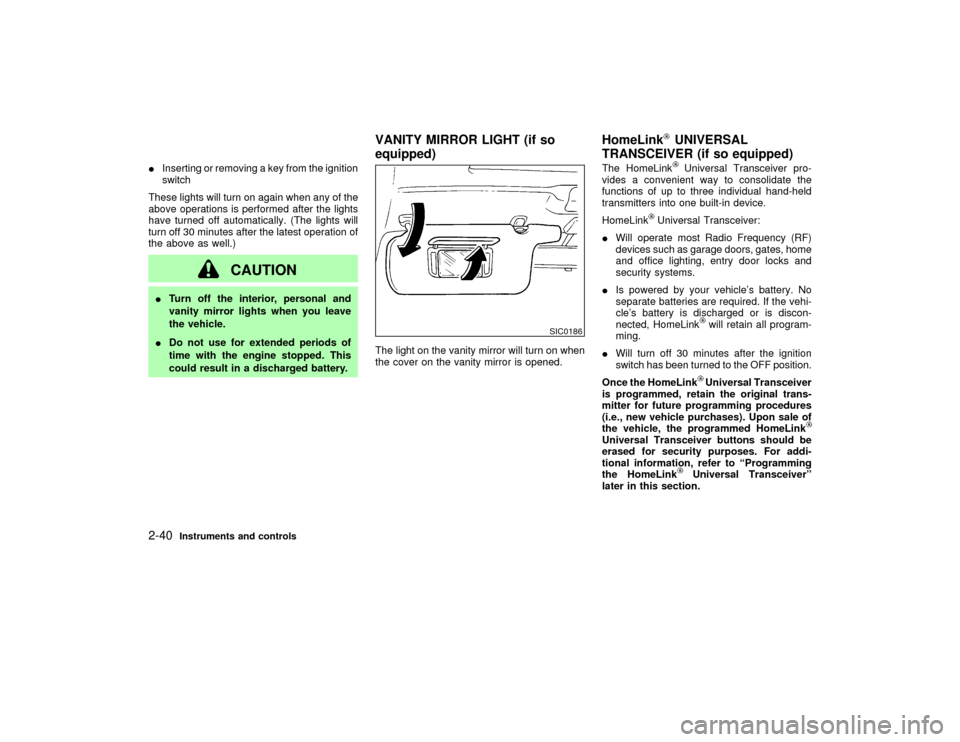
could result in a discharged battery.The light on the vanity mirror will turn on when
the cover on the vanity mirror is opened.The HomeLink
Universal Transceiver pro-
vides a convenient way to consolidate the
functions of up to three individual hand-held
transmitters into one built-in device.
HomeLink
Universal Transceiver:
IWill operate most Radio Frequency (RF)
devices such as garage doors, gates, home
and office lighting, entry door locks and
security systems.
IIs powered by your vehicle's battery. No
separate batteries are required. If the vehi-
cle's battery is discharged or is discon-
nected, HomeLink
will retain all program-
ming.
IWill turn off 30 minutes after the ignition
switch has been turned to the OFF position.
Once the HomeLinkUniversal Transceiver
is programmed, retain the original trans-
mitter for future programming procedures
(i.e., new vehicle purchases). Upon sale of
the vehicle, the programmed HomeLink
Universal Transceiver buttons should be
erased for security purposes. For addi-
tional information, refer to ªProgramming
the HomeLink
Universal Transceiverº
later in this section.
SIC0186
VANITY MIRROR LIGHT (if so
equipped)HomeLink
UNIVERSAL
TRANSCEIVER (if so equipped)
2-40
Instruments and controls
Z
01.9.21/R50-D/V5
X
Page 94 of 288
WARNING
IDo not use the HomeLink
Universal
Transceiver with any garage door
opener that lacks safety stop and
reverse features as required by fed-
eral safety standards. (These stan-
dards became effective for opener
models manufactured after April 1,
1982.) A garage door opener which
cannot detect an object in the path of
a closing garage door and then auto-
matically stop and reverse, does not
meet current federal safety stan-
dards. Using a garage door opener
without these features increases the
risk of serious injury or death.
IDuring programming, your garage
door or gate may open or close. Make
sure that people and objects are clear
of the garage door or gate that you
are programming.
IYour vehicle's engine should be
turned off while programming the
HomeLink
Universal Transceiver.
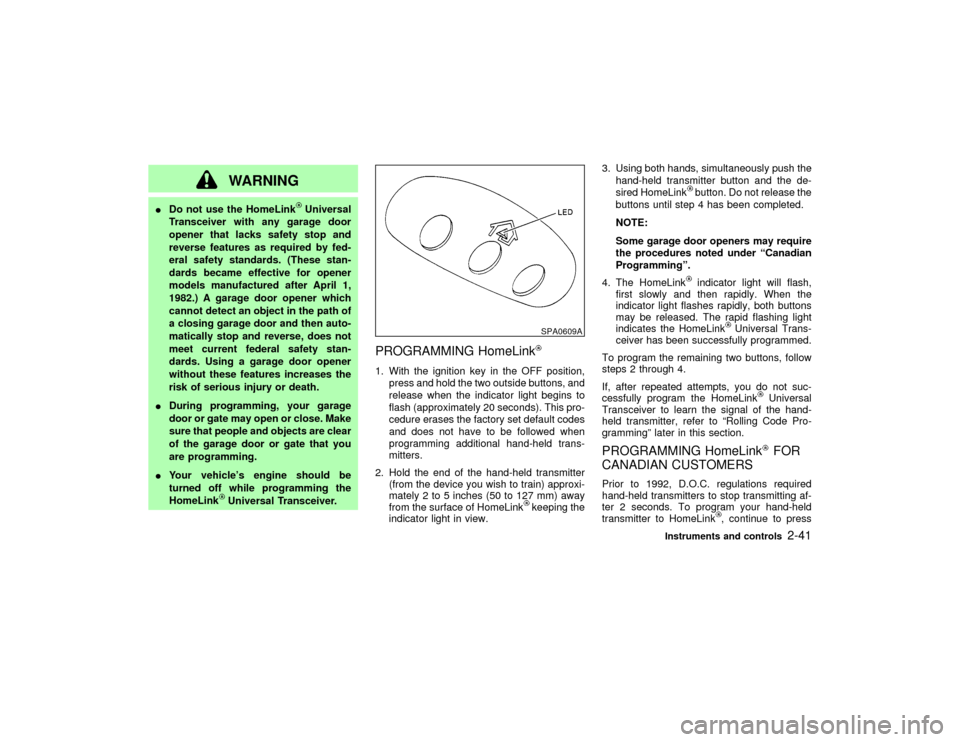
PROGRAMMING HomeLink1. With the ignition key in the OFF position,
press and hold the two outside buttons, and
release when the indicator light begins to
flash (approximately 20 seconds). This pro-
cedure erases the factory set default codes
and does not have to be followed when
programming additional hand-held trans-
mitters.
2. Hold the end of the hand-held transmitter
(from the device you wish to train) approxi-
mately 2 to 5 inches (50 to 127 mm) away
from the surface of HomeLink
keeping the
indicator light in view.3. Using both hands, simultaneously push the
hand-held transmitter button and the de-
sired HomeLink
button. Do not release the
buttons until step 4 has been completed.
NOTE:
Some garage door openers may require
the procedures noted under ªCanadian
Programmingº.
4. The HomeLinkindicator light will flash,
first slowly and then rapidly. When the
indicator light flashes rapidly, both buttons
may be released. The rapid flashing light
indicates the HomeLink
Universal Trans-
ceiver has been successfully programmed.
To program the remaining two buttons, follow
steps 2 through 4.
If, after repeated attempts, you do not suc-
cessfully program the HomeLink
Universal
Transceiver to learn the signal of the hand-
held transmitter, refer to ªRolling Code Pro-
grammingº later in this section.
PROGRAMMING HomeLink
FOR
CANADIAN CUSTOMERS
Prior to 1992, D.O.C. regulations required
hand-held transmitters to stop transmitting af-
ter 2 seconds. To program your hand-held
transmitter to HomeLink
, continue to press
SPA0609A
Instruments and controls
2-41
Z
01.9.21/R50-D/V5
X
Page 108 of 288
could void the user's authority to operate
the equipment.
This device complies with Part 15 of the
FCC Rules and RSS-210 of Industry
Canada.
Operation is subject to the following two
conditions: (1) This device may not cause
harmful interference, and (2) this device
must accept any interference received, in-
cluding interference that may cause undes-
ired operation of the device.
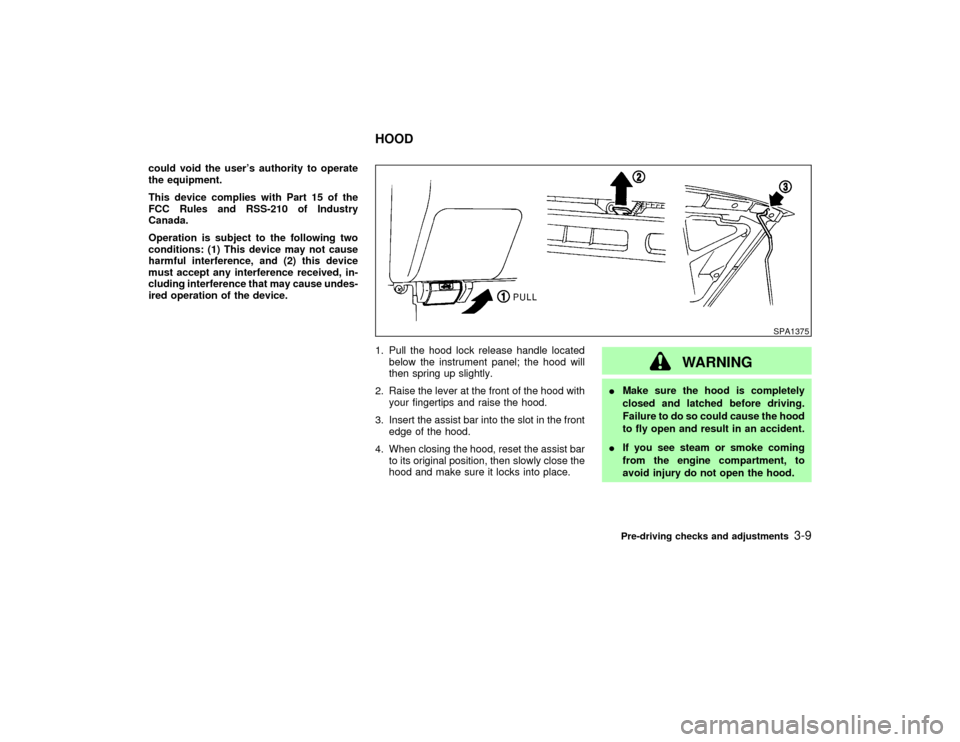
1. Pull the hood lock release handle located
below the instrument panel; the hood will
then spring up slightly.
2. Raise the lever at the front of the hood with
your fingertips and raise the hood.
3. Insert the assist bar into the slot in the front
edge of the hood.
4. When closing the hood, reset the assist bar
to its original position, then slowly close the
hood and make sure it locks into place.
WARNING
IMake sure the hood is completely
closed and latched before driving.
Failure to do so could cause the hood
to fly open and result in an accident.
IIf you see steam or smoke coming
from the engine compartment, to
avoid injury do not open the hood.
SPA1375
HOOD
Pre-driving checks and adjustments
3-9
Z
01.9.21/R50-D/V5
X
Page 111 of 288
gases to be drawn into the vehicle. See
ªPrecautions when starting and drivingº
in the ª5. Starting and drivingº section
for exhaust gas.
CAUTION
Do not open the glass hatch unless the
wiper is in the stowed position.
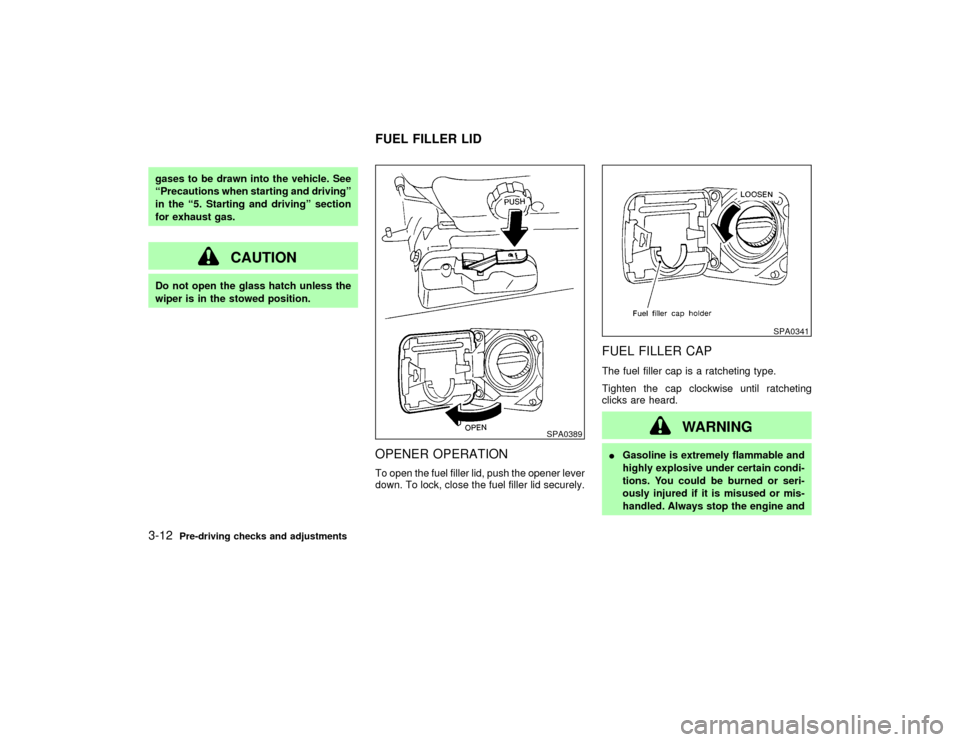
OPENER OPERATIONTo open the fuel filler lid, push the opener lever
down. To lock, close the fuel filler lid securely.
FUEL FILLER CAPThe fuel filler cap is a ratcheting type.
Tighten the cap clockwise until ratcheting
clicks are heard.
WARNING
IGasoline is extremely flammable and
highly explosive under certain condi-
tions. You could be burned or seri-
ously injured if it is misused or mis-
handled. Always stop the engine and
SPA0389
SPA0341
FUEL FILLER LID
3-12
Pre-driving checks and adjustments
Z
01.9.21/R50-D/V5
X
Page 119 of 288
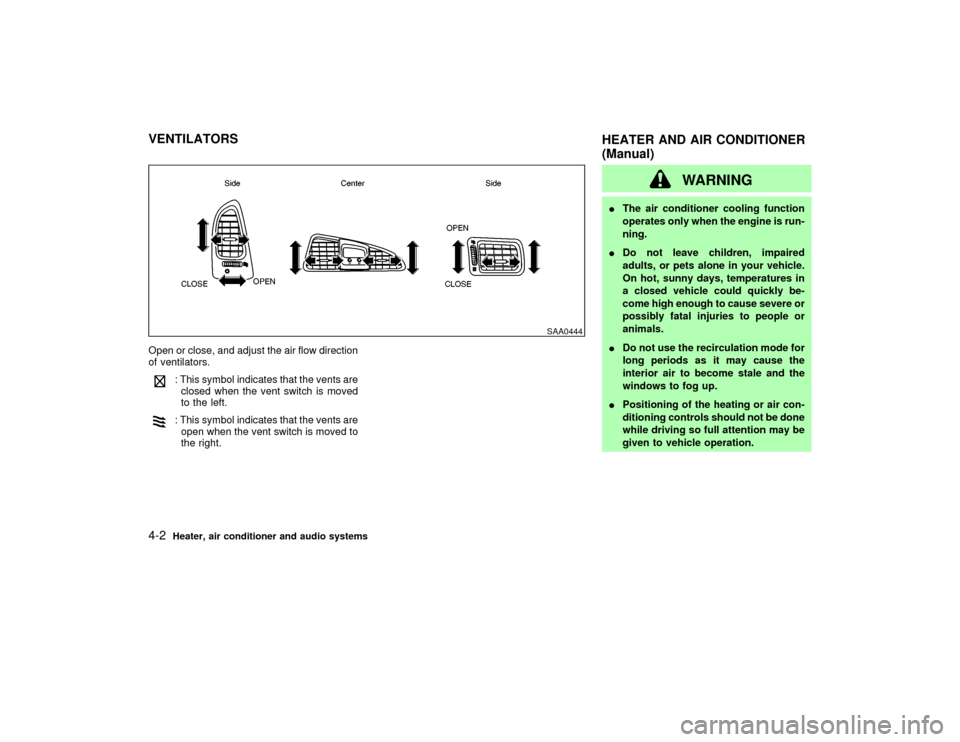
Open or close, and adjust the air flow direction
of ventilators.
: This symbol indicates that the vents are
closed when the vent switch is moved
to the left.: This symbol indicates that the vents are
open when the vent switch is moved to
the right.
WARNING
IThe air conditioner cooling function
operates only when the engine is run-
ning.
IDo not leave children, impaired
adults, or pets alone in your vehicle.
On hot, sunny days, temperatures in
a closed vehicle could quickly be-
come high enough to cause severe or
possibly fatal injuries to people or
animals.
IDo not use the recirculation mode for
long periods as it may cause the
interior air to become stale and the
windows to fog up.
IPositioning of the heating or air con-
ditioning controls should not be done
while driving so full attention may be
given to vehicle operation.
SAA0444
VENTILATORS
HEATER AND AIR CONDITIONER
(Manual)4-2
Heater, air conditioner and audio systems
Z
01.9.21/R50-D/V5
X
Page 120 of 288

CONTROLS
Fan control dialThis dial turns the fan on and off, and controls
fan speed.Air flow control dialThis dial allows you to select the air flow
outlets.
Ð Air flows from center and side venti-
lators.Ð Air flows from center and side venti-
lators and foot outlets.
Ð Air flows mainly from foot outlets.Ð Air flows from defroster outlets and
foot outlets.Ð Air flows mainly from defroster out-
lets.
Temperature control dialThis dial allows you to adjust the temperature
of the outlet air.
Air recirculation buttonOff position
Outside air is drawn into the passenger com-
partment.
Use the off position for normal heater, or air
conditioner operation.
On position (Indicator light on)
Interior air is recirculated inside the vehicle.
Push the air recirculation button to the on
position when driving on a dusty road or to
avoid traffic fumes.Air conditioner buttonThis button is provided only for vehicles with
air conditioner.
Start the engine, move the fan control dial to
the desired (1 to 4) position and push the air
conditioner button to turn on the air condi-
tioner. The indicator light will come on when
the air conditioner button is on. To stop the air
conditioner, push the switch again to return it
to the original position.
The air conditioner cooling function oper-
ates only when the engine is running.
SAA0152B
Heater, air conditioner and audio systems
4-3
Z
01.9.21/R50-D/V5
X
Page 122 of 288

AIR CONDITIONER OPERATIONStart the engine, move the fan control dial to
the desired (1 to 4) position and push in the air
conditioner button to activate the air condi-
tioner. When the air conditioner is on, cooling
and dehumidifying functions will be added to
the heater operation.
The air conditioner cooling function oper-
ates only when the engine is running.CoolingThis mode is used to cool and dehumidify.
1. Push the air recirculation button to the off
position.
2. Turn the air control dial to the
position.
3. Turn on the fan control dial.
4. Push on the air conditioner button. The
indicator light will come on.
5. Turn the temperature control dial to the
desired position.
IFor quick cooling when the outside tem-
perature is high, push the air recirculation
button to the on position. Be sure to return
the air recirculation button to the off position
for normal cooling.
Dehumidified heatingThis mode is used to heat and dehumidify.
1. Push the air recirculation button to the off
position.
2. Turn the air control dial to the
posi-
tion.
3. Turn on the fan control dial.
4. Push on the air conditioner button. The
indicator light will come on.
5. Turn the temperature control dial to the
desired position.
Dehumidified defoggingThis mode is used to defog the windows and
dehumidify.
1. Push the air recirculation button to the off
position.
2. Turn the air control dial to the
posi-
tion.
3. Turn on the fan control dial.
4. Push on the air conditioner button. The
indicator light will come on.
5. Turn the temperature control dial to the
desired position.
Operating tipsIKeep windows and sun roof closed while
the air conditioner is in operation.
IAfter parking in the sun, drive for two or
three minutes with the windows open to
vent hot air from the passenger compart-
ment. Then, close the windows. This will
allow the air conditioner to cool the interior
more quickly.
IThe air conditioning system should be
operated for about ten minutes at least
once a month. This helps prevent dam-
age to the system due to lack of lubrica-
tion.
IIf the coolant temperature gauge exceeds
the hot position, turn the air conditioner off.
For additional information, see ªIf your ve-
hicle overheatsº in the ª6. In case of emer-
gencyº section.AIR FLOW CHARTSThe following charts show the button and dial
positions formaximum and quickheating,
cooling or defrosting.The air recirculation
switch should always be in the off position
for heating and defrosting.Heater, air conditioner and audio systems
4-5
Z
01.9.21/R50-D/V5
X
Page 125 of 288
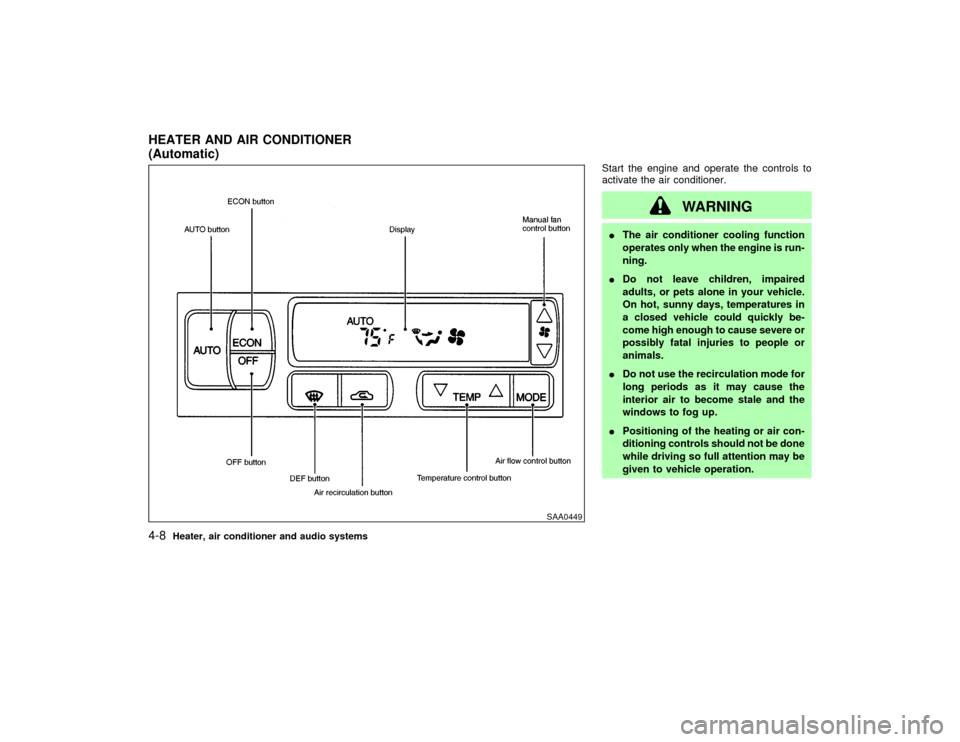
Start the engine and operate the controls to
activate the air conditioner.
WARNING
IThe air conditioner cooling function
operates only when the engine is run-
ning.
IDo not leave children, impaired
adults, or pets alone in your vehicle.
On hot, sunny days, temperatures in
a closed vehicle could quickly be-
come high enough to cause severe or
possibly fatal injuries to people or
animals.
IDo not use the recirculation mode for
long periods as it may cause the
interior air to become stale and the
windows to fog up.
IPositioning of the heating or air con-
ditioning controls should not be done
while driving so full attention may be
given to vehicle operation.
SAA0449
HEATER AND AIR CONDITIONER
(Automatic)4-8
Heater, air conditioner and audio systems
Z
01.9.21/R50-D/V5
X
Page 126 of 288

AUTOMATIC OPERATION
Cooling and/or dehumidified heating
(AUTO)This mode may be used all year round. The
system works automatically to maintain a
constant temperature. Air flow distribution and
fan speed are also controlled automatically.
1. Push the AUTO button on. (AUTO will
appear on the display.)
2. Push the temperature control button
to set the desired temperature.
IFor normal operation, adjust the tempera-
ture control button to about 75ÉF (24ÉC).
IThe temperature of the passenger compart-
ment will be maintained automatically. Air
flow distribution and fan speed are also
controlled automatically.
Heating (ECON)Use this mode when you need to heat only.
1. Push the ECON (Economy) button on.
(ECON appears on the display.)
2. Push the temperature control button
to set the desired temperature.
IThe temperature of the passenger compart-ment will be maintained automatically. Air
flow distribution and fan speed are also
controlled automatically.
IDo not set the temperature lower than the
outside air temperature. Otherwise the sys-
tem may not work properly.
IIf the windows fog up, do not use the ECON
mode.
Dehumidified defogging1. Push the DEF
switch on. (The indica-
tor light will come on.)
2. Push the temperature control button
to set the desired temperature.
ITo remove ice or fog from the outside of the
windows, push the manual fan control but-
tonand set to the maximum position.
IAs soon as possible after the windshield is
clean, push the AUTO button to return to
the auto mode.
IWhen the DEF
button is pushed, the
air conditioner will automatically be turned
on at outside temperatures above 23ÉF
(þ5ÉC) (for VQ35DE engine models) or
28ÉF (þ2ÉC) (for VG33E engine models) to
defog the windshield. The air recirculation
mode will automatically be turned off.Outside air is drawn into the passenger com-
partment to improve defogging performance.
MANUAL OPERATION
Fan speed controlPush the fan control button
to change
the fan speed manually.
IPush the AUTO button to return to auto-
matic control of the fan speed.
Air recirculationPush the air recirculation button
to recir-
culate interior air inside the vehicle. The indi-
cator light will come on.
Push it again to draw outside air into the
passenger compartment. The indicator will go
out.
IThe air recirculation button cannot be
activated when the air conditioner is in the
DEF mode.
Air flow controlPushing the MODE button selects the air outlet
to provide:
: Air flow from center and side ventilators.: Air flow from center and side ventilators
and foot outlets.
Heater, air conditioner and audio systems
4-9
Z
01.9.21/R50-D/V5
X
Page 127 of 288
: Air flow mainly from foot outlets.: Air flow from defroster and foot outlets.
To turn the system offPush the OFF button.OPERATING TIPSIWhen the engine coolant temperature and
outside air temperature are low, the air flow
from the foot outlets may not operate for 0
to 126 seconds. This is not a malfunction.
After the coolant temperature warms up, air
flow from the foot outlets will operate nor-
mally.
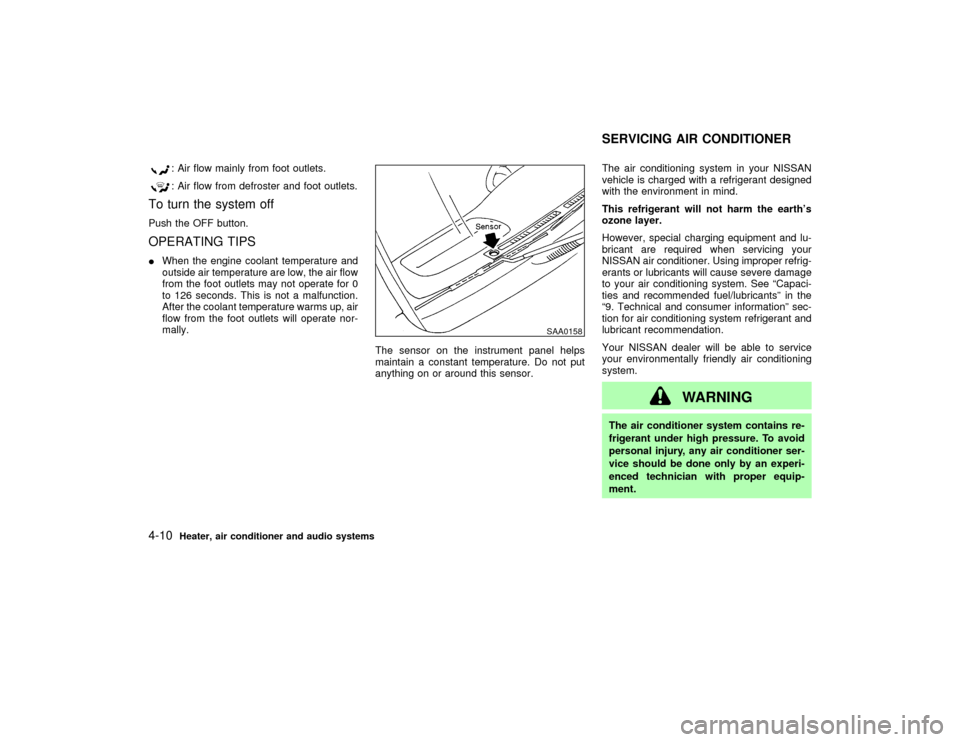
The sensor on the instrument panel helps
maintain a constant temperature. Do not put
anything on or around this sensor.The air conditioning system in your NISSAN
vehicle is charged with a refrigerant designed
with the environment in mind.
This refrigerant will not harm the earth's
ozone layer.
However, special charging equipment and lu-
bricant are required when servicing your
NISSAN air conditioner. Using improper refrig-
erants or lubricants will cause severe damage
to your air conditioning system. See ªCapaci-
ties and recommended fuel/lubricantsº in the
ª9. Technical and consumer informationº sec-
tion for air conditioning system refrigerant and
lubricant recommendation.
Your NISSAN dealer will be able to service
your environmentally friendly air conditioning
system.
WARNING
The air conditioner system contains re-
frigerant under high pressure. To avoid
personal injury, any air conditioner ser-
vice should be done only by an experi-
enced technician with proper equip-
ment.
SAA0158
SERVICING AIR CONDITIONER
4-10
Heater, air conditioner and audio systems
Z
01.9.21/R50-D/V5
X