navigation system NISSAN PATHFINDER 2009 Owner´s Manual
[x] Cancel search | Manufacturer: NISSAN, Model Year: 2009, Model line: PATHFINDER, Model: NISSAN PATHFINDER 2009Pages: 471, PDF Size: 5.9 MB
Page 167 of 471
4 Monitor, climate, audio, phone and voice
recognition systems
Control panel buttons — color screen without
Navigation System (if so equipped)..................4-4
How to use the NISSAN controller...............4-5
How to select menus on the screen..............4-6
How to use the STATUS button..................4-6
How to use the INFO button.....................4-7
How to use the SETTING button................4-11
OFF button.............................4-18
Control panel buttons — color screen with
Navigation System (if so equipped).................4-18
How to use the NISSAN controller..............4-19
How to use the touch screen...................4-19
Start-up screen...............................4-21
How to select menus on the screen.............4-21
How to use the STATUS button.................4-22
How to use the INFO button....................4-22
How to use the SETTING button................4-27
OFF button.............................4-34
RearView Monitor (if so equipped)..................4-34
How to read the displayed lines.................4-35
Adjusting the screen...........................4-35Operating tips.................................4-36
Vents...........................................4-37
Heater and air conditioner (manual)
(if so equipped)..................................4-38
Controls......................................4-38
Heater operation..............................4-39
Air conditioner operation (if so equipped)........4-40
Air flow charts.................................4-42
Heater and air conditioner (automatic)
(if so equipped)..................................4-45
Automatic operation...........................4-45
Manual operation..............................4-46
Operating tips.................................4-46
Rear seat air conditioner (if so equipped)............4-47
Controls......................................4-48
Servicing air conditioner...........................4-48
Audio system....................................4-48
Radio........................................4-48
FM radio reception............................4-49
AM radio reception............................4-49
Satellite radio reception (if so equipped).........4-49
ZREVIEW COPYÐ2009 Pathfinder(pat)
Owners ManualÐUSA_English(nna)
05/29/08Ðdebbie
X
Page 168 of 471
Audio operation precautions....................4-50
FM/AM radio with compact disc (CD) player
(if so equipped)...............................4-55
FM/AM/SAT radio with compact disc (CD)
changer (if so equipped).......................4-60
FM/AM/SAT radio with compact disc (CD)
player (if so equipped).........................4-68
CompactFlash™ (CF) player operation
(if so equipped)...............................4-73
Music Box hard-disk drive audio system
(if so equipped)...............................4-75
CD/CF (CompactFlash™) care and cleaning......4-84
Steering wheel switch for audio control..........4-86
Remote audio system controls
(if so equipped)...............................4-87
Antenna......................................4-88
NISSAN mobile entertainment system (MES)
(if so equipped)..................................4-89
Digital video disc (DVD) player controls..........4-90
Remote control................................4-91
Flip-down screen..............................4-91
Before operating the DVD mobile
entertainment system..........................4-93Playing a digital versatile disc (DVD).............4-94
Remote control operation.......................4-99
Care and maintenance........................4-101
How to handle the DVD.......................4-101
Car phone or CB radio...........................4-104
BluetoothTHands-Free Phone System without
Navigation System (if so equipped)................4-105
Regulatory Information........................4-106
Using the system.............................4-107
Control buttons..............................4-109
Getting started...............................4-109
List of voice commands.......................4-111
Speaker adaptation (SA) mode.................4-117
Troubleshooting guide........................4-119
BluetoothTHands-Free Phone System with
Navigation System (if so equipped)................4-120
Regulatory Information........................4-122
Voice commands.............................4-122
Pairing procedure............................4-122
Phonebook..................................4-124
Making a call.................................4-125
Receiving a call..............................4-126
During a call.................................4-127
ZREVIEW COPYÐ2009 Pathfinder(pat)
Owners ManualÐUSA_English(nna)
05/29/08Ðdebbie
X
Page 170 of 471
WARNING
cPositioning of the heating or air condi-
tioning controls and display controls
should not be done while driving in or-
der that full attention may be given to
the driving operation.
cDo not disassemble or modify this sys-
tem. If you do, it may result in accidents,
fire, or electrical shock.
cDo not use this system if you notice any
abnormality, such as a frozen screen or
lack of sound. Continued use of the
system may result in accident, fire or
electric shock.
cIn case you notice any foreign object in
the system hardware, spill liquid on it,
or notice smoke or smell coming from
it, stop using the system immediately
and contact your nearest NISSAN
dealer. Ignoring such conditions may
lead to accidents, fire or electrical
shock.
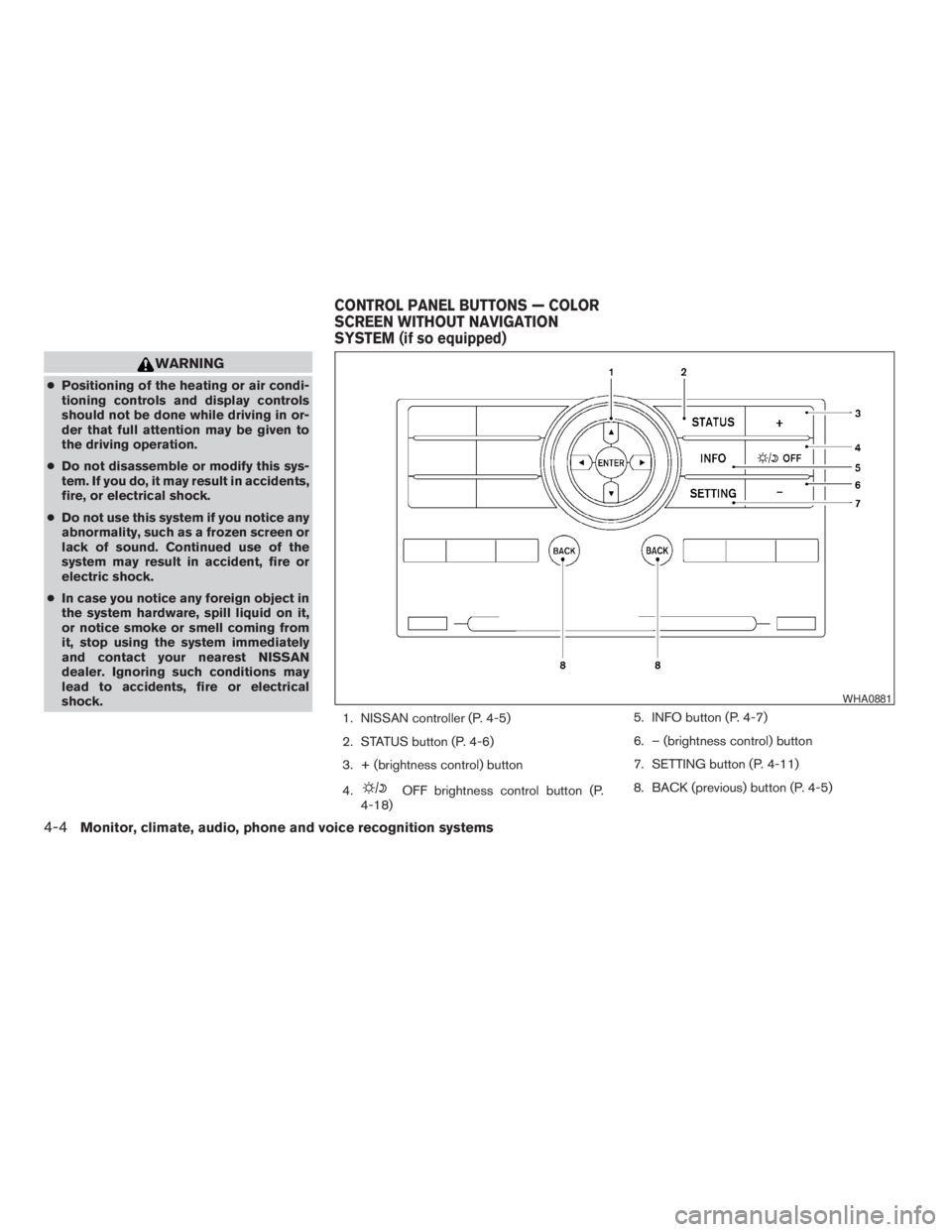
1. NISSAN controller (P. 4-5)
2. STATUS button (P. 4-6)
3. + (brightness control) button
4.
OFF brightness control button (P.
4-18)5. INFO button (P. 4-7)
6. – (brightness control) button
7. SETTING button (P. 4-11)
8. BACK (previous) button (P. 4-5)
WHA0881
CONTROL PANEL BUTTONS — COLOR
SCREEN WITHOUT NAVIGATION
SYSTEM (if so equipped)
4-4Monitor, climate, audio, phone and voice recognition systems
ZREVIEW COPYÐ2009 Pathfinder(pat)
Owners ManualÐUSA_English(nna)
05/29/08Ðdebbie
X
Page 184 of 471
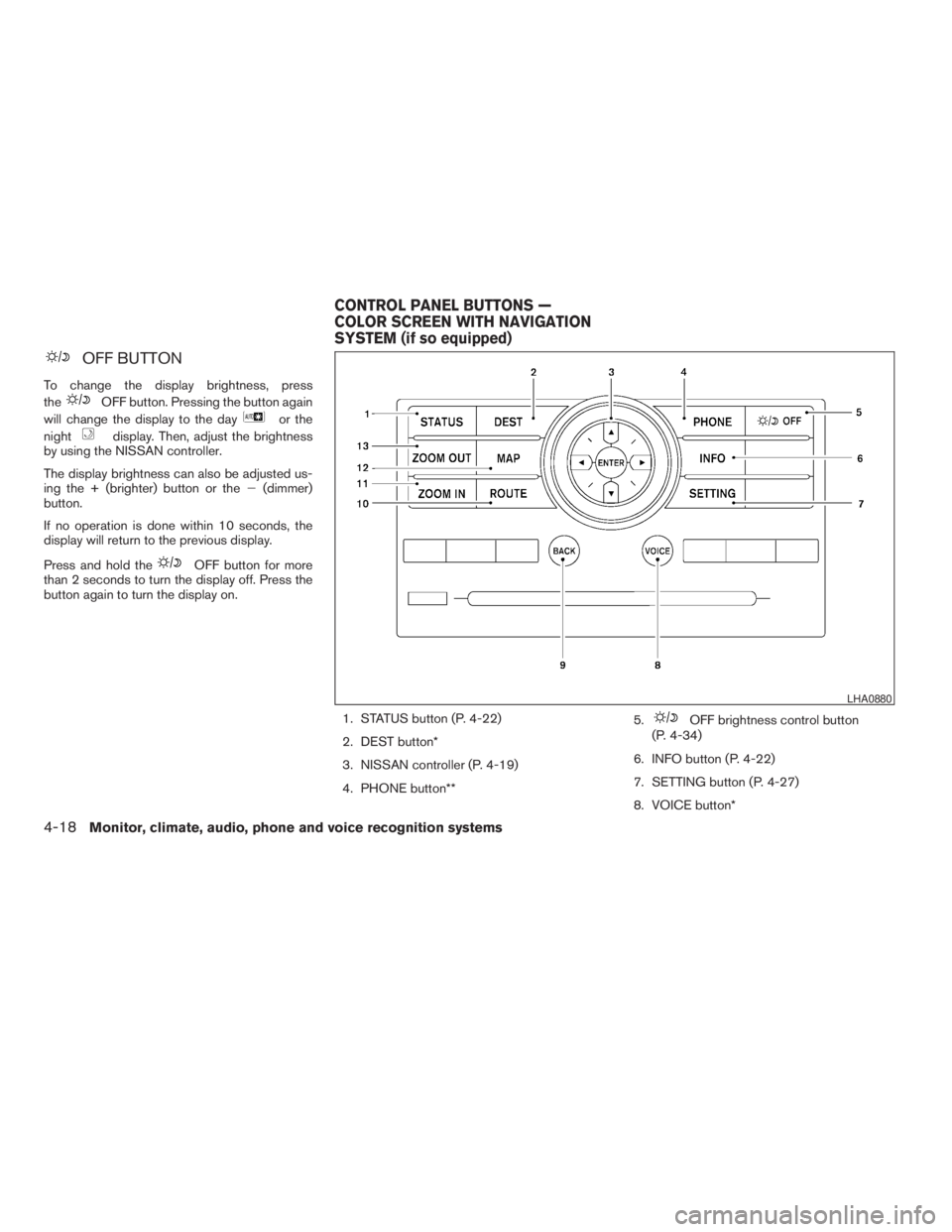
OFF BUTTON
To change the display brightness, press
the
OFF button. Pressing the button again
will change the display to the day
or the
night
display. Then, adjust the brightness
by using the NISSAN controller.
The display brightness can also be adjusted us-
ing the + (brighter) button or the2(dimmer)
button.
If no operation is done within 10 seconds, the
display will return to the previous display.
Press and hold the
OFF button for more
than 2 seconds to turn the display off. Press the
button again to turn the display on.
1. STATUS button (P. 4-22)
2. DEST button*
3. NISSAN controller (P. 4-19)
4. PHONE button**5.
OFF brightness control button
(P. 4-34)
6. INFO button (P. 4-22)
7. SETTING button (P. 4-27)
8. VOICE button*
LHA0880
CONTROL PANEL BUTTONS —
COLOR SCREEN WITH NAVIGATION
SYSTEM (if so equipped)
4-18Monitor, climate, audio, phone and voice recognition systems
ZREVIEW COPYÐ2009 Pathfinder(pat)
Owners ManualÐUSA_English(nna)
05/29/08Ðdebbie
X
Page 185 of 471
9. BACK (previous) button (P. 4-19)
10. ROUTE button*
11. ZOOM IN button*
12. MAP button*
13. ZOOM OUT button*
*For Navigation system control buttons, refer to
the separate Navigation System Owner’s
Manual.
**For information on the PHONE button, see
“BluetoothTHands-Free Phone System with
Navigation System” later in this section.
When you use this system, make sure the engine
is running.
If you use the system with the engine not
running (ignition ON or ACC) for a long
time, it will discharge the battery, and the
engine will not start.
Reference symbols:
ENTER button — This is a button on the control
panel.
“Display” key — This is a select key on the screen.
By selecting this key, you can proceed to the next
function.
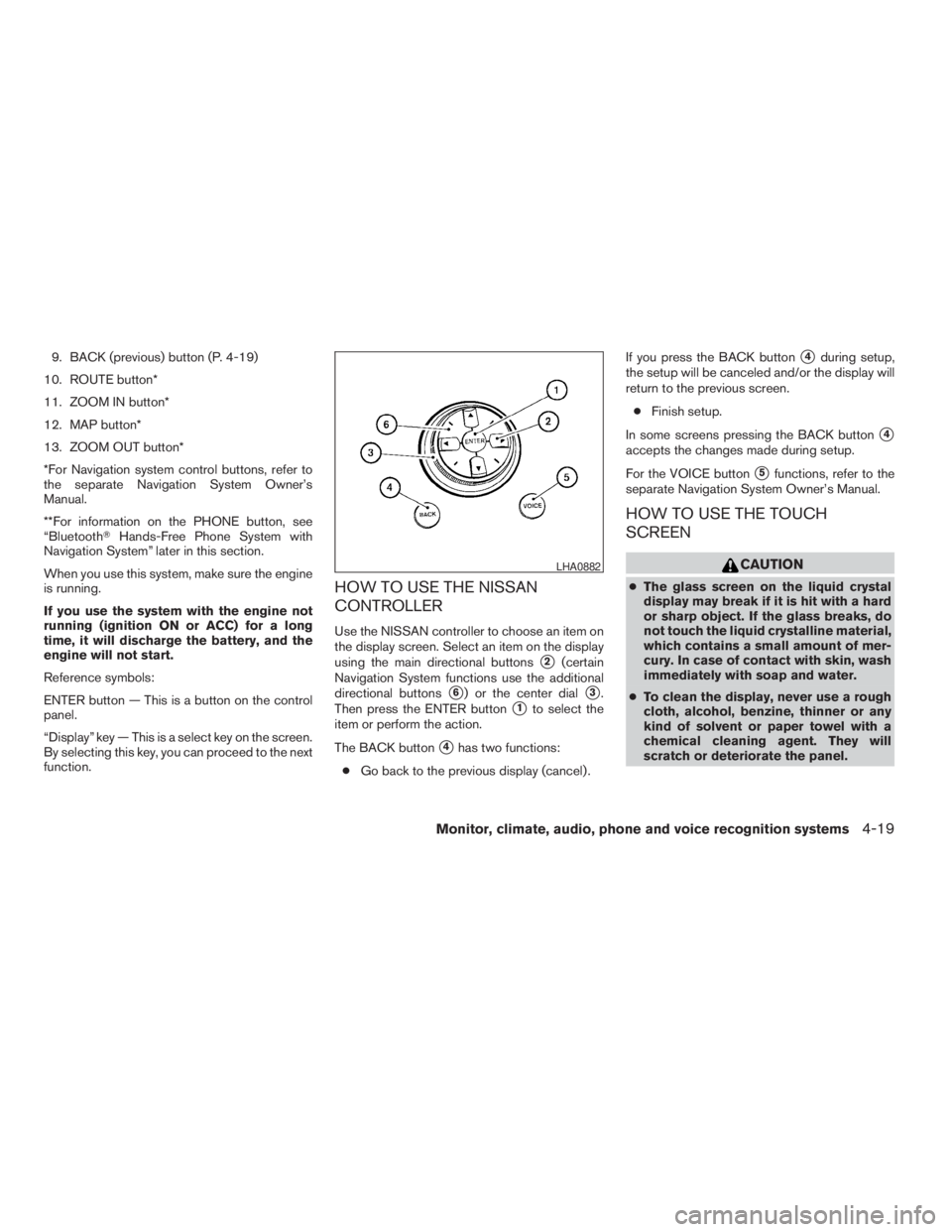
HOW TO USE THE NISSAN
CONTROLLER
Use the NISSAN controller to choose an item on
the display screen. Select an item on the display
using the main directional buttons
s2(certain
Navigation System functions use the additional
directional buttons
s6) or the center dials3.
Then press the ENTER button
s1to select the
item or perform the action.
The BACK button
s4has two functions:
cGo back to the previous display (cancel) .If you press the BACK button
s4during setup,
the setup will be canceled and/or the display will
return to the previous screen.
cFinish setup.
In some screens pressing the BACK button
s4
accepts the changes made during setup.
For the VOICE button
s5functions, refer to the
separate Navigation System Owner’s Manual.
HOW TO USE THE TOUCH
SCREEN
CAUTION
cThe glass screen on the liquid crystal
display may break if it is hit with a hard
or sharp object. If the glass breaks, do
not touch the liquid crystalline material,
which contains a small amount of mer-
cury. In case of contact with skin, wash
immediately with soap and water.
cTo clean the display, never use a rough
cloth, alcohol, benzine, thinner or any
kind of solvent or paper towel with a
chemical cleaning agent. They will
scratch or deteriorate the panel.
LHA0882
Monitor, climate, audio, phone and voice recognition systems4-19
ZREVIEW COPYÐ2009 Pathfinder(pat)
Owners ManualÐUSA_English(nna)
05/29/08Ðdebbie
X
Page 186 of 471
cDo not splash any liquid such as water
or car fragrance on the display. Contact
with liquid will cause the system to
malfunction.
To help ensure safe driving, some functions can-
not be operated while driving.
The on-screen functions that are not available
while driving will be “grayed out” or muted.
Park the vehicle in a safe location and then oper-
ate the navigation system.
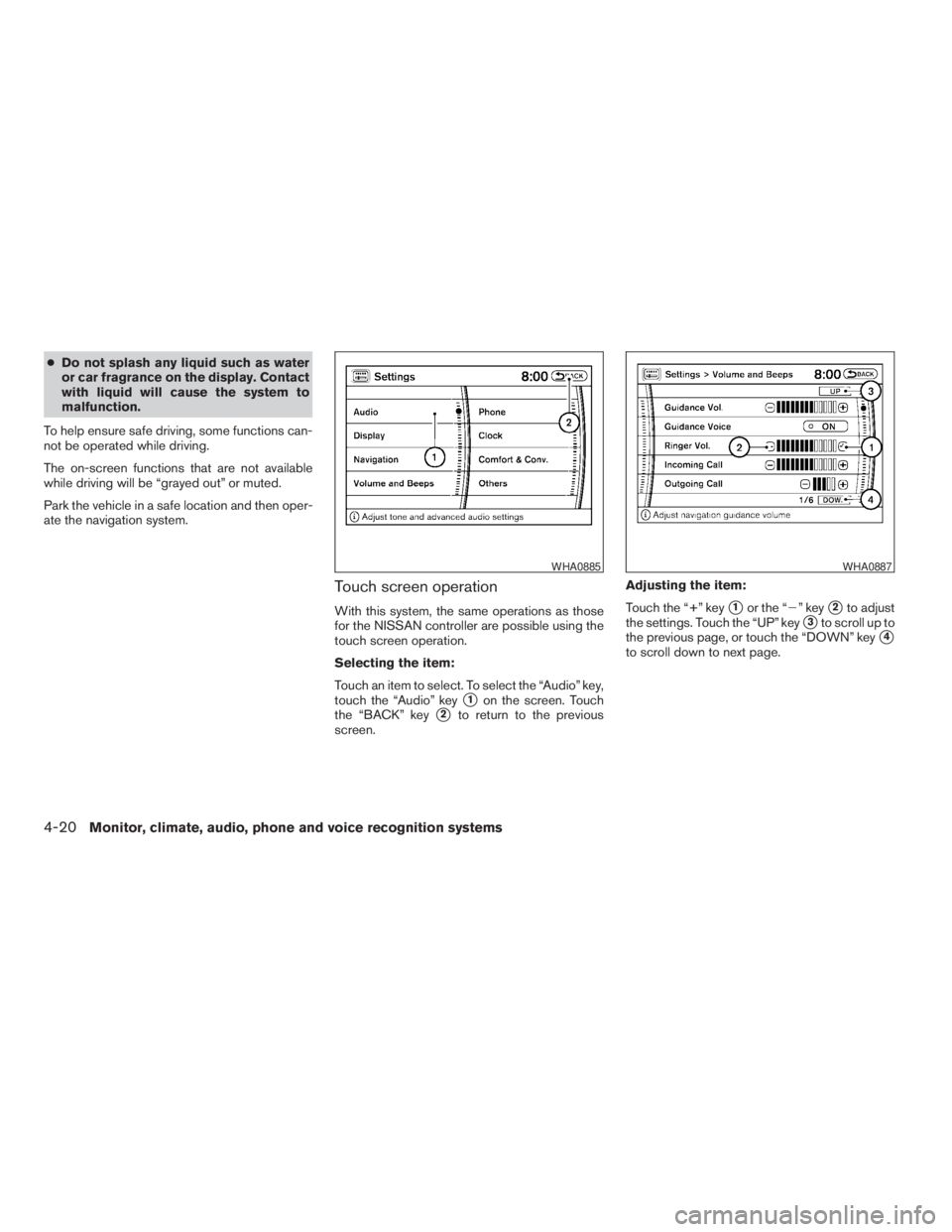
Touch screen operation
With this system, the same operations as those
for the NISSAN controller are possible using the
touch screen operation.
Selecting the item:
Touch an item to select. To select the “Audio” key,
touch the “Audio” key
s1on the screen. Touch
the “BACK” key
s2to return to the previous
screen.Adjusting the item:
Touch the “+” key
s1or the “2” keys2to adjust
the settings. Touch the “UP” key
s3to scroll up to
the previous page, or touch the “DOWN” key
s4
to scroll down to next page.
WHA0885WHA0887
4-20Monitor, climate, audio, phone and voice recognition systems
ZREVIEW COPYÐ2009 Pathfinder(pat)
Owners ManualÐUSA_English(nna)
05/29/08Ðdebbie
X
Page 187 of 471
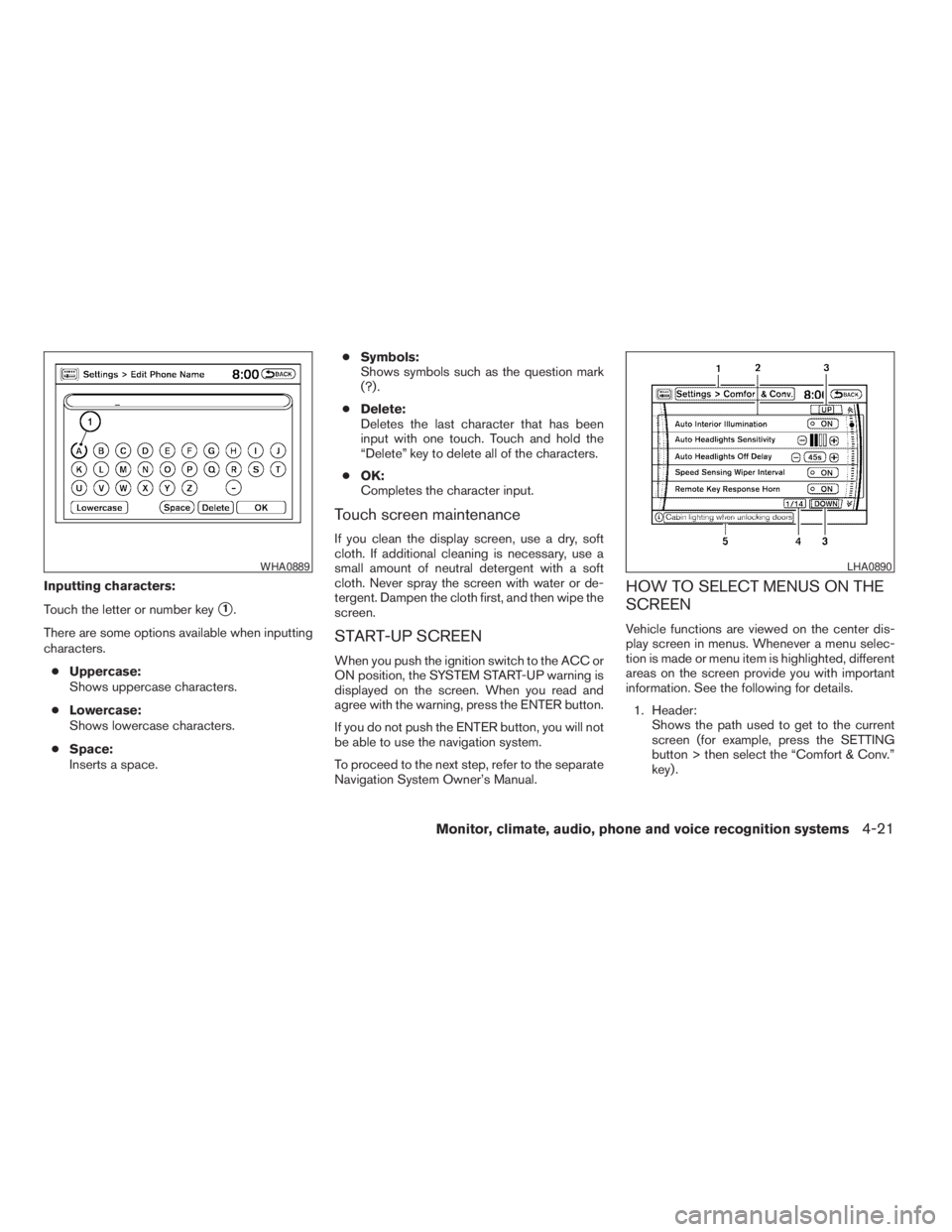
Inputting characters:
Touch the letter or number key
s1.
There are some options available when inputting
characters.
cUppercase:
Shows uppercase characters.
cLowercase:
Shows lowercase characters.
cSpace:
Inserts a space.cSymbols:
Shows symbols such as the question mark
(?) .
cDelete:
Deletes the last character that has been
input with one touch. Touch and hold the
“Delete” key to delete all of the characters.
cOK:
Completes the character input.
Touch screen maintenance
If you clean the display screen, use a dry, soft
cloth. If additional cleaning is necessary, use a
small amount of neutral detergent with a soft
cloth. Never spray the screen with water or de-
tergent. Dampen the cloth first, and then wipe the
screen.
START-UP SCREEN
When you push the ignition switch to the ACC or
ON position, the SYSTEM START-UP warning is
displayed on the screen. When you read and
agree with the warning, press the ENTER button.
If you do not push the ENTER button, you will not
be able to use the navigation system.
To proceed to the next step, refer to the separate
Navigation System Owner’s Manual.
HOW TO SELECT MENUS ON THE
SCREEN
Vehicle functions are viewed on the center dis-
play screen in menus. Whenever a menu selec-
tion is made or menu item is highlighted, different
areas on the screen provide you with important
information. See the following for details.
1. Header:
Shows the path used to get to the current
screen (for example, press the SETTING
button > then select the “Comfort & Conv.”
key) .
WHA0889LHA0890
Monitor, climate, audio, phone and voice recognition systems4-21
ZREVIEW COPYÐ2009 Pathfinder(pat)
Owners ManualÐUSA_English(nna)
05/29/08Ðdebbie
X
Page 188 of 471
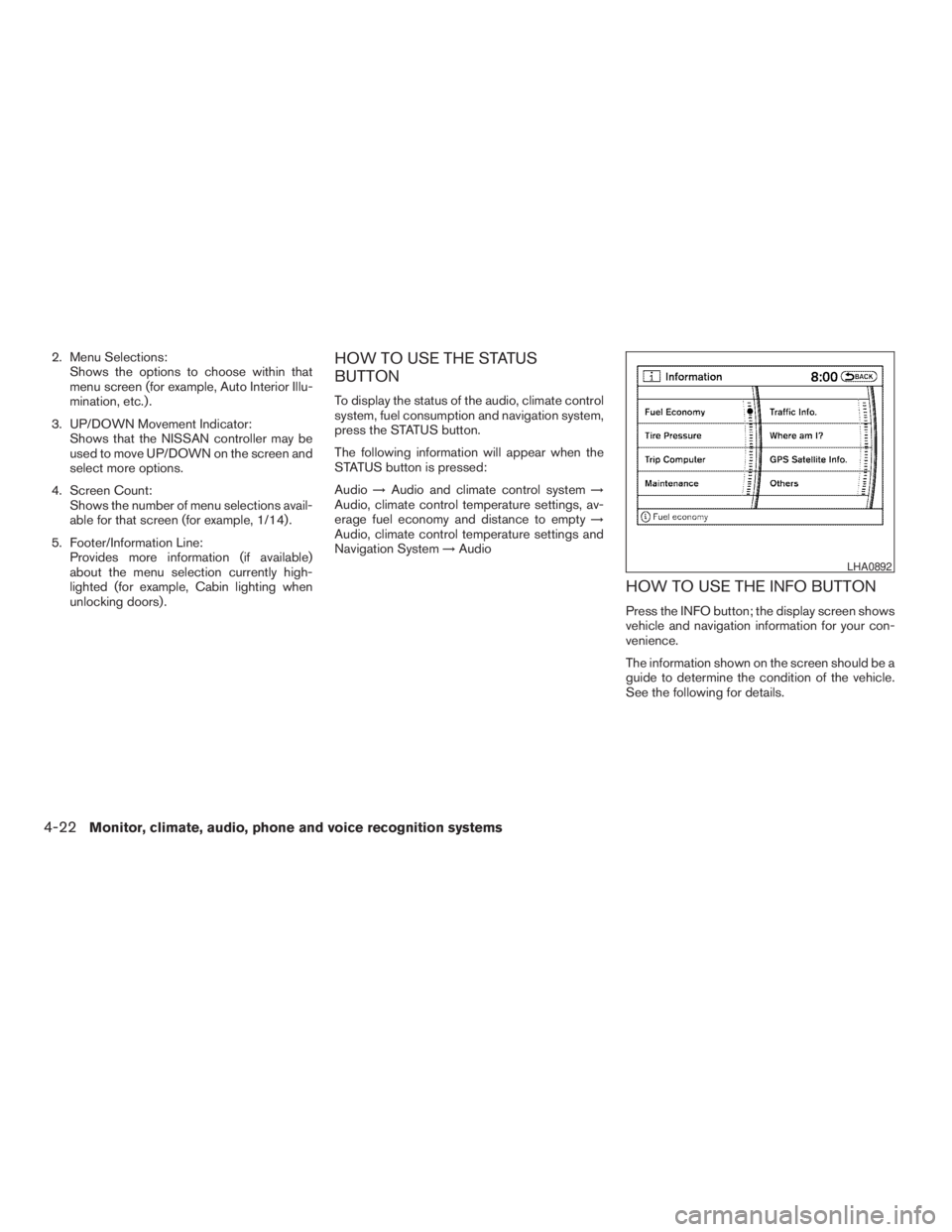
2. Menu Selections:
Shows the options to choose within that
menu screen (for example, Auto Interior Illu-
mination, etc.) .
3. UP/DOWN Movement Indicator:
Shows that the NISSAN controller may be
used to move UP/DOWN on the screen and
select more options.
4. Screen Count:
Shows the number of menu selections avail-
able for that screen (for example, 1/14) .
5. Footer/Information Line:
Provides more information (if available)
about the menu selection currently high-
lighted (for example, Cabin lighting when
unlocking doors) .HOW TO USE THE STATUS
BUTTON
To display the status of the audio, climate control
system, fuel consumption and navigation system,
press the STATUS button.
The following information will appear when the
STATUS button is pressed:
Audio!Audio and climate control system!
Audio, climate control temperature settings, av-
erage fuel economy and distance to empty!
Audio, climate control temperature settings and
Navigation System!Audio
HOW TO USE THE INFO BUTTON
Press the INFO button; the display screen shows
vehicle and navigation information for your con-
venience.
The information shown on the screen should be a
guide to determine the condition of the vehicle.
See the following for details.
LHA0892
4-22Monitor, climate, audio, phone and voice recognition systems
ZREVIEW COPYÐ2009 Pathfinder(pat)
Owners ManualÐUSA_English(nna)
05/29/08Ðdebbie
X
Page 193 of 471
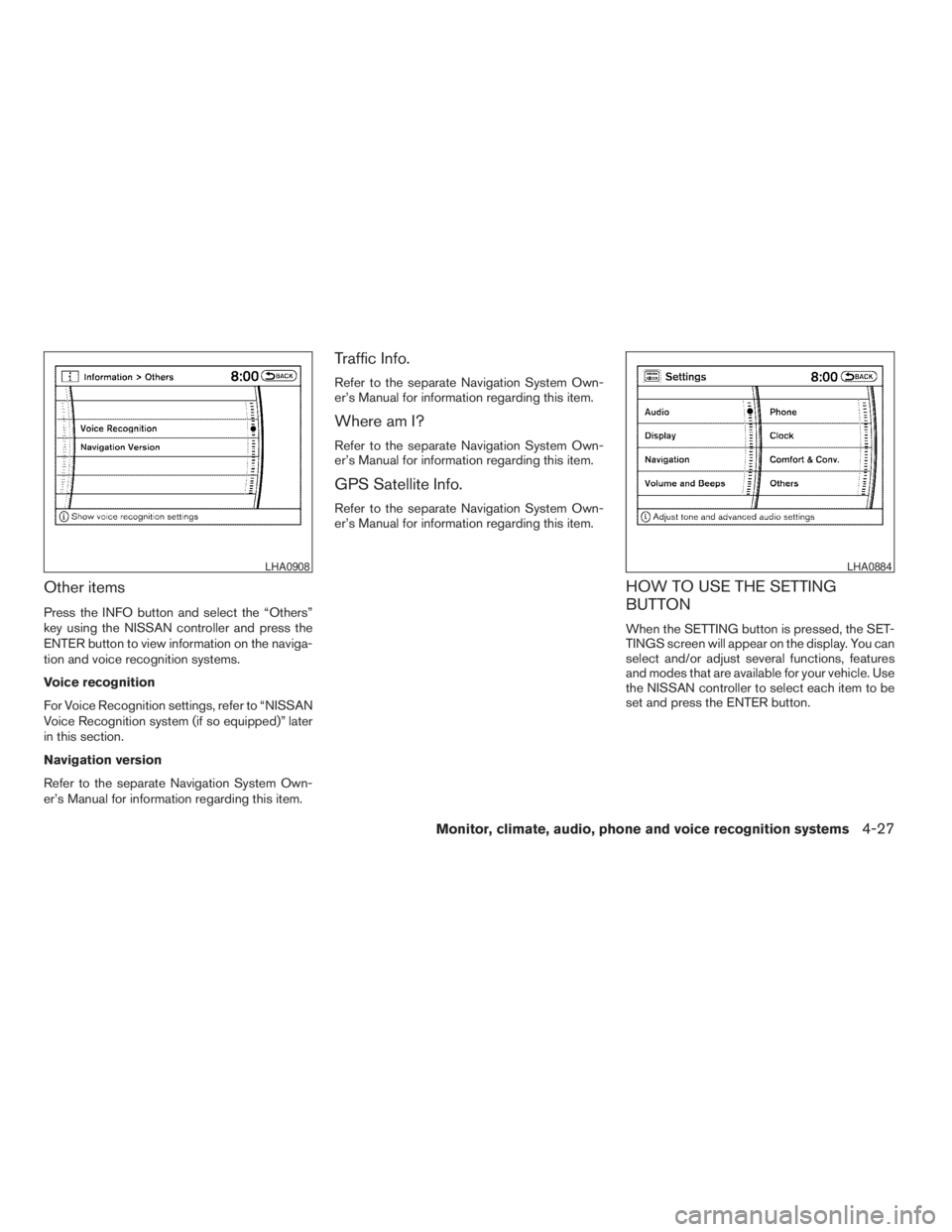
Other items
Press the INFO button and select the “Others”
key using the NISSAN controller and press the
ENTER button to view information on the naviga-
tion and voice recognition systems.
Voice recognition
For Voice Recognition settings, refer to “NISSAN
Voice Recognition system (if so equipped)” later
in this section.
Navigation version
Refer to the separate Navigation System Own-
er’s Manual for information regarding this item.
Traffic Info.
Refer to the separate Navigation System Own-
er’s Manual for information regarding this item.
Where am I?
Refer to the separate Navigation System Own-
er’s Manual for information regarding this item.
GPS Satellite Info.
Refer to the separate Navigation System Own-
er’s Manual for information regarding this item.
HOW TO USE THE SETTING
BUTTON
When the SETTING button is pressed, the SET-
TINGS screen will appear on the display. You can
select and/or adjust several functions, features
and modes that are available for your vehicle. Use
the NISSAN controller to select each item to be
set and press the ENTER button.
LHA0908LHA0884
Monitor, climate, audio, phone and voice recognition systems4-27
ZREVIEW COPYÐ2009 Pathfinder(pat)
Owners ManualÐUSA_English(nna)
05/29/08Ðdebbie
X
Page 199 of 471
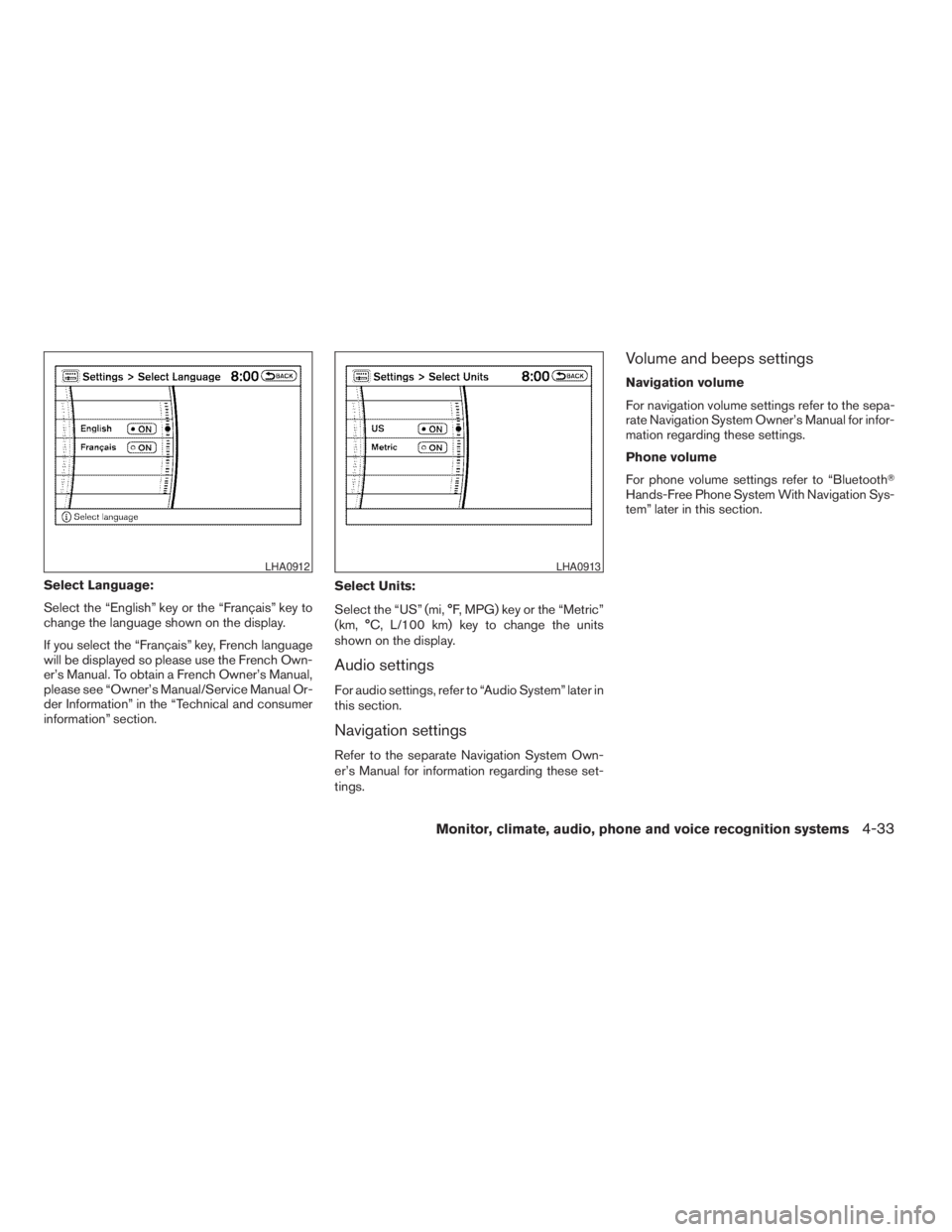
Select Language:
Select the “English” key or the “Français” key to
change the language shown on the display.
If you select the “Français” key, French language
will be displayed so please use the French Own-
er’s Manual. To obtain a French Owner’s Manual,
please see “Owner’s Manual/Service Manual Or-
der Information” in the “Technical and consumer
information” section.Select Units:
Select the “US” (mi, °F, MPG) key or the “Metric”
(km, °C, L/100 km) key to change the units
shown on the display.
Audio settings
For audio settings, refer to “Audio System” later in
this section.
Navigation settings
Refer to the separate Navigation System Own-
er’s Manual for information regarding these set-
tings.
Volume and beeps settings
Navigation volume
For navigation volume settings refer to the sepa-
rate Navigation System Owner’s Manual for infor-
mation regarding these settings.
Phone volume
For phone volume settings refer to “BluetoothT
Hands-Free Phone System With Navigation Sys-
tem” later in this section.
LHA0912LHA0913
Monitor, climate, audio, phone and voice recognition systems4-33
ZREVIEW COPYÐ2009 Pathfinder(pat)
Owners ManualÐUSA_English(nna)
05/29/08Ðdebbie
X