ECU NISSAN PATHFINDER 2009 Owner´s Manual
[x] Cancel search | Manufacturer: NISSAN, Model Year: 2009, Model line: PATHFINDER, Model: NISSAN PATHFINDER 2009Pages: 471, PDF Size: 5.9 MB
Page 50 of 471
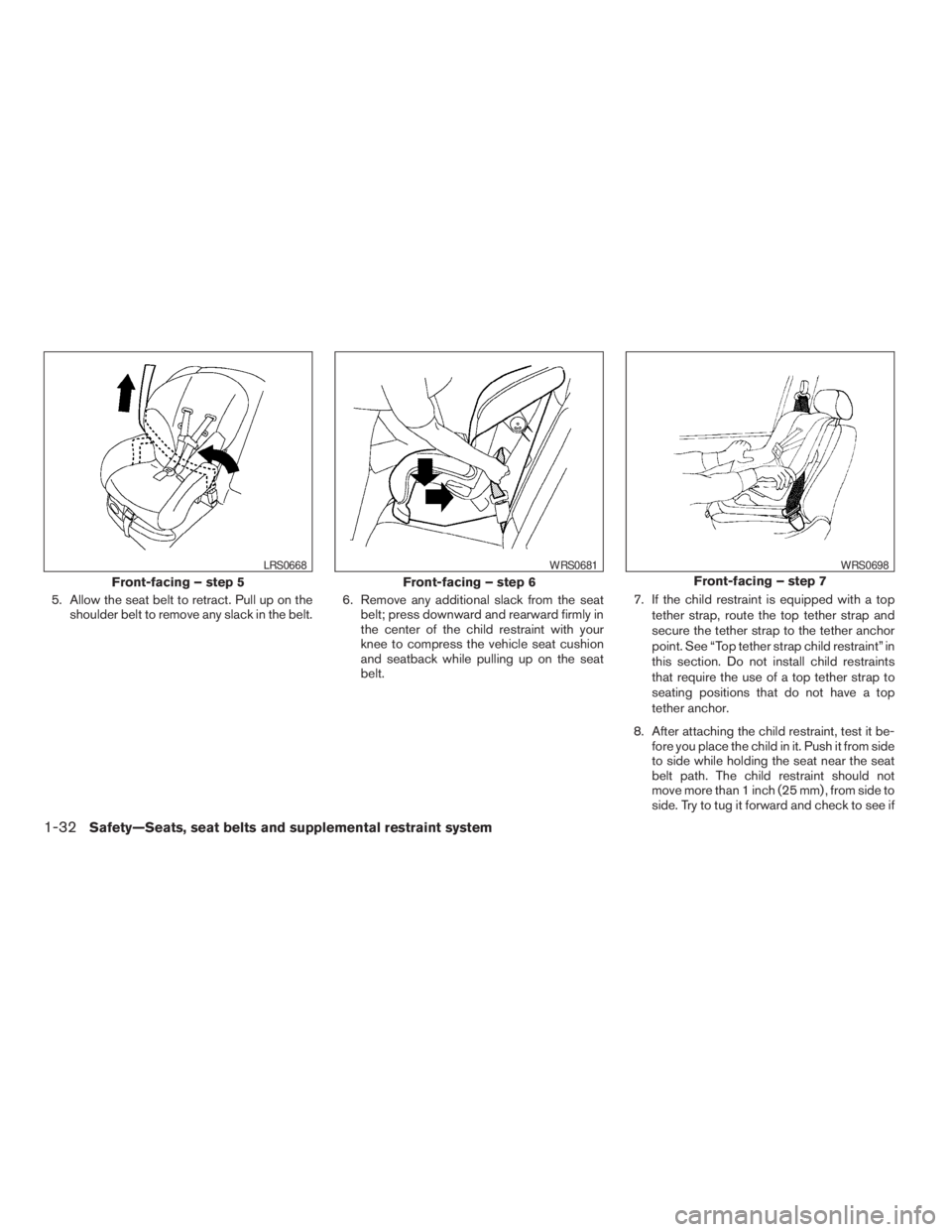
5. Allow the seat belt to retract. Pull up on the
shoulder belt to remove any slack in the belt.6. Remove any additional slack from the seat
belt; press downward and rearward firmly in
the center of the child restraint with your
knee to compress the vehicle seat cushion
and seatback while pulling up on the seat
belt.7. If the child restraint is equipped with a top
tether strap, route the top tether strap and
secure the tether strap to the tether anchor
point. See “Top tether strap child restraint” in
this section. Do not install child restraints
that require the use of a top tether strap to
seating positions that do not have a top
tether anchor.
8. After attaching the child restraint, test it be-
fore you place the child in it. Push it from side
to side while holding the seat near the seat
belt path. The child restraint should not
move more than 1 inch (25 mm) , from side to
side. Try to tug it forward and check to see if
Front-facing – step 5
LRS0668
Front-facing – step 6
WRS0681
Front-facing – step 7
WRS0698
1-32Safety—Seats, seat belts and supplemental restraint system
ZREVIEW COPYÐ2009 Pathfinder(pat)
Owners ManualÐUSA_English(nna)
05/29/08Ðdebbie
X
Page 51 of 471
the belt holds the restraint in place. If the
restraint is not secure, tighten the belt as
necessary, or put the restraint in another
seat and test it again. You may need to try a
different child restraint. Not all child re-
straints fit in all types of vehicles.
9. Check that the retractor is in the ALR mode
by trying to pull more seat belt out of the
retractor. If you cannot pull any more belt
webbing out of the retractor, the retractor is
in the ALR mode.
10. Check to make sure the child restraint is
properly secured prior to each use. If the
seat belt is not locked, repeat steps 3
through 8.
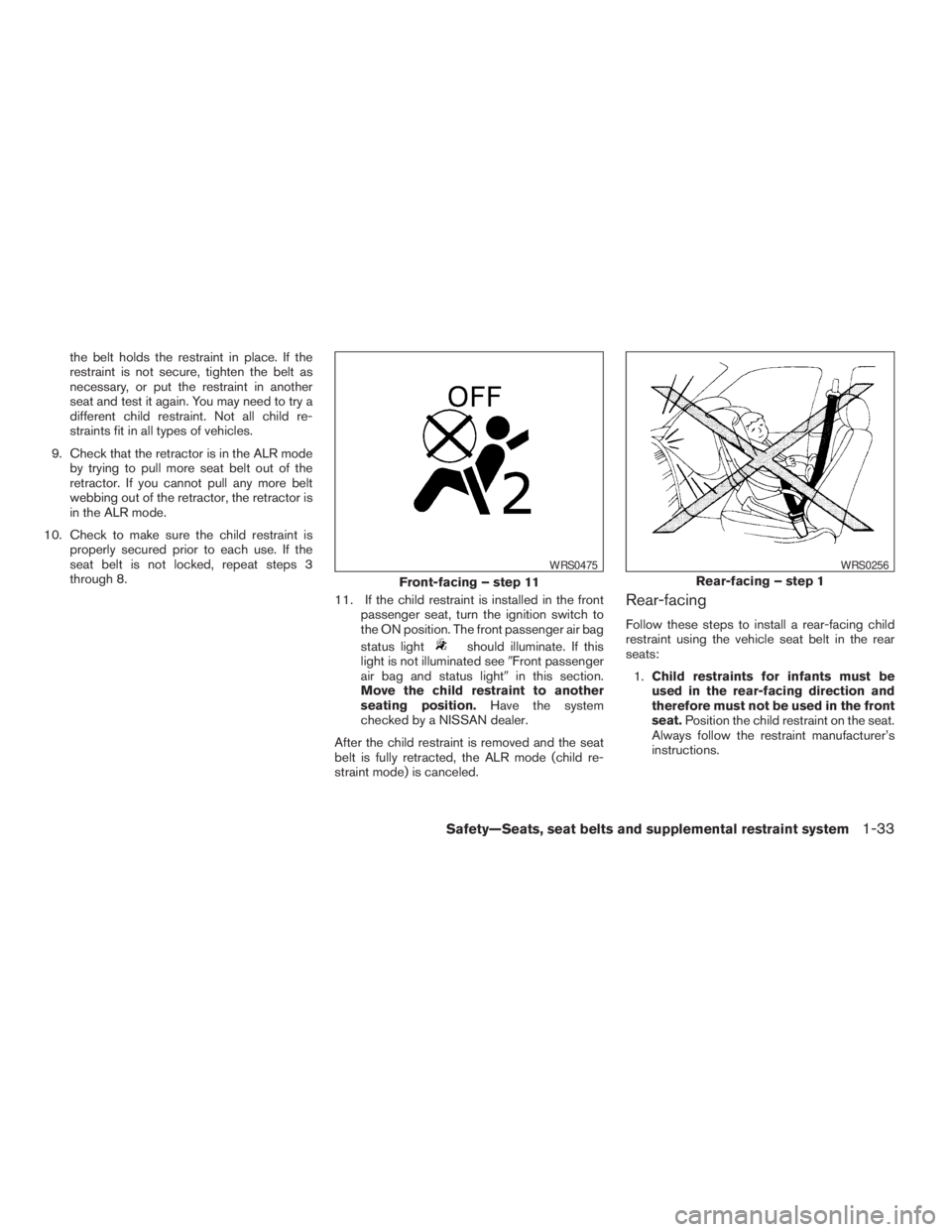
11. If the child restraint is installed in the front
passenger seat, turn the ignition switch to
the ON position. The front passenger air bag
status light
should illuminate. If this
light is not illuminated see9Front passenger
air bag and status light9in this section.
Move the child restraint to another
seating position.Have the system
checked by a NISSAN dealer.
After the child restraint is removed and the seat
belt is fully retracted, the ALR mode (child re-
straint mode) is canceled.
Rear-facing
Follow these steps to install a rear-facing child
restraint using the vehicle seat belt in the rear
seats:
1.Child restraints for infants must be
used in the rear-facing direction and
therefore must not be used in the front
seat.Position the child restraint on the seat.
Always follow the restraint manufacturer’s
instructions.
Front-facing – step 11
WRS0475
Rear-facing – step 1
WRS0256
Safety—Seats, seat belts and supplemental restraint system1-33
ZREVIEW COPYÐ2009 Pathfinder(pat)
Owners ManualÐUSA_English(nna)
05/29/08Ðdebbie
X
Page 52 of 471
When installing a child restraint in the 2nd or 3rd
row, check to make sure that it is not contacting
the seat directly in front of it. If you are unable to
properly secure the child restraint, move it to
another seating position or try a different child
restraint.
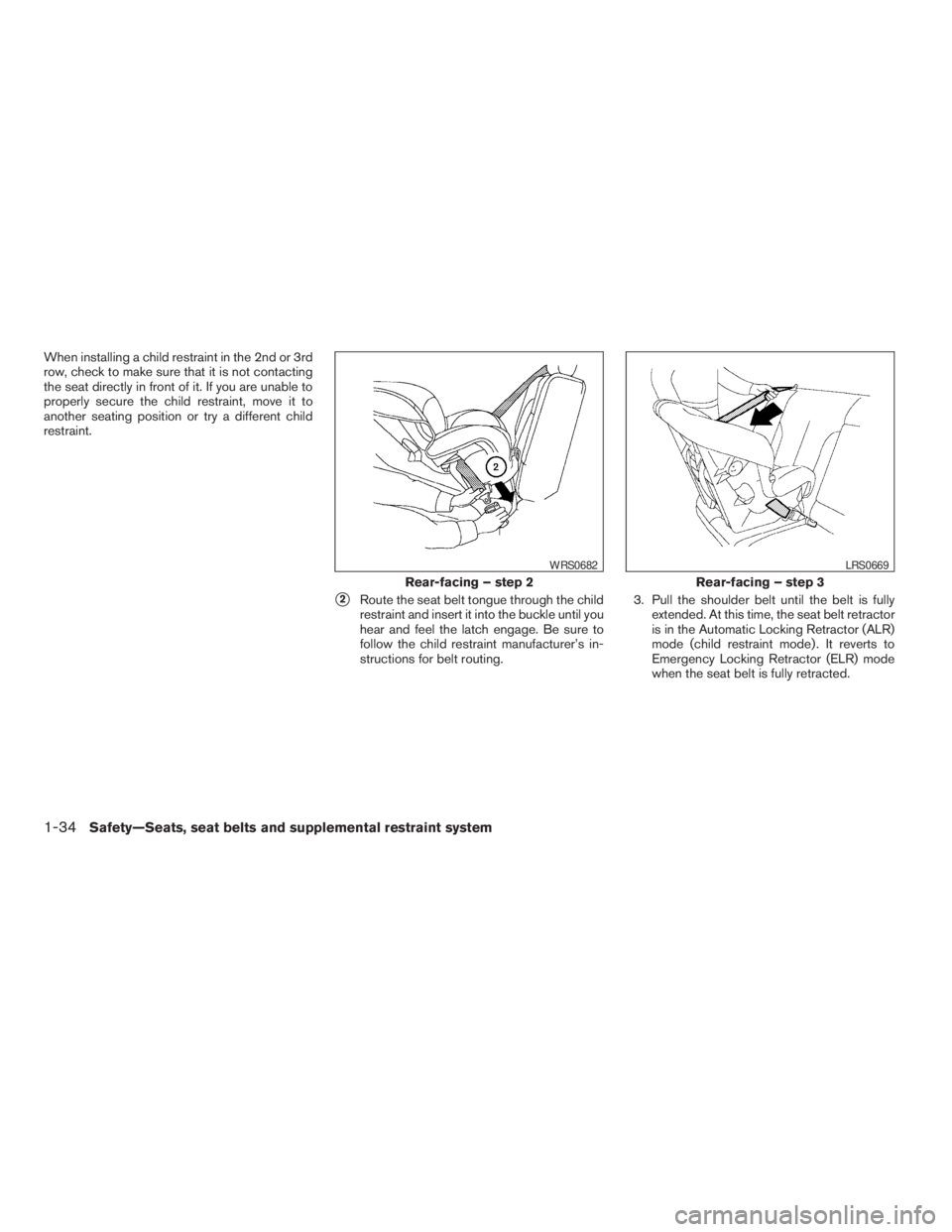
s2Route the seat belt tongue through the child
restraint and insert it into the buckle until you
hear and feel the latch engage. Be sure to
follow the child restraint manufacturer’s in-
structions for belt routing.3. Pull the shoulder belt until the belt is fully
extended. At this time, the seat belt retractor
is in the Automatic Locking Retractor (ALR)
mode (child restraint mode) . It reverts to
Emergency Locking Retractor (ELR) mode
when the seat belt is fully retracted.
Rear-facing – step 2
WRS0682
Rear-facing – step 3
LRS0669
1-34Safety—Seats, seat belts and supplemental restraint system
ZREVIEW COPYÐ2009 Pathfinder(pat)
Owners ManualÐUSA_English(nna)
05/29/08Ðdebbie
X
Page 53 of 471
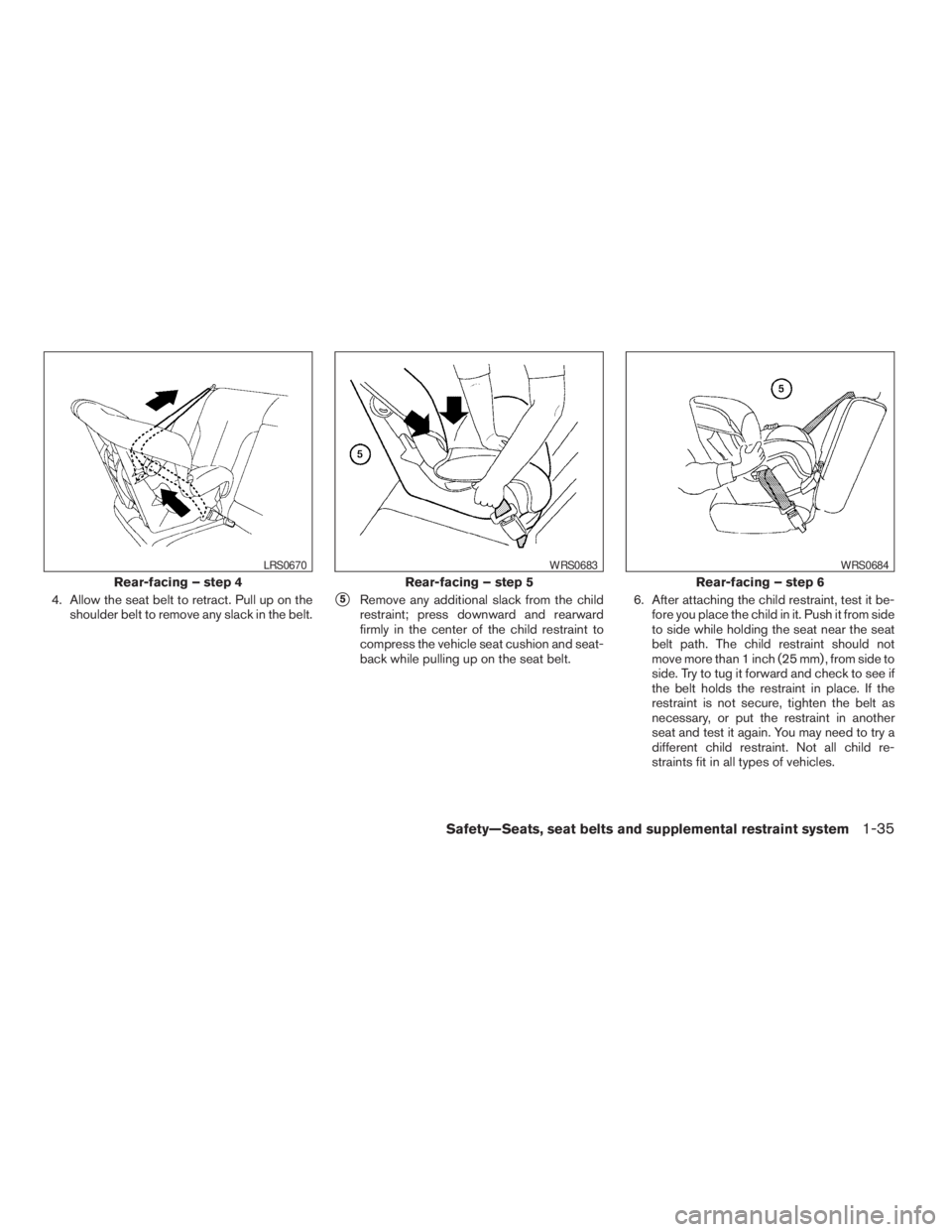
4. Allow the seat belt to retract. Pull up on the
shoulder belt to remove any slack in the belt.s5Remove any additional slack from the child
restraint; press downward and rearward
firmly in the center of the child restraint to
compress the vehicle seat cushion and seat-
back while pulling up on the seat belt.6. After attaching the child restraint, test it be-
fore you place the child in it. Push it from side
to side while holding the seat near the seat
belt path. The child restraint should not
move more than 1 inch (25 mm) , from side to
side. Try to tug it forward and check to see if
the belt holds the restraint in place. If the
restraint is not secure, tighten the belt as
necessary, or put the restraint in another
seat and test it again. You may need to try a
different child restraint. Not all child re-
straints fit in all types of vehicles.
Rear-facing – step 4
LRS0670
Rear-facing – step 5
WRS0683
Rear-facing – step 6
WRS0684
Safety—Seats, seat belts and supplemental restraint system1-35
ZREVIEW COPYÐ2009 Pathfinder(pat)
Owners ManualÐUSA_English(nna)
05/29/08Ðdebbie
X
Page 54 of 471
7. Check that the retractor is in the ALR mode
by trying to pull more seat belt out of the
retractor. If you cannot pull any more seat
belt webbing out of the retractor, the retrac-
tor is in the ALR mode.
8. Check to make sure that the child restraint is
properly secured prior to each use. If the
seat belt is not locked, repeat steps 3
through 7.
After the child restraint is removed and the seat
belt fully retracted, the ALR mode (child restraint
mode) is canceled.
PRECAUTIONS ON BOOSTER
SEATS
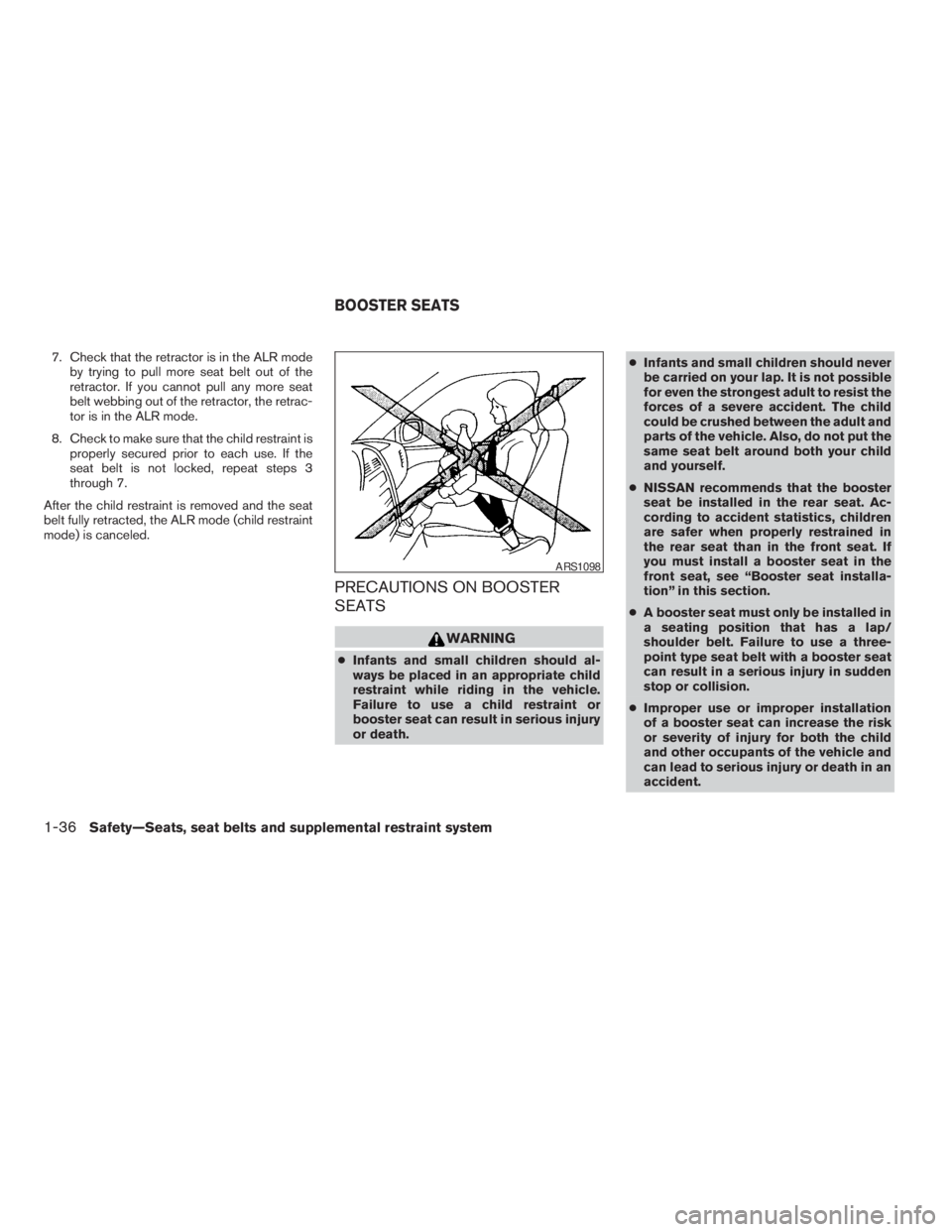
WARNING
cInfants and small children should al-
ways be placed in an appropriate child
restraint while riding in the vehicle.
Failure to use a child restraint or
booster seat can result in serious injury
or death.cInfants and small children should never
be carried on your lap. It is not possible
for even the strongest adult to resist the
forces of a severe accident. The child
could be crushed between the adult and
parts of the vehicle. Also, do not put the
same seat belt around both your child
and yourself.
cNISSAN recommends that the booster
seat be installed in the rear seat. Ac-
cording to accident statistics, children
are safer when properly restrained in
the rear seat than in the front seat. If
you must install a booster seat in the
front seat, see “Booster seat installa-
tion” in this section.
cA booster seat must only be installed in
a seating position that has a lap/
shoulder belt. Failure to use a three-
point type seat belt with a booster seat
can result in a serious injury in sudden
stop or collision.
cImproper use or improper installation
of a booster seat can increase the risk
or severity of injury for both the child
and other occupants of the vehicle and
can lead to serious injury or death in an
accident.
ARS1098
BOOSTER SEATS
1-36Safety—Seats, seat belts and supplemental restraint system
ZREVIEW COPYÐ2009 Pathfinder(pat)
Owners ManualÐUSA_English(nna)
05/29/08Ðdebbie
X
Page 55 of 471
cDo not use towels, books, pillows or
other items in place of a booster seat.
Items such as these may move during
normal driving or a collision and result
in serious injury or death. Booster seats
are designed to be used with a lap/
shoulder belt. Booster seats are de-
signed to properly route the lap and
shoulder portions of the seat belt over
the strongest portions of a child’s body
to provide the maximum protection dur-
ing a collision.
cFollow all of the booster seat manufac-
turer’s instructions for installation and
use. When purchasing a booster seat,
be sure to select one which will fit your
child and vehicle. It may not be possible
to properly install some types of
booster seats in your vehicle.
cIf the booster seat and seat belt is not
used properly, the risk of a child being
injured in a collision or a sudden stop
greatly increases.
cAdjustable seatbacks should be posi-
tioned to fit the booster seat, but as
upright as possible.cAfter placing the child in the booster
seat and fastening the seat belt, make
sure the shoulder portion of the belt is
away from the child’s face and neck and
the lap portion of the belt does not
cross the abdomen.
cDo not put the shoulder belt behind the
child or under the child’s arm. If you
must install a booster seat in the front
seat, see “Booster seat installation”
later in this section.
cWhen your booster seat is not in use,
keep it secured with a seat belt to pre-
vent it from being thrown around in
case of a sudden stop or accident.
CAUTION
Remember that a booster seat left in a
closed vehicle can become very hot.
Check the seating surface and buckles
before placing your child in the booster
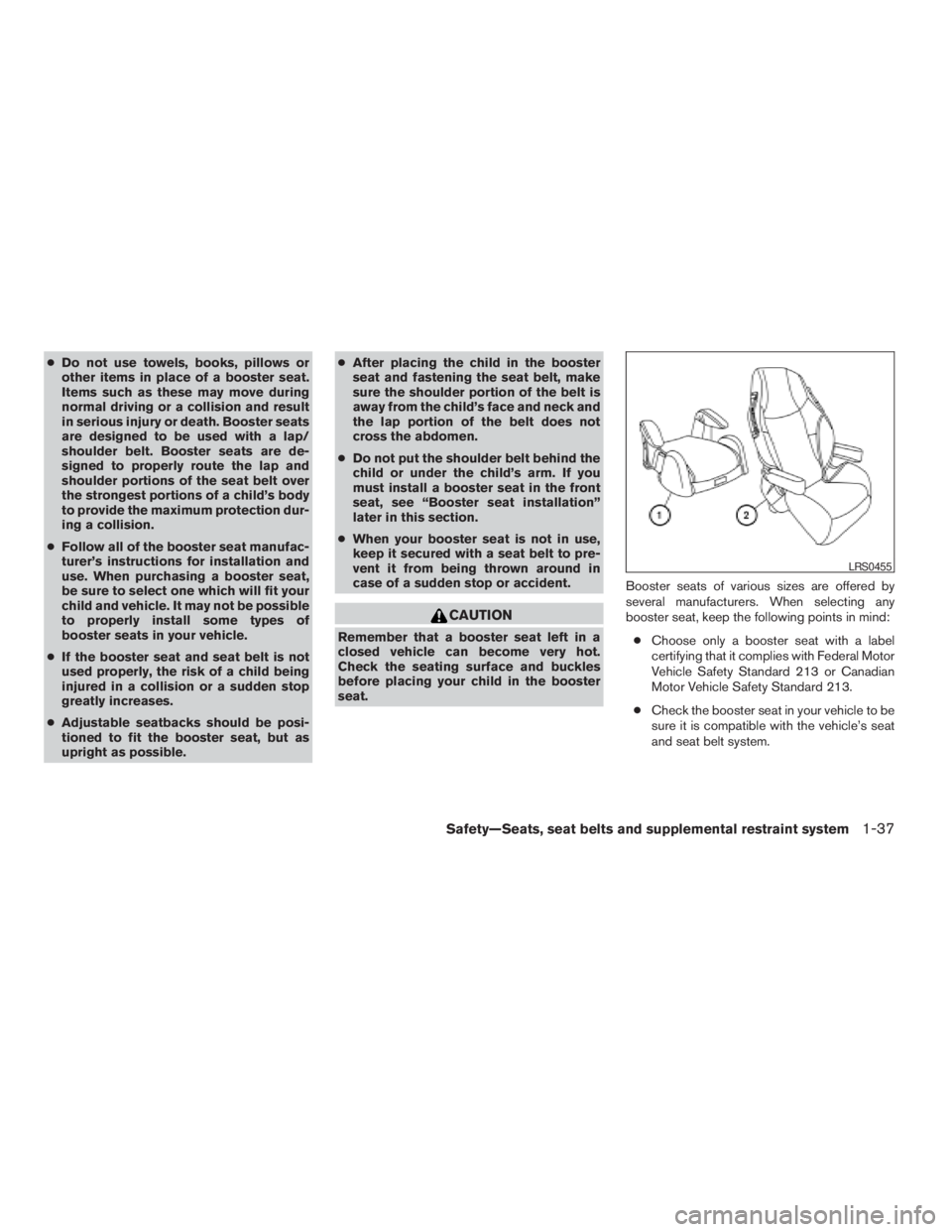
seat.Booster seats of various sizes are offered by
several manufacturers. When selecting any
booster seat, keep the following points in mind:
cChoose only a booster seat with a label
certifying that it complies with Federal Motor
Vehicle Safety Standard 213 or Canadian
Motor Vehicle Safety Standard 213.
cCheck the booster seat in your vehicle to be
sure it is compatible with the vehicle’s seat
and seat belt system.
LRS0455
Safety—Seats, seat belts and supplemental restraint system1-37
ZREVIEW COPYÐ2009 Pathfinder(pat)
Owners ManualÐUSA_English(nna)
05/29/08Ðdebbie
X
Page 57 of 471
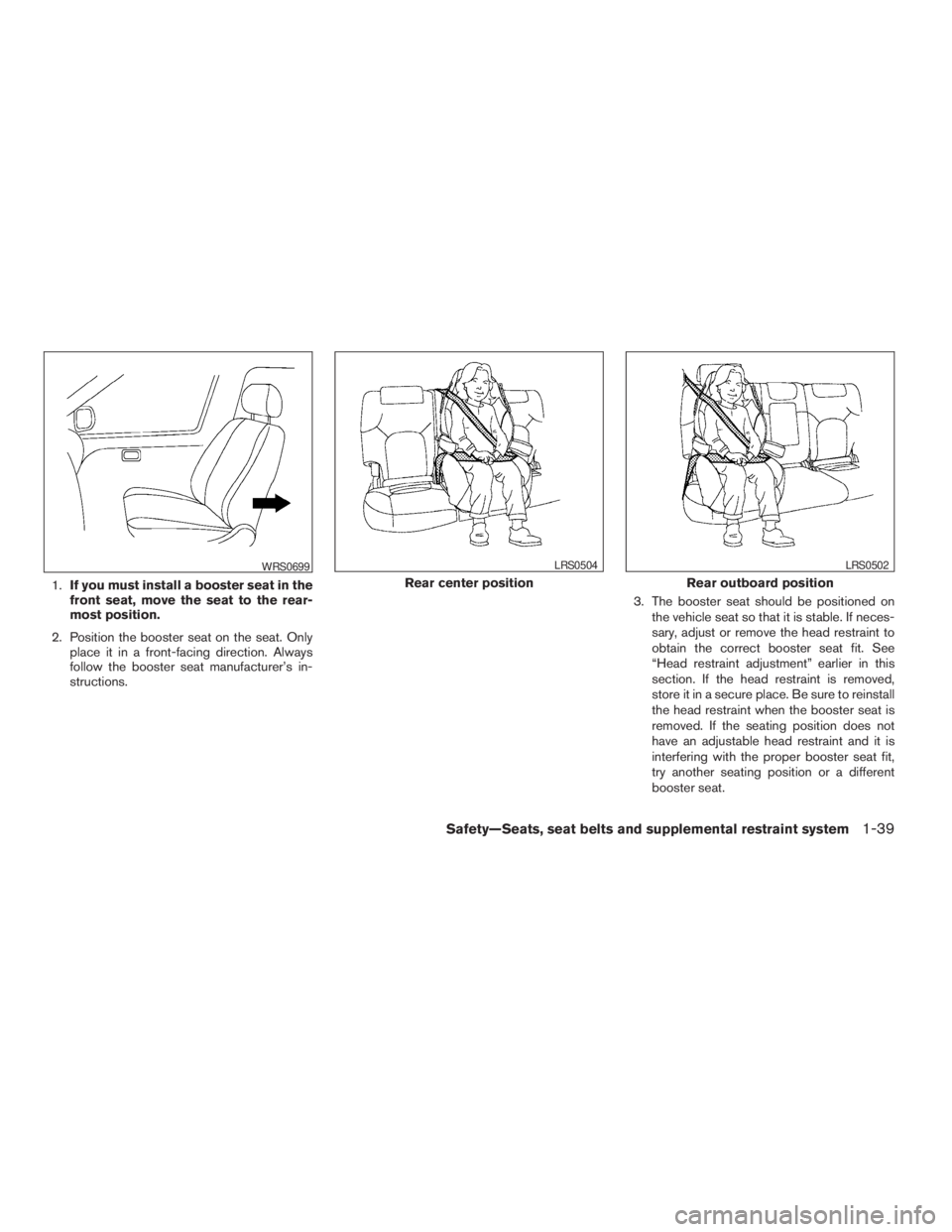
1.If you must install a booster seat in the
front seat, move the seat to the rear-
most position.
2. Position the booster seat on the seat. Only
place it in a front-facing direction. Always
follow the booster seat manufacturer’s in-
structions.3. The booster seat should be positioned on
the vehicle seat so that it is stable. If neces-
sary, adjust or remove the head restraint to
obtain the correct booster seat fit. See
“Head restraint adjustment” earlier in this
section. If the head restraint is removed,
store it in a secure place. Be sure to reinstall
the head restraint when the booster seat is
removed. If the seating position does not
have an adjustable head restraint and it is
interfering with the proper booster seat fit,
try another seating position or a different
booster seat.
WRS0699
Rear center position
LRS0504
Rear outboard position
LRS0502
Safety—Seats, seat belts and supplemental restraint system1-39
ZREVIEW COPYÐ2009 Pathfinder(pat)
Owners ManualÐUSA_English(nna)
05/29/08Ðdebbie
X
Page 76 of 471
2 Instruments and controls
Instrument panel...................................2-2
Meters and gauges................................2-3
Speedometer and odometer.....................2-4
Trip computer (if so equipped)...................2-5
Tachometer....................................2-6
Engine coolant temperature gauge...............2-6
Fuel gauge....................................2-7
Engine oil pressure gauge.......................2-8
Voltmeter......................................2-8
Compass display (if so equipped)...................2-9
Compass display...............................2-9
Warning/indicator lights and audible reminders......2-13
Checking bulbs...............................2-14
Warning lights................................2-14
Indicator lights................................2-19
Audible reminders.............................2-22
Security systems.................................2-23
Vehicle security system.........................2-23
NISSAN vehicle immobilizer system.............2-24
Windshield wiper and washer switch...............2-26
Switch operation..............................2-26
Rear window wiper and washer switch..............2-27Rear window and outside mirror (if so equipped)
defroster switch..................................2-27
Headlight and turn signal switch....................2-28
Headlight control switch........................2-28
Daytime running light system (Canada only)......2-30
Instrument brightness control...................2-31
Turn signal switch.............................2-31
Fog light switch (if so equipped)................2-32
Hazard warning flasher switch.....................2-32
Horn............................................2-33
Heated steering wheel (if so equipped).............2-33
Heated seat (if so equipped).......................2-34
Vehicle Dynamic Control (VDC) OFF switch.........2-34
Hill descent control switch (if so equipped)..........2-35
Power outlet.....................................2-36
Storage.........................................2-37
Storage trays.................................2-37
Storage bins..................................2-38
2nd row under-seat storage bin.................2-39
Console box..................................2-39
Glove box....................................2-40
Sunglasses holder.............................2-40
ZREVIEW COPYÐ2009 Pathfinder(pat)
Owners ManualÐUSA_English(nna)
05/29/08Ðdebbie
X
Page 89 of 471
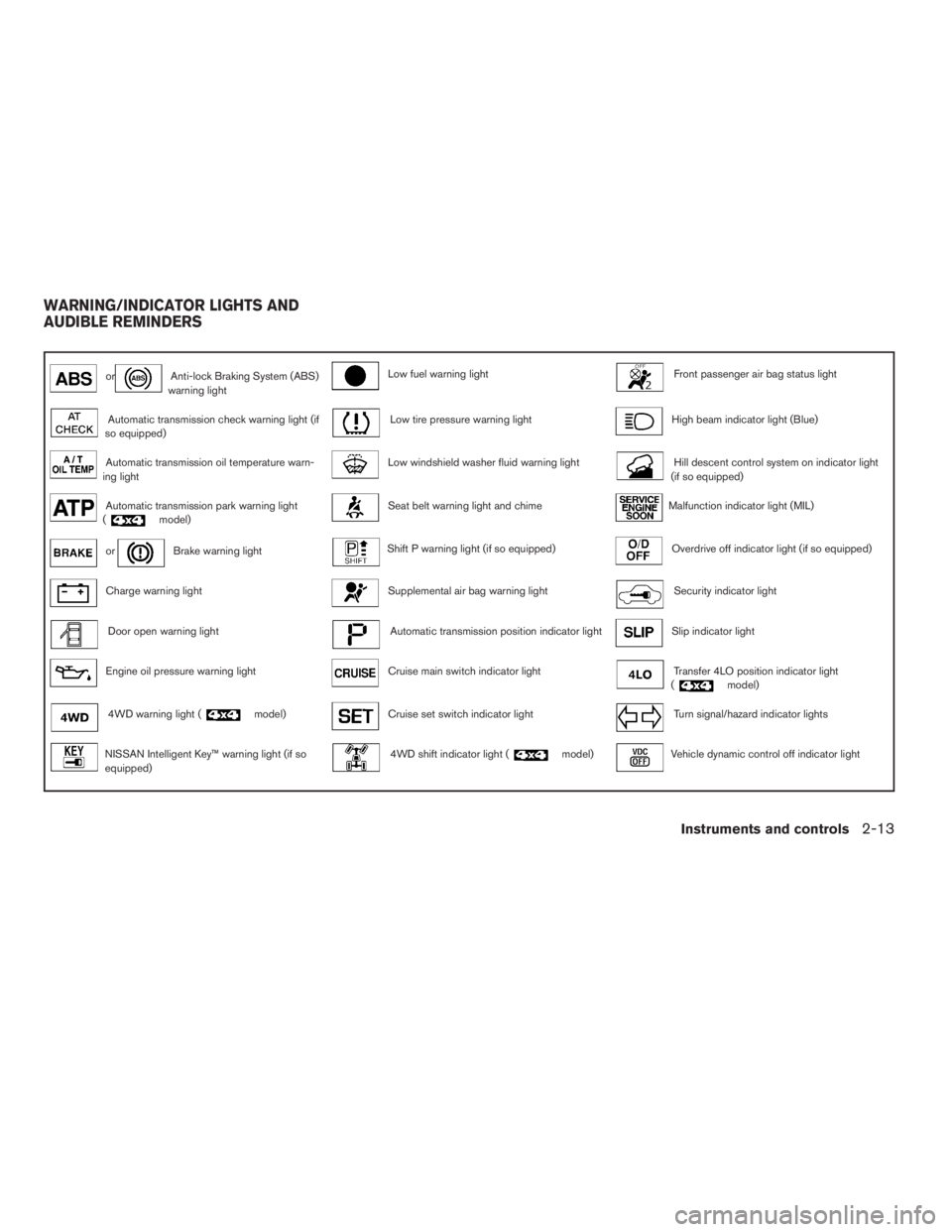
orAnti-lock Braking System (ABS)
warning lightLow fuel warning lightFront passenger air bag status light
Automatic transmission check warning light (if
so equipped)Low tire pressure warning lightHigh beam indicator light (Blue)
Automatic transmission oil temperature warn-
ing lightLow windshield washer fluid warning lightHill descent control system on indicator light
(if so equipped)
Automatic transmission park warning light
(model)Seat belt warning light and chimeMalfunction indicator light (MIL)
orBrake warning lightShift P warning light (if so equipped)Overdrive off indicator light (if so equipped)
Charge warning lightSupplemental air bag warning lightSecurity indicator light
Door open warning lightAutomatic transmission position indicator lightSlip indicator light
Engine oil pressure warning lightCruise main switch indicator lightTransfer 4LO position indicator light
(model)
4WD warning light (model)Cruise set switch indicator lightTurn signal/hazard indicator lights
NISSAN Intelligent Key™ warning light (if so
equipped)4WD shift indicator light (model)Vehicle dynamic control off indicator light
WARNING/INDICATOR LIGHTS AND
AUDIBLE REMINDERS
Instruments and controls2-13
ZREVIEW COPYÐ2009 Pathfinder(pat)
Owners ManualÐUSA_English(nna)
05/29/08Ðdebbie
X
Page 91 of 471
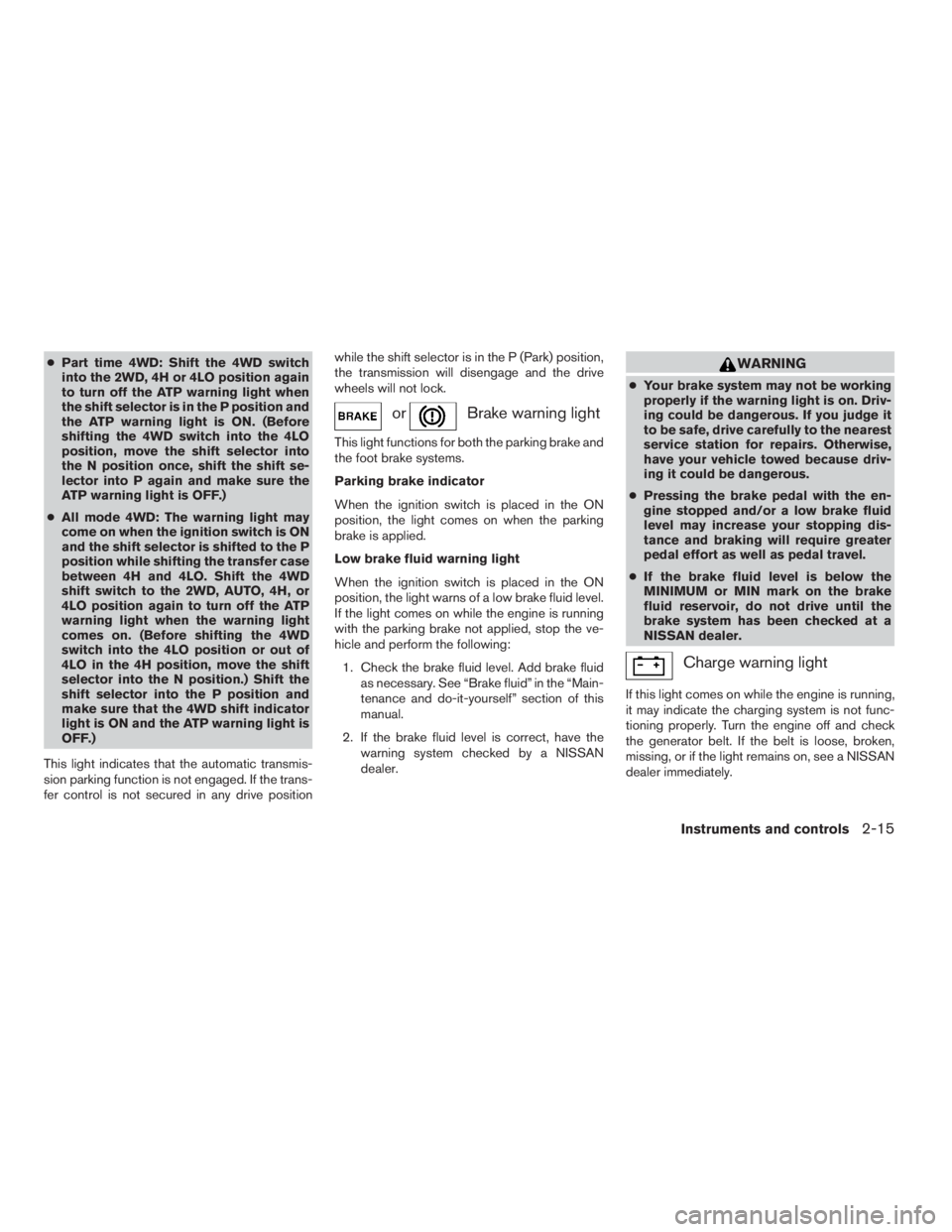
cPart time 4WD: Shift the 4WD switch
into the 2WD, 4H or 4LO position again
to turn off the ATP warning light when
the shift selector is in the P position and
the ATP warning light is ON. (Before
shifting the 4WD switch into the 4LO
position, move the shift selector into
the N position once, shift the shift se-
lector into P again and make sure the
ATP warning light is OFF.)
cAll mode 4WD: The warning light may
come on when the ignition switch is ON
and the shift selector is shifted to the P
position while shifting the transfer case
between 4H and 4LO. Shift the 4WD
shift switch to the 2WD, AUTO, 4H, or
4LO position again to turn off the ATP
warning light when the warning light
comes on. (Before shifting the 4WD
switch into the 4LO position or out of
4LO in the 4H position, move the shift
selector into the N position.) Shift the
shift selector into the P position and
make sure that the 4WD shift indicator
light is ON and the ATP warning light is
OFF.)
This light indicates that the automatic transmis-
sion parking function is not engaged. If the trans-
fer control is not secured in any drive positionwhile the shift selector is in the P (Park) position,
the transmission will disengage and the drive
wheels will not lock.
orBrake warning light
This light functions for both the parking brake and
the foot brake systems.
Parking brake indicator
When the ignition switch is placed in the ON
position, the light comes on when the parking
brake is applied.
Low brake fluid warning light
When the ignition switch is placed in the ON
position, the light warns of a low brake fluid level.
If the light comes on while the engine is running
with the parking brake not applied, stop the ve-
hicle and perform the following:
1. Check the brake fluid level. Add brake fluid
as necessary. See “Brake fluid” in the “Main-
tenance and do-it-yourself” section of this
manual.
2. If the brake fluid level is correct, have the
warning system checked by a NISSAN
dealer.
WARNING
cYour brake system may not be working
properly if the warning light is on. Driv-
ing could be dangerous. If you judge it
to be safe, drive carefully to the nearest
service station for repairs. Otherwise,
have your vehicle towed because driv-
ing it could be dangerous.
cPressing the brake pedal with the en-
gine stopped and/or a low brake fluid
level may increase your stopping dis-
tance and braking will require greater
pedal effort as well as pedal travel.
cIf the brake fluid level is below the
MINIMUM or MIN mark on the brake
fluid reservoir, do not drive until the
brake system has been checked at a
NISSAN dealer.
Charge warning light
If this light comes on while the engine is running,
it may indicate the charging system is not func-
tioning properly. Turn the engine off and check
the generator belt. If the belt is loose, broken,
missing, or if the light remains on, see a NISSAN
dealer immediately.
Instruments and controls2-15
ZREVIEW COPYÐ2009 Pathfinder(pat)
Owners ManualÐUSA_English(nna)
05/29/08Ðdebbie
X