audio NISSAN PATHFINDER 2010 Owner´s Manual
[x] Cancel search | Manufacturer: NISSAN, Model Year: 2010, Model line: PATHFINDER, Model: NISSAN PATHFINDER 2010Pages: 463, PDF Size: 5.69 MB
Page 245 of 463
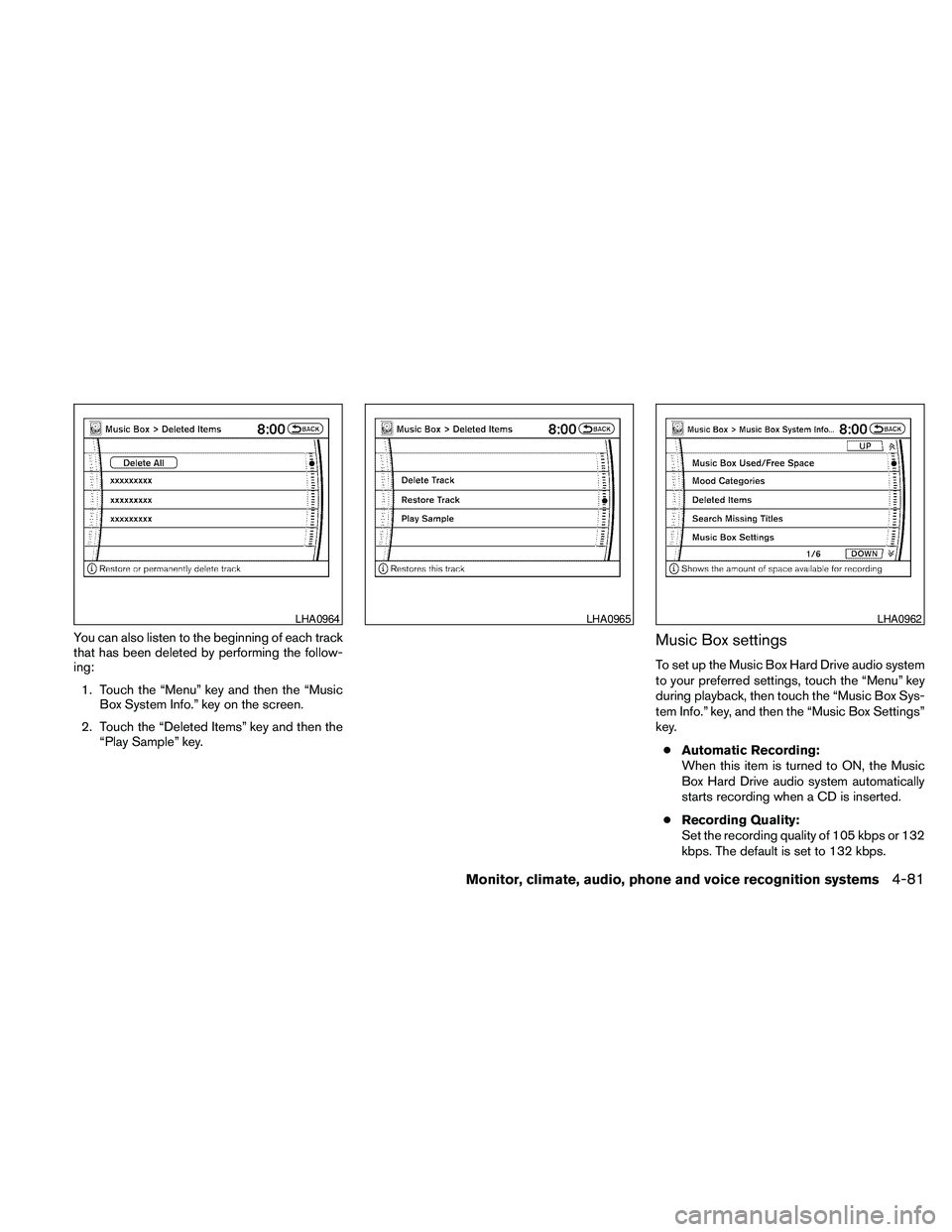
You can also listen to the beginning of each track
that has been deleted by performing the follow-
ing:
1. Touch the “Menu” key and then the “Music
Box System Info.” key on the screen.
2. Touch the “Deleted Items” key and then the
“Play Sample” key.Music Box settings
To set up the Music Box Hard Drive audio system
to your preferred settings, touch the “Menu” key
during playback, then touch the “Music Box Sys-
tem Info.” key, and then the “Music Box Settings”
key.
cAutomatic Recording:
When this item is turned to ON, the Music
Box Hard Drive audio system automatically
starts recording when a CD is inserted.
cRecording Quality:
Set the recording quality of 105 kbps or 132
kbps. The default is set to 132 kbps.
LHA0964LHA0965LHA0962
Monitor, climate, audio, phone and voice recognition systems4-81
Page 246 of 463
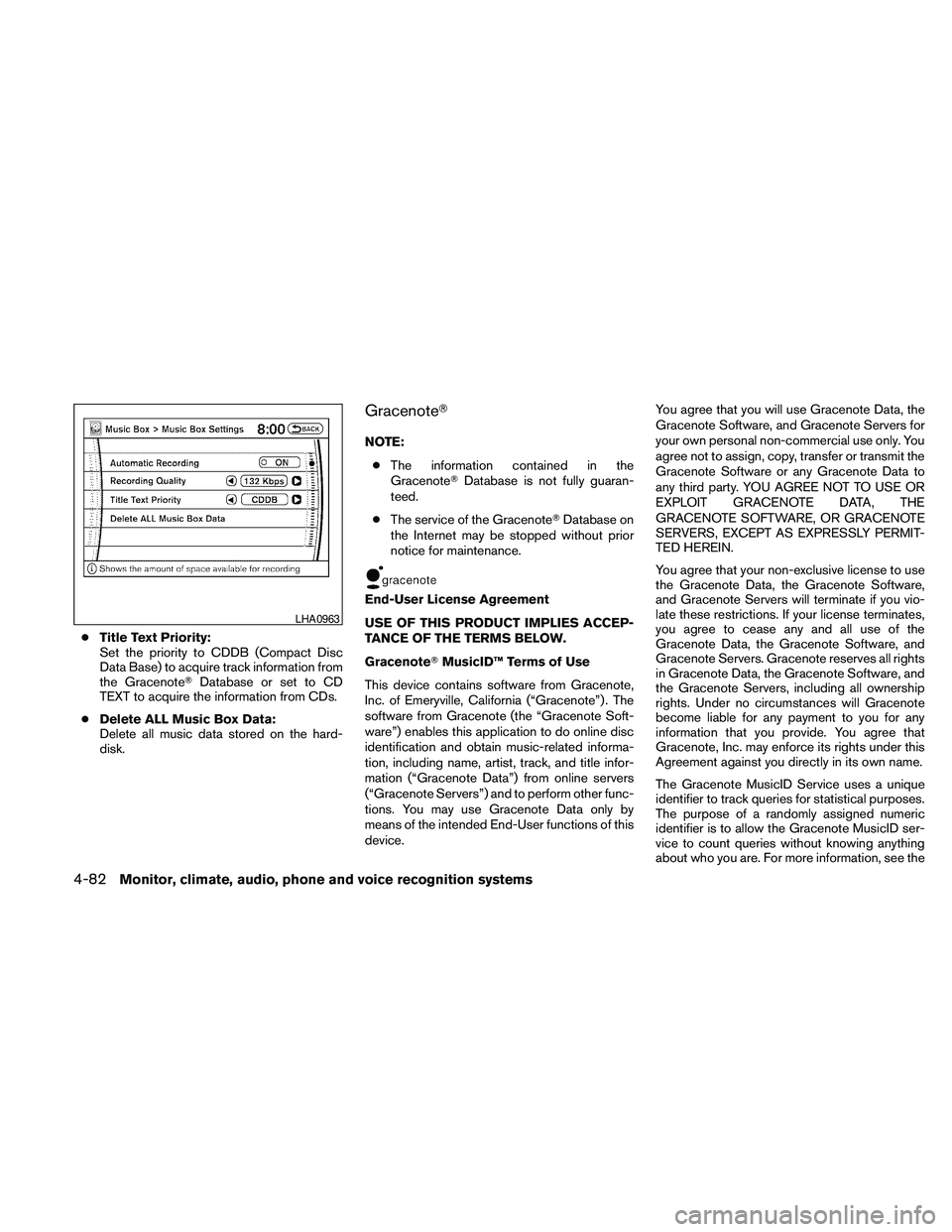
cTitle Text Priority:
Set the priority to CDDB (Compact Disc
Data Base) to acquire track information from
the GracenoteTDatabase or set to CD
TEXT to acquire the information from CDs.
cDelete ALL Music Box Data:
Delete all music data stored on the hard-
disk.
GracenoteT
NOTE:
cThe information contained in the
GracenoteTDatabase is not fully guaran-
teed.
cThe service of the GracenoteTDatabase on
the Internet may be stopped without prior
notice for maintenance.
End-User License Agreement
USE OF THIS PRODUCT IMPLIES ACCEP-
TANCE OF THE TERMS BELOW.
GracenoteTMusicID™ Terms of Use
This device contains software from Gracenote,
Inc. of Emeryville, California (“Gracenote”) . The
software from Gracenote (the “Gracenote Soft-
ware”) enables this application to do online disc
identification and obtain music-related informa-
tion, including name, artist, track, and title infor-
mation (“Gracenote Data”) from online servers
(“Gracenote Servers”) and to perform other func-
tions. You may use Gracenote Data only by
means of the intended End-User functions of this
device.You agree that you will use Gracenote Data, the
Gracenote Software, and Gracenote Servers for
your own personal non-commercial use only. You
agree not to assign, copy, transfer or transmit the
Gracenote Software or any Gracenote Data to
any third party. YOU AGREE NOT TO USE OR
EXPLOIT GRACENOTE DATA, THE
GRACENOTE SOFTWARE, OR GRACENOTE
SERVERS, EXCEPT AS EXPRESSLY PERMIT-
TED HEREIN.
You agree that your non-exclusive license to use
the Gracenote Data, the Gracenote Software,
and Gracenote Servers will terminate if you vio-
late these restrictions. If your license terminates,
you agree to cease any and all use of the
Gracenote Data, the Gracenote Software, and
Gracenote Servers. Gracenote reserves all rights
in Gracenote Data, the Gracenote Software, and
the Gracenote Servers, including all ownership
rights. Under no circumstances will Gracenote
become liable for any payment to you for any
information that you provide. You agree that
Gracenote, Inc. may enforce its rights under this
Agreement against you directly in its own name.
The Gracenote MusicID Service uses a unique
identifier to track queries for statistical purposes.
The purpose of a randomly assigned numeric
identifier is to allow the Gracenote MusicID ser-
vice to count queries without knowing anything
about who you are. For more information, see the
LHA0963
4-82Monitor, climate, audio, phone and voice recognition systems
Page 247 of 463
web page for the Gracenote Privacy Policy for
the Gracenote MusicID Service.
The Gracenote Software and each item of
Gracenote Data are licensed to you “AS IS.”
Gracenote makes no representations or warran-
ties, express or implied, regarding the accuracy
of any Gracenote Data from in the Gracenote
Servers. Gracenote reserves the right to delete
data from the Gracenote Servers or to change
data categories for any cause that Gracenote
deems sufficient. No warranty is made that the
Gracenote Software or Gracenote Servers are
error-free or that functioning of Gracenote Soft-
ware or Gracenote Servers will be uninterrupted.
Gracenote is not obligated to provide you with
new enhanced or additional data types or cat-
egories that Gracenote may provide in the future
and is free to discontinue its online services at
any time.
GRACENOTE DISCLAIMS ALL WARRANTIES
EXPRESS OR IMPLIED, INCLUDING, BUT NOT
LIMITED TO, IMPLIED WARRANTIES OF MER-
CHANTABILITY, FITNESS FOR A PARTICULAR
PURPOSE, TITLE, AND NONINFRINGEMENT.
GRACENOTE DOES NOT WARRANT THE RE-
SULTS THAT WILL BE OBTAINED BY YOUR
USE OF THE GRACENOTE SOFTWARE OR
ANY GRACENOTE SERVER. IN NO CASE
WILL GRACENOTE BE LIABLE FOR ANYCONSEQUENTIAL OR INCIDENTAL DAM-
AGES OR FOR ANY LOST PROFITS OR LOST
REVENUES.
Copyright:
Music recognition technology and related data
are provided by GracenoteT. Gracenote is the
industry standard in music recognition technol-
ogy and related content delivery. For more infor-
mation visit www.gracenote.com.
CD and music-related data from Gracenote, Inc.,
copyright © 2000-2007 Gracenote. Gracenote
Software, copyright © 2000-2007 Gracenote.
This product and service may practice one or
more of the following U.S. Patents: #5,987,525;
#6,061,680; #6,154,773, #6,161,132,
#6,230,192, #6,230,207, #6,240,459,
#6,330,593, and other patents issued or pend-
ing. Some services supplied under license from
Open Globe, Inc. for U.S. Patent: #6,304,523.
Gracenote and CDDB are registered trademarks
of Gracenote. The Gracenote logo and logotype,
and the “Powered by Gracenote” logo are trade-
marks of Gracenote.
CD/CF (CompactFlashT) CARE AND
CLEANING
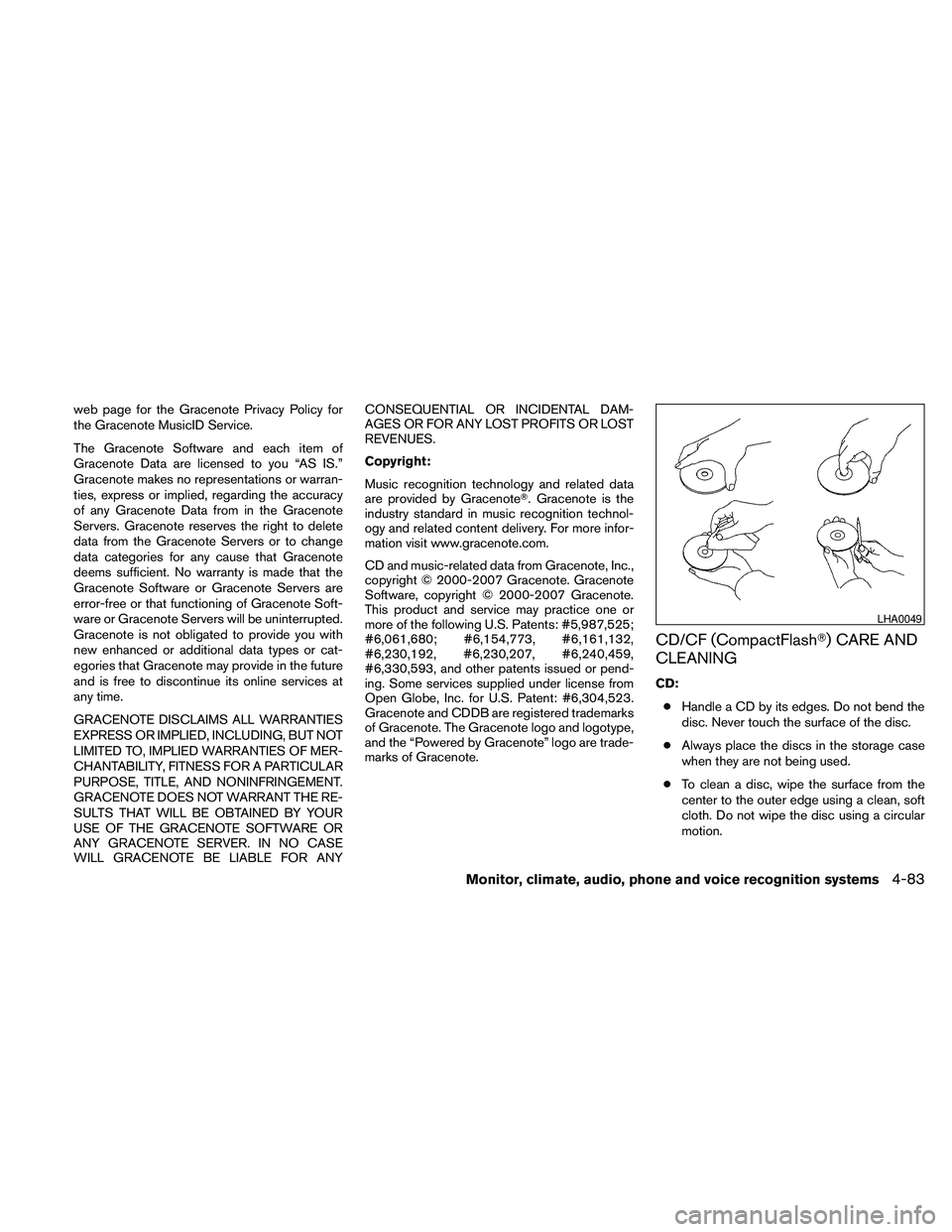
CD:
cHandle a CD by its edges. Do not bend the
disc. Never touch the surface of the disc.
cAlways place the discs in the storage case
when they are not being used.
cTo clean a disc, wipe the surface from the
center to the outer edge using a clean, soft
cloth. Do not wipe the disc using a circular
motion.
LHA0049
Monitor, climate, audio, phone and voice recognition systems4-83
Page 248 of 463
cDo not use a conventional record cleaner or
alcohol intended for industrial use.
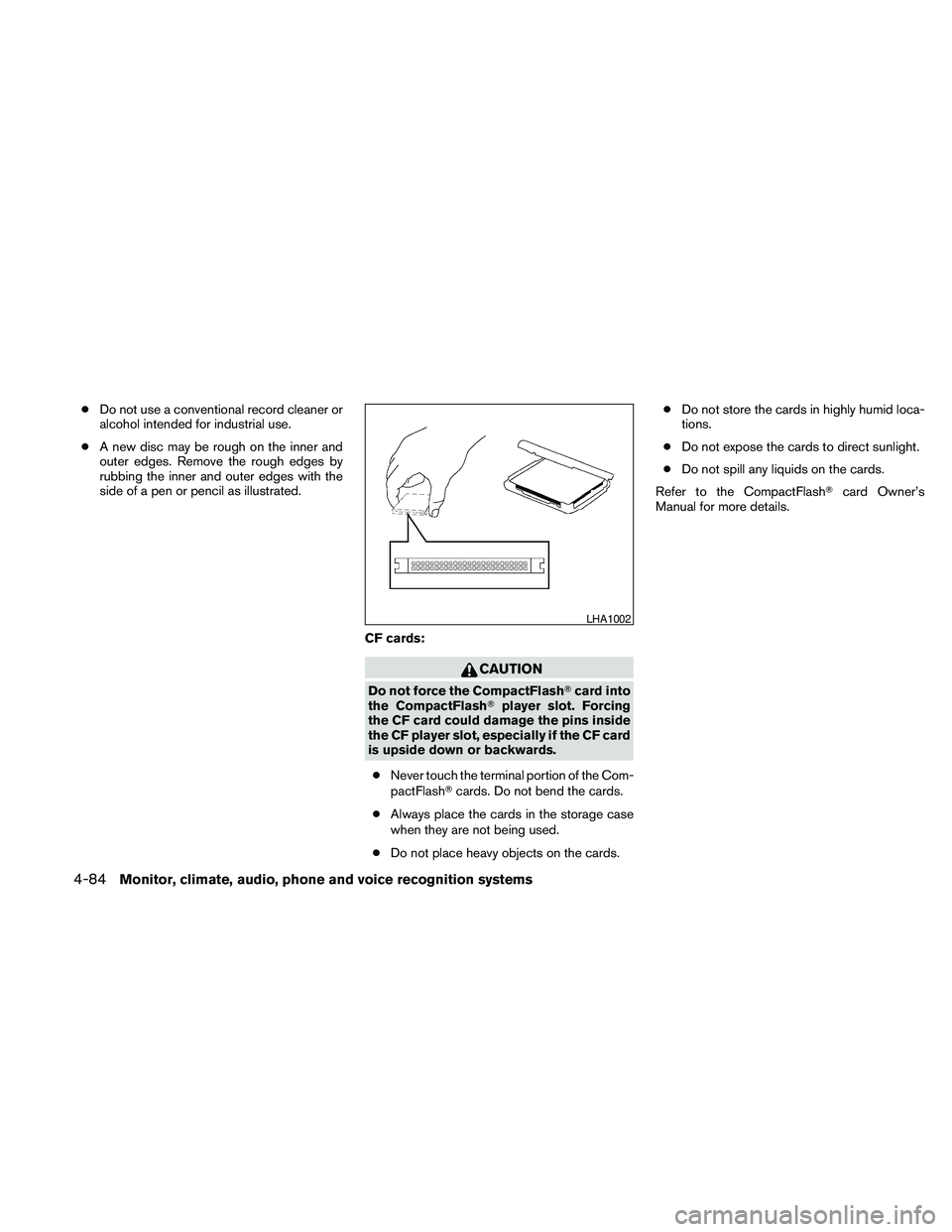
cA new disc may be rough on the inner and
outer edges. Remove the rough edges by
rubbing the inner and outer edges with the
side of a pen or pencil as illustrated.
CF cards:
CAUTION
Do not force the CompactFlashTcard into
the CompactFlashTplayer slot. Forcing
the CF card could damage the pins inside
the CF player slot, especially if the CF card
is upside down or backwards.
cNever touch the terminal portion of the Com-
pactFlashTcards. Do not bend the cards.
cAlways place the cards in the storage case
when they are not being used.
cDo not place heavy objects on the cards.cDo not store the cards in highly humid loca-
tions.
cDo not expose the cards to direct sunlight.
cDo not spill any liquids on the cards.
Refer to the CompactFlashTcard Owner’s
Manual for more details.
LHA1002
4-84Monitor, climate, audio, phone and voice recognition systems
Page 249 of 463
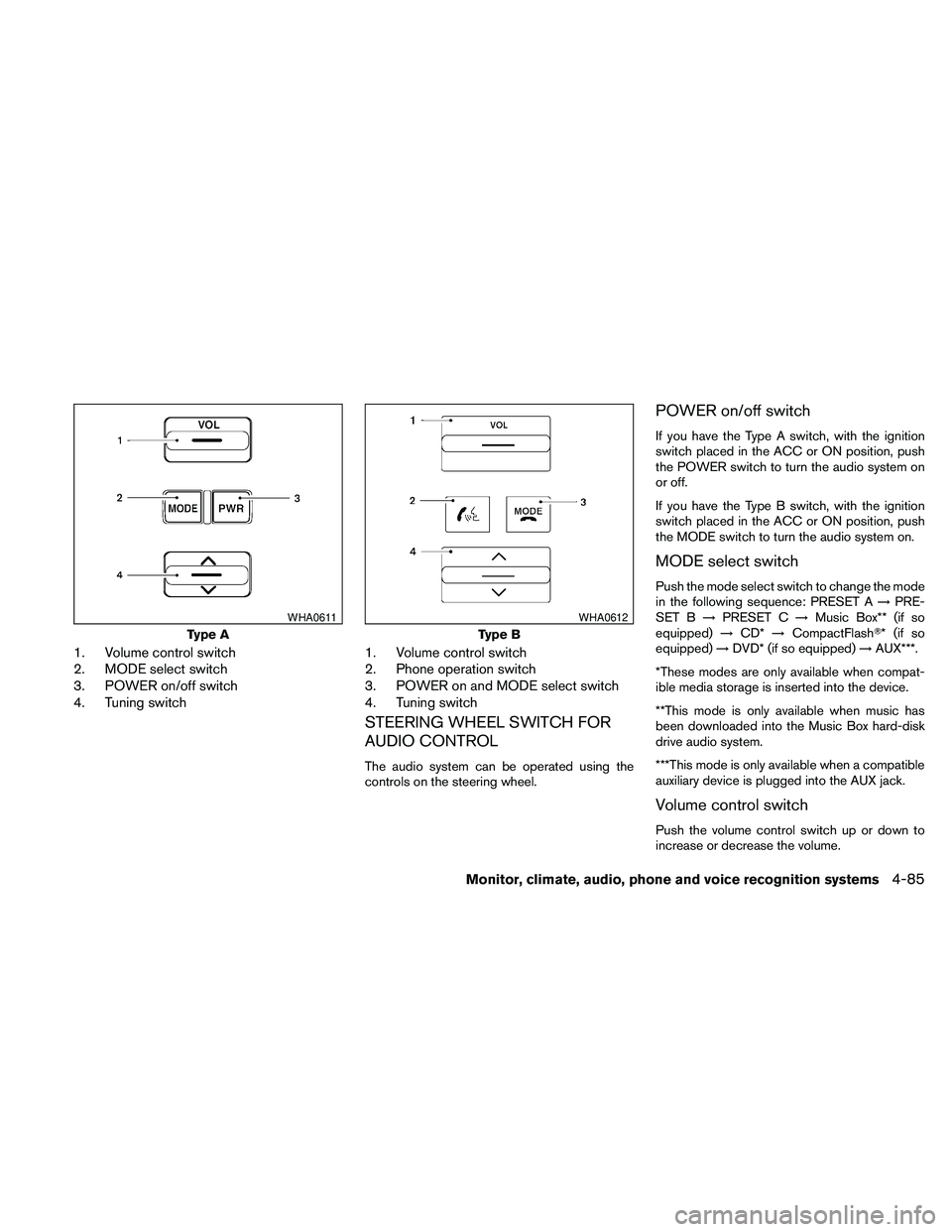
1. Volume control switch
2. MODE select switch
3. POWER on/off switch
4. Tuning switch1. Volume control switch
2. Phone operation switch
3. POWER on and MODE select switch
4. Tuning switch
STEERING WHEEL SWITCH FOR
AUDIO CONTROL
The audio system can be operated using the
controls on the steering wheel.
POWER on/off switch
If you have the Type A switch, with the ignition
switch placed in the ACC or ON position, push
the POWER switch to turn the audio system on
or off.
If you have the Type B switch, with the ignition
switch placed in the ACC or ON position, push
the MODE switch to turn the audio system on.
MODE select switch
Push the mode select switch to change the mode
in the following sequence: PRESET A!PRE-
SET B!PRESET C!Music Box** (if so
equipped)!CD*!CompactFlashT* (if so
equipped)!DVD* (if so equipped)!AUX***.
*These modes are only available when compat-
ible media storage is inserted into the device.
**This mode is only available when music has
been downloaded into the Music Box hard-disk
drive audio system.
***This mode is only available when a compatible
auxiliary device is plugged into the AUX jack.
Volume control switch
Push the volume control switch up or down to
increase or decrease the volume.
Type A
WHA0611
Type B
WHA0612
Monitor, climate, audio, phone and voice recognition systems4-85
Page 250 of 463
Tuning
Memory change (radio):
While in one of the preset radio station banks (A,
B or C) , push the tuning switch
orfor less than 1.5 seconds to change to the next
preset station in memory.
Seek tuning (radio):
Push the tuning switch
orfor more
than 1.5 seconds to seek the next or previous
radio station.
Next/Previous track (CD/CF):
Push the tuning switch
orfor less
than 1.5 seconds to return to the beginning of the
present track or skip to the next track. Push
several times to skip back or skip through tracks.
This system searches for the blank intervals be-
tween selections. If there is a blank interval within
1 program or there is no interval between pro-
grams, the system may not stop in the desired or
expected location.Next/Previous track (Music Box):
Push the tuning switch
orfor less
than 1.5 seconds to return to the beginning of the
present track or skip to the next track. Push
several times to skip back or skip through tracks.
Push and hold the tuning switch
orfor more than 1.5 seconds to change playlists.
When the last playlist is playing, the next playlist
will be selected.
Change disc (CD) (if so equipped):
Push the tuning switch
orfor more
than 1.5 seconds to change the playing disc up
or down.
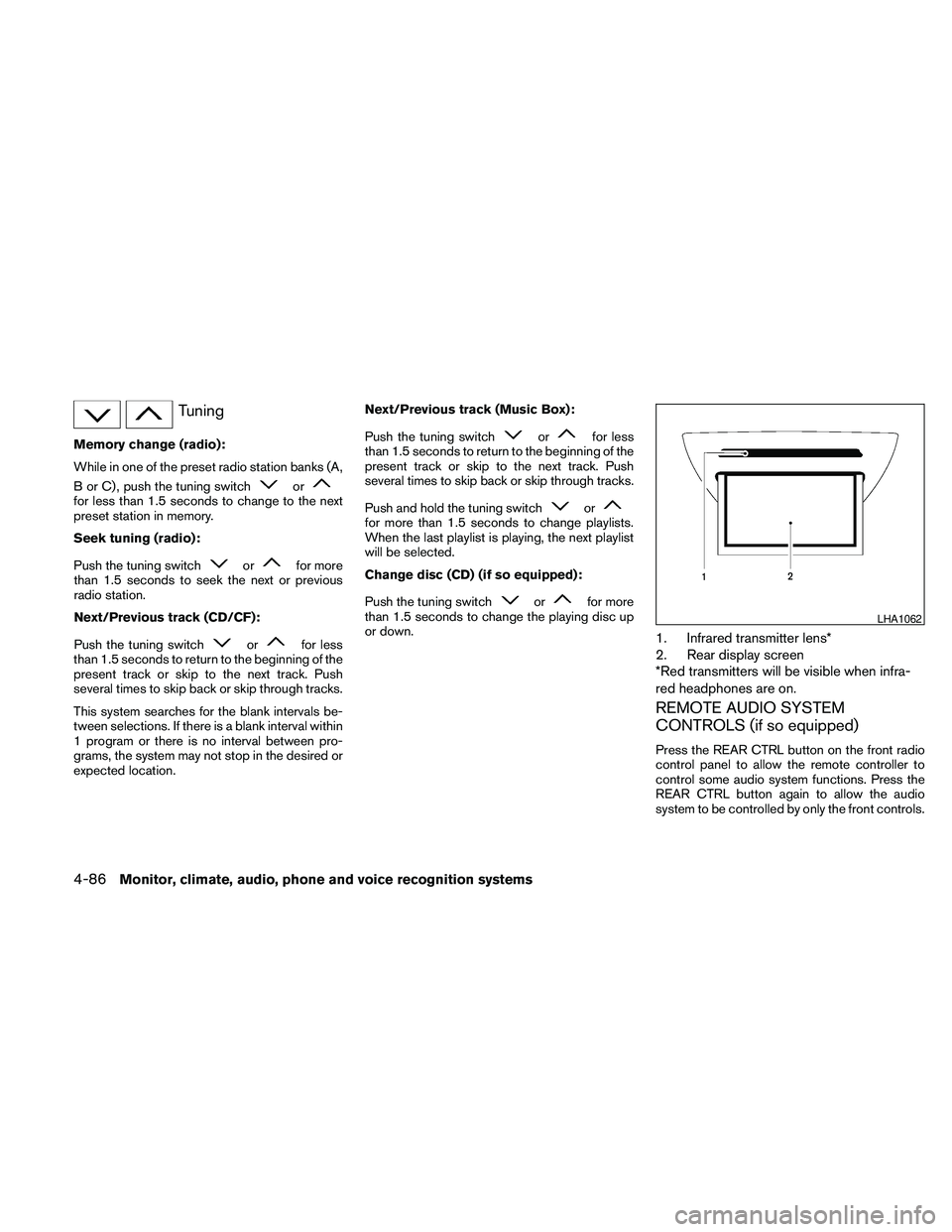
1. Infrared transmitter lens*
2. Rear display screen
*Red transmitters will be visible when infra-
red headphones are on.
REMOTE AUDIO SYSTEM
CONTROLS (if so equipped)
Press the REAR CTRL button on the front radio
control panel to allow the remote controller to
control some audio system functions. Press the
REAR CTRL button again to allow the audio
system to be controlled by only the front controls.
LHA1062
4-86Monitor, climate, audio, phone and voice recognition systems
Page 251 of 463
Press thebutton on the front radio control
panel; the headphones symbol and the message
“Headphones ON” illuminates on the front dis-
play when the headphones are on.
One or two infrared headphones and one remote
controller are included if the vehicle is equipped
with the DVD entertainment system.
For vehicles equipped with the FM/AM/SAT radio
with compact disc player, if the rear headphones
are turned on, the rear speakers will be disabled.
The rear passengers can use the wireless head-
phones to listen to a different media than the front
passengers. The rear passengers can listen to
the same media along with the front passengers
or they can listen to a different media.
For more information on the remote controller,
see “NISSAN Mobile Entertainment System
(MES)” later in this section.
VOL (volume) wireless headphones dial:
The VOL dial on the wireless headphones allows
the rear passengers to adjust the headphone
volume level.
Speaker control (front panel)
button:
Press the
button on the front radio control
panel to turn the rear speakers off and the wire-less headphones on. Press the
button
again to turn rear speakers back on and wireless
headphones off.
MODE (remote control) button:
The MODE button on the remote controller al-
lows the rear passengers to change between
Preset A, Preset B, Preset C, Music Box**, CD*,
CompactFlash*, DVD* and AUX. When a source
of media is selected, the media type will be dis-
played on the rear screen.
*These modes are only available when compat-
ible media storage is inserted into the device.
**This mode is only available when music has
been downloaded into the Music Box hard-disk
drive audio system.
Seek (remote control)
buttons:
In AM or FM mode, the
or theseek
buttons on the remote controller allow the rear
seat passengers to find the next or previous
preset radio station.
In CD, Music Box hard-disk drive audio system
and CompactFlash™ mode, the
or
the
seek buttons allow the rear passen-
gers to find the next or previous selection.
REW and FF
(remote control) buttons:
When the
(rewind) or the(fast for-
ward) button on the remote controller is pressed
while in AM or FM mode, the radio will tune to the
next frequency.
When the
(rewind) or the(fast for-
ward) button on the remote controller is pressed
while in CD, Music Box hard-disk audio system,
or CompactFlash™, the media will play while re-
winding or fast forwarding.
ANTENNA
Window antenna
The antenna pattern is printed inside the rear
passenger and driver side windows.
CAUTION
cDo not place metalized film near the
rear driver or passenger side window
glass or attach any metal parts to it. This
may cause poor reception or noise.
cWhen cleaning the inside of the rear
driver or passenger side window, be
careful not to scratch or damage the
window antenna. Lightly wipe along the
antenna with a dampened soft cloth.
Monitor, climate, audio, phone and voice recognition systems4-87
Page 252 of 463
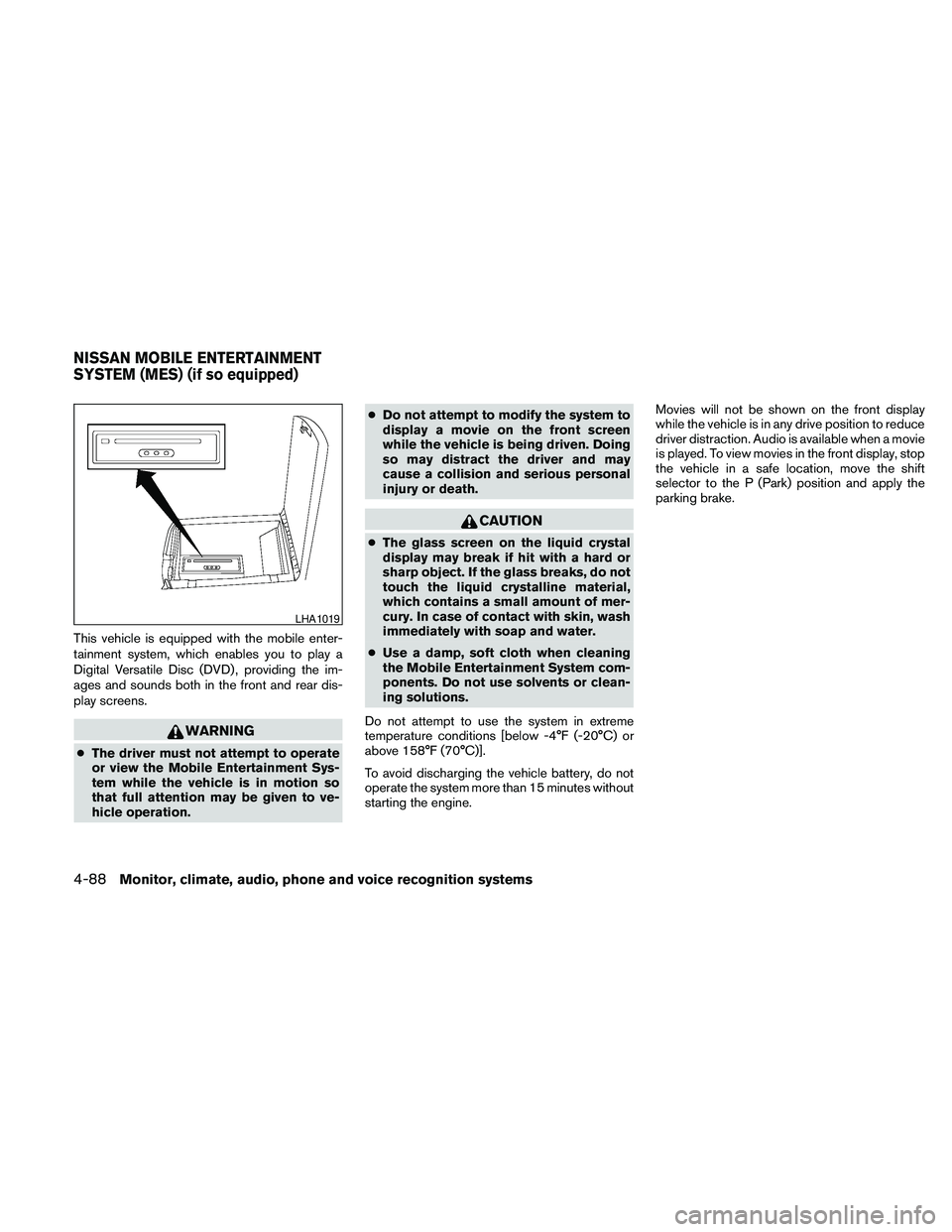
This vehicle is equipped with the mobile enter-
tainment system, which enables you to play a
Digital Versatile Disc (DVD) , providing the im-
ages and sounds both in the front and rear dis-
play screens.
WARNING
cThe driver must not attempt to operate
or view the Mobile Entertainment Sys-
tem while the vehicle is in motion so
that full attention may be given to ve-
hicle operation.cDo not attempt to modify the system to
display a movie on the front screen
while the vehicle is being driven. Doing
so may distract the driver and may
cause a collision and serious personal
injury or death.
CAUTION
cThe glass screen on the liquid crystal
display may break if hit with a hard or
sharp object. If the glass breaks, do not
touch the liquid crystalline material,
which contains a small amount of mer-
cury. In case of contact with skin, wash
immediately with soap and water.
cUse a damp, soft cloth when cleaning
the Mobile Entertainment System com-
ponents. Do not use solvents or clean-
ing solutions.
Do not attempt to use the system in extreme
temperature conditions [below -4°F (-20°C) or
above 158°F (70°C)].
To avoid discharging the vehicle battery, do not
operate the system more than 15 minutes without
starting the engine.Movies will not be shown on the front display
while the vehicle is in any drive position to reduce
driver distraction. Audio is available when a movie
is played. To view movies in the front display, stop
the vehicle in a safe location, move the shift
selector to the P (Park) position and apply the
parking brake.
LHA1019
NISSAN MOBILE ENTERTAINMENT
SYSTEM (MES) (if so equipped)
4-88Monitor, climate, audio, phone and voice recognition systems
Page 253 of 463
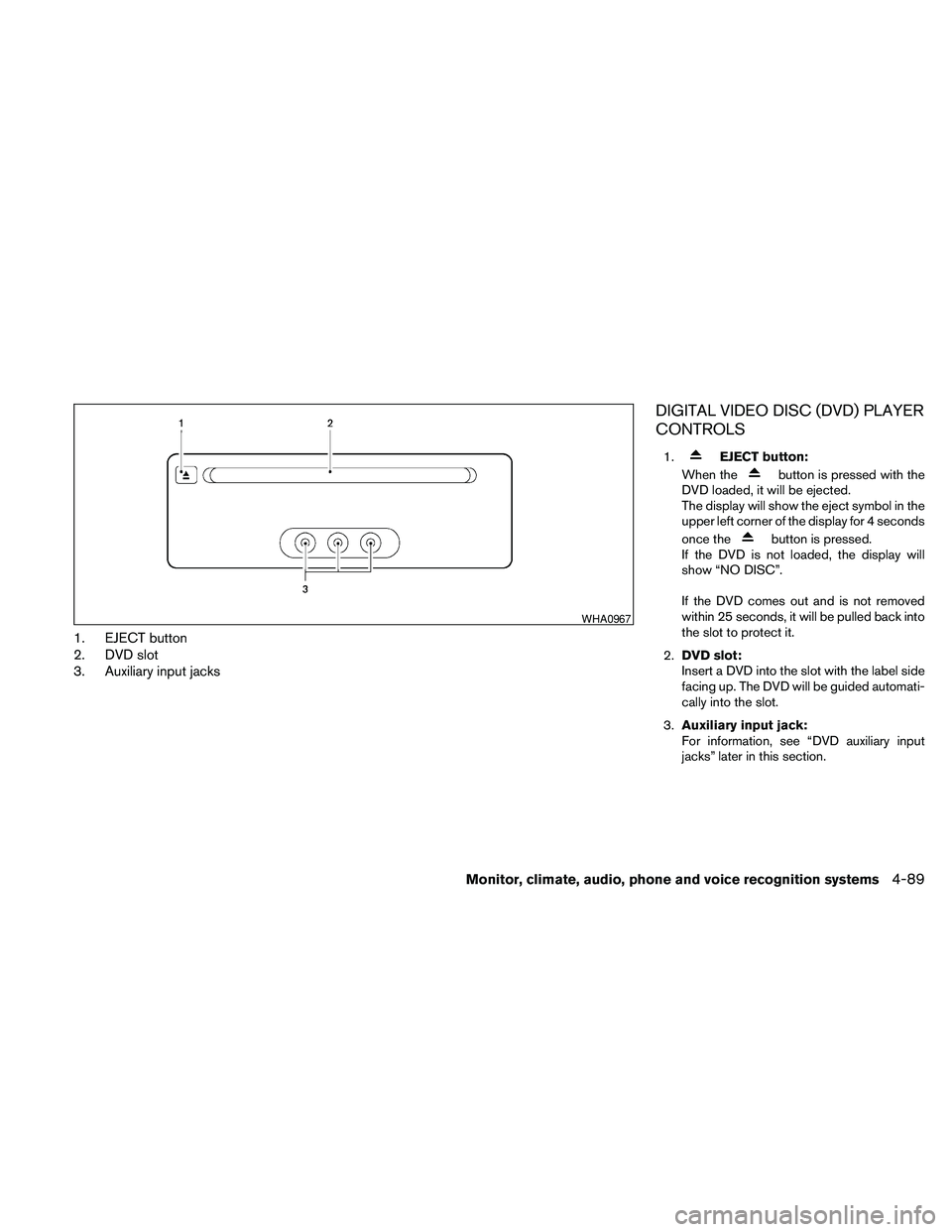
1. EJECT button
2. DVD slot
3. Auxiliary input jacks
DIGITAL VIDEO DISC (DVD) PLAYER
CONTROLS
1.EJECT button:
When the
button is pressed with the
DVD loaded, it will be ejected.
The display will show the eject symbol in the
upper left corner of the display for 4 seconds
once the
button is pressed.
If the DVD is not loaded, the display will
show “NO DISC”.
If the DVD comes out and is not removed
within 25 seconds, it will be pulled back into
the slot to protect it.
2.DVD slot:
Insert a DVD into the slot with the label side
facing up. The DVD will be guided automati-
cally into the slot.
3.Auxiliary input jack:
For information, see “DVD auxiliary input
jacks” later in this section.
WHA0967
Monitor, climate, audio, phone and voice recognition systems4-89
Page 254 of 463
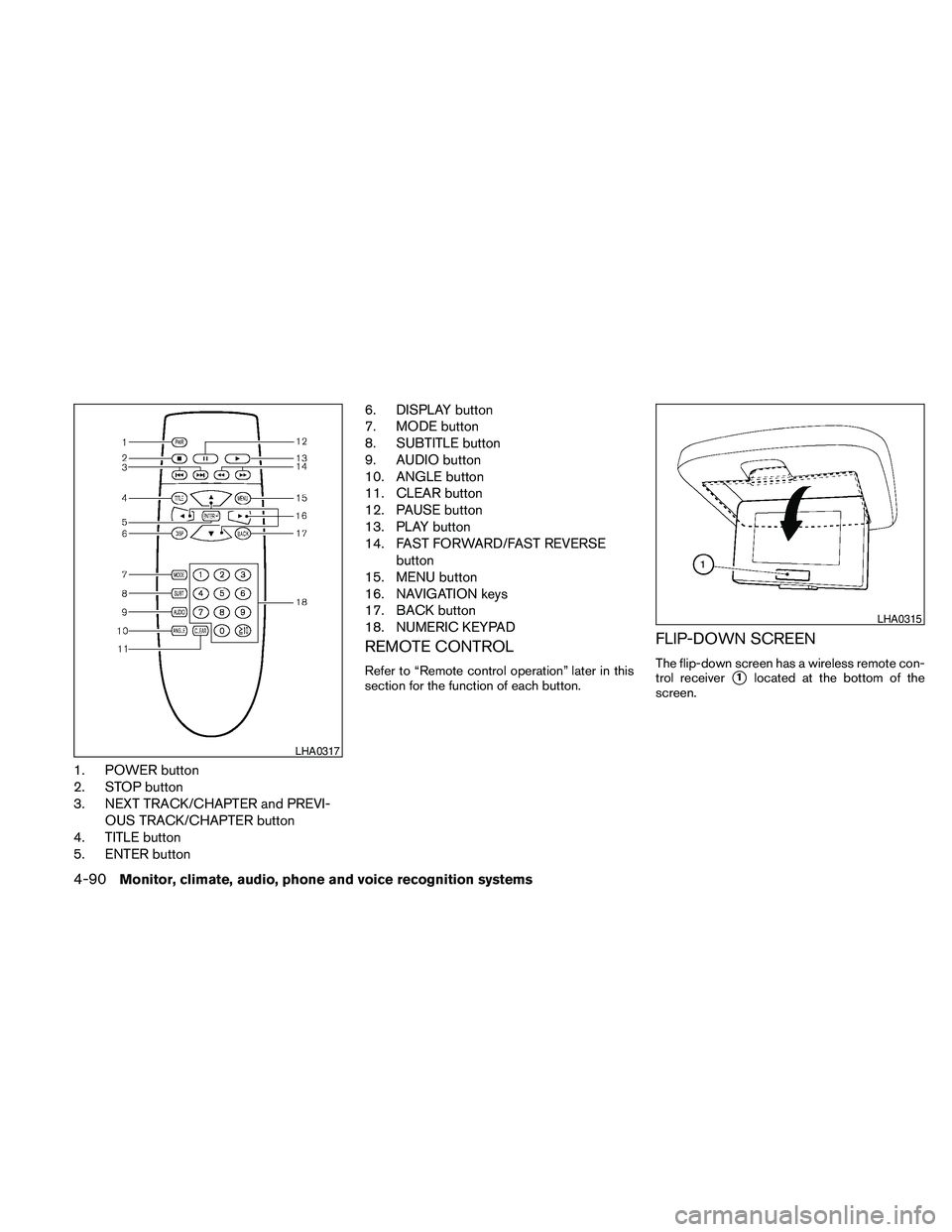
1. POWER button
2. STOP button
3. NEXT TRACK/CHAPTER and PREVI-
OUS TRACK/CHAPTER button
4. TITLE button
5. ENTER button6. DISPLAY button
7. MODE button
8. SUBTITLE button
9. AUDIO button
10. ANGLE button
11. CLEAR button
12. PAUSE button
13. PLAY button
14. FAST FORWARD/FAST REVERSE
button
15. MENU button
16. NAVIGATION keys
17. BACK button
18. NUMERIC KEYPAD
REMOTE CONTROL
Refer to “Remote control operation” later in this
section for the function of each button.
FLIP-DOWN SCREEN
The flip-down screen has a wireless remote con-
trol receiver
s1located at the bottom of the
screen.
LHA0317
LHA0315
4-90Monitor, climate, audio, phone and voice recognition systems