audio NISSAN PATHFINDER 2010 Owner´s Manual
[x] Cancel search | Manufacturer: NISSAN, Model Year: 2010, Model line: PATHFINDER, Model: NISSAN PATHFINDER 2010Pages: 463, PDF Size: 5.69 MB
Page 295 of 463
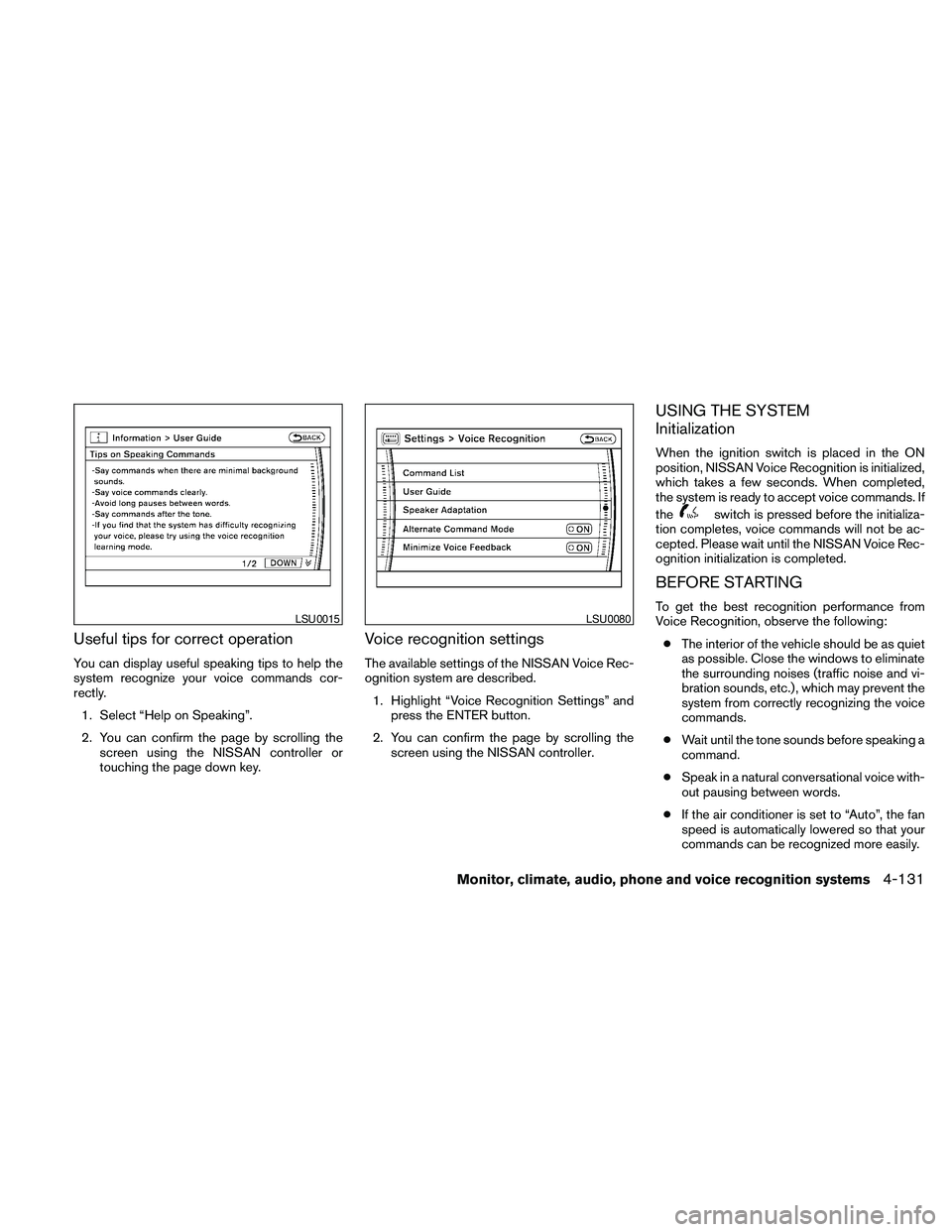
Useful tips for correct operation
You can display useful speaking tips to help the
system recognize your voice commands cor-
rectly.
1. Select “Help on Speaking”.
2. You can confirm the page by scrolling the
screen using the NISSAN controller or
touching the page down key.
Voice recognition settings
The available settings of the NISSAN Voice Rec-
ognition system are described.
1. Highlight “Voice Recognition Settings” and
press the ENTER button.
2. You can confirm the page by scrolling the
screen using the NISSAN controller.
USING THE SYSTEM
Initialization
When the ignition switch is placed in the ON
position, NISSAN Voice Recognition is initialized,
which takes a few seconds. When completed,
the system is ready to accept voice commands. If
the
switch is pressed before the initializa-
tion completes, voice commands will not be ac-
cepted. Please wait until the NISSAN Voice Rec-
ognition initialization is completed.
BEFORE STARTING
To get the best recognition performance from
Voice Recognition, observe the following:
cThe interior of the vehicle should be as quiet
as possible. Close the windows to eliminate
the surrounding noises (traffic noise and vi-
bration sounds, etc.) , which may prevent the
system from correctly recognizing the voice
commands.
cWait until the tone sounds before speaking a
command.
cSpeak in a natural conversational voice with-
out pausing between words.
cIf the air conditioner is set to “Auto”, the fan
speed is automatically lowered so that your
commands can be recognized more easily.LSU0015LSU0080
Monitor, climate, audio, phone and voice recognition systems4-131
Page 296 of 463
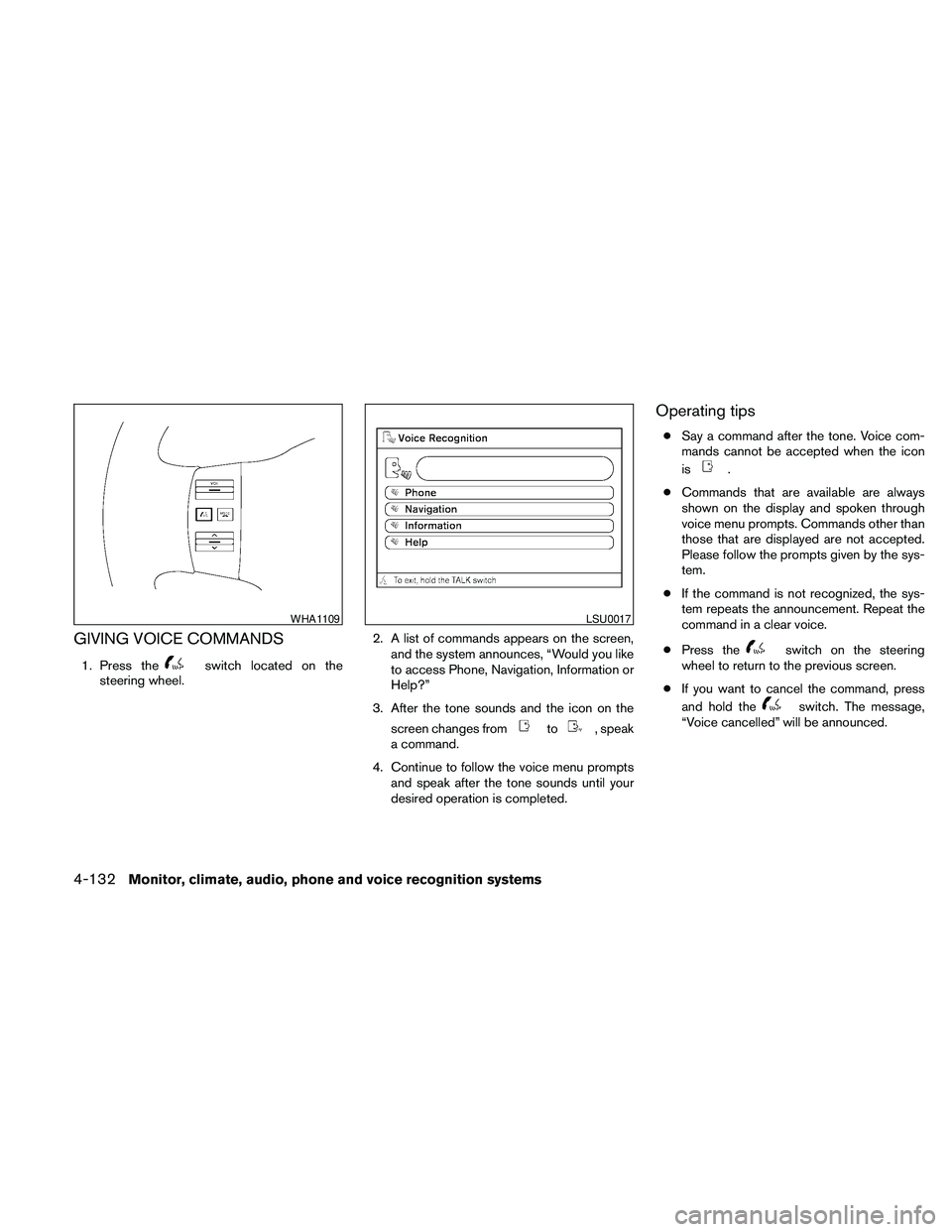
GIVING VOICE COMMANDS
1. Press theswitch located on the
steering wheel.2. A list of commands appears on the screen,
and the system announces, “Would you like
to access Phone, Navigation, Information or
Help?”
3. After the tone sounds and the icon on the
screen changes from
to, speak
a command.
4. Continue to follow the voice menu prompts
and speak after the tone sounds until your
desired operation is completed.
Operating tips
cSay a command after the tone. Voice com-
mands cannot be accepted when the icon
is
.
cCommands that are available are always
shown on the display and spoken through
voice menu prompts. Commands other than
those that are displayed are not accepted.
Please follow the prompts given by the sys-
tem.
cIf the command is not recognized, the sys-
tem repeats the announcement. Repeat the
command in a clear voice.
cPress the
switch on the steering
wheel to return to the previous screen.
cIf you want to cancel the command, press
and hold the
switch. The message,
“Voice cancelled” will be announced.
WHA1109LSU0017
4-132Monitor, climate, audio, phone and voice recognition systems
Page 297 of 463
cIf you want to adjust the volume of the sys-
tem feedback, push the volume control
switch on the steering wheel or use the
audio system volume knob while the system
is making an announcement.
How to speak numbers
Voice Recognition requires a certain way to
speak numbers when giving voice commands.
Refer to the following examples.
General rule:
cOnly single digits 0 (zero) to 9 can be used.
cWhen saying the phone number 800-662-
6200, the system will accept “eight-
hundred” in addition to “eight zero zero” or
“eight oh oh”. 500, 700, and 900 are also
supported.
Examples:
c1-800-662-6200
– “One eight zero zero six six two six two
zero zero”
– “One eight hundred six six two six two
zero zero”Improving Recognition of Phone numbers:
You can improve the recognition of phone num-
bers by saying the phone number in three groups
of numbers. For example, when you try to call
800-662-6200, say “eight zero zero” first, and
the system will then ask you for the next three
digits. Then, say “six six two”. After recognition,
the system will then ask for the last four digits.
Say, “six two zero zero”. Using this method of
phone digit entry can improve recognition perfor-
mance.
NOTE:
When speaking a house number, speak the
number “0” as “zero” or “oh”. If the letter
“O” is included in the house number, it will
not be recognized as “0” even if you speak
“oh” instead of “zero”.
Monitor, climate, audio, phone and voice recognition systems4-133
Page 298 of 463
Standard Mode command list
Category Command:
COMMAND ACTION
Phone Displays Phone function commands.
Navigation Displays Navigation function commands.
Information Displays Vehicle Information.
Help Displays User Guide.
Navigation Command:
COMMAND ACTION
Address Searches for a location by the street address specified, and sets a route (for continental US and Canada only) .
Places Sets a route to a facility near the current vehicle location.
Home Sets a route to your home that is stored in the Address Book.
Previous Destinations Sets a route to a previous destination.
4-134Monitor, climate, audio, phone and voice recognition systems
Page 299 of 463
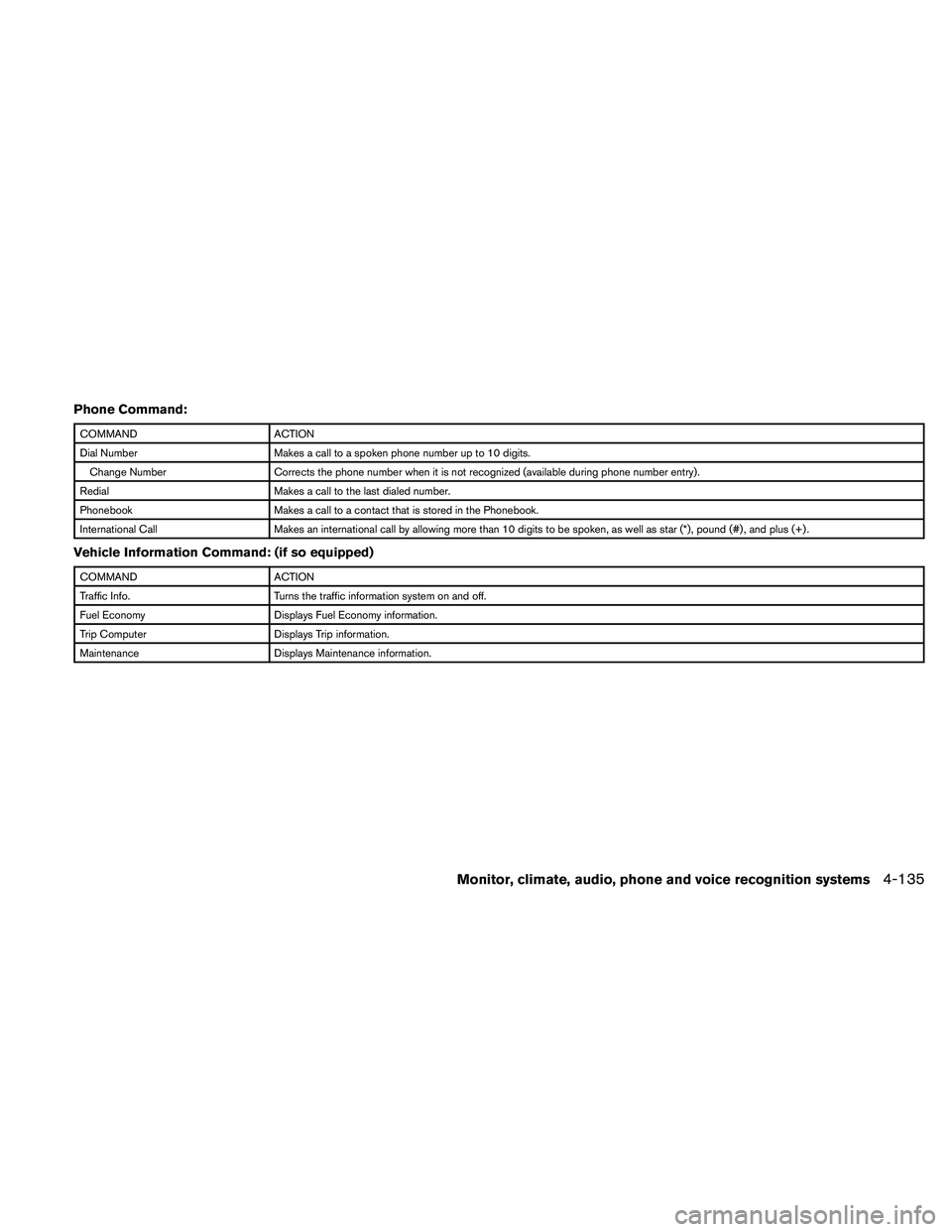
Phone Command:
COMMAND ACTION
Dial Number Makes a call to a spoken phone number up to 10 digits.
Change Number Corrects the phone number when it is not recognized (available during phone number entry) .
Redial Makes a call to the last dialed number.
Phonebook Makes a call to a contact that is stored in the Phonebook.
International Call Makes an international call by allowing more than 10 digits to be spoken, as well as star (*) , pound (#) , and plus (+) .
Vehicle Information Command: (if so equipped)
COMMAND ACTION
Traffic Info. Turns the traffic information system on and off.
Fuel Economy Displays Fuel Economy information.
Trip Computer Displays Trip information.
Maintenance Displays Maintenance information.
Monitor, climate, audio, phone and voice recognition systems4-135
Page 300 of 463
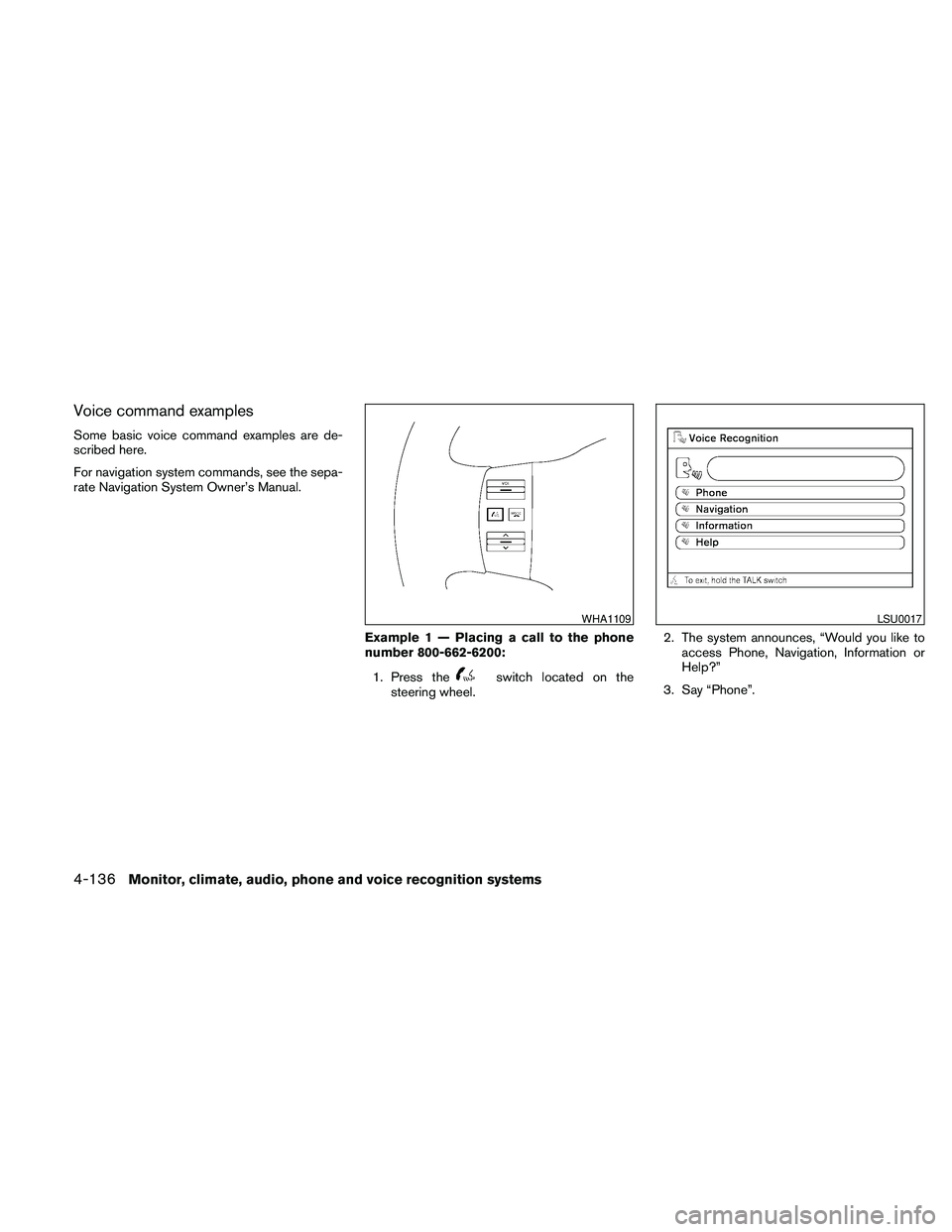
Voice command examples
Some basic voice command examples are de-
scribed here.
For navigation system commands, see the sepa-
rate Navigation System Owner’s Manual.
Example 1 — Placing a call to the phone
number 800-662-6200:
1. Press the
switch located on the
steering wheel.2. The system announces, “Would you like to
access Phone, Navigation, Information or
Help?”
3. Say “Phone”.
WHA1109LSU0017
4-136Monitor, climate, audio, phone and voice recognition systems
Page 301 of 463
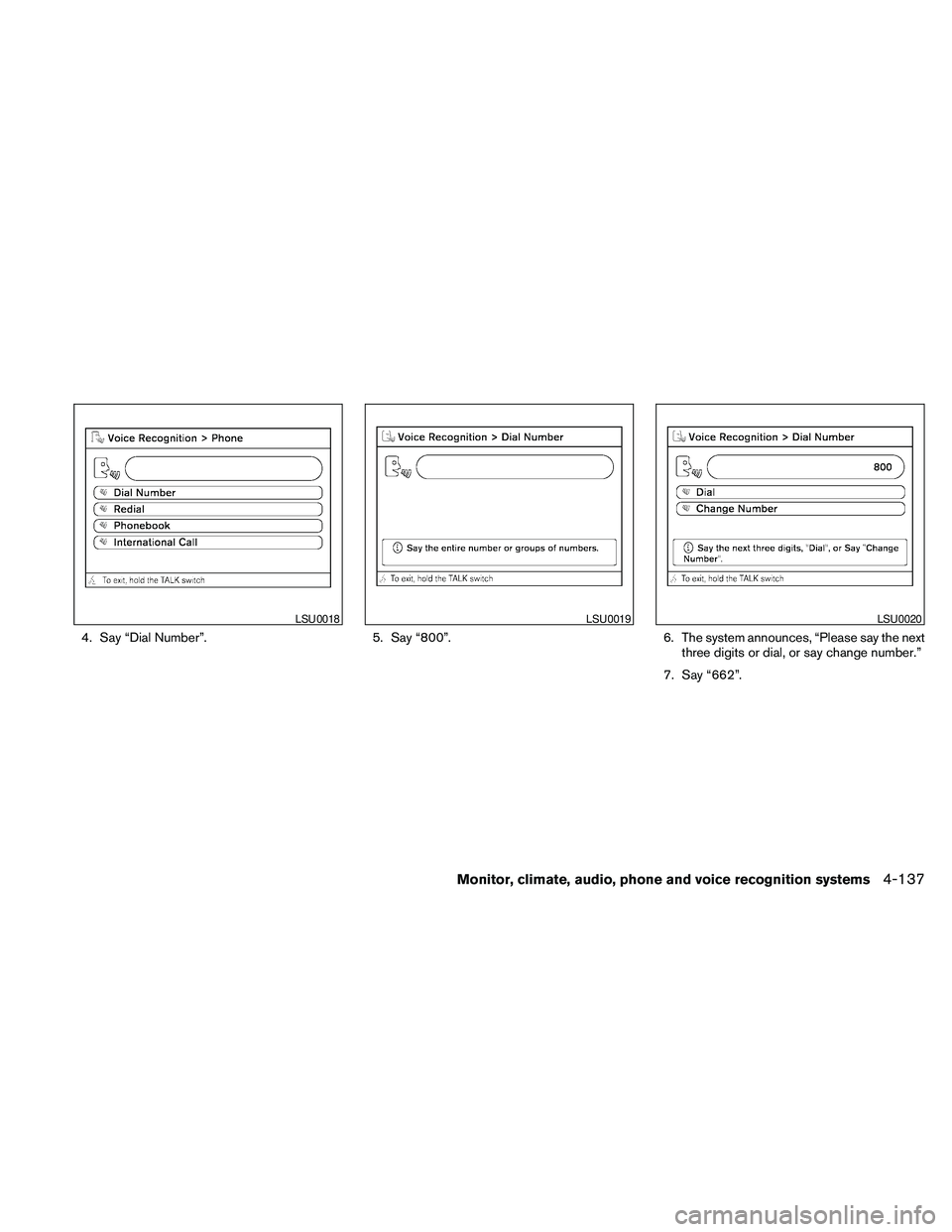
4. Say “Dial Number”. 5. Say “800”. 6. The system announces, “Please say the next
three digits or dial, or say change number.”
7. Say “662”.
LSU0018LSU0019LSU0020
Monitor, climate, audio, phone and voice recognition systems4-137
Page 302 of 463
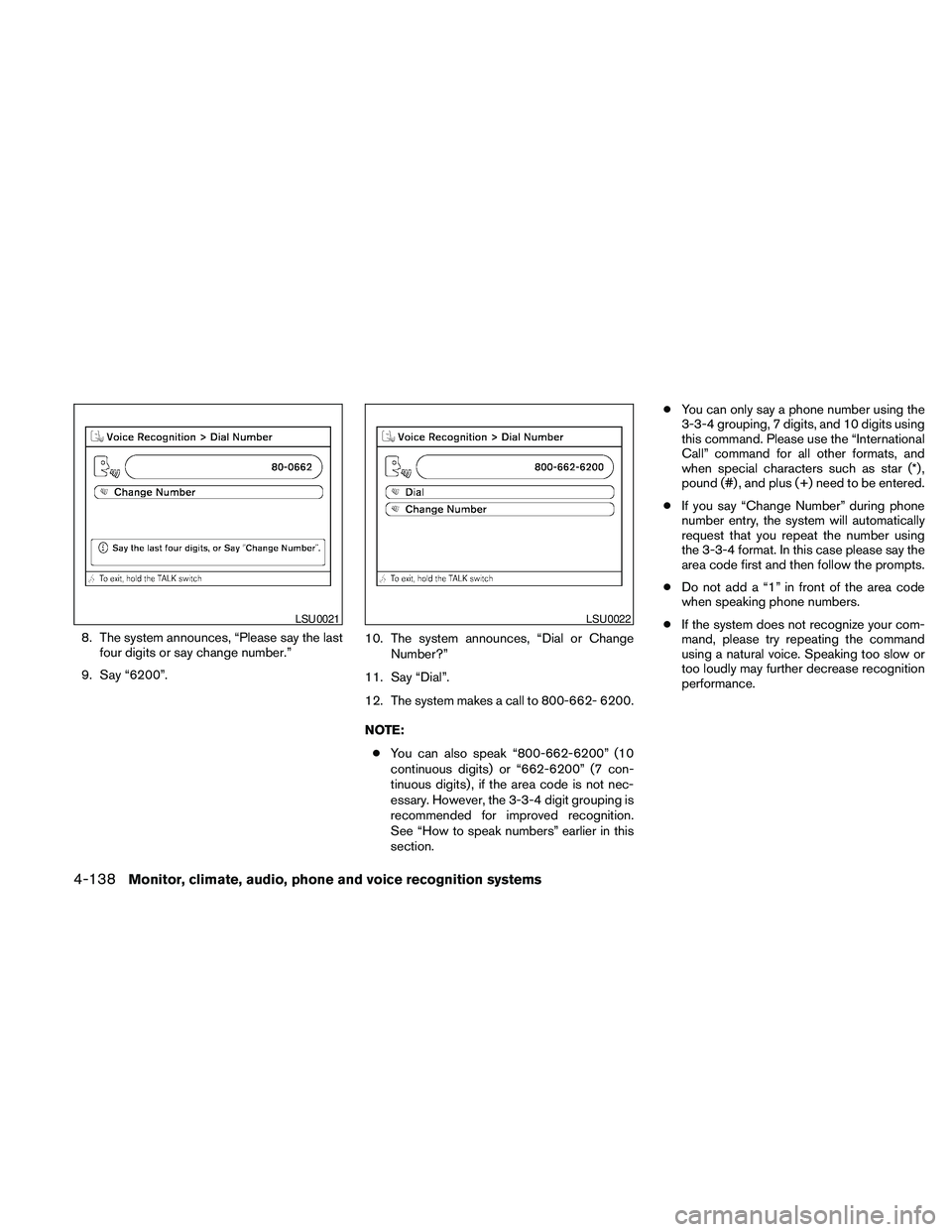
8. The system announces, “Please say the last
four digits or say change number.”
9. Say “6200”.10. The system announces, “Dial or Change
Number?”
11. Say “Dial”.
12. The system makes a call to 800-662- 6200.
NOTE:
cYou can also speak “800-662-6200” (10
continuous digits) or “662-6200” (7 con-
tinuous digits) , if the area code is not nec-
essary. However, the 3-3-4 digit grouping is
recommended for improved recognition.
See “How to speak numbers” earlier in this
section.cYou can only say a phone number using the
3-3-4 grouping, 7 digits, and 10 digits using
this command. Please use the “International
Call” command for all other formats, and
when special characters such as star (*) ,
pound (#) , and plus (+) need to be entered.
cIf you say “Change Number” during phone
number entry, the system will automatically
request that you repeat the number using
the 3-3-4 format. In this case please say the
area code first and then follow the prompts.
cDo not add a “1” in front of the area code
when speaking phone numbers.
cIf the system does not recognize your com-
mand, please try repeating the command
using a natural voice. Speaking too slow or
too loudly may further decrease recognition
performance.
LSU0021LSU0022
4-138Monitor, climate, audio, phone and voice recognition systems
Page 303 of 463
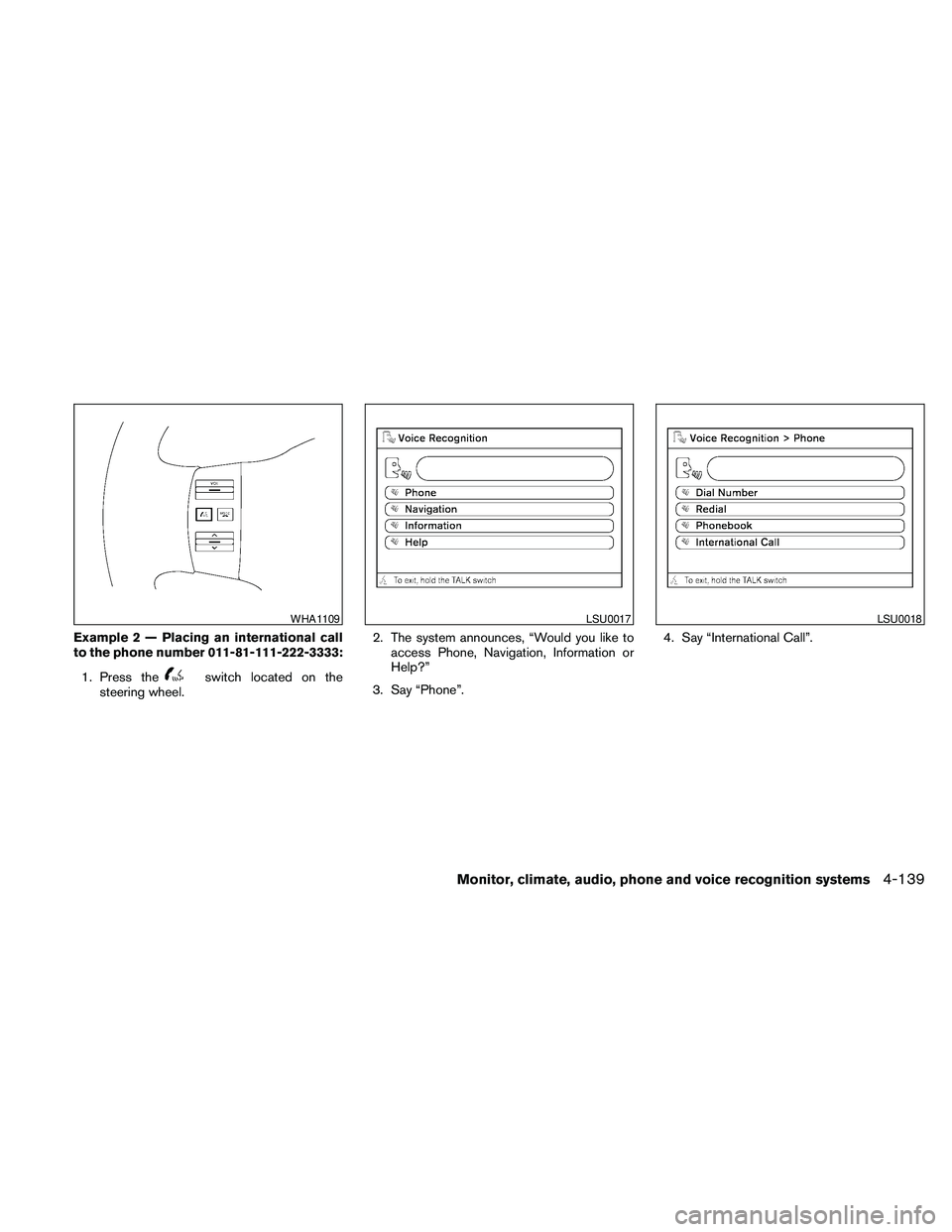
Example 2 — Placing an international call
to the phone number 011-81-111-222-3333:
1. Press the
switch located on the
steering wheel.2. The system announces, “Would you like to
access Phone, Navigation, Information or
Help?”
3. Say “Phone”.4. Say “International Call”.
WHA1109LSU0017LSU0018
Monitor, climate, audio, phone and voice recognition systems4-139
Page 304 of 463
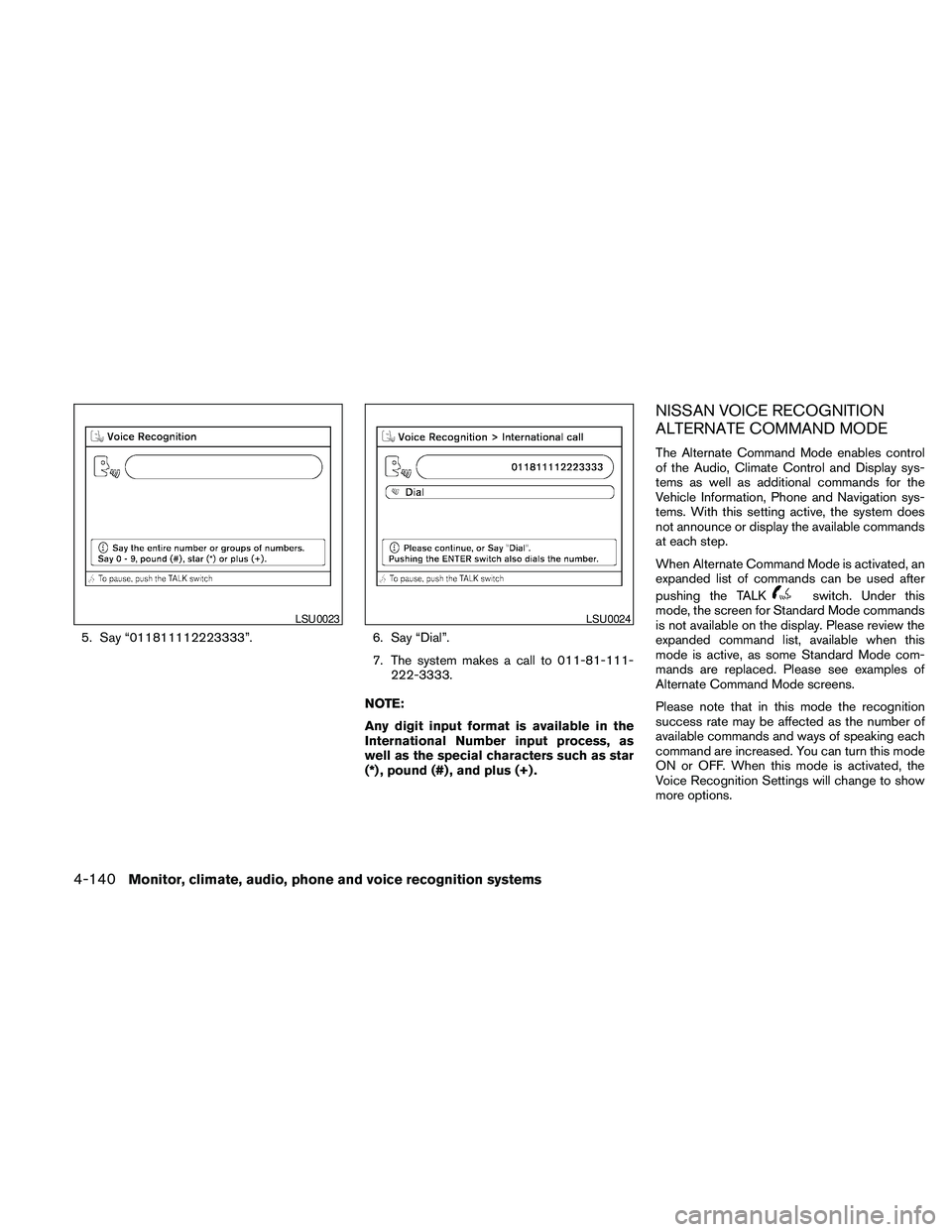
5. Say “011811112223333”. 6. Say “Dial”.
7. The system makes a call to 011-81-111-
222-3333.
NOTE:
Any digit input format is available in the
International Number input process, as
well as the special characters such as star
(*) , pound (#) , and plus (+) .
NISSAN VOICE RECOGNITION
ALTERNATE COMMAND MODE
The Alternate Command Mode enables control
of the Audio, Climate Control and Display sys-
tems as well as additional commands for the
Vehicle Information, Phone and Navigation sys-
tems. With this setting active, the system does
not announce or display the available commands
at each step.
When Alternate Command Mode is activated, an
expanded list of commands can be used after
pushing the TALK
switch. Under this
mode, the screen for Standard Mode commands
is not available on the display. Please review the
expanded command list, available when this
mode is active, as some Standard Mode com-
mands are replaced. Please see examples of
Alternate Command Mode screens.
Please note that in this mode the recognition
success rate may be affected as the number of
available commands and ways of speaking each
command are increased. You can turn this mode
ON or OFF. When this mode is activated, the
Voice Recognition Settings will change to show
more options.
LSU0023LSU0024
4-140Monitor, climate, audio, phone and voice recognition systems