power steering NISSAN PATHFINDER 2010 Owner´s Manual
[x] Cancel search | Manufacturer: NISSAN, Model Year: 2010, Model line: PATHFINDER, Model: NISSAN PATHFINDER 2010Pages: 463, PDF Size: 5.69 MB
Page 12 of 463
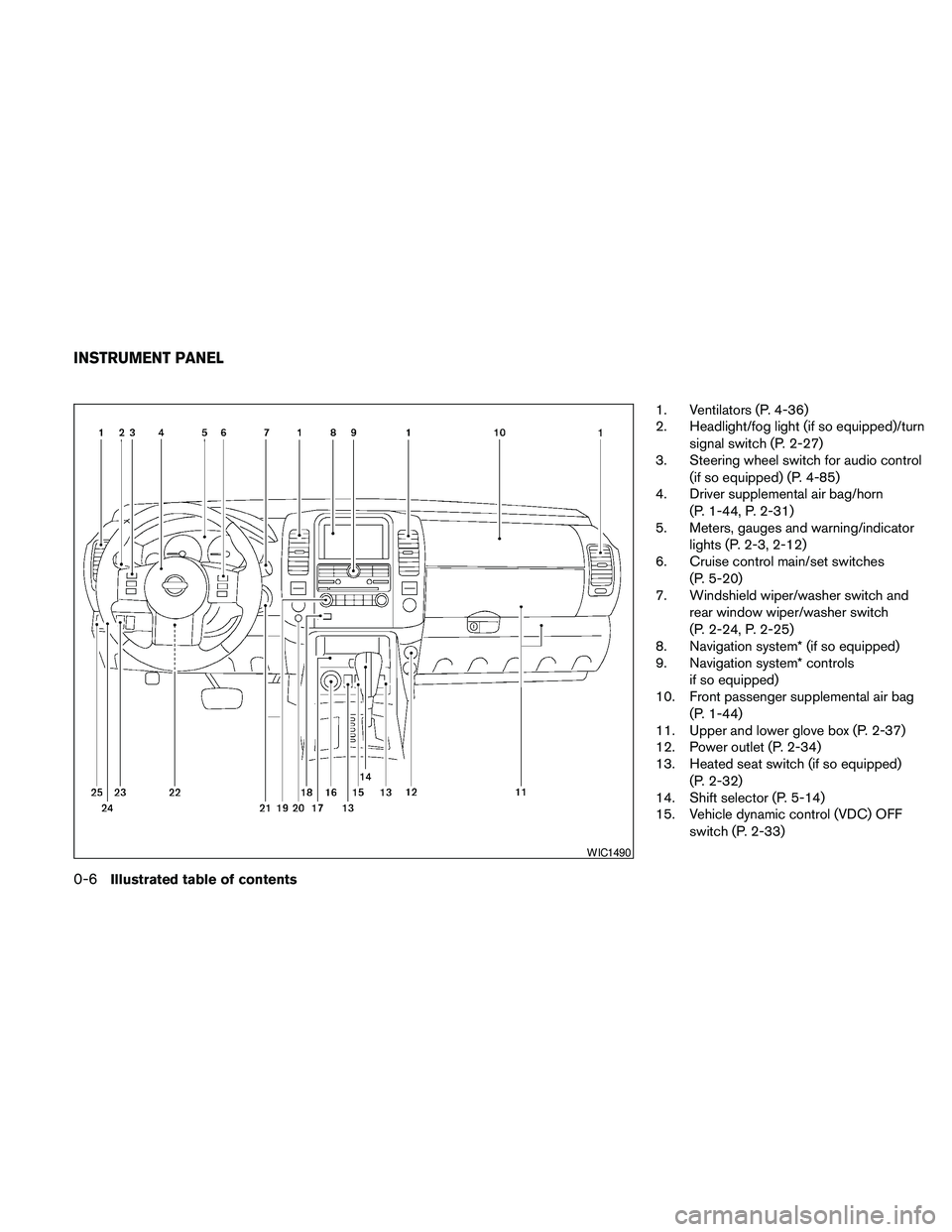
1. Ventilators (P. 4-36)
2. Headlight/fog light (if so equipped)/turn
signal switch (P. 2-27)
3. Steering wheel switch for audio control
(if so equipped) (P. 4-85)
4. Driver supplemental air bag/horn
(P. 1-44, P. 2-31)
5. Meters, gauges and warning/indicator
lights (P. 2-3, 2-12)
6. Cruise control main/set switches
(P. 5-20)
7. Windshield wiper/washer switch and
rear window wiper/washer switch
(P. 2-24, P. 2-25)
8. Navigation system* (if so equipped)
9. Navigation system* controls
if so equipped)
10. Front passenger supplemental air bag
(P. 1-44)
11. Upper and lower glove box (P. 2-37)
12. Power outlet (P. 2-34)
13. Heated seat switch (if so equipped)
(P. 2-32)
14. Shift selector (P. 5-14)
15. Vehicle dynamic control (VDC) OFF
switch (P. 2-33)
WIC1490
INSTRUMENT PANEL
0-6Illustrated table of contents
Page 14 of 463
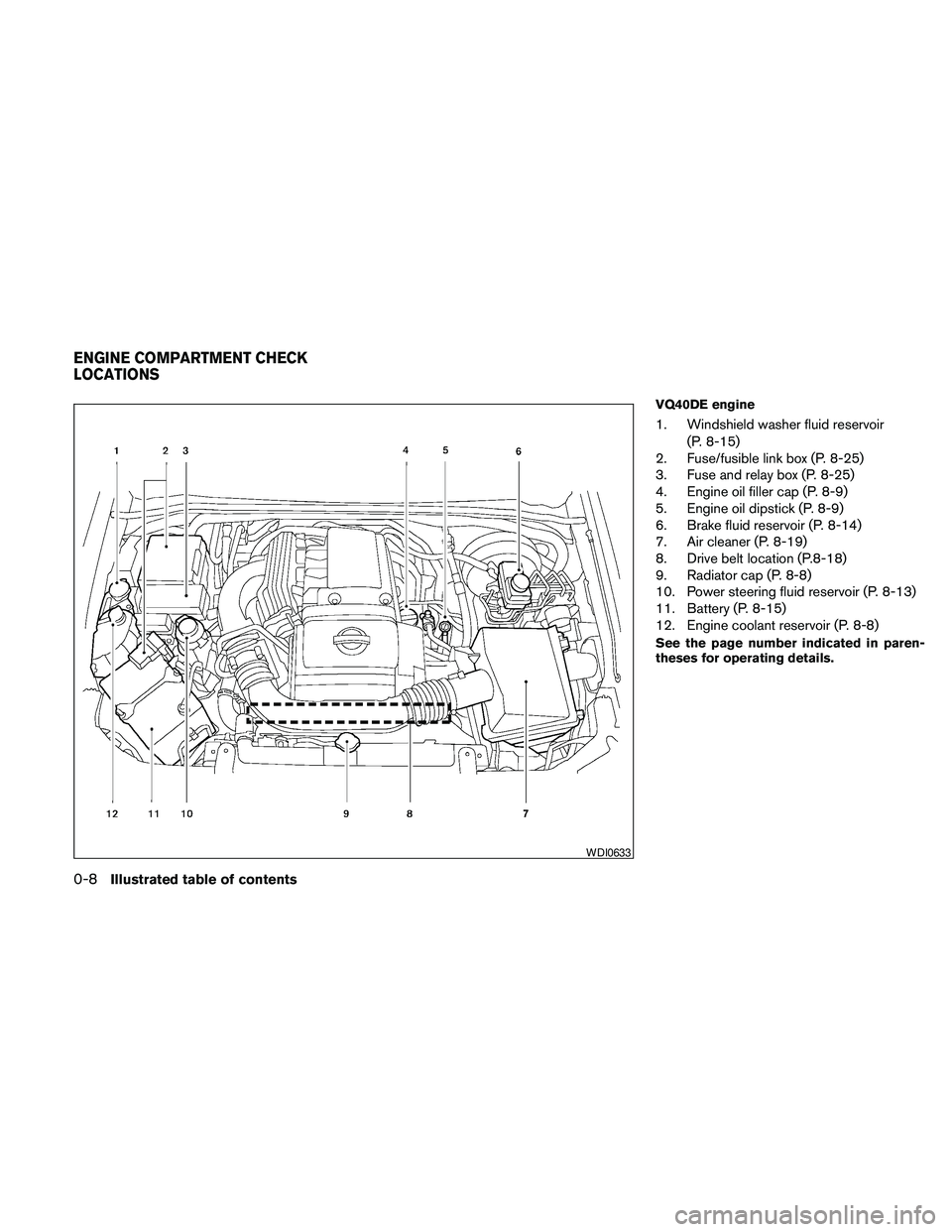
VQ40DE engine
1. Windshield washer fluid reservoir
(P. 8-15)
2. Fuse/fusible link box (P. 8-25)
3. Fuse and relay box (P. 8-25)
4. Engine oil filler cap (P. 8-9)
5. Engine oil dipstick (P. 8-9)
6. Brake fluid reservoir (P. 8-14)
7. Air cleaner (P. 8-19)
8. Drive belt location (P.8-18)
9. Radiator cap (P. 8-8)
10. Power steering fluid reservoir (P. 8-13)
11. Battery (P. 8-15)
12. Engine coolant reservoir (P. 8-8)
See the page number indicated in paren-
theses for operating details.
WDI0633
ENGINE COMPARTMENT CHECK
LOCATIONS
0-8Illustrated table of contents
Page 15 of 463
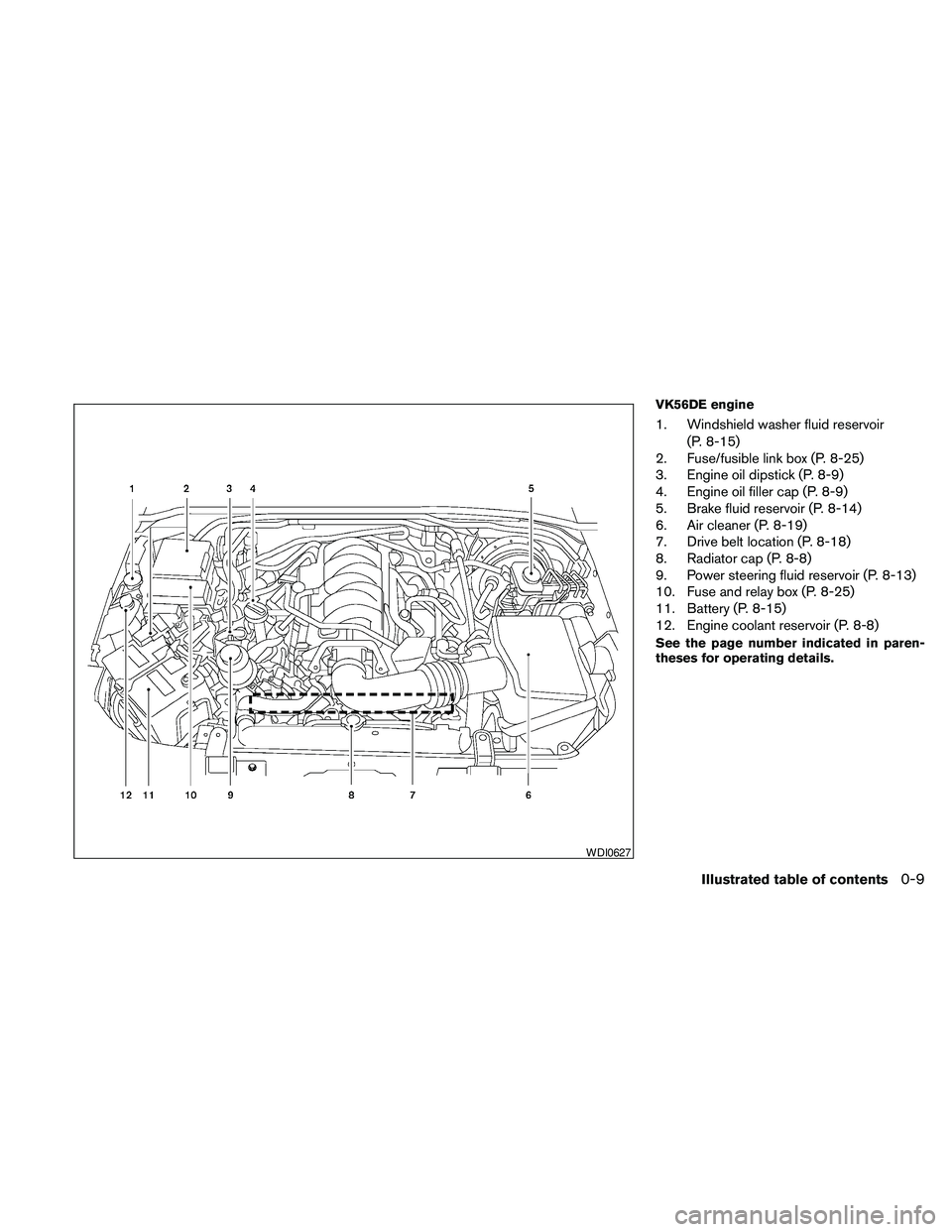
VK56DE engine
1. Windshield washer fluid reservoir
(P. 8-15)
2. Fuse/fusible link box (P. 8-25)
3. Engine oil dipstick (P. 8-9)
4. Engine oil filler cap (P. 8-9)
5. Brake fluid reservoir (P. 8-14)
6. Air cleaner (P. 8-19)
7. Drive belt location (P. 8-18)
8. Radiator cap (P. 8-8)
9. Power steering fluid reservoir (P. 8-13)
10. Fuse and relay box (P. 8-25)
11. Battery (P. 8-15)
12. Engine coolant reservoir (P. 8-8)
See the page number indicated in paren-
theses for operating details.
WDI0627
Illustrated table of contents0-9
Page 80 of 463
2 Instruments and controls
Instrument panel...................................2-2
Meters and gauges................................2-3
Speedometer and odometer.....................2-4
Trip computer..................................2-5
Tachometer....................................2-6
Engine coolant temperature gauge...............2-6
Fuel gauge....................................2-7
Engine oil pressure gauge.......................2-7
Voltmeter......................................2-8
Compass display (if so equipped)...................2-8
Compass display...............................2-9
Warning/indicator lights and audible reminders......2-12
Checking bulbs...............................2-13
Warning lights................................2-13
Indicator lights................................2-18
Audible reminders.............................2-21
Security systems.................................2-22
Vehicle security system.........................2-22
NISSAN vehicle immobilizer system.............2-23
Windshield wiper and washer switch...............2-24
Switch operation..............................2-24
Rear window wiper and washer switch..............2-25Rear window and outside mirror (if so equipped)
defroster switch..................................2-26
Headlight and turn signal switch....................2-27
Headlight control switch........................2-27
Daytime running light system (Canada only)......2-29
Instrument brightness control...................2-30
Turn signal switch.............................2-30
Fog light switch (if so equipped)................2-30
Hazard warning flasher switch.....................2-31
Horn............................................2-31
Heated steering wheel (if so equipped).............2-32
Heated seat (if so equipped).......................2-32
Vehicle Dynamic Control (VDC) OFF switch.........2-33
Power outlet.....................................2-34
Storage.........................................2-35
Storage trays.................................2-35
Storage bins..................................2-36
Console box..................................2-36
Glove box....................................2-37
Sunglasses holder.............................2-37
Map pockets..................................2-38
Seat pockets..................................2-38
Page 82 of 463
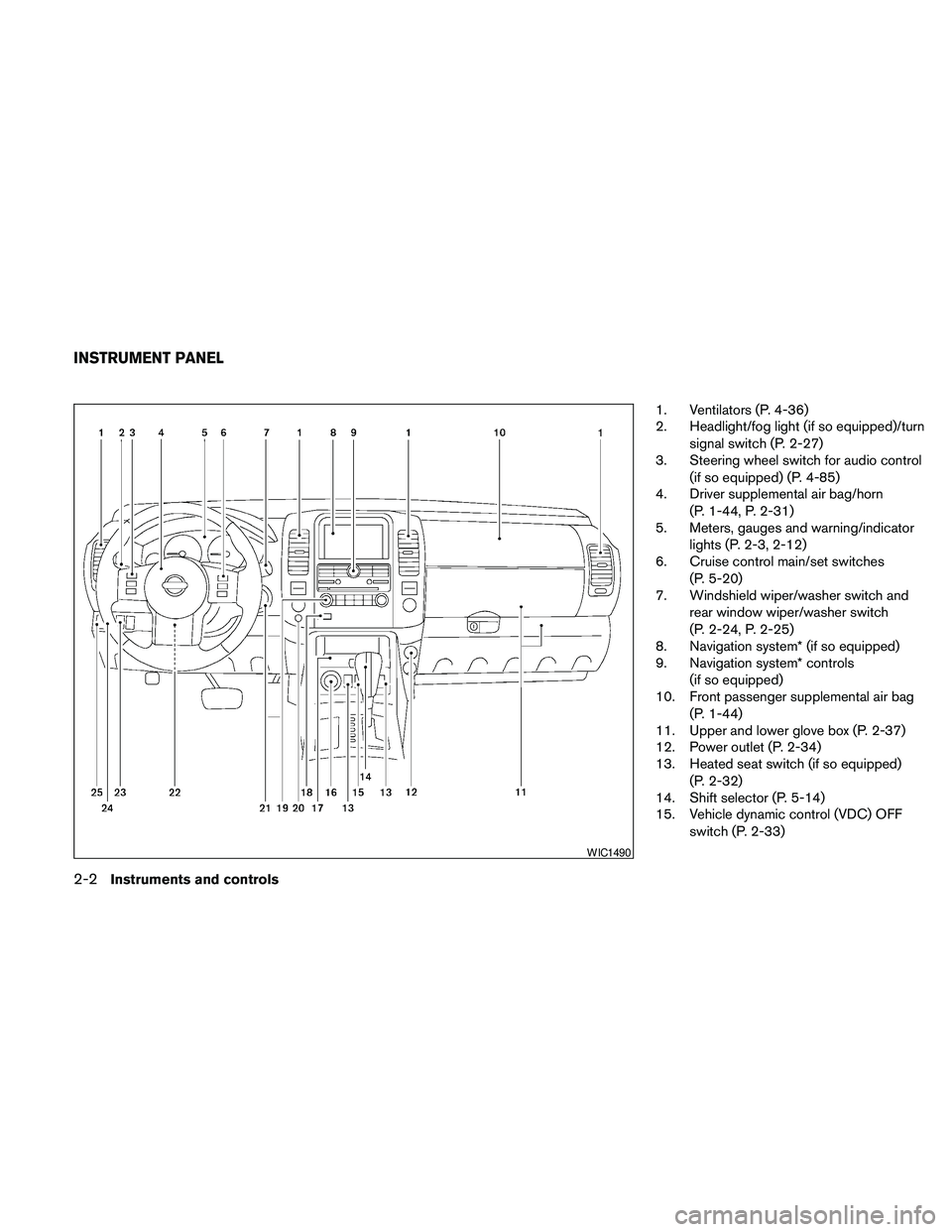
1. Ventilators (P. 4-36)
2. Headlight/fog light (if so equipped)/turn
signal switch (P. 2-27)
3. Steering wheel switch for audio control
(if so equipped) (P. 4-85)
4. Driver supplemental air bag/horn
(P. 1-44, P. 2-31)
5. Meters, gauges and warning/indicator
lights (P. 2-3, 2-12)
6. Cruise control main/set switches
(P. 5-20)
7. Windshield wiper/washer switch and
rear window wiper/washer switch
(P. 2-24, P. 2-25)
8. Navigation system* (if so equipped)
9. Navigation system* controls
(if so equipped)
10. Front passenger supplemental air bag
(P. 1-44)
11. Upper and lower glove box (P. 2-37)
12. Power outlet (P. 2-34)
13. Heated seat switch (if so equipped)
(P. 2-32)
14. Shift selector (P. 5-14)
15. Vehicle dynamic control (VDC) OFF
switch (P. 2-33)
WIC1490
INSTRUMENT PANEL
2-2Instruments and controls
Page 133 of 463
3 Pre-driving checks and adjustments
Keys .............................................3-2
NISSAN Vehicle Immobilizer System keys.........3-2
NISSAN Intelligent Key™ (if so equipped).........3-3
Doors............................................3-4
Locking with key................................3-5
Locking with inside lock knob....................3-5
Locking with power door lock switch.............3-6
Automatic door locks...........................3-6
Child safety rear door lock.......................3-7
Remote keyless entry system (if so equipped).........3-7
How to use remote keyless entry system..........3-8
NISSAN Intelligent Key™ (if so equipped)...........3-11
Operating range...............................3-13
Door locks/unlocks precaution..................3-13
NISSAN Intelligent Key™ Operation..............3-14
How to use the remote keyless entry
function......................................3-17
Warning signals...............................3-19
Troubleshooting guide.........................3-20
Hood...........................................3-21Lift gate.........................................3-21
Glass hatch......................................3-22
Fuel-filler door...................................3-23
Opening the fuel-filler lid.......................3-23
Fuel-filler cap.................................3-23
Steering wheel...................................3-24
Tilt operation..................................3-24
Pedal position adjustment (if so equipped)..........3-25
Sun visors.......................................3-25
Vanity mirrors.................................3-26
Mirrors..........................................3-26
Rearview mirror (if so equipped).................3-26
Automatic anti-glare rearview mirror
(if so equipped)...............................3-27
Outside mirrors...............................3-29
Automatic drive positioner (if so equipped)..........3-30
Memory storage function.......................3-30
Entry/exit function.............................3-31
System operation..............................3-32
Page 249 of 463
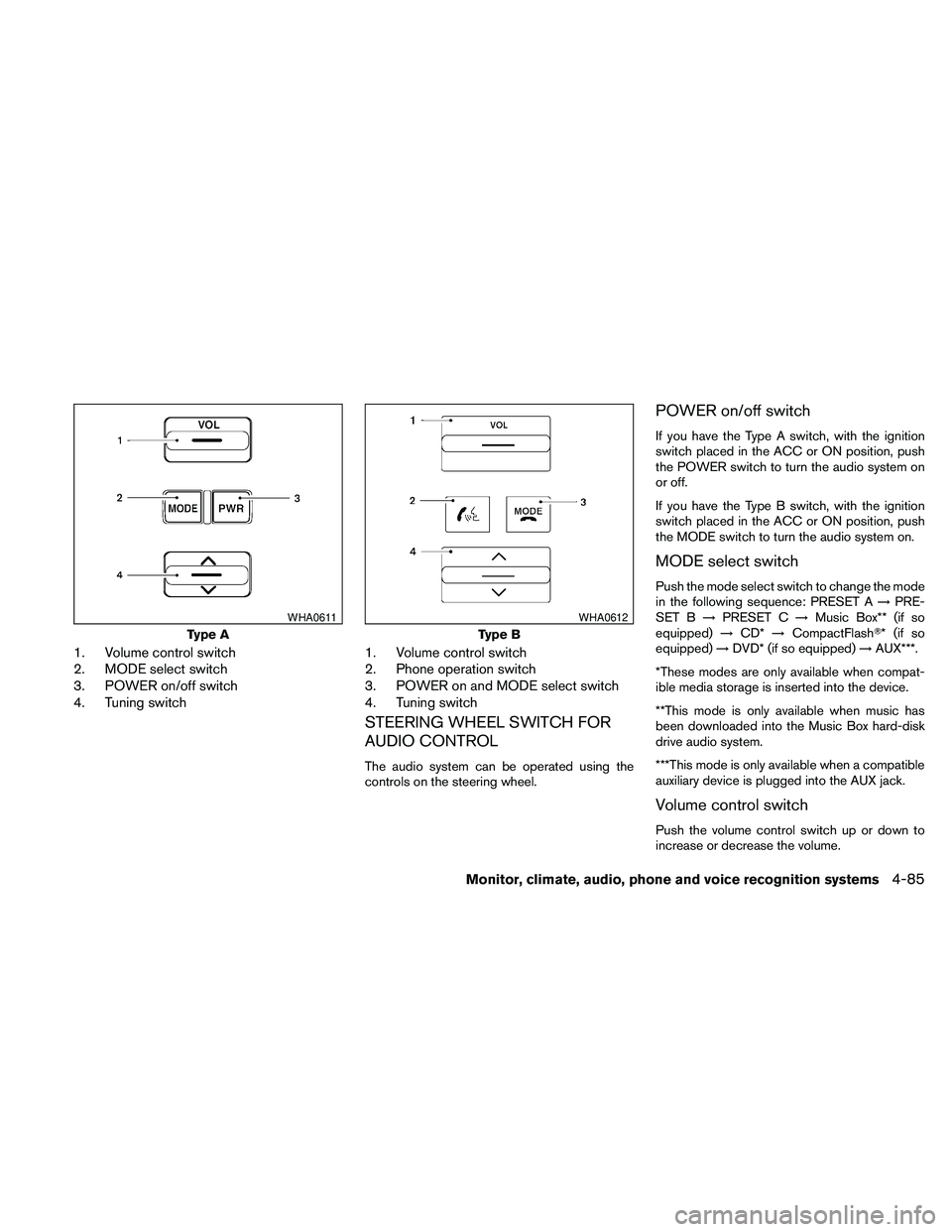
1. Volume control switch
2. MODE select switch
3. POWER on/off switch
4. Tuning switch1. Volume control switch
2. Phone operation switch
3. POWER on and MODE select switch
4. Tuning switch
STEERING WHEEL SWITCH FOR
AUDIO CONTROL
The audio system can be operated using the
controls on the steering wheel.
POWER on/off switch
If you have the Type A switch, with the ignition
switch placed in the ACC or ON position, push
the POWER switch to turn the audio system on
or off.
If you have the Type B switch, with the ignition
switch placed in the ACC or ON position, push
the MODE switch to turn the audio system on.
MODE select switch
Push the mode select switch to change the mode
in the following sequence: PRESET A!PRE-
SET B!PRESET C!Music Box** (if so
equipped)!CD*!CompactFlashT* (if so
equipped)!DVD* (if so equipped)!AUX***.
*These modes are only available when compat-
ible media storage is inserted into the device.
**This mode is only available when music has
been downloaded into the Music Box hard-disk
drive audio system.
***This mode is only available when a compatible
auxiliary device is plugged into the AUX jack.
Volume control switch
Push the volume control switch up or down to
increase or decrease the volume.
Type A
WHA0611
Type B
WHA0612
Monitor, climate, audio, phone and voice recognition systems4-85
Page 317 of 463
5 Starting and driving
Precautions when starting and driving................5-2
Exhaust gas (carbon monoxide)..................5-2
Three-way catalyst..............................5-2
Tire Pressure Monitoring System (TPMS)..........5-3
On-pavement and off-road driving
precautions....................................5-5
Avoiding collision and rollover....................5-6
Off-road recovery...............................5-6
Rapid air pressure loss..........................5-6
Drinking alcohol/drugs and driving................5-7
Driving safety precautions.......................5-7
Ignition switch.....................................5-9
NISSAN Intelligent Key™ (if so equipped)........5-10
Ignition switch positions........................5-10
Automatic transmission.........................5-11
Key positions.................................5-12
Nissan vehicle immobilizer system...............5-12
Before starting the engine.........................5-13
Starting the engine...............................5-13
Driving the vehicle................................5-14
Automatic transmission.........................5-14
Parking brake....................................5-19Cruise control....................................5-20
Precautions on cruise control...................5-20
Cruise control operations.......................5-20
Break-in schedule................................5-21
Increasing fuel economy...........................5-22
Using four wheel drive (4WD).............5-22
Parking/parking on hills............................5-32
Power steering...................................5-33
Brake system....................................5-33
Brake precautions.............................5-33
Anti-lock Braking System (ABS).................5-34
Active brake limited slip (ABLS) system.............5-35
Vehicle Dynamic Control (VDC) system.............5-36
Cold weather driving..............................5-37
Freeing a frozen door lock......................5-37
Anti-freeze....................................5-37
Battery.......................................5-37
Draining of coolant water.......................5-37
Tire equipment................................5-37
Special winter equipment.......................5-38
Driving on snow or ice.........................5-38
Engine block heater (if so equipped).............5-38
Page 349 of 463
cHEADED DOWNHILL WITH CURB:sA
Turn the wheels into the curb and move the
vehicle forward until the curb side wheel
gently touches the curb.
cHEADED UPHILL WITH CURB:
sB
Turn the wheels away from the curb and
move the vehicle back until the curb side
wheel gently touches the curb.
cHEADED UPHILL OR DOWNHILL, NO
CURB:
sC
Turn the wheels toward the side of the road
so the vehicle will move away from the cen-
ter of the road if it moves.
4. Place the ignition switch in the LOCK posi-
tion.The power assisted steering uses a hydraulic
pump, driven by the engine, to assist steering.
If the engine stops or the drive belt breaks, you
will still have control of the vehicle. However,
much greater steering effort is needed, especially
in sharp turns and at low speeds.
WARNING
If the engine is not running or is turned off
while driving, the power assist for the
steering will not work. Steering will be
harder to operate.The brake system has two separate hydraulic
circuits. If one circuit malfunctions, you will still
have braking at 2 wheels.
BRAKE PRECAUTIONS
Vacuum assisted brakes
The brake booster aids braking by using engine
vacuum. If the engine stops, you can stop the
vehicle by depressing the brake pedal. However,
greater foot pressure on the brake pedal will be
required to stop the vehicle and stopping dis-
tance will be longer.
Using the brakes
Avoid resting your foot on the brake pedal while
driving. This will overheat the brakes, wear out the
brake pads faster, and reduce gas mileage.
To help reduce brake wear and to prevent the
brakes from overheating, reduce speed and
downshift to a lower gear before going down a
slope or long grade. Overheated brakes may
reduce braking performance and could result in
loss of vehicle control.
POWER STEERING BRAKE SYSTEM
Starting and driving5-33
Page 350 of 463
WARNING
cWhile driving on a slippery surface, be
careful when braking, accelerating or
downshifting. Abrupt braking or accel-
erating could cause the wheels to skid
and result in an accident.
cIf the engine is not running or is turned
off while driving, the power assist for
the brakes will not work. Braking will be
harder.
Wet brakes
When the vehicle is washed or driven through
water, the brakes may get wet. As a result, your
braking distance will be longer and the vehicle
may pull to one side during braking.
To dry the brakes, drive the vehicle at a safe
speed while lightly pressing the brake pedal to
heat up the brakes. Do this until the brakes return
to normal. Avoid driving the vehicle at high
speeds until the brakes function correctly.
Parking brake break-in
Break-in the parking brake shoes whenever the
stopping effect of the parking brake is weakened
or whenever the parking brake shoes and/or
drum/rotors are replaced, in order to assure the
best brake performance.This procedure is described in the vehicle service
manual and can be performed by a NISSAN
dealer.
ANTI-LOCK BRAKING SYSTEM
(ABS)
WARNING
cThe Anti-lock Braking System (ABS) is a
sophisticated device, but it cannot pre-
vent accidents resulting from careless
or dangerous driving techniques. It can
help maintain vehicle control during
braking on slippery surfaces. Remem-
ber that stopping distances on slippery
surfaces will be longer than on normal
surfaces even with ABS. Stopping dis-
tances may also be longer on rough,
gravel or snow covered roads, or if you
are using tire chains. Always maintain a
safe distance from the vehicle in front
of you. Ultimately, the driver is respon-
sible for safety.
cTire type and condition may also affect
braking effectiveness.
– When replacing tires, install the
specified size of tires on all four
wheels.– When installing a spare tire, make
sure that it is the proper size and type
as specified on the Tire and Loading
Information label. See “Tire and
Loading Information label” in the
“Technical and consumer informa-
tion” section of this manual.
– For detailed information, see
“Wheels and tires” in the “Mainte-
nance and do-it-yourself” section of
this manual.
The Anti-lock Braking System (ABS) controls the
brakes so the wheels do not lock during hard
braking or when braking on slippery surfaces.
The system detects the rotation speed at each
wheel and varies the brake fluid pressure to pre-
vent each wheel from locking and sliding. By
preventing each wheel from locking, the system
helps the driver maintain steering control and
helps to minimize swerving and spinning on slip-
pery surfaces.
Using the system
Depress the brake pedal and hold it down. De-
press the brake pedal with firm steady pressure,
but do not pump the brakes. The ABS will oper-
ate to prevent the wheels from locking up. Steer
the vehicle to avoid obstacles.
5-34Starting and driving