fuel NISSAN PATHFINDER 2013 R52 / 4.G Owner's Manual
[x] Cancel search | Manufacturer: NISSAN, Model Year: 2013, Model line: PATHFINDER, Model: NISSAN PATHFINDER 2013 R52 / 4.GPages: 506, PDF Size: 5.06 MB
Page 198 of 506
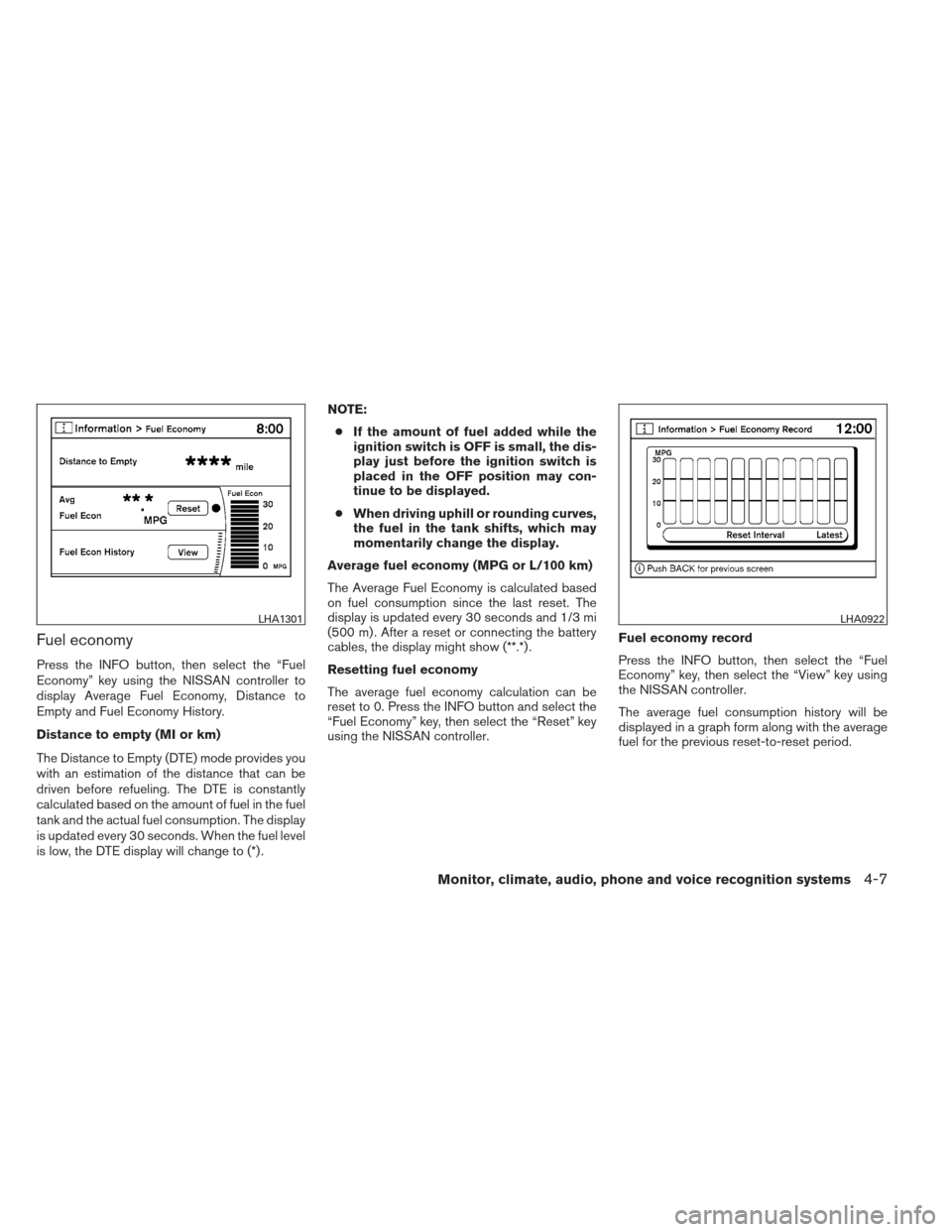
Fuel economy
Press the INFO button, then select the “Fuel
Economy” key using the NISSAN controller to
display Average Fuel Economy, Distance to
Empty and Fuel Economy History.
Distance to empty (MI or km)
The Distance to Empty (DTE) mode provides you
with an estimation of the distance that can be
driven before refueling. The DTE is constantly
calculated based on the amount of fuel in the fuel
tank and the actual fuel consumption. The display
is updated every 30 seconds. When the fuel level
is low, the DTE display will change to (*) .NOTE:
● If the amount of fuel added while the
ignition switch is OFF is small, the dis-
play just before the ignition switch is
placed in the OFF position may con-
tinue to be displayed.
● When driving uphill or rounding curves,
the fuel in the tank shifts, which may
momentarily change the display.
Average fuel economy (MPG or L/100 km)
The Average Fuel Economy is calculated based
on fuel consumption since the last reset. The
display is updated every 30 seconds and 1/3 mi
(500 m) . After a reset or connecting the battery
cables, the display might show (**.*) .
Resetting fuel economy
The average fuel economy calculation can be
reset to 0. Press the INFO button and select the
“Fuel Economy” key, then select the “Reset” key
using the NISSAN controller. Fuel economy record
Press the INFO button, then select the “Fuel
Economy” key, then select the “View” key using
the NISSAN controller.
The average fuel consumption history will be
displayed in a graph form along with the average
fuel for the previous reset-to-reset period.
LHA1301LHA0922
Monitor, climate, audio, phone and voice recognition systems4-7
Page 211 of 506
HOW TO USE THE STATUS
BUTTON
The STATUS button is used to display system infor-
mation. Three different split screens of information
are available. Press the STATUS button multiple
times to cycle through these screens as follows:
Audio with Turn Information for Navigation→
Audio with Fuel Economy Information →Audio
with Climate Control Information →Audio with
Turn Information for Navigation
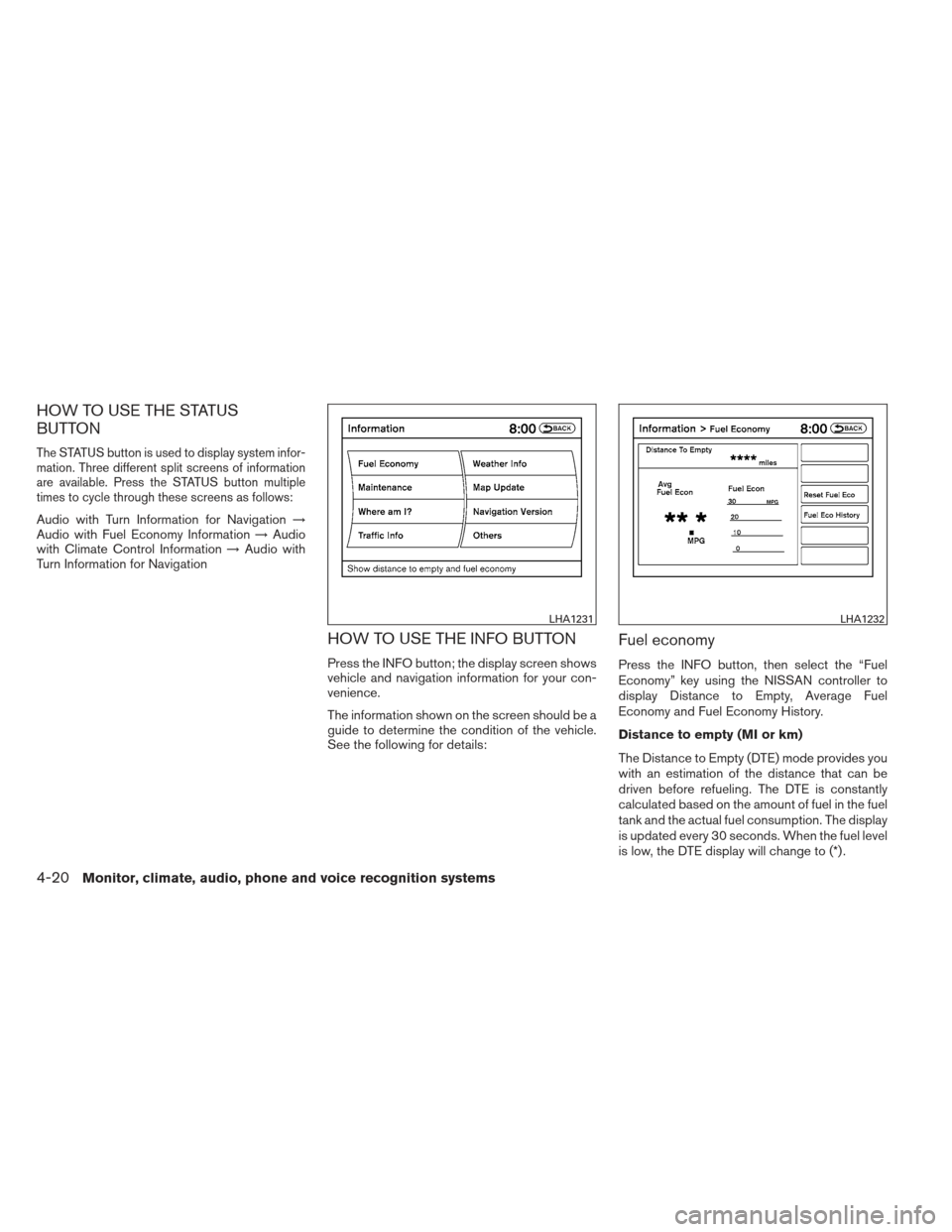
HOW TO USE THE INFO BUTTON
Press the INFO button; the display screen shows
vehicle and navigation information for your con-
venience.
The information shown on the screen should be a
guide to determine the condition of the vehicle.
See the following for details:
Fuel economy
Press the INFO button, then select the “Fuel
Economy” key using the NISSAN controller to
display Distance to Empty, Average Fuel
Economy and Fuel Economy History.
Distance to empty (MI or km)
The Distance to Empty (DTE) mode provides you
with an estimation of the distance that can be
driven before refueling. The DTE is constantly
calculated based on the amount of fuel in the fuel
tank and the actual fuel consumption. The display
is updated every 30 seconds. When the fuel level
is low, the DTE display will change to (*) .
LHA1231LHA1232
4-20Monitor, climate, audio, phone and voice recognition systems
Page 212 of 506
NOTE:● If the amount of fuel added while the
ignition switch is OFF is small, the dis-
play just before the ignition switch is
placed in the OFF position may con-
tinue to be displayed.
● When driving uphill or rounding curves,
the fuel in the tank shifts, which may
momentarily change the display.
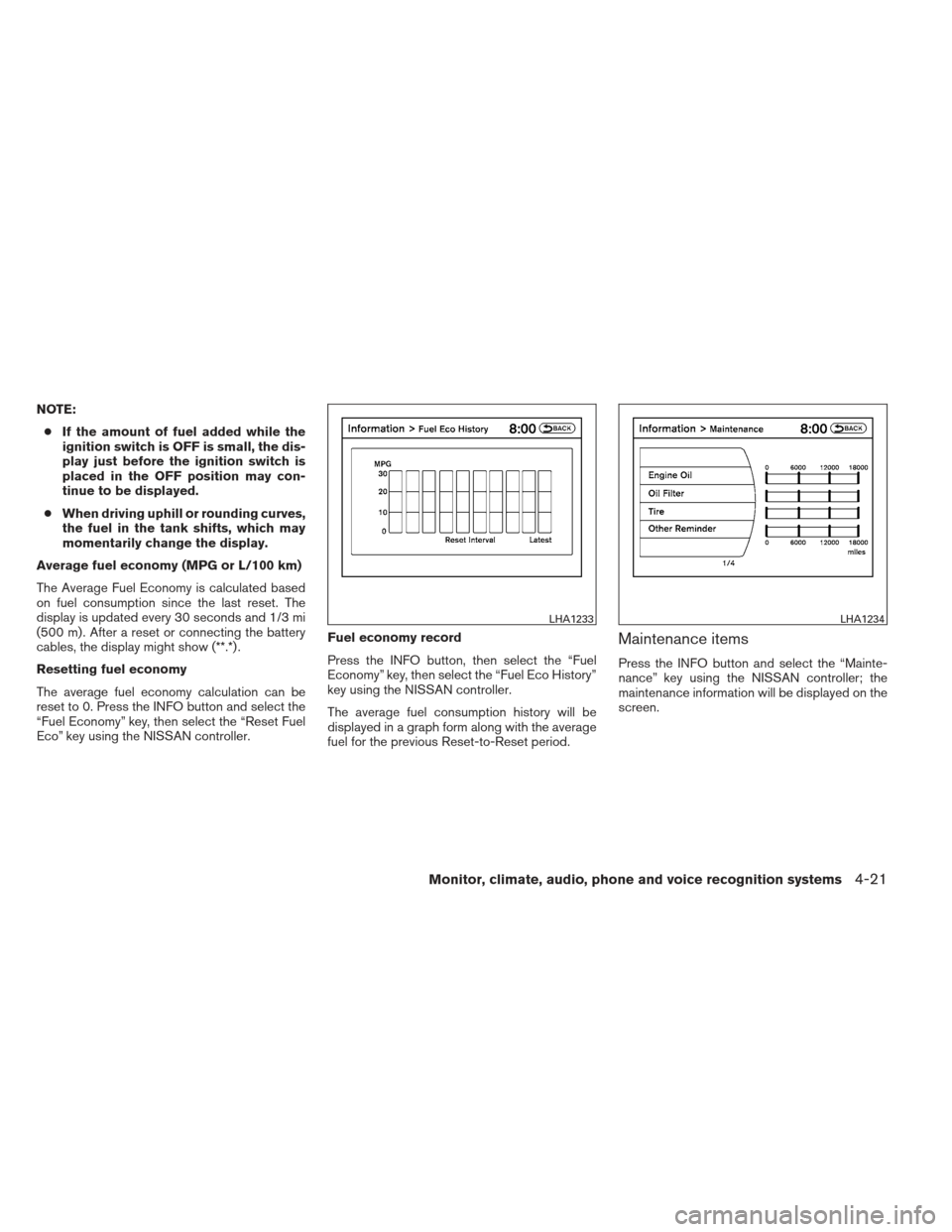
Average fuel economy (MPG or L/100 km)
The Average Fuel Economy is calculated based
on fuel consumption since the last reset. The
display is updated every 30 seconds and 1/3 mi
(500 m) . After a reset or connecting the battery
cables, the display might show (**.*) .
Resetting fuel economy
The average fuel economy calculation can be
reset to 0. Press the INFO button and select the
“Fuel Economy” key, then select the “Reset Fuel
Eco” key using the NISSAN controller. Fuel economy record
Press the INFO button, then select the “Fuel
Economy” key, then select the “Fuel Eco History”
key using the NISSAN controller.
The average fuel consumption history will be
displayed in a graph form along with the average
fuel for the previous Reset-to-Reset period.
Maintenance items
Press the INFO button and select the “Mainte-
nance” key using the NISSAN controller; the
maintenance information will be displayed on the
screen.
LHA1233LHA1234
Monitor, climate, audio, phone and voice recognition systems4-21
Page 350 of 506
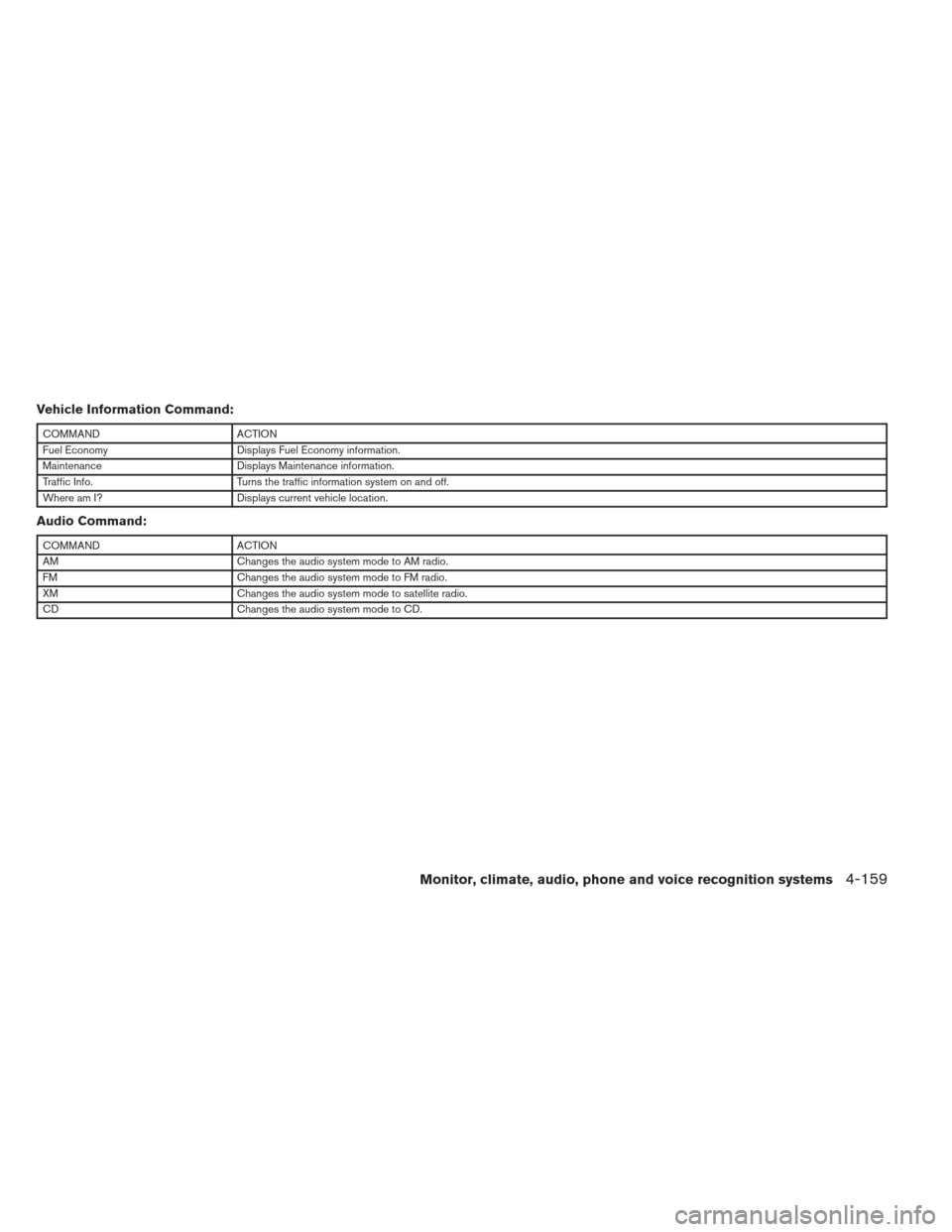
Vehicle Information Command:
COMMANDACTION
Fuel Economy Displays Fuel Economy information.
Maintenance Displays Maintenance information.
Traffic Info. Turns the traffic information system on and off.
Where am I? Displays current vehicle location.
Audio Command:
COMMANDACTION
AM Changes the audio system mode to AM radio.
FM Changes the audio system mode to FM radio.
XM Changes the audio system mode to satellite radio.
CD Changes the audio system mode to CD.
Monitor, climate, audio, phone and voice recognition systems4-159
Page 359 of 506
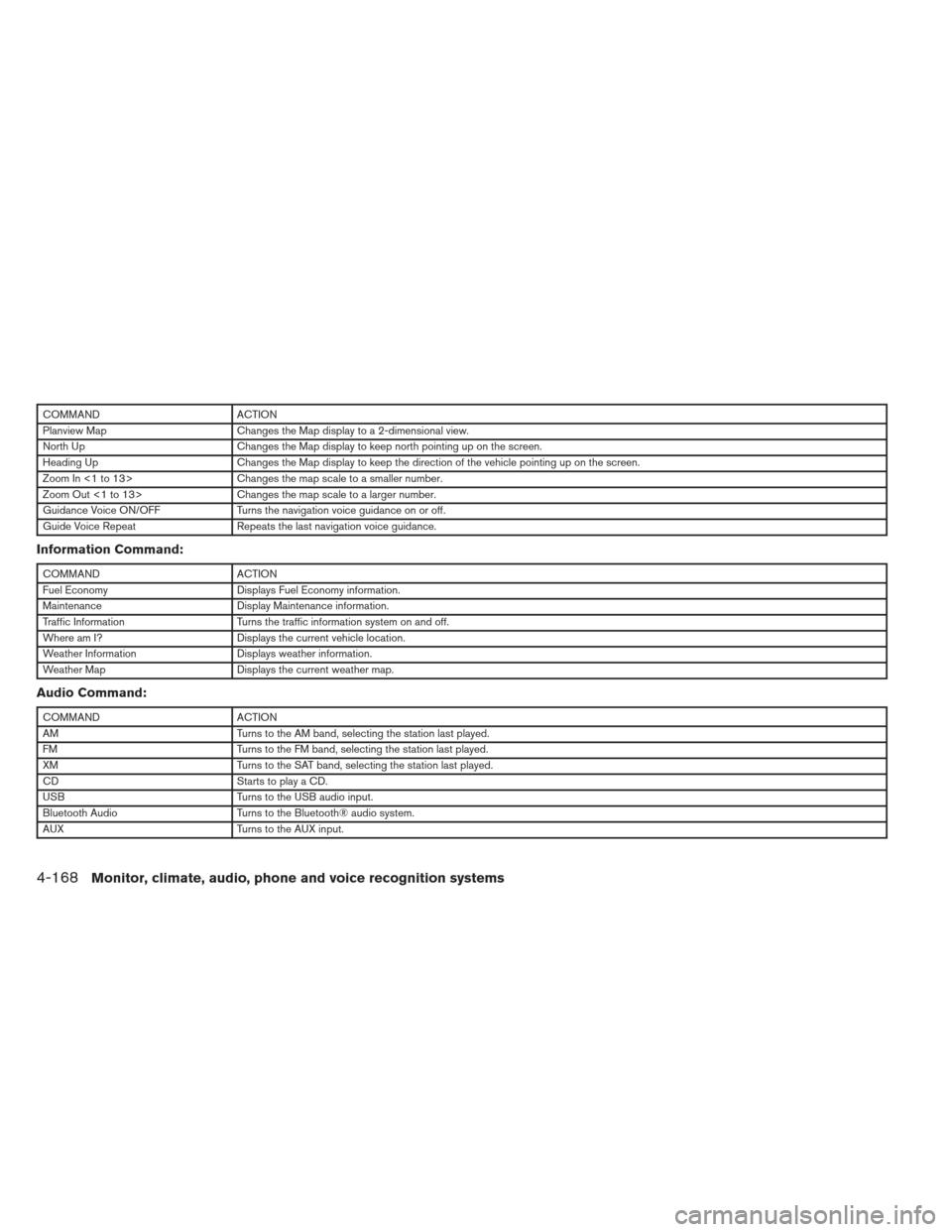
COMMANDACTION
Planview Map Changes the Map display to a 2-dimensional view.
North Up Changes the Map display to keep north pointing up on the screen.
Heading Up Changes the Map display to keep the direction of the vehicle pointing up on the screen.
Zoom In <1 to 13> Changes the map scale to a smaller number.
Zoom Out <1 to 13> Changes the map scale to a larger number.
Guidance Voice ON/OFF Turns the navigation voice guidance on or off.
Guide Voice Repeat Repeats the last navigation voice guidance.
Information Command:
COMMANDACTION
Fuel Economy Displays Fuel Economy information.
Maintenance Display Maintenance information.
Traffic Information Turns the traffic information system on and off.
Where am I? Displays the current vehicle location.
Weather Information Displays weather information.
Weather Map Displays the current weather map.
Audio Command:
COMMANDACTION
AM Turns to the AM band, selecting the station last played.
FM Turns to the FM band, selecting the station last played.
XM Turns to the SAT band, selecting the station last played.
CD Starts to play a CD.
USB Turns to the USB audio input.
Bluetooth Audio Turns to the Bluetooth® audio system.
AUX Turns to the AUX input.
4-168Monitor, climate, audio, phone and voice recognition systems
Page 367 of 506
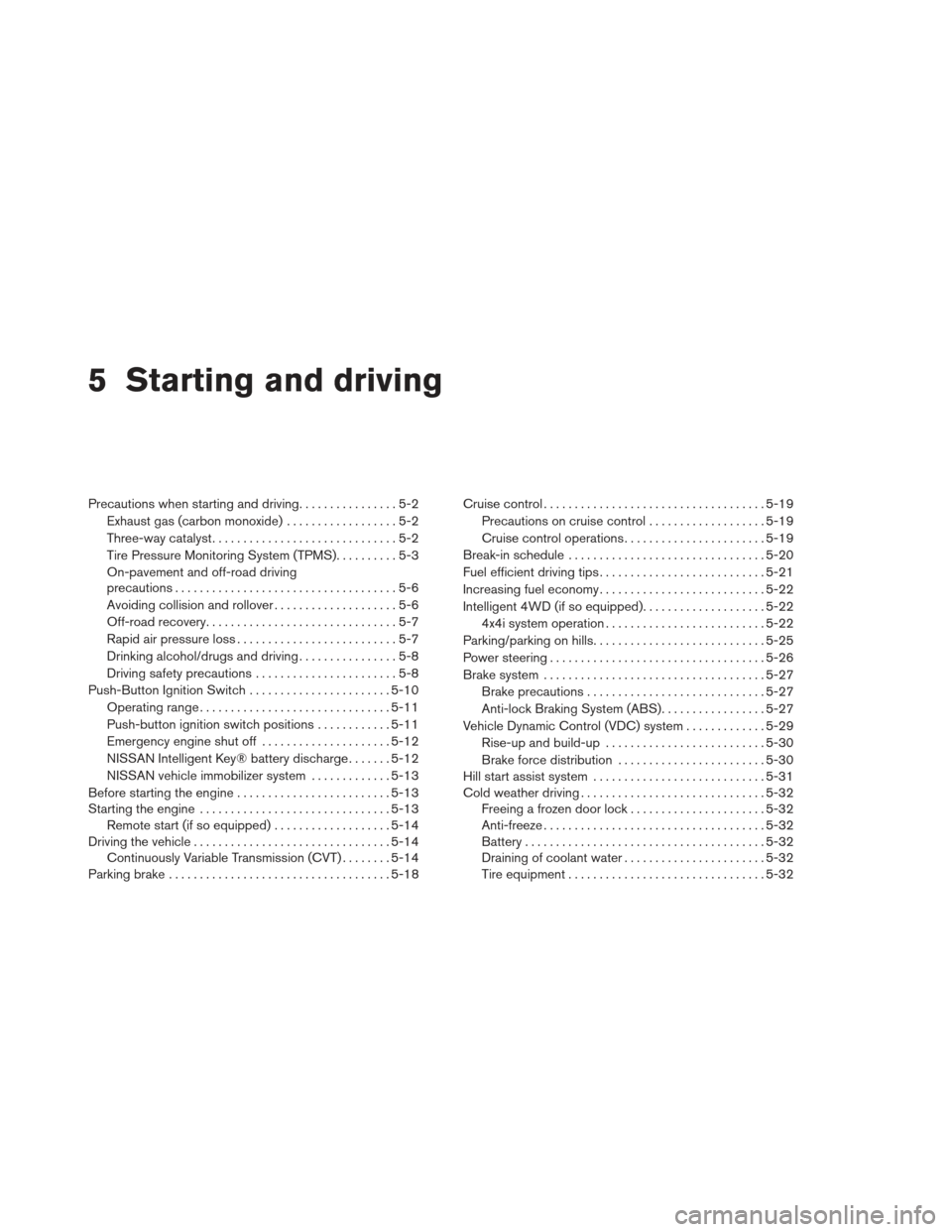
5 Starting and driving
Precautions when starting and driving................5-2
Exhaust gas (carbon monoxide) ..................5-2
Three-way catalyst ..............................5-2
Tire Pressure Monitoring System (TPMS) ..........5-3
On-pavement and off-road driving
precautions ....................................5-6
Avoiding collision and rollover ....................5-6
Off-road recovery ...............................5-7
Rapid air pressure loss ..........................5-7
Drinking alcohol/drugs and driving ................5-8
Driving safety precautions .......................5-8
Push-Button Ignition Switch .......................5-10
Operating range ............................... 5-11
Push-button ignition switch positions ............5-11
Emergency engine shut off .....................5-12
NISSAN Intelligent Key® battery discharge .......5-12
NISSAN vehicle immobilizer system .............5-13
Before starting the engine ......................... 5-13
Starting the engine ............................... 5-13
Remote start (if so equipped) ...................5-14
Driving the vehicle ................................ 5-14
Continuously Variable Transmission (CVT) ........5-14
Parking brake .................................... 5-18Cruise control
.................................... 5-19
Precautions on cruise control ...................5-19
Cruise control operations .......................5-19
Break-in schedule ................................ 5-20
Fuel efficient driving tips ........................... 5-21
Increasing fuel economy ........................... 5-22
Intelligent 4WD (if so equipped) ....................5-22
4x4i system operation .......................... 5-22
Parking/parking on hills ............................ 5-25
Power steering ................................... 5-26
Brake system .................................... 5-27
Brake precautions ............................. 5-27
Anti-lock Braking System (ABS) .................5-27
Vehicle Dynamic Control (VDC) system .............5-29
Rise-up and build-up .......................... 5-30
Brake
force distribution ........................ 5-30
Hill start assist system ............................ 5-31
Cold weather driving .............................. 5-32
Freeing a frozen door lock ......................5-32
Anti-freeze .................................... 5-32
Battery ....................................... 5-32
Draining of coolant water .......................5-32
Tire equipment ................................ 5-32
Page 370 of 506
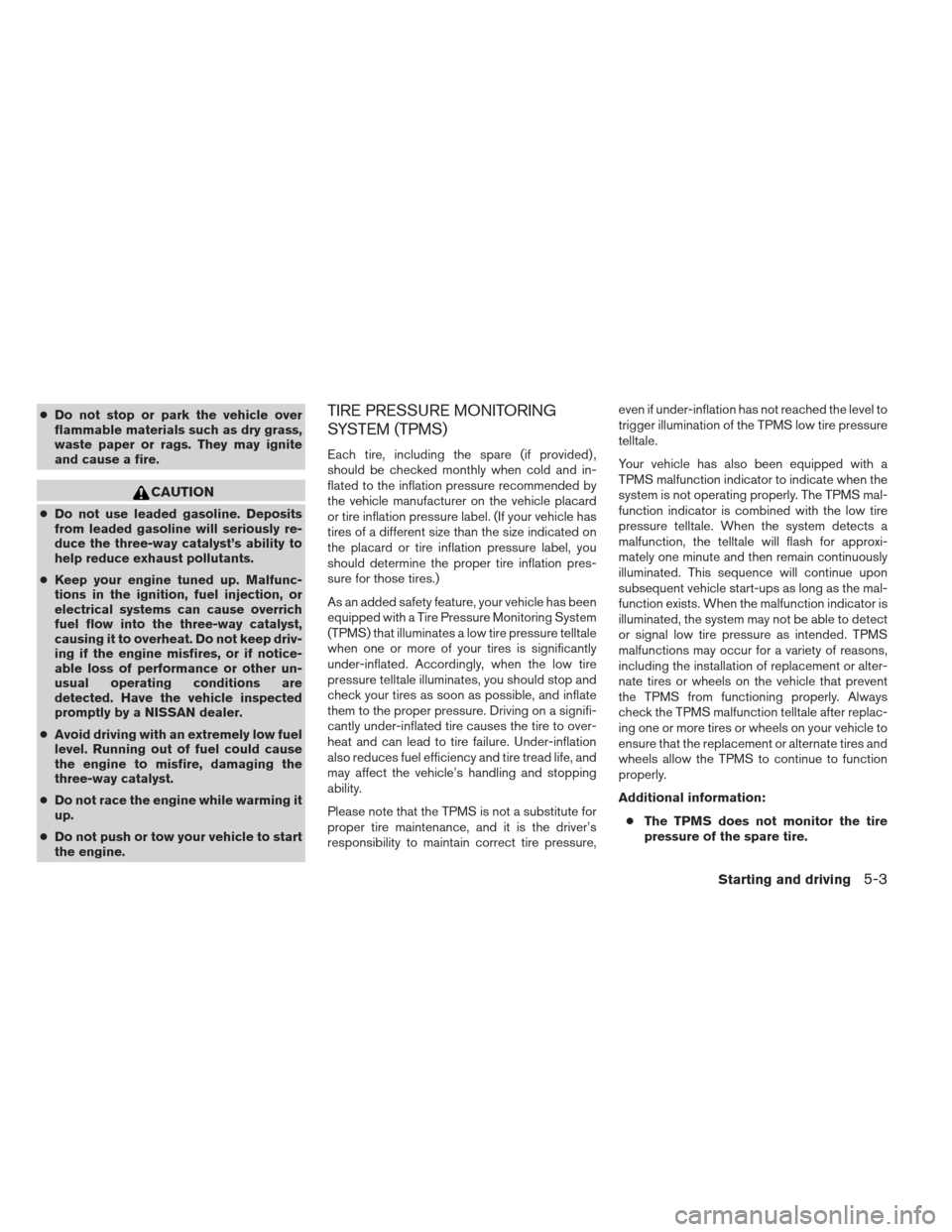
●Do not stop or park the vehicle over
flammable materials such as dry grass,
waste paper or rags. They may ignite
and cause a fire.
CAUTION
● Do not use leaded gasoline. Deposits
from leaded gasoline will seriously re-
duce the three-way catalyst’s ability to
help reduce exhaust pollutants.
● Keep your engine tuned up. Malfunc-
tions in the ignition, fuel injection, or
electrical systems can cause overrich
fuel flow into the three-way catalyst,
causing it to overheat. Do not keep driv-
ing if the engine misfires, or if notice-
able loss of performance or other un-
usual operating conditions are
detected. Have the vehicle inspected
promptly by a NISSAN dealer.
● Avoid driving with an extremely low fuel
level. Running out of fuel could cause
the engine to misfire, damaging the
three-way catalyst.
● Do not race the engine while warming it
up.
● Do not push or tow your vehicle to start
the engine.
TIRE PRESSURE MONITORING
SYSTEM (TPMS)
Each tire, including the spare (if provided) ,
should be checked monthly when cold and in-
flated to the inflation pressure recommended by
the vehicle manufacturer on the vehicle placard
or tire inflation pressure label. (If your vehicle has
tires of a different size than the size indicated on
the placard or tire inflation pressure label, you
should determine the proper tire inflation pres-
sure for those tires.)
As an added safety feature, your vehicle has been
equipped with a Tire Pressure Monitoring System
(TPMS) that illuminates a low tire pressure telltale
when one or more of your tires is significantly
under-inflated. Accordingly, when the low tire
pressure telltale illuminates, you should stop and
check your tires as soon as possible, and inflate
them to the proper pressure. Driving on a signifi-
cantly under-inflated tire causes the tire to over-
heat and can lead to tire failure. Under-inflation
also reduces fuel efficiency and tire tread life, and
may affect the vehicle’s handling and stopping
ability.
Please note that the TPMS is not a substitute for
proper tire maintenance, and it is the driver’s
responsibility to maintain correct tire pressure, even if under-inflation has not reached the level to
trigger illumination of the TPMS low tire pressure
telltale.
Your vehicle has also been equipped with a
TPMS malfunction indicator to indicate when the
system is not operating properly. The TPMS mal-
function indicator is combined with the low tire
pressure telltale. When the system detects a
malfunction, the telltale will flash for approxi-
mately one minute and then remain continuously
illuminated. This sequence will continue upon
subsequent vehicle start-ups as long as the mal-
function exists. When the malfunction indicator is
illuminated, the system may not be able to detect
or signal low tire pressure as intended. TPMS
malfunctions may occur for a variety of reasons,
including the installation of replacement or alter-
nate tires or wheels on the vehicle that prevent
the TPMS from functioning properly. Always
check the TPMS malfunction telltale after replac-
ing one or more tires or wheels on your vehicle to
ensure that the replacement or alternate tires and
wheels allow the TPMS to continue to function
properly.
Additional information:
● The TPMS does not monitor the tire
pressure of the spare tire.
Starting and driving5-3
Page 380 of 506
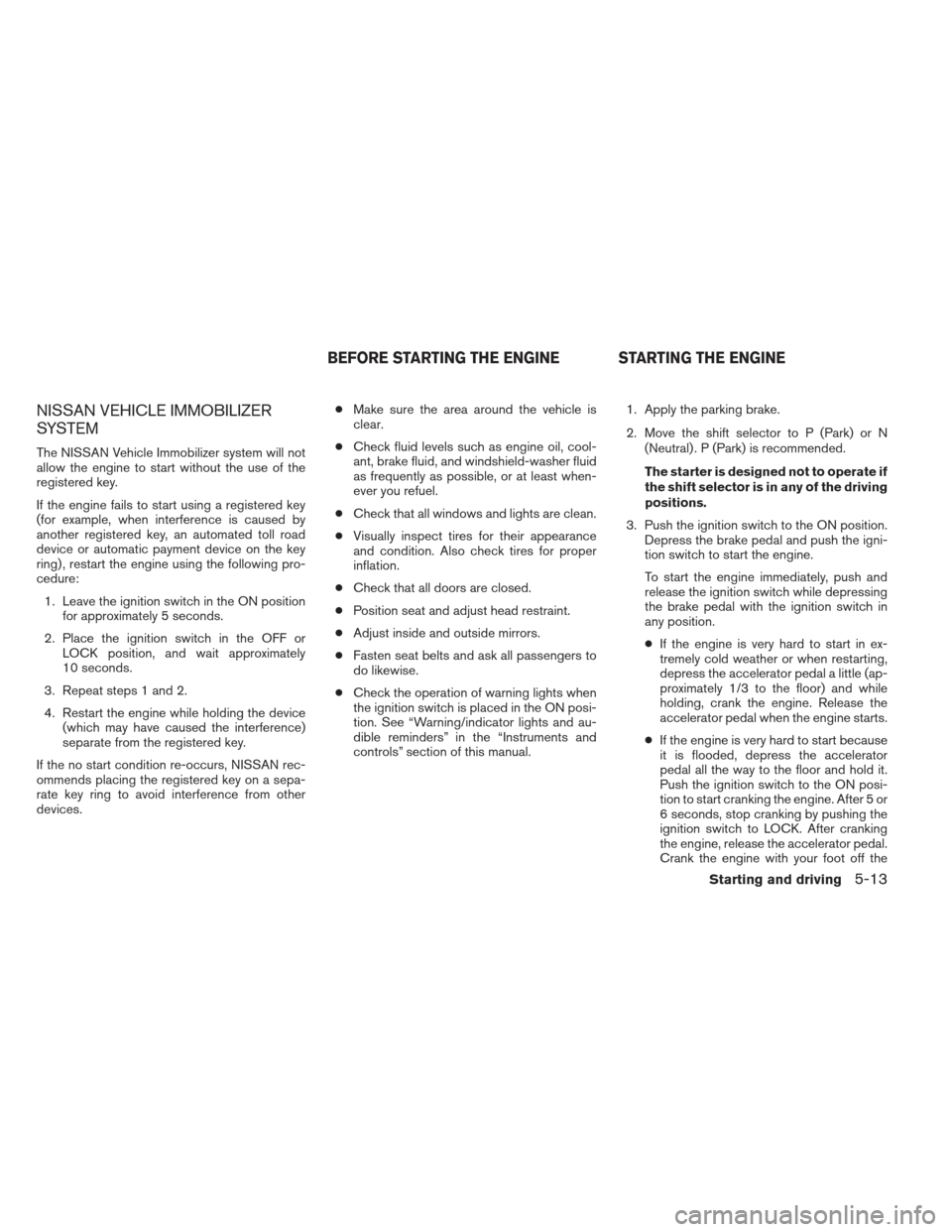
NISSAN VEHICLE IMMOBILIZER
SYSTEM
The NISSAN Vehicle Immobilizer system will not
allow the engine to start without the use of the
registered key.
If the engine fails to start using a registered key
(for example, when interference is caused by
another registered key, an automated toll road
device or automatic payment device on the key
ring) , restart the engine using the following pro-
cedure:1. Leave the ignition switch in the ON position for approximately 5 seconds.
2. Place the ignition switch in the OFF or LOCK position, and wait approximately
10 seconds.
3. Repeat steps 1 and 2.
4. Restart the engine while holding the device (which may have caused the interference)
separate from the registered key.
If the no start condition re-occurs, NISSAN rec-
ommends placing the registered key on a sepa-
rate key ring to avoid interference from other
devices. ●
Make sure the area around the vehicle is
clear.
● Check fluid levels such as engine oil, cool-
ant, brake fluid, and windshield-washer fluid
as frequently as possible, or at least when-
ever you refuel.
● Check that all windows and lights are clean.
● Visually inspect tires for their appearance
and condition. Also check tires for proper
inflation.
● Check that all doors are closed.
● Position seat and adjust head restraint.
● Adjust inside and outside mirrors.
● Fasten seat belts and ask all passengers to
do likewise.
● Check the operation of warning lights when
the ignition switch is placed in the ON posi-
tion. See “Warning/indicator lights and au-
dible reminders” in the “Instruments and
controls” section of this manual. 1. Apply the parking brake.
2. Move the shift selector to P (Park) or N
(Neutral) . P (Park) is recommended.
The starter is designed not to operate if
the shift selector is in any of the driving
positions.
3. Push the ignition switch to the ON position. Depress the brake pedal and push the igni-
tion switch to start the engine.
To start the engine immediately, push and
release the ignition switch while depressing
the brake pedal with the ignition switch in
any position.
● If the engine is very hard to start in ex-
tremely cold weather or when restarting,
depress the accelerator pedal a little (ap-
proximately 1/3 to the floor) and while
holding, crank the engine. Release the
accelerator pedal when the engine starts.
● If the engine is very hard to start because
it is flooded, depress the accelerator
pedal all the way to the floor and hold it.
Push the ignition switch to the ON posi-
tion to start cranking the engine. After 5 or
6 seconds, stop cranking by pushing the
ignition switch to LOCK. After cranking
the engine, release the accelerator pedal.
Crank the engine with your foot off the
BEFORE STARTING THE ENGINE STARTING THE ENGINE
Starting and driving5-13
Page 388 of 506
Follow these easy-to-use Fuel Efficient Driving
Tips to help you achieve the most fuel economy
from your vehicle.1. Use Smooth Accelerator and Brake
Pedal Application
● Avoid rapid starts and stops
● Use smooth, gentle accelerator and
brake application whenever possible
● Maintain constant speed while commut-
ing and coast whenever possible
2. Maintain Constant Speed
● Look ahead to try and anticipate and mini-
mize stops
● Synchronizing your speed with traffic
lights allows you to reduce your number
of stops
● Maintaining a steady speed can minimize
red light stops and improve fuel efficiency
3. Use Air Conditioning (A/C) at Higher
Vehicle Speeds
● Below 40 MPH (64 km/h), it is more
efficient to open windows to cool the
vehicle due to reduced engine load
● Above 40 MPH (64 km/h), it is more
efficient to use A/C to cool the vehicle
due to increased aerodynamic drag ●
Recirculating the cool air in the cabin
when the A/C is on reduces cooling load
4. Drive at Economical Speeds and Dis-
tances
● Observing the speed limit and not ex-
ceeding 60 MPH (97 km/h) (where le-
gally allowed) can improve fuel efficiency
due to reduced aerodynamic drag
● Maintaining a safe following distance be-
hind other vehicles reduces unnecessary
braking
● Safely monitoring traffic to anticipate
changes in speed permits reduced brak-
ing and smooth acceleration changes
● Select a gear range suitable to road con-
ditions.
5. Use Cruise Control
● Using cruise control during highway driv-
ing helps maintain a steady speed
● Cruise control is particularly effective in
providing fuel savings when driving on flat
terrains
6. Plan for the Shortest Route
● Utilize a map or navigation system to de-
termine the best route to save time 7.
Avoid Idling
● Shutting off your engine when safe for
stops exceeding 30–60 seconds saves
fuel and reduces emissions
8. Buy an Automated Pass for Toll Roads
● Automated passes permit drivers to use
special lanes to maintain cruising speed
through the toll and avoid stopping and
starting
9. Winter Warm Up
● Limit idling time to minimize impact to fuel
economy
● Vehicles typically need no more than
30 seconds of idling at start-up to effec-
tively circulate the engine oil before driv-
ing
● Your vehicle will reach its ideal operating
temperature more quickly while driving
versus idling
10. Keeping your Vehicle Cool
● Park your vehicle in a covered parking
area or in the shade whenever possible
● When entering a hot vehicle, opening the
windows will help to reduce the inside
temperature faster, resulting in reduced
demand on your A/C system
FUEL EFFICIENT DRIVING TIPS
Starting and driving5-21
Page 389 of 506
●Keep your engine tuned up.
● Follow the recommended scheduled main-
tenance.
● Keep the tires inflated to the correct pres-
sure. Low tire pressure increases tire wear
and lowers fuel economy.
● Keep the wheels in correct alignment. Im-
proper alignment increases tire wear and
lowers fuel economy.
● Use the recommended viscosity engine oil.
See “Engine oil and oil filter recommenda-
tions” in “Technical and consumer informa-
tion” later in this manual.
4X4I SYSTEM OPERATION
4WD shift switch
The Four-Wheel Drive (4WD) system is used to
select the 2WD (Two-Wheel Drive) , AUTO or
LOCK mode depending on the driving condi-
tions.
Turn the 4WD mode switch, located on the cen-
ter console, to select AUTO, 2WD, or LOCK.
● AUTO – Turn the 4WD mode switch to the
neutral (AUTO) position. The Four-Wheel
Drive (4WD) AUTO indicator light
in
the meter illuminates. ●
2WD – Turn the 4WD mode switch clock-
wise to the 2WD position.
● LOCK – To engage the LOCK mode, turn
the 4WD mode switch counterclockwise to
the LOCK position. The switch will return to
the AUTO position automatically and the
Four-Wheel Drive (4WD) LOCK indicator
light
in the meter illuminates. To dis-
engage the LOCK mode, turn the switch to
the LOCK position again. The switch will
return to the AUTO position automatically,
and the 4WD LOCK indicator light turns off.
The LOCK mode will automatically be can-
celled when the ignition switch is turned to
the “OFF” position.
LIC2399
INCREASING FUEL ECONOMY INTELLIGENT 4WD (if so equipped)
5-22Starting and driving