climate control NISSAN PATHFINDER 2013 R52 / 4.G Service Manual
[x] Cancel search | Manufacturer: NISSAN, Model Year: 2013, Model line: PATHFINDER, Model: NISSAN PATHFINDER 2013 R52 / 4.GPages: 506, PDF Size: 5.06 MB
Page 238 of 506
●The system is not designed to prevent
contact with small or moving objects.
● The system will not detect small objects
below the bumper, and may not detect
objects close to the bumper or on the
ground.
● The system may not detect the follow-
ing objects:
– Fluffy objects such as snow, cloth, cotton, glass or wool.
– Thin objects such as rope, wire or chain.
– Wedge-shaped objects.
● If your vehicle sustains damage to the
bumper fascia, leaving it misaligned or
bent, the sensing zone may be altered
causing inaccurate measurement of ob-
jects or false alarms.
CAUTION
● Excessive noise (such as audio system
volume or an open vehicle window) will
interfere with the tone and it may not be
heard. ●
Keep the surface of the sonar sensors
(located on the front and rear bumper
fascia) free from accumulations of
snow, ice and dirt. Do not scratch the
surface of the sonar sensors when
cleaning. If the sensors are covered, the
accuracy of the sonar function will be
diminished.
The system gives the tone for rear objects when
the shift selector is in the R (Reverse) position.
The system is deactivated at speeds above
6 mph (10 km/h). It is reactivated at lower
speeds.
When the objects are detected, the indicator
(green) appears and blinks and the tone sounds
intermittently. When the vehicle moves closer to
the object, the color of the indicator turns yellow
and the rate of the blinking and the rate of the
tone increase. When the vehicle is very close to
the object, the indicator stops blinking and turns
red, and the tone sounds continuously.
The intermittent tone will stop after three seconds
when an object is detected by only the corner
sonar and the distance does not change.
The tone will stop when the object gets away
from the vehicle. In the below cases, the sonar will be turned back
on automatically:
● When the shift selector is in the R (Reverse)
position.
● When the CAMERA button is pressed and a
screen other than the camera view is shown
on the display.
● When vehicle speed decreases below ap-
proximately 6 mph (10 km/h).
● When the ignition switch is placed in the
OFF position and turned back to the ON
position again.
HOW TO ADJUST THE SCREEN
VIEW
To adjust the Display ON/OFF, Brightness, Tint,
Color, Contrast and Black Level of the Around
View Monitor, press the SETTING button with the
Around View Monitor on, select the item key and
adjust the level using the NISSAN controller.
Do not adjust the Brightness, Tint, Color, Con-
trast and Black Level of the Around View Monitor
while the vehicle is moving. Make sure the park-
ing brake is firmly applied.
Monitor, climate, audio, phone and voice recognition systems4-47
Page 241 of 506
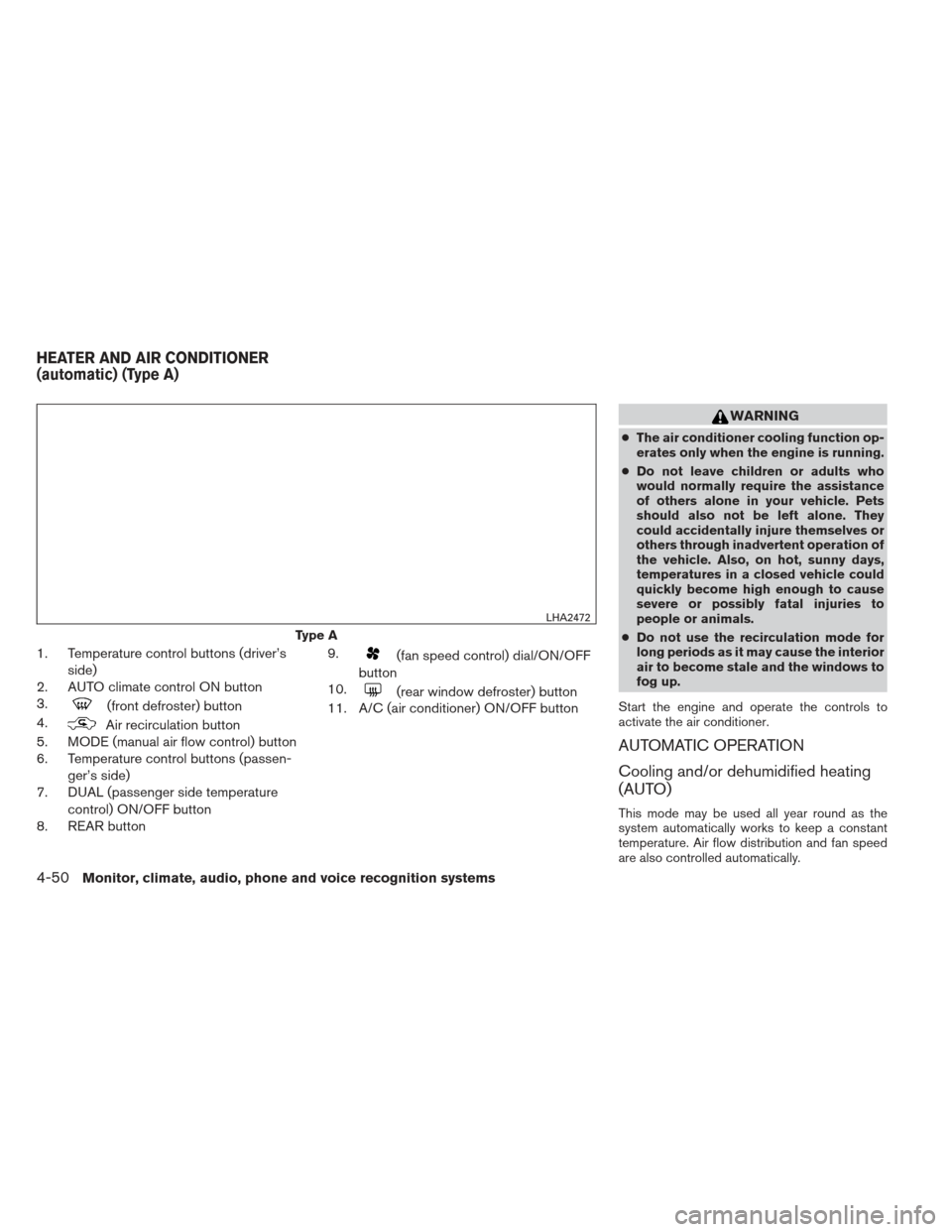
1. Temperature control buttons (driver’sside)
2. AUTO climate control ON button
3.
(front defroster) button
4.
Air recirculation button
5. MODE (manual air flow control) button
6. Temperature control buttons (passen-
ger’s side)
7. DUAL (passenger side temperature
control) ON/OFF button
8. REAR button 9.
(fan speed control) dial/ON/OFF
button
10.
(rear window defroster) button
11. A/C (air conditioner) ON/OFF button
WARNING
● The air conditioner cooling function op-
erates only when the engine is running.
● Do not leave children or adults who
would normally require the assistance
of others alone in your vehicle. Pets
should also not be left alone. They
could accidentally injure themselves or
others through inadvertent operation of
the vehicle. Also, on hot, sunny days,
temperatures in a closed vehicle could
quickly become high enough to cause
severe or possibly fatal injuries to
people or animals.
● Do not use the recirculation mode for
long periods as it may cause the interior
air to become stale and the windows to
fog up.
Start the engine and operate the controls to
activate the air conditioner.
AUTOMATIC OPERATION
Cooling and/or dehumidified heating
(AUTO)
This mode may be used all year round as the
system automatically works to keep a constant
temperature. Air flow distribution and fan speed
are also controlled automatically.
Type A
LHA2472
HEATER AND AIR CONDITIONER
(automatic) (Type A)
4-50Monitor, climate, audio, phone and voice recognition systems
Page 242 of 506
1. Press the AUTO button on. (The indicator onthe button will illuminate and AUTO will be
displayed.)
2. Operate the driver’s side temperature con- trol buttons.
● Adjust the temperature display to about
75°F (24°C) for normal operation.
● The temperature of the passenger compart-
ment will be maintained automatically. Air
flow distribution and fan speed are also con-
trolled automatically.
● A visible mist may be seen coming from the
ventilators in hot, humid conditions as the air
is cooled rapidly. This does not indicate a
malfunction.
3. You can individually set driver’s and front passenger’s side temperature using each
temperature control button. When the DUAL
button or passenger’s side temperature but-
ton is pressed, the DUAL indicator will come
on. To turn off the passenger’s side tempera-
ture control, press the DUAL button.
Heating (A/C OFF)
The air conditioner does not activate. When you
need to heat only, use this mode.
1. Press the A/C button. (A/C OFF will be displayed and A/C indicator will turn off.) 2. Operate the temperature control buttons to
set the desired temperature.
● The temperature of the passenger compart-
ment will be maintained automatically. Air
flow distribution and fan speed are also con-
trolled automatically.
● Do not set the temperature lower than the
outside air temperature. Otherwise the sys-
tem may not work properly.
● Not recommended if windows fog up.
Dehumidified defrosting or defogging
1. Press thefront defroster button on.
(The indicator light on the button will come
on.)
2. Operate the temperature control buttons to set the desired temperature.
● To quickly remove ice from the outside of the
windows, use the fan speed control dial to
set the fan speed to maximum.
● As soon as possible after the windshield is
clean, press the AUTO button to return to
the automatic mode. ●
When the
front defroster button is
pressed, the air conditioner will automati-
cally be turned on at outside temperatures
above 36°F (2°C) . The air recirculate mode
automatically turns off, allowing outside air
to be drawn into the passenger compart-
ment to further improve the defogging per-
formance.
MANUAL OPERATION
Fan speed control
Turn thefan speed control dial to manually
control the fan speed.
Press the AUTO button to return to automatic
control of the fan speed.
Air recirculation
Press theair recirculation button to recir-
culate interior air inside the vehicle. The
indicator light on the button will come on.
The air recirculation cannot be activated when
the air conditioner is in the
front defrosting
mode or the
front defrosting and foot out-
let mode.
Monitor, climate, audio, phone and voice recognition systems4-51
Page 243 of 506
Automatic intake air control
In the AUTO mode, the intake air will be con-
trolled automatically. To manually control the in-
take air, press the
air recirculation button.
To return to the automatic control mode, press
and hold the
air recirculation button for
about 2 seconds. The indicator light will flash
twice, and then the intake air will be controlled
automatically.
Air flow control
Pressing the MODE button manually controls air
flow and selects the air outlet:
— Air flows from center and side
vents.
— Air flows from center and side ventsand foot outlets.
— Air flows mainly from foot outlets.
— Air flows from defroster and footoutlets.
— Air flows from defroster outlets.
To turn system off
Press the OFF button.
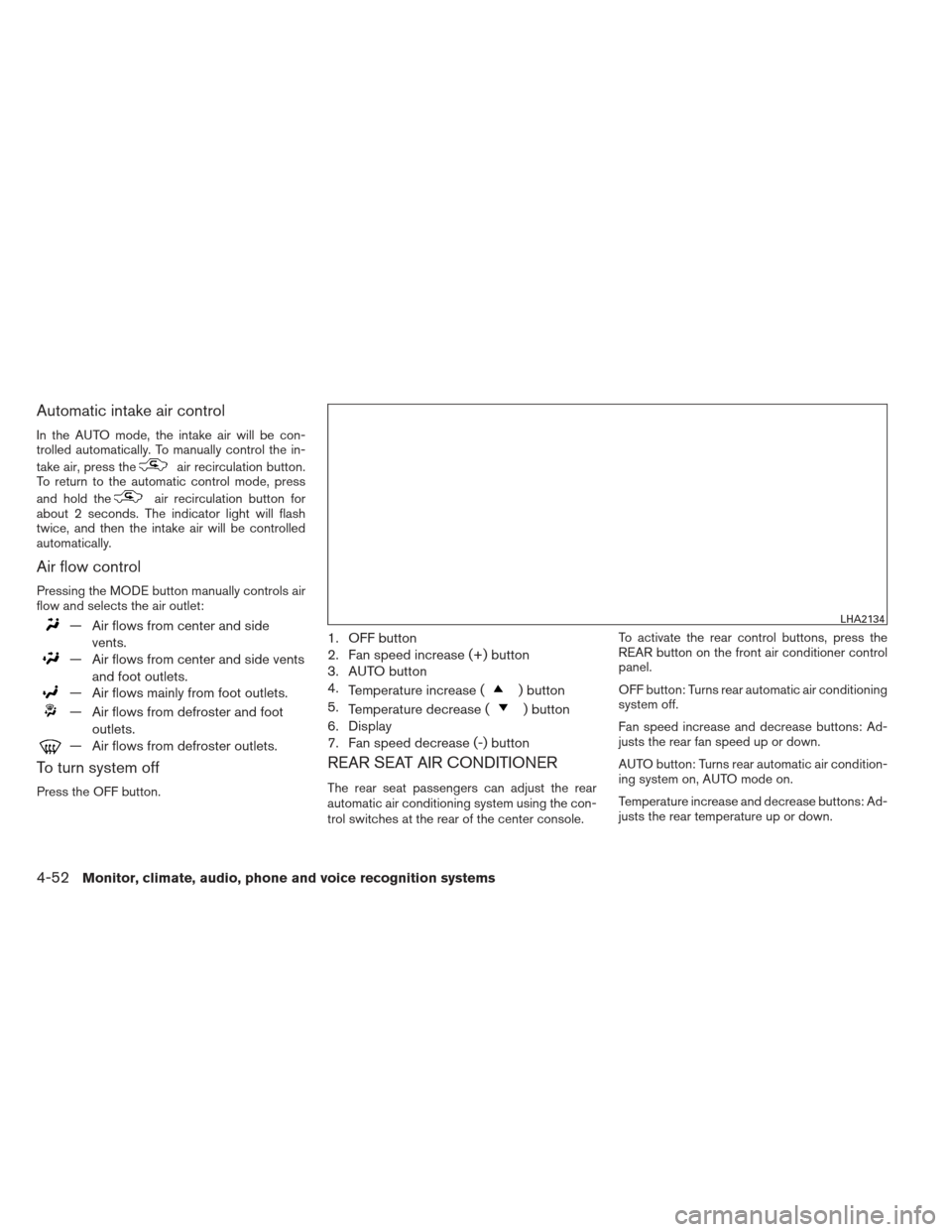
1. OFF button
2. Fan speed increase (+) button
3. AUTO button
4.Temperature increase (
) button
5. Temperature decrease (
) button
6. Display
7. Fan speed decrease (-) button
REAR SEAT AIR CONDITIONER
The rear seat passengers can adjust the rear
automatic air conditioning system using the con-
trol switches at the rear of the center console. To activate the rear control buttons, press the
REAR button on the front air conditioner control
panel.
OFF button: Turns rear automatic air conditioning
system off.
Fan speed increase and decrease buttons: Ad-
justs the rear fan speed up or down.
AUTO button: Turns rear automatic air condition-
ing system on, AUTO mode on.
Temperature increase and decrease buttons: Ad-
justs the rear temperature up or down.
LHA2134
4-52Monitor, climate, audio, phone and voice recognition systems
Page 245 of 506
1.Air recirculation button
2. A/C (air conditioner) ON/OFF button
3. MODE (manual air flow control) button
4. REAR button 5. Temperature control buttons (passen-
ger’s side)/DUAL (passenger’s side
temperature control) ON/OFF button
6.
(rear window defroster) button 7.
(fan speed control) dial/ON/OFF
button
8.
(front defroster) button
9. Temperature control dial (driver’s side)/
AUTO (automatic) climate control ON
button
WARNING
●The air conditioner cooling function op-
erates only when the engine is running.
● Do not leave children or adults who
would normally require the assistance
of others alone in your vehicle. Pets
should also not be left alone. They
could accidentally injure themselves or
others through inadvertent operation of
the vehicle. Also, on hot, sunny days,
temperatures in a closed vehicle could
quickly become high enough to cause
severe or possibly fatal injuries to
people or animals.
● Do not use the recirculation mode for
long periods as it may cause the interior
air to become stale and the windows to
fog up.
Start the engine and operate the controls to
activate the air conditioner.
LHA2447
HEATER AND AIR CONDITIONER
(automatic) (Type B)
4-54Monitor, climate, audio, phone and voice recognition systems
Page 246 of 506
AUTOMATIC OPERATION
Cooling and/or dehumidified heating
(AUTO)
This mode may be used all year round as the
system automatically works to keep a constant
temperature. Air flow distribution and fan speed
are also controlled automatically.1. Press the AUTO button on. (The indicator on the button will illuminate and AUTO will be
displayed.)
2. Turn the temperature control dial to the left or right to set the desired temperature.
● Adjust the temperature display to about
75°F (24°C) for normal operation.
● The temperature of the passenger compart-
ment will be maintained automatically. Air
flow distribution and fan speed are also con-
trolled automatically.
● A visible mist may be seen coming from the
vents in hot, humid conditions as the air is
cooled rapidly. This does not indicate a mal-
function.
3. You can individually set driver’s and front passenger’s side temperature using each
temperature control dial. When the DUAL
button or passenger’s side temperature dial
is turned, the DUAL indicator will come on. To turn off the passenger’s side temperature
control, press the DUAL button.
Heating (A/C OFF)
The air conditioner does not activate. When you
need to heat only, use this mode.
1. Press the A/C button. (A/C OFF will be displayed and A/C indicator will turn off.)
2. Turn the temperature control dial to set the desired temperature.
● The temperature of the passenger compart-
ment will be maintained automatically. Air
flow distribution and fan speed are also con-
trolled automatically.
● Do not set the temperature lower than the
outside air temperature. Otherwise, the sys-
tem may not work properly.
● Not recommended if windows fog up.
Dehumidified defrosting or defogging
1. Press thefront defroster button on.
(The indicator light on the button will come
on.)
2. Turn the temperature control dial to set the desired temperature. ●
To quickly remove ice from the outside of the
windows, use the fan speed control dial to
set the fan speed to maximum.
● As soon as possible after the windshield is
clean, press the AUTO button to return to
the automatic mode.
● When the
front defroster button is
pressed, the air conditioner will automati-
cally be turned on at outside temperatures
above 36°F (2°C) . The air recirculate mode
automatically turns off, allowing outside air
to be drawn into the passenger compart-
ment to further improve the defogging per-
formance.
MANUAL OPERATION
Fan speed control
Turn thefan speed control dial to manually
control the fan speed.
Press the AUTO button to return to automatic
control of the fan speed.
Air recirculation
Press theair recirculation button to recir-
culate interior air inside the vehicle. The
indicator light on the button will come on.
Monitor, climate, audio, phone and voice recognition systems4-55
Page 247 of 506
The air recirculation cannot be activated when
the air conditioner is in the
front defrosting
mode or the
front defrosting and foot out-
let mode.
Automatic intake air control
In the AUTO mode, the intake air will be con-
trolled automatically. To manually control the in-
take air, press the
air recirculation button.
To return to the automatic control mode, press
and hold the
air recirculation button for
about 2 seconds. The indicator light will flash
twice, and then the intake air will be controlled
automatically.
Air flow control
Pressing the MODE button manually controls air
flow and selects the air outlet:
— Air flows from center and side
vents.
— Air flows from center and side ventsand foot outlets.
— Air flows mainly from foot outlets.
— Air flows from defroster and footoutlets.
— Air flows from defroster outlets.
Rear automatic air conditioning system
To control the rear automatic air conditioning
system with the front air conditioner control
panel, press the REAR button. When the rear
automatic air conditioning system control is on,
the indicator light on the REAR button will illumi-
nate and the front display will switch to the rear air
conditioner screen.
The rear automatic air conditioning system can
be adjusted with the front air conditioner control
panel, when the rear air conditioner screen is
displayed.
To adjust the front air conditioning system, press
the REAR button one more time. Automatic operation:
1. Press the AUTO button. The AUTO indicator light will illuminate and “AUTO” will appear
on the display.
2. Turn the temperature control dial (driver’s side) to set the desired temperature.
Manual operation : ● Temperature control
Press the temperature control buttons to set
the desired temperature.
● Fan speed control
Press the fan speed increase or decrease
button to manually control the fan speed.
Press the A/C button when the rear automatic air
conditioning system is turned on with the rear air
conditioner screen displayed to turn off the rear
automatic air conditioning system.
Rear Heating (A/C off): 1. Press the REAR button to display the rear air conditioner screen on the front display when
the rear automatic air conditioning system is
on.
2. Press the AUTO button. The AUTO indicator light will illuminate and “AUTO” will appear
on the display.
LHA2168
4-56Monitor, climate, audio, phone and voice recognition systems
Page 248 of 506
3. If the A/C indicator light illuminates, pressthe A/C button. The A/C indicator light will
turn off.
4. Turn the temperature control dial to set the desired temperature.
● Do not set the temperature lower than the
outside air temperature. Doing so may cause
the temperature to not be controlled prop-
erly.
● To dehumidify the air, press the A/C button
before turning on the heater.
Turning the system off :
Press the OFF button when the rear air condi-
tioner screen is displayed.
1. OFF button
2. Fan speed increase (+) button
3. AUTO button
4. Temperature increase (
) button
5. Temperature decrease (
) button
6. Display
7. Fan speed decrease (-) button
Rear control buttons:
The rear seat passengers can adjust the rear
automatic air conditioning system using the con-
trol switches at the rear of the center console.
The rear control buttons do not function when the
rear air conditioner screen is shown on the front display. To activate the rear control buttons,
press the REAR button on the front air condi-
tioner control panel and switch the screen on the
front display.
OFF button: Turns rear automatic air conditioning
system off.
Fan speed increase and decrease buttons: Ad-
justs the rear fan speed up or down.
AUTO button: Turns rear automatic air condition-
ing system on, AUTO mode on.
Temperature increase and decrease buttons: Ad-
justs the rear temperature up or down
LHA2134
Monitor, climate, audio, phone and voice recognition systems4-57
Page 250 of 506
RADIO
Place the ignition switch in the ACC or ON
position and press the VOL (volume)/ON·OFF
(power) knob to turn the radio on. If you listen to
the radio with the engine not running, the ignition
switch should be placed in the ACC position.
Radio reception is affected by station signal
strength, distance from radio transmitter, build-
ings, bridges, mountains and other external influ-
ences. Intermittent changes in reception quality
normally are caused by these external influences.
Using a cellular phone in or near the ve-
hicle may influence radio reception quality.
Radio reception
Your NISSAN radio system is equipped with
state-of-the-art electronic circuits to enhance ra-
dio reception. These circuits are designed to
extend reception range, and to enhance the qual-
ity of that reception.
However, there are some general characteristics
of both FM and AM radio signals that can affect
radio reception quality in a moving vehicle, even
when the finest equipment is used. These char-
acteristics are completely normal in a given re-
ception area and do not indicate any malfunction
in your NISSAN radio system.Reception conditions will constantly change be-
cause of vehicle movement. Buildings, terrain,
signal distance and interference from other ve-
hicles can work against ideal reception. De-
scribed below are some of the factors that can
affect your radio reception.
Some cellular phones or other devices may
cause interference or a buzzing noise to come
from the audio system speakers. Storing the de-
vice in a different location may reduce or elimi-
nate the noise.
FM RADIO RECEPTION
Range: FM range is normally limited to 25 – 30 mi
(40 – 48 km) , with monaural (single channel) FM
having slightly more range than stereo FM. Exter-
nal influences may sometimes interfere with FM
station reception even if the FM station is within
25 mi (40 km) . The strength of the FM signal is
directly related to the distance between the
transmitter and receiver. FM signals follow a line-
of-sight path, exhibiting many of the same char-
acteristics as light. For example, they will reflect
off objects.
Fade and drift: As your vehicle moves away from
a station transmitter, the signals will tend to fade
and/or drift.
Static and flutter: During signal interference from
buildings, large hills or due to antenna position
(usually in conjunction with increased distance
from the station transmitter) , static or flutter can
be heard. This can be reduced by adjusting the
treble control to reduce treble response.
Multipath reception: Because of the reflective
characteristics of FM signals, direct and reflected
signals reach the receiver at the same time. The
signals may cancel each other, resulting in mo-
mentary flutter or loss of sound.
AM RADIO RECEPTION
AM signals, because of their low frequency, can
bend around objects and skip along the ground.
In addition, the signals can be bounced off the
ionosphere and bent back to earth. Because of
these characteristics, AM signals are also sub-
ject to interference as they travel from transmitter
to receiver.
Fading: Occurs while the vehicle is passing
through freeway underpasses or in areas with
many tall buildings. It can also occur for several
seconds during ionospheric turbulence even in
areas where no obstacles exist.
Static: Caused by thunderstorms, electrical
power lines, electric signs and even traffic lights.
AUDIO SYSTEM
Monitor, climate, audio, phone and voice recognition systems4-59
Page 252 of 506
●Do not expose the CD to direct sun-
light.
● CDs that are in poor condition or are
dirty, scratched or covered with finger-
prints may not work properly.
● The following CDs may not work prop-
erly:
● Copy control compact discs (CCCD)
● Recordable compact discs (CD-R)
● Rewritable compact discs (CD-RW)
● Do not use the following CDs as they
may cause the CD player to malfunc-
tion:
● 3.1 in (8 cm) discs with an adapter
● CDs that are not round
● CDs with a paper label
● CDs that are warped, scratched, or
have abnormal edges
● This audio system can only play pre-
recorded CDs. It has no capability to
record or burn CDs.
● If the CD cannot be played, one of the
following messages will be displayed. CHECK DISC:
●
Confirm that the CD is inserted cor-
rectly (the label side is facing up,
etc.) .
● Confirm that the CD is not bent or
warped and it is free of scratches.
PRESS EJECT:
This is an error due to excessive tem-
perature inside the player. Remove the
CD by pressing the EJECT button. After
a short time, reinsert the CD. The CD
can be played when the temperature of
the player returns to normal.
UNPLAYABLE:
The file is unplayable in this audio sys-
tem (only MP3 or WMA (if so equipped)
CD) .
CD/DVD combination player (models
with Navigation System)
● Do not force a disc into the CD/DVD
insert slot. This could damage the
CD/DVD player.
● During cold weather or rainy days, the
player may malfunction due to the hu-
midity. If this occurs, remove the
CD/DVD and dehumidify or ventilate
the player completely. ●
The player may skip while driving on
rough roads.
● The CD/DVD player sometimes cannot
function when the passenger compart-
ment temperature is extremely high.
Decrease the temperature before use.
● Only use high quality 4.7 in (12 cm)
round discs that have the “COMPACT
disc DIGITAL AUDIO” or “DVD Video”
logo on the disc or packaging.
● Do not expose the CD/DVD to direct
sunlight.
● CDs/DVDs that are of poor quality,
dirty, scratched, covered with finger-
prints, or that have pinholes may not
work properly.
● The following CDs/DVDs are not guar-
anteed to play:
● Copy control compact discs (CCCD)
● Recordable compact discs (CD-R)
● Rewritable compact discs (CD-RW)
● Recordable compact discs (DVD±R,
DVD±R DL)
● Rewritable compact discs
(DVD±RW, DVD±RW DL)
Monitor, climate, audio, phone and voice recognition systems4-61