wheel NISSAN PATHFINDER 2013 R52 / 4.G Workshop Manual
[x] Cancel search | Manufacturer: NISSAN, Model Year: 2013, Model line: PATHFINDER, Model: NISSAN PATHFINDER 2013 R52 / 4.GPages: 506, PDF Size: 5.06 MB
Page 339 of 506
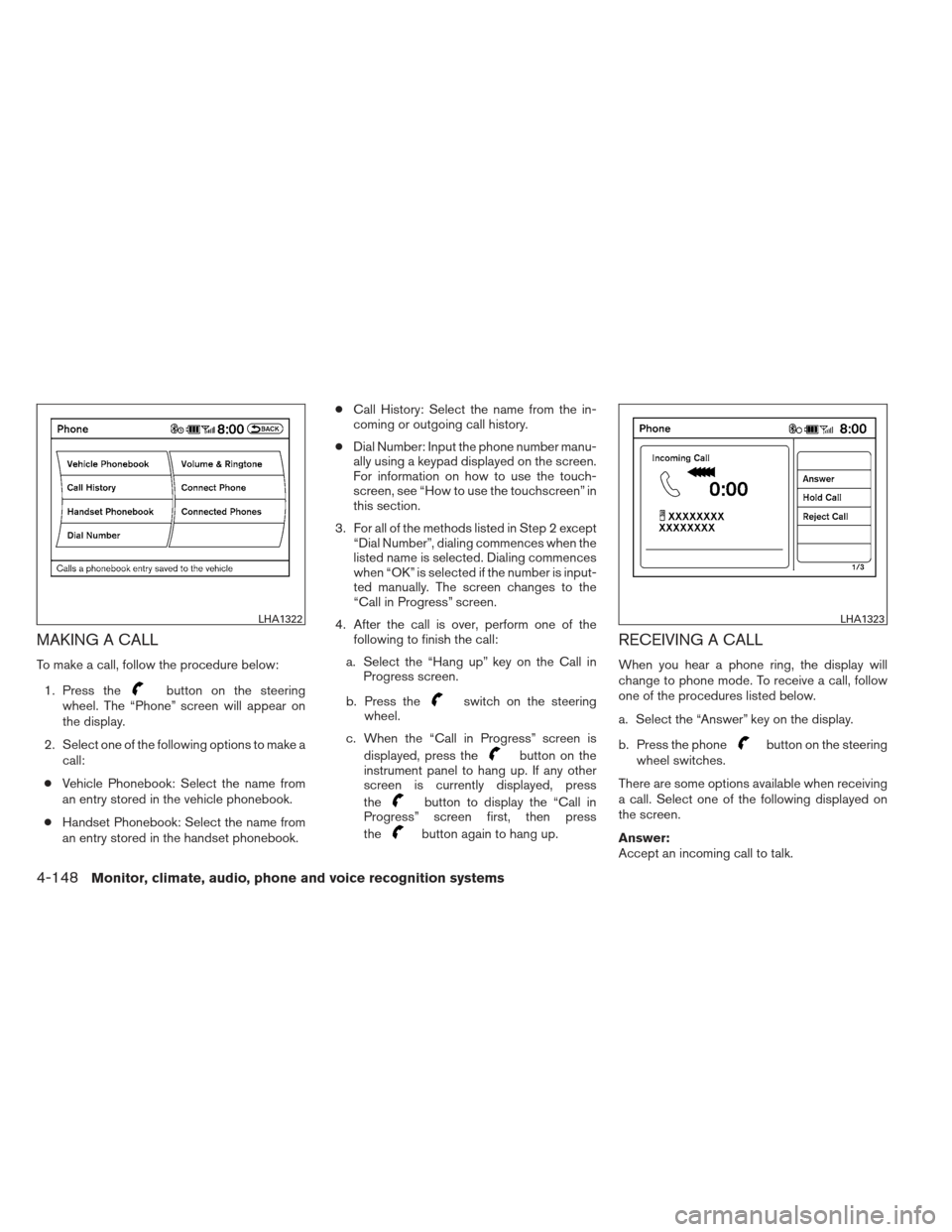
MAKING A CALL
To make a call, follow the procedure below:1. Press the
button on the steering
wheel. The “Phone” screen will appear on
the display.
2. Select one of the following options to make a call:
● Vehicle Phonebook: Select the name from
an entry stored in the vehicle phonebook.
● Handset Phonebook: Select the name from
an entry stored in the handset phonebook. ●
Call History: Select the name from the in-
coming or outgoing call history.
● Dial Number: Input the phone number manu-
ally using a keypad displayed on the screen.
For information on how to use the touch-
screen, see “How to use the touchscreen” in
this section.
3. For all of the methods listed in Step 2 except “Dial Number”, dialing commences when the
listed name is selected. Dialing commences
when “OK” is selected if the number is input-
ted manually. The screen changes to the
“Call in Progress” screen.
4. After the call is over, perform one of the following to finish the call:
a. Select the “Hang up” key on the Call in Progress screen.
b. Press theswitch on the steering
wheel.
c. When the “Call in Progress” screen is displayed, press the
button on the
instrument panel to hang up. If any other
screen is currently displayed, press
the
button to display the “Call in
Progress” screen first, then press
the
button again to hang up.
RECEIVING A CALL
When you hear a phone ring, the display will
change to phone mode. To receive a call, follow
one of the procedures listed below.
a. Select the “Answer” key on the display.
b. Press the phone
button on the steering
wheel switches.
There are some options available when receiving
a call. Select one of the following displayed on
the screen.
Answer:
Accept an incoming call to talk.
LHA1322LHA1323
4-148Monitor, climate, audio, phone and voice recognition systems
Page 340 of 506
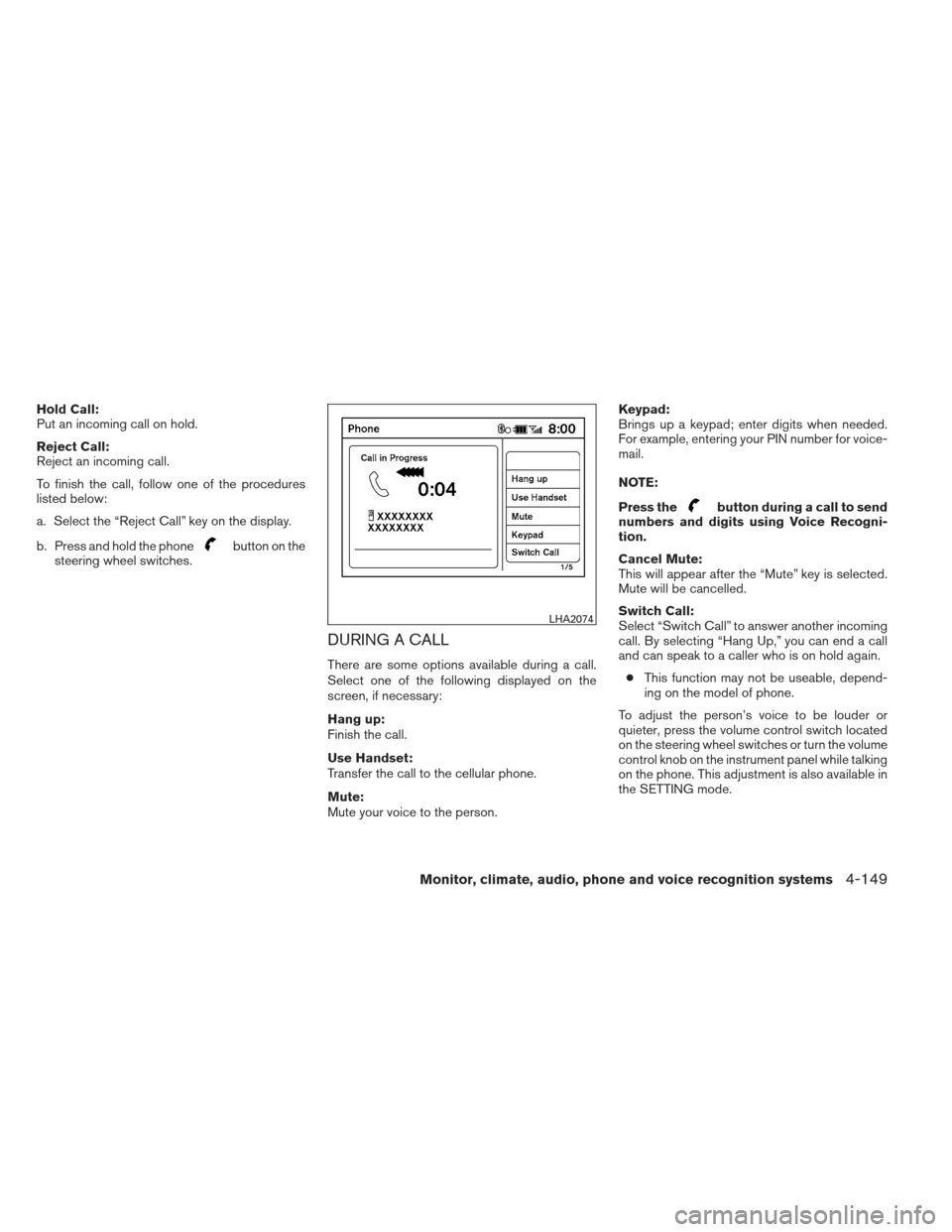
Hold Call:
Put an incoming call on hold.
Reject Call:
Reject an incoming call.
To finish the call, follow one of the procedures
listed below:
a. Select the “Reject Call” key on the display.
b. Press and hold the phone
button on the
steering wheel switches.
DURING A CALL
There are some options available during a call.
Select one of the following displayed on the
screen, if necessary:
Hang up:
Finish the call.
Use Handset:
Transfer the call to the cellular phone.
Mute:
Mute your voice to the person. Keypad:
Brings up a keypad; enter digits when needed.
For example, entering your PIN number for voice-
mail.
NOTE:
Press the
button during a call to send
numbers and digits using Voice Recogni-
tion.
Cancel Mute:
This will appear after the “Mute” key is selected.
Mute will be cancelled.
Switch Call:
Select “Switch Call” to answer another incoming
call. By selecting “Hang Up,” you can end a call
and can speak to a caller who is on hold again.
● This function may not be useable, depend-
ing on the model of phone.
To adjust the person’s voice to be louder or
quieter, press the volume control switch located
on the steering wheel switches or turn the volume
control knob on the instrument panel while talking
on the phone. This adjustment is also available in
the SETTING mode.
LHA2074
Monitor, climate, audio, phone and voice recognition systems4-149
Page 341 of 506
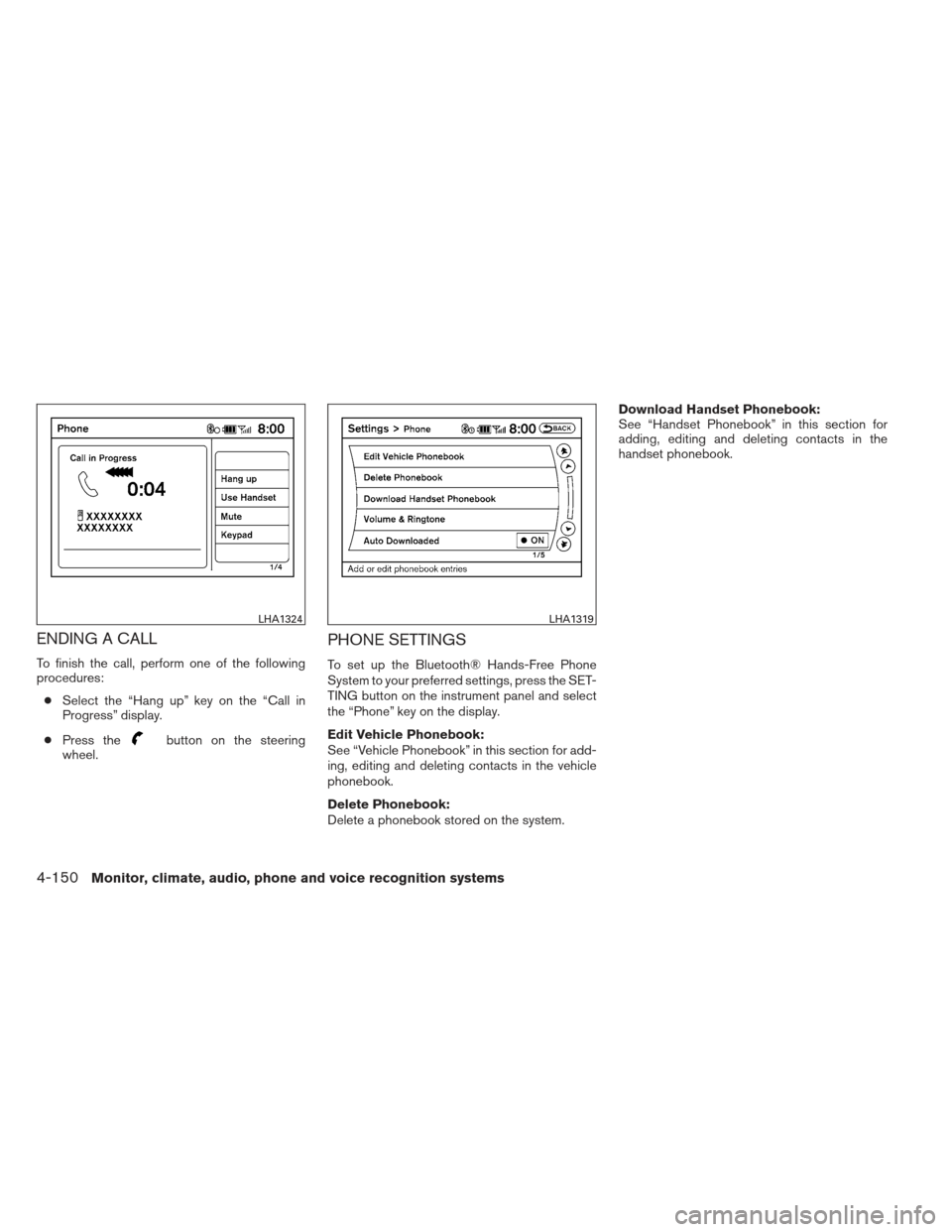
ENDING A CALL
To finish the call, perform one of the following
procedures:● Select the “Hang up” key on the “Call in
Progress” display.
● Press the
button on the steering
wheel.
PHONE SETTINGS
To set up the Bluetooth® Hands-Free Phone
System to your preferred settings, press the SET-
TING button on the instrument panel and select
the “Phone” key on the display.
Edit Vehicle Phonebook:
See “Vehicle Phonebook” in this section for add-
ing, editing and deleting contacts in the vehicle
phonebook.
Delete Phonebook:
Delete a phonebook stored on the system. Download Handset Phonebook:
See “Handset Phonebook” in this section for
adding, editing and deleting contacts in the
handset phonebook.
LHA1324LHA1319
4-150Monitor, climate, audio, phone and voice recognition systems
Page 343 of 506
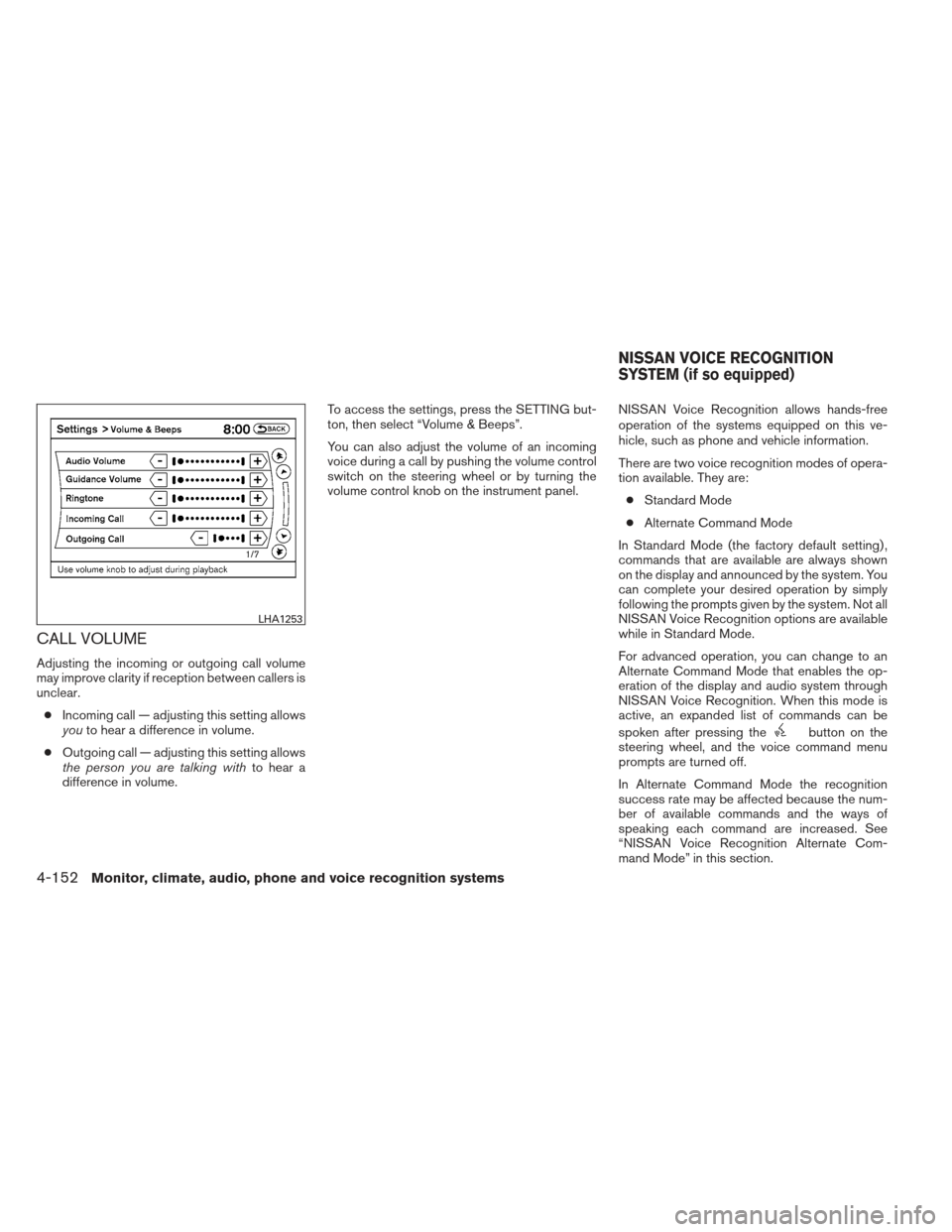
CALL VOLUME
Adjusting the incoming or outgoing call volume
may improve clarity if reception between callers is
unclear.● Incoming call — adjusting this setting allows
you to hear a difference in volume.
● Outgoing call — adjusting this setting allows
the person you are talking with to hear a
difference in volume. To access the settings, press the SETTING but-
ton, then select “Volume & Beeps”.
You can also adjust the volume of an incoming
voice during a call by pushing the volume control
switch on the steering wheel or by turning the
volume control knob on the instrument panel.
NISSAN Voice Recognition allows hands-free
operation of the systems equipped on this ve-
hicle, such as phone and vehicle information.
There are two voice recognition modes of opera-
tion available. They are:
● Standard Mode
● Alternate Command Mode
In Standard Mode (the factory default setting) ,
commands that are available are always shown
on the display and announced by the system. You
can complete your desired operation by simply
following the prompts given by the system. Not all
NISSAN Voice Recognition options are available
while in Standard Mode.
For advanced operation, you can change to an
Alternate Command Mode that enables the op-
eration of the display and audio system through
NISSAN Voice Recognition. When this mode is
active, an expanded list of commands can be
spoken after pressing the
button on the
steering wheel, and the voice command menu
prompts are turned off.
In Alternate Command Mode the recognition
success rate may be affected because the num-
ber of available commands and the ways of
speaking each command are increased. See
“NISSAN Voice Recognition Alternate Com-
mand Mode” in this section.
LHA1253
NISSAN VOICE RECOGNITION
SYSTEM (if so equipped)
4-152Monitor, climate, audio, phone and voice recognition systems
Page 344 of 506
To improve the recognition success rate when
Alternate Command Mode is active, try using the
Speaker Adaptation Function available in that
mode. See “Speaker Adaptation Function” in this
section. Otherwise, it is recommended that Alter-
nate Command Mode be turned off and Standard
Mode be used for the best recognition perfor-
mance.
While using the NISSAN Voice Recognition sys-
tem for certain Phone and Navigation features,
you can switch to using manual controls (touch-
screen, NISSAN controller, steering wheel con-
trols) and the information you have already en-
tered by voice control will be retained. To switch
to manual controls, select the “Manual Controls”
key on the display when it appears. The system
will respond by speaking “Changing to manual
operation. Please use manual controls to con-
tinue.”
For the voice commands for the navigation sys-
tem, refer to the Navigation System Owner’s
Manual of your vehicle.
For vehicles in the U.S., the factory default setting
is the Standard Mode. See “Standard Mode” in
this section. For vehicles in Canada, the factory
default setting is the Alternate Command Mode.
See “Alternate Command Mode” in this section.NISSAN VOICE RECOGNITION
STANDARD MODE
The Standard Mode enables control of naviga-
tion, phone and vehicle information. With this
setting active, commands that are available are
always shown on the display and announced by
the system.
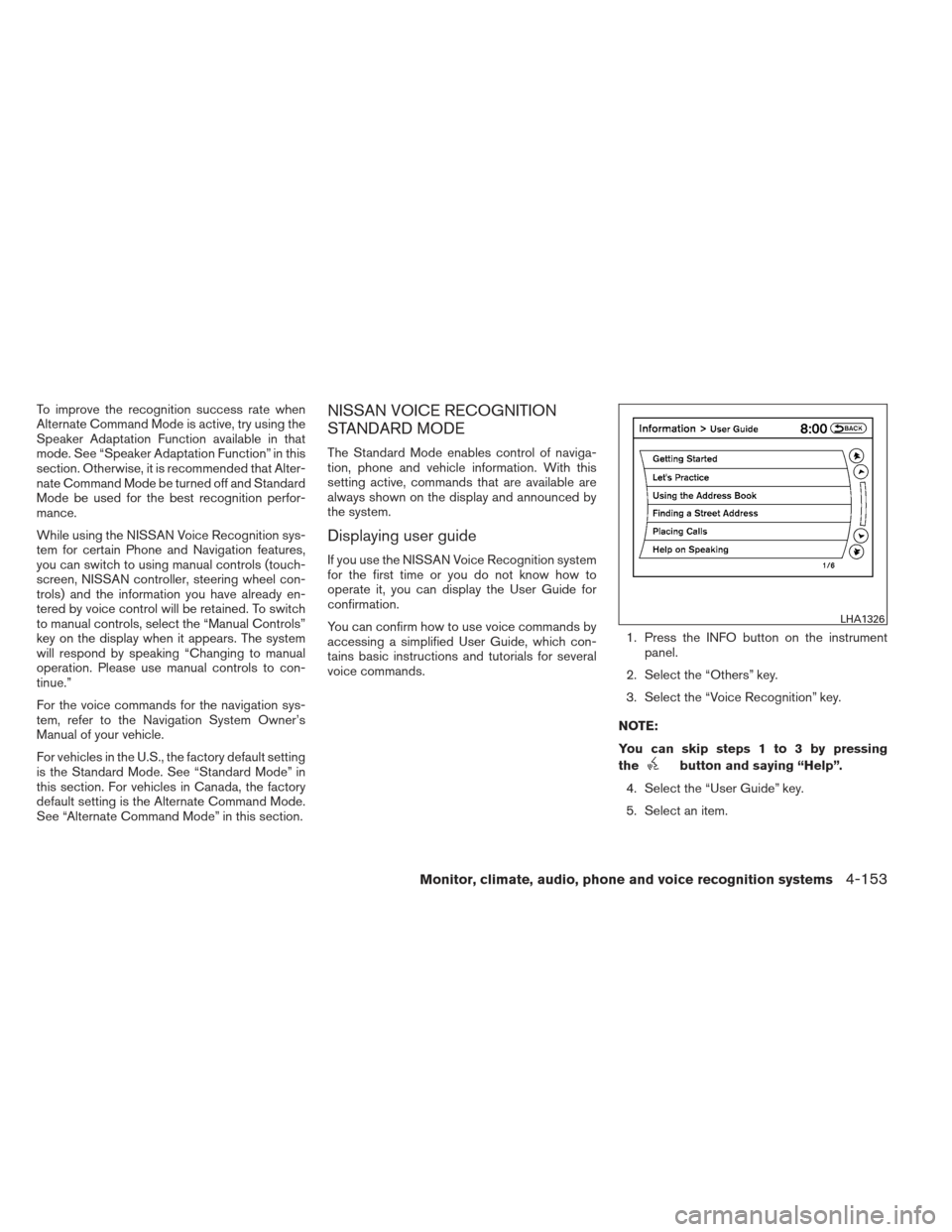
Displaying user guide
If you use the NISSAN Voice Recognition system
for the first time or you do not know how to
operate it, you can display the User Guide for
confirmation.
You can confirm how to use voice commands by
accessing a simplified User Guide, which con-
tains basic instructions and tutorials for several
voice commands.1. Press the INFO button on the instrument
panel.
2. Select the “Others” key.
3. Select the “Voice Recognition” key.
NOTE:
You can skip steps 1 to 3 by pressing
the
button and saying “Help”.
4. Select the “User Guide” key.
5. Select an item.
LHA1326
Monitor, climate, audio, phone and voice recognition systems4-153
Page 347 of 506
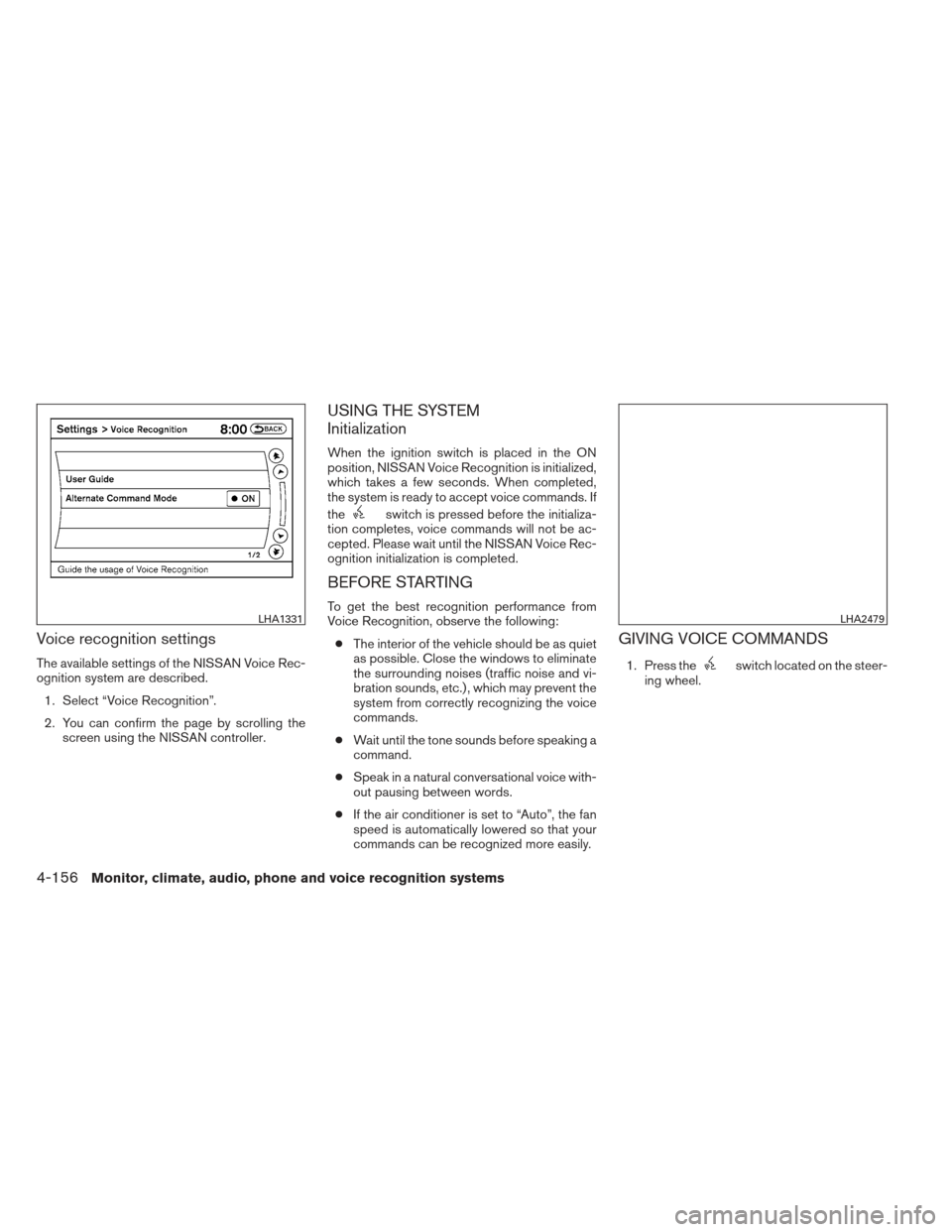
Voice recognition settings
The available settings of the NISSAN Voice Rec-
ognition system are described.1. Select “Voice Recognition”.
2. You can confirm the page by scrolling the screen using the NISSAN controller.
USING THE SYSTEM
Initialization
When the ignition switch is placed in the ON
position, NISSAN Voice Recognition is initialized,
which takes a few seconds. When completed,
the system is ready to accept voice commands. If
the
switch is pressed before the initializa-
tion completes, voice commands will not be ac-
cepted. Please wait until the NISSAN Voice Rec-
ognition initialization is completed.
BEFORE STARTING
To get the best recognition performance from
Voice Recognition, observe the following:
● The interior of the vehicle should be as quiet
as possible. Close the windows to eliminate
the surrounding noises (traffic noise and vi-
bration sounds, etc.) , which may prevent the
system from correctly recognizing the voice
commands.
● Wait until the tone sounds before speaking a
command.
● Speak in a natural conversational voice with-
out pausing between words.
● If the air conditioner is set to “Auto”, the fan
speed is automatically lowered so that your
commands can be recognized more easily.
GIVING VOICE COMMANDS
1. Press theswitch located on the steer-
ing wheel.
LHA1331LHA2479
4-156Monitor, climate, audio, phone and voice recognition systems
Page 348 of 506
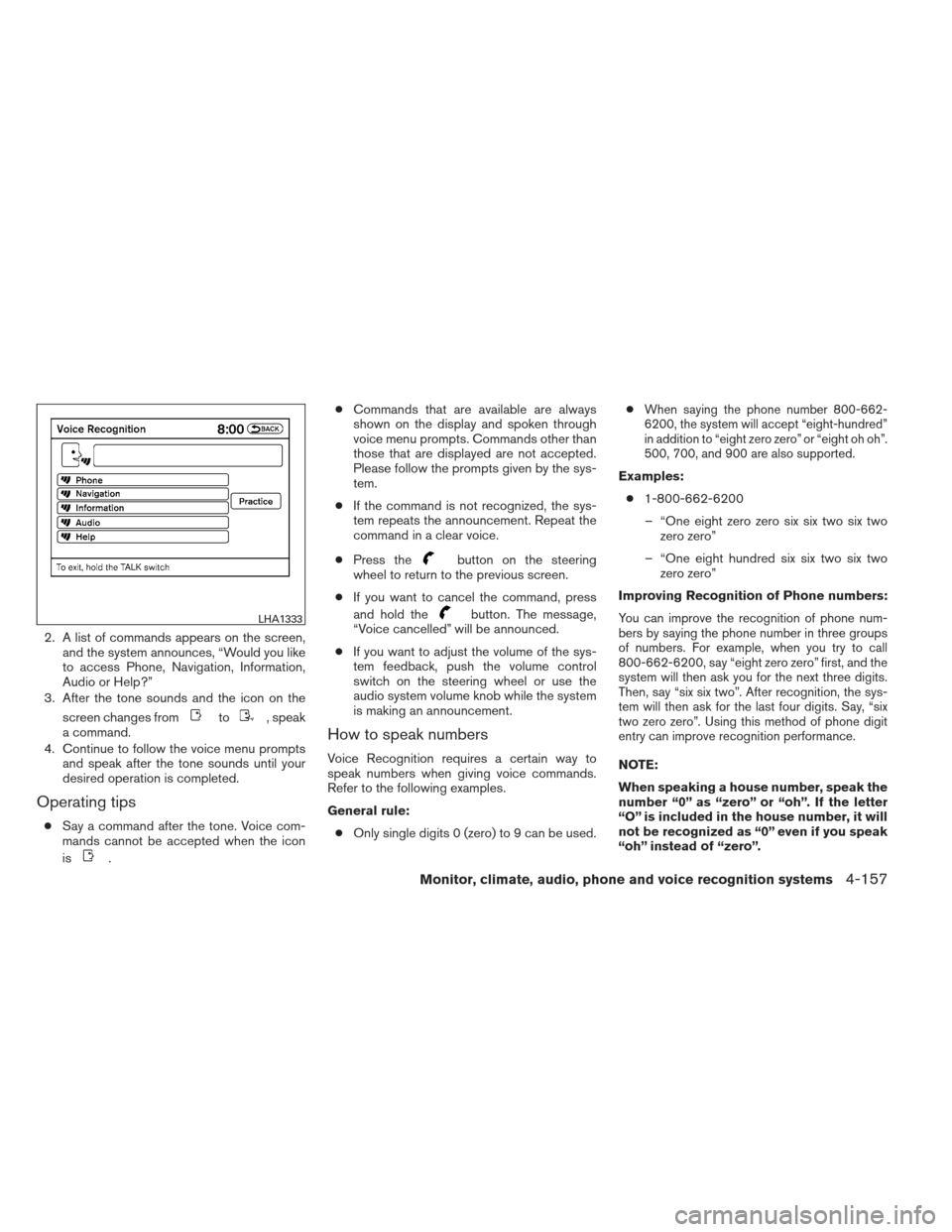
2. A list of commands appears on the screen,and the system announces, “Would you like
to access Phone, Navigation, Information,
Audio or Help?”
3. After the tone sounds and the icon on the
screen changes from
to, speak
a command.
4. Continue to follow the voice menu prompts and speak after the tone sounds until your
desired operation is completed.
Operating tips
●Say a command after the tone. Voice com-
mands cannot be accepted when the icon
is
. ●
Commands that are available are always
shown on the display and spoken through
voice menu prompts. Commands other than
those that are displayed are not accepted.
Please follow the prompts given by the sys-
tem.
● If the command is not recognized, the sys-
tem repeats the announcement. Repeat the
command in a clear voice.
● Press the
button on the steering
wheel to return to the previous screen.
● If you want to cancel the command, press
and hold the
button. The message,
“Voice cancelled” will be announced.
● If you want to adjust the volume of the sys-
tem feedback, push the volume control
switch on the steering wheel or use the
audio system volume knob while the system
is making an announcement.
How to speak numbers
Voice Recognition requires a certain way to
speak numbers when giving voice commands.
Refer to the following examples.
General rule:
● Only single digits 0 (zero) to 9 can be used. ●
When saying the phone number 800-662-
6200, the system will accept “eight-hundred”
in addition to “eight zero zero” or “eight oh oh”.
500, 700, and 900 are also supported.
Examples:
● 1-800-662-6200
– “One eight zero zero six six two six two zero zero”
– “One eight hundred six six two six two zero zero”
Improving Recognition of Phone numbers:
You can improve the recognition of phone num-
bers by saying the phone number in three groups
of numbers. For example, when you try to call
800-662-6200, say “eight zero zero” first, and the
system will then ask you for the next three digits.
Then, say “six six two”. After recognition, the sys-
tem will then ask for the last four digits. Say, “six
two zero zero”. Using this method of phone digit
entry can improve recognition performance.
NOTE:
When speaking a house number, speak the
number “0” as “zero” or “oh”. If the letter
“O” is included in the house number, it will
not be recognized as “0” even if you speak
“oh” instead of “zero”.
LHA1333
Monitor, climate, audio, phone and voice recognition systems4-157
Page 351 of 506
Voice command examples
Some basic voice command examples are de-
scribed here.
For navigation system commands, see the sepa-
rate Navigation System Owner’s Manual.Example 1 — Placing a call to the phone
number 800-662-6200:1. Press the
button located on the steer-
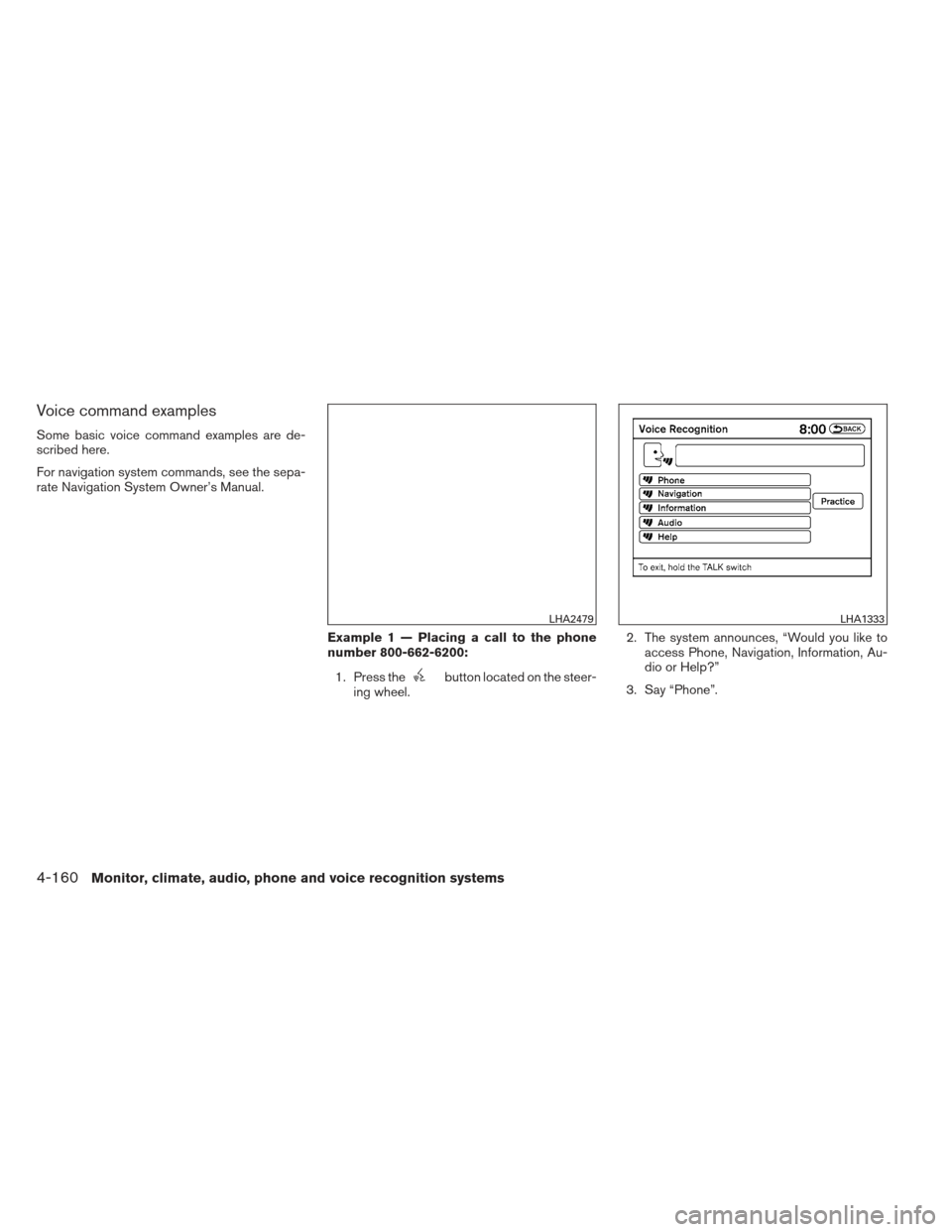
ing wheel. 2. The system announces, “Would you like to
access Phone, Navigation, Information, Au-
dio or Help?”
3. Say “Phone”.
LHA2479LHA1333
4-160Monitor, climate, audio, phone and voice recognition systems
Page 354 of 506
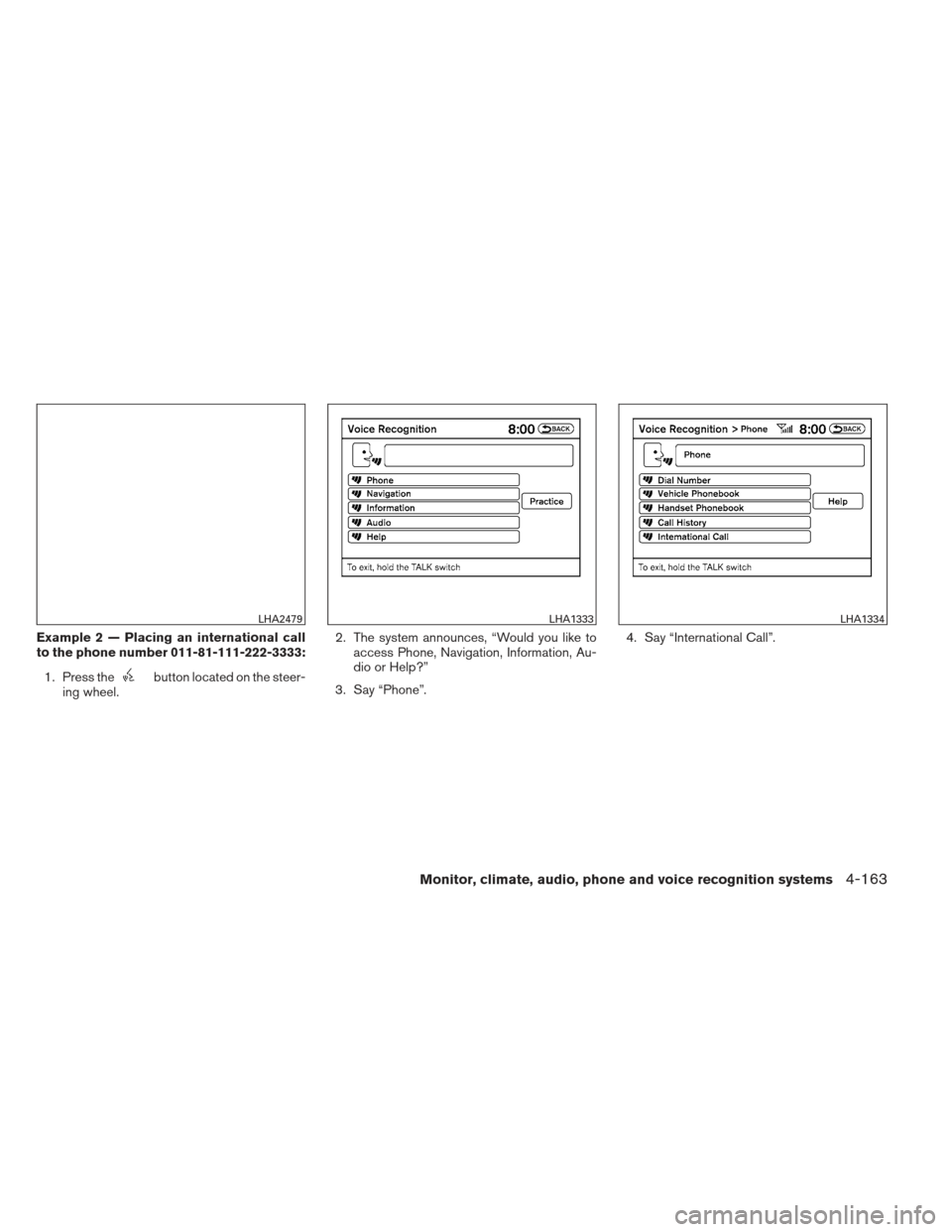
Example 2 — Placing an international call
to the phone number 011-81-111-222-3333:1. Press the
button located on the steer-
ing wheel. 2. The system announces, “Would you like to
access Phone, Navigation, Information, Au-
dio or Help?”
3. Say “Phone”. 4. Say “International Call”.
LHA2479LHA1333LHA1334
Monitor, climate, audio, phone and voice recognition systems4-163
Page 361 of 506
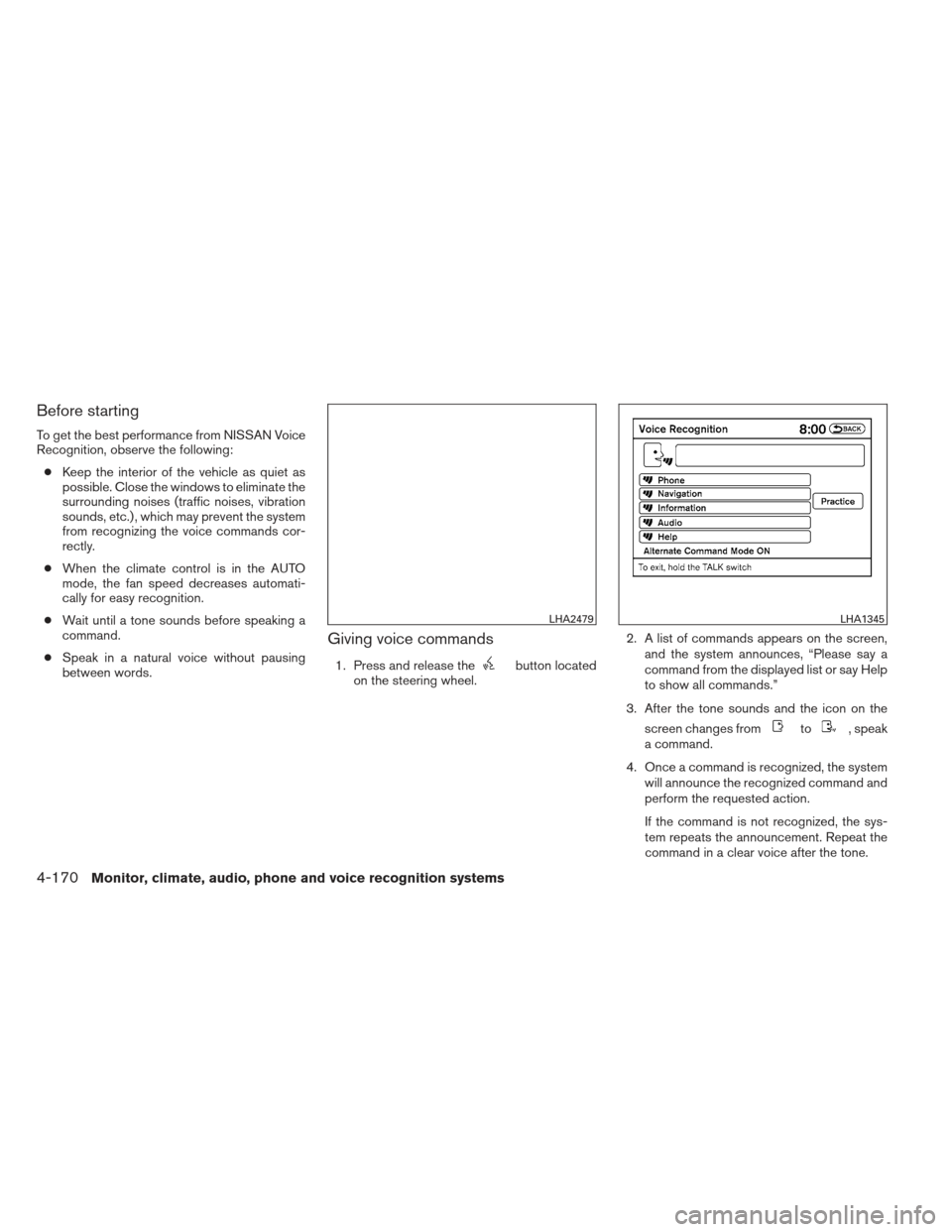
Before starting
To get the best performance from NISSAN Voice
Recognition, observe the following:● Keep the interior of the vehicle as quiet as
possible. Close the windows to eliminate the
surrounding noises (traffic noises, vibration
sounds, etc.) , which may prevent the system
from recognizing the voice commands cor-
rectly.
● When the climate control is in the AUTO
mode, the fan speed decreases automati-
cally for easy recognition.
● Wait until a tone sounds before speaking a
command.
● Speak in a natural voice without pausing
between words.
Giving voice commands
1. Press and release thebutton located
on the steering wheel. 2. A list of commands appears on the screen,
and the system announces, “Please say a
command from the displayed list or say Help
to show all commands.”
3. After the tone sounds and the icon on the screen changes from
to, speak
a command.
4. Once a command is recognized, the system will announce the recognized command and
perform the requested action.
If the command is not recognized, the sys-
tem repeats the announcement. Repeat the
command in a clear voice after the tone.
LHA2479LHA1345
4-170Monitor, climate, audio, phone and voice recognition systems