key NISSAN PATHFINDER 2016 R52 / 4.G Workshop Manual
[x] Cancel search | Manufacturer: NISSAN, Model Year: 2016, Model line: PATHFINDER, Model: NISSAN PATHFINDER 2016 R52 / 4.GPages: 540, PDF Size: 5.49 MB
Page 213 of 540
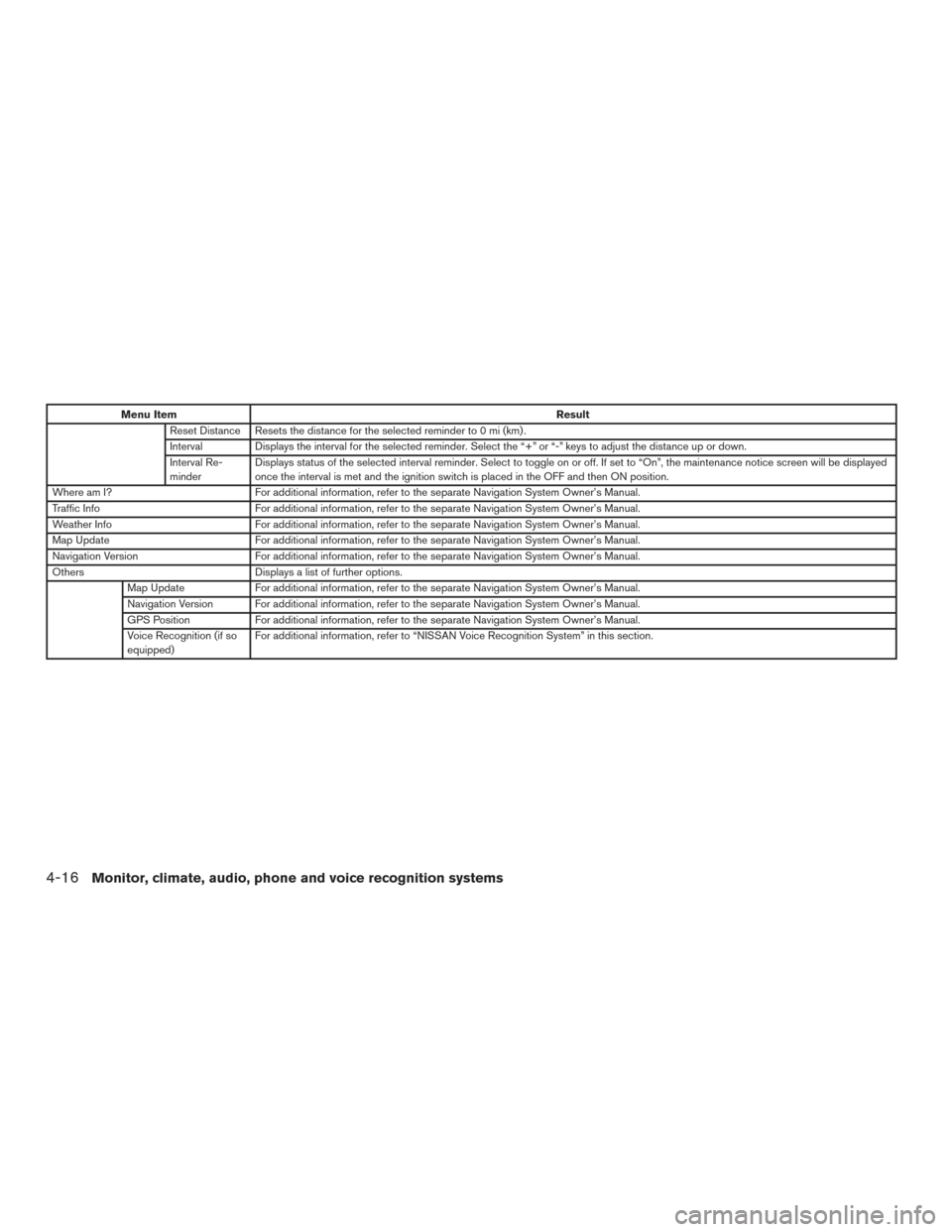
Menu ItemResult
Reset Distance Resets the distance for the selected reminder to 0 mi (km) .
Interval Displays the interval for the selected reminder. Select the “+” or “-” keys to adjust the distance up or down.
Interval Re-
minder Displays status of the selected interval reminder. Select to toggle on or off. If set to “On”, the maintenance notice screen will be displayed
once the interval is met and the ignition switch is placed in the OFF and then ON position.
Where am I? For additional information, refer to the separate Navigation System Owner’s Manual.
Traffic Info For additional information, refer to the separate Navigation System Owner’s Manual.
Weather Info For additional information, refer to the separate Navigation System Owner’s Manual.
Map Update For additional information, refer to the separate Navigation System Owner’s Manual.
Navigation Version For additional information, refer to the separate Navigation System Owner’s Manual.
Others Displays a list of further options.
Map Update For additional information, refer to the separate Navigation System Owner’s Manual.
Navigation Version For additional information, refer to the separate Navigation System Owner’s Manual.
GPS Position For additional information, refer to the separate Navigation System Owner’s Manual.
Voice Recognition (if so
equipped) For additional information, refer to “NISSAN Voice Recognition System” in this section.
4-16Monitor, climate, audio, phone and voice recognition systems
Page 214 of 540
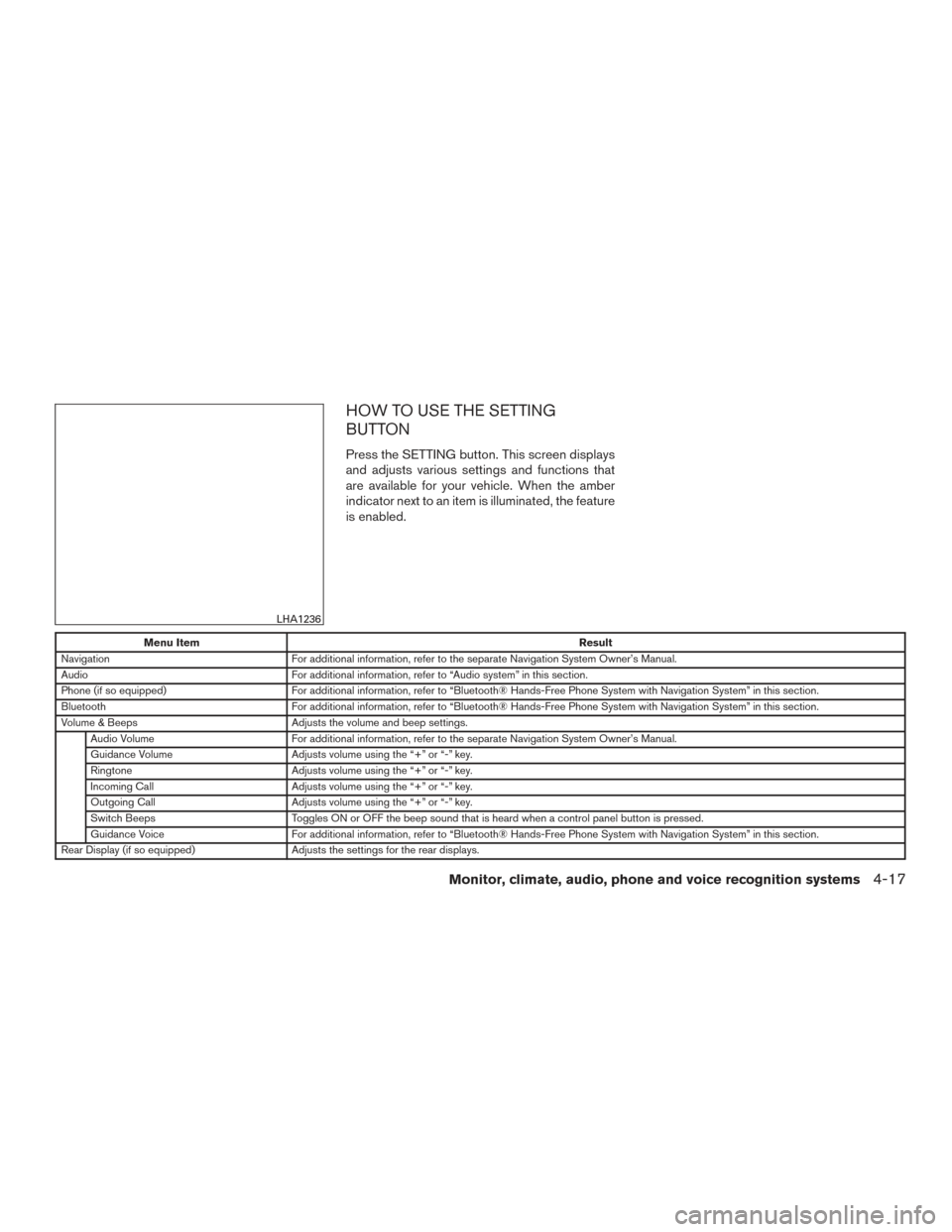
HOW TO USE THE SETTING
BUTTON
Press the SETTING button. This screen displays
and adjusts various settings and functions that
are available for your vehicle. When the amber
indicator next to an item is illuminated, the feature
is enabled.
Menu ItemResult
Navigation For additional information, refer to the separate Navigation System Owner’s Manual.
Audio For additional information, refer to “Audio system” in this section.
Phone (if so equipped) For additional information, refer to “Bluetooth® Hands-Free Phone System with Navigation System” in this section.
Bluetooth For additional information, refer to “Bluetooth® Hands-Free Phone System with Navigation System” in this section.
Volume & Beeps Adjusts the volume and beep settings.
Audio Volume For additional information, refer to the separate Navigation System Owner’s Manual.
Guidance Volume Adjusts volume using the “+” or “-” key.
Ringtone Adjusts volume using the “+” or “-” key.
Incoming Call Adjusts volume using the “+” or “-” key.
Outgoing Call Adjusts volume using the “+” or “-” key.
Switch Beeps Toggles ON or OFF the beep sound that is heard when a control panel button is pressed.
Guidance Voice For additional information, refer to “Bluetooth® Hands-Free Phone System with Navigation System” in this section.
Rear Display (if so equipped) Adjusts the settings for the rear displays.
LHA1236
Monitor, climate, audio, phone and voice recognition systems4-17
Page 215 of 540
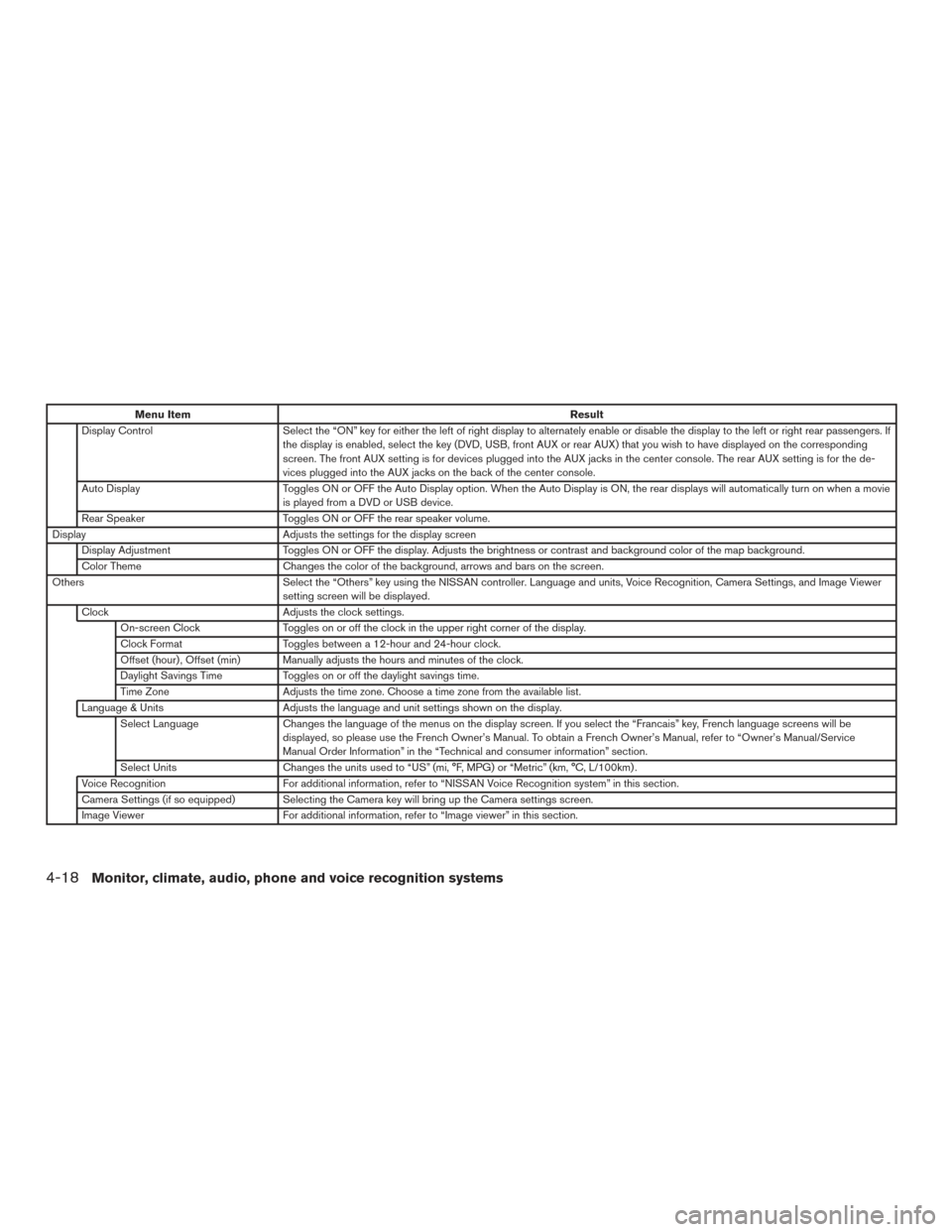
Menu ItemResult
Display Control Select the “ON” key for either the left of right display to alternately enable or disable the display to the left or right rear passengers. If
the display is enabled, select the key (DVD, USB, front AUX or rear AUX) that you wish to have displayed on the corresponding
screen. The front AUX setting is for devices plugged into the AUX jacks in the center console. The rear AUX setting is for the de-
vices plugged into the AUX jacks on the back of the center console.
Auto Display Toggles ON or OFF the Auto Display option. When the Auto Display is ON, the rear displays will automatically turn on when a movie
is played from a DVD or USB device.
Rear Speaker Toggles ON or OFF the rear speaker volume.
Display Adjusts the settings for the display screen
Display Adjustment Toggles ON or OFF the display. Adjusts the brightness or contrast and background color of the map background.
Color Theme Changes the color of the background, arrows and bars on the screen.
Others Select the “Others” key using the NISSAN controller. Language and units, Voice Recognition, Camera Settings, and Image Viewer
setting screen will be displayed.
Clock Adjusts the clock settings.
On-screen Clock Toggles on or off the clock in the upper right corner of the display.
Clock Format Toggles between a 12-hour and 24-hour clock.
Offset (hour) , Offset (min) Manually adjusts the hours and minutes of the clock.
Daylight Savings Time Toggles on or off the daylight savings time.
Time Zone Adjusts the time zone. Choose a time zone from the available list.
Language & Units Adjusts the language and unit settings shown on the display.
Select Language Changes the language of the menus on the display screen. If you select the “Francais” key, French language screens will be
displayed, so please use the French Owner’s Manual. To obtain a French Owner’s Manual, refer to “Owner’s Manual/Service
Manual Order Information” in the “Technical and consumer information” section.
Select Units Changes the units used to “US” (mi, °F, MPG) or “Metric” (km, °C, L/100km) .
Voice Recognition For additional information, refer to “NISSAN Voice Recognition system” in this section.
Camera Settings (if so equipped) Selecting the Camera key will bring up the Camera settings screen.
Image Viewer For additional information, refer to “Image viewer” in this section.
4-18Monitor, climate, audio, phone and voice recognition systems
Page 217 of 540
HOW TO USE THE CAMERA
BUTTON
For additional information, refer to ”RearView
Monitor” or “Around View® Monitor” in this sec-
tion.
OFF BUTTON
To change the display brightness, press
the
OFF button. Pressing the button again
will change the display to the day
or the
night
display. The brightness can then be
adjusted using the NISSAN controller.
If no operation is performed within 5 seconds, the
display will return to the previous display.
Press and hold the
OFF button for more
than 2 seconds to turn the display off. Press the
button again to turn the display on.
USING THE IMAGE VIEWER
When a compatible portable storage device is
plugged into the USB connection port located in
the center console, compatible image files stored
on the device can be viewed on the control panel
display.
Connecting the portable storage
device
To connect a portable storage device to the sys-
tem so that images stored on it can be viewed,
insert the device into the USB connection port
located in the center console.
Viewing images
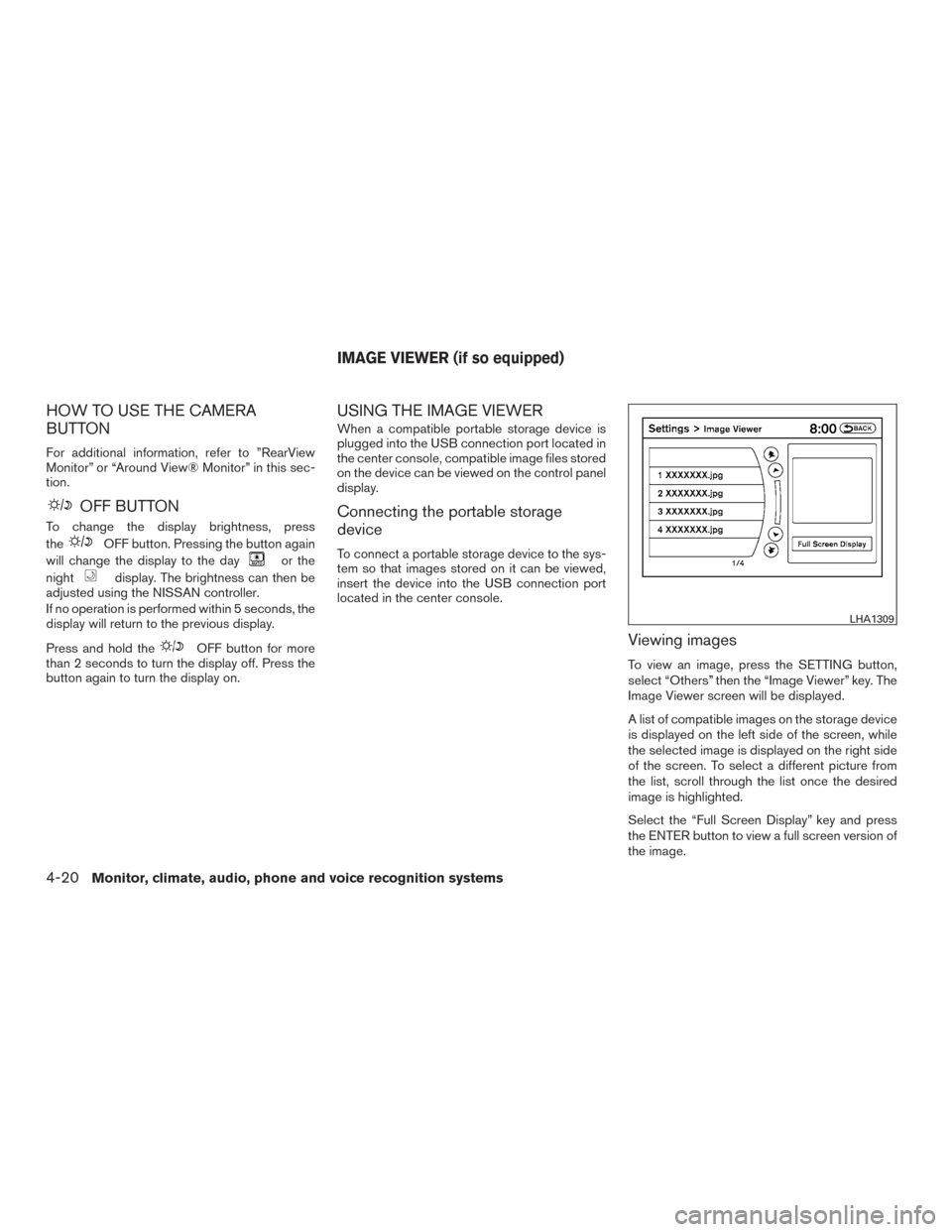
To view an image, press the SETTING button,
select “Others” then the “Image Viewer” key. The
Image Viewer screen will be displayed.
A list of compatible images on the storage device
is displayed on the left side of the screen, while
the selected image is displayed on the right side
of the screen. To select a different picture from
the list, scroll through the list once the desired
image is highlighted.
Select the “Full Screen Display” key and press
the ENTER button to view a full screen version of
the image.
LHA1309
IMAGE VIEWER (if so equipped)
4-20Monitor, climate, audio, phone and voice recognition systems
Page 218 of 540
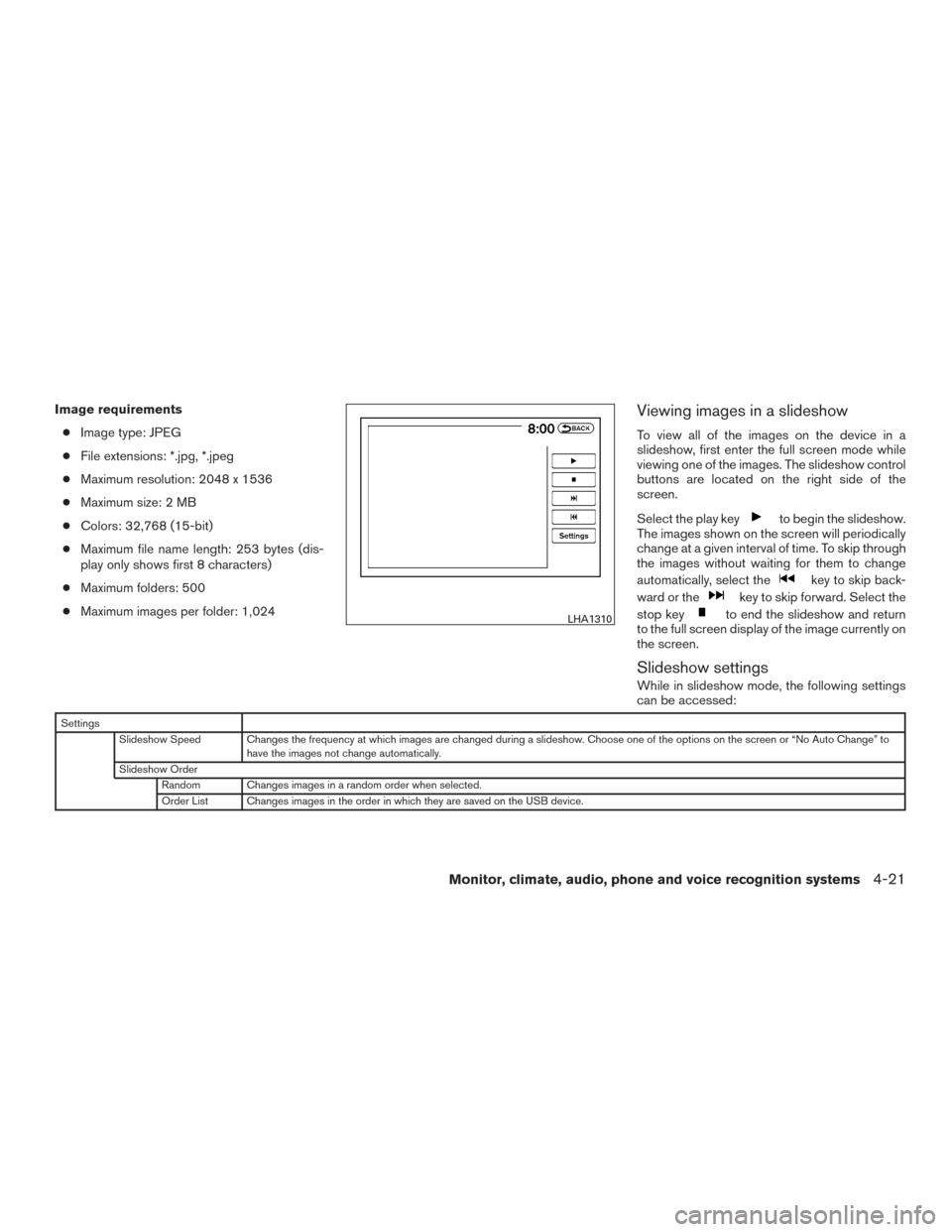
Image requirements● Image type: JPEG
● File extensions: *.jpg, *.jpeg
● Maximum resolution: 2048 x 1536
● Maximum size: 2 MB
● Colors: 32,768 (15-bit)
● Maximum file name length: 253 bytes (dis-
play only shows first 8 characters)
● Maximum folders: 500
● Maximum images per folder: 1,024Viewing images in a slideshow
To view all of the images on the device in a
slideshow, first enter the full screen mode while
viewing one of the images. The slideshow control
buttons are located on the right side of the
screen.
Select the play key
to begin the slideshow.
The images shown on the screen will periodically
change at a given interval of time. To skip through
the images without waiting for them to change
automatically, select the
key to skip back-
ward or the
key to skip forward. Select the
stop key
to end the slideshow and return
to the full screen display of the image currently on
the screen.
Slideshow settings
While in slideshow mode, the following settings
can be accessed:
Settings
Slideshow Speed Changes the frequency at which images are changed during a slideshow. Choose one of the options on the screen or “No Auto Change” to have the images not change automatically.
Slideshow Order Random Changes images in a random order when selected.
Order List Changes images in the order in which they are saved on the USB device.
LHA1310
Monitor, climate, audio, phone and voice recognition systems4-21
Page 224 of 540
ADJUSTING THE SCREEN
To adjust the Display ON/OFF, Brightness, Tint,
Color, Contrast and Black Level of the RearView
Monitor, press the SETTING button with the
RearView Monitor on and select the “Display”
key. Select one of the items and change the value
by touching the “+” or “-” key or by turning the
NISSAN controller.NOTE:
Do not adjust the Brightness, Tint, Color,
Contrast and Black Level of the RearView
Monitor while the vehicle is moving. Make
sure the parking brake is firmly applied.
HOW TO TURN ON AND OFF
PREDICTED COURSE LINES
Models without navigation
To toggle ON and OFF the predicted course lines
while in the P (Park) position:
1. Press the SETTING button. 2. Select the Camera key.
3. Select the Predicted Course Lines key to
turn the feature ON or OFF.
To toggle ON and OFF the predicted course lines
while in the R (Reverse) position: 1. Press the SETTING button.
2. Select the Settings key.
3. Select the Predicted Course Lines key to turn the feature ON or OFF.
Models with navigation
To toggle ON and OFF the predicted course lines
while in the P (Park) position: 1. Press the SETTING button.
2. Touch the Other key.
3. Touch the Camera key.
4. Touch the Predicted Course Lines key to turn the feature ON or OFF.
To toggle ON and OFF the predicted course lines
while in the R (Reverse) position: 1. Press the SETTING button.
2. Touch the Settings key.
3. Touch the Predicted Course Lines key to turn the feature ON or OFF.
Models without navigation
LHA3834
Models with navigation
LHA3833
Monitor, climate, audio, phone and voice recognition systems4-27
Page 235 of 540
ADJUSTING THE SCREEN
To adjust the Display ON/OFF, Brightness, Tint,
Color, Contrast and Black Level of the Around
View® Monitor, press the SETTING button with
the monitor on and select the “Display” key. Se-
lect one of the items and change the value by
touching the “+” or “-” key or by turning the
NISSAN controller.NOTE:
Do not adjust the Brightness, Tint, Color,
Contrast and Black Level of the Around
View® Monitor while the vehicle is moving.
Make sure the parking brake is firmly ap-
plied.
AROUND VIEW® MONITOR
SYSTEM LIMITATIONS
LHA3833
LHA3760
4-38Monitor, climate, audio, phone and voice recognition systems
Page 276 of 540
Clock operation
For additional information on setting the clock,
refer to “How to use the SETTING button” in this
section.CD/MP3 display mode
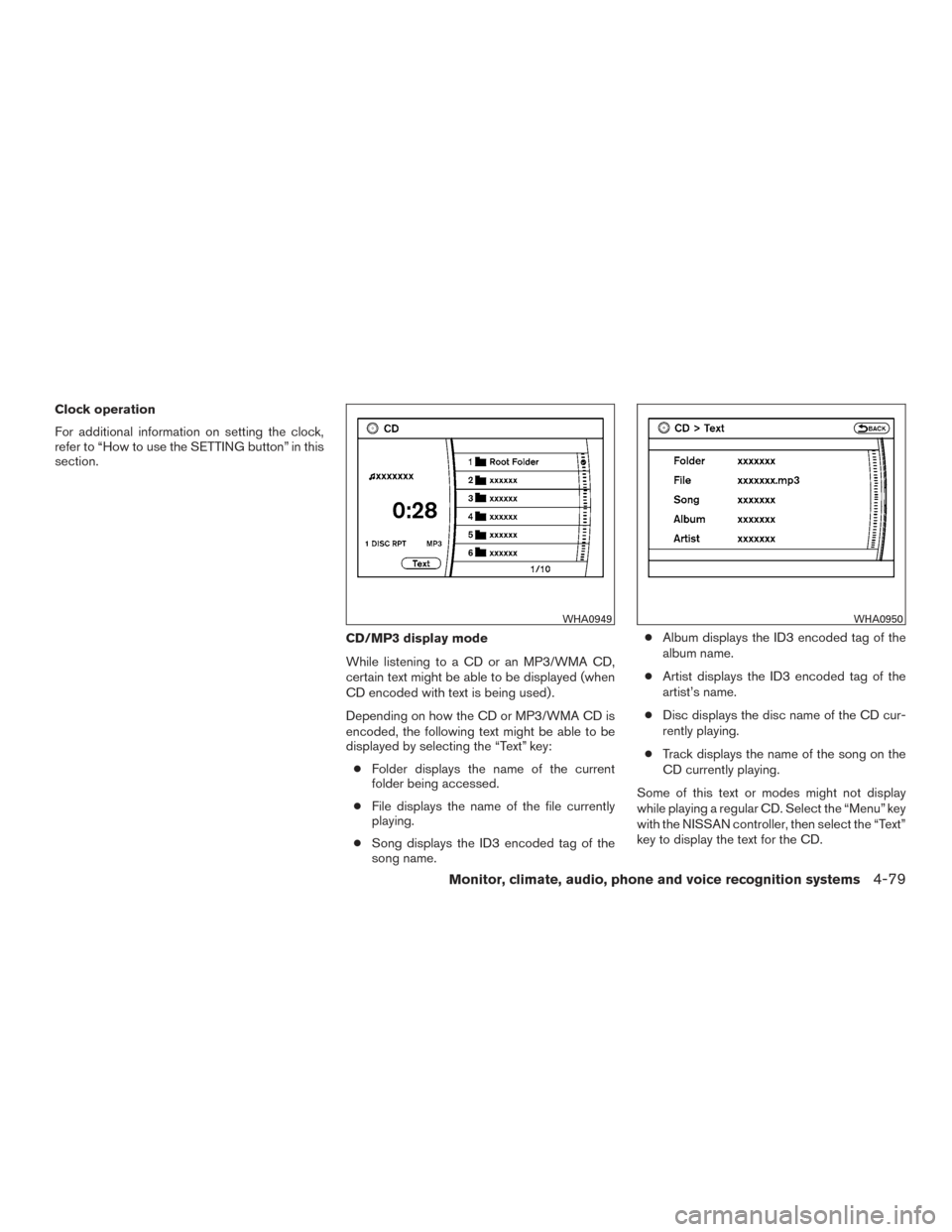
While listening to a CD or an MP3/WMA CD,
certain text might be able to be displayed (when
CD encoded with text is being used) .
Depending on how the CD or MP3/WMA CD is
encoded, the following text might be able to be
displayed by selecting the “Text” key:● Folder displays the name of the current
folder being accessed.
● File displays the name of the file currently
playing.
● Song displays the ID3 encoded tag of the
song name. ●
Album displays the ID3 encoded tag of the
album name.
● Artist displays the ID3 encoded tag of the
artist’s name.
● Disc displays the disc name of the CD cur-
rently playing.
● Track displays the name of the song on the
CD currently playing.
Some of this text or modes might not display
while playing a regular CD. Select the “Menu” key
with the NISSAN controller, then select the “Text”
key to display the text for the CD.
WHA0949WHA0950
Monitor, climate, audio, phone and voice recognition systems4-79
Page 278 of 540
Radio data system (RDS)
RDS stands for Radio Data System, and is a data
information service transmitted by some radio
stations on the FM band (not AM band) . Cur-
rently, most RDS stations are in large cities, but
many stations are now considering broadcasting
RDS data.
RDS can display:● Station call sign, such as “WHFR 98.3”.
● Station name, such as “The Groove”.
● Music or programming type such as “Clas-
sical”, “Country”, or “Rock”.
When the “Text” key is selected with the NISSAN
controller on the display while the radio is playing,
additional information is displayed on the screen.
If the station broadcasts RDS information, the
RDS icon is displayed.
Compact disc (CD) player operation
Place the ignition in the ACC or ON position and
insert the compact disc into the slot with the label
side facing up. The compact disc will be guided
automatically into the slot and start playing.
If the radio is already operating, it will automati-
cally turn off and the compact disc will play. If the system has been turned off while the com-
pact disc was playing, pressing the ON·OFF
button will start the compact disc.
DISC button
When the DISC button is pressed with the sys-
tem off and a compact disc loaded, the system
will turn on and the compact disc will start to play.
When the DISC button is pressed with a com-
pact disc loaded with the radio playing, the radio
will automatically be turned off and the compact
disc will start to play.
SEEK/CAT and TRACK
buttons
When the SEEK/CAT
button is pressed
while a compact disc is playing, the track being
played returns to its beginning. Press several
times to skip back through tracks. The compact
disc will go back the number of times the button
is pressed.
When the TRACK
button is pressed while
a compact disc is playing, the next track will start
to play from its beginning. Press several times to
skip through tracks. The compact disc will ad-
vance the number of times the button is pressed.
(When the last track on the compact disc is
skipped through, the first track will be played.)
The NISSAN controller can also be used to se-
lect tracks when a CD is playing.
SEEK/CAT and TRACK
(Rewind and Fast For-
ward) buttons
Press and hold the SEEK/CAT
(rewind)
button or the TRACK
(fast forward) button
while a compact disc is playing; the compact disc
will play while rewinding or fast forwarding. When
the button is released, the compact disc will
return to normal play speed.
TUNE/FOLDER knob
While playing an MP3/WMA CD, turn the
TUNE/FOLDER knob right or left to scan forward
or backward through available folders.
RPT (repeat)/RDM (random) button
When the RPT/RDM button is pressed while the
compact disc is playing, the play pattern can be
changed as follows:
CD
Repeat All →1 Track Repeat →1 Disc Random
→ Repeat All
CD with compressed audio files
Repeat All →1 Folder Repeat →1 Track Repeat
→ 1 Disc Random →1 Folder Random →Re-
peat All
Monitor, climate, audio, phone and voice recognition systems4-81
Page 280 of 540
AUX settings
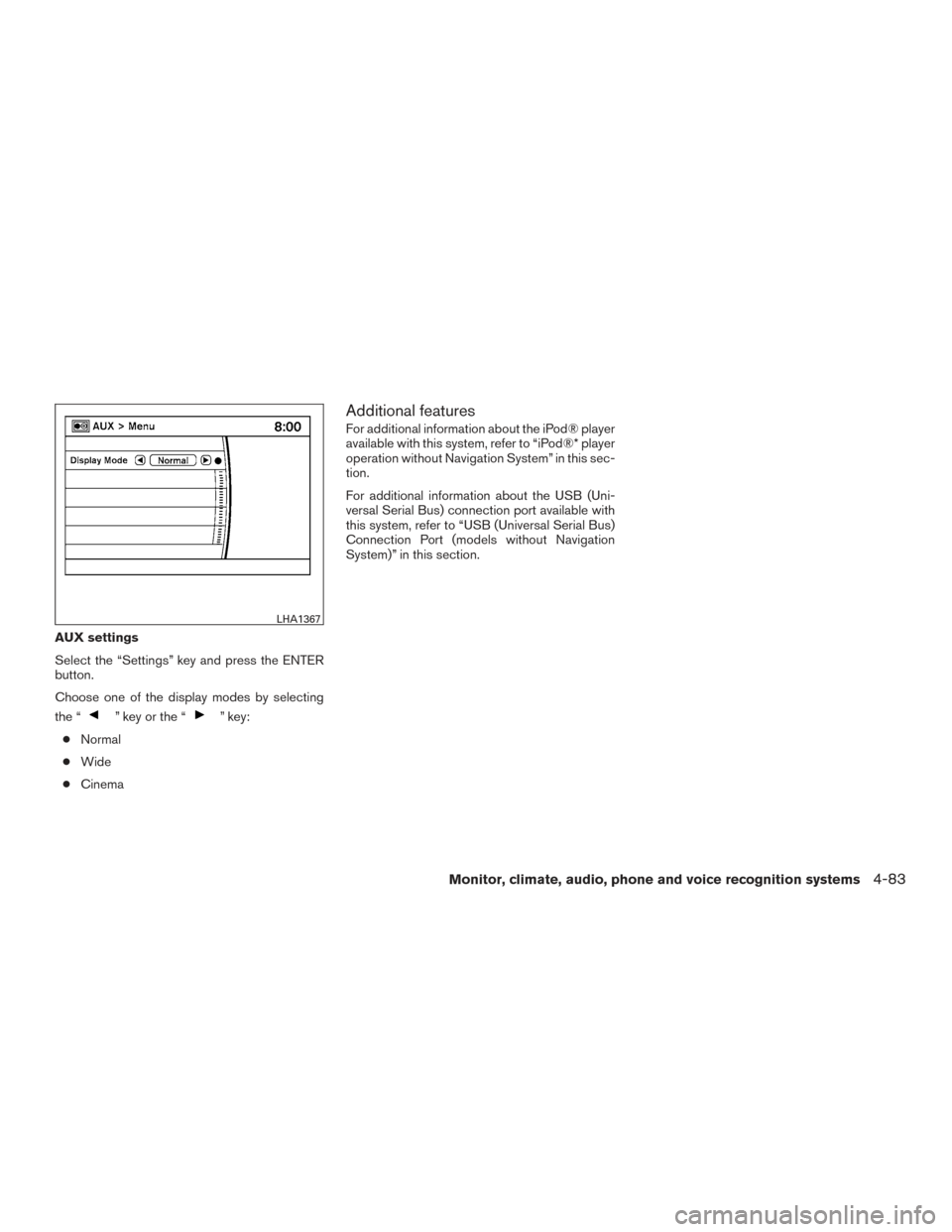
Select the “Settings” key and press the ENTER
button.
Choose one of the display modes by selecting
the “
” key or the “” key:
● Normal
● Wide
● Cinema
Additional features
For additional information about the iPod® player
available with this system, refer to “iPod®* player
operation without Navigation System” in this sec-
tion.
For additional information about the USB (Uni-
versal Serial Bus) connection port available with
this system, refer to “USB (Universal Serial Bus)
Connection Port (models without Navigation
System)” in this section.
LHA1367
Monitor, climate, audio, phone and voice recognition systems4-83