4WD NISSAN PATHFINDER 2016 R52 / 4.G Owners Manual
[x] Cancel search | Manufacturer: NISSAN, Model Year: 2016, Model line: PATHFINDER, Model: NISSAN PATHFINDER 2016 R52 / 4.GPages: 540, PDF Size: 5.49 MB
Page 3 of 540
For descriptions specified for 4-wheel drive
models, a4WDmark is placed at the beginning
of the applicable sections/items.
As with other vehicles with features for
off-road use, failure to operate 4-wheel
drive models correctly may result in loss of
control or an accident. Be sure to read
“Driving safety precautions” in the “Start-
ing and driving” section of this manual.
ON-PAVEMENT AND OFF-ROAD DRIV-
ING
This vehicle will handle and maneuver
differently from an ordinary passenger
car because it has a higher center of
gravity for off-road use. As with other
vehicles with features of this type, fail-
ure to operate this vehicle correctly may
result in loss of control or an accident.
For additional information, refer to “On-
pavement and off-road driving
precautions”, “Avoiding collision and
rollover” and “Driving safety precau-
tions” in the “Starting and driving” sec-
tion of this manual.
MODIFICATION OF YOUR VEHICLE
This vehicle should not be modified.
Modification could affect its
performance, safety or durability and may
even violate governmental regulations. In
addition, damage or performance prob-
lems resulting from modifications may
not be covered under NISSAN warranties. This manual includes information for all features
and equipment available on this model. Features
and equipment in your vehicle may vary depend-
ing on model, trim level, options selected, order,
date of production, region or availability. There-
fore, you may find information about features or
equipment that are not included or installed on
your vehicle.
All information, specifications and illustrations in
this manual are those in effect at the time of
printing. NISSAN reserves the right to change
specifications, performance, design or compo-
nent suppliers without notice and without obliga-
tion. From time to time, NISSAN may update or
revise this manual to provide Owners with the
most accurate information currently available.
Please carefully read and retain with this manual
all revision updates sent to you by NISSAN to
ensure you have access to accurate and up-to-
date information regarding your vehicle. Current
versions of vehicle Owner’s Manuals and any
updates can also be found in the Owner section
of the NISSAN website at
https://owners.nissanusa.com/nowners/
navigation/manualsGuide.
If you have ques-
tions concerning any information in your Owner’s
Manual, contact NISSAN Consumer Affairs. Refer
to NISSAN CUSTOMER CARE PROGRAM page
in this Owner’s Manual for contact information.
WHEN READING THE MANUAL
Page 107 of 540
The vehicle information display is located to the
left of the speedometer. It displays such items as:● Vehicle settings
● Trip computer information
● Drive system warnings and settings (if so
equipped)
● Cruise control system information
● NISSAN Intelligent Key® operation informa-
tion
● Indicators and warnings
● Tire Pressure informationHOW TO USE THE VEHICLE
INFORMATION DISPLAY
The vehicle information display can be navigated
using the ENTER ,
, andbuttons
located on the steering wheel.
1.
— press to enter the vehicle informa-
tion menu items
2. ENTER — move UP/DOWN
to navi-
gate through the items in vehicle information
then press to change or select an item in the
vehicle information display
3.
— to go back to the previous menu The ENTER button also controls audio functions.
For additional information, refer to “Steering
wheel switch for audio control” in the “Monitor,
climate, audio, phone and voice recognition sys-
tems” section of this manual.
STARTUP DISPLAY
When the vehicle in placed in the ON or ACC
position the screens that display in the vehicle
information include:
● Active system status (if so equipped)
● Trip computer
● Tire pressure information
● 4WD (if so equipped)
● Fuel economy
● Distance to empty
● Warnings
Warnings will only display if there are any pres-
ent. For additional information on warnings and
indicators refer to “Vehicle information display
warnings and indicators” in this section.
To control what items display in the vehicle infor-
mation display, refer to “Main menu selection” in
this section.
LIC2205LIC2245
VEHICLE INFORMATION DISPLAY
2-18Instruments and controls
Page 111 of 540
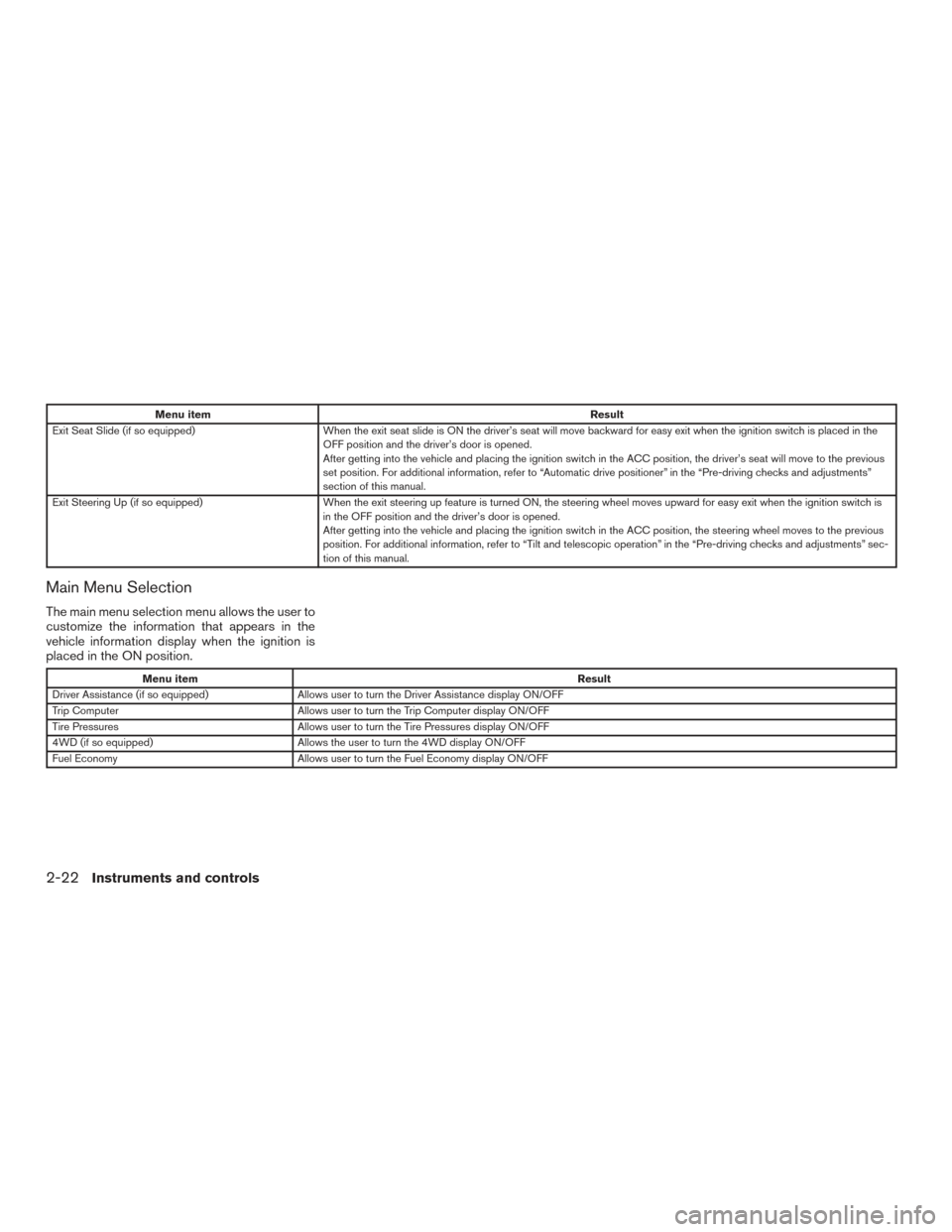
Menu itemResult
Exit Seat Slide (if so equipped) When the exit seat slide is ON the driver’s seat will move backward for easy exit when the ignition switch is placed in the
OFF position and the driver’s door is opened.
After getting into the vehicle and placing the ignition switch in the ACC position, the driver’s seat will move to the previous
set position. For additional information, refer to “Automatic drive positioner” in the “Pre-driving checks and adjustments”
section of this manual.
Exit Steering Up (if so equipped) When the exit steering up feature is turned ON, the steering wheel moves upward for easy exit when the ignition switch i s
in the OFF position and the driver’s door is opened.
After getting into the vehicle and placing the ignition switch in the ACC position, the steering wheel moves to the previous
position. For additional information, refer to “Tilt and telescopic operation” in the “Pre-driving checks and adjustments” sec-
tion of this manual.
Main Menu Selection
The main menu selection menu allows the user to
customize the information that appears in the
vehicle information display when the ignition is
placed in the ON position.
Menu item Result
Driver Assistance (if so equipped) Allows user to turn the Driver Assistance display ON/OFF
Trip Computer Allows user to turn the Trip Computer display ON/OFF
Tire Pressures Allows user to turn the Tire Pressures display ON/OFF
4WD (if so equipped) Allows the user to turn the 4WD display ON/OFF
Fuel Economy Allows user to turn the Fuel Economy display ON/OFF
2-22Instruments and controls
Page 117 of 540
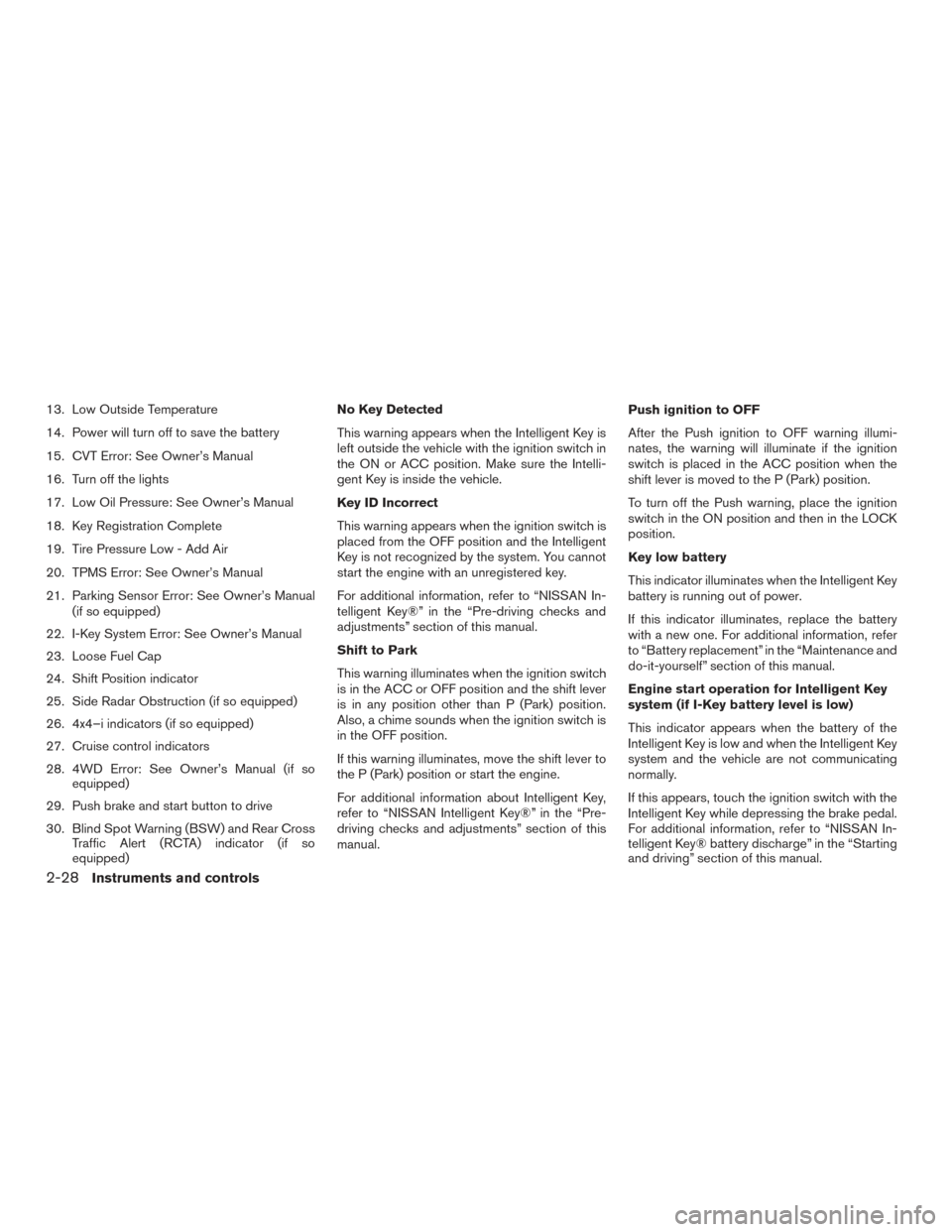
13. Low Outside Temperature
14. Power will turn off to save the battery
15. CVT Error: See Owner’s Manual
16. Turn off the lights
17. Low Oil Pressure: See Owner’s Manual
18. Key Registration Complete
19. Tire Pressure Low - Add Air
20. TPMS Error: See Owner’s Manual
21. Parking Sensor Error: See Owner’s Manual(if so equipped)
22. I-Key System Error: See Owner’s Manual
23. Loose Fuel Cap
24. Shift Position indicator
25. Side Radar Obstruction (if so equipped)
26. 4x4–i indicators (if so equipped)
27. Cruise control indicators
28. 4WD Error: See Owner’s Manual (if so equipped)
29. Push brake and start button to drive
30. Blind Spot Warning (BSW) and Rear Cross Traffic Alert (RCTA) indicator (if so
equipped) No Key Detected
This warning appears when the Intelligent Key is
left outside the vehicle with the ignition switch in
the ON or ACC position. Make sure the Intelli-
gent Key is inside the vehicle.
Key ID Incorrect
This warning appears when the ignition switch is
placed from the OFF position and the Intelligent
Key is not recognized by the system. You cannot
start the engine with an unregistered key.
For additional information, refer to “NISSAN In-
telligent Key®” in the “Pre-driving checks and
adjustments” section of this manual.
Shift to Park
This warning illuminates when the ignition switch
is in the ACC or OFF position and the shift lever
is in any position other than P (Park) position.
Also, a chime sounds when the ignition switch is
in the OFF position.
If this warning illuminates, move the shift lever to
the P (Park) position or start the engine.
For additional information about Intelligent Key,
refer to “NISSAN Intelligent Key®” in the “Pre-
driving checks and adjustments” section of this
manual.
Push ignition to OFF
After the Push ignition to OFF warning illumi-
nates, the warning will illuminate if the ignition
switch is placed in the ACC position when the
shift lever is moved to the P (Park) position.
To turn off the Push warning, place the ignition
switch in the ON position and then in the LOCK
position.
Key low battery
This indicator illuminates when the Intelligent Key
battery is running out of power.
If this indicator illuminates, replace the battery
with a new one. For additional information, refer
to “Battery replacement” in the “Maintenance and
do-it-yourself” section of this manual.
Engine start operation for Intelligent Key
system (if I-Key battery level is low)
This indicator appears when the battery of the
Intelligent Key is low and when the Intelligent Key
system and the vehicle are not communicating
normally.
If this appears, touch the ignition switch with the
Intelligent Key while depressing the brake pedal.
For additional information, refer to “NISSAN In-
telligent Key® battery discharge” in the “Starting
and driving” section of this manual.
2-28Instruments and controls
Page 119 of 540
and “Tire Pressure Monitoring System (TPMS)”
in the “Starting and driving” section of this
manual.
TPMS Error: See Owner’s Manual
This warning appears when there is an error with
your TPMS. If this warning comes on, it is recom-
mended you have the system checked by a
NISSAN dealer.
Parking Sensor Error: See Owner’s
Manual (if so equipped)
This warning illuminates when there is an error
with the system. For additional information, refer
to “Rear Sonar System (RSS)” in the “Starting
and driving” section of this manual.
I-Key System Error: See Owner’s Manual
After the ignition switch is pushed to the ON
position, this light comes on for about 2 seconds
and then turns off.
The I-Key System Error message warns of a
malfunction with the Intelligent Key system. If the
light comes on while the engine is stopped, it may
be impossible to start the engine.
If the light comes on while the engine is running,
you can drive the vehicle. However in these
cases, have the system checked. It is recom-
mended that you visit a NISSAN dealer for this
service.Loose Fuel Cap
This warning appears when the fuel-filler cap is
not tightened correctly after the vehicle has been
refueled. For additional information, refer to
“Fuel-filler cap” in the “Pre-driving checks and
adjustments” section of this manual.
Shift Position indicator
This indicator shows the transmission shift posi-
tion.
Side Radar Obstruction (if so equipped)
This warning appears when there is radar block-
age detected. For additional information, refer to
“Blind Spot Warning (BSW)” in the “Starting and
driving” section of this manual.
4x4–i indicators (if so equipped)
These indicators show the Intelligent 4WD sys-
tem status while the engine is running.
For additional information, refer to “Intelligent 4WD”
in the “Starting and driving” section of this manual.
Cruise control indicators
These indicators show the cruise control system
status.
For additional information, refer to “Cruise con-
trol” in the “Starting and Driving” section of this
manual.4WD Erorr: See Owner’s Manual (if so
equipped)
This warning appears when the 4-wheel drive
system is not functioning properly. For additional
information, refer to “Intelligent 4WD” in the
“Starting and driving” section of this manual.
Push brake and start button to drive
This indicator appears when the shift lever is in
the P (Park) position.
This indicator also appears when the vehicle has
been started with the remote start function (if so
equipped) .
This indicator means that the engine will start by
pushing the ignition switch with the brake pedal
depressed. You can start the engine from any
position of the ignition switch.
Blind Spot Warning (BSW) and Rear Cross
Traffic Alert (RCTA) indicator (if so
equipped)
This indicator shows when the BSW and RCTA
systems are engaged.
For additional information, refer to “Blind Spot
Warning (BSW)” and “Rear Cross Traffic Alert
(RCTA)” in the “Starting and driving” section of
this manual.
2-30Instruments and controls
Page 134 of 540
WARNING
●Never rely solely on the hill descent
control system to control vehicle speed
when driving on steep downhill grades.
Always drive carefully when using the
hill descent control system and deceler-
ate the vehicle speed by depressing the
brake pedal if necessary. Be especially
careful when driving on frozen, muddy
or extremely steep downhill roads. Fail-
ure to control vehicle speed may result
in a loss of control of the vehicle and
possible serious injury or death. ●
The hill descent control may not control
the vehicle speed on a hill under all load
or road conditions. Always be prepared
to depress the brake pedal to control
vehicle speed. Failure to do so may re-
sult in a collision or serious personal
injury.
CAUTION
When the hill descent control system op-
erates continuously for a long time, the
temperature of the brake pads may in-
crease and the hill descent control system
may be temporarily disabled (the indicator
light will blink) . If the indicator light does
not come on continuously after blinking,
stop using the system.
The HDC system is designed to reduce driver
workload when going down steep hills. The HDC
system helps to control vehicle speed so the
driver can concentrate on steering the vehicle.
To activate the HDC system: ● the 4WD switch must be in the LOCK posi-
tion and the vehicle speed must be under
15 mph (25 km/h)
● the hill descent control system switch must
be ON. The HDC system on indicator light will come on
when the system is activated. Also, the stop/tail
lights illuminate while the hill descent control
system applies the brakes to control vehicle
speed.
If the accelerator or brake pedal is depressed
while the HDC system is on, the system will stop
operating temporarily. As soon as the accelerator
or brake pedal is released, the HDC system
begins to function again if the HDC operating
conditions are fulfilled.
The HDC system on indicator light blinks if the
switch is on and all conditions for system activa-
tion are not met or if the system becomes disen-
gaged for any reason.
To turn off the HDC system, push the switch to
the OFF position.
For additional information, refer to “Hill descent
control system on indicator light” in this section
and “Hill descent control system” in the “Starting
and driving” section of this manual.
LIC3435
HILL DESCENT CONTROL (HDC)
SWITCH (if so equipped)
Instruments and controls2-45
Page 363 of 540
5 Starting and driving
Precautions when starting and driving................5-2
Exhaust gas (carbon monoxide) ..................5-2
Three-way catalyst ..............................5-2
Tire Pressure Monitoring System (TPMS) ..........5-3
On-pavement and off-road driving
precautions ....................................5-6
Avoiding collision and rollover . . ..................5-7
Off-road recovery ...............................5-7
Rapid air pressure loss ..........................5-7
Drinking alcohol/drugs and driving ................5-8
Driving safety precautions .......................5-8
Push-Button Ignition Switch .......................5-10
Operating range ............................... 5-11
Push-button ignition switch positions . . . .........5-12
Emergency engine shut off .....................5-12
NISSAN Intelligent Key® battery discharge .......5-13
NISSAN Vehicle Immobilizer System .............5-13
Before starting the engine ......................... 5-14
Starting the engine ............................... 5-14
Remote start (if so equipped) ...................5-15
Driving the vehicle ................................ 5-15
Continuously Variable Transmission (CVT) ........5-15
Parking brake .................................... 5-19Blind Spot Warning (BSW) (if so equipped)
.........5-20
BSW system operation ........................ 5-21
How to enable/disable the BSW system .........5-22
BSW system limitations ........................ 5-23
BSW driving situations ......................... 5-24
System temporarily unavailable ..................5-27
System maintenance ........................... 5-28
Rear Cross Traffic Alert (RCTA) (if so equipped) .....5-29
RCTA system operation ........................ 5-30
How to enable/disable the RCTA system .........5-32
RCTA system limitations ........................ 5-33
System temporarily unavailable ..................5-35
System maintenance ........................... 5-36
Cruise control .................................... 5-37
Precautions on cruise control ...................5-37
Cruise
control operations ....................... 5-38
Break-in schedule ................................ 5-39
Fuel efficient driving tips ........................... 5-39
Increasing fuel economy ........................... 5-40
Intelligent 4WD (if so equipped) ....................5-41
4x4–i system operation ........................ 5-41
Parking/parking on hills ............................ 5-45
Power steering ................................... 5-46
Page 371 of 540
WARNING
The following actions can increase the
chance of losing control of the vehicle if
there is a sudden loss of tire air pressure.
Losing control of the vehicle may cause a
collision and result in personal injury.
●The vehicle generally moves or pulls in
the direction of the flat tire.
● Do not rapidly apply the brakes.
● Do not rapidly release the accelerator
pedal.
● Do not rapidly turn the steering wheel.
1. Remain calm and do not overreact.
2. Maintain a firm grip on the steering wheel with both hands and try to hold a straight
course.
3. When appropriate, slowly release the accel- erator pedal to gradually slow the vehicle.
4. Gradually steer the vehicle to a safe location off the road and away from traffic if possible.
5. Lightly apply the brake pedal to gradually stop the vehicle.
6. Turn on the hazard warning flashers and contact a roadside emergency service to
change the tire. For additional information, refer to “Changing a flat tire” in the “In case
of emergency” section of this manual.DRINKING ALCOHOL/DRUGS AND
DRIVING
WARNING
Never drive under the influence of alcohol
or drugs. Alcohol in the bloodstream re-
duces coordination, delays reaction time
and impairs judgement. Driving after
drinking alcohol increases the likelihood
of being involved in an accident injuring
yourself and others. Additionally, if you
are injured in an accident, alcohol can
increase the severity of the injury.
NISSAN is committed to safe driving. However,
you must choose not to drive under the influence
of alcohol. Every year thousands of people are
injured or killed in alcohol-related collisions. Al-
though the local laws vary on what is considered
to be legally intoxicated, the fact is that alcohol
affects all people differently and most people
underestimate the effects of alcohol.
Remember, drinking and driving don’t mix! That is
true for drugs (over-the-counter, prescription)
and illegal drugs too. Don’t drive if your ability to
operate your vehicle is impaired by alcohol,
drugs, or some other physical condition.
DRIVING SAFETY PRECAUTIONS
Your NISSAN is designed for both normal and
off-road use. However, avoid driving in deep wa-
ter or mud as your NISSAN is mainly designed for
leisure use, unlike a conventional off-road ve-
hicle.
Remember that 2-wheel drive models are less
capable than 4-wheel drive models for rough
road driving and extrication when stuck in deep
snow or mud, or the like.
Please observe the following precautions:
WARNING
● Spinning the front wheels on slippery
surface may cause the 4WD warning
message to display and the 4WD sys-
tem to automatically switch from the
4WD to the 2WD mode. This could re-
duce the traction. Be especially careful
when towing a trailer. (4WD models)
● Drive carefully when off the road and
avoid dangerous areas. Every person
who drives or rides in this vehicle
should be seated with their seat belt
fastened. This will keep you and your
passengers in position when driving
over rough terrain.
5-8Starting and driving
Page 372 of 540
●Do not drive across steep slopes. In-
stead drive either straight up or straight
down the slopes. Off-road vehicles can
tip over sideways much more easily
than they can forward or backward.
● Many hills are too steep for any vehicle.
If you drive up them, you may stall. If
you drive down them, you may not be
able to control your speed. If you drive
across them, you may roll over.
● Do not shift gears while driving on
downhill grades as this could cause
loss of control of the vehicle.
● Stay alert when driving to the top of a
hill. At the top there could be a drop-off
or other hazard that could cause an
accident.
● If your engine stalls or you cannot make
it to the top of a steep hill, never at-
tempt to turn around. Your vehicle could
tip or roll over. Always back straight
down in R (Reverse) gear and apply
brakes to control your speed.
● Heavy braking going down a hill could
cause your brakes to overheat and fade,
resulting in loss of control and an acci-
dent. Apply brakes lightly and use a low
gear to control your speed. ●
Unsecured cargo can be thrown around
when driving over rough terrain. Prop-
erly secure all cargo so it will not be
thrown forward and cause injury to you
or your passengers.
● Secure heavy loads in the cargo area as
far forward and as low as possible. Do
not equip the vehicle with tires larger
than specified in this manual. This could
cause your vehicle to roll over.
● Do not grip the inside or spokes of the
steering wheel when driving off-road.
The steering wheel could move sud-
denly and injure your hands. Instead
drive with your fingers and thumbs on
the outside of the rim.
● Before operating the vehicle, ensure
that the driver and all passengers have
their seat belts fastened.
● Always drive with the floor mats in place
as the floor may become hot.
● Lower your speed when encountering
strong crosswinds. With a higher center
of gravity, your NISSAN is more affected
by strong side winds. Slower speeds
ensure better vehicle control. ●
Do not drive beyond the performance
capability of the tires, even with 4WD
engaged.
● For 4WD equipped vehicles, do not at-
tempt to raise two wheels off the
ground and shift the transmission to
any drive or reverse position with the
engine running. Doing so may result in
drivetrain damage or unexpected ve-
hicle movement which could result in
serious vehicle damage or personal
injury.
● Do not attempt to test a 4WD equipped
vehicle on a 2-wheel dynamometer
(such as the dynamometers used by
some states for emissions testing) , or
similar equipment even if the other two
wheels are raised off the ground. Make
sure you inform test facility personnel
that your vehicle is equipped with 4WD
before it is placed on a dynamometer.
Using the wrong test equipment may
result in drivetrain damage or unex-
pected vehicle movement which could
result in serious vehicle damage or per-
sonal injury.
● When a wheel is off the ground due to
an unlevel surface, do not spin the
wheel excessively.
Starting and driving5-9
Page 404 of 540
4X4–I SYSTEM OPERATION
WARNING
●Do not drive beyond the performance
capability of the tires. Accelerating
quickly, sharp steering maneuvers or
sudden braking may cause loss of con-
trol, even with Intelligent 4WD engaged.
● For 4WD equipped vehicles, do not at-
tempt to raise two wheels off the
ground and shift the transmission to
any drive or reverse position with the
engine running. Doing so may result in
drivetrain damage or unexpected ve-
hicle movement which could result in
serious personal injury or vehicle
damage. ●
Do not attempt to test a 4WD equipped
vehicle on a 2-wheel dynamometer
(such as the dynamometers used by
some states for emissions testing) or
similar equipment even if the other 2
wheels are raised off the ground. Make
sure that you inform the test facility
personnel that your vehicle is equipped
with 4WD before it is placed on a dyna-
mometer. Using the wrong test equip-
ment may result in drivetrain damage or
unexpected vehicle movement which
could result in serious personal injury
or vehicle damage.
CAUTION
● Do not operate the engine on a free
roller when any of the wheels are
raised.
● If you use the free roller, rotate 4 wheels
with the same speed without raising
any wheels.
● If a 4WD warning message is displayed
while driving there may be a malfunc-
tion in the 4WD system. Reduce the
vehicle speed immediately and have
your vehicle checked. It is recom-
mended you visit a NISSAN dealer as
soon as possible. ●
If the 4WD high temperature message is
displayed while you are driving, pull off
the road in a safe area, and idle the
engine. The driving mode will change to
2WD to prevent the 4WD system from
malfunctioning. If the warning message
turns off, you can drive again.
● If the incorrect tire size message is dis-
played while you are driving, pull off the
road in a safe area with the engine
idling. Check that all tire sizes are the
same, that the tire pressure is correct
and that the tires are not excessively
worn.
● If a warning message continues to be
displayed after the above operations,
have your vehicle checked as soon as
possible. It is recommended you visit a
NISSAN dealer for this service.
INTELLIGENT 4WD (if so equipped)
Starting and driving5-41