audio NISSAN PATHFINDER 2018 Owner´s Manual
[x] Cancel search | Manufacturer: NISSAN, Model Year: 2018, Model line: PATHFINDER, Model: NISSAN PATHFINDER 2018Pages: 474, PDF Size: 5.51 MB
Page 265 of 474
The air conditioner system in your NISSAN
vehicle is charged with a refrigerant de-
signed with the environment in mind.
This refrigerant does not harm the
earth’s ozone layer.
Special charging equipment and lubricant
is required when servicing your NISSAN air
conditioner. Using improper refrigerants or
lubricants will cause severe damage to
your air conditioner system. For additional
information, refer to “Air conditioner sys-
tem refrigerant and oil recommendations”
in the “Technical and consumer informa-
tion” section of this manual.
It is recommended that you visit a NISSAN
dealer to service your “environmentally
friendly” air conditioner system.
WARNING
The air conditioner system contains re-
frigerant under high pressure. To avoid
personal injury, any air conditioner ser-
vice should be done only by an experi-
enced technician with proper
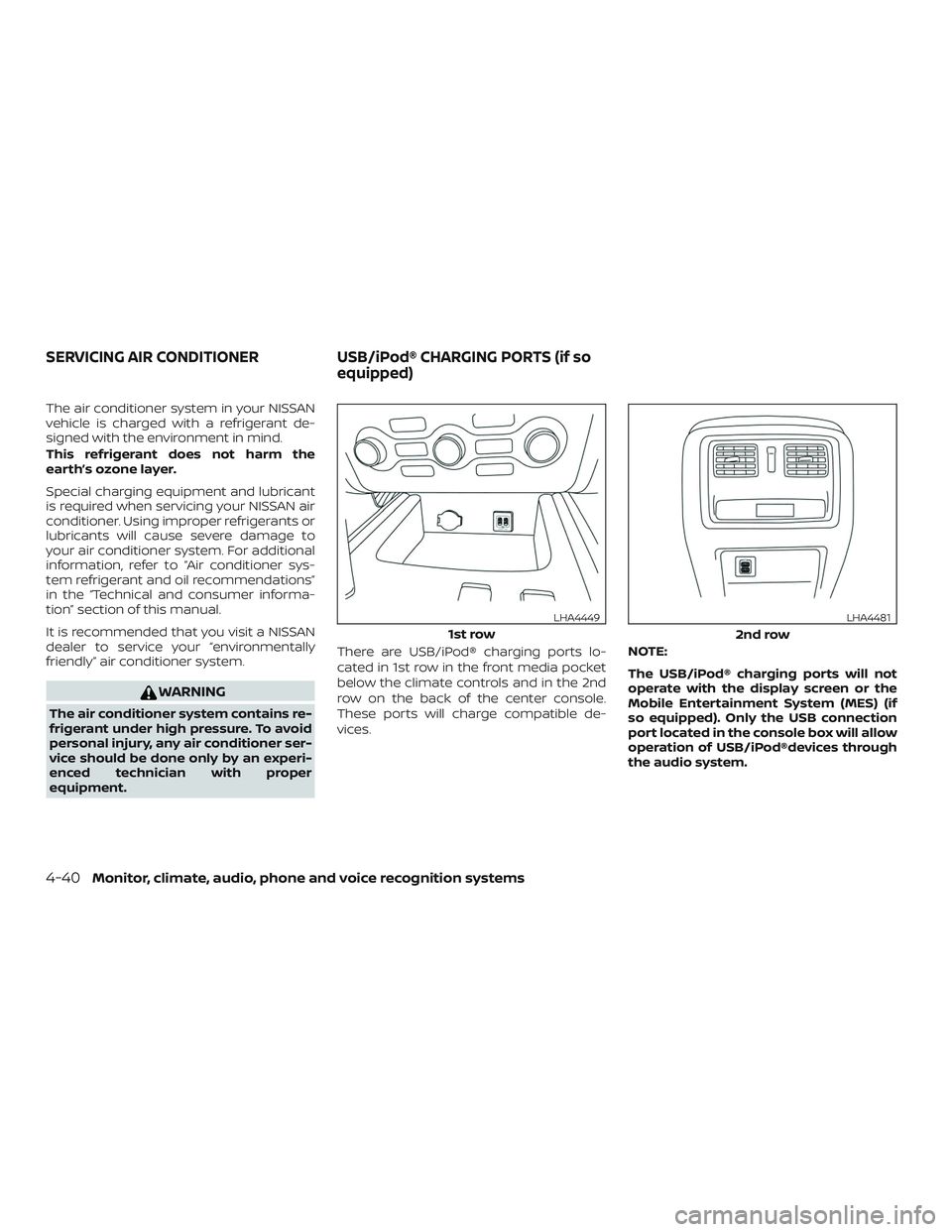
equipment.There are USB/iPod® charging ports lo-
cated in 1st row in the front media pocket
below the climate controls and in the 2nd
row on the back of the center console.
These ports will charge compatible de-
vices.
NOTE:
The USB/iPod® charging ports will not
operate with the display screen or the
Mobile Entertainment System (MES) (if
so equipped). Only the USB connection
port located in the console box will allow
operation of USB/iPod®devices through
the audio system.
1st row
LHA4449
2nd row
LHA4481
SERVICING AIR CONDITIONER
USB/iPod® CHARGING PORTS (if so
equipped)
4-40Monitor, climate, audio, phone and voice recognition systems
Page 266 of 474
The antenna cannot be shortened, but can
be removed. When you need to remove the
antenna, turn the antenna rod counter-
clockwise.
To install the antenna rod, turn the antenna
rod clockwise and hand tighten.
CAUTION
∙ Always properly tighten the antennarod during installation or the antenna
rod may break during vehicle
operation.
∙ Be sure that the antenna is removed before the vehicle enters an auto-
matic car wash.
WINDOW ANTENNA
The antenna pattern is printed inside the
rear window.
CAUTION
∙ Do not place metalized film near therear window glass or attach any metal
parts to it. This may cause poor recep-
tion or noise. ∙ When cleaning the inside of the rear
window, be careful not to scratch or
damage the rear window antenna.
Lightly wipe along the antenna with a
dampened sof t cloth. When installing a CB, ham radio or car
phone in your vehicle, be sure to observe
the following precautions; otherwise, the
new equipment may adversely affect the
engine control system and other electronic
parts.
WARNING
∙ A cellular phone should not be used
for any purpose while driving so full
attention may be given to vehicle op-
eration. Some jurisdictions prohibit
the use of cellular phones while
driving.
∙ If you must make a call while your ve- hicle is in motion, the hands free cellu-
lar phone operational mode is highly
recommended. Exercise extreme cau-
tion at all times so full attention may
be given to vehicle operation.
∙ If you are unable to devote full atten- tion to vehicle operation while talking
on the phone, pull off the road to a
safe location and stop your vehicle.
ANTENNA CAR PHONE OR CB RADIO
Monitor, climate, audio, phone and voice recognition systems4-41
Page 267 of 474
CAUTION
∙ Keep the antenna as far away as pos-sible from the electronic control
modules.
∙ Keep the antenna wire more than 8 in (20 cm) away from the electronic con-
trol system harnesses. Do not route
the antenna wire next to any harness.
∙ Adjust the antenna standing-wave ratio as recommended by the
manufacturer.
∙ Connect the ground wire from the CB radio chassis to the body.
∙ For additional information, it is rec- ommended that you visit a NISSAN
dealer for servicing.
4-42Monitor, climate, audio, phone and voice recognition systems
Page 268 of 474
MEMO
Monitor, climate, audio, phone and voice recognition systems4-43
Page 295 of 474
∙The RCTA system (if so equipped) is in-
tegrated into the BSW system. There is
not a separate selection in the vehicle
information display for the RCTA sys-
tem. When the BSW is disabled, the
RCTA system is also disabled.
∙ When the BSW system is turned on,
the BSW/RCTA indicator (white) in the
vehicle information display illumi-
nates.
BSW SYSTEM LIMITATIONS
WARNING
Listed below are the system limitations
for the BSW system. Failure to operate
the vehicle in accordance with these
system limitations could result in seri-
ous injury or death.
∙ The BSW system cannot detect all ve- hicles under all conditions.
∙ The radar sensors may not be able to detect and activate BSW when certain
objects are present such as:
– Pedestrian, bicycles, animals.
– Vehicles such as motorcycles, low height vehicles, or high ground
clearance vehicles. – Oncoming vehicles.
– Vehicles remaining in the detec-
tion zone when you accelerate
from a stop.
– A vehicle merging into an adjacent lane at a speed approximately the
same as your vehicle.
– A vehicle approaching rapidly from behind.
– A vehicle which your vehicle over- takes rapidly.
– A vehicle that passes through the detection zone quickly.
– When overtaking several vehicles in a row, the vehicles af ter the first
vehicle may not be detected if they
are traveling close together.
∙ The radar sensor’s detection zone is designed based on a standard lane
width. When driving in a wider lane,
the radar sensors may not detect ve-
hicles in an adjacent lane. When driv-
ing in a narrow lane, the radar sensors
may detect vehicles driving two lanes
away. ∙ The radar sensors are designed to ig-
nore most stationary objects; how-
ever, objects such as guardrails, walls,
foliage and parked vehicles may oc-
casionally be detected. This is a nor-
mal operation condition.
∙ The following conditions may reduce the ability of the radar to detect other
vehicles:
– Severe weather
– Road spray
– Ice/frost/dirt build-up on the vehicle
∙ Do not attach stickers (including transparent material), install accesso-
ries or apply additional paint near the
radar sensors. These conditions may
reduce the ability of the radar to de-
tect other vehicles.
∙ Excessive noise (for example, audio system volume, open vehicle window)
will interfere with the chime sound,
and it may not be heard.
5-26Starting and driving
Page 306 of 474
WARNING
Listed below are the system limitations
for the RCTA system. Failure to operate
the vehicle in accordance with these
system limitations could result in seri-
ous injury or death.
∙ Always check surroundings and turnto check what is behind you before
backing up. The radar sensors detect
approaching (moving) vehicles. The
radar sensors cannot detect every
object such as:
– Pedestrians, bicycles, motorcycles, animals or child-operated toy
vehicles
– A vehicle that is passing at speeds greater than approximately
19 mph (30 km/h)
– A vehicle that is passing at speeds lower than approximately 5 mph
(8 km/h)
∙ The radar sensors may not detect ap- proaching vehicles in certain
situations:
– Illustration a: When a vehicle parked next to you obstructs the
beam of the radar sensor. – Illustration b: When the vehicle is
parked in an angled parking space.
– Illustration c: When the vehicle is parked on inclined ground.
– Illustration d: When an approach- ing vehicle turns into your vehicle’s
parking lot aisle.
– Illustration e: When the angle formed by your vehicle and ap-
proaching vehicle is small.
∙ The following conditions may reduce the ability of the radar to detect other
vehicles:
– Severe weather
– Road spray
– Ice/frost/dirt build-up on the vehicle
∙ Do not attach stickers (including transparent material), install accesso-
ries or apply additional paint near the
radar sensors. These conditions may
reduce the ability of the radar to de-
tect other vehicles. ∙ Excessive noise (e.g., audio system
volume, open vehicle window) will in-
terfere with the chime sound, and it
may not be heard.
Starting and driving5-37