fog light NISSAN PATHFINDER 2019 Owner´s Manual
[x] Cancel search | Manufacturer: NISSAN, Model Year: 2019, Model line: PATHFINDER, Model: NISSAN PATHFINDER 2019Pages: 476, PDF Size: 5.61 MB
Page 13 of 476
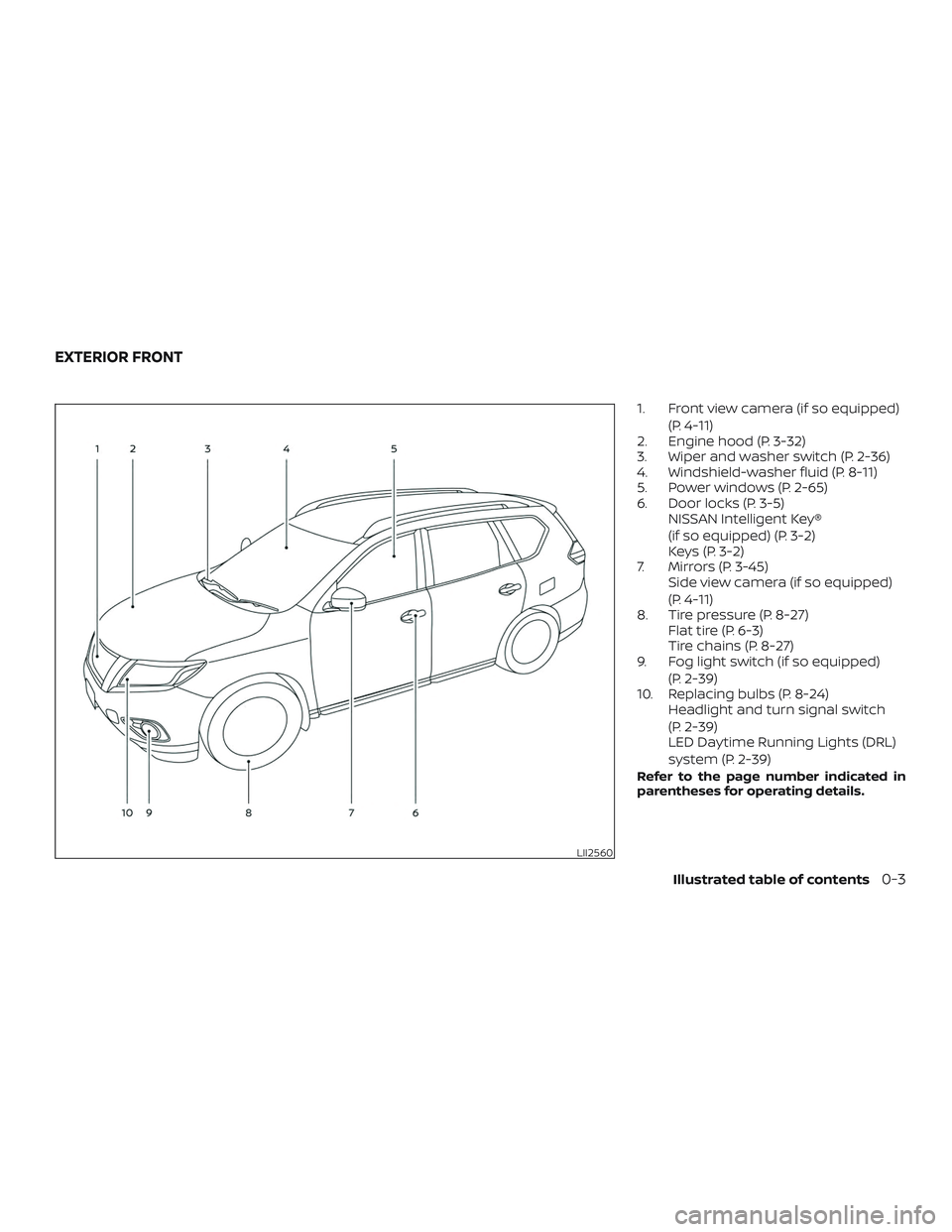
1. Front view camera (if so equipped)(P. 4-11)
2. Engine hood (P. 3-32)
3. Wiper and washer switch (P. 2-36)
4. Windshield-washer fluid (P. 8-11)
5. Power windows (P. 2-65)
6. Door locks (P. 3-5) NISSAN Intelligent Key®
(if so equipped) (P. 3-2)
Keys (P. 3-2)
7. Mirrors (P. 3-45) Side view camera (if so equipped)
(P. 4-11)
8. Tire pressure (P. 8-27) Flat tire (P. 6-3)
Tire chains (P. 8-27)
9. Fog light switch (if so equipped)
(P. 2-39)
10. Replacing bulbs (P. 8-24) Headlight and turn signal switch
(P. 2-39)
LED Daytime Running Lights (DRL)
system (P. 2-39)
Refer to the page number indicated in
parentheses for operating details.
LII2560
EXTERIOR FRONT
Illustrated table of contents0-3
Page 16 of 476
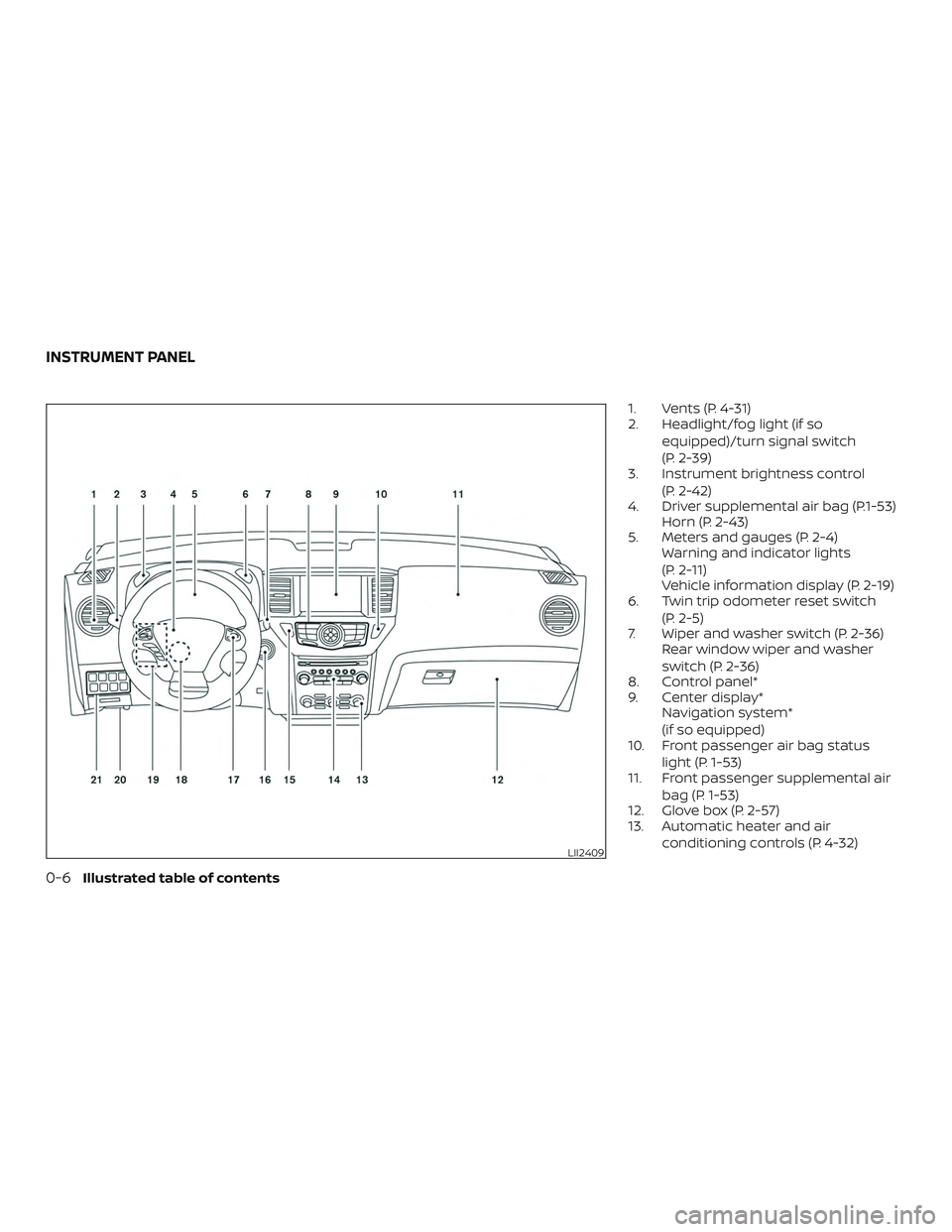
1. Vents (P. 4-31)
2. Headlight/fog light (if soequipped)/turn signal switch
(P. 2-39)
3. Instrument brightness control
(P. 2-42)
4. Driver supplemental air bag (P.1-53) Horn (P. 2-43)
5. Meters and gauges (P. 2-4) Warning and indicator lights
(P. 2-11)
Vehicle information display (P. 2-19)
6. Twin trip odometer reset switch
(P. 2-5)
7. Wiper and washer switch (P. 2-36) Rear window wiper and washer
switch (P. 2-36)
8. Control panel*
9. Center display* Navigation system*
(if so equipped)
10. Front passenger air bag status
light (P. 1-53)
11. Front passenger supplemental air
bag (P. 1-53)
12. Glove box (P. 2-57)
13. Automatic heater and air
conditioning controls (P. 4-32)
LII2409
INSTRUMENT PANEL
0-6Illustrated table of contents
Page 19 of 476
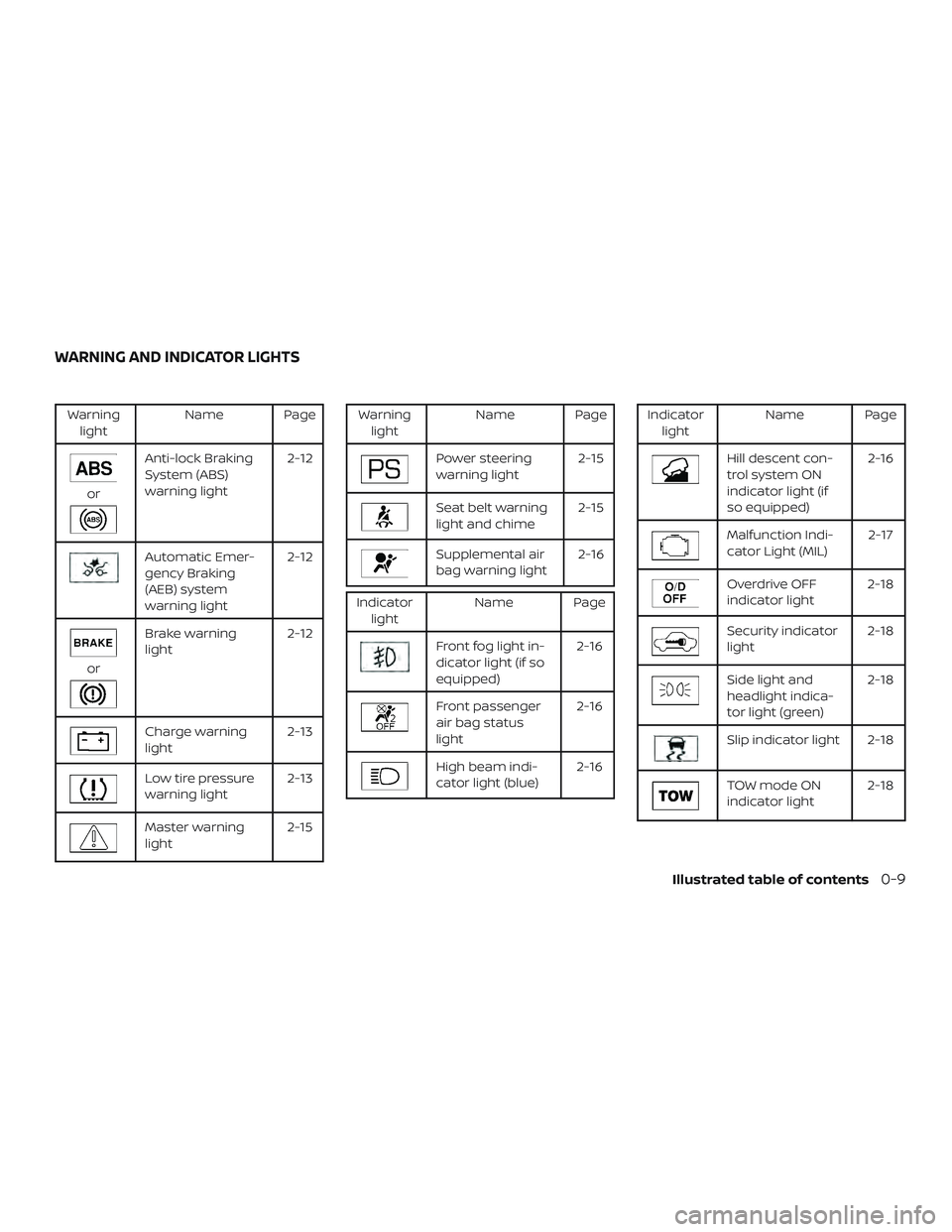
Warninglight Name Page
or
Anti-lock Braking
System (ABS)
warning light 2-12
Automatic Emer-
gency Braking
(AEB) system
warning light2-12
or
Brake warning
light
2-12
Charge warning
light 2-13
Low tire pressure
warning light2-13
Master warning
light2-15
Warning
light Name Page
Power steering
warning light 2-15
Seat belt warning
light and chime2-15
Supplemental air
bag warning light2-16
Indicator
light Name Page
Front fog light in-
dicator light (if so
equipped) 2-16
Front passenger
air bag status
light2-16
High beam indi-
cator light (blue)
2-16
Indicator
light Name Page
Hill descent con-
trol system ON
indicator light (if
so equipped) 2-16
Malfunction Indi-
cator Light (MIL)
2-17
Overdrive OFF
indicator light2-18
Security indicator
light2-18
Side light and
headlight indica-
tor light (green)2-18
Slip indicator light 2-18
TOW mode ON
indicator light
2-18
WARNING AND INDICATOR LIGHTS
Illustrated table of contents0-9
Page 96 of 476
2 Instruments and controls
Instrument panel................................2-2
Meters and gauges ..............................2-4
Speedometer and odometer .................2-4
Tachometer ..................................2-6
Engine coolant temperature gauge ..........2-6
Fuel gauge ................................... 2-7
Distance To Empty (DTE) ...................... 2-7
Compass (if so equipped) .......................2-8
Compass display .............................2-8
Warning lights, indicator lights and audible
reminders ....................................... 2-11
Checking lights ............................... 2-11
Warning lights ............................... 2-12
Indicator lights .............................. 2-16
Audible reminders ........................... 2-19
Vehicle information display .....................2-19
How to use the vehicle information
display ...................................... 2-20
Startup display .............................. 2-20
Resetting the trip computer .................2-21
Settings ..................................... 2-21
Vehicle information display warnings
and indicators ............................... 2-28
Security systems ............................... 2-33Vehicle security system
.....................2-33
NISSAN Vehicle Immobilizer System .........2-34
Wiper and washer switch .......................2-36
Switch operation ............................ 2-36
Rear switch operation .......................2-37
Rear window and outside mirror
(if so equipped) defroster switch ................2-38
Headlight and turn signal switch ...............2-39
Headlight control switch .....................2-39
LED Daytime Running Lights (DRL)
system ...................................... 2-41
Instrument brightness control ...............2-42
Turn signal switch ........................... 2-42
Fog light switch (if so equipped) .............2-43
Horn ........................................... 2-43
Climate controlled seat switches
(if so equipped) ................................. 2-44
He
ated seat switches (if so equipped) ..........2-45
Heated 2nd row seat switches
(if so equipped) ................................. 2-46
Heated steering wheel switch Type A
(if so equipped) .................................2-47
Heated steering wheel Type B (if so equipped) . . 2-48
Vehicle Dynamic Control (VDC) OFF switch ......2-48
Page 98 of 476
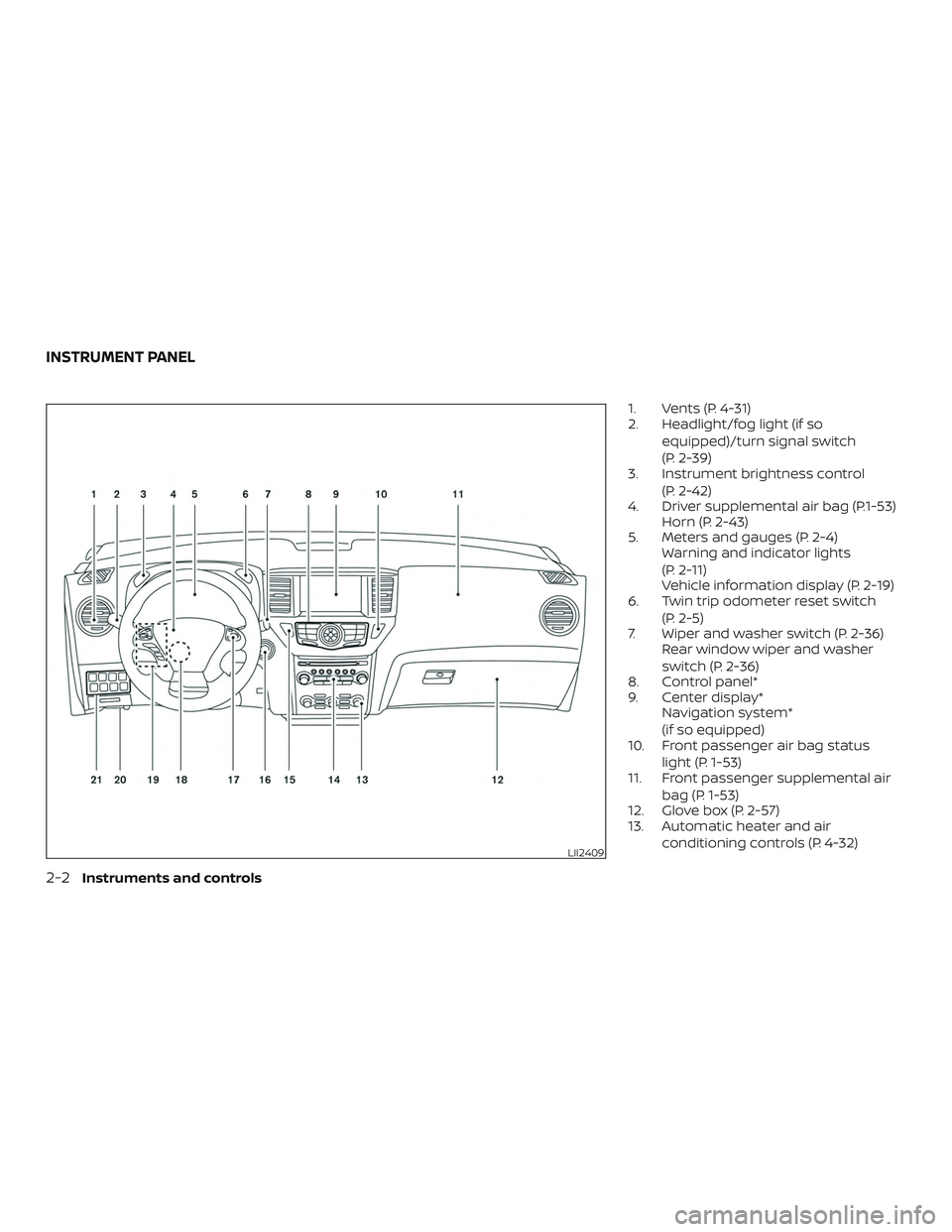
1. Vents (P. 4-31)
2. Headlight/fog light (if soequipped)/turn signal switch
(P. 2-39)
3. Instrument brightness control
(P. 2-42)
4. Driver supplemental air bag (P.1-53) Horn (P. 2-43)
5. Meters and gauges (P. 2-4) Warning and indicator lights
(P. 2-11)
Vehicle information display (P. 2-19)
6. Twin trip odometer reset switch
(P. 2-5)
7. Wiper and washer switch (P. 2-36) Rear window wiper and washer
switch (P. 2-36)
8. Control panel*
9. Center display* Navigation system*
(if so equipped)
10. Front passenger air bag status
light (P. 1-53)
11. Front passenger supplemental air
bag (P. 1-53)
12. Glove box (P. 2-57)
13. Automatic heater and air
conditioning controls (P. 4-32)
LII2409
INSTRUMENT PANEL
2-2Instruments and controls
Page 107 of 476
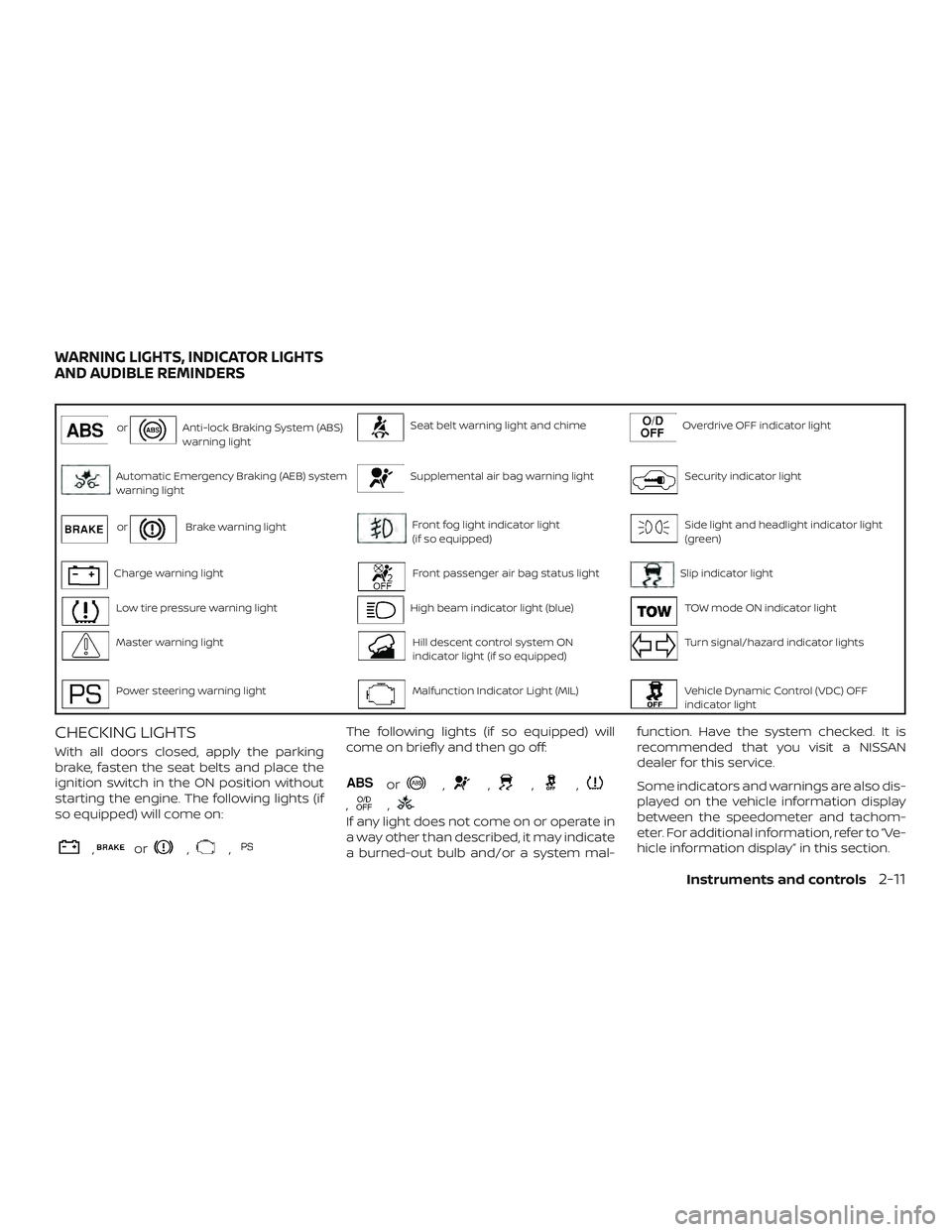
orAnti-lock Braking System (ABS)
warning lightSeat belt warning light and chimeOverdrive OFF indicator light
Automatic Emergency Braking (AEB) system
warning lightSupplemental air bag warning lightSecurity indicator light
orBrake warning lightFront fog light indicator light
(if so equipped)Side light and headlight indicator light
(green)
Charge warning lightFront passenger air bag status lightSlip indicator light
Low tire pressure warning lightHigh beam indicator light (blue)TOW mode ON indicator light
Master warning lightHill descent control system ON
indicator light (if so equipped)Turn signal/hazard indicator lights
Power steering warning lightMalfunction Indicator Light (MIL)Vehicle Dynamic Control (VDC) OFF
indicator light
CHECKING LIGHTS
With all doors closed, apply the parking
brake, fasten the seat belts and place the
ignition switch in the ON position without
starting the engine. The following lights (if
so equipped) will come on:
,or,,
The following lights (if so equipped) will
come on briefly and then go off:
or,,,,
,,
If any light does not come on or operate in
a way other than described, it may indicate
a burned-out bulb and/or a system mal-function. Have the system checked. It is
recommended that you visit a NISSAN
dealer for this service.
Some indicators and warnings are also dis-
played on the vehicle information display
between the speedometer and tachom-
eter. For additional information, refer to “Ve-
hicle information display” in this section.
WARNING LIGHTS, INDICATOR LIGHTS
AND AUDIBLE REMINDERS
Instruments and controls2-11
Page 112 of 476
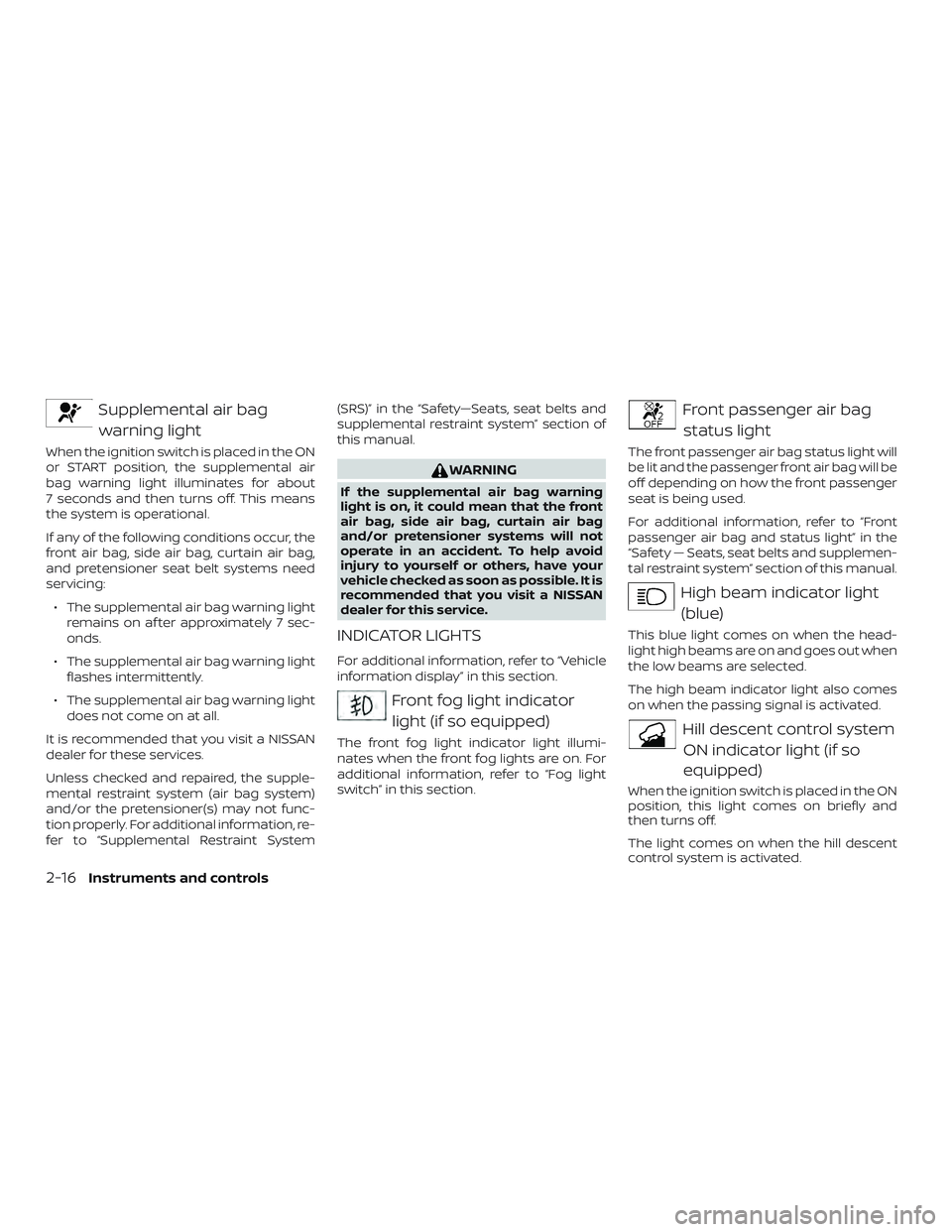
Supplemental air bagwarning light
When the ignition switch is placed in the ON
or START position, the supplemental air
bag warning light illuminates for about
7 seconds and then turns off. This means
the system is operational.
If any of the following conditions occur, the
front air bag, side air bag, curtain air bag,
and pretensioner seat belt systems need
servicing:
∙ The supplemental air bag warning light remains on af ter approximately 7 sec-
onds.
∙ The supplemental air bag warning light flashes intermittently.
∙ The supplemental air bag warning light does not come on at all.
It is recommended that you visit a NISSAN
dealer for these services.
Unless checked and repaired, the supple-
mental restraint system (air bag system)
and/or the pretensioner(s) may not func-
tion properly. For additional information, re-
fer to “Supplemental Restraint System (SRS)” in the “Safety—Seats, seat belts and
supplemental restraint system” section of
this manual.
WARNING
If the supplemental air bag warning
light is on, it could mean that the front
air bag, side air bag, curtain air bag
and/or pretensioner systems will not
operate in an accident. To help avoid
injury to yourself or others, have your
vehicle checked as soon as possible. It is
recommended that you visit a NISSAN
dealer for this service.
INDICATOR LIGHTS
For additional information, refer to “Vehicle
information display” in this section.
Front fog light indicator
light (if so equipped)
The front fog light indicator light illumi-
nates when the front fog lights are on. For
additional information, refer to “Fog light
switch” in this section.
Front passenger air bagstatus light
The front passenger air bag status light will
be lit and the passenger front air bag will be
off depending on how the front passenger
seat is being used.
For additional information, refer to “Front
passenger air bag and status light” in the
“Safety — Seats, seat belts and supplemen-
tal restraint system” section of this manual.
High beam indicator light(blue)
This blue light comes on when the head-
light high beams are on and goes out when
the low beams are selected.
The high beam indicator light also comes
on when the passing signal is activated.
Hill descent control systemON indicator light (if so
equipped)
When the ignition switch is placed in the ON
position, this light comes on briefly and
then turns off.
The light comes on when the hill descent
control system is activated.
2-16Instruments and controls
Page 139 of 476
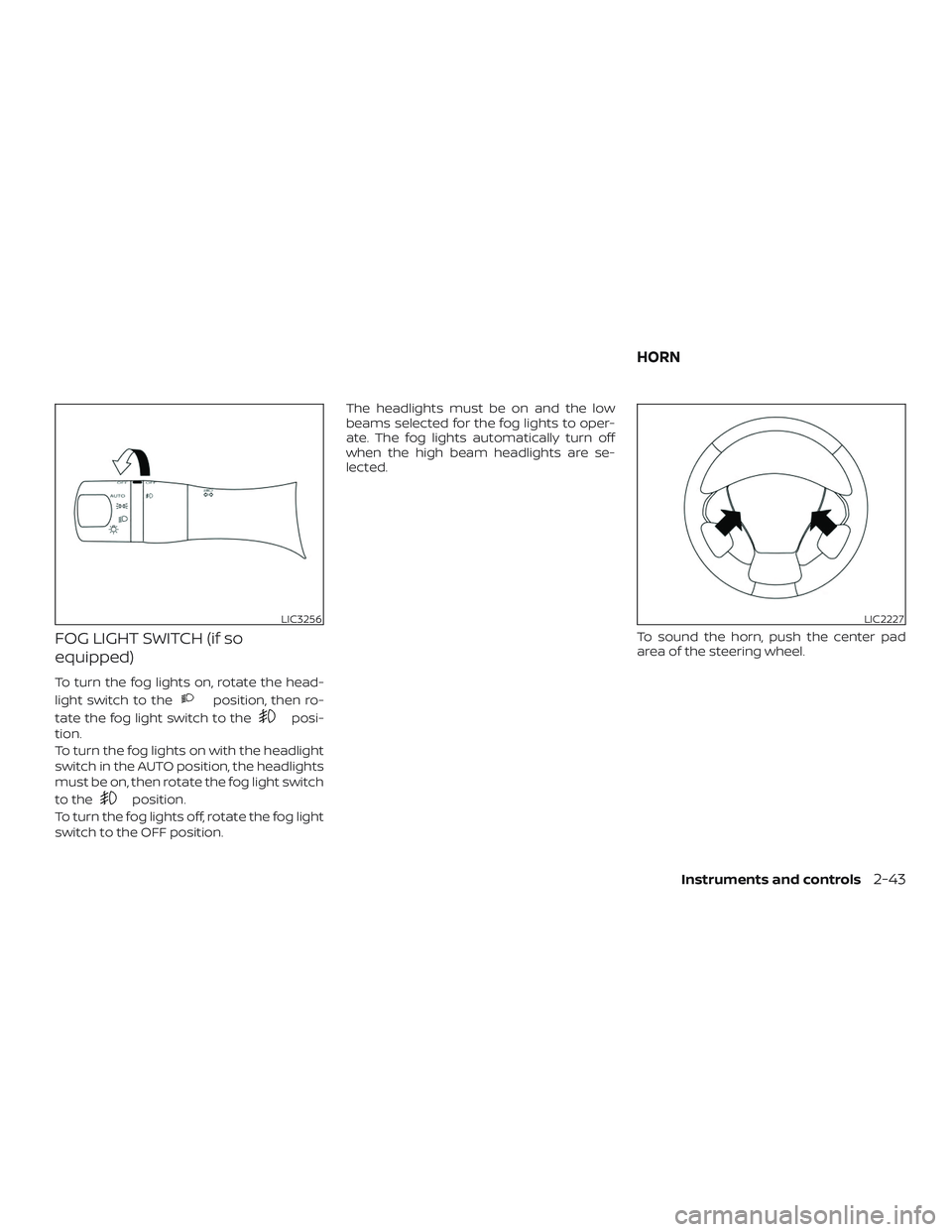
FOG LIGHT SWITCH (if so
equipped)
To turn the fog lights on, rotate the head-
light switch to the
position, then ro-
tate the fog light switch to the
posi-
tion.
To turn the fog lights on with the headlight
switch in the AUTO position, the headlights
must be on, then rotate the fog light switch
to the
position.
To turn the fog lights off, rotate the fog light
switch to the OFF position. The headlights must be on and the low
beams selected for the fog lights to oper-
ate. The fog lights automatically turn off
when the high beam headlights are se-
lected.
To sound the horn, push the center pad
area of the steering wheel.
LIC3256LIC2227
HORN
Instruments and controls2-43
Page 259 of 476
∙When parking, set the heater and air
conditioner controls to turn off air re-
circulation to allow fresh air into the
passenger compartment. This should
help reduce odors inside the vehicle.
AUTOMATIC OPERATION
Cooling and/or dehumidified
heating (AUTO)
This mode may be used all year round as
the system automatically works to keep a
constant temperature. Air flow distribution,
air intake control, and fan speed are also
controlled automatically.
1. Press the AUTO button on.
2. Turn the temperature control dial to the lef t or right to set the desired tem-
perature.
∙ Adjust the temperature display to about 75°F (24°C) for normal operation.
∙ The temperature of the passenger compartment will be maintained auto-
matically. Air flow distribution, air intake
control and fan speed are also con-
trolled automatically. ∙ A visible mist may be seen coming from
the vents in hot, humid conditions as
the air is cooled rapidly. This does not
indicate a malfunction.
3. You can individually set driver’s and front passenger’s side temperature us-
ing each temperature control dial.
∙ To synchronizes the driver’s and front passenger’s temperature settings,
press the SYNC button. The SYNC indi-
cator will illuminate and SYNC text will
appear in the Climate display.
Heating (A/C off )
The air conditioner does not activate. When
you need to heat only, use this mode.
Turn the temperature control dial to set the
desired temperature.
1. If the air conditioner is on, touch the “A/C” key on the screen. The A/C indica-
tor light will turn off.
2. Turn the temperature control dial to set the desired temperature.
∙ The temperature of the passenger compartment will be maintained auto-
matically. Air flow distribution, air intake
control and fan speed are also con-
trolled automatically. ∙ Do not set the temperature lower than
the outside air temperature. Otherwise,
the system may not work properly.
∙ Not recommended if windows fog up.
Dehumidified defrosting or
defogging
1. Press thefront defroster button
on. (The indicator light on the button
will come on.)
2. Turn the temperature control dial to set the desired temperature.
∙ To quickly remove ice from the outside of the windows, use the
fan speed
control dial to set the fan speed to
maximum.
∙ As soon as possible af ter the wind- shield is clean, press the AUTO button to
return to the automatic mode.
∙ When the
front defroster button is
pressed, the air conditioner will auto-
matically be turned on at outside tem-
peratures above 36°F (2°C). The air recir-
culate mode automatically turns off,
allowing outside air to be drawn into the
passenger compartment to further im-
prove the defogging performance.
Monitor, climate, audio, phone and voice recognition systems4-33
Page 320 of 476
The warning chime will not sound when:∙ The vehicle approaches other vehicles that are parked or moving slowly.
∙ The accelerator pedal is depressed, overriding the system.
NOTE:
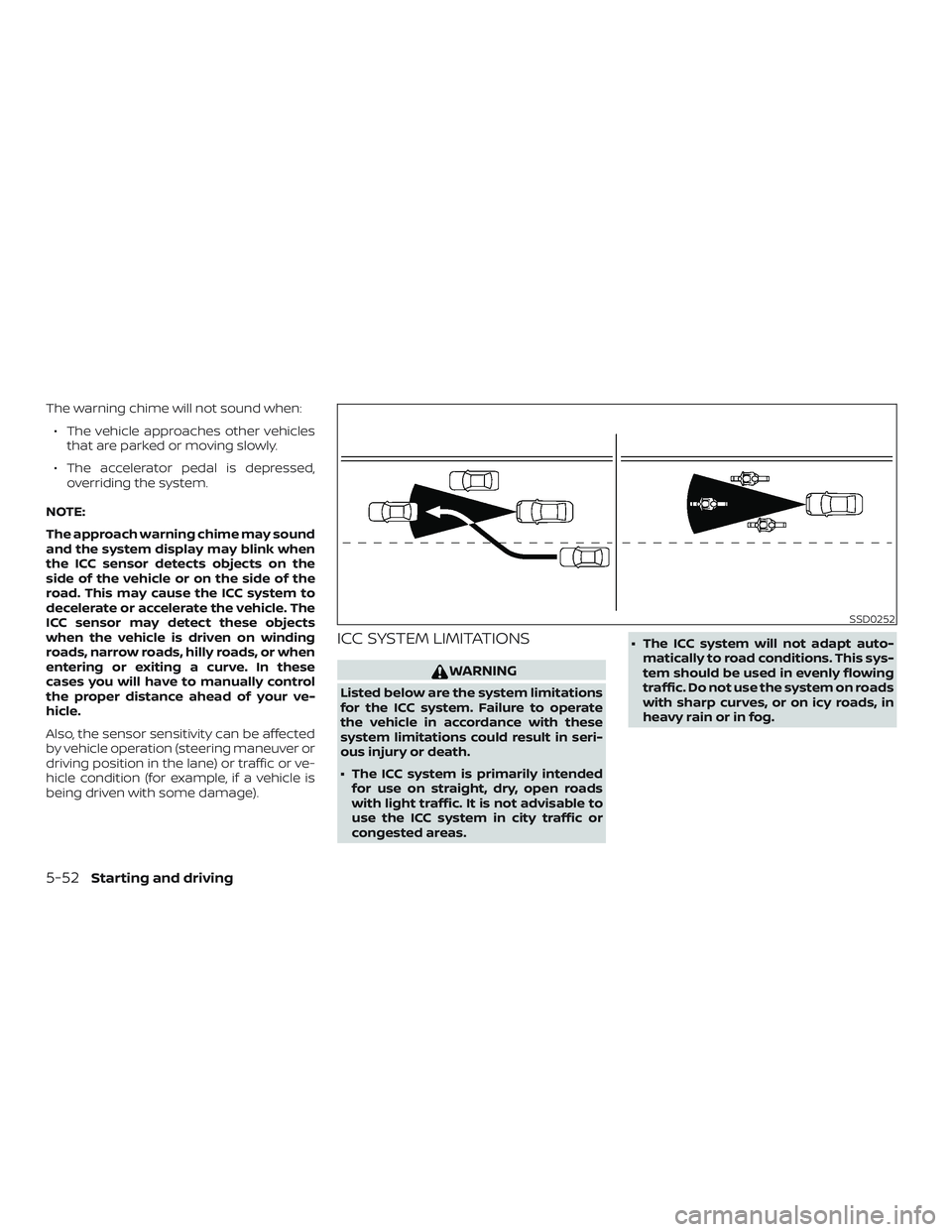
The approach warning chime may sound
and the system display may blink when
the ICC sensor detects objects on the
side of the vehicle or on the side of the
road. This may cause the ICC system to
decelerate or accelerate the vehicle. The
ICC sensor may detect these objects
when the vehicle is driven on winding
roads, narrow roads, hilly roads, or when
entering or exiting a curve. In these
cases you will have to manually control
the proper distance ahead of your ve-
hicle.
Also, the sensor sensitivity can be affected
by vehicle operation (steering maneuver or
driving position in the lane) or traffic or ve-
hicle condition (for example, if a vehicle is
being driven with some damage).
ICC SYSTEM LIMITATIONS
WARNING
Listed below are the system limitations
for the ICC system. Failure to operate
the vehicle in accordance with these
system limitations could result in seri-
ous injury or death.
∙ The ICC system is primarily intended for use on straight, dry, open roads
with light traffic. It is not advisable to
use the ICC system in city traffic or
congested areas. ∙ The ICC system will not adapt auto-
matically to road conditions. This sys-
tem should be used in evenly flowing
traffic. Do not use the system on roads
with sharp curves, or on icy roads, in
heavy rain or in fog.
SSD0252
5-52Starting and driving