power steering NISSAN PATHFINDER 2020 Owner´s Manual
[x] Cancel search | Manufacturer: NISSAN, Model Year: 2020, Model line: PATHFINDER, Model: NISSAN PATHFINDER 2020Pages: 482, PDF Size: 5.51 MB
Page 23 of 482
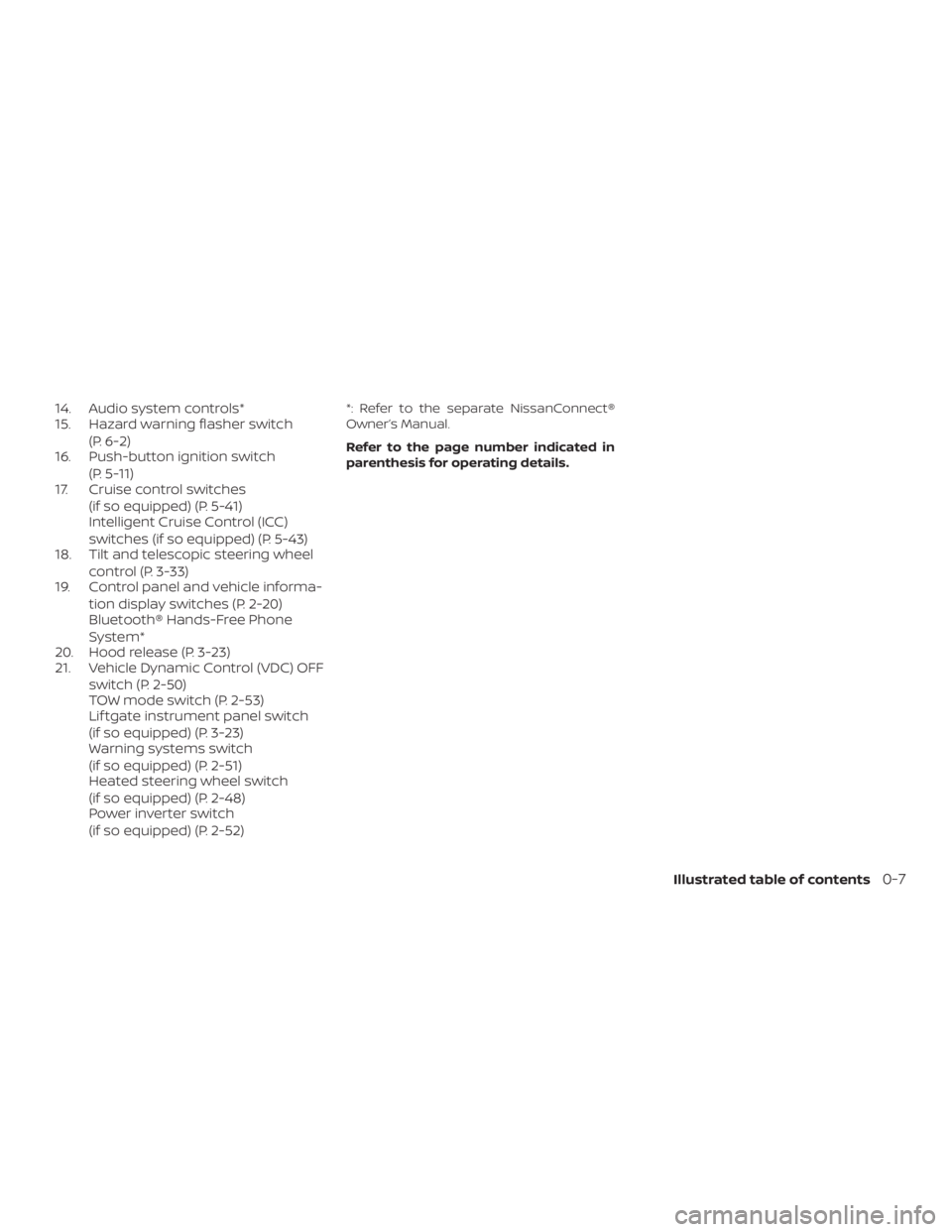
14. Audio system controls*
15. Hazard warning flasher switch(P. 6-2)
16. Push-button ignition switch
(P. 5-11)
17. Cruise control switches
(if so equipped) (P. 5-41)
Intelligent Cruise Control (ICC)
switches (if so equipped) (P. 5-43)
18. Tilt and telescopic steering wheel
control (P. 3-33)
19. Control panel and vehicle informa-
tion display switches (P. 2-20)
Bluetooth® Hands-Free Phone
System*
20. Hood release (P. 3-23)
21. Vehicle Dynamic Control (VDC) OFF
switch (P. 2-50)
TOW mode switch (P. 2-53)
Lif tgate instrument panel switch
(if so equipped) (P. 3-23)
Warning systems switch
(if so equipped) (P. 2-51)
Heated steering wheel switch
(if so equipped) (P. 2-48)
Power inverter switch
(if so equipped) (P. 2-52)*: Refer to the separate NissanConnect®
Owner’s Manual.
Refer to the page number indicated in
parenthesis for operating details.
Illustrated table of contents0-7
Page 24 of 482
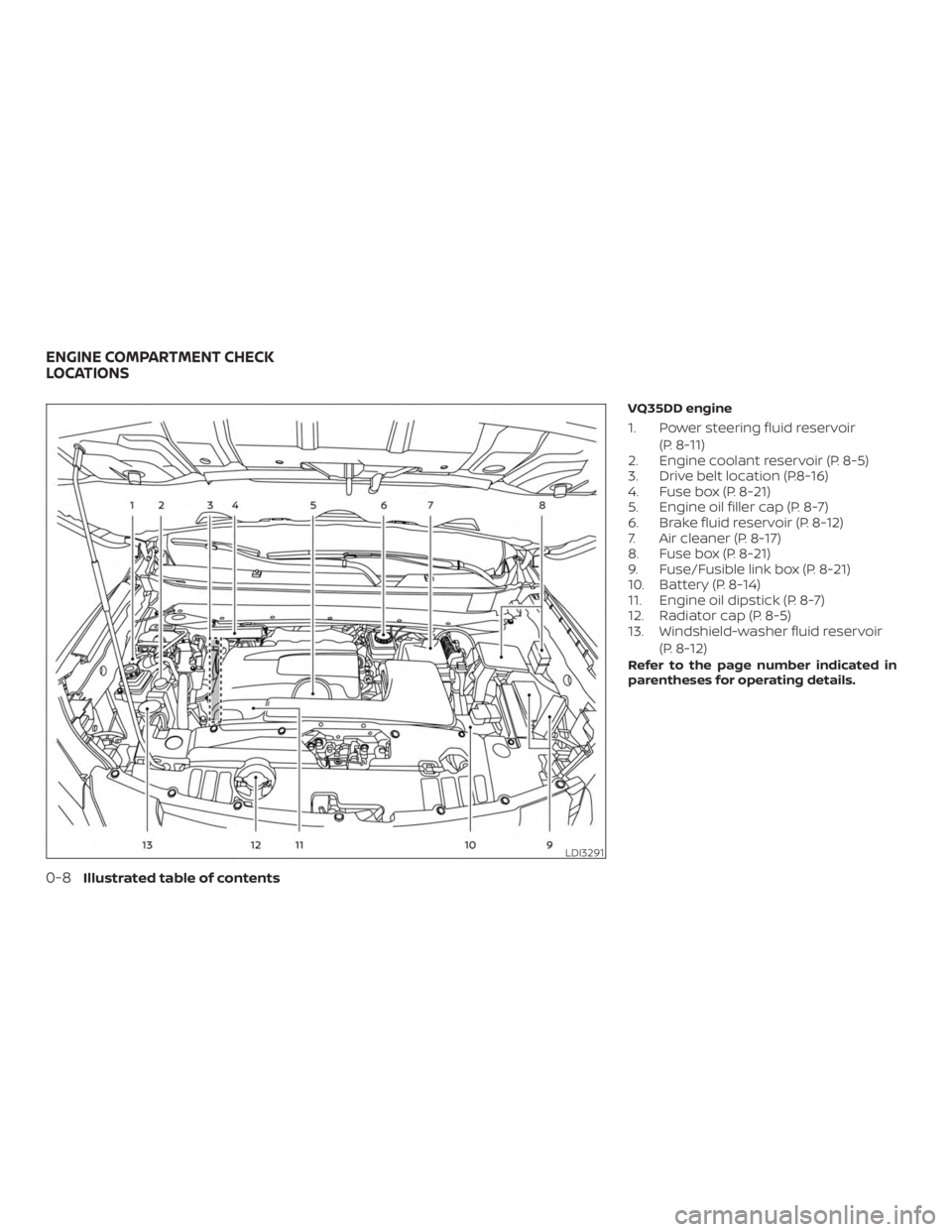
VQ35DD engine
1. Power steering fluid reservoir(P. 8-11)
2. Engine coolant reservoir (P. 8-5)
3. Drive belt location (P.8-16)
4. Fuse box (P. 8-21)
5. Engine oil filler cap (P. 8-7)
6. Brake fluid reservoir (P. 8-12)
7. Air cleaner (P. 8-17)
8. Fuse box (P. 8-21)
9. Fuse/Fusible link box (P. 8-21)
10. Battery (P. 8-14)
11. Engine oil dipstick (P. 8-7)
12. Radiator cap (P. 8-5)
13. Windshield-washer fluid reservoir
(P. 8-12)
Refer to the page number indicated in
parentheses for operating details.
LDI3291
ENGINE COMPARTMENT CHECK
LOCATIONS
0-8Illustrated table of contents
Page 25 of 482
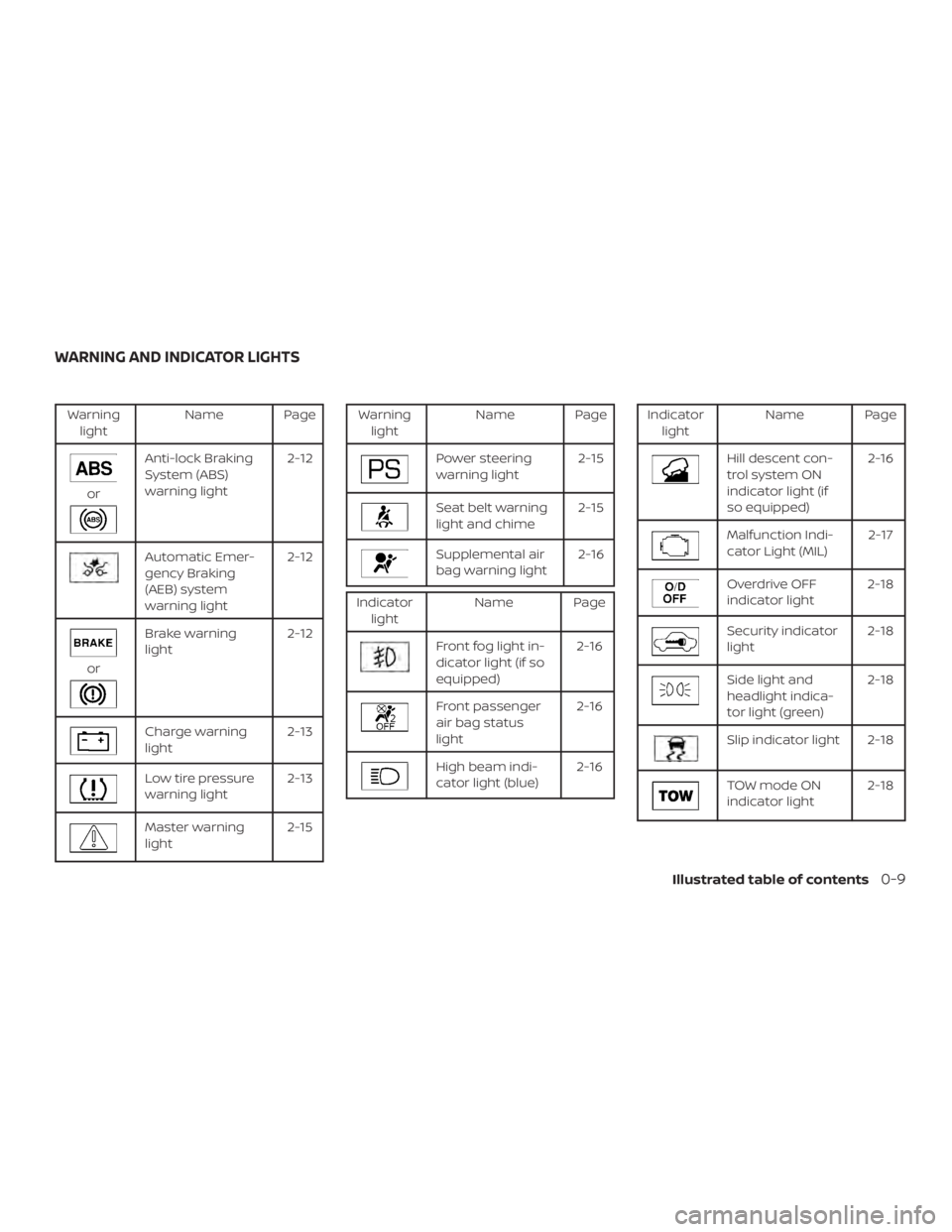
Warninglight Name Page
or
Anti-lock Braking
System (ABS)
warning light 2-12
Automatic Emer-
gency Braking
(AEB) system
warning light2-12
or
Brake warning
light
2-12
Charge warning
light 2-13
Low tire pressure
warning light2-13
Master warning
light2-15
Warning
light Name Page
Power steering
warning light 2-15
Seat belt warning
light and chime2-15
Supplemental air
bag warning light2-16
Indicator
light Name Page
Front fog light in-
dicator light (if so
equipped) 2-16
Front passenger
air bag status
light2-16
High beam indi-
cator light (blue)
2-16
Indicator
light Name Page
Hill descent con-
trol system ON
indicator light (if
so equipped) 2-16
Malfunction Indi-
cator Light (MIL)
2-17
Overdrive OFF
indicator light2-18
Security indicator
light2-18
Side light and
headlight indica-
tor light (green)2-18
Slip indicator light 2-18
TOW mode ON
indicator light
2-18
WARNING AND INDICATOR LIGHTS
Illustrated table of contents0-9
Page 107 of 482
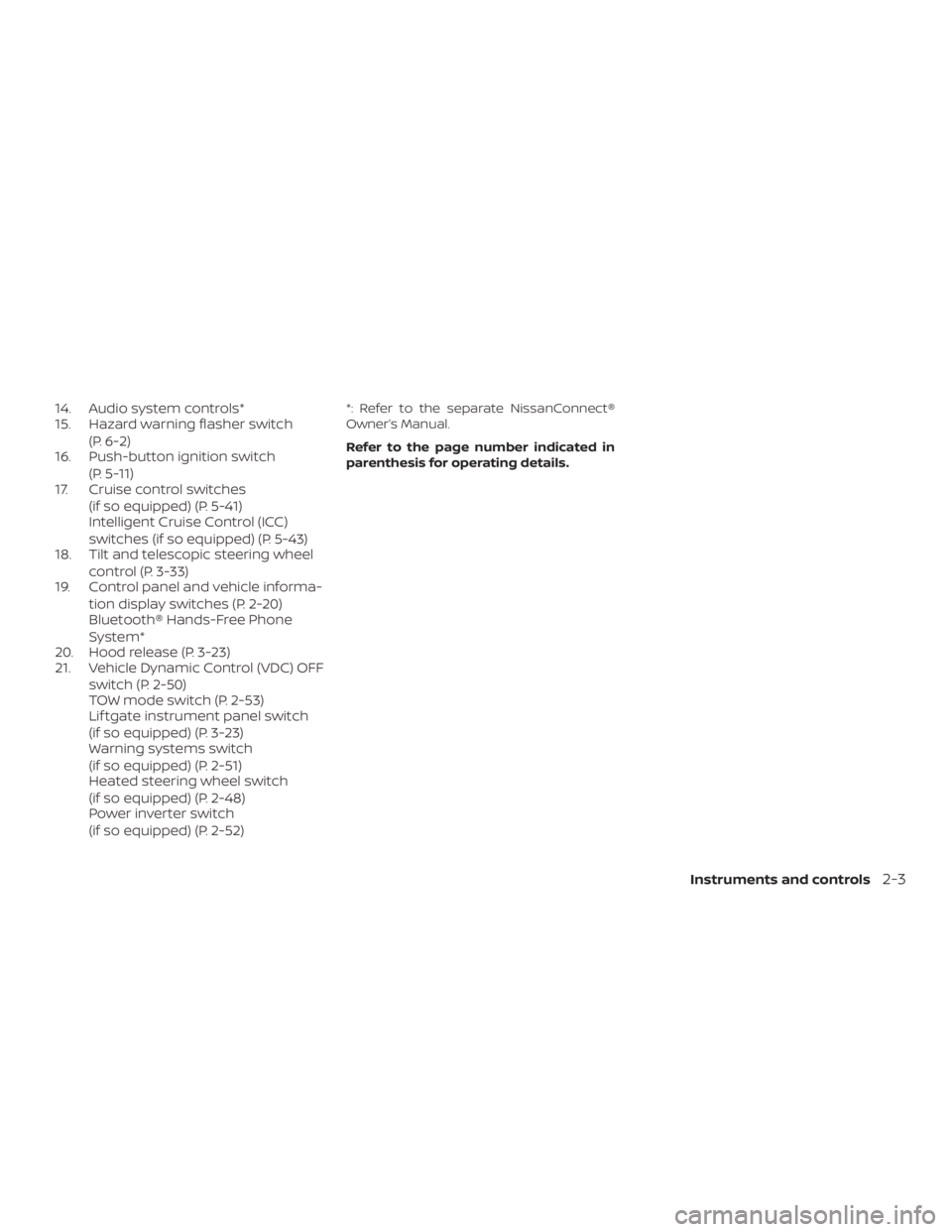
14. Audio system controls*
15. Hazard warning flasher switch(P. 6-2)
16. Push-button ignition switch
(P. 5-11)
17. Cruise control switches
(if so equipped) (P. 5-41)
Intelligent Cruise Control (ICC)
switches (if so equipped) (P. 5-43)
18. Tilt and telescopic steering wheel
control (P. 3-33)
19. Control panel and vehicle informa-
tion display switches (P. 2-20)
Bluetooth® Hands-Free Phone
System*
20. Hood release (P. 3-23)
21. Vehicle Dynamic Control (VDC) OFF
switch (P. 2-50)
TOW mode switch (P. 2-53)
Lif tgate instrument panel switch
(if so equipped) (P. 3-23)
Warning systems switch
(if so equipped) (P. 2-51)
Heated steering wheel switch
(if so equipped) (P. 2-48)
Power inverter switch
(if so equipped) (P. 2-52)*: Refer to the separate NissanConnect®
Owner’s Manual.
Refer to the page number indicated in
parenthesis for operating details.
Instruments and controls2-3
Page 115 of 482
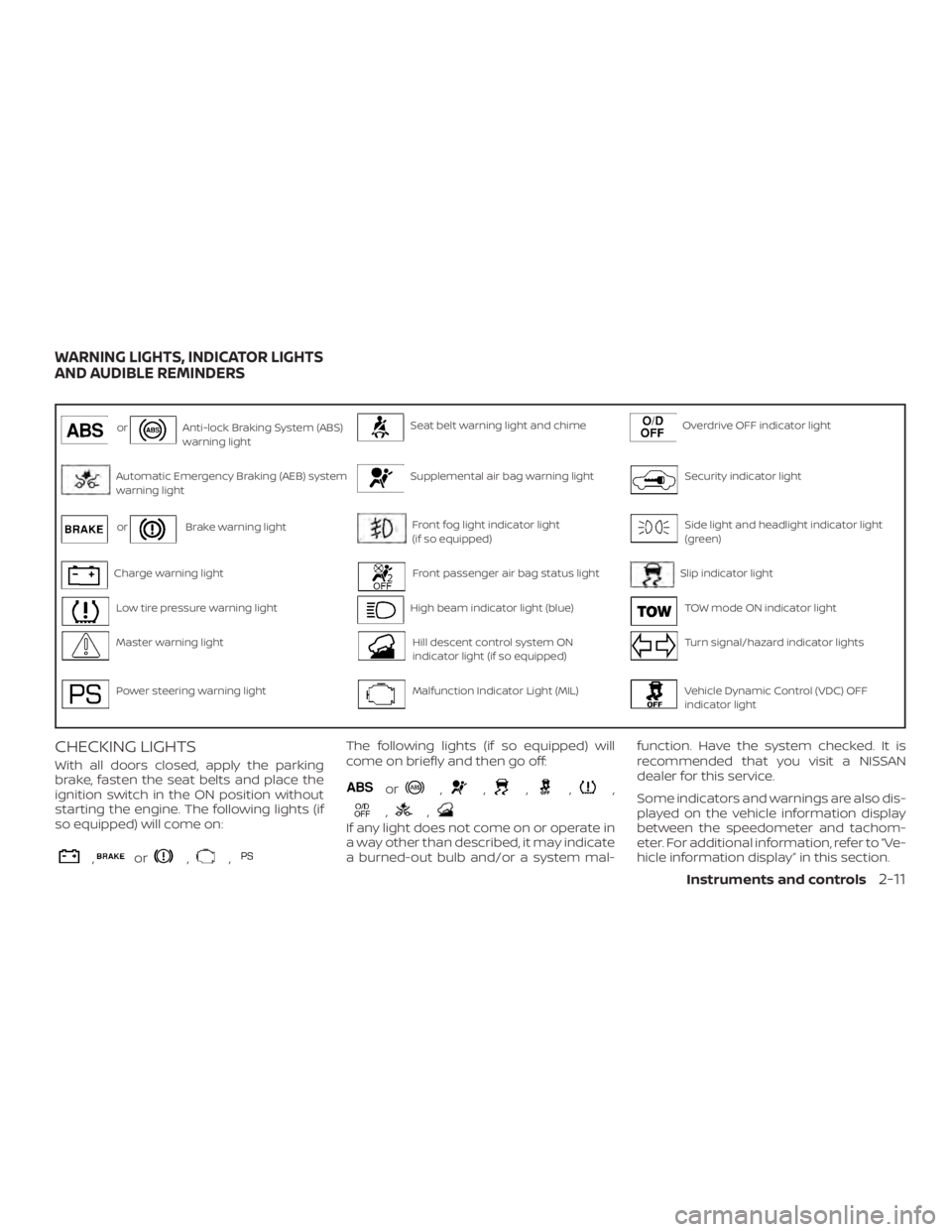
orAnti-lock Braking System (ABS)
warning lightSeat belt warning light and chimeOverdrive OFF indicator light
Automatic Emergency Braking (AEB) system
warning lightSupplemental air bag warning lightSecurity indicator light
orBrake warning lightFront fog light indicator light
(if so equipped)Side light and headlight indicator light
(green)
Charge warning lightFront passenger air bag status lightSlip indicator light
Low tire pressure warning lightHigh beam indicator light (blue)TOW mode ON indicator light
Master warning lightHill descent control system ON
indicator light (if so equipped)Turn signal/hazard indicator lights
Power steering warning lightMalfunction Indicator Light (MIL)Vehicle Dynamic Control (VDC) OFF
indicator light
CHECKING LIGHTS
With all doors closed, apply the parking
brake, fasten the seat belts and place the
ignition switch in the ON position without
starting the engine. The following lights (if
so equipped) will come on:
,or,,
The following lights (if so equipped) will
come on briefly and then go off:
or,,,,,
,,
If any light does not come on or operate in
a way other than described, it may indicate
a burned-out bulb and/or a system mal-function. Have the system checked. It is
recommended that you visit a NISSAN
dealer for this service.
Some indicators and warnings are also dis-
played on the vehicle information display
between the speedometer and tachom-
eter. For additional information, refer to “Ve-
hicle information display” in this section.
WARNING LIGHTS, INDICATOR LIGHTS
AND AUDIBLE REMINDERS
Instruments and controls2-11
Page 119 of 482
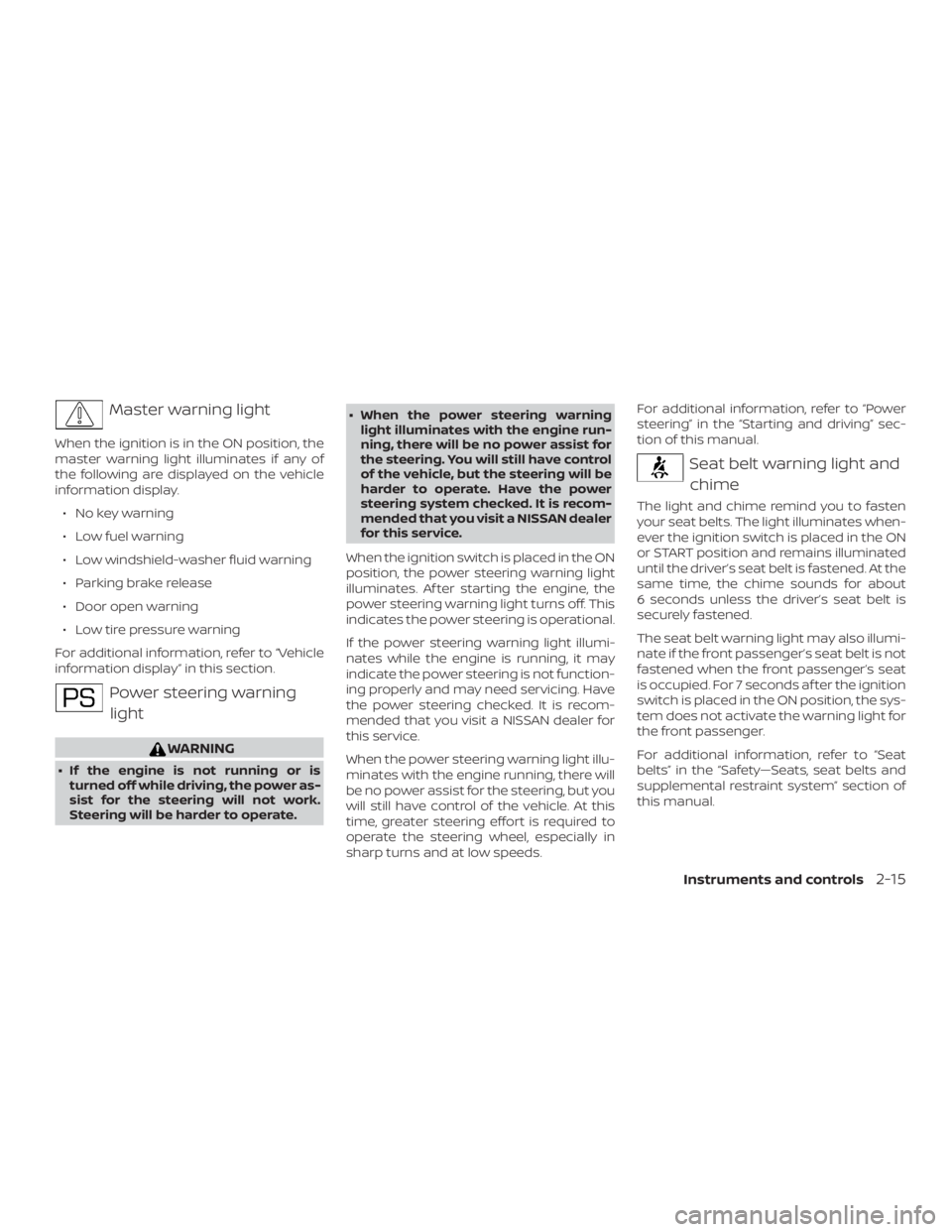
Master warning light
When the ignition is in the ON position, the
master warning light illuminates if any of
the following are displayed on the vehicle
information display.∙ No key warning
∙ Low fuel warning
∙ Low windshield-washer fluid warning
∙ Parking brake release
∙ Door open warning
∙ Low tire pressure warning
For additional information, refer to “Vehicle
information display” in this section.
Power steering warning light
WARNING
∙ If the engine is not running or is turned off while driving, the power as-
sist for the steering will not work.
Steering will be harder to operate. ∙ When the power steering warning
light illuminates with the engine run-
ning, there will be no power assist for
the steering. You will still have control
of the vehicle, but the steering will be
harder to operate. Have the power
steering system checked. It is recom-
mended that you visit a NISSAN dealer
for this service.
When the ignition switch is placed in the ON
position, the power steering warning light
illuminates. Af ter starting the engine, the
power steering warning light turns off. This
indicates the power steering is operational.
If the power steering warning light illumi-
nates while the engine is running, it may
indicate the power steering is not function-
ing properly and may need servicing. Have
the power steering checked. It is recom-
mended that you visit a NISSAN dealer for
this service.
When the power steering warning light illu-
minates with the engine running, there will
be no power assist for the steering, but you
will still have control of the vehicle. At this
time, greater steering effort is required to
operate the steering wheel, especially in
sharp turns and at low speeds. For additional information, refer to “Power
steering” in the “Starting and driving” sec-
tion of this manual.
Seat belt warning light and
chime
The light and chime remind you to fasten
your seat belts. The light illuminates when-
ever the ignition switch is placed in the ON
or START position and remains illuminated
until the driver’s seat belt is fastened. At the
same time, the chime sounds for about
6 seconds unless the driver’s seat belt is
securely fastened.
The seat belt warning light may also illumi-
nate if the front passenger’s seat belt is not
fastened when the front passenger’s seat
is occupied. For 7 seconds af ter the ignition
switch is placed in the ON position, the sys-
tem does not activate the warning light for
the front passenger.
For additional information, refer to “Seat
belts” in the “Safety—Seats, seat belts and
supplemental restraint system” section of
this manual.
Instruments and controls2-15
Page 161 of 482
∙ Avoid using power outlets when theair conditioner, headlights or rear win-
dow defroster is on.
∙ Before inserting or disconnecting a plug, be sure the electrical accessory
being used is turned OFF.
∙ Push the plug in as far as it will go. If good contact is not made, the plug
may overheat or the internal tem-
perature fuse may open.
∙ When not in use, be sure to close the cap. Do not allow water or any other
liquid to contact the outlet.
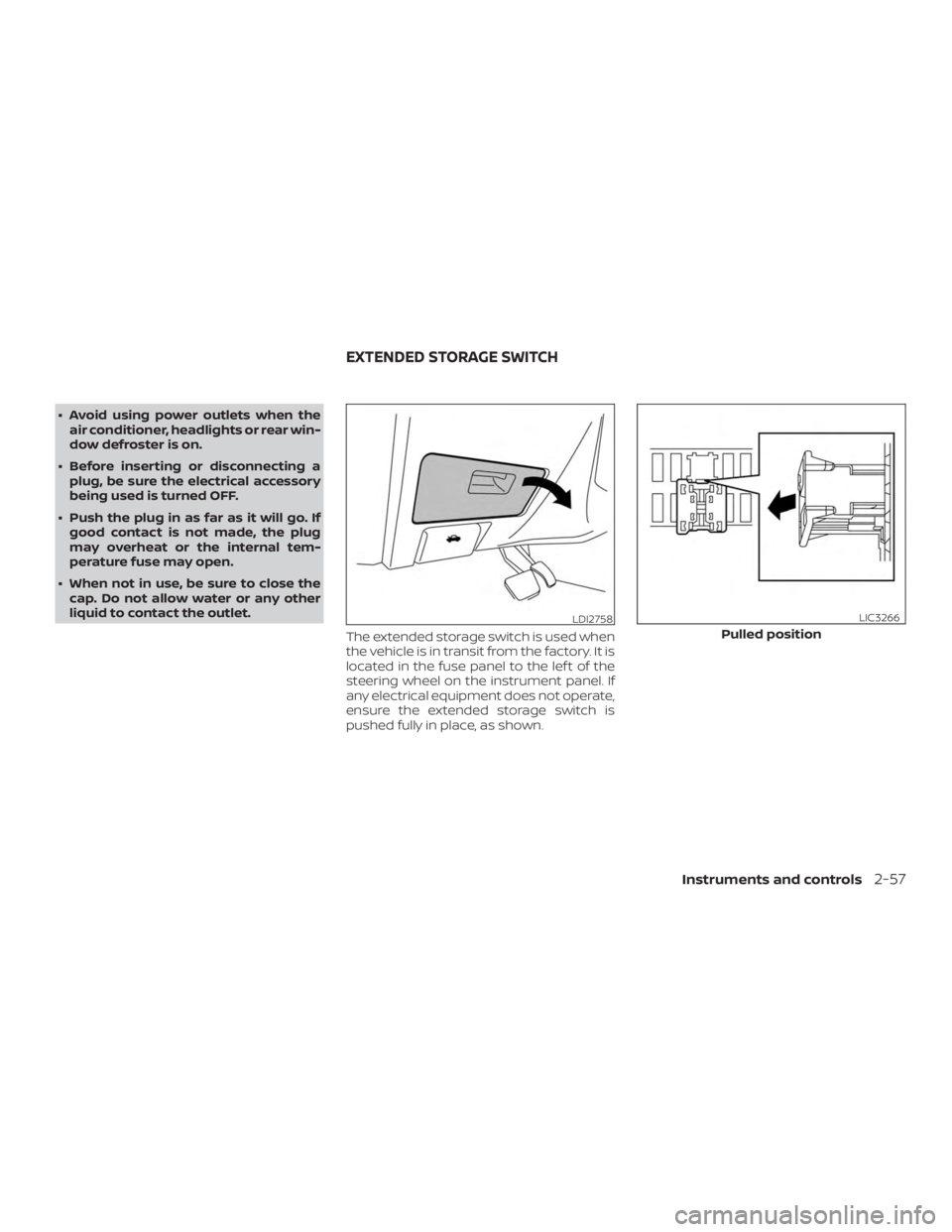
The extended storage switch is used when
the vehicle is in transit from the factory. It is
located in the fuse panel to the lef t of the
steering wheel on the instrument panel. If
any electrical equipment does not operate,
ensure the extended storage switch is
pushed fully in place, as shown.
LDI2758
Pulled position
LIC3266
EXTENDED STORAGE SWITCH
Instruments and controls2-57
Page 184 of 482
3 Pre-driving checks and adjustments
Keys.............................................3-2NISSAN Intelligent Key® .......................3-2
NISSAN Vehicle Immobilizer System
keys..........................................3-4
Doors ...........................................3-5
Locking with key ..............................3-5
Locking with inside lock knob .................3-6
Locking with power door lock switch .........3-6
Automatic door locks......................... 3-7
Child safety rear door lock .................... 3-7
NISSAN INTELLIGENT KEY® ....................... 3-7
Operating range ..............................3-9
Door locks/unlocks precaution ..............3-10
NISSAN Intelligent Key® Operation ...........3-10
How to use the remote keyless entry
function ..................................... 3-13
Type A (if so equipped) ....................... 3-14
Type B (if so equipped) ....................... 3-14
Type C (if so equipped) ....................... 3-15
Warning signals ............................. 3-17
Troubleshooting guide ......................3-18
Remote Engine Start (if so equipped) ...........3-20
Remote Engine Start operating range .......3-20
Remote starting the vehicle .................3-21Extending engine run time
..................3-21
Canceling a Remote Engine Start ............3-21
Conditions the Remote Engine Start will
notwork .................................... 3-22
Hood ........................................... 3-23
Lif tgate ......................................... 3-23
Operating the manual lif tgate
(if so equipped) .............................. 3-24
Operating the power lif tgate
(if so equipped) .............................. 3-24
Motion-Activated Lif tgate
(if so equipped) .............................. 3-27
Lif tgate release .............................. 3-28
Lif tgate position setting
(if so equipped) .............................. 3-29
Fuel-filler door .................................. 3-30
Opening the fuel-filler door ..................3-30
Fuel-filler cap ................................ 3-30
Steering wheel ................................. 3-33
Manual operation (if so equipped) ...........3-33
Automatic
operation (if so equipped) ........3-33
Sun visors ...................................... 3-34
Vanity mirrors ............................... 3-35
Card holder ................................. 3-35
Page 261 of 482
∙ When thefront defroster button is
pressed, the air conditioner will auto-
matically be turned on at outside tem-
peratures above 36°F (2°C). The air recir-
culate mode automatically turns off,
allowing outside air to be drawn into the
passenger compartment to further im-
prove the defogging performance.
Remote Engine Start with
Intelligent Climate Control (if so
equipped)
Vehicles equipped with automatic climate
controls and Remote Engine Start function
may go into automatic heating or cooling
mode when Remote Engine Start is acti-
vated depending on outside and cabin
temperatures. During this period, the cli-
mate control display and buttons will be
inoperable until the ignition switch is
turned on. In Remote Engine Start defrost-
ing mode, the rear window defroster and
heated steering wheel (if so equipped) may
be activated automatically.
Voice Recognition logic (if so
equipped)
When the climate control system is on, the
front and rear fan speeds may be auto-
matically lowered so that commands are
more easily recognized. Fan speed can be
adjusted using the fan speed decrease and
increase buttons, if desired.
MANUAL OPERATION
Fan speed control dial
Turn thefan speed control dial to
manually control the fan speed.
Press the AUTO button to return to auto-
matic control of the fan speed.
Temperature control dial
The temperature control dial allows you to
adjust the temperature of the outlet air. To
lower the temperature, turn the dial to the
lef t. To increase the temperature, turn the
dial to the right. Temperature can be ad-
justed on the driver’s and passenger’s side.
Air recirculation
Press theair recirculation button to
recirculate interior air inside the vehicle.
The
indicator light on the button will
come on.
The air recirculation cannot be activated
when the air conditioner is in the
front defrosting mode.
When the outside temperature exceeds
70°F (21°C), the air conditioning system may
default to air recirculation mode automati-
cally to reduce overall power consumption.
To exit air recirculation mode, deselect the
air recirculation button (indicator will turn
off ) to enter fresh air mode.
Automatic intake air control
In the AUTO mode, the intake air will be
controlled automatically. To manually con-
trol the intake air, press the
air recir-
culation button. To return to the automatic
control mode, press and hold the
air
recirculation button for about 2 seconds.
The indicator light will flash twice, and then
the intake air will be controlled automati-
cally.
Monitor, climate, audio, phone and voice recognition systems4-35
Page 271 of 482
The ICC switch.............................. 5-46
ICC system limitations .......................5-52
System temporarily unavailable .............5-55
System maintenance ........................ 5-57
Automatic Emergency Braking (AEB) ...........5-58
AEB system operation .......................5-59
Turning the AEB system on/off ..............5-61
AEB system limitations ......................5-61
System temporarily unavailable .............5-63
System malfunction ......................... 5-64
System maintenance ........................ 5-64
Break-in schedule .............................. 5-65
Fuel efficient driving tips ........................5-66
Increasing fuel economy .......................5-67
Intelligent 4x4 (I-4x4) (if so equipped) ............5-67
I–4x4 system operation ......................5-67
Parking/parking on hills ........................5-71
Power steering ................................. 5-72
Brake system ................................... 5-73Brake precautions
........................... 5-73
Anti-lock Braking System (ABS) ..............5-73
Brake Assist .................................5-74
Vehicle Dynamic Control (VDC) system .........5-75
Rise-up and build-up ........................ 5-77
Brake force distribution ......................5-77
Hill descent control system (if so equipped) .....5-78
Hill start assist system .......................... 5-78
Rear Sonar System (RSS) .......................5-79
Cold weather driving ........................... 5-80
Freeing a frozen door lock ...................5-80
Antifreeze ................................... 5-80
Battery...................................... 5-80
Draining of coolant water ....................5-80
Tire equipment .............................. 5-80
Special winter equipment ...................5-81
Driving
on snow or ice ....................... 5-81
Engine block heater (if so equipped) .........5-81