Button NISSAN PATHFINDER 2022 Owner´s Manual
[x] Cancel search | Manufacturer: NISSAN, Model Year: 2022, Model line: PATHFINDER, Model: NISSAN PATHFINDER 2022Pages: 647, PDF Size: 8.48 MB
Page 490 of 647
HOW TO TURN OFF THE VDC
SYSTEM
The vehicle should be driven with the Ve-
hicle Dynamic Control (VDC) system ON for
most driving conditions.
When the vehicle is stuck in mud or snow,
the VDC system reduces the engine output
to reduce wheel spin. The engine speed will
be reduced even if the accelerator is de-
pressed to the floor. If maximum engine
power is needed to free a stuck vehicle,
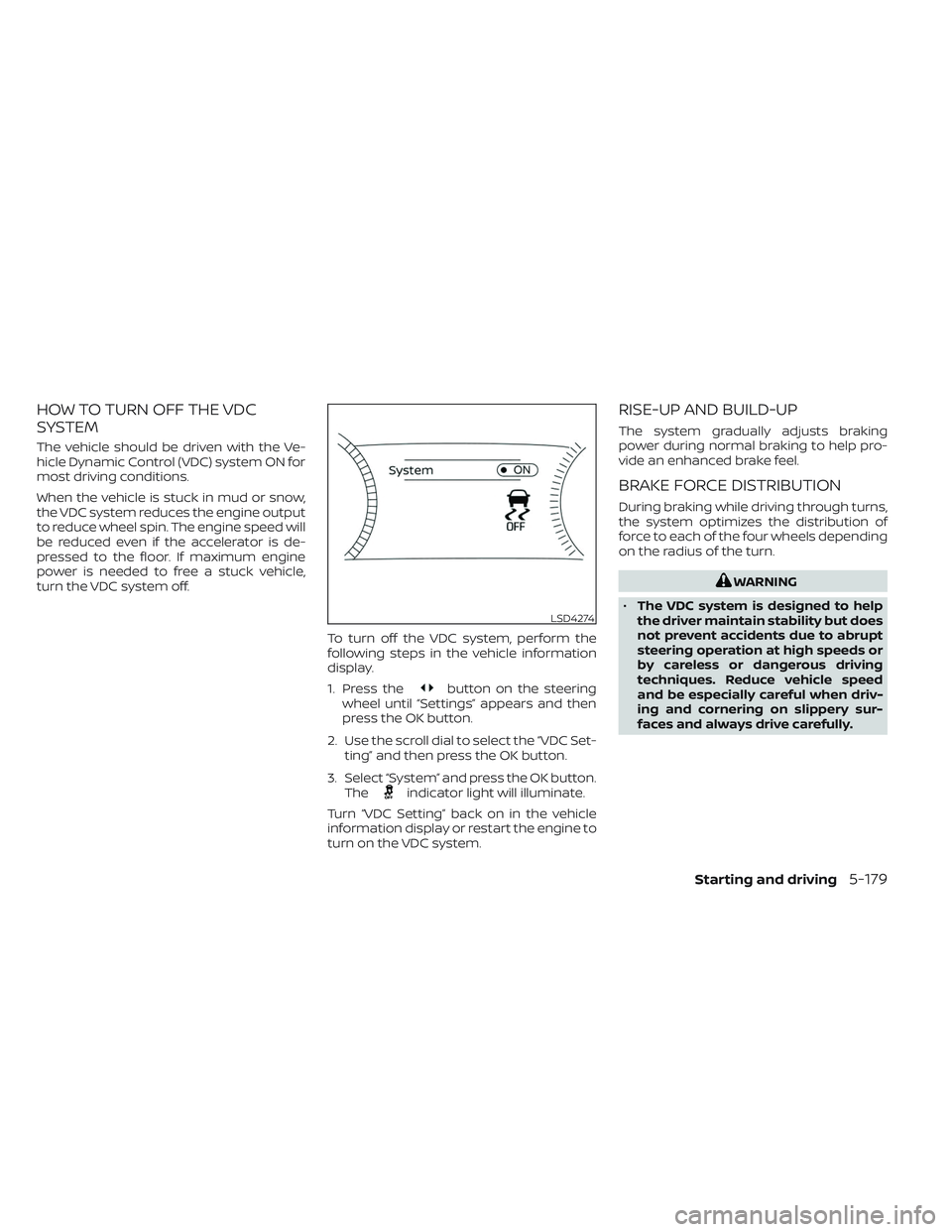
turn the VDC system off.To turn off the VDC system, perform the
following steps in the vehicle information
display.
1. Press the
button on the steering
wheel until “Settings” appears and then
press the OK button.
2. Use the scroll dial to select the “VDC Set- ting” and then press the OK button.
3. Select “System” and press the OK button. The
indicator light will illuminate.
Turn “VDC Setting” back on in the vehicle
information display or restart the engine to
turn on the VDC system.
RISE-UP AND BUILD-UP
The system gradually adjusts braking
power during normal braking to help pro-
vide an enhanced brake feel.
BRAKE FORCE DISTRIBUTION
During braking while driving through turns,
the system optimizes the distribution of
force to each of the four wheels depending
on the radius of the turn.
WARNING
• The VDC system is designed to help
the driver maintain stability but does
not prevent accidents due to abrupt
steering operation at high speeds or
by careless or dangerous driving
techniques. Reduce vehicle speed
and be especially careful when driv-
ing and cornering on slippery sur-
faces and always drive carefully.
LSD4274
Starting and driving5-179
Page 497 of 647
HOW TO ENABLE/DISABLE THE
FRONT AND REAR SONAR SYSTEMThe system is automatically activated
when the push button ignition is placed inthe ON position and the shif t lever is in the
R (Reverse) position.
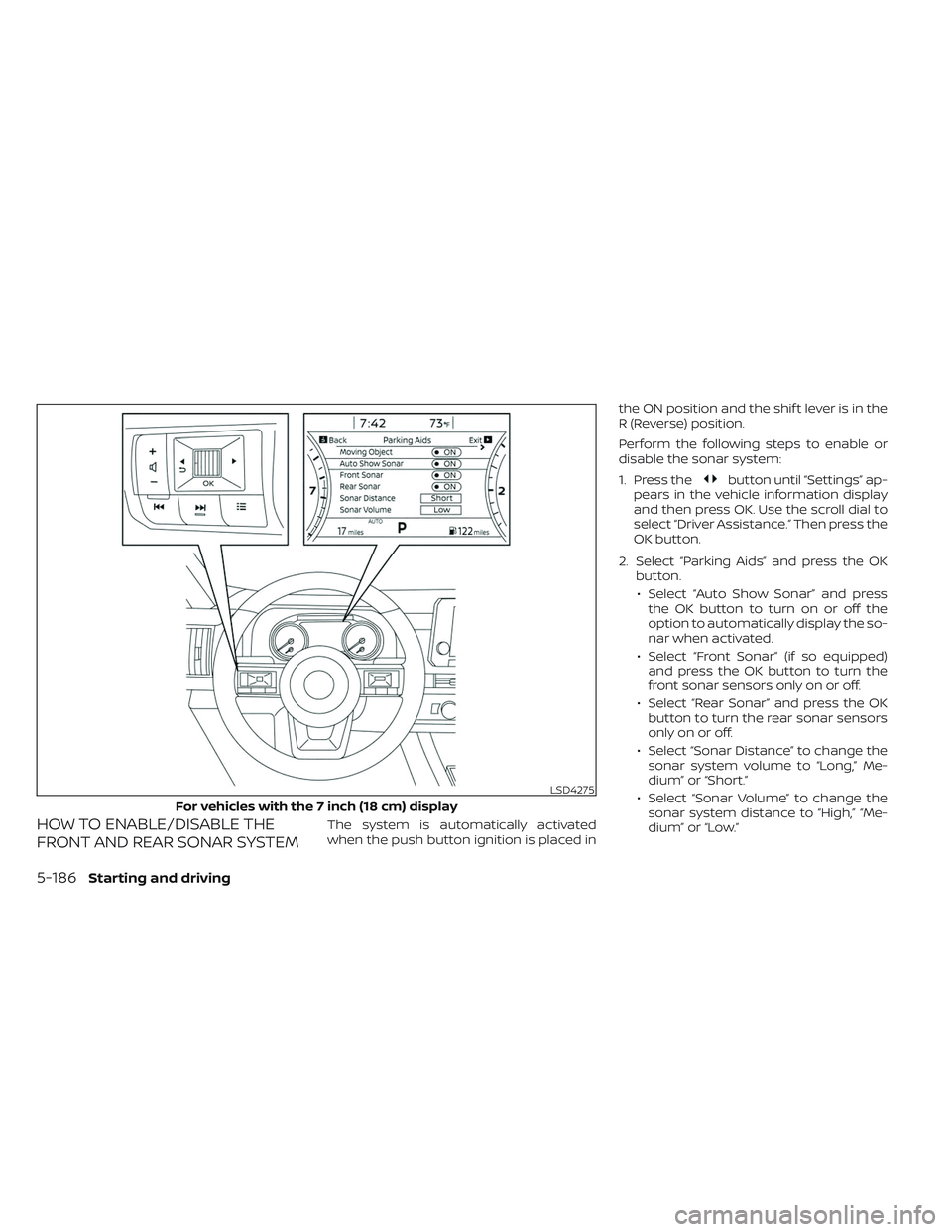
Perform the following steps to enable or
disable the sonar system:
1. Press the
button until “Settings” ap-
pears in the vehicle information display
and then press OK. Use the scroll dial to
select “Driver Assistance.” Then press the
OK button.
2. Select “Parking Aids” and press the OK button.
• Select “Auto Show Sonar” and press the OK button to turn on or off the
option to automatically display the so-
nar when activated.
• Select “Front Sonar” (if so equipped) and press the OK button to turn the
front sonar sensors only on or off.
• Select “Rear Sonar” and press the OK button to turn the rear sonar sensors
onlyonoroff.
• Select “Sonar Distance” to change the sonar system volume to “Long,” Me-
dium” or “Short.”
• Select “Sonar Volume” to change the sonar system distance to “High,” “Me-
dium” or “Low.”
LSD4275
For vehicles with the 7 inch (18 cm) display
5-186Starting and driving
Page 509 of 647
Push the switch on to warn other drivers
when you must stop or park under emer-
gency conditions. All turn signal lights flash.
WARNING
• If stopping for an emergency, be sure
to move the vehicle well off the road.
• Do not use the hazard warning flash-
ers while moving on the highway un-
less unusual circumstances force
you to drive so slowly that your ve-
hicle might become a hazard to other
traffic. •
Turn signals do not work when the
hazard warning flasher lights are on.
The flashers will operate with the ignition
switch placed in any position.
Some jurisdictions may prohibit the use
of the hazard warning flasher switch
while driving. To shut off the engine in an emergency
situation while driving, perform the follow-
ing procedure:
– Rapidly push the push-button ignition
switch three consecutive times in less
than 1.5 seconds, or
– Push and hold the push-button ignition switch for more than 2 seconds.
LIC0394
HAZARD WARNING FLASHER SWITCH EMERGENCY ENGINE SHUT OFF
6-2In case of emergency
Page 511 of 647
CHANGING A FLAT TIRE
If you have a flat tire, follow the instructions
below:
Stopping the vehicle
1. Safely move the vehicle off the road andaway from traffic.
2. Turn on the hazard warning flashers.
3. Park on a level surface and apply the parking brake. Push the park button to
shif t to the P (Park) position.
4. Turn off the engine.
5. Raise the hood to warn other traffic and to signal professional road assistance
personnel that you need assistance.
6. Have all passengers get out of the ve- hicle and stand in a safe place, away
from traffic and clear of the vehicle.
WARNING
• Make sure the parking brake is se-
curely applied and the shif t position
is placed in the P (Park) position.
• Never change tires when the vehicle
is on a slope, ice or slippery areas.
This is hazardous.
• Never change tires if oncoming traf-
fic is close to your vehicle. Wait for
professional road assistance.
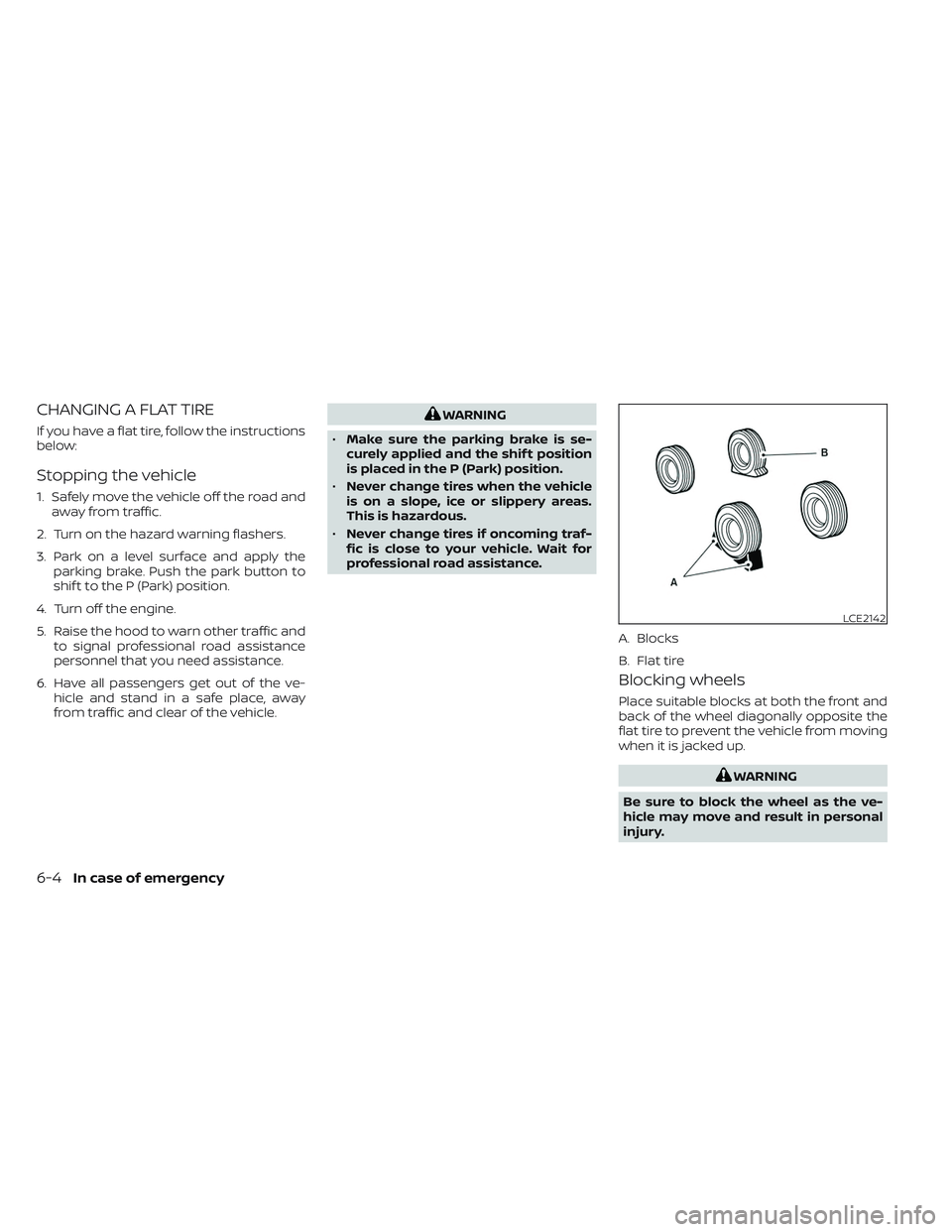
Blocking wheels
Place suitable blocks at both the front and
back of the wheel diagonally opposite the
flat tire to prevent the vehicle from moving
when it is jacked up.
WARNING
Be sure to block the wheel as the ve-
hicle may move and result in personal
injury.
LCE2142
A. Blocks
B. Flat tire
6-4In case of emergency
Page 519 of 647
•Whenever working on or near a bat-
tery, always wear suitable eye pro-
tectors (for example, goggles or in-
dustrial safety spectacles) and
remove rings, metal bands, or any
other jewelry. Do not lean over the
battery when jump starting.
• Do not attempt to jump start a frozen
battery. It could explode and cause
serious injury.
• Your vehicle has an automatic engine
cooling fan. It could come on at any
time. Keep hands and other objects
away from it.
WARNING
Always follow the instructions below.
Failure to do so could result in damage
to the charging system and cause per-
sonal injury.
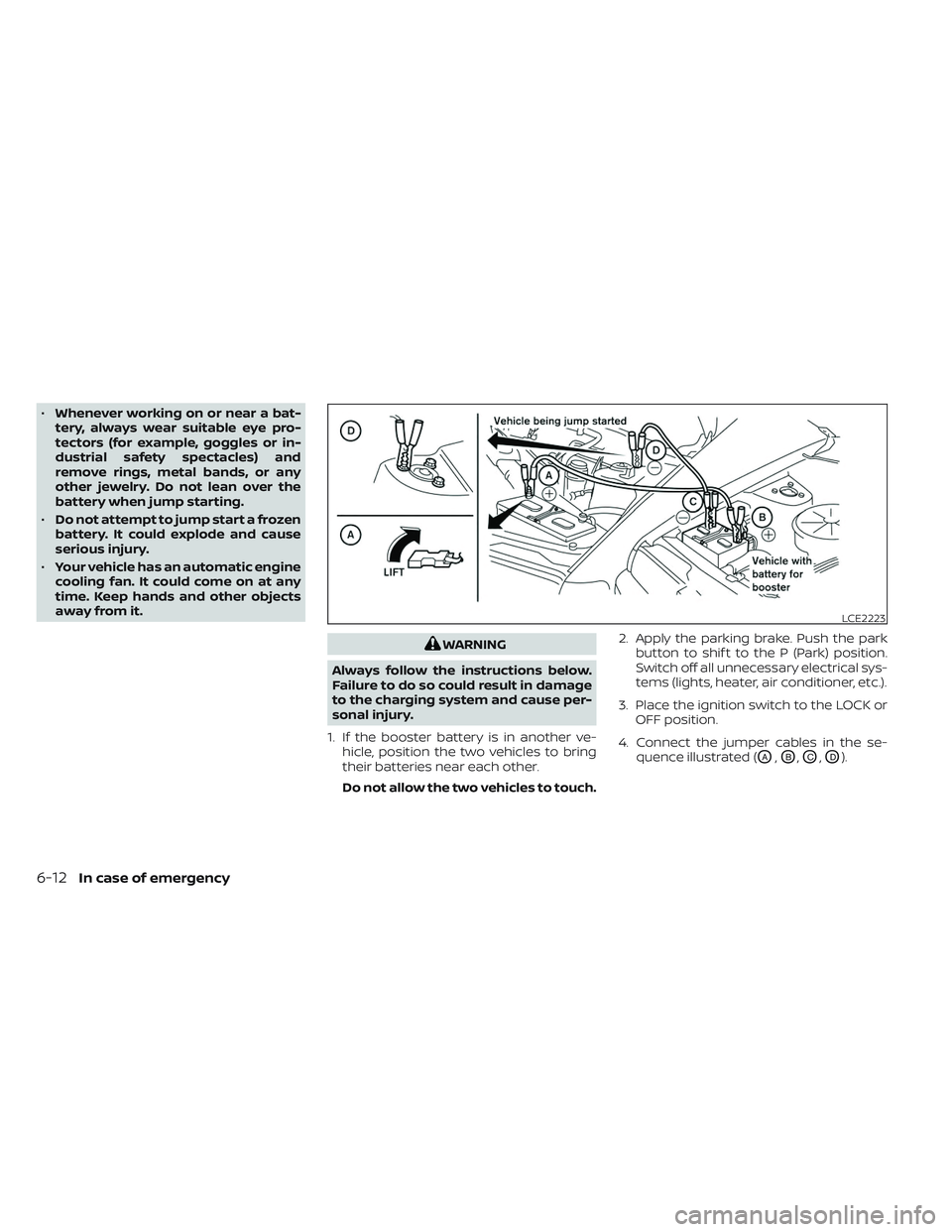
1. If the booster battery is in another ve- hicle, position the two vehicles to bring
their batteries near each other.
Do not allow the two vehicles to touch. 2. Apply the parking brake. Push the park
button to shif t to the P (Park) position.
Switch off all unnecessary electrical sys-
tems (lights, heater, air conditioner, etc.).
3. Place the ignition switch to the LOCK or OFF position.
4. Connect the jumper cables in the se- quence illustrated (
OA,OB,OC,OD).
LCE2223
6-12In case of emergency
Page 520 of 647
CAUTION
• Always connect positive (+) to posi-
tive (+) and negative (−) to body
ground (for example, strut mounting
bolt, engine lif t bracket, etc.) — not to
the battery.
• Make sure the jumper cables do not
touch moving parts in the engine
compartment and that the cable
clamps do not contact any other
metal.
5. Start the engine of the booster vehicle and let it run for a few minutes.
6. Keep the engine speed of the booster vehicle at about 2,000 rpm and start the
engine of the vehicle being jump
started.
CAUTION
Do not keep the starter motor engaged
for more than 10 seconds. If the engine
does not start right away, place the ig-
nition switch in the OFF position and
wait 3 to 4 seconds before trying again.
7. Af ter starting the engine, carefully dis- connect the negative cable and then the
positive cable.
CAUTION
Automatic transmission models can-
not be push-started. Attempting to do
so may cause transmission damage.WARNING
• Do not continue to drive if your ve-
hicle overheats. Doing so could cause
engine damage or a vehicle fire.
• To avoid the danger of being scalded,
never remove the radiator or coolant
reservoir cap while the engine is still
hot. When the radiator or coolant res-
ervoir cap is removed, pressurized
hot water will spurt out, possibly
causing serious injury.
• Do not open the hood if steam is
coming out.
If your vehicle is overheating (indicated by
an extremely high temperature gauge
reading and the Low Oil Pressure: See
Owner’s Manual warning message ap-
pears in the vehicle information display), or
if you feel a lack of engine power, detect
abnormal noise, etc. take the following
steps:
1. Move the vehicle safely off the road, ap- ply the parking brake.
2. Push the park button to shif t to the P (Park) position.
Do not stop the engine.
PUSH STARTING IF YOUR VEHICLE OVERHEATS
In case of emergency6-13
Page 535 of 647
When performing any inspection or main-
tenance work on your vehicle, always take
care to prevent serious accidental injury to
yourself or damage to the vehicle. The fol-
lowing are general precautions which
should be closely observed.
WARNING
• Park the vehicle on a level surface,
apply the parking brake securely and
block the wheels to prevent the ve-
hicle from moving. Push the park
button to shif t to the P (Park)
position.
• Be sure the ignition switch is in the
OFF or LOCK position when perform-
ing any parts replacement or repairs.
• If you must work with the engine run-
ning, keep your hands, clothing, hair
and tools away from moving fans,
belts and any other moving parts.
• It is advisable to secure or remove
any loose clothing and remove any
jewelry, such as rings, watches, etc.
before working on your vehicle.
• Always wear eye protection when-
ever you work on your vehicle. •
Your vehicle is equipped with an au-
tomatic engine cooling fan. It may
come on at any time without warn-
ing, even if the ignition switch is in
the OFF position and the engine is
not running. To avoid injury, always
disconnect the negative battery
cable before working near the fan.
• If you must run the engine in an en-
closed space such as a garage, be
sure there is proper ventilation for
exhaust gases to escape.
• Never get under the vehicle while it is
supported only by a jack. If it is nec-
essary to work under the vehicle,
support it with safety stands.
• Keep smoking materials, flame and
sparks away from the fuel tank and
battery.
• Because the fuel lines on gasoline
engine models are under high pres-
sure even when the engine is off, it is
recommended that you visit a
NISSAN dealer for service of the fuel
filter or fuel lines.
CAUTION
• Do not work under the hood while
the engine is hot. Turn the engine off
and wait until it cools down.
• Avoid contact with used engine oil
and coolant. Improperly disposed
engine oil, engine coolant and/or
other vehicle fluids can damage the
environment. Always conform to lo-
cal regulations for disposal of vehicle
fluid.
• Never leave the engine or automatic
transmission related component
harnesses disconnected while the
ignition switch is in the ON position.
• Never connect or disconnect the bat-
tery or any transistorized compo-
nent while the ignition switch is in
the ON position.
NOTE:
If the battery is completely drained the
transmission will not manually shif t to
other positions.
This “Do-it-yourself ” section gives instruc-
tions regarding only those items which are
relatively easy for an owner to perform.
MAINTENANCE PRECAUTIONS
8-2Do-it-yourself
Page 559 of 647
3. Replace the battery with a new one.Recommended battery: CR2032 or
equivalent.• Do not touch the internal circuit and electric terminals as doing so could
cause a malfunction.
• Hold the battery by the edges. Holding the battery across the contact points
will seriously deplete the storage
capacity.
• Make sure that the + side faces the bottom of the lower part.
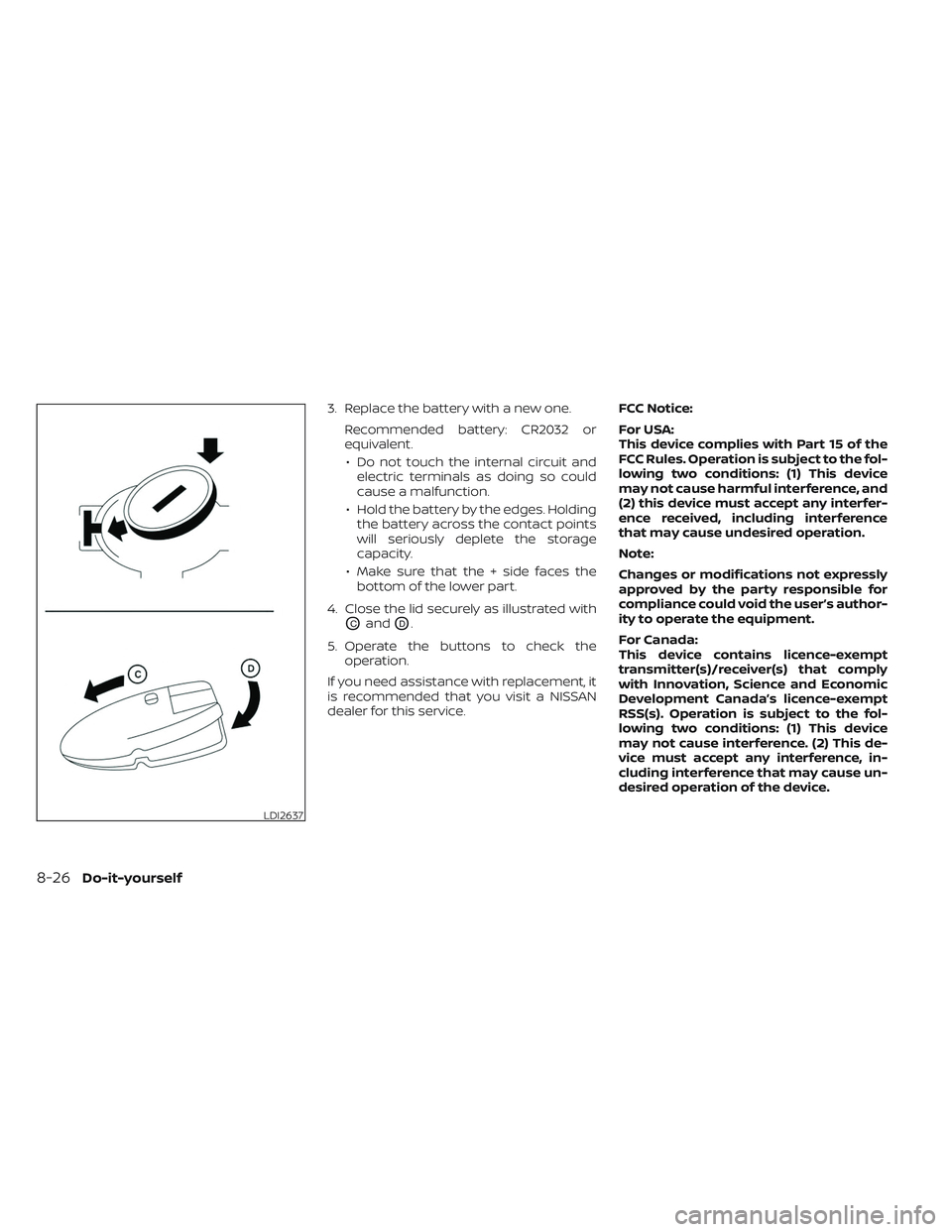
4. Close the lid securely as illustrated with
OCandOD.
5. Operate the buttons to check the operation.
If you need assistance with replacement, it
is recommended that you visit a NISSAN
dealer for this service. FCC Notice:
For USA:
This device complies with Part 15 of the
FCC Rules. Operation is subject to the fol-
lowing two conditions: (1) This device
may not cause harmful interference, and
(2) this device must accept any interfer-
ence received, including interference
that may cause undesired operation.
Note:
Changes or modifications not expressly
approved by the party responsible for
compliance could void the user’s author-
ity to operate the equipment.
For Canada:
This device contains licence-exempt
transmitter(s)/receiver(s) that comply
with Innovation, Science and Economic
Development Canada’s licence-exempt
RSS(s). Operation is subject to the fol-
lowing two conditions: (1) This device
may not cause interference. (2) This de-
vice must accept any interference, in-
cluding interference that may cause un-
desired operation of the device.
LDI2637
8-26Do-it-yourself
Page 626 of 647
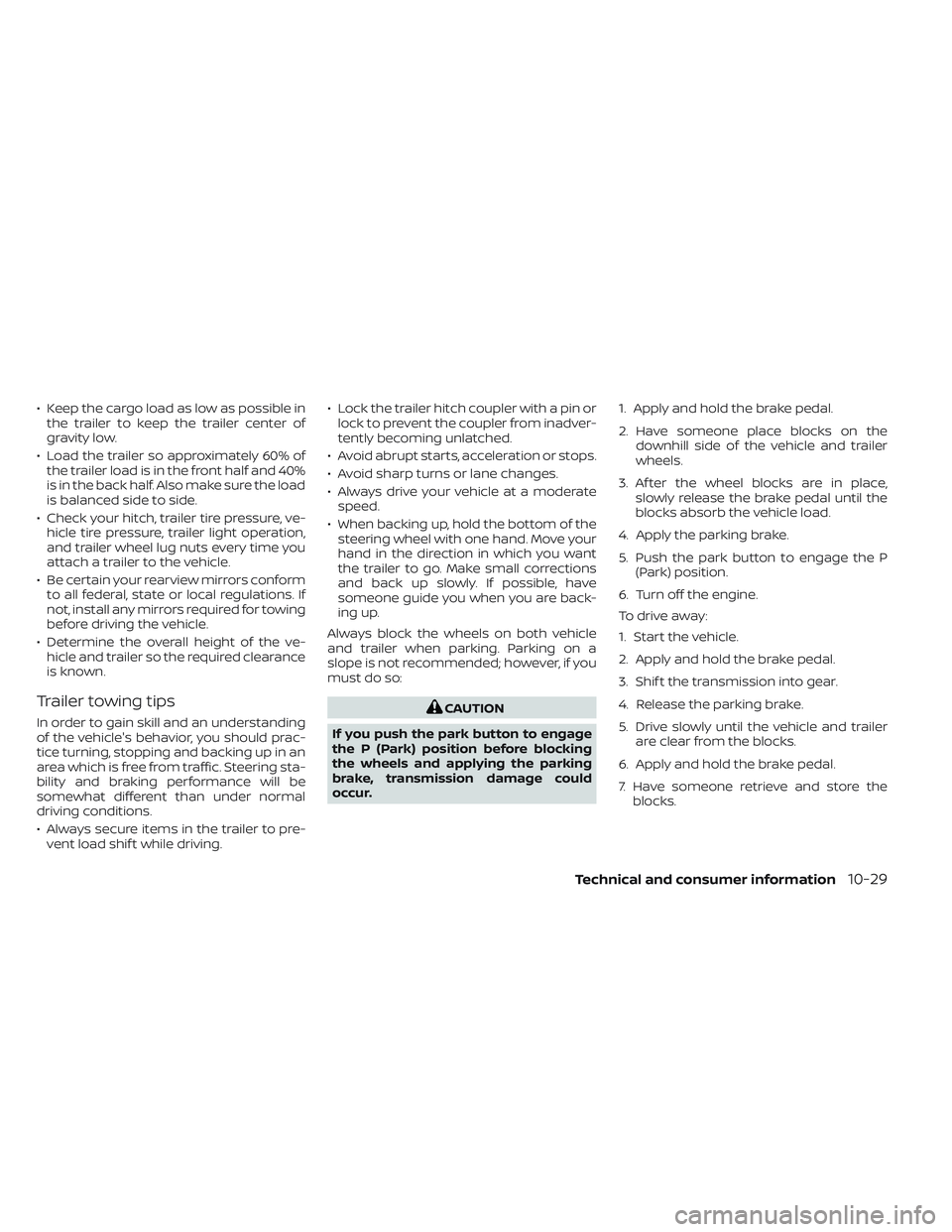
• Keep the cargo load as low as possible inthe trailer to keep the trailer center of
gravity low.
• Load the trailer so approximately 60% of the trailer load is in the front half and 40%
is in the back half. Also make sure the load
is balanced side to side.
• Check your hitch, trailer tire pressure, ve- hicle tire pressure, trailer light operation,
and trailer wheel lug nuts every time you
attach a trailer to the vehicle.
• Be certain your rearview mirrors conform to all federal, state or local regulations. If
not, install any mirrors required for towing
before driving the vehicle.
• Determine the overall height of the ve- hicle and trailer so the required clearance
is known.
Trailer towing tips
In order to gain skill and an understanding
of the vehicle's behavior, you should prac-
tice turning, stopping and backing up in an
area which is free from traffic. Steering sta-
bility and braking performance will be
somewhat different than under normal
driving conditions.
• Always secure items in the trailer to pre-vent load shif t while driving. • Lock the trailer hitch coupler with a pin or
lock to prevent the coupler from inadver-
tently becoming unlatched.
• Avoid abrupt starts, acceleration or stops.
• Avoid sharp turns or lane changes.
• Always drive your vehicle at a moderate speed.
• When backing up, hold the bottom of the steering wheel with one hand. Move your
hand in the direction in which you want
the trailer to go. Make small corrections
and back up slowly. If possible, have
someone guide you when you are back-
ing up.
Always block the wheels on both vehicle
and trailer when parking. Parking on a
slope is not recommended; however, if you
must do so:CAUTION
If you push the park button to engage
the P (Park) position before blocking
the wheels and applying the parking
brake, transmission damage could
occur. 1. Apply and hold the brake pedal.
2. Have someone place blocks on the
downhill side of the vehicle and trailer
wheels.
3. Af ter the wheel blocks are in place, slowly release the brake pedal until the
blocks absorb the vehicle load.
4. Apply the parking brake.
5. Push the park button to engage the P (Park) position.
6. Turn off the engine.
To drive away:
1. Start the vehicle.
2. Apply and hold the brake pedal.
3. Shif t the transmission into gear.
4. Release the parking brake.
5. Drive slowly until the vehicle and trailer are clear from the blocks.
6. Apply and hold the brake pedal.
7. Have someone retrieve and store the blocks.
Technical and consumer information10-29
Page 637 of 647
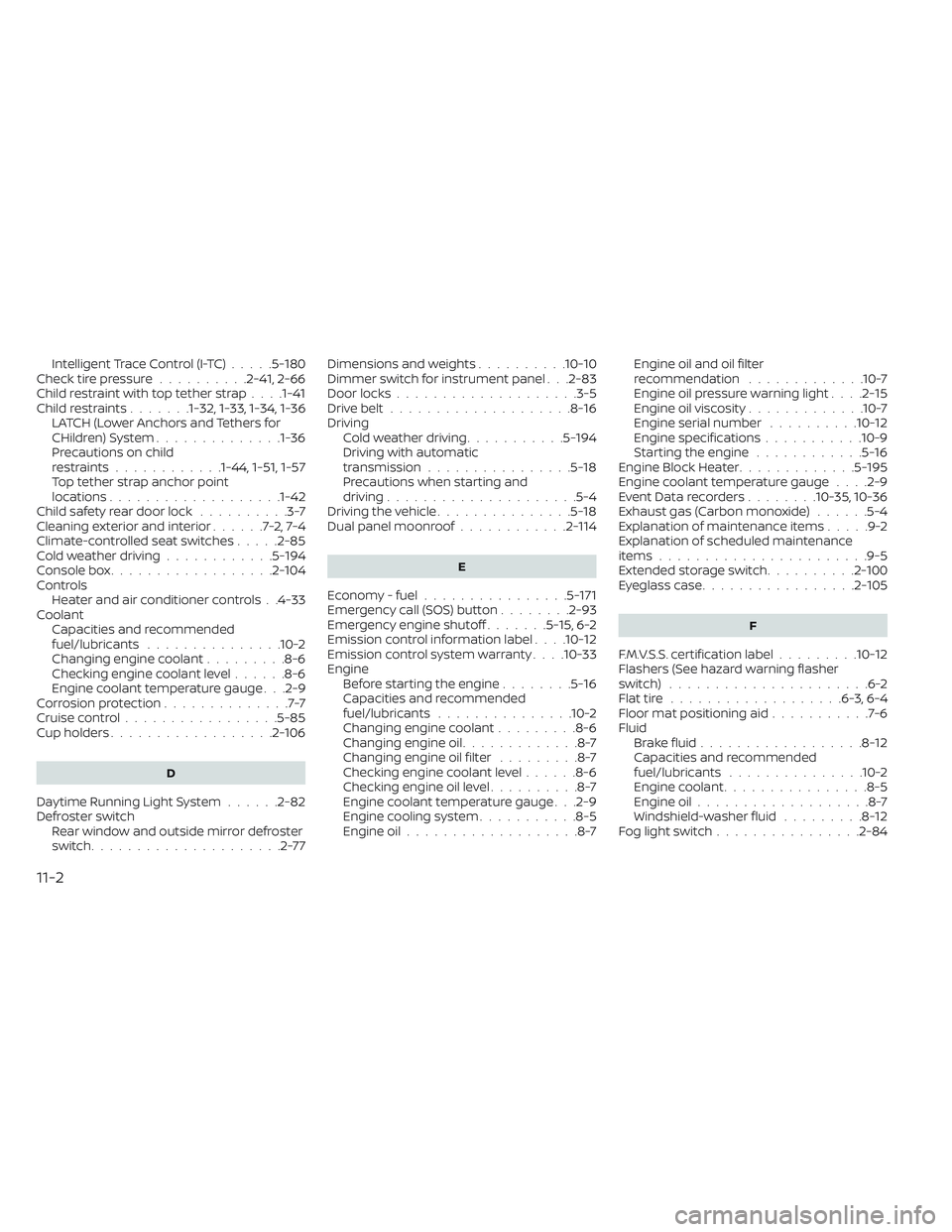
Intelligent Trace Control (I-TC).....5-180Check tire pressure..........2-41, 2-66Child restraint with top tether strap. . . .1-41Child restraints.......1-32, 1-33, 1-34, 1-36LATCH (Lower Anchors and Tethers for
CHildren) System..............1-36Precautions on child
restraints............1-44, 1-51, 1-57Top tether strap anchor point
locations...................1-42Child safety rear door lock..........3-7Cleaning exterior and interior......7-2,7-4Climate-controlled seat switches.....2-85Cold weather driving............5-194Console box..................2-104Controls
Heater and air conditioner controls. .4-33CoolantCapacities and recommended
fuel/lubricants
...............10-2Changing engine coolant.........8-6Checking engine coolant level......8-6Engine coolant temperature gauge. . .2-9Corrosion protection..............7-7Cruise control................ .5-85Cup holders..................2-106
D
Daytime Running Light System......2-82Defroster switch
Rear window and outside mirror defroster
switch
.....................2-77
Dimensions and weights..........10-10Dimmer switch for instrument panel. . .2-83Door locks................... .3-5Drive belt....................8-16Driving
Cold weather driving...........5-194Driving with automatic
transmission................5-18Precautions when starting and
driving.................... .5-4Driving the vehicle...............5-18Dual panel moonroof............2-114
E
Economy - fuel................5-171Emergency call (SOS) button........2-93Emergency engine shutoff.......5-15,6-2Emission control information label. . . .10-12Emission control system warranty. . . .10-33Engine
Before starting the engine........5-16Capacities and recommended
fuel/lubricants...............10-2Changing engine coolant.........8-6Changing engine oil.............8-7Changing engine oil filter.........8-7Checking engine coolant level......8-6Checking engine oil level..........8-7Engine coolant temperature gauge. . .2-9Engine cooling system...........8-5Engine oil...................8-7
Engine oil and oil filter
recommendation.............10-7Engine oil pressure warning light. . . .2-15Engine oil viscosity.............10-7Engine serial number..........10-12Engine specifications...........10-9Starting the engine............5-16Engine Block Heater.............5-195Engine coolant temperature gauge. . . .2-9Event Data recorders........10-35, 10-36Exhaust gas (Carbon monoxide)......5-4Explanation of maintenance items.....9-2Explanation of scheduled maintenance
items...................... .9-5Extended storage switch..........2-100Eyeglass case.................2-105
F
F.M.V.S.S. certification label.........10-12Flashers (See hazard warning flasher
switch)......................6-2Flat tire...................6-3, 6-4Floor mat positioning aid...........7-6Fluid
Brake fluid..................8-12Capacities and recommended
fuel/lubricants...............10-2Engine coolant................8-5Engine oil...................8-7Windshield-washer fluid.........8-12Fog light switch................2-84
11-2