navigation system NISSAN PATHFINDER 2022 Owner´s Manual
[x] Cancel search | Manufacturer: NISSAN, Model Year: 2022, Model line: PATHFINDER, Model: NISSAN PATHFINDER 2022Pages: 647, PDF Size: 8.48 MB
Page 238 of 647
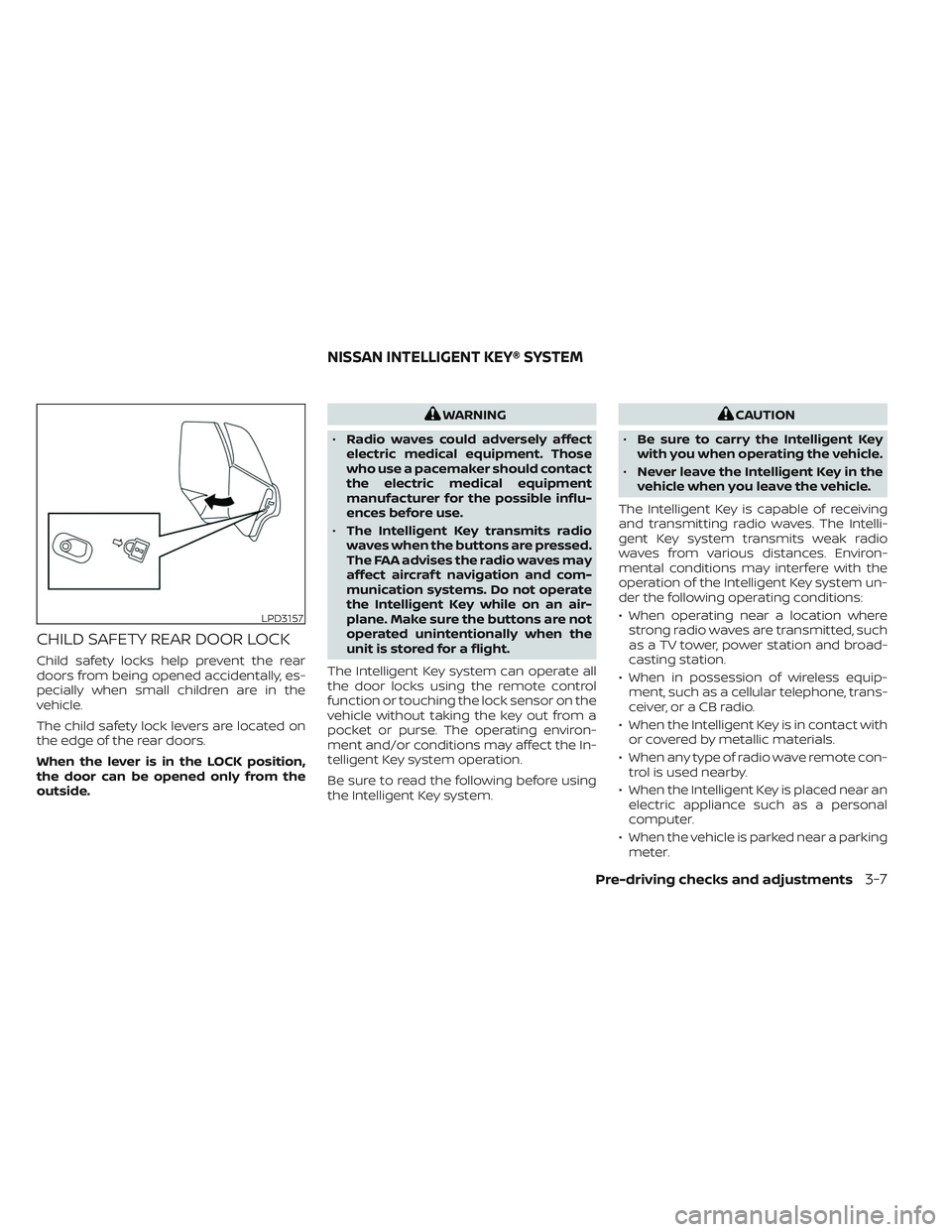
CHILD SAFETY REAR DOOR LOCK
Child safety locks help prevent the rear
doors from being opened accidentally, es-
pecially when small children are in the
vehicle.
The child safety lock levers are located on
the edge of the rear doors.
When the lever is in the LOCK position,
the door can be opened only from the
outside.
WARNING
• Radio waves could adversely affect
electric medical equipment. Those
who use a pacemaker should contact
the electric medical equipment
manufacturer for the possible influ-
ences before use.
• The Intelligent Key transmits radio
waves when the buttons are pressed.
The FAA advises the radio waves may
affect aircraf t navigation and com-
munication systems. Do not operate
the Intelligent Key while on an air-
plane. Make sure the buttons are not
operated unintentionally when the
unit is stored for a flight.
The Intelligent Key system can operate all
the door locks using the remote control
function or touching the lock sensor on the
vehicle without taking the key out from a
pocket or purse. The operating environ-
ment and/or conditions may affect the In-
telligent Key system operation.
Be sure to read the following before using
the Intelligent Key system.CAUTION
• Be sure to carry the Intelligent Key
with you when operating the vehicle.
• Never leave the Intelligent Key in the
vehicle when you leave the vehicle.
The Intelligent Key is capable of receiving
and transmitting radio waves. The Intelli-
gent Key system transmits weak radio
waves from various distances. Environ-
mental conditions may interfere with the
operation of the Intelligent Key system un-
der the following operating conditions:
• When operating near a location where strong radio waves are transmitted, such
as a TV tower, power station and broad-
casting station.
• When in possession of wireless equip- ment, such as a cellular telephone, trans-
ceiver, or a CB radio.
• When the Intelligent Key is in contact with or covered by metallic materials.
• When any type of radio wave remote con- trol is used nearby.
• When the Intelligent Key is placed near an electric appliance such as a personal
computer.
• When the vehicle is parked near a parking meter.
LPD3157
NISSAN INTELLIGENT KEY® SYSTEM
Pre-driving checks and adjustments3-7
Page 271 of 647
Refer to the digital NissanConnect® Own-
er’s manual using the QR code on this
page, or your printed NissanConnect®
Owner’s manual (if so equipped). This
manual includes the following information:
• NissanConnect® Services (if so equipped)
• Navigation system (if so equipped)
• Audio system
• Apple CarPlay®
• Android Auto
TM
• Bluetooth® Hands-Free Phone system
• Viewing information
• Other settings• Voice recognition
• General system information
LHA5506
NISSANCONNECT® OWNER’S
MANUAL
4-2Monitor, climate, audio, phone and voice recognition systems
Page 326 of 647
Af ter a period of time, functions such as
radio, navigation (if so equipped), and
Bluetooth® Hands-Free Phone System
may be restarted by turning on the audio
system (see separate NissanConnect®
Owner’s Manual), or by pushing the UN-
LOCK button on the Intelligent Key for up to
a total of 30 minutes.
EMERGENCY ENGINE SHUT OFF
To shut off the engine in an emergency
situation while driving, perform the follow-
ing procedure:
• Rapidly push the ignition switch threeconsecutive times in less than 1.5 sec-
onds, or
• Push and hold the ignition switch for more than 2 seconds.
NISSAN INTELLIGENT KEY®
BATTERY DISCHARGE
If the battery of the NISSAN Intelligent Key®
is discharged or environmental conditions
interfere with the Intelligent Key operation,
start the engine according to the following
procedure:
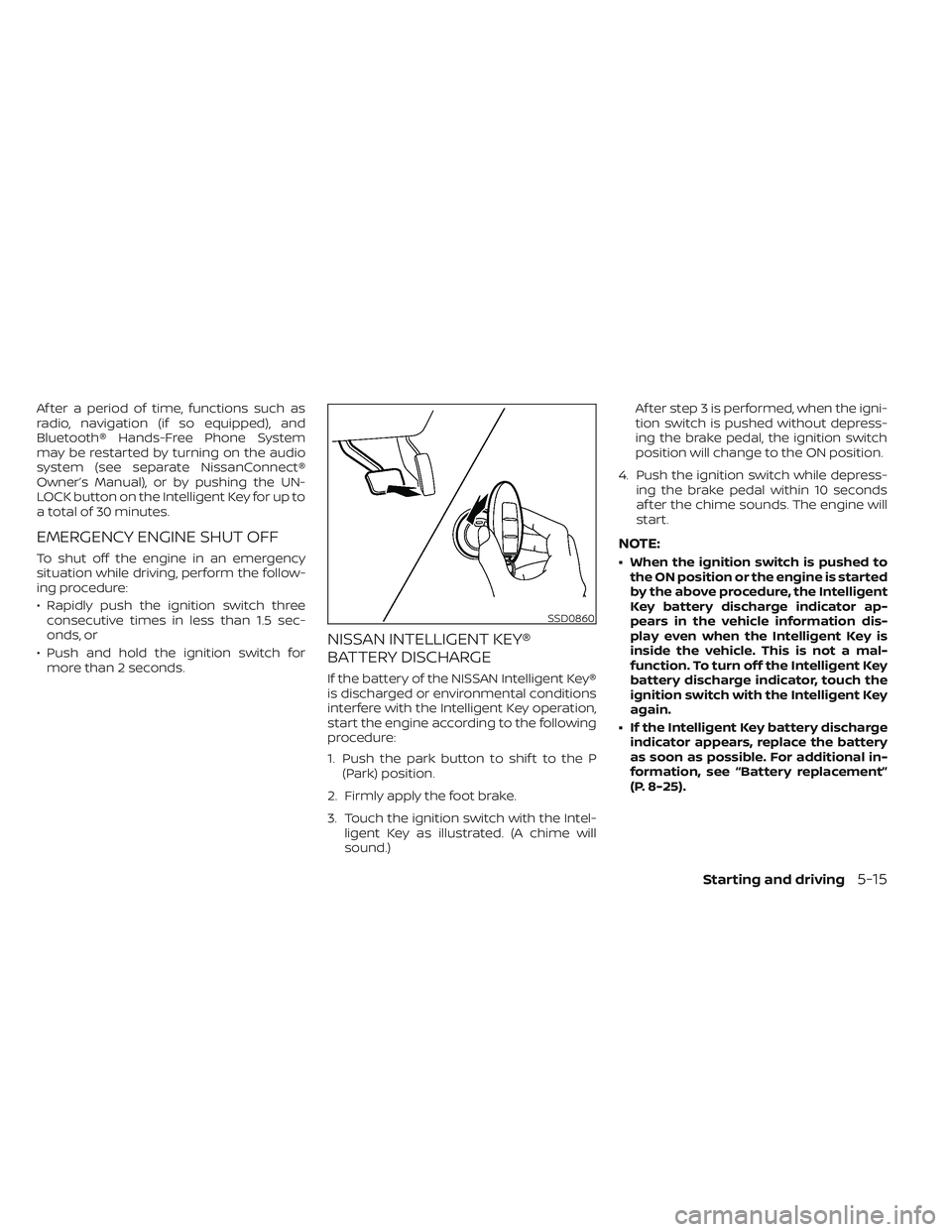
1. Push the park button to shif t to the P (Park) position.
2. Firmly apply the foot brake.
3. Touch the ignition switch with the Intel- ligent Key as illustrated. (A chime will
sound.) Af ter step 3 is performed, when the igni-
tion switch is pushed without depress-
ing the brake pedal, the ignition switch
position will change to the ON position.
4. Push the ignition switch while depress- ing the brake pedal within 10 seconds
af ter the chime sounds. The engine will
start.
NOTE:
• When the ignition switch is pushed tothe ON position or the engine is started
by the above procedure, the Intelligent
Key battery discharge indicator ap-
pears in the vehicle information dis-
play even when the Intelligent Key is
inside the vehicle. This is not a mal-
function. To turn off the Intelligent Key
battery discharge indicator, touch the
ignition switch with the Intelligent Key
again.
• If the Intelligent Key battery discharge indicator appears, replace the battery
as soon as possible. For additional in-
formation, see “Battery replacement”
(P. 8-25).
SSD0860
Starting and driving5-15
Page 343 of 647
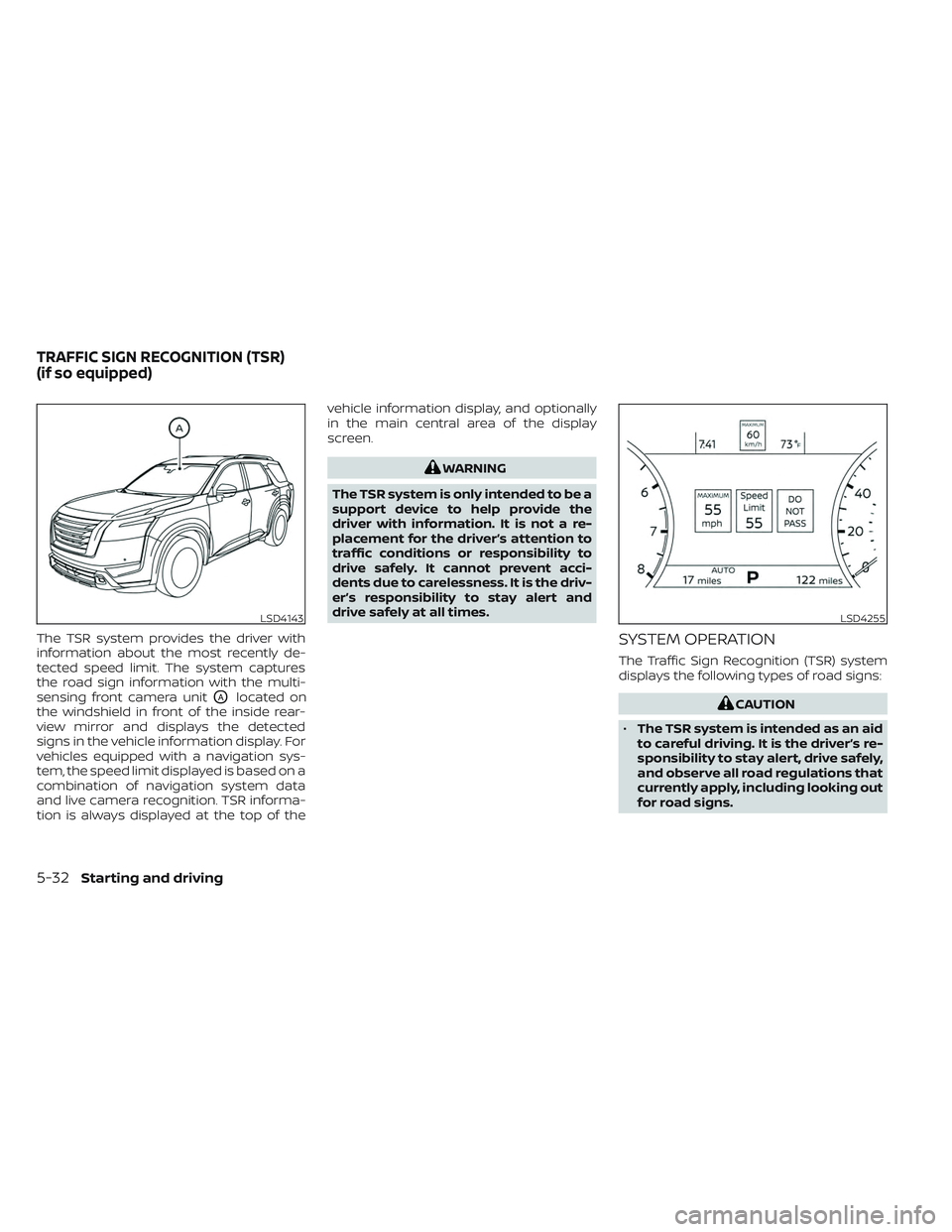
The TSR system provides the driver with
information about the most recently de-
tected speed limit. The system captures
the road sign information with the multi-
sensing front camera unit
OAlocated on
the windshield in front of the inside rear-
view mirror and displays the detected
signs in the vehicle information display. For
vehicles equipped with a navigation sys-
tem, the speed limit displayed is based on a
combination of navigation system data
and live camera recognition. TSR informa-
tion is always displayed at the top of the vehicle information display, and optionally
in the main central area of the display
screen.
WARNING
The TSR system is only intended to be a
support device to help provide the
driver with information. It is not a re-
placement for the driver’s attention to
traffic conditions or responsibility to
drive safely. It cannot prevent acci-
dents due to carelessness. It is the driv-
er’s responsibility to stay alert and
drive safely at all times.
SYSTEM OPERATION
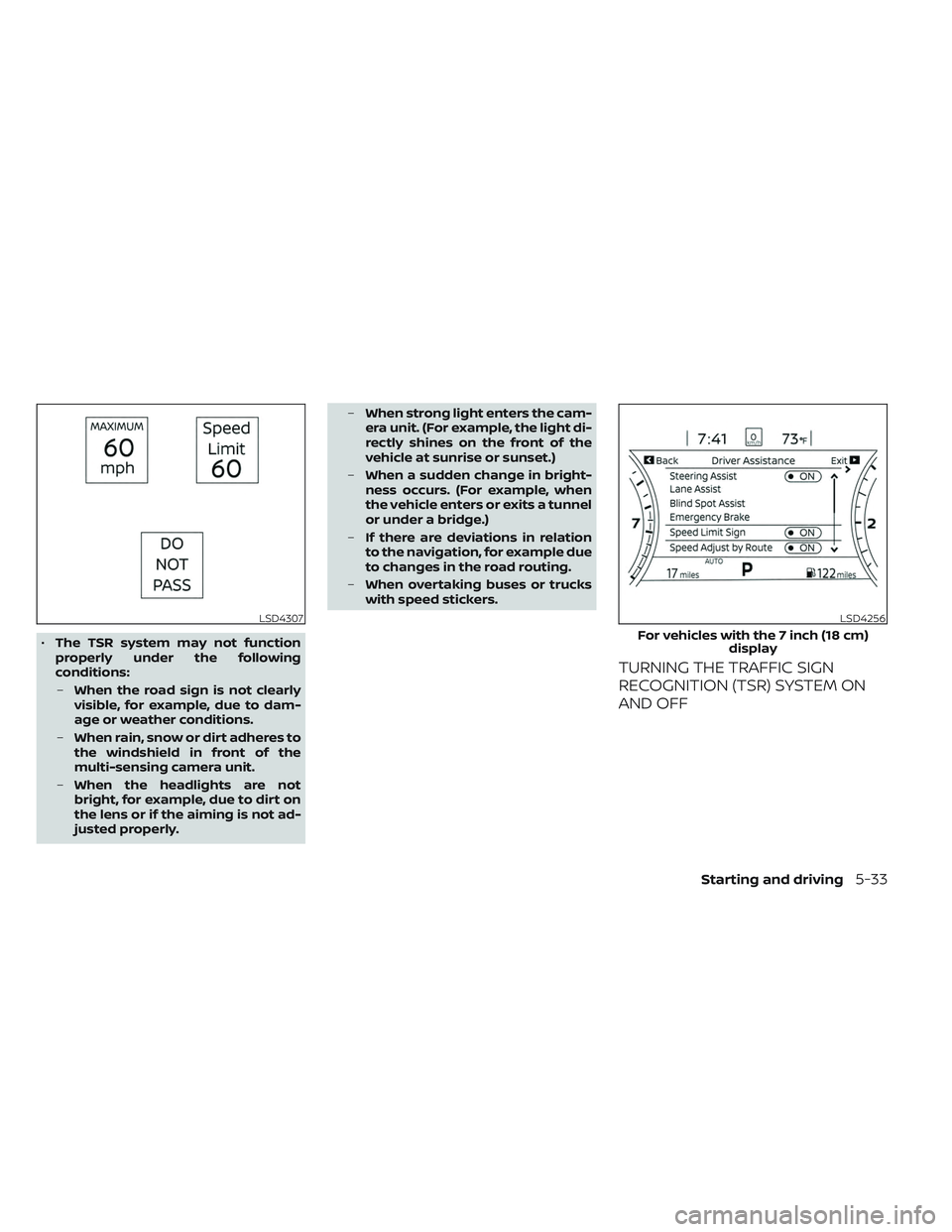
The Traffic Sign Recognition (TSR) system
displays the following types of road signs:
CAUTION
• The TSR system is intended as an aid
to careful driving. It is the driver’s re-
sponsibility to stay alert, drive safely,
and observe all road regulations that
currently apply, including looking out
for road signs.
LSD4143LSD4255
TRAFFIC SIGN RECOGNITION (TSR)
(if so equipped)
5-32Starting and driving
Page 344 of 647
•The TSR system may not function
properly under the following
conditions:
– When the road sign is not clearly
visible, for example, due to dam-
age or weather conditions.
– When rain, snow or dirt adheres to
the windshield in front of the
multi-sensing camera unit.
– When the headlights are not
bright, for example, due to dirt on
the lens or if the aiming is not ad-
justed properly. –
When strong light enters the cam-
era unit. (For example, the light di-
rectly shines on the front of the
vehicle at sunrise or sunset.)
– When a sudden change in bright-
ness occurs. (For example, when
the vehicle enters or exits a tunnel
or under a bridge.)
– If there are deviations in relation
to the navigation, for example due
to changes in the road routing.
– When overtaking buses or trucks
with speed stickers.
TURNING THE TRAFFIC SIGN
RECOGNITION (TSR) SYSTEM ON
AND OFF
LSD4307LSD4256
For vehicles with the 7 inch (18 cm)
display
Starting and driving5-33
Page 400 of 647
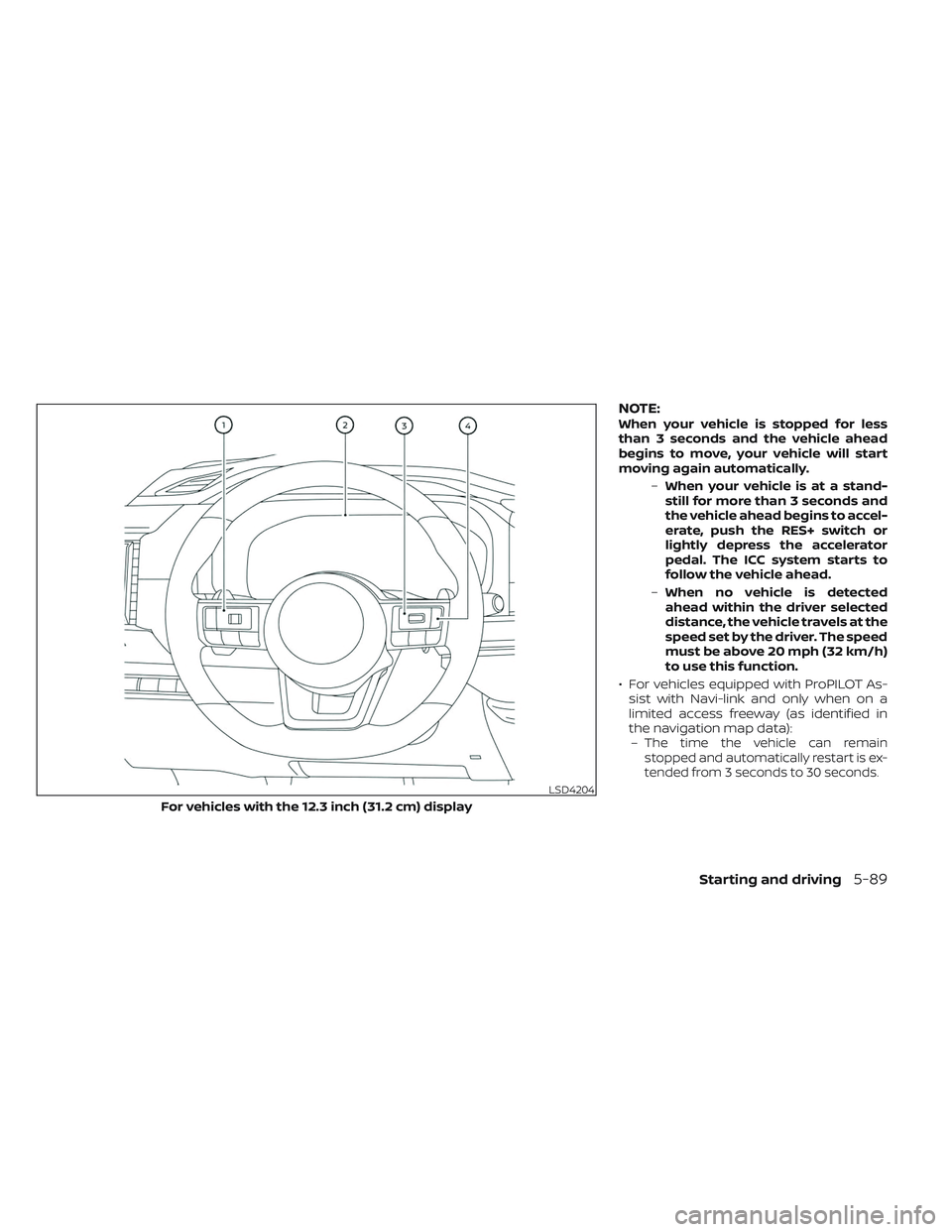
NOTE:When your vehicle is stopped for less
than 3 seconds and the vehicle ahead
begins to move, your vehicle will start
moving again automatically.–When your vehicle is at a stand-
still for more than 3 seconds and
the vehicle ahead begins to accel-
erate, push the RES+ switch or
lightly depress the accelerator
pedal. The ICC system starts to
follow the vehicle ahead.
– When no vehicle is detected
ahead within the driver selected
distance, the vehicle travels at the
speed set by the driver. The speed
must be above 20 mph (32 km/h)
to use this function.
• For vehicles equipped with ProPILOT As- sist with Navi-link and only when on a
limited access freeway (as identified in
the navigation map data):–
The time the vehicle can remain
stopped and automatically restart is ex-
tended from 3 seconds to 30 seconds.
LSD4204
For vehicles with the 12.3 inch (31.2 cm) display
Starting and driving5-89
Page 413 of 647
WARNING
To prevent the vehicle from moving or
rolling unexpectedly, which could re-
sult in serious personal injury or prop-
erty damage, before exiting the vehicle
make sure to push the ProPILOT Assist
switch to turn the system off, press the
park button to shif t to the P (Park) po-
sition, and turn the engine off.
INTELLIGENT CRUISE CONTROL
(ICC) (for vehicles with ProPILOT
Assist)
WARNING
Failure to follow the warnings and in-
structions for proper use of the ICC sys-
tem could result in serious injury or
death.
• The ICC system is only an aid to assist
the driver and is not a collision warn-
ing or avoidance device. It is recom-
mended for highway use only and it
is not intended for city driving. It is
the driver’s responsibility to stay
alert, drive safely, and be in control of
the vehicle at all times. •
There are limitations to the ICC sys-
tem capability. The ICC system does
not function in all driving, traffic,
weather, and road conditions. It is the
driver’s responsibility to stay alert,
drive safely, keep the vehicle in the
traveling lane, and be in control of the
vehicle at all times.
• Always observe posted speed limits
and do not set the speed over them.
• The ICC system does not react to sta-
tionary and slow moving vehicles.
• Always drive carefully and atten-
tively when using the ICC system.
Read and understand the Owner’s
Manual thoroughly before using the
ICC system. To avoid serious injury or
death, do not rely on the system to
prevent accidents or to control the
vehicle’s speed in emergency situa-
tions. Do not use the ICC system ex-
cept in appropriate road and traffic
conditions.
ICC system operation
The ICC system is designed to maintain a
selected distance from the vehicle in front
of you and can reduce the speed to match
a slower vehicle ahead. The system decel- erates the vehicle as necessary and if the
vehicle ahead comes to a stop, the vehicle
decelerates to a standstill. However, the ICC
system can only apply up to 40% of the
vehicle’s total braking power. This system
should only be used when traffic condi-
tions allow vehicle speeds to remain fairly
constant or when vehicle speeds change
gradually. If a vehicle moves into the travel-
ing lane ahead or if a vehicle traveling
ahead rapidly decelerates, the distance be-
tween vehicles may become closer be-
cause the ICC system cannot decelerate
the vehicle quickly enough. If this occurs,
the ICC system sounds a warning chime
and blinks the system display to notif y the
driver to take necessary action.
The ICC system cancels and a warning
chime sounds if the speed is below ap-
proximately 15 mph (24 km/h) and a vehicle
is not detected ahead. For ProPILOT Assist
with Navi-link equipped vehicles on a lim-
ited access freeway as identified in the
navigation map data, the ICC system can-
cels and a warning chime sounds if your
vehicle is at a standstill for more than ap-
proximately 3 seconds and a vehicle is not
detected ahead.
5-102Starting and driving
Page 417 of 647
Vehicle ahead accelerates
•When your vehicle is stopped for less than
approximately 3 seconds and the vehicle
ahead begins to move, your vehicle will
start moving again automatically.
• When your vehicle is at a standstill for more than approximately 3 seconds and
the vehicle ahead begins to accelerate,
push up the RES+ switch or lightly de-
press the accelerator pedal. The ICC sys-
tem starts to follow the vehicle ahead.
• Always check surroundings before re- starting the vehicle.
• For vehicles equipped with ProPILOT As- sist with Navi-link and only when on a
limited access freeway (as identified in
the navigation map data):– The time the vehicle can remain stopped and automatically restart is
extended from 3 seconds to 30
seconds.
– If a vehicle ahead cuts in or out of the lane ahead, the vehicle may not auto-
matically start when the traffic ahead
begins to move. You need to push up
the RES+ switch or lightly depress the
accelerator pedal to follow the vehicle
directly ahead when it is safe to do so.
Vehicle ahead not detected
When a vehicle is no longer detected
ahead, the ICC system gradually acceler-
ates your vehicle to resume the previously
set vehicle speed. The ICC system then
maintains the set speed.
When a vehicle is no longer detected, the
vehicle ahead detection indicator turns off
and speed control status indicator (main-
tain speed control mode) illuminates
(green outline
).
The ICC system gradually accelerates to
the set speed, but you can depress the
accelerator pedal to quickly accelerate.
When a vehicle is no longer detected and
your vehicle is traveling under approxi-
mately 15 mph (24 km/h), the ICC system
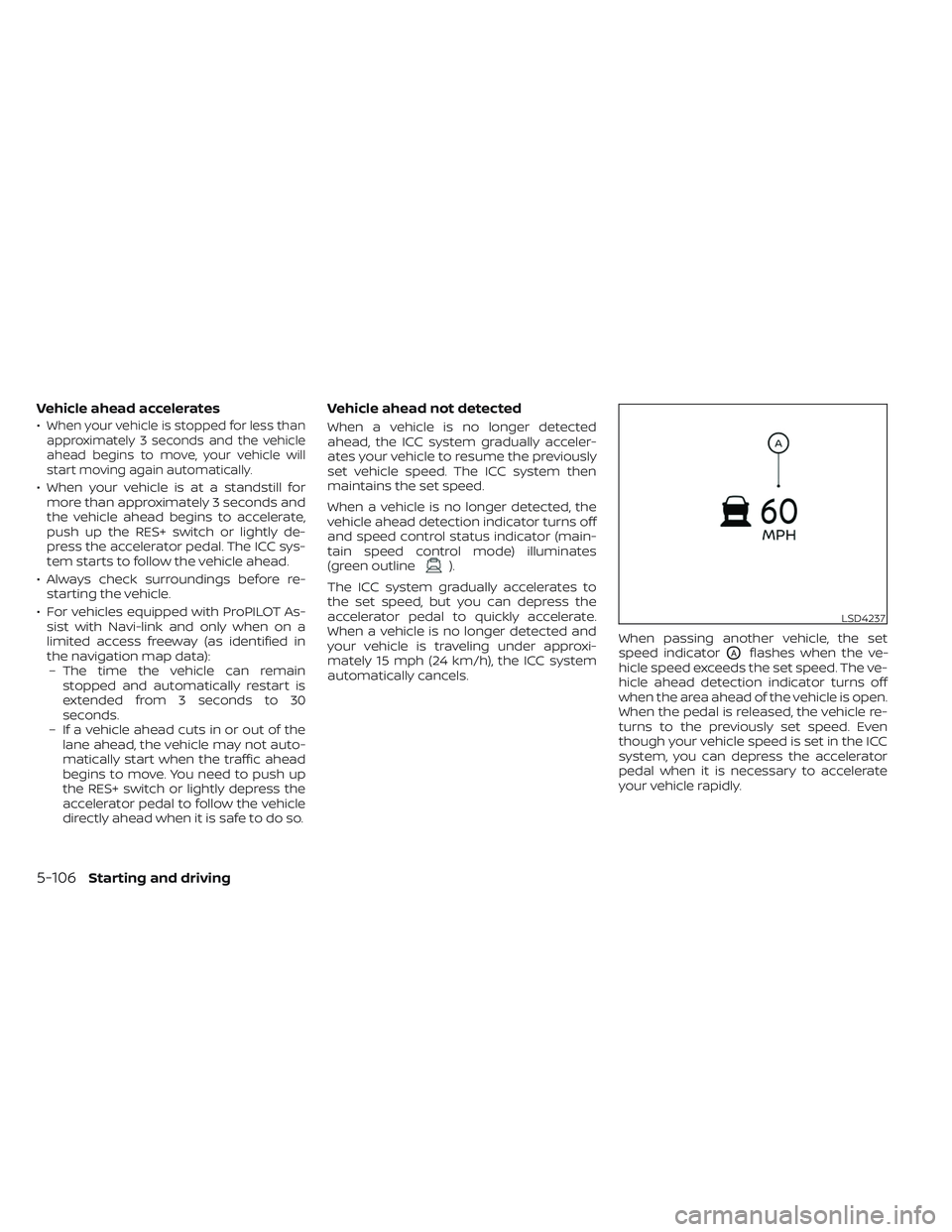
automatically cancels. When passing another vehicle, the set
speed indicator
OAflashes when the ve-
hicle speed exceeds the set speed. The ve-
hicle ahead detection indicator turns off
when the area ahead of the vehicle is open.
When the pedal is released, the vehicle re-
turns to the previously set speed. Even
though your vehicle speed is set in the ICC
system, you can depress the accelerator
pedal when it is necessary to accelerate
your vehicle rapidly.
LSD4237
5-106Starting and driving
Page 420 of 647
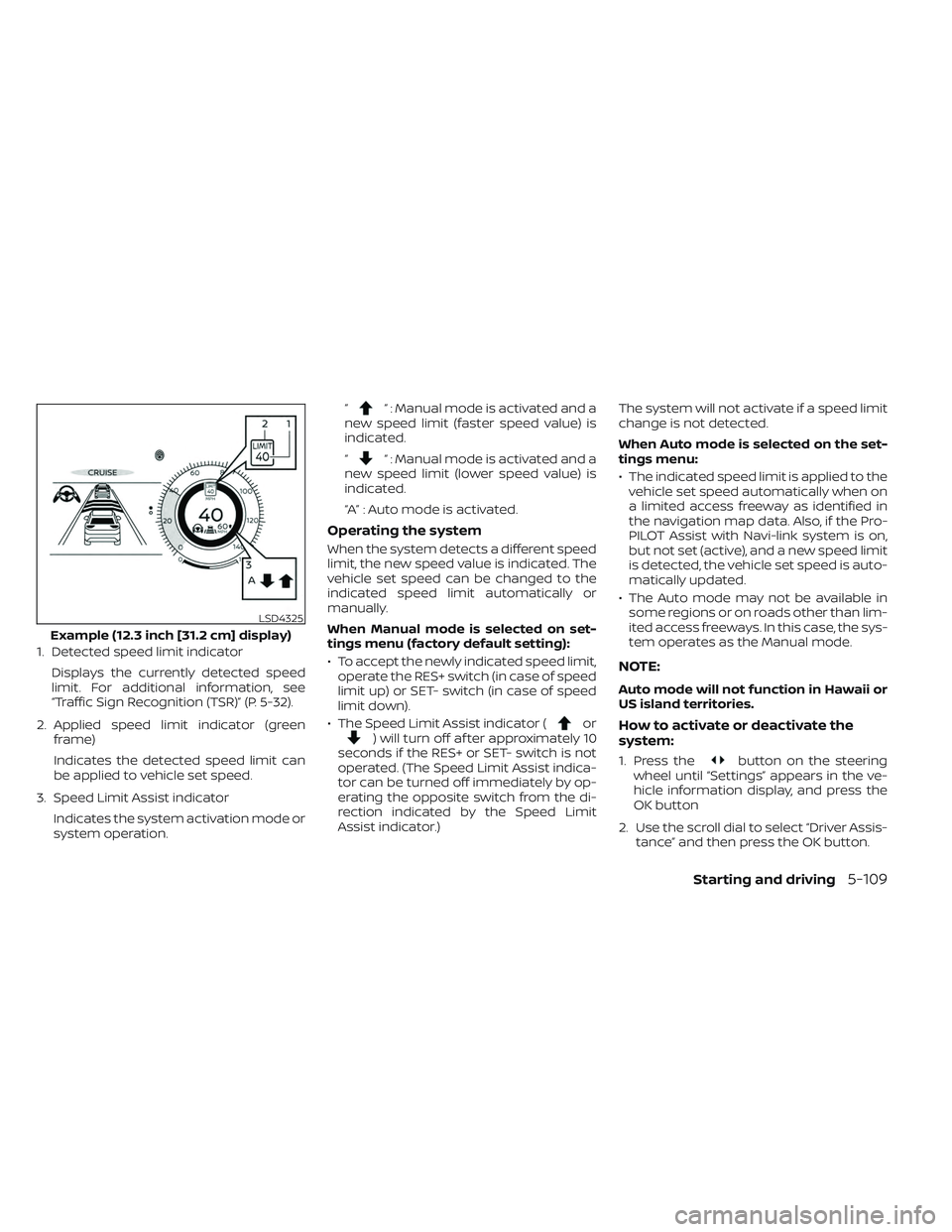
1. Detected speed limit indicatorDisplays the currently detected speed
limit. For additional information, see
“Traffic Sign Recognition (TSR)” (P. 5-32).
2. Applied speed limit indicator (green frame)
Indicates the detected speed limit can
be applied to vehicle set speed.
3. Speed Limit Assist indicator Indicates the system activation mode or
system operation. “
“ : Manual mode is activated and a
new speed limit (faster speed value) is
indicated.
“
“ : Manual mode is activated and a
new speed limit (lower speed value) is
indicated.
“A” : Auto mode is activated.
Operating the system
When the system detects a different speed
limit, the new speed value is indicated. The
vehicle set speed can be changed to the
indicated speed limit automatically or
manually.
When Manual mode is selected on set-
tings menu (factory default setting):
• To accept the newly indicated speed limit, operate the RES+ switch (in case of speed
limit up) or SET- switch (in case of speed
limit down).
• The Speed Limit Assist indicator (
or) will turn off af ter approximately 10
seconds if the RES+ or SET- switch is not
operated. (The Speed Limit Assist indica-
tor can be turned off immediately by op-
erating the opposite switch from the di-
rection indicated by the Speed Limit
Assist indicator.) The system will not activate if a speed limit
change is not detected.
When Auto mode is selected on the set-
tings menu:
• The indicated speed limit is applied to the
vehicle set speed automatically when on
a limited access freeway as identified in
the navigation map data. Also, if the Pro-
PILOT Assist with Navi-link system is on,
but not set (active), and a new speed limit
is detected, the vehicle set speed is auto-
matically updated.
• The Auto mode may not be available in some regions or on roads other than lim-
ited access freeways. In this case, the sys-
tem operates as the Manual mode.
NOTE:
Auto mode will not function in Hawaii or
US island territories.
How to activate or deactivate the
system:
1. Press thebutton on the steering
wheel until “Settings” appears in the ve-
hicle information display, and press the
OK button
2. Use the scroll dial to select “Driver Assis- tance” and then press the OK button.
LSD4325
Example (12.3 inch [31.2 cm] display)
Starting and driving5-109
Page 421 of 647
3. Select “Spd. Limit Assist”, and press theOK button to select “Auto” or “Manual” to
enable (not activate) the system. To de-
activate the system, select “OFF”.
NOTE:
The system will retain current settings in
the vehicle information display even if
the engine is restarted.
Speed Adjust by Rout e-afeature
of ProPILOT Assist with Navi-link
(if so equipped)
When the ProPILOT Assist with Navi-link is
active on a limited access freeway (as iden-
tified in the navigation map data), the
Speed Adjust by Route uses road informa-
tion provided by the navigation system
and can adjust the vehicle speed depend-
ing on curves, junctions or exits and the
driver may need to apply additional brak-
ing at any time.
When the vehicle is through the curve or
junction, the vehicle will accelerate again to
the set speed. When exiting the limited ac-
cess freeway, the driver will need to apply
braking at the end of the exit.
NOTE:
• The system does not operate when the
accelerator pedal is depressed.
• The system may not operate depend-
ing on the set distance to the vehicle
ahead and vehicles detected ahead.
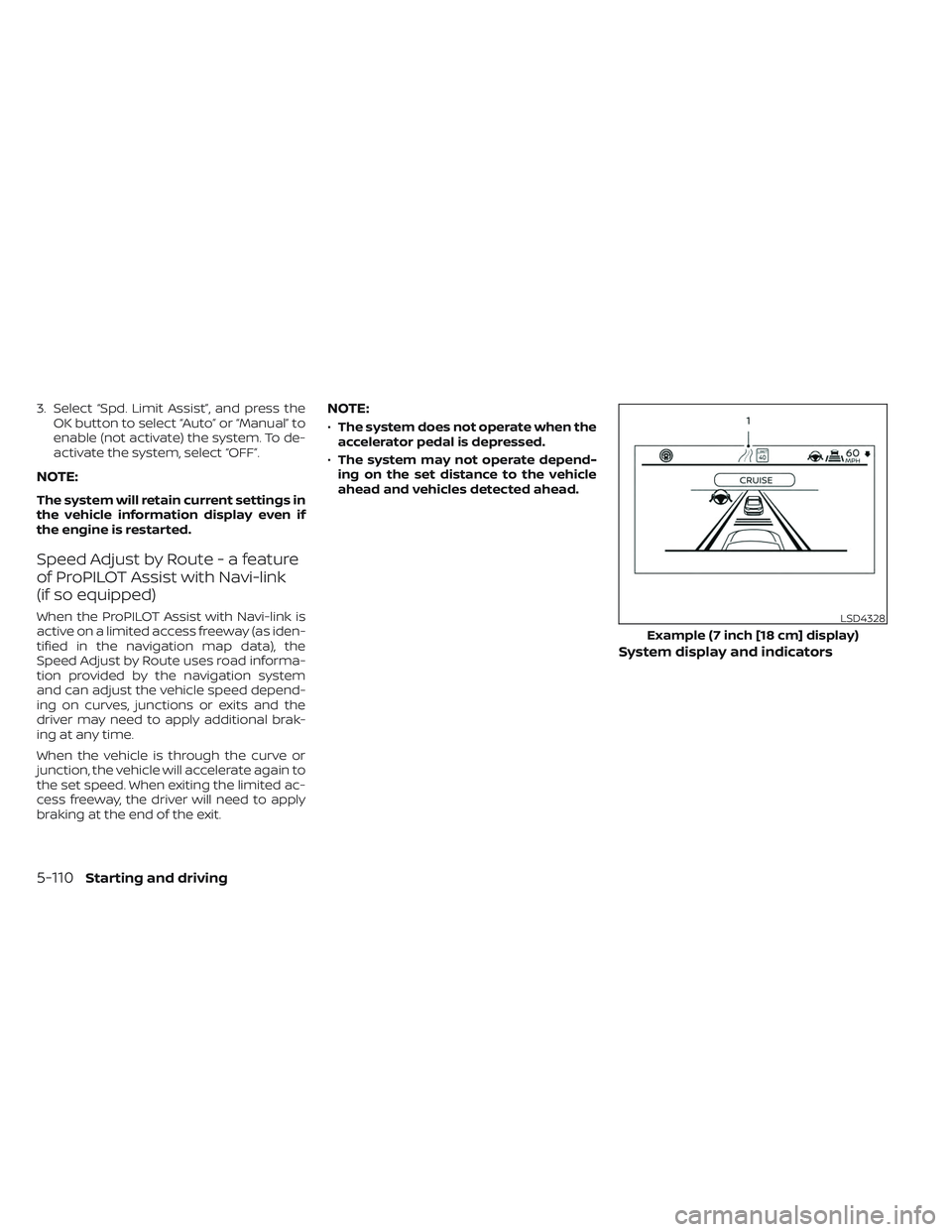
System display and indicators
LSD4328
Example (7 inch [18 cm] display)
5-110Starting and driving