start stop button NISSAN PATHFINDER 2022 Owner´s Manual
[x] Cancel search | Manufacturer: NISSAN, Model Year: 2022, Model line: PATHFINDER, Model: NISSAN PATHFINDER 2022Pages: 647, PDF Size: 8.48 MB
Page 332 of 647
• You unfasten the driver’s seat belt andopen the driver side door when the ve-
hicle is stationary or driving at very low
speed and the transmission is in the D
(Drive) position, the N (Neutral) position.
CAUTION
To avoid A/T malfunction, it is recom-
mended that you manually place the
shif t position in the P (Park) position
under the above conditions.
R (Reverse)
CAUTION
To prevent transmission damage, use
the R (Reverse) position only when the
vehicle is completely stopped.
Use the R (Reverse) position to back up.
Make sure the vehicle is completely
stopped before selecting the R (Reverse)
position. The brake pedal must be de-
pressed and the shif t lever button
pressed to move the shif t lever from the
home position to R (Reverse). If the ve-
hicle is placed in R (Reverse) position
while the vehicle is moving forward, the
chime will sound and the vehicle will
switch into the N (Neutral) position.
N (Neutral)
Neither forward nor reverse gear is en-
gaged. The engine can be started in this
position. You may shif t to the N (Neutral)
position and restart a stalled engine while
the vehicle is moving.
You can select this position by holding the
shif t lever at this position for 0.5 seconds.
D (Drive)
Use this position for all normal forward
driving. The A/T changes gears automati-
cally. All forward gears are available. If the
vehicle is placed in the D (Drive) position
while the vehicle is reversing, the chime
will sound and the vehicle will switch into
the N (Neutral) position.
Manual shif t mode
When the shif t lever is moved to the D
(Drive) position again with the vehicle in the
D (Drive) position while driving, the trans-
mission enters the manual shif t mode.
Shif t ranges can be selected manually by
pulling the paddle shif ters on the steering
wheel.
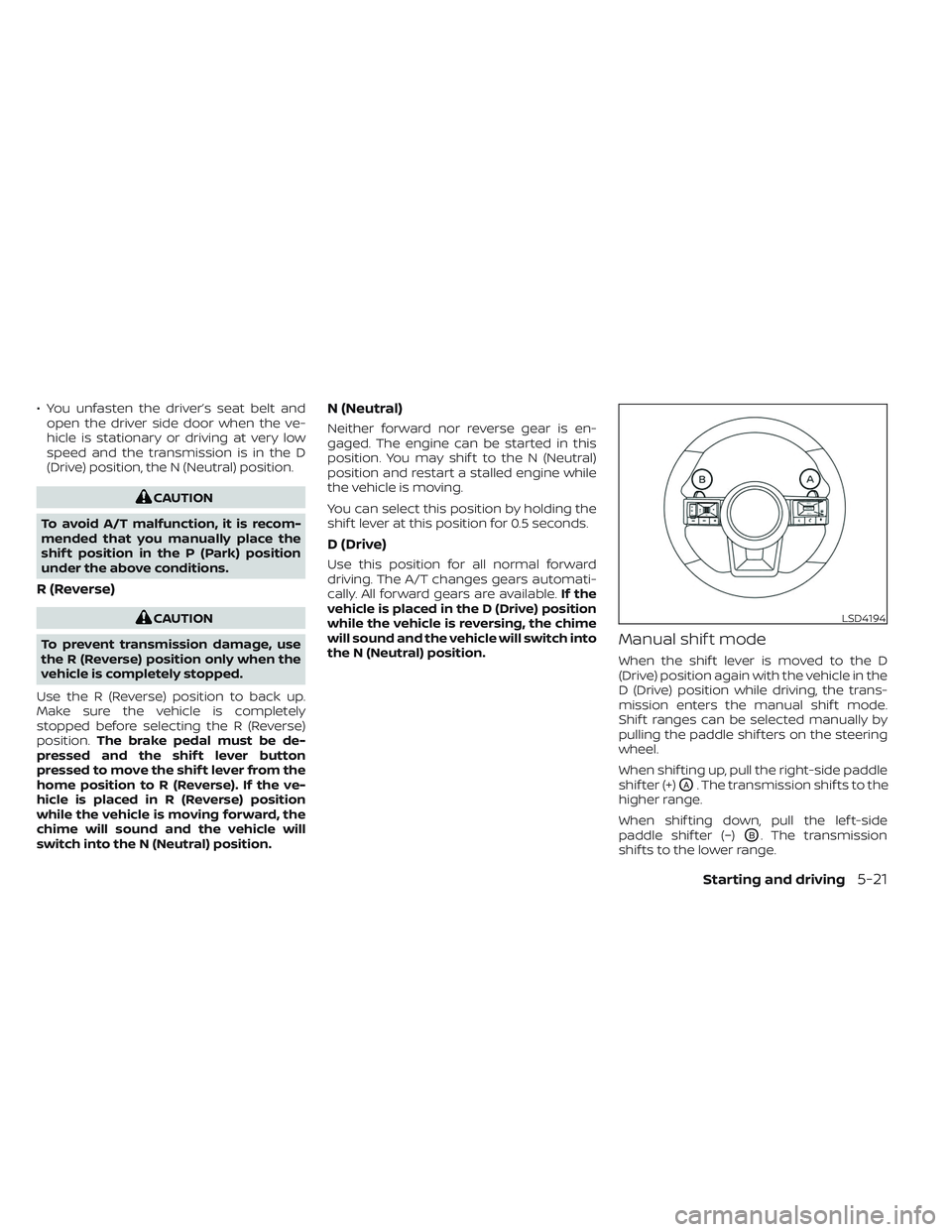
When shif ting up, pull the right-side paddle
shif ter (+)
OA. The transmission shif ts to the
higher range.
When shif ting down, pull the lef t-side
paddle shif ter (−)
OB. The transmission
shif ts to the lower range.
LSD4194
Starting and driving5-21
Page 339 of 647
maintained, the automatic brake hold indi-
cator light (green) illuminates on the meter.
To start the vehicle from a
standstill
With the vehicle not in the P (Park) or the
shif t lever not in the N (Neutral) position,
depress the accelerator pedal while the
brake force is maintained. The brake force
will automatically be released to restart the
vehicle.
The automatic brake hold indicator light
(white) on the meter illuminates and the
automatic brake hold returns to standby.
Parking
When the park button is pushed to engage
the P (Park) position with the brake force
maintained by the automatic brake hold
function, the parking brake will automati-
cally be applied and the brake force of the
automatic brake hold will be released. The
automatic brake hold indicator light turns
off. When the parking brake is applied with
the brake force maintained by the auto-
matic brake hold function, the brake force
of the automatic brake hold will be re-
leased. The automatic brake hold indicator
light turns off.
NOTE:
• When the vehicle stops, but the brakeforce is not automatically applied, de-
press the brake pedal firmly until the
automatic brake hold indicator light
(green) illuminates.
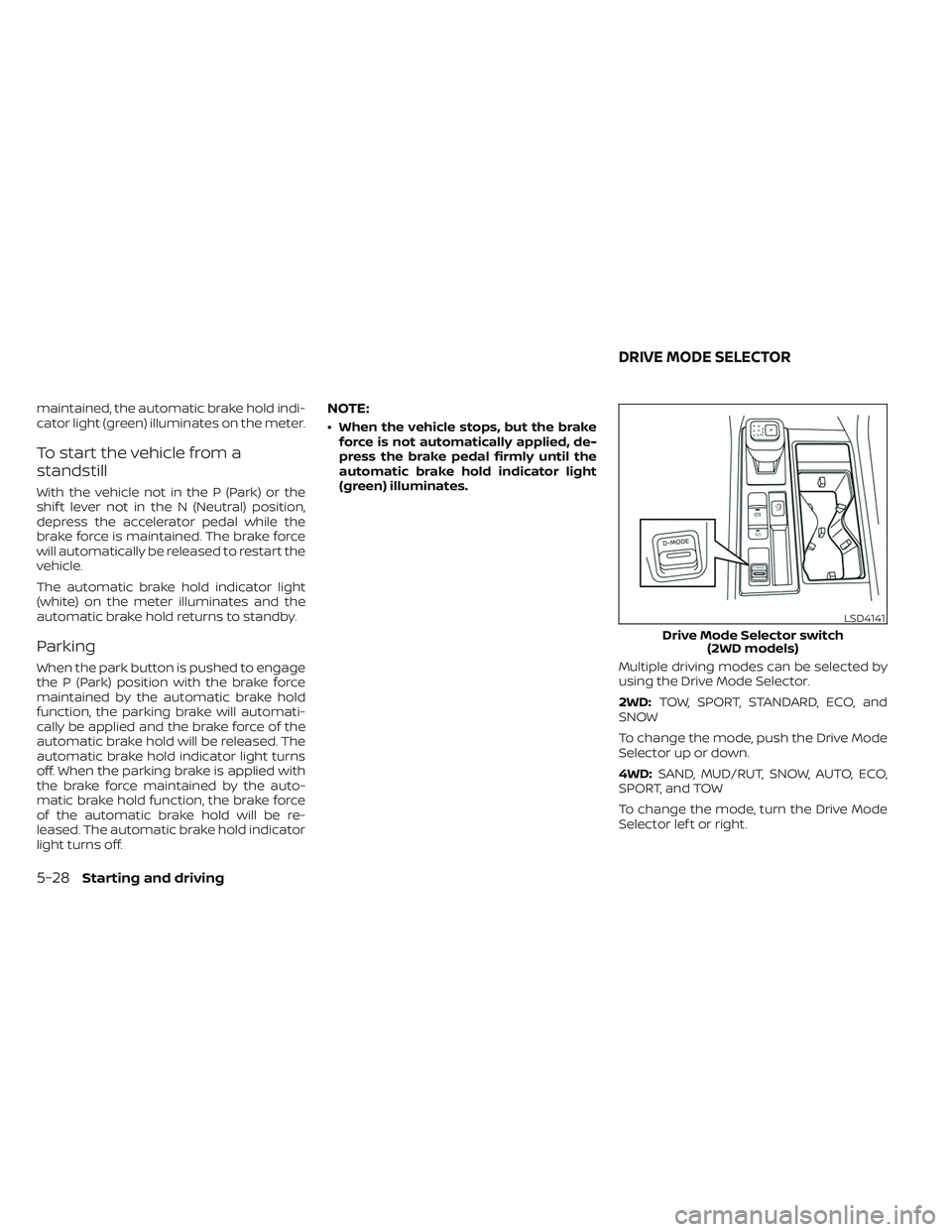
Multiple driving modes can be selected by
using the Drive Mode Selector.
2WD:TOW, SPORT, STANDARD, ECO, and
SNOW
To change the mode, push the Drive Mode
Selector up or down.
4WD: SAND, MUD/RUT, SNOW, AUTO, ECO,
SPORT, and TOW
To change the mode, turn the Drive Mode
Selector lef t or right.
LSD4141
Drive Mode Selector switch (2WD models)
DRIVE MODE SELECTOR
5-28Starting and driving
Page 345 of 647
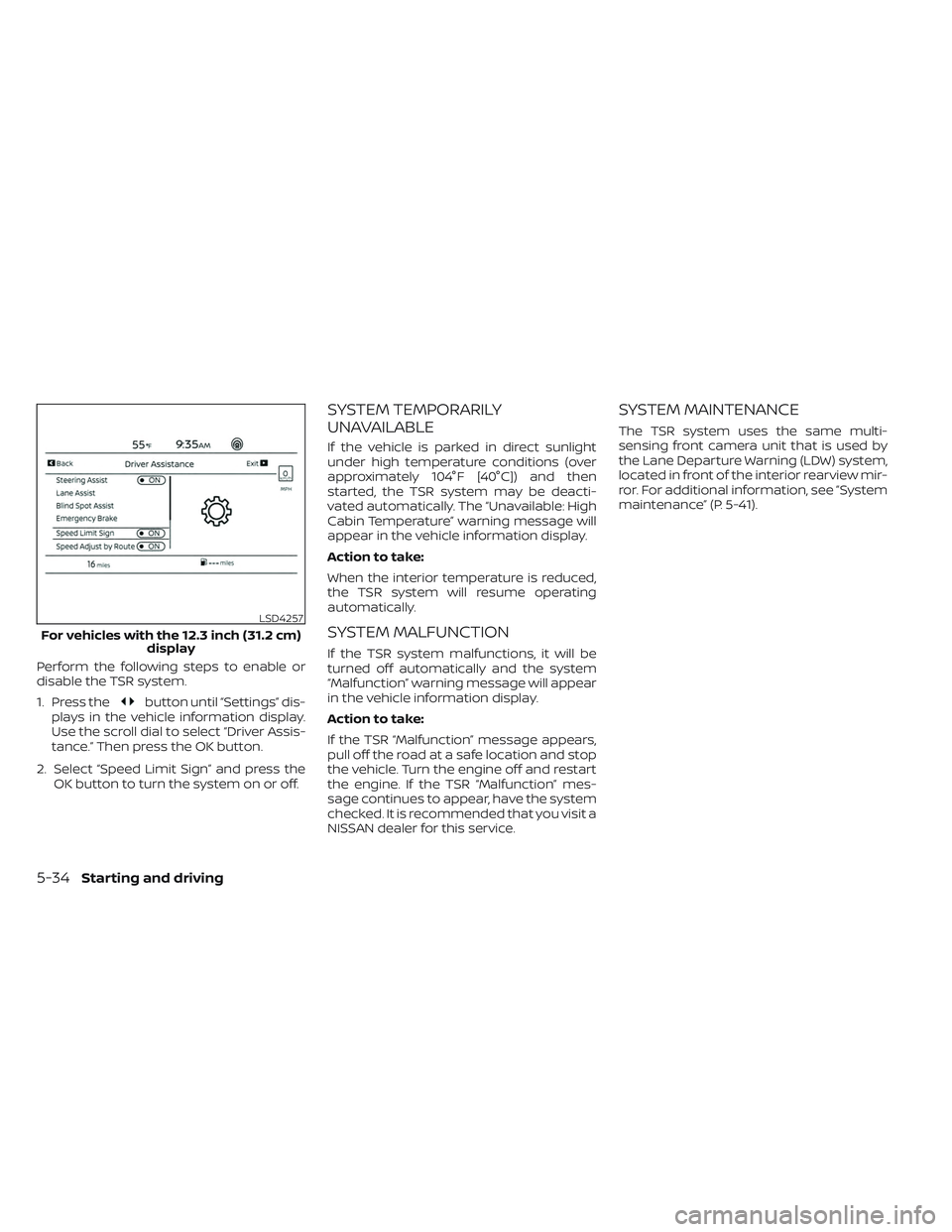
Perform the following steps to enable or
disable the TSR system.
1. Press the
button until “Settings” dis-
plays in the vehicle information display.
Use the scroll dial to select “Driver Assis-
tance.” Then press the OK button.
2. Select “Speed Limit Sign” and press the OK button to turn the system on or off.
SYSTEM TEMPORARILY
UNAVAILABLE
If the vehicle is parked in direct sunlight
under high temperature conditions (over
approximately 104°F [40°C]) and then
started, the TSR system may be deacti-
vated automatically. The “Unavailable: High
Cabin Temperature” warning message will
appear in the vehicle information display.
Action to take:
When the interior temperature is reduced,
the TSR system will resume operating
automatically.
SYSTEM MALFUNCTION
If the TSR system malfunctions, it will be
turned off automatically and the system
“Malfunction” warning message will appear
in the vehicle information display.
Action to take:
If the TSR “Malfunction” message appears,
pull off the road at a safe location and stop
the vehicle. Turn the engine off and restart
the engine. If the TSR “Malfunction” mes-
sage continues to appear, have the system
checked. It is recommended that you visit a
NISSAN dealer for this service.
SYSTEM MAINTENANCE
The TSR system uses the same multi-
sensing front camera unit that is used by
the Lane Departure Warning (LDW) system,
located in front of the interior rearview mir-
ror. For additional information, see ”System
maintenance” (P. 5-41).
LSD4257
For vehicles with the 12.3 inch (31.2 cm) display
5-34Starting and driving
Page 412 of 647
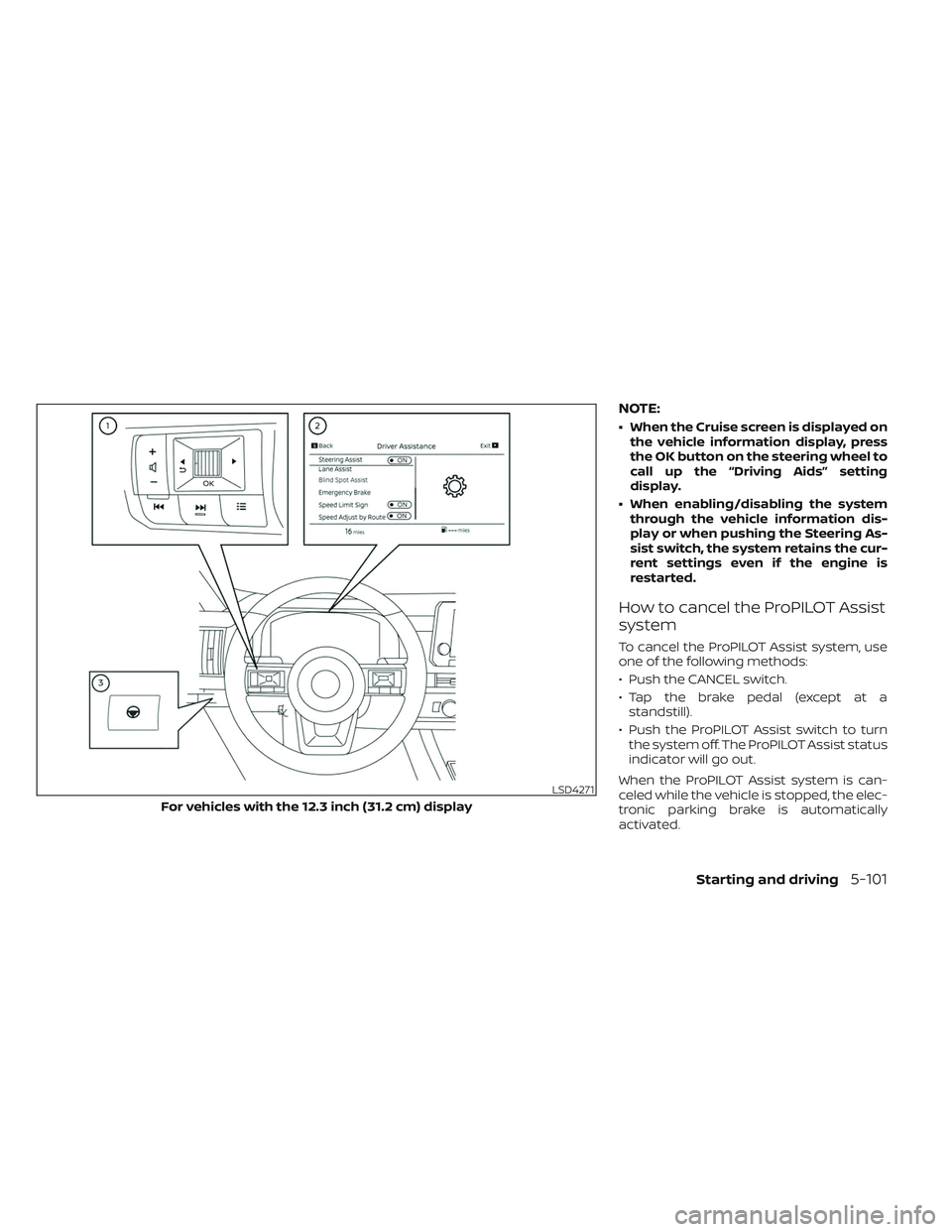
NOTE:
• When the Cruise screen is displayed onthe vehicle information display, press
the OK button on the steering wheel to
call up the “Driving Aids” setting
display.
• When enabling/disabling the system through the vehicle information dis-
play or when pushing the Steering As-
sist switch, the system retains the cur-
rent settings even if the engine is
restarted.
How to cancel the ProPILOT Assist
system
To cancel the ProPILOT Assist system, use
one of the following methods:
• Push the CANCEL switch.
• Tap the brake pedal (except at astandstill).
• Push the ProPILOT Assist switch to turn the system off. The ProPILOT Assist status
indicator will go out.
When the ProPILOT Assist system is can-
celed while the vehicle is stopped, the elec-
tronic parking brake is automatically
activated.
LSD4271
For vehicles with the 12.3 inch (31.2 cm) display
Starting and driving5-101
Page 413 of 647
WARNING
To prevent the vehicle from moving or
rolling unexpectedly, which could re-
sult in serious personal injury or prop-
erty damage, before exiting the vehicle
make sure to push the ProPILOT Assist
switch to turn the system off, press the
park button to shif t to the P (Park) po-
sition, and turn the engine off.
INTELLIGENT CRUISE CONTROL
(ICC) (for vehicles with ProPILOT
Assist)
WARNING
Failure to follow the warnings and in-
structions for proper use of the ICC sys-
tem could result in serious injury or
death.
• The ICC system is only an aid to assist
the driver and is not a collision warn-
ing or avoidance device. It is recom-
mended for highway use only and it
is not intended for city driving. It is
the driver’s responsibility to stay
alert, drive safely, and be in control of
the vehicle at all times. •
There are limitations to the ICC sys-
tem capability. The ICC system does
not function in all driving, traffic,
weather, and road conditions. It is the
driver’s responsibility to stay alert,
drive safely, keep the vehicle in the
traveling lane, and be in control of the
vehicle at all times.
• Always observe posted speed limits
and do not set the speed over them.
• The ICC system does not react to sta-
tionary and slow moving vehicles.
• Always drive carefully and atten-
tively when using the ICC system.
Read and understand the Owner’s
Manual thoroughly before using the
ICC system. To avoid serious injury or
death, do not rely on the system to
prevent accidents or to control the
vehicle’s speed in emergency situa-
tions. Do not use the ICC system ex-
cept in appropriate road and traffic
conditions.
ICC system operation
The ICC system is designed to maintain a
selected distance from the vehicle in front
of you and can reduce the speed to match
a slower vehicle ahead. The system decel- erates the vehicle as necessary and if the
vehicle ahead comes to a stop, the vehicle
decelerates to a standstill. However, the ICC
system can only apply up to 40% of the
vehicle’s total braking power. This system
should only be used when traffic condi-
tions allow vehicle speeds to remain fairly
constant or when vehicle speeds change
gradually. If a vehicle moves into the travel-
ing lane ahead or if a vehicle traveling
ahead rapidly decelerates, the distance be-
tween vehicles may become closer be-
cause the ICC system cannot decelerate
the vehicle quickly enough. If this occurs,
the ICC system sounds a warning chime
and blinks the system display to notif y the
driver to take necessary action.
The ICC system cancels and a warning
chime sounds if the speed is below ap-
proximately 15 mph (24 km/h) and a vehicle
is not detected ahead. For ProPILOT Assist
with Navi-link equipped vehicles on a lim-
ited access freeway as identified in the
navigation map data, the ICC system can-
cels and a warning chime sounds if your
vehicle is at a standstill for more than ap-
proximately 3 seconds and a vehicle is not
detected ahead.
5-102Starting and driving
Page 422 of 647
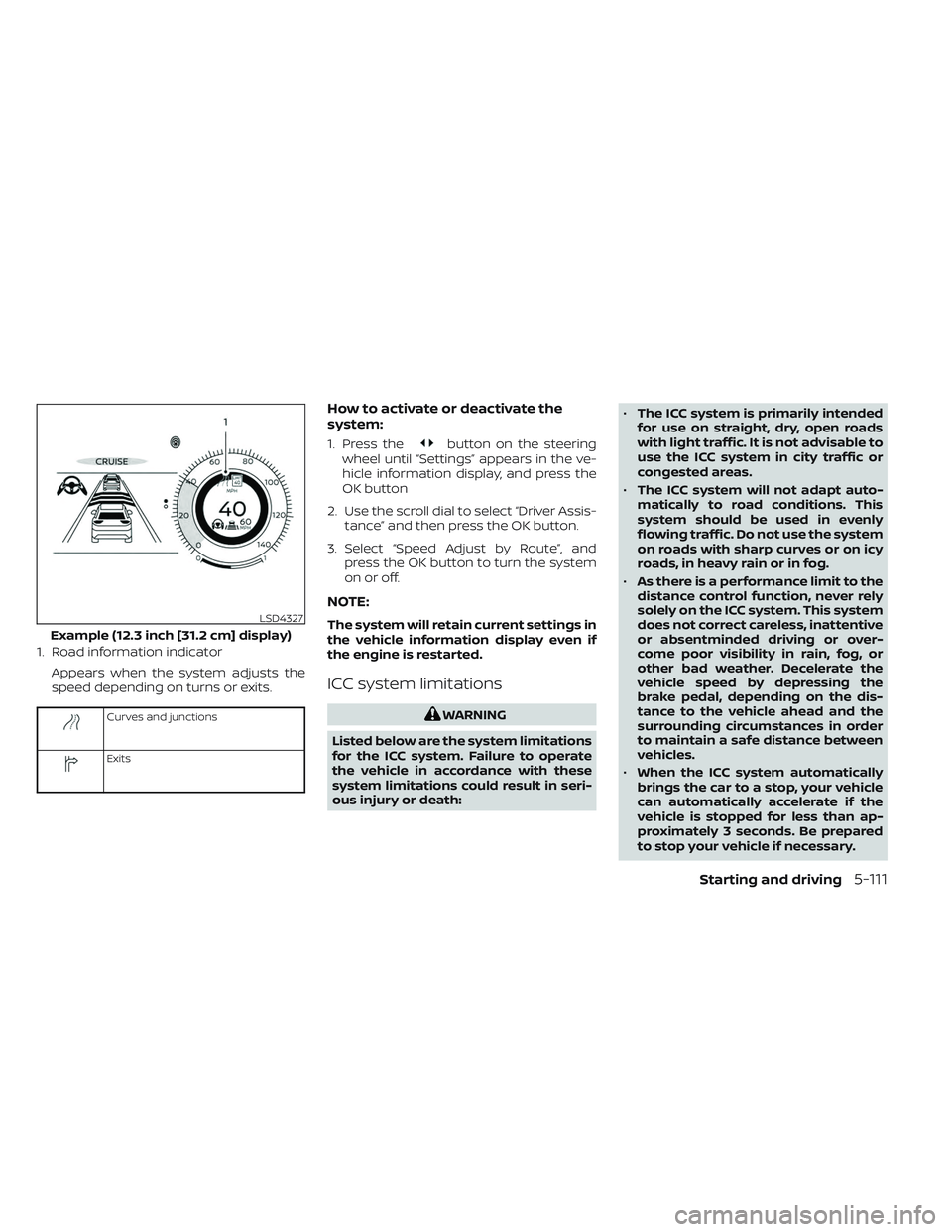
1. Road information indicatorAppears when the system adjusts the
speed depending on turns or exits.
Curves and junctions
Exits
How to activate or deactivate the
system:
1. Press thebutton on the steering
wheel until “Settings” appears in the ve-
hicle information display, and press the
OK button
2. Use the scroll dial to select “Driver Assis- tance” and then press the OK button.
3. Select “Speed Adjust by Route”, and press the OK button to turn the system
on or off.
NOTE:
The system will retain current settings in
the vehicle information display even if
the engine is restarted.
ICC system limitations
WARNING
Listed below are the system limitations
for the ICC system. Failure to operate
the vehicle in accordance with these
system limitations could result in seri-
ous injury or death: •
The ICC system is primarily intended
for use on straight, dry, open roads
with light traffic. It is not advisable to
use the ICC system in city traffic or
congested areas.
• The ICC system will not adapt auto-
matically to road conditions. This
system should be used in evenly
flowing traffic. Do not use the system
on roads with sharp curves or on icy
roads, in heavy rain or in fog.
• As there is a performance limit to the
distance control function, never rely
solely on the ICC system. This system
does not correct careless, inattentive
or absentminded driving or over-
come poor visibility in rain, fog, or
other bad weather. Decelerate the
vehicle speed by depressing the
brake pedal, depending on the dis-
tance to the vehicle ahead and the
surrounding circumstances in order
to maintain a safe distance between
vehicles.
• When the ICC system automatically
brings the car to a stop, your vehicle
can automatically accelerate if the
vehicle is stopped for less than ap-
proximately 3 seconds. Be prepared
to stop your vehicle if necessary.
LSD4327
Example (12.3 inch [31.2 cm] display)
Starting and driving5-111
Page 480 of 647
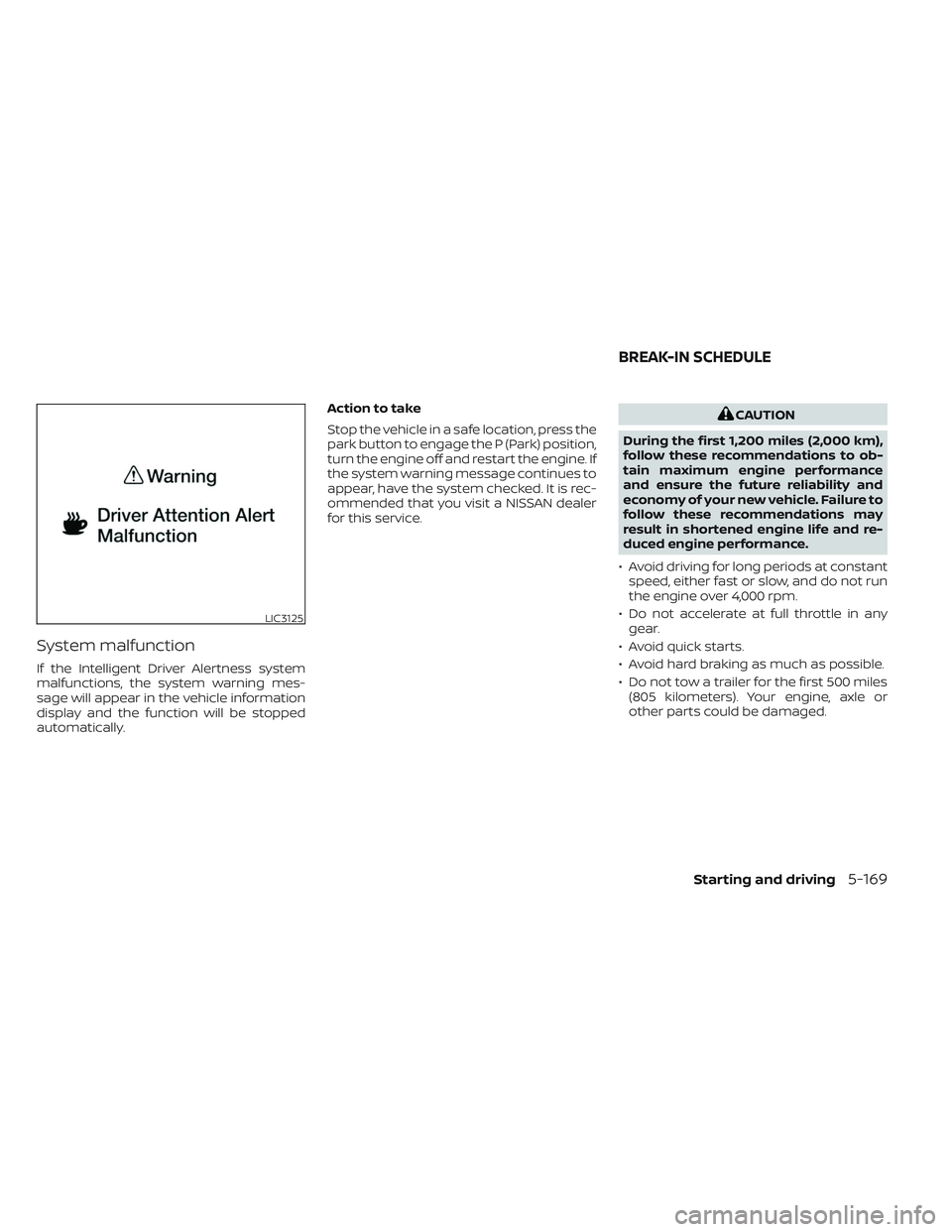
System malfunction
If the Intelligent Driver Alertness system
malfunctions, the system warning mes-
sage will appear in the vehicle information
display and the function will be stopped
automatically.Action to take
Stop the vehicle in a safe location, press the
park button to engage the P (Park) position,
turn the engine off and restart the engine. If
the system warning message continues to
appear, have the system checked. It is rec-
ommended that you visit a NISSAN dealer
for this service.
CAUTION
During the first 1,200 miles (2,000 km),
follow these recommendations to ob-
tain maximum engine performance
and ensure the future reliability and
economy of your new vehicle. Failure to
follow these recommendations may
result in shortened engine life and re-
duced engine performance.
• Avoid driving for long periods at constant speed, either fast or slow, and do not run
the engine over 4,000 rpm.
• Do not accelerate at full throttle in any gear.
• Avoid quick starts.
• Avoid hard braking as much as possible.
• Do not tow a trailer for the first 500 miles (805 kilometers). Your engine, axle or
other parts could be damaged.
LIC3125
BREAK-IN SCHEDULE
Starting and driving5-169
Page 520 of 647
CAUTION
• Always connect positive (+) to posi-
tive (+) and negative (−) to body
ground (for example, strut mounting
bolt, engine lif t bracket, etc.) — not to
the battery.
• Make sure the jumper cables do not
touch moving parts in the engine
compartment and that the cable
clamps do not contact any other
metal.
5. Start the engine of the booster vehicle and let it run for a few minutes.
6. Keep the engine speed of the booster vehicle at about 2,000 rpm and start the
engine of the vehicle being jump
started.
CAUTION
Do not keep the starter motor engaged
for more than 10 seconds. If the engine
does not start right away, place the ig-
nition switch in the OFF position and
wait 3 to 4 seconds before trying again.
7. Af ter starting the engine, carefully dis- connect the negative cable and then the
positive cable.
CAUTION
Automatic transmission models can-
not be push-started. Attempting to do
so may cause transmission damage.WARNING
• Do not continue to drive if your ve-
hicle overheats. Doing so could cause
engine damage or a vehicle fire.
• To avoid the danger of being scalded,
never remove the radiator or coolant
reservoir cap while the engine is still
hot. When the radiator or coolant res-
ervoir cap is removed, pressurized
hot water will spurt out, possibly
causing serious injury.
• Do not open the hood if steam is
coming out.
If your vehicle is overheating (indicated by
an extremely high temperature gauge
reading and the Low Oil Pressure: See
Owner’s Manual warning message ap-
pears in the vehicle information display), or
if you feel a lack of engine power, detect
abnormal noise, etc. take the following
steps:
1. Move the vehicle safely off the road, ap- ply the parking brake.
2. Push the park button to shif t to the P (Park) position.
Do not stop the engine.
PUSH STARTING IF YOUR VEHICLE OVERHEATS
In case of emergency6-13
Page 626 of 647
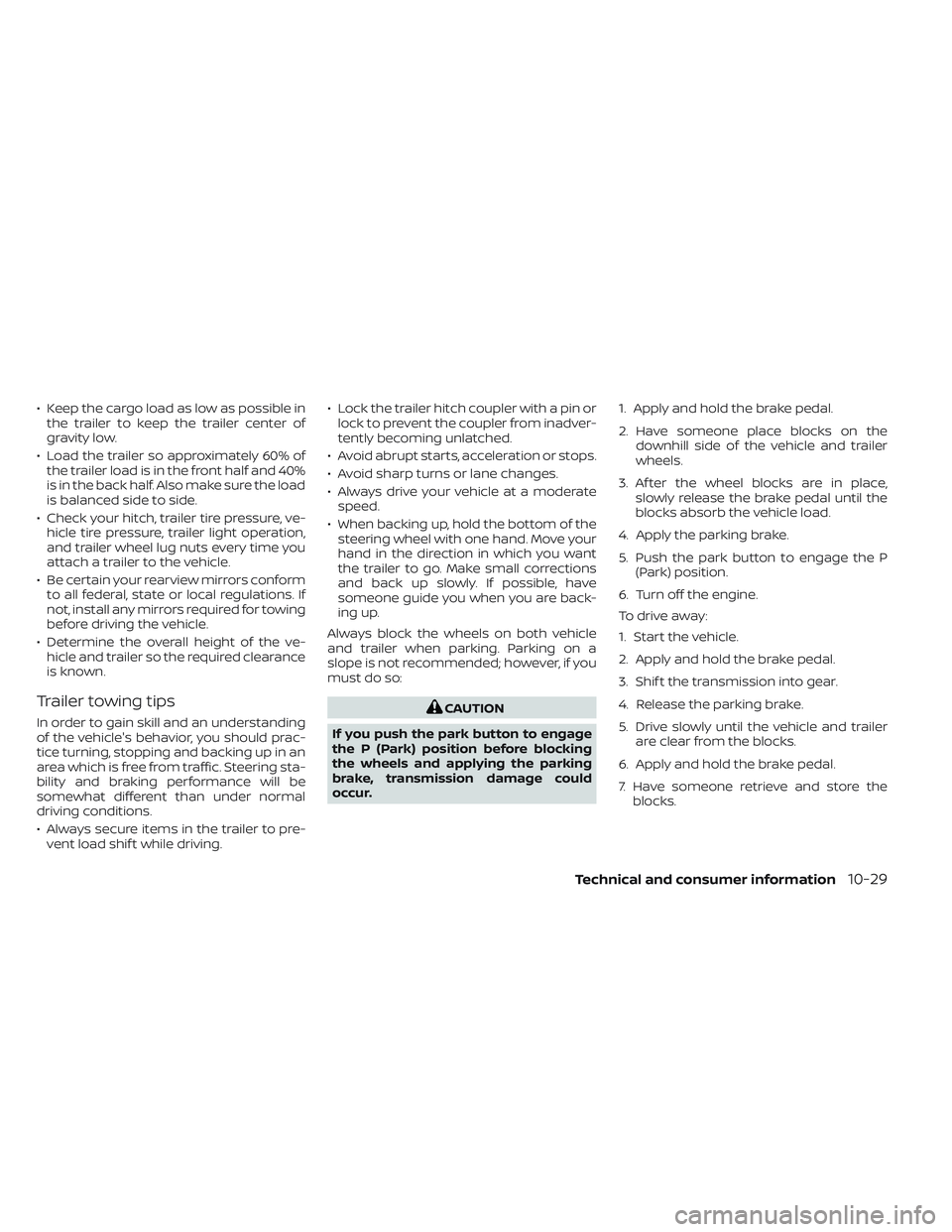
• Keep the cargo load as low as possible inthe trailer to keep the trailer center of
gravity low.
• Load the trailer so approximately 60% of the trailer load is in the front half and 40%
is in the back half. Also make sure the load
is balanced side to side.
• Check your hitch, trailer tire pressure, ve- hicle tire pressure, trailer light operation,
and trailer wheel lug nuts every time you
attach a trailer to the vehicle.
• Be certain your rearview mirrors conform to all federal, state or local regulations. If
not, install any mirrors required for towing
before driving the vehicle.
• Determine the overall height of the ve- hicle and trailer so the required clearance
is known.
Trailer towing tips
In order to gain skill and an understanding
of the vehicle's behavior, you should prac-
tice turning, stopping and backing up in an
area which is free from traffic. Steering sta-
bility and braking performance will be
somewhat different than under normal
driving conditions.
• Always secure items in the trailer to pre-vent load shif t while driving. • Lock the trailer hitch coupler with a pin or
lock to prevent the coupler from inadver-
tently becoming unlatched.
• Avoid abrupt starts, acceleration or stops.
• Avoid sharp turns or lane changes.
• Always drive your vehicle at a moderate speed.
• When backing up, hold the bottom of the steering wheel with one hand. Move your
hand in the direction in which you want
the trailer to go. Make small corrections
and back up slowly. If possible, have
someone guide you when you are back-
ing up.
Always block the wheels on both vehicle
and trailer when parking. Parking on a
slope is not recommended; however, if you
must do so:CAUTION
If you push the park button to engage
the P (Park) position before blocking
the wheels and applying the parking
brake, transmission damage could
occur. 1. Apply and hold the brake pedal.
2. Have someone place blocks on the
downhill side of the vehicle and trailer
wheels.
3. Af ter the wheel blocks are in place, slowly release the brake pedal until the
blocks absorb the vehicle load.
4. Apply the parking brake.
5. Push the park button to engage the P (Park) position.
6. Turn off the engine.
To drive away:
1. Start the vehicle.
2. Apply and hold the brake pedal.
3. Shif t the transmission into gear.
4. Release the parking brake.
5. Drive slowly until the vehicle and trailer are clear from the blocks.
6. Apply and hold the brake pedal.
7. Have someone retrieve and store the blocks.
Technical and consumer information10-29
Page 638 of 647
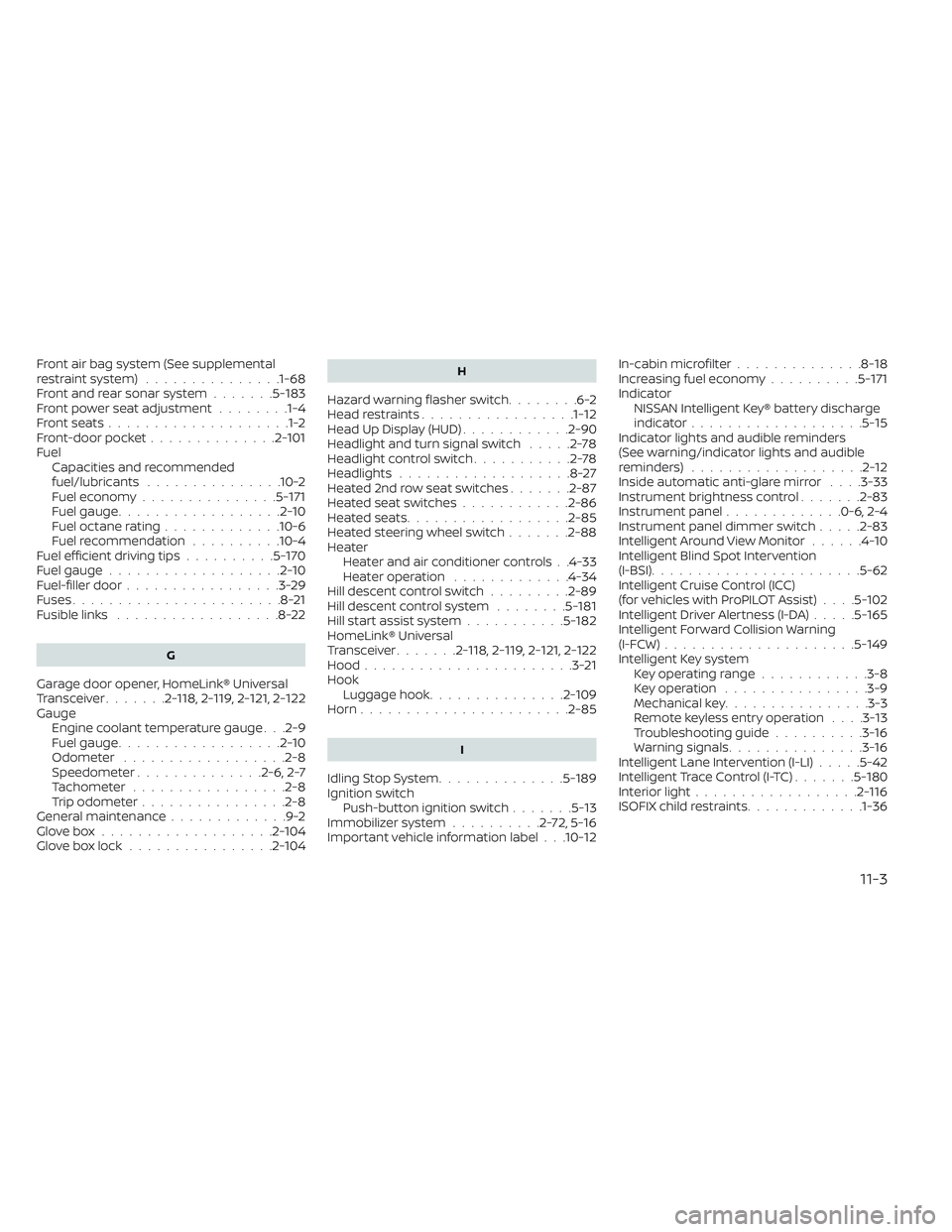
Front air bag system (See supplemental
restraint system)...............1-68Front and rear sonar system.......5-183Front power seat adjustment........1-4Front seats....................1-2Front-door pocket..............2-101FuelCapacities and recommended
fuel/lubricants
...............10-2Fuel economy...............5-171Fuel gauge..................2-10Fuel octane rating.............10-6Fuel recommendation..........10-4Fuel efficient driving tips..........5-170Fuel gauge...................2-10Fuel-filler door.................3-29Fuses.......................8-21Fusible links..................8-22
G
Garage door opener, HomeLink® Universal
Transceiver.......2- 118, 2-119, 2-121, 2-122Gauge
Engine coolant temperature gauge. . .2-9Fuel gauge..................2-10Odometer................. .2-8Speedometer..............2-6, 2-7Tachometer.................2-8Trip odometer................2-8General maintenance.............9-2Glove box...................2-104Glove box lock................2-104
H
Hazard warning flasher switch........6-2Head restraints.................1-12Head Up Display (HUD)............2-90Headlight and turn signal switch.....2-78Headlight control switch...........2-78Headlights...................8-27Heated 2nd row seat switches.......2-87Heated seat switches............2-86Heated seats................. .2-85Heated steering wheel switch.......2-88Heater
Heater and air conditioner controls. .4-33Heater operation.............4-34Hill descent control switch.........2-89Hill descent control system........5-181Hill start assist system...........5-182HomeLink® Universal
Transceiver.......2- 118, 2-119, 2-121, 2-122Hood.......................3-21Hook
Luggage hook...............2-109Horn...................... .2-85
I
Idling Stop System..............5-189Ignition switch
Push-button ignition switch.......5-13Immobilizer system..........2-72,5-16Important vehicle information label. . .10-12
In-cabin microfilter..............8-18Increasing fuel economy..........5-171IndicatorNISSAN Intelligent Key® battery discharge
indicator
...................5-15Indicator lights and audible reminders
(See warning/indicator lights and audible
reminders)
...................2-12Inside automatic anti-glare mirror. . . .3-33Instrument brightness control.......2-83Instrument panel.............0-6, 2-4Instrument panel dimmer switch.....2-83Intelligent Around View Monitor......4-10Intelligent Blind Spot Intervention
(I-BSI)...................... .5-62Intelligent Cruise Control (ICC)
(for vehicles with ProPILOT Assist). . . .5-102Intelligent Driver Alertness (I-DA).....5-165Intelligent Forward Collision Warning
(I-FCW).....................5-149Intelligent Key system
Key operating range............3-8Key operation................3-9Mechanical key................3-3Remote keyless entry operation. . . .3-13Troubleshooting guide..........3-16Warning signals...............3-16Intelligent Lane Intervention (I-LI).....5-42Intelligent Trace Control (I-TC).......5-180Interior light..................2-116ISOFIX child restraints.............1-36
11-3