stop start NISSAN PATHFINDER 2022 Owner´s Manual
[x] Cancel search | Manufacturer: NISSAN, Model Year: 2022, Model line: PATHFINDER, Model: NISSAN PATHFINDER 2022Pages: 647, PDF Size: 8.48 MB
Page 206 of 647
WARNING
• Never put metallic materials be-
tween the wireless charger and a
smartphone.
• Those who use a pacemaker or other
medical equipment should contact
the electric medical equipment
manufacturer for the possible influ-
ences before use.
• Never put cloth over the smartphone
during charging process.
• Never charge a smartphone when it
is wet.
• Never put metallic materials or small
goods such as a cigarette lighter, In-
telligent Key or memory drive.
CAUTION
• Do not put an RFID/NFC/credit card
between the wireless charger and a
smartphone. This could cause data
corruption in the card.
• Do not use the wireless charger with
dust accumulated or dirt on the pad.
• Do not hit the surface of the wireless
charger. •
Do not spill liquid (water, drinks, etc.)
on the charging pad.
• Do not use grease, oil or alcohol for
cleaning charging pad.
WIRELESS CHARGER INDICATOR
The indicator(1)willil luminate in orange
when the charging process is started.
When the charging has completed, the in-
dicator illuminates in green.
If a malfunction occurs or the charging
process has stopped, the indicator will
blink in orange for 8 seconds then turn off.
WIRELESS CHARGER OPERATION
To use the wireless charger, it is necessary
to seat the smartphone well within the
charging pad. To maximize charging per-
formance, ensure the smartphone is fully
seated on the center of the charging pad
over the "Qi" logo
OA. Because the location
of the power receiver may vary depending
on the smartphone, you will need to try and
find the area that suits your smartphone.
Because some smartphone cases or ac-
cessories may adversely affect charging,
remove them before wireless charging.
Turn off the vibration function of the smart-
phone before wireless charging.
NOTE:
• Only a Qi compatible smartphone can
be used.
• The smartphone may be warmed dur-
ing charging process and the charging
may stop by the protection function of
the wireless charger. This is not a mal-
function. If this occurs, restart charging
af ter the smartphone cooled down.
The indicator will blink in orange then
turn off.
• The wireless charging process may be
stopped by the status of the smart-
phone (battery temperature, etc.).
• If a radio noise interference occurs dur-
ing charging process, put the smart-
phone onto the center (“Qi” logo) posi-
tion of the wireless charger.
• The wireless charging process will stop
during process of searching the Intelli-
gent Key.
• The wireless charging process will not
be started when a USB (Universal Serial
Bus) cable is connected to the smart-
phone. The indicator may illuminate in
orange or blink if the smartphone is
put on the wireless charger with a USB
cable connected. However, charging is
not performed.
Instruments and controls2-99
Page 221 of 647
CAUTION
• Do not release the rear door sun-
shade during operation. This could
damage the sunshade or cause
injury.
• Do not forcefully pull the sunshade.
Doing so may elongate the sun-
shade. This could cause improper op-
eration or could damage the
sunshade.
• Do not place objects on or near the
rear sunshade. This could cause im-
proper operation or could damage
the sunshade.
NOTE:
To avoid damage to the sunshade,
please note the following:
• Do not pull or push the sunshade, other than upwards.
• Do not pull or push the sunshade with the sunshade hung on the hooks.
• Do not allow liquids or objects on the storing area of the sunshade.
WARNING
• In an accident you could be thrown
from the vehicle through an open
moonroof. Always use seat belts and
child restraints.
• Do not allow anyone to stand up or
extend any portion of their body of
the moonroof opening while the ve-
hicle is in motion or while the moon-
roof is closing.
CAUTION
• Remove water drops, snow, ice or
sand from the moonroof before
opening.
• Do not place any heavy object on the
moonroof or surrounding area.
AUTOMATIC MOONROOF AND
SUNSHADE
Sliding sunshade and moonroof
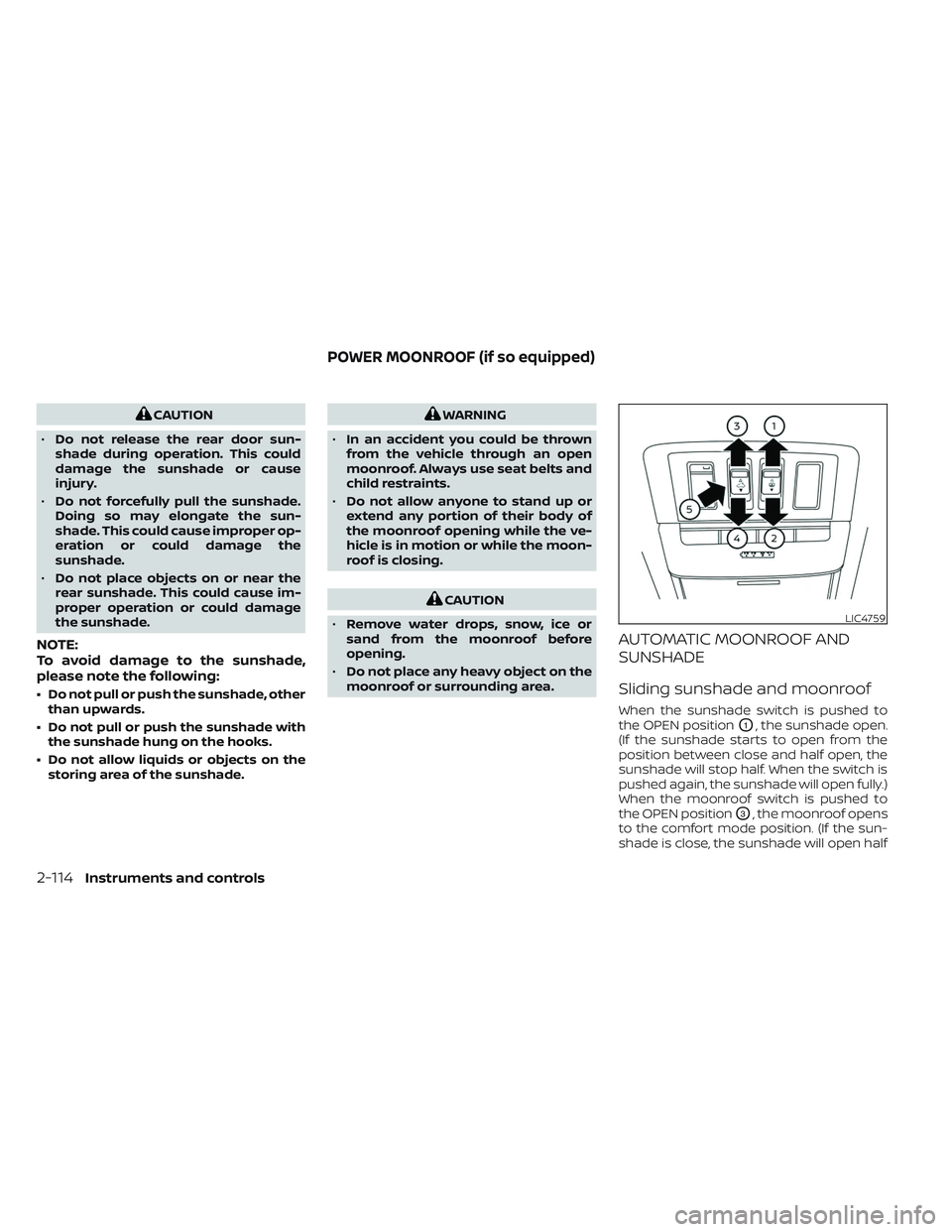
When the sunshade switch is pushed to
the OPEN position
O1, the sunshade open.
(If the sunshade starts to open from the
position between close and half open, the
sunshade will stop half. When the switch is
pushed again, the sunshade will open fully.)
When the moonroof switch is pushed to
the OPEN position
O3, the moonroof opens
to the comfort mode position. (If the sun-
shade is close, the sunshade will open half
LIC4759
POWER MOONROOF (if so equipped)
2-114Instruments and controls
Page 222 of 647
first. When the switch is pushed again, the
moonroof will open fully.)
When the moonroof switch is pushed to
the CLOSE position
O4, the moonroof will
automatically close. When the sunshade
switch is pushed to the CLOSE position
O2,
the sunshade will close. (If the sunshade
starts to close from the position between
full and half open, the sunshade will stop
half. When the switch is pushed again, the
sunshade will close fully. However, if the
moonroof is open or tilted up, the sun-
shade will not close beyond half.)
To stop the sunshade or moonroof during
the operation, push the moonroof switch
to either of the OPEN
O1,O3, CLOSEO2,O4
or UPO5position.
Tilting the moonroof
To tilt up the moonroof, push the moonroof
switch to the UP position
O5. To tilt down
the moonroof, push the switch to the
CLOSE position
O4.
Comfort mode
This is the position used when driving with
the moonroof open. When driving with the
moonroof fully open, wind noise may be
very loud. Use the comfort mode position
when driving.
Auto-reverse function
WARNING
There are some small distances imme-
diately before the closed position
which cannot be detected. Make sure
that all passengers have their hands,
etc., inside the vehicle before closing
the moonroof and sunshade.
The auto-reverse function enables the
moonroof and sunshade to automatically
reverse when something is caught in the
moonroof and sunshade as it is closing.
When the control unit detects an obstacle,
the moonroof and sunshade will open
immediately.
Depending on the environment or driving
conditions, the auto-reverse function may
activate if an impact or load similar to
something being caught in the moonroof
and sunshade occurs.
If the auto-reverse function activates con-
secutively or the battery is discharged, the
moonroof and sunshade may not close
properly. In this case, push and hold the
switch to the CLOSE position
O4to close
the moonroof.
If the moonroof switch does not
operate
If the moonroof and sunshade do not op-
erate properly, perform the following pro-
cedure to initialize the operation system.
1. If the moonroof and sunshade are open, close them fully by repeatedly pushing
the moonroof switch to the CLOSE
O2
andO4position.
2. Push and hold the moonroof switch to the CLOSE
O4position for 10 seconds.
3. Af ter the moonroof and sunshade move slightly to the closed position and
then move back a little, release the
moonroof switch.
4. Push and hold the moonroof switch to the CLOSE
O4position, and the glass
and shade will move.
5. Release the moonroof switch. Then the moonroof and sunshade will fully open
and then fully close.
6. Check if the moonroof switch operates normally.
Instruments and controls2-115
Page 226 of 647
WARNING
• Your vehicle's engine should be
turned off while programming the
HomeLink® Universal Transceiver. For
additional information, see “Push-
button ignition switch” (P. 5-13). Do
not breathe exhaust gases; they con-
tain colorless and odorless carbon
monoxide. Carbon monoxide is dan-
gerous. It can cause unconscious-
ness or death.
• Do not use the HomeLink® Universal
Transceiver with any garage door
opener that lacks safety stop and re-
verse features as required by federal
safety standards. (These standards
became effective for opener models
manufactured af ter April 1, 1982.) A
garage door opener which cannot
detect an object in the path of a clos-
ing garage door and then automati-
cally stop and reverse does not meet
current federal safety standards. Us-
ing a garage door opener without
these features increases the risk of
serious injury or death. •
During the programming procedure
your garage door or security gate will
open and close (if the transmitter is
within range). Make sure that people
or objects are clear of the garage
door, gate, etc., that you are
programming.
PROGRAMMING HOMELINK®
If you have any questions or are having
difficulty programming your HomeLink®
buttons, refer to the HomeLink® web site at:
www.homelink.com or call 1-800-355-3515.
NOTE:
Place the ignition switch in the ON posi-
tion (without starting the engine) when
programming HomeLink®. It is also rec-
ommended that a new battery be placed
in the hand-held transmitter of the de-
vice being programmed to HomeLink®
for quicker programming and accurate
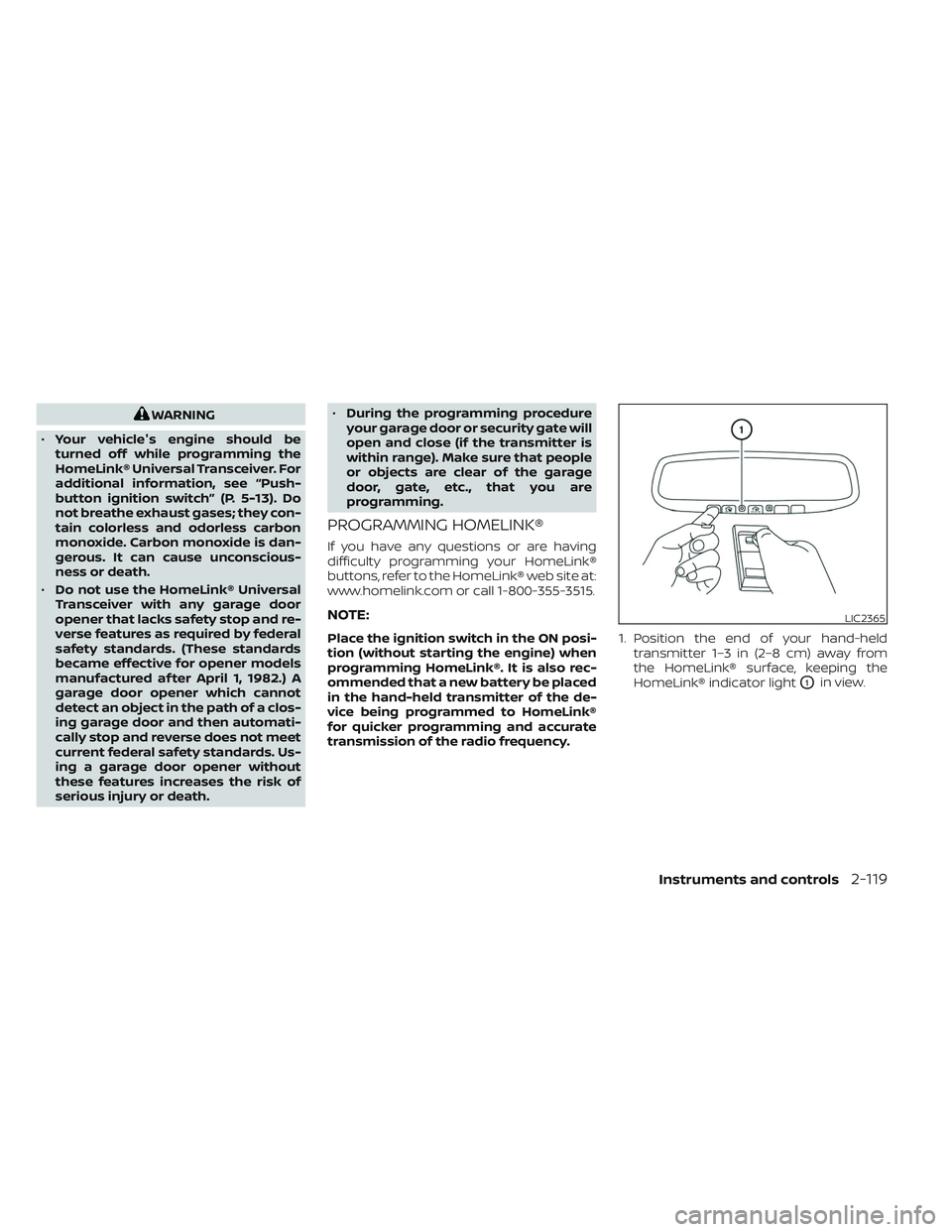
transmission of the radio frequency. 1. Position the end of your hand-held
transmitter 1–3 in (2–8 cm) away from
the HomeLink® surface, keeping the
HomeLink® indicator light
O1in view.
LIC2365
Instruments and controls2-119
Page 251 of 647
CONDITIONS THE REMOTE ENGINE
START WILL NOT WORK
The Remote Engine Start will not operate if
any of the following conditions are present:
• The ignition switch is placed in the ONposition.
• The hood is not securely closed.
• The hazard indicator lights are on.
• The engine is still running. The engine must be completely stopped. Wait at
least 6 seconds if the engine goes from
running to off. This is not applicable when
extending engine run time.
• The
button is not pressed and held
for at least 2 seconds.
• The
button is not pressed and held
within 5 seconds of pressing the lock
button.
• The brake is pressed.
• The doors are not closed and locked.
• The lif tgate is open.
• The Key System Error warning message appears in the vehicle information
display.
• The alarm sounds due to illegal entry into the vehicle. • Two Remote Engine Starts, or a single
Remote Engine Start with an extension,
have already been used.
• The vehicle is not in P (Park).
• There is a detected registered key already inside of the vehicle.
• The Remote Engine Start feature has been switched to the OFF position using
the “Vehicle Settings” menu on the vehicle
information display. For additional infor-
mation, see “Vehicle information display
7 inch (18 cm) Type A” (P. 2-22) or “Vehicle
information display 12.3 inch (31 cm) Type
B” (P. 2-45).
The Remote Engine Start may display a
warning or indicator in the vehicle informa-
tion display. For additional information, see
“Vehicle information display 7 inch (18 cm)
Type A” (P. 2-22) or “Vehicle information dis-
play 12.3 inch (31 cm) Type B” (P. 2-45).
3-20Pre-driving checks and adjustments
Page 255 of 647
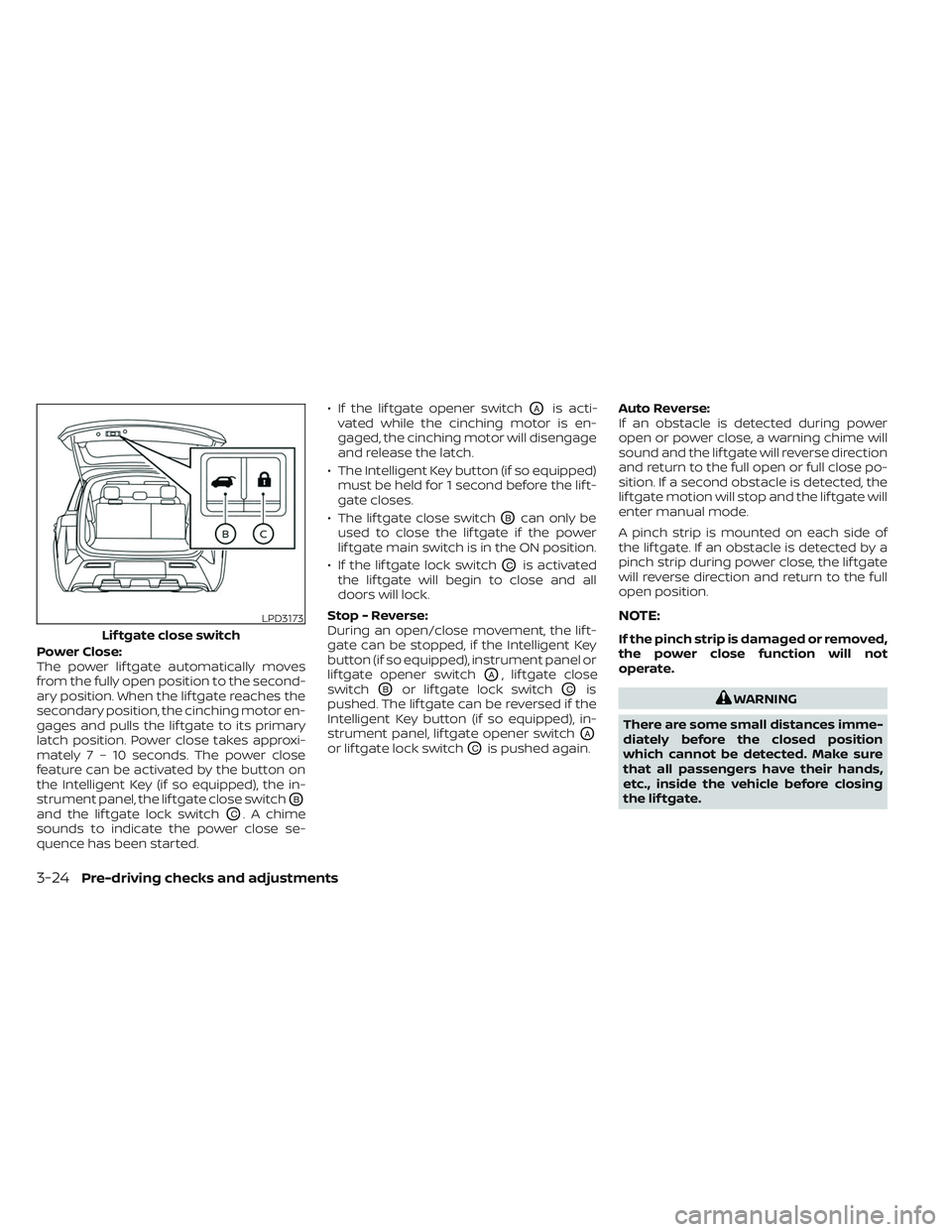
Power Close:
The power lif tgate automatically moves
from the fully open position to the second-
ary position. When the lif tgate reaches the
secondary position, the cinching motor en-
gages and pulls the lif tgate to its primary
latch position. Power close takes approxi-
mately7–10sec onds. The power close
feature can be activated by the button on
the Intelligent Key (if so equipped), the in-
strument panel, the lif tgate close switch
OB
and the lif tgate lock switchOC. A chime
sounds to indicate the power close se-
quence has been started. • If the lif tgate opener switch
OAis acti-
vated while the cinching motor is en-
gaged, the cinching motor will disengage
and release the latch.
• The Intelligent Key button (if so equipped) must be held for 1 second before the lif t-
gate closes.
• The lif tgate close switch
OBcan only be
used to close the lif tgate if the power
lif tgate main switch is in the ON position.
• If the lif tgate lock switch
OCis activated
the lif tgate will begin to close and all
doors will lock.
Stop - Reverse:
During an open/close movement, the lif t-
gate can be stopped, if the Intelligent Key
button (if so equipped), instrument panel or
lif tgate opener switch
OA, lif tgate close
switch
OBor lif tgate lock switchOCis
pushed. The lif tgate can be reversed if the
Intelligent Key button (if so equipped), in-
strument panel, lif tgate opener switch
OA
or lif tgate lock switchOCis pushed again. Auto Reverse:
If an obstacle is detected during power
open or power close, a warning chime will
sound and the lif tgate will reverse direction
and return to the full open or full close po-
sition. If a second obstacle is detected, the
lif tgate motion will stop and the lif tgate will
enter manual mode.
A pinch strip is mounted on each side of
the lif tgate. If an obstacle is detected by a
pinch strip during power close, the lif tgate
will reverse direction and return to the full
open position.
NOTE:
If the pinch strip is damaged or removed,
the power close function will not
operate.
WARNING
There are some small distances imme-
diately before the closed position
which cannot be detected. Make sure
that all passengers have their hands,
etc., inside the vehicle before closing
the lif tgate.
LPD3173
Lif tgate close switch
3-24Pre-driving checks and adjustments
Page 260 of 647
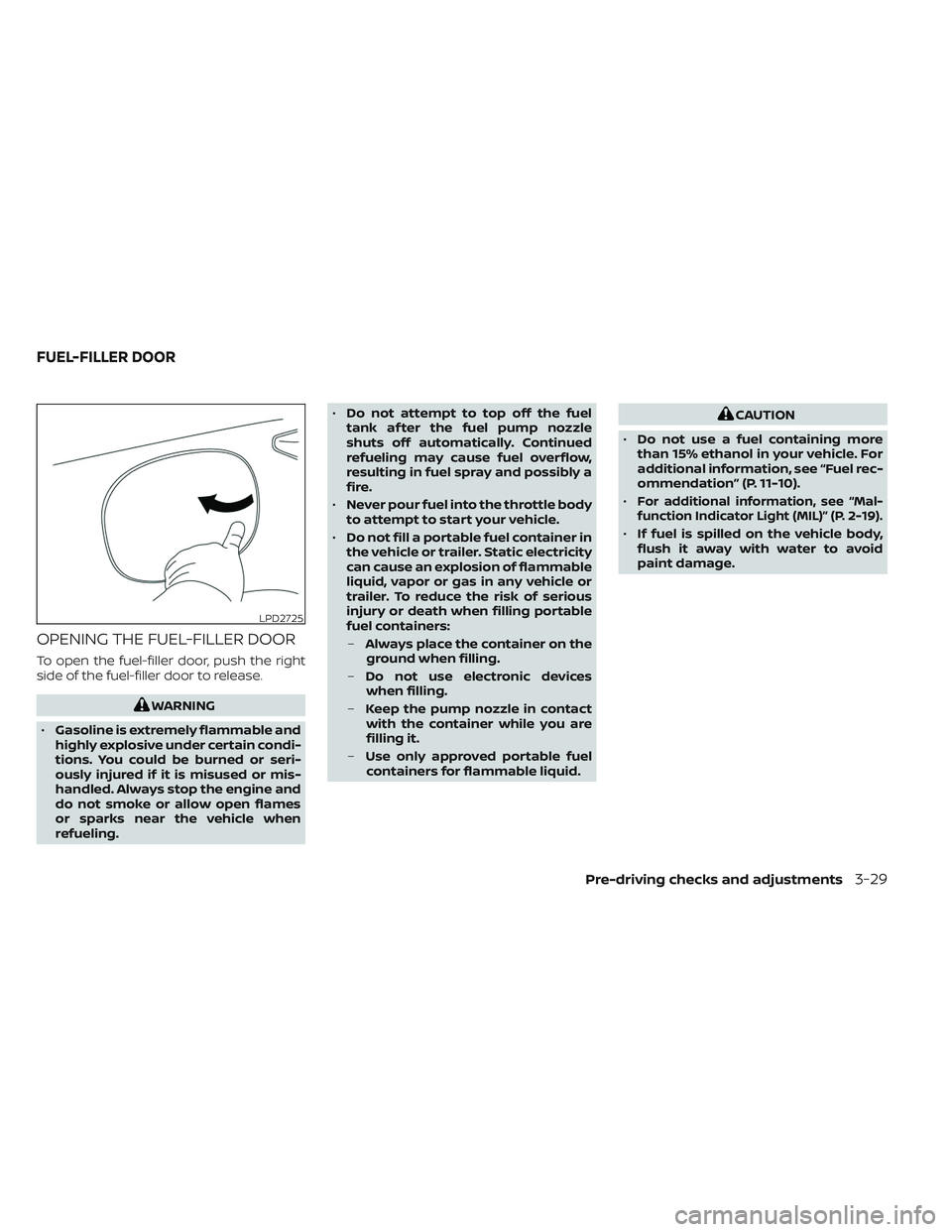
OPENING THE FUEL-FILLER DOOR
To open the fuel-filler door, push the right
side of the fuel-filler door to release.
WARNING
• Gasoline is extremely flammable and
highly explosive under certain condi-
tions. You could be burned or seri-
ously injured if it is misused or mis-
handled. Always stop the engine and
do not smoke or allow open flames
or sparks near the vehicle when
refueling. •
Do not attempt to top off the fuel
tank af ter the fuel pump nozzle
shuts off automatically. Continued
refueling may cause fuel overflow,
resulting in fuel spray and possibly a
fire.
• Never pour fuel into the throttle body
to attempt to start your vehicle.
• Do not fill a portable fuel container in
the vehicle or trailer. Static electricity
can cause an explosion of flammable
liquid, vapor or gas in any vehicle or
trailer. To reduce the risk of serious
injury or death when filling portable
fuel containers:
– Always place the container on the
ground when filling.
– Do not use electronic devices
when filling.
– Keep the pump nozzle in contact
with the container while you are
filling it.
– Use only approved portable fuel
containers for flammable liquid.
CAUTION
• Do not use a fuel containing more
than 15% ethanol in your vehicle. For
additional information, see “Fuel rec-
ommendation” (P. 11-10).
•
For additional information, see “Mal-
function Indicator Light (MIL)” (P. 2-19).
• If fuel is spilled on the vehicle body,
flush it away with water to avoid
paint damage.
LPD2725
FUEL-FILLER DOOR
Pre-driving checks and adjustments3-29
Page 269 of 647
Restarting the entry/exit function
If the battery cable is disconnected or if the
fuse opens, the stored memory positions
may be lost and some of the functions will
be restricted.
1. Drive the vehicle over 25 mph (40 km/h).
OR
2. Open and close the driver's door morethan two times with the ignition switch
in the OFF position.
The entry/exit function should now work
properly.
SETTING MEMORY FUNCTION
The position of the following settings can
be linked to the Intelligent Key and the
memorized settings can be available for
each Intelligent Key.
• Climate control system
• Audio system
To use the memory function, set the cli-
mate and audio systems to the driver's
preferred settings. Lock the doors with the
Intelligent Key. Each Intelligent Key may be
set with the driver's individual preferences.
When a new Intelligent Key is used, “Con-
nection with the key has been done” will be displayed on the vehicle information dis-
play and the memorized settings are
available.
To engage the memorized settings, per-
form the following:
1. Carry the Intelligent Key that is linked to
the memorized settings.
2. Unlock the doors by wrapping hand around the capacitive door handle or
the
button on the Intelligent Key.
3. Place the ignition switch in the ON posi- tion. The settings linked to the Intelligent
Key will start.
For additional information on using the cli-
mate control system, see “Heater and air
conditioner (automatic)” (P. 4-33).
SYSTEM OPERATION
The memory seat system will not work or
will stop operating under the following
conditions:
• When the vehicle speed is above 4 mph (7 km/h).
• When any of the memory switches are pushed while the memory seat is
operating. • When the switch for the driver’s seat and
steering wheel is pushed while the
memory seat is operating.
• When the seat has already been moved to the memorized position.
• When no seat position is stored in the memory switch.
• When the shif t position is moved from P (Park) to any other position.
3-38Pre-driving checks and adjustments
Page 314 of 647
Active Ride Control (ARC)
(if so equipped)............................. 5-181
Hill descent control system (if so equipped) . . . 5-181
Hill start assist system ........................5-182
Front and Rear Sonar System
(if so equipped) ................................ 5-183
System operation .......................... 5-184
How to enable/disable the front and
rear sonar system .......................... 5-186
Sonar limitations ........................... 5-187
System temporarily unavailable ............5-188
System maintenance ......................5-188
Idling Stop System ............................ 5-189Retrograde movement control function
....5-191
Idling Stop System display ..................5-191
Idling Stop OFF switch ......................5-193
Cold weather driving .......................... 5-194
Freeing a frozen door lock ..................5-194
Antifreeze .................................. 5-194
Battery..................................... 5-194
Draining of coolant water ..................5-194
Tire equipment ............................. 5-194
Special winter equipment ..................5-195
Driving on snow or ice ......................5-195
Engine block heater (if so equipped) ........5-195
Page 315 of 647
WARNING
• Do not leave children or adults who
would normally require the assis-
tance of others alone in your vehicle.
Pets should also not be lef t alone.
They could accidentally injure them-
selves or others through inadvertent
operation of the vehicle. Also, on hot,
sunny days, temperatures in a closed
vehicle could quickly become high
enough to cause severe or possibly
fatal injuries to people or animals.
• Properly secure all cargo with ropes
or straps to help prevent it from slid-
ing or shif ting. Do not place cargo
higher than the seatbacks. In a sud-
den stop or collision, unsecured
cargo could cause personal injury.
EXHAUST GAS (carbon monoxide)
WARNING
• Do not breathe exhaust gases; they
contain colorless and odorless car-
bon monoxide. Carbon monoxide is
dangerous. It can cause uncon-
sciousness or death. •
If you suspect that exhaust fumes
are entering the vehicle, drive with all
windows fully open, and have the ve-
hicle inspected immediately.
• Do not run the engine in closed
spaces such as a garage.
• Do not park the vehicle with the en-
gine running for any extended length
of time.
• Keep the rear vent windows, lif t-
gates, doors and trunk lids (if so
equipped) closed while driving, oth-
erwise exhaust gases could be
drawn into the passenger compart-
ment. If you must drive with one of
these open, follow these precau-
tions:
1. Open all the windows.
2. Set the
air recirculation but-
ton to off and the fan control dial
to high to circulate the air.
• If electrical wiring or other cable con-
nections must pass to a trailer
through the seal on the lif tgate or the
body, follow the manufacturer's rec-
ommendation to prevent carbon
monoxide entry into the vehicle. •
The exhaust system and body should
be inspected by a qualified mechanic
whenever:
a. The vehicle is raised for service.
b. You suspect that exhaust fumes are entering into the passenger
compartment.
c. You notice a change in the sound of the exhaust system.
d. You have had an accident involv- ing damage to the exhaust sys-
tem, underbody, or rear of the
vehicle.
THREE-WAY CATALYST
The three-way catalyst is an emission con-
trol device installed in the exhaust system.
Exhaust gases in the three-way catalyst
are burned at high temperatures to help
reduce pollutants.
WARNING
• The exhaust gas and the exhaust
system are very hot. Keep people,
animals or flammable materials
away from the exhaust system
components.
PRECAUTIONS WHEN STARTING AND
DRIVING
5-4Starting and driving