warning NISSAN PATHFINDER 2022 Owner´s Manual
[x] Cancel search | Manufacturer: NISSAN, Model Year: 2022, Model line: PATHFINDER, Model: NISSAN PATHFINDER 2022Pages: 647, PDF Size: 8.48 MB
Page 486 of 647
The brake system has two separate hy-
draulic circuits. If one circuit malfunctions,
you will still have braking at two wheels.
BRAKE PRECAUTIONS
Vacuum assisted brakes
The brake booster aids braking by using
engine vacuum. If the engine stops, you
can stop the vehicle by depressing the
brake pedal. However, greater foot pres-
sure on the brake pedal will be required to
stop the vehicle and stopping distance will
be longer.
Using the brakes
Avoid resting your foot on the brake pedal
while driving. This will overheat the brakes,
wear out the brake pads faster, and reduce
gas mileage.
To help reduce brake wear and to prevent
the brakes from overheating, reduce speed
and downshif t to a lower gear before going
down a slope or long grade. Overheated
brakes may reduce braking performance
and could result in loss of vehicle control.
WARNING
• While driving on a slippery surface,
be careful when braking, accelerat-
ing or downshif ting. Abrupt braking
or accelerating could cause the
wheels to skid and result in an
accident.
• If the engine is not running or is
turned off while driving, the power
assist for the brakes will not work.
Braking will be harder.
Wet brakes
When the vehicle is washed or driven
through water, the brakes may get wet. As
a result, your braking distance will be lon-
ger and the vehicle may pull to one side
during braking.
To dry the brakes, drive the vehicle at a safe
speed while lightly pressing the brake
pedal to heat up the brakes. Do this until
the brakes return to normal. Avoid driving
the vehicle at high speeds until the brakes
function correctly.
Parking brake break-in
Break in the parking brake shoes whenever
the stopping effect of the parking brake is
weakened or whenever the parking brake
shoes and/or rotors are replaced, in order
to assure the best brake performance.
This procedure is described in the vehicle
service manual and can be performed by a
NISSAN dealer.
ANTI-LOCK BRAKING SYSTEM (ABS)
WARNING
• The ABS is a sophisticated device, but
it cannot prevent accidents resulting
from careless or dangerous driving
techniques. It can help maintain ve-
hicle control during braking on slip-
pery surfaces. Remember that stop-
ping distances on slippery surfaces
will be longer than on normal sur-
faces even with ABS. Stopping dis-
tances may also be longer on rough,
gravel or snow covered roads, or if
you are using tire chains. Always
maintain a safe distance from the ve-
hicle in front of you. Ultimately, the
driver is responsible for safety.
BRAKE SYSTEM
Starting and driving5-175
Page 487 of 647
•Tire type and condition may also af-
fect braking effectiveness.
– When replacing tires, install the
specified size of tires on all four
wheels.
–
When installing a spare tire, make sure that it is the proper size and
type as specified on the Tire and
Loading Information label. For ad-
ditional information, see “Tire and
Loading Information label” (P. 8-31).
– For additional information, see
“Wheels and tires” (P. 8-29).
The ABS controls the brakes so the wheels
do not lock during hard braking or when
braking on slippery surfaces. The system
detects the rotation speed at each wheel
and varies the brake fluid pressure to pre-
vent each wheel from locking and sliding.
By preventing each wheel from locking, the
system helps the driver maintain steering
control and helps to minimize swerving
and spinning on slippery surfaces.
Using the system
Depress the brake pedal and hold it down.
Depress the brake pedal with firm steady
pressure, but do not pump the brakes. The
Anti-lock Braking System will operate to
prevent the wheels from locking up. Steer
the vehicle to avoid obstacles.
WARNING
Do not pump the brake pedal. Doing so
may result in increased stopping
distances.
Self-test feature
The Anti-lock Braking System (ABS) includes
electronic sensors, electric pumps, hydraulic
solenoids and a computer. The computer
has a built-in diagnostic feature that tests
the system each time you start the engine
and move the vehicle at a low speed in for-
ward or reverse. When the self-test occurs,
you may hear a “clunk” noise and/or feel a
pulsation in the brake pedal. This is normal
and does not indicate a malfunction. If the
computer senses a malfunction, it switches
the ABS off and illuminates the ABS warning
light on the instrument panel. The brake sys-
tem then operates normally, but without
anti-lock assistance.
If the ABS warning light illuminates during
the self-test or while driving, have the ve-
hicle checked. It is recommended that you
visit a NISSAN dealer for this service.
Normal operation
The Anti-lock Braking System (ABS) oper-
ates at speeds abov e3-6mph(5-10
km/h). The speed varies according to road
conditions.
When the ABS senses that one or more
wheels are close to locking up, the actuator
rapidly applies and releases hydraulic pres-
sure. This action is similar to pumping the
brakes very quickly. You may feel a pulsa-
tion in the brake pedal and hear a noise
from under the hood or feel a vibration
from the actuator when it is operating. This
is normal and indicates that the ABS is op-
erating properly. However, the pulsation
may indicate that road conditions are haz-
ardous and extra care is required while
driving.
5-176Starting and driving
Page 488 of 647
BRAKE ASSIST
When the force applied to the brake pedal
exceeds a certain level, the Brake Assist is
activated generating greater braking force
than a conventional brake booster even
with light pedal force.
WARNING
The Brake Assist is only an aid to assist
braking operation and is not a collision
warning or avoidance device. It is the
driver’s responsibility to stay alert,
drive safely and be in control of the ve-
hicle at all times. The VDC system uses various sensors to
monitor driver inputs and vehicle motion.
Under certain driving conditions, the VDC
system helps to perform the following
functions:
• Controls brake pressure to reduce wheel
slip on one slipping drive wheel so power
is transferred to a non-slipping drive
wheel on the same axle.
• Controls brake pressure and engine out- put to reduce drive wheel slip based on
vehicle speed (traction control function).
• Controls brake pressure at individual wheels and engine output to help the
driver maintain control of the vehicle in
the following conditions:– Understeer (vehicle tends to not follow the steered path despite increased
steering input)
– Oversteer (vehicle tends to spin due to certain road or driving conditions)
The VDC system can help the driver to
maintain control of the vehicle, but it can-
not prevent loss of vehicle control in all driv-
ing situations.
When the VDC system operates, the
indicator light in the instrument panel
flashes so note the following: • The road may be slippery or the system
may determine some action is required
to help keep the vehicle on the steered
path.
• You may feel a pulsation in the brake pedal and hear a noise or vibration from
under the hood. This is normal and indi-
cates that the VDC system is working
properly.
• Adjust your speed and driving to the road conditions.
For additional information, see “Slip indica-
tor light” (P. 2-20) and “Vehicle Dynamic
Control (VDC) OFF indicator light” (P. 2-20).
If a malfunction occurs in the system, the
andindicator lights come on in
the instrument panel. The VDC system au-
tomatically turns off when these indicator
lights are on.
The vehicle information display is used to
turn off the VDC system. The
indicator
light and the AEB with Pedestrian Detec-
tion system warning light illuminate to in-
dicate the VDC and AEB with Pedestrian
Detection systems are off.
When the vehicle information display is
used to turn off the system, the VDC sys-
tem still operates to prevent one drive
wheel from slipping by transferring power
VEHICLE DYNAMIC CONTROL (VDC)
SYSTEM
Starting and driving5-177
Page 489 of 647
to a non-slipping drive wheel. Theindicator light flashes if this occurs. All
other VDC functions are off and the
indicator light will not flash.
The VDC system is automatically reset to
on when the ignition switch is placed in the
OFF position then back to the ON position.
The computer has a built-in diagnostic fea-
ture that tests the system each time you
start the engine and move the vehicle for-
ward or in reverse at a slow speed. When
the self-test occurs, you may hear a clunk
noise and/or feel a pulsation in the brake
pedal. This is normal and is not an indica-
tion of a malfunction.
WARNING
• The VDC system is designed to help
the driver maintain stability but does
not prevent accidents due to abrupt
steering operation at high speeds or
by careless or dangerous driving
techniques. Reduce vehicle speed
and be especially careful when driv-
ing and cornering on slippery sur-
faces and always drive carefully. •
Do not modif y the vehicle's suspen-
sion. If suspension parts such as
shock absorbers, struts, springs, sta-
bilizer bars, bushings and wheels are
not NISSAN recommended for your
vehicle or are extremely deterio-
rated, the VDC system may not oper-
ate properly. This could adversely af-
fect vehicle handling performance,
and the
indicator light may flash
or both theandindicator
lights may illuminate.
• If brake related parts such as brake
pads, rotors and calipers are not
NISSAN recommended or are ex-
tremely deteriorated, the VDC sys-
tem may not operate properly and
both the
and theindicator
lights may illuminate.
• If engine control related parts are not
NISSAN recommended or are ex-
tremely deteriorated, both the
andindicator lights may
illuminate. •
When driving on extremely inclined
surfaces such as higher banked cor-
ners, the VDC system may not oper-
ate properly and the
indicator
light may flash or both theandindicator lights may illuminate.
Do not drive on these types of roads.
• When driving on an unstable surface
such as a turntable, ferry, elevator or
ramp, the
indicator light may
flash or both theandindi-
cator lights may illuminate. This is
not a malfunction. Restart the engine
af ter driving onto a stable surface.
• If wheels or tires other than the
NISSAN recommended ones are
used, the VDC system may not oper-
ate properly and the
indicator
light may flash or both theandindicator lights may illuminate.
• The VDC system is not a substitute
for winter tires or tire chains on a
snow covered road.
5-178Starting and driving
Page 490 of 647
HOW TO TURN OFF THE VDC
SYSTEM
The vehicle should be driven with the Ve-
hicle Dynamic Control (VDC) system ON for
most driving conditions.
When the vehicle is stuck in mud or snow,
the VDC system reduces the engine output
to reduce wheel spin. The engine speed will
be reduced even if the accelerator is de-
pressed to the floor. If maximum engine
power is needed to free a stuck vehicle,
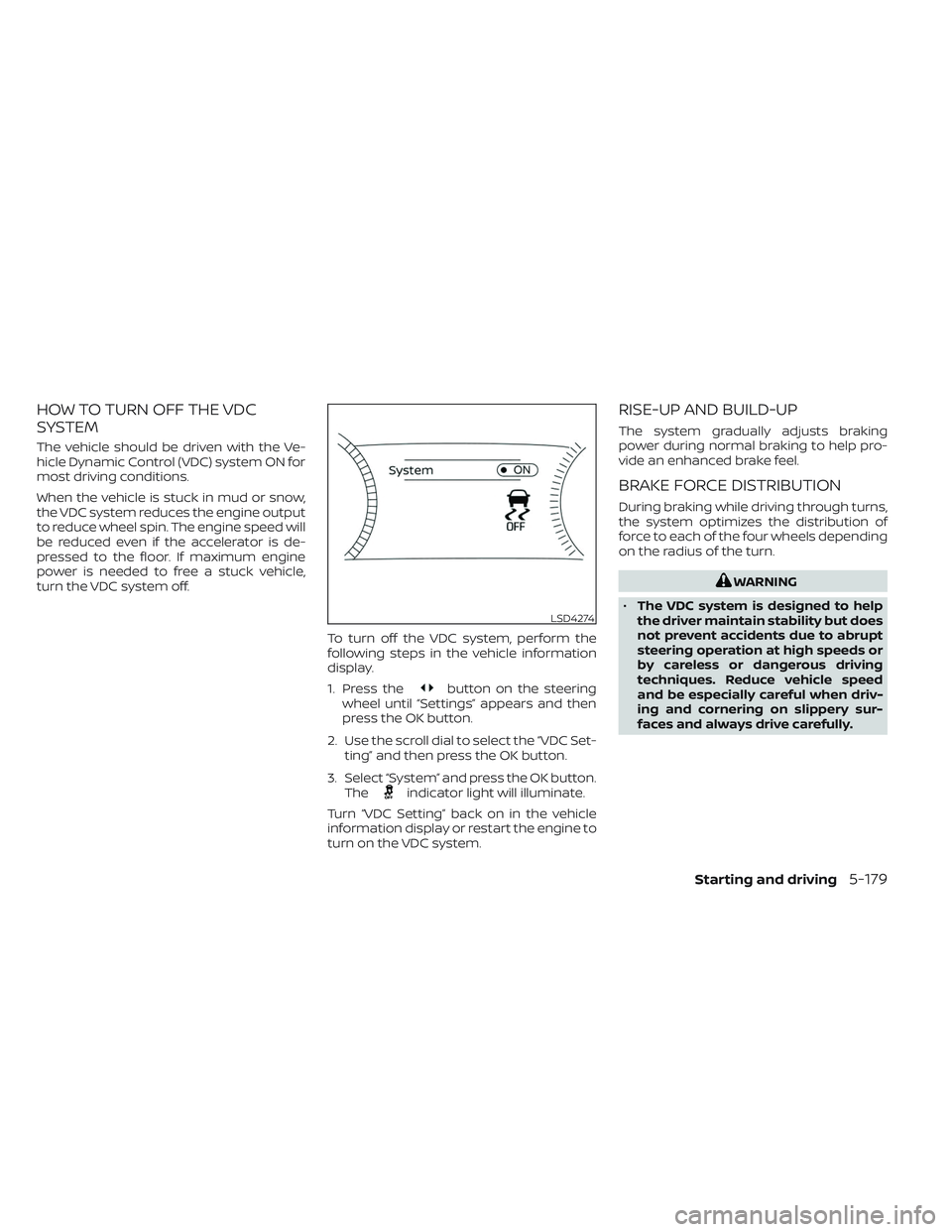
turn the VDC system off.To turn off the VDC system, perform the
following steps in the vehicle information
display.
1. Press the
button on the steering
wheel until “Settings” appears and then
press the OK button.
2. Use the scroll dial to select the “VDC Set- ting” and then press the OK button.
3. Select “System” and press the OK button. The
indicator light will illuminate.
Turn “VDC Setting” back on in the vehicle
information display or restart the engine to
turn on the VDC system.
RISE-UP AND BUILD-UP
The system gradually adjusts braking
power during normal braking to help pro-
vide an enhanced brake feel.
BRAKE FORCE DISTRIBUTION
During braking while driving through turns,
the system optimizes the distribution of
force to each of the four wheels depending
on the radius of the turn.
WARNING
• The VDC system is designed to help
the driver maintain stability but does
not prevent accidents due to abrupt
steering operation at high speeds or
by careless or dangerous driving
techniques. Reduce vehicle speed
and be especially careful when driv-
ing and cornering on slippery sur-
faces and always drive carefully.
LSD4274
Starting and driving5-179
Page 491 of 647
•Do not modif y the vehicle’s suspen-
sion. If suspension parts such as
shock absorbers, struts, springs, sta-
bilizer bars, bushings and wheels are
not NISSAN recommended for your
vehicle or are extremely deterio-
rated, the VDC system may not oper-
ate properly. This could adversely af-
fect vehicle handling performance,
and the
indicator light may flash
or both theandindicator
lights may illuminate.
• If brake related parts such as brake
pads, rotors and calipers are not
NISSAN recommended or are ex-
tremely deteriorated, the VDC sys-
tem may not operate properly and
both the
and theindicator
lights may illuminate.
• If engine control related parts are not
NISSAN recommended or are ex-
tremely deteriorated, both the
andindicator lights may
illuminate. •
When driving on extremely inclined
surfaces such as higher banked cor-
ners, the VDC system may not oper-
ate properly and the
indicator
light may flash or both theandindicator lights may illuminate.
Do not drive on these types of roads.
• When driving on an unstable surface
such as a turntable, ferry, elevator or
ramp, the
indicator light may
flash or both theandindi-
cator lights may illuminate. This is
not a malfunction. Restart the engine
af ter driving onto a stable surface.
• If wheels or tires other than the
NISSAN recommended ones are
used, the VDC system may not oper-
ate properly and the
indicator
light may flash or both theandindicator lights may illuminate.
• The VDC system is not a substitute
for winter tires or tire chains on a
snow covered road. The chassis control is an electric control
module that includes the following
functions:
• Intelligent Trace Control
• Active Ride Control (if so equipped)
INTELLIGENT TRACE CONTROL
(I-TC)
This system senses driving based on the
driver’s steering and acceleration/braking
patterns, and controls brake pressure at
individual wheels to aid tracing at corners
and help smooth vehicle response.
When the VDC system is turned off, the I-TC
is also turned off.
The amount of brake control is changed
based on Drive Mode Selector.
When the I-TC is not functioning properly,
the master warning light illuminates, and
the warning message “Chassis Control
System Error” will also appear in the vehicle
information display.
CHASSIS CONTROL
5-180Starting and driving
Page 492 of 647
If the chassis control warning message ap-
pears in the vehicle information display, it
may indicate that the I-TC is not function-
ing properly. Have the system checked as
soon as possible. It is recommended that
you visit a NISSAN dealer for this service. For
additional information, see “Vehicle infor-
mation display warnings and indicators”
(P. 2-37).
WARNING
The I-TC may not be effective depend-
ing on the driving condition. Always
drive carefully and attentively.
When the I-TC is operating, you may feel a
pulsation in the brake pedal and hear a
noise. This is normal and indicates that the
I-TC is operating properly. You may also feel
deceleration when the I-TC is operating.
However, this is not a malfunction.
ACTIVE RIDE CONTROL (ARC) (if so
equipped)
This system senses upper body motion
and controls four wheel brake pressure.
This will enhance ride comfort in an effort
to restrain uncomfortable upper body
movement when passing over undulated
road surfaces. When the VDC system is
turned off, the ARC is also turned off.
If the chassis control system error warning
message appears in the vehicle informa-
tion display, it may indicate that the ARC is
not functioning properly. Have the system
checked as soon as possible. It is recom-
mended that you visit an NISSAN dealer for
this service.
WARNING
The ARC may not be effective depend-
ing on the driving condition. Always
drive carefully and attentively.
When the ARC is operating, you may feel a
pulsation in the brake pedal and hear a
noise. This is normal and indicates that the
ARC is operating properly. You may also feel
deceleration when the ARC is operating.
However, this is not a malfunction.
WARNING
• Never rely solely on the hill descent
control system to control vehicle
speed when driving on steep down-
hill grades. Always drive carefully and
attentively when using the hill de-
scent control system and decelerate
the vehicle speed by depressing the
brake pedal if necessary. Be espe-
cially careful when driving on frozen,
muddy or extremely steep downhill
roads. Failure to control vehicle
speed may result in a loss of control
of the vehicle and possible serious
injury or death.
• The hill descent control may not con-
trol the vehicle speed on a hill under
all load or road conditions. Always be
prepared to depress the brake pedal
to control vehicle speed. Failure to do
so may result in a collision or serious
personal injury.
The hill descent control system helps
maintain vehicle speed when driving under
15 mph (25 km/h) on steeper downhill
grades. Hill descent control is useful when
engine braking alone cannot control ve-
hicle speed. Hill descent control applies the
HILL DESCENT CONTROL SYSTEM
(if so equipped)
Starting and driving5-181
Page 493 of 647
vehicle brakes to control vehicle speed al-
lowing the driver to concentrate on steer-
ing while reducing the burden of brake and
accelerator operation.
If the hill descent control system ON indica-
tor light is blinking, the hill descent control
is engaged; however, the hill descent con-
trol will not control the vehicle speed.
• Once the system is activated, the indica-tor light will remain on in the instrument
panel. For additional information, see “Hill
descent control system ON indicator
light” (P. 2-17).
If the accelerator or brake pedal is de-
pressed while the hill descent control sys-
tem is on, the system will stop operating
temporarily. As soon as the accelerator or
brake pedal is released, the hill descent
control system begins to function again if
the hill descent control operating condi-
tions are fulfilled.WARNING
• Never rely solely on the hill start as-
sist system to prevent the vehicle
from moving backward on a hill. Al-
ways drive carefully and attentively.
Depress the brake pedal when the
vehicle is stopped on a steep hill. Be
especially careful when stopped on a
hill on frozen or muddy roads. Failure
to prevent the vehicle from rolling
backwards may result in a loss of
control of the vehicle and possible
serious injury or death.
• The hill start assist system is not de-
signed to hold the vehicle at a stand-
still on a hill. Depress the brake pedal
when the vehicle is stopped on a
steep hill. Failure to do so may cause
the vehicle to roll backwards and
may result in a collision or serious
personal injury.
• The hill start assist may not prevent
the vehicle from rolling backwards
on a hill under all load or road condi-
tions. Always be prepared to depress
the brake pedal to prevent the ve-
hicle from rolling backwards. Failure
to do so may result in a collision or
serious personal injury. The hill start assist system automatically
keeps the brakes applied to help prevent
the vehicle from rolling backward in the
time it takes the driver to release the brake
pedal and apply the accelerator when the
vehicle is stopped on a hill.
Hill start assist will operate automatically
under the following conditions:
• The shif t lever is moved to a forward or
reverse gear.
• The vehicle is stopped completely on a hill by applying the brake.
The maximum holding time is 2 seconds.
Af ter 2 seconds the vehicle will begin to roll
back and hill start assist will stop operating
completely.
Hill start assist will not operate when the
shif t position is moved to N (Neutral) or P
(Park), or on a flat and level road.
HILL START ASSIST SYSTEM
5-182Starting and driving
Page 494 of 647
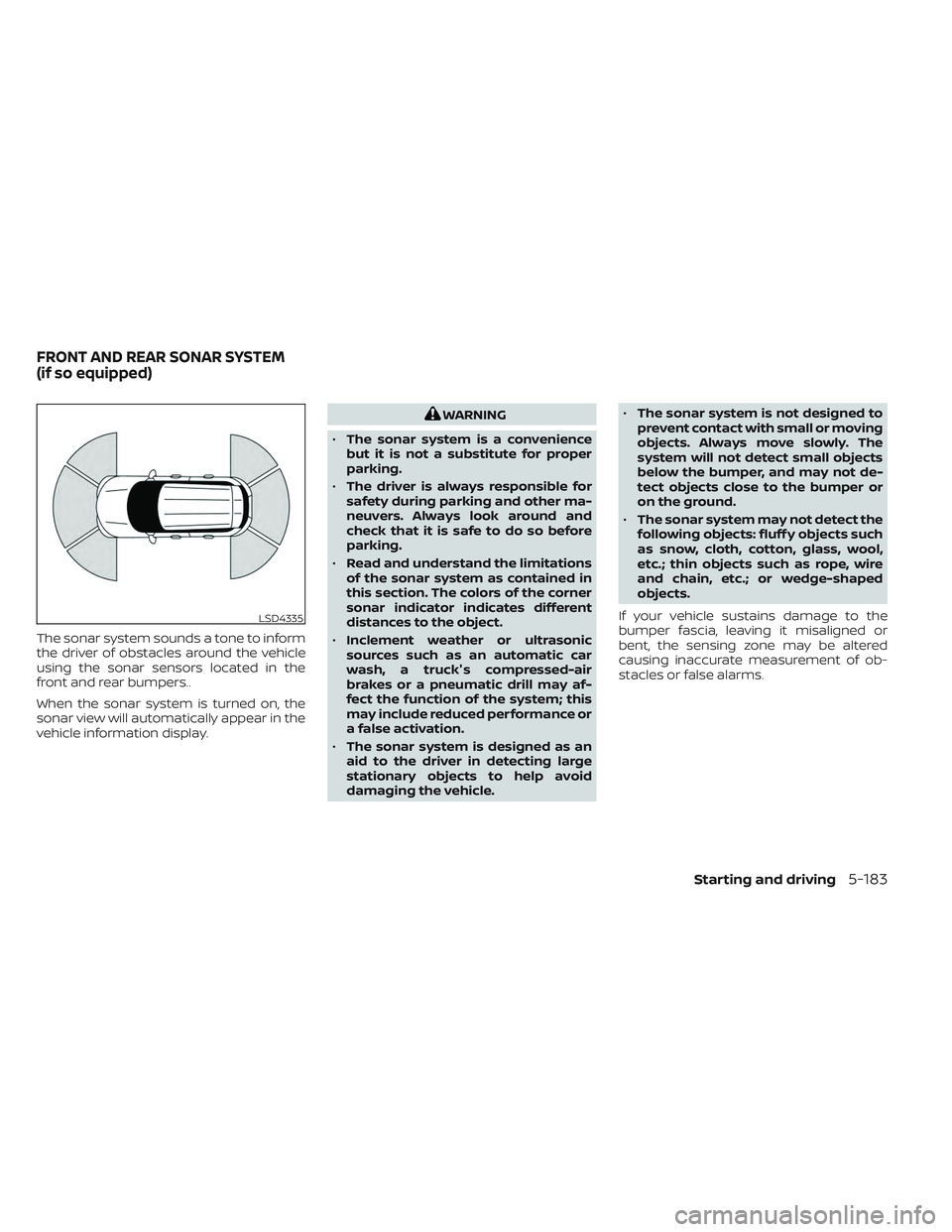
The sonar system sounds a tone to inform
the driver of obstacles around the vehicle
using the sonar sensors located in the
front and rear bumpers..
When the sonar system is turned on, the
sonar view will automatically appear in the
vehicle information display.
WARNING
• The sonar system is a convenience
but it is not a substitute for proper
parking.
• The driver is always responsible for
safety during parking and other ma-
neuvers. Always look around and
check that it is safe to do so before
parking.
• Read and understand the limitations
of the sonar system as contained in
this section. The colors of the corner
sonar indicator indicates different
distances to the object.
• Inclement weather or ultrasonic
sources such as an automatic car
wash, a truck's compressed-air
brakes or a pneumatic drill may af-
fect the function of the system; this
may include reduced performance or
a false activation.
• The sonar system is designed as an
aid to the driver in detecting large
stationary objects to help avoid
damaging the vehicle. •
The sonar system is not designed to
prevent contact with small or moving
objects. Always move slowly. The
system will not detect small objects
below the bumper, and may not de-
tect objects close to the bumper or
on the ground.
• The sonar system may not detect the
following objects: fluff y objects such
as snow, cloth, cotton, glass, wool,
etc.; thin objects such as rope, wire
and chain, etc.; or wedge-shaped
objects.
If your vehicle sustains damage to the
bumper fascia, leaving it misaligned or
bent, the sensing zone may be altered
causing inaccurate measurement of ob-
stacles or false alarms.
LSD4335
FRONT AND REAR SONAR SYSTEM
(if so equipped)
Starting and driving5-183
Page 498 of 647
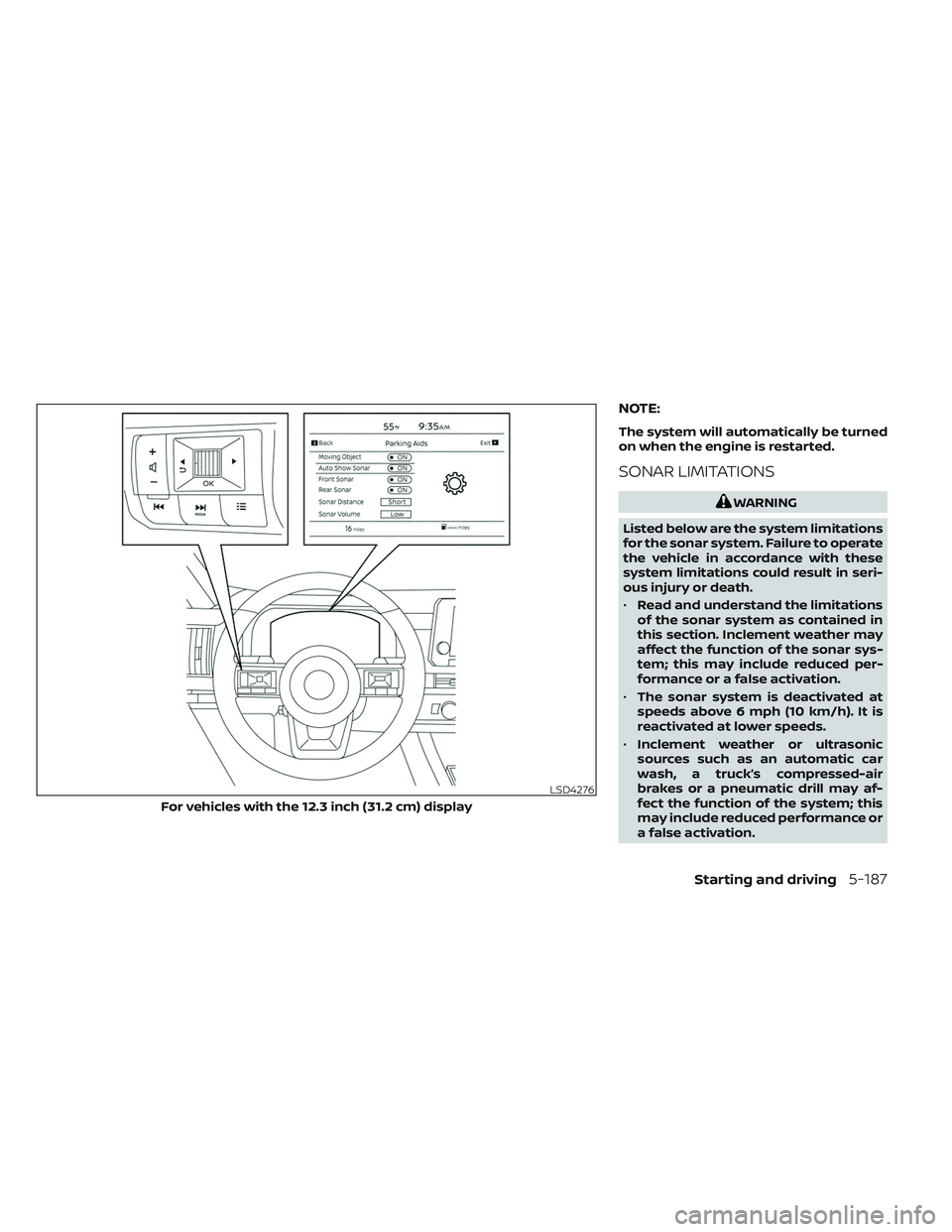
NOTE:
The system will automatically be turned
on when the engine is restarted.
SONAR LIMITATIONS
WARNING
Listed below are the system limitations
for the sonar system. Failure to operate
the vehicle in accordance with these
system limitations could result in seri-
ous injury or death.
• Read and understand the limitations
of the sonar system as contained in
this section. Inclement weather may
affect the function of the sonar sys-
tem; this may include reduced per-
formance or a false activation.
• The sonar system is deactivated at
speeds above 6 mph (10 km/h). It is
reactivated at lower speeds.
• Inclement weather or ultrasonic
sources such as an automatic car
wash, a truck’s compressed-air
brakes or a pneumatic drill may af-
fect the function of the system; this
may include reduced performance or
a false activation.
LSD4276
For vehicles with the 12.3 inch (31.2 cm) display
Starting and driving5-187