headlights NISSAN PATHFINDER 2022 Owner´s Manual
[x] Cancel search | Manufacturer: NISSAN, Model Year: 2022, Model line: PATHFINDER, Model: NISSAN PATHFINDER 2022Pages: 647, PDF Size: 8.48 MB
Page 351 of 647
–When driving without normal tire
conditions (for example, tire wear,
low tire pressure, installation of
spare tire, tire chains, nonstan-
dard wheels).
– When the vehicle is equipped with
non-original brake parts or sus-
pension parts.
– When you are towing a trailer or
other vehicle.
• The system may not function prop-
erly under the following conditions:
– On roads where there are multiple
parallel lane markers; lane mark-
ers that are faded or not painted
clearly; yellow painted lane mark-
ers; non-standard lane markers;
or lane markers covered with wa-
ter, dirt, snow, etc.
– On roads where the discontinued
lane markers are still detectable.
– On roads where there are sharp
curves.
–
On roads where there are sharply contrasting objects, such as shad-
ows, snow, water, wheel ruts, seams
or lines remaining af ter road re-
pairs. (The LDW system could detect
these items as lane markers.)
– On roads where the traveling lane
merges or separates.
– When the vehicle’s traveling direc-
tion does not align with the lane
marker.
– When traveling close to the ve-
hicle in front of you, which ob-
structs the lane camera unit de-
tection range.
– When rain, snow, dirt or an object
adheres to the windshield in front
of the lane camera unit.
– When the headlights are not
bright due to dirt on the lens or if
the aiming is not adjusted
properly.
– When strong light enters the lane
camera unit. (For example, the
light directly shines on the front of
the vehicle at sunrise or sunset.)
– When a sudden change in bright-
ness occurs. (For example, when
the vehicle enters or exits a tunnel
or under a bridge.)SYSTEM TEMPORARILY
UNAVAILABLE
If the vehicle is parked in direct sunlight
under high temperature conditions (over
approximately 104°F [40°C]) and then
started, the LDW system may be deacti-
vated automatically and the following
message will appear in the vehicle infor-
mation display: “Unavailable: High Cabin
Temperature."
When the interior temperature is reduced,
the LDW system will resume operating
automatically.
The LDW system is not designed to warn
under the following conditions:
• When you operate the lane change signal and change traveling lanes in the direc-
tion of the signal. (The LDW system will
become operable again approximately 2
seconds af ter the lane change signal is
turned off.)
• When the vehicle speed lowers to less than approximately 37 mph (60 km/h).
Af ter the above conditions have finished
and the necessary operating conditions
are satisfied, the LDW functions will resume.
5-40Starting and driving
Page 358 of 647
•The I-LI system will not operate at
speeds below approximately 37 mph
(60 km/h) or if it cannot detect lane
markers.
• Do not use the I-LI system under the
following conditions as it may not
function properly:
– During bad weather (rain, fog,
snow, etc.).
– When driving on slippery roads,
such as on ice or snow.
– When driving on winding or un-
even roads.
– When there is a lane closure due to
road repairs.
– When driving in a makeshif t or
temporary lane.
– When driving on roads where the
lane width is too narrow.
– When driving without normal tire
conditions (for example, tire wear,
low tire pressure, installation of
spare tire, tire chains, non-
standard wheels).
– When the vehicle is equipped with
nonoriginal brake parts or sus-
pension parts. –
When you are towing a trailer or
other vehicle.
– On roads where there are multiple
parallel lane markers; lane mark-
ers that are faded or not painted
clearly; yellow painted lane mark-
ers; non-standard lane markers;
or lane markers covered with wa-
ter, dirt, snow, etc.
– On roads where discontinued lane
markers are still detectable.
– On roads where there are sharp
curves.
–
On roads where there are sharply contrasting objects, such as shad-
ows, snow, water, wheel ruts, seams
or lines remaining af ter road re-
pairs. (The I-LI system could detect
these items as lane markers.)
– On roads where the traveling lane
merges or separates.
– When the vehicle’s traveling direc-
tion does not align with the lane
marker.
– When traveling close to the ve-
hicle in front of you, which ob-
structs the lane camera unit de-
tection range. –
When rain, snow or dirt adheres to
the windshield in front of the lane
camera unit.
– When the headlights are not
bright due to dirt on the lens or if
the aiming is not adjusted
properly.
– When strong light enters the lane
camera unit. (For example, the
light directly shines on the front of
the vehicle at sunrise or sunset.)
– When a sudden change in bright-
ness occurs. (For example, when
the vehicle enters or exits a tunnel
or under a bridge.)
While the I-LI system is operating, you may
hear a sound of brake operation. This is
normal and indicates that the I-LI system is
operating properly.
Starting and driving5-47
Page 379 of 647
–When the vehicle’s traveling direc-
tion does not align with the lane
markers.
– When traveling close to the ve-
hicle in front of you, which ob-
structs the lane camera unit de-
tection range.
– When rain, snow or dirt adheres to
the windshield in front of a lane
camera unit.
– When the headlights are not
bright due to dirt on the lens or if
aiming is not adjusted properly.
– When strong light enters a lane
camera unit. (For example: light
directly shines on the front of the
vehicle at sunrise or sunset.)
– When a sudden change in bright-
ness occurs. (For example: when
the vehicle enters or exits a tunnel
or under a bridge.)
• Do not use the I-BSI system under the
following conditions because the
system may not function properly.
– During bad weather (for example:
rain, fog, snow, etc.).
– When driving on slippery roads,
such as on ice or snow, etc. –
When driving on winding or un-
even roads.
– When there is a lane closure due to
road repairs.
– When driving in a makeshif t or
temporary lane.
– When driving on roads where the
lane width is too narrow.
– When driving with a tire that is not
within normal tire conditions (e.g.,
tire wear, low tire pressure, instal-
lation of spare tire, tire chains,
nonstandard wheels).
– When the vehicle is equipped with
non-original brake parts or sus-
pension parts.
– When towing a trailer or other
vehicle.
• Excessive noise (e.g., audio system
volume, open vehicle window) will in-
terfere with the chime sound, and it
may not be heard.I-BSI DRIVING SITUATIONS
Indicator on
Indicator off
Indicator flashing
5-68Starting and driving
Page 434 of 647
–When driving on roads where
there are multiple lanes or unclear
lane markers due to road
construction
– When driving on roads where
there are sharply contrasting ob-
jects, such as shadows, snow, wa-
ter, wheel ruts, seams, or lines re-
maining af ter road repairs (the
Steering Assist could detect these
items as lane markers)
– When driving on roads where the
traveling lane merges or
separates
• Do not use the Steering Assist under
the following conditions because the
system may not properly detect lane
markers. Doing so could cause a loss
of vehicle control and result in an ac-
cident.
– During bad weather (rain, fog,
snow, dust, etc.)
– When rain, snow, sand, etc., is
thrown up by the wheels of other
vehicles
– When dirt, oil, ice, snow, water, or
another object adheres to the
camera unit –
When the lens of the camera unit
is foggy
– When strong light (for example,
sunlight or high beams from on-
coming vehicles) shines on the
camera
– When the headlights are not
bright due to dirt on the lens or
the headlights are off in tunnels or
darkness
– When a sudden change in bright-
ness occurs (for example, when
the vehicle enters or exits a tunnel
or is under a bridge)
– When driving on roads where the
traveling lane merges or sepa-
rates or where there are tempo-
rary lane markers because of road
construction
– When there is a lane closure due to
road repairs
– When driving on a bumpy road
surface, such as an uneven dirt
road
– When driving on sharp curves or
winding roads
– When driving on repeated uphill
and downhill roads •
Do not use the Steering Assist under
the following conditions because the
system will not operate properly:
– When driving with a tire that is not
within normal tire conditions (for
example, tire wear, abnormal tire
pressure, installation of a spare
tire, tire chains, nonstandard
wheels)
– When the vehicle is equipped with
non-original brake or suspension
parts
– When an object such as a sticker
or cargo obstructs the camera
– When excessively heavy baggage
is loaded in the rear seat or lug-
gage area of your vehicle
– When the vehicle load capacity is
exceeded
– When towing a trailer or other
vehicle
• Excessive noise will interfere with the
warning chime sound, and the beep
may not be heard.
Starting and driving5-123
Page 453 of 647
•The AEB with Pedestrian Detection
system does not detect the following
objects:
– Pedestrians that are small (for ex- ample, children), in a sitting posi-
tion, operating toys/skateboards,
on scooters or in wheelchairs, or
not in an upright standing or
walking position.
– Animals of any size.
– Obstacles (for example, cargo or debris) on the roadway or
roadside.
– Oncoming or crossing vehicles.
– Vehicles where the tires are diffi- cult to see or the shape of the rear
of the vehicle is unclear or
obstructed.
– Parked vehicles.
• The AEB with Pedestrian Detection
system has some performance limi-
tations.
– If a stationary vehicle is in the ve-
hicle’s path, the system will not
function when the vehicle ap-
proaches the stationary vehicle at
speeds over approximately 50
mph (80 km/h). –
Pedestrian detection will not
function when the vehicle is
driven at speeds over approxi-
mately 37 mph (60 km/h) or below
approximately 6 mph (10km/h).
• For pedestrians, the AEB with Pedes-
trian Detection system will not issue
the first warning.
• The AEB with Pedestrian Detection
system may not function properly or
detect a vehicle or pedestrians
ahead in the following conditions:
– In poor visibility conditions (such
as rain, snow, fog, dust storms,
sand storms, smoke, and road
spray from other vehicles).
– If dirt, ice, snow, fog or other ma-
terial is covering the radar sensor
area or camera area of
windshield.
– If a strong light (for example, sun-
light or high beams) enters the
front camera or a sudden change
in brightness occurs (for example,
entering a tunnel or driving in
lightning). –
In dark or dimly lit conditions,
such as at night or in tunnels, in-
cluding cases where your vehi-
cle’s headlights are off or dim, or
the tail lights of the vehicle ahead
are off.
– When the direction of the camera
is misaligned.
– When driving on a steep downhill
slope, on roads with sharp curves,
and/or bumpy or dirt roads.
– If there is interference by other ra-
dar sources.
– When your vehicle’s position or
movement is changed quickly or
significantly (for example, lane
change, turning vehicle, abrupt
steering, sudden acceleration or
deceleration).
– When your vehicle or the vehicle
or pedestrian ahead moves
quickly or significantly such that
the system cannot detect and re-
act in time (for example, pedes-
trian moving quickly toward the
vehicle at close range, vehicle cut-
ting in, changing lanes, making a
turn, steering abruptly, sudden
acceleration or deceleration).
5-142Starting and driving
Page 501 of 647
•When the fan speed control is in any
position other than “OFF,” (0) while the
air flow control is in the front defogger
position.
• When the front defroster switch is on.
• When the rear window defroster switch
is on.
• When the temperature inside the ve-
hicle is lower than approximately 20°C
(68°F), unless the Air Conditioning ECO
customize option is selected, and the
ECO driving mode is on.
• When the temperature inside the ve-
hicle is higher than approximately 30°C
(86°F), unless the Air Conditioning ECO
customize option is selected, and the
ECO driving mode is on. (When the air
conditioner is off, the Idling Stop Sys-
tem will operate.)
• When the fan speed of the air condi-
tioner is set to the maximum speed,
unless the Air Conditioning ECO cus-
tomize option is selected, and the ECO
driving mode is on.
• When the Idling Stop OFF switch is
turned on.
• When the power consumption is large.
• When the vehicle is traveling at alti-
tudes higher than 6,562 f t (2,000 m). •
When the accelerator pedal is
depressed.
• When the shif t lever is in the R (Reverse)
position.
• When the brake pedal is not firmly
depressed.
• When stopping the vehicle on steep
sloping roads.
NOTE:
The engine will not restart even if the
brake pedal is released while the Idling
Stop System is activated under the fol-
lowing conditions: (The engine may re-
start by the other engine restart condi-
tions.)
• When the shif t position is in the P (Park)
position.
NOTE:
It may take some time until the Idling
Stop System activates under the follow-
ing conditions:
• When the battery is discharged.
• When the outside temperature is low or
high.
•
When the battery is replaced or the bat-
tery terminal is disconnected for ex-
tended periods and then reconnected.
NOTE:
When the Idling Stop System indicator
light illuminates, the engine starts run-
ning automatically under at least one of
the following conditions:
• The brake pedal is released with the
shif t lever in the D (Drive) or N (Neutral)
position.
• The shif t position is placed in the D
(Drive) or R (Reverse) position from the
N (Neutral) or P (Park) position.
• The driver’s seat belt is unfastened, or
the driver’s door is open.
• The battery voltage becomes low (due
to electrical load from other vehicle
systems like headlights, heaters, etc.,
or auxiliary devices connected to the
12 volt socket inside the vehicle).
• The vehicle speed is above about 1 mph
(2 km/h).
• When the rear window defroster is
operated.
• When the temperature inside the ve-
hicle is lower than approximately 68°F
(20°C), unless the Air Conditioning ECO
customize option is selected, and the
ECO driving mode is on.
5-190Starting and driving
Page 534 of 647
8 Do-it-yourself
Maintenance precautions.......................8-2
Engine compartment check locations ...........8-4
Engine cooling system ..........................8-5
Checking engine coolant level ................8-6
Changing engine coolant ....................8-6
Engine oil .......................................8-7
Checking engine oil level .....................8-7
Changing engine oil and oil filter ..............8-7
Automatic Transmission Fluid (ATF) ..............8-11
Brake fluid ...................................... 8-12
Windshield-washer fluid ........................8-12
Windshield-washer fluid reservoir ...........8-12
Battery......................................... 8-14
Jump starting ............................... 8-15
Variable voltage control system
(if so equipped) ................................. 8-16
Drive belt ....................................... 8-16
Spark plugs .................................... 8-17
Replacing spark plugs ....................... 8-17
Air cleaner ..................................... 8-18In-cabin microfilter
.......................... 8-18
Windshield wiper blades ........................8-19
Cleaning .................................... 8-19
Replacing ................................... 8-19
Brakes ......................................... 8-21
Fuses .......................................... 8-21
Engine compartment .......................8-22
Passenger compartment ...................8-23
Battery replacement ........................... 8-25
NISSAN Intelligent Key® ......................8-25
Lights .......................................... 8-27
Headlights .................................. 8-27
Fog lights (if so equipped) ...................8-27
Exterior and interior lights ...................8-27
Wheels and tires ............................... 8-29
Tire pressure ................................ 8-29
Tire labeling ................................. 8-34
Types of tires ................................
8-36
Tir
e chains .................................. 8-37
Changing wheels and tires ..................8-38
Page 560 of 647
HEADLIGHTS
For additional information on headlight
bulb replacement, refer to the instructions
outlined in this section.
Replacing the LED headlight bulb
If LED headlight bulb replacement is re-
quired, it is recommended that you visit a
NISSAN dealer for this service.
FOG LIGHTS (if so equipped)
For additional information on fog light bulb
replacement, refer to the instructions out-
lined in this section.
Replacing the LED fog light bulb
If LED fog light bulb replacement is re-
quired, it is recommended that you visit a
NISSAN dealer for this service.
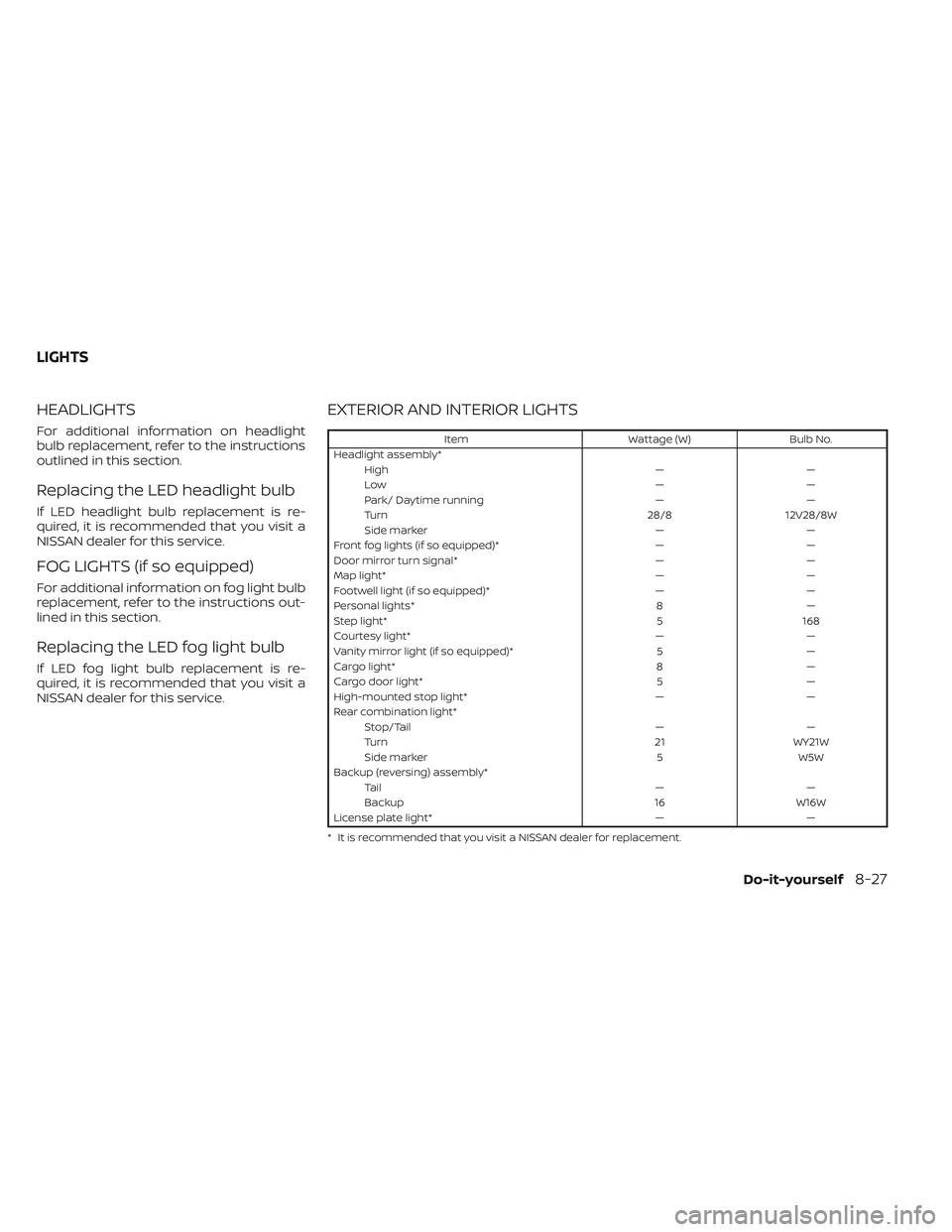
EXTERIOR AND INTERIOR LIGHTS
ItemWattage (W)Bulb No.
Headlight assembly* High ——
Low ——
Park/ Daytime running ——
Turn 28/812V28/8W
Side marker ——
Front fog lights (if so equipped)* ——
Door mirror turn signal* ——
Map light* ——
Footwell light (if so equipped)* ——
Personal lights* 8—
Step light* 5168
Courtesy light* ——
Vanity mirror light (if so equipped)* 5—
Cargo light* 8—
Cargo door light* 5—
High-mounted stop light* ——
Rear combination light* Stop/Tail ——
Turn 21WY21W
Side marker 5W5W
Backup (reversing) assembly* Ta i l ——
Backup 16W16W
License plate light* ——
* It is recommended that you visit a NISSAN dealer for replacement.
LIGHTS
Do-it-yourself8-27
Page 578 of 647
Doors and engine hood:Check that the
doors and engine hood operate properly.
Also ensure that all latches lock securely.
Lubricate hinges, latches, latch pins, rollers
and links if necessary. Make sure that the
secondary latch keeps the hood from
opening when the primary latch is
released.
When driving in areas using road salt or
other corrosive materials, check lubrica-
tion frequently.
Check that the gas stays or struts properly
and securely hold the hood, trunk, or rear
hatch fully open. If the hood, trunk, or rear
hatch is not held open, have the gas stays
or struts replaced.
Lights*: Clean the headlights on a regular
basis. Make sure that the headlights, stop
lights, tail lights, turn signal lights, and other
lights are all operating properly and in-
stalled securely. Also check headlight aim.
Road wheel nuts (lug nuts)*: When check-
ing the tires, make sure no wheel nuts are
missing, and check for any loose wheel
nuts. Tighten if necessary.
Tire rotation*: Rotate tires at the specified
interval shown in the maintenance
schedule. Tires*:
Check the pressure with a gauge
of ten and always prior to long distance
trips. If necessary, adjust the pressure in all
tires, including the spare, to the pressure
specified. Check carefully for damage, cuts
or excessive wear.
Tire Pressure Monitoring System (TPMS)
tire pressure sensor: It is recommended
that you replace the TPMS tire pressure
sensor assembly when the tires are re-
placed due to wear or age.
Wheel alignment and balance: If the ve-
hicle should pull to either side while driving
on a straight and level road, or if you detect
uneven or abnormal tire wear, there may
be a need for wheel alignment. If the steer-
ing wheel or seat vibrates at normal high-
way speeds, wheel balancing may be
needed.
For additional information regarding tires,
refer to “Important Tire Safety Information”
(US) or “Tire Safety Information” (Canada) in
the Warranty Information Booklet.
Windshield: Clean the windshield on a
regular basis. Check the windshield at least
every six months for cracks or other dam-
age. Have a damaged windshield repaired
by a qualified repair facility. It is recom-
mended that you have a damaged wind- shield repaired by a NISSAN dealer, or a
NISSAN Certified Collision Center. To locate
a collision center in your area, refer to
http://collision.nissanusa.com.
Windshield wiper blades*:
Check for
cracks or wear if they do not wipe properly.
Inside the vehicle
The maintenance items listed here should
be checked on a regular basis, such as
when performing scheduled maintenance,
cleaning the vehicle, etc.
Accelerator pedal: Check the pedal for
smooth operation and make sure the
pedal does not catch or require uneven
effort. Keep the floor mat away from the
pedal.
Brake pedal: Check the pedal for smooth
operation. If the brake pedal suddenly goes
down further than normal, the pedal feels
spongy or the vehicle seems to take longer
to stop, have your vehicle checked imme-
diately. It is recommended that you visit a
NISSAN dealer for this service. Keep the
floor mat away from the pedal.
Brakes: Check that the brakes do not pull
the vehicle to one side when applied.
Maintenance and schedules9-3
Page 638 of 647
Front air bag system (See supplemental
restraint system)...............1-68Front and rear sonar system.......5-183Front power seat adjustment........1-4Front seats....................1-2Front-door pocket..............2-101FuelCapacities and recommended
fuel/lubricants
...............10-2Fuel economy...............5-171Fuel gauge..................2-10Fuel octane rating.............10-6Fuel recommendation..........10-4Fuel efficient driving tips..........5-170Fuel gauge...................2-10Fuel-filler door.................3-29Fuses.......................8-21Fusible links..................8-22
G
Garage door opener, HomeLink® Universal
Transceiver.......2- 118, 2-119, 2-121, 2-122Gauge
Engine coolant temperature gauge. . .2-9Fuel gauge..................2-10Odometer................. .2-8Speedometer..............2-6, 2-7Tachometer.................2-8Trip odometer................2-8General maintenance.............9-2Glove box...................2-104Glove box lock................2-104
H
Hazard warning flasher switch........6-2Head restraints.................1-12Head Up Display (HUD)............2-90Headlight and turn signal switch.....2-78Headlight control switch...........2-78Headlights...................8-27Heated 2nd row seat switches.......2-87Heated seat switches............2-86Heated seats................. .2-85Heated steering wheel switch.......2-88Heater
Heater and air conditioner controls. .4-33Heater operation.............4-34Hill descent control switch.........2-89Hill descent control system........5-181Hill start assist system...........5-182HomeLink® Universal
Transceiver.......2- 118, 2-119, 2-121, 2-122Hood.......................3-21Hook
Luggage hook...............2-109Horn...................... .2-85
I
Idling Stop System..............5-189Ignition switch
Push-button ignition switch.......5-13Immobilizer system..........2-72,5-16Important vehicle information label. . .10-12
In-cabin microfilter..............8-18Increasing fuel economy..........5-171IndicatorNISSAN Intelligent Key® battery discharge
indicator
...................5-15Indicator lights and audible reminders
(See warning/indicator lights and audible
reminders)
...................2-12Inside automatic anti-glare mirror. . . .3-33Instrument brightness control.......2-83Instrument panel.............0-6, 2-4Instrument panel dimmer switch.....2-83Intelligent Around View Monitor......4-10Intelligent Blind Spot Intervention
(I-BSI)...................... .5-62Intelligent Cruise Control (ICC)
(for vehicles with ProPILOT Assist). . . .5-102Intelligent Driver Alertness (I-DA).....5-165Intelligent Forward Collision Warning
(I-FCW).....................5-149Intelligent Key system
Key operating range............3-8Key operation................3-9Mechanical key................3-3Remote keyless entry operation. . . .3-13Troubleshooting guide..........3-16Warning signals...............3-16Intelligent Lane Intervention (I-LI).....5-42Intelligent Trace Control (I-TC).......5-180Interior light..................2-116ISOFIX child restraints.............1-36
11-3