warning light NISSAN PATHFINDER 2022 Owner´s Manual
[x] Cancel search | Manufacturer: NISSAN, Model Year: 2022, Model line: PATHFINDER, Model: NISSAN PATHFINDER 2022Pages: 647, PDF Size: 8.48 MB
Page 329 of 647
AUTOMATIC TRANSMISSION (A/T)
WARNING
• Do not depress the accelerator pedal
while shif ting from P (Park) or N (Neu-
tral) to R (Reverse), D (Drive), or L
(Low). Always depress the brake
pedal until shif ting is completed.
Failure to do so could cause you to
lose control and have an accident.
• Cold engine idle speed is high, so use
caution when shif ting into a forward
or reverse gear before the engine has
warmed up.
• Do not downshif t abruptly on slip-
pery roads. This may cause a loss of
control.
• Never shif t to either the P (Park) or R
(Reverse) position while the vehicle is
moving forward and P (Park) or D
(Drive) position while the vehicle is
reversing. This could cause an acci-
dent or damage the transmission.
CAUTION
• To avoid possible damage to your ve-
hicle; when stopping the vehicle on
an uphill grade, do not hold the ve-
hicle by depressing the accelerator
pedal. The foot brake should be used
for this purpose.
• Except in an emergency, do not shif t
to the N (Neutral) position while driv-
ing. Coasting with the transmission
in the N (Neutral) position may cause
serious damage to the transmission.
The A/T in your vehicle is electronically con-
trolled to produce maximum power and
smooth operation.
The recommended operating procedures
for this transmission are shown on the fol-
lowing pages. Follow these procedures for
maximum vehicle performance and driv-
ing enjoyment.
Engine power may be automatically re-
duced to protect the A/T if the engine
speed increases quickly when driving on
slippery roads or while being tested on
some dynamometers.Starting the vehicle
1. Af ter starting the engine, fully depress the foot brake pedal before moving the
shif t position out of the P (Park) position.
This Automatic Transmission is de-
signed so that the foot brake pedal
must be depressed before shif ting
from P (Park) to any driving position
while the ignition switch is in the ON
position.
The shif t position cannot be moved
out of the P (Park) position and into
any of the other positions if the igni-
tion switch is placed in the LOCK, OFF
or AUTO ACC position while the ready
light illuminates.
2. Keep the foot brake pedal depressed and move the shif t lever to a driving
position.
3. Release the parking brake and foot brake pedal and then gradually start the
vehicle in motion.
DRIVING THE VEHICLE
5-18Starting and driving
Page 334 of 647
Fail-safe
If the vehicle is driven under extreme
conditions, such as excessive wheel
spinning and subsequent hard braking,
the fail-safe system may be activated.
The Malfunction Indicator Light (MIL)
may come on to indicate the fail-safe
mode is activated. For additional infor-
mation, see “Malfunction Indicator Light
(MIL)” (P. 2-19). This will occur even if all
electrical circuits are functioning prop-
erly. In this case, place the ignition switch
in the OFF position and wait for 10 sec-
onds. Then push the switch back to the
ON position. The vehicle should return to
its normal operating condition. If it does
not return to its normal operating condi-
tion, have the transmission checked and
repaired, if necessary. It is recommended
that you visit a NISSAN dealer for this
service.
WARNING
When the high fluid temperature pro-
tection mode or fail-safe operation oc-
curs, vehicle speed may be gradually
reduced. The reduced speed may be
lower than other traffic, which could in-
crease the chance of a collision. Be es-
pecially careful when driving. If neces-
sary, pull to the side of the road at a safe
place and allow the transmission to re-
turn to normal operation, or have it re-
paired if necessary.WARNING
• Be sure the parking brake is fully re-
leased before driving. Failure to do so
can cause brake failure and lead to
an accident.
• Do not release the parking brake
from outside the vehicle.
• Do not use the shif t lever in place of
the parking brake. When parking, be
sure the parking brake is fully
engaged.
• To help avoid risk of injury or death
through unintended operation of the
vehicle and/or its systems, do not
leave children, people who require
the assistance of others or pets unat-
tended in your vehicle. Additionally,
the temperature inside a closed ve-
hicle on a warm day can quickly be-
come high enough to cause a signifi-
cant risk of injury or death to people
and pets.
PARKING BRAKE
Starting and driving5-23
Page 335 of 647
ELECTRONIC PARKING BRAKE
(switch type)
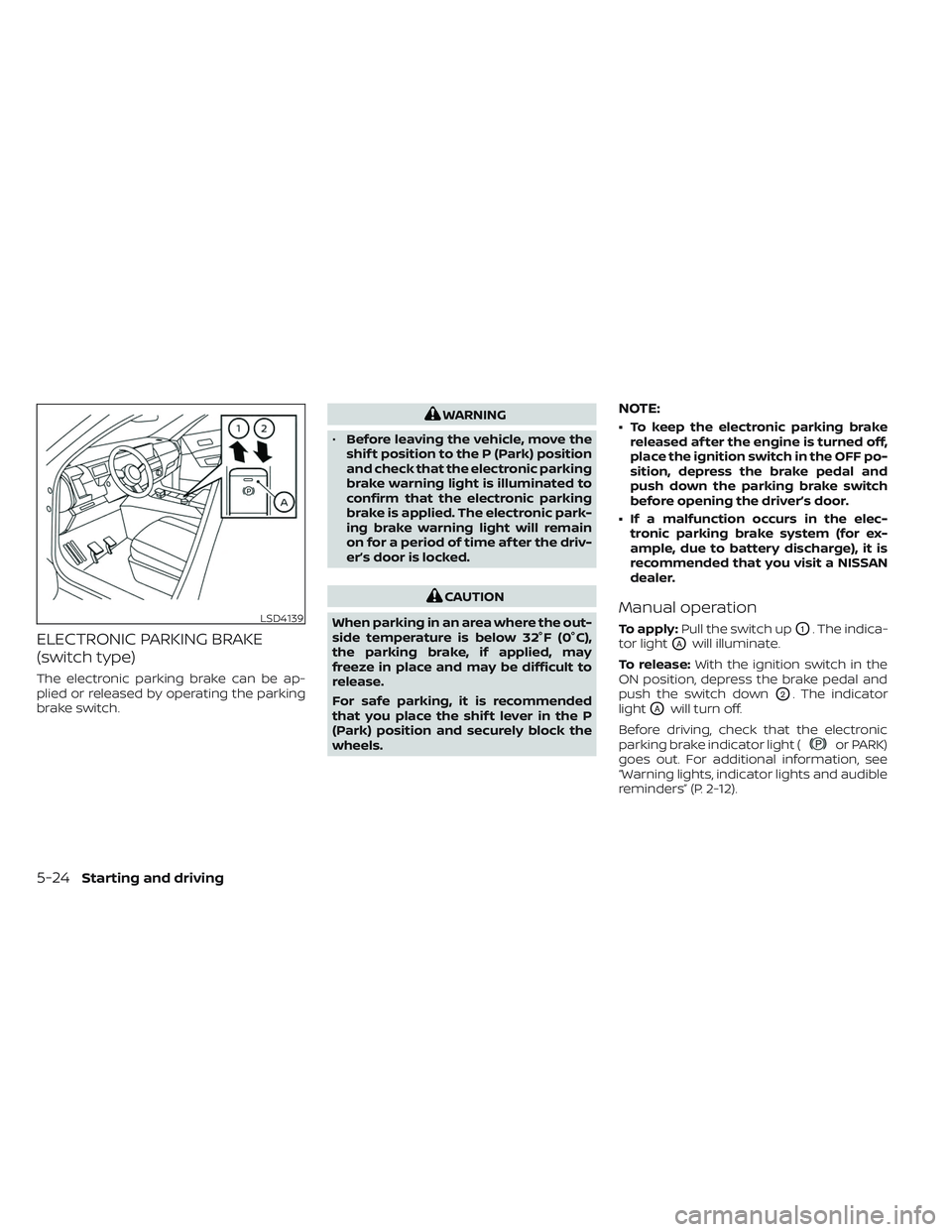
The electronic parking brake can be ap-
plied or released by operating the parking
brake switch.
WARNING
• Before leaving the vehicle, move the
shif t position to the P (Park) position
and check that the electronic parking
brake warning light is illuminated to
confirm that the electronic parking
brake is applied. The electronic park-
ing brake warning light will remain
on for a period of time af ter the driv-
er’s door is locked.
CAUTION
When parking in an area where the out-
side temperature is below 32°F (0°C),
the parking brake, if applied, may
freeze in place and may be difficult to
release.
For safe parking, it is recommended
that you place the shif t lever in the P
(Park) position and securely block the
wheels.
NOTE:
• To keep the electronic parking brake released af ter the engine is turned off,
place the ignition switch in the OFF po-
sition, depress the brake pedal and
push down the parking brake switch
before opening the driver’s door.
• If a malfunction occurs in the elec- tronic parking brake system (for ex-
ample, due to battery discharge), it is
recommended that you visit a NISSAN
dealer.
Manual operation
To apply: Pull the switch upO1. The indica-
tor light
OAwill illuminate.
To release: With the ignition switch in the
ON position, depress the brake pedal and
push the switch down
O2. The indicator
light
OAwill turn off.
Before driving, check that the electronic
parking brake indicator light (
or PARK)
goes out. For additional information, see
“Warning lights, indicator lights and audible
reminders” (P. 2-12).
LSD4139
5-24Starting and driving
Page 336 of 647
NOTE:
• While the electronic parking brake isapplied or released, an operating
sound is heard from the lower side of
the rear seat. This is normal and does
not indicate a malfunction.
• When the electronic parking brake is frequently applied and released in a
short period of time, the parking brake
may not operate in order to prevent the
parking brake system from overheat-
ing. If this occurs, operate the elec-
tronic parking brake switch again af ter
waiting approximately 1 minute.
• If the electronic parking brake must be applied while driving in an emergency,
pull up and hold the parking brake
switch. When you release the parking
brake switch, the parking brake will be
released. • While pulling up the electronic parking
brake switch during driving, the park-
ing brake is applied and a chime
sounds. The electronic parking brake
indicator light in the meter and in the
parking brake switch illuminates. This
does not indicate a malfunction. The
electronic parking brake indicator light
in the meter and in the parking brake
switch turns off when the parking
brake is released.
• When pulling the electronic parking brake switch up with the ignition
switch in the OFF or AUTO ACC position,
the parking brake switch indicator
light will continue to illuminate for a
short period of time. The automatic brake hold function main-
tains the braking force without the driver
having to depress the brake pedal when
the vehicle is stopped at a traffic light or
intersection. As soon as the driver de-
presses the accelerator pedal again, the
automatic brake hold function is deacti-
vated and the braking force is released. The
operating status of the automatic brake
hold can be displayed on the vehicle infor-
mation display.
For additional information, see “Warning
lights, indicator lights and audible remind-
ers” (P. 2-12).
WARNING
• The automatic brake hold function is
not designed to hold the vehicle on a
steep hill or slippery road. Never use
the automatic brake hold when the
vehicle is stopped on a steep hill or
slippery road. Failure to do so may
cause the vehicle to move.
• The automatic brake hold warning
may appear in the vehicle informa-
tion display to request that the driver
retake control by depressing the
brake pedal.
AUTOMATIC BRAKE HOLD
Starting and driving5-25
Page 337 of 647
•When the automatic brake hold func-
tion is activated but fails to maintain
the vehicle at a standstill, depress the
brake pedal to stop the vehicle. If the
vehicle unexpectedly moves due to
outside conditions, the chime may
sound and automatic brake hold
warning may illuminate in the vehicle
information display.
• Be sure to deactivate the automatic
brake hold function when using a car
wash or towing your vehicle.
• Make sure to place the shif t lever in
the P (Park) position and apply the
parking brake when parking your ve-
hicle, entering or exiting the vehicle,
or loading luggage. Failure to do so
could cause the vehicle to move or
roll away unexpectedly and result in
serious personal injury or property
damage. •
If any of the following conditions oc-
cur, the automatic brake hold func-
tion may not function. Have the sys-
tem checked promptly. It is
recommended that you visit a
NISSAN dealer for this service. Failure
to operate the vehicle in accordance
with these conditions could cause
the vehicle to move or roll away un-
expectedly and result in serious per-
sonal injury or property damage.
– A warning message appears in the
vehicle information display.
– The indicator light on the auto-
matic brake hold switch does not
illuminate when the switch is
pushed. •
The automatic brake hold function
will not be activated if the Slip indica-
tor light, electronic parking brake
warning light or master warning light
illuminate and the chassis control
system fault message appears in the
vehicle information display.
• To maintain the braking force to keep
the vehicle to a standstill, a noise
may be heard. This is not a
malfunction.
5-26Starting and driving
Page 338 of 647
HOW TO ACTIVATE/DEACTIVATE
THE AUTOMATIC BRAKE HOLD
FUNCTION
How to activate the automatic
brake hold function
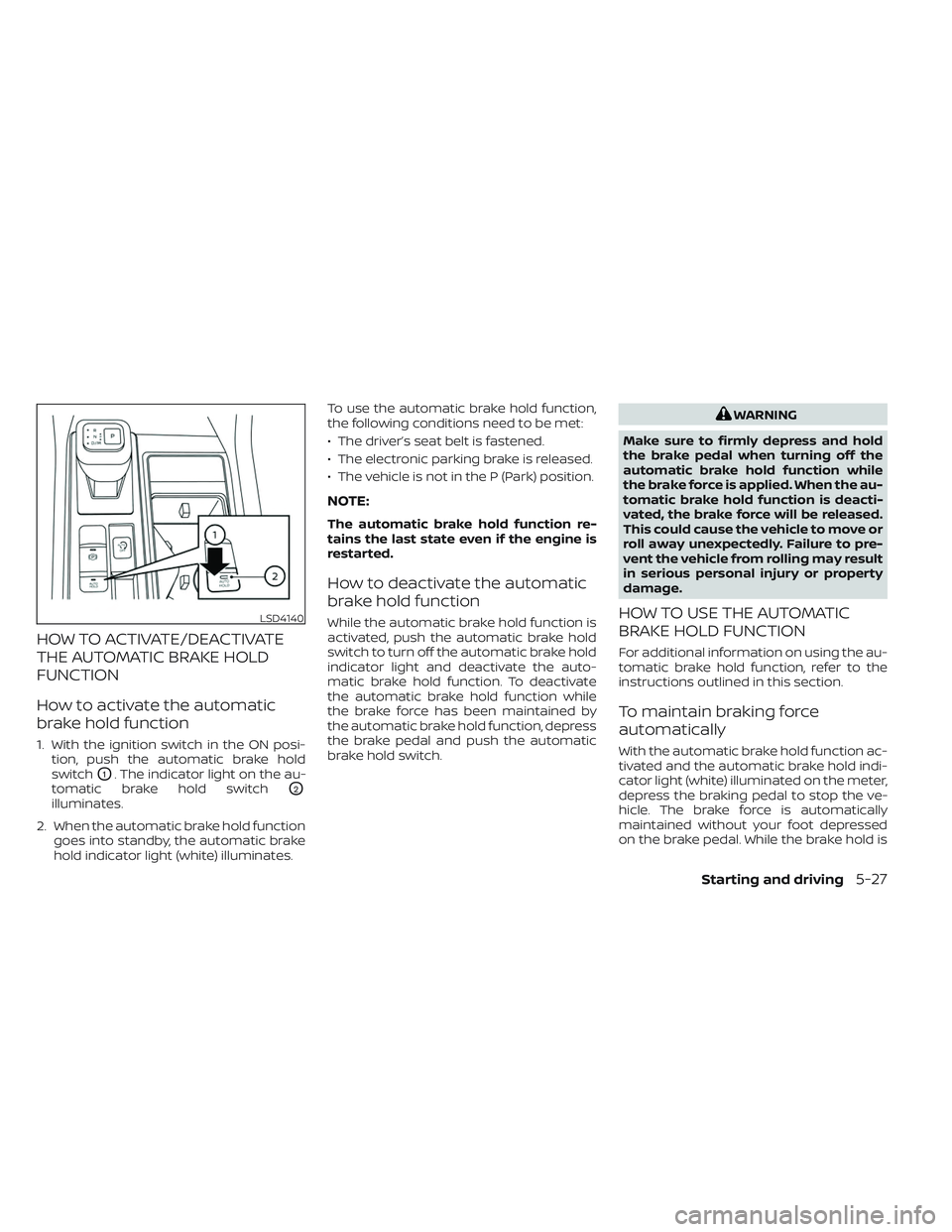
1. With the ignition switch in the ON posi-tion, push the automatic brake hold
switch
O1. The indicator light on the au-
tomatic brake hold switch
O2
illuminates.
2. When the automatic brake hold function goes into standby, the automatic brake
hold indicator light (white) illuminates. To use the automatic brake hold function,
the following conditions need to be met:
• The driver’s seat belt is fastened.
• The electronic parking brake is released.
• The vehicle is not in the P (Park) position.
NOTE:
The automatic brake hold function re-
tains the last state even if the engine is
restarted.
How to deactivate the automatic
brake hold function
While the automatic brake hold function is
activated, push the automatic brake hold
switch to turn off the automatic brake hold
indicator light and deactivate the auto-
matic brake hold function. To deactivate
the automatic brake hold function while
the brake force has been maintained by
the automatic brake hold function, depress
the brake pedal and push the automatic
brake hold switch.
WARNING
Make sure to firmly depress and hold
the brake pedal when turning off the
automatic brake hold function while
the brake force is applied. When the au-
tomatic brake hold function is deacti-
vated, the brake force will be released.
This could cause the vehicle to move or
roll away unexpectedly. Failure to pre-
vent the vehicle from rolling may result
in serious personal injury or property
damage.
HOW TO USE THE AUTOMATIC
BRAKE HOLD FUNCTION
For additional information on using the au-
tomatic brake hold function, refer to the
instructions outlined in this section.
To maintain braking force
automatically
With the automatic brake hold function ac-
tivated and the automatic brake hold indi-
cator light (white) illuminated on the meter,
depress the braking pedal to stop the ve-
hicle. The brake force is automatically
maintained without your foot depressed
on the brake pedal. While the brake hold is
LSD4140
Starting and driving5-27
Page 345 of 647
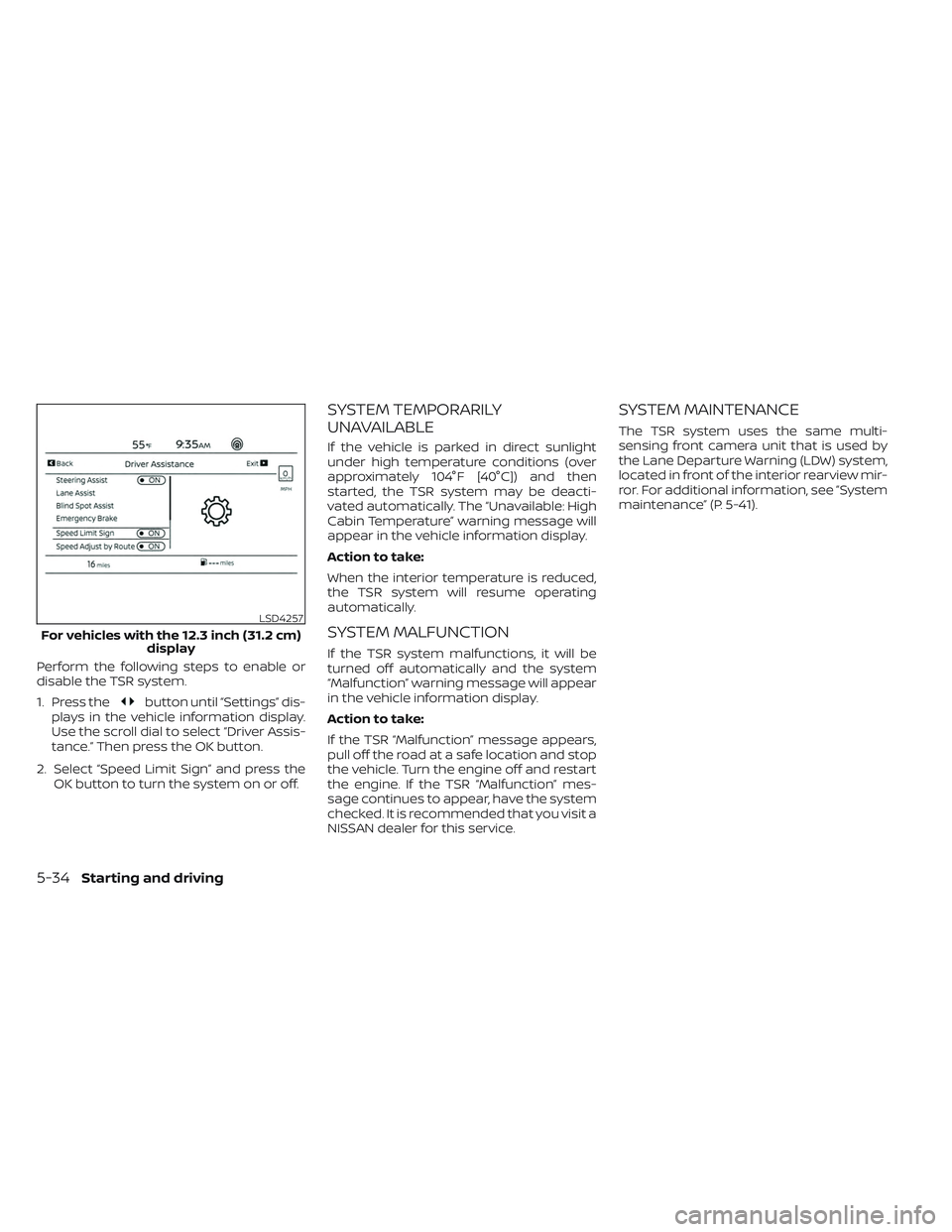
Perform the following steps to enable or
disable the TSR system.
1. Press the
button until “Settings” dis-
plays in the vehicle information display.
Use the scroll dial to select “Driver Assis-
tance.” Then press the OK button.
2. Select “Speed Limit Sign” and press the OK button to turn the system on or off.
SYSTEM TEMPORARILY
UNAVAILABLE
If the vehicle is parked in direct sunlight
under high temperature conditions (over
approximately 104°F [40°C]) and then
started, the TSR system may be deacti-
vated automatically. The “Unavailable: High
Cabin Temperature” warning message will
appear in the vehicle information display.
Action to take:
When the interior temperature is reduced,
the TSR system will resume operating
automatically.
SYSTEM MALFUNCTION
If the TSR system malfunctions, it will be
turned off automatically and the system
“Malfunction” warning message will appear
in the vehicle information display.
Action to take:
If the TSR “Malfunction” message appears,
pull off the road at a safe location and stop
the vehicle. Turn the engine off and restart
the engine. If the TSR “Malfunction” mes-
sage continues to appear, have the system
checked. It is recommended that you visit a
NISSAN dealer for this service.
SYSTEM MAINTENANCE
The TSR system uses the same multi-
sensing front camera unit that is used by
the Lane Departure Warning (LDW) system,
located in front of the interior rearview mir-
ror. For additional information, see ”System
maintenance” (P. 5-41).
LSD4257
For vehicles with the 12.3 inch (31.2 cm) display
5-34Starting and driving
Page 359 of 647
SYSTEM TEMPORARILY
UNAVAILABLE
Condition A:
The warning and assist functions of the I-LI
system are not designed to work under the
following conditions:
•
When you operate the lane change signal
and change the traveling lanes in the direc-
tion of the signal. (The I-LI system will be
deactivated for approximately 2 seconds
af ter the lane change signal is turned off.)
• When the vehicle speed lowers to less than approximately 37 mph (60 km/h).
Af ter the above conditions have finished
and the necessary operating conditions
are satisfied, the warning and assist func-
tions will resume.
Condition B:
The assist function of the I-LI system is not
designed to work under the following con-
ditions (warning is still functional):
• When the brake pedal is depressed.
• When the steering wheel is turned as far as necessary for the vehicle to change
lanes.
• When the vehicle is accelerated during I-LI system operation. • When the Intelligent Cruise Control (ICC)
approach warning occurs.
• When the hazard warning flashers are operated.
• When driving on a curve at high speed.
Af ter the above conditions have finished
and the necessary operating conditions
are satisfied, the I-LI system application of
the brakes will resume.
Condition C:
If the following messages appear in the
vehicle information display, the I-LI system
will be turned off automatically.
• “Not Available Poor Road Conditions” When the VDC system (except Traction
Control System [TCS] function) or ABS
operates.
• “Currently not available”: – When the VDC system is turned off.
– When the SNOW mode, or the MUD/ RUT mode or SAND mode (4WD mod-
els only) is selected.
Action to take:
When the above conditions no longer exist,
turn off the I-LI system. Push the ProPILOT
Assist switch (for vehicles with ProPILOT
Assist) on the steering wheel again to turn
the I-LI system back on. Temporary disabled status at high
temperature:
If the vehicle is parked in direct sunlight
under high temperature conditions (over
approximately 104°F [40°C]) and then the
I-LI system is turned on, the I-LI system
may be deactivated automatically and the
following message will appear on the ve-
hicle information display: “Unavailable: High
Cabin Temperature.”
SYSTEM MALFUNCTION
If the I-LI system malfunctions, it will cancel
automatically. The LDW indicator (orange)
and the “Not Available System Malfunction”
warning message will display. If the LDW
indicator (orange) and the warning mes-
sage appear in the display, pull off the road
to a safe location and stop the vehicle. Turn
the engine/motor off and restart the
engine/motor. If the LDW indicator (orange)
and warning message continue to appear,
have the I-LI system checked. It is recom-
mended that you visit a NISSAN dealer for
this service.
5-48Starting and driving
Page 360 of 647
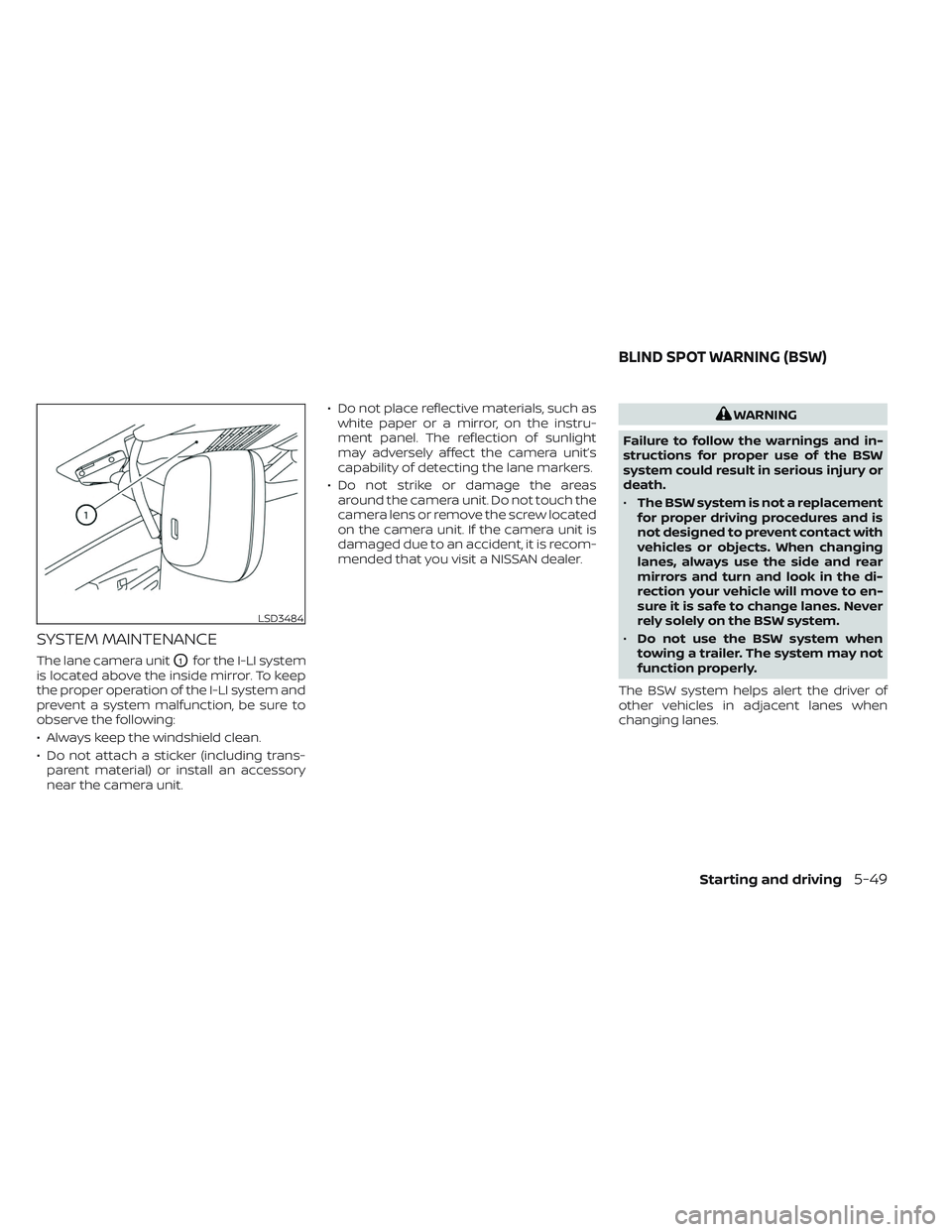
SYSTEM MAINTENANCE
The lane camera unitO1for the I-LI system
is located above the inside mirror. To keep
the proper operation of the I-LI system and
prevent a system malfunction, be sure to
observe the following:
• Always keep the windshield clean.
• Do not attach a sticker (including trans- parent material) or install an accessory
near the camera unit. • Do not place reflective materials, such as
white paper or a mirror, on the instru-
ment panel. The reflection of sunlight
may adversely affect the camera unit’s
capability of detecting the lane markers.
• Do not strike or damage the areas around the camera unit. Do not touch the
camera lens or remove the screw located
on the camera unit. If the camera unit is
damaged due to an accident, it is recom-
mended that you visit a NISSAN dealer.
WARNING
Failure to follow the warnings and in-
structions for proper use of the BSW
system could result in serious injury or
death.
• The BSW system is not a replacement
for proper driving procedures and is
not designed to prevent contact with
vehicles or objects. When changing
lanes, always use the side and rear
mirrors and turn and look in the di-
rection your vehicle will move to en-
sure it is safe to change lanes. Never
rely solely on the BSW system.
• Do not use the BSW system when
towing a trailer. The system may not
function properly.
The BSW system helps alert the driver of
other vehicles in adjacent lanes when
changing lanes.
LSD3484
BLIND SPOT WARNING (BSW)
Starting and driving5-49
Page 375 of 647
NOTE:
• I-BSI warning and system applicationwill only be activated if the side indica-
tor light is already illuminated when
your vehicle approaches a lane marker.
If another vehicle comes into the de-
tection zone af ter your vehicle has
crossed a lane marker, no I-BSI warn-
ing or system application will be acti-
vated. For additional information, see
“I-BSI driving situations” (P. 5-68).
• The I-BSI system is typically activated prior to the Intelligent Lane Interven-
tion (I-LI) system when your vehicle is
approaching a lane marker.
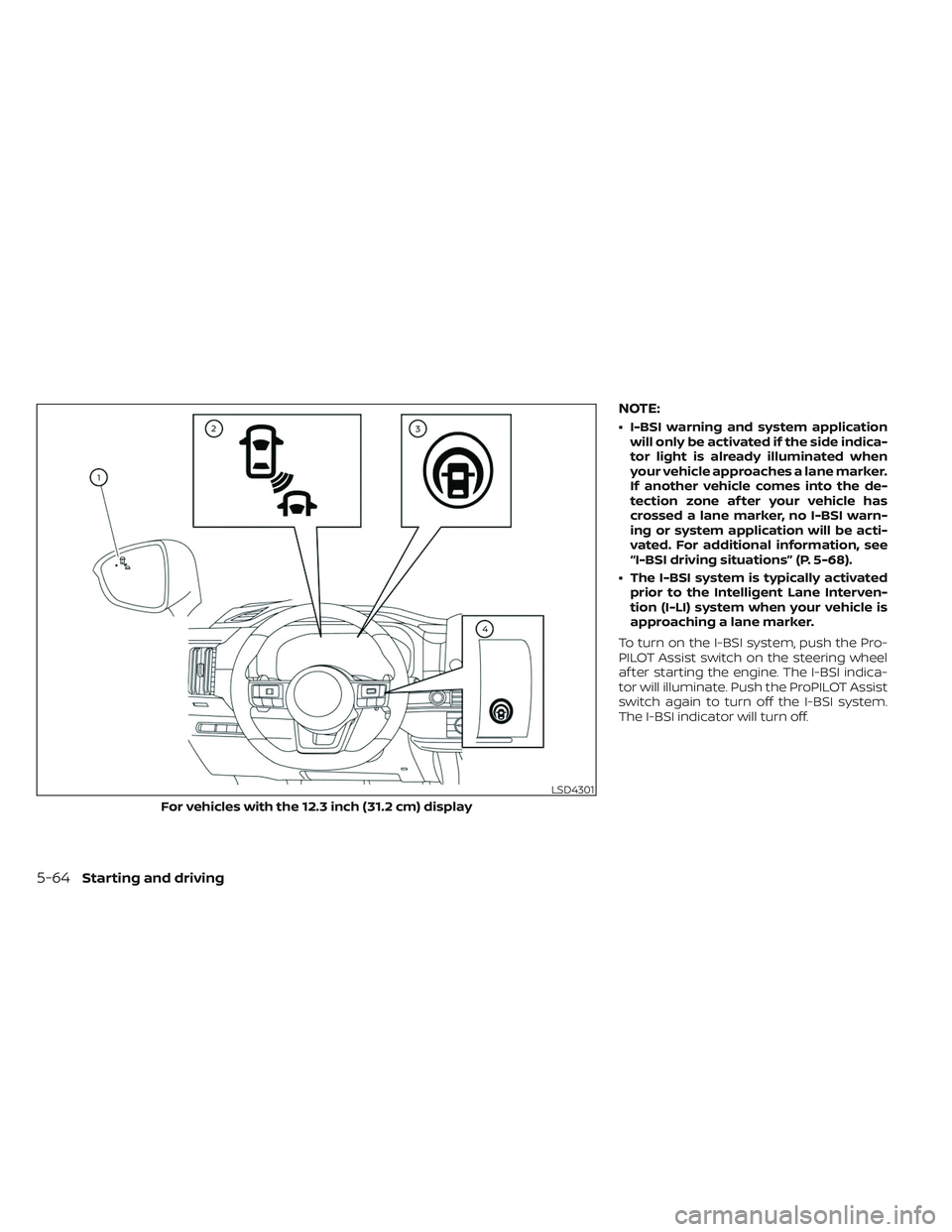
To turn on the I-BSI system, push the Pro-
PILOT Assist switch on the steering wheel
af ter starting the engine. The I-BSI indica-
tor will illuminate. Push the ProPILOT Assist
switch again to turn off the I-BSI system.
The I-BSI indicator will turn off.
LSD4301
For vehicles with the 12.3 inch (31.2 cm) display
5-64Starting and driving