change tire NISSAN PATHFINDER 2022 Owner´s Manual
[x] Cancel search | Manufacturer: NISSAN, Model Year: 2022, Model line: PATHFINDER, Model: NISSAN PATHFINDER 2022Pages: 647, PDF Size: 8.48 MB
Page 3 of 647
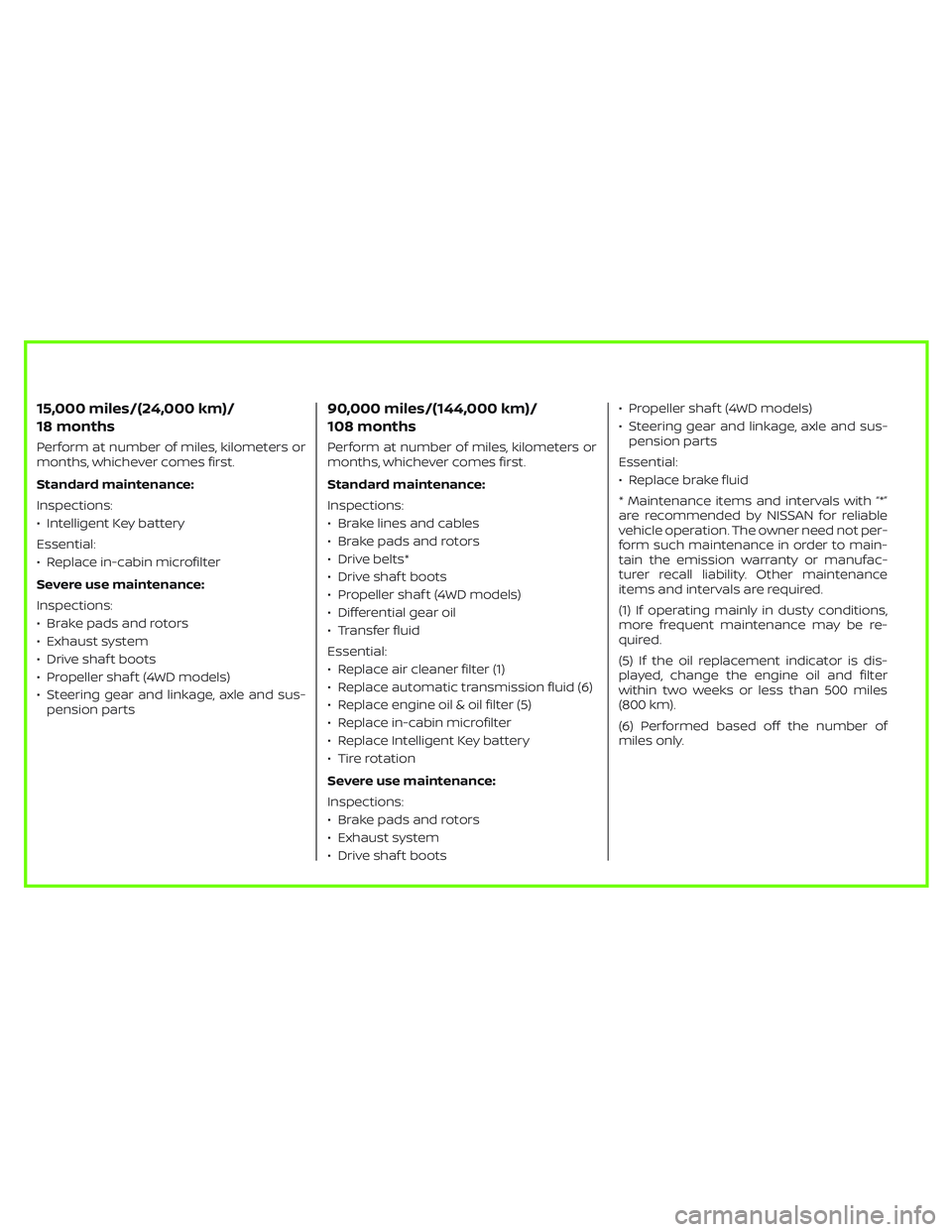
15,000 miles/(24,000 km)/
18 months
Perform at number of miles, kilometers or
months, whichever comes first.
Standard maintenance:
Inspections:
• Intelligent Key battery
Essential:
• Replace in-cabin microfilter
Severe use maintenance:
Inspections:
• Brake pads and rotors
• Exhaust system
• Drive shaf t boots
• Propeller shaf t (4WD models)
• Steering gear and linkage, axle and sus-
pension parts
90,000 miles/(144,000 km)/
108 months
Perform at number of miles, kilometers or
months, whichever comes first.
Standard maintenance:
Inspections:
• Brake lines and cables
• Brake pads and rotors
• Drive belts*
• Drive shaf t boots
• Propeller shaf t (4WD models)
• Differential gear oil
• Transfer fluid
Essential:
• Replace air cleaner filter (1)
• Replace automatic transmission fluid (6)
• Replace engine oil & oil filter (5)
• Replace in-cabin microfilter
• Replace Intelligent Key battery
• Tire rotation
Severe use maintenance:
Inspections:
• Brake pads and rotors
• Exhaust system
• Drive shaf t boots• Propeller shaf t (4WD models)
• Steering gear and linkage, axle and sus-
pension parts
Essential:
• Replace brake fluid
* Maintenance items and intervals with “*”
are recommended by NISSAN for reliable
vehicle operation. The owner need not per-
form such maintenance in order to main-
tain the emission warranty or manufac-
turer recall liability. Other maintenance
items and intervals are required.
(1) If operating mainly in dusty conditions,
more frequent maintenance may be re-
quired.
(5) If the oil replacement indicator is dis-
played, change the engine oil and filter
within two weeks or less than 500 miles
(800 km).
(6) Performed based off the number of
miles only.
Page 130 of 647
• Audio information
• Compass and navigation information(if so equipped)
• Shif t position
• Distance to empty
• Odometer
• Clock and outside temperature
HOW TO USE THE VEHICLE
INFORMATION DISPLAY
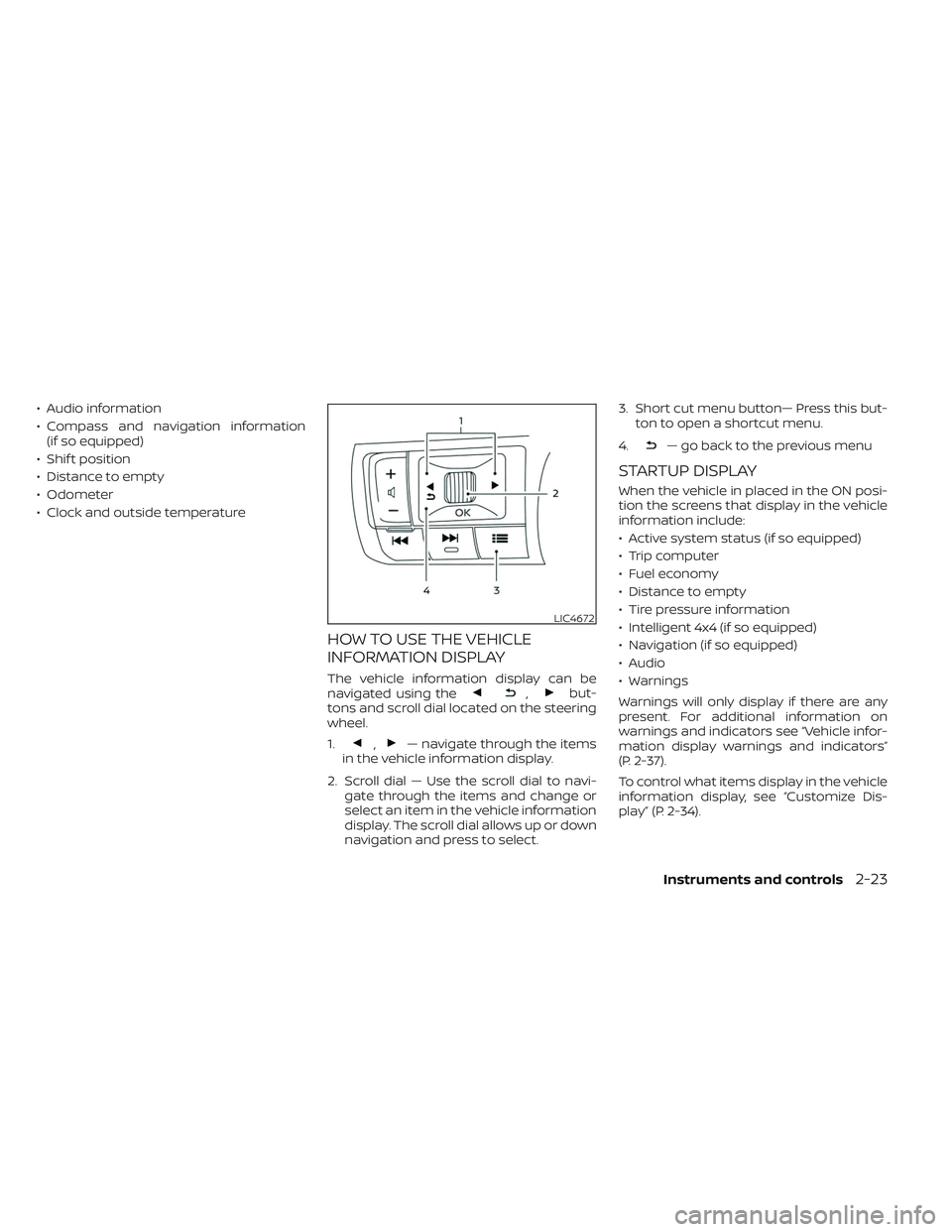
The vehicle information display can be
navigated using the,but-
tons and scroll dial located on the steering
wheel.
1.
,— navigate through the items
in the vehicle information display.
2. Scroll dial — Use the scroll dial to navi- gate through the items and change or
select an item in the vehicle information
display. The scroll dial allows up or down
navigation and press to select. 3. Short cut menu button— Press this but-
ton to open a shortcut menu.
4.
— go back to the previous menu
STARTUP DISPLAY
When the vehicle in placed in the ON posi-
tion the screens that display in the vehicle
information include:
• Active system status (if so equipped)
• Trip computer
• Fuel economy
• Distance to empty
• Tire pressure information
• Intelligent 4x4 (if so equipped)
• Navigation (if so equipped)
• Audio
• Warnings
Warnings will only display if there are any
present. For additional information on
warnings and indicators see “Vehicle infor-
mation display warnings and indicators”
(P. 2-37).
To control what items display in the vehicle
information display, see “Customize Dis-
play” (P. 2-34).
LIC4672
Instruments and controls2-23
Page 137 of 647
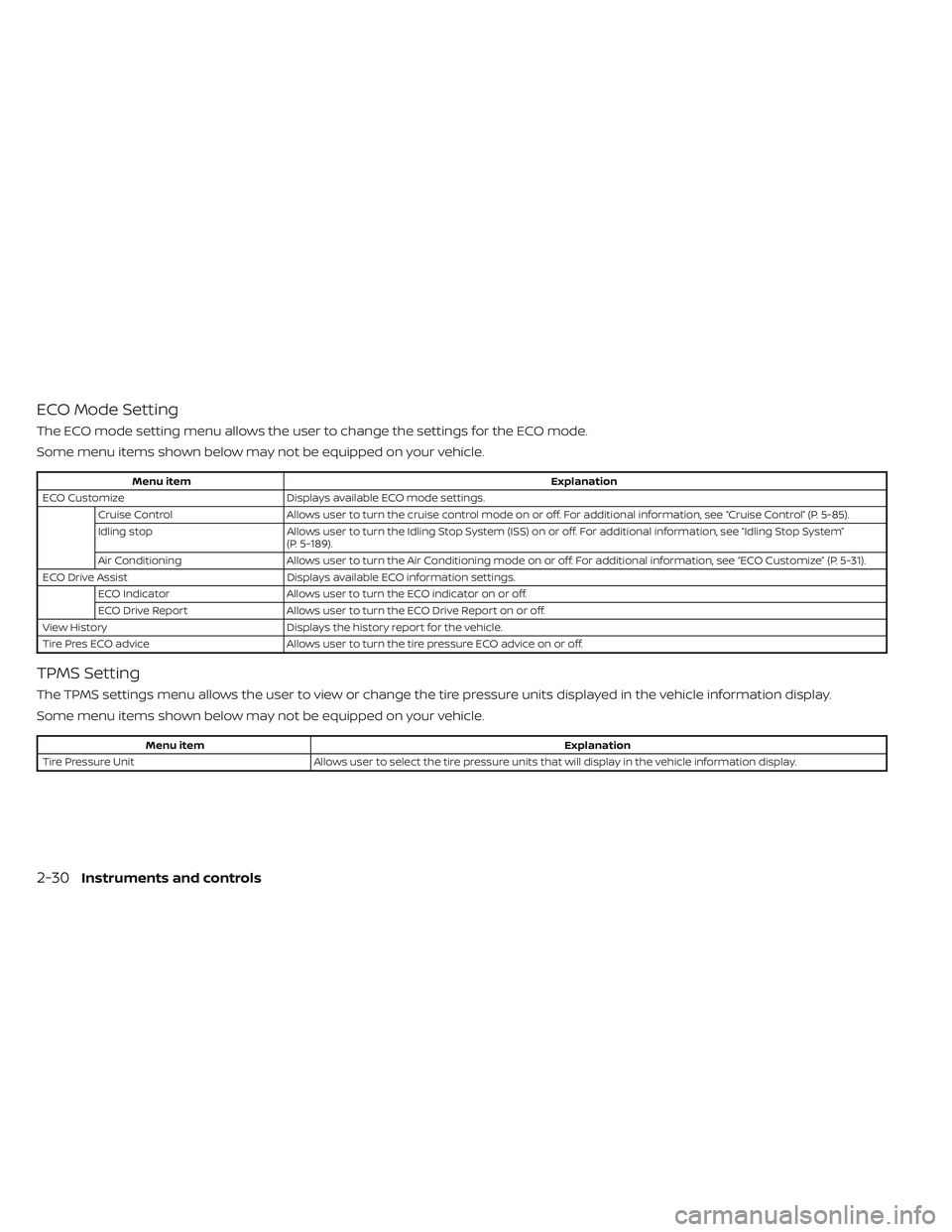
ECO Mode Setting
The ECO mode setting menu allows the user to change the settings for the ECO mode.
Some menu items shown below may not be equipped on your vehicle.
Menu itemExplanation
ECO Customize Displays available ECO mode settings.
Cruise Control Allows user to turn the cruise control mode on or off. For additional information, see “Cruise Control” (P. 5-85).
Idling stop Allows user to turn the Idling Stop System (ISS) on or off. For additional information, see “Idling Stop System”
(P. 5-189).
Air Conditioning Allows user to turn the Air Conditioning mode on or off. For additional information, see “ECO Customize” (P. 5-31).
ECO Drive Assist Displays available ECO information settings.
ECO Indicator Allows user to turn the ECO indicator on or off.
ECO Drive Report Allows user to turn the ECO Drive Report on or off.
View History Displays the history report for the vehicle.
Tire Pres ECO advice Allows user to turn the tire pressure ECO advice on or off.
TPMS Setting
The TPMS settings menu allows the user to view or change the tire pressure units displayed in the vehicle information display.
Some menu items shown below may not be equipped on your vehicle.
Menu item Explanation
Tire Pressure Unit Allows user to select the tire pressure units that will display in the vehicle information display.
2-30Instruments and controls
Page 140 of 647
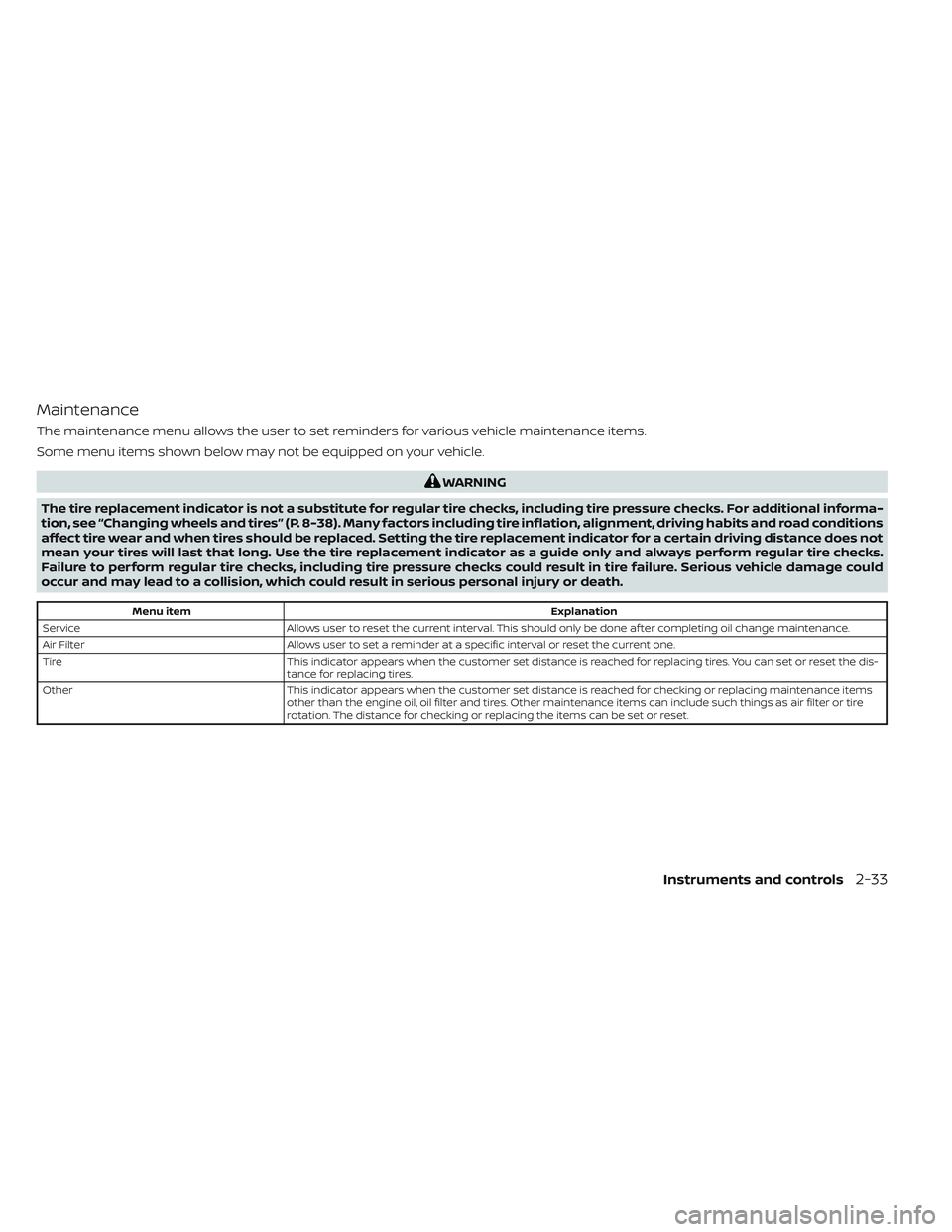
Maintenance
The maintenance menu allows the user to set reminders for various vehicle maintenance items.
Some menu items shown below may not be equipped on your vehicle.
WARNING
The tire replacement indicator is not a substitute for regular tire checks, including tire pressure checks. For additional informa-
tion, see “Changing wheels and tires” (P. 8-38). Many factors including tire inflation, alignment, driving habits and road conditions
affect tire wear and when tires should be replaced. Setting the tire replacement indicator for a certain driving distance does not
mean your tires will last that long. Use the tire replacement indicator as a guide only and always perform regular tire checks.
Failure to perform regular tire checks, including tire pressure checks could result in tire failure. Serious vehicle damage could
occur and may lead to a collision, which could result in serious personal injury or death.
Menu item Explanation
Service Allows user to reset the current interval. This should only be done af ter completing oil change maintenance.
Air Filter Allows user to set a reminder at a specific interval or reset the current one.
Tire This indicator appears when the customer set distance is reached for replacing tires. You can set or reset the dis-
tance for replacing tires.
Other This indicator appears when the customer set distance is reached for checking or replacing maintenance items
other than the engine oil, oil filter and tires. Other maintenance items can include such things as air filter or tire
rotation. The distance for checking or replacing the items can be set or reset.
Instruments and controls2-33
Page 142 of 647
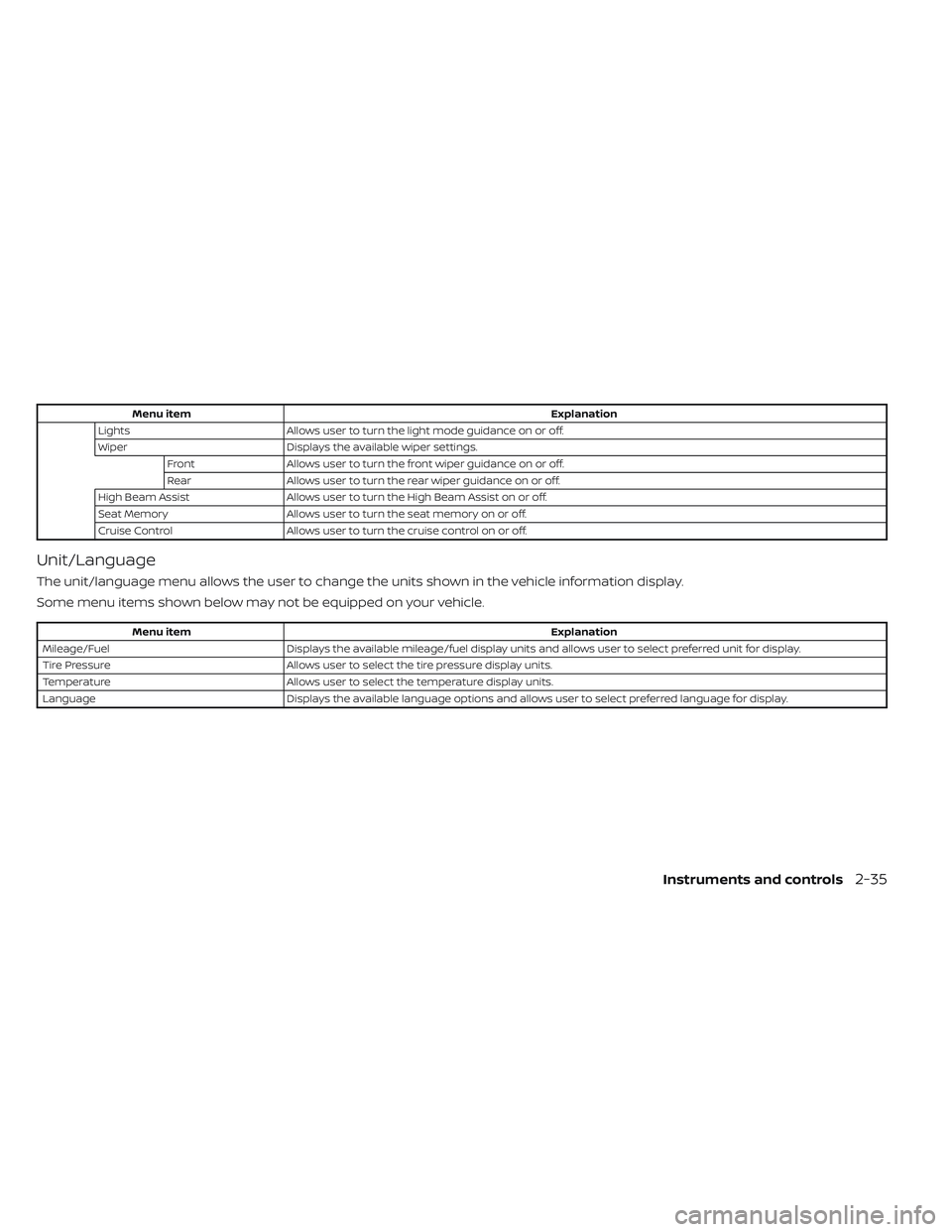
Menu itemExplanation
Lights Allows user to turn the light mode guidance on or off.
Wiper Displays the available wiper settings.
Front Allows user to turn the front wiper guidance on or off.
Rear Allows user to turn the rear wiper guidance on or off.
High Beam Assist Allows user to turn the High Beam Assist on or off.
Seat Memory Allows user to turn the seat memory on or off.
Cruise Control Allows user to turn the cruise control on or off.
Unit/Language
The unit/language menu allows the user to change the units shown in the vehicle information display.
Some menu items shown below may not be equipped on your vehicle.
Menu item Explanation
Mileage/Fuel Displays the available mileage/fuel display units and allows user to select preferred unit for display.
Tire Pressure Allows user to select the tire pressure display units.
Temperature Allows user to select the temperature display units.
Language Displays the available language options and allows user to select preferred language for display.
Instruments and controls2-35
Page 148 of 647
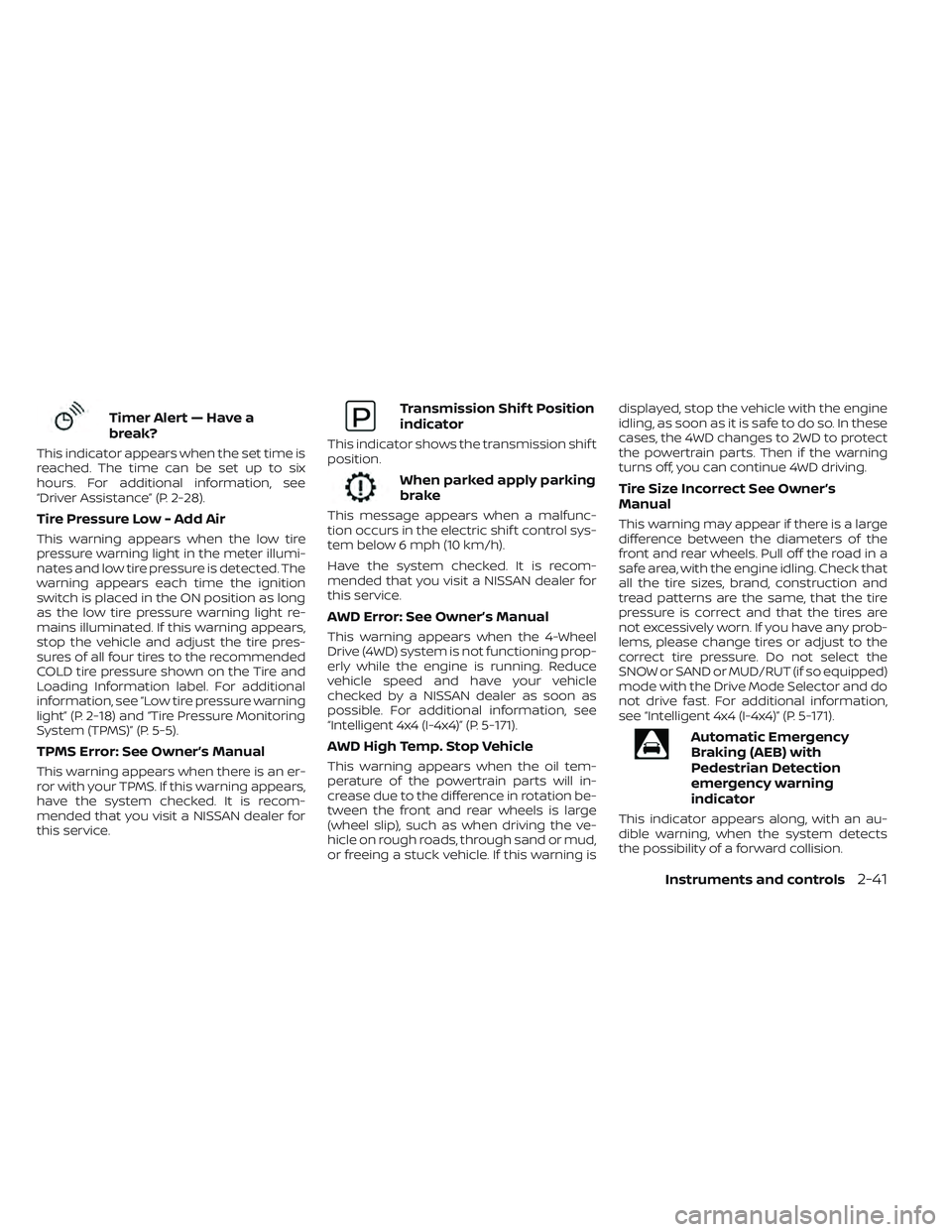
Timer Alert — Have a
break?
This indicator appears when the set time is
reached. The time can be set up to six
hours. For additional information, see
“Driver Assistance” (P. 2-28).
Tire Pressure Low - Add Air
This warning appears when the low tire
pressure warning light in the meter illumi-
nates and low tire pressure is detected. The
warning appears each time the ignition
switch is placed in the ON position as long
as the low tire pressure warning light re-
mains illuminated. If this warning appears,
stop the vehicle and adjust the tire pres-
sures of all four tires to the recommended
COLD tire pressure shown on the Tire and
Loading Information label. For additional
information, see “Low tire pressure warning
light” (P. 2-18) and “Tire Pressure Monitoring
System (TPMS)” (P. 5-5).
TPMS Error: See Owner’s Manual
This warning appears when there is an er-
ror with your TPMS. If this warning appears,
have the system checked. It is recom-
mended that you visit a NISSAN dealer for
this service.
Transmission Shif t Position
indicator
This indicator shows the transmission shif t
position.
When parked apply parking
brake
This message appears when a malfunc-
tion occurs in the electric shif t control sys-
tem below 6 mph (10 km/h).
Have the system checked. It is recom-
mended that you visit a NISSAN dealer for
this service.
AWD Error: See Owner’s Manual
This warning appears when the 4-Wheel
Drive (4WD) system is not functioning prop-
erly while the engine is running. Reduce
vehicle speed and have your vehicle
checked by a NISSAN dealer as soon as
possible. For additional information, see
“Intelligent 4x4 (I-4x4)” (P. 5-171).
AWD High Temp. Stop Vehicle
This warning appears when the oil tem-
perature of the powertrain parts will in-
crease due to the difference in rotation be-
tween the front and rear wheels is large
(wheel slip), such as when driving the ve-
hicle on rough roads, through sand or mud,
or freeing a stuck vehicle. If this warning isdisplayed, stop the vehicle with the engine
idling, as soon as it is safe to do so. In these
cases, the 4WD changes to 2WD to protect
the powertrain parts. Then if the warning
turns off, you can continue 4WD driving.
Tire Size Incorrect See Owner’s
Manual
This warning may appear if there is a large
difference between the diameters of the
front and rear wheels. Pull off the road in a
safe area, with the engine idling. Check that
all the tire sizes, brand, construction and
tread patterns are the same, that the tire
pressure is correct and that the tires are
not excessively worn. If you have any prob-
lems, please change tires or adjust to the
correct tire pressure. Do not select the
SNOW or SAND or MUD/RUT (if so equipped)
mode with the Drive Mode Selector and do
not drive fast. For additional information,
see “Intelligent 4x4 (I-4x4)” (P. 5-171).
Automatic Emergency
Braking (AEB) with
Pedestrian Detection
emergency warning
indicator
This indicator appears along, with an au-
dible warning, when the system detects
the possibility of a forward collision.
Instruments and controls2-41
Page 153 of 647
• Audio information
• Compass and navigation information(if so equipped)
• Shif t position
• Distance to empty
• Odometer/twin trip odometer
• Clock and outside temperature
• Intelligent 4x4 (if so equipped)
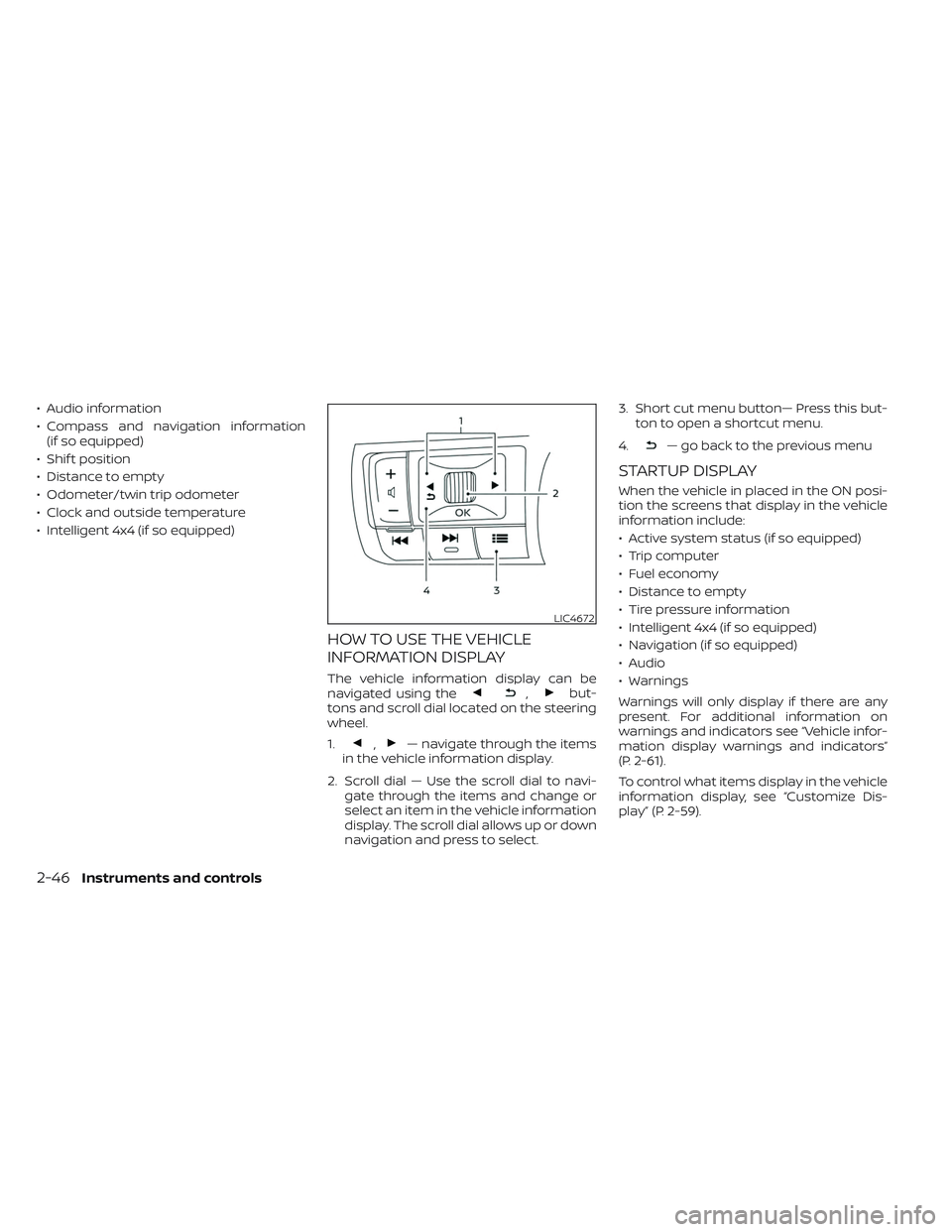
HOW TO USE THE VEHICLE
INFORMATION DISPLAY
The vehicle information display can be
navigated using the,but-
tons and scroll dial located on the steering
wheel.
1.
,— navigate through the items
in the vehicle information display.
2. Scroll dial — Use the scroll dial to navi- gate through the items and change or
select an item in the vehicle information
display. The scroll dial allows up or down
navigation and press to select. 3. Short cut menu button— Press this but-
ton to open a shortcut menu.
4.
— go back to the previous menu
STARTUP DISPLAY
When the vehicle in placed in the ON posi-
tion the screens that display in the vehicle
information include:
• Active system status (if so equipped)
• Trip computer
• Fuel economy
• Distance to empty
• Tire pressure information
• Intelligent 4x4 (if so equipped)
• Navigation (if so equipped)
• Audio
• Warnings
Warnings will only display if there are any
present. For additional information on
warnings and indicators see “Vehicle infor-
mation display warnings and indicators”
(P. 2-61).
To control what items display in the vehicle
information display, see “Customize Dis-
play” (P. 2-59).
LIC4672
2-46Instruments and controls
Page 162 of 647
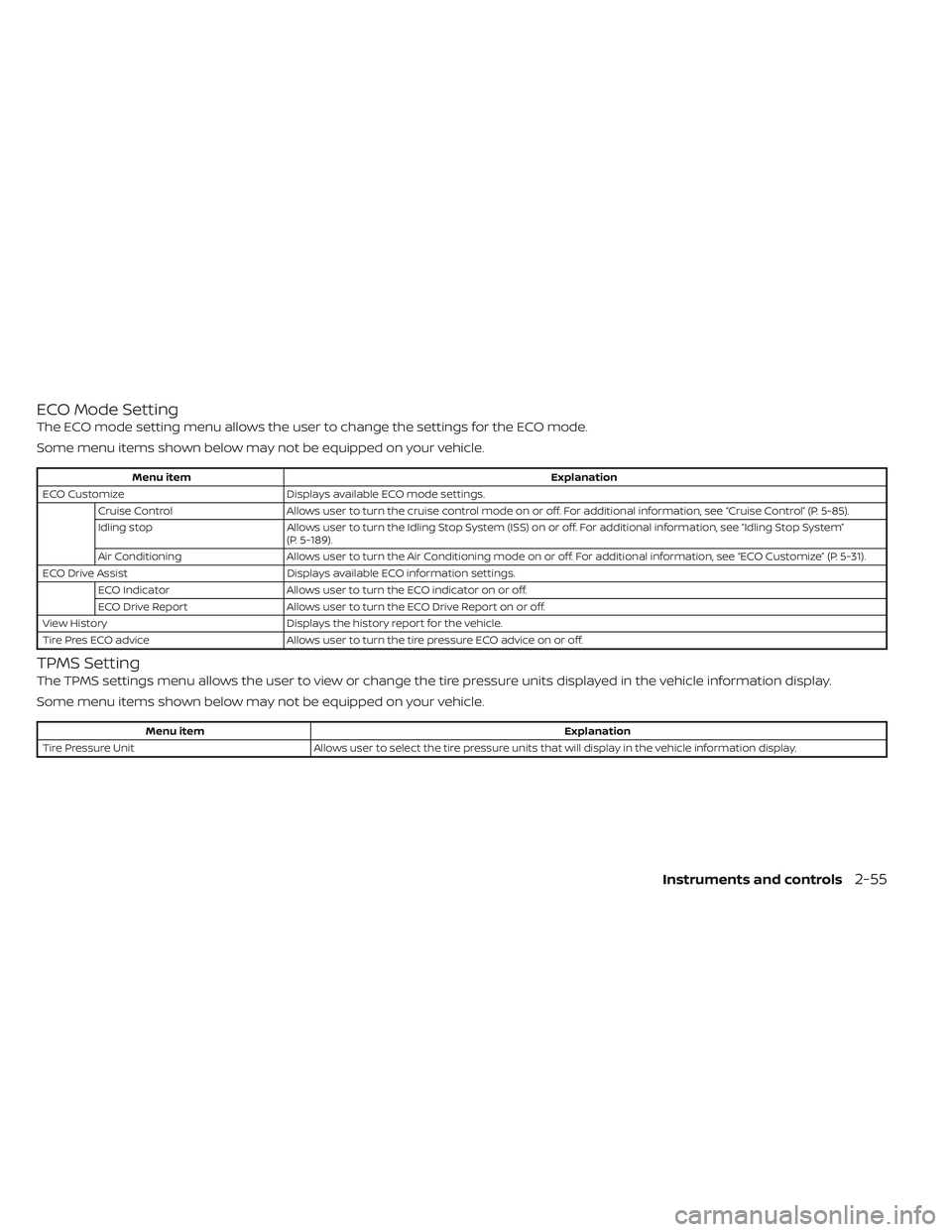
ECO Mode Setting
The ECO mode setting menu allows the user to change the settings for the ECO mode.
Some menu items shown below may not be equipped on your vehicle.
Menu itemExplanation
ECO Customize Displays available ECO mode settings.
Cruise Control Allows user to turn the cruise control mode on or off. For additional information, see “Cruise Control” (P. 5-85).
Idling stop Allows user to turn the Idling Stop System (ISS) on or off. For additional information, see “Idling Stop System”
(P. 5-189).
Air Conditioning Allows user to turn the Air Conditioning mode on or off. For additional information, see “ECO Customize” (P. 5-31).
ECO Drive Assist Displays available ECO information settings.
ECO Indicator Allows user to turn the ECO indicator on or off.
ECO Drive Report Allows user to turn the ECO Drive Report on or off.
View History Displays the history report for the vehicle.
Tire Pres ECO advice Allows user to turn the tire pressure ECO advice on or off.
TPMS Setting
The TPMS settings menu allows the user to view or change the tire pressure units displayed in the vehicle information display.
Some menu items shown below may not be equipped on your vehicle.
Menu item Explanation
Tire Pressure Unit Allows user to select the tire pressure units that will display in the vehicle information display.
Instruments and controls2-55
Page 165 of 647
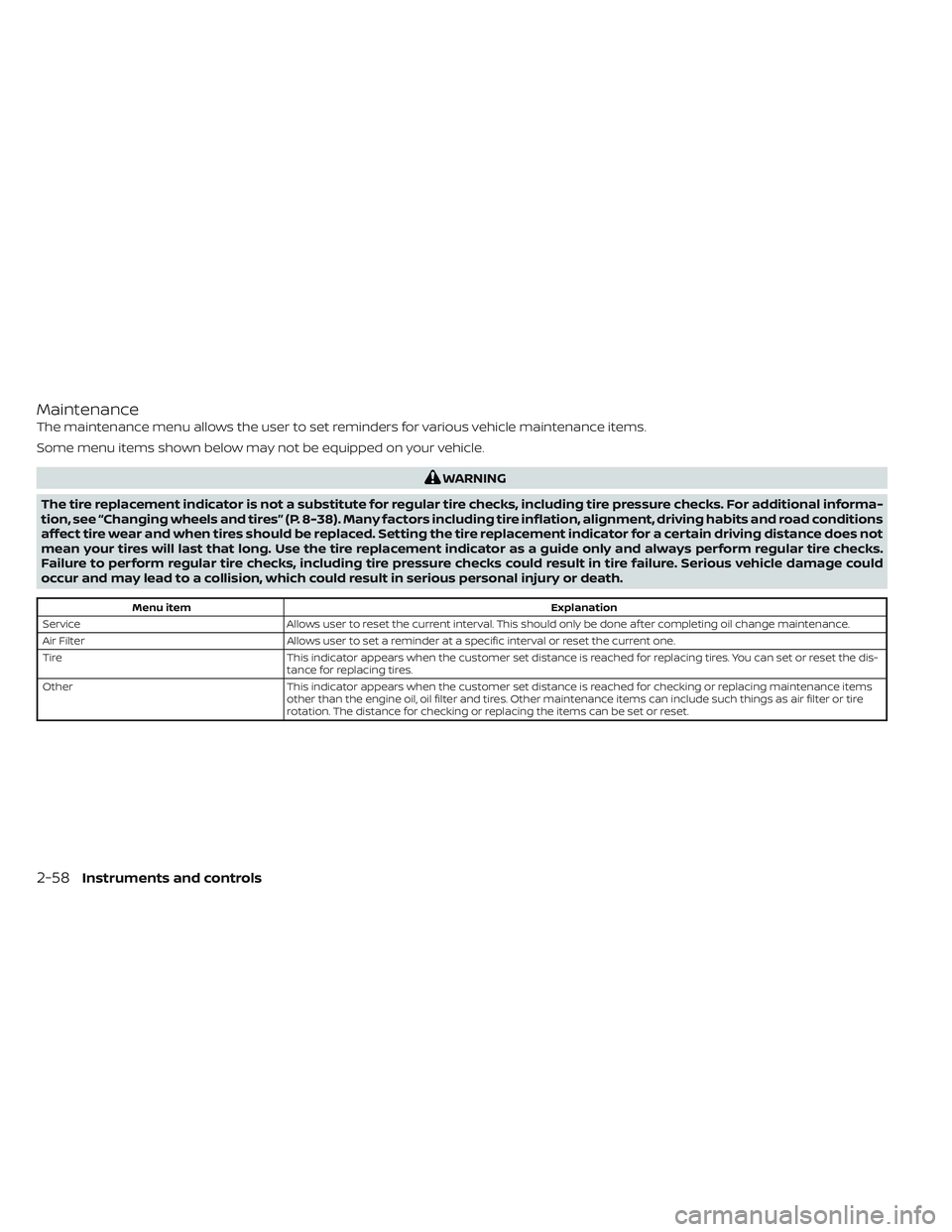
Maintenance
The maintenance menu allows the user to set reminders for various vehicle maintenance items.
Some menu items shown below may not be equipped on your vehicle.
WARNING
The tire replacement indicator is not a substitute for regular tire checks, including tire pressure checks. For additional informa-
tion, see “Changing wheels and tires” (P. 8-38). Many factors including tire inflation, alignment, driving habits and road conditions
affect tire wear and when tires should be replaced. Setting the tire replacement indicator for a certain driving distance does not
mean your tires will last that long. Use the tire replacement indicator as a guide only and always perform regular tire checks.
Failure to perform regular tire checks, including tire pressure checks could result in tire failure. Serious vehicle damage could
occur and may lead to a collision, which could result in serious personal injury or death.
Menu item Explanation
Service Allows user to reset the current interval. This should only be done af ter completing oil change maintenance.
Air Filter Allows user to set a reminder at a specific interval or reset the current one.
Tire This indicator appears when the customer set distance is reached for replacing tires. You can set or reset the dis-
tance for replacing tires.
Other This indicator appears when the customer set distance is reached for checking or replacing maintenance items
other than the engine oil, oil filter and tires. Other maintenance items can include such things as air filter or tire
rotation. The distance for checking or replacing the items can be set or reset.
2-58Instruments and controls
Page 167 of 647
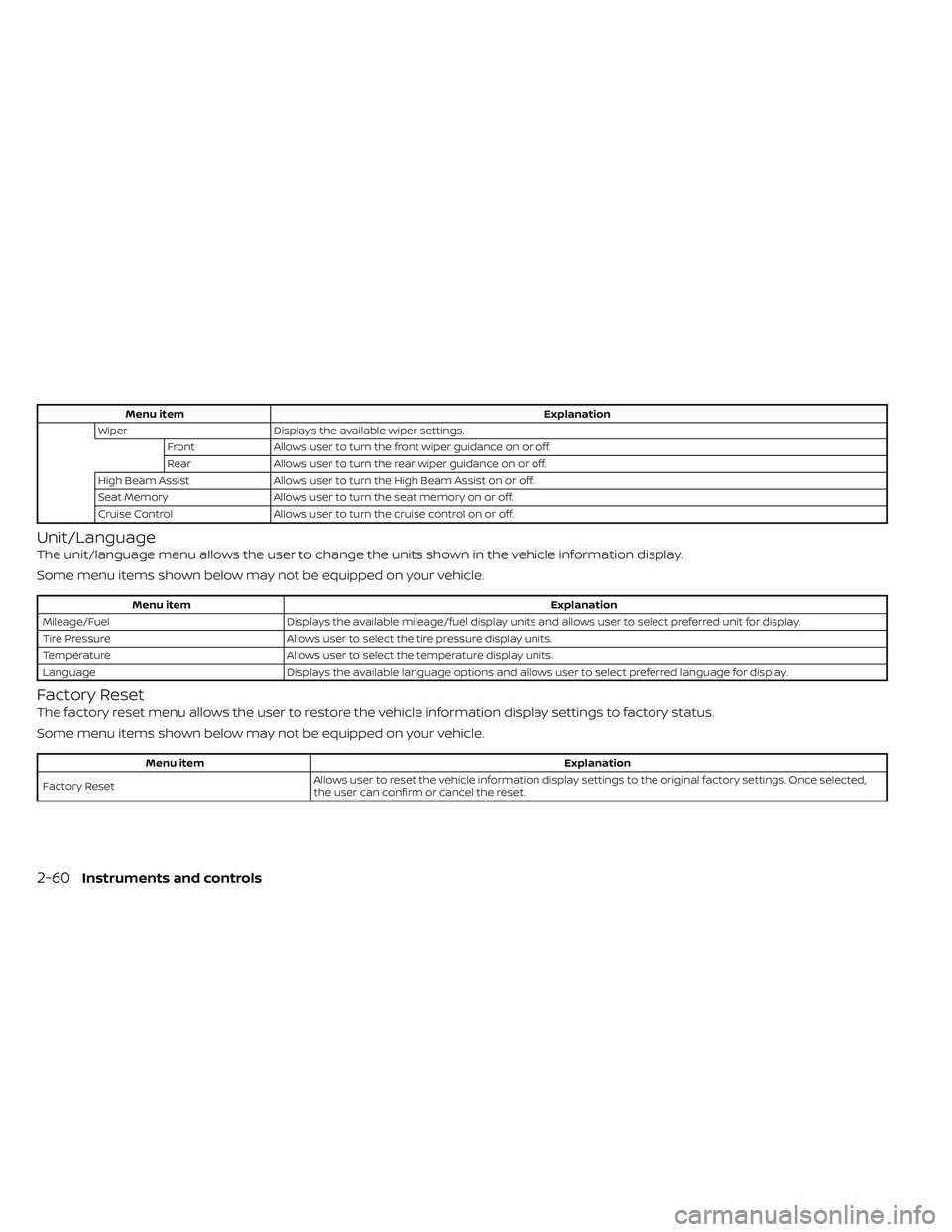
Menu itemExplanation
Wiper Displays the available wiper settings.
Front Allows user to turn the front wiper guidance on or off.
Rear Allows user to turn the rear wiper guidance on or off.
High Beam Assist Allows user to turn the High Beam Assist on or off.
Seat Memory Allows user to turn the seat memory on or off.
Cruise Control Allows user to turn the cruise control on or off.
Unit/Language
The unit/language menu allows the user to change the units shown in the vehicle information display.
Some menu items shown below may not be equipped on your vehicle.
Menu item Explanation
Mileage/Fuel Displays the available mileage/fuel display units and allows user to select preferred unit for display.
Tire Pressure Allows user to select the tire pressure display units.
Temperature Allows user to select the temperature display units.
Language Displays the available language options and allows user to select preferred language for display.
Factory Reset
The factory reset menu allows the user to restore the vehicle information display settings to factory status.
Some menu items shown below may not be equipped on your vehicle.
Menu item Explanation
Factory Reset Allows user to reset the vehicle information display setti
ngs to the original factory settings. Once selected,
the user can confirm or cancel the reset.
2-60Instruments and controls