window NISSAN PATHFINDER 2022 Owner´s Manual
[x] Cancel search | Manufacturer: NISSAN, Model Year: 2022, Model line: PATHFINDER, Model: NISSAN PATHFINDER 2022Pages: 647, PDF Size: 8.48 MB
Page 14 of 647
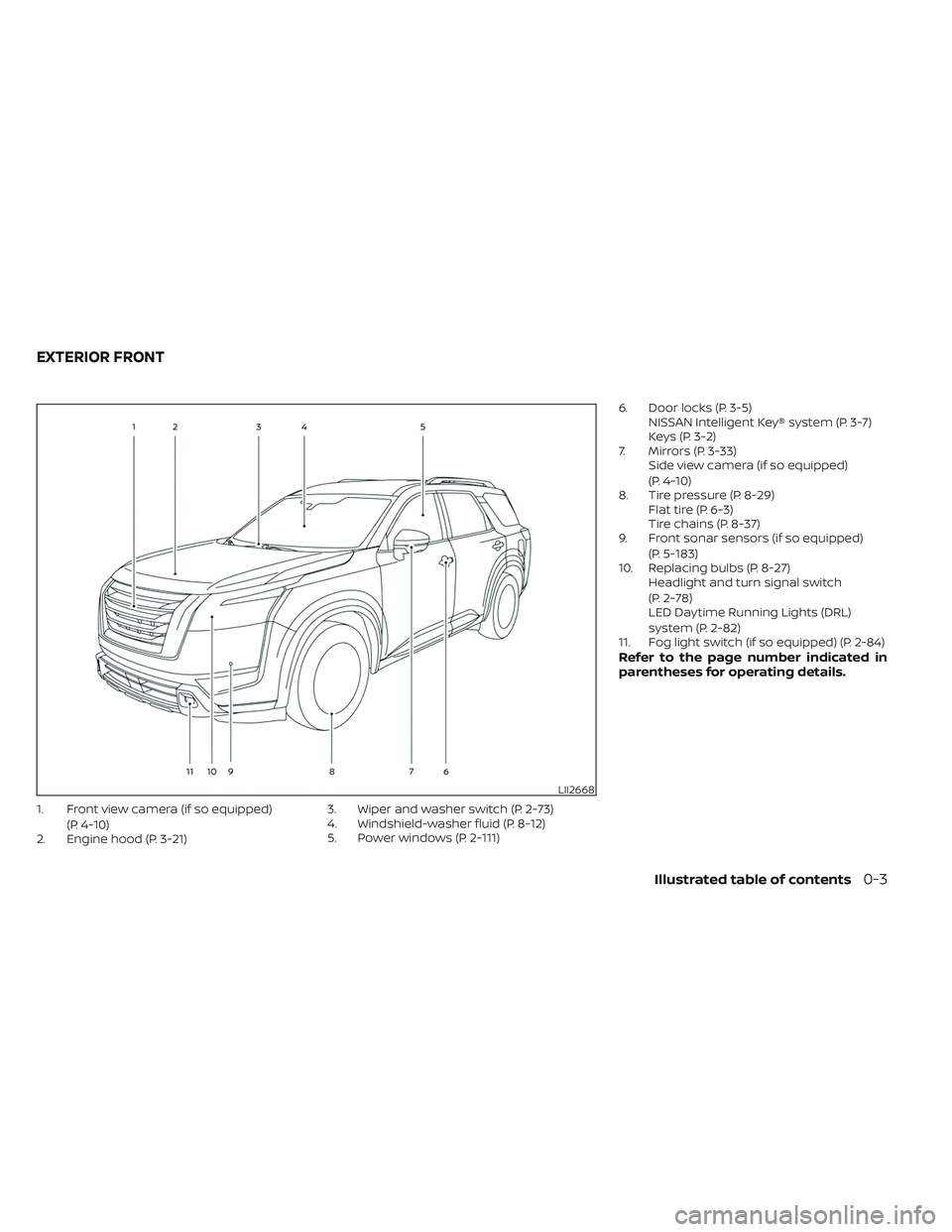
1. Front view camera (if so equipped)(P. 4-10)
2. Engine hood (P. 3-21) 3. Wiper and washer switch (P. 2-73)
4. Windshield-washer fluid (P. 8-12)
5. Power windows (P. 2-111)6. Door locks (P. 3-5)
NISSAN Intelligent Key® system (P. 3-7)
Keys (P. 3-2)
7. Mirrors (P. 3-33) Side view camera (if so equipped)
(P. 4-10)
8. Tire pressure (P. 8-29) Flat tire (P. 6-3)
Tire chains (P. 8-37)
9. Front sonar sensors (if so equipped)
(P. 5-183)
10. Replacing bulbs (P. 8-27) Headlight and turn signal switch
(P. 2-78)
LED Daytime Running Lights (DRL)
system (P. 2-82)
11. Fog light switch (if so equipped) (P. 2-84)
Refer to the page number indicated in
parentheses for operating details.
LII2668
EXTERIOR FRONT
Illustrated table of contents0-3
Page 15 of 647
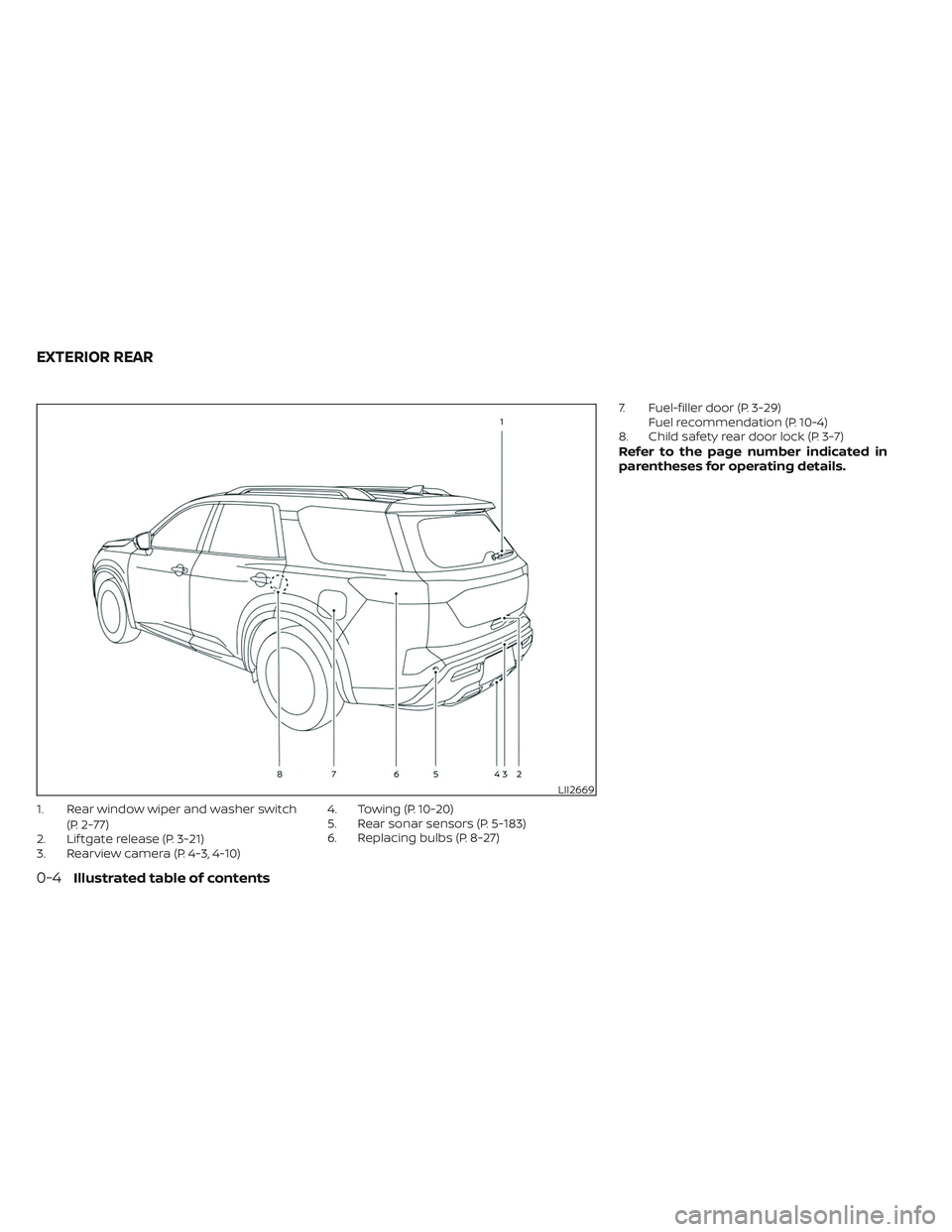
1. Rear window wiper and washer switch(P. 2-77)
2. Lif tgate release (P. 3-21)
3. Rearview camera (P. 4-3, 4-10) 4. Towing (P. 10-20)
5. Rear sonar sensors (P. 5-183)
6. Replacing bulbs (P. 8-27)7. Fuel-filler door (P. 3-29)
Fuel recommendation (P. 10-4)
8. Child safety rear door lock (P. 3-7)
Refer to the page number indicated in
parentheses for operating details.
LII2669
EXTERIOR REAR
0-4Illustrated table of contents
Page 17 of 647
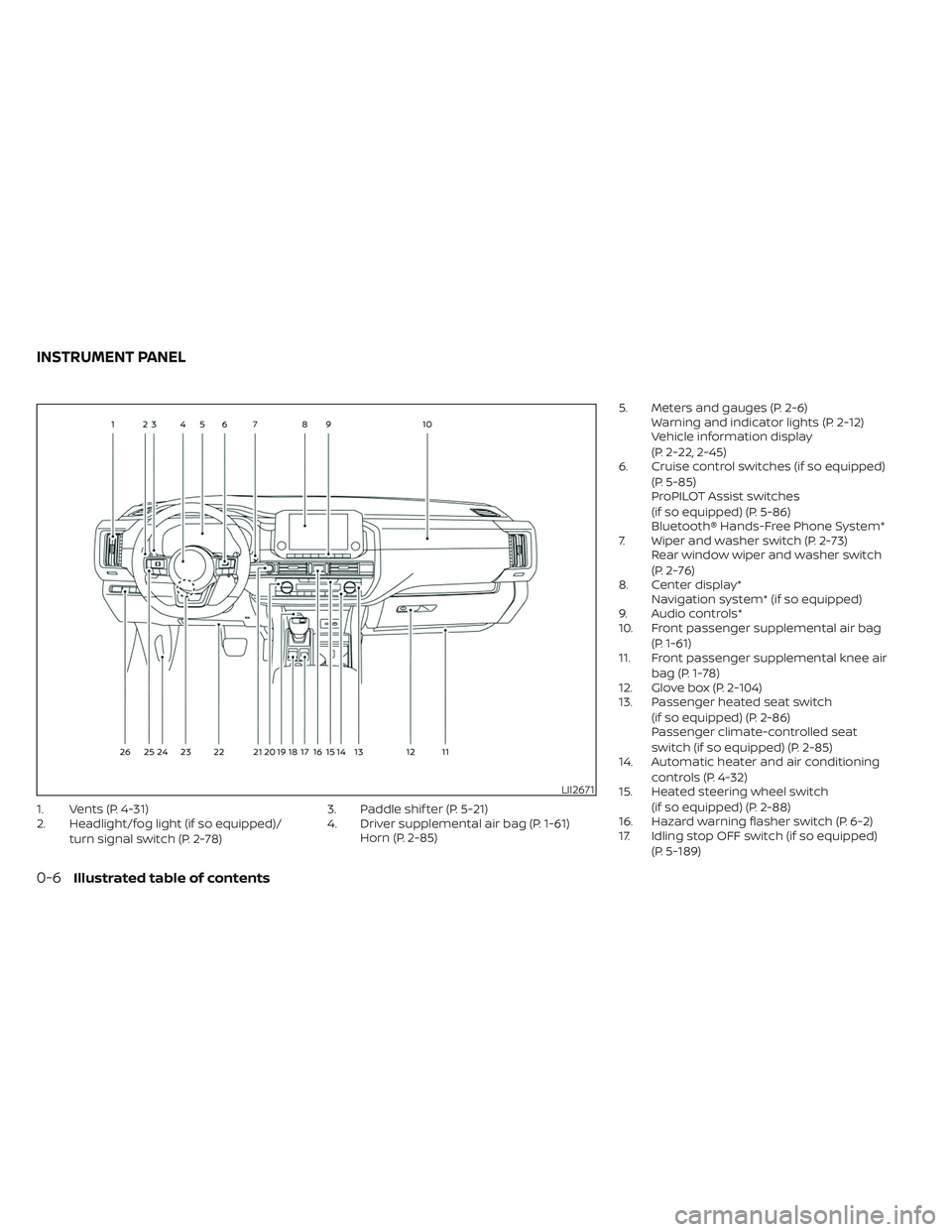
1. Vents (P. 4-31)
2. Headlight/fog light (if so equipped)/turn signal switch (P. 2-78) 3. Paddle shif ter (P. 5-21)
4. Driver supplemental air bag (P. 1-61)
Horn (P. 2-85) 5. Meters and gauges (P. 2-6)
Warning and indicator lights (P. 2-12)
Vehicle information display
(P. 2-22, 2-45)
6. Cruise control switches (if so equipped)
(P. 5-85)
ProPILOT Assist switches
(if so equipped) (P. 5-86)
Bluetooth® Hands-Free Phone System*
7. Wiper and washer switch (P. 2-73) Rear window wiper and washer switch
(P. 2-76)
8. Center display* Navigation system* (if so equipped)
9. Audio controls*
10. Front passenger supplemental air bag
(P. 1-61)
11. Front passenger supplemental knee air
bag (P. 1-78)
12. Glove box (P. 2-104)
13. Passenger heated seat switch
(if so equipped) (P. 2-86)
Passenger climate-controlled seat
switch (if so equipped) (P. 2-85)
14. Automatic heater and air conditioning
controls (P. 4-32)
15. Heated steering wheel switch
(if so equipped) (P. 2-88)
16. Hazard warning flasher switch (P. 6-2)
17. Idling stop OFF switch (if so equipped)
(P. 5-189)
LII2671
INSTRUMENT PANEL
0-6Illustrated table of contents
Page 87 of 647
WARNING
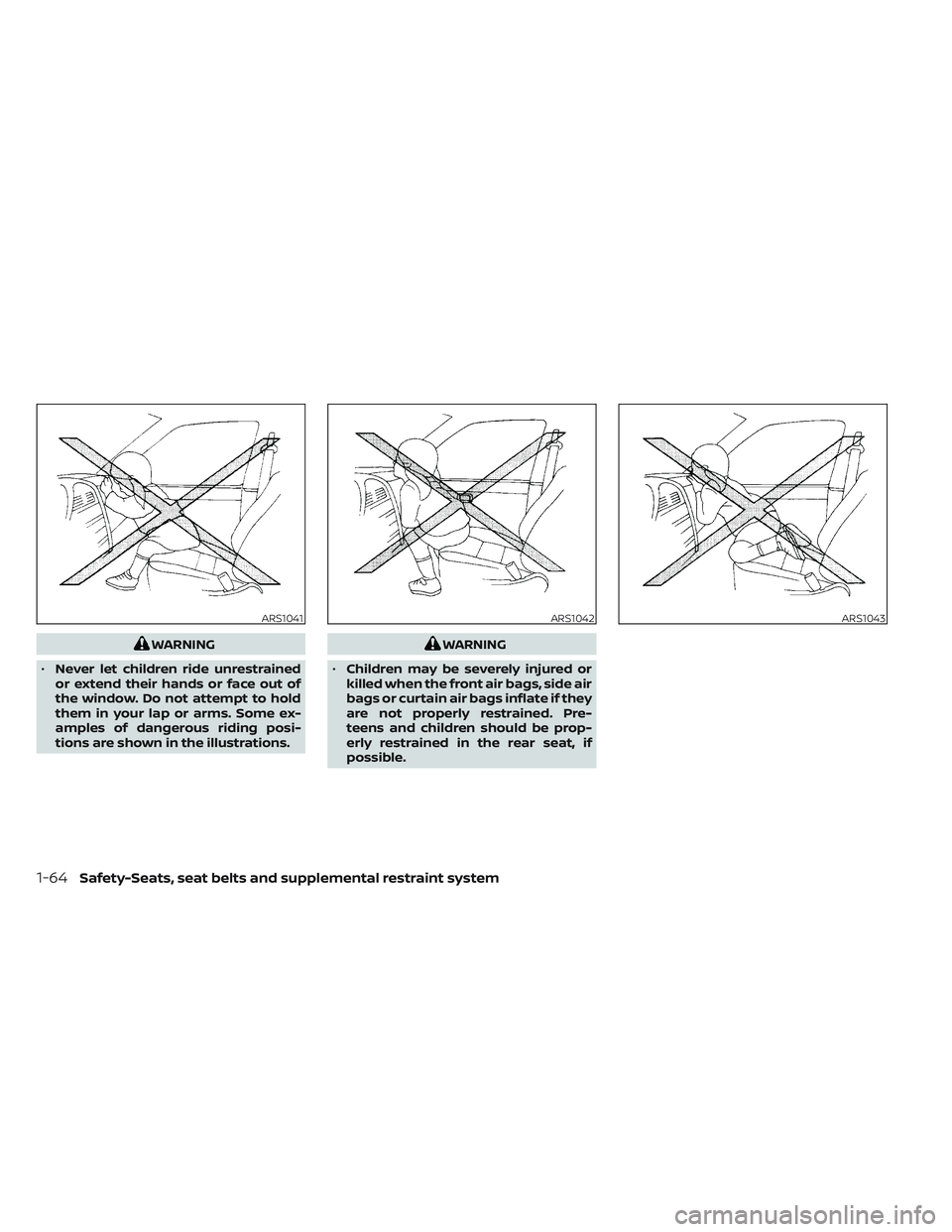
• Never let children ride unrestrained
or extend their hands or face out of
the window. Do not attempt to hold
them in your lap or arms. Some ex-
amples of dangerous riding posi-
tions are shown in the illustrations.WARNING
• Children may be severely injured or
killed when the front air bags, side air
bags or curtain air bags inflate if they
are not properly restrained. Pre-
teens and children should be prop-
erly restrained in the rear seat, if
possible.
ARS1041ARS1042ARS1043
1-64Safety-Seats, seat belts and supplemental restraint system
Page 89 of 647
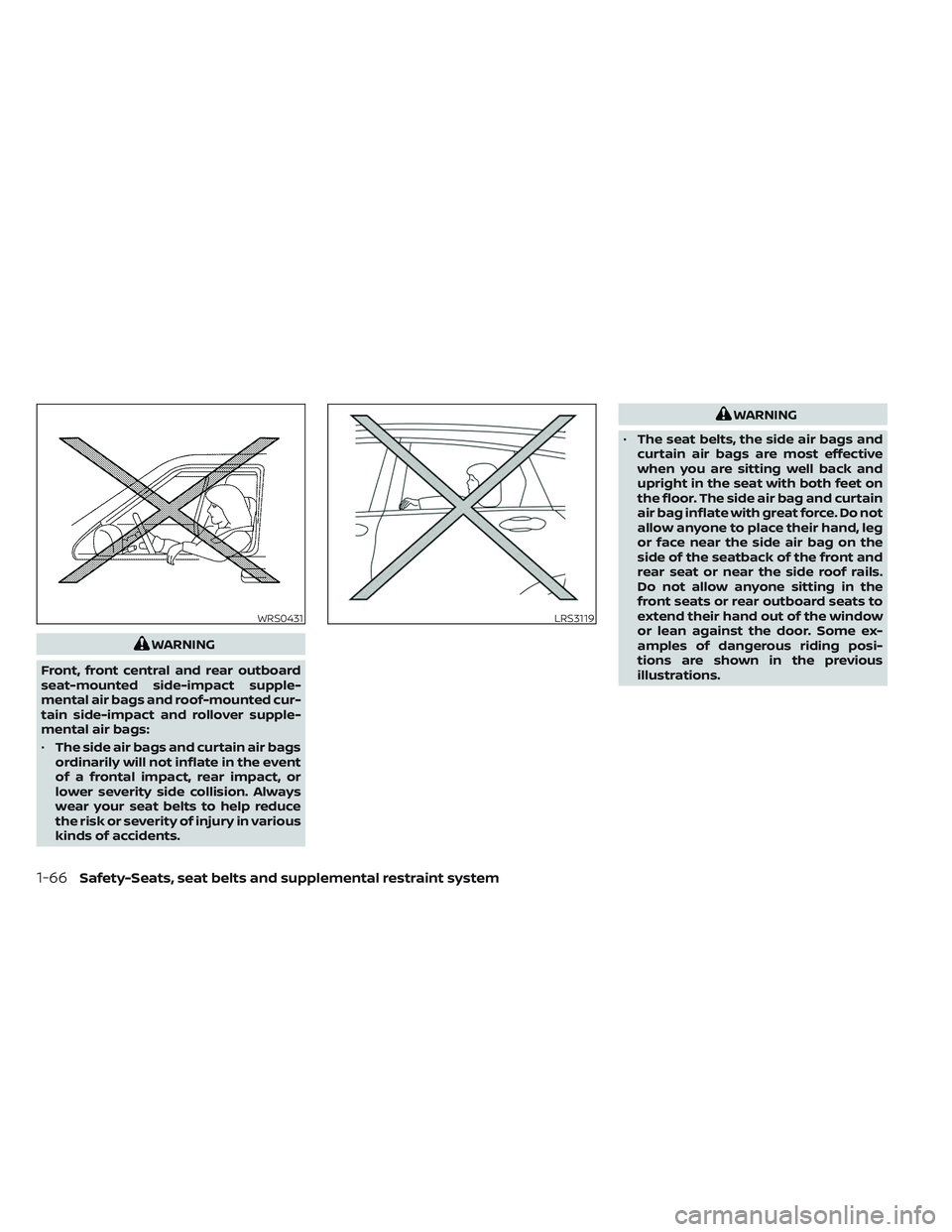
WARNING
Front, front central and rear outboard
seat-mounted side-impact supple-
mental air bags and roof-mounted cur-
tain side-impact and rollover supple-
mental air bags:
• The side air bags and curtain air bags
ordinarily will not inflate in the event
of a frontal impact, rear impact, or
lower severity side collision. Always
wear your seat belts to help reduce
the risk or severity of injury in various
kinds of accidents.
WARNING
• The seat belts, the side air bags and
curtain air bags are most effective
when you are sitting well back and
upright in the seat with both feet on
the floor. The side air bag and curtain
air bag inflate with great force. Do not
allow anyone to place their hand, leg
or face near the side air bag on the
side of the seatback of the front and
rear seat or near the side roof rails.
Do not allow anyone sitting in the
front seats or rear outboard seats to
extend their hand out of the window
or lean against the door. Some ex-
amples of dangerous riding posi-
tions are shown in the previous
illustrations.
WRS0431LRS3119
1-66Safety-Seats, seat belts and supplemental restraint system
Page 108 of 647
2 Instruments and controls
Instrument panel................................2-4
Meters and gauges .............................2-6
Speedometer and odometer .................2-6
Tachometer ..................................2-8
Engine coolant temperature gauge ..........2-9
Fuel gauge .................................. 2-10
Distance To Empty (DTE) ....................2-10
Warning lights, indicator lights and audible
reminders ...................................... 2-12
Checking lights .............................. 2-13
Warning/Indicator lights (red) ...............2-13
Warning/Indicator lights (yellow) ............2-16
Warning/Indicator lights (other) .............2-21
Audible reminders ........................... 2-22
Vehicle information display 7 inch (18 cm)
Type A (if so equipped) ......................... 2-22
How to use the vehicle information
display ...................................... 2-23
Startup display .............................. 2-23
Trip computer ............................... 2-24
Oil control system (if so equipped) ...........2-27
Settings ..................................... 2-28
Vehicle information display warnings
and indicators ............................... 2-37
Vehicle information display 12.3 inch (31 cm)
Type B (if so equipped) ......................... 2-45How to use the vehicle information
display
...................................... 2-46
Startup display .............................. 2-46
Trip computer ...............................2-47
Changing the meter screen view ............2-50
Oil control system (if so equipped) ...........2-51
Settings ..................................... 2-52
Vehicle information display warnings
and indicators ............................... 2-61
Security systems ............................... 2-71
Vehicle security system .....................2-71
NISSAN Vehicle Immobilizer System .........2-72
Wiper and washer switch .......................2-73
Switch operation ............................ 2-73
Rain-sensing auto wiper system
(if so equipped) .............................. 2-75
Rear switch operation .......................2-76
R
ear window and outside mirror
(if so equipped) defroster switch ...............2-77
Headlight and turn signal switch ...............2-78
Headlight control switch ....................2-78
LED Daytime Running Lights (DRL)
system ...................................... 2-82
Instrument brightness control ..............2-83
Turn signal switch ........................... 2-83
Fog light switch (if so equipped) .............2-84
Page 109 of 647
Horn........................................... 2-85
Climate controlled seat switches
(if so equipped) ................................. 2-85
Heated seat switches (if so equipped) ..........2-86
Heated 2nd row seat switches
(if so equipped) ................................. 2-87
Heated steering wheel switch (if so equipped) . . 2-88
Hill descent control switch (if so equipped) .....2-89
Steering Assist switch (for vehicles with
ProPILOT Assist) (if so equipped) ................2-90
Head Up Display (HUD) (if so equipped) .........2-90
HowtousetheHUD......................... 2-92
Driver Assistance/Navigation linking ........2-92
Emergency call (SOS) button (if so equipped) . . . 2-93
Rear Door Alert ................................. 2-94
Power outlets .................................. 2-96
12v outlets .................................. 2-96
120v outlet (if so equipped) ..................2-97
USB/iPod® charging ports ......................2-97
Wireless charger (if so equipped) ...............2-98
Wireless charger indicator ...................2-99
Wireless charger operation ..................2-99
Extended storage switch ......................2-100
Storage ....................................... 2-101Front-door pockets
........................ 2-101
Lower console storage tray ................2-102
Seatback pockets .......................... 2-102
Storagetrays............................... 2-103
Glovebox .................................. 2-104
Console box ................................ 2-104
Second row console (if so equipped) .......2-104
Overhead sunglasses storage ..............2-105
Cup holders ................................ 2-106
Cargo area storage bin .....................2-108
Luggage hooks ............................ 2-109
Roof rack (if so equipped) ..................2-110
Windows ....................................... 2-111
Power windows ............................. 2-111
Rear door sunshade (if so equipped) .......2-113
Power moonroof (if so equipped) ..............2-114
Automatic
moonroof and sunshade .......2-114
Interior lights .................................. 2-116
Map lights ................................... 2-117
Personal lights .............................. 2-117
Cargo light ................................. 2-118
HomeLink® Universal Transceiver
(if so equipped) ................................ 2-118
Programming HomeLink® ..................2-119
Page 111 of 647
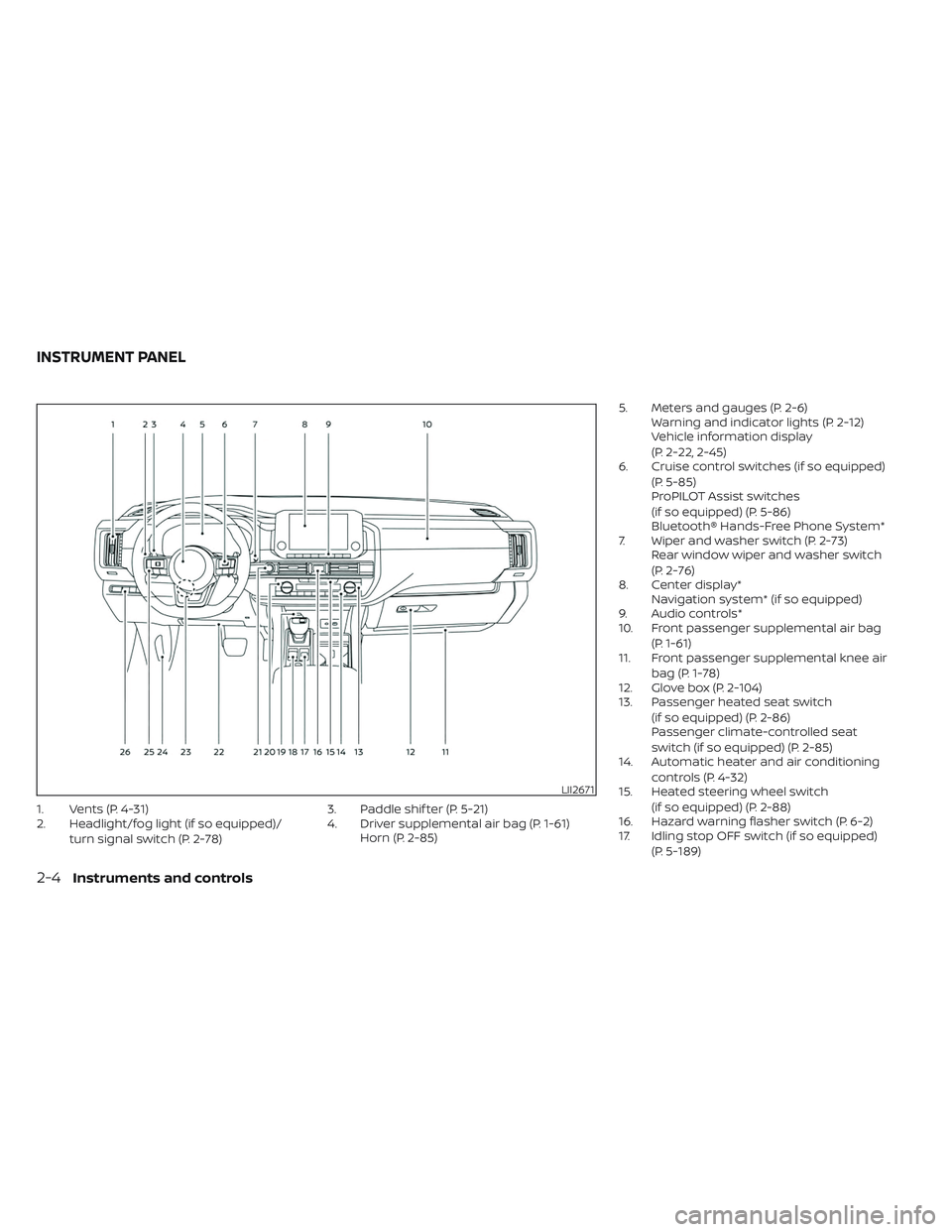
1. Vents (P. 4-31)
2. Headlight/fog light (if so equipped)/turn signal switch (P. 2-78) 3. Paddle shif ter (P. 5-21)
4. Driver supplemental air bag (P. 1-61)
Horn (P. 2-85) 5. Meters and gauges (P. 2-6)
Warning and indicator lights (P. 2-12)
Vehicle information display
(P. 2-22, 2-45)
6. Cruise control switches (if so equipped)
(P. 5-85)
ProPILOT Assist switches
(if so equipped) (P. 5-86)
Bluetooth® Hands-Free Phone System*
7. Wiper and washer switch (P. 2-73) Rear window wiper and washer switch
(P. 2-76)
8. Center display* Navigation system* (if so equipped)
9. Audio controls*
10. Front passenger supplemental air bag
(P. 1-61)
11. Front passenger supplemental knee air
bag (P. 1-78)
12. Glove box (P. 2-104)
13. Passenger heated seat switch
(if so equipped) (P. 2-86)
Passenger climate-controlled seat
switch (if so equipped) (P. 2-85)
14. Automatic heater and air conditioning
controls (P. 4-32)
15. Heated steering wheel switch
(if so equipped) (P. 2-88)
16. Hazard warning flasher switch (P. 6-2)
17. Idling stop OFF switch (if so equipped)
(P. 5-189)
LII2671
INSTRUMENT PANEL
2-4Instruments and controls
Page 179 of 647
The system helps deter vehicle thef t but
cannot prevent it, nor can it prevent the
thef t of interior or exterior vehicle compo-
nents in all situations. Always secure your
vehicle even if parking for a brief period.
Never leave your keys in the vehicle, and
always lock the vehicle when unattended.
Be aware of your surroundings, and park in
secure, well-lit areas whenever possible.
Many devices offering additional protec-
tion, such as component locks, identifica-
tion markers, and tracking systems, are
available at auto supply stores and spe-
cialty shops. A NISSAN dealer may also offer
such equipment. Check with your insur-
ance company to see if you may be eligible
for discounts for various thef t protection
features.
How to arm the vehicle security
system
1. Close all windows and the moonroof(if so equipped). The system can be
armed even if the windows and moon-
roof are open.
2. Remove the key from the vehicle. 3. Close all doors, hood and lif tgate. Lock
all doors. The doors can be locked with
the key, door capacitive touch pad (if so
equipped) or power door lock switch.
4. Wait 30 seconds for the system to com- plete the pre-armed phase. If during the
pre-armed phase one of the following
occurs, the system will not arm:
• Any door is unlocked with the key or door capacitive touch pad (if so equipped).
• The ignition switch is placed in the ON position.
• Even when the driver and/or passen-
gers are in the vehicle, the system will
activate when all the doors, hood and
lif tgate are locked with the ignition
switch placed in the LOCK position.
When placing the ignition switch in the
ON position, the system will be
released.Vehicle security system activation
The vehicle security system will give the
following alarm:
• The headlights blink and the horn sounds intermittently. • The alarm automatically turns off af ter a
period of time. However, the alarm reacti-
vates if the vehicle is tampered with
again. The alarm can be shut off by un-
locking the driver's door by pressing the
button on the Intelligent Key or plac-
ing the ignition switch in the ON position.
The alarm is activated by:
• opening a door without using the Intelli- gent Key (even if the door is unlocked by
using the inside lock knob or the power
door lock switch).
How to stop an activated alarm
The alarm stops only by unlocking the driv-
er’s door or the lif tgate by pressing the
button on the Intelligent Key or push-
ing the capacitive touch pad (if so
equipped) on the driver's or passenger's
door with the Intelligent Key in range of the
door handle.
NISSAN VEHICLE IMMOBILIZER
SYSTEM
The NISSAN Vehicle Immobilizer System
will not allow the engine to start without
the use of a registered key.
2-72Instruments and controls
Page 183 of 647
The rain-sensing auto wiper system can
automatically turn on the wipers and ad-
just the wiper speed depending on the
rainfall and the vehicle speed by using the
rain sensor located on the upper part of
the windshield.
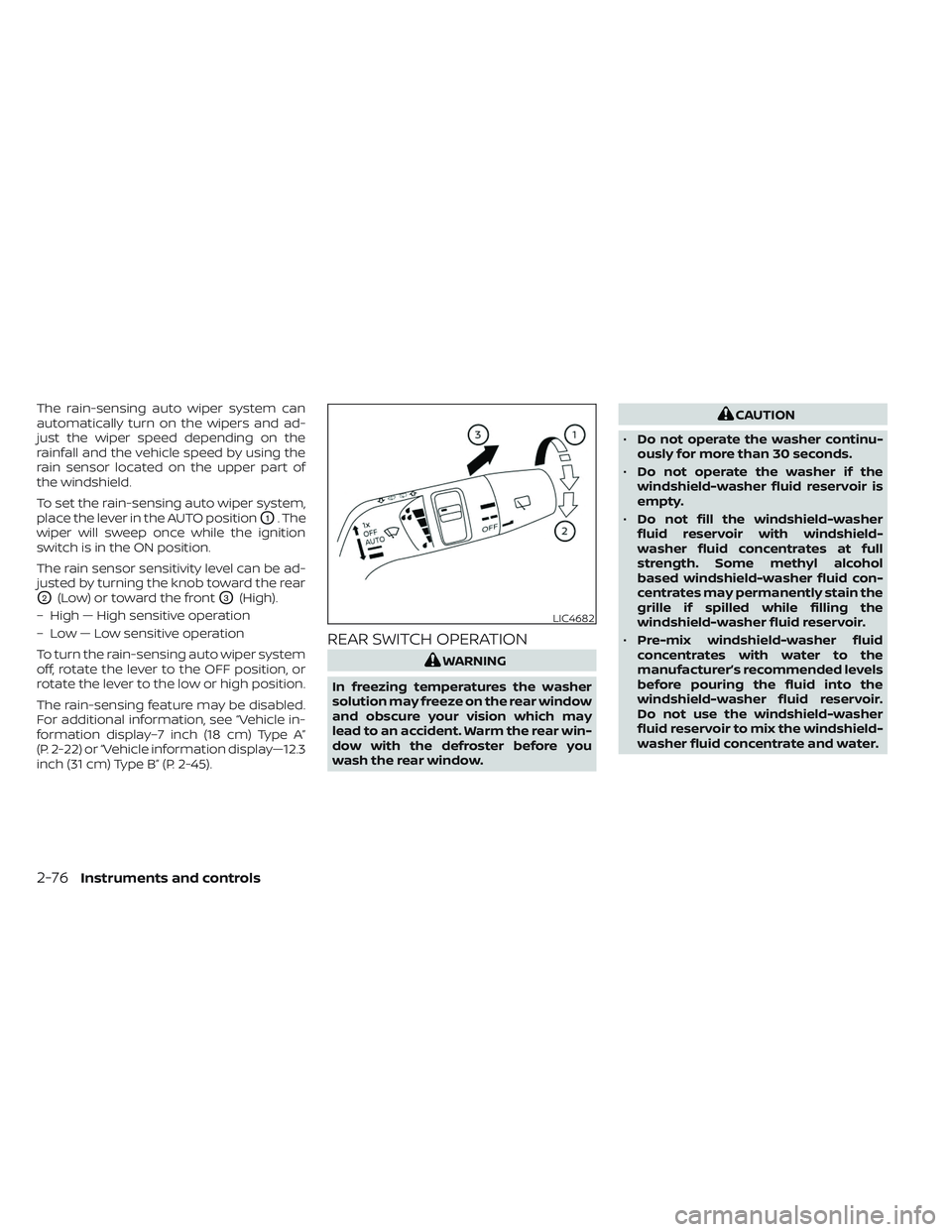
To set the rain-sensing auto wiper system,
place the lever in the AUTO position
O1. The
wiper will sweep once while the ignition
switch is in the ON position.
The rain sensor sensitivity level can be ad-
justed by turning the knob toward the rear
O2(Low) or toward the frontO3(High).
– High — High sensitive operation
– Low — Low sensitive operation
To turn the rain-sensing auto wiper system
off, rotate the lever to the OFF position, or
rotate the lever to the low or high position.
The rain-sensing feature may be disabled.
For additional information, see “Vehicle in-
formation display–7 inch (18 cm) Type A”
(P. 2-22) or “Vehicle information display—12.3
inch (31 cm) Type B” (P. 2-45).
REAR SWITCH OPERATION
WARNING
In freezing temperatures the washer
solution may freeze on the rear window
and obscure your vision which may
lead to an accident. Warm the rear win-
dow with the defroster before you
wash the rear window.
CAUTION
• Do not operate the washer continu-
ously for more than 30 seconds.
• Do not operate the washer if the
windshield-washer fluid reservoir is
empty.
• Do not fill the windshield-washer
fluid reservoir with windshield-
washer fluid concentrates at full
strength. Some methyl alcohol
based windshield-washer fluid con-
centrates may permanently stain the
grille if spilled while filling the
windshield-washer fluid reservoir.
• Pre-mix windshield-washer fluid
concentrates with water to the
manufacturer’s recommended levels
before pouring the fluid into the
windshield-washer fluid reservoir.
Do not use the windshield-washer
fluid reservoir to mix the windshield-
washer fluid concentrate and water.
LIC4682
2-76Instruments and controls