roof NISSAN PATHFINDER 2023 User Guide
[x] Cancel search | Manufacturer: NISSAN, Model Year: 2023, Model line: PATHFINDER, Model: NISSAN PATHFINDER 2023Pages: 665, PDF Size: 4.64 MB
Page 100 of 665
•Modif ying or tampering with the
front passenger seat may result in
serious personal injury. For example,
do not change the front seats by
placing material on the seat cushion
or by installing additional trim mate-
rial, such as seat covers, on the seat
that are not specifically designed to
assure proper air bag operation. Ad-
ditionally, do not stow any objects
under the front passenger seat or the
seat cushion and seatback. Such ob-
jects may interfere with the proper
operation of the occupant classifica-
tion sensor (weight sensor).
• No unauthorized changes should be
made to any components or wiring
of the seat belt system. This may af-
fect the front air bag system. Tam-
pering with the seat belt system may
result in serious personal injury. •
It is recommended that you visit a
NISSAN dealer for work on and
around the front air bag. It is also rec-
ommended that you visit a NISSAN
dealer for installation of electrical
equipment. The Supplemental Re-
straint System (SRS) wiring har-
nesses* should not be modified or
disconnected. Unauthorized electri-
cal test equipment and probing de-
vices should not be used on the air
bag system.
• A cracked windshield should be re-
placed immediately by a qualified re-
pair facility. A cracked windshield
could affect the function of the
supplemental air bag system.
*The SRS wiring harness connectors are
yellow and orange for easy
identification.
When selling your vehicle, we request that
you inform the buyer about the front air
bag system and guide the buyer to the
appropriate sections in this Owner's
Manual.
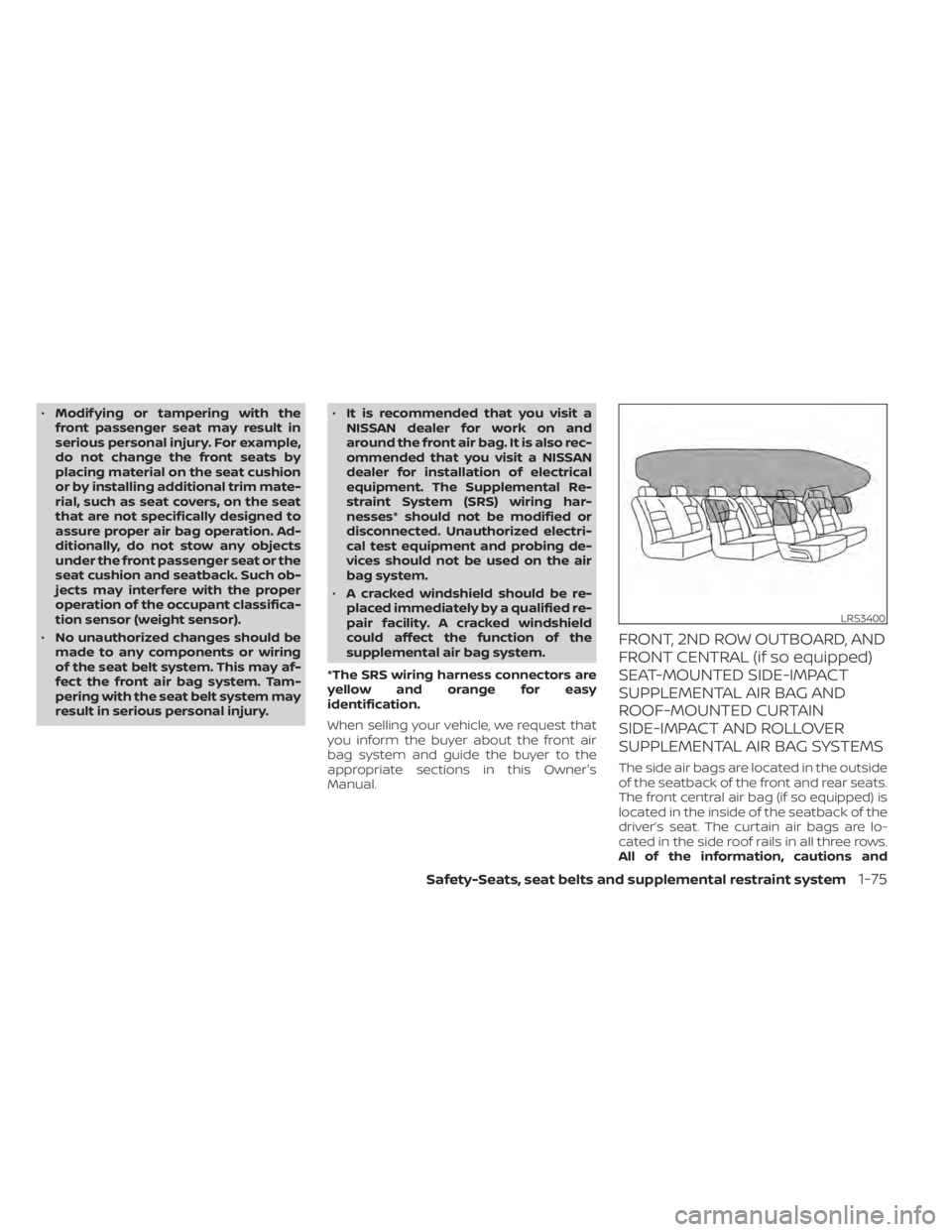
FRONT, 2ND ROW OUTBOARD, AND
FRONT CENTRAL (if so equipped)
SEAT-MOUNTED SIDE-IMPACT
SUPPLEMENTAL AIR BAG AND
ROOF-MOUNTED CURTAIN
SIDE-IMPACT AND ROLLOVER
SUPPLEMENTAL AIR BAG SYSTEMS
The side air bags are located in the outside
of the seatback of the front and rear seats.
The front central air bag (if so equipped) is
located in the inside of the seatback of the
driver’s seat. The curtain air bags are lo-
cated in the side roof rails in all three rows.
All of the information, cautions and
LRS3400
Safety-Seats, seat belts and supplemental restraint system1-75
Page 101 of 665
warnings in this manual must be fol-
lowed.The side air bags and curtain air
bags are designed to inflate in higher se-
verity side collisions, although they may in-
flate if the forces in another type of collision
are similar to those of a higher severity
impact. They are designed to inflate on the
side where the vehicle is impacted. They
may not inflate in certain side collisions.
Curtain air bags are also designed to inflate
in certain types of rollover collisions or near
rollovers. As a result, certain vehicle move-
ments (for example, during severe off-
roading) may cause the curtain air bags to
inflate.
Vehicle damage (or lack of it) is not always
an indication of proper side air bag and
curtain air bag operation.
When the side air bags and curtain air bags
inflate, a fairly loud noise may be heard,
followed by release of smoke. This smoke is
not harmful and does not indicate a fire.
Care should be taken not to inhale it, as it
may cause irritation and choking. Those
with a history of a breathing condition
should get fresh air promptly.
Side air bags, along with the use of seat
belts, help to cushion the impact force on
the chest of the front and rear outboard occupants. Front central side air bag, along
with the use of seat belts helps cushion the
impact force on the head area of the front
occupants. Curtain air bags help to cush-
ion the impact force to the head of occu-
pants in the front and rear outboard seat-
ing positions in all rows. They can help save
lives and reduce serious injuries. However,
an inflating side air bag or curtain air bag
may cause abrasions or other injuries. Side
air bags and curtain air bags do not pro-
vide restraint to the lower body.
The seat belts should be correctly worn
and the driver, front passenger, and 2nd
row outboard occupants seated upright as
far as practical away from the side air bag.
Rear seat passengers should be seated as
far away as practical from the door finish-
ers and side roof rails. The side air bags and
curtain air bags inflate quickly in order to
help protect the occupants. Because of
this, the force of the side air bags and cur-
tain air bags inflating can increase the risk
of injury if the occupant is too close to, or is
against, these air bag modules during in-
flation. The side air bag will deflate quickly
af ter the collision is over. The front central
side air bag and curtain air bags will remain
inflated for a short period of time.
The side air bags and curtain air bags
operate only when the ignition switch is
placed in the ON position.
Af ter placing the ignition switch in the
ON position, the supplemental air bag
warning light illuminates. The supple-
mental air bag warning light will turn off
af ter about 7 seconds if the system is
operational.
WARNING
• Do not place any objects near the
seatback of the front seats. Also, do
not place any objects (an umbrella,
bag, etc.) between the front door fin-
isher and the front seat. Such objects
may become dangerous projectiles
and cause injury if a side air bag
inflates.
• Right af ter inflation, several side air
bag and curtain air bag system com-
ponents will be hot. Do not touch
them; you may severely burn
yourself.
1-76Safety-Seats, seat belts and supplemental restraint system
Page 109 of 665
Horn........................................... 2-89
Climate controlled seat switches
(if so equipped) ................................. 2-90
Heated seat switches (if so equipped) ..........2-91
Heated 2nd row seat switches
(if so equipped) ................................. 2-92
Heated steering wheel switch (if so equipped) . . 2-93
Hill descent control switch (if so equipped) .....2-94
Steering Assist switch (for vehicles with
ProPILOT Assist) (if so equipped) ................2-95
Head Up Display (HUD) (if so equipped) .........2-95
HowtousetheHUD......................... 2-96
Driver Assistance/Navigation linking ........2-97
Emergency call (SOS) button (if so equipped) . . . 2-98 Emergency support ......................... 2-98
Rear Door Alert ................................ 2-100
Power outlets ................................. 2-101
12v outlets ................................. 2-101
120v outlet (if so equipped) .................2-102
USB/iPod® charging ports .....................2-103
Wireless charger (if so equipped) ..............2-104
Wireless charger indicator ..................2-105Wireless charger operation
.................2-105
Extended storage switch ......................2-106
Storage ....................................... 2-107
Front-door pockets ........................ 2-107
Lower console storage tray ................2-108
Seatback pockets (if so equipped) ..........2-108
Storagetrays............................... 2-109
Glovebox .................................. 2-110
Console box ................................ 2-110
2nd row console (if so equipped) ...........2-110
Overhead sunglasses storage ...............2-111
Cup holders ................................ 2-112
Cargo area storage bin .....................2-114
Luggage hooks ............................ 2-115
Roof rack (if so equipped) ..................2-116
Windows ....................................... 2-117
Power windows .............................
2-117
R
ear door sunshade (if so equipped) .......2-120
Power moonroof (if so equipped) ..............2-120
Automatic moonroof and sunshade .......2-121
Interior lights .................................. 2-123
Map lights .................................. 2-123
Page 118 of 665
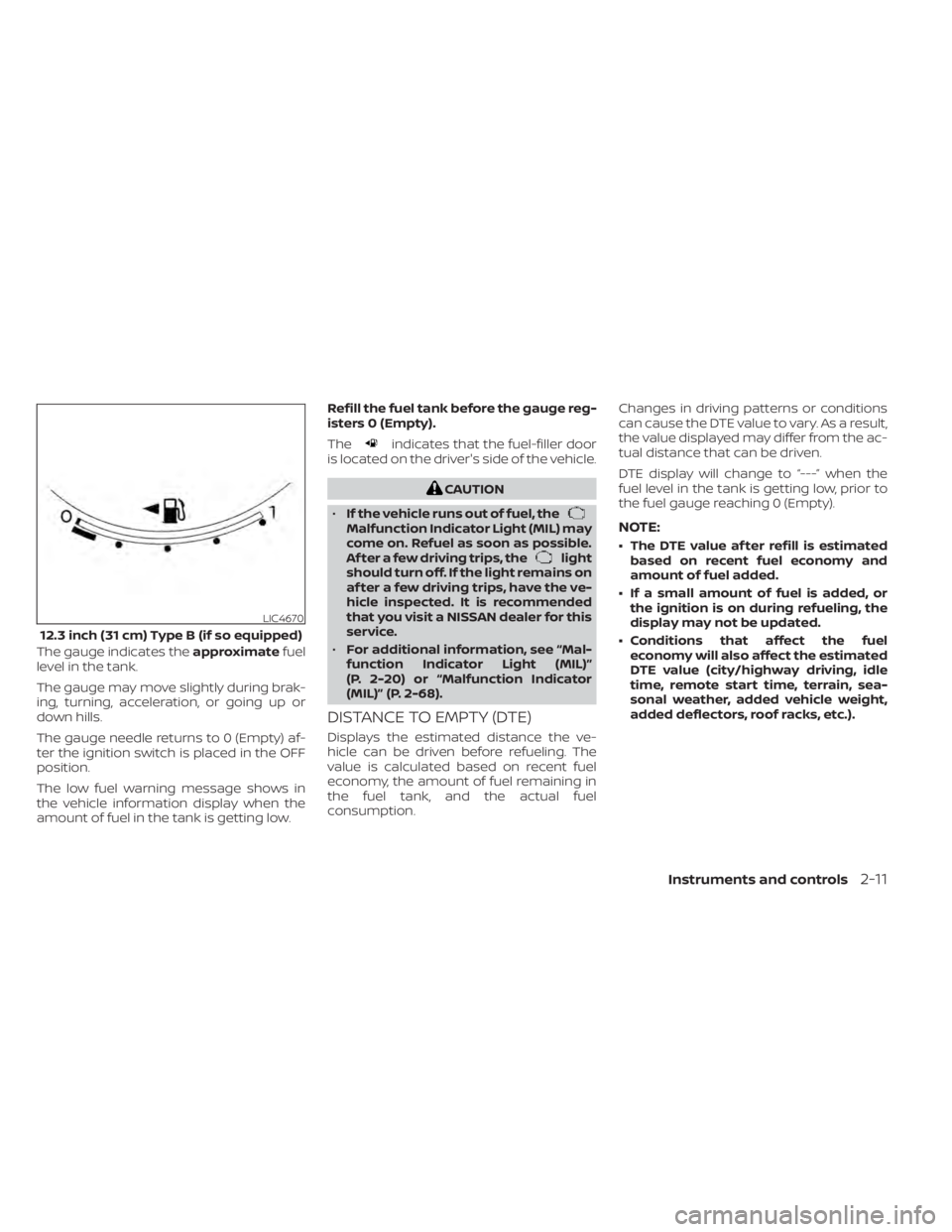
The gauge indicates theapproximatefuel
level in the tank.
The gauge may move slightly during brak-
ing, turning, acceleration, or going up or
down hills.
The gauge needle returns to 0 (Empty) af-
ter the ignition switch is placed in the OFF
position.
The low fuel warning message shows in
the vehicle information display when the
amount of fuel in the tank is getting low. Refill the fuel tank before the gauge reg-
isters 0 (Empty).
The
indicates that the fuel-filler door
is located on the driver's side of the vehicle.
CAUTION
• If the vehicle runs out of fuel, the
Malfunction Indicator Light (MIL) may
come on. Refuel as soon as possible.
Af ter a few driving trips, the
light
should turn off. If the light remains on
af ter a few driving trips, have the ve-
hicle inspected. It is recommended
that you visit a NISSAN dealer for this
service.
• For additional information, see “Mal-
function Indicator Light (MIL)”
(P. 2-20) or “Malfunction Indicator
(MIL)” (P. 2-68).
DISTANCE TO EMPTY (DTE)
Displays the estimated distance the ve-
hicle can be driven before refueling. The
value is calculated based on recent fuel
economy, the amount of fuel remaining in
the fuel tank, and the actual fuel
consumption. Changes in driving patterns or conditions
can cause the DTE value to vary. As a result,
the value displayed may differ from the ac-
tual distance that can be driven.
DTE display will change to “---” when the
fuel level in the tank is getting low, prior to
the fuel gauge reaching 0 (Empty).
NOTE:
• The DTE value af ter refill is estimated
based on recent fuel economy and
amount of fuel added.
• If a small amount of fuel is added, or the ignition is on during refueling, the
display may not be updated.
• Conditions that affect the fuel economy will also affect the estimated
DTE value (city/highway driving, idle
time, remote start time, terrain, sea-
sonal weather, added vehicle weight,
added deflectors, roof racks, etc.).
LIC4670
12.3 inch (31 cm) Type B (if so equipped)
Instruments and controls2-11
Page 183 of 665
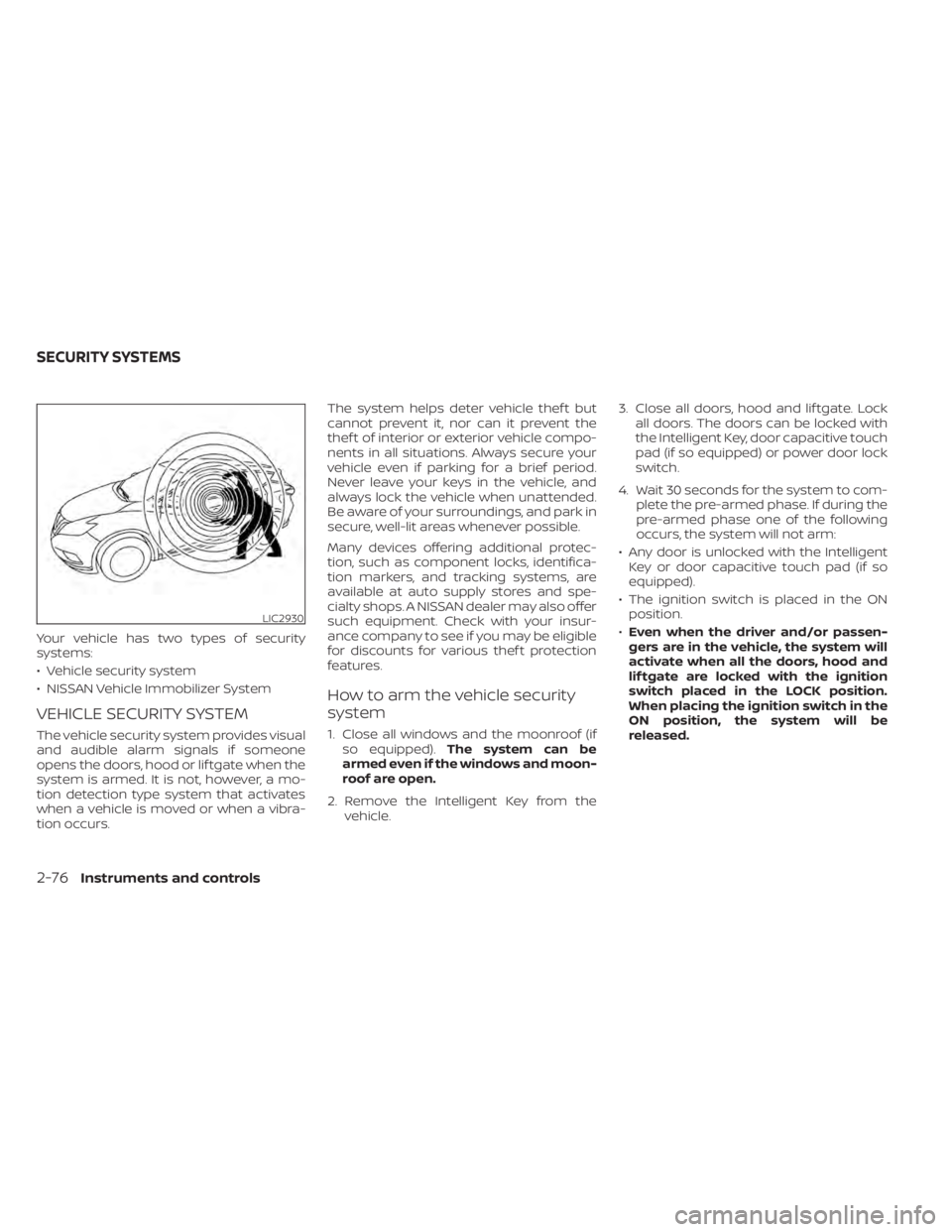
Your vehicle has two types of security
systems:
• Vehicle security system
• NISSAN Vehicle Immobilizer System
VEHICLE SECURITY SYSTEM
The vehicle security system provides visual
and audible alarm signals if someone
opens the doors, hood or lif tgate when the
system is armed. It is not, however, a mo-
tion detection type system that activates
when a vehicle is moved or when a vibra-
tion occurs.The system helps deter vehicle thef t but
cannot prevent it, nor can it prevent the
thef t of interior or exterior vehicle compo-
nents in all situations. Always secure your
vehicle even if parking for a brief period.
Never leave your keys in the vehicle, and
always lock the vehicle when unattended.
Be aware of your surroundings, and park in
secure, well-lit areas whenever possible.
Many devices offering additional protec-
tion, such as component locks, identifica-
tion markers, and tracking systems, are
available at auto supply stores and spe-
cialty shops. A NISSAN dealer may also offer
such equipment. Check with your insur-
ance company to see if you may be eligible
for discounts for various thef t protection
features.
How to arm the vehicle security
system
1. Close all windows and the moonroof (if
so equipped). The system can be
armed even if the windows and moon-
roof are open.
2. Remove the Intelligent Key from the vehicle. 3. Close all doors, hood and lif tgate. Lock
all doors. The doors can be locked with
the Intelligent Key, door capacitive touch
pad (if so equipped) or power door lock
switch.
4. Wait 30 seconds for the system to com- plete the pre-armed phase. If during the
pre-armed phase one of the following
occurs, the system will not arm:
• Any door is unlocked with the Intelligent Key or door capacitive touch pad (if so
equipped).
• The ignition switch is placed in the ON position.
• Even when the driver and/or passen-
gers are in the vehicle, the system will
activate when all the doors, hood and
lif tgate are locked with the ignition
switch placed in the LOCK position.
When placing the ignition switch in the
ON position, the system will be
released.
LIC2930
SECURITY SYSTEMS
2-76Instruments and controls
Page 223 of 665
ROOF RACK (if so equipped)
WARNING
• Always install the crossbars onto the
roof side rails before loading cargo of
any kind. Loading cargo directly onto
the roof side rails or the vehicle’s roof
may cause vehicle damage.
• Roof rack cross bars should be evenly
distributed.
• Do not exceed maximum roof rack
crossbars load capacity and always
distribute the load uniformly. •
Heavy loading of the crossbars has
the potential to affect the vehicle
stability and handling during sudden
or unusual handling maneuvers.
• Properly secure all cargo with ropes
or straps to help prevent it from slid-
ing or shif ting. In a sudden stop or
collision, unsecured cargo could
cause personal injury.
• Drive extra carefully when the vehicle
is loaded at or near the cargo carry-
ing capacity, especially if the signifi-
cant portion of that load is carried on
the crossbars.CAUTION
• Use care when placing or removing
items from the roof rack. If you can-
not comfortably lif t the items onto
the roof rack from the ground, use a
ladder or a stool.
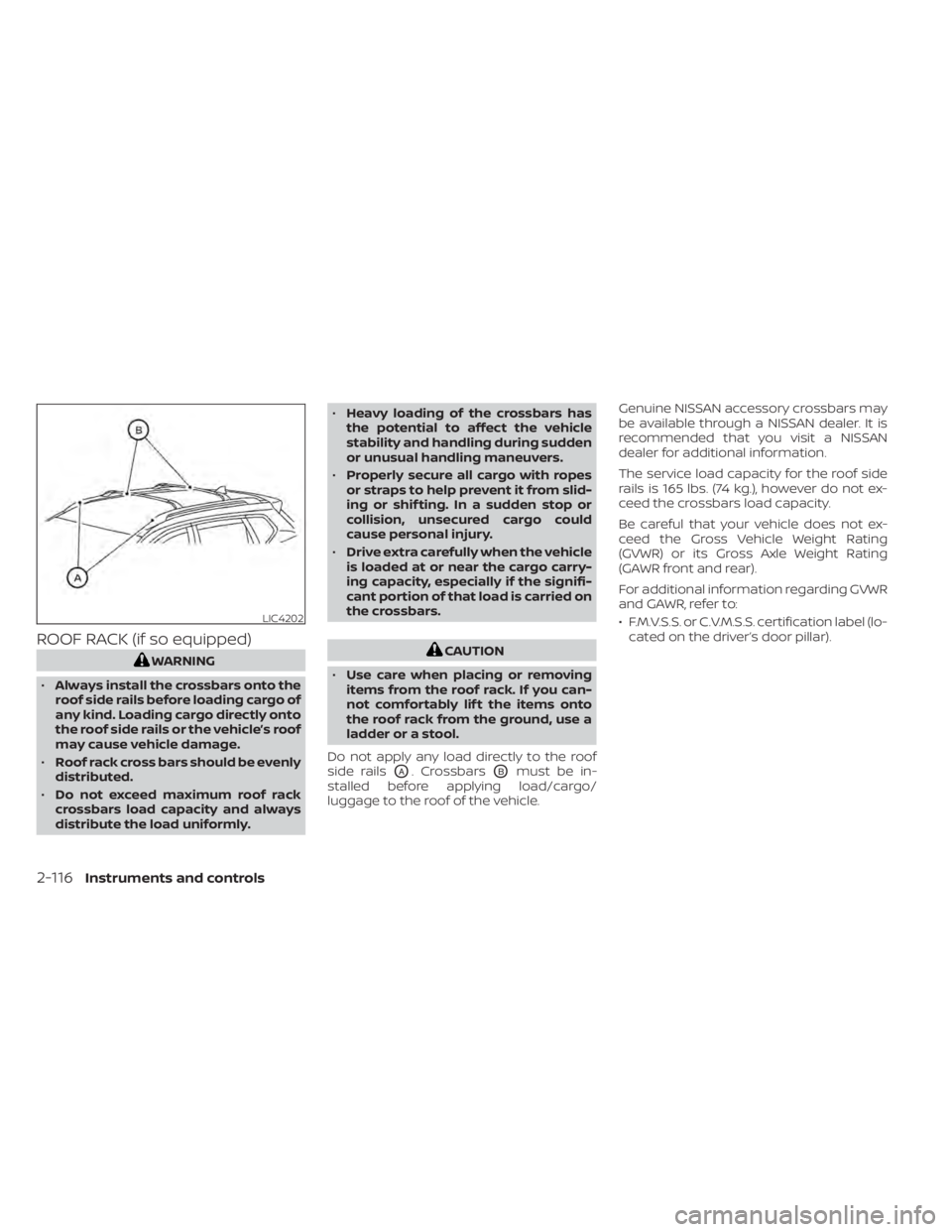
Do not apply any load directly to the roof
side rails
OA. CrossbarsOBmust be in-
stalled before applying load/cargo/
luggage to the roof of the vehicle. Genuine NISSAN accessory crossbars may
be available through a NISSAN dealer. It is
recommended that you visit a NISSAN
dealer for additional information.
The service load capacity for the roof side
rails is 165 lbs. (74 kg.), however do not ex-
ceed the crossbars load capacity.
Be careful that your vehicle does not ex-
ceed the Gross Vehicle Weight Rating
(GVWR) or its Gross Axle Weight Rating
(GAWR front and rear).
For additional information regarding GVWR
and GAWR, refer to:
• F.M.V.S.S. or C.V.M.S.S. certification label (lo-
cated on the driver’s door pillar).
LIC4202
2-116Instruments and controls
Page 224 of 665
Installing Crossbars (if so
equipped)
WARNING
• It is recommended that you have the
roof rack crossbars installed by a
NISSAN dealer.
• Protect the painted area on the ve-
hicle roof under the crossbars by
placing a piece of cloth under the
cross bars to prevent scratch
damage.
• Make sure the moonroof (if so
equipped) is in the closed position
during the installation process.
POWER WINDOWS
WARNING
• Make sure that all passengers have
their hands, etc., inside the vehicle
while it is in motion and before clos-
ing the windows. Use the window
lock switch to prevent unexpected
use of the power windows.
• To help avoid risk of injury or death
through unintended operation of the
vehicle and/or its systems, including
entrapment in windows or inadver-
tent door lock activation, do not
leave children, people who require
the assistance of others or pets unat-
tended in your vehicle. Additionally,
the temperature inside a closed ve-
hicle on a warm day can quickly be-
come high enough to cause a signifi-
cant risk of injury or death to people
and pets.
The power windows operate when the ig-
nition switch is placed in the ON position or
for a period of time af ter the ignition switch
is placed in the OFF position. If the driver's
or passenger's door is opened during this
period of time, the power to the windows is
canceled.
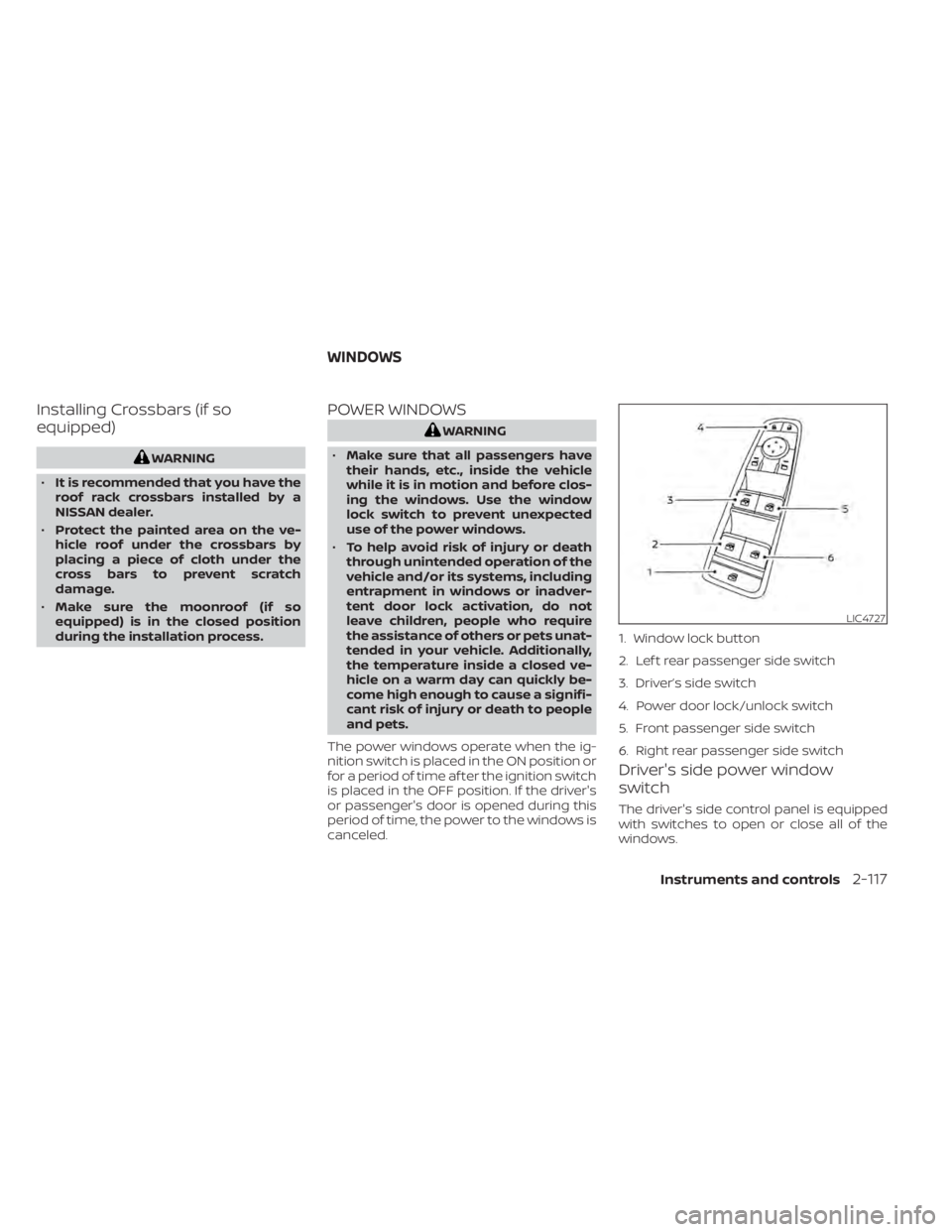
Driver's side power window
switch
The driver's side control panel is equipped
with switches to open or close all of the
windows.
LIC4727
1. Window lock button
2. Lef t rear passenger side switch
3. Driver’s side switch
4. Power door lock/unlock switch
5. Front passenger side switch
6. Right rear passenger side switch
WINDOWS
Instruments and controls2-117
Page 227 of 665
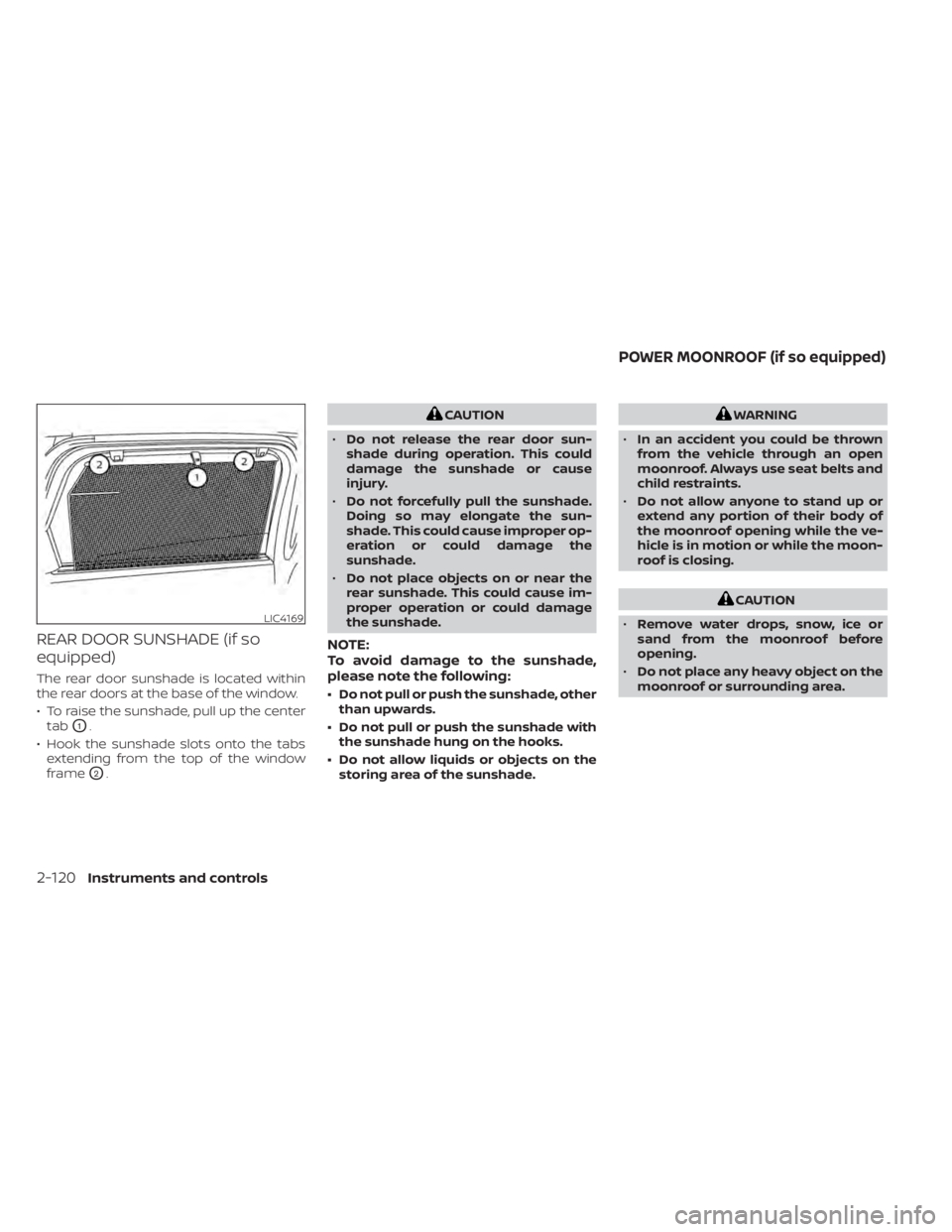
REAR DOOR SUNSHADE (if so
equipped)
The rear door sunshade is located within
the rear doors at the base of the window.
• To raise the sunshade, pull up the centertab
O1.
• Hook the sunshade slots onto the tabs extending from the top of the window
frame
O2.
CAUTION
• Do not release the rear door sun-
shade during operation. This could
damage the sunshade or cause
injury.
• Do not forcefully pull the sunshade.
Doing so may elongate the sun-
shade. This could cause improper op-
eration or could damage the
sunshade.
• Do not place objects on or near the
rear sunshade. This could cause im-
proper operation or could damage
the sunshade.
NOTE:
To avoid damage to the sunshade,
please note the following:
• Do not pull or push the sunshade, other than upwards.
• Do not pull or push the sunshade with the sunshade hung on the hooks.
• Do not allow liquids or objects on the storing area of the sunshade.
WARNING
• In an accident you could be thrown
from the vehicle through an open
moonroof. Always use seat belts and
child restraints.
• Do not allow anyone to stand up or
extend any portion of their body of
the moonroof opening while the ve-
hicle is in motion or while the moon-
roof is closing.
CAUTION
• Remove water drops, snow, ice or
sand from the moonroof before
opening.
• Do not place any heavy object on the
moonroof or surrounding area.
LIC4169
POWER MOONROOF (if so equipped)
2-120Instruments and controls
Page 228 of 665
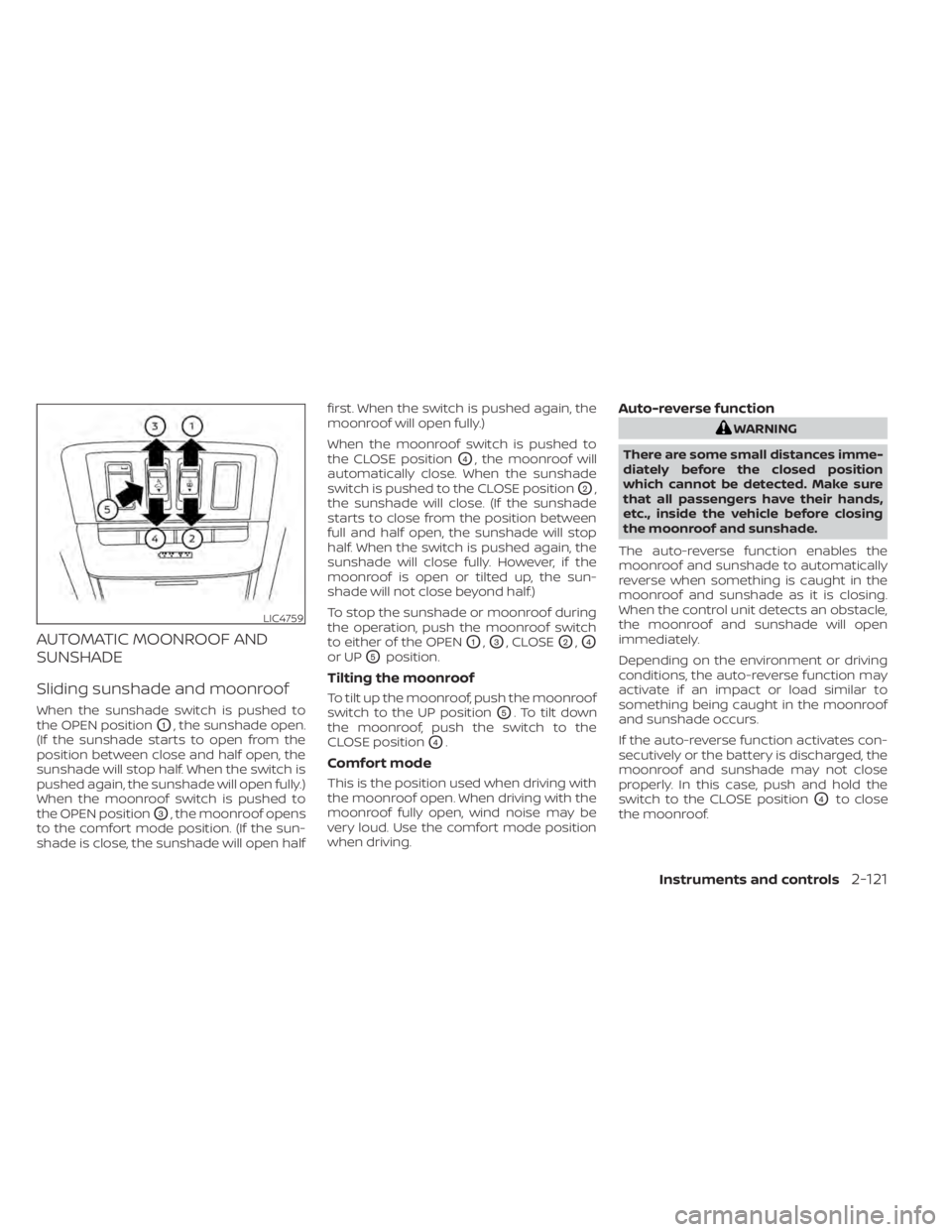
AUTOMATIC MOONROOF AND
SUNSHADE
Sliding sunshade and moonroof
When the sunshade switch is pushed to
the OPEN position
O1, the sunshade open.
(If the sunshade starts to open from the
position between close and half open, the
sunshade will stop half. When the switch is
pushed again, the sunshade will open fully.)
When the moonroof switch is pushed to
the OPEN position
O3, the moonroof opens
to the comfort mode position. (If the sun-
shade is close, the sunshade will open half first. When the switch is pushed again, the
moonroof will open fully.)
When the moonroof switch is pushed to
the CLOSE position
O4, the moonroof will
automatically close. When the sunshade
switch is pushed to the CLOSE position
O2,
the sunshade will close. (If the sunshade
starts to close from the position between
full and half open, the sunshade will stop
half. When the switch is pushed again, the
sunshade will close fully. However, if the
moonroof is open or tilted up, the sun-
shade will not close beyond half.)
To stop the sunshade or moonroof during
the operation, push the moonroof switch
to either of the OPEN
O1,O3, CLOSEO2,O4
or UPO5position.
Tilting the moonroof
To tilt up the moonroof, push the moonroof
switch to the UP position
O5. To tilt down
the moonroof, push the switch to the
CLOSE position
O4.
Comfort mode
This is the position used when driving with
the moonroof open. When driving with the
moonroof fully open, wind noise may be
very loud. Use the comfort mode position
when driving.
Auto-reverse function
WARNING
There are some small distances imme-
diately before the closed position
which cannot be detected. Make sure
that all passengers have their hands,
etc., inside the vehicle before closing
the moonroof and sunshade.
The auto-reverse function enables the
moonroof and sunshade to automatically
reverse when something is caught in the
moonroof and sunshade as it is closing.
When the control unit detects an obstacle,
the moonroof and sunshade will open
immediately.
Depending on the environment or driving
conditions, the auto-reverse function may
activate if an impact or load similar to
something being caught in the moonroof
and sunshade occurs.
If the auto-reverse function activates con-
secutively or the battery is discharged, the
moonroof and sunshade may not close
properly. In this case, push and hold the
switch to the CLOSE position
O4to close
the moonroof.
LIC4759
Instruments and controls2-121
Page 229 of 665
If the moonroof switch does not
operate
If the moonroof and sunshade do not op-
erate properly, perform the following pro-
cedure to initialize the operation system.
1. If the moonroof and sunshade are open,close them fully by repeatedly pushing
the moonroof switch to the CLOSE
O2
andO4position.
2. Push and hold the moonroof switch to the CLOSE
O4position for 10 seconds.
3. Af ter the moonroof and sunshade move slightly to the closed position and
then move back a little, release the
moonroof switch.
4. Push and hold the moonroof switch to the CLOSE
O4position, and the glass
and shade will move.
5. Release the moonroof switch. Then the moonroof and sunshade will fully open
and then fully close.
6. Check if the moonroof switch operates normally.
WARNING
The driver is always responsible for op-
erating the moonroof properly, includ-
ing the operation by all passengers.
Failure to follow the warnings and in-
structions for proper use of the moon-
roof could result in serious injury or
death.
• Do not allow children to operate the
moonroof. Improper operation by
children may cause an accident. If
children or others get caught in the
moonroof, it could cause serious
injury.
• To help avoid risk of injury or death
through unintended operation of the
moonroof, place the ignition switch
in the OFF position when leaving the
vehicle, and do not leave children and
the Intelligent Key inside the vehicle.
• Do not activate the auto-reverse
function intentionally. If hands or
face, etc. get caught in the moonroof,
it could cause serious injury.CAUTION
• Do not place objects (such as news-
papers, handkerchiefs, etc.) on the
sunshade when it is extending or re-
tracting causing improper operation
or damage to the sunshade.
• Do not push the sunshade arm with
your hands, etc., as this may deform
it. Improper operation or damage to
the sunshade may result.
• Do not put any object into the sun-
shade inlet port as this may result in
improper operation or damage the
sunshade.
• Do not hang any object on the arm
rail as this may result in improper op-
eration or damage the sunshade.
• Do not forcefully pull the sunshade.
Doing so may elongate the sun-
shade. Improper operation or dam-
age to the sunshade may result.
If the moonroof does not operate properly
af ter performing the procedure above,
have your vehicle checked by a NISSAN
dealer.
2-122Instruments and controls