lane NISSAN PATHFINDER 2023 Service Manual
[x] Cancel search | Manufacturer: NISSAN, Model Year: 2023, Model line: PATHFINDER, Model: NISSAN PATHFINDER 2023Pages: 665, PDF Size: 4.64 MB
Page 391 of 665
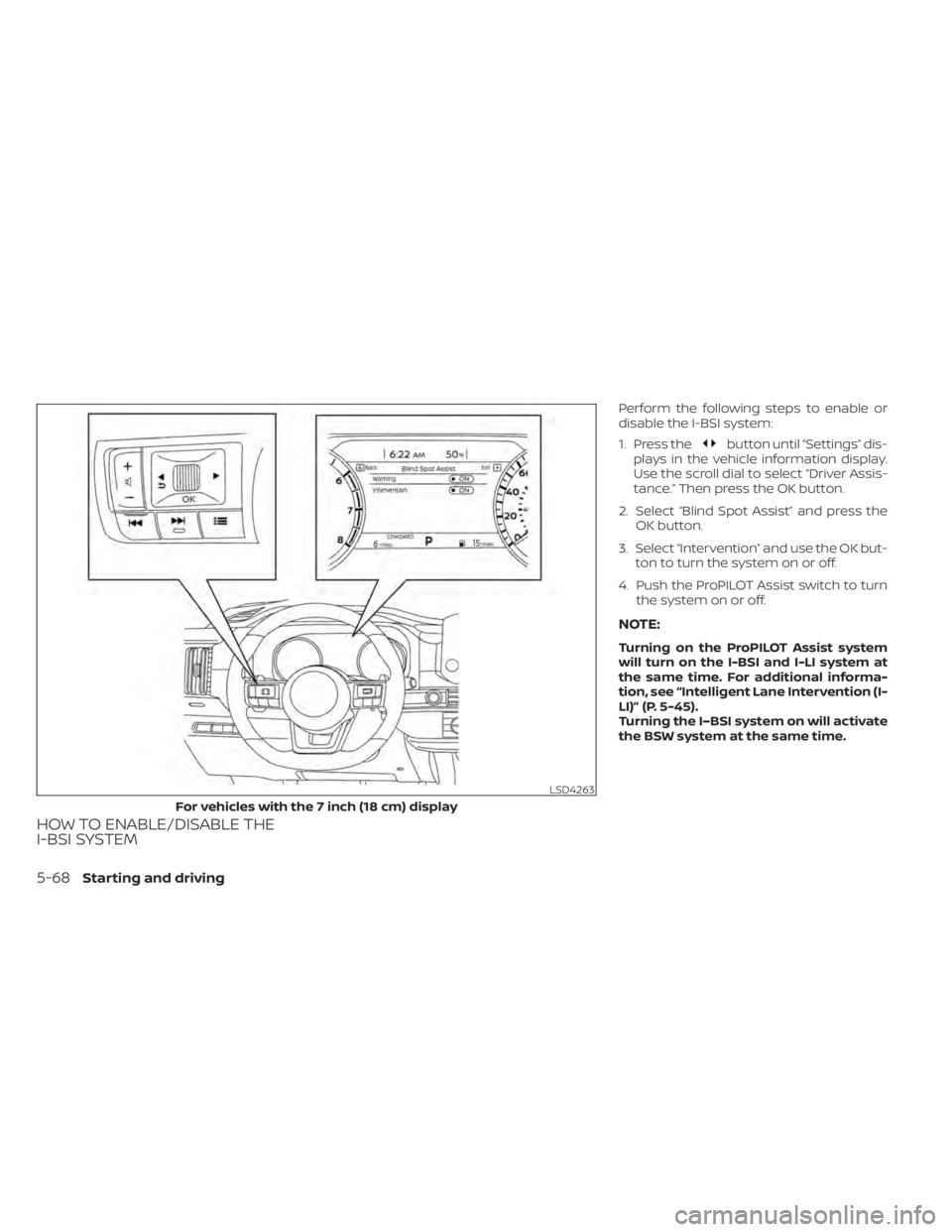
HOW TO ENABLE/DISABLE THE
I-BSI SYSTEM
Perform the following steps to enable or
disable the I-BSI system:
1. Press the
button until “Settings” dis-
plays in the vehicle information display.
Use the scroll dial to select “Driver Assis-
tance.” Then press the OK button.
2. Select “Blind Spot Assist” and press the OK button.
3. Select “Intervention” and use the OK but- ton to turn the system on or off.
4. Push the ProPILOT Assist switch to turn the system on or off.
NOTE:
Turning on the ProPILOT Assist system
will turn on the I-BSI and I-LI system at
the same time. For additional informa-
tion, see “Intelligent Lane Intervention (I-
LI)” (P. 5-45).
Turning the I–BSI system on will activate
the BSW system at the same time.
LSD4263
For vehicles with the 7 inch (18 cm) display
5-68Starting and driving
Page 392 of 665
I-BSI SYSTEM LIMITATIONS
WARNING
Listed below are the system limitations
for the I-BSI system. Failure to operate
the vehicle in accordance with these
system limitations could result in seri-
ous injury or death.
• The I-BSI system cannot detect all
vehicles under all conditions.
• The radar sensors may not be able to
detect and activate I-BSI when cer-
tain objects are present such as:
– Pedestrians, bicycles, or animals.
– Vehicles such as motorcycles, low
height vehicles, or high ground
clearance vehicles.
– Vehicles remaining in the detec-
tion zone when you accelerate
from a stop. For additional infor-
mation, see “BSI driving situa-
tions” (P. 5-71).
– Oncoming vehicles.
– A vehicle merging into an adjacent
lane at a speed approximately the
same as your vehicle.
– A vehicle approaching rapidly
from behind.
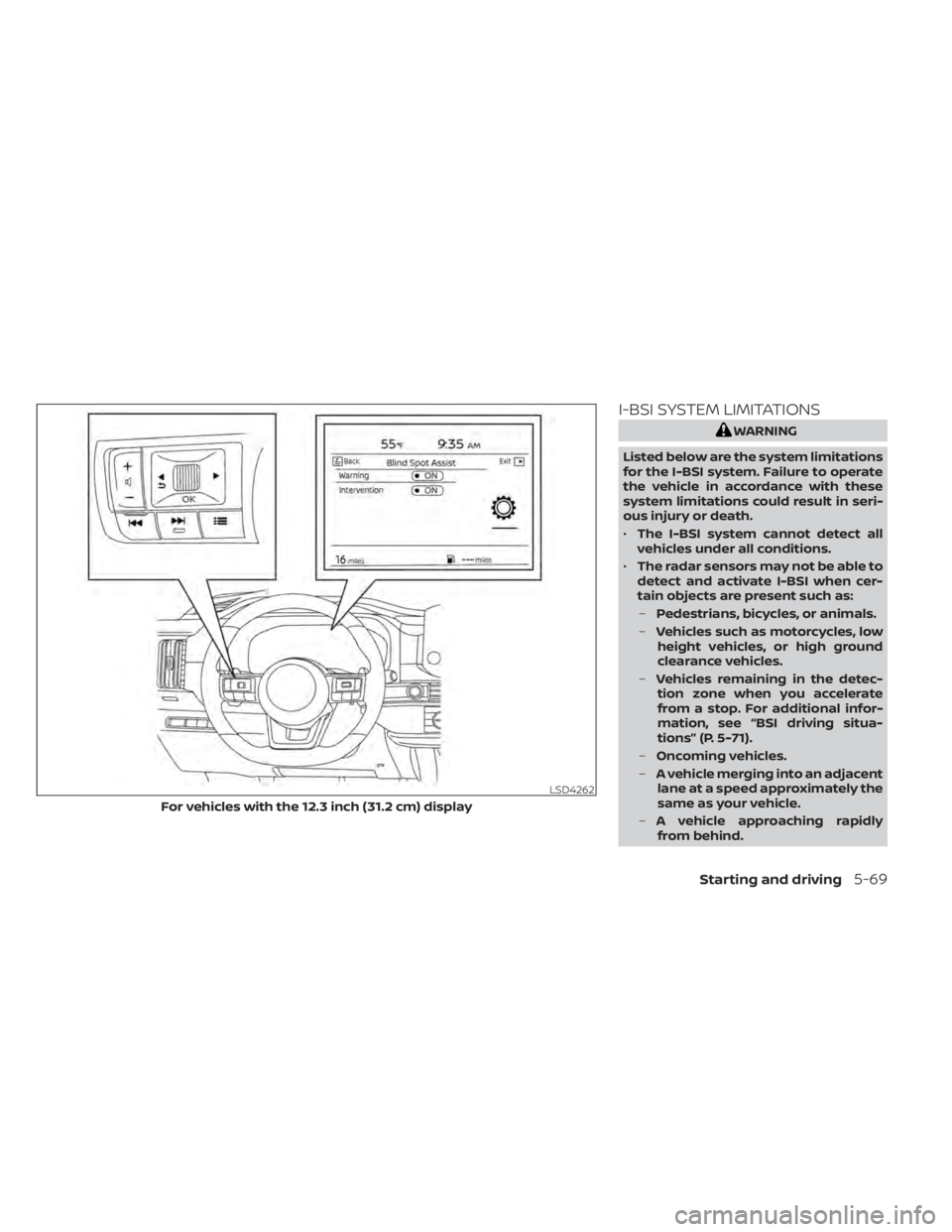
LSD4262
For vehicles with the 12.3 inch (31.2 cm) display
Starting and driving5-69
Page 393 of 665
–A vehicle which your vehicle over-
takes rapidly.
– A vehicle that passes through the
detection zone quickly.
• The radar sensors’ detection zone is
designed based on a standard lane
width. When driving in a wider lane,
the radar sensors may not detect ve-
hicles in an adjacent lane. When driv-
ing in a narrow lane, the radar sen-
sors may detect vehicles driving two
lanes away.
• The radar sensors are designed to ig-
nore most stationary objects; how-
ever, objects such as guardrails,
walls, foliage and parked vehicles
may occasionally be detected. This is
a normal operation condition.
• The following conditions may reduce
the ability of the radar to detect other
vehicles:
– Severe weather
– Road spray
– Ice/frost/dirt build-up on the
vehicle •
Do not attach stickers (including
transparent material), install acces-
sories or apply additional paint near
the radar sensors. These conditions
may reduce the ability of the radar to
detect other vehicles.
• The camera may not detect lane
markers in the following situations
and the I-BSI system may not oper-
ate properly.
– On roads where there are multiple
parallel lane markers; lane mark-
ers that are faded or not painted
clearly; yellow painted lane mark-
ers; non-standard lane markers;
lane markers covered with water,
dirt, snow, etc.
– On roads where discontinued lane
markers are still detectable.
– On roads where there are sharp
curves.
– On roads where there are sharply
contrasting objects, such as shad-
ows, snow, water, wheel ruts,
seams or lines remaining af ter
road repairs.
– On roads where the traveling lane
merges or separates. –
When the vehicle’s traveling direc-
tion does not align with the lane
markers.
– When traveling close to the ve-
hicle in front of you, which ob-
structs the lane camera unit de-
tection range.
– When rain, snow or dirt adheres to
the windshield in front of a lane
camera unit.
– When the headlights are not
bright due to dirt on the lens or if
aiming is not adjusted properly.
– When strong light enters a lane
camera unit. (For example: light
directly shines on the front of the
vehicle at sunrise or sunset.)
– When a sudden change in bright-
ness occurs. (For example: when
the vehicle enters or exits a tunnel
or under a bridge.)
• Do not use the I-BSI system under the
following conditions because the
system may not function properly.
– During bad weather (for example:
rain, fog, snow, etc.).
– When driving on slippery roads,
such as on ice or snow, etc.
5-70Starting and driving
Page 394 of 665
–When driving on winding or un-
even roads.
– When there is a lane closure due to
road repairs.
– When driving in a makeshif t or
temporary lane.
– When driving on roads where the
lane width is too narrow.
– When driving with a tire that is not
within normal tire conditions (e.g.,
tire wear, low tire pressure, instal-
lation of spare tire, tire chains,
nonstandard wheels).
– When the vehicle is equipped with
non-original brake parts or sus-
pension parts.
– When towing a trailer or other
vehicle.
• Excessive noise (e.g., audio system
volume, open vehicle window) will in-
terfere with the chime sound, and it
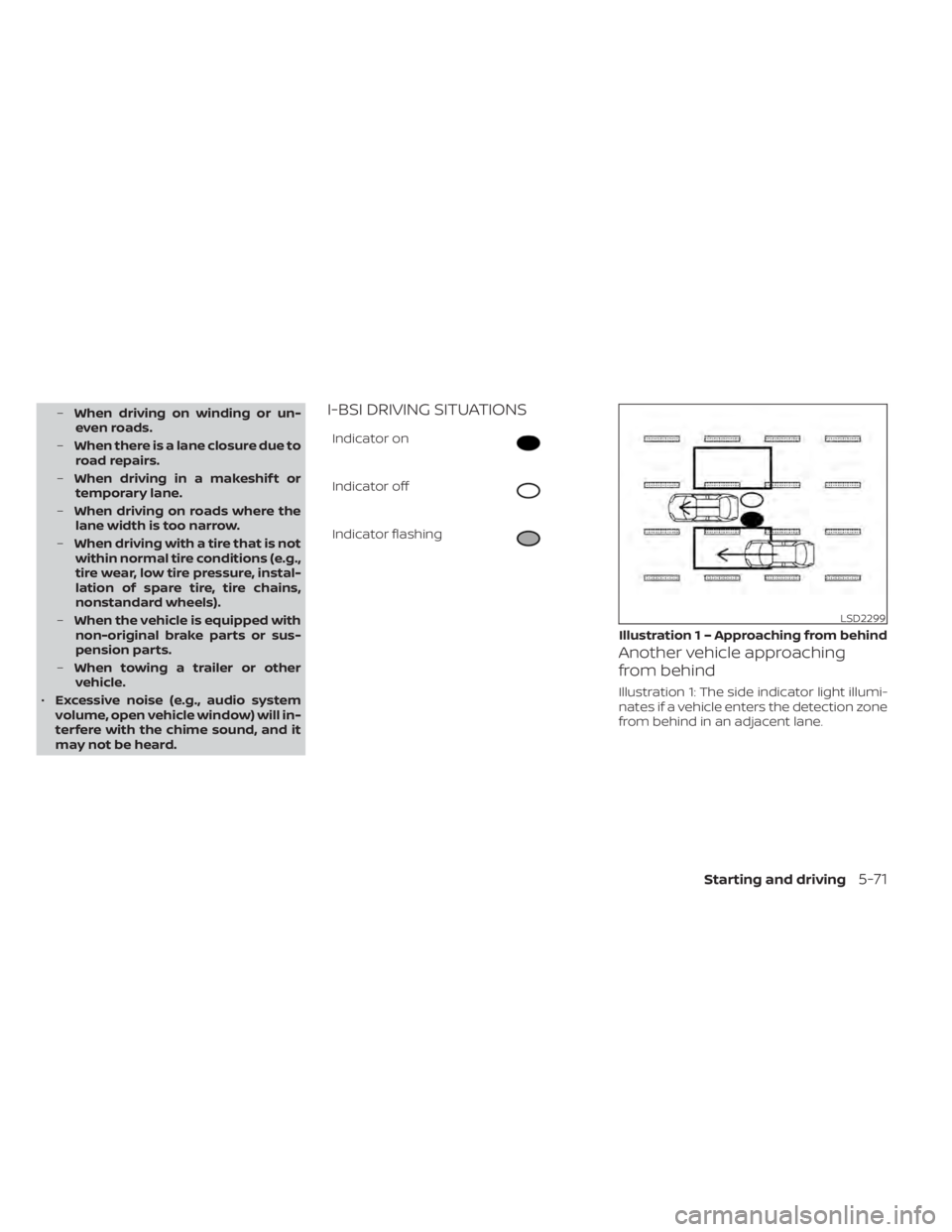
may not be heard.I-BSI DRIVING SITUATIONS
Indicator on
Indicator off
Indicator flashing
Another vehicle approaching
from behind
Illustration 1: The side indicator light illumi-
nates if a vehicle enters the detection zone
from behind in an adjacent lane.
LSD2299
Illustration 1 – Approaching from behind
Starting and driving5-71
Page 395 of 665
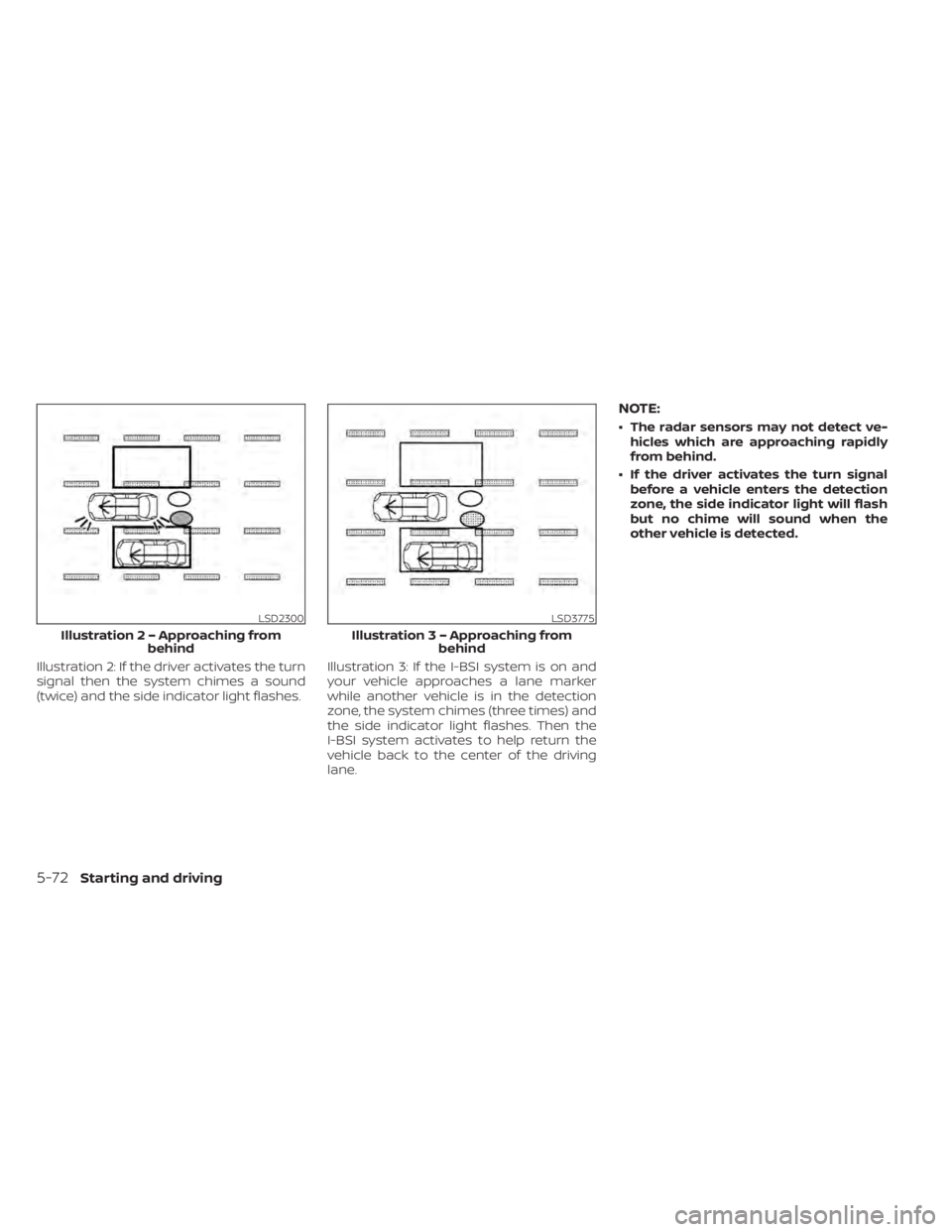
Illustration 2: If the driver activates the turn
signal then the system chimes a sound
(twice) and the side indicator light flashes.Illustration 3: If the I-BSI system is on and
your vehicle approaches a lane marker
while another vehicle is in the detection
zone, the system chimes (three times) and
the side indicator light flashes. Then the
I-BSI system activates to help return the
vehicle back to the center of the driving
lane.
NOTE:
• The radar sensors may not detect ve-
hicles which are approaching rapidly
from behind.
• If the driver activates the turn signal before a vehicle enters the detection
zone, the side indicator light will flash
but no chime will sound when the
other vehicle is detected.
LSD2300
Illustratio n 2 – Approaching from
behind
LSD3775
Illustratio n 3 – Approaching from
behind
5-72Starting and driving
Page 396 of 665
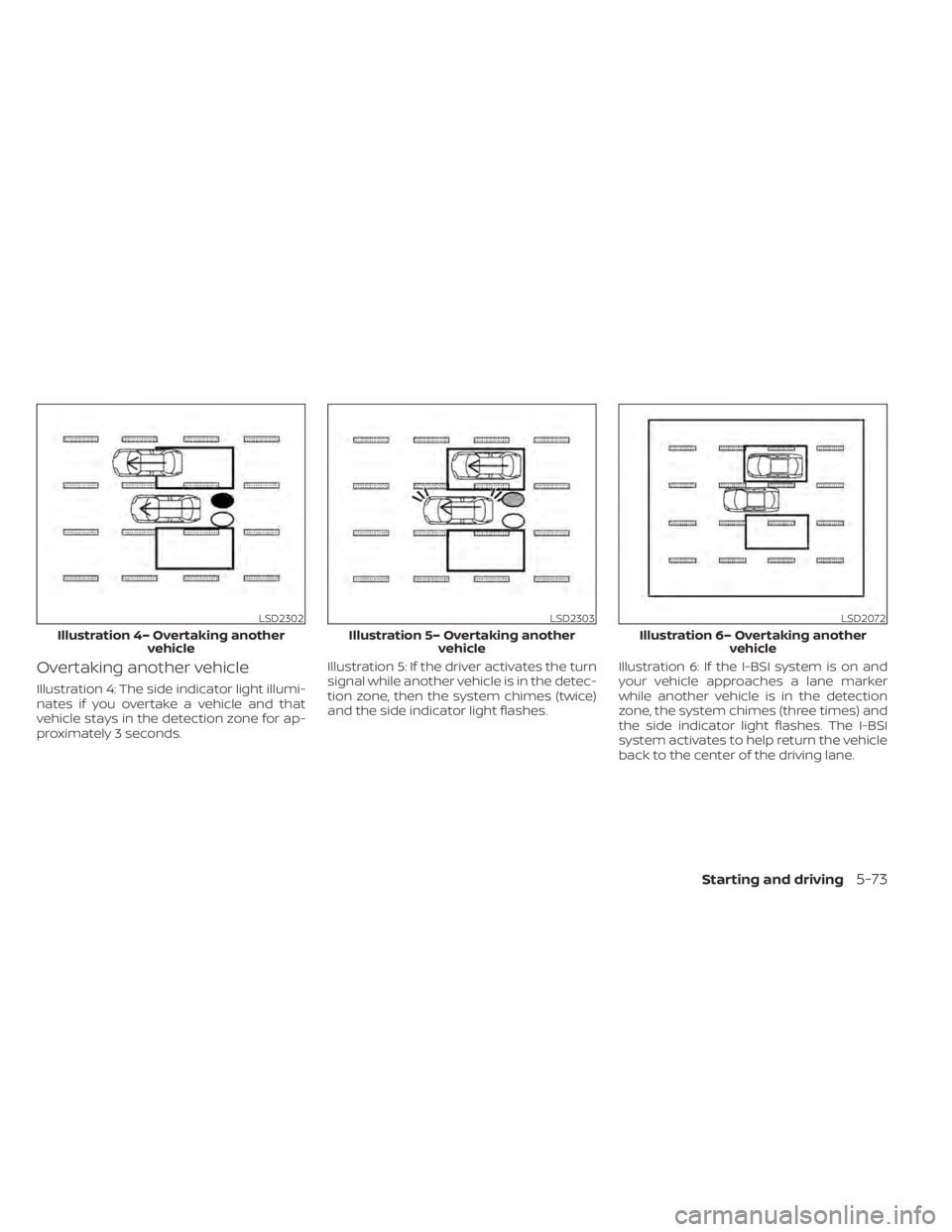
Overtaking another vehicle
Illustration 4: The side indicator light illumi-
nates if you overtake a vehicle and that
vehicle stays in the detection zone for ap-
proximately 3 seconds.Illustration 5: If the driver activates the turn
signal while another vehicle is in the detec-
tion zone, then the system chimes (twice)
and the side indicator light flashes.
Illustration 6: If the I-BSI system is on and
your vehicle approaches a lane marker
while another vehicle is in the detection
zone, the system chimes (three times) and
the side indicator light flashes. The I-BSI
system activates to help return the vehicle
back to the center of the driving lane.
LSD2302
Illustration 4– Overtaking another
vehicle
LSD2303
Illustration 5– Overtaking anothervehicle
LSD2072
Illustration 6– Overtaking another vehicle
Starting and driving5-73
Page 398 of 665
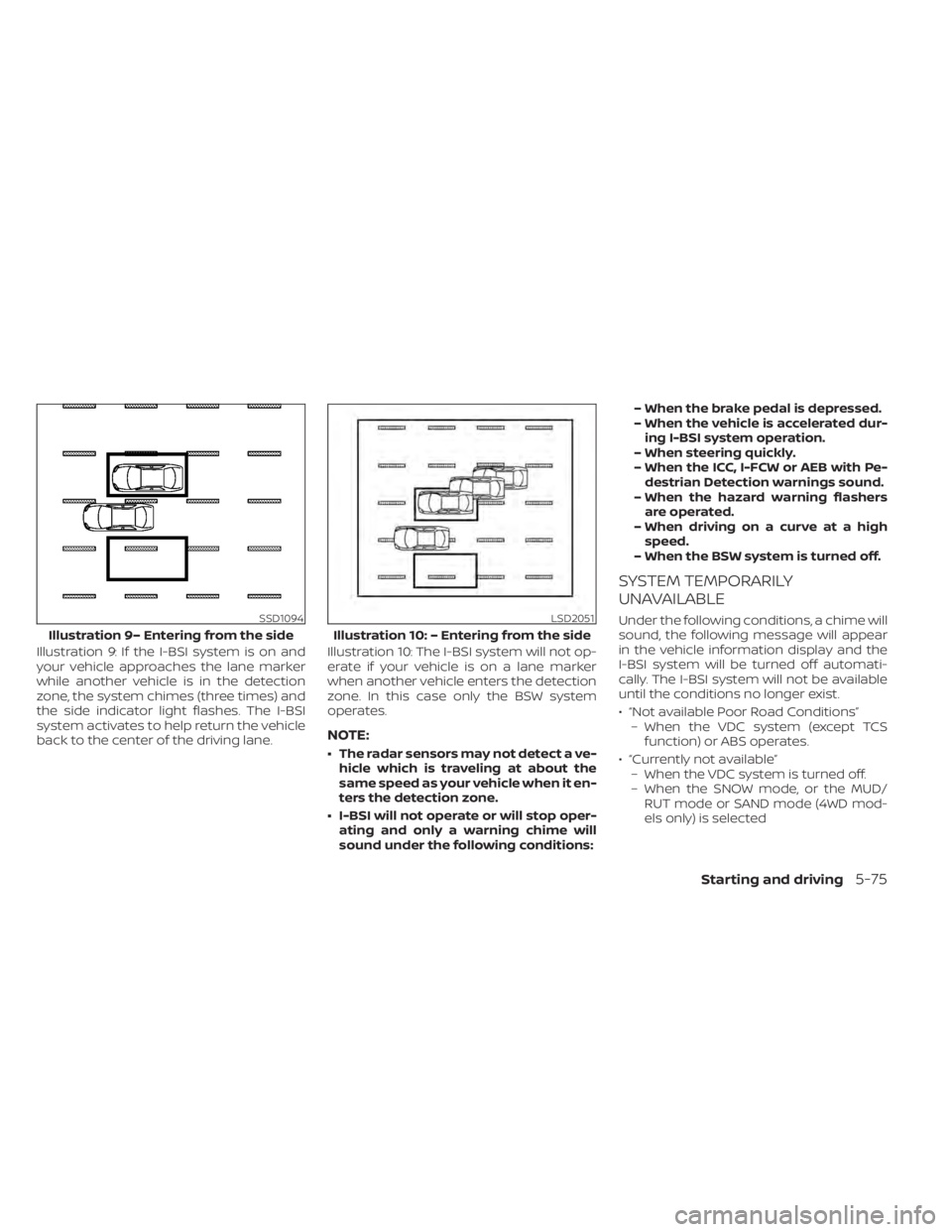
Illustration 9: If the I-BSI system is on and
your vehicle approaches the lane marker
while another vehicle is in the detection
zone, the system chimes (three times) and
the side indicator light flashes. The I-BSI
system activates to help return the vehicle
back to the center of the driving lane.Illustration 10: The I-BSI system will not op-
erate if your vehicle is on a lane marker
when another vehicle enters the detection
zone. In this case only the BSW system
operates.
NOTE:
• The radar sensors may not detect a ve-
hicle which is traveling at about the
same speed as your vehicle when it en-
ters the detection zone.
• I-BSI will not operate or will stop oper- ating and only a warning chime will
sound under the following conditions: – When the brake pedal is depressed.
– When the vehicle is accelerated dur-
ing I-BSI system operation.
– When steering quickly.
– When the ICC, I-FCW or AEB with Pe- destrian Detection warnings sound.
– When the hazard warning flashers are operated.
– When driving on a curve at a high speed.
– When the BSW system is turned off.
SYSTEM TEMPORARILY
UNAVAILABLE
Under the following conditions, a chime will
sound, the following message will appear
in the vehicle information display and the
I-BSI system will be turned off automati-
cally. The I-BSI system will not be available
until the conditions no longer exist.
• “Not available Poor Road Conditions” – When the VDC system (except TCS function) or ABS operates.
• “Currently not available” – When the VDC system is turned off.
– When the SNOW mode, or the MUD/ RUT mode or SAND mode (4WD mod-
els only) is selectedSSD1094
Illustration 9– Entering from the side
LSD2051
Illustration 10: – Entering from the side
Starting and driving5-75
Page 399 of 665
• “Unavailable High Cabin Temperature”:If the vehicle is parked in direct sunlight
under high temperature conditions
(over approximately 104°F (40°C)).
• “Unavailable Side Radar Obstruction”: When side radar blockage is detected.
Turn off the I-BSI system and turn it on
again when the above conditions no lon-
ger exist.
SYSTEM MALFUNCTION
When the I-BSI system malfunctions, it will
be turned off automatically, a chime will
sound, and the “Not available System Mal-
function” warning message with the BSW
indicator (orange) will appear in the vehicle
information display.
Action to take:
Stop the vehicle in a safe location, place the
vehicle in the P (Park) position, turn the en-
gine off and restart the engine. If the “Not
available System Malfunction” warning
message with the BSW indicator (orange)
continues to be displayed, have the I-BSI
system checked. It is recommended you
visit a certified NISSAN dealer for this
service.
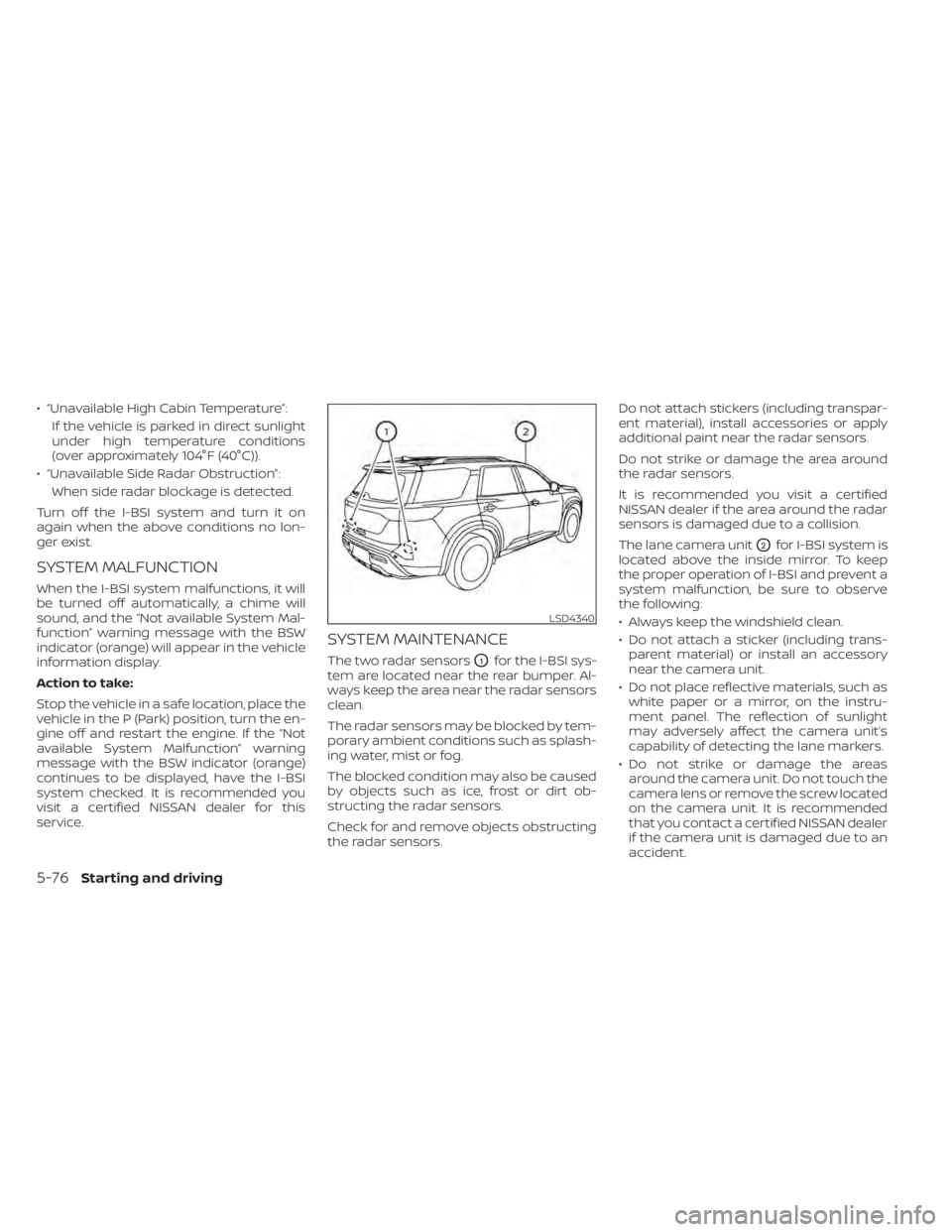
SYSTEM MAINTENANCE
The two radar sensorsO1for the I-BSI sys-
tem are located near the rear bumper. Al-
ways keep the area near the radar sensors
clean.
The radar sensors may be blocked by tem-
porary ambient conditions such as splash-
ing water, mist or fog.
The blocked condition may also be caused
by objects such as ice, frost or dirt ob-
structing the radar sensors.
Check for and remove objects obstructing
the radar sensors. Do not attach stickers (including transpar-
ent material), install accessories or apply
additional paint near the radar sensors.
Do not strike or damage the area around
the radar sensors.
It is recommended you visit a certified
NISSAN dealer if the area around the radar
sensors is damaged due to a collision.
The lane camera unit
O2for I-BSI system is
located above the inside mirror. To keep
the proper operation of I-BSI and prevent a
system malfunction, be sure to observe
the following:
• Always keep the windshield clean.
• Do not attach a sticker (including trans- parent material) or install an accessory
near the camera unit.
• Do not place reflective materials, such as white paper or a mirror, on the instru-
ment panel. The reflection of sunlight
may adversely affect the camera unit’s
capability of detecting the lane markers.
• Do not strike or damage the areas around the camera unit. Do not touch the
camera lens or remove the screw located
on the camera unit. It is recommended
that you contact a certified NISSAN dealer
if the camera unit is damaged due to an
accident.
LSD4340
5-76Starting and driving
Page 411 of 665
• The vehicle may not maintain the setspeed when going up or down steep hills.
If this happens, drive without the cruise
control.
To cancel the preset speed, use one of the
following three methods:
• Push the CANCEL switch; the
indica-
tor (green) in the vehicle information dis-
play goes out.
• Tap the brake pedal; the
indicator
(green) goes out.
• Push the cruise control ON/OFF switch off. The
indicator in the vehicle infor-
mation display go out.
The cruise control is automatically can-
celed and the
indicator (green) in the
vehicle information display goes out if:
• You depress the brake pedal while push- ing the RES+ or SET- switch. The preset
speed is deleted from memory.
• The vehicle slows down more than 8 mph (13 km/h) below the set speed.
• You move the shif t lever to N (Neutral). To reset at a faster cruising speed,
use
one of the following three methods:
• Depress the accelerator pedal. When the vehicle attains the desired speed, push
and release the SET- switch.
• Push and hold the RES+ switch. When the vehicle attains the speed you desire, re-
lease the switch.
• Push and release the RES+ switch. Each time you do this, the set speed increases
by about 1 mph (1.6 km/h).
To reset at a slower cruising speed, use
one of the following three methods:
• Lightly tap the brake pedal. When the ve- hicle attains the desired speed, push the
SET- switch and release it.
• Push and hold the SET- switch. Release the switch when the vehicle slows to the
desired speed.
• Push and release the SET- switch. Each time you do this, the set speed decreases
by about 1 mph (1.6 km/h).
To resume the preset speed, push and
release the RES+ switch. The vehicle re-
turns to the last set cruising speed when
the vehicle speed is over 25 mph (40 km/h).
WARNING
Failure to follow the warnings and in-
structions for proper use of the ProPI-
LOT Assist system could result in seri-
ous injury or death.
• ProPILOT Assist is not a self-driving
system. Within the limits of its capa-
bilities, as described in this manual, it
helps the driver with certain driving
activities.
• The ProPILOT Assist system is not a
replacement for proper driving pro-
cedures and is not designed to cor-
rect careless, inattentive or absent-
minded driving. ProPILOT Assist will
not always steer the vehicle to keep it
in the lane. The ProPILOT Assist sys-
tem is not designed to prevent loss of
control. It is the driver’s responsibility
to stay alert, drive safely, keep the
vehicle in the traveling lane, and be in
control of the vehicle at all times.
PROPILOT ASSIST (if so equipped)
5-88Starting and driving
Page 412 of 665
•There are limitations to the ProPILOT
Assist system capability. The ProPI-
LOT Assist system does not function
in all driving, traffic, weather, and
road conditions. It is the driver’s re-
sponsibility to stay alert, drive safely,
keep the vehicle in the traveling lane,
and be in control of the vehicle at all
times.
• The ProPILOT Assist system is only an
aid to assist the driver and is not a
collision warning or avoidance
device.
• The ProPILOT Assist system is for
highway use only and is not intended
for city driving. Failure to apply the
brakes or steer the vehicle when nec-
essary may result in a serious
accident.
• Always observe posted speed limits
and do not set the speed over them.
• Never take your hands off the steer-
ing wheel when driving. Always keep
your hands on the steering wheel
and drive your vehicle safely.
• Never unfasten your safety belt
when using ProPILOT Assist. Doing so
automatically cancels the ProPILOT
Assist system. •
The ProPILOT Assist system does not
react to stationary and slow moving
vehicles.
• Always drive carefully and atten-
tively when using the ProPILOT Assist
system. Read and understand the
Owner’s Manual thoroughly before
using the ProPILOT Assist system. To
avoid serious injury or death, do not
rely on the system to prevent acci-
dents or to control the vehicle’s
speed in emergency situations. Do
not use the ProPILOT Assist system
except in appropriate road and traffic
conditions.
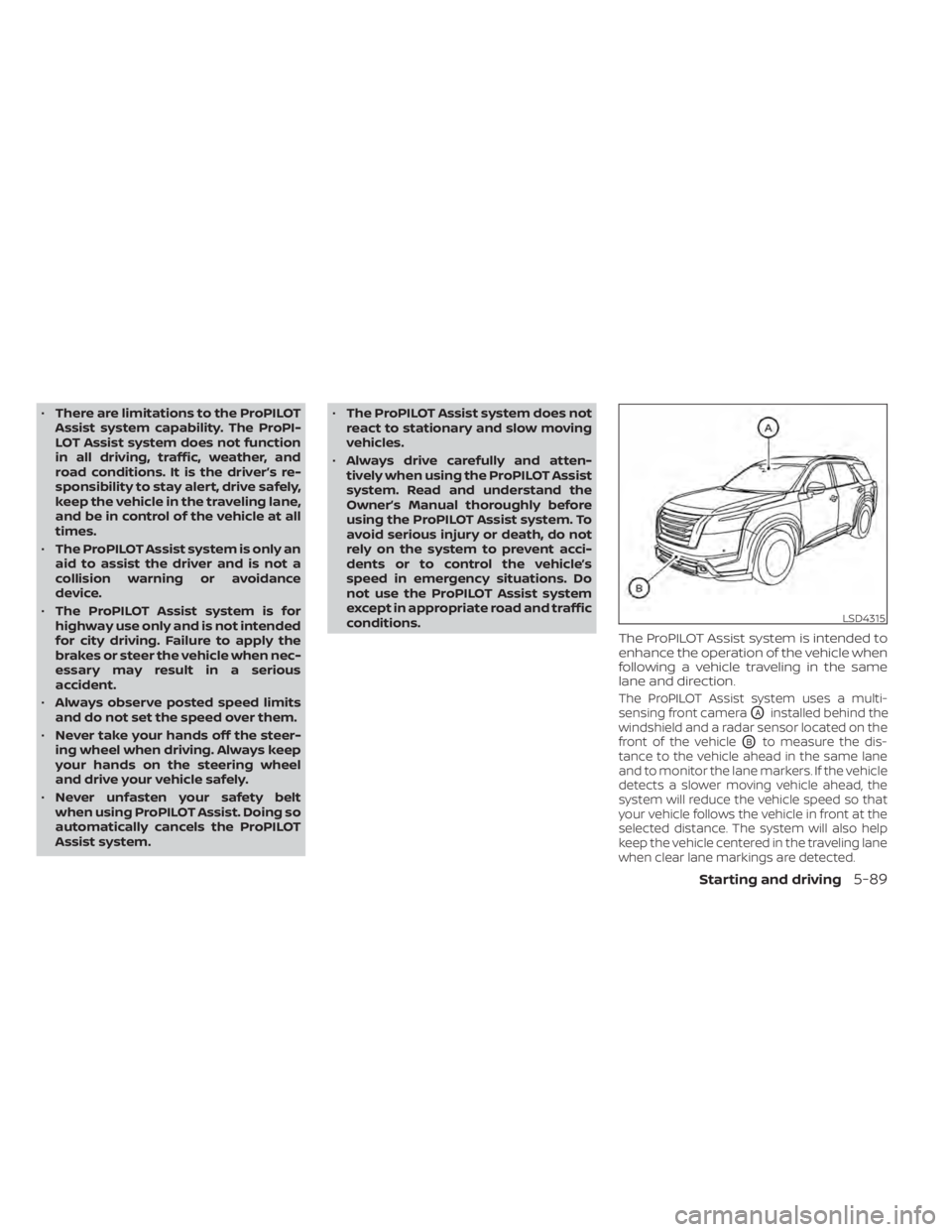
The ProPILOT Assist system is intended to
enhance the operation of the vehicle when
following a vehicle traveling in the same
lane and direction.
The ProPILOT Assist system uses a multi-
sensing front camera
OAinstalled behind the
windshield and a radar sensor located on the
front of the vehicle
OBto measure the dis-
tance to the vehicle ahead in the same lane
and to monitor the lane markers. If the vehicle
detects a slower moving vehicle ahead, the
system will reduce the vehicle speed so that
your vehicle follows the vehicle in front at the
selected distance. The system will also help
keep the vehicle centered in the traveling lane
when clear lane markings are detected.
LSD4315
Starting and driving5-89