lock NISSAN PATHFINDER 2023 Manual Online
[x] Cancel search | Manufacturer: NISSAN, Model Year: 2023, Model line: PATHFINDER, Model: NISSAN PATHFINDER 2023Pages: 665, PDF Size: 4.64 MB
Page 271 of 665
Be sure to insert the funnel into the fuel-
filler opening slowly and fully. Insert the
nozzle of the portable fuel container into
the opening along the funnel and fill the
fuel tank.
Af ter refueling, remove the funnel from the
fuel-filler opening. Wipe the funnel clean
and return it to the tool bag.
CAUTION
• Do not insert the nozzle of the por-
table fuel container directly into the
fuel-filler opening. Doing so may
damage the opening and the fuel
system.
• Use only the funnel provided with
your vehicle. Otherwise the fuel-filler
opening and the fuel system may be
damaged.
WARNING
• Do not adjust the steering wheel
while driving. You could lose control
of your vehicle and cause an
accident.
• Do not adjust the steering wheel any
closer to you than is necessary for
proper steering operation and com-
fort. The driver's air bag inflates with
great force. If you are unrestrained,
leaning forward, sitting sideways or
out of position in any way, you are at
greater risk of injury or death in a
crash. You may also receive serious
or fatal injuries from the air bag if you
are up against it when it inflates. Al-
ways sit back against the seatback
and as far away as practical from the
steering wheel. Always use the seat
belts.
MANUAL OPERATION (if so
equipped)
Tilt and telescopic operation
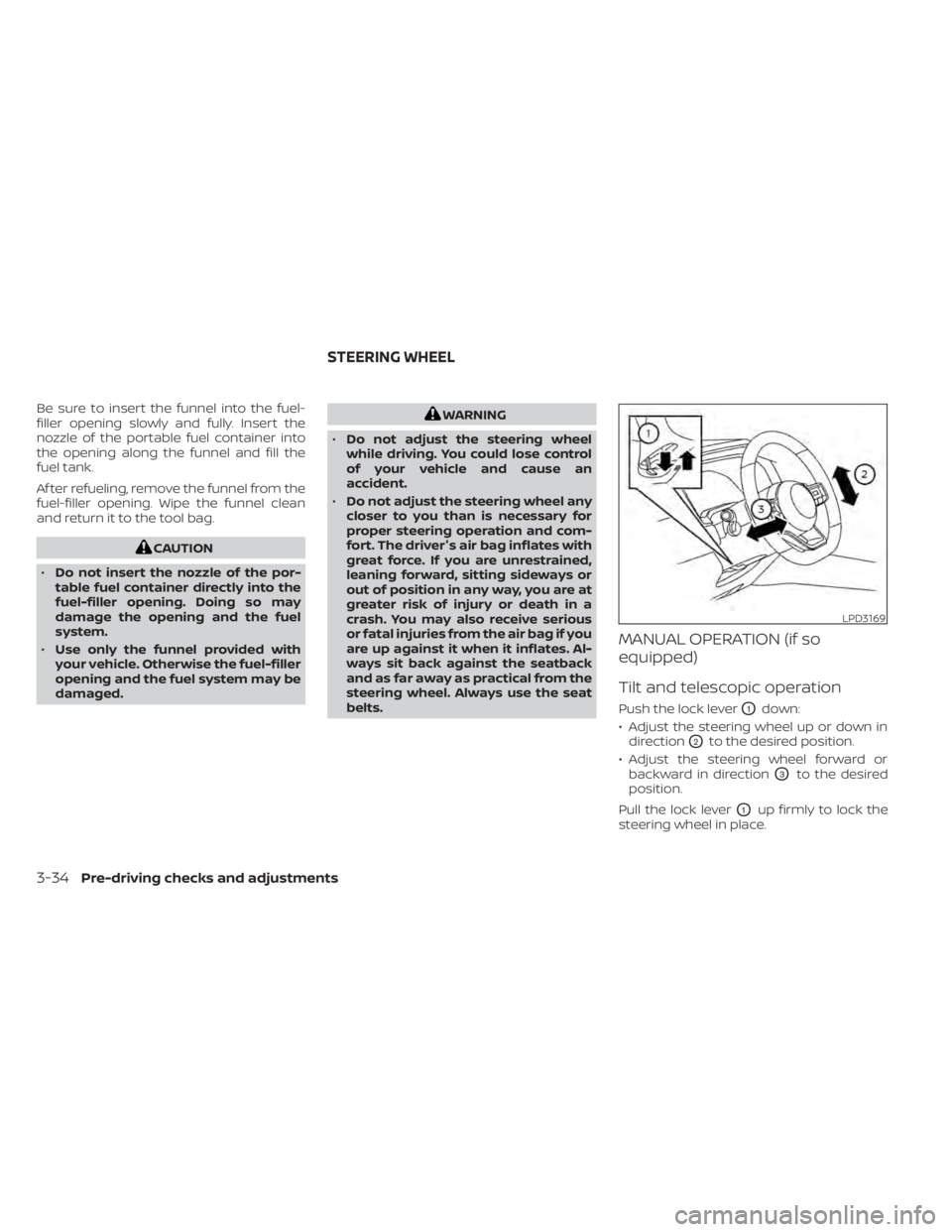
Push the lock leverO1down:
• Adjust the steering wheel up or down in direction
O2to the desired position.
• Adjust the steering wheel forward or backward in direction
O3to the desired
position.
Pull the lock lever
O1up firmly to lock the
steering wheel in place.
LPD3169
STEERING WHEEL
3-34Pre-driving checks and adjustments
Page 272 of 665
AUTOMATIC OPERATION (if so
equipped)
Tilt and telescopic operation
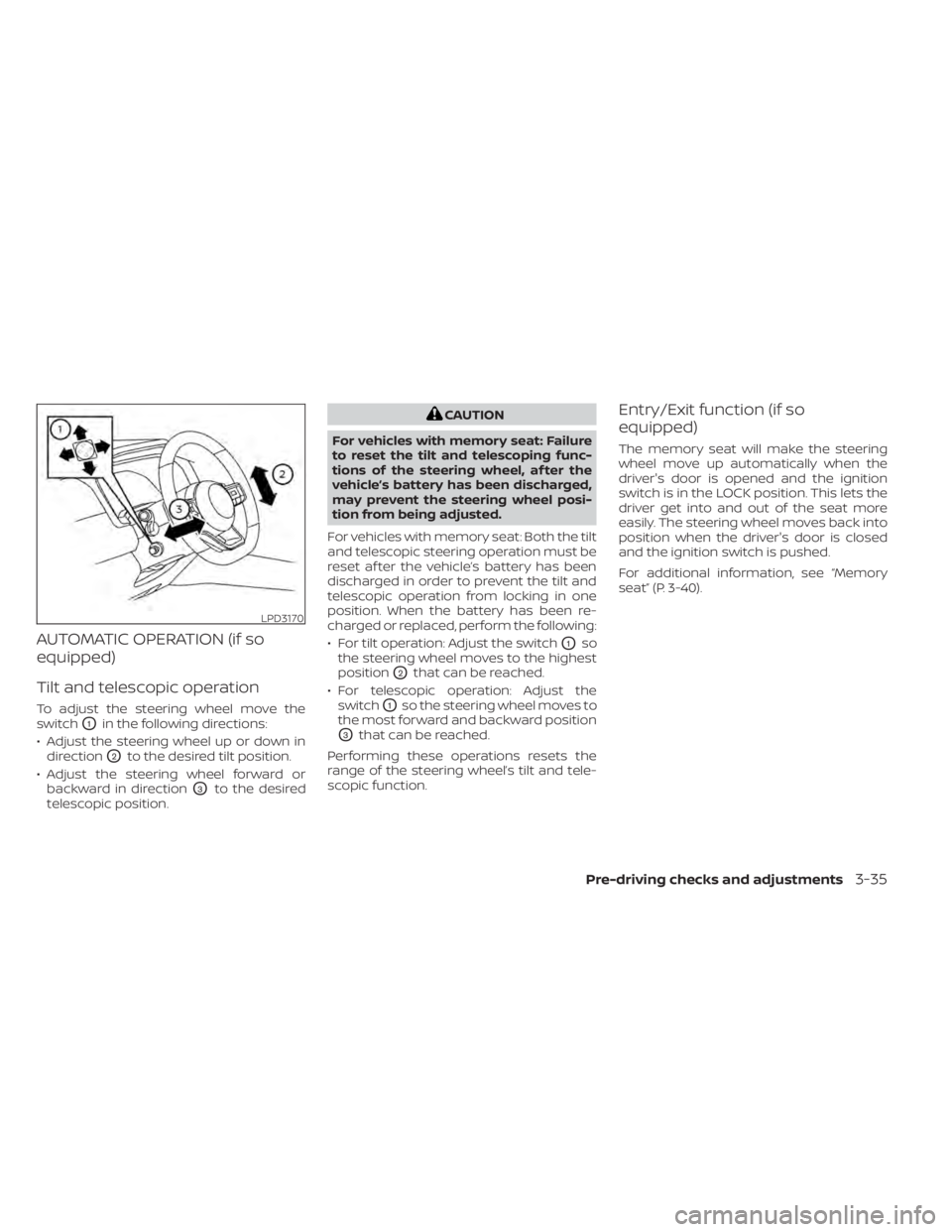
To adjust the steering wheel move the
switch
O1in the following directions:
• Adjust the steering wheel up or down in direction
O2to the desired tilt position.
• Adjust the steering wheel forward or backward in direction
O3to the desired
telescopic position.
CAUTION
For vehicles with memory seat: Failure
to reset the tilt and telescoping func-
tions of the steering wheel, af ter the
vehicle’s battery has been discharged,
may prevent the steering wheel posi-
tion from being adjusted.
For vehicles with memory seat: Both the tilt
and telescopic steering operation must be
reset af ter the vehicle’s battery has been
discharged in order to prevent the tilt and
telescopic operation from locking in one
position. When the battery has been re-
charged or replaced, perform the following:
• For tilt operation: Adjust the switch
O1so
the steering wheel moves to the highest
position
O2that can be reached.
• For telescopic operation: Adjust the switch
O1so the steering wheel moves to
the most forward and backward position
O3that can be reached.
Performing these operations resets the
range of the steering wheel’s tilt and tele-
scopic function.
Entry/Exit function (if so
equipped)
The memory seat will make the steering
wheel move up automatically when the
driver's door is opened and the ignition
switch is in the LOCK position. This lets the
driver get into and out of the seat more
easily. The steering wheel moves back into
position when the driver's door is closed
and the ignition switch is pushed.
For additional information, see “Memory
seat” (P. 3-40).
LPD3170
Pre-driving checks and adjustments3-35
Page 273 of 665
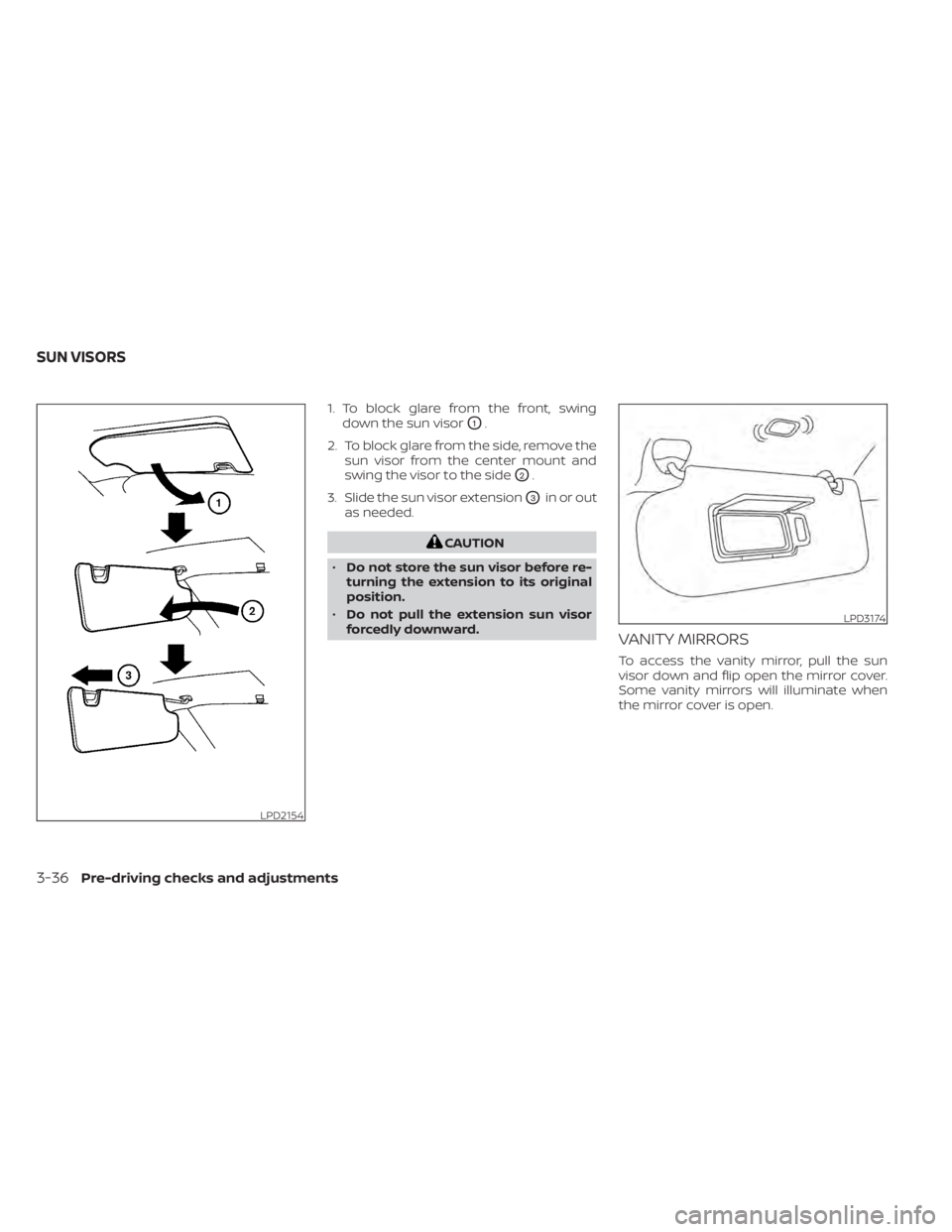
1. To block glare from the front, swingdown the sun visor
O1.
2. To block glare from the side, remove the sun visor from the center mount and
swing the visor to the side
O2.
3. Slide the sun visor extension
O3in or out
as needed.
CAUTION
• Do not store the sun visor before re-
turning the extension to its original
position.
• Do not pull the extension sun visor
forcedly downward.
VANITY MIRRORS
To access the vanity mirror, pull the sun
visor down and flip open the mirror cover.
Some vanity mirrors will illuminate when
the mirror cover is open.
LPD2154
LPD3174
SUN VISORS
3-36Pre-driving checks and adjustments
Page 277 of 665
The outside mirror surfaces will return to
their original position when one of the fol-
lowing conditions has occurred:
• The shif t lever is moved to any positionother than R (Reverse).
• The outside mirror control switch is set to the neutral or center position.
• The ignition switch is placed in the OFF position.
The reverse tilt position can be changed.
While in R (Reverse), adjust the glass posi-
tion to the desired location. The next time
the vehicle is shif ted into R (Reverse), the
glass position will go to the newly set posi-
tion. Additionally, the changed reverse tilt
position can be saved to a memory seat
position. Af ter the reverse tilt glass position
has been changed, vehicle is shif ted back
into park and glass has returned to the
original position, push the Set switch and
press the desired memory switch (1 or 2) to
assign the new reverse tilt position
memory.
NOTE:
If the outside mirror control switch is in
the center position, the mirror surface
will NOT turn downward when the shif t
lever is moved to R (Reverse). For additional information, see “Memory
seat” (P. 3-40).
The memory seat system has three
features:
• Memory storage function (Key-link)
• Memory storage function (Switch)
• Entry/exit function
Key-link, when enabled, automatically re-
tains the driver’s last seat, automatic steer-
ing wheel, and outside mirror positions for
that specific key when the ignition is posi-
tioned from ON to OFF.
Each memory switch button (1 or 2) on the
driver’s door can also store one additional
position which is independent of the key-
linked position.
MEMORY STORAGE FUNCTION
(key-link)
Use the following process to setup key-link:
1. Unlock the vehicle with the desired Intel-
ligent Key while the ignition is OFF.
2. Place the ignition in the ON position or start the engine.
3. Within the settings menu of the touch screen display, select “Edit User” and
then “Synch Profile with Intelligent Key”.
4. Turn “Synch Profile with Intelligent Key” ON. The ON button will light up.
MEMORY SEAT (if so equipped)
3-40Pre-driving checks and adjustments
Page 278 of 665
5. Within the settings menu of the touchscreen display, select “Edit User” and
then “User Profiles”.
6. Create a personal profile and make sure the correct key number is selected with
the arrow.
7. Set the desired seat, steering and mirror positions.
8. Place the ignition switch in the OFF po- sition and lock the vehicle with the Intel-
ligent Key.
Once Step 8 is completed, every time the
vehicle is unlocked using the Intelligent Key
and the ignition is switched placed in the
ON position, the memory positions will be
recalled.
For additional information, see the
“NissanConnect® Owner’s Manual.
Follow the same procedure if you want
to link the 2nd, 3rd or 4th Intelligent Key.
NOTE:
If new memory positions are set prior to
turning the ignition from ON to OFF, the
previously linked memory positions for
the respective key will be overwritten by
new positions.
Recalling Intelligent Key memory
positions
If the “Key-Linked Settings” are enabled in
the vehicle information display for that par-
ticular key, every time you enter the vehicle
the driver’s seat, automatic steering wheel,
and outside mirrors will automatically
move to the driver’s last position of the
respective Intelligent Key.
NOTE:
The key-linked memory positions can be
different from the positions stored in the
memory switch (1 or 2).
MEMORY STORAGE FUNCTION
(switch)
Two positions for the driver's seat, steering
wheel and outside mirrors can be stored in
the memory seat system. Follow these
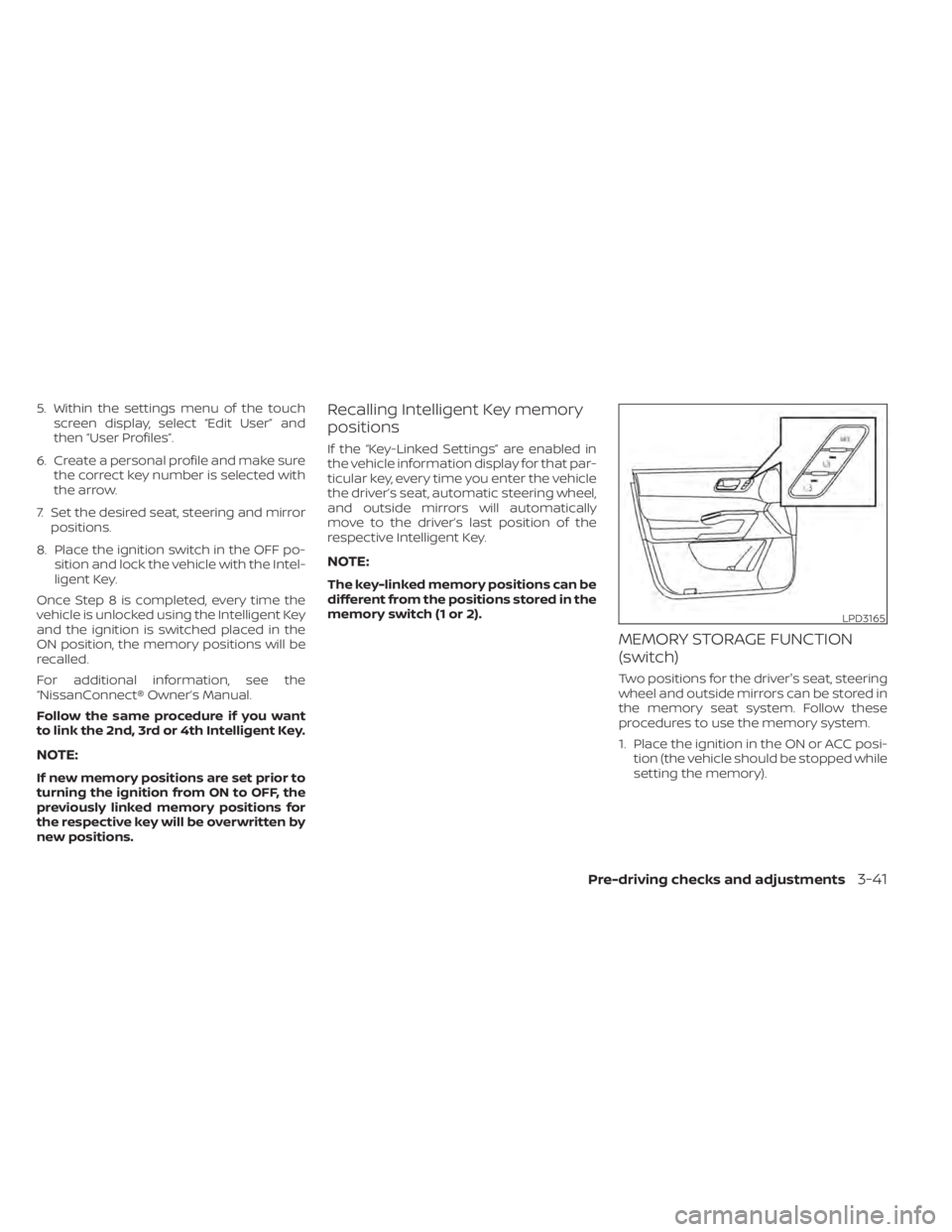
procedures to use the memory system.
1. Place the ignition in the ON or ACC posi- tion (the vehicle should be stopped while
setting the memory).
LPD3165
Pre-driving checks and adjustments3-41
Page 280 of 665
Restarting the entry/exit function
If the battery cable is disconnected or if the
fuse opens, the stored memory positions
may be lost and some of the functions will
be restricted.
1. Drive the vehicle over 25 mph (40 km/h).
OR
2. Open and close the driver's door morethan two times with the ignition switch
in the OFF position.
The entry/exit function should now work
properly.
SETTING MEMORY FUNCTION
The position of the following settings can
be linked to the Intelligent Key and the
memorized settings can be available for
each Intelligent Key.
• Climate control system
• Audio system
To use the memory function, set the cli-
mate and audio systems to the driver's
preferred settings. Lock the doors with the
Intelligent Key. Each Intelligent Key may be
set with the driver's individual preferences.
When a new Intelligent Key is used, “Con-
nection with the key has been done” will be displayed on the vehicle information dis-
play and the memorized settings are
available.
To engage the memorized settings, per-
form the following:
1. Carry the Intelligent Key that is linked to
the memorized settings.
2. Unlock the doors by wrapping hand around the capacitive door handle or
the
button on the Intelligent Key.
3. Place the ignition switch in the ON posi- tion. The settings linked to the Intelligent
Key will start.
For additional information on using the cli-
mate control system, see “Heater and air
conditioner (automatic)” (P. 4-32).
SYSTEM OPERATION
The memory seat system will not work or
will stop operating under the following
conditions:
• When the vehicle speed is above 4 mph (7 km/h).
• When any of the memory switches are pushed while the memory seat is
operating. • When the switch for the driver’s seat and
steering wheel is pushed while the
memory seat is operating.
• When the seat has already been moved to the memorized position.
• When no seat position is stored in the memory switch.
• When the shif t position is moved from P (Park) position to any other position.
Pre-driving checks and adjustments3-43
Page 288 of 665
object when backing up to the positionOA
if the object projects over the actual back-
ing up course.
HOW TO PARK WITH PREDICTED
COURSE LINES
WARNING
• If the tires are replaced with different
sized tires, the predicted course lines
may be displayed incorrectly.
• On a snow-covered or slippery road,
there may be a difference between
the predicted course line and the ac-
tual course line.
• If the battery is disconnected or be-
comes discharged, the predicted
course lines may be displayed incor-
rectly. If this occurs, please perform
the following procedures:
– Turn the steering wheel from lock
to lock while the engine is
running.
– Drive the vehicle on a straight road
for more than 5 minutes.
• When the steering wheel is turned
with the ignition switch in the ACC
position, the predicted course lines
may be displayed incorrectly. 1. Visually check that the parking space is
safe before parking your vehicle.
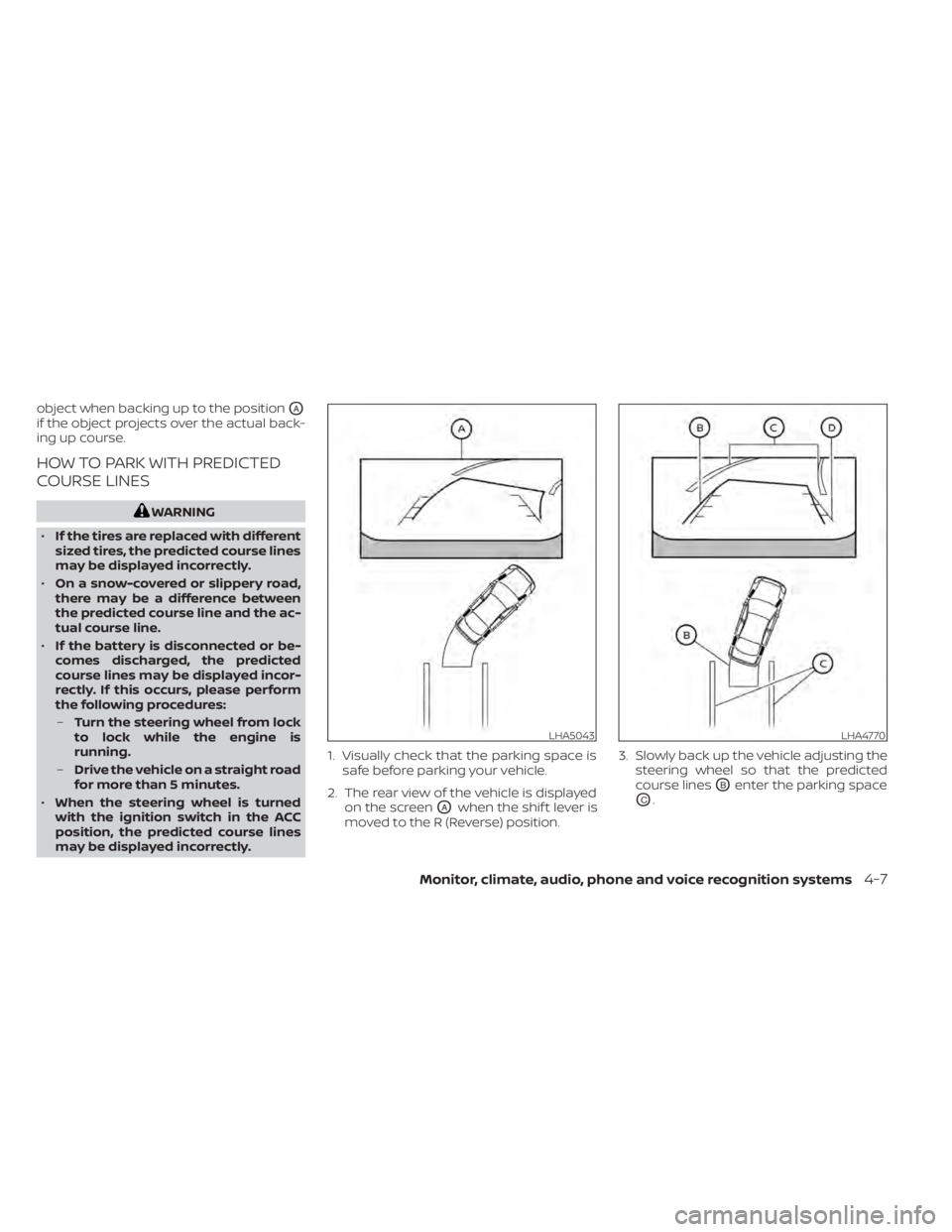
2. The rear view of the vehicle is displayed on the screen
OAwhen the shif t lever is
moved to the R (Reverse) position. 3. Slowly back up the vehicle adjusting the
steering wheel so that the predicted
course lines
OBenter the parking space
OC.
LHA5043LHA4770
Monitor, climate, audio, phone and voice recognition systems4-7
Page 298 of 665
Backing up near a projecting
object
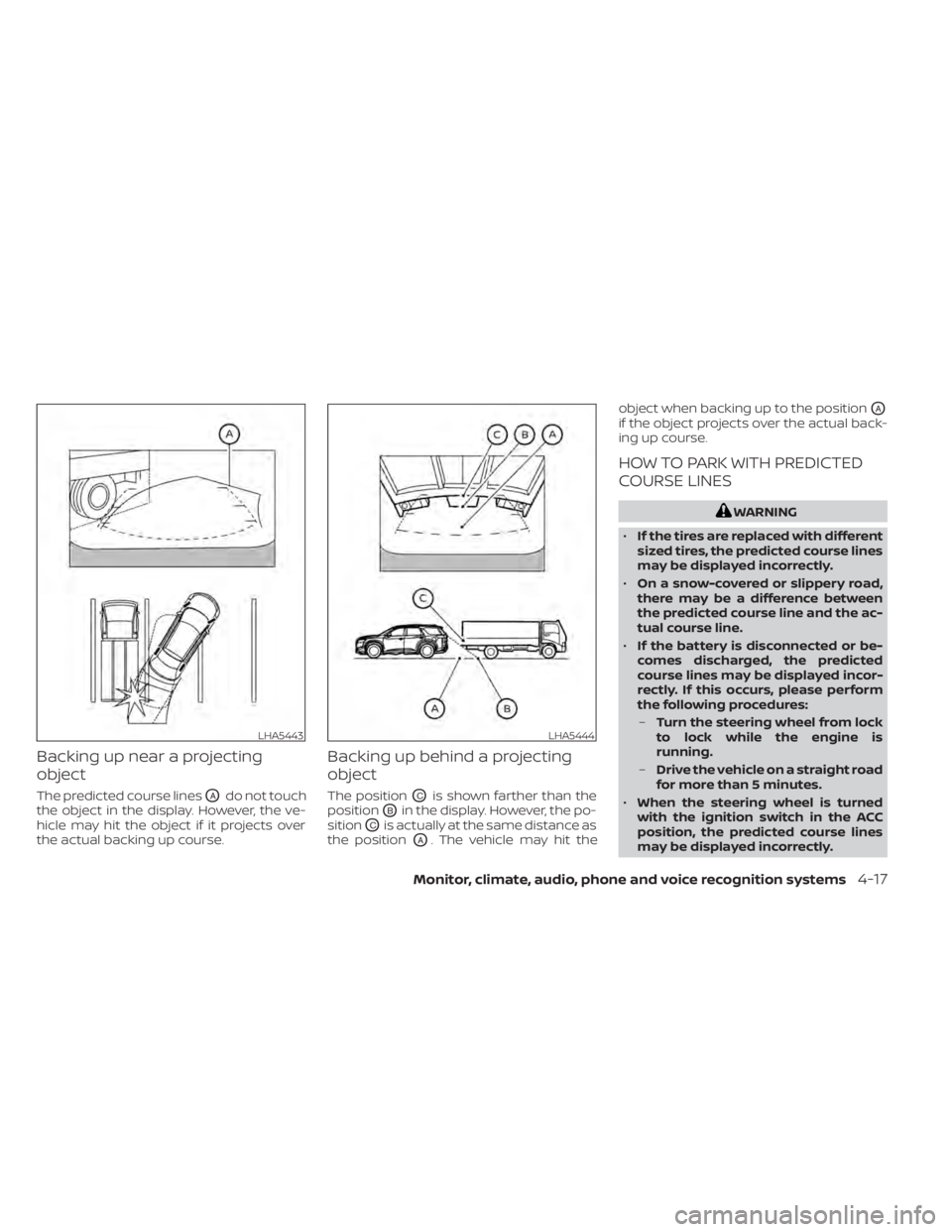
The predicted course linesOAdo not touch
the object in the display. However, the ve-
hicle may hit the object if it projects over
the actual backing up course.
Backing up behind a projecting
object
The positionOCis shown farther than the
position
OBin the display. However, the po-
sition
OCis actually at the same distance as
the position
OA. The vehicle may hit the object when backing up to the position
OA
if the object projects over the actual back-
ing up course.
HOW TO PARK WITH PREDICTED
COURSE LINES
WARNING
• If the tires are replaced with different
sized tires, the predicted course lines
may be displayed incorrectly.
• On a snow-covered or slippery road,
there may be a difference between
the predicted course line and the ac-
tual course line.
• If the battery is disconnected or be-
comes discharged, the predicted
course lines may be displayed incor-
rectly. If this occurs, please perform
the following procedures:
– Turn the steering wheel from lock
to lock while the engine is
running.
– Drive the vehicle on a straight road
for more than 5 minutes.
• When the steering wheel is turned
with the ignition switch in the ACC
position, the predicted course lines
may be displayed incorrectly.
LHA5443LHA5444
Monitor, climate, audio, phone and voice recognition systems4-17
Page 310 of 665
TURNING MOD ON AND OFF
To turn the MOD system on or off:
1. Press the
orbutton on the
steering wheel and select “Settings” in
the vehicle information display.
2. Using the scroll dial, select “Driver Assis- tance” and press the OK button.
3. Select “Parking Aids”.
4. Toggle ON or OFF “Moving Object” using the OK button.
MOD SYSTEM LIMITATIONS
WARNING
Listed below are the system limitations
for MOD. Failure to operate the vehicle
in accordance with these system limi-
tations could result in serious injury or
death.
• Do not use the MOD system when
towing a trailer. The system may not
function properly.
• Excessive noise (for example, audio
system volume or open vehicle win-
dow) will interfere with the chime
sound, and it may not be heard. •
The MOD system performance will be
limited according to environmental
conditions and surrounding objects
such as:
– When there is low contrast be-
tween background and the mov-
ing objects.
– When there is a blinking source of
light.
– When strong light such as another
vehicle’s headlight or sunlight is
present.
– When camera orientation is not in
its usual position, such as when a
mirror is folded.
– When there is dirt, water drops or
snow on the camera lens.
– When the position of the moving
objects in the display is not
changed.
• The MOD system might detect flow-
ing water droplets on the camera
lens, white smoke from the muffler,
moving shadows, etc.
• The MOD system may not function
properly depending on the speed, di-
rection, distance or shape of the
moving objects. •
If your vehicle sustains damage to
the parts where the camera is in-
stalled, leaving it misaligned or bent,
the sensing zone may be altered and
the MOD system may not detect ob-
jects properly.
• When the temperature is extremely
high or low, the screen may not dis-
play objects clearly. This is not a
malfunction.
NOTE:
The green MOD icon will change to or-
ange if one of the following has oc-
curred:
• When the system is malfunctioning.
• When the component temperature
reaches a high level (icon will blink).
• When the rearview camera has de-
tected a blockage (icon will blink).
If the icon light continues to illuminate
orange, have the MOD system checked. It
is recommended that you visit a NISSAN
dealer for this service.
Monitor, climate, audio, phone and voice recognition systems4-29
Page 313 of 665
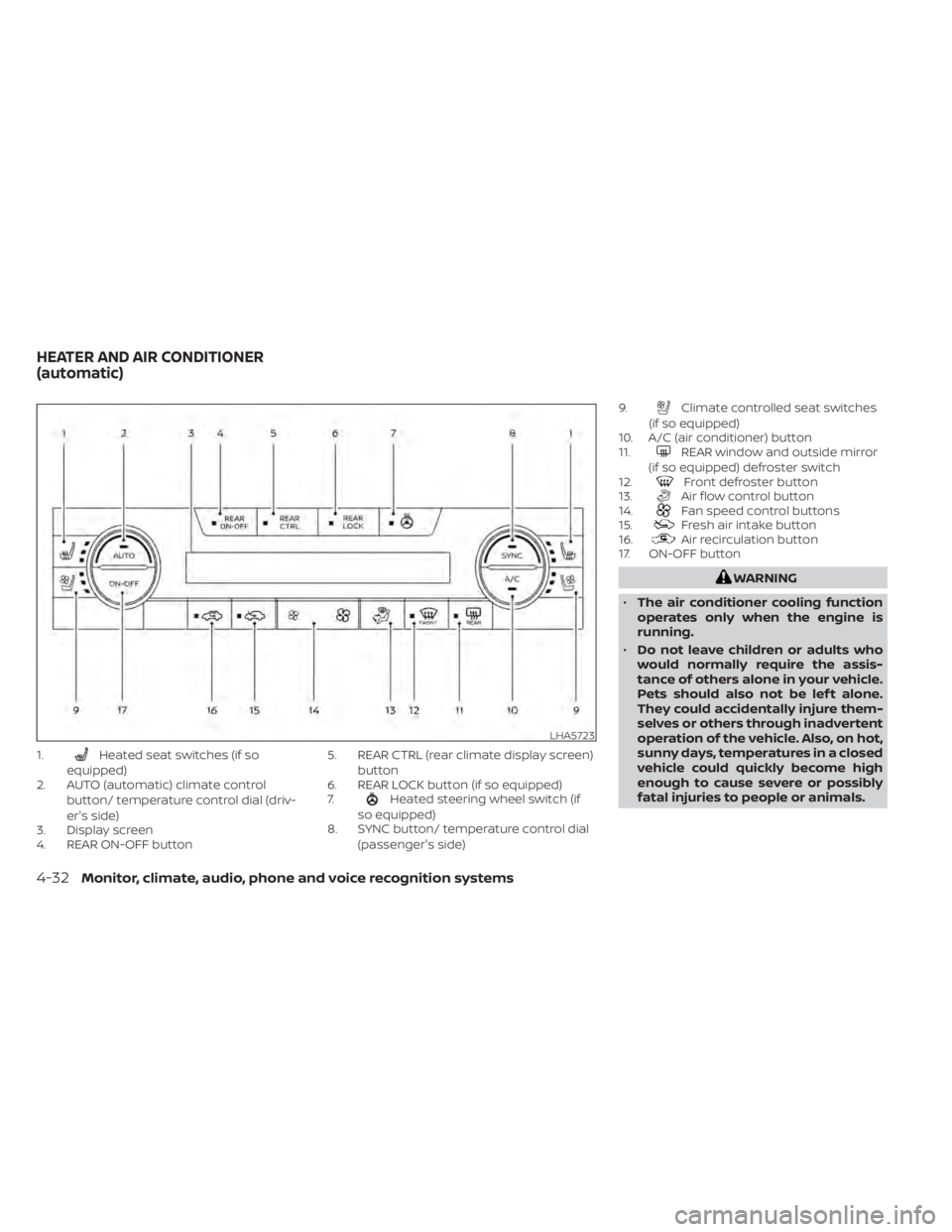
1.Heated seat switches (if so
equipped)
2. AUTO (automatic) climate control
button/ temperature control dial (driv-
er's side)
3. Display screen
4. REAR ON-OFF button 5. REAR CTRL (rear climate display screen)
button
6. REAR LOCK button (if so equipped)
7.
Heated steering wheel switch (if
so equipped)
8. SYNC button/ temperature control dial
(passenger's side) 9.
Climate controlled seat switches
(if so equipped)
10. A/C (air conditioner) button
11.
REAR window and outside mirror
(if so equipped) defroster switch
12.
Front defroster button
13.Air flow control button
14.Fan speed control buttons
15.Fresh air intake button
16.Air recirculation button
17. ON-OFF button
WARNING
• The air conditioner cooling function
operates only when the engine is
running.
• Do not leave children or adults who
would normally require the assis-
tance of others alone in your vehicle.
Pets should also not be lef t alone.
They could accidentally injure them-
selves or others through inadvertent
operation of the vehicle. Also, on hot,
sunny days, temperatures in a closed
vehicle could quickly become high
enough to cause severe or possibly
fatal injuries to people or animals.
LHA5723
HEATER AND AIR CONDITIONER
(automatic)
4-32Monitor, climate, audio, phone and voice recognition systems