ABS NISSAN PATHFINDER 2023 Owners Manual
[x] Cancel search | Manufacturer: NISSAN, Model Year: 2023, Model line: PATHFINDER, Model: NISSAN PATHFINDER 2023Pages: 665, PDF Size: 4.64 MB
Page 22 of 665
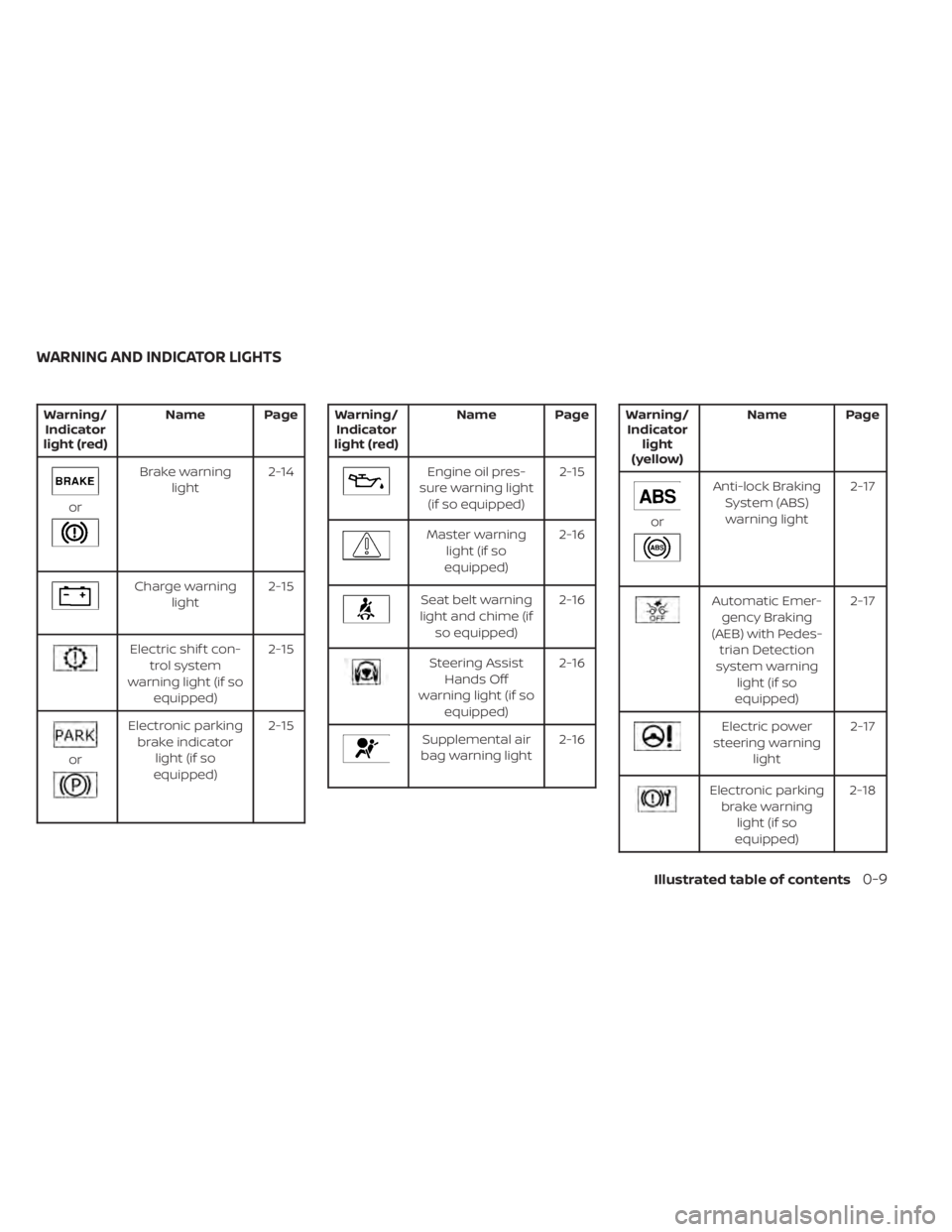
Warning/Indicator
light (red) Name Page
or
Brake warning
light 2-14
Charge warning
light 2-15
Electric shif t con-
trol system
warning light (if so equipped) 2-15
or
Electronic parking
brake indicator light (if so
equipped) 2-15
Warning/
Indicator
light (red) Name Page
Engine oil pres-
sure warning light (if so equipped) 2-15
Master warning
light (if so
equipped) 2-16
Seat belt warning
light and chime (if so equipped) 2-16
Steering Assist
Hands Off
warning light (if so equipped) 2-16
Supplemental air
bag warning light 2-16
Warning/
Indicator light
(yellow) Name Page
or
Anti-lock Braking
System (ABS)warning light 2-17
Automatic Emer-
gency Braking
(AEB) with Pedes- trian Detection
system warning light (if so
equipped) 2-17
Electric power
steering warning light 2-17
Electronic parking
brake warning light (if so
equipped) 2-18
WARNING AND INDICATOR LIGHTS
Illustrated table of contents0-9
Page 119 of 665
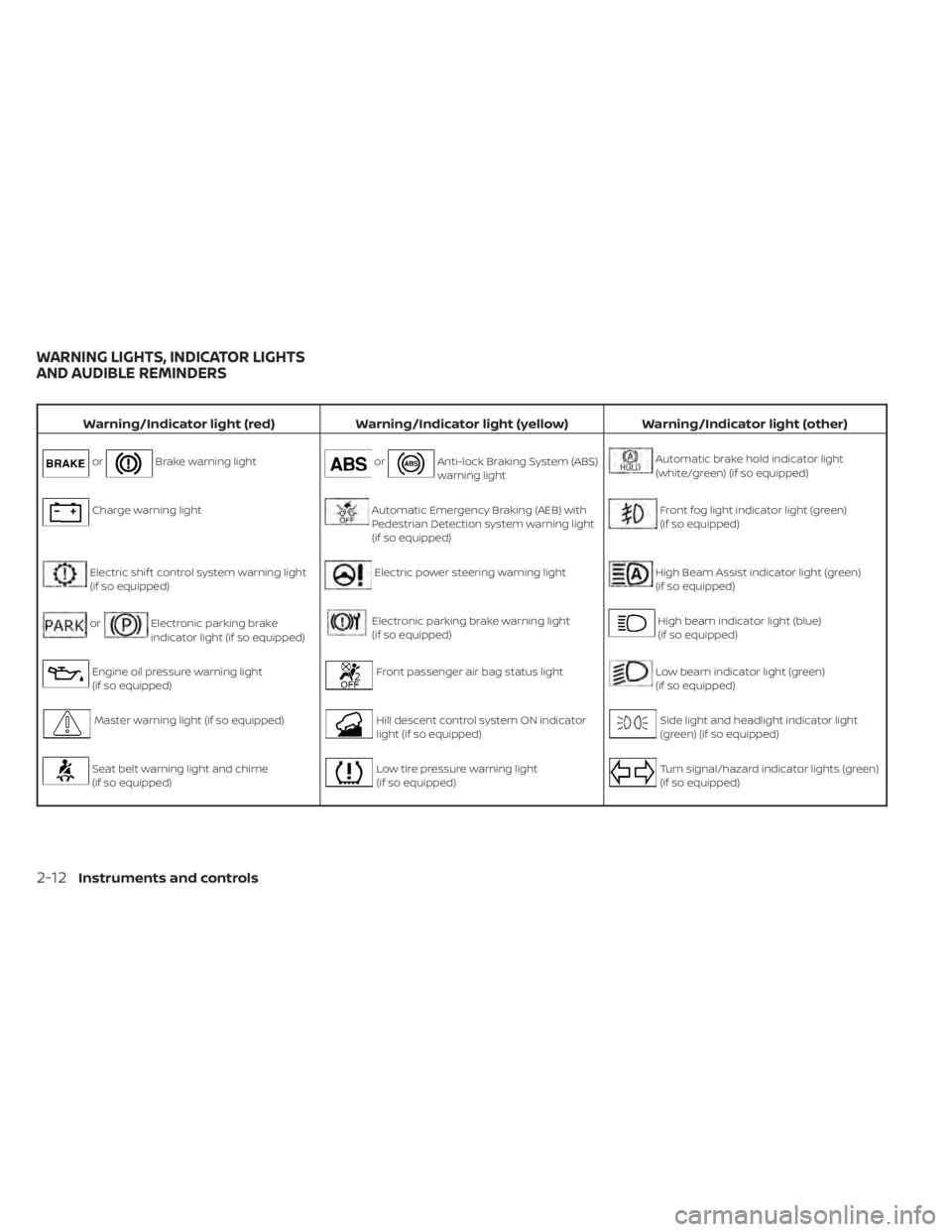
Warning/Indicator light (red)Warning/Indicator light (yellow) Warning/Indicator light (other)
orBrake warning lightorAnti-lock Braking System (ABS)
warning lightAutomatic brake hold indicator light
(white/green) (if so equipped)
Charge warning lightAutomatic Emergency Braking (AEB) with
Pedestrian Detection system warning light
(if so equipped)Front fog light indicator light (green)
(if so equipped)
Electric shif t control system warning light
(if so equipped)Electric power steering warning lightHigh Beam Assist indicator light (green)
(if so equipped)
orElectronic parking brake
indicator light (if so equipped)Electronic parking brake warning light
(if so equipped)High beam indicator light (blue)
(if so equipped)
Engine oil pressure warning light
(if so equipped)Front passenger air bag status lightLow beam indicator light (green)
(if so equipped)
Master warning light (if so equipped)Hill descent control system ON indicator
light (if so equipped)Side light and headlight indicator light
(green) (if so equipped)
Seat belt warning light and chime
(if so equipped)Low tire pressure warning light
(if so equipped)Turn signal/hazard indicator lights (green)
(if so equipped)
WARNING LIGHTS, INDICATOR LIGHTS
AND AUDIBLE REMINDERS
2-12Instruments and controls
Page 124 of 665
• The supplemental air bag warning lightdoes not come on at all.
It is recommended that you visit a NISSAN
dealer for these services.
Unless checked and repaired, the supple-
mental restraint system (air bag system)
and/or the pretensioner(s) may not func-
tion properly. For additional information,
see “Supplemental Restraint System (SRS)”
(P. 1-59).
WARNING
If the supplemental air bag warning
light is on, it could mean that the front
air bag, side air bag, curtain air bag
and/or pretensioner systems will not
operate in an accident. To help avoid
injury to yourself or others, have your
vehicle checked as soon as possible. It
is recommended that you visit a
NISSAN dealer for this service.
WARNING/INDICATOR LIGHTS
(yellow)
For additional information on warnings
and indicators, see “Vehicle information
display–7 inch (18 cm) Type A” (P. 2-23) or
“Vehicle information display—12.3 inch (31
cm) Type B” (P. 2-48).
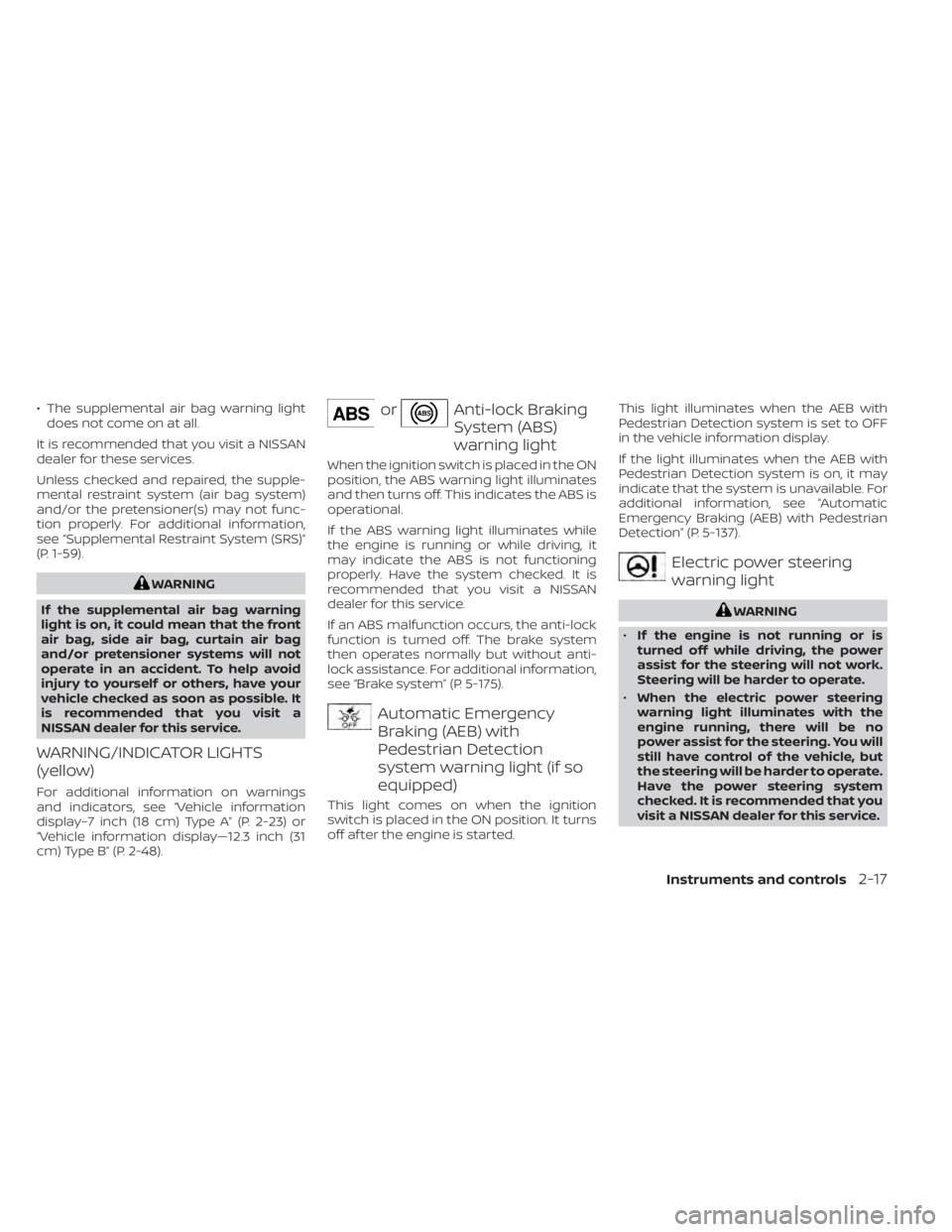
orAnti-lock Braking
System (ABS)
warning light
When the ignition switch is placed in the ON
position, the ABS warning light illuminates
and then turns off. This indicates the ABS is
operational.
If the ABS warning light illuminates while
the engine is running or while driving, it
may indicate the ABS is not functioning
properly. Have the system checked. It is
recommended that you visit a NISSAN
dealer for this service.
If an ABS malfunction occurs, the anti-lock
function is turned off. The brake system
then operates normally but without anti-
lock assistance. For additional information,
see “Brake system” (P. 5-175).
Automatic Emergency
Braking (AEB) with
Pedestrian Detection
system warning light (if so
equipped)
This light comes on when the ignition
switch is placed in the ON position. It turns
off af ter the engine is started. This light illuminates when the AEB with
Pedestrian Detection system is set to OFF
in the vehicle information display.
If the light illuminates when the AEB with
Pedestrian Detection system is on, it may
indicate that the system is unavailable. For
additional information, see “Automatic
Emergency Braking (AEB) with Pedestrian
Detection” (P. 5-137).
Electric power steering
warning light
WARNING
• If the engine is not running or is
turned off while driving, the power
assist for the steering will not work.
Steering will be harder to operate.
• When the electric power steering
warning light illuminates with the
engine running, there will be no
power assist for the steering. You will
still have control of the vehicle, but
the steering will be harder to operate.
Have the power steering system
checked. It is recommended that you
visit a NISSAN dealer for this service.
Instruments and controls2-17
Page 227 of 665
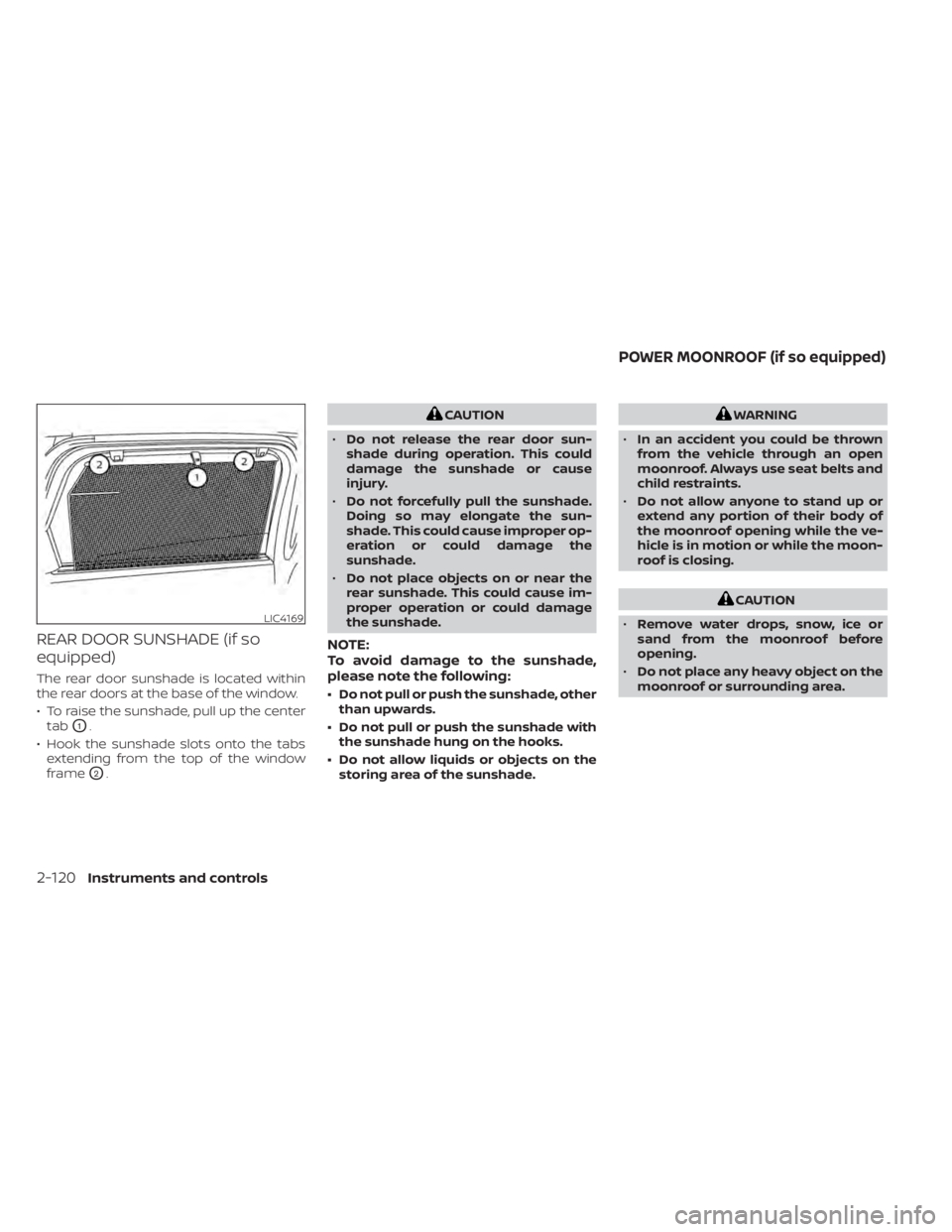
REAR DOOR SUNSHADE (if so
equipped)
The rear door sunshade is located within
the rear doors at the base of the window.
• To raise the sunshade, pull up the centertab
O1.
• Hook the sunshade slots onto the tabs extending from the top of the window
frame
O2.
CAUTION
• Do not release the rear door sun-
shade during operation. This could
damage the sunshade or cause
injury.
• Do not forcefully pull the sunshade.
Doing so may elongate the sun-
shade. This could cause improper op-
eration or could damage the
sunshade.
• Do not place objects on or near the
rear sunshade. This could cause im-
proper operation or could damage
the sunshade.
NOTE:
To avoid damage to the sunshade,
please note the following:
• Do not pull or push the sunshade, other than upwards.
• Do not pull or push the sunshade with the sunshade hung on the hooks.
• Do not allow liquids or objects on the storing area of the sunshade.
WARNING
• In an accident you could be thrown
from the vehicle through an open
moonroof. Always use seat belts and
child restraints.
• Do not allow anyone to stand up or
extend any portion of their body of
the moonroof opening while the ve-
hicle is in motion or while the moon-
roof is closing.
CAUTION
• Remove water drops, snow, ice or
sand from the moonroof before
opening.
• Do not place any heavy object on the
moonroof or surrounding area.
LIC4169
POWER MOONROOF (if so equipped)
2-120Instruments and controls
Page 325 of 665
Steering Assist............................. 5-119
Conventional (fixed speed) cruise
control mode .............................. 5-127
Rear Automatic Braking (RAB) .................5-130
RAB system operation ......................5-131
Turning the RAB system on/off .............5-133
RAB system limitations .....................5-134
System malfunction ........................ 5-136
System maintenance ......................5-136
Automatic Emergency Braking (AEB) with
Pedestrian Detection .......................... 5-137
AEB with Pedestrian Detection system
operation .................................. 5-138
Turning the AEB with Pedestrian
Detection system ON/OFF .................5-140
AEB with Pedestrian Detection system
limitations ................................. 5-141
System temporarily unavailable ............5-145
System malfunction ........................ 5-147
System maintenance ......................5-148
Intelligent Forward Collision Warning (I-FCW) . . 5-149 I-FCW system operation ....................5-152
Turning the I-FCW system on/off ...........5-153
I-FCW system limitations ...................5-155
System temporarily unavailable ............5-161 System malfunction
........................ 5-163
System maintenance ......................5-164
Intelligent Driver Alertness (I-DA) ...............5-165
Intelligent Driver Alertness system
operation .................................. 5-166
How to enable/disable the Intelligent
Driver Alertness (I-DA) system ..............5-167
Intelligent Driver Alertness (I-DA)
system limitations ......................... 5-168
Break-in schedule ............................. 5-169
Fuel efficient driving tips .......................5-170
Increasing fuel economy .......................5-171
Intelligent 4X4 (I-4X4) (if so equipped) ...........5-171
Parking/parking on hills .......................5-173
Power steering ................................ 5-174
Brake system ................................. 5-175
Brake precautions .......................... 5-175
Anti-lock Braking System (ABS) .............5-175
Br
ake Assist ................................ 5-177
Vehicle Dynamic Control (VDC) system ........5-177
How to turn off the VDC system ............5-179
Rise-up and build-up ....................... 5-179
Brake force distribution ....................5-179
Active Brake Limited Slip (ABLS) system .......5-180
Page 374 of 665
SYSTEM TEMPORARILY
UNAVAILABLE
Condition A:
The warning and assist functions of the I-LI
system are not designed to work under the
following conditions:
• When you operate the lane change signaland change the traveling lanes in the di-
rection of the signal. (The I-LI system will
be deactivated for approximately 2 sec-
onds af ter the lane change signal is
turned off.)
• When the vehicle speed lowers to less than approximately 37 mph (60 km/h).
Af ter the above conditions have finished
and the necessary operating conditions
are satisfied, the warning and assist func-
tions will resume.
Condition B:
The assist function of the I-LI system is not
designed to work under the following con-
ditions (warning is still functional):
• When the brake pedal is depressed.
• When the steering wheel is turned as far as necessary for the vehicle to change
lanes.
• When the vehicle is accelerated during I-LI system operation. • When the Intelligent Cruise Control (ICC)
approach warning occurs.
• When the hazard warning flashers are operated.
• When driving on a curve at high speed.
Af ter the above conditions have finished
and the necessary operating conditions
are satisfied, the I-LI system application of
the brakes will resume.
Condition C:
If the following messages appear in the
vehicle information display, the I-LI system
will be turned off automatically.
• “Not Available Poor Road Conditions” When the VDC system (except Traction
Control System [TCS] function) or ABS
operates.
• “Currently not available”: – When the VDC system is turned off.
– When the SNOW mode, or the MUD/ RUT mode or SAND mode (4WD mod-
els only) is selected.
Action to take:
When the above conditions no longer exist,
turn off the I-LI system. Push the ProPILOT
Assist switch (for vehicles with ProPILOT
Assist) on the steering wheel again to turn
the I-LI system back on. Temporary disabled status at high
temperature:
If the vehicle is parked in direct sunlight
under high temperature conditions (over
approximately 104°F [40°C]) and then the
I-LI system is turned on, the I-LI system
may be deactivated automatically and the
following message will appear on the ve-
hicle information display: “Unavailable: High
Cabin Temperature.”
SYSTEM MALFUNCTION
If the I-LI system malfunctions, it will cancel
automatically. The LDW indicator (orange)
and the “Not Available System Malfunction”
warning message will display. If the LDW
indicator (orange) and the warning mes-
sage appear in the display, pull off the road
to a safe location and stop the vehicle. Turn
the engine/motor off and restart the
engine/motor. If the LDW indicator (orange)
and warning message continue to appear,
have the I-LI system checked. It is recom-
mended that you visit a NISSAN dealer for
this service.
Starting and driving5-51
Page 398 of 665
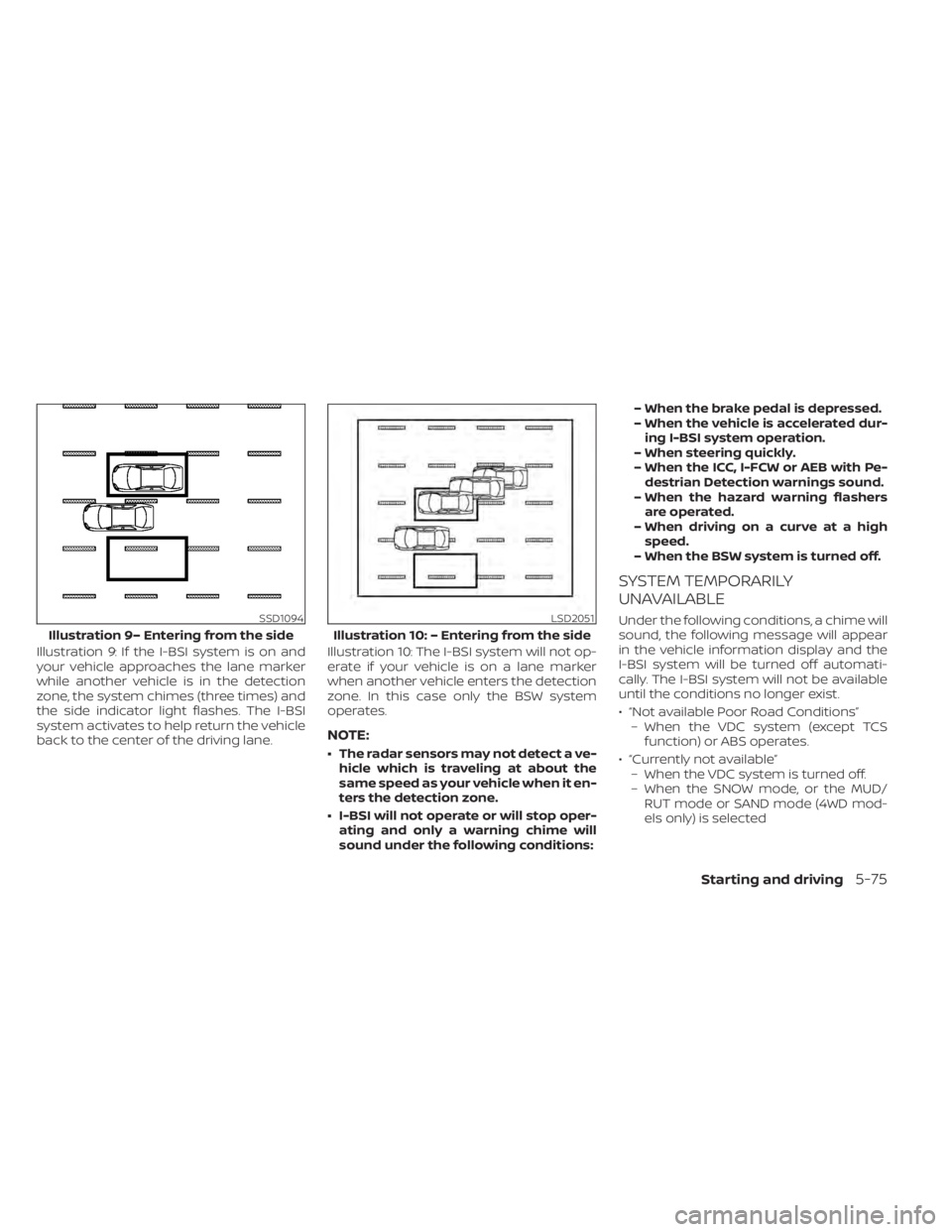
Illustration 9: If the I-BSI system is on and
your vehicle approaches the lane marker
while another vehicle is in the detection
zone, the system chimes (three times) and
the side indicator light flashes. The I-BSI
system activates to help return the vehicle
back to the center of the driving lane.Illustration 10: The I-BSI system will not op-
erate if your vehicle is on a lane marker
when another vehicle enters the detection
zone. In this case only the BSW system
operates.
NOTE:
• The radar sensors may not detect a ve-
hicle which is traveling at about the
same speed as your vehicle when it en-
ters the detection zone.
• I-BSI will not operate or will stop oper- ating and only a warning chime will
sound under the following conditions: – When the brake pedal is depressed.
– When the vehicle is accelerated dur-
ing I-BSI system operation.
– When steering quickly.
– When the ICC, I-FCW or AEB with Pe- destrian Detection warnings sound.
– When the hazard warning flashers are operated.
– When driving on a curve at a high speed.
– When the BSW system is turned off.
SYSTEM TEMPORARILY
UNAVAILABLE
Under the following conditions, a chime will
sound, the following message will appear
in the vehicle information display and the
I-BSI system will be turned off automati-
cally. The I-BSI system will not be available
until the conditions no longer exist.
• “Not available Poor Road Conditions” – When the VDC system (except TCS function) or ABS operates.
• “Currently not available” – When the VDC system is turned off.
– When the SNOW mode, or the MUD/ RUT mode or SAND mode (4WD mod-
els only) is selectedSSD1094
Illustration 9– Entering from the side
LSD2051
Illustration 10: – Entering from the side
Starting and driving5-75
Page 411 of 665
• The vehicle may not maintain the setspeed when going up or down steep hills.
If this happens, drive without the cruise
control.
To cancel the preset speed, use one of the
following three methods:
• Push the CANCEL switch; the
indica-
tor (green) in the vehicle information dis-
play goes out.
• Tap the brake pedal; the
indicator
(green) goes out.
• Push the cruise control ON/OFF switch off. The
indicator in the vehicle infor-
mation display go out.
The cruise control is automatically can-
celed and the
indicator (green) in the
vehicle information display goes out if:
• You depress the brake pedal while push- ing the RES+ or SET- switch. The preset
speed is deleted from memory.
• The vehicle slows down more than 8 mph (13 km/h) below the set speed.
• You move the shif t lever to N (Neutral). To reset at a faster cruising speed,
use
one of the following three methods:
• Depress the accelerator pedal. When the vehicle attains the desired speed, push
and release the SET- switch.
• Push and hold the RES+ switch. When the vehicle attains the speed you desire, re-
lease the switch.
• Push and release the RES+ switch. Each time you do this, the set speed increases
by about 1 mph (1.6 km/h).
To reset at a slower cruising speed, use
one of the following three methods:
• Lightly tap the brake pedal. When the ve- hicle attains the desired speed, push the
SET- switch and release it.
• Push and hold the SET- switch. Release the switch when the vehicle slows to the
desired speed.
• Push and release the SET- switch. Each time you do this, the set speed decreases
by about 1 mph (1.6 km/h).
To resume the preset speed, push and
release the RES+ switch. The vehicle re-
turns to the last set cruising speed when
the vehicle speed is over 25 mph (40 km/h).
WARNING
Failure to follow the warnings and in-
structions for proper use of the ProPI-
LOT Assist system could result in seri-
ous injury or death.
• ProPILOT Assist is not a self-driving
system. Within the limits of its capa-
bilities, as described in this manual, it
helps the driver with certain driving
activities.
• The ProPILOT Assist system is not a
replacement for proper driving pro-
cedures and is not designed to cor-
rect careless, inattentive or absent-
minded driving. ProPILOT Assist will
not always steer the vehicle to keep it
in the lane. The ProPILOT Assist sys-
tem is not designed to prevent loss of
control. It is the driver’s responsibility
to stay alert, drive safely, keep the
vehicle in the traveling lane, and be in
control of the vehicle at all times.
PROPILOT ASSIST (if so equipped)
5-88Starting and driving
Page 436 of 665
•The ICC system is primarily intended
for use on straight, dry, open roads
with light traffic. It is not advisable to
use the ICC system in city traffic or
congested areas.
• The ICC system will not adapt auto-
matically to road conditions. This
system should be used in evenly
flowing traffic. Do not use the system
on roads with sharp curves or on icy
roads, in heavy rain or in fog.
• As there is a performance limit to the
distance control function, never rely
solely on the ICC system. This system
does not correct careless, inattentive
or absentminded driving or over-
come poor visibility in rain, fog, or
other bad weather. Decelerate the
vehicle speed by depressing the
brake pedal, depending on the dis-
tance to the vehicle ahead and the
surrounding circumstances in order
to maintain a safe distance between
vehicles.
• When the ICC system automatically
brings the car to a stop, your vehicle
can automatically accelerate if the
vehicle is stopped for less than ap-
proximately 3 seconds. Be prepared
to stop your vehicle if necessary. •
Always check surroundings before
restarting the vehicle.
• Always pay attention to the opera-
tion of the vehicle and be ready to
manually control the proper follow-
ing distance. The ICC system may not
be able to maintain the selected dis-
tance between vehicles (following
distance) or selected vehicle speed
under some circumstances.
• The system may not detect the ve-
hicle in front of you in certain road or
weather conditions. To avoid acci-
dents, never use the ICC system un-
der the following conditions:
– On roads with heavy, high-speed
traffic or sharp curves
– On slippery road surfaces such as
on ice or snow, etc.
– During bad weather (rain, fog,
snow, etc.)
– When rain, snow or dirt adhere to
the bumper around the distance
sensor –
On steep downhill roads (the ve-
hicle may go beyond the set ve-
hicle speed and frequent braking
may result in overheating the
brakes)
– On repeated uphill and downhill
roads
– When traffic conditions make it
difficult to keep a proper distance
between vehicles because of fre-
quent acceleration or
deceleration
– Interference by other radar
sources.
• Do not use the ICC system if you are
towing a trailer. The system may not
detect a vehicle ahead.
• In some road or traffic conditions, a
vehicle or object can unexpectedly
come into the sensor detection zone
and cause automatic braking. Al-
ways stay alert and avoid using the
ICC system where not recommended
in this warning section.
Starting and driving5-113
Page 442 of 665
Before customizing or restoring the front
bumper, it is recommended that you visit a
NISSAN dealer.
The camera sensor is located above the
inside mirror.
To keep the proper operation of the sys-
tems and prevent a system malfunction,
be sure to observe the following:
• Always keep the windshield clean.
• Do not attach a sticker (including trans-parent material) or install an accessory
near the camera unit.
• Do not place reflective materials, such as white paper or a mirror, on the instru-
ment panel. The reflection of sunlight
may adversely affect the camera unit’s
capability of detecting the lane markers.
• Do not strike or damage the areas around the camera unit. Do not touch the
camera lens or remove the screw located
on the camera unit.
If the camera unit is damaged due to an
accident, it is recommended that you visit a
NISSAN dealer.STEERING ASSIST
WARNING
Failure to follow the warnings and in-
structions for proper use of the Steer-
ing Assist could result in serious injury
or death.
• The Steering Assist is not a replace-
ment for proper driving procedures
and is not designed to correct care-
less, inattentive or absent-minded
driving. The Steering Assist will not
always steer the vehicle to keep it in
the lane. It is not designed to prevent
loss of control. It is the driver’s re-
sponsibility to stay alert, drive safely,
keep the vehicle in the traveling lane,
and be in control of the vehicle at all
times.
• As there is a performance limit to the
Steering Assist’s capability, never
rely solely on the system. The Steer-
ing Assist does not function in all
driving, traffic, weather, and road
conditions. Always drive safely, pay
attention to the operation of the ve-
hicle, and manually control your ve-
hicle appropriately. •
The Steering Assist is intended for
use on well-developed freeways or
highways with gentle (moderate)
curves. To avoid risk of an accident,
do not use this system on local or
non-highway roads.
• The Steering Assist only steers the
vehicle to maintain its position in the
center of a lane. The vehicle will not
steer to avoid objects in the road in
front of the vehicle or to avoid a ve-
hicle moving into your lane.
• It is the driver’s responsibility to stay
alert, drive safely, keep the vehicle in
the traveling lane, and be in control of
the vehicle at all times. Never take
your hands off the steering wheel
when driving. Always keep your
hands on the steering wheel and
drive your vehicle safely.
Starting and driving5-119