horn NISSAN PATHFINDER 2023 Owners Manual
[x] Cancel search | Manufacturer: NISSAN, Model Year: 2023, Model line: PATHFINDER, Model: NISSAN PATHFINDER 2023Pages: 665, PDF Size: 4.64 MB
Page 19 of 665
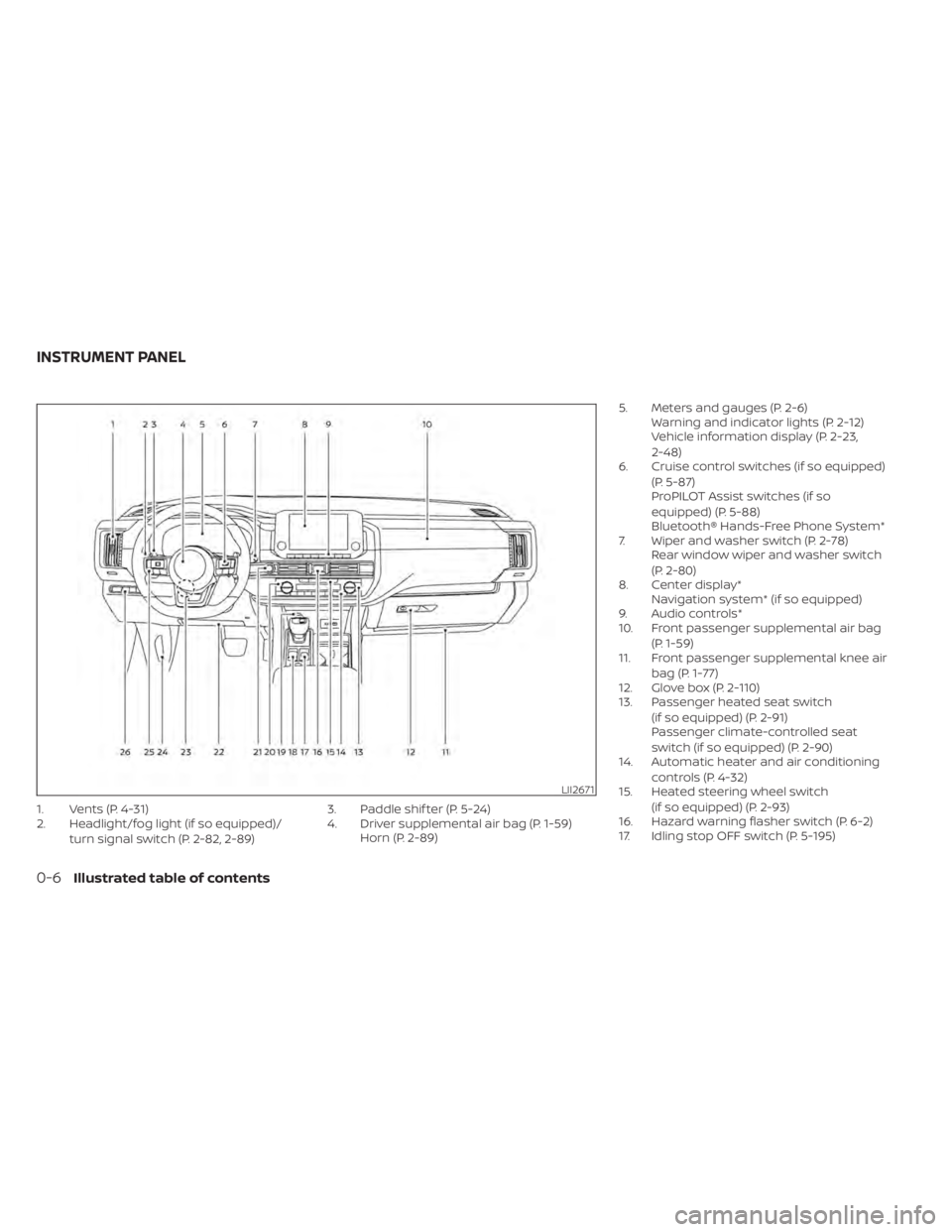
1. Vents (P. 4-31)
2. Headlight/fog light (if so equipped)/turn signal switch (P. 2-82, 2-89) 3. Paddle shif ter (P. 5-24)
4. Driver supplemental air bag (P. 1-59)
Horn (P. 2-89) 5. Meters and gauges (P. 2-6)
Warning and indicator lights (P. 2-12)
Vehicle information display (P. 2-23,
2-48)
6. Cruise control switches (if so equipped)
(P. 5-87)
ProPILOT Assist switches (if so
equipped) (P. 5-88)
Bluetooth® Hands-Free Phone System*
7. Wiper and washer switch (P. 2-78) Rear window wiper and washer switch
(P. 2-80)
8. Center display* Navigation system* (if so equipped)
9. Audio controls*
10. Front passenger supplemental air bag
(P. 1-59)
11. Front passenger supplemental knee air
bag (P. 1-77)
12. Glove box (P. 2-110)
13. Passenger heated seat switch
(if so equipped) (P. 2-91)
Passenger climate-controlled seat
switch (if so equipped) (P. 2-90)
14. Automatic heater and air conditioning
controls (P. 4-32)
15. Heated steering wheel switch
(if so equipped) (P. 2-93)
16. Hazard warning flasher switch (P. 6-2)
17. Idling stop OFF switch (P. 5-195)
LII2671
INSTRUMENT PANEL
0-6Illustrated table of contents
Page 109 of 665
Horn........................................... 2-89
Climate controlled seat switches
(if so equipped) ................................. 2-90
Heated seat switches (if so equipped) ..........2-91
Heated 2nd row seat switches
(if so equipped) ................................. 2-92
Heated steering wheel switch (if so equipped) . . 2-93
Hill descent control switch (if so equipped) .....2-94
Steering Assist switch (for vehicles with
ProPILOT Assist) (if so equipped) ................2-95
Head Up Display (HUD) (if so equipped) .........2-95
HowtousetheHUD......................... 2-96
Driver Assistance/Navigation linking ........2-97
Emergency call (SOS) button (if so equipped) . . . 2-98 Emergency support ......................... 2-98
Rear Door Alert ................................ 2-100
Power outlets ................................. 2-101
12v outlets ................................. 2-101
120v outlet (if so equipped) .................2-102
USB/iPod® charging ports .....................2-103
Wireless charger (if so equipped) ..............2-104
Wireless charger indicator ..................2-105Wireless charger operation
.................2-105
Extended storage switch ......................2-106
Storage ....................................... 2-107
Front-door pockets ........................ 2-107
Lower console storage tray ................2-108
Seatback pockets (if so equipped) ..........2-108
Storagetrays............................... 2-109
Glovebox .................................. 2-110
Console box ................................ 2-110
2nd row console (if so equipped) ...........2-110
Overhead sunglasses storage ...............2-111
Cup holders ................................ 2-112
Cargo area storage bin .....................2-114
Luggage hooks ............................ 2-115
Roof rack (if so equipped) ..................2-116
Windows ....................................... 2-117
Power windows .............................
2-117
R
ear door sunshade (if so equipped) .......2-120
Power moonroof (if so equipped) ..............2-120
Automatic moonroof and sunshade .......2-121
Interior lights .................................. 2-123
Map lights .................................. 2-123
Page 111 of 665
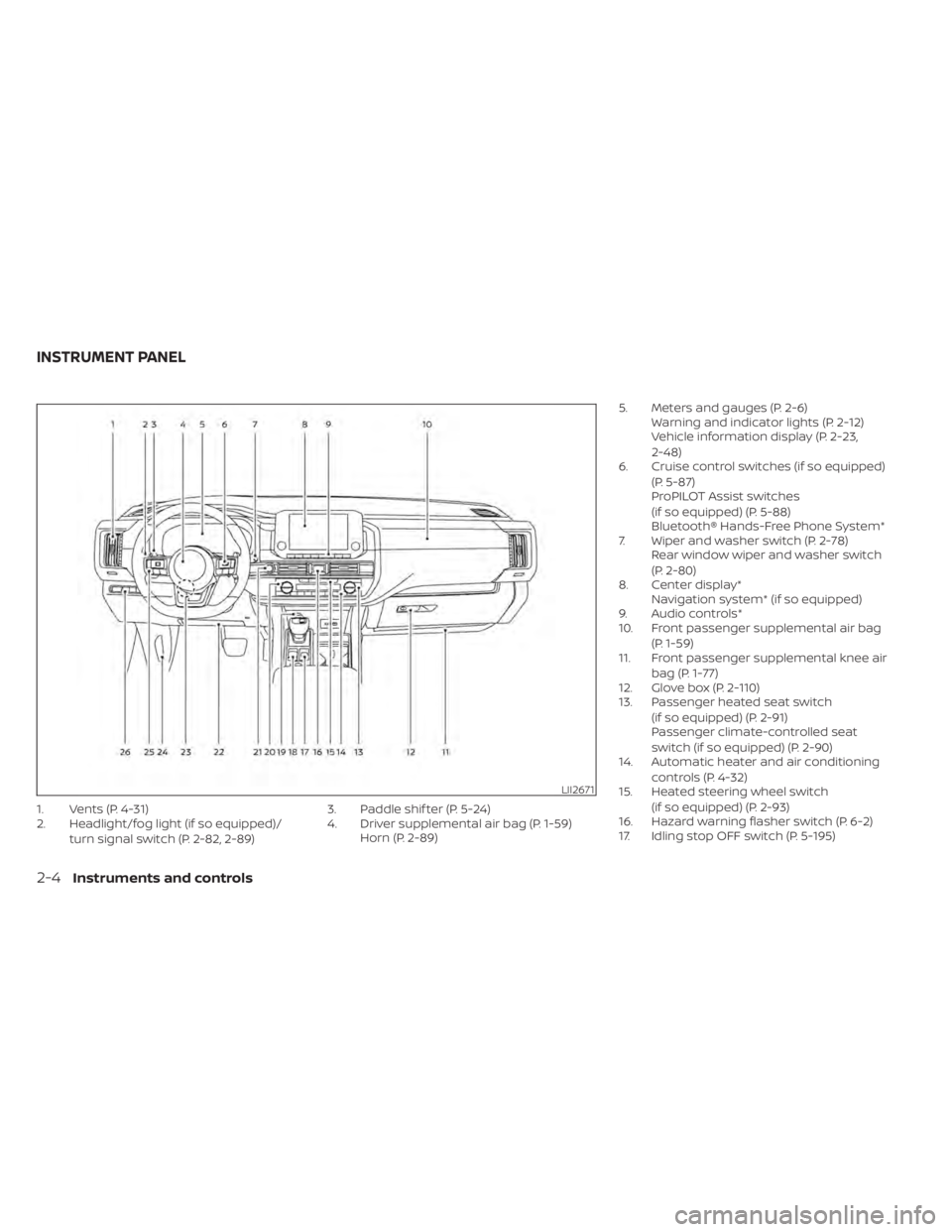
1. Vents (P. 4-31)
2. Headlight/fog light (if so equipped)/turn signal switch (P. 2-82, 2-89) 3. Paddle shif ter (P. 5-24)
4. Driver supplemental air bag (P. 1-59)
Horn (P. 2-89) 5. Meters and gauges (P. 2-6)
Warning and indicator lights (P. 2-12)
Vehicle information display (P. 2-23,
2-48)
6. Cruise control switches (if so equipped)
(P. 5-87)
ProPILOT Assist switches
(if so equipped) (P. 5-88)
Bluetooth® Hands-Free Phone System*
7. Wiper and washer switch (P. 2-78) Rear window wiper and washer switch
(P. 2-80)
8. Center display* Navigation system* (if so equipped)
9. Audio controls*
10. Front passenger supplemental air bag
(P. 1-59)
11. Front passenger supplemental knee air
bag (P. 1-77)
12. Glove box (P. 2-110)
13. Passenger heated seat switch
(if so equipped) (P. 2-91)
Passenger climate-controlled seat
switch (if so equipped) (P. 2-90)
14. Automatic heater and air conditioning
controls (P. 4-32)
15. Heated steering wheel switch
(if so equipped) (P. 2-93)
16. Hazard warning flasher switch (P. 6-2)
17. Idling stop OFF switch (P. 5-195)
LII2671
INSTRUMENT PANEL
2-4Instruments and controls
Page 140 of 665
Vehicle Settings
The vehicle settings menu allows the user to change the settings for lights, wipers, locking, keys, and other vehicle settings.
Some menu items shown below may not be equipped on your vehicle.
Menu itemExplanation
Power Back Door Allows user to turn the power back door on or off.
Lighting Displays the available lighting options.
Welcome Headlight Allows user to turn the welcome headlight on or off.
Auto Room Lamp Allows user to turn the auto room lamp on or off.
Accent Lighting Allows user to adjust the accent lighting.
Auto Headlight Allows user to change when the lights illuminate based on the brightness outside the vehicle.
Light Off Delay Allows user to change the duration of time that the automatic headlights stay on af ter the vehicle is shut off.
Locking Displays the available locking options.
Ext. Door Switch Allows user to turn the exit door switch on or off.
Selective Unlock Allows user to turn the selective unlock feature o n or off. When this item is turned on (default), only the driver’s
door is unlocked af ter the driver’s door unlock operation. All the doors can be unlocked if the capacitive touch
pad is pressed within 60 seconds of the door handle capacitive unlock feature. When this feature is turned off, all
the doors unlock when the driver’s door unlock operation is performed once.
Auto Door Unlock Allows the user to set the auto door unlock to Shif t to P or Shif t to Park, IGN OFF and OFF.
Horn beeps on lock Allows the user to turn the horn beeps on lock feature on or off.
Walk Away Lock Allows the user to turn the walk away lock function ON or OFF. For additional information, see “Walk away lock
function” (P. 3-17).
Approach Unlock Allows the user to turn the approach unlock function ON or OFF. For additional information, see “Approach unlock
function” (P. 3-17).
Wipers Displays the available wiper options.
Speed Dependent Allows user to turn the speed dependent wipers on or off.
Rain Sensor Allows user to turn the rain sensor wipers on or off.
Reverse Link Allows user to turn the reverse link feature on or off.
Instruments and controls2-33
Page 141 of 665
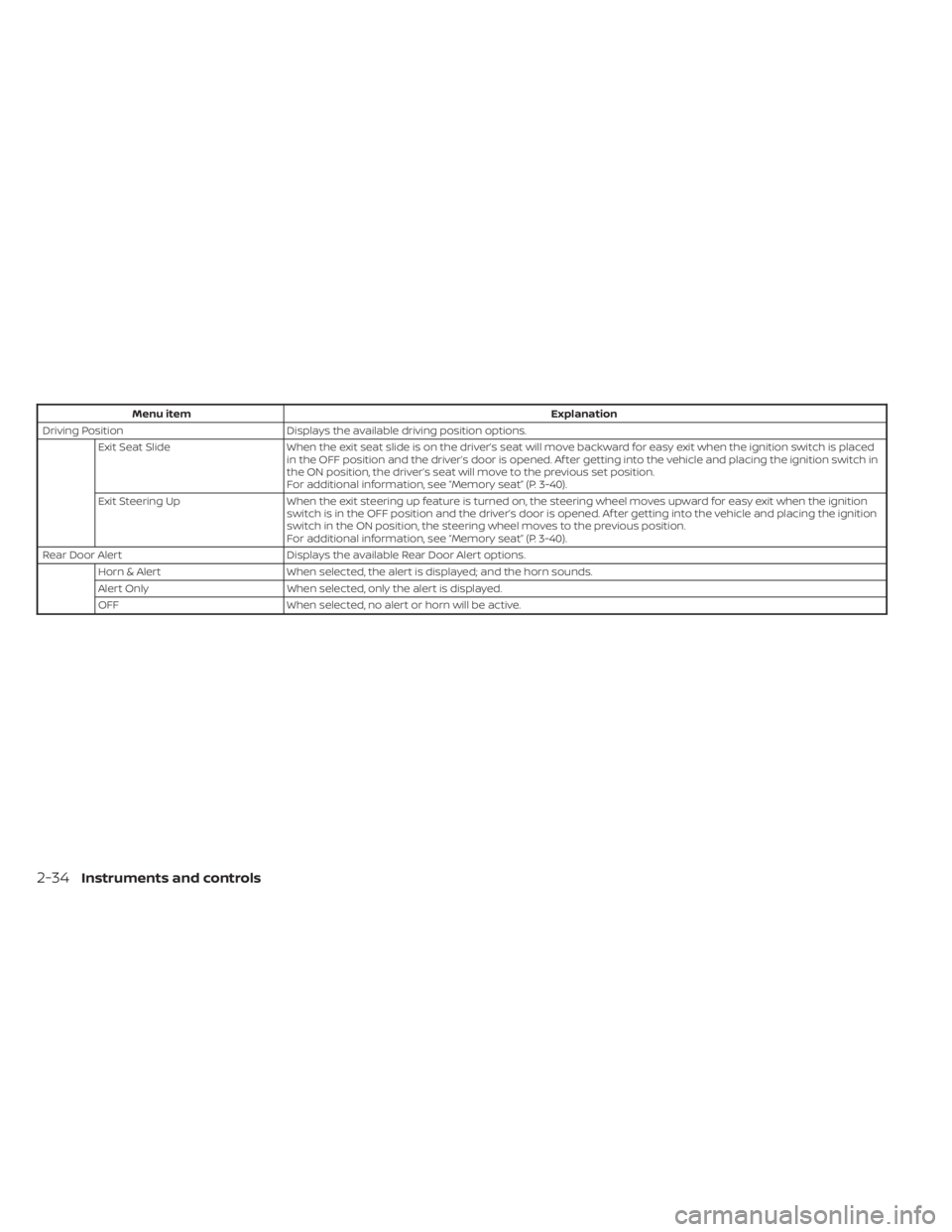
Menu itemExplanation
Driving Position Displays the available driving position options.
Exit Seat Slide When the exit seat slide is on the driver’s seat will move backward for easy exit when the ignition switch is placed
in the OFF position and the driver’s door is opened. Af ter getting into the vehicle and placing the ignition switch in
the ON position, the driver’s seat will move to the previous set position.
For additional information, see “Memory seat” (P. 3-40).
Exit Steering Up When the exit steering up feature is turned on, the steering wheel moves upward for easy exit when the ignition
switch is in the OFF position and the driver’s door is opened. Af ter getting into the vehicle and placing the ignition
switch in the ON position, the steering wheel moves to the previous position.
For additional information, see “Memory seat” (P. 3-40).
Rear Door Alert Displays the available Rear Door Alert options.
Horn & Alert When selected, the alert is displayed; and the horn sounds.
Alert Only When selected, only the alert is displayed.
OFF When selected, no alert or horn will be active.
2-34Instruments and controls
Page 147 of 665
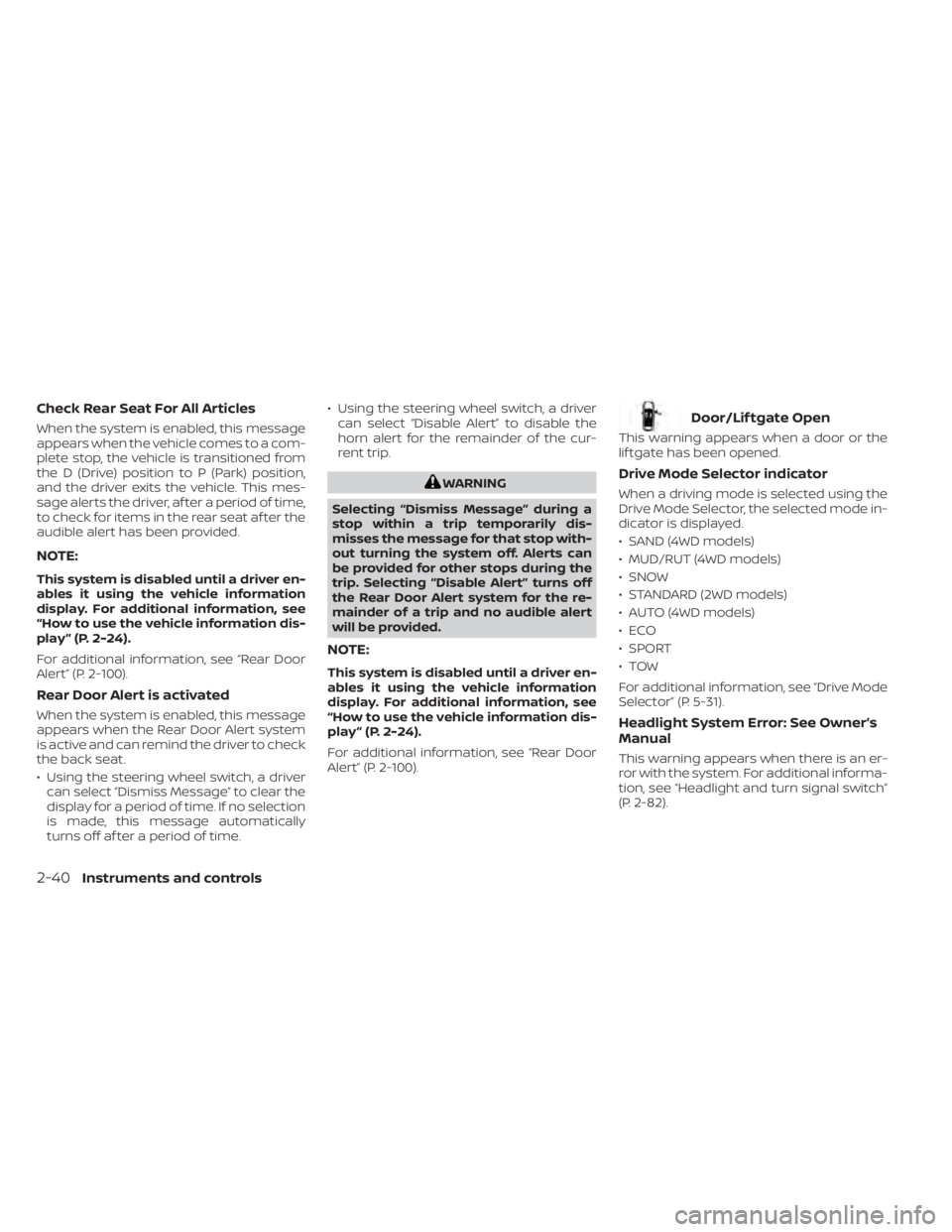
Check Rear Seat For All Articles
When the system is enabled, this message
appears when the vehicle comes to a com-
plete stop, the vehicle is transitioned from
the D (Drive) position to P (Park) position,
and the driver exits the vehicle. This mes-
sage alerts the driver, af ter a period of time,
to check for items in the rear seat af ter the
audible alert has been provided.
NOTE:
This system is disabled until a driver en-
ables it using the vehicle information
display. For additional information, see
“How to use the vehicle information dis-
play ” (P. 2-24).
For additional information, see “Rear Door
Alert” (P. 2-100).
Rear Door Alert is activated
When the system is enabled, this message
appears when the Rear Door Alert system
is active and can remind the driver to check
the back seat.
• Using the steering wheel switch, a drivercan select “Dismiss Message” to clear the
display for a period of time. If no selection
is made, this message automatically
turns off af ter a period of time. • Using the steering wheel switch, a driver
can select “Disable Alert” to disable the
horn alert for the remainder of the cur-
rent trip.
WARNING
Selecting “Dismiss Message” during a
stop within a trip temporarily dis-
misses the message for that stop with-
out turning the system off. Alerts can
be provided for other stops during the
trip. Selecting “Disable Alert” turns off
the Rear Door Alert system for the re-
mainder of a trip and no audible alert
will be provided.
NOTE:
This system is disabled until a driver en-
ables it using the vehicle information
display. For additional information, see
“How to use the vehicle information dis-
play ” (P. 2-24).
For additional information, see “Rear Door
Alert” (P. 2-100).
Door/Lif tgate Open
This warning appears when a door or the
lif tgate has been opened.
Drive Mode Selector indicator
When a driving mode is selected using the
Drive Mode Selector, the selected mode in-
dicator is displayed.
• SAND (4WD models)
• MUD/RUT (4WD models)
• SNOW
• STANDARD (2WD models)
• AUTO (4WD models)
•ECO
• SPORT
•TOW
For additional information, see “Drive Mode
Selector” (P. 5-31).
Headlight System Error: See Owner’s
Manual
This warning appears when there is an er-
ror with the system. For additional informa-
tion, see “Headlight and turn signal switch”
(P. 2-82).
2-40Instruments and controls
Page 167 of 665
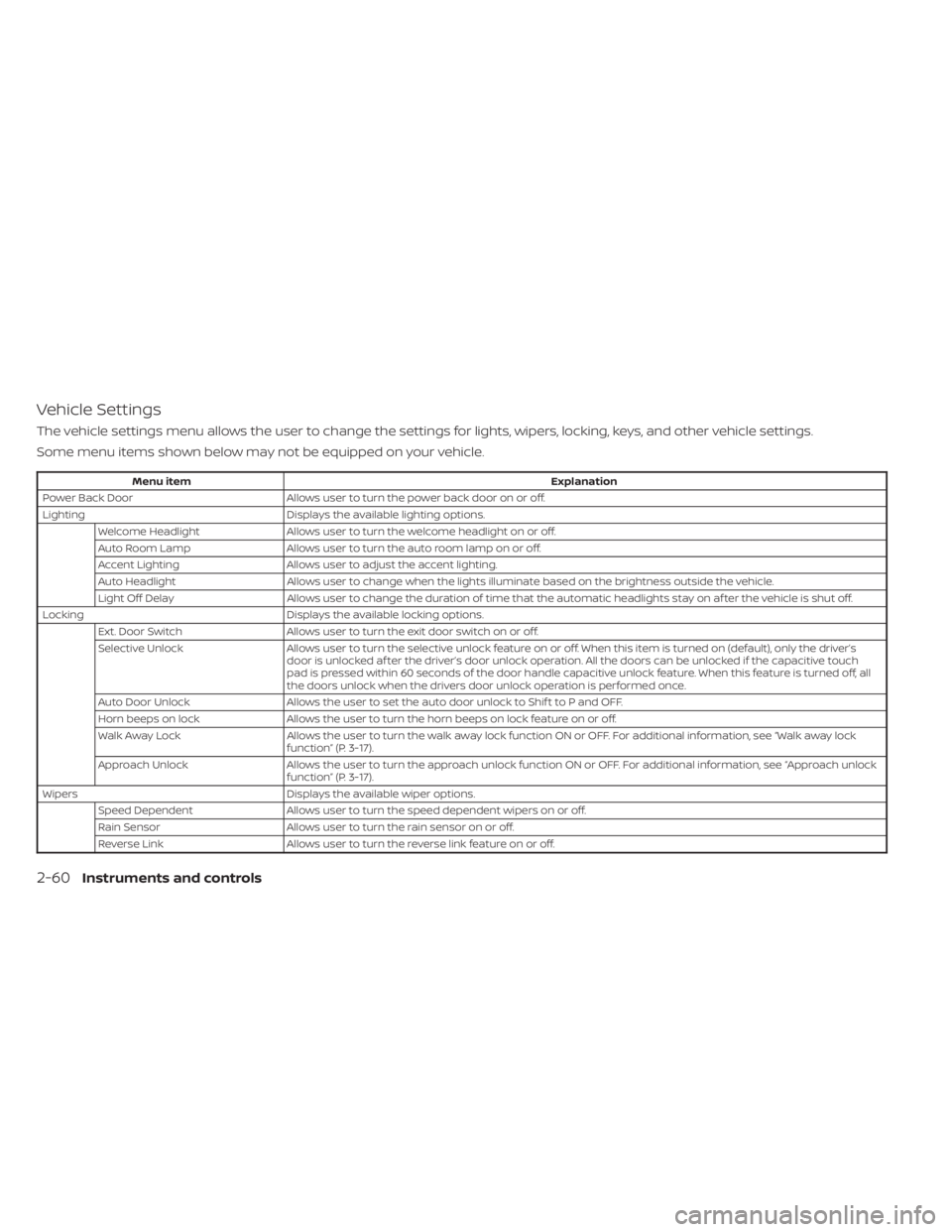
Vehicle Settings
The vehicle settings menu allows the user to change the settings for lights, wipers, locking, keys, and other vehicle settings.
Some menu items shown below may not be equipped on your vehicle.
Menu itemExplanation
Power Back Door Allows user to turn the power back door on or off.
Lighting Displays the available lighting options.
Welcome Headlight Allows user to turn the welcome headlight on or off.
Auto Room Lamp Allows user to turn the auto room lamp on or off.
Accent Lighting Allows user to adjust the accent lighting.
Auto Headlight Allows user to change when the lights illuminate based on the brightness outside the vehicle.
Light Off Delay Allows user to change the duration of time that the automatic headlights stay on af ter the vehicle is shut off.
Locking Displays the available locking options.
Ext. Door Switch Allows user to turn the exit door switch on or off.
Selective Unlock Allows user to turn the selective unlock feature o n or off. When this item is turned on (default), only the driver’s
door is unlocked af ter the driver’s door unlock operation. All the doors can be unlocked if the capacitive touch
pad is pressed within 60 seconds of the door handle capacitive unlock feature. When this feature is turned off, all
the doors unlock when the drivers door unlock operation is performed once.
Auto Door Unlock Allows the user to set the auto door unlock to Shif t to P and OFF.
Horn beeps on lock Allows the user to turn the horn beeps on lock feature on or off.
Walk Away Lock Allows the user to turn the walk away lock function ON or OFF. For additional information, see “Walk away lock
function” (P. 3-17).
Approach Unlock Allows the user to turn the approach unlock function ON or OFF. For additional information, see “Approach unlock
function” (P. 3-17).
Wipers Displays the available wiper options.
Speed Dependent Allows user to turn the speed dependent wipers on or off.
Rain Sensor Allows user to turn the rain sensor on or off.
Reverse Link Allows user to turn the reverse link feature on or off.
2-60Instruments and controls
Page 168 of 665
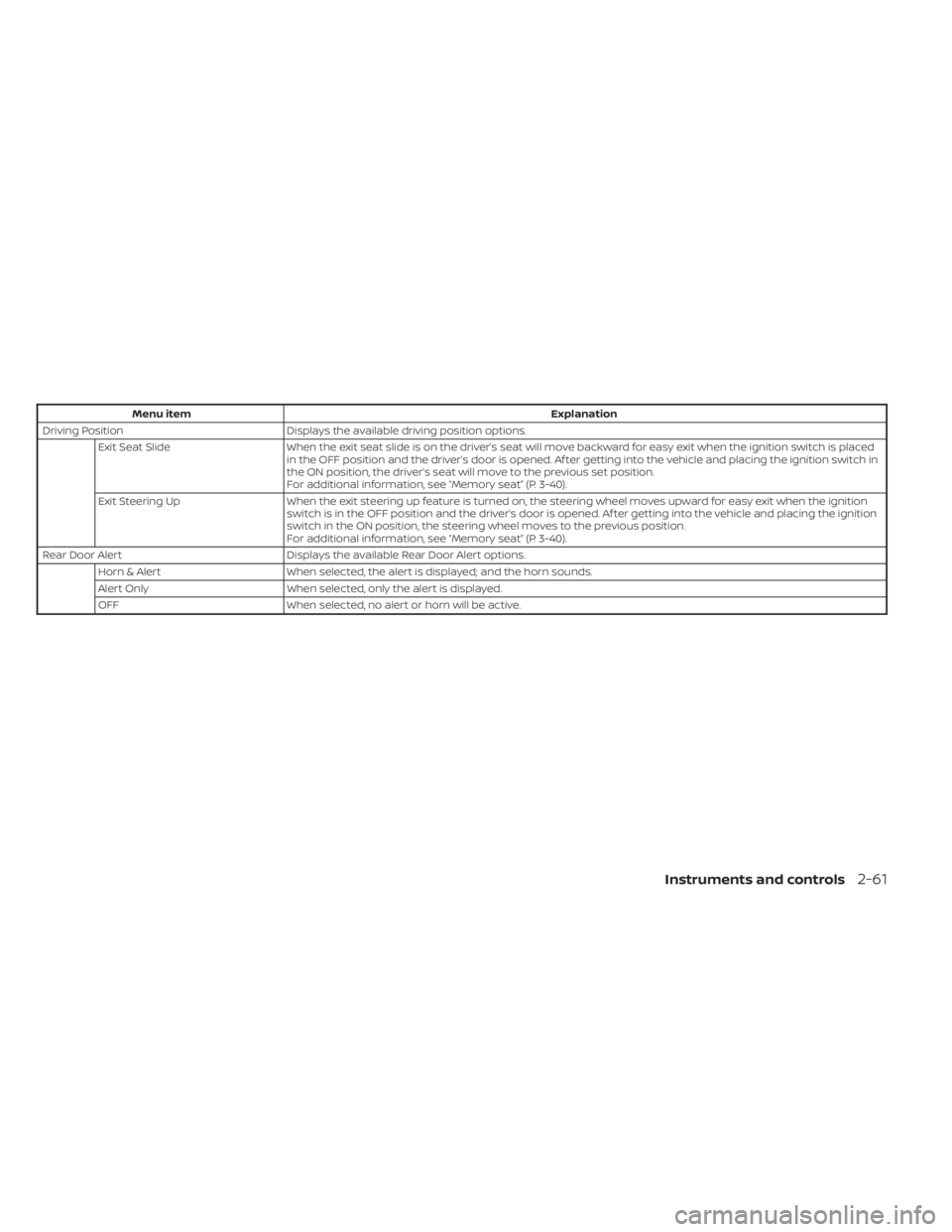
Menu itemExplanation
Driving Position Displays the available driving position options.
Exit Seat Slide When the exit seat slide is on the driver’s seat will move backward for easy exit when the ignition switch is placed
in the OFF position and the driver’s door is opened. Af ter getting into the vehicle and placing the ignition switch in
the ON position, the driver’s seat will move to the previous set position.
For additional information, see “Memory seat” (P. 3-40).
Exit Steering Up When the exit steering up feature is turned on, the steering wheel moves upward for easy exit when the ignition
switch is in the OFF position and the driver’s door is opened. Af ter getting into the vehicle and placing the ignition
switch in the ON position, the steering wheel moves to the previous position.
For additional information, see “Memory seat” (P. 3-40).
Rear Door Alert Displays the available Rear Door Alert options.
Horn & Alert When selected, the alert is displayed; and the horn sounds.
Alert Only When selected, only the alert is displayed.
OFF When selected, no alert or horn will be active.
Instruments and controls2-61
Page 173 of 665
Chassis Control System Error See
Owner’s Manual
This warning appears if the chassis control
module detects a malfunction in the chas-
sis control system. Have the system
checked. It is recommended that you visit a
NISSAN dealer for this service. For addi-
tional information, see “Chassis Control”
(P. 5-181).
Check Rear Seat For All Articles
When the system is enabled, this message
appears when the vehicle comes to a com-
plete stop, the vehicle is transitioned from
the D (Drive) position to P (Park) position,
and the driver exits the vehicle. This mes-
sage alerts the driver, af ter a period of time,
to check for items in the rear seat af ter the
audible alert has been provided.
NOTE:
This system is disabled until a driver en-
ables it using the vehicle information
display. For additional information, see
“How to use the vehicle information dis-
play ” (P. 2-48).
For additional information, see “Rear Door
Alert” (P. 2-100).
Rear Door Alert is activated
When the system is enabled, this message
appears when the Rear Door Alert system
is active and can remind the driver to check
the back seat.
• Using the steering wheel switch, a drivercan select “Dismiss Message” to clear the
display for a period of time. If no selection
is made, this message automatically
turns off af ter a period of time.
• Using the steering wheel switch, a driver can select “Disable Alert” to disable the
horn alert for the remainder of the cur-
rent trip.
WARNING
Selecting “Dismiss Message” during a
stop within a trip temporarily dis-
misses the message for that stop with-
out turning the system off. Alerts can
be provided for other stops during the
trip. Selecting “Disable Alert” turns off
the Rear Door Alert system for the re-
mainder of a trip and no audible alert
will be provided.
NOTE:
This system is disabled until a driver en-
ables it using the vehicle information
display. For additional information, see
“How to use the vehicle information dis-
play ” (P. 2-48).
For additional information, see “Rear Door
Alert” (P. 2-100).
Door/Lif tgate Open
This warning appears when a door or the
lif tgate has been opened.
Drive Mode Selector indicator
When a driving mode is selected using the
Drive Mode Selector, the selected mode in-
dicator is displayed.
• SAND (4WD models)
• MUD/RUT (4WD models)
• SNOW
• STANDARD (2WD models)
• AUTO (4WD models)
•ECO
• SPORT
•TOW
For additional information, see “Drive Mode
Selector” (P. 5-31).
2-66Instruments and controls
Page 184 of 665
Vehicle security system activation
The vehicle security system will give the
following alarm:
• The headlights blink and the horn soundsintermittently.
• The alarm automatically turns off af ter a period of time. However, the alarm reacti-
vates if the vehicle is tampered with
again. The alarm can be shut off by un-
locking the driver's door by pressing the
button on the Intelligent Key or plac-
ing the ignition switch in the ON position.
The alarm is activated by:
• opening a door without using the Intelli- gent Key (even if the door is unlocked by
using the inside lock knob or the power
door lock switch).
How to stop an activated alarm
The alarm stops only by unlocking the driv-
er’s door or the lif tgate by pressing the
button on the Intelligent Key or push-
ing the capacitive touch pad (if so
equipped) on the driver's or passenger's
door with the Intelligent Key in range of the
door handle.
NISSAN VEHICLE IMMOBILIZER
SYSTEM
The NISSAN Vehicle Immobilizer System
will not allow the engine to start without
the use of a registered key.
If the engine fails to start using a registered
key (for example, when interference is
caused by another registered key, an auto-
mated toll road device or automatic pay-
ment device on the key ring), restart the
engine using the following procedures:
1. Leave the ignition switch in the ON posi- tion for approximately 5 seconds.
2. Place the ignition switch in the OFF or LOCK position and wait approximately
10 seconds.
3. Repeat steps 1 and 2.
4. Restart the engine while holding the de- vice (which may have caused the inter-
ference) separate from the registered
key.
If the no start condition reoccurs, NISSAN
recommends placing the registered key on
a separate key ring to avoid interference
from other devices. Never leave these keys in the vehicle.
FCC Notice:
For USA:
This device complies with Part 15 of the
FCC Rules. Operation is subject to the fol-
lowing two conditions: (1) This device
may not cause harmful interference, and
(2) this device must accept any interfer-
ence received, including interference
that may cause undesired operation.
NOTE:
Changes or modifications not expressly
approved by the party responsible for
compliance could void the user's author-
ity to operate the equipment.
For Canada:
This device contains licence-exempt
transmitter(s)/receiver(s) that comply
with Innovation, Science and Economic
Development Canada’s licence-exempt
RSS(s). Operation is subject to the fol-
lowing two conditions: (1) This device
may not cause interference. (2) This de-
vice must accept any interference, in-
cluding interference that may cause un-
desired operation of the device.
Instruments and controls2-77