audio NISSAN PATHFINDER HYBRID 2014 R52 / 4.G Owners Manual
[x] Cancel search | Manufacturer: NISSAN, Model Year: 2014, Model line: PATHFINDER HYBRID, Model: NISSAN PATHFINDER HYBRID 2014 R52 / 4.GPages: 571, PDF Size: 5.38 MB
Page 426 of 571
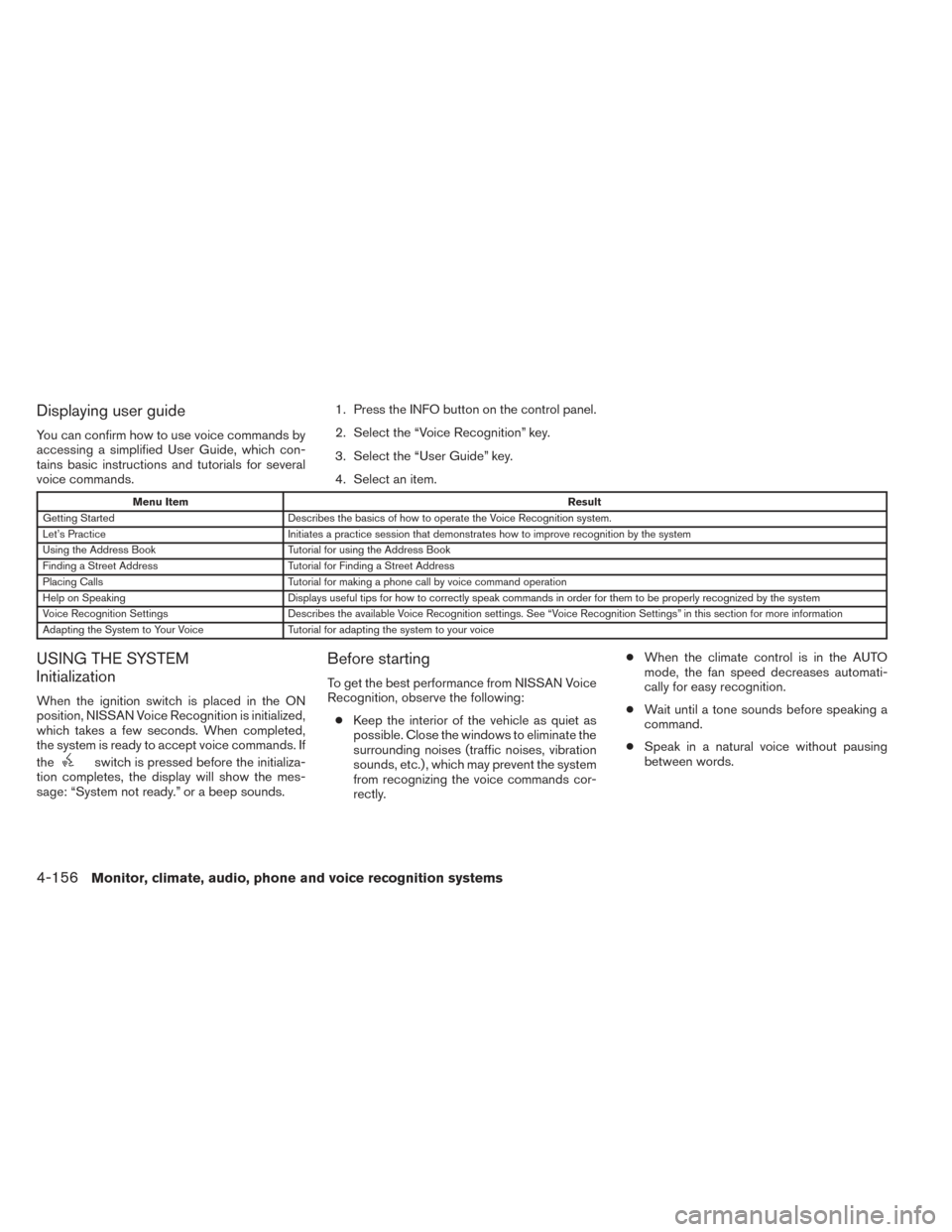
Displaying user guide
You can confirm how to use voice commands by
accessing a simplified User Guide, which con-
tains basic instructions and tutorials for several
voice commands.1. Press the INFO button on the control panel.
2. Select the “Voice Recognition” key.
3. Select the “User Guide” key.
4. Select an item.
Menu Item
Result
Getting Started Describes the basics of how to operate the Voice Recognition system.
Let’s Practice Initiates a practice session that demonstrates how to improve recognition by the system
Using the Address Book Tutorial for using the Address Book
Finding a Street Address Tutorial for Finding a Street Address
Placing Calls Tutorial for making a phone call by voice command operation
Help on Speaking Displays useful tips for how to correctly speak commands in order for them to be properly recognized by the system
Voice Recognition Settings Describes the available Voice Recognition settings. See “Voice Recognition Settings” in this section for more information
Adapting the System to Your Voice Tutorial for adapting the system to your voice
USING THE SYSTEM
Initialization
When the ignition switch is placed in the ON
position, NISSAN Voice Recognition is initialized,
which takes a few seconds. When completed,
the system is ready to accept voice commands. If
the
switch is pressed before the initializa-
tion completes, the display will show the mes-
sage: “System not ready.” or a beep sounds.
Before starting
To get the best performance from NISSAN Voice
Recognition, observe the following:
● Keep the interior of the vehicle as quiet as
possible. Close the windows to eliminate the
surrounding noises (traffic noises, vibration
sounds, etc.) , which may prevent the system
from recognizing the voice commands cor-
rectly. ●
When the climate control is in the AUTO
mode, the fan speed decreases automati-
cally for easy recognition.
● Wait until a tone sounds before speaking a
command.
● Speak in a natural voice without pausing
between words.
4-156Monitor, climate, audio, phone and voice recognition systems
Page 427 of 571
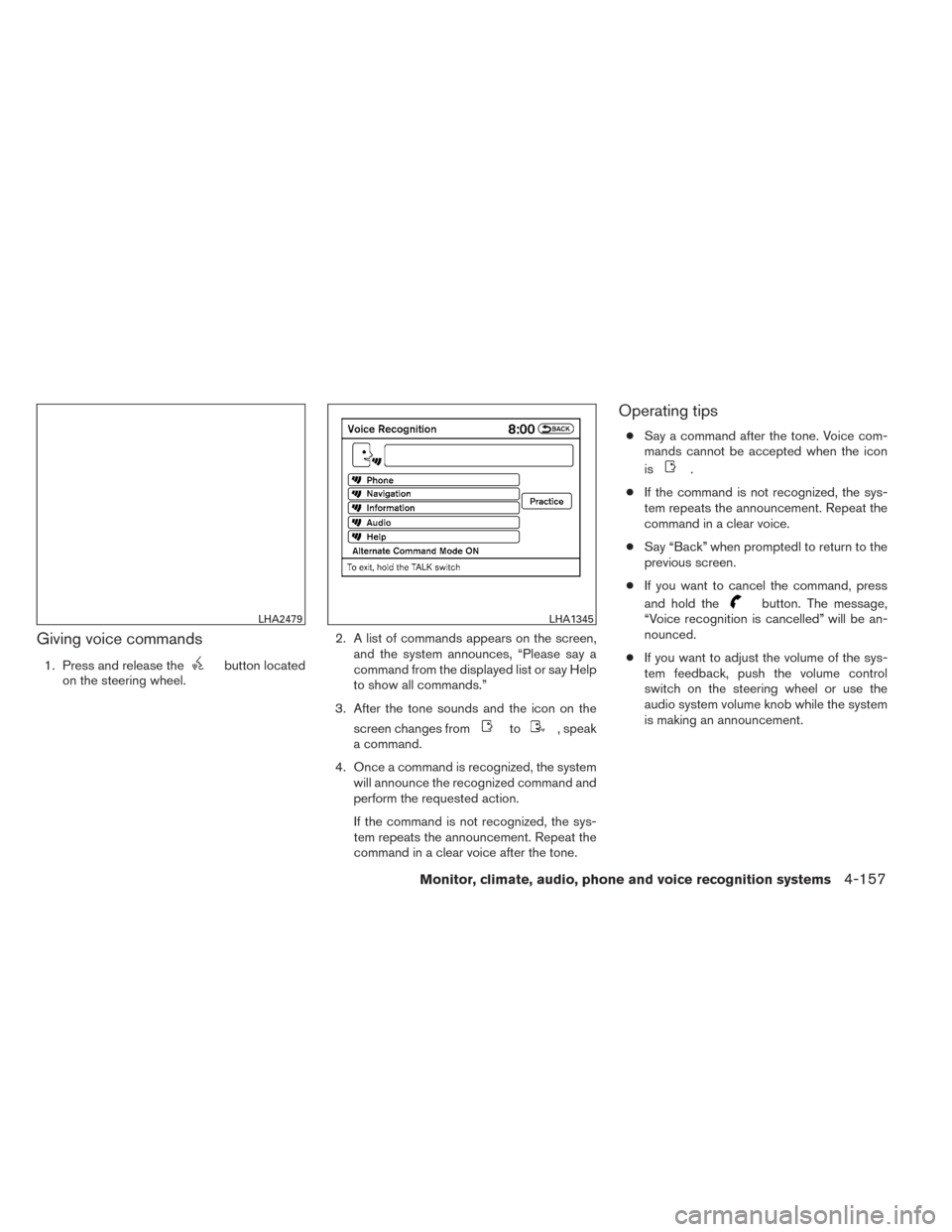
Giving voice commands
1. Press and release thebutton located
on the steering wheel. 2. A list of commands appears on the screen,
and the system announces, “Please say a
command from the displayed list or say Help
to show all commands.”
3. After the tone sounds and the icon on the screen changes from
to, speak
a command.
4. Once a command is recognized, the system will announce the recognized command and
perform the requested action.
If the command is not recognized, the sys-
tem repeats the announcement. Repeat the
command in a clear voice after the tone.
Operating tips
● Say a command after the tone. Voice com-
mands cannot be accepted when the icon
is
.
● If the command is not recognized, the sys-
tem repeats the announcement. Repeat the
command in a clear voice.
● Say “Back” when promptedl to return to the
previous screen.
● If you want to cancel the command, press
and hold the
button. The message,
“Voice recognition is cancelled” will be an-
nounced.
● If you want to adjust the volume of the sys-
tem feedback, push the volume control
switch on the steering wheel or use the
audio system volume knob while the system
is making an announcement.LHA2479LHA1345
Monitor, climate, audio, phone and voice recognition systems4-157
Page 428 of 571
●To minimize the amount of prompts spoken
by the system in Alternate Command Mode,
use the Minimize Voice Feedback function.
To access the Minimize Voice Feedback
function press the SETTING button, then
select the “Others” key. Then select the
“Voice Recognition” key.
How to speak numbers
Voice Recognition requires a certain way to
speak numbers when giving voice commands.
Refer to the following examples.
General rule:
● Only single digits 0 (zero) to 9 can be used.
● When saying the phone number 800-662-
6200, the system will accept “eight-
hundred” in addition to “eight zero zero” or
“eight oh oh”. 500, 700, and 900 are also
supported.
Examples: ● 1-800-662-6200
– “One eight zero zero six six two six two zero zero”
– “One eight hundred six six two six two zero zero” Improving Recognition of Phone numbers:
You can improve the recognition of phone num-
bers by saying the phone number in three groups
of numbers. For example, when you try to call
800-662-6200, say “eight zero zero” first, and
the system will then ask you for the next three
digits. Then, say “six six two”. After recognition,
the system will then ask for the last four digits.
Say, “six two zero zero”. Using this method of
phone digit entry can improve recognition perfor-
mance.
NOTE:
When speaking a house number, speak the
number “0” as “zero” or “oh”. If the letter
“O” is included in the house number, it will
not be recognized as “0” even if you speak
“oh” instead of “zero”.
Settings menu
The content of the Settings Menu differs when
the system is in the Alternate Command Mode.
Command List:
Displays the command list for Alternate Com-
mand Mode.
User Guide:
The user guide provides basic instructions for
using Voice Recognition and accessing some
voice commands.
NOTE:
The user guide can also be accessed from
within the INFO menu after pressing the
INFO button.
Speaker Adaptation:
Starts a system training procedure to learn the
specific sounds of your voice. See “Speaker ad-
aptation function” in this section.
Alternate Command Mode:
For advanced operation, an Alternate Command
Mode is provided. This setting enables control of
the audio system as well as additional commands
for the Phone and Navigation systems. With this
setting active, the system does not announce or
display the available commands at each step.
When this mode is activated, the Voice Recogni-
tion Settings will change to show more options.
Minimize Voice Feedback:
Reduces the amount of the information spoken
for each voice instruction.
4-158Monitor, climate, audio, phone and voice recognition systems
Page 429 of 571
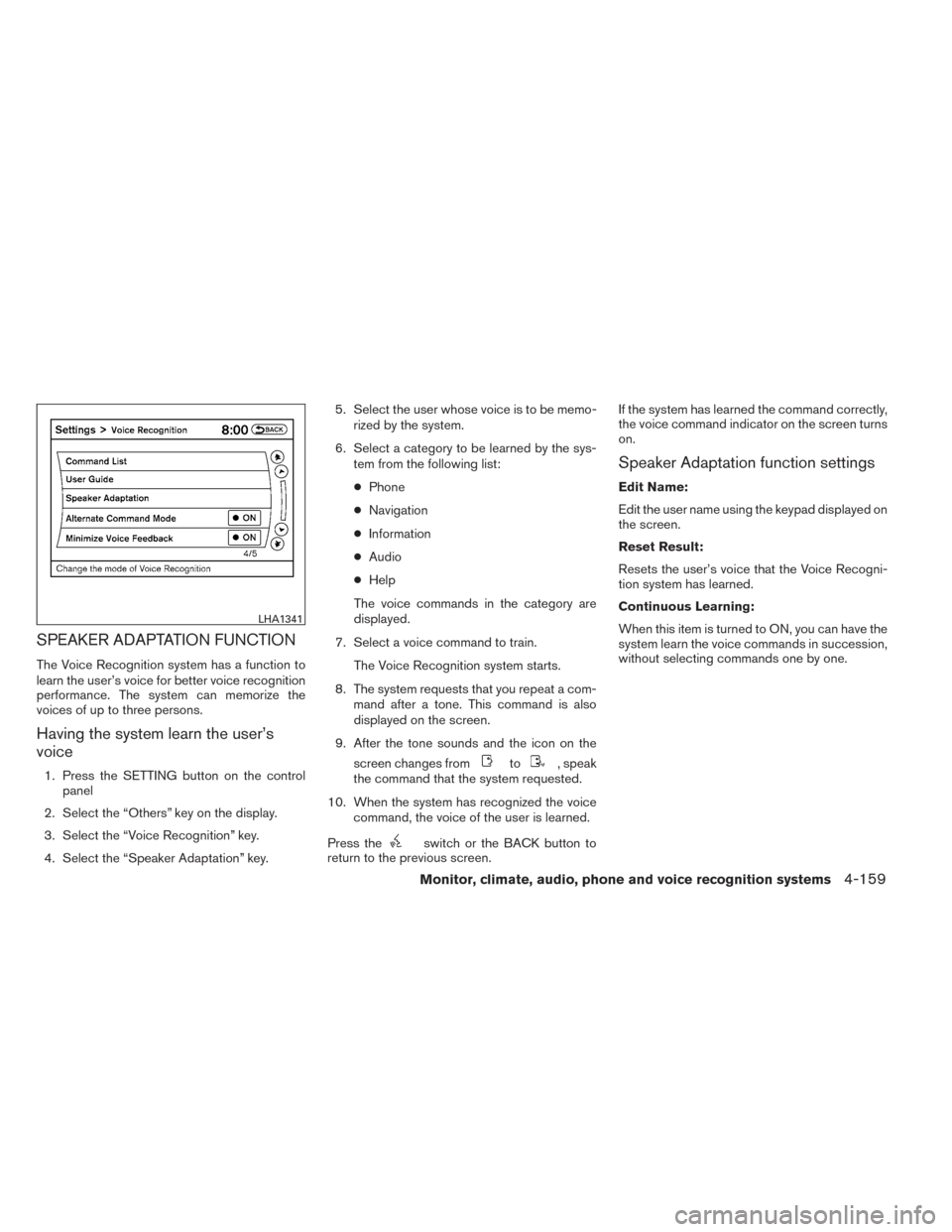
SPEAKER ADAPTATION FUNCTION
The Voice Recognition system has a function to
learn the user’s voice for better voice recognition
performance. The system can memorize the
voices of up to three persons.
Having the system learn the user’s
voice
1. Press the SETTING button on the controlpanel
2. Select the “Others” key on the display.
3. Select the “Voice Recognition” key.
4. Select the “Speaker Adaptation” key. 5. Select the user whose voice is to be memo-
rized by the system.
6. Select a category to be learned by the sys- tem from the following list:
● Phone
● Navigation
● Information
● Audio
● Help
The voice commands in the category are
displayed.
7. Select a voice command to train. The Voice Recognition system starts.
8. The system requests that you repeat a com- mand after a tone. This command is also
displayed on the screen.
9. After the tone sounds and the icon on the screen changes fromto, speak
the command that the system requested.
10. When the system has recognized the voice command, the voice of the user is learned.
Press the
switch or the BACK button to
return to the previous screen. If the system has learned the command correctly,
the voice command indicator on the screen turns
on.
Speaker Adaptation function settings
Edit Name:
Edit the user name using the keypad displayed on
the screen.
Reset Result:
Resets the user’s voice that the Voice Recogni-
tion system has learned.
Continuous Learning:
When this item is turned to ON, you can have the
system learn the voice commands in succession,
without selecting commands one by one.
LHA1341
Monitor, climate, audio, phone and voice recognition systems4-159
Page 430 of 571
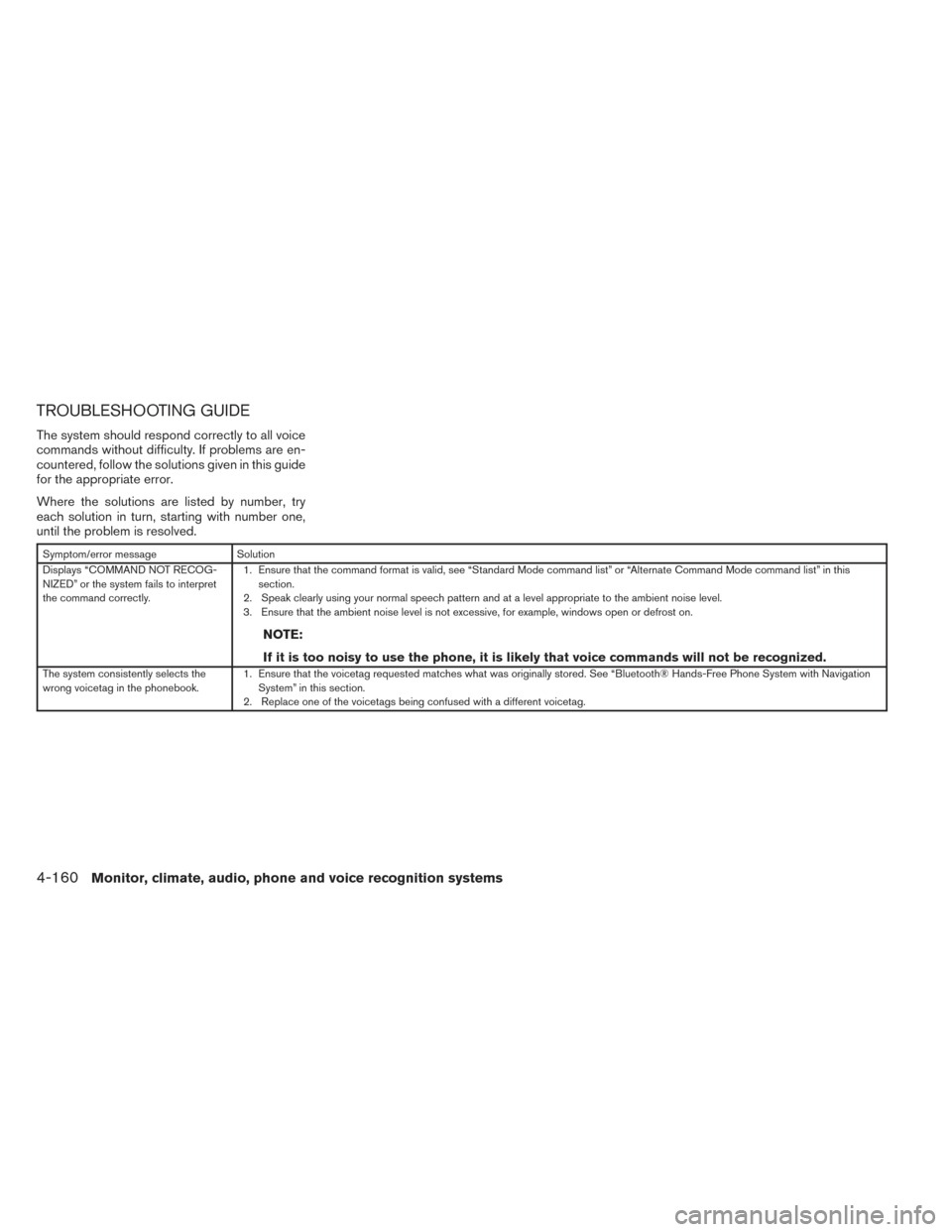
TROUBLESHOOTING GUIDE
The system should respond correctly to all voice
commands without difficulty. If problems are en-
countered, follow the solutions given in this guide
for the appropriate error.
Where the solutions are listed by number, try
each solution in turn, starting with number one,
until the problem is resolved.
Symptom/error messageSolution
Displays “COMMAND NOT RECOG-
NIZED” or the system fails to interpret
the command correctly. 1. Ensure that the command format is valid, see “Standard Mode command list” or “Alternate Command Mode command list” in this
section.
2. Speak clearly using your normal speech pattern and at a level appropriate to the ambient noise level.
3. Ensure that the ambient noise level is not excessive, for example, windows open or defrost on.
NOTE:
If it is too noisy to use the phone, it is likely that voice commands will not be recognized.
The system consistently selects the
wrong voicetag in the phonebook. 1. Ensure that the voicetag requested matches what was originally stored. See “Bluetooth® Hands-Free Phone System with Navigation
System” in this section.
2. Replace one of the voicetags being confused with a different voicetag.
4-160Monitor, climate, audio, phone and voice recognition systems
Page 431 of 571

MEMO
Monitor, climate, audio, phone and voice recognition systems4-161
Page 563 of 571
10 Index
A
Air bag (See supplemental restraint
system) .....................1-53
Air bag system Front (See supplemental front impact
air bag system) ...............1-60
Airbagwarninglabels.............1-68
Airbagwarninglight...........1-68,2-14
Air cleaner housing filter ............8-18
Air conditioner Air conditioner service ...........4-49
Air conditioner specification label .....9-11
Air conditioner system refrigerant and
oil recommendations .............9-6
Heater and air conditioner
controls................4-41,4-45
Rear seat air conditioner ..........4-43
Servicing air conditioner ..........4-49
Alarm system
(See vehicle security system) .........2-26
Anchor point locations .............1-38
Antenna....................4-104
Anti-lock brake warning light ..........2-10
Anti-lock Braking System (ABS) ........5-28
Audible reminders ...............2-16
Audio system ..................4-49
Bluetooth®audio..............4-99
Compact Disc (CD) changer .......4-67
Compact disc (CD) player .....4-74,4-81
FM-AM radio with compact disc
(CD) changer ................4-65 FM/AM/SAT radio with CD/DVD player . .4-77
FM/AM/SAT radio with compact disc
(CD) player
.................4-70
Audio System iPod®Player.............4-93,4-95
Audio system Radio ....................4-49
Steering wheel audio control switch . . .4-103
USB interface ............4-88,4-90
Autolight switch .................2-32
Automatic Automatic drive positioner .........3-35
Automatic power window switch .....2-52
Automatic anti-glare inside mirror .......3-32
Automatic door locks ..............3-6
AUXjack ....................4-69
B
Battery ......................8-14
Charge warning light ............2-11
Before starting the engine ...........5-13
Belt (See drive belt) ..............8-16
Block heater Engine ....................5-34
Bluetooth®audio................4-99
Bluetooth® hands-free phone
system .................4- 118, 4-131
Boosterseats..................1-50
Brake Anti-lock Braking System (ABS) ......5-28
Brake fluid ..................8-12 Brakelight(Seestoplight).........8-26
Brake system
................5-27
Brake warning light .............2-11
Brake wear indicators ........2-16,8-20
Parking brake operation ..........5-18
Self-adjusting brakes ............8-20
Brakes ......................8-20
Break-inschedule ...............5-21
Brightness/contrast button .......4-11,4-20
Brightness control Instrument panel ..............2-34
Bulb check/instrument panel ..........2-10
Bulbreplacement................8-26
C
Capacities and recommended
fuel/lubricants ...................9-2
Cargolight ...................2-57
Cargo
(See vehicle loading information) . . .9-12
Car phone or CB radio ............4-117
CD care and cleaning .............4-102
CD changer (See audio system) .......4-67
CD player (See audio system) .....4-74,4-81
Check tire pressure ...............2-25
Child restraints .......1-31,1-32,1-33,1-35
Precautions on child
restraints ........1-33,1-40,1-45,1-50
Top tether strap anchor point locations . .1-38
Child restraint with top tether strap ......1-37
Child safety rear door lock ............3-7
Chimes,audiblereminders...........2-16
Page 564 of 571
Cleaning exterior and interior...........7-2
C.M.V.S.S. certification label ..........9-10
Cold weather driving ..............5-33
Compact disc (CD) player ........4-74,4-81
Consolebox...................2-47
Continuously Variable Transmission (CVT). . .5-15 Continuously Variable Transmission
(CVT) fluid ..................8-11
Driving with Continuously Variable
Transmission (CVT) .............5-15
Control panel buttons ..............4-11
Brightness/contrast button ......4-11,4-20
Enterbutton...............4-4,4-11
Without navigation system ..........4-4
Controls Audiocontrols(steeringwheel)......4-103
Heater and air conditioner
controls ................4-41,4-45
Rear seat air conditioner ..........4-43
Coolant Capacities and recommended
fuel/lubricants .................9-2
Changing engine coolant ...........8-8
Checking engine coolant level ........8-8
Engine coolant temperature gauge .....2-5
Corrosionprotection ...............7-6
Cruisecontrol..................5-19
Cupholders...................2-45
D
Daytime running light system (Canada only) . .2-34
Defroster switch Rear window and outside mirror defroster
switch.....................2-30 Digital Versatile Disc (DVD) player
.......4-85
Dimensionsandweights.............9-8
Dimmer switch for instrument panel ......2-34
Display controls
(seecontrolpanelbuttons) ........4-4,4-11
Door locks .....................3-5
Drive belt .....................8-16
Drive positioner, Automatic ...........3-35
Driving Cold weather driving ............5-33
Driving with Continuously Variable
Transmission (CVT) .............5-15
Precautions when starting and driving ....5-2
E
Economy - fuel ..................5-22
Emission control information label .......9-10
Emission control system warranty .......9-29
Engine Before starting the engine ..........5-13
Block heater .................5-34
Capacities and recommended
fuel/lubricants .................9-2
Changingenginecoolant...........8-8
Changingengineoil.............8-10
Changing engine oil filter ..........8-11
Checking engine coolant level ........8-8
Checking engine oil level ...........8-9
Engine compartment check locations ....8-6
Engine coolant temperature gauge .....2-5
Engine cooling system ............8-7
Engineoil ...................8-9
Engine oil and oil filter recommendation . . .9-5
Engine oil viscosity ..............9-5 Engine serial number
............9-10
Engine specifications .............9-7
Starting the engine .............5-14
Enterbutton.................4-4,4-11
Eventdatarecorders ..............9-31
Exhaustgas(Carbonmonoxide).........5-2
Extended storage switch ............8-23
Eyeglass case ..................2-44
F
Flashers (See hazard warning flasher switch) . .6-2
Flat tire .......................6-3
Floor mat positioning aid .............7-5
Fluid Brake fluid ..................
8-12
Capacities and recommended
fuel/lubricants .................9-2
Continuously Variable Transmission
(CVT) fluid ..................8-11
Engine coolant .................8-7
Engine oil ...................8-9
Power steering fluid .............8-12
Windshield-washer fluid ...........8-13
F.M.V.S.S. certification label ...........9-10
Foglightswitch .................2-35
Front air bag system
(See supplemental restraint system) ......1-60
Front seats .....................1-2
Fuel Capacities and recommended
fuel/lubricants .................9-2
Fuel economy ................5-22
Fuel-filler door and cap ...........3-27
Fuelgauge...................2-5
10-2
Page 567 of 571
Power steering system...........5-27
Power windows ...............2-50
Rear power windows ............2-51
Powerinverterswitch..............2-40
Precautions Maintenanceprecautions...........8-5
On-pavement and off-road driving
precautions ..................5-6
Precautions on child
restraints .........1-33,1-40,1-45,1-50
Precautionsonseatbeltusage.......1-24
Precautions on supplemental restraint
system ....................1-53
Precautions when starting and driving ....5-2
Pre-tensioner seat belt system .........1-67
Push starting ...................6-11
R
Radio Car phone or CB radio ..........4-117
Compact Disc (CD) changer ........4-67
FM-AM radio with compact disc
(CD) changer ................4-65
FM/AM/SAT radio with CD/DVD player . .4-77
FM/AM/SAT radio with compact disc
(CD) player ..................4-70
Steering wheel audio control switch . . .4-103
Readiness for inspection maintenance
(I/M) test .....................9-30
Rear power windows ..............2-51
Rear seat air conditioner ............4-43
RearViewMonitor................4-23
Rear window and outside mirror defroster
switch .......................2-30 Rear window wiper and washer switches . . .2-29
Recorders
Eventdata..................9-31
Refrigerant recommendation ...........9-6
Registering your vehicle in another country . . .9-9
Reporting safety defects (US only) .......9-29
Roof rack .....................2-49
S
Safety Child safety rear door lock ..........3-7
Childseatbelts.....1-33,1-40,1-45,1-50
Reporting safety defects (US only) .....9-29
Seat adjustment Frontmanualseatadjustment ........1-2
Front power seat adjustment .........1-4
Second row bench seats ........1-6,1-8
Seatback pockets ................2-44
Seat belt Child safety ..................1-31
Infants and small children ..........1-32
Injured Person ................1-27
Largerchildren................1-32
Precautions on seat belt usage .......1-24
Pregnant women ...............1-27
Pre-tensioner seat belt system .......1-67
Seatbeltextenders .............1-30
Seatbeltmaintenance............1-31
Seatbelts...................1-24
Three-point type with retractor .......1-27
Seat belt warning light ..............2-13
Seats Adjustment ...................1-2
Automatic drive positioner ..........3-35 Frontseats...................1-2
Heated seats
..........2-36,2-37,2-40
Manual front seat adjustment .........1-2
Security indicator light ..............2-15
Security system (NISSAN vehicle immobilizer
system) , engine start ........2-27,3-4,5-13
Self-adjusting brakes ..............8-20
Service manual order form ...........9-31
Servicing air conditioner .............4-49
Spark plug replacement .............8-17
Speedometer ...................2-4
Spotlights(Seemaplight) ...........2-57
SRSwarninglabel................1-68
Starting Before
starting the engine ..........5-13
Jump starting .................6-9
Precautions when starting and driving ....5-2
Push starting .................6-11
Starting the engine .............5-14
Steering Heated steering wheel ...........2-38
Power steering fluid .............8-12
Power steering system ...........5-27
Steering wheel audio control switch .....4-103
Stoplight.....................8-26
Storage......................2-43
Storagebin....................2-49
Sunglasses case .................2-44
Sunglasses holder ................2-44
Sunroof (see Moonroof) .............2-52
Sun visors ....................3-31
Supplemental air bag warning labels ......1-68
Supplemental air bag warning light . . .1-68, 2-14
Supplemental front impact air bag system . . .1-60
Supplemental restraint system Information and warning labels .......1-68
10-5
Page 568 of 571
Precautions on supplemental restraint
system ....................1-53
Supplemental restraint system
(Supplemental air bag system) .........1-53
Switch Autolightswitch...............2-32
Automatic power window switch ......2-52
Foglightswitch ...............2-35
Hazard warning flasher switch ........6-2
Headlight and turn signal switch ......2-31
Headlightcontrolswitch ..........2-32
Power door lock switch ............3-6
Power inverter switch ............2-40
Rear window and outside mirror defroster
switch.....................2-30
Rear window wiper and washer
switches ...................2-29
Turnsignalswitch..............2-34
Vehicle dynamic control (VDC) off
switch.....................2-40
Windshield wiper and washer switch . . .2-28
T
Tachometer ....................2-4
Temperature gauge Engine coolant temperature gauge .....2-5
Theft (NISSAN vehicle immobilizer system) ,
engine start .............2-27,3-4,5-13
Three-way catalyst ................5-2
Tire Flat tire .....................6-3
Spare tire ...................6-4
Tire and Loading Information label .....9-11Tirechains..................8-36
Tireplacard..................9-11
Tire pressure
.................8-29
Tire rotation..................8-36
Tires of 4-wheel drive ............8-38
Types of tires .................8-35
Uniform tire quality grading .........9-28
Wheels and tires ...............8-29
Wheel/tire size .................9-8
Tire pressure Low tire pressure warning light .......2-11
Tire Pressure Monitoring System (TPMS) ....5-3
Top tether strap child restraint .........1-37
Towing 4-wheel drive models ............6-13
Flattowing..................9-27
Towing load/specification ..........9-20
Towtrucktowing...............6-12
Trailer towing .................9-16
Tow mode switch ................2-41
Transceiver HomeLink® Universal Transceiver .....2-58
Transmission Continuously Variable Transmission
(CVT) fluid ..................8-11
Driving with Continuously Variable
Transmission (CVT) .............5-15
Travel (See registering your vehicle in another
country) ......................9-9
Trip odometer ...................2-4
Turn signal switch ................2-34
U
Uniform tire quality grading ...........9-28USB interface
Audio file operation ..........4-89,4-90
Video file operation .............4-92
V
Vanity mirror ...................3-32
Variable voltage control system .........8-16
Vehicledimensionsandweights.........9-8
Vehicle dynamic control (VDC) off switch . . .2-40
Vehicle dynamic control (VDC) system .....5-29
Vehicle identification ...............9-9
Vehicle identification number (VIN)
(Chassis number) .................9-9
Vehicle identification number (VIN) plate ....9-9
Vehicleloadinginformation...........9-12
V
ehicle recovery .................6-15
Vehicle security system .............2-26
Vehicle security system (NISSAN vehicle immobi-
lizer system) , engine start ......2-27,3-4,5-13
Ventilators ....................4-39
Visors.......................3-31
Voice recognition system ...........4-144
W
Warning Airbagwarninglight.........1-68, 2-14
Anti-lock brake warning light ........2-10
Battery charge warning light ........2-11
Brake warning light .............2-11
Hazard warning flasher switch ........6-2
Low fuel warning light ........2-13, 2-24
Low tire pressure warning light .......2-11
10-6