navigation system NISSAN PATHFINDER HYBRID 2015 Service Manual
[x] Cancel search | Manufacturer: NISSAN, Model Year: 2015, Model line: PATHFINDER HYBRID, Model: NISSAN PATHFINDER HYBRID 2015Pages: 524, PDF Size: 6.49 MB
Page 353 of 524
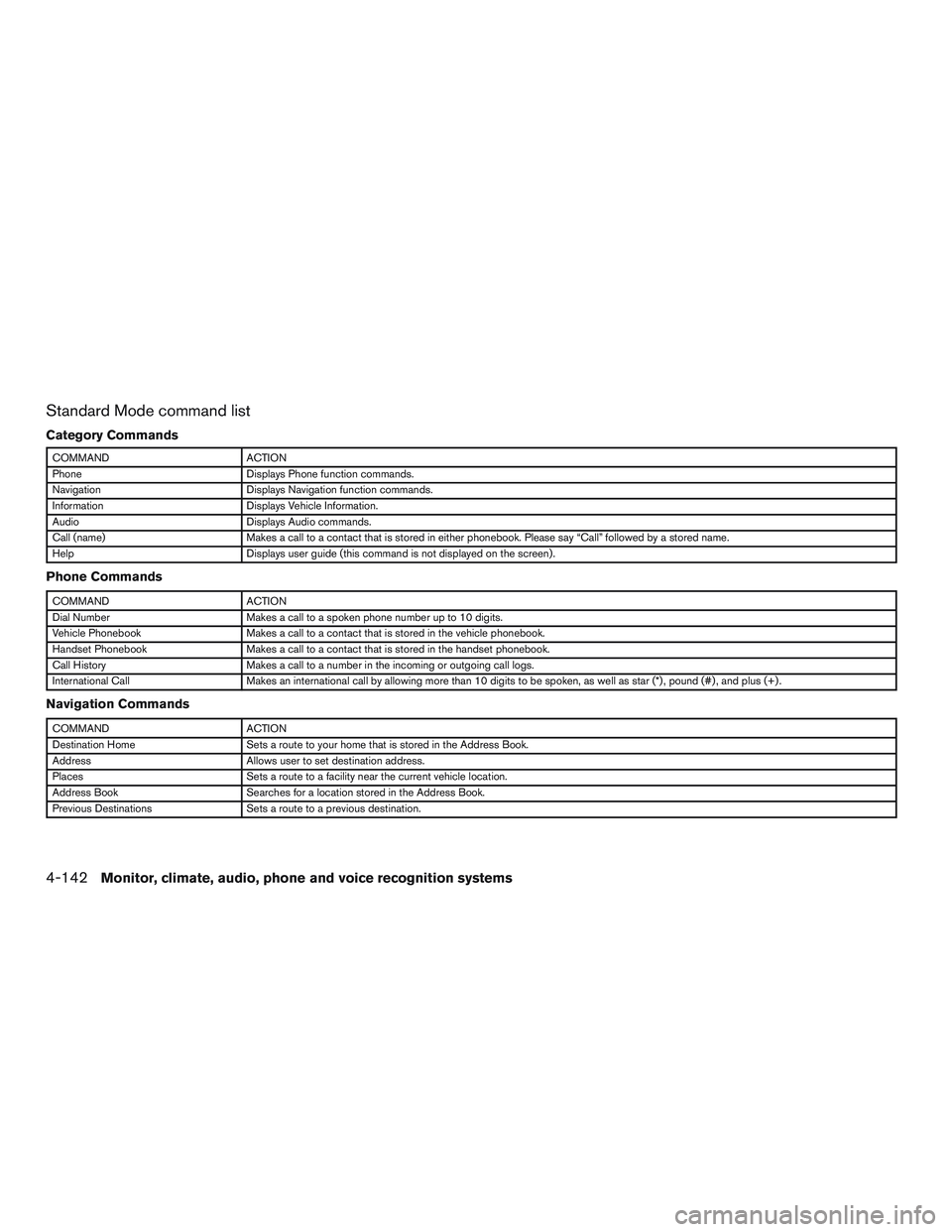
Standard Mode command list
Category Commands
COMMAND ACTION
Phone Displays Phone function commands.
Navigation Displays Navigation function commands.
Information Displays Vehicle Information.
Audio Displays Audio commands.
Call (name) Makes a call to a contact that is stored in either phonebook. Please say “Call” followed by a stored name.
Help Displays user guide (this command is not displayed on the screen) .
Phone Commands
COMMAND ACTION
Dial Number Makes a call to a spoken phone number up to 10 digits.
Vehicle Phonebook Makes a call to a contact that is stored in the vehicle phonebook.
Handset Phonebook Makes a call to a contact that is stored in the handset phonebook.
Call History Makes a call to a number in the incoming or outgoing call logs.
International Call Makes an international call by allowing more than 10 digits to be spoken, as well as star (*) , pound (#) , and plus (+) .
Navigation Commands
COMMAND ACTION
Destination Home Sets a route to your home that is stored in the Address Book.
Address Allows user to set destination address.
Places Sets a route to a facility near the current vehicle location.
Address Book Searches for a location stored in the Address Book.
Previous Destinations Sets a route to a previous destination.
4-142Monitor, climate, audio, phone and voice recognition systems
Page 355 of 524
Voice command examples
Some basic voice command examples are de-
scribed here.
For navigation system commands, refer to the
separate Navigation System Owner’s Manual.
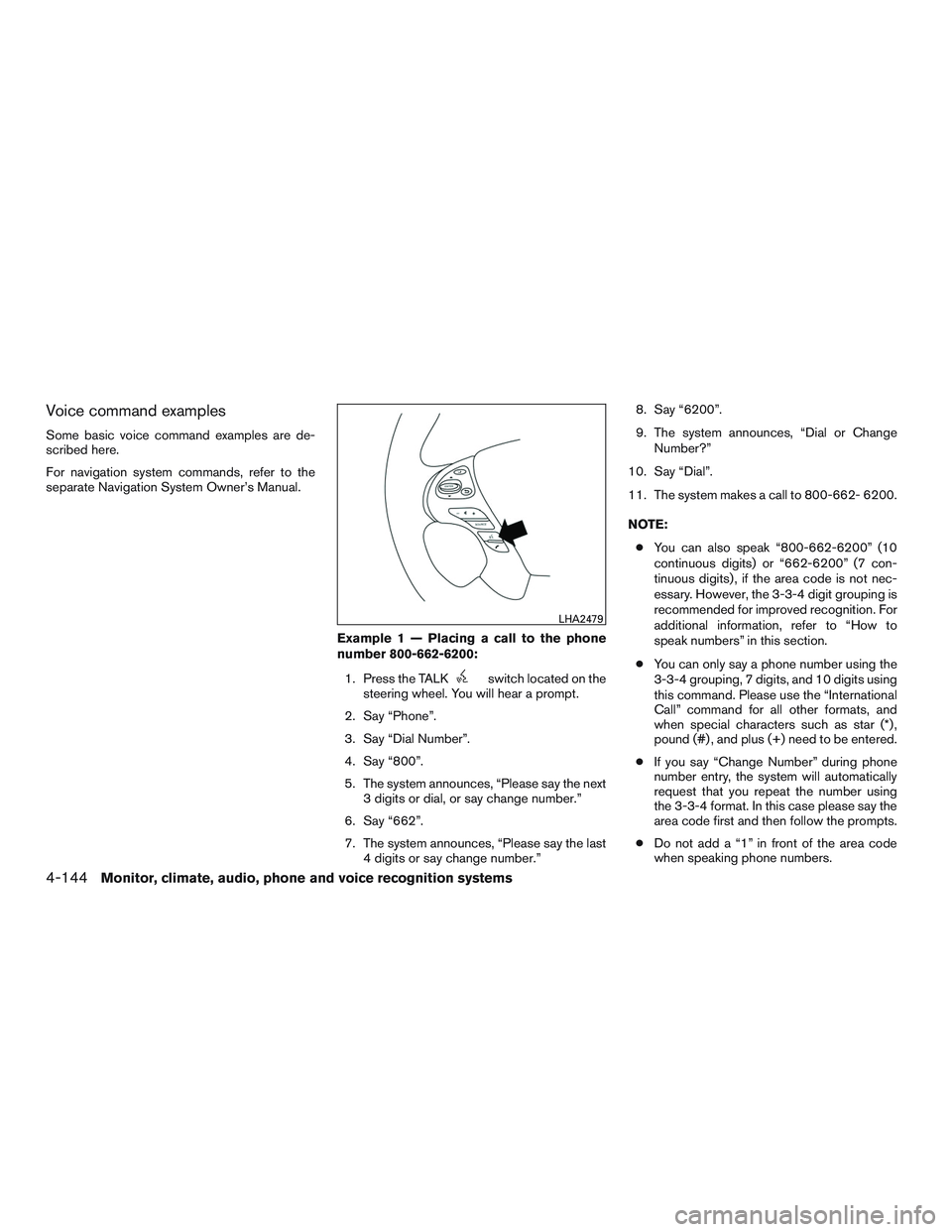
Example 1 — Placing a call to the phone
number 800-662-6200:
1. Press the TALK
switch located on the
steering wheel. You will hear a prompt.
2. Say “Phone”.
3. Say “Dial Number”.
4. Say “800”.
5. The system announces, “Please say the next
3 digits or dial, or say change number.”
6. Say “662”.
7. The system announces, “Please say the last
4 digits or say change number.”8. Say “6200”.
9. The system announces, “Dial or Change
Number?”
10. Say “Dial”.
11. The system makes a call to 800-662- 6200.
NOTE:
●You can also speak “800-662-6200” (10
continuous digits) or “662-6200” (7 con-
tinuous digits) , if the area code is not nec-
essary. However, the 3-3-4 digit grouping is
recommended for improved recognition. For
additional information, refer to “How to
speak numbers” in this section.
●You can only say a phone number using the
3-3-4 grouping, 7 digits, and 10 digits using
this command. Please use the “International
Call” command for all other formats, and
when special characters such as star (*) ,
pound (#) , and plus (+) need to be entered.
●If you say “Change Number” during phone
number entry, the system will automatically
request that you repeat the number using
the 3-3-4 format. In this case please say the
area code first and then follow the prompts.
●Do not add a “1” in front of the area code
when speaking phone numbers.
LHA2479
4-144Monitor, climate, audio, phone and voice recognition systems
Page 356 of 524
●If the system does not recognize your com-
mand, please try repeating the command
using a natural voice. Speaking too slowly or
too loudly may further decrease recognition
performance.
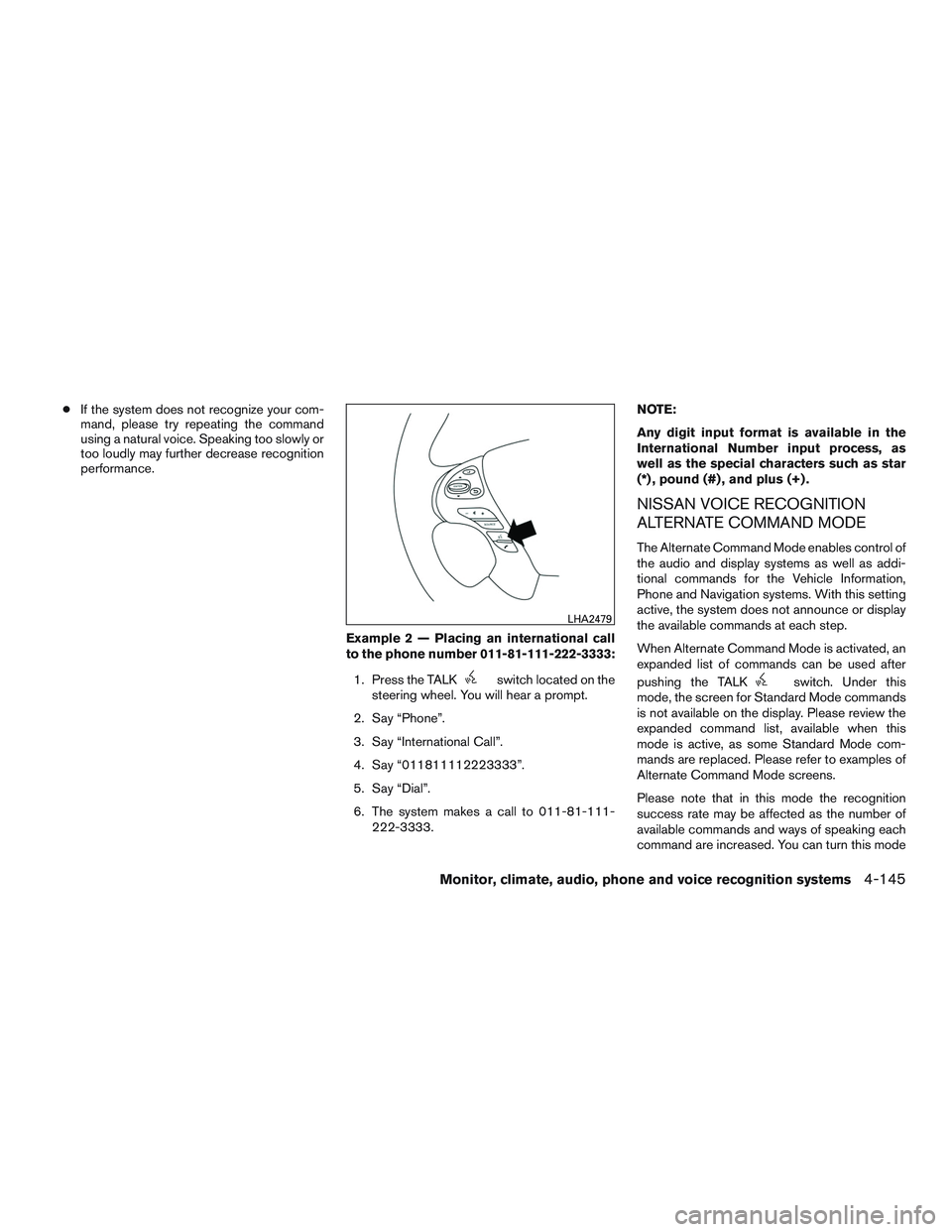
Example 2 — Placing an international call
to the phone number 011-81-111-222-3333:
1. Press the TALK
switch located on the
steering wheel. You will hear a prompt.
2. Say “Phone”.
3. Say “International Call”.
4. Say “011811112223333”.
5. Say “Dial”.
6. The system makes a call to 011-81-111-
222-3333.NOTE:
Any digit input format is available in the
International Number input process, as
well as the special characters such as star
(*) , pound (#) , and plus (+) .
NISSAN VOICE RECOGNITION
ALTERNATE COMMAND MODE
The Alternate Command Mode enables control of
the audio and display systems as well as addi-
tional commands for the Vehicle Information,
Phone and Navigation systems. With this setting
active, the system does not announce or display
the available commands at each step.
When Alternate Command Mode is activated, an
expanded list of commands can be used after
pushing the TALK
switch. Under this
mode, the screen for Standard Mode commands
is not available on the display. Please review the
expanded command list, available when this
mode is active, as some Standard Mode com-
mands are replaced. Please refer to examples of
Alternate Command Mode screens.
Please note that in this mode the recognition
success rate may be affected as the number of
available commands and ways of speaking each
command are increased. You can turn this mode
LHA2479
Monitor, climate, audio, phone and voice recognition systems4-145
Page 358 of 524
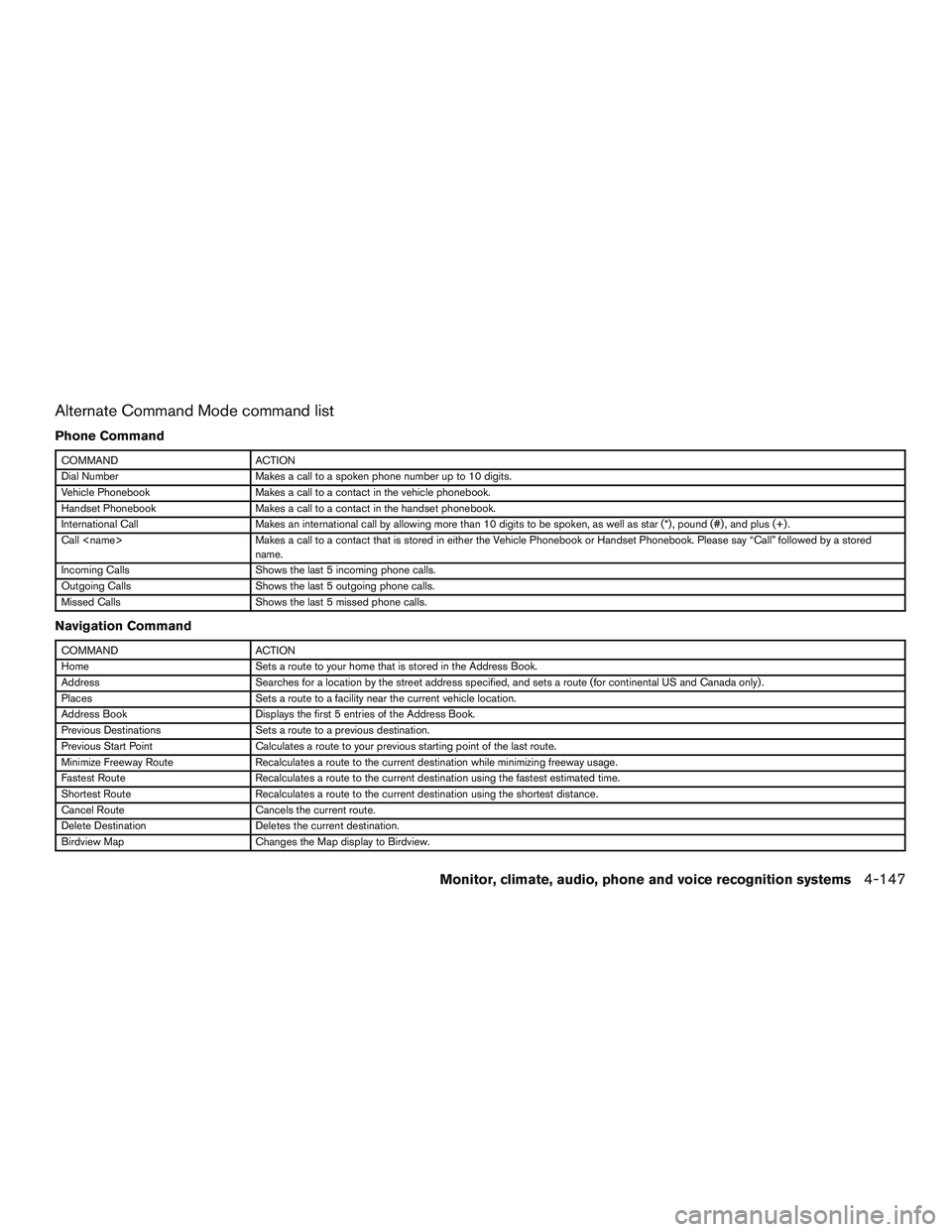
Alternate Command Mode command list
Phone Command
COMMAND ACTION
Dial Number Makes a call to a spoken phone number up to 10 digits.
Vehicle Phonebook Makes a call to a contact in the vehicle phonebook.
Handset Phonebook Makes a call to a contact in the handset phonebook.
International Call Makes an international call by allowing more than 10 digits to be spoken, as well as star (*) , pound (#) , and plus (+) .
Call
name.
Incoming Calls Shows the last 5 incoming phone calls.
Outgoing Calls Shows the last 5 outgoing phone calls.
Missed Calls Shows the last 5 missed phone calls.
Navigation Command
COMMAND ACTION
Home Sets a route to your home that is stored in the Address Book.
Address Searches for a location by the street address specified, and sets a route (for continental US and Canada only) .
Places Sets a route to a facility near the current vehicle location.
Address Book Displays the first 5 entries of the Address Book.
Previous Destinations Sets a route to a previous destination.
Previous Start Point Calculates a route to your previous starting point of the last route.
Minimize Freeway Route Recalculates a route to the current destination while minimizing freeway usage.
Fastest Route Recalculates a route to the current destination using the fastest estimated time.
Shortest Route Recalculates a route to the current destination using the shortest distance.
Cancel Route Cancels the current route.
Delete Destination Deletes the current destination.
Birdview Map Changes the Map display to Birdview.
Monitor, climate, audio, phone and voice recognition systems4-147
Page 359 of 524
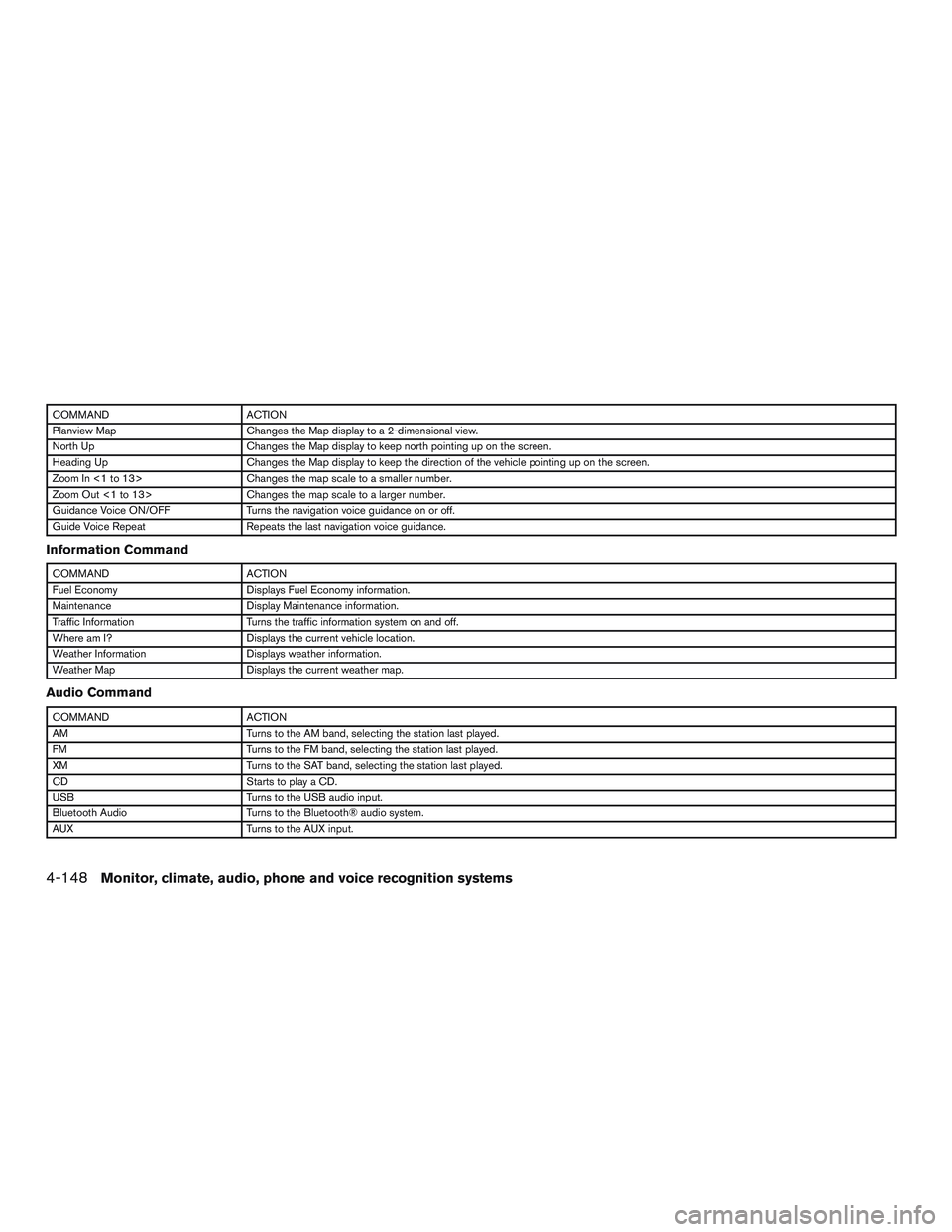
COMMAND ACTION
Planview Map Changes the Map display to a 2-dimensional view.
North Up Changes the Map display to keep north pointing up on the screen.
Heading Up Changes the Map display to keep the direction of the vehicle pointing up on the screen.
Zoom In <1 to 13> Changes the map scale to a smaller number.
Zoom Out <1 to 13> Changes the map scale to a larger number.
Guidance Voice ON/OFF Turns the navigation voice guidance on or off.
Guide Voice Repeat Repeats the last navigation voice guidance.
Information Command
COMMAND ACTION
Fuel Economy Displays Fuel Economy information.
Maintenance Display Maintenance information.
Traffic Information Turns the traffic information system on and off.
Where am I? Displays the current vehicle location.
Weather Information Displays weather information.
Weather Map Displays the current weather map.
Audio Command
COMMAND ACTION
AM Turns to the AM band, selecting the station last played.
FM Turns to the FM band, selecting the station last played.
XM Turns to the SAT band, selecting the station last played.
CD Starts to play a CD.
USB Turns to the USB audio input.
Bluetooth Audio Turns to the Bluetooth® audio system.
AUX Turns to the AUX input.
4-148Monitor, climate, audio, phone and voice recognition systems
Page 362 of 524
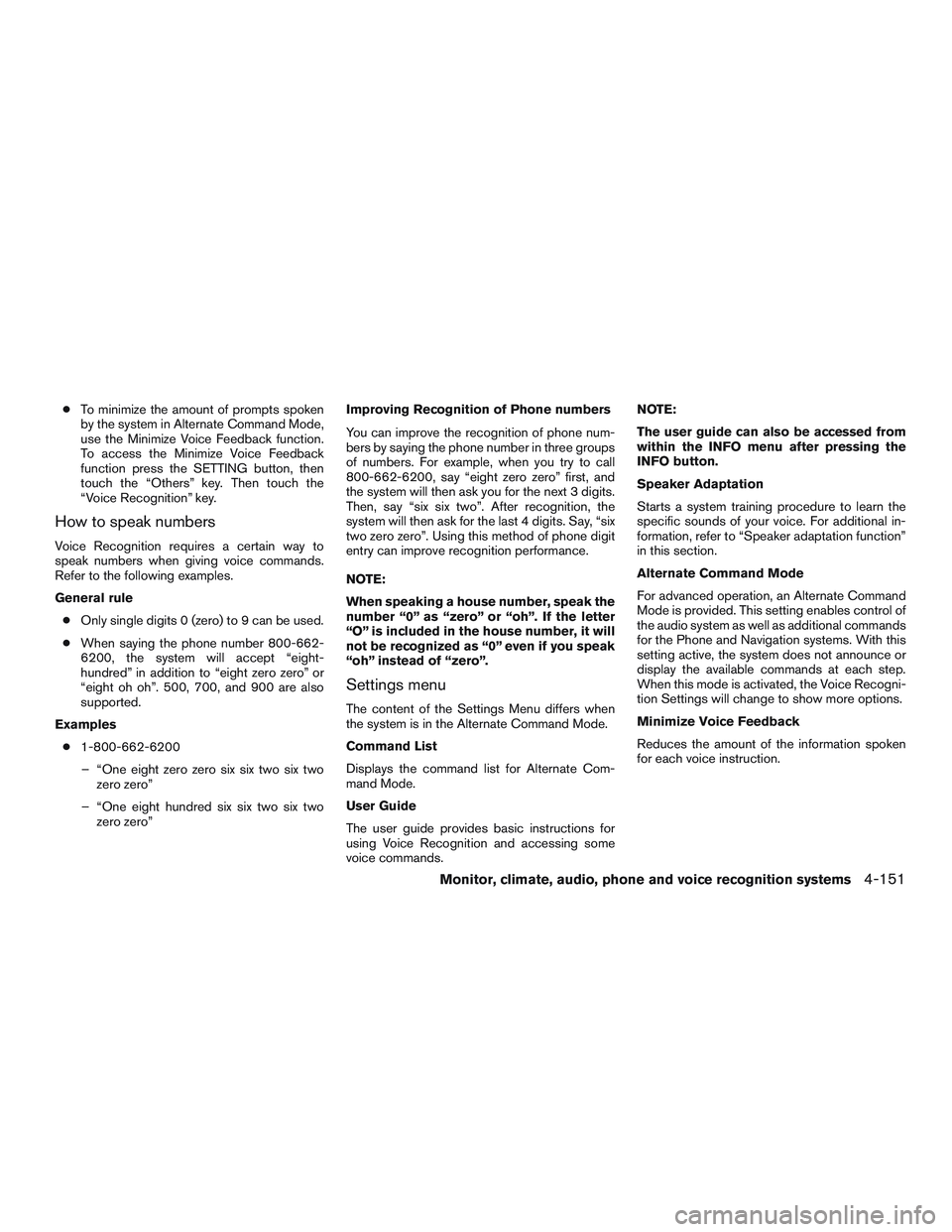
●To minimize the amount of prompts spoken
by the system in Alternate Command Mode,
use the Minimize Voice Feedback function.
To access the Minimize Voice Feedback
function press the SETTING button, then
touch the “Others” key. Then touch the
“Voice Recognition” key.
How to speak numbers
Voice Recognition requires a certain way to
speak numbers when giving voice commands.
Refer to the following examples.
General rule
●Only single digits 0 (zero) to 9 can be used.
●When saying the phone number 800-662-
6200, the system will accept “eight-
hundred” in addition to “eight zero zero” or
“eight oh oh”. 500, 700, and 900 are also
supported.
Examples
●1-800-662-6200
– “One eight zero zero six six two six two
zero zero”
– “One eight hundred six six two six two
zero zero”Improving Recognition of Phone numbers
You can improve the recognition of phone num-
bers by saying the phone number in three groups
of numbers. For example, when you try to call
800-662-6200, say “eight zero zero” first, and
the system will then ask you for the next 3 digits.
Then, say “six six two”. After recognition, the
system will then ask for the last 4 digits. Say, “six
two zero zero”. Using this method of phone digit
entry can improve recognition performance.
NOTE:
When speaking a house number, speak the
number “0” as “zero” or “oh”. If the letter
“O” is included in the house number, it will
not be recognized as “0” even if you speak
“oh” instead of “zero”.
Settings menu
The content of the Settings Menu differs when
the system is in the Alternate Command Mode.
Command List
Displays the command list for Alternate Com-
mand Mode.
User Guide
The user guide provides basic instructions for
using Voice Recognition and accessing some
voice commands.NOTE:
The user guide can also be accessed from
within the INFO menu after pressing the
INFO button.
Speaker Adaptation
Starts a system training procedure to learn the
specific sounds of your voice. For additional in-
formation, refer to “Speaker adaptation function”
in this section.
Alternate Command Mode
For advanced operation, an Alternate Command
Mode is provided. This setting enables control of
the audio system as well as additional commands
for the Phone and Navigation systems. With this
setting active, the system does not announce or
display the available commands at each step.
When this mode is activated, the Voice Recogni-
tion Settings will change to show more options.
Minimize Voice Feedback
Reduces the amount of the information spoken
for each voice instruction.
Monitor, climate, audio, phone and voice recognition systems4-151
Page 363 of 524
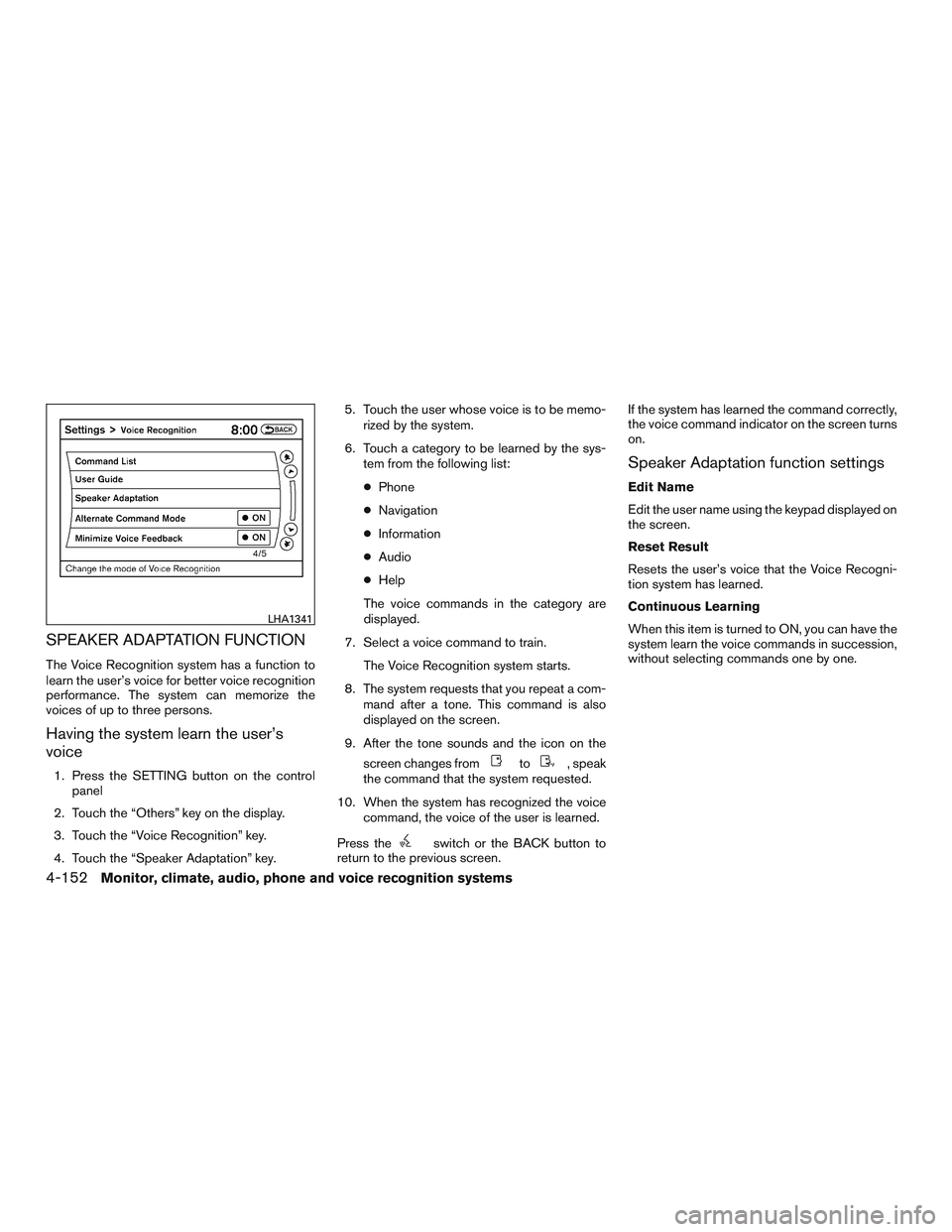
SPEAKER ADAPTATION FUNCTION
The Voice Recognition system has a function to
learn the user’s voice for better voice recognition
performance. The system can memorize the
voices of up to three persons.
Having the system learn the user’s
voice
1. Press the SETTING button on the control
panel
2. Touch the “Others” key on the display.
3. Touch the “Voice Recognition” key.
4. Touch the “Speaker Adaptation” key.5. Touch the user whose voice is to be memo-
rized by the system.
6. Touch a category to be learned by the sys-
tem from the following list:
●Phone
●Navigation
●Information
●Audio
●Help
The voice commands in the category are
displayed.
7. Select a voice command to train.
The Voice Recognition system starts.
8. The system requests that you repeat a com-
mand after a tone. This command is also
displayed on the screen.
9. After the tone sounds and the icon on the
screen changes fromto, speak
the command that the system requested.
10. When the system has recognized the voice
command, the voice of the user is learned.
Press the
switch or the BACK button to
return to the previous screen.If the system has learned the command correctly,
the voice command indicator on the screen turns
on.
Speaker Adaptation function settings
Edit Name
Edit the user name using the keypad displayed on
the screen.
Reset Result
Resets the user’s voice that the Voice Recogni-
tion system has learned.
Continuous Learning
When this item is turned to ON, you can have the
system learn the voice commands in succession,
without selecting commands one by one.
LHA1341
4-152Monitor, climate, audio, phone and voice recognition systems
Page 364 of 524
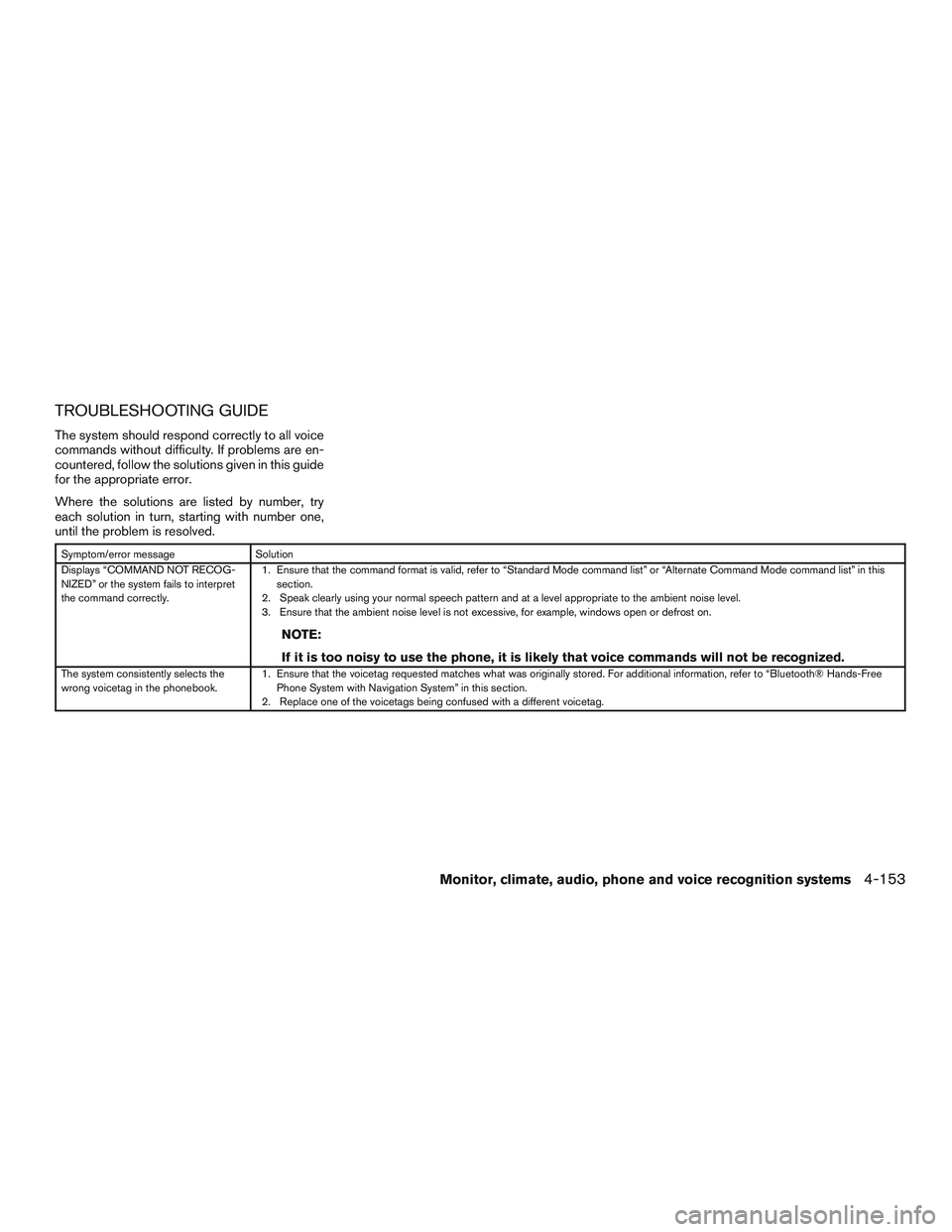
TROUBLESHOOTING GUIDE
The system should respond correctly to all voice
commands without difficulty. If problems are en-
countered, follow the solutions given in this guide
for the appropriate error.
Where the solutions are listed by number, try
each solution in turn, starting with number one,
until the problem is resolved.
Symptom/error message Solution
Displays “COMMAND NOT RECOG-
NIZED” or the system fails to interpret
the command correctly.1. Ensure that the command format is valid, refer to “Standard Mode command list” or “Alternate Command Mode command list” in this
section.
2. Speak clearly using your normal speech pattern and at a level appropriate to the ambient noise level.
3. Ensure that the ambient noise level is not excessive, for example, windows open or defrost on.
NOTE:
If it is too noisy to use the phone, it is likely that voice commands will not be recognized.
The system consistently selects the
wrong voicetag in the phonebook.1. Ensure that the voicetag requested matches what was originally stored. For additional information, refer to “Bluetooth® Hands-Free
Phone System with Navigation System” in this section.
2. Replace one of the voicetags being confused with a different voicetag.
Monitor, climate, audio, phone and voice recognition systems4-153
Page 399 of 524
3.Use Air Conditioning (A/C) at Higher
Vehicle Speeds
●Below 40 MPH (64 km/h), it is more
efficient to open windows to cool the
vehicle due to reduced engine load
●Above 40 MPH (64 km/h), it is more
efficient to use A/C to cool the vehicle
due to increased aerodynamic drag
●Recirculating the cool air in the cabin
when the A/C is on reduces cooling load
●Turn off air conditioning when it is not
necessary
4.Drive at Economical Speeds and Dis-
tances
●Observing the speed limit and not ex-
ceeding 60 MPH (97 km/h) (where le-
gally allowed) can improve fuel efficiency
due to reduced aerodynamic drag
●Maintaining a safe following distance be-
hind other vehicles reduces unnecessary
braking
●Safely monitoring traffic to anticipate
changes in speed permits reduced brak-
ing and smooth acceleration changes
●Select a gear range suitable to road con-
ditions●Frequent short-distance driving can re-
duce fuel economy
5.Use Cruise Control
●Using cruise control during highway driv-
ing helps maintain a steady speed
●Cruise control is particularly effective in
providing fuel savings when driving on flat
terrains
6.Plan for the Shortest Route
●Utilize a map or navigation system to de-
termine the best route to save time
7.Avoid Idling
●Shutting off your engine when safe for
stops exceeding 30–60 seconds saves
fuel and reduces emissions
8.Buy an Automated Pass for Toll Roads
●Automated passes permit drivers to use
special lanes to maintain cruising speed
through the toll and avoid stopping and
starting
9.Winter Warm Up
●Limit idling time to minimize impact to fuel
economy
●Vehicles typically need no more than
30 seconds of idling at start-up to effec-tively circulate the engine oil before driv-
ing
●Your vehicle will reach its ideal operating
temperature more quickly while driving
versus idling
●Park your vehicle in moderate ambient
temperatures when possible
10.Keeping your Vehicle Cool
●Park your vehicle in a covered parking
area or in the shade whenever possible
●When entering a hot vehicle, opening the
windows will help to reduce the inside
temperature faster, resulting in reduced
demand on your A/C system
11.Cargo
●Avoid transporting unnecessary luggage
in the vehicle
●Avoid carrying luggage in the roof rack
which can increase aerodynamic drag
12.Break-in
●your vehicle may need a break-in period
for more than 4000 miles to improve the
fuel economy
●Avoid measuring fuel economy within ini-
tial 1200 miles
5-34Starting and driving
Page 517 of 524
Child restraints.......1-23,1-24,1-25,1-27
LATCH (Lower Anchors and Tethers for
CHildren) System..............1-27
Precautions on child
restraints.........1-25,1-32,1-39,1-44
Top tether strap anchor point locations . .1-30
Child restraint with top tether strap.......1-29
Child safety rear door lock............3-7
Chimes, audible reminders...........2-18
Cleaningexteriorandinterior...........7-2
Clock set/adjustment...........4-8,4-16
C.M.V.S.S. certification label..........9-11
Cold weather driving...............5-48
Compact disc (CD) player........4-67,4-74
Consolebox...................2-49
Continuously Variable Transmission (CVT) . . .5-15
Continuously Variable Transmission
(CVT) fluid..................8-13
Driving with Continuously Variable
Transmission (CVT).............5-15
Control panel buttons..............4-10
Brightness/contrast button......4-9,4-18
Enterbutton...............4-4,4-10
Without navigation system..........4-4
Controls
Audiocontrols(steeringwheel).......4-94
Heater and air conditioner controls.....4-43
Coolant
Capacities and recommended
fuel/lubricants.................9-2
Changing engine coolant...........8-8
Checking engine coolant level........8-8
Checking inverter coolant level.......8-10
Corrosionprotection ...............7-7
Cruisecontrol..................5-31
Cupholders...................2-51D
Daytime running light system (Canada only) . .2-39
Defroster switch
Rear window and outside mirror defroster
switch.....................2-36
Digital Versatile Disc (DVD) player.......4-76
Dimensionsandweights.............9-9
Dimmer switch for instrument panel......2-39
Display controls (see control panel buttons) . .4-4,
4-10
Door locks.....................3-5
Drive belt.....................8-17
Drive positioner, Automatic...........3-36
Driving
Cold weather driving.............5-48
Driving with Continuously Variable
Transmission (CVT).............5-15
Precautions when starting and driving....5-2
Dual head restraint DVD system........4-96
E
Economy - fuel..................5-35
Emission control information label.......9-11
Emission control system warranty.......9-29
Engine
Before starting the engine..........5-13
Block heater.................5-49
Capacities and recommended
fuel/lubricants.................9-2
Changingenginecoolant...........8-8
Changingengineoil.............8-11
Changing engine oil filter..........8-13Checking engine coolant level........8-8
Checking engine oil level..........8-10
Engine compartment check locations....8-6
Engine cooling system............8-7
Engineoil...................8-10
Engine oil and oil filter recommendation . . .9-6
Engine oil pressure warning light......2-12
Engine oil viscosity..............9-6
Engine serial number...........
.9-11
Engine specifications.............9-8
Starting the engine.............5-14
Enter button.................4-4,4-10
Event data recorders..............9-31
Exhaust gas (Carbon monoxide).........5-2
Extended storage switch............8-23
F
Flashers (See hazard warning flasher switch) . .6-2
Flat tire.......................6-3
Floor mat positioning aid.............7-6
Fluid
Brake fluid..................8-14
Capacities and recommended
fuel/lubricants.................9-2
Continuously Variable Transmission
(CVT) fluid..................8-13
Enginecoolant.................8-7
Engineoil...................8-10
Inverter coolant................8-9
Power steering fluid.............8-14
Windshield-washer fluid...........8-15
F.M.V.S.S. certification label...........9-11
Foglightswitch .................2-40
10-2