display NISSAN PATHFINDER HYBRID 2015 Owners Manual
[x] Cancel search | Manufacturer: NISSAN, Model Year: 2015, Model line: PATHFINDER HYBRID, Model: NISSAN PATHFINDER HYBRID 2015Pages: 524, PDF Size: 6.49 MB
Page 11 of 524
The NISSAN PUREDRIVE™ Hybrid System
combines the power of a gasoline engine and an
electric motor to help minimize fuel consumption
and emissions.
Depending on driving conditions, the vehicle runs
on a combination of the gasoline engine and the
electric motor, whichever is best for those condi-
tions.
Because the gasoline engine charges the
Lithium-ion (Li-ion) battery as needed, the battery
does not have to be charged from an outside
source like an all-electric vehicle.WARNING
If you continue to drive the vehicle while
the warning is displayed, the hybrid sys-
tem may become temporarily inoperative
and the system can not provide power to
the wheels. This can result in reduced or
zero vehicle speed. The reduced speed or
zero speed may be lower than other traf-
fic, which could increase the chance of a
collision. If the vehicle cannot maintain a
safe driving speed, pull to the side of the
road in a safe area. If this occurs, place the
shift lever in the “P” position, ignition in
the READY position with the vehicle
stopped until the display turns off. The
Hybrid system overheat warning and the
SHIFT “P” warning messages will be alter-
nately displayed. For additional informa-
tion, refer to “Shift to Park” in the “Instru-
ments and controls” section of this
manual.
WARNING
Your vehicle contains a sealed Lithium ion
(Li-ion) high-voltage battery. If the Li-ion
battery is disposed of improperly, there is
a risk of severe burns and electrical shock
that may result in serious injury or death
and there is also a risk of environmental
damage.
CAUTION
Do not misuse the Li-ion battery (to use
the Li-ion battery for completely another
purpose) .
The Li-ion battery is used to drive the electric
motors in the NISSAN PUREDRIVE™ Hybrid
System.
The Li-ion battery has a limited service life. Con-
tact your NISSAN dealer for information about
recycling or disposal of the battery.
NISSAN PUREDRIVE™ HYBRID
SYSTEMLITHIUM-ION (Li-ion) BATTERY
HEV-2HEV Overview
Page 15 of 524
The NISSAN PUREDRIVE™ Hybrid System
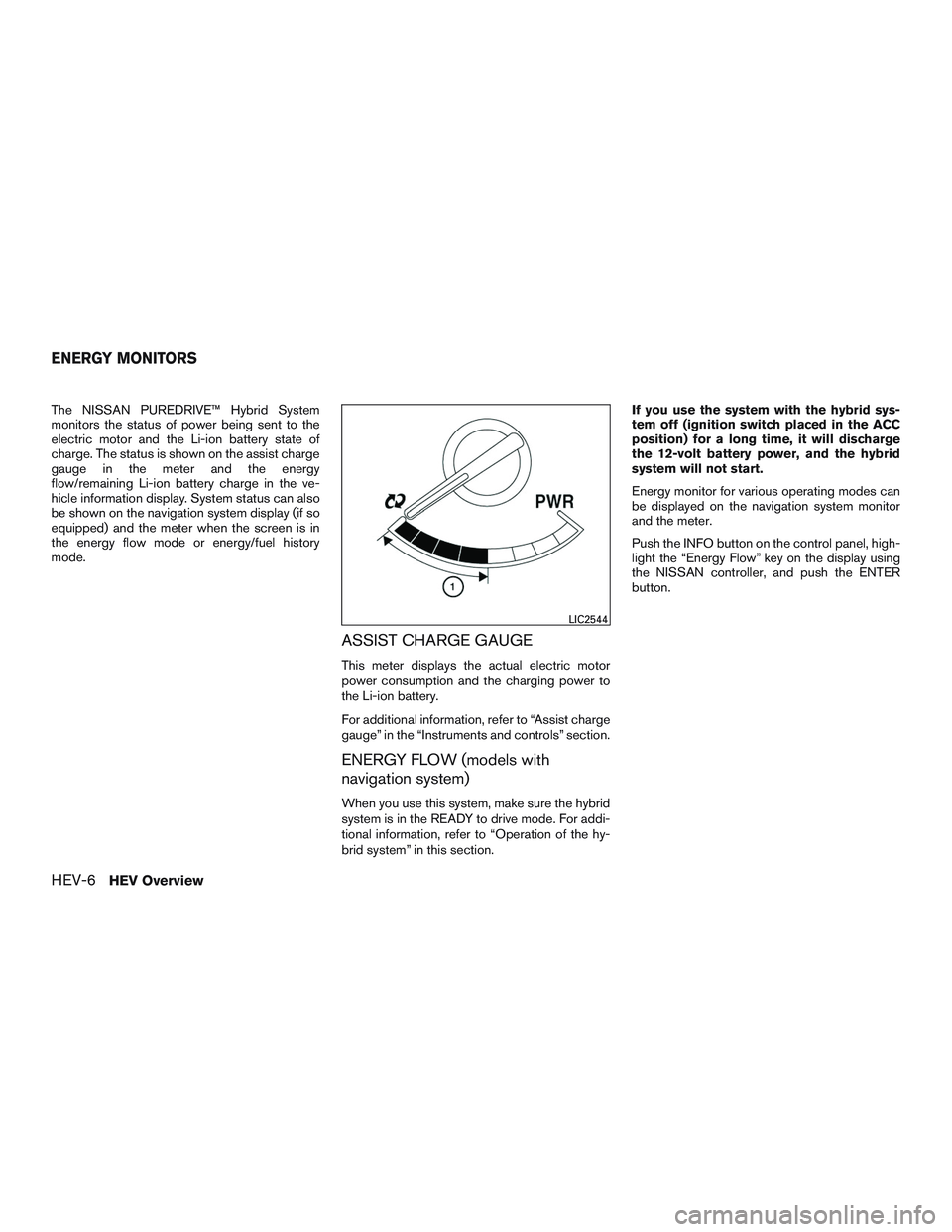
monitors the status of power being sent to the
electric motor and the Li-ion battery state of
charge. The status is shown on the assist charge
gauge in the meter and the energy
flow/remaining Li-ion battery charge in the ve-
hicle information display. System status can also
be shown on the navigation system display (if so
equipped) and the meter when the screen is in
the energy flow mode or energy/fuel history
mode.
ASSIST CHARGE GAUGE
This meter displays the actual electric motor
power consumption and the charging power to
the Li-ion battery.
For additional information, refer to “Assist charge
gauge” in the “Instruments and controls” section.
ENERGY FLOW (models with
navigation system)
When you use this system, make sure the hybrid
system is in the READY to drive mode. For addi-
tional information, refer to “Operation of the hy-
brid system” in this section.If you use the system with the hybrid sys-
tem off (ignition switch placed in the ACC
position) for a long time, it will discharge
the 12-volt battery power, and the hybrid
system will not start.
Energy monitor for various operating modes can
be displayed on the navigation system monitor
and the meter.
Push the INFO button on the control panel, high-
light the “Energy Flow” key on the display using
the NISSAN controller, and push the ENTER
button.
LIC2544
ENERGY MONITORS
HEV-6HEV Overview
Page 16 of 524
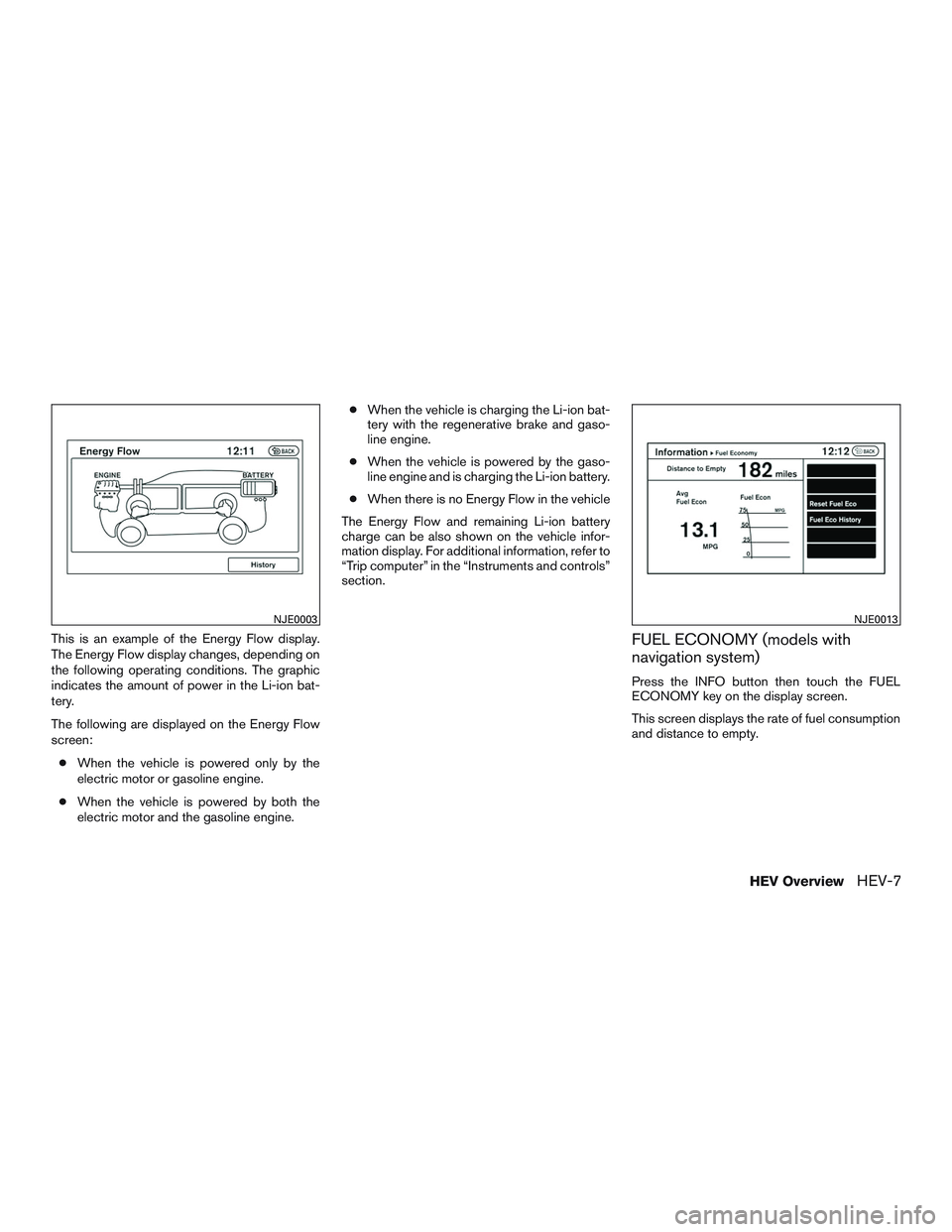
This is an example of the Energy Flow display.
The Energy Flow display changes, depending on
the following operating conditions. The graphic
indicates the amount of power in the Li-ion bat-
tery.
The following are displayed on the Energy Flow
screen:
●When the vehicle is powered only by the
electric motor or gasoline engine.
●When the vehicle is powered by both the
electric motor and the gasoline engine.●When the vehicle is charging the Li-ion bat-
tery with the regenerative brake and gaso-
line engine.
●When the vehicle is powered by the gaso-
line engine and is charging the Li-ion battery.
●When there is no Energy Flow in the vehicle
The Energy Flow and remaining Li-ion battery
charge can be also shown on the vehicle infor-
mation display. For additional information, refer to
“Trip computer” in the “Instruments and controls”
section.FUEL ECONOMY (models with
navigation system)
Press the INFO button then touch the FUEL
ECONOMY key on the display screen.
This screen displays the rate of fuel consumption
and distance to empty.
NJE0003NJE0013
HEV OverviewHEV-7
Page 17 of 524
FUEL ECONOMY (models without
navigation system)
Press the INFO button. Using the NISSAN con-
troller, select FUEL ECONOMY menu option.
This screen displays the rate of fuel consumption
and distance to empty.
FUEL ECONOMY HISTORY (models
with navigation system)
The Fuel Economy History screen appears in the
display with the navigation system when the
screen is in the Fuel Economy History mode.
1. Push the INFO button on the control panel
and highlight the “Energy Flow” key on the
display using the NISSAN controller. Then
push the ENTER button.
2. Highlight the “History” key, and push the
ENTER button.The Fuel Economy History can be displayed on
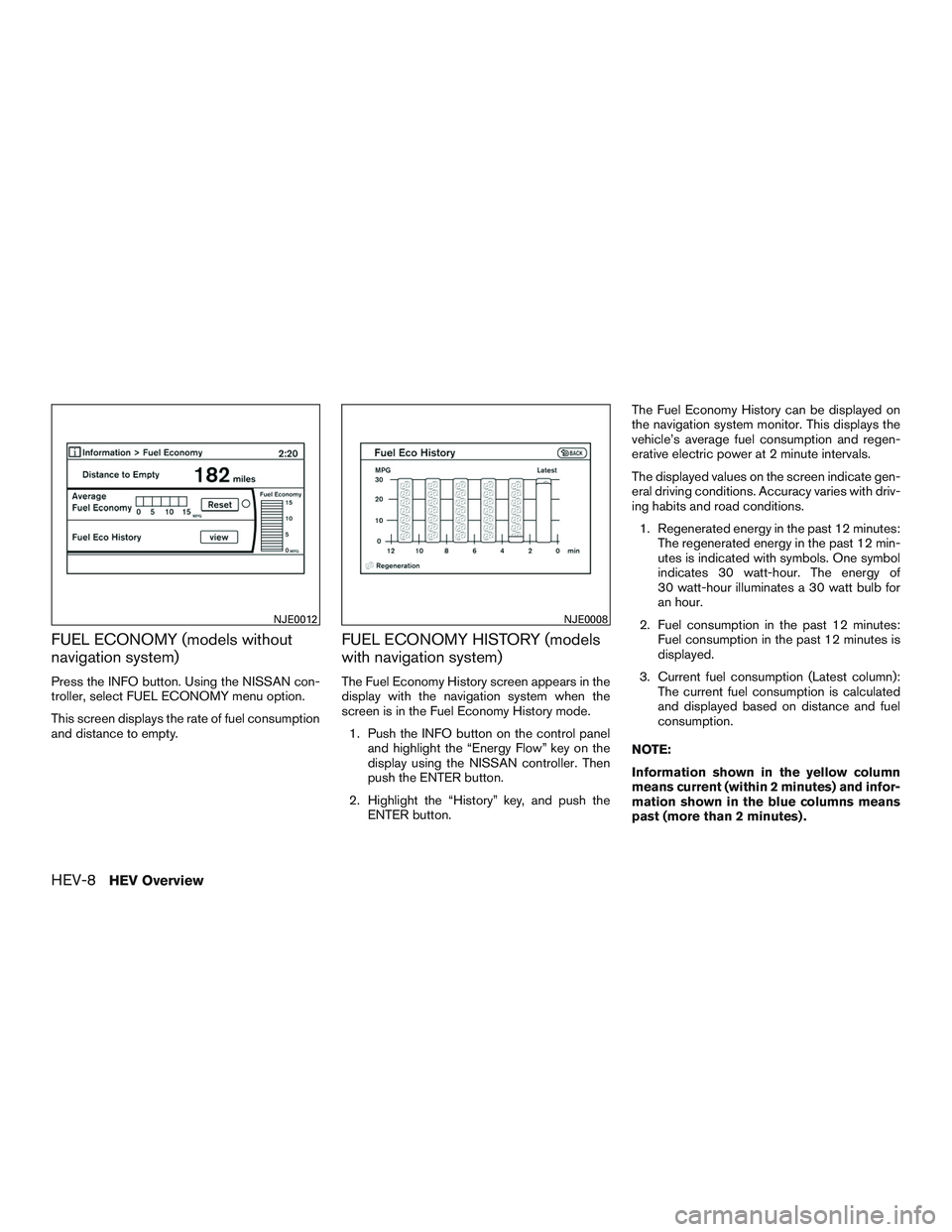
the navigation system monitor. This displays the
vehicle’s average fuel consumption and regen-
erative electric power at 2 minute intervals.
The displayed values on the screen indicate gen-
eral driving conditions. Accuracy varies with driv-
ing habits and road conditions.
1. Regenerated energy in the past 12 minutes:
The regenerated energy in the past 12 min-
utes is indicated with symbols. One symbol
indicates 30 watt-hour. The energy of
30 watt-hour illuminates a 30 watt bulb for
an hour.
2. Fuel consumption in the past 12 minutes:
Fuel consumption in the past 12 minutes is
displayed.
3. Current fuel consumption (Latest column):
The current fuel consumption is calculated
and displayed based on distance and fuel
consumption.
NOTE:
Information shown in the yellow column
means current (within 2 minutes) and infor-
mation shown in the blue columns means
past (more than 2 minutes) .
NJE0012NJE0008
HEV-8HEV Overview
Page 18 of 524
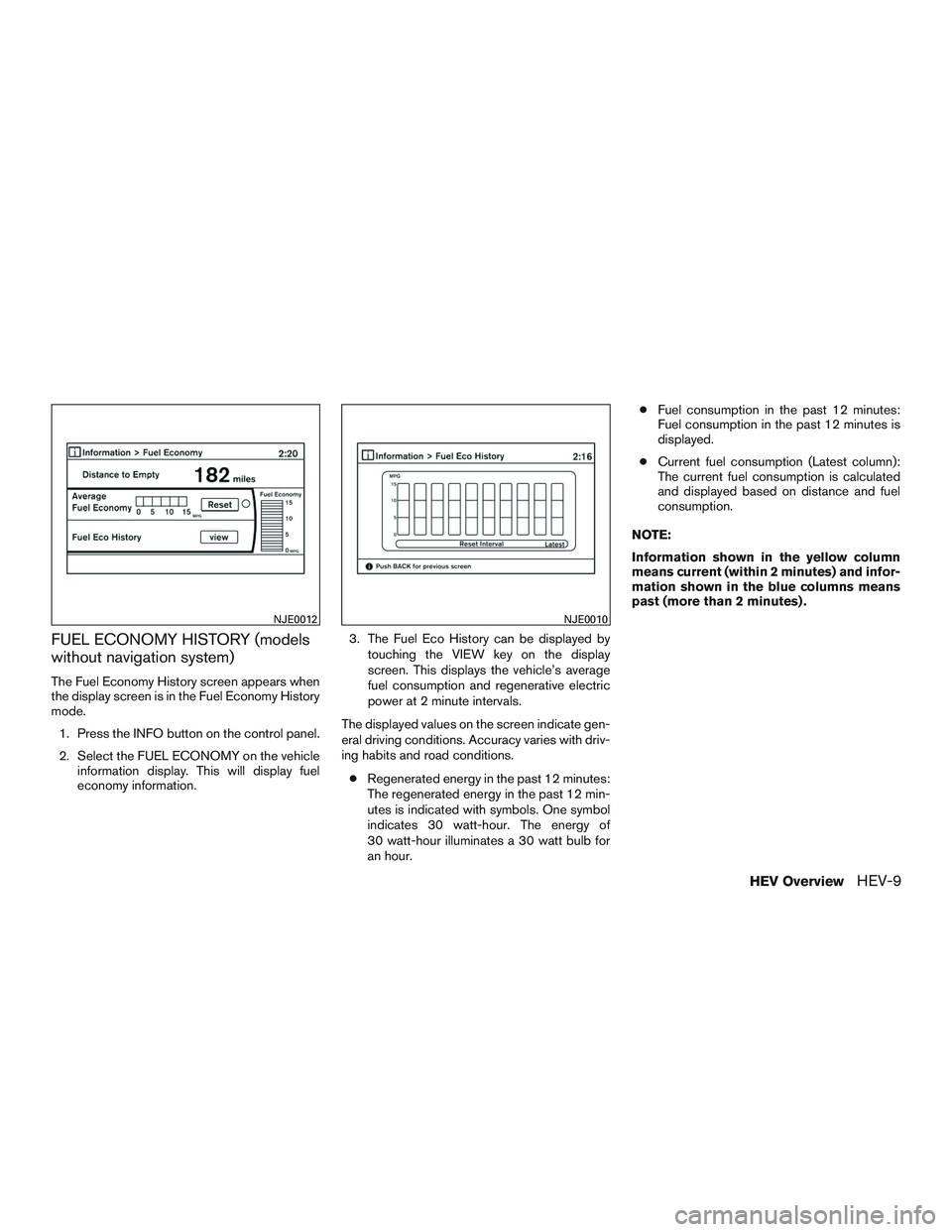
FUEL ECONOMY HISTORY (models
without navigation system)
The Fuel Economy History screen appears when
the display screen is in the Fuel Economy History
mode.
1. Press the INFO button on the control panel.
2. Select the FUEL ECONOMY on the vehicle
information display. This will display fuel
economy information.3. The Fuel Eco History can be displayed by
touching the VIEW key on the display
screen. This displays the vehicle’s average
fuel consumption and regenerative electric
power at 2 minute intervals.
The displayed values on the screen indicate gen-
eral driving conditions. Accuracy varies with driv-
ing habits and road conditions.
●Regenerated energy in the past 12 minutes:
The regenerated energy in the past 12 min-
utes is indicated with symbols. One symbol
indicates 30 watt-hour. The energy of
30 watt-hour illuminates a 30 watt bulb for
an hour.●Fuel consumption in the past 12 minutes:
Fuel consumption in the past 12 minutes is
displayed.
●Current fuel consumption (Latest column):
The current fuel consumption is calculated
and displayed based on distance and fuel
consumption.
NOTE:
Information shown in the yellow column
means current (within 2 minutes) and infor-
mation shown in the blue columns means
past (more than 2 minutes) .
NJE0012NJE0010
HEV OverviewHEV-9
Page 19 of 524
This vehicle is equipped with two braking sys-
tems.
●Hydraulic brake system
●Regenerative brake system
When the vehicle decelerates while the vehicle is
driven with the shift lever in the D (drive) position,
the Li-ion battery can be charged by the electric
motor. The electric motor converts the energy of
the rotating wheels into electric power under the
following circumstances:
●When the accelerator pedal is released
●When the brake pedal is depressed
●When there is no malfunction in the brake
system or the NISSAN PUREDRIVE™ Hy-
brid System
The regenerative brake may not work properly if
the vehicle is installed with tires and road wheels
other than the ones specified in this manual.
While the regenerative cooperative brake system
is operating, you might feel slight vibration or hear
the system working when braking. This is normal.
The regenerative cooperative brake system con-
trols both hydraulic and regenerative brakes. If
you feel unusual deceleration when braking, have
a NISSAN dealer check both the brake and hy-
brid systems.Drive your vehicle with smooth accelera-
tion and deceleration.
●While driving, energy is recovered through
the regenerative brake as the vehicle decel-
erates. However, for most efficient use, do
not accelerate or decelerate your vehicle
more than necessary.
●Avoid abrupt acceleration and deceleration.
●The power of the Li-ion battery can be
checked on the Energy Flow in the center
display (models with navigation system) or
Li-ion battery status meter in the vehicle
information display. For additional informa-
tion, refer to “Energy Flow (models with navi-
gation system)” or “Trip computer” in the
“Instruments and controls” section of this
manual. Gradual or non-abrupt acceleration
and deceleration will make more effective
use of the electric power.
●When parking, be sure to place the shift
lever in the P (Park) position. While driving,
place the shift lever in the D (Drive) position.HIGH-VOLTAGE COMPONENTS
AND THEIR LOCATIONS
WARNING
●The NISSAN PUREDRIVE™ Hybrid Sys-
tem uses high voltage up to approxi-
mately 144 volts. The system can be hot
during and after starting. Be careful of
both the high voltage and the high tem-
perature. Obey the warning labels at-
tached to the vehicle.
●Never touch, disassemble, remove or
replace the high-voltage parts, har-
nesses and their connectors. High-
voltage harnesses are orange. Touch-
ing, disassembling, removing or
replacing those parts and harnesses
can cause severe burns or electric
shock that may result in serious injury
or death.
REGENERATIVE BRAKE EFFICIENT USE OF YOUR VEHICLE HYBRID VEHICLE PRECAUTIONS
HEV-10HEV Overview
Page 26 of 524
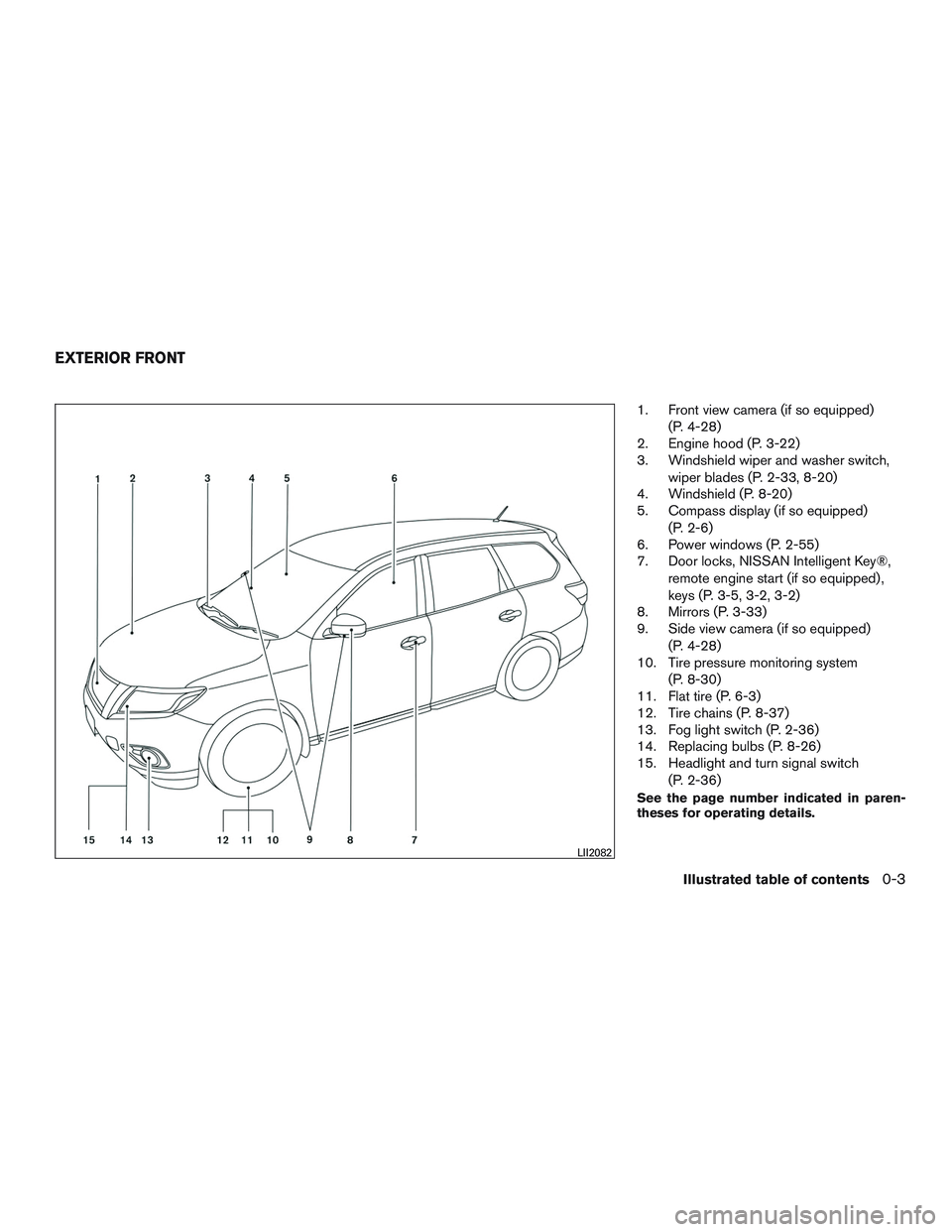
1. Front view camera (if so equipped)
(P. 4-28)
2. Engine hood (P. 3-22)
3. Windshield wiper and washer switch,
wiper blades (P. 2-33, 8-20)
4. Windshield (P. 8-20)
5. Compass display (if so equipped)
(P. 2-6)
6. Power windows (P. 2-55)
7. Door locks, NISSAN Intelligent Key®,
remote engine start (if so equipped) ,
keys (P. 3-5, 3-2, 3-2)
8. Mirrors (P. 3-33)
9. Side view camera (if so equipped)
(P. 4-28)
10. Tire pressure monitoring system
(P. 8-30)
11. Flat tire (P. 6-3)
12. Tire chains (P. 8-37)
13. Fog light switch (P. 2-36)
14. Replacing bulbs (P. 8-26)
15. Headlight and turn signal switch
(P. 2-36)
See the page number indicated in paren-
theses for operating details.
LII2082
EXTERIOR FRONT
Illustrated table of contents0-3
Page 29 of 524
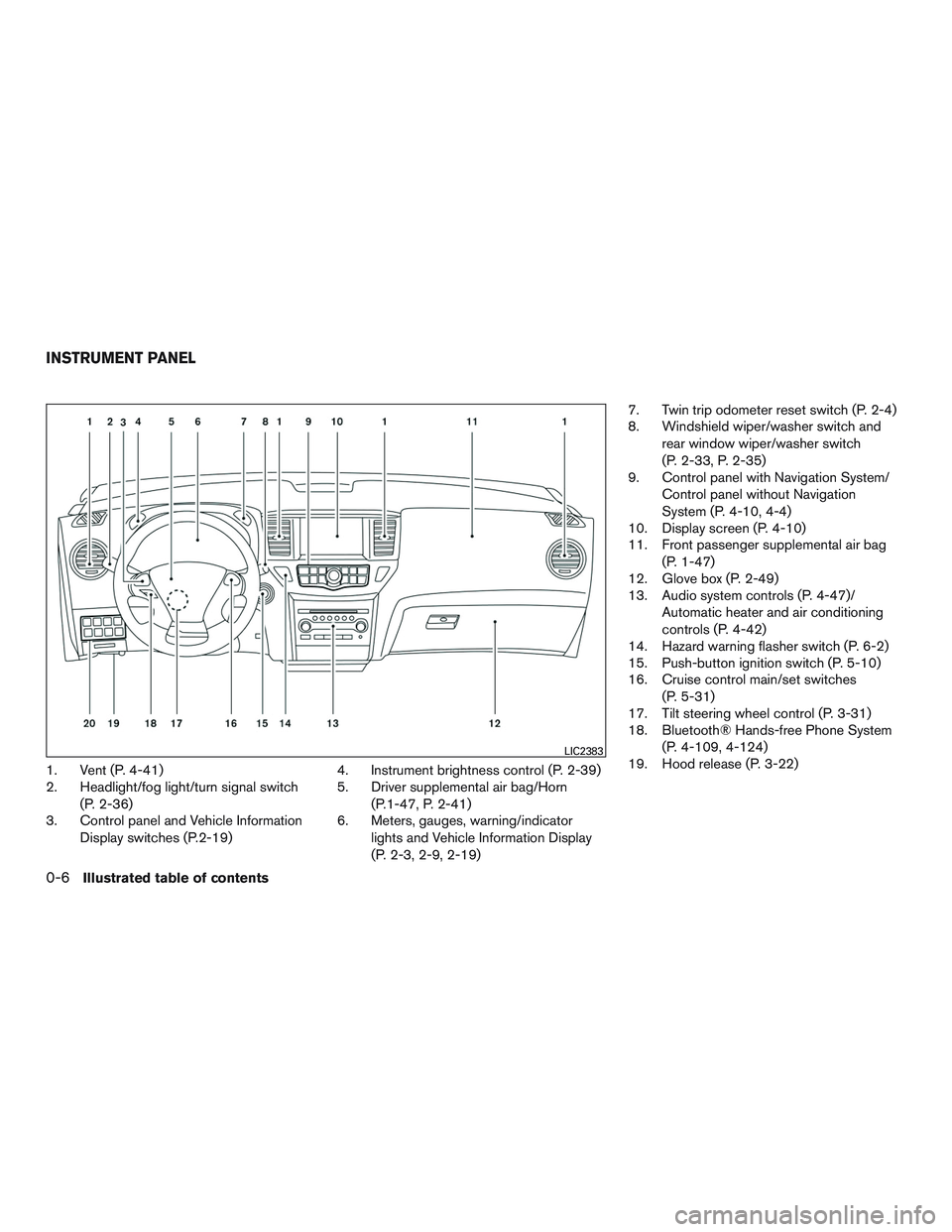
1. Vent (P. 4-41)
2. Headlight/fog light/turn signal switch
(P. 2-36)
3. Control panel and Vehicle Information
Display switches (P.2-19)4. Instrument brightness control (P. 2-39)
5. Driver supplemental air bag/Horn
(P.1-47, P. 2-41)
6. Meters, gauges, warning/indicator
lights and Vehicle Information Display
(P. 2-3, 2-9, 2-19)7. Twin trip odometer reset switch (P. 2-4)
8. Windshield wiper/washer switch and
rear window wiper/washer switch
(P. 2-33, P. 2-35)
9. Control panel with Navigation System/
Control panel without Navigation
System (P. 4-10, 4-4)
10. Display screen (P. 4-10)
11. Front passenger supplemental air bag
(P. 1-47)
12. Glove box (P. 2-49)
13. Audio system controls (P. 4-47)/
Automatic heater and air conditioning
controls (P. 4-42)
14. Hazard warning flasher switch (P. 6-2)
15. Push-button ignition switch (P. 5-10)
16. Cruise control main/set switches
(P. 5-31)
17. Tilt steering wheel control (P. 3-31)
18. Bluetooth® Hands-free Phone System
(P. 4-109, 4-124)
19. Hood release (P. 3-22)
LIC2383
INSTRUMENT PANEL
0-6Illustrated table of contents
Page 100 of 524
SUPPLEMENTAL AIR BAG
WARNING LIGHT
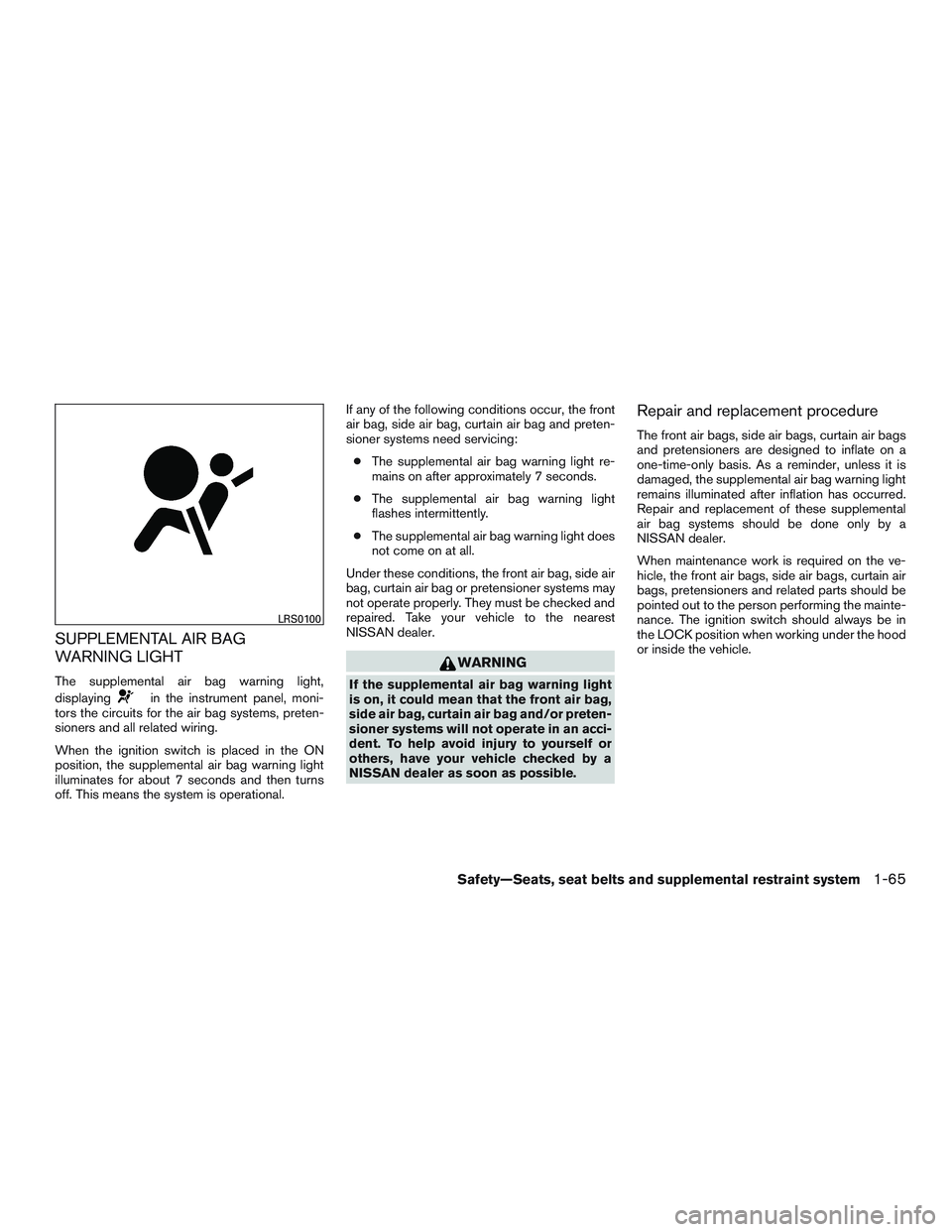
The supplemental air bag warning light,
displaying
in the instrument panel, moni-
tors the circuits for the air bag systems, preten-
sioners and all related wiring.
When the ignition switch is placed in the ON
position, the supplemental air bag warning light
illuminates for about 7 seconds and then turns
off. This means the system is operational.If any of the following conditions occur, the front
air bag, side air bag, curtain air bag and preten-
sioner systems need servicing:
●The supplemental air bag warning light re-
mains on after approximately 7 seconds.
●The supplemental air bag warning light
flashes intermittently.
●The supplemental air bag warning light does
not come on at all.
Under these conditions, the front air bag, side air
bag, curtain air bag or pretensioner systems may
not operate properly. They must be checked and
repaired. Take your vehicle to the nearest
NISSAN dealer.
WARNING
If the supplemental air bag warning light
is on, it could mean that the front air bag,
side air bag, curtain air bag and/or preten-
sioner systems will not operate in an acci-
dent. To help avoid injury to yourself or
others, have your vehicle checked by a
NISSAN dealer as soon as possible.
Repair and replacement procedure
The front air bags, side air bags, curtain air bags
and pretensioners are designed to inflate on a
one-time-only basis. As a reminder, unless it is
damaged, the supplemental air bag warning light
remains illuminated after inflation has occurred.
Repair and replacement of these supplemental
air bag systems should be done only by a
NISSAN dealer.
When maintenance work is required on the ve-
hicle, the front air bags, side air bags, curtain air
bags, pretensioners and related parts should be
pointed out to the person performing the mainte-
nance. The ignition switch should always be in
the LOCK position when working under the hood
or inside the vehicle.
LRS0100
Safety—Seats, seat belts and supplemental restraint system1-65
Page 103 of 524
2 Instruments and controls
Instrument panel...................................2-2
Meters and gauges................................2-3
Speedometer and odometer.....................2-4
Tachometer....................................2-5
Fuel gauge....................................2-5
Assist Charge Gauge...........................2-6
Compass display (if so equipped)...................2-6
Zone variation change procedure.................2-7
Warning/indicator lights and audible reminders.......2-9
Checking bulbs...............................2-10
Warning lights................................2-10
Indicator lights................................2-15
Audible reminders.............................2-18
Vehicle Information Display........................2-18
How to use the vehicle information display.......2-19
Startup display................................2-19
Settings......................................2-19
Vehicle information display warnings and
indicators.....................................2-27
Security systems.................................2-31
Vehicle security system.........................2-31
NISSAN vehicle immobilizer system.............2-32
Windshield wiper and washer switch...............2-33Switch operation..............................2-34
Rear window wiper and washer switch..............2-35
Rear window and outside mirror defroster switch.....2-36
Headlight and turn signal switch....................2-36
Headlight control switch........................2-37
Daytime running light system (Canada only)......2-39
Instrument brightness control...................2-39
Turn signal switch.............................2-39
Fog light switch...............................2-40
Horn............................................2-41
Heated seats (if so equipped)......................2-41
Heated 2nd row seats (if so equipped)..............2-42
Climate controlled seat switch (if so equipped)......2-43
Heated steering wheel (if so equipped).............2-44
Vehicle Dynamic Control (VDC) off switch
...........2-45
Power inverter switch (if so equipped)..............2-45
Tow mode switch.................................2-46
Power outlets....................................2-46
12v outlets...................................2-46
120v outlet (if so equipped)....................2-48
Storage.........................................2-48
Map pockets..................................2-48
Seatback pocket..............................2-49