automatic NISSAN PATROL 2004 Electronic User Guide
[x] Cancel search | Manufacturer: NISSAN, Model Year: 2004, Model line: PATROL, Model: NISSAN PATROL 2004Pages: 579, PDF Size: 26.61 MB
Page 314 of 579
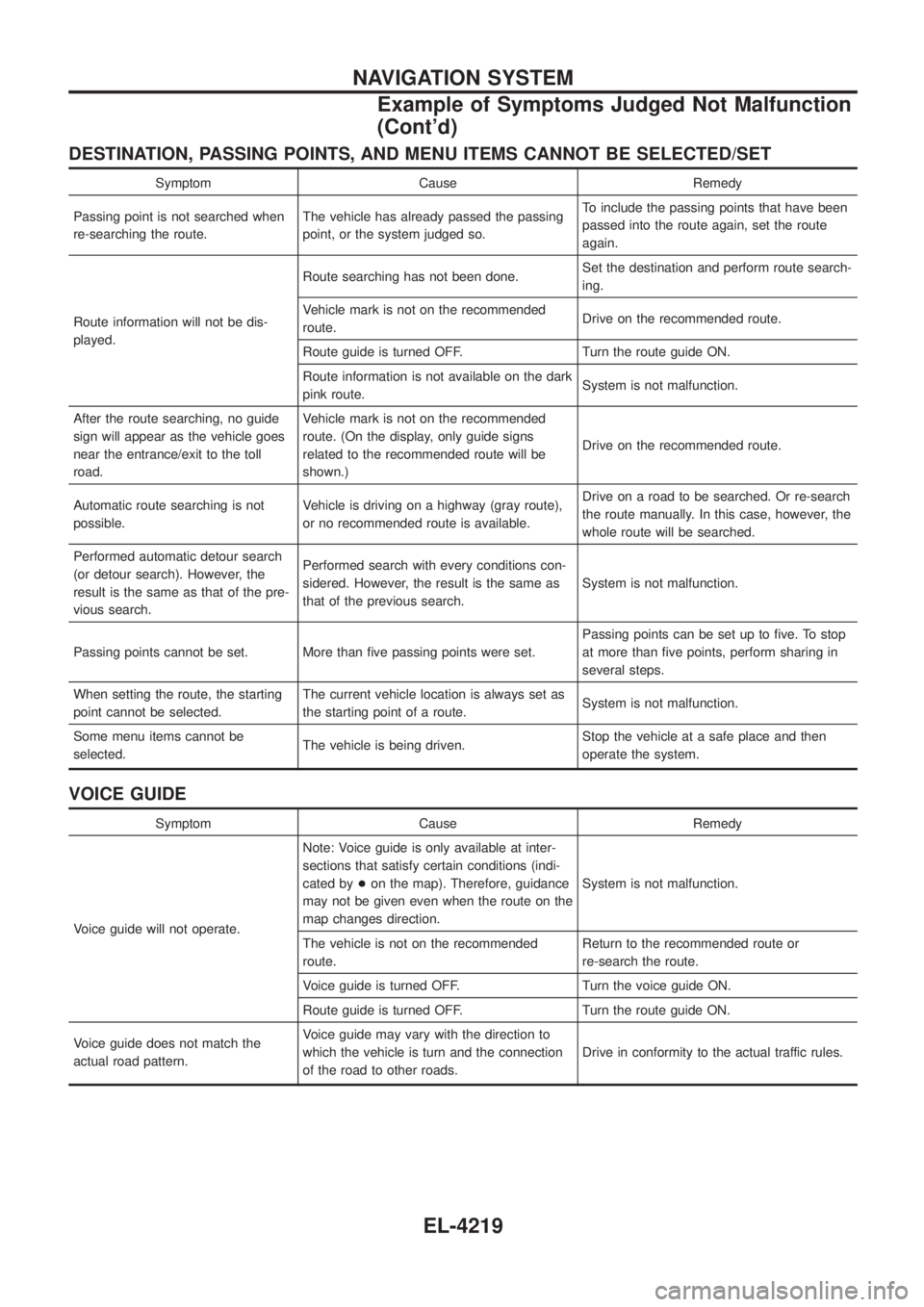
DESTINATION, PASSING POINTS, AND MENU ITEMS CANNOT BE SELECTED/SET
Symptom Cause Remedy
Passing point is not searched when
re-searching the route. The vehicle has already passed the passing
point, or the system judged so. To include the passing points that have been
passed into the route again, set the route
again.
Route information will not be dis-
played. Route searching has not been done.
Set the destination and perform route search-
ing.
Vehicle mark is not on the recommended
route. Drive on the recommended route.
Route guide is turned OFF. Turn the route guide ON.
Route information is not available on the dark
pink route. System is not malfunction.
After the route searching, no guide
sign will appear as the vehicle goes
near the entrance/exit to the toll
road. Vehicle mark is not on the recommended
route. (On the display, only guide signs
related to the recommended route will be
shown.)
Drive on the recommended route.
Automatic route searching is not
possible. Vehicle is driving on a highway (gray route),
or no recommended route is available. Drive on a road to be searched. Or re-search
the route manually. In this case, however, the
whole route will be searched.
Performed automatic detour search
(or detour search). However, the
result is the same as that of the pre-
vious search. Performed search with every conditions con-
sidered. However, the result is the same as
that of the previous search.
System is not malfunction.
Passing points cannot be set. More than ®ve passing points were set. Passing points can be set up to ®ve. To stop
at more than ®ve points, perform sharing in
several steps.
When setting the route, the starting
point cannot be selected. The current vehicle location is always set as
the starting point of a route.
System is not malfunction.
Some menu items cannot be
selected. The vehicle is being driven. Stop the vehicle at a safe place and then
operate the system.
VOICE GUIDE
Symptom Cause Remedy
Voice guide will not operate. Note: Voice guide is only available at inter-
sections that satisfy certain conditions (indi-
cated by
+on the map). Therefore, guidance
may not be given even when the route on the
map changes direction. System is not malfunction.
The vehicle is not on the recommended
route. Return to the recommended route or
re-search the route.
Voice guide is turned OFF. Turn the voice guide ON.
Route guide is turned OFF. Turn the route guide ON.
Voice guide does not match the
actual road pattern. Voice guide may vary with the direction to
which the vehicle is turn and the connection
of the road to other roads.
Drive in conformity to the actual traffic rules.
NAVIGATION SYSTEM
Example of Symptoms Judged Not Malfunction
(Cont'd)
EL-4219
Page 319 of 579
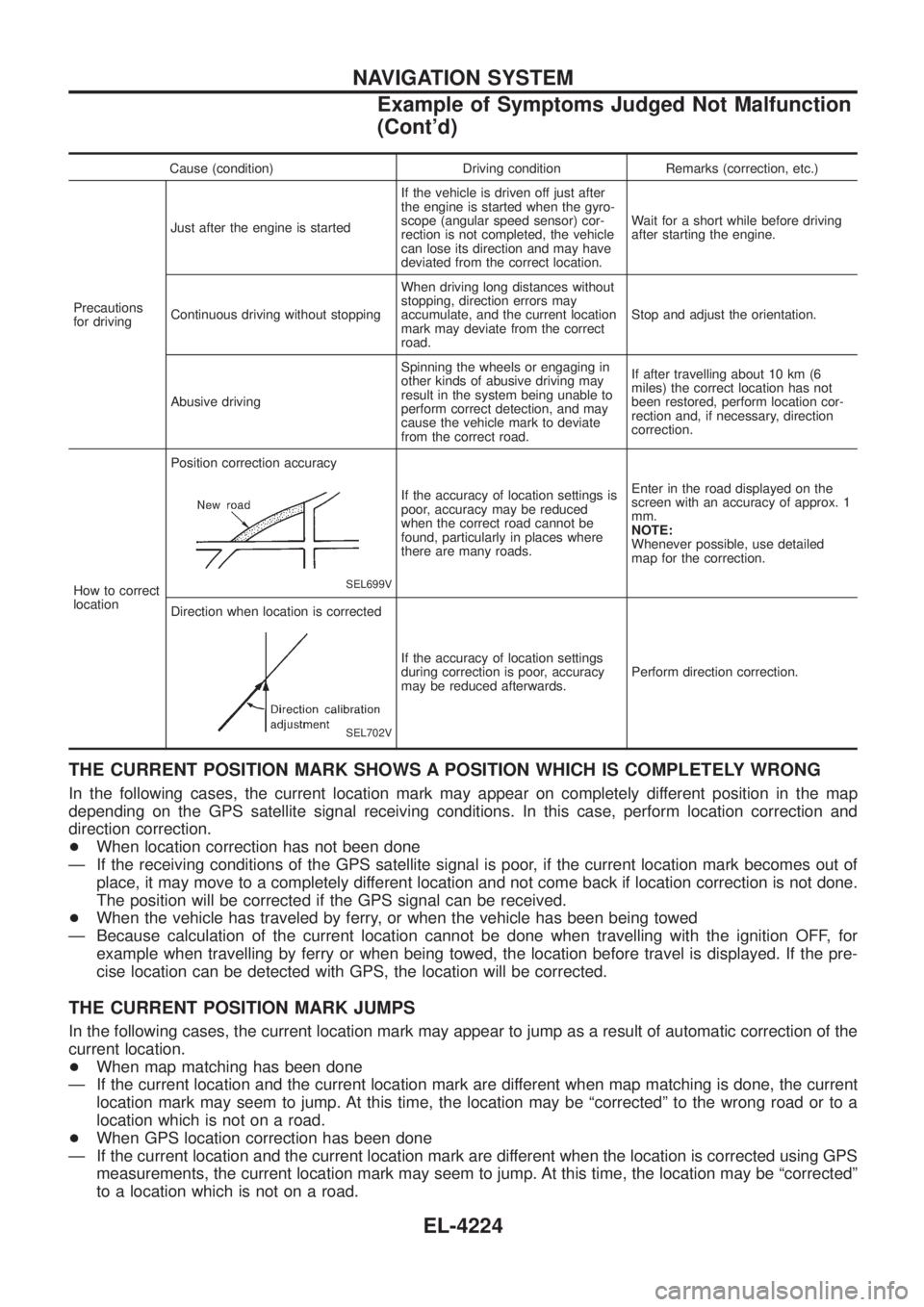
Cause (condition) Driving condition Remarks (correction, etc.)
Precautions
for driving Just after the engine is started
If the vehicle is driven off just after
the engine is started when the gyro-
scope (angular speed sensor) cor-
rection is not completed, the vehicle
can lose its direction and may have
deviated from the correct location.Wait for a short while before driving
after starting the engine.
Continuous driving without stopping When driving long distances without
stopping, direction errors may
accumulate, and the current location
mark may deviate from the correct
road.Stop and adjust the orientation.
Abusive driving Spinning the wheels or engaging in
other kinds of abusive driving may
result in the system being unable to
perform correct detection, and may
cause the vehicle mark to deviate
from the correct road.If after travelling about 10 km (6
miles) the correct location has not
been restored, perform location cor-
rection and, if necessary, direction
correction.
How to correct
location Position correction accuracy
SEL699V
If the accuracy of location settings is
poor, accuracy may be reduced
when the correct road cannot be
found, particularly in places where
there are many roads.
Enter in the road displayed on the
screen with an accuracy of approx. 1
mm.
NOTE:
Whenever possible, use detailed
map for the correction.
Direction when location is corrected
SEL702V
If the accuracy of location settings
during correction is poor, accuracy
may be reduced afterwards. Perform direction correction.
THE CURRENT POSITION MARK SHOWS A POSITION WHICH IS COMPLETELY WRONG
In the following cases, the current location mark may appear on completely different position in the map
depending on the GPS satellite signal receiving conditions. In this case, perform location correction and
direction correction.
+
When location correction has not been done
Ð If the receiving conditions of the GPS satellite signal is poor, if the current location mark becomes out of place, it may move to a completely different location and not come back if location correction is not done.
The position will be corrected if the GPS signal can be received.
+ When the vehicle has traveled by ferry, or when the vehicle has been being towed
Ð Because calculation of the current location cannot be done when travelling with the ignition OFF, for example when travelling by ferry or when being towed, the location before travel is displayed. If the pre-
cise location can be detected with GPS, the location will be corrected.
THE CURRENT POSITION MARK JUMPS
In the following cases, the current location mark may appear to jump as a result of automatic correction of the
current location.
+When map matching has been done
Ð If the current location and the current location mark are different when map matching is done, the current location mark may seem to jump. At this time, the location may be ªcorrectedº to the wrong road or to a
location which is not on a road.
+ When GPS location correction has been done
Ð If the current location and the current location mark are different when the location is corrected using GPS measurements, the current location mark may seem to jump. At this time, the location may be ªcorrectedº
to a location which is not on a road.
NAVIGATION SYSTEM
Example of Symptoms Judged Not Malfunction
(Cont'd)
EL-4224
Page 328 of 579

Schematic/TB48 and TD42Ti Engine Models
TEL088N
AUTOMATIC SPEED CONTROL DEVICE (ASCD)/WAGON AND HARDTOPMODELS
EL-4233
Page 329 of 579

Wiring Diagram Ð ASCD Ð/TB48 and TD42Ti
Engine Models
TEL569M
AUTOMATIC SPEED CONTROL DEVICE (ASCD)/WAGON AND HARDTOPMODELS
EL-4234
Page 330 of 579

TEL570M
AUTOMATIC SPEED CONTROL DEVICE (ASCD)/WAGON AND HARDTOPMODELS
Wiring Diagram Ð ASCD Ð/TB48 and TD42Ti
Engine Models (Cont'd)
EL-4235
Page 331 of 579

TEL089N
AUTOMATIC SPEED CONTROL DEVICE (ASCD)/WAGON AND HARDTOPMODELS
Wiring Diagram Ð ASCD Ð/TB48 and TD42Ti
Engine Models (Cont'd)
EL-4236
Page 332 of 579

TEL090N
AUTOMATIC SPEED CONTROL DEVICE (ASCD)/WAGON AND HARDTOPMODELS
Wiring Diagram Ð ASCD Ð/TB48 and TD42Ti
Engine Models (Cont'd)
EL-4237
Page 442 of 579

Wiring Diagram Codes (Cell Codes)
Use the chart below to ®nd out what each wiring diagram code
stands for.
Refer to the wiring diagram code in the alphabetical index to ®nd
the location (Page number) of each wiring diagram.
Code Section Wiring Diagram Name
A/C, A HA Auto Air Conditioner
A/C, M HA Manual Air Conditioner
A/CCUT EC Air Conditioner Control
A/T AT A/T
ASCD EL Automatic Speed Control Device
AUDIO EL Audio
BACK/L EL Back-up Lamp
CD/CHG EL CD Auto Changer
CHIME EL Warning Chime
COMPAS EL Compass and Thermometer
COOL/B HA Cool Box
D/LOCK EL Power Door Lock
DEF EL Rear Window Defogger
DEICER EL Wiper Deicer
DTRL EL Headlamp Ð Daytime Light System
F/FOG EL Front Fog Lamp
FICD EC IACV-FICD Solenoid Valve
GLOW EC Quick Glow System
H/AIM EL Headlamp Aiming Control System
H/LAMP EL Headlamp
HEATUP EC Heat Up Switch
HLC EL Headlamp Washer
HORN EL Horn
HSEAT EL Heated Seat
ILL EL Illumination
LOAD EC Electrical Load Signal
MAFS EC Mass Air Flow Sensor
METER EL Meter and Gauges
MIRROR EL Door Mirror
MULTI EL Multi-remote Control System
NATS EL Nissan Anti-Theft System
NAVI EL Navigation System
NONDTC AT Non-detective Items
P/ANT EL Power Antenna
PHONE EL Telephone
POWER EL Power Supply Routing
R/COOL HA Rear Cooler System
R/FOG EL Rear Fog LampCode Section Wiring Diagram Name
R/HEAT HA Rear Heater System
REMOTE EL Audio (Remote Control Switch)
ROOM/L EL Interior Room Lamp
S/LOCK EL Power Door Lock Ð Super Lock
S/TANK FE Sub Fuel Tank Control System
SRS RS Supplemental Restraint System
STAB RA Stabilizer Release Device
STOP/L EL Stop Lamp
TAIL/L EL Parking, License and Tail Lamps
THEFT EL Theft Warning System
TRQ/SG EC Engine Torque Control Signal
TURN EL Turn Signal and Hazard Warning
Lamps
VSS EC Vehicle Speed Sensor
WARN EL Warning Lamps
WINDOW EL Power Window
WIP/R EL Rear Wiper and Washer
WIPER EL Front Wiper and Washer
WIRING DIAGRAM CODES (CELL CODES)
EL-4347
Page 476 of 579
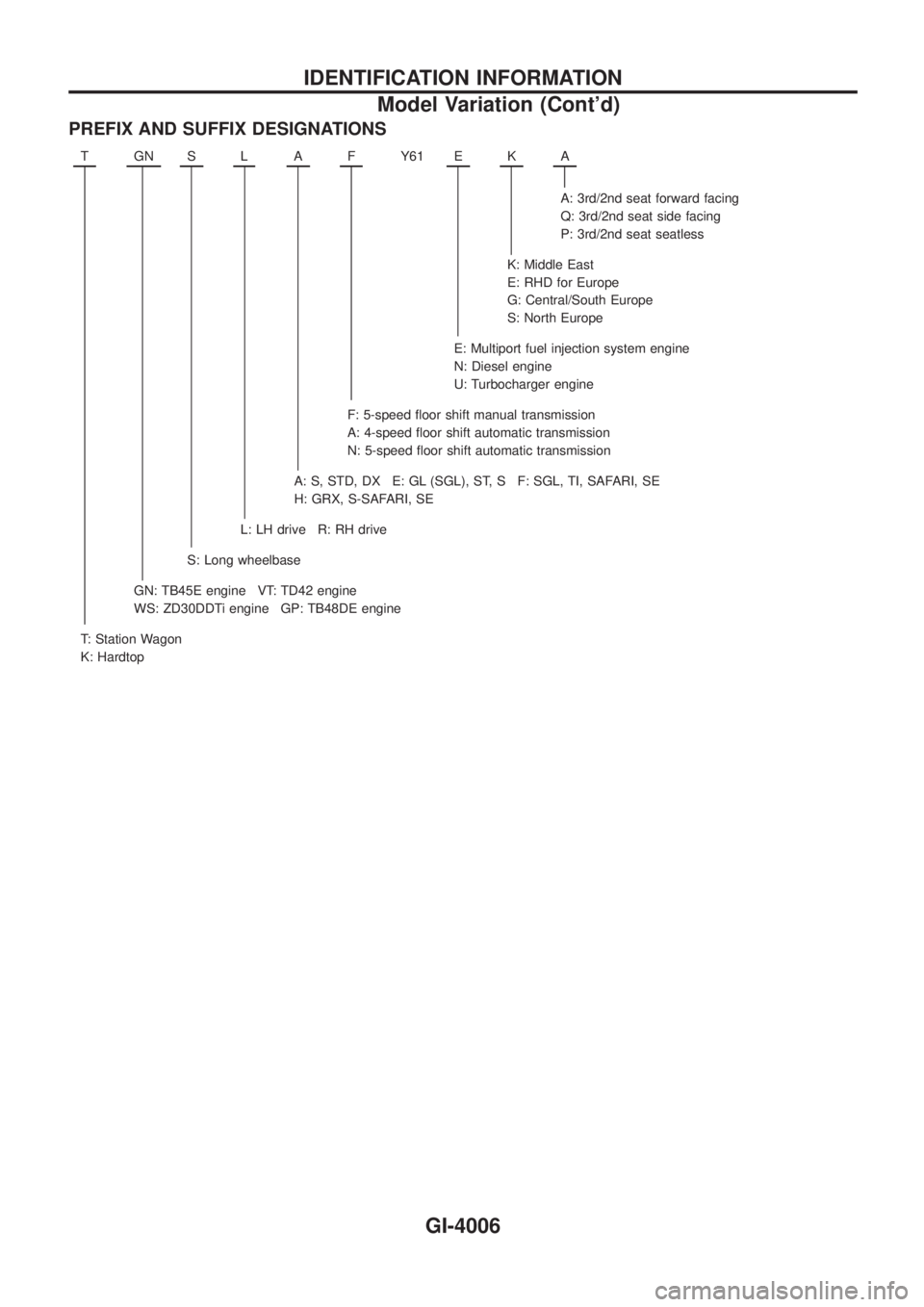
PREFIX AND SUFFIX DESIGNATIONS
TGNSLAFY61 EKA
A: 3rd/2nd seat forward facing
Q: 3rd/2nd seat side facing
P: 3rd/2nd seat seatless
K: Middle East
E: RHD for Europe
G: Central/South Europe
S: North Europe
E: Multiport fuel injection system engine
N: Diesel engine
U: Turbocharger engine
F: 5-speed ¯oor shift manual transmission
A: 4-speed ¯oor shift automatic transmission
N: 5-speed ¯oor shift automatic transmission
A: S, STD, DX E: GL (SGL), ST, S F: SGL, TI, SAFARI, SE
H: GRX, S-SAFARI, SE
L: LH drive R: RH drive
S: Long wheelbase
GN: TB45E engine VT: TD42 engine
WS: ZD30DDTi engine GP: TB48DE engine
T: Station Wagon
K: Hardtop
IDENTIFICATION INFORMATION
Model Variation (Cont'd)
GI-4006
Page 480 of 579

HEATER&
AIR CONDITIONER
SECTION
HA
MODIFICATION NOTICE:
+ Wiring diagram has been changed.
+ Automatic A/C controller has been changed.
+ Front thermo amp. for auto A/C has been eliminated.
CONTENTS
AUTO
DESCRIPTION ...........................................................4002
Features (TB48 Engine Models) ...........................4002
REAR HEATER
TROUBLE DIAGNOSES ...........................................4003
Wiring Diagram Ð R/HEAT Ð/LHD Models .........4003
Wiring Diagram Ð R/HEAT Ð/RHD Models .........4004
MANUAL
TROUBLE DIAGNOSES ...........................................4005
Wiring Diagram Ð A/C, M Ð/Wagon and
Hardtop Models with ZD Engine ...........................4005
AUTO
DESCRIPTION...........................................................4007
Control Operation ..................................................4007
TROUBLE DIAGNOSES ...........................................4008
Circuit Diagram Ð A/C, A Ð/TB48 Engine ...........4008
Wiring Diagram Ð A/C, A Ð/TB48 Engine ...........4009
Circuit Diagram Ð A/C, A Ð/TB45 Engine ...........4013
Wiring Diagram Ð A/C, A Ð/TB45 Engine ...........4014
Circuit Diagram Ð A/C, A Ð/TD Engine ...............4017
Wiring Diagram Ð A/C, A Ð/TD Engine ...............4018
Circuit Diagram Ð A/C, A Ð/ZD Engine ...............4021
Wiring Diagram Ð A/C, A Ð/ZD Engine ...............4022
Self-diagnosis ........................................................4025
Operational Check .................................................4032
A/C System ............................................................4034 Mode Door Motor...................................................4035
Air Mix Door Motor ................................................4036
Intake Door Motor ..................................................4037
Blower Motor..........................................................4038
Magnet Clutch........................................................4039
Insufficient Cooling ................................................4052
Insufficient Heating ................................................4053
Self-diagnosis ........................................................4054
REAR COOLER
TROUBLE DIAGNOSES ...........................................4055
Wiring Diagram Ð R/COOL Ð/LHD Models with
Front Auto A/C .......................................................4055
Wiring Diagram Ð R/COOL Ð/LHD Models with
Front Manual A/C Except for TB45E Engine ........4057
Wiring Diagram Ð R/COOL Ð/LHD Models with
Front Manual A/C for TB45E Engine.....................4059
Wiring Diagram Ð R/COOL Ð/RHD Models with
Front Auto A/C .......................................................4061
Wiring Diagram Ð R/COOL Ð/RHD Models with
Front Manual A/C...................................................4063
COOL BOX
TROUBLE DIAGNOSES ...........................................4065
Wiring Diagram Ð COOL/B Ð/All Engines
Except TB48 and TB45E Wagon Models for the
Middle East ............................................................4065
Wiring Diagram Ð COOL/B Ð/TB48 and TB45E
Engine Wagon Models for the Middle East...........4066
HA-4001