engine speed NISSAN PATROL 2004 Electronic User Guide
[x] Cancel search | Manufacturer: NISSAN, Model Year: 2004, Model line: PATROL, Model: NISSAN PATROL 2004Pages: 579, PDF Size: 26.61 MB
Page 80 of 579
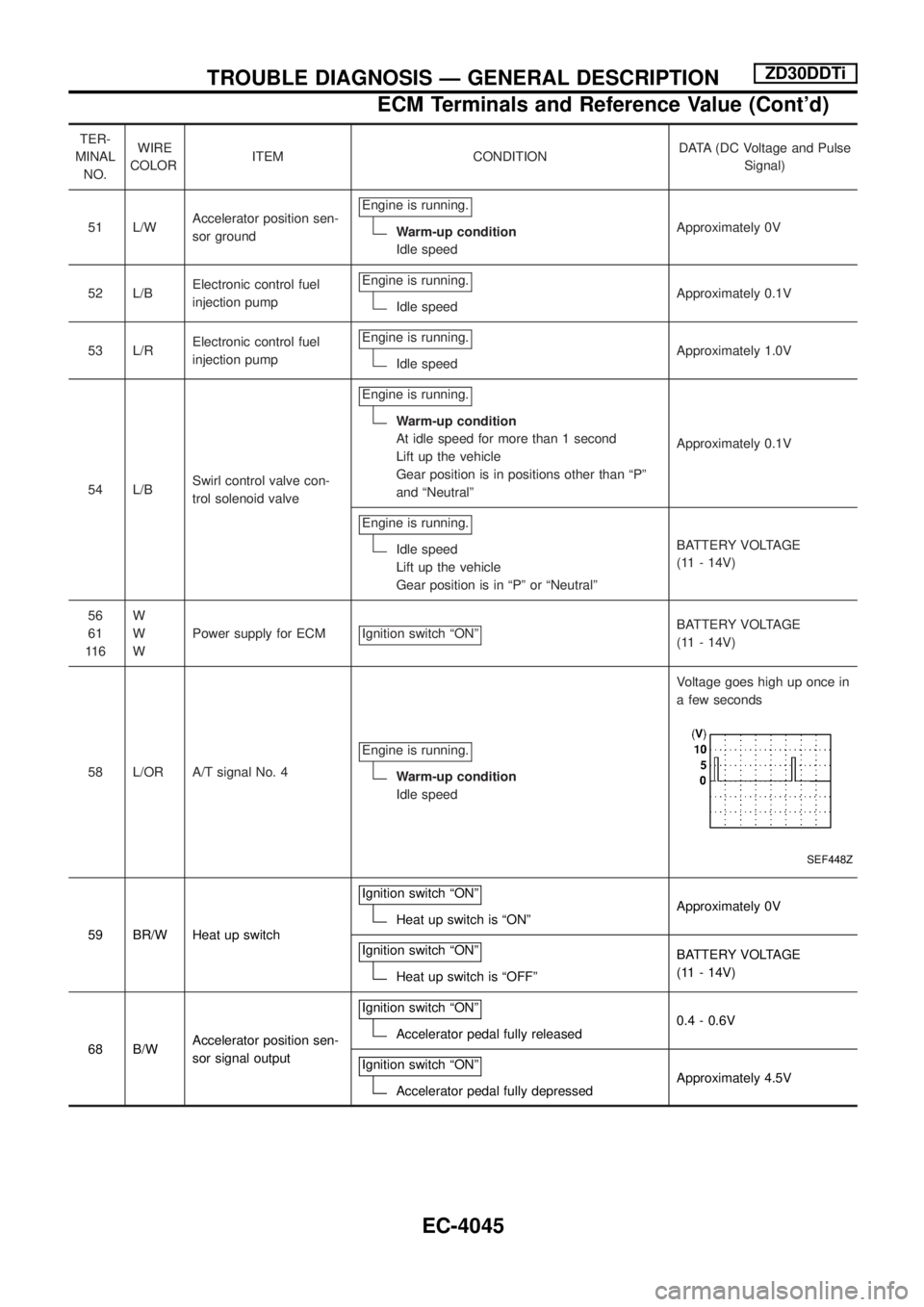
TER-
MINAL
NO.WIRE
COLORITEM CONDITIONDATA (DC Voltage and Pulse
Signal)
51 L/WAccelerator position sen-
sor groundEngine is running.
Warm-up condition
Idle speedApproximately 0V
52 L/BElectronic control fuel
injection pumpEngine is running.
Idle speedApproximately 0.1V
53 L/RElectronic control fuel
injection pumpEngine is running.
Idle speedApproximately 1.0V
54 L/BSwirl control valve con-
trol solenoid valveEngine is running.
Warm-up condition
At idle speed for more than 1 second
Lift up the vehicle
Gear position is in positions other than ªPº
and ªNeutralºApproximately 0.1V
Engine is running.
Idle speed
Lift up the vehicle
Gear position is in ªPº or ªNeutralºBATTERY VOLTAGE
(11 - 14V)
56
61
11 6W
W
WPower supply for ECM Ignition switch ªONº
BATTERY VOLTAGE
(11 - 14V)
58 L/OR A/T signal No. 4Engine is running.
Warm-up condition
Idle speedVoltage goes high up once in
a few seconds
SEF448Z
59 BR/W Heat up switchIgnition switch ªONºHeat up switch is ªONºApproximately 0V
Ignition switch ªONº
Heat up switch is ªOFFºBATTERY VOLTAGE
(11 - 14V)
68 B/WAccelerator position sen-
sor signal outputIgnition switch ªONº
Accelerator pedal fully released0.4 - 0.6V
Ignition switch ªONº
Accelerator pedal fully depressedApproximately 4.5V
TROUBLE DIAGNOSIS Ð GENERAL DESCRIPTIONZD30DDTi
ECM Terminals and Reference Value (Cont'd)
EC-4045
Page 81 of 579
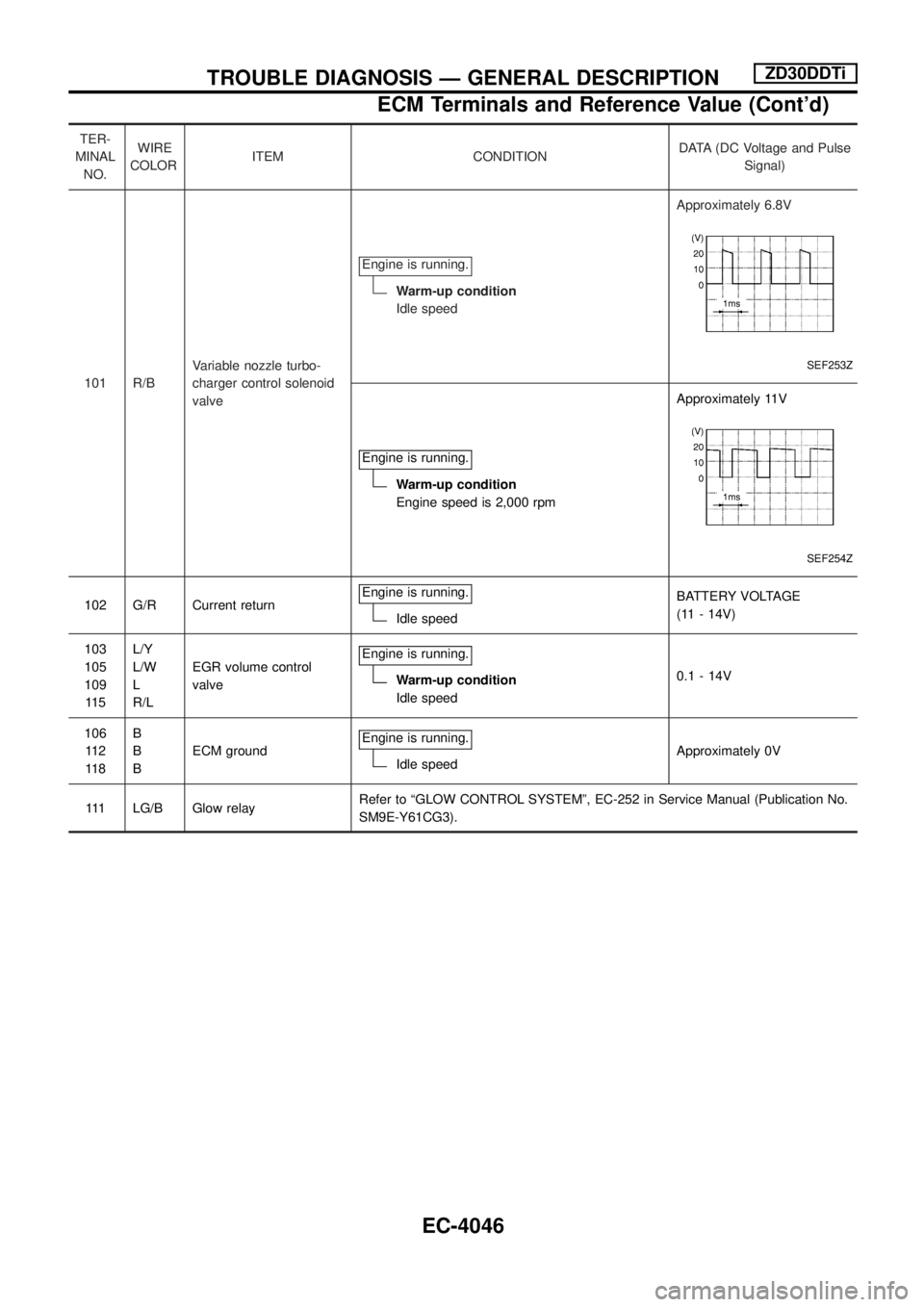
TER-
MINAL
NO.WIRE
COLORITEM CONDITIONDATA (DC Voltage and Pulse
Signal)
101 R/BVariable nozzle turbo-
charger control solenoid
valveEngine is running.
Warm-up condition
Idle speedApproximately 6.8V
SEF253Z
Engine is running.
Warm-up condition
Engine speed is 2,000 rpmApproximately 11V
SEF254Z
102 G/R Current returnEngine is running.Idle speedBATTERY VOLTAGE
(11 - 14V)
103
105
109
11 5L/Y
L/W
L
R/LEGR volume control
valveEngine is running.
Warm-up condition
Idle speed0.1 - 14V
106
11 2
11 8B
B
BECM groundEngine is running.
Idle speedApproximately 0V
111 LG/B Glow relayRefer to ªGLOW CONTROL SYSTEMº, EC-252 in Service Manual (Publication No.
SM9E-Y61CG3).
TROUBLE DIAGNOSIS Ð GENERAL DESCRIPTIONZD30DDTi
ECM Terminals and Reference Value (Cont'd)
EC-4046
Page 82 of 579
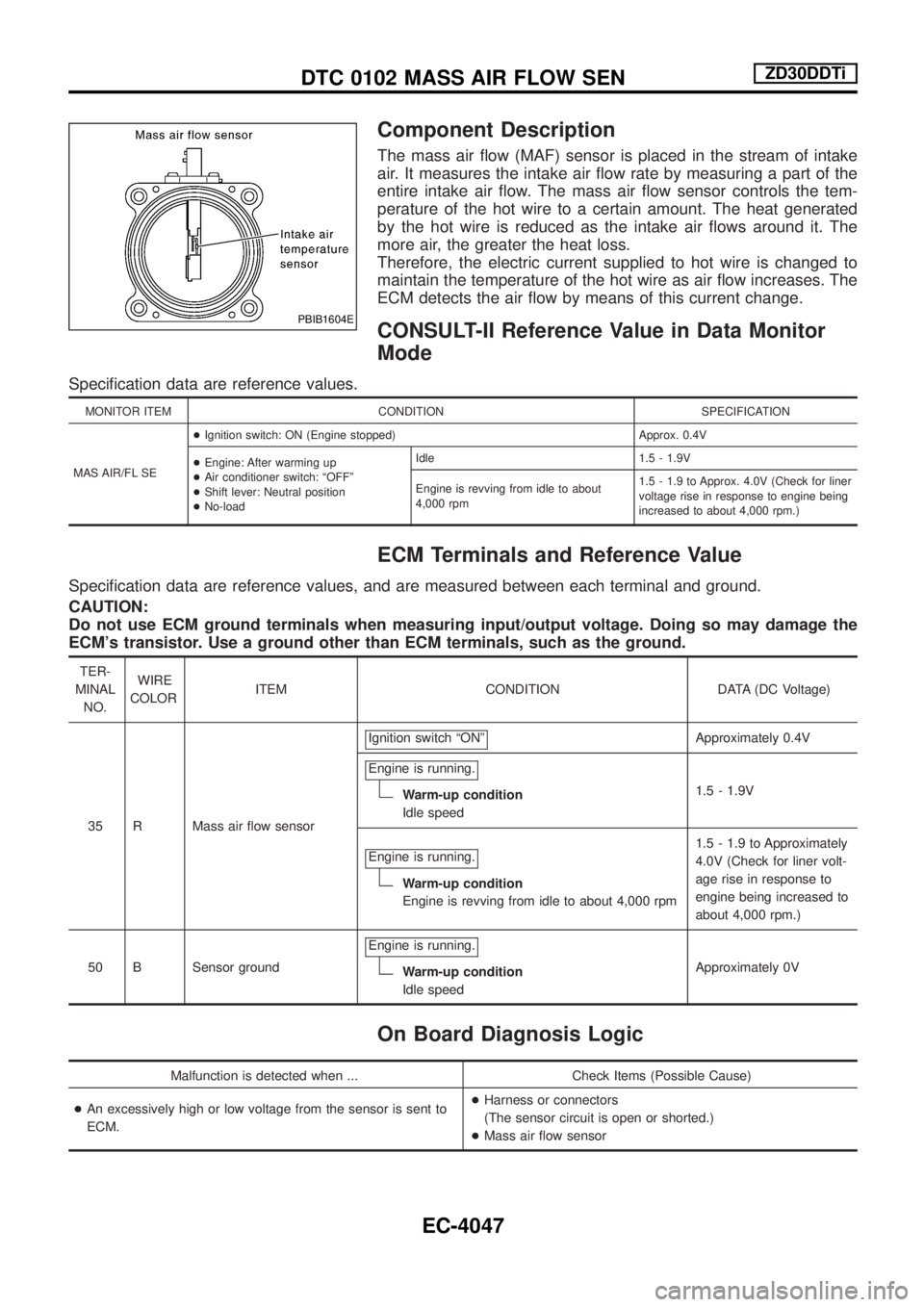
Component Description
The mass air ¯ow (MAF) sensor is placed in the stream of intake
air. It measures the intake air ¯ow rate by measuring a part of the
entire intake air ¯ow. The mass air ¯ow sensor controls the tem-
perature of the hot wire to a certain amount. The heat generated
by the hot wire is reduced as the intake air ¯ows around it. The
more air, the greater the heat loss.
Therefore, the electric current supplied to hot wire is changed to
maintain the temperature of the hot wire as air ¯ow increases. The
ECM detects the air ¯ow by means of this current change.
CONSULT-II Reference Value in Data Monitor
Mode
Speci®cation data are reference values.
MONITOR ITEM CONDITION SPECIFICATION
MAS AIR/FL SE+Ignition switch: ON (Engine stopped) Approx. 0.4V
+Engine: After warming up
+Air conditioner switch: ªOFFº
+Shift lever: Neutral position
+No-loadIdle 1.5 - 1.9V
Engine is revving from idle to about
4,000 rpm1.5 - 1.9 to Approx. 4.0V (Check for liner
voltage rise in response to engine being
increased to about 4,000 rpm.)
ECM Terminals and Reference Value
Speci®cation data are reference values, and are measured between each terminal and ground.
CAUTION:
Do not use ECM ground terminals when measuring input/output voltage. Doing so may damage the
ECM's transistor. Use a ground other than ECM terminals, such as the ground.
TER-
MINAL
NO.WIRE
COLORITEM CONDITION DATA (DC Voltage)
35 R Mass air ¯ow sensorIgnition switch ªONº
Approximately 0.4V
Engine is running.
Warm-up condition
Idle speed1.5 - 1.9V
Engine is running.
Warm-up condition
Engine is revving from idle to about 4,000 rpm1.5 - 1.9 to Approximately
4.0V (Check for liner volt-
age rise in response to
engine being increased to
about 4,000 rpm.)
50 B Sensor groundEngine is running.
Warm-up condition
Idle speedApproximately 0V
On Board Diagnosis Logic
Malfunction is detected when ... Check Items (Possible Cause)
+An excessively high or low voltage from the sensor is sent to
ECM.+Harness or connectors
(The sensor circuit is open or shorted.)
+Mass air ¯ow sensor
PBIB1604E
DTC 0102 MASS AIR FLOW SENZD30DDTi
EC-4047
Page 98 of 579

Terminals and Reference Value for NAVI Control
Unit........................................................................\
.4183
Terminals and Reference Value for Display ..........4185
Terminals and Reference Value for NAVI Switch ..4186
Terminals and Reference Value for Transfer Unit .4187
Terminals and Reference Value for Voice
Change Relay ........................................................4188
Self-Diagnosis Function .........................................4189
Self-Diagnosis Mode..............................................4189
Con®rmation/Adjustment Mode .............................4192
Trouble Diagnoses.................................................4198
Example of Symptoms Judged Not Malfunction ...4218
Program Loading ...................................................4226
DOOR MIRROR/WAGON AND HARDTOP
MODELS ....................................................................4227
Wiring Diagram Ð MIRROR Ð/LHD Models........4227
Wiring Diagram Ð MIRROR Ð/RHD Models .......4229
HEATED SEAT/WAGON AND HARDTOP
MODELS ....................................................................4231
Wiring Diagram Ð HSEAT Ð................................4231
AUTOMATIC SPEED CONTROL DEVICE (ASCD)/
WAGON AND HARDTOP MODELS .........................4233
Schematic/TB48 and TD42Ti Engine Models .......4233
Wiring Diagram Ð ASCD Ð/TB48 and TD42Ti
Engine Models .......................................................4234
POWER WINDOW/WAGON AND HARDTOP
MODELS ....................................................................4238
Schematic ..............................................................4238
Wiring Diagram Ð WINDOW Ð ...........................4239
POWER DOOR LOCK/WAGON AND HARDTOP
MODELS ....................................................................4244
Schematic/Without Theft Warning System
Models ...................................................................4244
Wiring Diagram Ð D/LOCK Ð/Without Theft
Warning System Models ........................................4245
Schematic/With Theft Warning System Models ....4249
Wiring Diagram Ð D/LOCK Ð/LHD Models With
Theft Warning System ...........................................4250
Wiring Diagram Ð D/LOCK Ð/RHD Models With
Theft Warning System ...........................................4254
POWER DOOR LOCK/WAGON AND HARDTOP
MODELS ....................................................................4258
Schematic Ð Super Lock Ð .................................4258
Wiring Diagram Ð S/LOCK Ð ..............................4259
MULTI-REMOTE CONTROL SYSTEM/WAGON
AND HARDTOP MODELS ........................................4264
Wiring Diagram Ð MULTI Ð/LHD Models Except
for Europe, The Middle East and With Theft
Warning System ....................................................4264
Wiring Diagram Ð MULTI Ð/RHD Models
Except for Europe, South Africa and With Theft
Warning System ....................................................4266 Schematic/With Theft Warning System Models ....4268
Wiring Diagram Ð MULTI Ð/LHD Models with
Theft Warning System ...........................................4269
Wiring Diagram Ð MULTI Ð/RHD Models with
Theft Warning System ...........................................4273
Wiring Diagram Ð MULTI Ð/LHD Models for
Europe and The Middle East.................................4276
THEFT WARNING SYSTEM/WAGON AND
HARDTOP MODELS .................................................4278
Schematic ..............................................................4278
Wiring Diagram Ð THEFT Ð/LHD Models ...........4279
Wiring Diagram Ð THEFT Ð/RHD Models ..........4284
SUPER LOCK CONTROL UNIT/WAGON AND
HARDTOP MODELS .................................................4290
Schematic/RHD Models for Europe ......................4290
UNIFIED METER CONTROL UNIT (TIME
CONTROL SYSTEM)/WAGON AND HARDTOP
MODELS ....................................................................4292
Schematic/Except RHD Models for Europe and
With Theft Warning System Models ......................4292
NATS (Nissan Anti-Theft System)/TB48DE
ENGINE MODELS FOR EUROPE ............................4293
Wiring Diagram Ð NATS Ð ..................................4293
NATS (Nissan Anti-Theft System)/ZD ENGINE
MODELS ....................................................................4295
Wiring Diagram Ð NATS Ð/LHD Models for
Europe ...................................................................4295
Wiring Diagram Ð NATS Ð/RHD Models for
Europe ...................................................................4297
LOCATION OF ELECTRICAL UNITS/WAGON
AND HARDTOP MODELS ........................................4300
Engine Compartment .............................................4300
Passenger Compartment Ð LHD Models .............4302
Passenger Compartment Ð RHD Models ............4304
HARNESS LAYOUT ..................................................4307
How to Read Harness Layout ...............................4307
HARNESS LAYOUT/WAGON AND HARDTOP
MODELS ....................................................................4308
Main Harness/LHD Models....................................4308
Main Harness/RHD Models ...................................4312
Engine Room Harness/LHD Models .....................4316
Engine Room Harness/RHD Models .....................4322
Engine Harness .....................................................4328
Body Harness/LHD Models ...................................4330
Body Harness/RHD Models...................................4334
Body No. 2 Harness/LHD Models .........................4338
Body No. 2 Harness/RHD Models.........................4340
Chassis Harness....................................................4342
Front Door Harness (Driver side) ..........................4343
Front Door Harness (Passenger side) ..................4344
Rear Door Harness................................................4345
CONTENTS(Cont'd)
EL-4003
Page 264 of 579
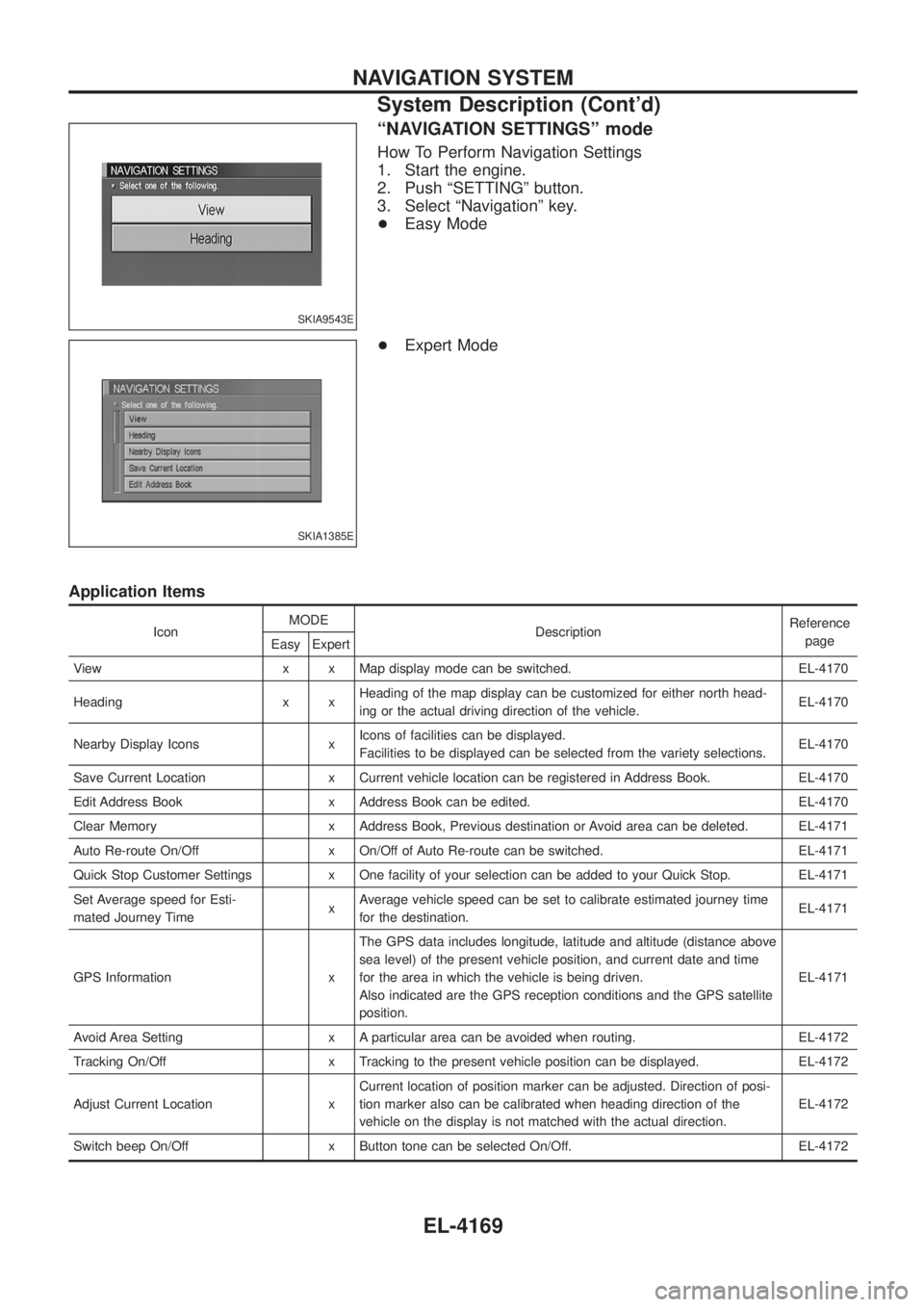
ªNAVIGATION SETTINGSº mode
How To Perform Navigation Settings
1. Start the engine.
2. Push ªSETTINGº button.
3. Select ªNavigationº key.
+Easy Mode
+ Expert Mode
Application Items
Icon MODE
Description Reference
page
Easy Expert
View x x Map display mode can be switched. EL-4170
Heading x x Heading of the map display can be customized for either north head-
ing or the actual driving direction of the vehicle. EL-4170
Nearby Display Icons x Icons of facilities can be displayed.
Facilities to be displayed can be selected from the variety selections. EL-4170
Save Current Location x Current vehicle location can be registered in Address Book. EL-4170
Edit Address Book x Address Book can be edited. EL-4170
Clear Memory x Address Book, Previous destination or Avoid area can be deleted. EL-4171
Auto Re-route On/Off x On/Off of Auto Re-route can be switched. EL-4171
Quick Stop Customer Settings x One facility of your selection can be added to your Quick Stop. EL-4171
Set Average speed for Esti-
mated Journey Time xAverage vehicle speed can be set to calibrate estimated journey time
for the destination. EL-4171
GPS Information x The GPS data includes longitude, latitude and altitude (distance above
sea level) of the present vehicle position, and current date and time
for the area in which the vehicle is being driven.
Also indicated are the GPS reception conditions and the GPS satellite
position. EL-4171
Avoid Area Setting x A particular area can be avoided when routing. EL-4172
Tracking On/Off x Tracking to the present vehicle position can be displayed. EL-4172
Adjust Current Location x Current location of position marker can be adjusted. Direction of posi-
tion marker also can be calibrated when heading direction of the
vehicle on the display is not matched with the actual direction. EL-4172
Switch beep On/Off x Button tone can be selected On/Off. EL-4172
SKIA9543E
SKIA1385E
NAVIGATION SYSTEM
System Description (Cont'd)
EL-4169
Page 284 of 579
Self-Diagnosis Function
DESCRIPTION
+Diagnosis function consists of the self-diagnosis mode performed automatically and the CONFIRMATION/
ADJUSTMENT mode operated manually.
+ Self-diagnosis mode checks for connections between the units constituting this system, analyzes each
individual unit at the same time, and displays the results on the LCD screen.
+ CONFIRMATION/ADJUSTMENT mode is used to perform trouble diagnosis that require operation and
judgment by an operator (malfunction that cannot be automatically judged by the system), to check/change
the set value, and to display the History of Errors of the navigation system.
DIAGNOSIS ITEM
Mode Description
Self-diagnosis +
NAVI Control unit diagnosis (DVD-ROM drive will not be diagnosed when no
map DVD-ROM is in it.).
+ Performs diagnosis of each unit and connections between control unit and
GPS antenna, as well as between control unit and each unit.
Con®rmation/
Adjustment Display
Color tone and shading of the screen can be checked by the display of a color
bar and a gray scale.
Vehicle signals Analyzes the following vehicle signals: Vehicle speed signal, light signal, ignition
switch signal, and reverse signal.
Navigation Display Longi-
tude & Lati-
tude
Display the map. Use the joystick to adjust position. Longitude and latitude will be
displayed.
Speed Calibra-
tion Under ordinary conditions, the navigation system distance measuring function will
automatically compensate for minute decreases in wheel and tire diameter
caused by tire wear or low-pressure. Speed calibration immediately restores sys-
tem accuracy in cases such as when distance calibration is needed because of
the use of tire chains in inclement weather.
Angle Adjust-
ment Corrects difference between actual turning angle of a vehicle and turning angle of
the car mark on the display.
Initialize Loca-
tion This mode is for initializing the current location. Use when the vehicle is trans-
ported a long distance on a trailer, etc.
History of Errors Diagnosis results previously stored in the memory (before turning ignition switch
ON) are displayed in this mode. Time and location when/where the errors
occurred are also displayed.
Self-Diagnosis Mode
OPERATION PROCEDURE
1. Start the engine.
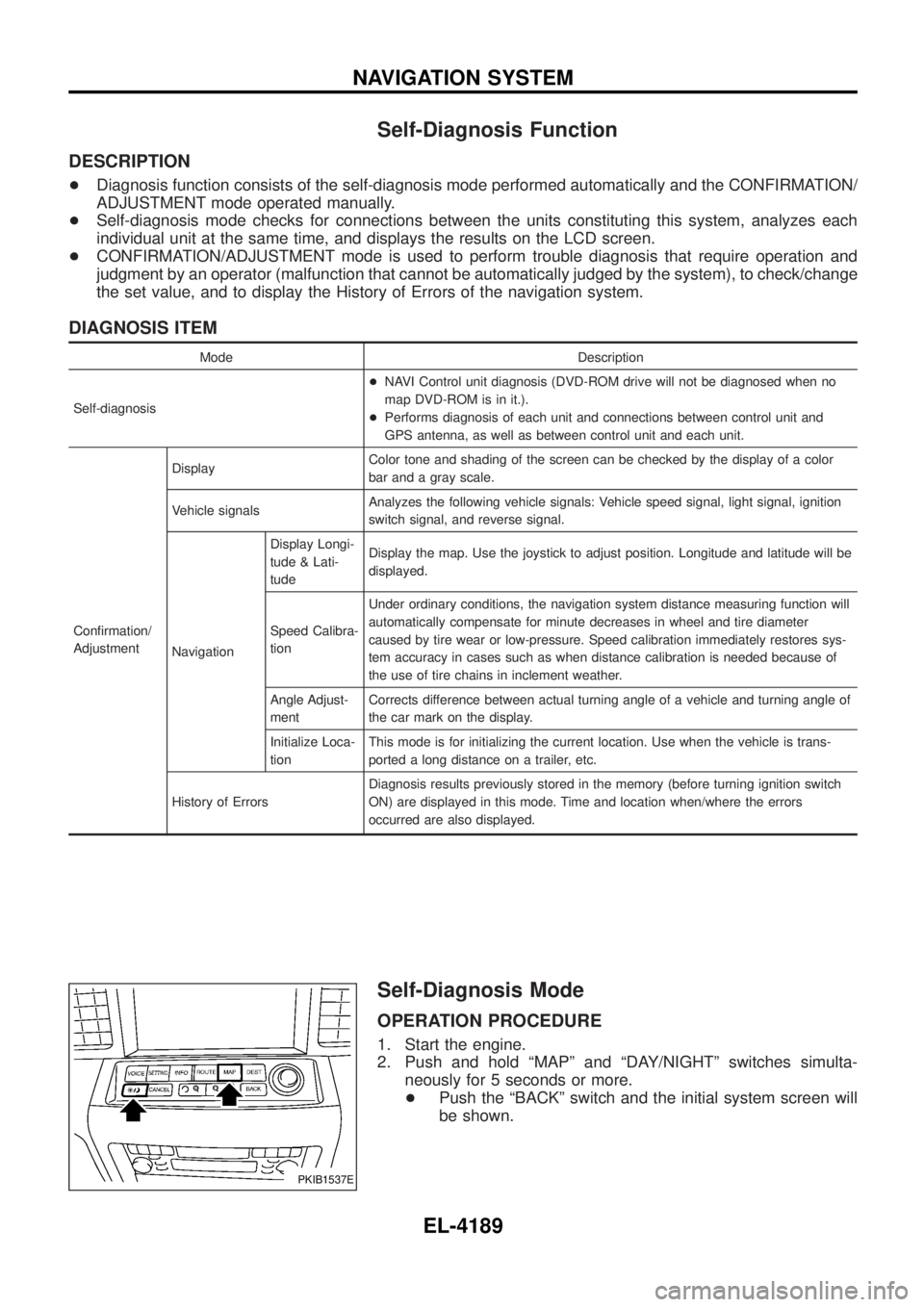
2. Push and hold ªMAPº and ªDAY/NIGHTº switches simulta-
neously for 5 seconds or more.
+ Push the ªBACKº switch and the initial system screen will
be shown.
PKIB1537E
NAVIGATION SYSTEM
EL-4189
Page 302 of 579

3. CHECK VEHICLE SPEED SIGNAL
1. Connect NAVI control unit and combination meter connector.
2. Start engine and drive vehicle at more than 40 km/h (25 MPH).
3. Check the signal between NAVI control unit harness connector M168 terminal 28 (R/W) and ground with CONSULT-ll oroscilloscope.
SKIA9106E
28 (R/W) - Ground: Refer to EL-4183. OK or NG
OK ©Replace NAVI control unit.
NG ©Replace uni®ed meter control unit.
ILLUMINATION SIGNAL CHECK
1. CHECK TAIL LAMP OPERATION
When lighting switch turned 1st or 2nd position, does tail lamp illuminate?
YesorNo
Ye s ©GO TO 2.
No ©Go to tail lamp trouble diagnosis.
2. CHECK ILLUMINATION SIGNAL
Check voltage between NAVI control unit and ground.
SKIB0315E
OK or NG
OK ©Replace NAVI control unit.
NG ©Repair harness or connector.
Terminals
Lighting switch position Voltage
(+)
(þ)
Connector Terminal (wire color)
M168 25 (L/B) Ground 1st or 2nd position Battery voltage
OFF Approx. 0V
NAVIGATION SYSTEM
Trouble Diagnoses (Cont'd)
EL-4207
Page 319 of 579
Cause (condition) Driving condition Remarks (correction, etc.)
Precautions
for driving Just after the engine is started
If the vehicle is driven off just after
the engine is started when the gyro-
scope (angular speed sensor) cor-
rection is not completed, the vehicle
can lose its direction and may have
deviated from the correct location.Wait for a short while before driving
after starting the engine.
Continuous driving without stopping When driving long distances without
stopping, direction errors may
accumulate, and the current location
mark may deviate from the correct
road.Stop and adjust the orientation.
Abusive driving Spinning the wheels or engaging in
other kinds of abusive driving may
result in the system being unable to
perform correct detection, and may
cause the vehicle mark to deviate
from the correct road.If after travelling about 10 km (6
miles) the correct location has not
been restored, perform location cor-
rection and, if necessary, direction
correction.
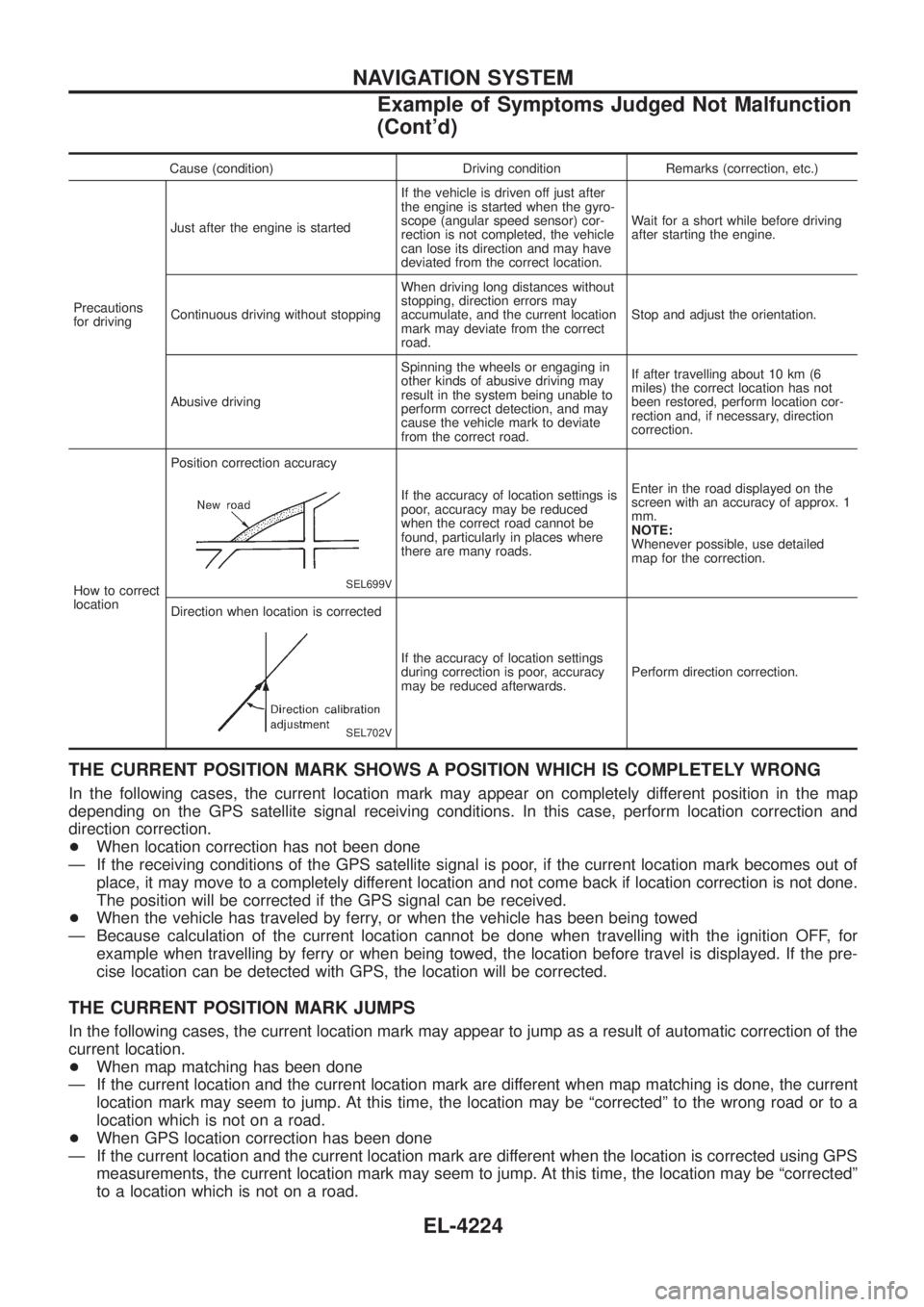
How to correct
location Position correction accuracy
SEL699V
If the accuracy of location settings is
poor, accuracy may be reduced
when the correct road cannot be
found, particularly in places where
there are many roads.
Enter in the road displayed on the
screen with an accuracy of approx. 1
mm.
NOTE:
Whenever possible, use detailed
map for the correction.
Direction when location is corrected
SEL702V
If the accuracy of location settings
during correction is poor, accuracy
may be reduced afterwards. Perform direction correction.
THE CURRENT POSITION MARK SHOWS A POSITION WHICH IS COMPLETELY WRONG
In the following cases, the current location mark may appear on completely different position in the map
depending on the GPS satellite signal receiving conditions. In this case, perform location correction and
direction correction.
+
When location correction has not been done
Ð If the receiving conditions of the GPS satellite signal is poor, if the current location mark becomes out of place, it may move to a completely different location and not come back if location correction is not done.
The position will be corrected if the GPS signal can be received.
+ When the vehicle has traveled by ferry, or when the vehicle has been being towed
Ð Because calculation of the current location cannot be done when travelling with the ignition OFF, for example when travelling by ferry or when being towed, the location before travel is displayed. If the pre-
cise location can be detected with GPS, the location will be corrected.
THE CURRENT POSITION MARK JUMPS
In the following cases, the current location mark may appear to jump as a result of automatic correction of the
current location.
+When map matching has been done
Ð If the current location and the current location mark are different when map matching is done, the current location mark may seem to jump. At this time, the location may be ªcorrectedº to the wrong road or to a
location which is not on a road.
+ When GPS location correction has been done
Ð If the current location and the current location mark are different when the location is corrected using GPS measurements, the current location mark may seem to jump. At this time, the location may be ªcorrectedº
to a location which is not on a road.
NAVIGATION SYSTEM
Example of Symptoms Judged Not Malfunction
(Cont'd)
EL-4224
Page 328 of 579

Schematic/TB48 and TD42Ti Engine Models
TEL088N
AUTOMATIC SPEED CONTROL DEVICE (ASCD)/WAGON AND HARDTOPMODELS
EL-4233
Page 329 of 579

Wiring Diagram Ð ASCD Ð/TB48 and TD42Ti
Engine Models
TEL569M
AUTOMATIC SPEED CONTROL DEVICE (ASCD)/WAGON AND HARDTOPMODELS
EL-4234