Switch NISSAN PATROL 2004 Electronic Service Manual
[x] Cancel search | Manufacturer: NISSAN, Model Year: 2004, Model line: PATROL, Model: NISSAN PATROL 2004Pages: 579, PDF Size: 26.61 MB
Page 262 of 579
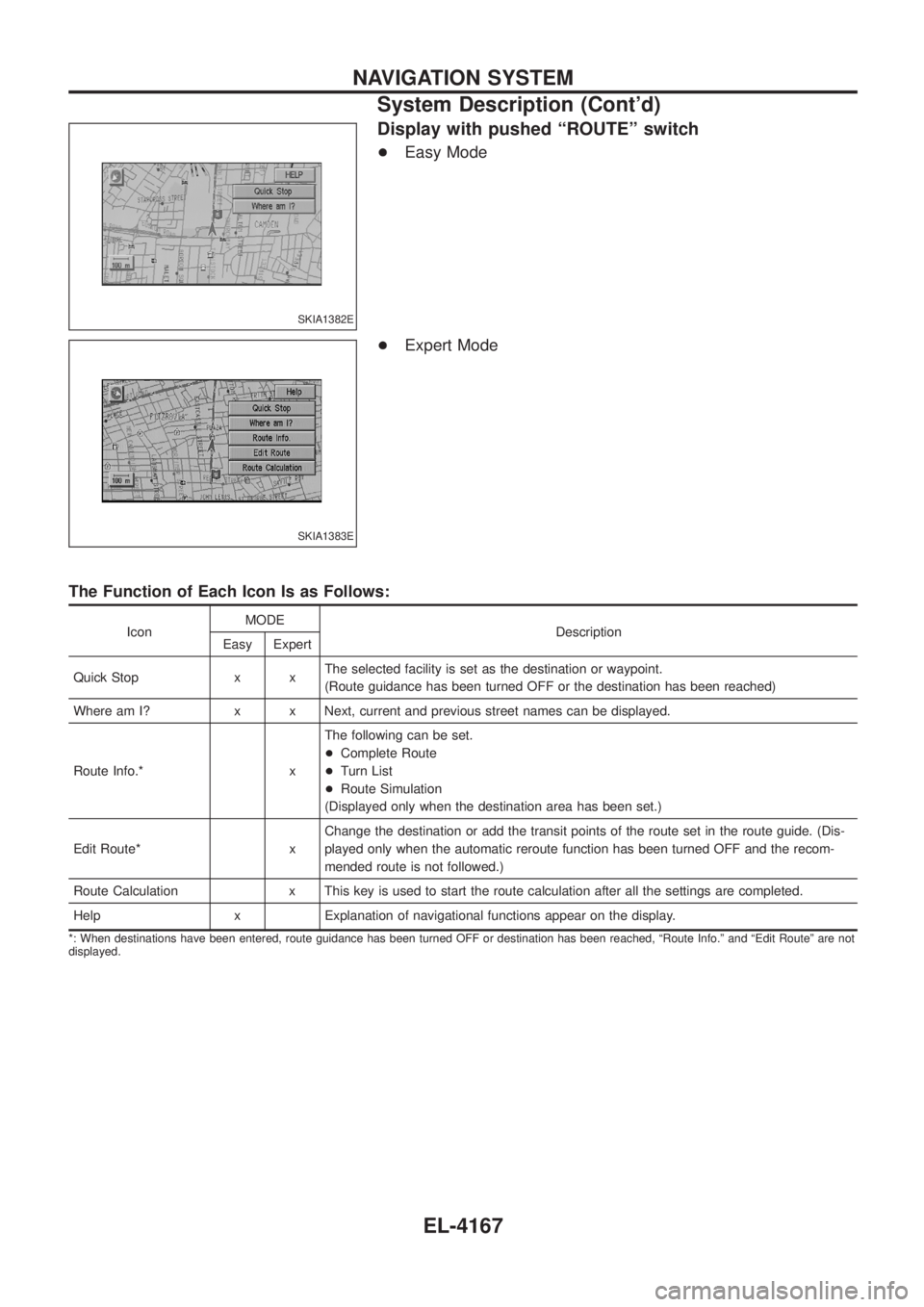
Display with pushed ªROUTEº switch
+Easy Mode
+ Expert Mode
The Function of Each Icon Is as Follows:
Icon MODE
Description
Easy Expert
Quick Stop x x The selected facility is set as the destination or waypoint.
(Route guidance has been turned OFF or the destination has been reached)
Where am I? x x Next, current and previous street names can be displayed.
Route Info.* x The following can be set.
+
Complete Route
+ Turn List
+ Route Simulation
(Displayed only when the destination area has been set.)
Edit Route* x Change the destination or add the transit points of the route set in the route guide. (Dis-
played only when the automatic reroute function has been turned OFF and the recom-
mended route is not followed.)
Route Calculation x This key is used to start the route calculation after all the settings are completed.
Help x Explanation of navigational functions appear on the display.
*: When destinations have been entered, route guidance has been turned OFF or destination has been reached, ªRoute Info.º and ªEdit Routeº are not
displayed.
SKIA1382E
SKIA1383E
NAVIGATION SYSTEM
System Description (Cont'd)
EL-4167
Page 263 of 579
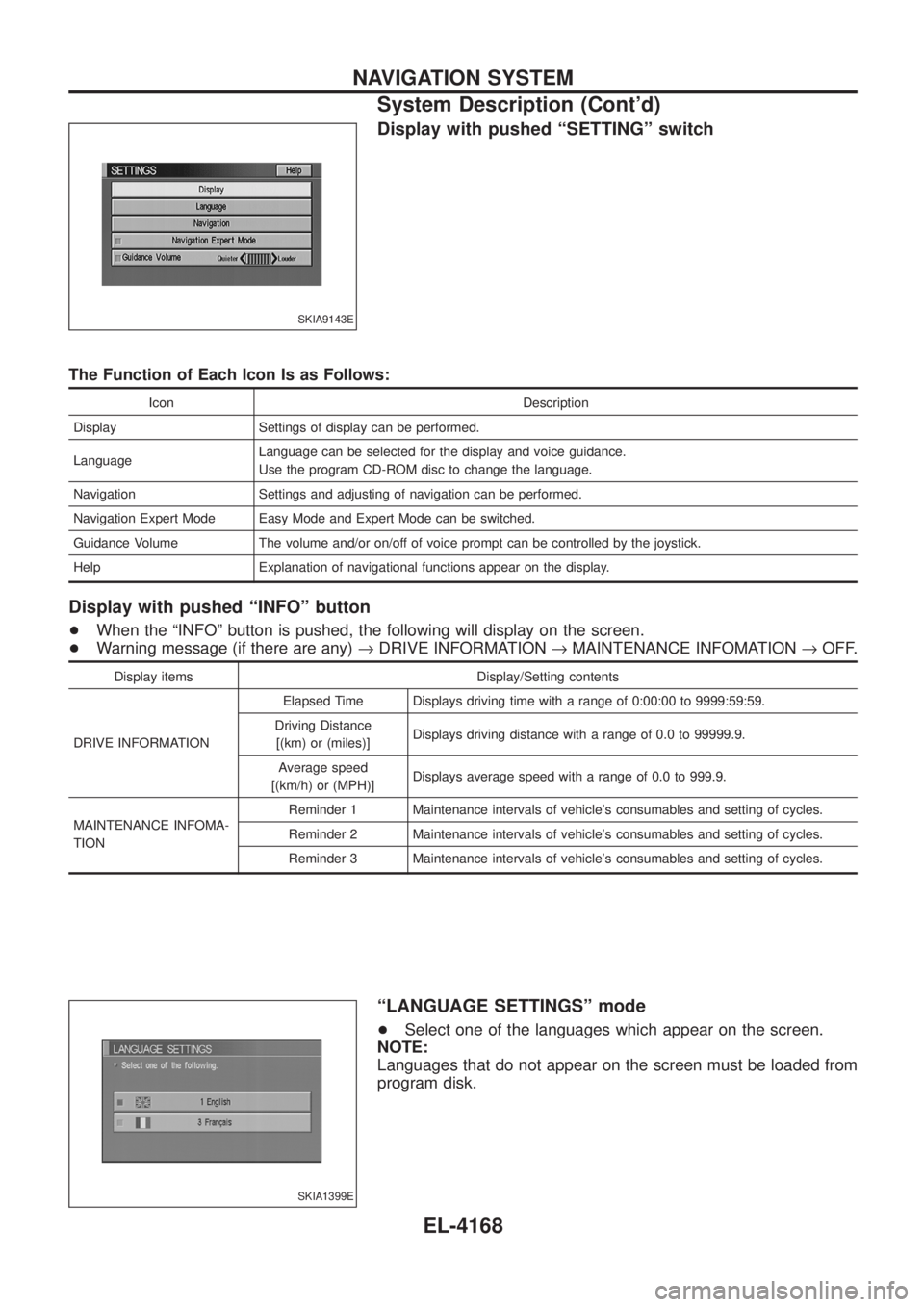
Display with pushed ªSETTINGº switch
The Function of Each Icon Is as Follows:
Icon Description
Display Settings of display can be performed.
Language Language can be selected for the display and voice guidance.
Use the program CD-ROM disc to change the language.
Navigation Settings and adjusting of navigation can be performed.
Navigation Expert Mode Easy Mode and Expert Mode can be switched.
Guidance Volume The volume and/or on/off of voice prompt can be controlled by the joystick.
Help Explanation of navigational functions appear on the display.
Display with pushed ªINFOº button
+ When the ªINFOº button is pushed, the following will display on the screen.
+ Warning message (if there are any) ®DRIVE INFORMATION ®MAINTENANCE INFOMATION ®OFF.
Display items Display/Setting contents
DRIVE INFORMATION Elapsed Time Displays driving time with a range of 0:00:00 to 9999:59:59.
Driving Distance [(km) or (miles)] Displays driving distance with a range of 0.0 to 99999.9.
Average speed
[(km/h) or (MPH)] Displays average speed with a range of 0.0 to 999.9.
MAINTENANCE INFOMA-
TION Reminder 1 Maintenance intervals of vehicle's consumables and setting of cycles.
Reminder 2 Maintenance intervals of vehicle's consumables and setting of cycles.
Reminder 3 Maintenance intervals of vehicle's consumables and setting of cycles.
ªLANGUAGE SETTINGSº mode
+
Select one of the languages which appear on the screen.
NOTE:
Languages that do not appear on the screen must be loaded from
program disk.
SKIA9143E
SKIA1399E
NAVIGATION SYSTEM
System Description (Cont'd)
EL-4168
Page 264 of 579
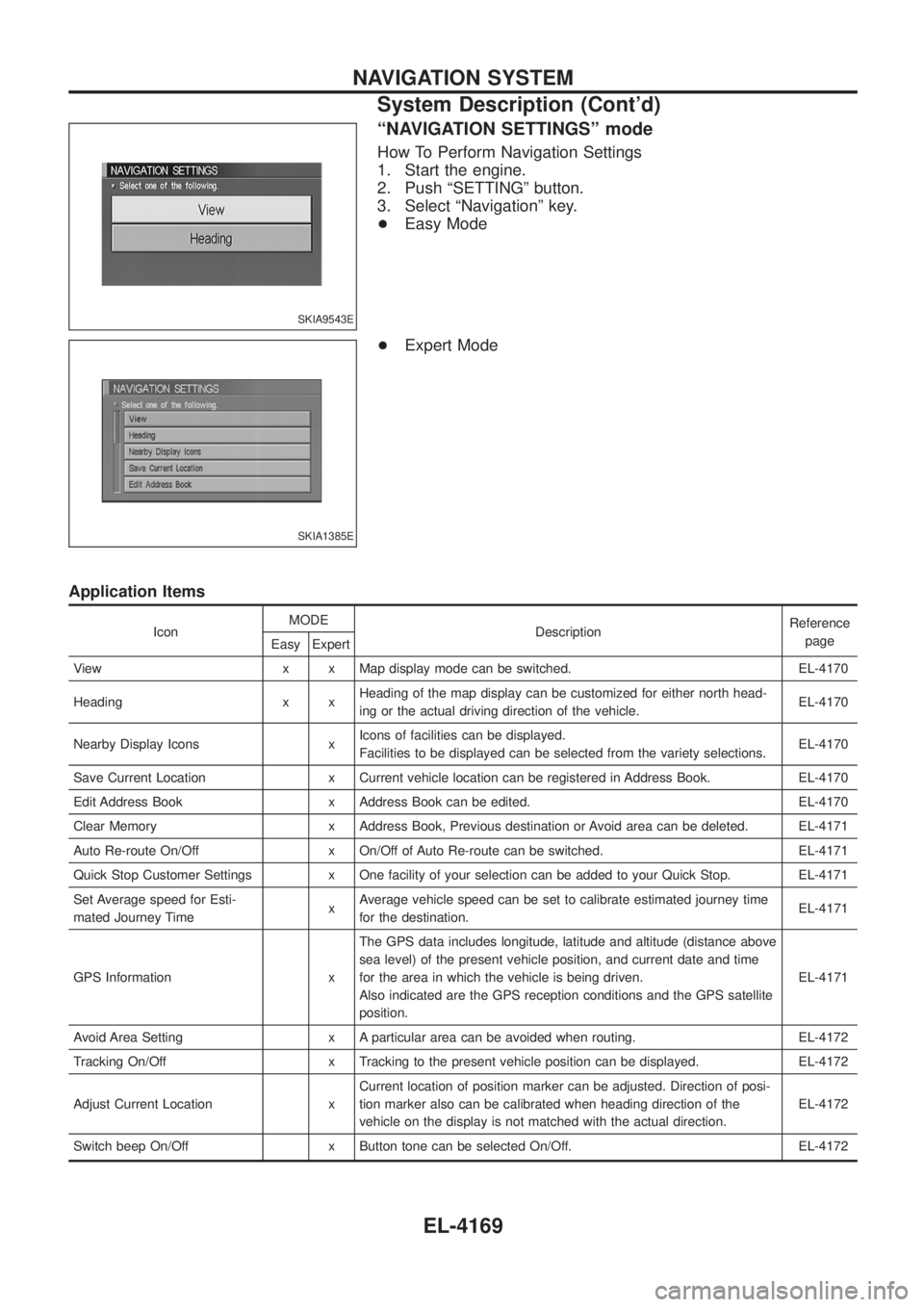
ªNAVIGATION SETTINGSº mode
How To Perform Navigation Settings
1. Start the engine.
2. Push ªSETTINGº button.
3. Select ªNavigationº key.
+Easy Mode
+ Expert Mode
Application Items
Icon MODE
Description Reference
page
Easy Expert
View x x Map display mode can be switched. EL-4170
Heading x x Heading of the map display can be customized for either north head-
ing or the actual driving direction of the vehicle. EL-4170
Nearby Display Icons x Icons of facilities can be displayed.
Facilities to be displayed can be selected from the variety selections. EL-4170
Save Current Location x Current vehicle location can be registered in Address Book. EL-4170
Edit Address Book x Address Book can be edited. EL-4170
Clear Memory x Address Book, Previous destination or Avoid area can be deleted. EL-4171
Auto Re-route On/Off x On/Off of Auto Re-route can be switched. EL-4171
Quick Stop Customer Settings x One facility of your selection can be added to your Quick Stop. EL-4171
Set Average speed for Esti-
mated Journey Time xAverage vehicle speed can be set to calibrate estimated journey time
for the destination. EL-4171
GPS Information x The GPS data includes longitude, latitude and altitude (distance above
sea level) of the present vehicle position, and current date and time
for the area in which the vehicle is being driven.
Also indicated are the GPS reception conditions and the GPS satellite
position. EL-4171
Avoid Area Setting x A particular area can be avoided when routing. EL-4172
Tracking On/Off x Tracking to the present vehicle position can be displayed. EL-4172
Adjust Current Location x Current location of position marker can be adjusted. Direction of posi-
tion marker also can be calibrated when heading direction of the
vehicle on the display is not matched with the actual direction. EL-4172
Switch beep On/Off x Button tone can be selected On/Off. EL-4172
SKIA9543E
SKIA1385E
NAVIGATION SYSTEM
System Description (Cont'd)
EL-4169
Page 267 of 579
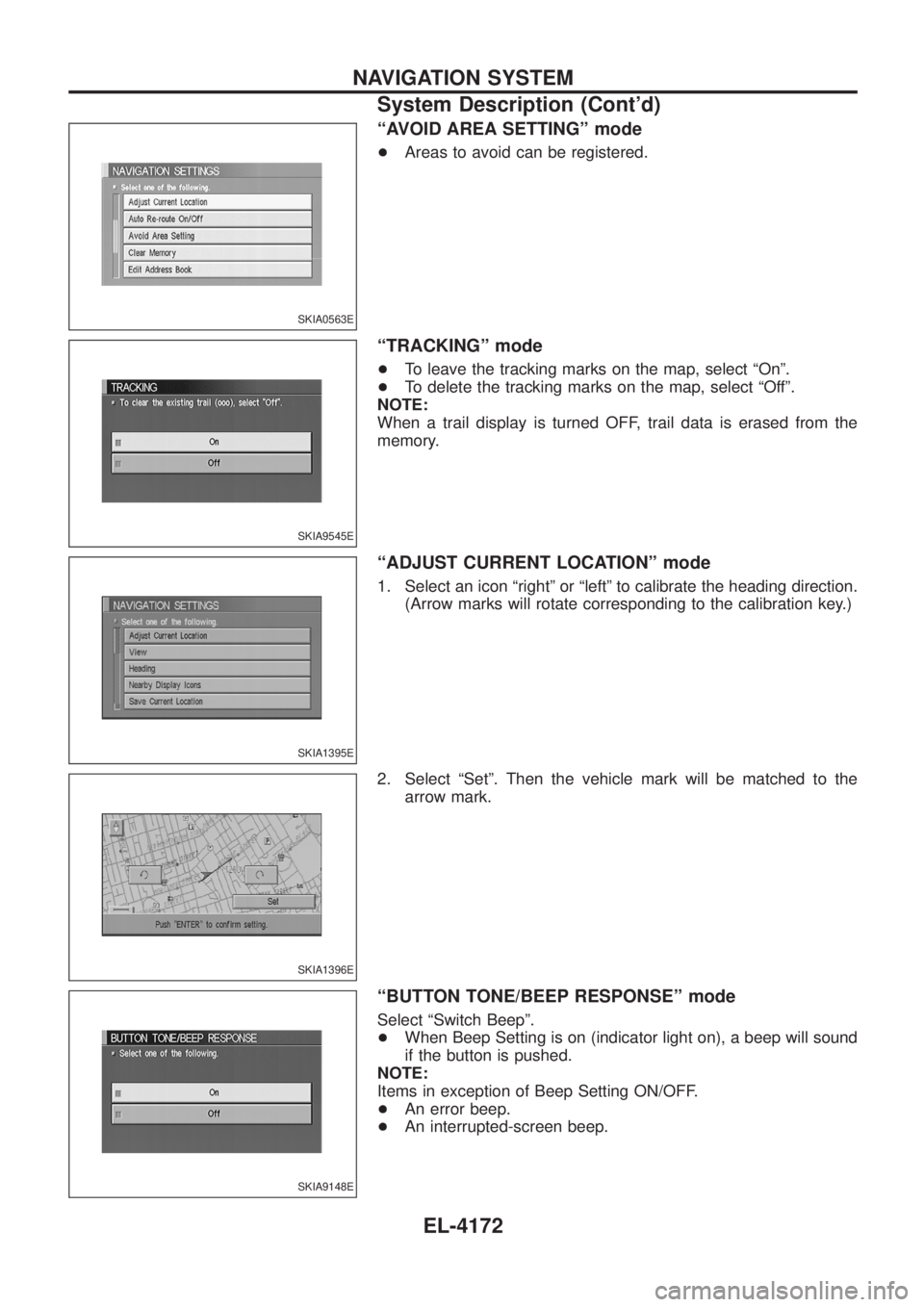
ªAVOID AREA SETTINGº mode
+Areas to avoid can be registered.
ªTRACKINGº mode
+To leave the tracking marks on the map, select ªOnº.
+ To delete the tracking marks on the map, select ªOffº.
NOTE:
When a trail display is turned OFF, trail data is erased from the
memory.
ªADJUST CURRENT LOCATIONº mode
1. Select an icon ªrightº or ªleftº to calibrate the heading direction. (Arrow marks will rotate corresponding to the calibration key.)
2. Select ªSetº. Then the vehicle mark will be matched to the arrow mark.
ªBUTTON TONE/BEEP RESPONSEº mode
Select ªSwitch Beepº.
+When Beep Setting is on (indicator light on), a beep will sound
if the button is pushed.
NOTE:
Items in exception of Beep Setting ON/OFF.
+ An error beep.
+ An interrupted-screen beep.
SKIA0563E
SKIA9545E
SKIA1395E
SKIA1396E
SKIA9148E
NAVIGATION SYSTEM
System Description (Cont'd)
EL-4172
Page 268 of 579
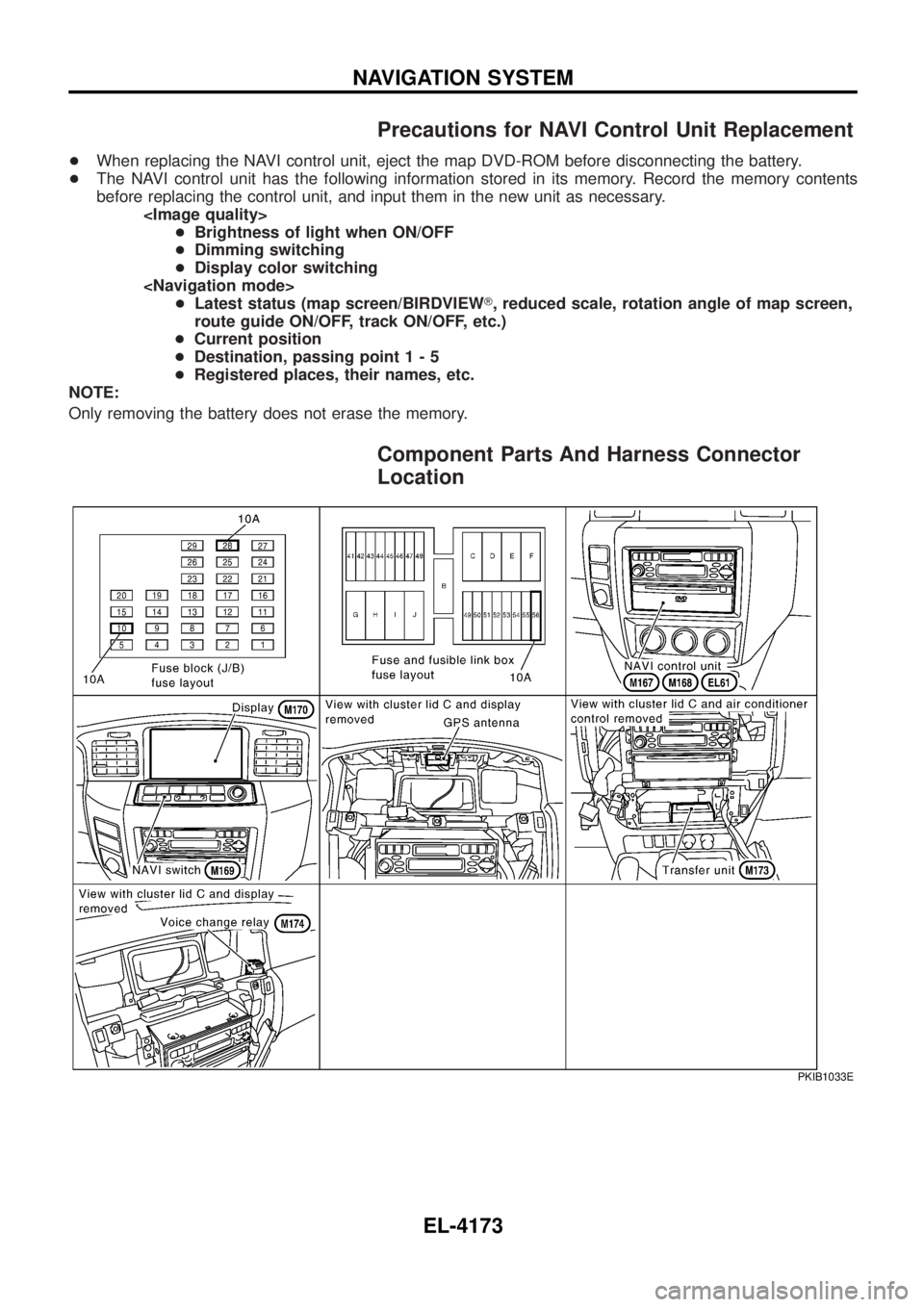
Precautions for NAVI Control Unit Replacement
+When replacing the NAVI control unit, eject the map DVD-ROM before disconnecting the battery.
+ The NAVI control unit has the following information stored in its memory. Record the memory contents
before replacing the control unit, and input them in the new unit as necessary.
+ Dimming switching
+ Display color switching
route guide ON/OFF, track ON/OFF, etc.)
+ Current position
+ Destination, passing poin t1-5
+ Registered places, their names, etc.
NOTE:
Only removing the battery does not erase the memory.
Component Parts And Harness Connector
Location
PKIB1033E
NAVIGATION SYSTEM
EL-4173
Page 278 of 579
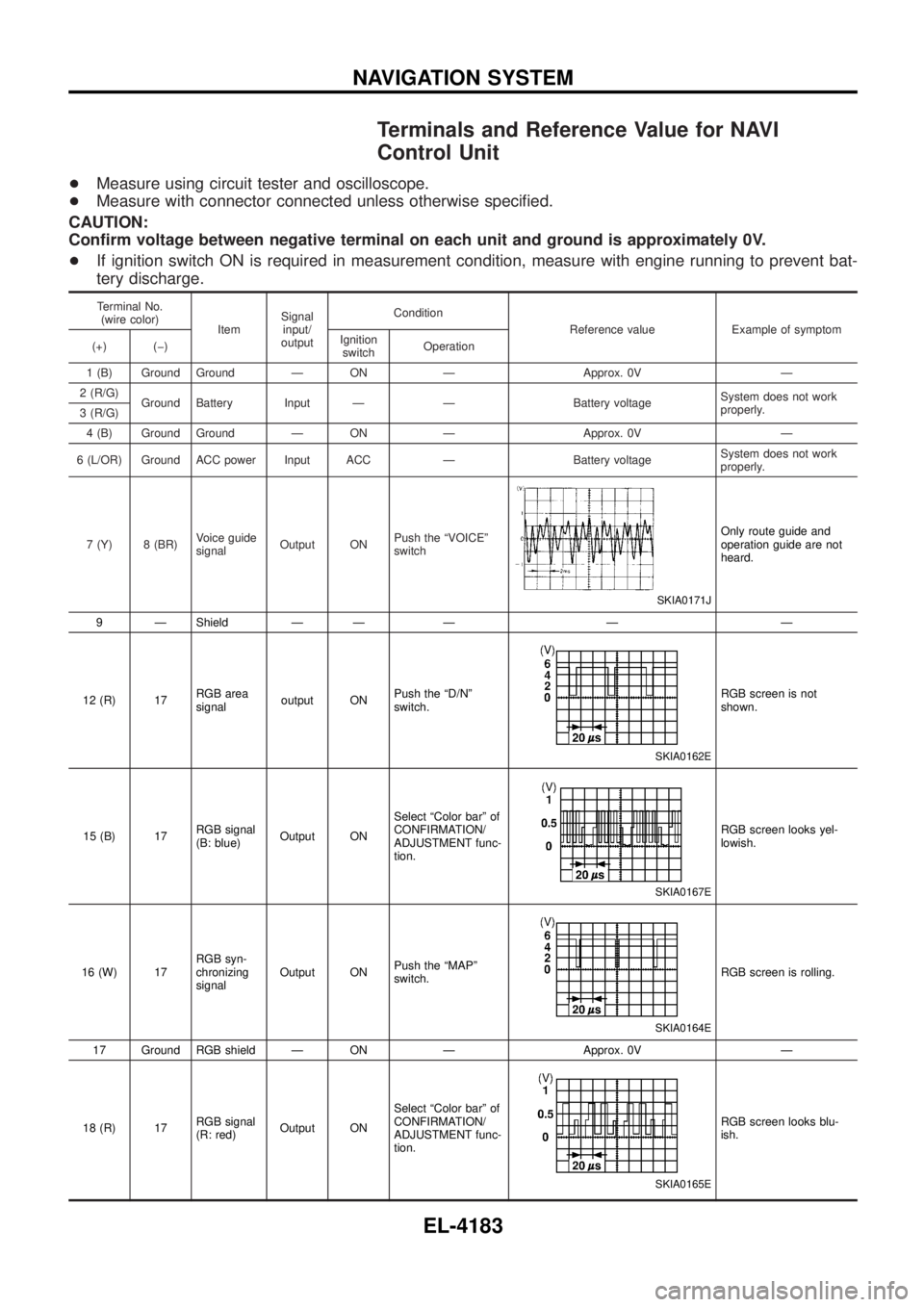
Terminals and Reference Value for NAVI
Control Unit
+Measure using circuit tester and oscilloscope.
+ Measure with connector connected unless otherwise speci®ed.
CAUTION:
Con®rm voltage between negative terminal on each unit and ground is approximately 0V.
+ If ignition switch ON is required in measurement condition, measure with engine running to prevent bat-
tery discharge.
Terminal No.
(wire color) ItemSignal
input/
output Condition
Reference value Example of symptom
(+) (þ) Ignition
switch Operation
1 (B) Ground Ground Ð ON Ð Approx. 0V Ð
2 (R/G) Ground Battery Input Ð Ð Battery voltage System does not work
properly.
3 (R/G)
4 (B) Ground Ground Ð ON Ð Approx. 0V Ð
6 (L/OR) Ground ACC power Input ACC Ð Battery voltage System does not work
properly.
7 (Y) 8 (BR) Voice guide
signalOutput ON Push the ªVOICEº
switch
SKIA0171J
Only route guide and
operation guide are not
heard.
9 Ð Shield Ð Ð Ð Ð Ð
12 (R) 17 RGB area
signaloutput ON Push the ªD/Nº
switch.
SKIA0162E
RGB screen is not
shown.
15 (B) 17 RGB signal
(B: blue)Output ON Select ªColor barº of
CONFIRMATION/
ADJUSTMENT func-
tion.
SKIA0167E
RGB screen looks yel-
lowish.
16 (W) 17 RGB syn-
chronizing
signalOutput ON
Push the ªMAPº
switch.
SKIA0164E
RGB screen is rolling.
17 Ground RGB shield Ð ON Ð Approx. 0V Ð
18 (R) 17 RGB signal
(R: red)Output ON Select ªColor barº of
CONFIRMATION/
ADJUSTMENT func-
tion.
SKIA0165E
RGB screen looks blu-
ish.
NAVIGATION SYSTEM
EL-4183
Page 279 of 579
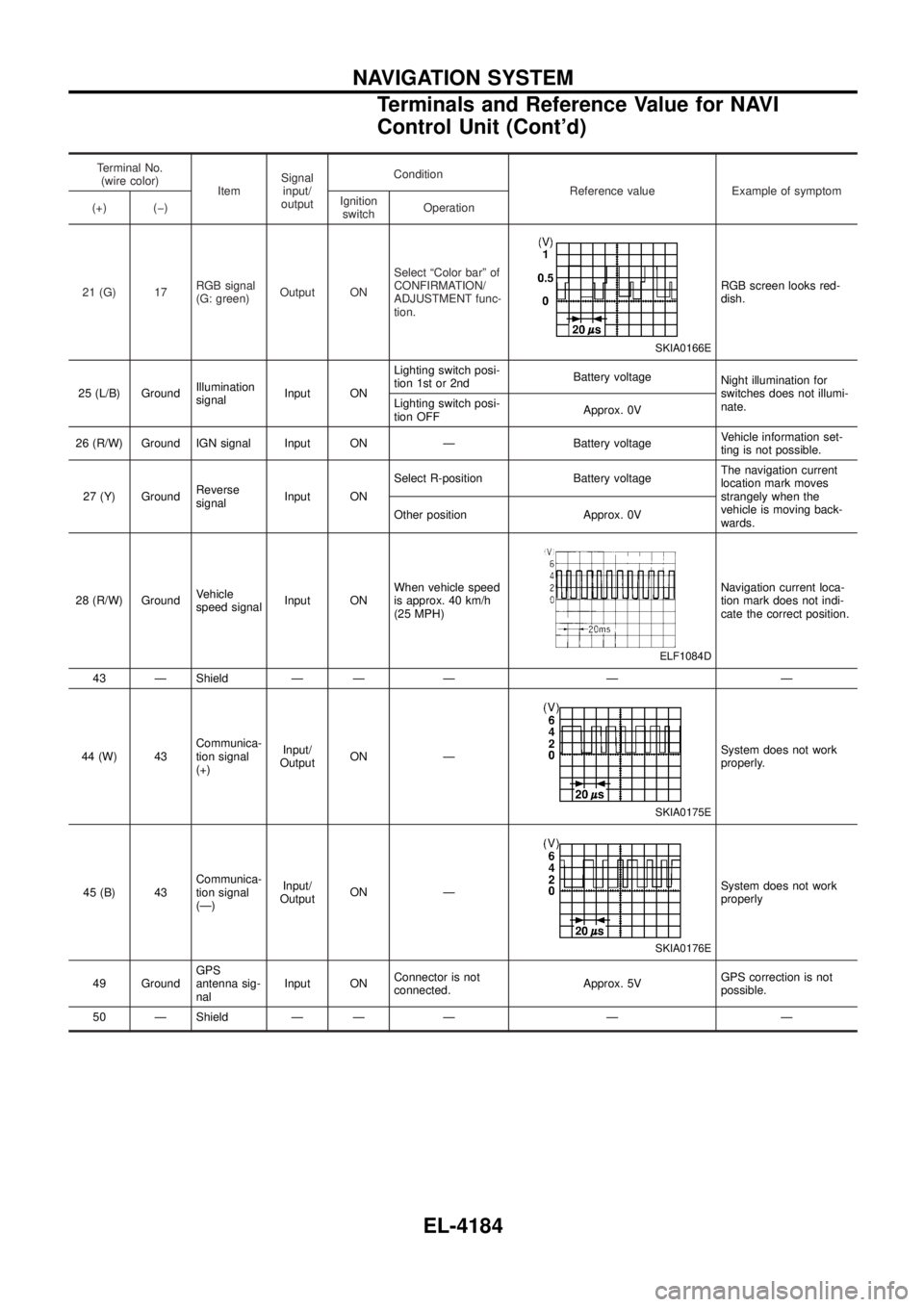
Terminal No.(wire color) ItemSignal
input/
output Condition
Reference value Example of symptom
(+) (þ) Ignition
switch Operation
21 (G) 17 RGB signal
(G: green)Output ON Select ªColor barº of
CONFIRMATION/
ADJUSTMENT func-
tion.
SKIA0166E
RGB screen looks red-
dish.
25 (L/B) Ground Illumination
signalInput ON Lighting switch posi-
tion 1st or 2nd
Battery voltage
Night illumination for
switches does not illumi-
nate.
Lighting switch posi-
tion OFF Approx. 0V
26 (R/W) Ground IGN signal Input ON Ð Battery voltage Vehicle information set-
ting is not possible.
27 (Y) Ground Reverse
signalInput ON Select R-position Battery voltage
The navigation current
location mark moves
strangely when the
vehicle is moving back-
wards.
Other position Approx. 0V
28 (R/W) Ground Vehicle
speed signalInput ON When vehicle speed
is approx. 40 km/h
(25 MPH)
ELF1084D
Navigation current loca-
tion mark does not indi-
cate the correct position.
43 Ð Shield Ð Ð Ð Ð Ð
44 (W) 43 Communica-
tion signal
(+)Input/
Output ON Ð
SKIA0175E
System does not work
properly.
45 (B) 43 Communica-
tion signal
(Ð)Input/
Output ON Ð
SKIA0176E
System does not work
properly
49 Ground GPS
antenna sig-
nalInput ON
Connector is not
connected. Approx. 5VGPS correction is not
possible.
50 Ð Shield Ð Ð Ð Ð Ð
NAVIGATION SYSTEM
Terminals and Reference Value for NAVI
Control Unit (Cont'd)
EL-4184
Page 280 of 579
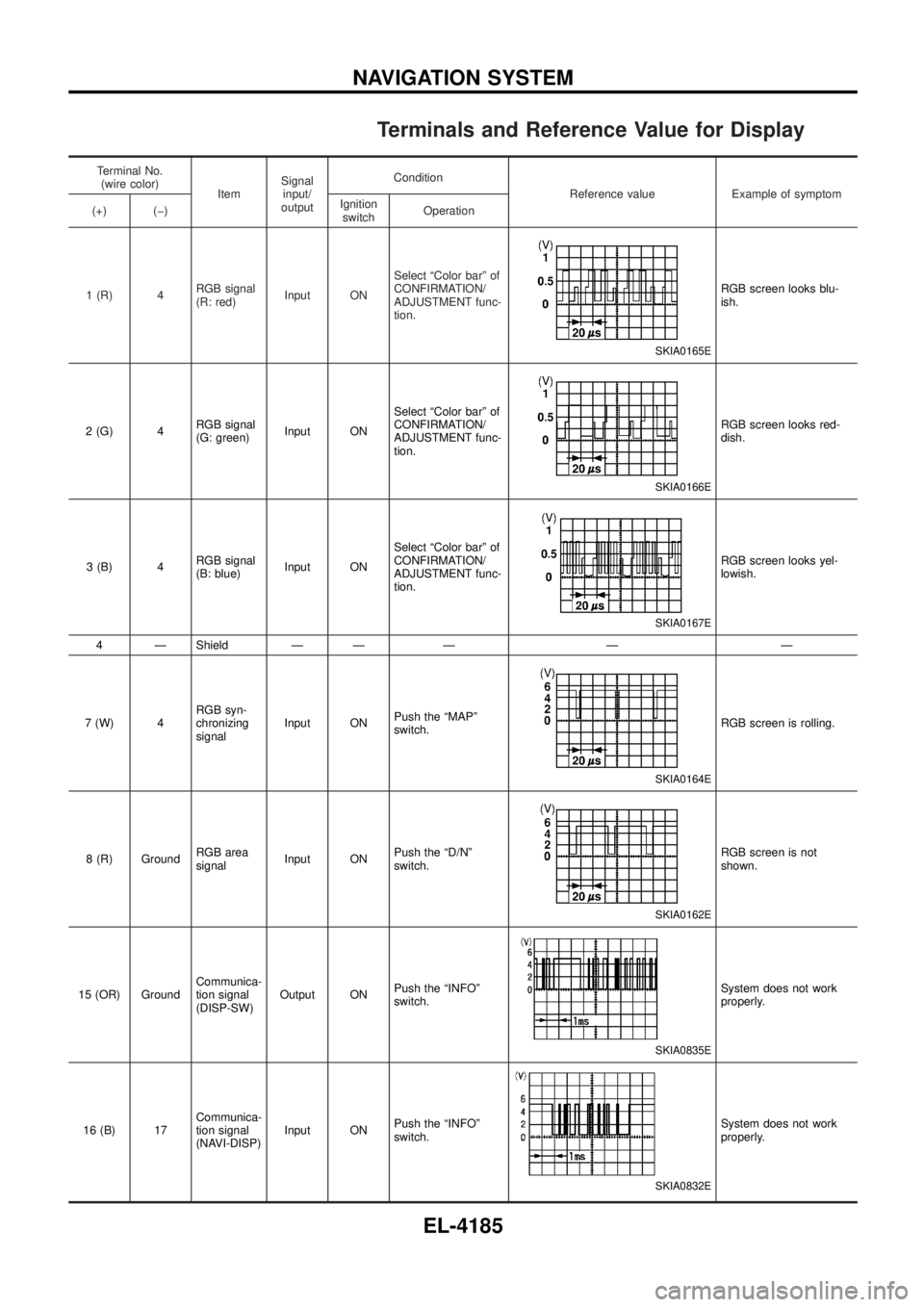
Terminals and Reference Value for Display
Terminal No.(wire color) ItemSignal
input/
output Condition
Reference value Example of symptom
(+) (þ) Ignition
switch Operation
1 (R) 4 RGB signal
(R: red)Input ON Select ªColor barº of
CONFIRMATION/
ADJUSTMENT func-
tion.
SKIA0165E
RGB screen looks blu-
ish.
2 (G) 4 RGB signal
(G: green)Input ON Select ªColor barº of
CONFIRMATION/
ADJUSTMENT func-
tion.
SKIA0166E
RGB screen looks red-
dish.
3 (B) 4 RGB signal
(B: blue)Input ON Select ªColor barº of
CONFIRMATION/
ADJUSTMENT func-
tion.
SKIA0167E
RGB screen looks yel-
lowish.
4 Ð Shield Ð Ð Ð Ð Ð
7 (W) 4 RGB syn-
chronizing
signalInput ON
Push the ªMAPº
switch.
SKIA0164E
RGB screen is rolling.
8 (R) Ground RGB area
signalInput ON Push the ªD/Nº
switch.
SKIA0162E
RGB screen is not
shown.
15 (OR) Ground Communica-
tion signal
(DISP-SW)Output ON
Push the ªINFOº
switch.
SKIA0835E
System does not work
properly.
16 (B) 17 Communica-
tion signal
(NAVI-DISP)Input ON
Push the ªINFOº
switch.
SKIA0832E
System does not work
properly.
NAVIGATION SYSTEM
EL-4185
Page 281 of 579
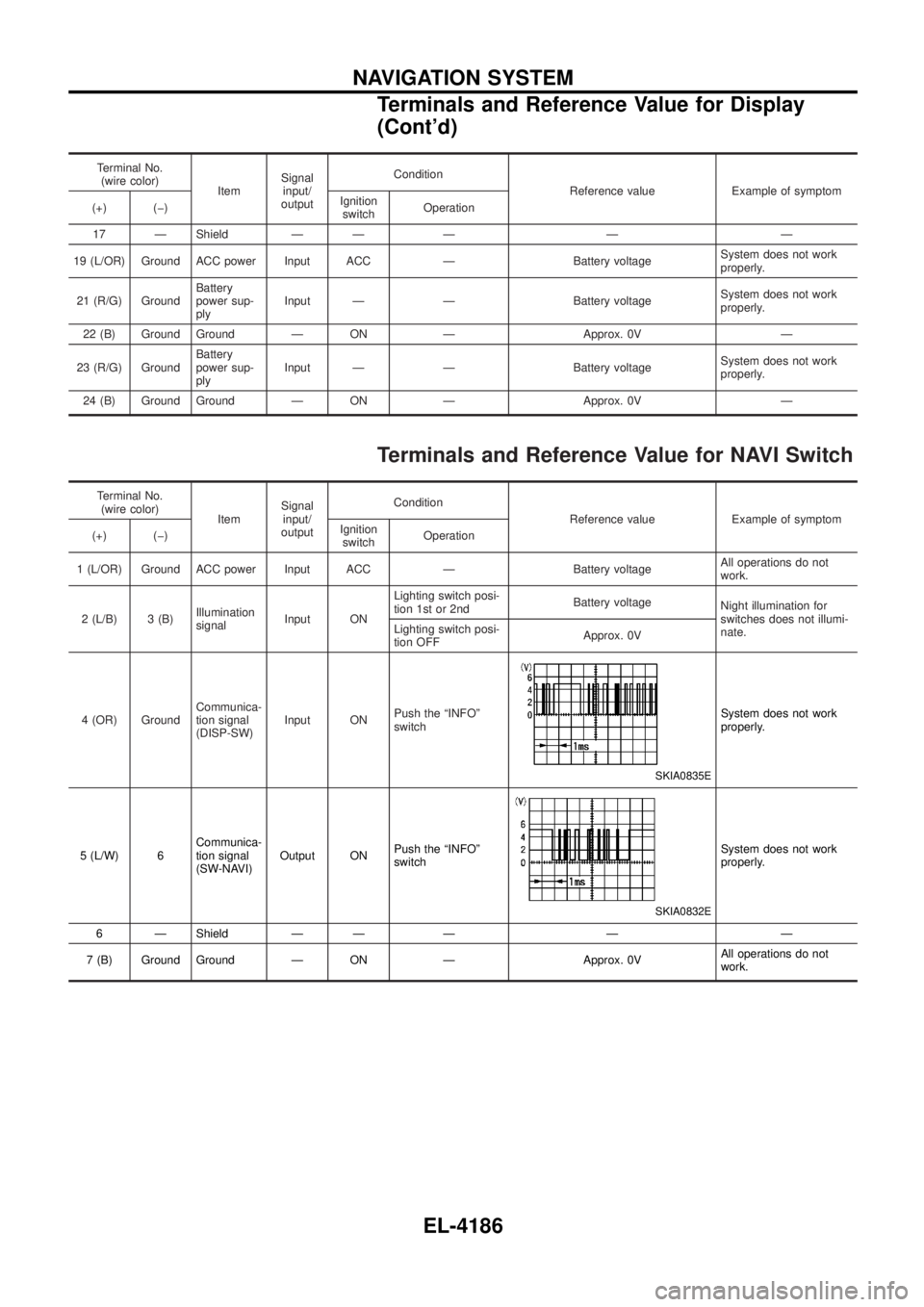
Terminal No.(wire color) ItemSignal
input/
output Condition
Reference value Example of symptom
(+) (þ) Ignition
switch Operation
17 Ð Shield Ð Ð Ð Ð Ð
19 (L/OR) Ground ACC power Input ACC Ð Battery voltage System does not work
properly.
21 (R/G) Ground Battery
power sup-
plyInput Ð Ð Battery voltage
System does not work
properly.
22 (B) Ground Ground Ð ON Ð Approx. 0V Ð
23 (R/G) Ground Battery
power sup-
plyInput Ð Ð Battery voltage
System does not work
properly.
24 (B) Ground Ground Ð ON Ð Approx. 0V Ð
Terminals and Reference Value for NAVI Switch
Terminal No. (wire color) ItemSignal
input/
output Condition
Reference value Example of symptom
(+) (þ) Ignition
switch Operation
1 (L/OR) Ground ACC power Input ACC Ð Battery voltage All operations do not
work.
2 (L/B) 3 (B) Illumination
signalInput ON Lighting switch posi-
tion 1st or 2nd
Battery voltage
Night illumination for
switches does not illumi-
nate.
Lighting switch posi-
tion OFF Approx. 0V
4 (OR) Ground Communica-
tion signal
(DISP-SW)Input ON
Push the ªINFOº
switch
SKIA0835E
System does not work
properly.
5 (L/W) 6 Communica-
tion signal
(SW-NAVI)Output ON
Push the ªINFOº
switch
SKIA0832E
System does not work
properly.
6 Ð Shield Ð Ð Ð Ð Ð
7 (B) Ground Ground Ð ON Ð Approx. 0V All operations do not
work.
NAVIGATION SYSTEM
Terminals and Reference Value for Display
(Cont'd)
EL-4186
Page 282 of 579
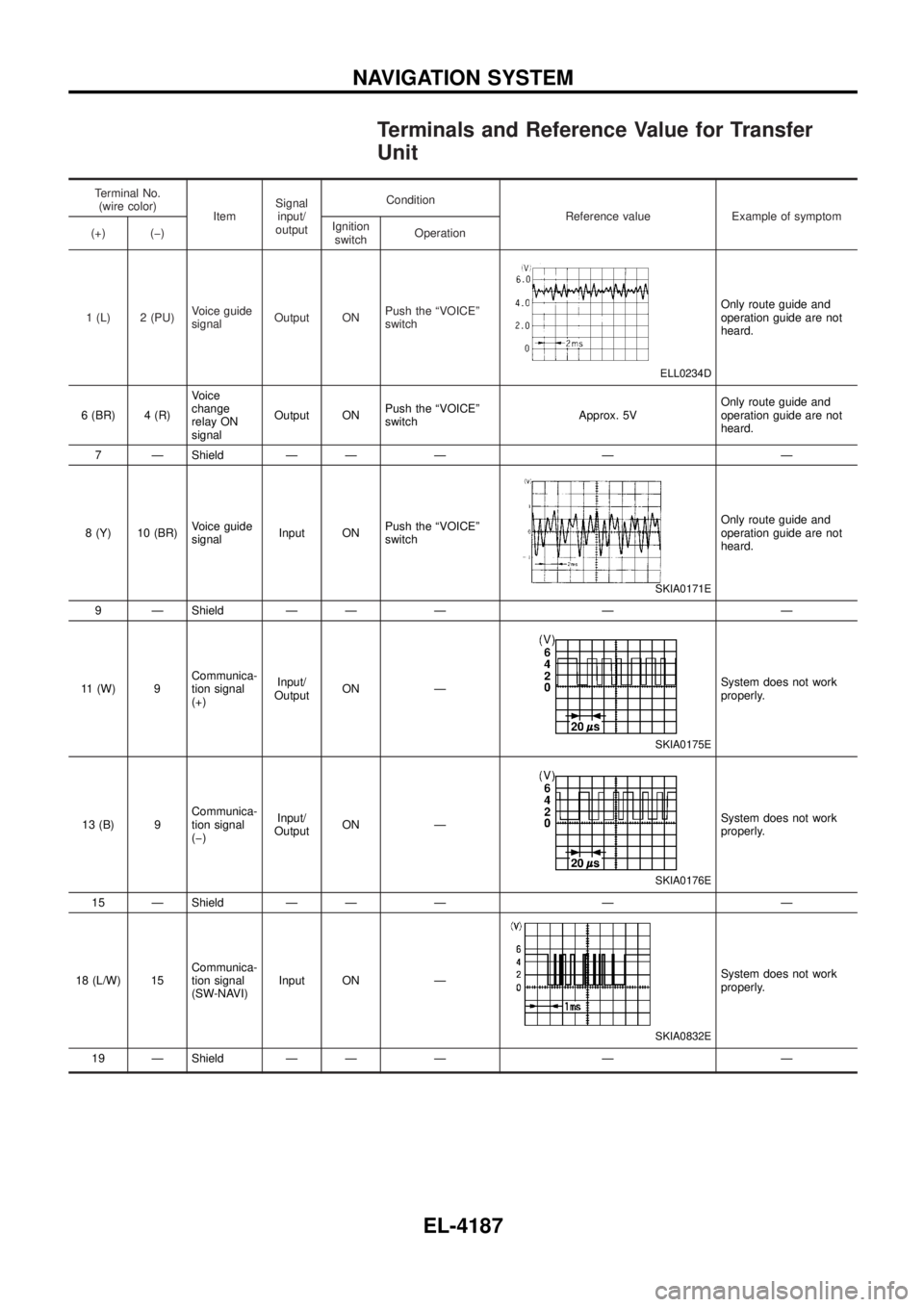
Terminals and Reference Value for Transfer
Unit
Terminal No.(wire color) ItemSignal
input/
output Condition
Reference value Example of symptom
(+) (þ) Ignition
switch Operation
1 (L) 2 (PU) Voice guide
signalOutput ON Push the ªVOICEº
switch
ELL0234D
Only route guide and
operation guide are not
heard.
6 (BR) 4 (R) Voice
change
relay ON
signalOutput ON
Push the ªVOICEº
switch Approx. 5VOnly route guide and
operation guide are not
heard.
7 Ð Shield Ð Ð Ð Ð Ð
8 (Y) 10 (BR) Voice guide
signalInput ON Push the ªVOICEº
switch
SKIA0171E
Only route guide and
operation guide are not
heard.
9 Ð Shield Ð Ð Ð Ð Ð
11 (W) 9 Communica-
tion signal
(+)Input/
Output ON Ð
SKIA0175E
System does not work
properly.
13 (B) 9 Communica-
tion signal
(þ)Input/
Output ON Ð
SKIA0176E
System does not work
properly.
15 Ð Shield Ð Ð Ð Ð Ð
18 (L/W) 15 Communica-
tion signal
(SW-NAVI)Input ON Ð
SKIA0832E
System does not work
properly.
19 Ð Shield Ð Ð Ð Ð Ð
NAVIGATION SYSTEM
EL-4187