AT indicator NISSAN PATROL 2004 Electronic Repair Manual
[x] Cancel search | Manufacturer: NISSAN, Model Year: 2004, Model line: PATROL, Model: NISSAN PATROL 2004Pages: 579, PDF Size: 26.61 MB
Page 18 of 579
SECTION
BR
MODIFICATION NOTICE:
+ Engine direction indicator stamp has been added to brake booster hose.
+ Service data and speci®cations (SDS) have been changed.
CONTENTS
VACUUM PIPING .......................................................4002
Vacuum Hose ........................................................4002 SERVICE DATA AND SPECIFICATIONS (SDS)
......4003
General Speci®cations ...........................................4003
BR-4001
Page 76 of 579
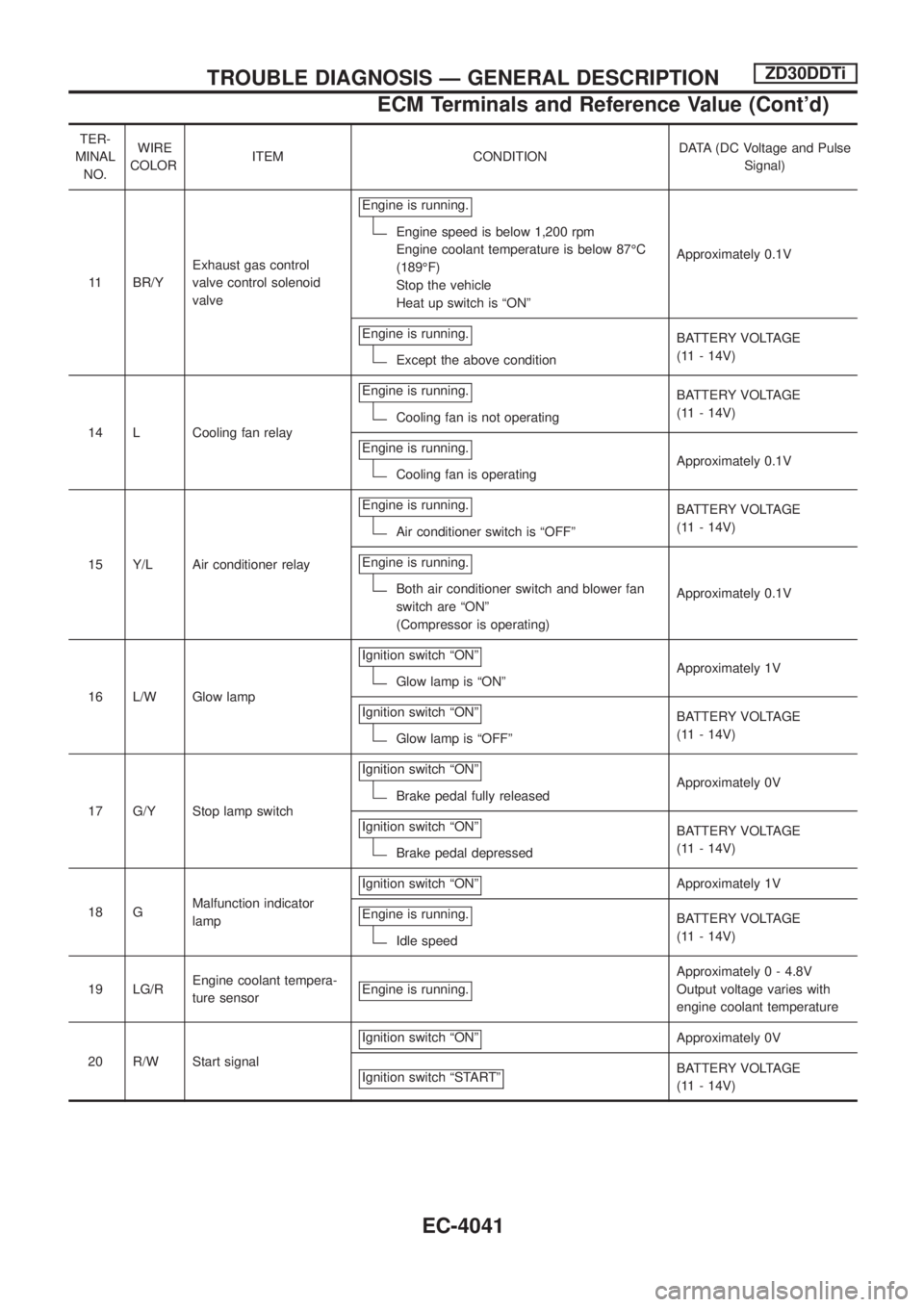
TER-
MINAL
NO.WIRE
COLORITEM CONDITIONDATA (DC Voltage and Pulse
Signal)
11 BR/YExhaust gas control
valve control solenoid
valveEngine is running.
Engine speed is below 1,200 rpm
Engine coolant temperature is below 87ÉC
(189ÉF)
Stop the vehicle
Heat up switch is ªONºApproximately 0.1V
Engine is running.
Except the above conditionBATTERY VOLTAGE
(11 - 14V)
14 L Cooling fan relayEngine is running.
Cooling fan is not operatingBATTERY VOLTAGE
(11 - 14V)
Engine is running.
Cooling fan is operatingApproximately 0.1V
15 Y/L Air conditioner relayEngine is running.
Air conditioner switch is ªOFFºBATTERY VOLTAGE
(11 - 14V)
Engine is running.
Both air conditioner switch and blower fan
switch are ªONº
(Compressor is operating)Approximately 0.1V
16 L/W Glow lampIgnition switch ªONº
Glow lamp is ªONºApproximately 1V
Ignition switch ªONº
Glow lamp is ªOFFºBATTERY VOLTAGE
(11 - 14V)
17 G/Y Stop lamp switchIgnition switch ªONº
Brake pedal fully releasedApproximately 0V
Ignition switch ªONº
Brake pedal depressedBATTERY VOLTAGE
(11 - 14V)
18 GMalfunction indicator
lampIgnition switch ªONº
Approximately 1V
Engine is running.
Idle speedBATTERY VOLTAGE
(11 - 14V)
19 LG/REngine coolant tempera-
ture sensorEngine is running.
Approximately 0 - 4.8V
Output voltage varies with
engine coolant temperature
20 R/W Start signalIgnition switch ªONº
Approximately 0V
Ignition switch ªSTARTº
BATTERY VOLTAGE
(11 - 14V)
TROUBLE DIAGNOSIS Ð GENERAL DESCRIPTIONZD30DDTi
ECM Terminals and Reference Value (Cont'd)
EC-4041
Page 92 of 579
8 CHECK HEAT UP SWITCH INDICATOR LAMP GROUND CIRCUIT FOR OPEN OR SHORT
1. Check harness continuity between heat up switch terminal 6 and ground.
Refer to Wiring Diagram.
Continuity should exist.
2. Also check harness for short to power.
OK or NG
OKcGO TO 9.
NGcRepair open circuit or short to power in harness or connectors.
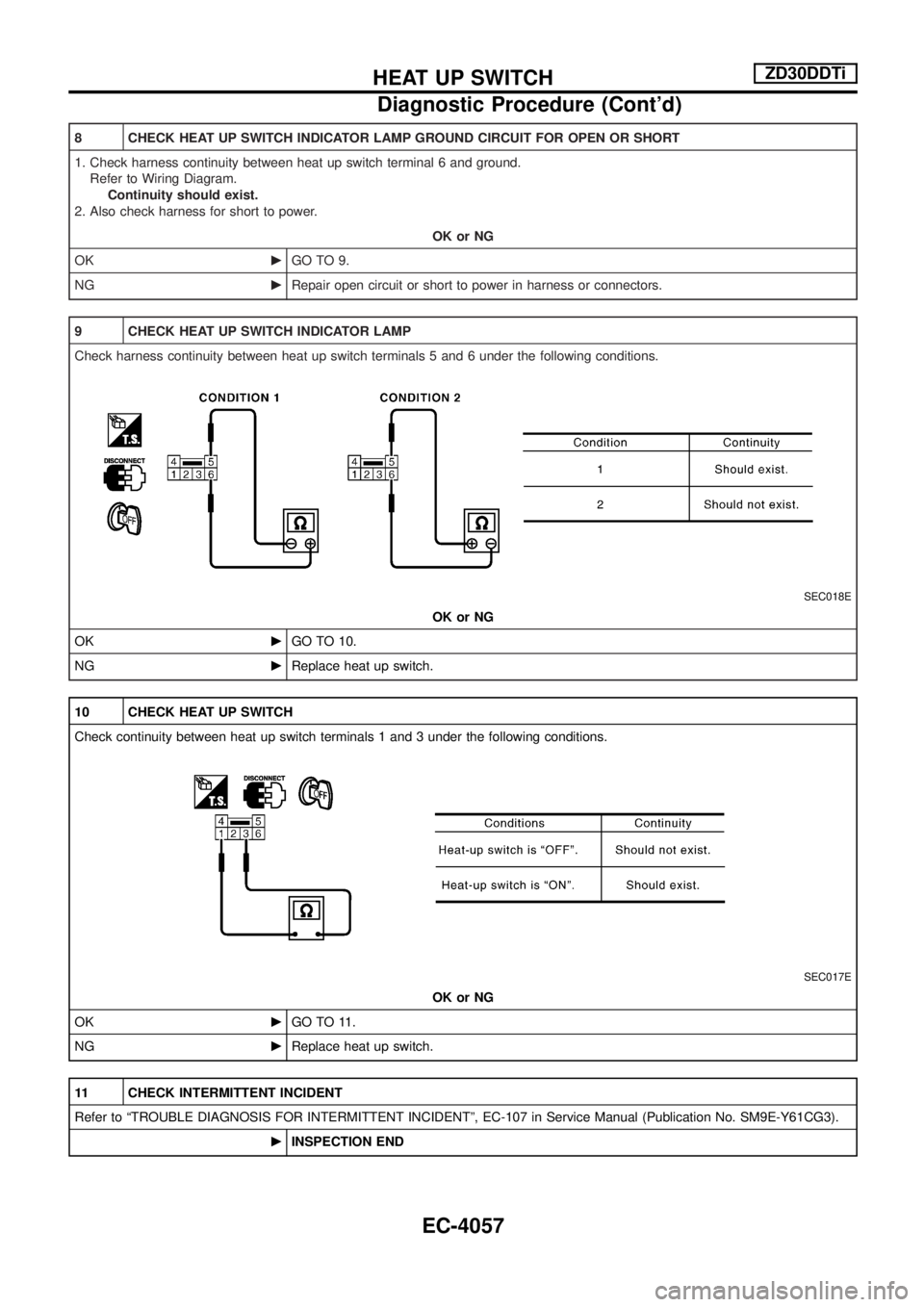
9 CHECK HEAT UP SWITCH INDICATOR LAMP
Check harness continuity between heat up switch terminals 5 and 6 under the following conditions.
SEC018E
OK or NG
OKcGO TO 10.
NGcReplace heat up switch.
10 CHECK HEAT UP SWITCH
Check continuity between heat up switch terminals 1 and 3 under the following conditions.
SEC017E
OK or NG
OKcGO TO 11.
NGcReplace heat up switch.
11 CHECK INTERMITTENT INCIDENT
Refer to ªTROUBLE DIAGNOSIS FOR INTERMITTENT INCIDENTº, EC-107 in Service Manual (Publication No. SM9E-Y61CG3).
cINSPECTION END
HEAT UP SWITCHZD30DDTi
Diagnostic Procedure (Cont'd)
EC-4057
Page 267 of 579
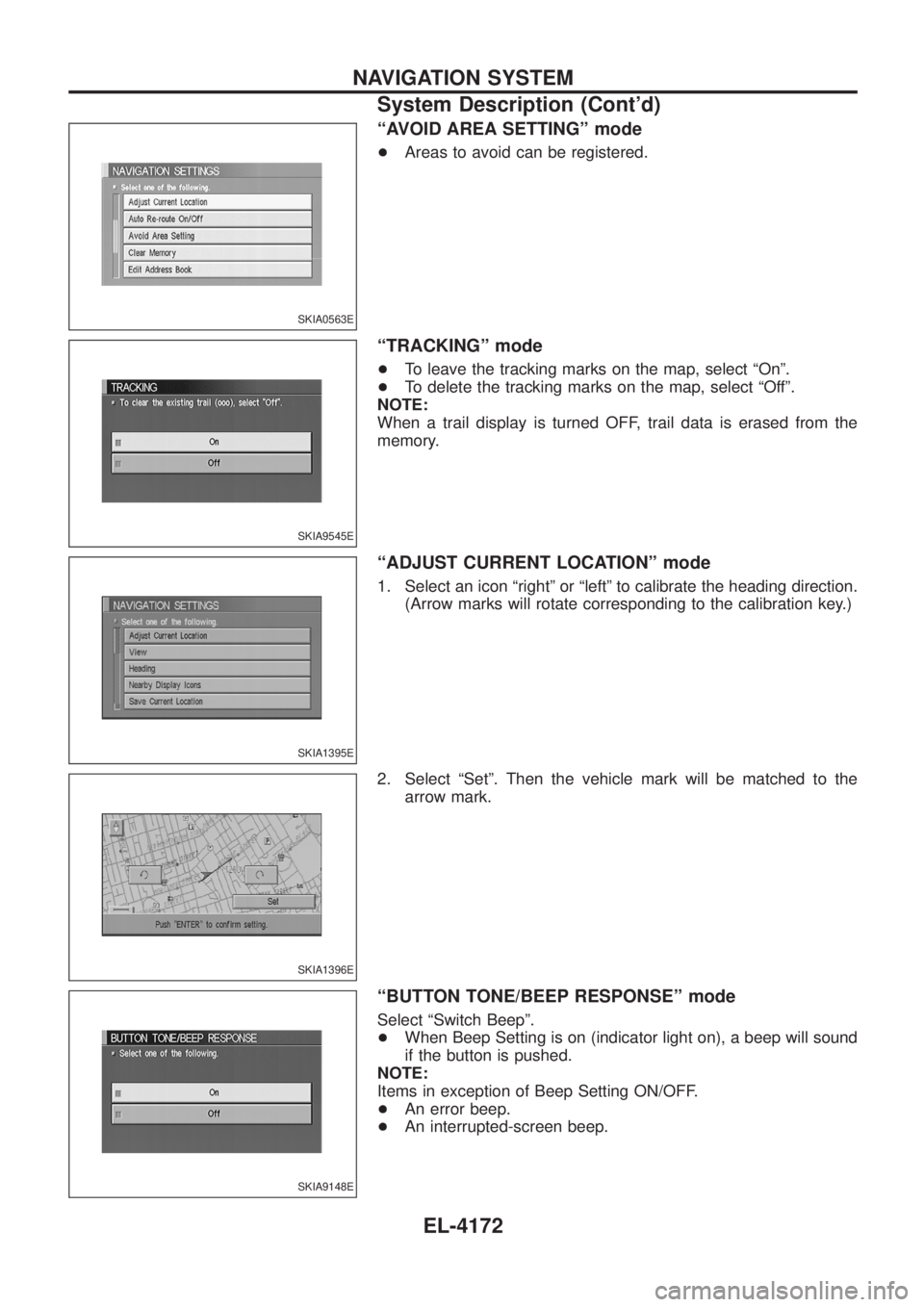
ªAVOID AREA SETTINGº mode
+Areas to avoid can be registered.
ªTRACKINGº mode
+To leave the tracking marks on the map, select ªOnº.
+ To delete the tracking marks on the map, select ªOffº.
NOTE:
When a trail display is turned OFF, trail data is erased from the
memory.
ªADJUST CURRENT LOCATIONº mode
1. Select an icon ªrightº or ªleftº to calibrate the heading direction. (Arrow marks will rotate corresponding to the calibration key.)
2. Select ªSetº. Then the vehicle mark will be matched to the arrow mark.
ªBUTTON TONE/BEEP RESPONSEº mode
Select ªSwitch Beepº.
+When Beep Setting is on (indicator light on), a beep will sound
if the button is pushed.
NOTE:
Items in exception of Beep Setting ON/OFF.
+ An error beep.
+ An interrupted-screen beep.
SKIA0563E
SKIA9545E
SKIA1395E
SKIA1396E
SKIA9148E
NAVIGATION SYSTEM
System Description (Cont'd)
EL-4172
Page 290 of 579
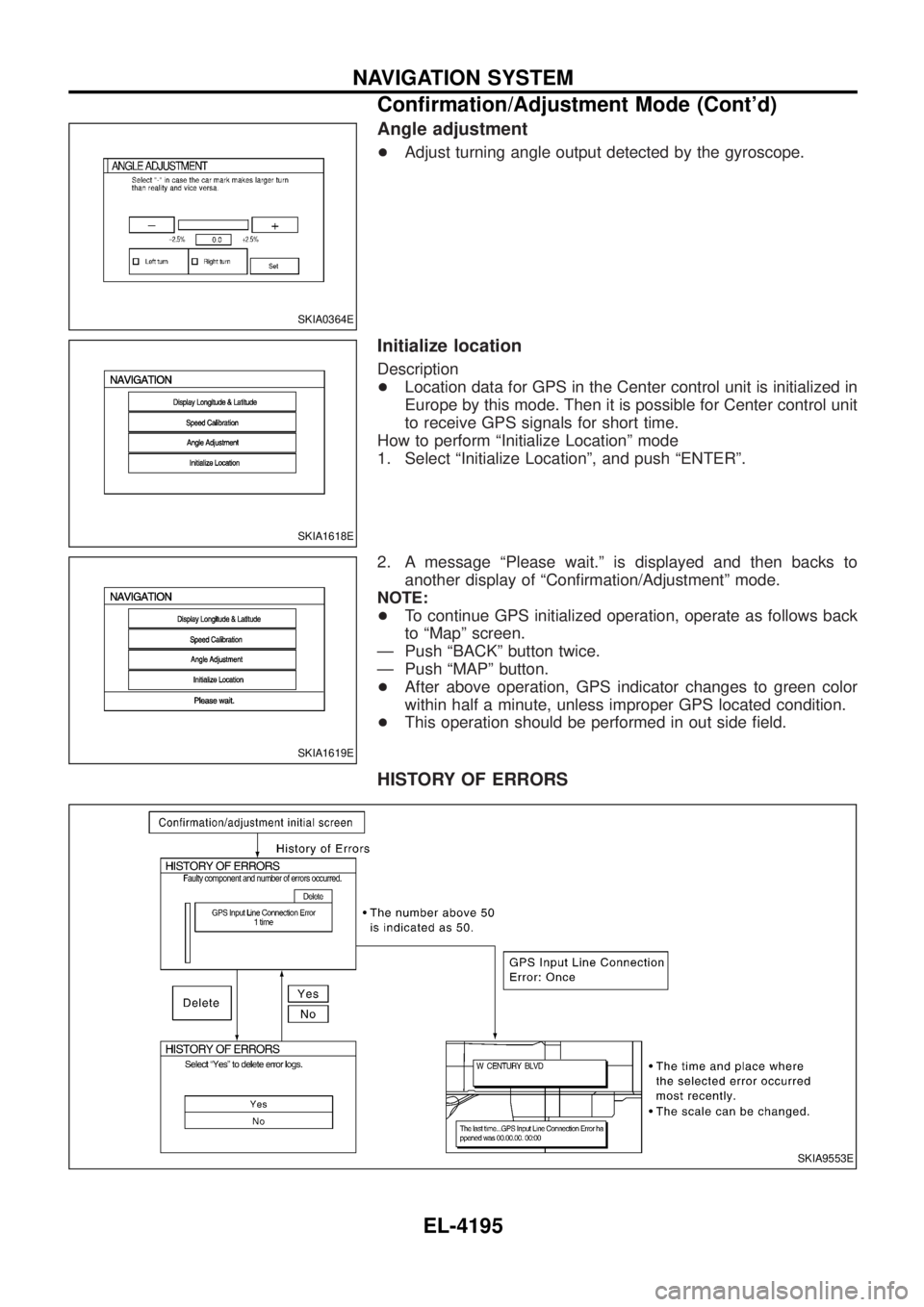
Angle adjustment
+Adjust turning angle output detected by the gyroscope.
Initialize location
Description
+Location data for GPS in the Center control unit is initialized in
Europe by this mode. Then it is possible for Center control unit
to receive GPS signals for short time.
How to perform ªInitialize Locationº mode
1. Select ªInitialize Locationº, and push ªENTERº.
2. A message ªPlease wait.º is displayed and then backs to another display of ªCon®rmation/Adjustmentº mode.
NOTE:
+ To continue GPS initialized operation, operate as follows back
to ªMapº screen.
Ð Push ªBACKº button twice.
Ð Push ªMAPº button.
+ After above operation, GPS indicator changes to green color
within half a minute, unless improper GPS located condition.
+ This operation should be performed in out side ®eld.
HISTORY OF ERRORS
SKIA0364E
SKIA1618E
SKIA1619E
SKIA9553E
NAVIGATION SYSTEM
Con®rmation/Adjustment Mode (Cont'd)
EL-4195
Page 303 of 579
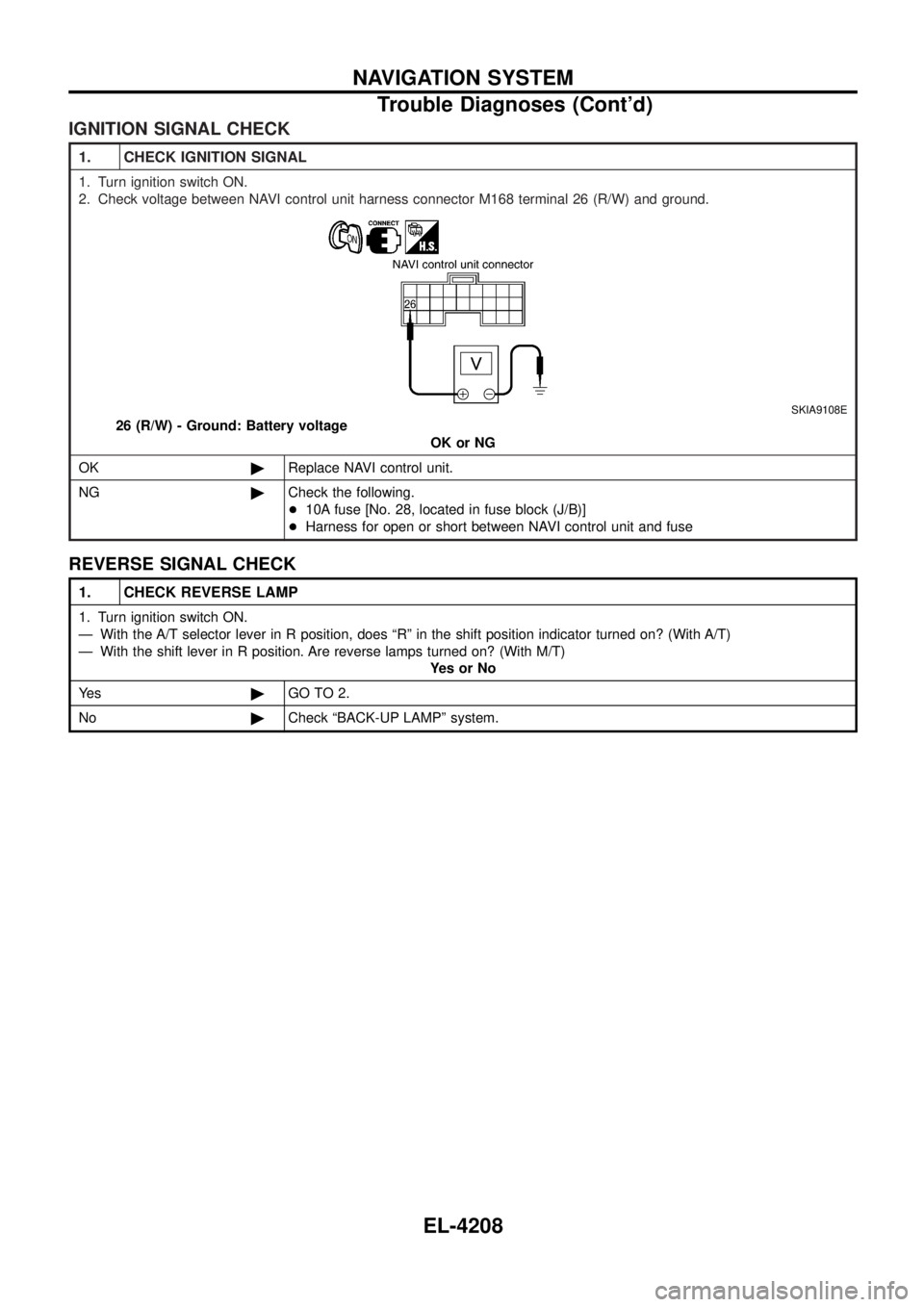
IGNITION SIGNAL CHECK
1. CHECK IGNITION SIGNAL
1. Turn ignition switch ON.
2. Check voltage between NAVI control unit harness connector M168 terminal 26 (R/W) and ground.
SKIA9108E
26 (R/W) - Ground: Battery voltageOK or NG
OK ©Replace NAVI control unit.
NG ©Check the following.
+10A fuse [No. 28, located in fuse block (J/B)]
+ Harness for open or short between NAVI control unit and fuse
REVERSE SIGNAL CHECK
1. CHECK REVERSE LAMP
1. Turn ignition switch ON.
Ð With the A/T selector lever in R position, does ªRº in the shift position indicator turned on? (With A/T)
Ð With the shift lever in R position. Are reverse lamps turned on? (With M/T)
YesorNo
Ye s ©GO TO 2.
No ©Check ªBACK-UP LAMPº system.
NAVIGATION SYSTEM
Trouble Diagnoses (Cont'd)
EL-4208
Page 313 of 579
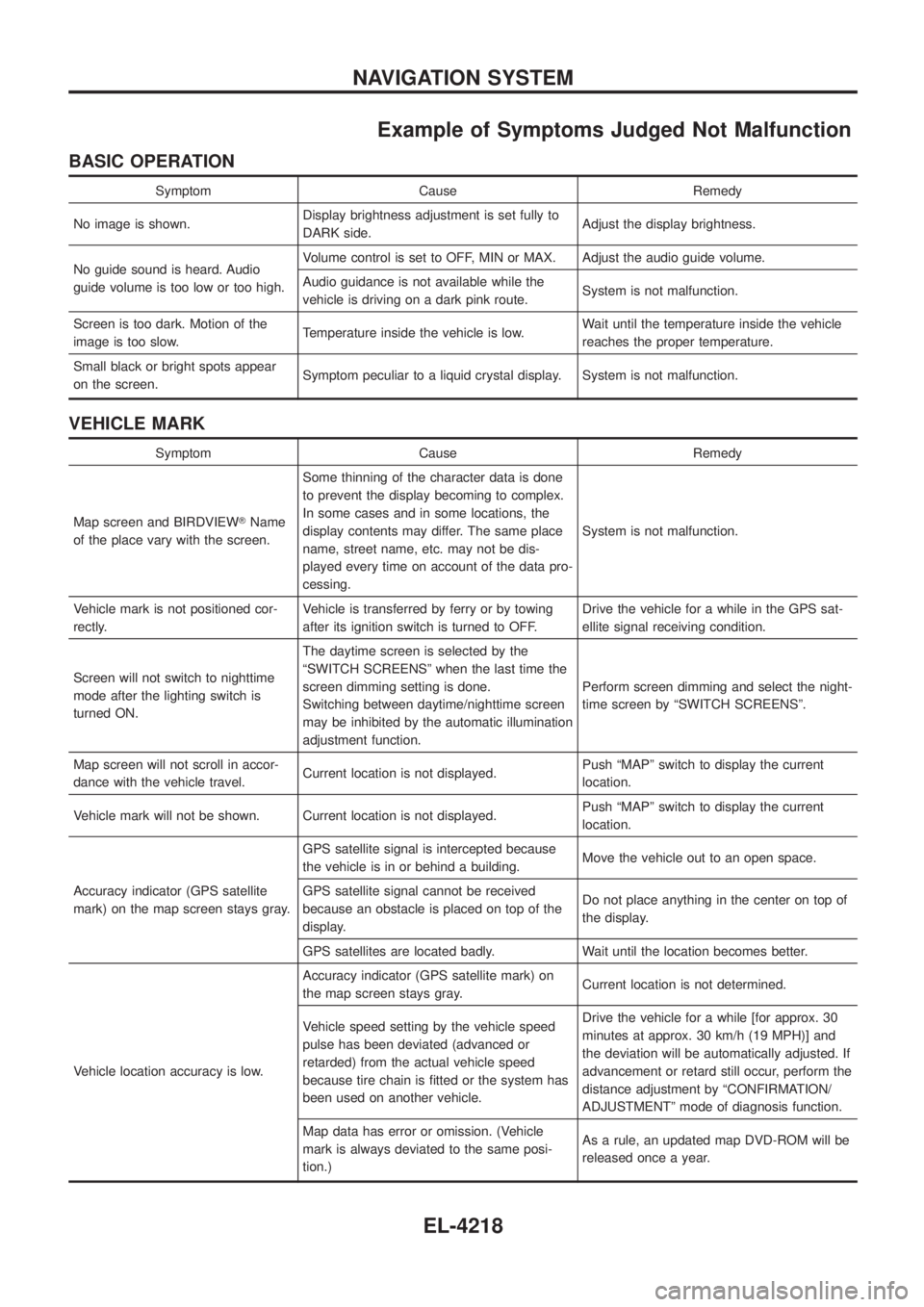
Example of Symptoms Judged Not Malfunction
BASIC OPERATION
Symptom Cause Remedy
No image is shown. Display brightness adjustment is set fully to
DARK side. Adjust the display brightness.
No guide sound is heard. Audio
guide volume is too low or too high. Volume control is set to OFF, MIN or MAX. Adjust the audio guide volume.
Audio guidance is not available while the
vehicle is driving on a dark pink route.
System is not malfunction.
Screen is too dark. Motion of the
image is too slow. Temperature inside the vehicle is low. Wait until the temperature inside the vehicle
reaches the proper temperature.
Small black or bright spots appear
on the screen. Symptom peculiar to a liquid crystal display. System is not malfunction.
VEHICLE MARK
Symptom Cause Remedy
Map screen and BIRDVIEW TName
of the place vary with the screen. Some thinning of the character data is done
to prevent the display becoming to complex.
In some cases and in some locations, the
display contents may differ. The same place
name, street name, etc. may not be dis-
played every time on account of the data pro-
cessing.
System is not malfunction.
Vehicle mark is not positioned cor-
rectly. Vehicle is transferred by ferry or by towing
after its ignition switch is turned to OFF. Drive the vehicle for a while in the GPS sat-
ellite signal receiving condition.
Screen will not switch to nighttime
mode after the lighting switch is
turned ON. The daytime screen is selected by the
ªSWITCH SCREENSº when the last time the
screen dimming setting is done.
Switching between daytime/nighttime screen
may be inhibited by the automatic illumination
adjustment function.
Perform screen dimming and select the night-
time screen by ªSWITCH SCREENSº.
Map screen will not scroll in accor-
dance with the vehicle travel. Current location is not displayed. Push ªMAPº switch to display the current
location.
Vehicle mark will not be shown. Current location is not displayed. Push ªMAPº switch to display the current
location.
Accuracy indicator (GPS satellite
mark) on the map screen stays gray. GPS satellite signal is intercepted because
the vehicle is in or behind a building.
Move the vehicle out to an open space.
GPS satellite signal cannot be received
because an obstacle is placed on top of the
display. Do not place anything in the center on top of
the display.
GPS satellites are located badly. Wait until the location becomes better.
Vehicle location accuracy is low. Accuracy indicator (GPS satellite mark) on
the map screen stays gray.
Current location is not determined.
Vehicle speed setting by the vehicle speed
pulse has been deviated (advanced or
retarded) from the actual vehicle speed
because tire chain is ®tted or the system has
been used on another vehicle. Drive the vehicle for a while [for approx. 30
minutes at approx. 30 km/h (19 MPH)] and
the deviation will be automatically adjusted. If
advancement or retard still occur, perform the
distance adjustment by ªCONFIRMATION/
ADJUSTMENTº mode of diagnosis function.
Map data has error or omission. (Vehicle
mark is always deviated to the same posi-
tion.) As a rule, an updated map DVD-ROM will be
released once a year.
NAVIGATION SYSTEM
EL-4218
Page 461 of 579
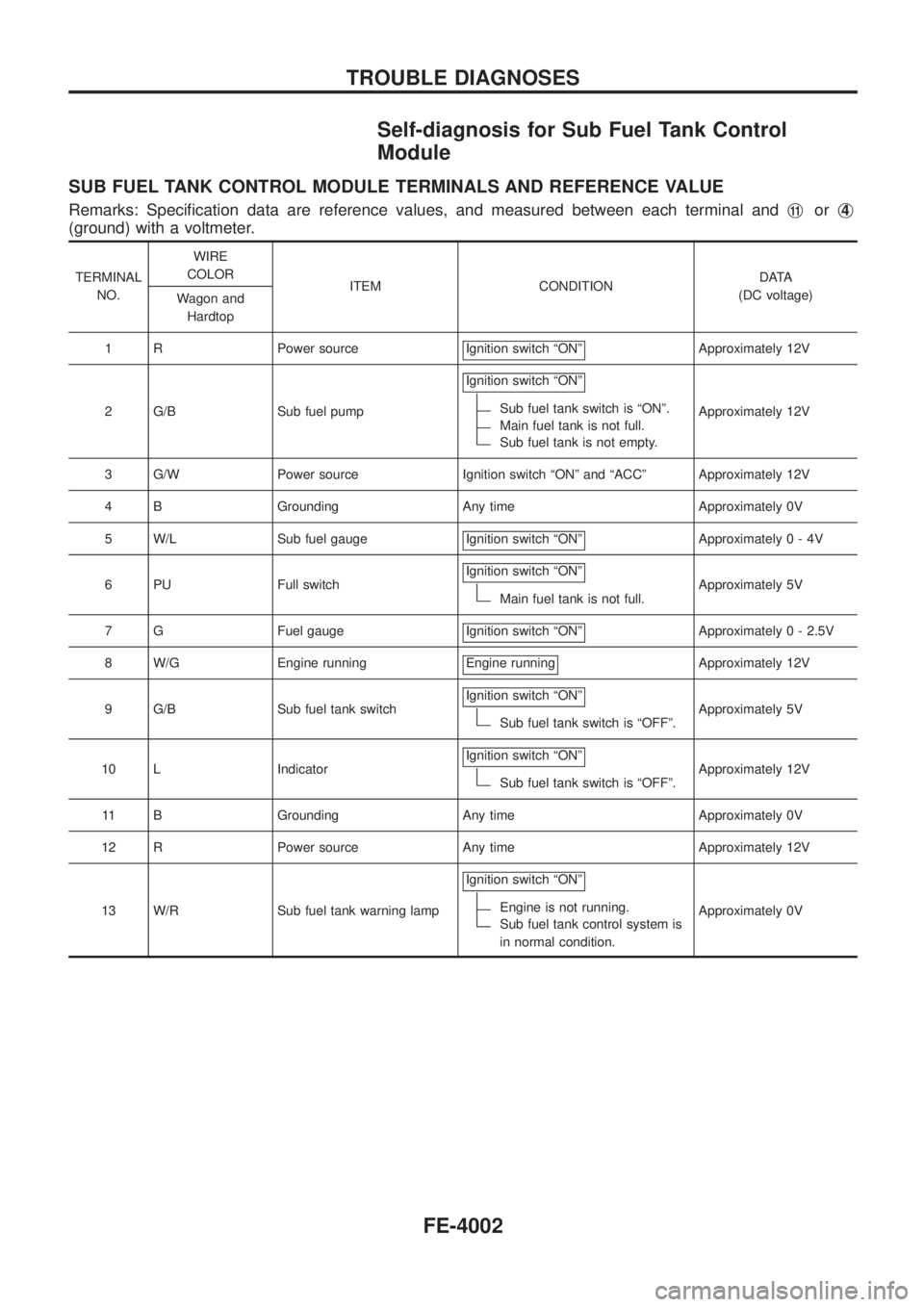
Self-diagnosis for Sub Fuel Tank Control
Module
SUB FUEL TANK CONTROL MODULE TERMINALS AND REFERENCE VALUE
Remarks: Speci®cation data are reference values, and measured between each terminal andj11orj4
(ground) with a voltmeter.
TERMINAL
NO.WIRE
COLOR
ITEM CONDITIONDATA
(DC voltage)
Wagon and
Hardtop
1 R Power source Ignition switch ªONº
Approximately 12V
2 G/B Sub fuel pumpIgnition switch ªONº
Sub fuel tank switch is ªONº.
Main fuel tank is not full.
Sub fuel tank is not empty.Approximately 12V
3 G/W Power source Ignition switch ªONº and ªACCº Approximately 12V
4 B Grounding Any time Approximately 0V
5 W/L Sub fuel gauge Ignition switch ªONº
Approximately0-4V
6 PU Full switchIgnition switch ªONº
Main fuel tank is not full.Approximately 5V
7 G Fuel gauge Ignition switch ªONº
Approximately 0 - 2.5V
8 W/G Engine running Engine running
Approximately 12V
9 G/B Sub fuel tank switchIgnition switch ªONº
Sub fuel tank switch is ªOFFº.Approximately 5V
10 L IndicatorIgnition switch ªONº
Sub fuel tank switch is ªOFFº.Approximately 12V
11 B Grounding Any time Approximately 0V
12 R Power source Any time Approximately 12V
13 W/R Sub fuel tank warning lampIgnition switch ªONº
Engine is not running.
Sub fuel tank control system is
in normal condition.Approximately 0V
TROUBLE DIAGNOSES
FE-4002
Page 486 of 579
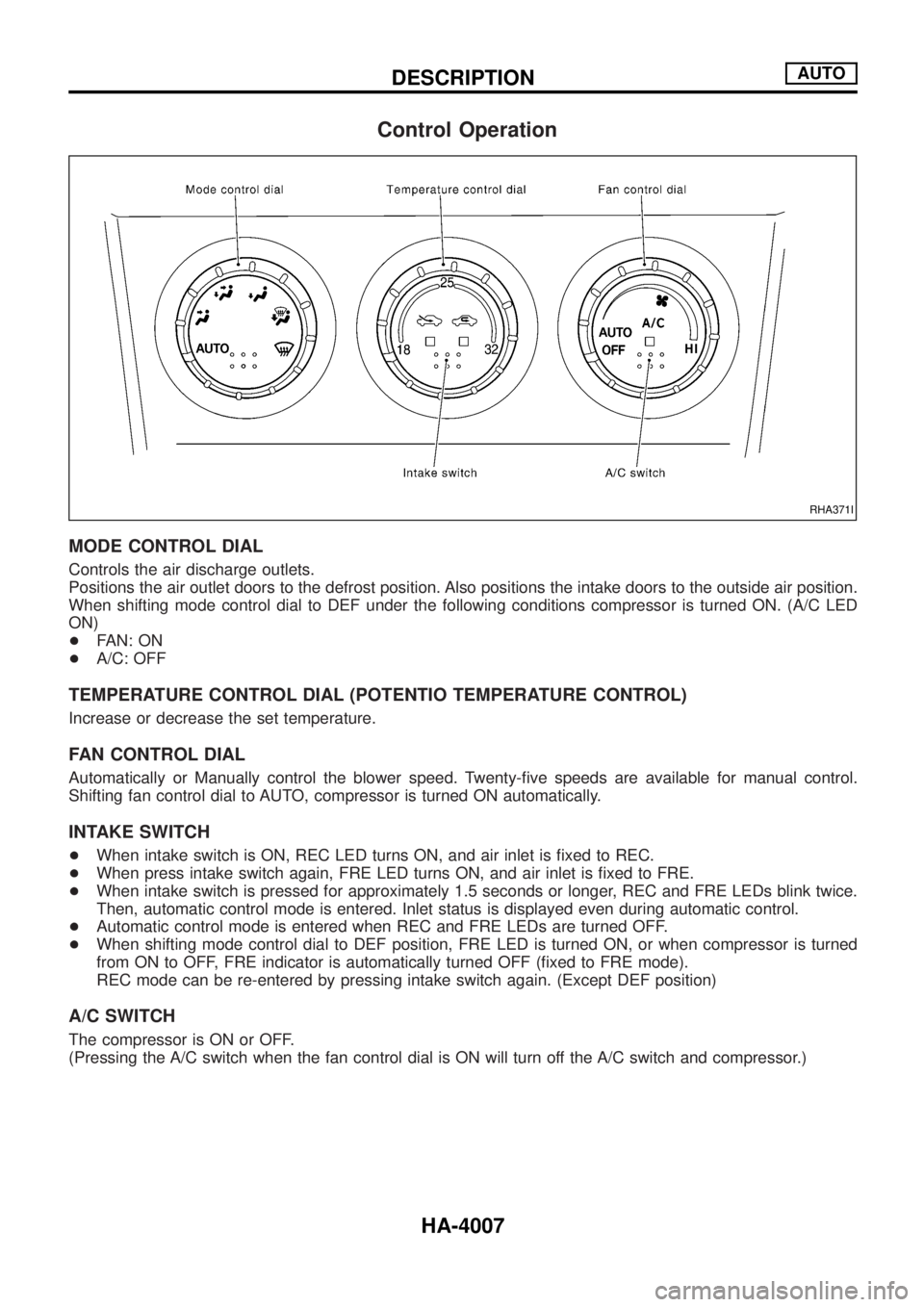
Control Operation
MODE CONTROL DIAL
Controls the air discharge outlets.
Positions the air outlet doors to the defrost position. Also positions the intake doors to the outside air position.
When shifting mode control dial to DEF under the following conditions compressor is turned ON. (A/C LED
ON)
+FAN: ON
+A/C: OFF
TEMPERATURE CONTROL DIAL (POTENTIO TEMPERATURE CONTROL)
Increase or decrease the set temperature.
FAN CONTROL DIAL
Automatically or Manually control the blower speed. Twenty-®ve speeds are available for manual control.
Shifting fan control dial to AUTO, compressor is turned ON automatically.
INTAKE SWITCH
+When intake switch is ON, REC LED turns ON, and air inlet is ®xed to REC.
+When press intake switch again, FRE LED turns ON, and air inlet is ®xed to FRE.
+When intake switch is pressed for approximately 1.5 seconds or longer, REC and FRE LEDs blink twice.
Then, automatic control mode is entered. Inlet status is displayed even during automatic control.
+Automatic control mode is entered when REC and FRE LEDs are turned OFF.
+When shifting mode control dial to DEF position, FRE LED is turned ON, or when compressor is turned
from ON to OFF, FRE indicator is automatically turned OFF (®xed to FRE mode).
REC mode can be re-entered by pressing intake switch again. (Except DEF position)
A/C SWITCH
The compressor is ON or OFF.
(Pressing the A/C switch when the fan control dial is ON will turn off the A/C switch and compressor.)
RHA371I
DESCRIPTIONAUTO
HA-4007
Page 512 of 579
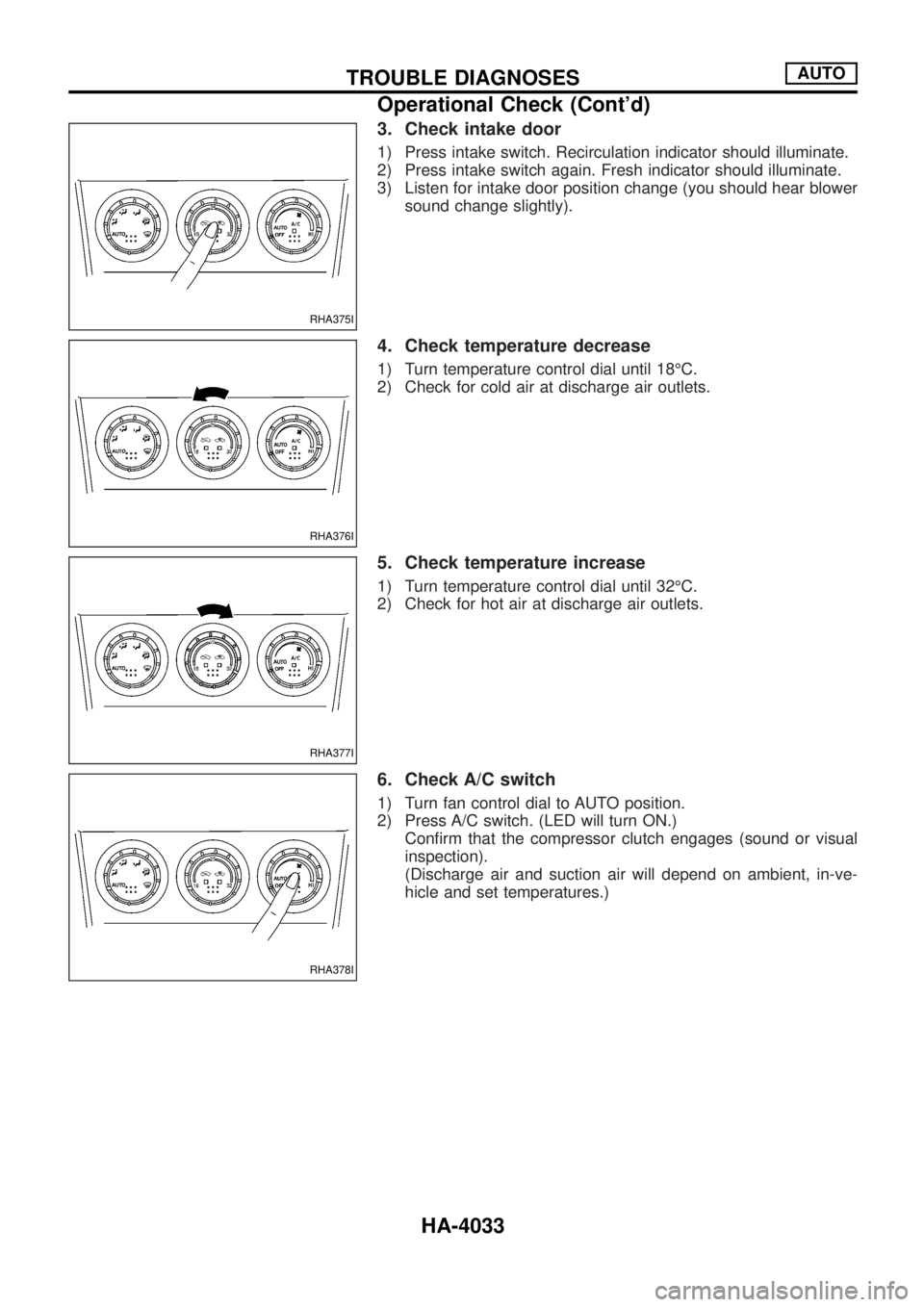
3. Check intake door
1) Press intake switch. Recirculation indicator should illuminate.
2) Press intake switch again. Fresh indicator should illuminate.
3) Listen for intake door position change (you should hear blower
sound change slightly).
4. Check temperature decrease
1) Turn temperature control dial until 18ÉC.
2) Check for cold air at discharge air outlets.
5. Check temperature increase
1) Turn temperature control dial until 32ÉC.
2) Check for hot air at discharge air outlets.
6. Check A/C switch
1) Turn fan control dial to AUTO position.
2) Press A/C switch. (LED will turn ON.)
Con®rm that the compressor clutch engages (sound or visual
inspection).
(Discharge air and suction air will depend on ambient, in-ve-
hicle and set temperatures.)
RHA375I
RHA376I
RHA377I
RHA378I
TROUBLE DIAGNOSESAUTO
Operational Check (Cont'd)
HA-4033