CAN system NISSAN PATROL 2004 Electronic Repair Manual
[x] Cancel search | Manufacturer: NISSAN, Model Year: 2004, Model line: PATROL, Model: NISSAN PATROL 2004Pages: 579, PDF Size: 26.61 MB
Page 257 of 579
System Description
OUTLINE
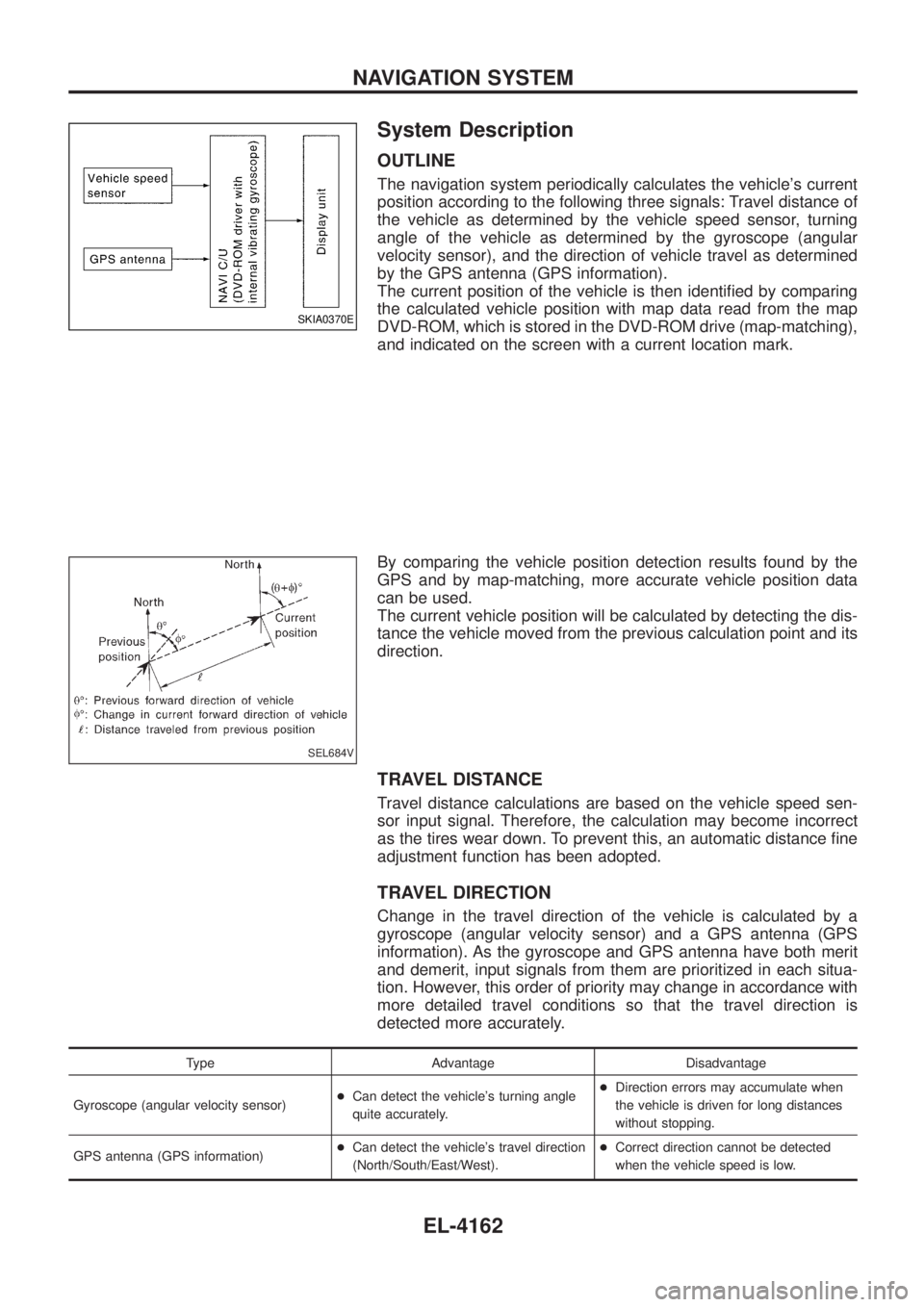
The navigation system periodically calculates the vehicle's current
position according to the following three signals: Travel distance of
the vehicle as determined by the vehicle speed sensor, turning
angle of the vehicle as determined by the gyroscope (angular
velocity sensor), and the direction of vehicle travel as determined
by the GPS antenna (GPS information).
The current position of the vehicle is then identi®ed by comparing
the calculated vehicle position with map data read from the map
DVD-ROM, which is stored in the DVD-ROM drive (map-matching),
and indicated on the screen with a current location mark.
By comparing the vehicle position detection results found by the
GPS and by map-matching, more accurate vehicle position data
can be used.
The current vehicle position will be calculated by detecting the dis-
tance the vehicle moved from the previous calculation point and its
direction.
TRAVEL DISTANCE
Travel distance calculations are based on the vehicle speed sen-
sor input signal. Therefore, the calculation may become incorrect
as the tires wear down. To prevent this, an automatic distance ®ne
adjustment function has been adopted.
TRAVEL DIRECTION
Change in the travel direction of the vehicle is calculated by a
gyroscope (angular velocity sensor) and a GPS antenna (GPS
information). As the gyroscope and GPS antenna have both merit
and demerit, input signals from them are prioritized in each situa-
tion. However, this order of priority may change in accordance with
more detailed travel conditions so that the travel direction is
detected more accurately.
Type Advantage Disadvantage
Gyroscope (angular velocity sensor) +
Can detect the vehicle's turning angle
quite accurately. +
Direction errors may accumulate when
the vehicle is driven for long distances
without stopping.
GPS antenna (GPS information) +
Can detect the vehicle's travel direction
(North/South/East/West). +
Correct direction cannot be detected
when the vehicle speed is low.
SKIA0370E
SEL684V
NAVIGATION SYSTEM
EL-4162
Page 258 of 579
MAP-MATCHING
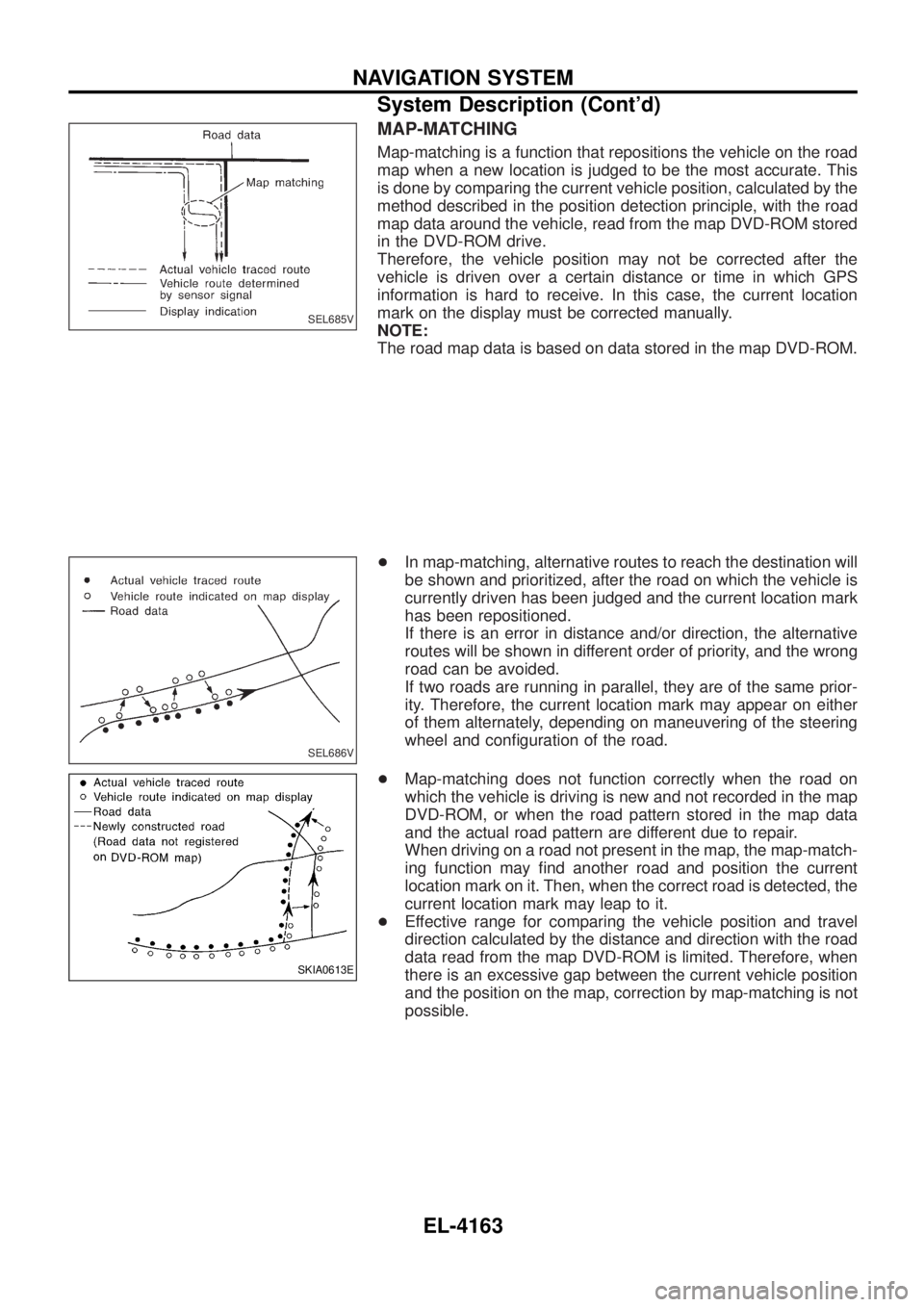
Map-matching is a function that repositions the vehicle on the road
map when a new location is judged to be the most accurate. This
is done by comparing the current vehicle position, calculated by the
method described in the position detection principle, with the road
map data around the vehicle, read from the map DVD-ROM stored
in the DVD-ROM drive.
Therefore, the vehicle position may not be corrected after the
vehicle is driven over a certain distance or time in which GPS
information is hard to receive. In this case, the current location
mark on the display must be corrected manually.
NOTE:
The road map data is based on data stored in the map DVD-ROM.
+In map-matching, alternative routes to reach the destination will
be shown and prioritized, after the road on which the vehicle is
currently driven has been judged and the current location mark
has been repositioned.
If there is an error in distance and/or direction, the alternative
routes will be shown in different order of priority, and the wrong
road can be avoided.
If two roads are running in parallel, they are of the same prior-
ity. Therefore, the current location mark may appear on either
of them alternately, depending on maneuvering of the steering
wheel and con®guration of the road.
+ Map-matching does not function correctly when the road on
which the vehicle is driving is new and not recorded in the map
DVD-ROM, or when the road pattern stored in the map data
and the actual road pattern are different due to repair.
When driving on a road not present in the map, the map-match-
ing function may ®nd another road and position the current
location mark on it. Then, when the correct road is detected, the
current location mark may leap to it.
+ Effective range for comparing the vehicle position and travel
direction calculated by the distance and direction with the road
data read from the map DVD-ROM is limited. Therefore, when
there is an excessive gap between the current vehicle position
and the position on the map, correction by map-matching is not
possible.
SEL685V
SEL686V
SKIA0613E
NAVIGATION SYSTEM
System Description (Cont'd)
EL-4163
Page 259 of 579
GPS (GLOBAL POSITIONING SYSTEM)
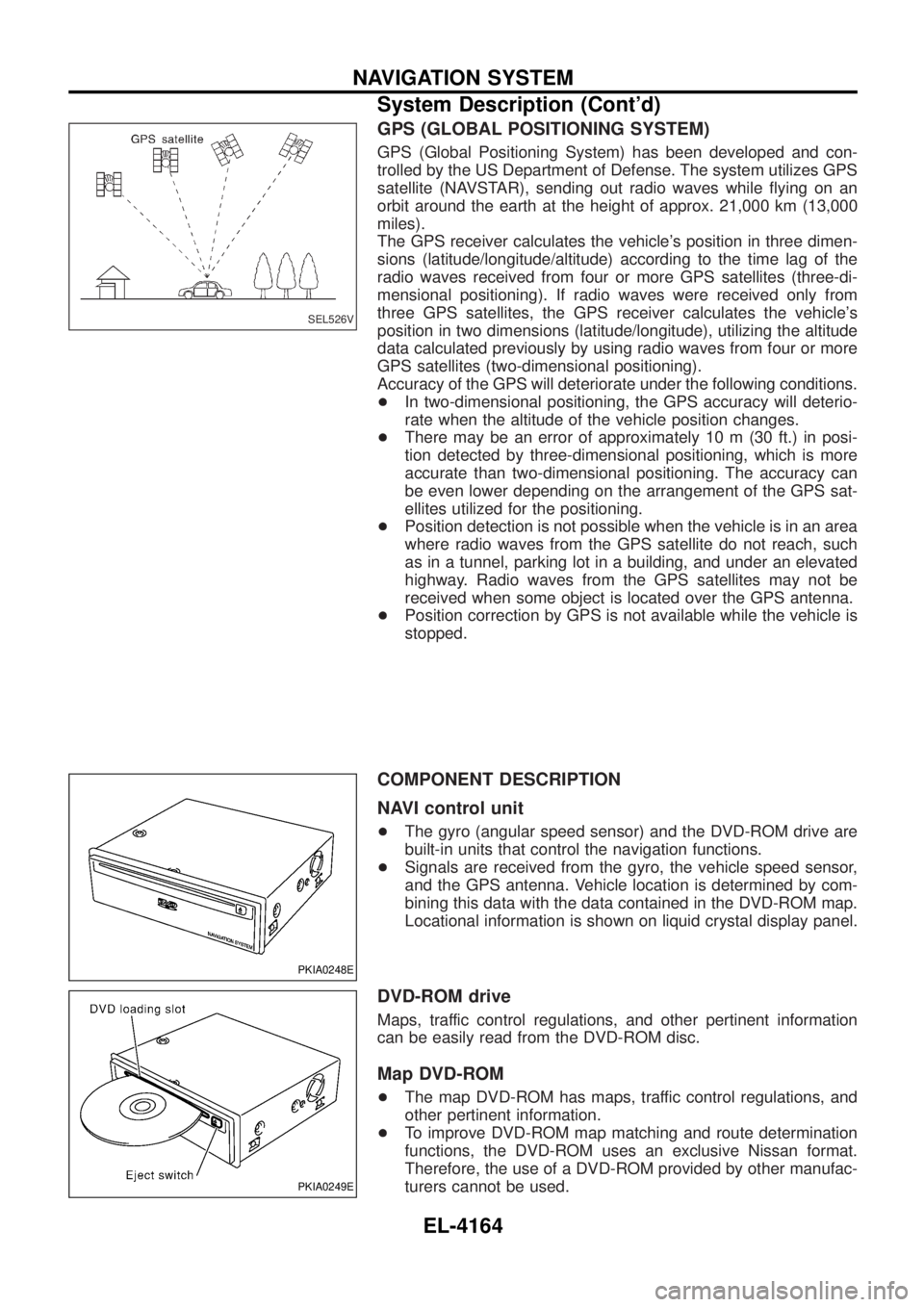
GPS (Global Positioning System) has been developed and con-
trolled by the US Department of Defense. The system utilizes GPS
satellite (NAVSTAR), sending out radio waves while ¯ying on an
orbit around the earth at the height of approx. 21,000 km (13,000
miles).
The GPS receiver calculates the vehicle's position in three dimen-
sions (latitude/longitude/altitude) according to the time lag of the
radio waves received from four or more GPS satellites (three-di-
mensional positioning). If radio waves were received only from
three GPS satellites, the GPS receiver calculates the vehicle's
position in two dimensions (latitude/longitude), utilizing the altitude
data calculated previously by using radio waves from four or more
GPS satellites (two-dimensional positioning).
Accuracy of the GPS will deteriorate under the following conditions.
+In two-dimensional positioning, the GPS accuracy will deterio-
rate when the altitude of the vehicle position changes.
+ There may be an error of approximately 10 m (30 ft.) in posi-
tion detected by three-dimensional positioning, which is more
accurate than two-dimensional positioning. The accuracy can
be even lower depending on the arrangement of the GPS sat-
ellites utilized for the positioning.
+ Position detection is not possible when the vehicle is in an area
where radio waves from the GPS satellite do not reach, such
as in a tunnel, parking lot in a building, and under an elevated
highway. Radio waves from the GPS satellites may not be
received when some object is located over the GPS antenna.
+ Position correction by GPS is not available while the vehicle is
stopped.
COMPONENT DESCRIPTION
NAVI control unit
+The gyro (angular speed sensor) and the DVD-ROM drive are
built-in units that control the navigation functions.
+ Signals are received from the gyro, the vehicle speed sensor,
and the GPS antenna. Vehicle location is determined by com-
bining this data with the data contained in the DVD-ROM map.
Locational information is shown on liquid crystal display panel.
DVD-ROM drive
Maps, traffic control regulations, and other pertinent information
can be easily read from the DVD-ROM disc.
Map DVD-ROM
+The map DVD-ROM has maps, traffic control regulations, and
other pertinent information.
+ To improve DVD-ROM map matching and route determination
functions, the DVD-ROM uses an exclusive Nissan format.
Therefore, the use of a DVD-ROM provided by other manufac-
turers cannot be used.
SEL526V
PKIA0248E
PKIA0249E
NAVIGATION SYSTEM
System Description (Cont'd)
EL-4164
Page 261 of 579
MAP DISPLAY
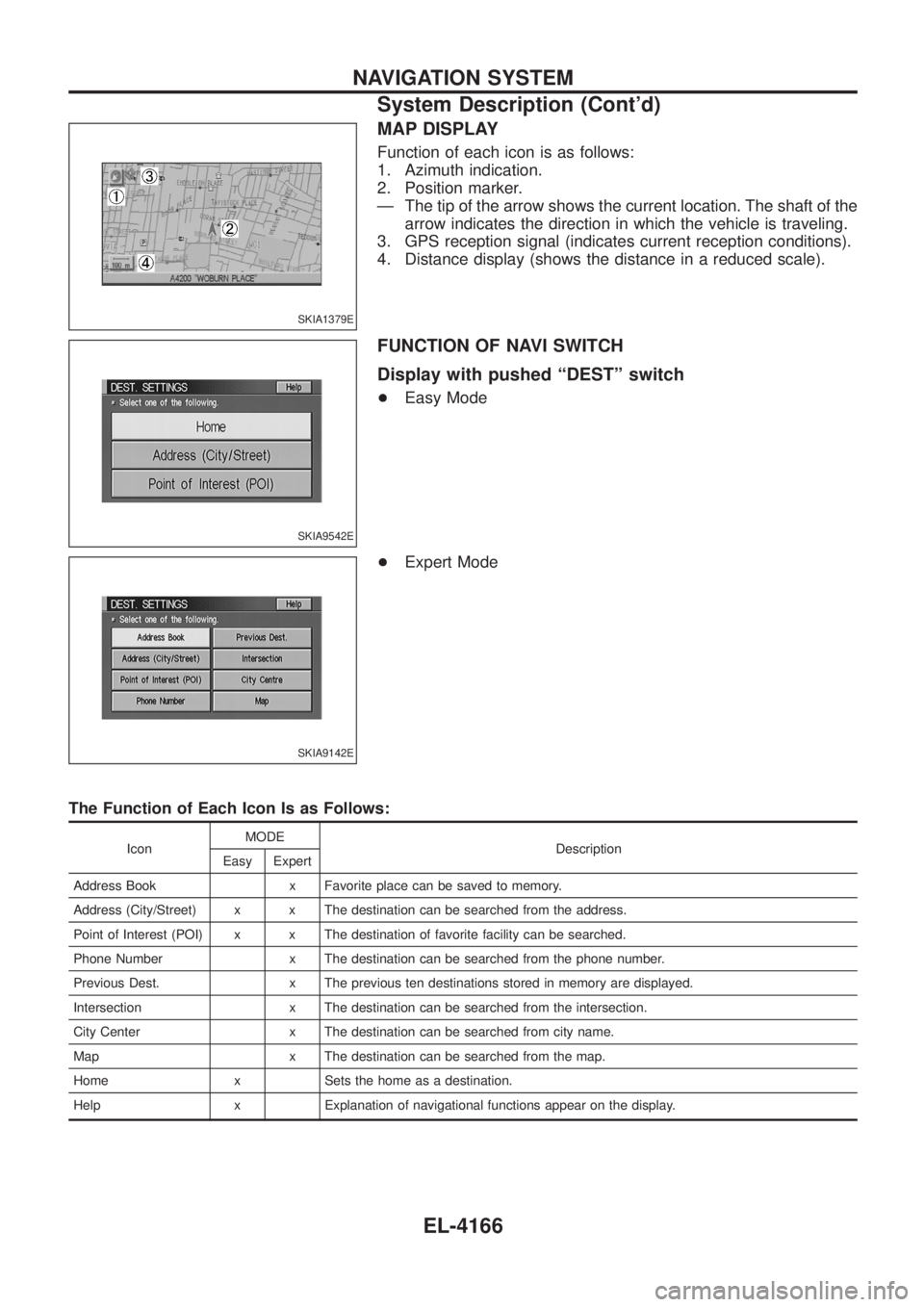
Function of each icon is as follows:
1. Azimuth indication.
2. Position marker.
Ð The tip of the arrow shows the current location. The shaft of thearrow indicates the direction in which the vehicle is traveling.
3. GPS reception signal (indicates current reception conditions).
4. Distance display (shows the distance in a reduced scale).
FUNCTION OF NAVI SWITCH
Display with pushed ªDESTº switch
+ Easy Mode
+ Expert Mode
The Function of Each Icon Is as Follows:
Icon MODE
Description
Easy Expert
Address Book x Favorite place can be saved to memory.
Address (City/Street) x x The destination can be searched from the address.
Point of Interest (POI) x x The destination of favorite facility can be searched.
Phone Number x The destination can be searched from the phone number.
Previous Dest. x The previous ten destinations stored in memory are displayed.
Intersection x The destination can be searched from the intersection.
City Center x The destination can be searched from city name.
Map x The destination can be searched from the map.
Home x Sets the home as a destination.
Help x Explanation of navigational functions appear on the display.
SKIA1379E
SKIA9542E
SKIA9142E
NAVIGATION SYSTEM
System Description (Cont'd)
EL-4166
Page 262 of 579
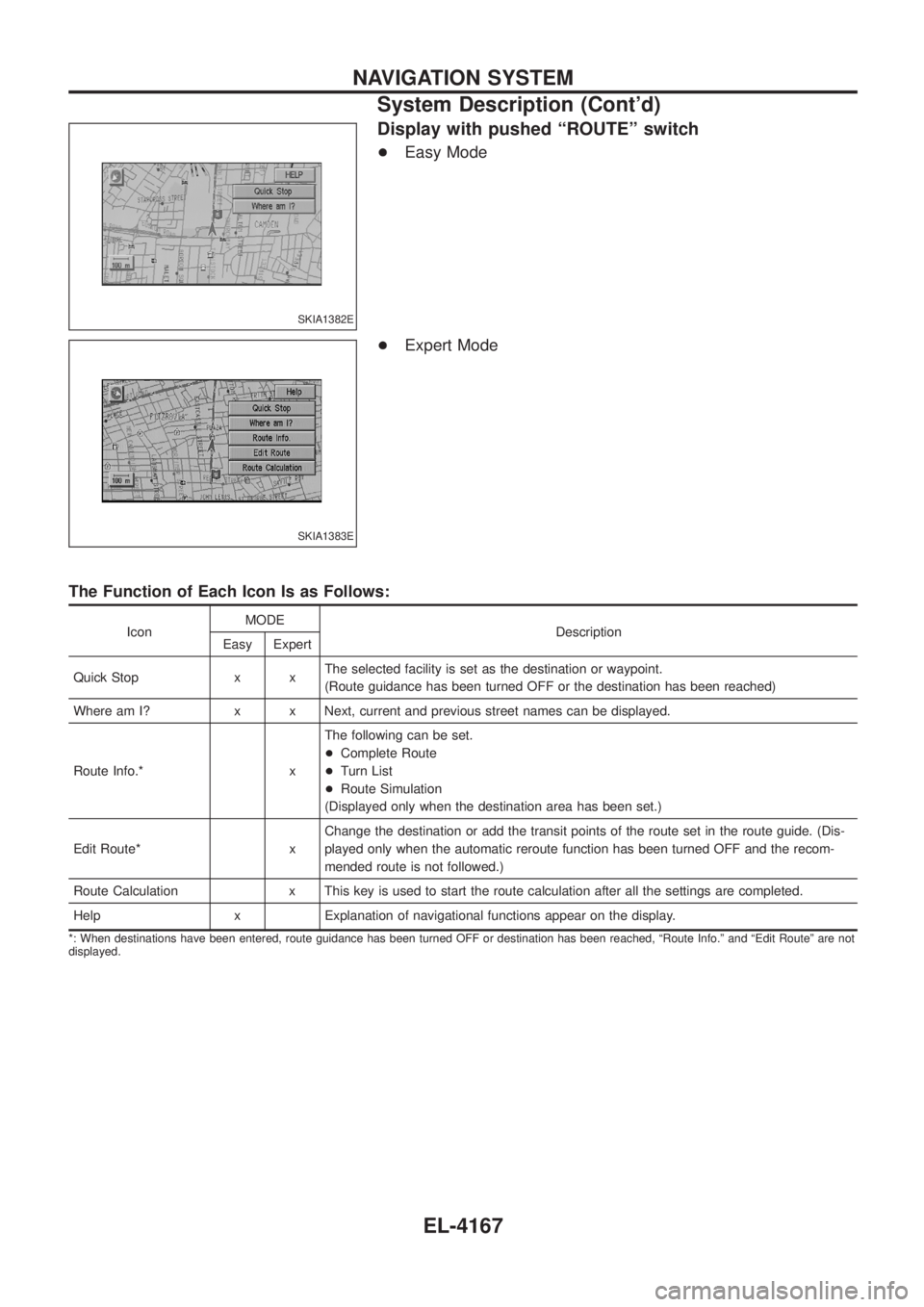
Display with pushed ªROUTEº switch
+Easy Mode
+ Expert Mode
The Function of Each Icon Is as Follows:
Icon MODE
Description
Easy Expert
Quick Stop x x The selected facility is set as the destination or waypoint.
(Route guidance has been turned OFF or the destination has been reached)
Where am I? x x Next, current and previous street names can be displayed.
Route Info.* x The following can be set.
+
Complete Route
+ Turn List
+ Route Simulation
(Displayed only when the destination area has been set.)
Edit Route* x Change the destination or add the transit points of the route set in the route guide. (Dis-
played only when the automatic reroute function has been turned OFF and the recom-
mended route is not followed.)
Route Calculation x This key is used to start the route calculation after all the settings are completed.
Help x Explanation of navigational functions appear on the display.
*: When destinations have been entered, route guidance has been turned OFF or destination has been reached, ªRoute Info.º and ªEdit Routeº are not
displayed.
SKIA1382E
SKIA1383E
NAVIGATION SYSTEM
System Description (Cont'd)
EL-4167
Page 263 of 579
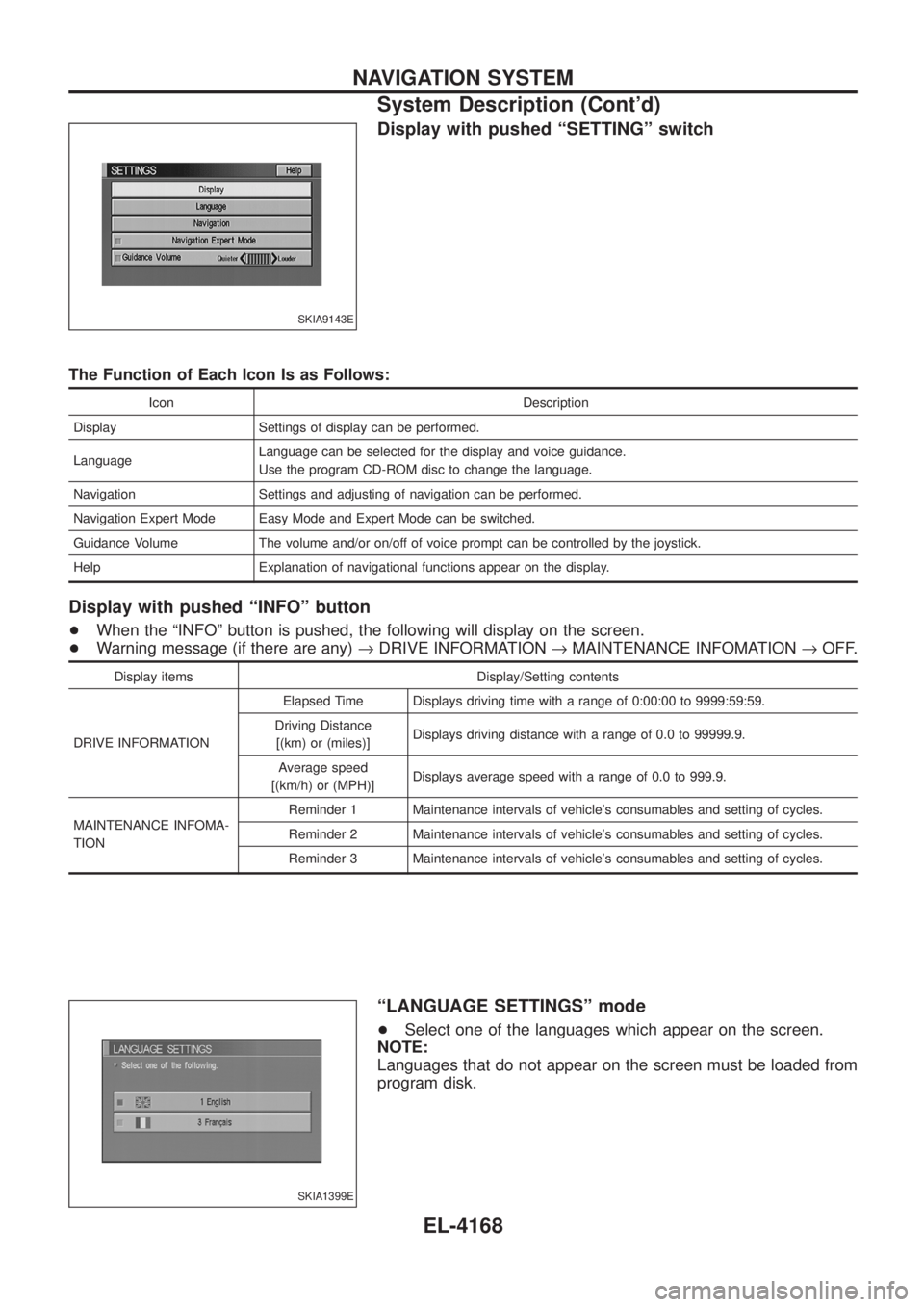
Display with pushed ªSETTINGº switch
The Function of Each Icon Is as Follows:
Icon Description
Display Settings of display can be performed.
Language Language can be selected for the display and voice guidance.
Use the program CD-ROM disc to change the language.
Navigation Settings and adjusting of navigation can be performed.
Navigation Expert Mode Easy Mode and Expert Mode can be switched.
Guidance Volume The volume and/or on/off of voice prompt can be controlled by the joystick.
Help Explanation of navigational functions appear on the display.
Display with pushed ªINFOº button
+ When the ªINFOº button is pushed, the following will display on the screen.
+ Warning message (if there are any) ®DRIVE INFORMATION ®MAINTENANCE INFOMATION ®OFF.
Display items Display/Setting contents
DRIVE INFORMATION Elapsed Time Displays driving time with a range of 0:00:00 to 9999:59:59.
Driving Distance [(km) or (miles)] Displays driving distance with a range of 0.0 to 99999.9.
Average speed
[(km/h) or (MPH)] Displays average speed with a range of 0.0 to 999.9.
MAINTENANCE INFOMA-
TION Reminder 1 Maintenance intervals of vehicle's consumables and setting of cycles.
Reminder 2 Maintenance intervals of vehicle's consumables and setting of cycles.
Reminder 3 Maintenance intervals of vehicle's consumables and setting of cycles.
ªLANGUAGE SETTINGSº mode
+
Select one of the languages which appear on the screen.
NOTE:
Languages that do not appear on the screen must be loaded from
program disk.
SKIA9143E
SKIA1399E
NAVIGATION SYSTEM
System Description (Cont'd)
EL-4168
Page 264 of 579
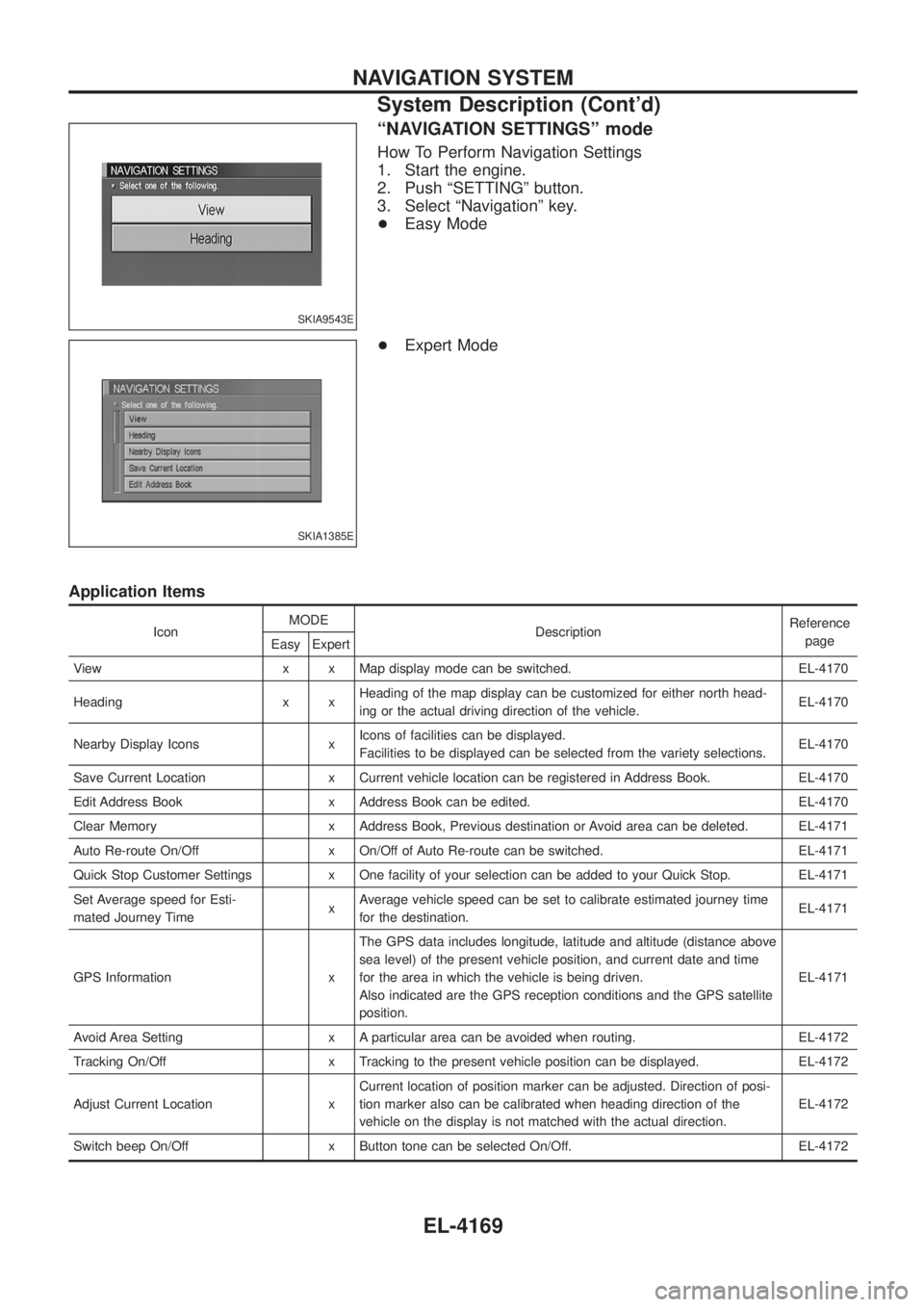
ªNAVIGATION SETTINGSº mode
How To Perform Navigation Settings
1. Start the engine.
2. Push ªSETTINGº button.
3. Select ªNavigationº key.
+Easy Mode
+ Expert Mode
Application Items
Icon MODE
Description Reference
page
Easy Expert
View x x Map display mode can be switched. EL-4170
Heading x x Heading of the map display can be customized for either north head-
ing or the actual driving direction of the vehicle. EL-4170
Nearby Display Icons x Icons of facilities can be displayed.
Facilities to be displayed can be selected from the variety selections. EL-4170
Save Current Location x Current vehicle location can be registered in Address Book. EL-4170
Edit Address Book x Address Book can be edited. EL-4170
Clear Memory x Address Book, Previous destination or Avoid area can be deleted. EL-4171
Auto Re-route On/Off x On/Off of Auto Re-route can be switched. EL-4171
Quick Stop Customer Settings x One facility of your selection can be added to your Quick Stop. EL-4171
Set Average speed for Esti-
mated Journey Time xAverage vehicle speed can be set to calibrate estimated journey time
for the destination. EL-4171
GPS Information x The GPS data includes longitude, latitude and altitude (distance above
sea level) of the present vehicle position, and current date and time
for the area in which the vehicle is being driven.
Also indicated are the GPS reception conditions and the GPS satellite
position. EL-4171
Avoid Area Setting x A particular area can be avoided when routing. EL-4172
Tracking On/Off x Tracking to the present vehicle position can be displayed. EL-4172
Adjust Current Location x Current location of position marker can be adjusted. Direction of posi-
tion marker also can be calibrated when heading direction of the
vehicle on the display is not matched with the actual direction. EL-4172
Switch beep On/Off x Button tone can be selected On/Off. EL-4172
SKIA9543E
SKIA1385E
NAVIGATION SYSTEM
System Description (Cont'd)
EL-4169
Page 265 of 579
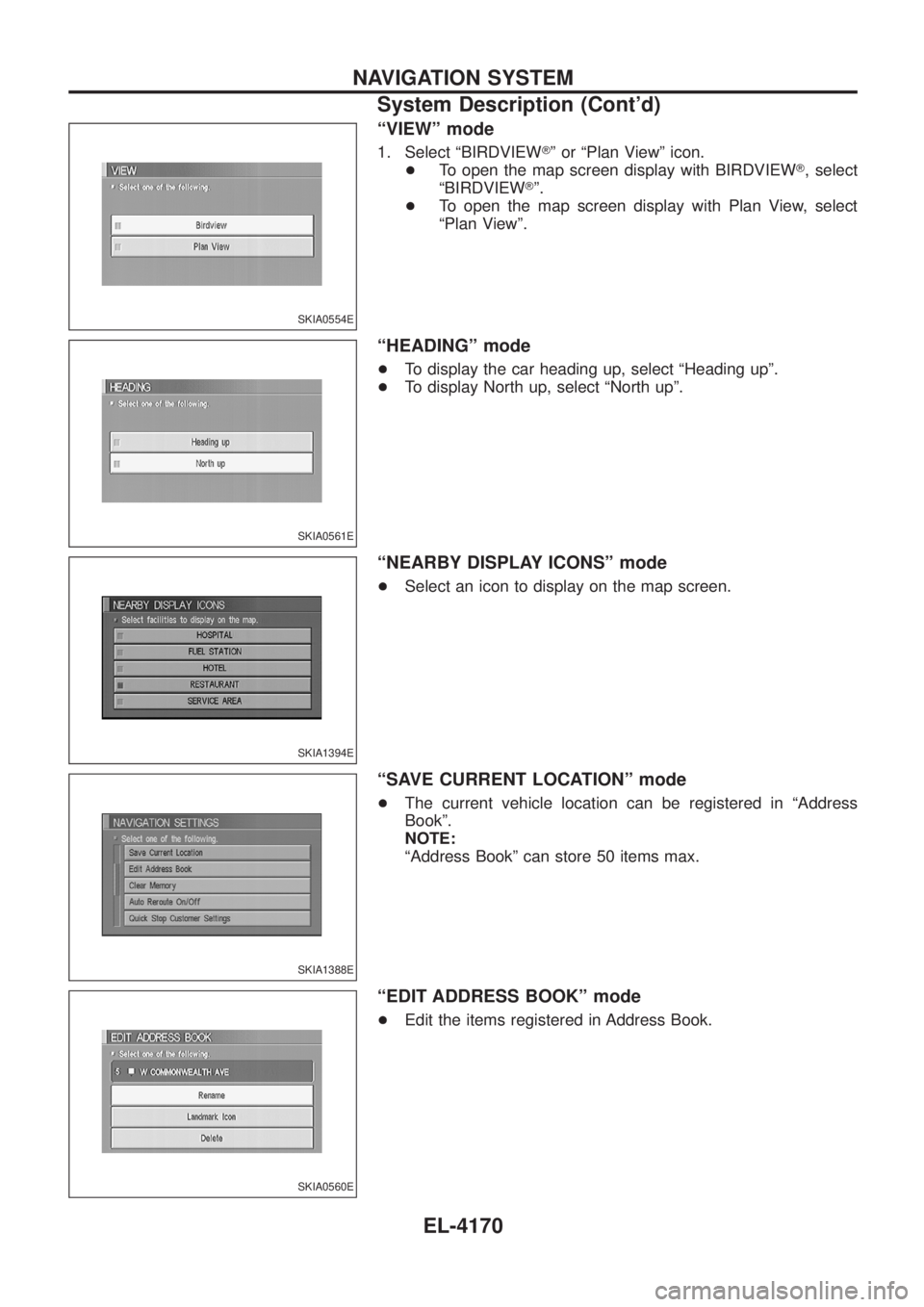
ªVIEWº mode
1. Select ªBIRDVIEWTº or ªPlan Viewº icon.
+ To open the map screen display with BIRDVIEW T, select
ªBIRDVIEW Tº.
+ To open the map screen display with Plan View, select
ªPlan Viewº.
ªHEADINGº mode
+To display the car heading up, select ªHeading upº.
+ To display North up, select ªNorth upº.
ªNEARBY DISPLAY ICONSº mode
+Select an icon to display on the map screen.
ªSAVE CURRENT LOCATIONº mode
+The current vehicle location can be registered in ªAddress
Bookº.
NOTE:
ªAddress Bookº can store 50 items max.
ªEDIT ADDRESS BOOKº mode
+Edit the items registered in Address Book.
SKIA0554E
SKIA0561E
SKIA1394E
SKIA1388E
SKIA0560E
NAVIGATION SYSTEM
System Description (Cont'd)
EL-4170
Page 267 of 579
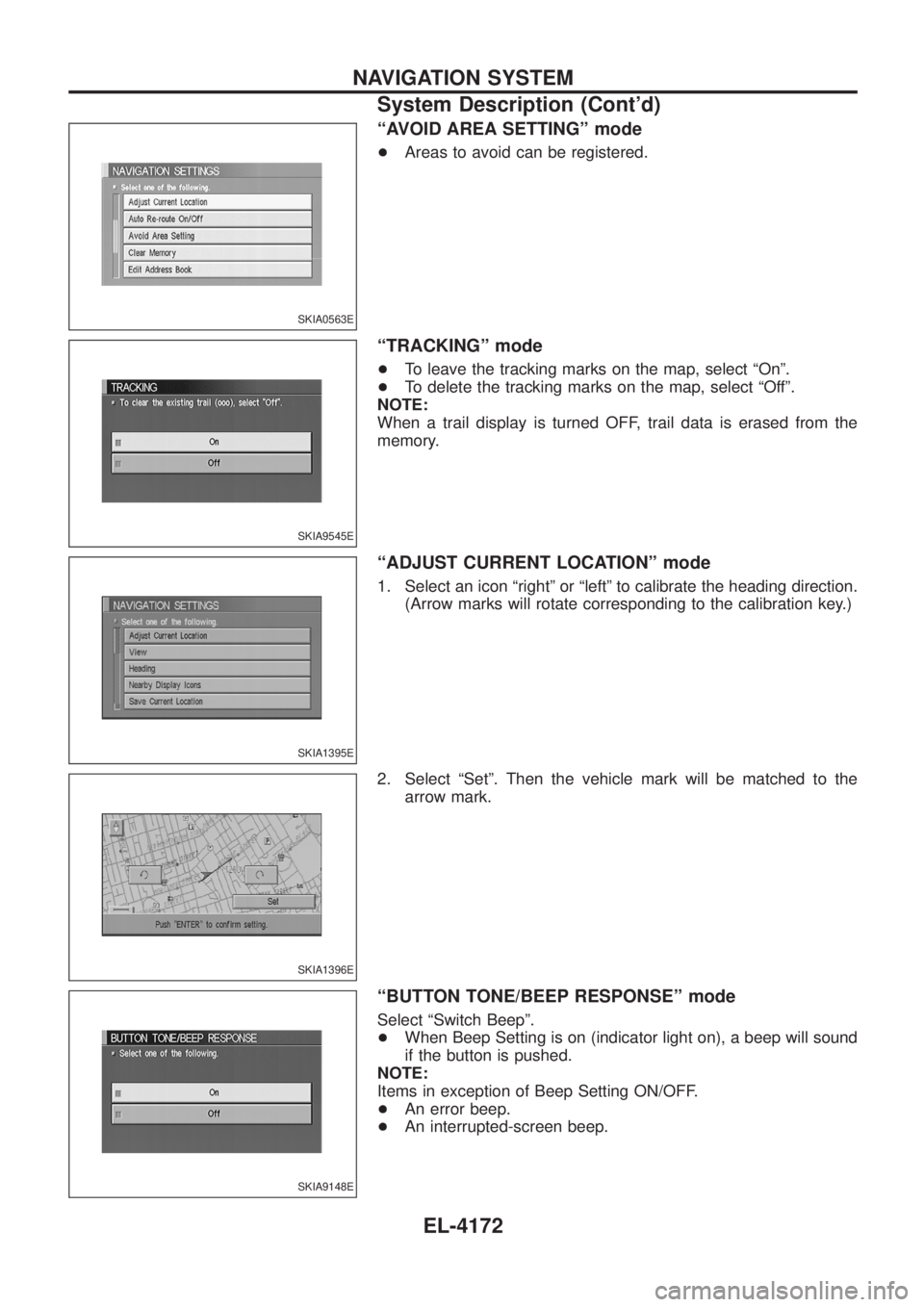
ªAVOID AREA SETTINGº mode
+Areas to avoid can be registered.
ªTRACKINGº mode
+To leave the tracking marks on the map, select ªOnº.
+ To delete the tracking marks on the map, select ªOffº.
NOTE:
When a trail display is turned OFF, trail data is erased from the
memory.
ªADJUST CURRENT LOCATIONº mode
1. Select an icon ªrightº or ªleftº to calibrate the heading direction. (Arrow marks will rotate corresponding to the calibration key.)
2. Select ªSetº. Then the vehicle mark will be matched to the arrow mark.
ªBUTTON TONE/BEEP RESPONSEº mode
Select ªSwitch Beepº.
+When Beep Setting is on (indicator light on), a beep will sound
if the button is pushed.
NOTE:
Items in exception of Beep Setting ON/OFF.
+ An error beep.
+ An interrupted-screen beep.
SKIA0563E
SKIA9545E
SKIA1395E
SKIA1396E
SKIA9148E
NAVIGATION SYSTEM
System Description (Cont'd)
EL-4172
Page 284 of 579
Self-Diagnosis Function
DESCRIPTION
+Diagnosis function consists of the self-diagnosis mode performed automatically and the CONFIRMATION/
ADJUSTMENT mode operated manually.
+ Self-diagnosis mode checks for connections between the units constituting this system, analyzes each
individual unit at the same time, and displays the results on the LCD screen.
+ CONFIRMATION/ADJUSTMENT mode is used to perform trouble diagnosis that require operation and
judgment by an operator (malfunction that cannot be automatically judged by the system), to check/change
the set value, and to display the History of Errors of the navigation system.
DIAGNOSIS ITEM
Mode Description
Self-diagnosis +
NAVI Control unit diagnosis (DVD-ROM drive will not be diagnosed when no
map DVD-ROM is in it.).
+ Performs diagnosis of each unit and connections between control unit and
GPS antenna, as well as between control unit and each unit.
Con®rmation/
Adjustment Display
Color tone and shading of the screen can be checked by the display of a color
bar and a gray scale.
Vehicle signals Analyzes the following vehicle signals: Vehicle speed signal, light signal, ignition
switch signal, and reverse signal.
Navigation Display Longi-
tude & Lati-
tude
Display the map. Use the joystick to adjust position. Longitude and latitude will be
displayed.
Speed Calibra-
tion Under ordinary conditions, the navigation system distance measuring function will
automatically compensate for minute decreases in wheel and tire diameter
caused by tire wear or low-pressure. Speed calibration immediately restores sys-
tem accuracy in cases such as when distance calibration is needed because of
the use of tire chains in inclement weather.
Angle Adjust-
ment Corrects difference between actual turning angle of a vehicle and turning angle of
the car mark on the display.
Initialize Loca-
tion This mode is for initializing the current location. Use when the vehicle is trans-
ported a long distance on a trailer, etc.
History of Errors Diagnosis results previously stored in the memory (before turning ignition switch
ON) are displayed in this mode. Time and location when/where the errors
occurred are also displayed.
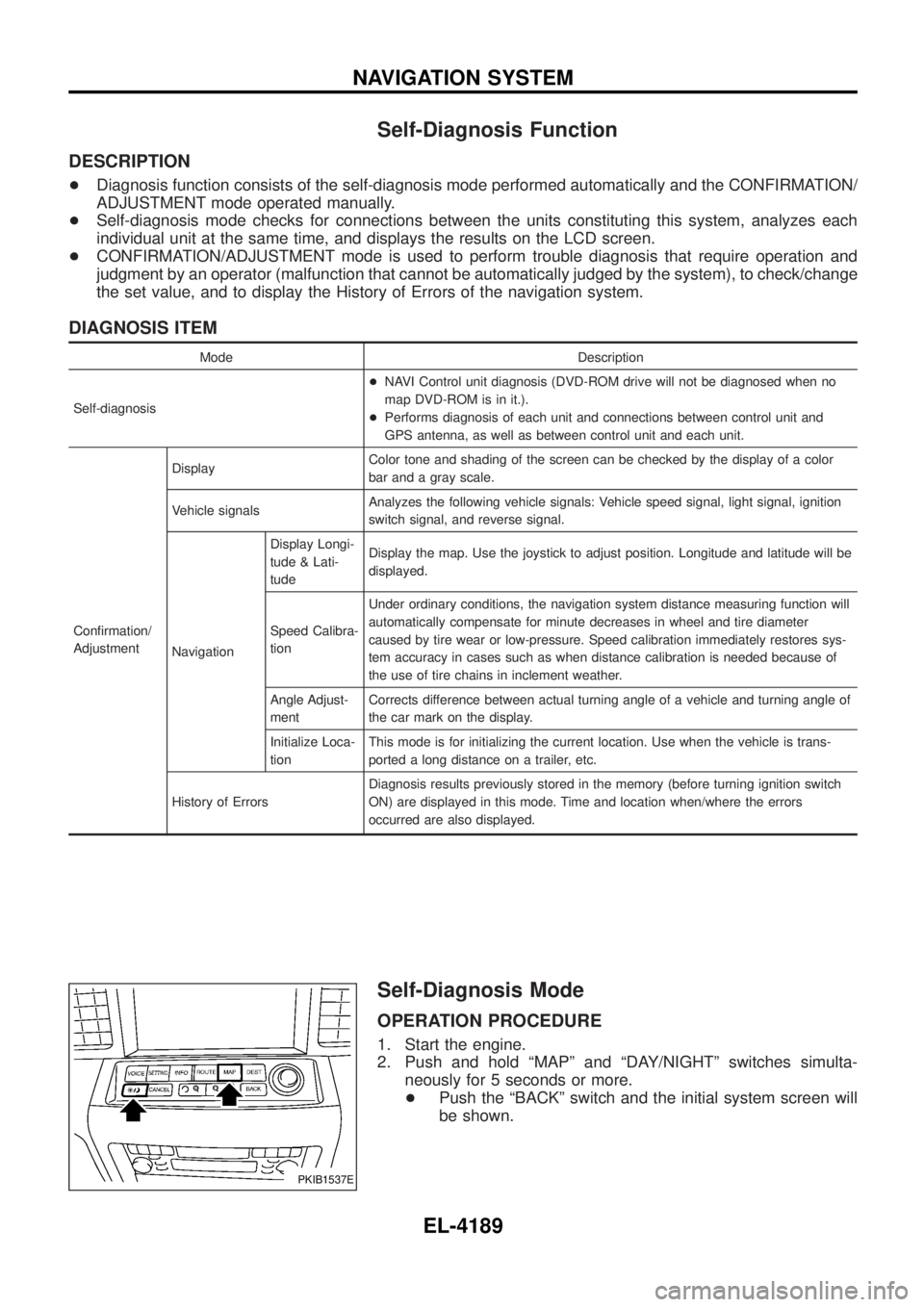
Self-Diagnosis Mode
OPERATION PROCEDURE
1. Start the engine.
2. Push and hold ªMAPº and ªDAY/NIGHTº switches simulta-
neously for 5 seconds or more.
+ Push the ªBACKº switch and the initial system screen will
be shown.
PKIB1537E
NAVIGATION SYSTEM
EL-4189