Tail NISSAN PATROL 2006 Service Manual
[x] Cancel search | Manufacturer: NISSAN, Model Year: 2006, Model line: PATROL, Model: NISSAN PATROL 2006Pages: 1226, PDF Size: 37.18 MB
Page 82 of 1226
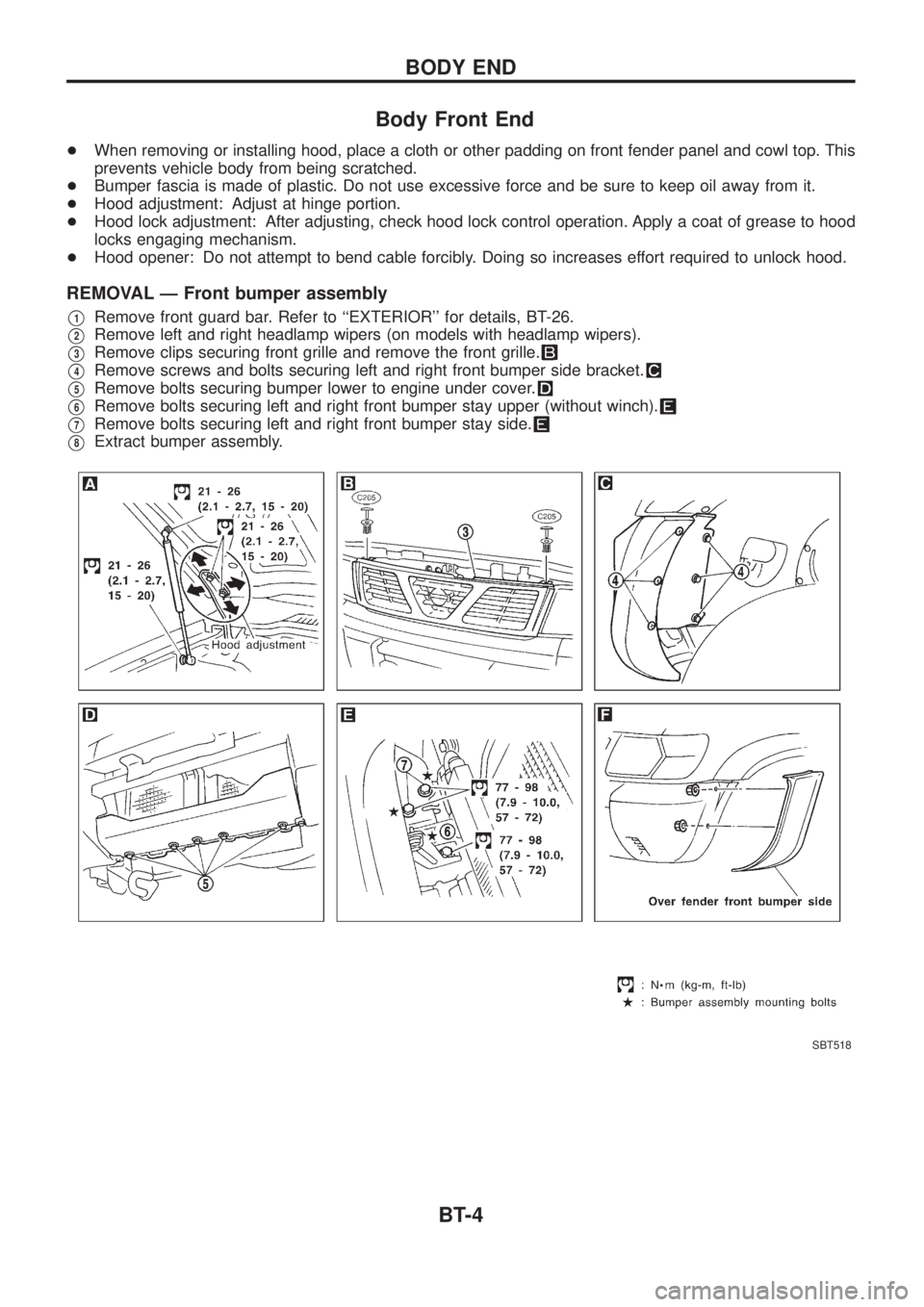
Body Front End
+When removing or installing hood, place a cloth or other padding on front fender panel and cowl top. This
prevents vehicle body from being scratched.
+Bumper fascia is made of plastic. Do not use excessive force and be sure to keep oil away from it.
+Hood adjustment: Adjust at hinge portion.
+Hood lock adjustment: After adjusting, check hood lock control operation. Apply a coat of grease to hood
locks engaging mechanism.
+Hood opener: Do not attempt to bend cable forcibly. Doing so increases effort required to unlock hood.
REMOVAL Ð Front bumper assembly
V1Remove front guard bar. Refer to ``EXTERIOR'' for details, BT-26.
V2Remove left and right headlamp wipers (on models with headlamp wipers).
V3Remove clips securing front grille and remove the front grille.
V4Remove screws and bolts securing left and right front bumper side bracket.
V5Remove bolts securing bumper lower to engine under cover.
V6Remove bolts securing left and right front bumper stay upper (without winch).
V7Remove bolts securing left and right front bumper stay side.
V8Extract bumper assembly.
SBT518
BODY END
BT-4
Page 89 of 1226
CAUTION:
+Disconnect both battery cables in advance.
+Disconnect air bag system line in advance.
+Never tamper with or force air bag lid open, as this may adversely affect air bag performance.
+Be careful not to scratch pad and other parts.
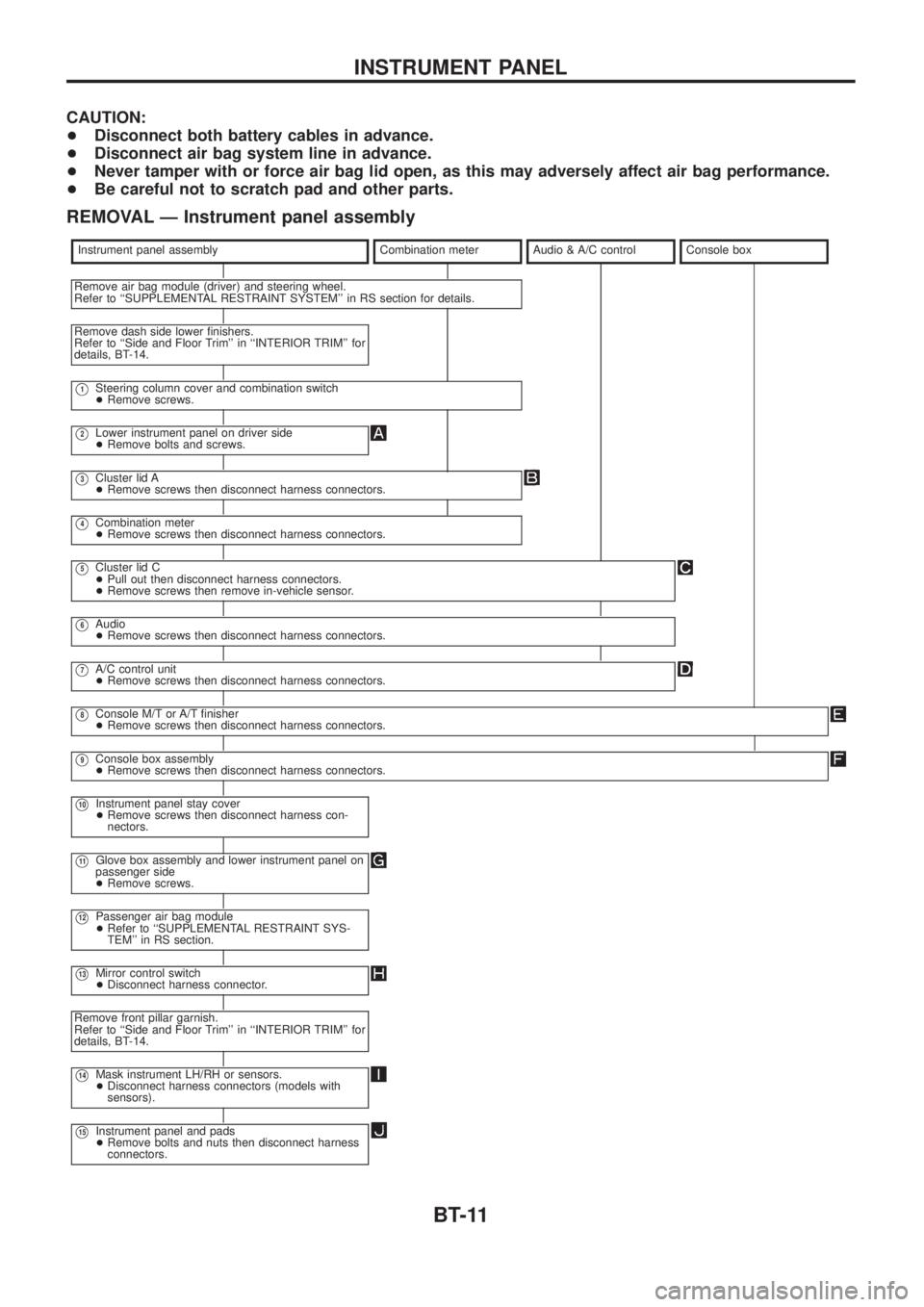
REMOVAL Ð Instrument panel assembly
Instrument panel assemblyCombination meterAudio & A/C controlConsole box
Remove air bag module (driver) and steering wheel.
Refer to ``SUPPLEMENTAL RESTRAINT SYSTEM'' in RS section for details.
Remove dash side lower ®nishers.
Refer to ``Side and Floor Trim'' in ``INTERIOR TRIM'' for
details, BT-14.
V1Steering column cover and combination switch
+Remove screws.
V2Lower instrument panel on driver side
+Remove bolts and screws.
V3Cluster lid A
+Remove screws then disconnect harness connectors.
V4Combination meter
+Remove screws then disconnect harness connectors.
V5Cluster lid C
+Pull out then disconnect harness connectors.
+Remove screws then remove in-vehicle sensor.
V6Audio
+Remove screws then disconnect harness connectors.
V7A/C control unit
+Remove screws then disconnect harness connectors.
V8Console M/T or A/T ®nisher
+Remove screws then disconnect harness connectors.
V9Console box assembly
+Remove screws then disconnect harness connectors.
V10Instrument panel stay cover
+Remove screws then disconnect harness con-
nectors.
V11Glove box assembly and lower instrument panel on
passenger side
+Remove screws.
V12Passenger air bag module
+Refer to ``SUPPLEMENTAL RESTRAINT SYS-
TEM'' in RS section.
V13Mirror control switch
+Disconnect harness connector.
Remove front pillar garnish.
Refer to ``Side and Floor Trim'' in ``INTERIOR TRIM'' for
details, BT-14.
V14Mask instrument LH/RH or sensors.
+Disconnect harness connectors (models with
sensors).
V15Instrument panel and pads
+Remove bolts and nuts then disconnect harness
connectors.
INSTRUMENT PANEL
BT-11
Page 92 of 1226
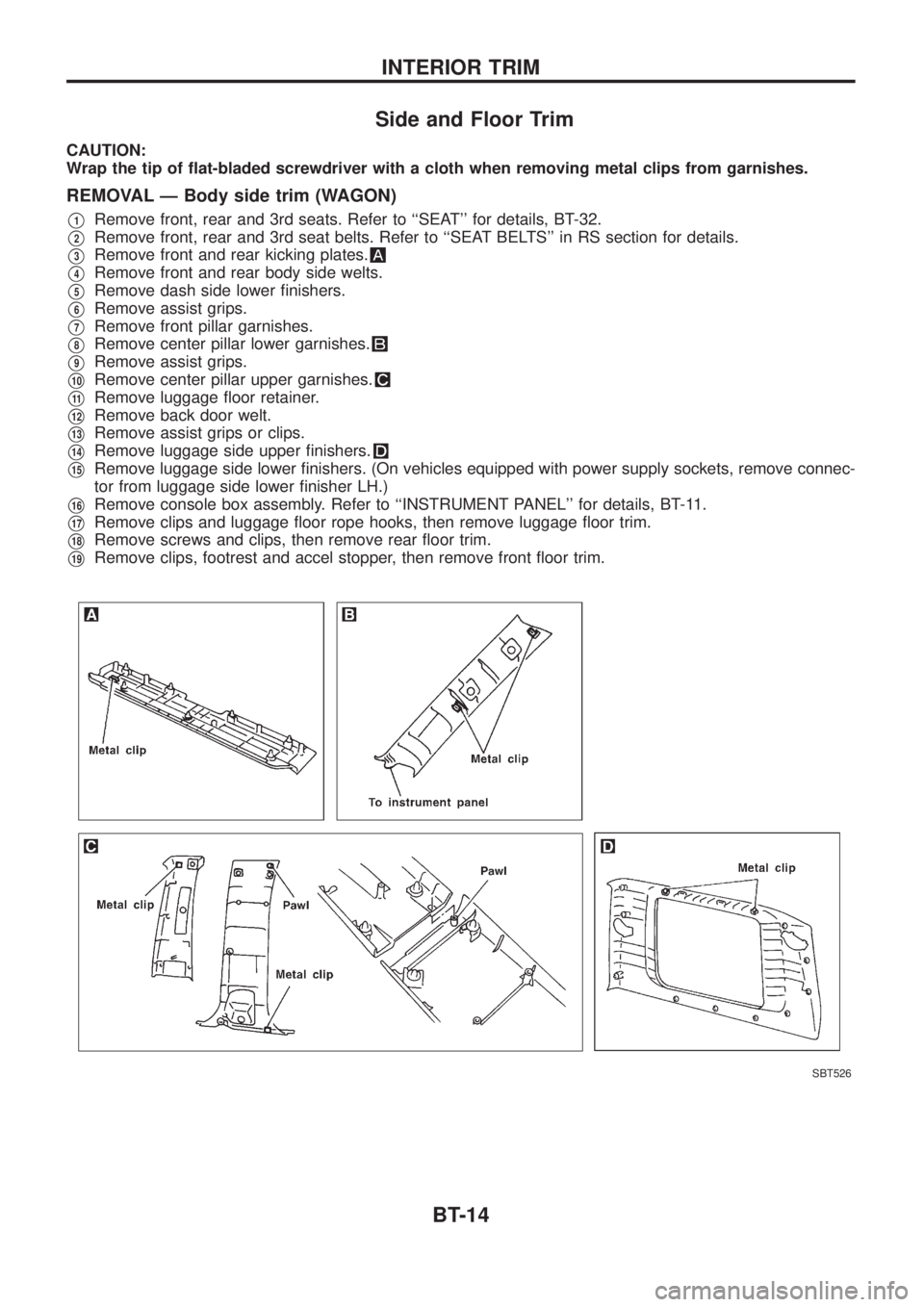
Side and Floor Trim
CAUTION:
Wrap the tip of ¯at-bladed screwdriver with a cloth when removing metal clips from garnishes.
REMOVAL Ð Body side trim (WAGON)
V1Remove front, rear and 3rd seats. Refer to ``SEAT'' for details, BT-32.
V2Remove front, rear and 3rd seat belts. Refer to ``SEAT BELTS'' in RS section for details.
V3Remove front and rear kicking plates.
V4Remove front and rear body side welts.
V5Remove dash side lower ®nishers.
V6Remove assist grips.
V7Remove front pillar garnishes.
V8Remove center pillar lower garnishes.
V9Remove assist grips.
V10Remove center pillar upper garnishes.
V11Remove luggage ¯oor retainer.
V12Remove back door welt.
V13Remove assist grips or clips.
V14Remove luggage side upper ®nishers.
V15Remove luggage side lower ®nishers. (On vehicles equipped with power supply sockets, remove connec-
tor from luggage side lower ®nisher LH.)
V16Remove console box assembly. Refer to ``INSTRUMENT PANEL'' for details, BT-11.
V17Remove clips and luggage ¯oor rope hooks, then remove luggage ¯oor trim.
V18Remove screws and clips, then remove rear ¯oor trim.
V19Remove clips, footrest and accel stopper, then remove front ¯oor trim.
SBT526
INTERIOR TRIM
BT-14
Page 94 of 1226
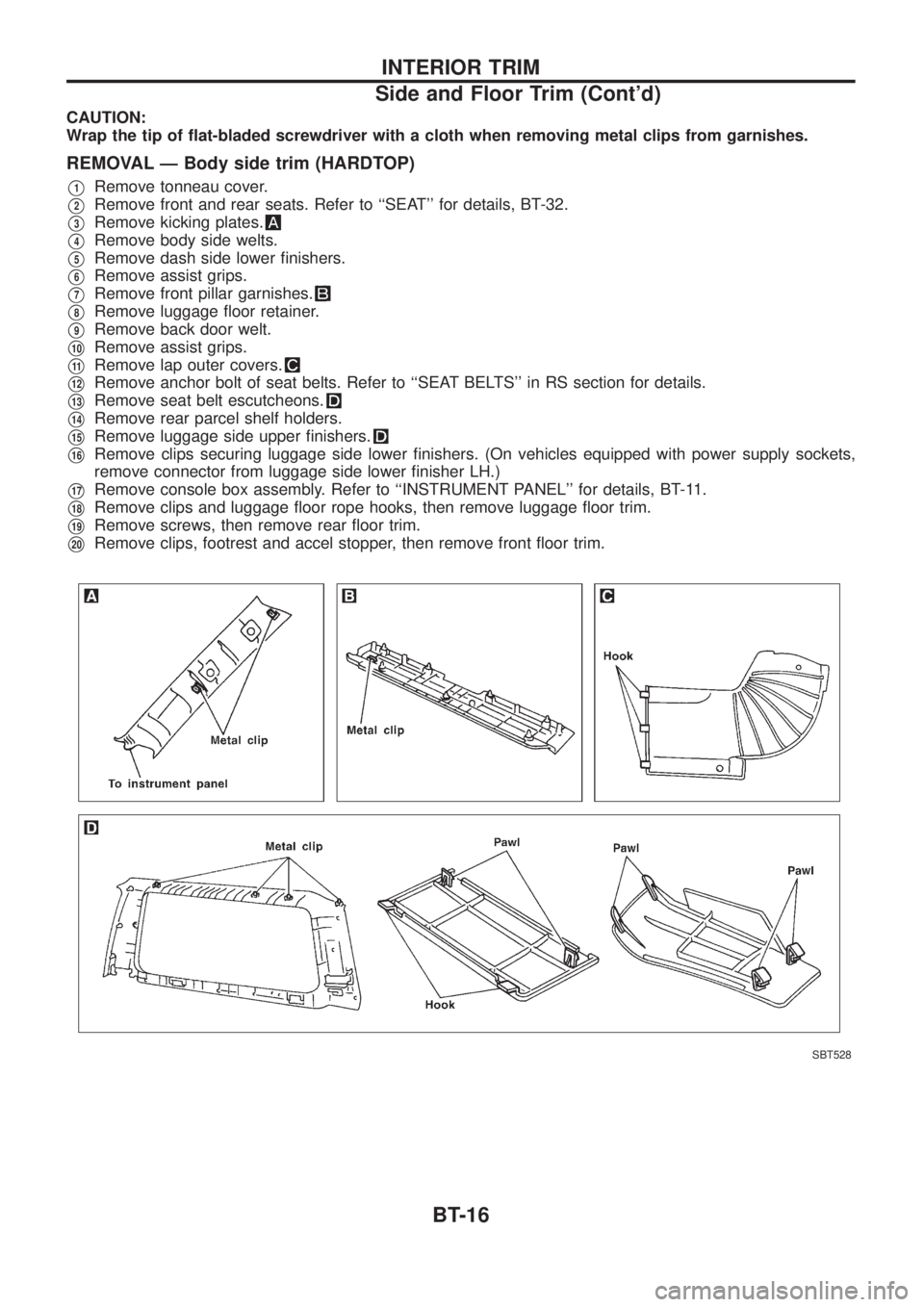
CAUTION:
Wrap the tip of ¯at-bladed screwdriver with a cloth when removing metal clips from garnishes.
REMOVAL Ð Body side trim (HARDTOP)
V1Remove tonneau cover.
V2Remove front and rear seats. Refer to ``SEAT'' for details, BT-32.
V3Remove kicking plates.
V4Remove body side welts.
V5Remove dash side lower ®nishers.
V6Remove assist grips.
V7Remove front pillar garnishes.
V8Remove luggage ¯oor retainer.
V9Remove back door welt.
V10Remove assist grips.
V11Remove lap outer covers.
V12Remove anchor bolt of seat belts. Refer to ``SEAT BELTS'' in RS section for details.
V13Remove seat belt escutcheons.
V14Remove rear parcel shelf holders.
V15Remove luggage side upper ®nishers.
V16Remove clips securing luggage side lower ®nishers. (On vehicles equipped with power supply sockets,
remove connector from luggage side lower ®nisher LH.)
V17Remove console box assembly. Refer to ``INSTRUMENT PANEL'' for details, BT-11.
V18Remove clips and luggage ¯oor rope hooks, then remove luggage ¯oor trim.
V19Remove screws, then remove rear ¯oor trim.
V20Remove clips, footrest and accel stopper, then remove front ¯oor trim.
SBT528
INTERIOR TRIM
Side and Floor Trim (Cont'd)
BT-16
Page 98 of 1226
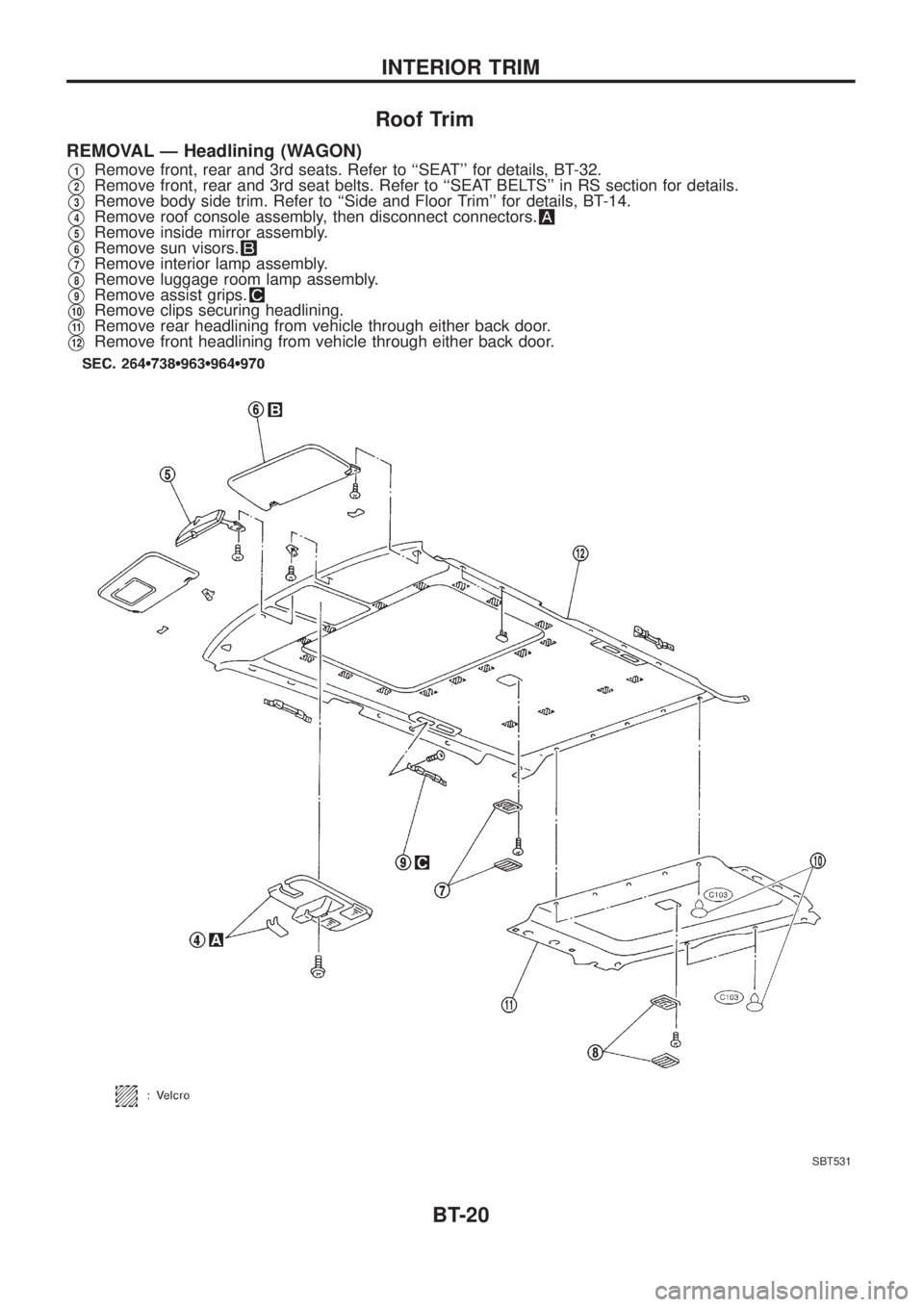
Roof Trim
REMOVAL Ð Headlining (WAGON)
V1Remove front, rear and 3rd seats. Refer to ``SEAT'' for details, BT-32.
V2Remove front, rear and 3rd seat belts. Refer to ``SEAT BELTS'' in RS section for details.
V3Remove body side trim. Refer to ``Side and Floor Trim'' for details, BT-14.
V4Remove roof console assembly, then disconnect connectors.
V5Remove inside mirror assembly.
V6Remove sun visors.
V7Remove interior lamp assembly.
V8Remove luggage room lamp assembly.
V9Remove assist grips.
V10Remove clips securing headlining.
V11Remove rear headlining from vehicle through either back door.
V12Remove front headlining from vehicle through either back door.
SBT531
INTERIOR TRIM
BT-20
Page 100 of 1226
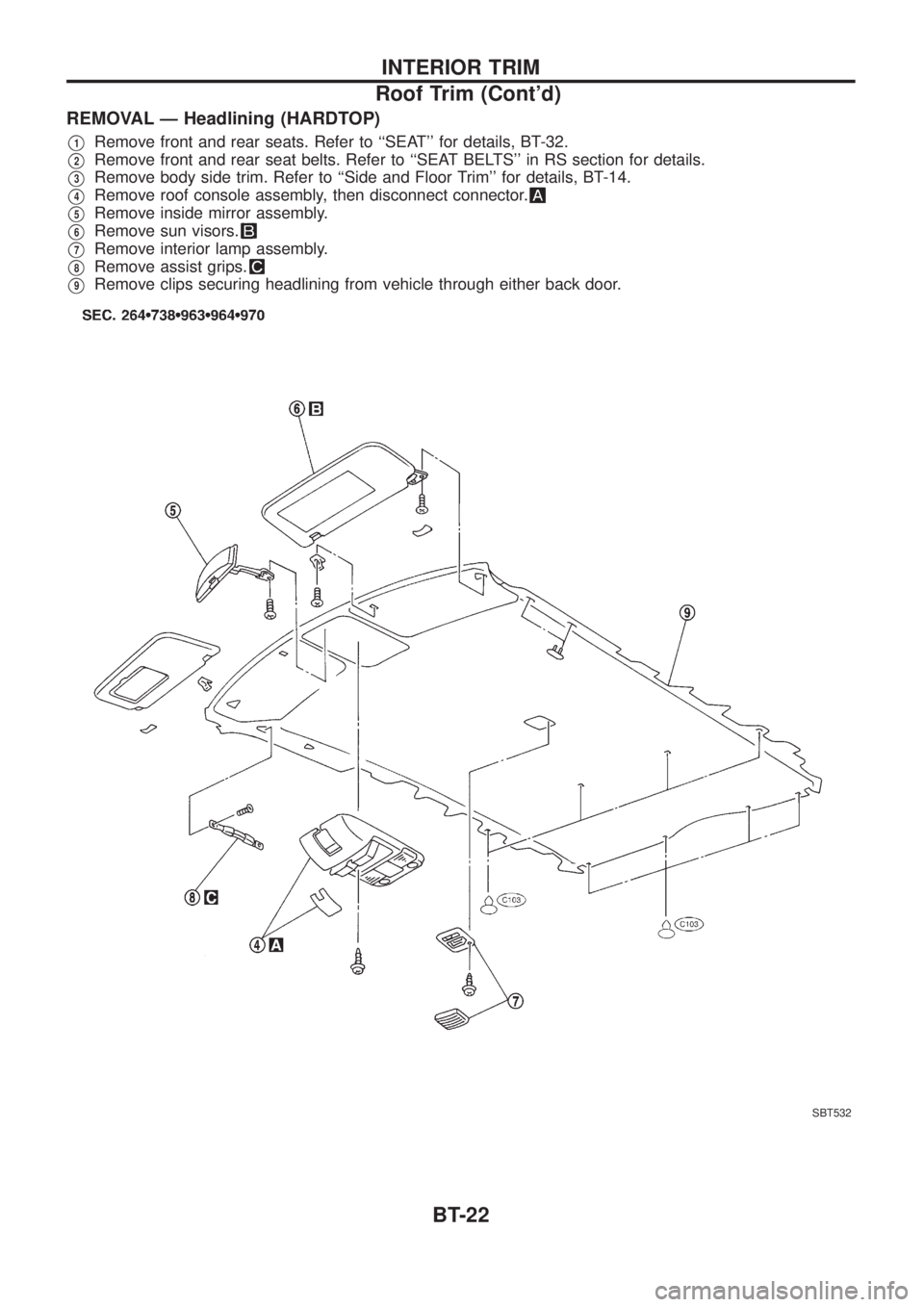
REMOVAL Ð Headlining (HARDTOP)
V1Remove front and rear seats. Refer to ``SEAT'' for details, BT-32.
V2Remove front and rear seat belts. Refer to ``SEAT BELTS'' in RS section for details.
V3Remove body side trim. Refer to ``Side and Floor Trim'' for details, BT-14.
V4Remove roof console assembly, then disconnect connector.
V5Remove inside mirror assembly.
V6Remove sun visors.
V7Remove interior lamp assembly.
V8Remove assist grips.
V9Remove clips securing headlining from vehicle through either back door.
SBT532
INTERIOR TRIM
Roof Trim (Cont'd)
BT-22
Page 118 of 1226
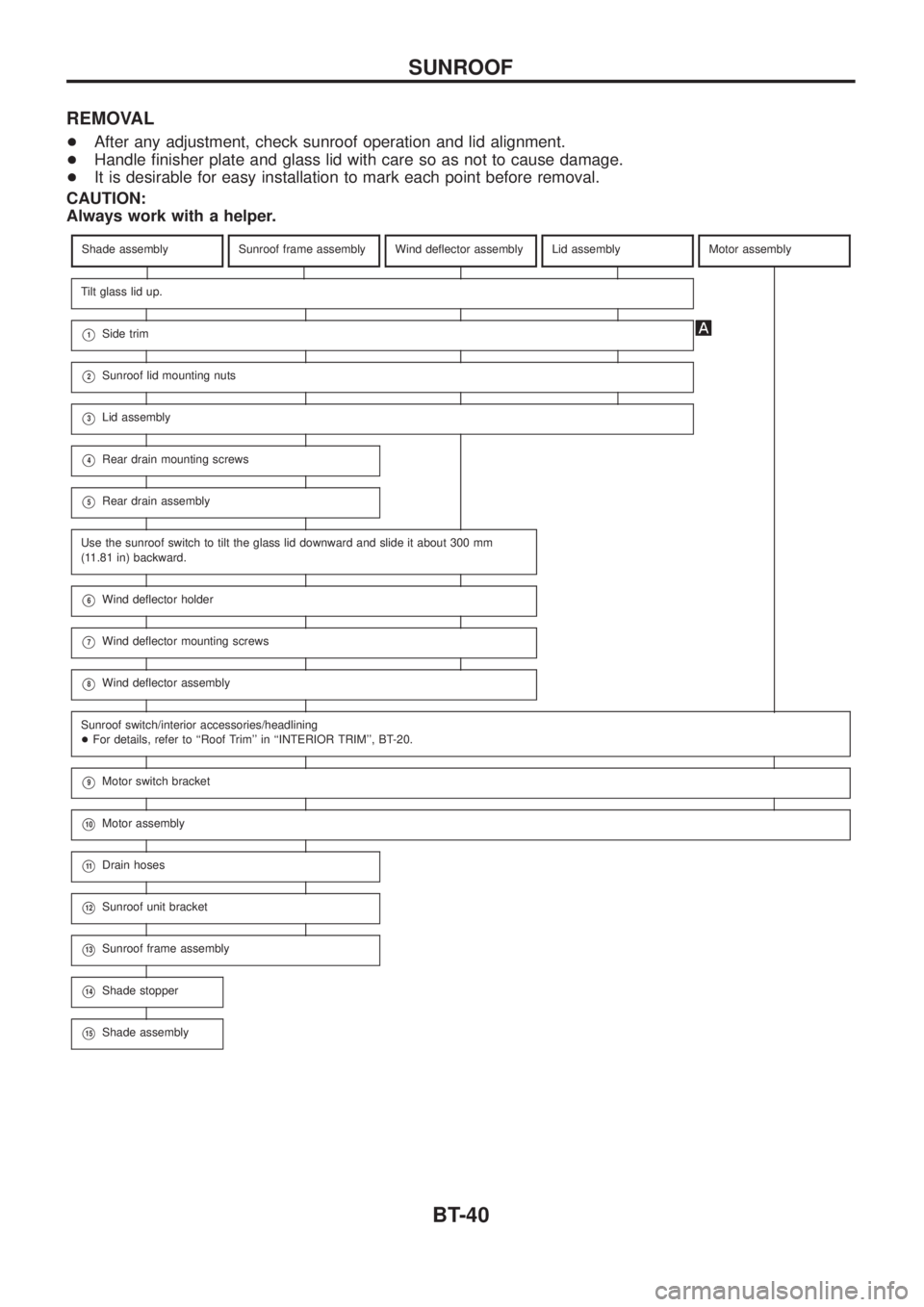
REMOVAL
+After any adjustment, check sunroof operation and lid alignment.
+Handle ®nisher plate and glass lid with care so as not to cause damage.
+It is desirable for easy installation to mark each point before removal.
CAUTION:
Always work with a helper.
Shade assemblySunroof frame assemblyWind de¯ector assemblyLid assemblyMotor assembly
Tilt glass lid up.
V1Side trim
V2Sunroof lid mounting nuts
V3Lid assembly
V4Rear drain mounting screws
V5Rear drain assembly
Use the sunroof switch to tilt the glass lid downward and slide it about 300 mm
(11.81 in) backward.
V6Wind de¯ector holder
V7Wind de¯ector mounting screws
V8Wind de¯ector assembly
Sunroof switch/interior accessories/headlining
+For details, refer to ``Roof Trim'' in ``INTERIOR TRIM'', BT-20.
V9Motor switch bracket
V10Motor assembly
V11Drain hoses
V12Sunroof unit bracket
V13Sunroof frame assembly
V14Shade stopper
V15Shade assembly
SUNROOF
BT-40
Page 124 of 1226
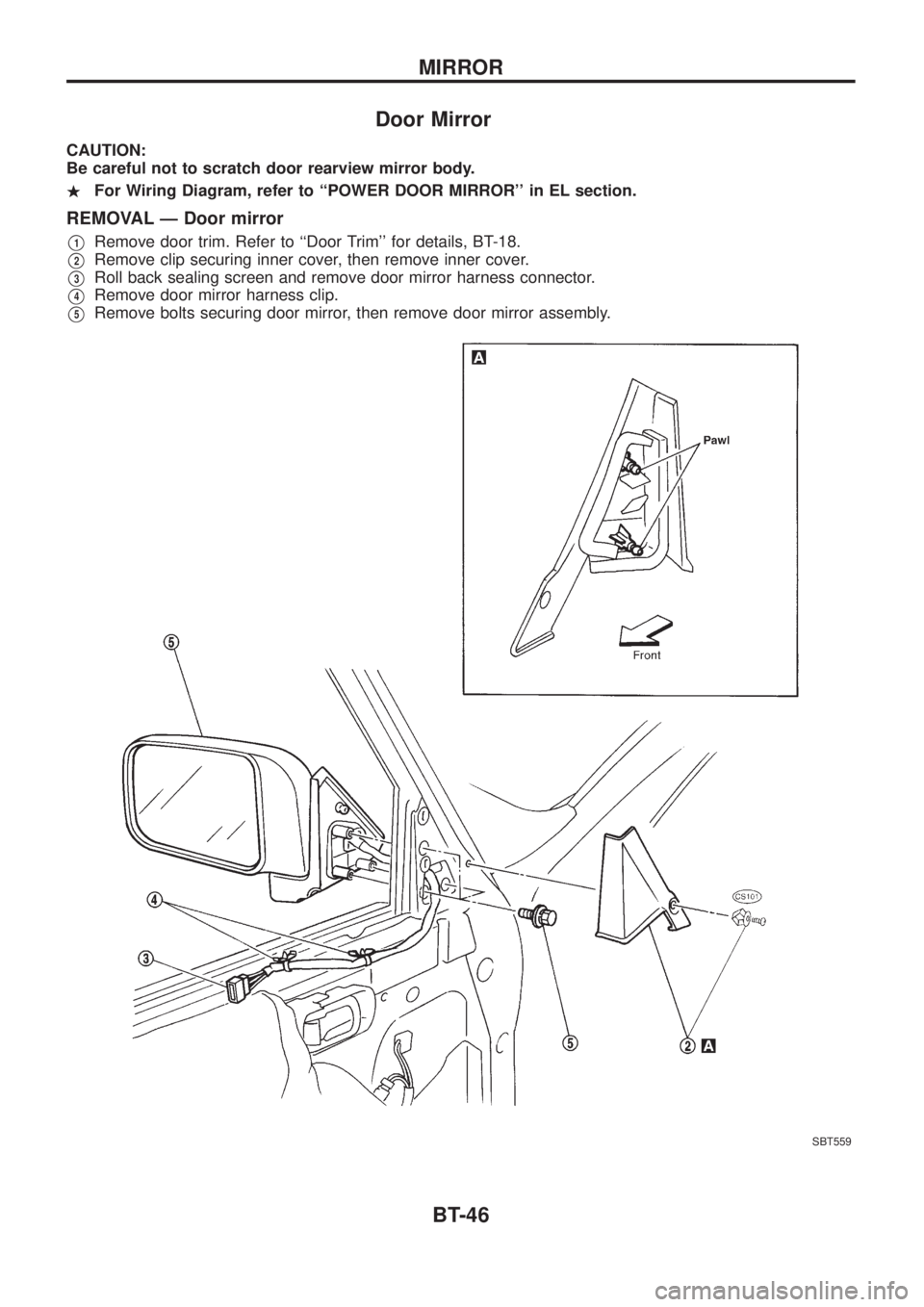
Door Mirror
CAUTION:
Be careful not to scratch door rearview mirror body.
.For Wiring Diagram, refer to ``POWER DOOR MIRROR'' in EL section.
REMOVAL Ð Door mirror
V1Remove door trim. Refer to ``Door Trim'' for details, BT-18.
V2Remove clip securing inner cover, then remove inner cover.
V3Roll back sealing screen and remove door mirror harness connector.
V4Remove door mirror harness clip.
V5Remove bolts securing door mirror, then remove door mirror assembly.
SBT559
MIRROR
BT-46
Page 196 of 1226
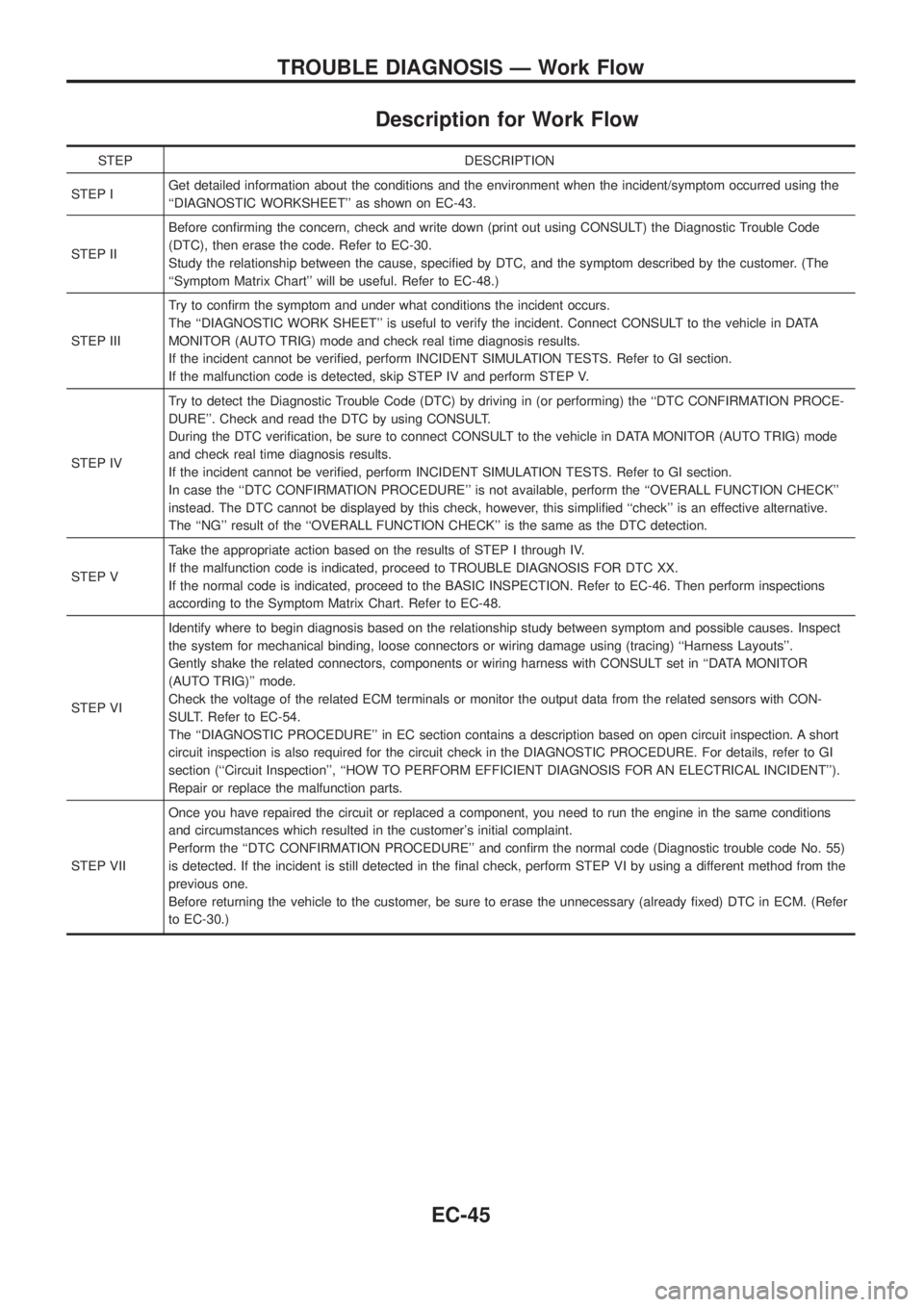
Description for Work Flow
STEP DESCRIPTION
STEP IGet detailed information about the conditions and the environment when the incident/symptom occurred using the
``DIAGNOSTIC WORKSHEET'' as shown on EC-43.
STEP IIBefore con®rming the concern, check and write down (print out using CONSULT) the Diagnostic Trouble Code
(DTC), then erase the code. Refer to EC-30.
Study the relationship between the cause, speci®ed by DTC, and the symptom described by the customer. (The
``Symptom Matrix Chart'' will be useful. Refer to EC-48.)
STEP IIITry to con®rm the symptom and under what conditions the incident occurs.
The ``DIAGNOSTIC WORK SHEET'' is useful to verify the incident. Connect CONSULT to the vehicle in DATA
MONITOR (AUTO TRIG) mode and check real time diagnosis results.
If the incident cannot be veri®ed, perform INCIDENT SIMULATION TESTS. Refer to GI section.
If the malfunction code is detected, skip STEP IV and perform STEP V.
STEP IVTry to detect the Diagnostic Trouble Code (DTC) by driving in (or performing) the ``DTC CONFIRMATION PROCE-
DURE''. Check and read the DTC by using CONSULT.
During the DTC veri®cation, be sure to connect CONSULT to the vehicle in DATA MONITOR (AUTO TRIG) mode
and check real time diagnosis results.
If the incident cannot be veri®ed, perform INCIDENT SIMULATION TESTS. Refer to GI section.
In case the ``DTC CONFIRMATION PROCEDURE'' is not available, perform the ``OVERALL FUNCTION CHECK''
instead. The DTC cannot be displayed by this check, however, this simpli®ed ``check'' is an effective alternative.
The ``NG'' result of the ``OVERALL FUNCTION CHECK'' is the same as the DTC detection.
STEP VTake the appropriate action based on the results of STEP I through IV.
If the malfunction code is indicated, proceed to TROUBLE DIAGNOSIS FOR DTC XX.
If the normal code is indicated, proceed to the BASIC INSPECTION. Refer to EC-46. Then perform inspections
according to the Symptom Matrix Chart. Refer to EC-48.
STEP VIIdentify where to begin diagnosis based on the relationship study between symptom and possible causes. Inspect
the system for mechanical binding, loose connectors or wiring damage using (tracing) ``Harness Layouts''.
Gently shake the related connectors, components or wiring harness with CONSULT set in ``DATA MONITOR
(AUTO TRIG)'' mode.
Check the voltage of the related ECM terminals or monitor the output data from the related sensors with CON-
SULT. Refer to EC-54.
The ``DIAGNOSTIC PROCEDURE'' in EC section contains a description based on open circuit inspection. A short
circuit inspection is also required for the circuit check in the DIAGNOSTIC PROCEDURE. For details, refer to GI
section (``Circuit Inspection'', ``HOW TO PERFORM EFFICIENT DIAGNOSIS FOR AN ELECTRICAL INCIDENT'').
Repair or replace the malfunction parts.
STEP VIIOnce you have repaired the circuit or replaced a component, you need to run the engine in the same conditions
and circumstances which resulted in the customer's initial complaint.
Perform the ``DTC CONFIRMATION PROCEDURE'' and con®rm the normal code (Diagnostic trouble code No. 55)
is detected. If the incident is still detected in the ®nal check, perform STEP VI by using a different method from the
previous one.
Before returning the vehicle to the customer, be sure to erase the unnecessary (already ®xed) DTC in ECM. (Refer
to EC-30.)
TROUBLE DIAGNOSIS Ð Work Flow
EC-45
Page 270 of 1226
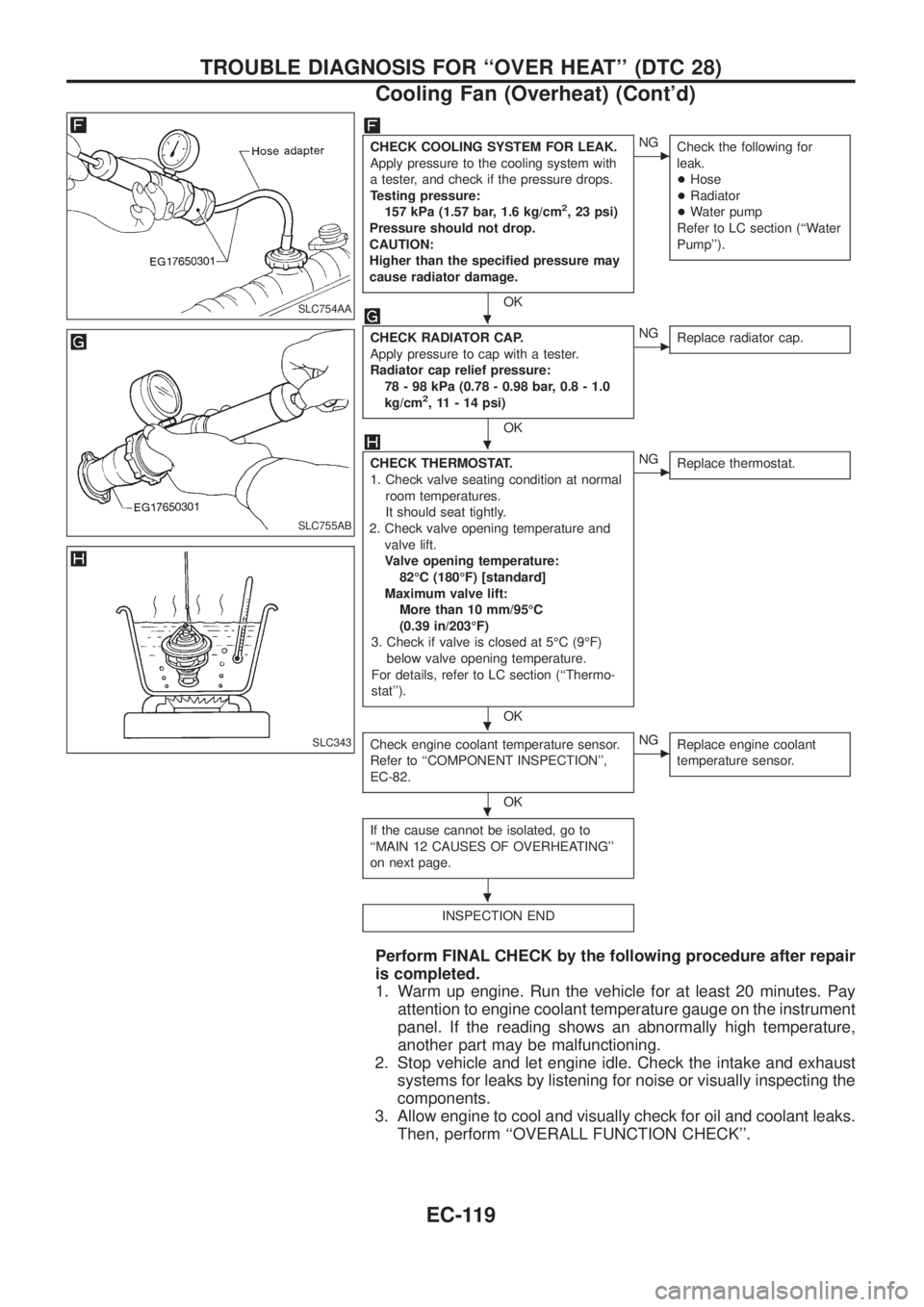
CHECK COOLING SYSTEM FOR LEAK.
Apply pressure to the cooling system with
a tester, and check if the pressure drops.
Testing pressure:
157 kPa (1.57 bar, 1.6 kg/cm
2, 23 psi)
Pressure should not drop.
CAUTION:
Higher than the speci®ed pressure may
cause radiator damage.
OK
cNG
Check the following for
leak.
+Hose
+Radiator
+Water pump
Refer to LC section (``Water
Pump'').
CHECK RADIATOR CAP.
Apply pressure to cap with a tester.
Radiator cap relief pressure:
78 - 98 kPa (0.78 - 0.98 bar, 0.8 - 1.0
kg/cm
2, 11 - 14 psi)
OK
cNG
Replace radiator cap.
CHECK THERMOSTAT.
1. Check valve seating condition at normal
room temperatures.
It should seat tightly.
2. Check valve opening temperature and
valve lift.
Valve opening temperature:
82ÉC (180ÉF) [standard]
Maximum valve lift:
More than 10 mm/95ÉC
(0.39 in/203ÉF)
3. Check if valve is closed at 5ÉC (9ÉF)
below valve opening temperature.
For details, refer to LC section (``Thermo-
stat'').
OK
cNG
Replace thermostat.
Check engine coolant temperature sensor.
Refer to ``COMPONENT INSPECTION'',
EC-82.
OK
cNG
Replace engine coolant
temperature sensor.
If the cause cannot be isolated, go to
``MAIN 12 CAUSES OF OVERHEATING''
on next page.
INSPECTION END
Perform FINAL CHECK by the following procedure after repair
is completed.
1. Warm up engine. Run the vehicle for at least 20 minutes. Pay
attention to engine coolant temperature gauge on the instrument
panel. If the reading shows an abnormally high temperature,
another part may be malfunctioning.
2. Stop vehicle and let engine idle. Check the intake and exhaust
systems for leaks by listening for noise or visually inspecting the
components.
3. Allow engine to cool and visually check for oil and coolant leaks.
Then, perform ``OVERALL FUNCTION CHECK''.
SLC754AA
SLC755AB
SLC343
.
.
.
.
.
TROUBLE DIAGNOSIS FOR ``OVER HEAT'' (DTC 28)
Cooling Fan (Overheat) (Cont'd)
EC-119