cooling NISSAN PULSAR 1987 Owner's Guide
[x] Cancel search | Manufacturer: NISSAN, Model Year: 1987, Model line: PULSAR, Model: NISSAN PULSAR 1987Pages: 238, PDF Size: 28.91 MB
Page 198 of 238
198 Electrical System
(3) Replenish the coolant in the radiator. Refer
to the Cooling and Heating Systems section for the
correct procedure.
TO DISMANTLE
Bosch Alternator
Remove the alternator from the vehicle as
previously described.
Scribe a mark across the drive end bracket,
stator and slip ring end bracket to facilitate correct
alignment during assembly. Remove the screws and washers securing the
regulator and brush holder assembly. Withdraw the
regulator and brush holder assembly from the alter-
nator. Remove the long screws securing the drive
end bracket to the slip ring end bracket and withdraw
the drive end bracket, rotor and pulley assembly.
NOTE: Ensure that the wave washer behind
the rotor shaft rear bearing in the slip ring
end bracket is not mislaid.
Holding the rotor in a soft jawed vice,
remove the split drive pulley retaining nut, washer
and spacer from the rotor shaft. Remove the split driv e pulley, spacer, plate
washer and fan from the rotor shaft. Using a suitable pres s and press plates,
support the drive end bracket with the pulley end of
the rotor shaft uppermost a nd carefully press the rotor
shaft from the spacer, bearing and the drive end
bracket.
Remove the spacer and the bearing retainer
plate screws from the drive end bracket. Remove the bearing retainer plate and the
bearing from the drive end bracket. If necessary, using a bearing puller, remove
the rear bearing from the rotor shaft. Remove the nut, spring washer and output
terminal components from the {B + ) terminal on the
outside of the slip ring end bracket.
(12) Working inside the slip ring end bracket,
remove the screws securing the diode pack to the
bracket and withdraw the stator and diode pack as an
assembly. Remove the insulating spacer and washer
from the (B +) terminal.
NOTE: The diode pack is supplied as an
assembly and in the event of a component
'failure, must be renewed as a complete unit.
Mark all wiring connections prior to removal
to aid assembly. Where necessary, unsolder the stator leads
from the connector terminals to separate the diode
pack.
NOTE: When soldering or unsoldering the
stator leads from the diodes, grip the leads
with a pair of long nosed pliers. This will
safeguard the diodes by transferring any
excess heat to the jaws of the pliers.
Hitachi Alternator
Remove the alternator from the vehicle as
previously described.
Scribe a mark across the drive end bracket,
stator and slip ring end bracket to facilitate correct
alignment during assembly. Remove the through bolts retaining the drive
end bracket to the slip ring end bracket. Apply a heated 200 watt soldering iron to the
slip ring end bracket at the bearing mounting boss for
3-4 minutes to heat the bracket and allow the removal
of the slip ring end bearing. Carefully prise the slip ring end bracket and
stator assembly from the drive end bracket and rotor
assembly using suitable levers. Do not insert the levers
too far or damage to the stator will occur.
Hold the rotor and driv e end bracket assem-
bly in a soft jawed vice and remove the nut retaining
the drive pulley to the rotor. Remove the washer, pulley and spacer
washer from the rotor shaft.
Using a soft faced hammer, drive the rotor
shaft assembly from the drive end bracket and remove
the inner spacer washer from the rotor shaft.
Remove the bearing retainer plate screws
and remove the plate. Using a suitable drift, drive the
bearing from the bracket. Remove the retaining nut and insulator
washer from the alternator terminal. Remove the slip ring end bracket retaining
nuts and separate the diode pack, stator and regulator
assembly.
If necessary, file the ends of the brush
assembly retaining rivets, caref ully unsolder the ter-
minal plate and remove the brush assembly and
terminal plate from the diode pack. If necessary, remove the fan guide retaining
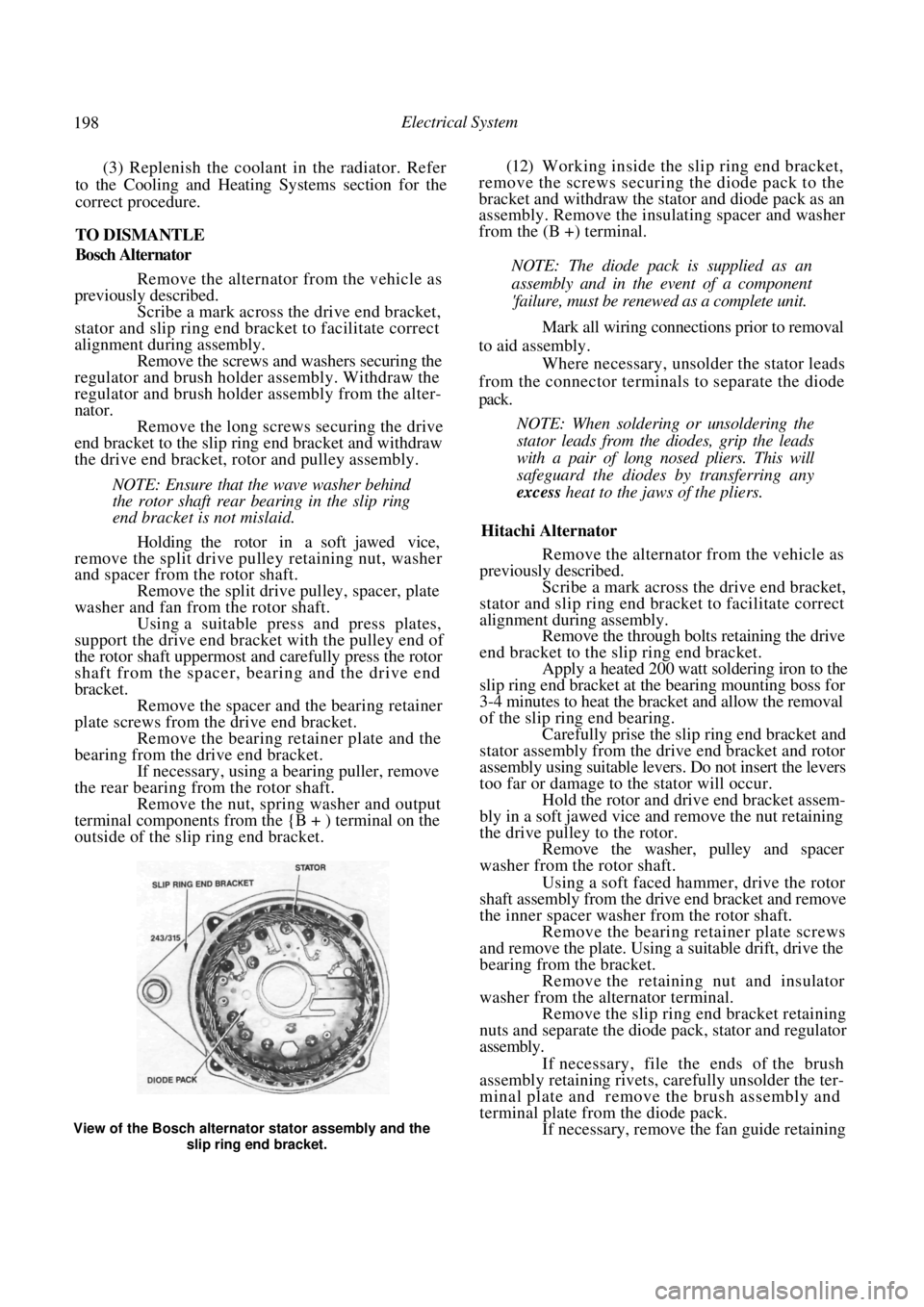
View of the Bosch alternator stator assembly and the
slip ring end bracket.
Page 209 of 238

Electrical System 209
12. INSTRUMENT CLUSTER
TO REMOVE AND INSTAL
Disconnect the negative battery terminal.
Remove the retaining screws from the instru-
ment cluster surround. Carefully withdraw the instrument cluster
surround from the instrument panel sufficiently to
enable the wiring to be disconnected. Remove the
surround from the vehicle.
.
FLEXIBLE PRINTED
CIRCUIT
Rear view of the instrument cluster removed from the
vehicle.
(4) Remove the instrument cluster assembly
retaining screws and gently ease the assembly from the
instrument panel sufficiently to enable the wiring to be
disconnected.
If necessary, remove the instruments as follows:
Carefully depress the retaining clips on the
front lens and remove the front lens. On models equipped with a tachometer, slide
the plastic rib from between the speedometer and the
tachometer. Remove the screws retaining the speedome-
ter and the tachometer or fuel/temperature gauges
from the rear of the instrument cluster.
CLUSTER ASSEMBLY
(d) Withdraw both instruments from the front of
the instrument cluster being careful as these instru-
ments are held by protruding pin terminals.
NOTE: Do not touch the faces of the instru-
ment dials as they mark easily.
(e) On models equipped with a tachometer,
remove the retaining nuts and remove the tempera-
ture and/or the fuel gauge from the cluster assembly.
Installation is a reversal of the removal procedure
ensuring that all electrical connectors are correctly
installed.
13. BLOWER FAN
The removal and installation procedure for the
blower fan is described in the Cooling and Heating
Systems section.
14. RADIO/CASSETTE
TO REMOVE AND INSTAL
Disconnect the negative battery terminal.
Remove the release hole covers on each side
of the radio/cassette.
Dismantled view of the instrument cluster.
Illustration of the radio/cass ette removal tool showing
the required dimensions.
BULB HOLDERS
BULB HOLDERS
Removing the release hole covers from the radio/cas-
sette.
Page 221 of 238
Electrical System 221
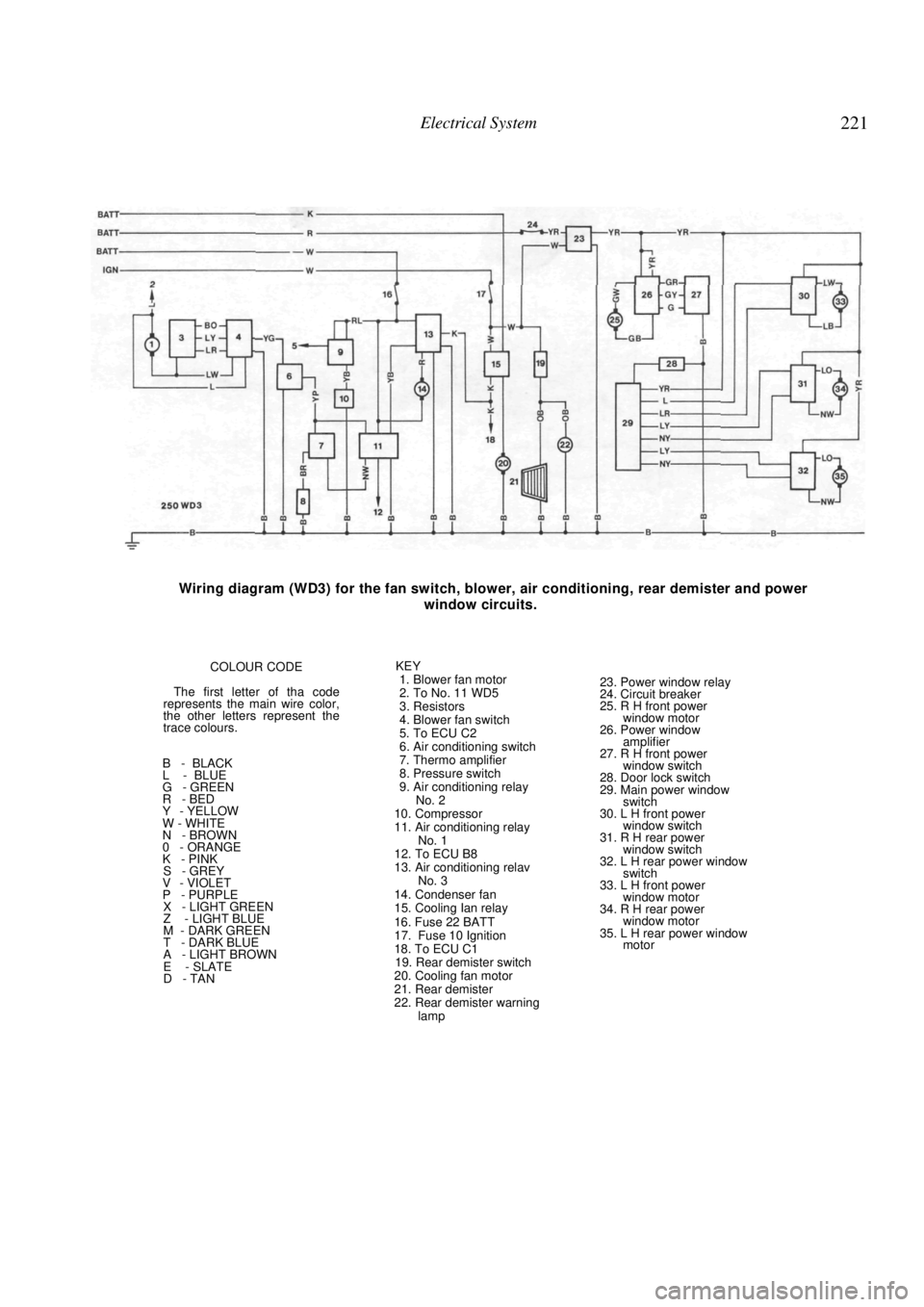
Wiring diagram (WD3) for the fan switch, blower, air conditioning, rear demister and power
window circuits.
COLOUR CODE
The first letter of tha code
represents the main wire color,
the other letters represent the
trace colours.
B - BLACK
L - BLUE
G - GREEN
R - BED
Y - YELLOW
W - WHITE
N - BROWN
0 - ORANGE
K - PINK
S - GREY
V - VIOLET
P - PURPLE
X - LIGHT GREEN
Z - LIGHT BLUE
M - DARK GREEN
T - DARK BLUE
A - LIGHT BROWN
E - SLATE
D - TAN KEY
1. Blower fan motor
2. To No. 11 WD5
3. Resistors
4. Blower fan switch
5. To ECU C2
6. Air conditioning switch
7. Thermo amplifier
8. Pressure switch
9. Air conditioning relay No. 2
10. Compressor
11. Air conditioning relay No. 1
12. To ECU B8
13. Air conditioning relav No. 3
14. Condenser fan
15. Cooling Ian relay
16. Fuse 22 BATT
17. Fuse 10 Ignition
18. To ECU C1
19. Rear demister switch
20. Cooling fan motor
21. Rear demister
22. Rear demister warning lamp
23. Power window relay
24. Circuit breaker
25. R H front power
window motor
26. Power window amplifier
27. R H front power window switch
28. Door lock switch
29. Main power window switch
30. L H front power
window switch
31. R H rear power window switch
32. L H rear power window switch
33. L H front power
window motor
34. R H rear power window motor
35. L H rear power window motor