Intelligent NISSAN QASHQAI 2008 Owner's Manual
[x] Cancel search | Manufacturer: NISSAN, Model Year: 2008, Model line: QASHQAI, Model: NISSAN QASHQAI 2008Pages: 297, PDF Size: 4.09 MB
Page 99 of 297
Downloaded from www.Manualslib.com manuals search engine BACK DOOR LOCK
WARNING
Always check that the back door has been
properly closed to prevent it from opening
while driving.
Do not drive with the back door opened. This
could allow dangerous exhaust gases to be
drawn into the vehicle.
Closely supervise children when they are
around the vehicle to prevent them from play-
ing and being locked in the luggage compart-
ment where they could be seriously injured.
Keep the vehicle locked, with the back door
closed, when not in use, and prevent chil-
dren’s access to the vehicle’s keys.
The power door lock system allows you to lock or
unlock all doors including the back door.
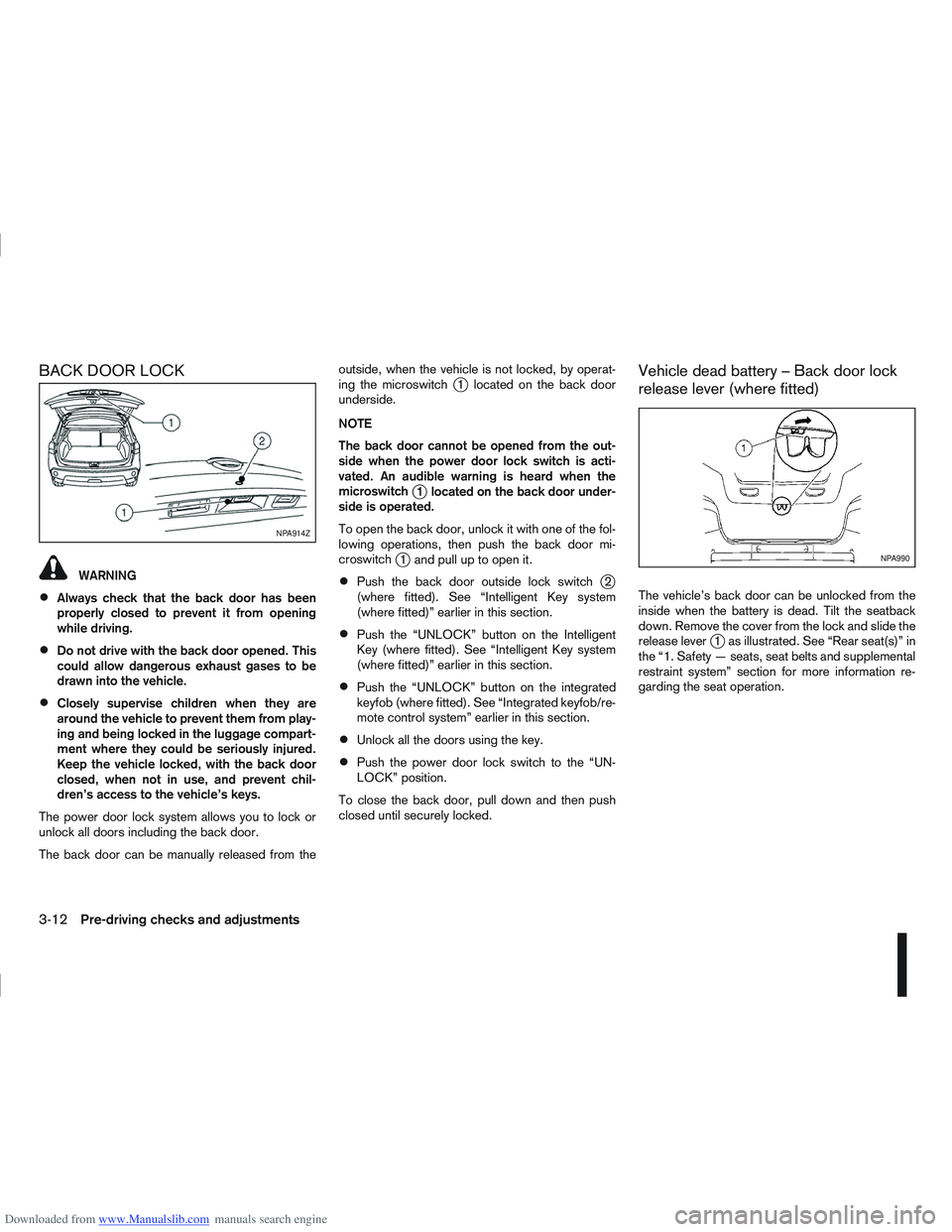
The back door can be manually released from the outside, when the vehicle is not locked, by operat-
ing the microswitch
j1 located on the back door
underside.
NOTE
The back door cannot be opened from the out-
side when the power door lock switch is acti-
vated. An audible warning is heard when the
microswitch
j1 located on the back door under-
side is operated.
To open the back door, unlock it with one of the fol-
lowing operations, then push the back door mi-
croswitch
j1 and pull up to open it.
Push the back door outside lock switchj2
(where fitted). See “Intelligent Key system
(where fitted)” earlier in this section.
Push the “UNLOCK” button on the Intelligent
Key (where fitted). See “Intelligent Key system
(where fitted)” earlier in this section.
Push the “UNLOCK” button on the integrated
keyfob (where fitted). See “Integrated keyfob/re-
mote control system” earlier in this section.
Unlock all the doors using the key.
Push the power door lock switch to the “UN-
LOCK” position.
To close the back door, pull down and then push
closed until securely locked.
Vehicle dead battery – Back door lock
release lever (where fitted)
The vehicle’s back door can be unlocked from the
inside when the battery is dead. Tilt the seatback
down. Remove the cover from the lock and slide the
release lever
j1 as illustrated. See “Rear seat(s)” in
the “1. Safety — seats, seat belts and supplemental
restraint system” section for more information re-
garding the seat operation.
NPA914Z
NPA990
3-12Pre-driving checks and adjustments
Page 100 of 297

Downloaded from www.Manualslib.com manuals search engine ALARM SYSTEM (where fitted)
The alarm system provides visual and audible alarm
signals if parts of the vehicle are disturbed.
How to arm the alarm system
1. Close all doors, windows, back door and bon-net.
2. Lock the vehicle using the keyfob (lock button), for additional information, see “Integrated key-
fob/remote control system” in the “3. Pre-driving
checks and adjustments” section.
NOTE
If the vehicle is not fully locked, a door/bonnet/
back door is open, or the ignition switch is in the
ON position (after arming the system), the buzzer
will sound. After correctly closing, the buzzer will
stop.
Alarm system operation
The system will give the following alarm:
The siren sounds intermittently and all direction
indicators will flash.
The alarm automatically turns off after 28 sec-
onds.
The alarm is activated when:
The volumetric sensing system (ultrasonic sen-
sors) is triggered.
Any door/the back door is opened.
The bonnet is opened.
The ignition circuit is turned on without the own-
er’s key being used.
The alarm system will stop when:
The vehicle is unlocked using the keyfob unlock
button.
The ignition switch or ignition knob is turned to
the ON position with a registered NATS key.
If the system does not operate as described
above, have it checked by your NISSAN dealer or
qualified workshop.
Ultrasonic sensors (where fitted)
The ultrasonic sensors (volumetric sensing) detect
movements in the passenger’s compartment. When
the alarm system is set to the armed position, it will
automatically switch on the ultrasonic sensors.
It is possible to exclude the ultrasonic sensors (e.g.
when leaving pets inside the car).
To exclude the ultrasonic sensors:
1. Turn the ignition switch 3 times within 7 seconds from the “OFF” to the ON position.
2. Close the door(s)/bonnet/back door and press the lock button
on the keyfob to lock all doors/
back door.
The ultrasonic sensors are now excluded from the
alarm system. All other functions of the system re-
main activated until the alarm system is disarmed
again.
NISSAN ANTI-THEFT SYSTEM (NATS)
The NISSAN Anti-Theft System (NATS)* will not
allow the engine to start without the use of the reg-
istered NATS key.
* Immobilizer
If the engine fails to start using the registered NATS
key, it may be due to interference from another
NATS key, an automated toll road device or an auto-
mated payment device on the key ring. Restart the
engine using the following procedure:
1. Leave the ignition switch in the ON position for approximately 5 seconds.
2. Turn the ignition switch to the “OFF” or LOCK position and wait approximately 5 seconds.
3. Repeat steps 1 and 2.
4. Restart the engine while holding the device (which may have caused the interference) sepa-
rated from the registered NATS key or NATS
Intelligent Key (where fitted).
If this procedure allows the engine to start,
NISSAN recommends placing the registered
NATS key or NATS Intelligent Key (where fitted)
on a separate key-ring to avoid interference from
other devices.
SECURITY SYSTEM
Pre-driving checks and adjustments3-13
Page 101 of 297
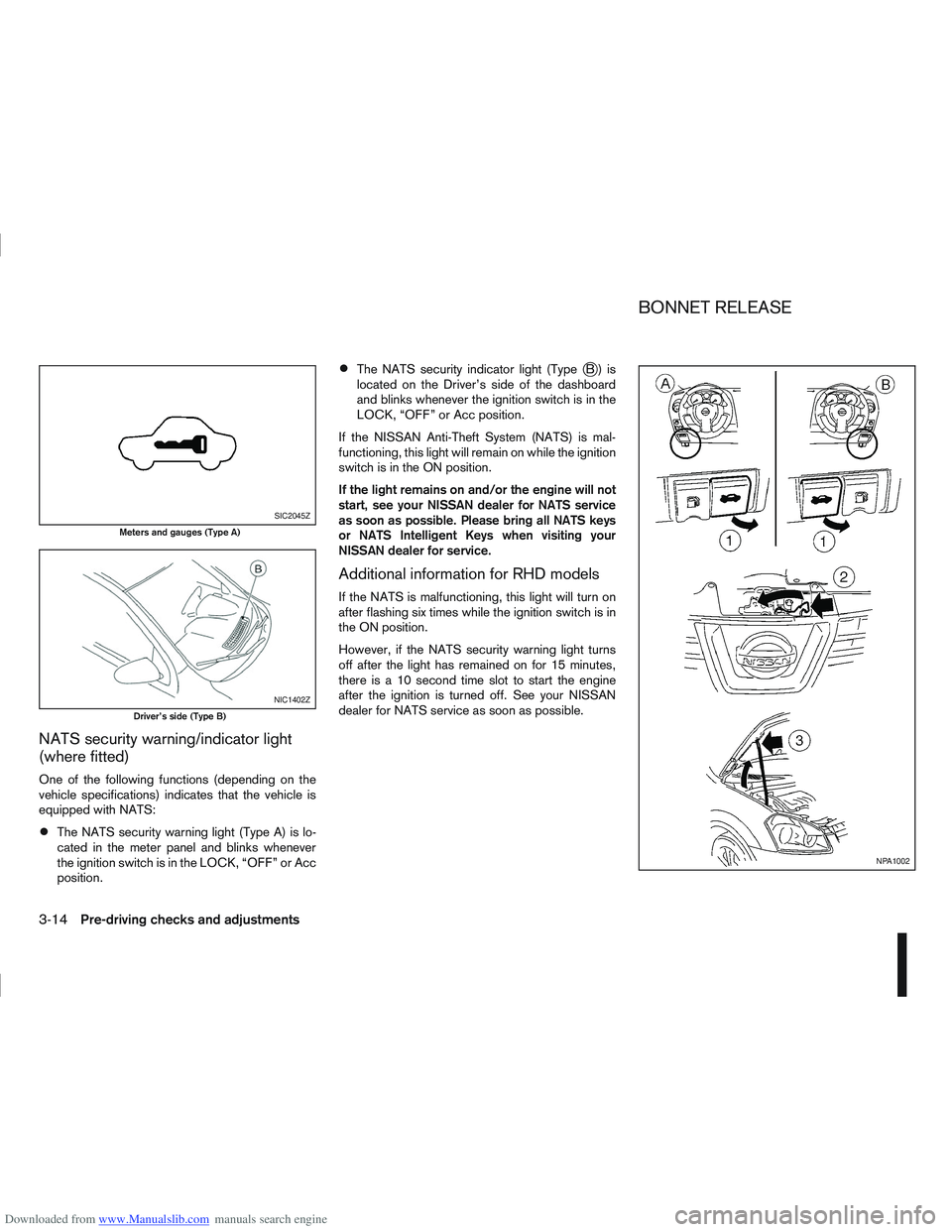
Downloaded from www.Manualslib.com manuals search engine NATS security warning/indicator light
(where fitted)
One of the following functions (depending on the
vehicle specifications) indicates that the vehicle is
equipped with NATS:
The NATS security warning light (Type A) is lo-
cated in the meter panel and blinks whenever
the ignition switch is in the LOCK, “OFF” or Acc
position.
The NATS security indicator light (TypejB) is
located on the Driver’s side of the dashboard
and blinks whenever the ignition switch is in the
LOCK, “OFF” or Acc position.
If the NISSAN Anti-Theft System (NATS) is mal-
functioning, this light will remain on while the ignition
switch is in the ON position.
If the light remains on and/or the engine will not
start, see your NISSAN dealer for NATS service
as soon as possible. Please bring all NATS keys
or NATS Intelligent Keys when visiting your
NISSAN dealer for service.
Additional information for RHD models
If the NATS is malfunctioning, this light will turn on
after flashing six times while the ignition switch is in
the ON position.
However, if the NATS security warning light turns
off after the light has remained on for 15 minutes,
there is a 10 second time slot to start the engine
after the ignition is turned off. See your NISSAN
dealer for NATS service as soon as possible.
SIC2045Z
Meters and gauges (Type A)
NIC1402Z
Driver’s side (Type B)
NPA1002
BONNET RELEASE
3-14Pre-driving checks and adjustments
Page 163 of 297
Downloaded from www.Manualslib.com manuals search engine 5Starting and driving
Starting and driving
Running-in schedule ................................................ 5-2
Before starting the engine ........................................ 5-2
Precautions when starting and driving ...................... 5-3
Exhaust gas (Carbon Monoxide) ......................... 5-3
On-pavement and off-road driving precautions ......... 5-4
Three-way catalyst (Petrol engine models)................ 5-4 To help prevent damage ..................................... 5-4
Turbocharger system (Diesel engine models) ........... 5-5
Diesel Particulate Filter (DPF) (where fitted) ............. 5-5 Regeneration restrictions .................................... 5-5
If regeneration fails ............................................. 5-5
Care when driving ................................................... 5-6 Engine cold start period ...................................... 5-6
Loading luggage ................................................. 5-6
Driving on wet roads ........................................... 5-6
Driving under winter conditions ........................... 5-6
Ignition switch.......................................................... 5-6 Manual transmission ........................................... 5-6
Automatic transmission or Continuously
variable transmission........................................... 5-7
Steering lock ...................................................... 5-7
Key positions ...................................................... 5-7
NISSAN Anti-Theft System (NATS)..................... 5-7
Ignition knob (where fitted)....................................... 5-8 Manual transmission ........................................... 5-8
Automatic transmission or Continuously
variable transmission........................................... 5-9
Steering lock ...................................................... 5-9
Ignition knob position .......................................... 5-9 Emergency key – Intelligent Key dead battery
situation .............................................................. 5-10
NISSAN Anti-Theft System (NATS)..................... 5-10
Starting the engine................................................... 5-11
Driving the vehicle.................................................... 5-12 Driving with manual transmission......................... 5-12
Driving with automatic transmission or with
continuously variable transmission (Models
with manual shift) ................................................ 5-14
Driving with Continuously Variable Transmis-
sion (CVT) (Models without manual shift) ............ 5-17
Stop/Start System (where fitted) .............................. 5-21 Normal operation ................................................ 5-21
Precautions ........................................................ 5-22
Stop/Start System OFF switch ........................... 5-23
Environmental savings ........................................ 5-23
Ultrasonic Parking Sensor (where fitted) .................. 5-24
Four-wheel Drive (4WD) (where fitted)..................... 5-24 4WD mode operations........................................ 5-25
4WD shift tips .................................................... 5-25
4WD Warning light ............................................. 5-26
4WD Mode indicator lights ................................. 5-27
Driving four-wheel drive (4WD) safely ................. 5-27
Cruise control (where fitted) .................................... 5-29 Precautions on cruise control .............................. 5-29
Cruise control system operations ........................ 5-30
Speed limiter ........................................................... 5-31 Speed limiter operations ..................................... 5-32
Parking .................................................................... 5-33
Trailer towing ........................................................... 5-35
Page 171 of 297
Downloaded from www.Manualslib.com manuals search engine For additional information, see “NISSAN Anti-Theft
System (NATS)” in the “3. Pre-driving checks and
adjustments” section.
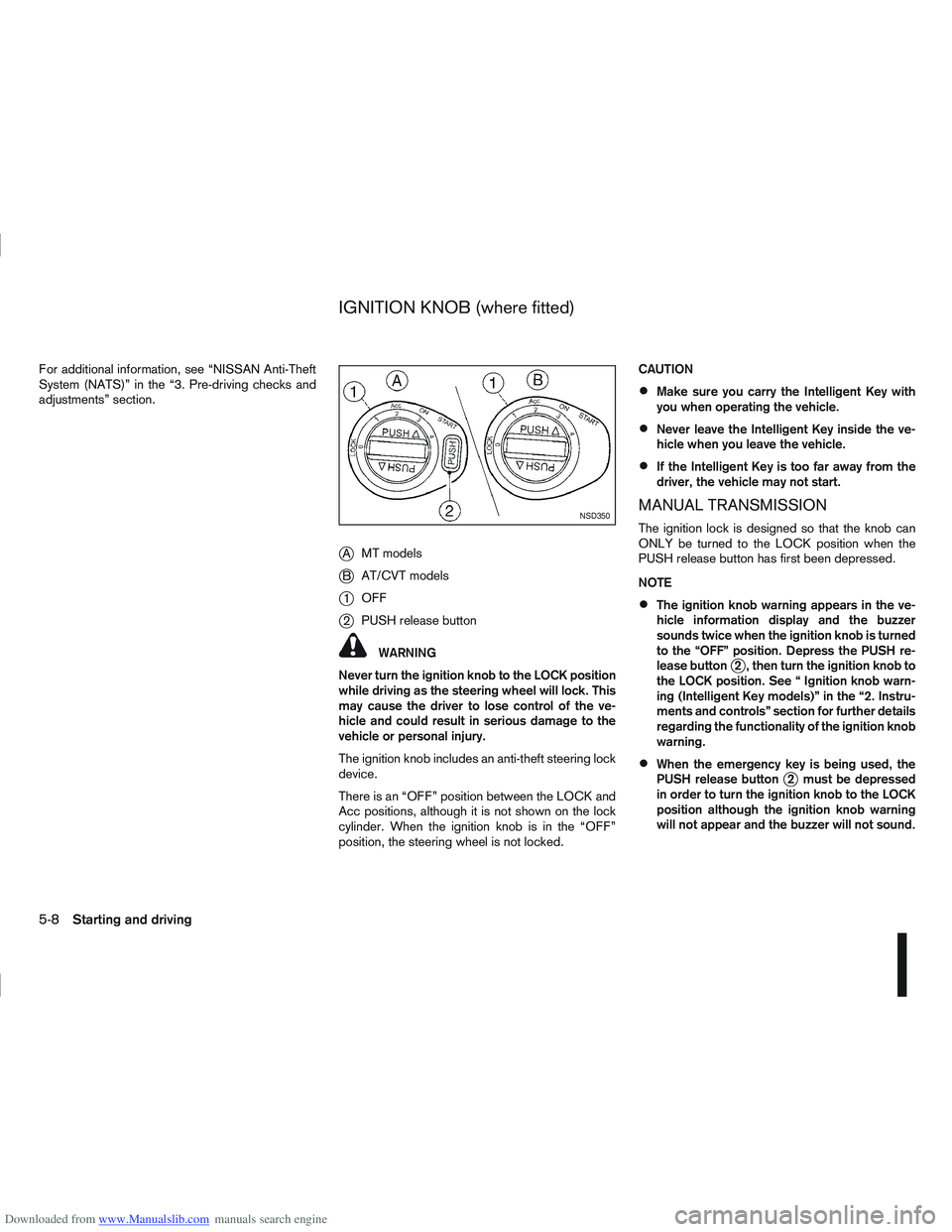
jAMT models
jB AT/CVT models
j1OFF
j2PUSH release button
WARNING
Never turn the ignition knob to the LOCK position
while driving as the steering wheel will lock. This
may cause the driver to lose control of the ve-
hicle and could result in serious damage to the
vehicle or personal injury.
The ignition knob includes an anti-theft steering lock
device.
There is an “OFF” position between the LOCK and
Acc positions, although it is not shown on the lock
cylinder. When the ignition knob is in the “OFF”
position, the steering wheel is not locked. CAUTION
Make sure you carry the Intelligent Key with
you when operating the vehicle.
Never leave the Intelligent Key inside the ve-
hicle when you leave the vehicle.
If the Intelligent Key is too far away from the
driver, the vehicle may not start.
MANUAL TRANSMISSION
The ignition lock is designed so that the knob can
ONLY be turned to the LOCK position when the
PUSH release button has first been depressed.
NOTE
The ignition knob warning appears in the ve-
hicle information display and the buzzer
sounds twice when the ignition knob is turned
to the “OFF” position. Depress the PUSH re-
lease button
j2 , then turn the ignition knob to
the LOCK position. See “ Ignition knob warn-
ing (Intelligent Key models)” in the “2. Instru-
ments and controls” section for further details
regarding the functionality of the ignition knob
warning.
When the emergency key is being used, the
PUSH release buttonj2 must be depressed
in order to turn the ignition knob to the LOCK
position although the ignition knob warning
will not appear and the buzzer will not sound.
NSD350
IGNITION KNOB (where fitted)
5-8Starting and driving
Page 173 of 297
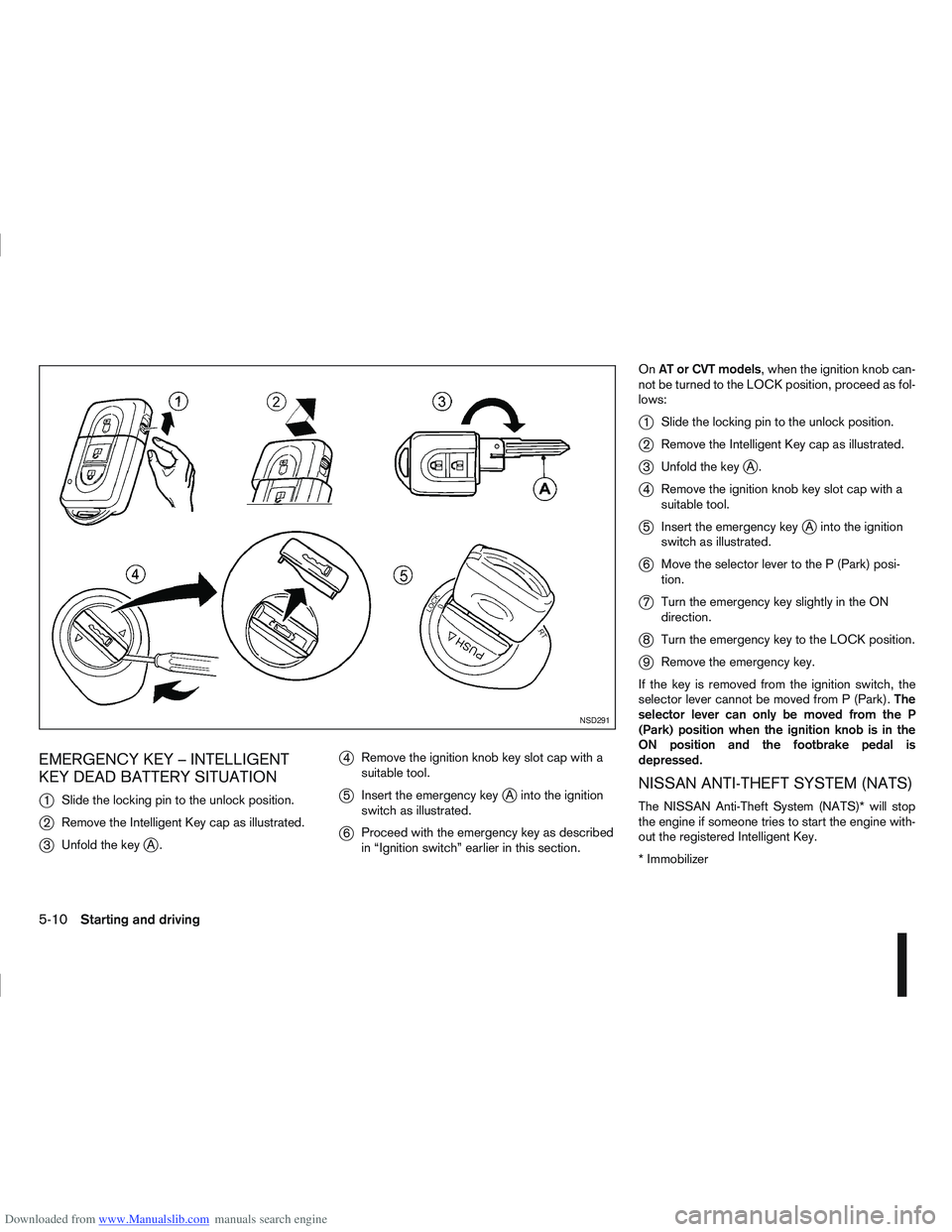
Downloaded from www.Manualslib.com manuals search engine EMERGENCY KEY – INTELLIGENT
KEY DEAD BATTERY SITUATION
j
1Slide the locking pin to the unlock position.
j2Remove the Intelligent Key cap as illustrated.
j3Unfold the keyjA.
j4Remove the ignition knob key slot cap with a
suitable tool.
j5Insert the emergency keyjA into the ignition
switch as illustrated.
j6 Proceed with the emergency key as described
in “Ignition switch” earlier in this section. On
AT or CVT models, when the ignition knob can-
not be turned to the LOCK position, proceed as fol-
lows:
j1 Slide the locking pin to the unlock position.
j2Remove the Intelligent Key cap as illustrated.
j3Unfold the keyjA.
j4Remove the ignition knob key slot cap with a
suitable tool.
j5Insert the emergency keyjA into the ignition
switch as illustrated.
j6 Move the selector lever to the P (Park) posi-
tion.
j7Turn the emergency key slightly in the ON
direction.
j8Turn the emergency key to the LOCK position.
j9Remove the emergency key.
If the key is removed from the ignition switch, the
selector lever cannot be moved from P (Park). The
selector lever can only be moved from the P
(Park) position when the ignition knob is in the
ON position and the footbrake pedal is
depressed.
NISSAN ANTI-THEFT SYSTEM (NATS)
The NISSAN Anti-Theft System (NATS)* will stop
the engine if someone tries to start the engine with-
out the registered Intelligent Key.
* Immobilizer
NSD291
5-10Starting and driving
Page 174 of 297
Downloaded from www.Manualslib.com manuals search engine If you failed to start the engine using the NATS Intel-
ligent Key, turn the ignition knob to the LOCK posi-
tion, wait for 5 seconds and turn the knob to the
START position again to start the engine.
For additional information, see “NISSAN Anti-Theft
System (NATS)” in the “3. Pre-driving checks and
adjustments” section.1. Apply the handbrake.
2.
Manual transmission models:
Move the gear lever to N (Neutral) position, and
depress the clutch pedal to the floor while start-
ing the engine.
Automatic transmission or Continuously vari-
able transmission models:
Depress the brake pedal and move the selector
lever to the P (Park) or N (Neutral) position.
(P position is preferred). NOTE
The starter is designed not to operate if the
selector lever is out of the P (Park) or N (Neu-
tral) position.
3. Models without Intelligent Key: Rotate the steering wheel left to right to release
the ignition lock whilst turning the ignition switch
to the ON position.
Models with Intelligent key:
MT models – keep the clutch pedal
depressed and/or depress the brake pedal
then:
AT or CVT models – depress the brake pedal
then:
1) Push the ignition knob.
2) Rotate the steering wheel left to right to release the ignition lock whilst turning the
ignition knob to the ON position. CAUTION
Make sure you carry the Intelligent Key with
you when operating the vehicle.
If the Intelligent Key is too far away from
the driver, the vehicle may not start.
4. For diesel engine models: Wait until the glow indicator light
goes out.
5. Crank the engine with your foot on the brake pedal, not on the accelerator pedal , by turning
the ignition switch to START.
6. Release the ignition switch when the engine starts. If the engine starts, but fails to run, repeat
the above procedure.
For petrol engine models:
NOTE
Models with HR16DE engine:
If the engine is very hard to start because it is
flooded, depress the accelerator pedal all the
way to the floor and hold it. Crank the engine
for 5-6 seconds and stop. After cranking the
engine, release the accelerator pedal. Then
crank the engine with your foot off the accel-
erator pedal. Release the ignition switch when
the engine starts. If the engine starts, but fails
to run, repeat the above procedure.
Models with MR20DE engine:
If the engine is very hard to start in extremely
cold or hot weather, or when restarting, de-
press the accelerator pedal a little (approxi-
STARTING THE ENGINE
Starting and driving5-11
Page 181 of 297
Downloaded from www.Manualslib.com manuals search engine The CVT is designed so the footbrake pedal
MUST be depressed before shifting from the P
(Park) position to any driving position while the
ignition switch is in the ON position.
The selector lever cannot be moved out of the P
(Park) position and into any of the other posi-
tions if the ignition switch is placed in the LOCK,
“OFF” or ACC position or if the key is removed.
CAUTION
DEPRESS THE FOOTBRAKE PEDAL - Shifting
the selector lever to D, R or L without de-
pressing the footbrake pedal causes the ve-
hicle to move slowly when the engine is run-
ning. Make sure the footbrake pedal is de-
pressed fully and the vehicle is stopped before
shifting the selector lever.
MAKE SURE OF THE SELECTOR LEVER POSI-
TION - Make sure the selector lever is in the
desired position. D and L are used to move
forward and R to reverse.
WARM UP THE ENGINE - Due to the higher
idle speeds when the engine is cold, extra
caution must be exercised when shifting the
selector lever into the driving position imme-
diately after starting the engine.
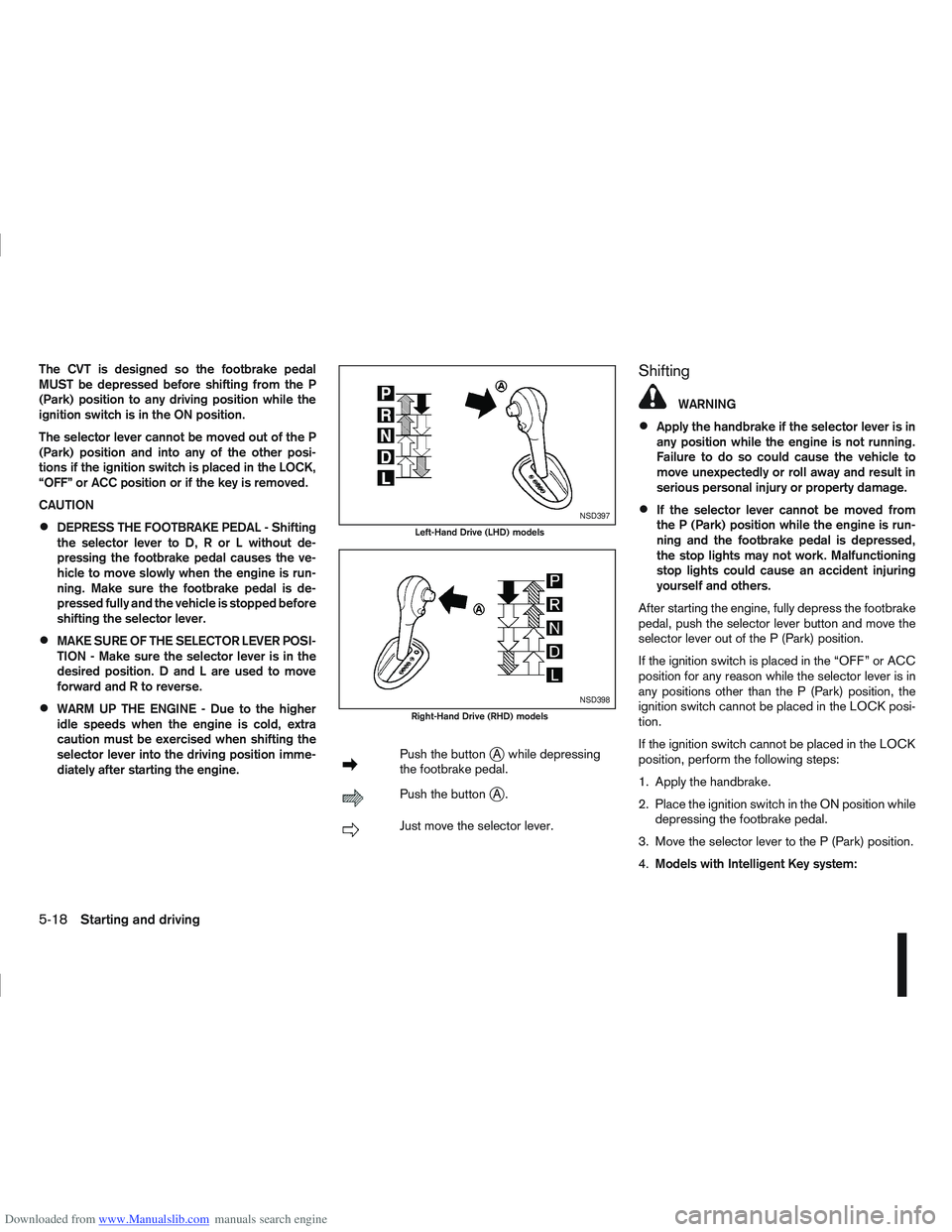
mPush the buttonjA while depressing
the footbrake pedal.
mPush the buttonjA.
mJust move the selector lever.
Shifting
WARNING
Apply the handbrake if the selector lever is in
any position while the engine is not running.
Failure to do so could cause the vehicle to
move unexpectedly or roll away and result in
serious personal injury or property damage.
If the selector lever cannot be moved from
the P (Park) position while the engine is run-
ning and the footbrake pedal is depressed,
the stop lights may not work. Malfunctioning
stop lights could cause an accident injuring
yourself and others.
After starting the engine, fully depress the footbrake
pedal, push the selector lever button and move the
selector lever out of the P (Park) position.
If the ignition switch is placed in the “OFF” or ACC
position for any reason while the selector lever is in
any positions other than the P (Park) position, the
ignition switch cannot be placed in the LOCK posi-
tion.
If the ignition switch cannot be placed in the LOCK
position, perform the following steps:
1. Apply the handbrake.
2. Place the ignition switch in the ON position while depressing the footbrake pedal.
3. Move the selector lever to the P (Park) position.
4. Models with Intelligent Key system:NSD397
Left-Hand Drive (LHD) models
NSD398
Right-Hand Drive (RHD) models
5-18Starting and driving
Page 182 of 297
Downloaded from www.Manualslib.com manuals search engine Place the ignition switch in the “OFF” position.
Models without Intelligent Key system:
Place the ignition switch in the LOCK position.
P (Park):
Use this position when the vehicle is parked or when
starting the engine. Make sure that the vehicle is
completely stopped and move the selector lever
into the P (Park) position. Apply the handbrake.
When parking on a hill, first depress the footbrake
pedal, apply the handbrake, and then move the se-
lector lever into the P (Park) position.
R (Reverse):
Use this position to reverse. Make sure that the
vehicle is completely stopped before selecting the R
(Reverse) position.
When the selector lever is in the R (Reverse) posi-
tion, either the NISSAN Connect monitor (where fit-
ted) or the ultra sonic parking sensor (where fitted)
will be activated. For details, see “Rear-view moni-
tor (where fitted)” or “Around view monitor (where
fitted)” earlier in this section or “Ultrasonic Parking
Sensor (where fitted)” later in this section
N (Neutral):
Neither the forward nor reverse gear is engaged.
The engine can be started in this position. You may
shift to the N (Neutral) position and restart a stalled
engine while the vehicle is moving.
D (Drive):
Use this position for all normal forward driving. L (Low):
Use this position when climbing steep hills slowly or
driving slowly through deep snow, sand or mud, or
for maximum engine braking on steep downhill
grades.
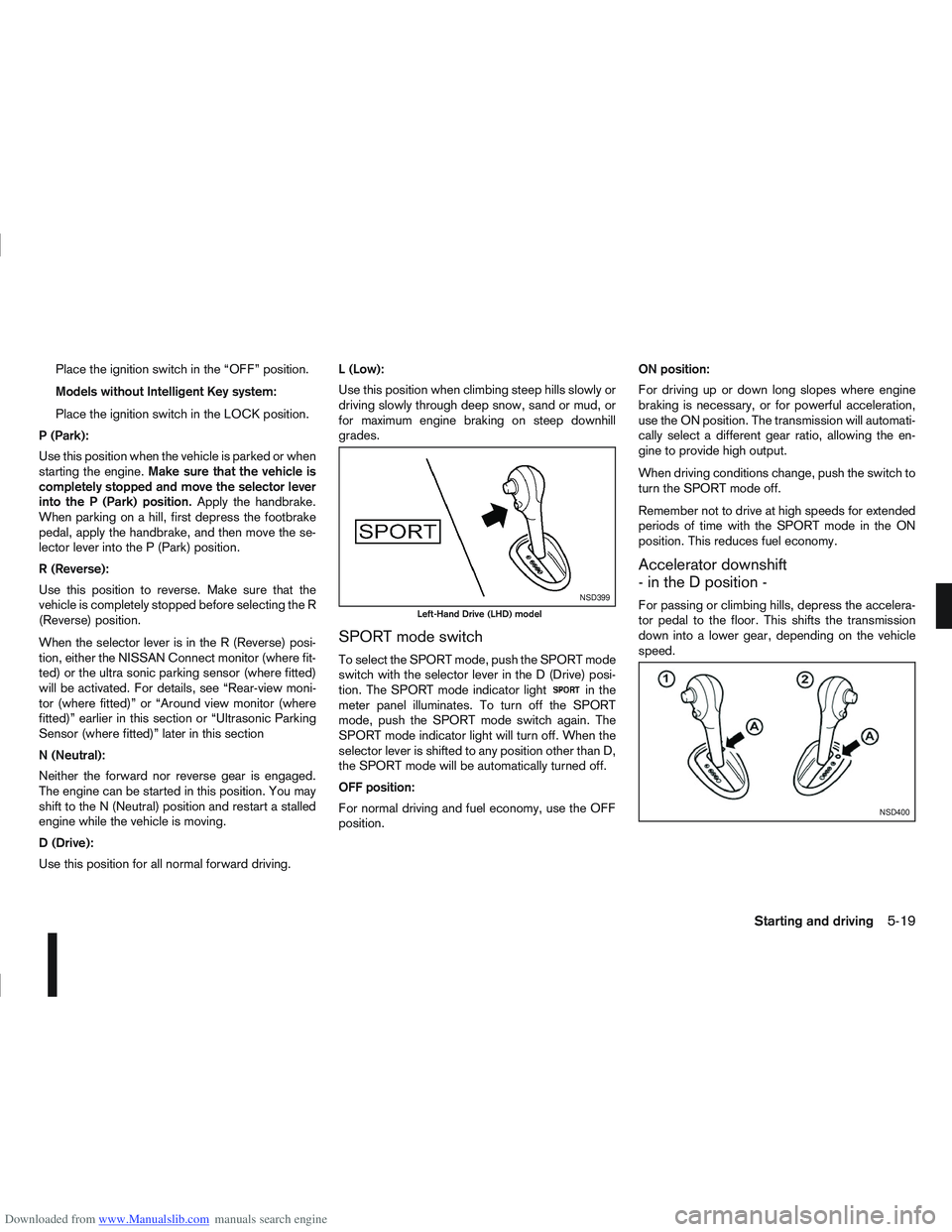
SPORT mode switch
To select the SPORT mode, push the SPORT mode
switch with the selector lever in the D (Drive) posi-
tion. The SPORT mode indicator light
in the
meter panel illuminates. To turn off the SPORT
mode, push the SPORT mode switch again. The
SPORT mode indicator light will turn off. When the
selector lever is shifted to any position other than D,
the SPORT mode will be automatically turned off.
OFF position:
For normal driving and fuel economy, use the OFF
position. ON position:
For driving up or down long slopes where engine
braking is necessary, or for powerful acceleration,
use the ON position. The transmission will automati-
cally select a different gear ratio, allowing the en-
gine to provide high output.
When driving conditions change, push the switch to
turn the SPORT mode off.
Remember not to drive at high speeds for extended
periods of time with the SPORT mode in the ON
position. This reduces fuel economy.
Accelerator downshift
- in the D position -
For passing or climbing hills, depress the accelera-
tor pedal to the floor. This shifts the transmission
down into a lower gear, depending on the vehicle
speed.NSD399
Left-Hand Drive (LHD) model
NSD400
Starting and driving5-19
Page 183 of 297
Downloaded from www.Manualslib.com manuals search engine Shift lock release
j
1LHD models
j2RHD models
jA Shift lock release button
If the battery charge is low or discharged, the selec-
tor lever may not move from the P (Park) position
even with the brake pedal depressed and the selec-
tor lever button pushed.
To move the selector lever, perform the following
procedure:
1. Models with Intelligent Key system:
Place the ignition switch in the “OFF” or LOCK
position.
Models without Intelligent Key system:
Place the ignition switch in the LOCK position,
and remove the key if it is inserted.
2. Apply the handbrake.
3. Push down the shift lock release button
jA.Use
a suitable tool.
4. Push and hold the selector lever button and move the selector lever to the N (Neutral) position while
holding down the shift lock release button.
Place the ignition switch in the ON position to un-
lock the steering wheel. The vehicle may be moved
to the desired location. For models with Intelligent Key system: If the battery
is discharged completely, the steering wheel cannot
be unlocked. Do not move the vehicle with the steer-
ing wheel locked.
If the selector lever cannot be moved out of the P
(Park) position, have a NISSAN dealer or qualified
workshop check the CVT system as soon as pos-
sible.
WARNING
If the selector lever cannot be moved from the P
(Park) position while the engine is running and
the brake pedal is depressed, the stop lights may
not work. Malfunctioning stop lights could cause
an accident injuring yourself and others.
High fluid temperature protection mode
This transmission has a high fluid temperature pro-
tection mode. If the fluid temperature becomes too
high (for example, when climbing steep grades in
high temperature with heavy loads, such as when
towing a trailer), engine power and, under some
conditions, vehicle speed will be decreased auto-
matically to reduce the chance of transmission dam-
age. Vehicle speed can be controlled with the ac-
celerator pedal, but engine and vehicle speed may
be limited.
Fail-safe
When the fail-safe operation occurs, the CVT will
not be shifted to the selected driving position.
If the vehicle is driven under extreme conditions,
such as excessive wheel spinning and subse- quent hard braking, the fail-safe system may be
activated. This will occur even if all electrical cir-
cuits are functioning properly. In this case, place
the ignition switch in the “OFF” position and wait
for 10 seconds. Then turn the ignition switch back
to the ON position. The vehicle should return to
its normal operating condition. If it does not re-
turn to its normal operating condition, have a
NISSAN dealer or qualified workshop check the
transmission and repair it if necessary.
WARNING
When the fail-safe operation occurs, vehicle
speed may be gradually reduced. The reduced
speed may be lower than other traffic, which
could increase the chance of a collision. Be es-
pecially careful when driving. If necessary, pull to
the side of the road at a safe place and allow the
transmission to return to normal operation, or
have it repaired if necessary.
5-20Starting and driving