spec NISSAN QASHQAI 2009 User Guide
[x] Cancel search | Manufacturer: NISSAN, Model Year: 2009, Model line: QASHQAI, Model: NISSAN QASHQAI 2009Pages: 297, PDF Size: 4.09 MB
Page 45 of 297
Downloaded from www.Manualslib.com manuals search engine sary to secure the shoulder belt in place with a
locking clipjA . Use a locking clip attached to
the child restraint system, or one which is equiva-
lent in dimensions and strength.
Be sure to follow the child restraint system
manufacturer’s instructions for belt routing.
4. Test the child restraint system before you place the child in it. Check that it does not tilt too far
from side to side. Try to tug it forwards and check
if it is held securely in place.
5. Check to make sure that the child restraint sys- tem is properly secured prior to each use.
ISOFIX SYSTEM (where fitted)
WARNING
Attach ISOFIX compatible child restraint sys-
tems only at the locations shown. If a child
restraint is not secured properly, your child
could be seriously injured or killed in an acci-
dent.
The rear seat is equipped with 2 ISOFIX com-
patible child restraint systems, on both outer
seats ONLY. Do not secure a child restraint in
the rear centre seating position using the child
restraint lower anchors. The child restraint will
not be secured properly.
The ISOFIX system anchors are designed to
withstand only those loads imposed by cor-
rectly fitted child restraints. Under no circum-
stances are they to be used for adult seat
belts or harnesses.
Some child restraints include two rigid or webbing-
mounted attachments that can be connected to two
anchors located at certain seating positions in your
vehicle. This system is known as the ISOFIX or
ISOFIX compatible system. With this system, you
do not have to use a vehicle seat belt to secure the
child restraint. Your vehicle is equipped with special
anchor points that are used with ISOFIX system
compatible child restraints on the rear seat. Check
your child restraint for a label stating that it is com-
patible with the ISOFIX system. This information
may also be in the child restraint owner’s manual. If
you have such a child restraint, refer to the illustra-
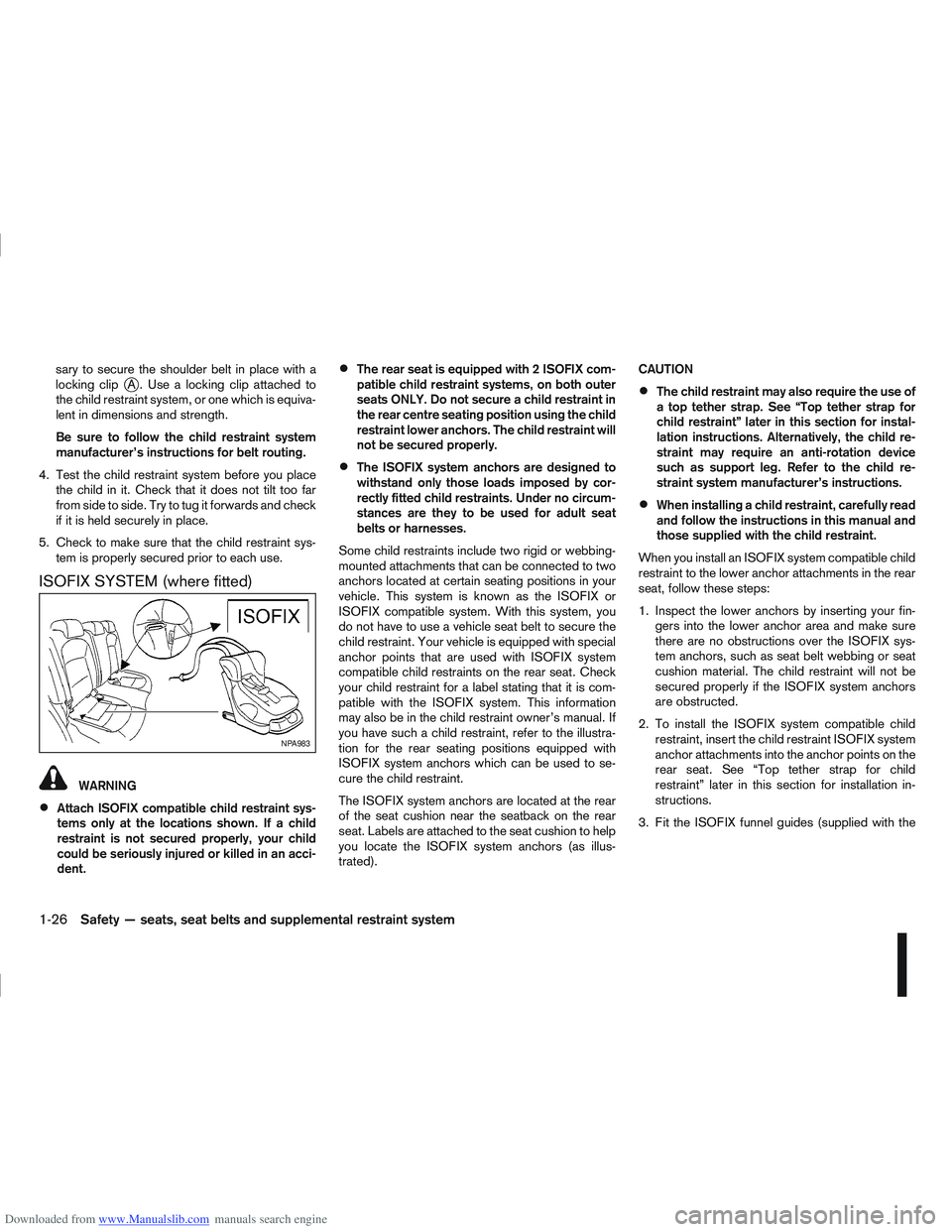
tion for the rear seating positions equipped with
ISOFIX system anchors which can be used to se-
cure the child restraint.
The ISOFIX system anchors are located at the rear
of the seat cushion near the seatback on the rear
seat. Labels are attached to the seat cushion to help
you locate the ISOFIX system anchors (as illus-
trated). CAUTION
The child restraint may also require the use of
a top tether strap. See “Top tether strap for
child restraint” later in this section for instal-
lation instructions. Alternatively, the child re-
straint may require an anti-rotation device
such as support leg. Refer to the child re-
straint system manufacturer’s instructions.
When installing a child restraint, carefully read
and follow the instructions in this manual and
those supplied with the child restraint.
When you install an ISOFIX system compatible child
restraint to the lower anchor attachments in the rear
seat, follow these steps:
1. Inspect the lower anchors by inserting your fin- gers into the lower anchor area and make sure
there are no obstructions over the ISOFIX sys-
tem anchors, such as seat belt webbing or seat
cushion material. The child restraint will not be
secured properly if the ISOFIX system anchors
are obstructed.
2. To install the ISOFIX system compatible child restraint, insert the child restraint ISOFIX system
anchor attachments into the anchor points on the
rear seat. See “Top tether strap for child
restraint” later in this section for installation in-
structions.
3. Fit the ISOFIX funnel guides (supplied with the
NPA983
1-26Safety — seats, seat belts and supplemental restraint system
Page 55 of 297
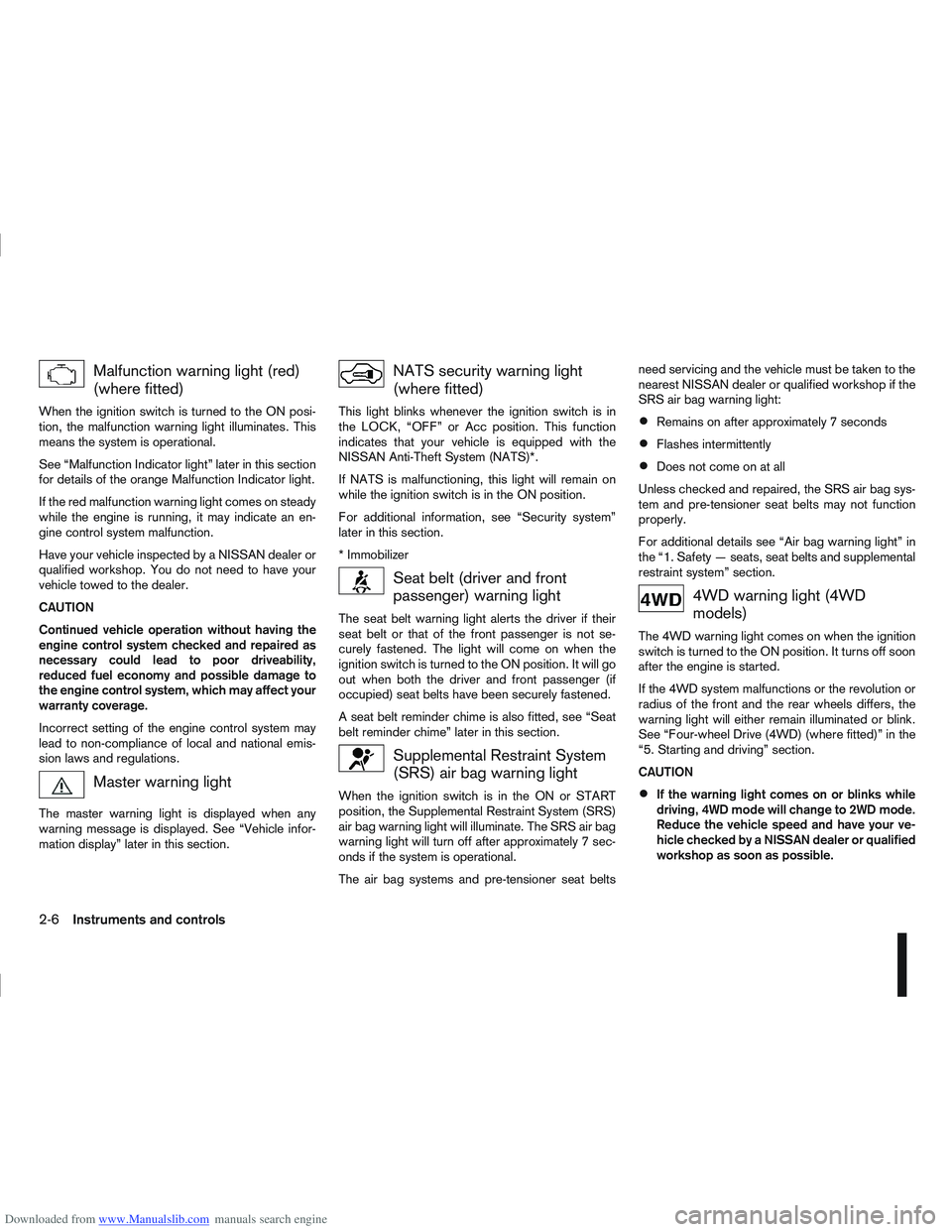
Downloaded from www.Manualslib.com manuals search engine Malfunction warning light (red)
(where fitted)
When the ignition switch is turned to the ON posi-
tion, the malfunction warning light illuminates. This
means the system is operational.
See “Malfunction Indicator light” later in this section
for details of the orange Malfunction Indicator light.
If the red malfunction warning light comes on steady
while the engine is running, it may indicate an en-
gine control system malfunction.
Have your vehicle inspected by a NISSAN dealer or
qualified workshop. You do not need to have your
vehicle towed to the dealer.
CAUTION
Continued vehicle operation without having the
engine control system checked and repaired as
necessary could lead to poor driveability,
reduced fuel economy and possible damage to
the engine control system, which may affect your
warranty coverage.
Incorrect setting of the engine control system may
lead to non-compliance of local and national emis-
sion laws and regulations.
Master warning light
The master warning light is displayed when any
warning message is displayed. See “Vehicle infor-
mation display” later in this section.
NATS security warning light
(where fitted)
This light blinks whenever the ignition switch is in
the LOCK, “OFF” or Acc position. This function
indicates that your vehicle is equipped with the
NISSAN Anti-Theft System (NATS)*.
If NATS is malfunctioning, this light will remain on
while the ignition switch is in the ON position.
For additional information, see “Security system”
later in this section.
* Immobilizer
Seat belt (driver and front
passenger) warning light
The seat belt warning light alerts the driver if their
seat belt or that of the front passenger is not se-
curely fastened. The light will come on when the
ignition switch is turned to the ON position. It will go
out when both the driver and front passenger (if
occupied) seat belts have been securely fastened.
A seat belt reminder chime is also fitted, see “Seat
belt reminder chime” later in this section.
Supplemental Restraint System
(SRS) air bag warning light
When the ignition switch is in the ON or START
position, the Supplemental Restraint System (SRS)
air bag warning light will illuminate. The SRS air bag
warning light will turn off after approximately 7 sec-
onds if the system is operational.
The air bag systems and pre-tensioner seat beltsneed servicing and the vehicle must be taken to the
nearest NISSAN dealer or qualified workshop if the
SRS air bag warning light:
Remains on after approximately 7 seconds
Flashes intermittently
Does not come on at all
Unless checked and repaired, the SRS air bag sys-
tem and pre-tensioner seat belts may not function
properly.
For additional details see “Air bag warning light” in
the “1. Safety — seats, seat belts and supplemental
restraint system” section.
4WD warning light (4WD
models)
The 4WD warning light comes on when the ignition
switch is turned to the ON position. It turns off soon
after the engine is started.
If the 4WD system malfunctions or the revolution or
radius of the front and the rear wheels differs, the
warning light will either remain illuminated or blink.
See “Four-wheel Drive (4WD) (where fitted)” in the
“5. Starting and driving” section.
CAUTION
If the warning light comes on or blinks while
driving, 4WD mode will change to 2WD mode.
Reduce the vehicle speed and have your ve-
hicle checked by a NISSAN dealer or qualified
workshop as soon as possible.
2-6Instruments and controls
Page 57 of 297
Downloaded from www.Manualslib.com manuals search engine When the ESP OFF indicator light and SLIP indica-
tor light come on with the ESP system turned on, it
alerts the driver to the fact that the system’s fail-safe
mode is operating. This means that the system may
not be functioning properly. Have the system
checked by your NISSAN dealer or qualified work-
shop.
If an abnormality occurs in the system, the ESP sys-
tem function will be cancelled, but the vehicle is still
driveable. For additional information, see “Electronic
Stability Programme (ESP) system (where fitted)” in
the “5. Starting and driving” section.
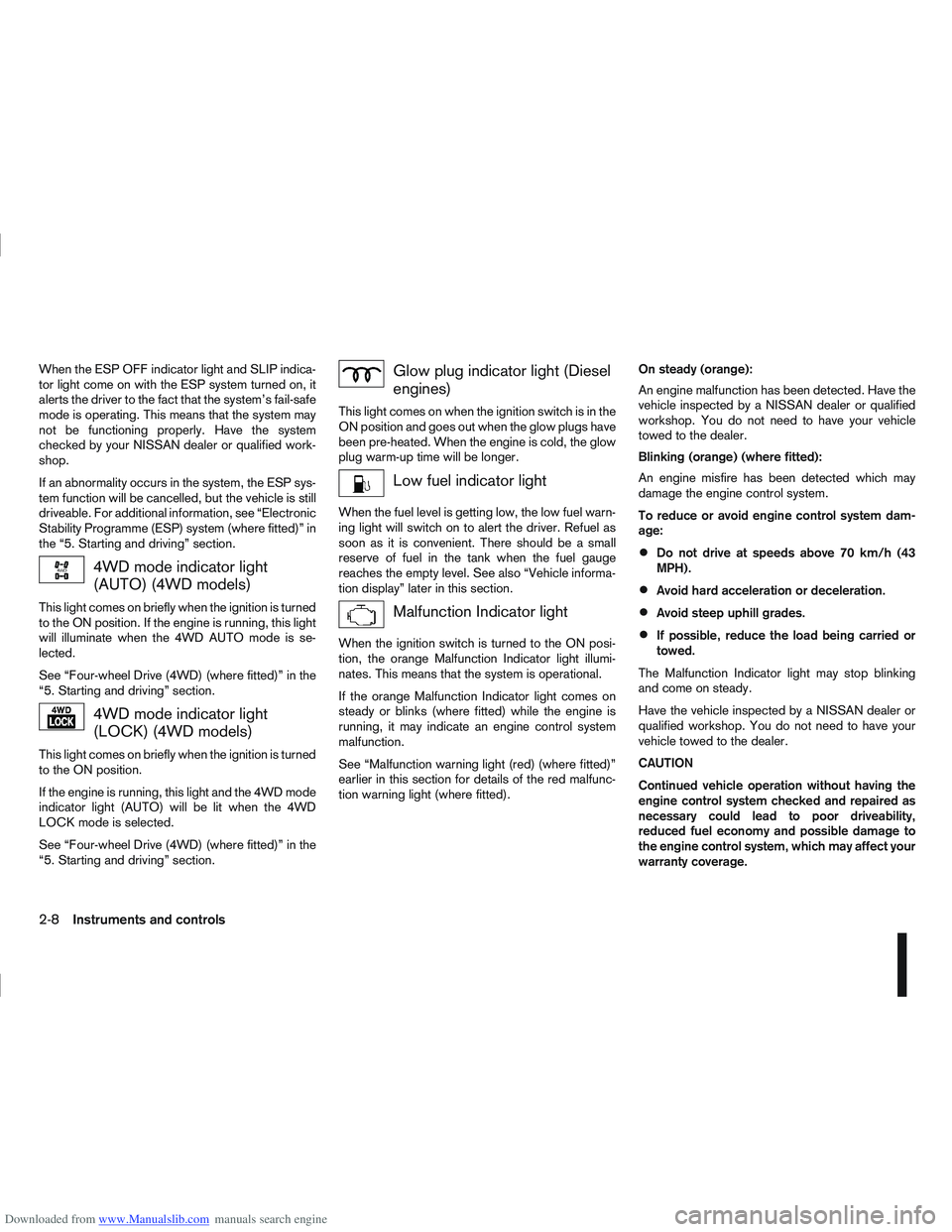
4WD mode indicator light
(AUTO) (4WD models)
This light comes on briefly when the ignition is turned
to the ON position. If the engine is running, this light
will illuminate when the 4WD AUTO mode is se-
lected.
See “Four-wheel Drive (4WD) (where fitted)” in the
“5. Starting and driving” section.
4WD mode indicator light
(LOCK) (4WD models)
This light comes on briefly when the ignition is turned
to the ON position.
If the engine is running, this light and the 4WD mode
indicator light (AUTO) will be lit when the 4WD
LOCK mode is selected.
See “Four-wheel Drive (4WD) (where fitted)” in the
“5. Starting and driving” section.
Glow plug indicator light (Diesel
engines)
This light comes on when the ignition switch is in the
ON position and goes out when the glow plugs have
been pre-heated. When the engine is cold, the glow
plug warm-up time will be longer.
Low fuel indicator light
When the fuel level is getting low, the low fuel warn-
ing light will switch on to alert the driver. Refuel as
soon as it is convenient. There should be a small
reserve of fuel in the tank when the fuel gauge
reaches the empty level. See also “Vehicle informa-
tion display” later in this section.
Malfunction Indicator light
When the ignition switch is turned to the ON posi-
tion, the orange Malfunction Indicator light illumi-
nates. This means that the system is operational.
If the orange Malfunction Indicator light comes on
steady or blinks (where fitted) while the engine is
running, it may indicate an engine control system
malfunction.
See “Malfunction warning light (red) (where fitted)”
earlier in this section for details of the red malfunc-
tion warning light (where fitted).On steady (orange):
An engine malfunction has been detected. Have the
vehicle inspected by a NISSAN dealer or qualified
workshop. You do not need to have your vehicle
towed to the dealer.
Blinking (orange) (where fitted):
An engine misfire has been detected which may
damage the engine control system.
To reduce or avoid engine control system dam-
age:
Do not drive at speeds above 70 km/h (43
MPH).
Avoid hard acceleration or deceleration.
Avoid steep uphill grades.
If possible, reduce the load being carried or
towed.
The Malfunction Indicator light may stop blinking
and come on steady.
Have the vehicle inspected by a NISSAN dealer or
qualified workshop. You do not need to have your
vehicle towed to the dealer.
CAUTION
Continued vehicle operation without having the
engine control system checked and repaired as
necessary could lead to poor driveability,
reduced fuel economy and possible damage to
the engine control system, which may affect your
warranty coverage.
2-8Instruments and controls
Page 64 of 297
![NISSAN QASHQAI 2009 User Guide Downloaded from www.Manualslib.com manuals search engine However reset is possible (only after the oil was
changed) using the [Service] menu item in the
[Settings] menu. See “[Maintenance]” later](/img/5/56767/w960_56767-63.png "NISSAN QASHQAI 2009 User Guide Downloaded from www.Manualslib.com manuals search engine However reset is possible (only after the oil was
changed) using the [Service] menu item in the
[Settings] menu. See “[Maintenance]” later")
Downloaded from www.Manualslib.com manuals search engine However reset is possible (only after the oil was
changed) using the [Service] menu item in the
[Settings] menu. See “[Maintenance]” later in this
section
Have the vehicle inspected by a NISSAN dealer
or qualified workshop if these conditions occur.
j20Distance to maintenance alert
(where fitted)
This alert reminds when maintenance is due in the
shown distance. The alert is shown for 10 seconds
at ignition ON, when the distance to the next main-
tenance interval is below 5000 km (3100 Miles).
The message is shown until the steering wheel
switch
ji (where fitted) is pressed.
NOTE
Visit a NISSAN dealer or qualified workshop
before the maintenance due alertj19reaches
0 km (miles) to perform maintenance (oil
change).
The maintenance interval will reduce faster
with certain types of driving, especially at low
speeds in urban conditions.
j21Tyre change alert
You can set a distance for changing tyres. See
“[Maintenance]” later in this section
j22Maintenance alert
You can set a distance for a non specific mainte-
nance item. See “[Maintenance]” later in this sec-
tion
j23Low temperature warning
If, during driving, the temperature falls below 4ºC
this alert will appear to indicate low outside air tem-
perature. You can switch the low temperature warn-
ing [On] or [Off]. See “[Units]” later in this section
CAUTION
Even if the alert is not on, there is no guarantee
that the road is free of hazards caused by in-
clement weather.
NOTE
The outside air temperature sensor is located at
the front of the vehicle. At low speeds the sensor
can be affected by engine heat, heat reflected
from the road surface and exhaust from other
vehicles, these influences can cause the display
to be inaccurate. To compensate, the outside air
temperature display is designed to react slowly
to increasing temperatures, but quickly to falling
temperatures.
j24Low fuel warning
This warning appears when the fuel level in the tank
is getting low. Refuel as soon as it is convenient,
preferably before the fuel gauge reaches the empty
position. For more information, see “Fuel gauge”
earlier in this section.
j25Driver alert
This warning appears when the previously set time
for a break is reached. You can set the time for up
to 6 hours in the setting menu. (See “Settings menu”
later in this section.)
Stop/Start System (where fitted)
For more information, see “Stop/Start System
(where fitted)” in the “5. Starting and driving” sec-
tion
j26Engine stop:
If the engine stops when the Stop/Start System is
activated, the message is shown.
j27Auto start deactivation:
If the engine stops when the Stop/Start System is
activated, and will not start automatically, the mes-
sage is shown.
j28System fault:
If the Stop/Start System is activated, but does not
operate correctly, the message is shown. Visit a
NISSAN dealer or qualified workshop.
Activating or deactivating using the Stop/Start
System OFF switch:
Using the Stop/Start System OFF switch activates
or deactivates the Stop/Start System. This is shown
in the vehicle information display:
j29 :The Stop/Start System OFF switch is
pushed to the “ON” position.
j30 :The Stop/Start System OFF switch is pushed to
the “OFF” position.
Instruments and controls2-15
Page 84 of 297
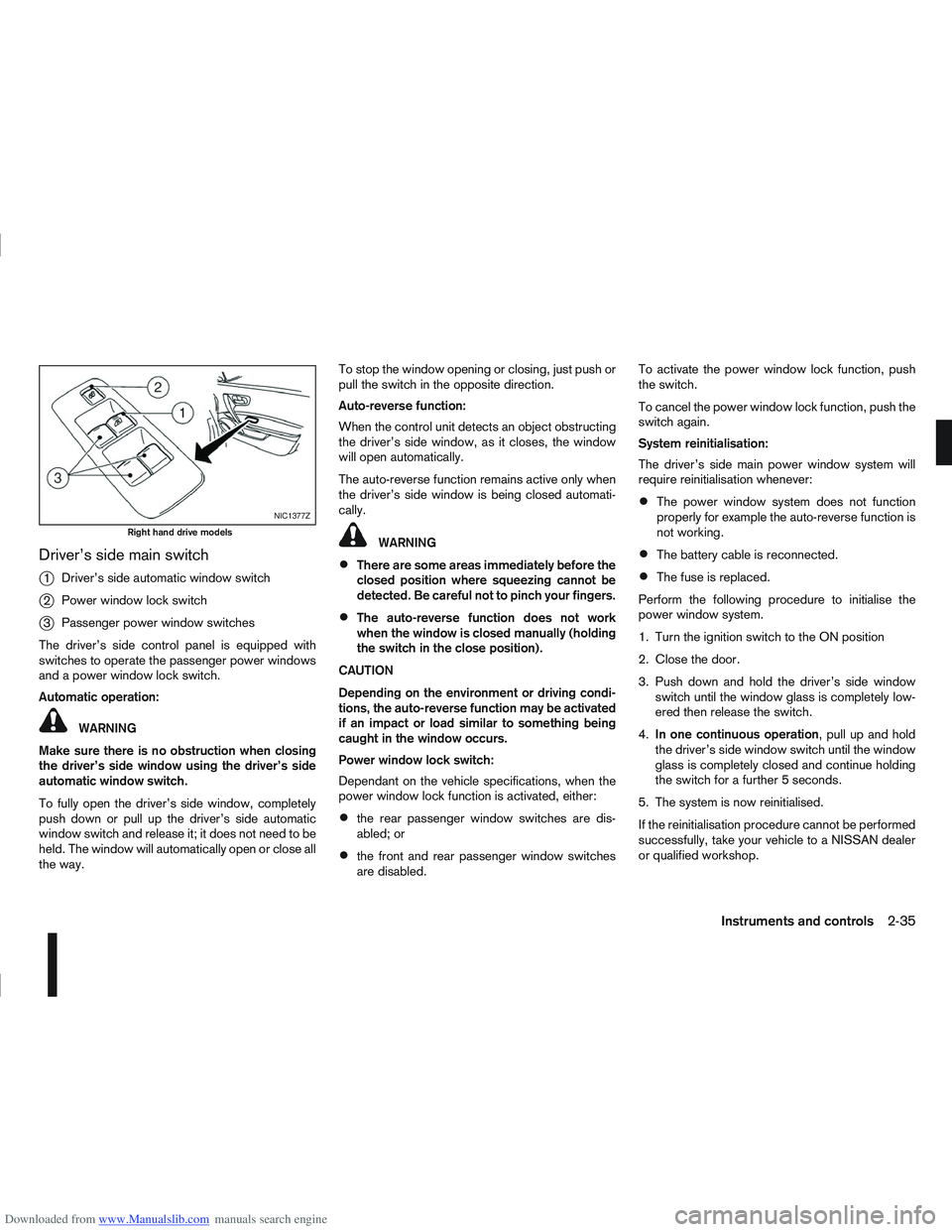
Downloaded from www.Manualslib.com manuals search engine Driver’s side main switch
j
1Driver’s side automatic window switch
j2Power window lock switch
j3Passenger power window switches
The driver’s side control panel is equipped with
switches to operate the passenger power windows
and a power window lock switch.
Automatic operation:
WARNING
Make sure there is no obstruction when closing
the driver’s side window using the driver’s side
automatic window switch.
To fully open the driver’s side window, completely
push down or pull up the driver’s side automatic
window switch and release it; it does not need to be
held. The window will automatically open or close all
the way. To stop the window opening or closing, just push or
pull the switch in the opposite direction.
Auto-reverse function:
When the control unit detects an object obstructing
the driver’s side window, as it closes, the window
will open automatically.
The auto-reverse function remains active only when
the driver’s side window is being closed automati-
cally.
WARNING
There are some areas immediately before the
closed position where squeezing cannot be
detected. Be careful not to pinch your fingers.
The auto-reverse function does not work
when the window is closed manually (holding
the switch in the close position).
CAUTION
Depending on the environment or driving condi-
tions, the auto-reverse function may be activated
if an impact or load similar to something being
caught in the window occurs.
Power window lock switch:
Dependant on the vehicle specifications, when the
power window lock function is activated, either:
the rear passenger window switches are dis-
abled; or
the front and rear passenger window switches
are disabled. To activate the power window lock function, push
the switch.
To cancel the power window lock function, push the
switch again.
System reinitialisation:
The driver’s side main power window system will
require reinitialisation whenever:
The power window system does not function
properly for example the auto-reverse function is
not working.
The battery cable is reconnected.
The fuse is replaced.
Perform the following procedure to initialise the
power window system.
1. Turn the ignition switch to the ON position
2. Close the door.
3. Push down and hold the driver’s side window switch until the window glass is completely low-
ered then release the switch.
4. In one continuous operation , pull up and hold
the driver’s side window switch until the window
glass is completely closed and continue holding
the switch for a further 5 seconds.
5. The system is now reinitialised.
If the reinitialisation procedure cannot be performed
successfully, take your vehicle to a NISSAN dealer
or qualified workshop.
NIC1377Z
Right hand drive models
Instruments and controls2-35
Page 93 of 297
![NISSAN QASHQAI 2009 User Guide Downloaded from www.Manualslib.com manuals search engine – The message [Single door unlock] appears inthe vehicle information display.
– Only the driver’s door unlocks.
– The direction indicat](/img/5/56767/w960_56767-92.png "NISSAN QASHQAI 2009 User Guide Downloaded from www.Manualslib.com manuals search engine – The message [Single door unlock] appears inthe vehicle information display.
– Only the driver’s door unlocks.
– The direction indicat")
Downloaded from www.Manualslib.com manuals search engine – The message [Single door unlock] appears inthe vehicle information display.
– Only the driver’s door unlocks.
– The direction indicators flash twice, quickly.
2. Push the “UNLOCK” button
on the integrated
keyfob again.
– All doors unlock.
– The direction indicators flash twice.
Auto-relock:
An auto-relock function will operate 2 minutes after
a full or partial unlock, if no further user action is
taken. The auto-relock will be cancelled if any door
is opened or the key is inserted into the ignition.
KEYFOB OPERATION FAILURE
The keyfob may not work properly if:
The keyfob battery is low. See “Integrated key-
fob/Intelligent Key battery replacement” in the
“8. Maintenance and do-it-yourself” section for
keyfob battery replacement instructions and the
required battery type.
The locking/unlocking system has been used
continuously. An anti lock-abuse system pre-
vents the lock motors from overheating and dis-
ables the keyfob locking operation for a short
period of time if the system is used continuously.
The door handle is being pulled while the
keyfob is being operated.
The vehicle’s battery is dead. NOTE
See Intelligent Key detection warning, Intelligent
Key low battery warning or Intelligent Key system
fault warning in “Vehicle information display” ear-
lier in this section for more information.
The Intelligent Key system is a convenient keyless
entry system that allows you to operate your vehicle
without using an actual key.
WARNING
Radio waves could adversely affect electric medi-
cal equipment. Those who use a pacemaker
should contact the electric medical equipment
manufacturer for the possible influences before
use.
INTELLIGENT KEY OPERATING
RANGE
The Intelligent Key functions can only be used when
the Intelligent Key is within the specified operating
range from the request switch
j1.
When the Intelligent Key battery is discharged or
strong radio waves are present near the operating
location, the Intelligent Key system’s operating
range becomes narrower, and the Intelligent Key
may not function properly.
NPA1042NPA1018
INTELLIGENT KEY SYSTEM
(where fitted)
3-6Pre-driving checks and adjustments
Page 98 of 297
Downloaded from www.Manualslib.com manuals search engine 3. Close the driver’s door.
– The driver’s door locks
– The power door lock switch illuminates
–Super Lock system models: The Super Lock
system is not activated
– Intelligent Key models: If the Intelligent Key has
been left inside the vehicle, all doors will unlock
and an alarm will sound
Super Lock equipped models (RHD
models)
If the doors are locked using the integrated keyfob
“LOCK” button or an outside door lock switch (In-
telligent Key models), the Super Lock system will be
activated. The power door lock switch will illuminate
to indicate that all doors are locked, but it will not be
possible to use the power door lock switch to un-
lock the doors.
Locking the doors with the power door lock switch
will not activate the Super Lock system.
Drive away door locking
When active, the drive away door locking function
will automatically lock all doors when the vehicle
speed exceeds 12 km/h (7 MPH).
All doors will be automatically unlocked when a front
door is opened except in anti-hijack mode (only the
driver’s door or front passenger door will unlock); or
when opening a rear passenger door from the in-
side.
When “UNLOCK”, on the power door lock switch, is pressed the drive away door locking system will
not lock the doors again until a door is opened and
closed.
To activate or deactivate drive-away door
locking:
1. Unlock the doors.
2. Turn the ignition switch ON.
3.
Activation
Press and hold the “LOCK” side of the power
door lock switch
j1 for 5 seconds.
Deactivation
Press and hold the “UNLOCK” side of the power
door lock switch
j1 for 5 seconds.
4. A buzzer will sound if activation or deactivation was successful.
Once activated, drive-away door locking will func-
tion on every subsequent trip.
CHILD SAFETY LOCK — REAR
DOORS
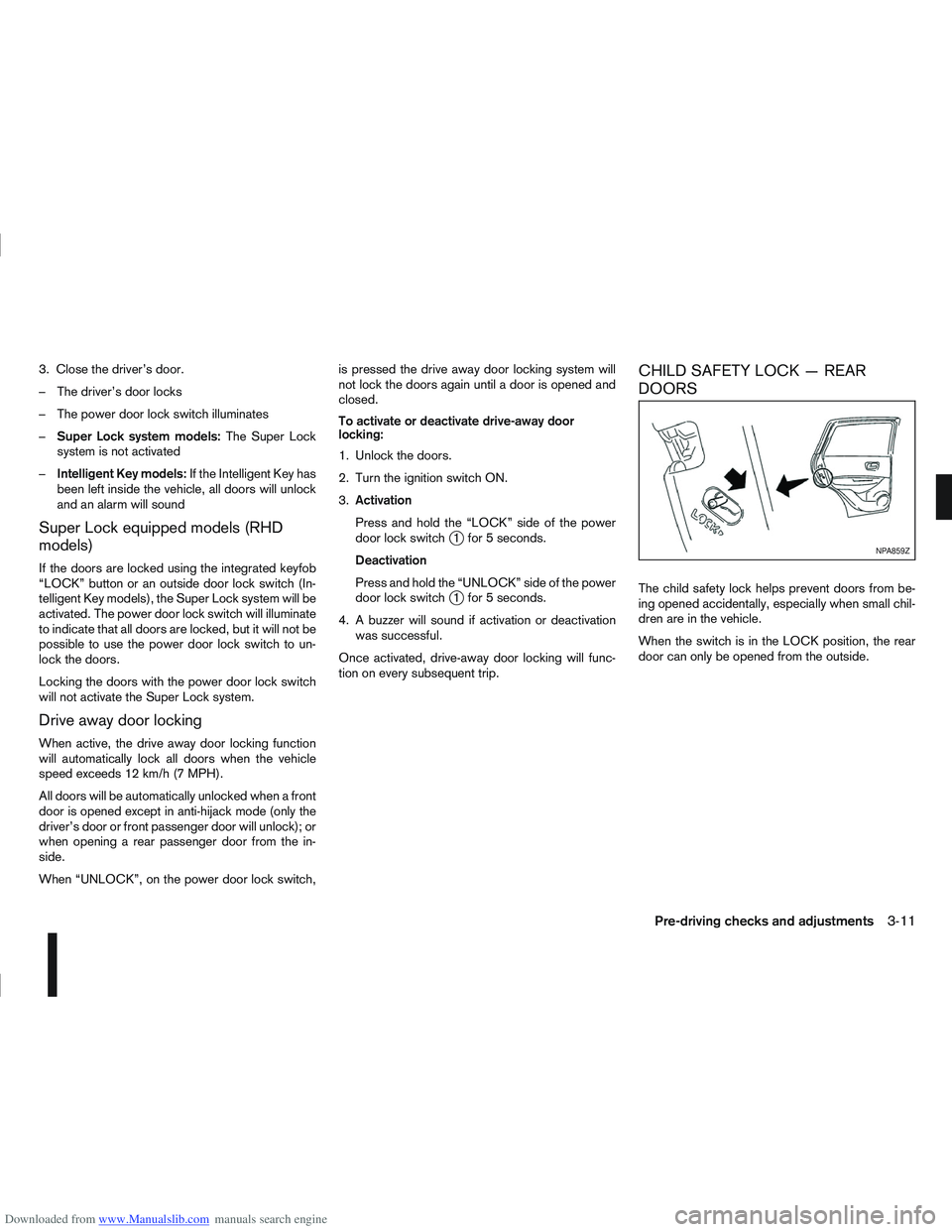
The child safety lock helps prevent doors from be-
ing opened accidentally, especially when small chil-
dren are in the vehicle.
When the switch is in the LOCK position, the rear
door can only be opened from the outside.
NPA859Z
Pre-driving checks and adjustments3-11
Page 101 of 297
Downloaded from www.Manualslib.com manuals search engine NATS security warning/indicator light
(where fitted)
One of the following functions (depending on the
vehicle specifications) indicates that the vehicle is
equipped with NATS:
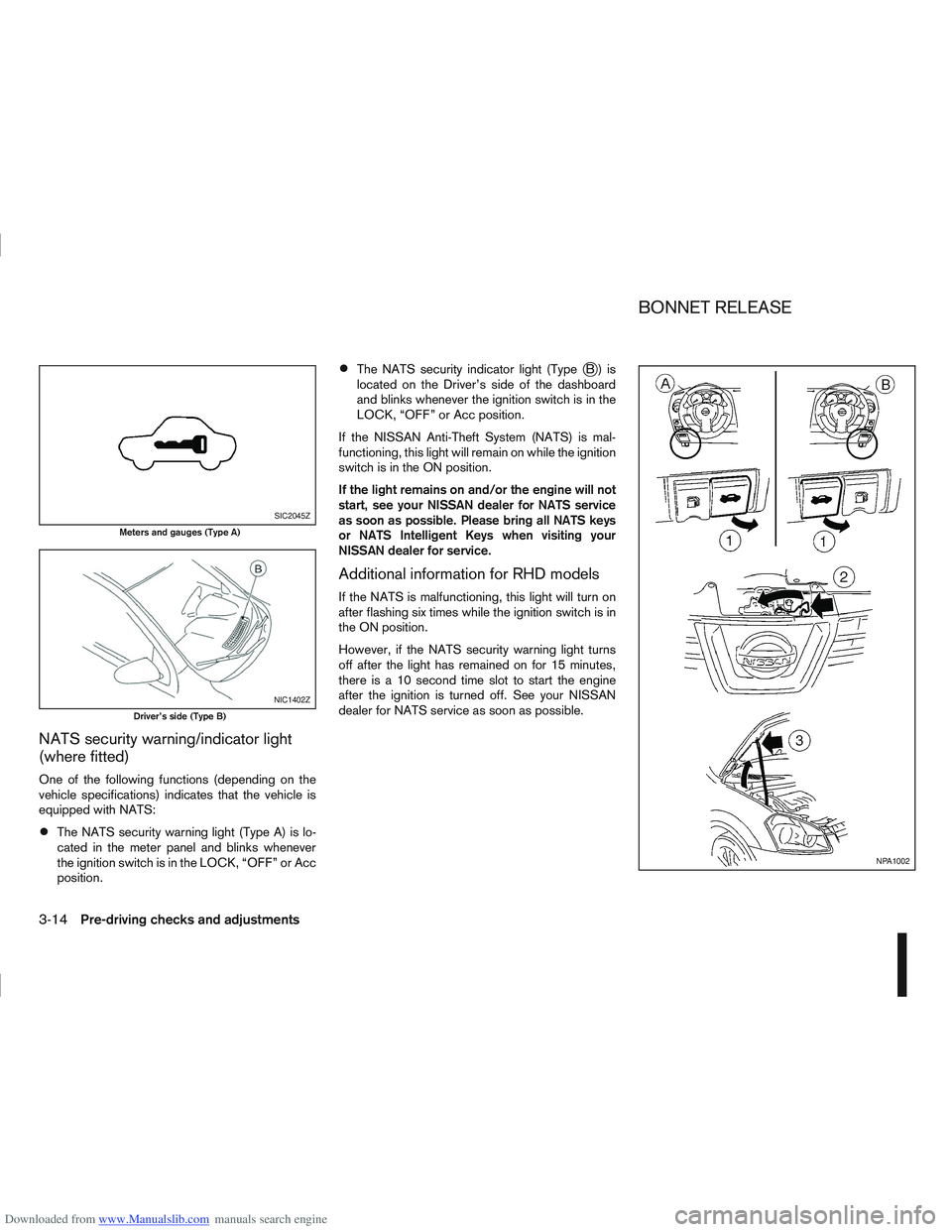
The NATS security warning light (Type A) is lo-
cated in the meter panel and blinks whenever
the ignition switch is in the LOCK, “OFF” or Acc
position.
The NATS security indicator light (TypejB) is
located on the Driver’s side of the dashboard
and blinks whenever the ignition switch is in the
LOCK, “OFF” or Acc position.
If the NISSAN Anti-Theft System (NATS) is mal-
functioning, this light will remain on while the ignition
switch is in the ON position.
If the light remains on and/or the engine will not
start, see your NISSAN dealer for NATS service
as soon as possible. Please bring all NATS keys
or NATS Intelligent Keys when visiting your
NISSAN dealer for service.
Additional information for RHD models
If the NATS is malfunctioning, this light will turn on
after flashing six times while the ignition switch is in
the ON position.
However, if the NATS security warning light turns
off after the light has remained on for 15 minutes,
there is a 10 second time slot to start the engine
after the ignition is turned off. See your NISSAN
dealer for NATS service as soon as possible.
SIC2045Z
Meters and gauges (Type A)
NIC1402Z
Driver’s side (Type B)
NPA1002
BONNET RELEASE
3-14Pre-driving checks and adjustments
Page 124 of 297
Downloaded from www.Manualslib.com manuals search engine Air conditioner filter (where fitted)
The air conditioning system is equipped with a filter
which collects dirt, pollen, dust, etc. To make sure
the air conditioner heats, defogs, and ventilates effi-
ciently, replace the filter regularly. For filter replace-
ment, contact a NISSAN dealer or qualified work-
shop.
The filter should be replaced if the airflow is ex-
tremely reduced or when the windows fog up
easily during air conditioning system operation.
Servicing air conditioner
The air conditioning system (where fitted) in your
NISSAN vehicle is charged with an environmentally
friendly refrigerant.
NISSAN GREEN PROGRAM
This refrigerant will not harm the earth’s ozone
layer.
Special charging equipment and lubricant are re-
quired when servicing your vehicle’s air conditioner.
Using improper refrigerants or lubricants will cause
severe damage to the air conditioning system. See
“Air conditioning system refrigerant and lubricant
recommendations (where fitted)” in the “9. Techni-
cal information” section of this manual.
A NISSAN dealer or qualified workshop will be able
to service the air conditioning system.
Display screen, heater and air conditioner, and audio system4-17
Page 128 of 297
Downloaded from www.Manualslib.com manuals search engine After parking in the sun, drive for two or three
minutes with the windows open to vent hot air
from the passenger compartment. Then, close
the windows. This will allow the acceleration of
the air conditioner’s cooling operation.
Keep windows closed while the air conditioner is
operating.
The air conditioning system should be operated
for about 10 minutes, at least once a month. This
helps prevent damage to the system due to lack
of lubrication.
If the coolant temperature gauge exceeds the
“HOT” position, turn the air conditioner off. For
additional information, see “Engine overheat” in
the “6. In case of emergency” section.
If the engine coolant reaches an extremely high
temperature, the air conditioning system will au-
tomatically turn off. This may happen for example
if the engine runs at idle speed for a long time on
a hot day.
Air conditioner filter
The air conditioning system is equipped with a filter
which collects dirt, pollen, dust, etc. To make sure
the air conditioner heats, defogs, and ventilates effi-
ciently, replace the filter regularly. To replace the fil-
ter, contact a NISSAN dealer or qualified workshop.
The filter should be replaced if the airflow is ex-
tremely reduced or when the windows fog up
easily while operating the heater or air condition-
ing system.
Servicing air conditioner
The air conditioning system in your NISSAN vehicle
is charged with an environmentally friendly refriger-
ant.
NISSAN GREEN PROGRAM
This refrigerant will not harm the earth’s ozone
layer.
Special charging equipment and lubricant are re-
quired when servicing the NISSAN air conditioner.
Using improper refrigerants or lubricants will cause
severe damage to the air conditioning system. See
“Air conditioning system refrigerant and lubricant
recommendations (where fitted)” in the “9. Techni-
cal information” section.
A NISSAN dealer or qualified workshop will be able
to service the air conditioning system.
WARNING
Do not adjust the audio system while driving.
The audio system operates when the ignition switch
is in the Acc or ON position. If you want to listen to
the radio or CD while the engine is not running, turn
the ignition switch to the Acc position. Do not use
for an extended period of time with the engine
stopped.
AUDIO OPERATION PRECAUTIONS
NOTE
Models with NISSAN Connect system, see the
audio operation precautions in the separately
provided NISSAN Connect Owner’s Manual.
Radio
Radio reception is affected by station signal
strength, distance from radio transmitter, build-
ings, bridges, mountains and other external influ-
ences. Intermittent changes in reception quality
are normally caused by these external influences.
Using a mobile phone in or near the vehicle may
influence radio reception quality.
Use the antenna for the best reception.
Compact Disc (CD) player
During cold weather or rainy days, the player
may malfunction due to the humidity. If this
occurs, remove the CD and dehumidify or
ventilate the player completely.
AUDIO SYSTEM
Display screen, heater and air conditioner, and audio system4-21