Control NISSAN QASHQAI 2009 Repair Manual
[x] Cancel search | Manufacturer: NISSAN, Model Year: 2009, Model line: QASHQAI, Model: NISSAN QASHQAI 2009Pages: 297, PDF Size: 4.09 MB
Page 122 of 297
Downloaded from www.Manualslib.com manuals search engine 3) The temperature control dial to the maxi-mum “HOT” (right) position.
Operating tips
In order to improve the heater operation, clear
the snow and ice from the wiper blade and air
inlet in front of the windscreen.
After parking in the sun, drive for two or three
minutes with the windows open to vent hot air
from the passenger compartment. Then close
the windows to allow the acceleration of the air
conditioner’s cooling operation.
Keep the windows closed while the air condi-
tioner is operating.
The air conditioning system should be operated
for about 10 minutes, at least once a month. This
helps prevent damage to the system due to lack
of lubrication.
If the coolant temperature gauge exceeds the
“HOT” position, turn the air conditioner off. For
additional information, see “Engine overheat” in
the “6. In case of emergency” section.
If the engine coolant reaches an extremely high
temperature, the air conditioning system will au-
tomatically turn off. This may happen for example
if the engine runs at idle speed for a long time on
a hot day.
Quick reference charts
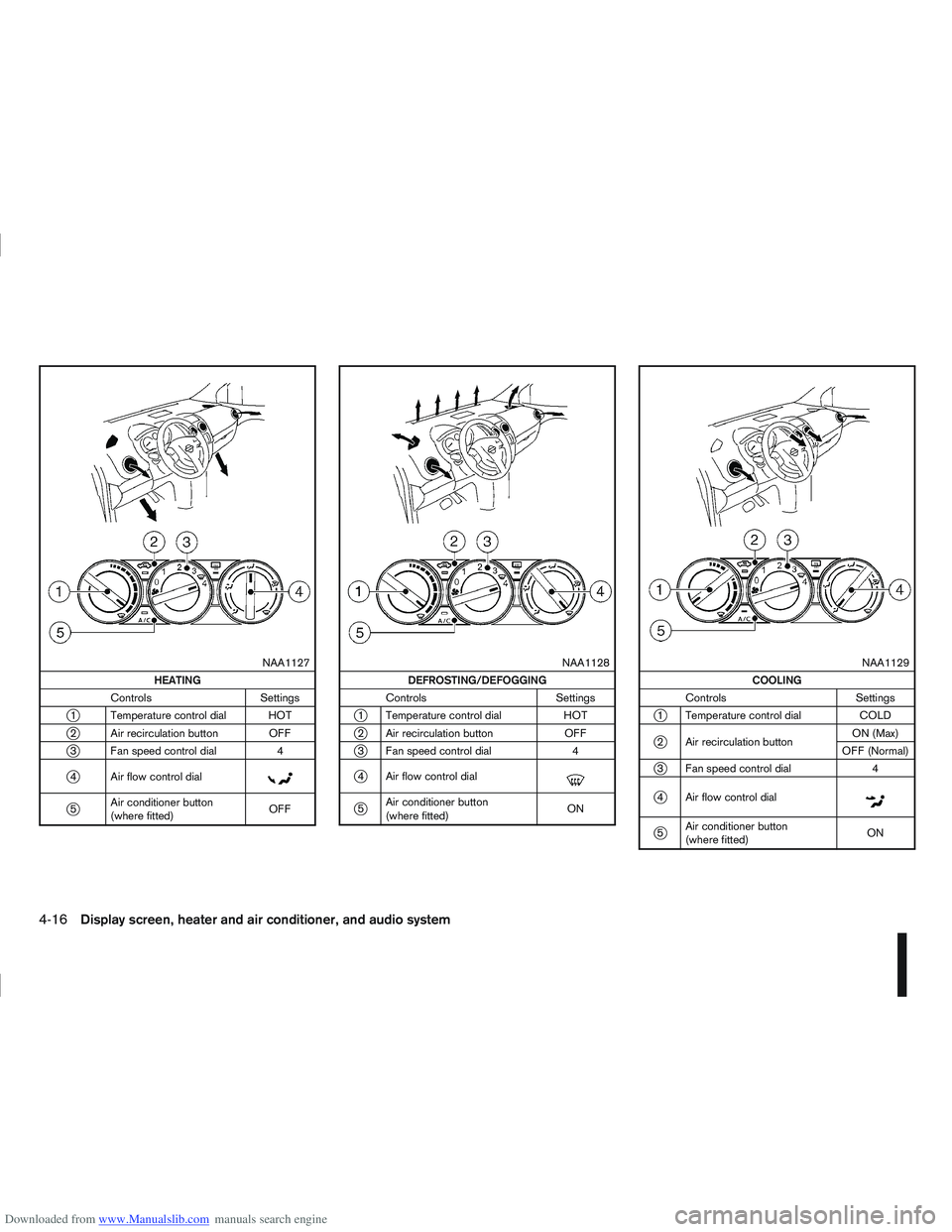
The following charts show the button, air intake and
dial positions for MAXIMUM AND QUICK heating,
cooling or defrosting. NOTE
The air recirculation mode should not be selected
for either heating or defrosting.
Display screen, heater and air conditioner, and audio system4-15
Page 123 of 297
Downloaded from www.Manualslib.com manuals search engine m
NAA1127
HEATING
Controls Settings
j1 Temperature control dial HOT
j2 Air recirculation button OFF
j3 Fan speed control dial 4
j4 Air flow control dialm
j5Air conditioner button
(where fitted) OFF
m
NAA1128
DEFROSTING/DEFOGGING
Controls Settings
j1 Temperature control dial HOT
j2 Air recirculation button OFF
j3 Fan speed control dial 4
j4 Air flow control dialm
j5Air conditioner button
(where fitted) ON
m
NAA1129
COOLING
Controls Settings
j1 Temperature control dial COLD
j2 Air recirculation buttonON (Max)
OFF (Normal)
j3 Fan speed control dial 4
j4 Air flow control dialm
j5Air conditioner button
(where fitted) ON
4-16Display screen, heater and air conditioner, and audio system
Page 125 of 297
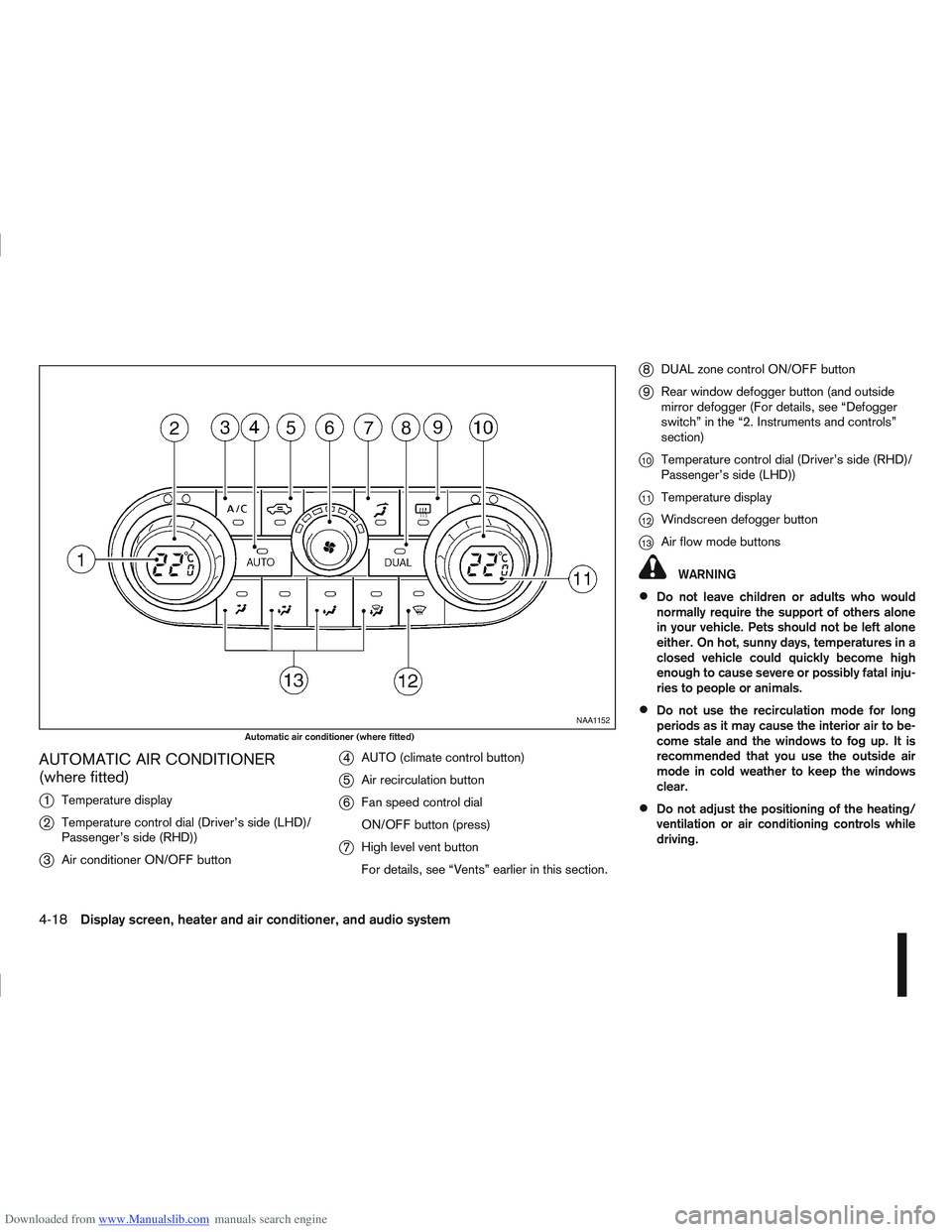
Downloaded from www.Manualslib.com manuals search engine AUTOMATIC AIR CONDITIONER
(where fitted)
j
1Temperature display
j2Temperature control dial (Driver’s side (LHD)/
Passenger’s side (RHD))
j3Air conditioner ON/OFF button
j4AUTO (climate control button)
j5Air recirculation button
j6Fan speed control dial
ON/OFF button (press)
j7High level vent button
For details, see “Vents” earlier in this section.
j8DUAL zone control ON/OFF button
j9Rear window defogger button (and outside
mirror defogger (For details, see “Defogger
switch” in the “2. Instruments and controls”
section)
j10Temperature control dial (Driver’s side (RHD)/
Passenger’s side (LHD))
j11Temperature display
j12Windscreen defogger button
j13Air flow mode buttons
WARNING
Do not leave children or adults who would
normally require the support of others alone
in your vehicle. Pets should not be left alone
either. On hot, sunny days, temperatures in a
closed vehicle could quickly become high
enough to cause severe or possibly fatal inju-
ries to people or animals.
Do not use the recirculation mode for long
periods as it may cause the interior air to be-
come stale and the windows to fog up. It is
recommended that you use the outside air
mode in cold weather to keep the windows
clear.
Do not adjust the positioning of the heating/
ventilation or air conditioning controls while
driving.
NAA1152
Automatic air conditioner (where fitted)
4-18Display screen, heater and air conditioner, and audio system
Page 126 of 297
Downloaded from www.Manualslib.com manuals search engine NOTE
The air conditioner cooling function operates
only when the engine is running, and the am-
bient temperature is above -2°C (28°F).
The air conditioner can be used to dehumidify
when heating, or to reduce air temperature
and dehumidify when cooling. This is possible
in both auto or manual control mode as long
as the fan speed is minimum (first bar).
When the AUTO mode is selected, the tem-
perature of the passenger compartment will
be maintained automatically. Air flow distribu-
tion and fan speed will also be controlled au-
tomatically.
Controls
NOTE
Before any selection or change is made, press
the AUTO button to activate the heater and air
conditioner system.
Cooling and/or dehumidified heating (AUTO
mode):
This mode may be used all year round. The system
works automatically to control the inside tempera-
ture, air flow distribution and fan speed after the
preferred temperature is set manually.
1. Press the AUTO button (the indicator light willilluminate).
2. Operate the driver’s side temperature control dial to set the desired temperature. Adjust the temperature to about 22°C (72°F) for
normal operation.
3. Driver’s side and passenger side temperatures can be set independently using the individual
temperature control dial. When the passenger
side temperature control dial is turned, the DUAL
indicator light will come on. To turn off the pas-
senger side temperature control, press the DUAL
button.
NOTE
A visible mist may be seen coming from the
vents in hot, humid conditions as the air is
cooled rapidly, this is not a malfunction.
It is not possible to use DUAL mode when
windscreen defogger is selected.
Heating (AUTO mode):
Use this mode for heating purposes only.
1. Press the A/C button to turn off the air condi- tioner cooling function (A/C indicator light goes
off).
2. Select the desired temperature with the tempera- ture control dial.
Do not set the temperature at a lower level than
the one of the outside air temperature. Other-
wise the system may not work properly.
This mode is not recommended if the windscreen
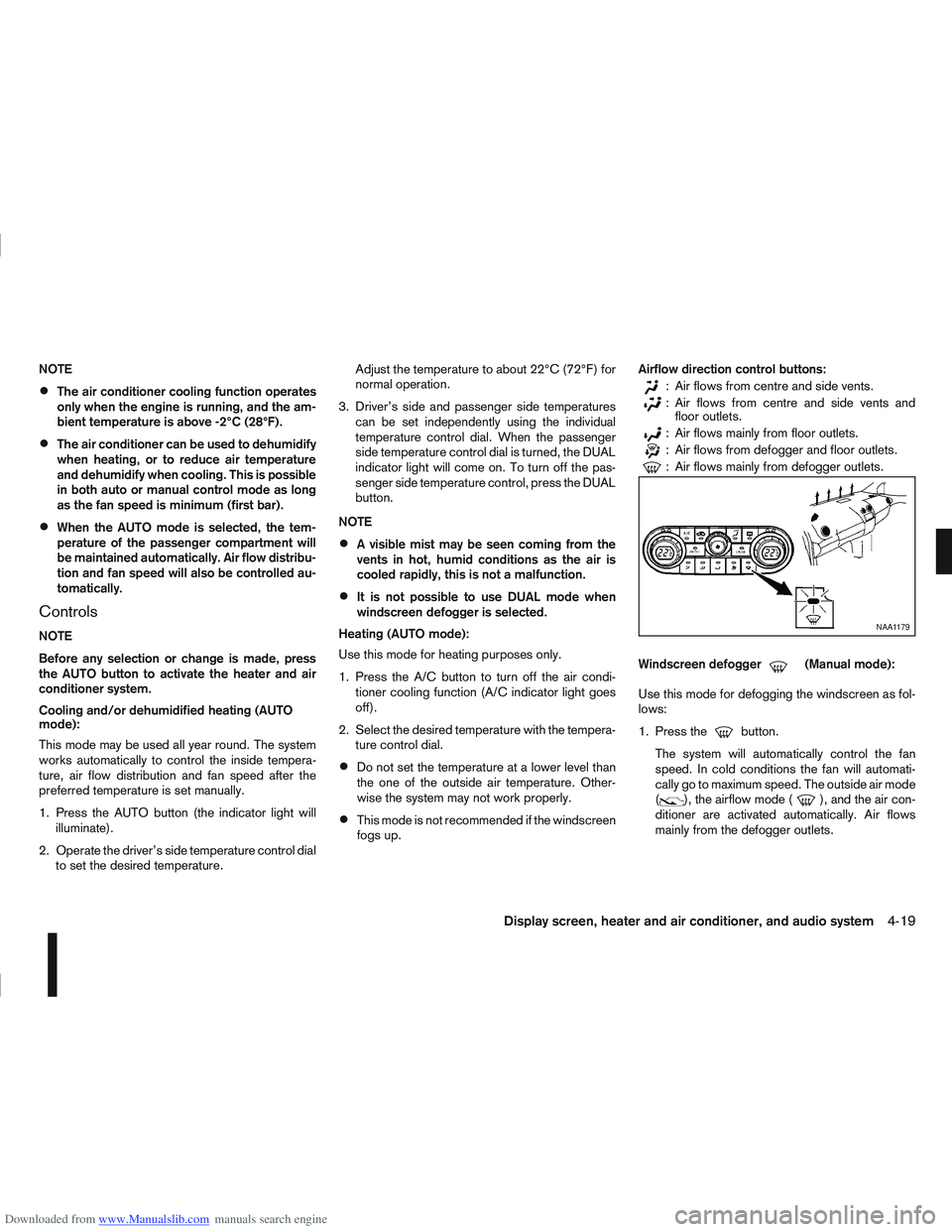
fogs up. Airflow direction control buttons:
: Air flows from centre and side vents.
: Air flows from centre and side vents and
floor outlets.
: Air flows mainly from floor outlets.
: Air flows from defogger and floor outlets.
: Air flows mainly from defogger outlets.
Windscreen defogger
m(Manual mode):
Use this mode for defogging the windscreen as fol-
lows:
1. Press the
button.
The system will automatically control the fan
speed. In cold conditions the fan will automati-
cally go to maximum speed. The outside air mode
(
), the airflow mode (), and the air con-
ditioner are activated automatically. Air flows
mainly from the defogger outlets.
NAA1179
Display screen, heater and air conditioner, and audio system4-19
Page 127 of 297
Downloaded from www.Manualslib.com manuals search engine 2. To switch off, press either thebutton to
return to the previous mode or the AUTO button
for the auto climate control mode.
To quickly defrost/defog the windscreen, set the
fan speed to the maximum position.
As soon as possible after the windscreen has
been cleared of ice or fog, press either the
windscreen defogger button or AUTO button.
When the windscreen defogging mode is acti-
vated, the air conditioner will automatically switch
on at outside temperatures [above -2°C (28°F)]
and the air recirculation mode will be switched
off.
Outside air is drawn into the passenger com-
partment to improve the defogging performance.
Heating and defogging (Manual mode):
This mode heats the interior and defogs the wind-
screen.
The outside air is drawn inside the passenger com-
partment when the
button is pressed. Switch
on the air-conditioning to improve the defogging and
adjust the preferred fan speed and temperature.
Fan speed control
m(Manual mode):
Turn the fan speed control dial anticlockwise or
clockwise to adjust the fan speed.
Press the AUTO button to change the fan speed to
automatic mode. Air recirculation:
Use this mode to recirculate interior air inside the
passenger compartment in situations such as driv-
ing on a dust raised road, avoiding traffic fumes or
having maximum cooling from the air conditioner.
Press the
<
>button to recirculate interior air.
The indicator light illuminates and the air conditioner
will automatically come on.
When the air recirculation mode is switched off, out-
side air is drawn into the passenger compartment.
Outside air circulation:
Use this mode to draw outside air into the passen-
ger compartment for normal heating, ventilation or
air conditioner operation.
Press the <
>button to change the air intake
from the air recirculation to the outside air mode.
The indicator light (
) turns off. To turn the system on/off:
Press the “ON/OFF” (
) button to turn the system
on or off.
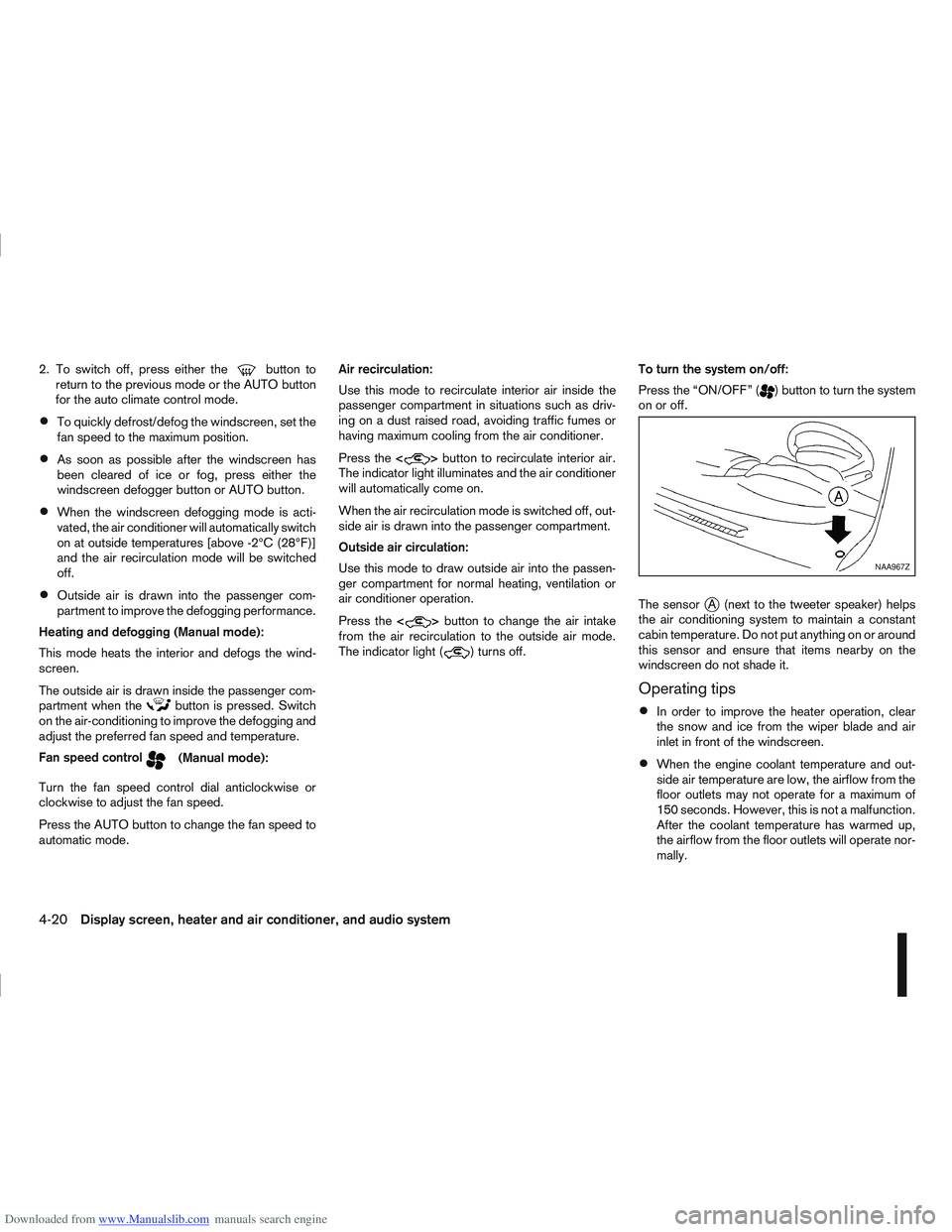
The sensor
jA (next to the tweeter speaker) helps
the air conditioning system to maintain a constant
cabin temperature. Do not put anything on or around
this sensor and ensure that items nearby on the
windscreen do not shade it.
Operating tips
In order to improve the heater operation, clear
the snow and ice from the wiper blade and air
inlet in front of the windscreen.
When the engine coolant temperature and out-
side air temperature are low, the airflow from the
floor outlets may not operate for a maximum of
150 seconds. However, this is not a malfunction.
After the coolant temperature has warmed up,
the airflow from the floor outlets will operate nor-
mally.
NAA967Z
4-20Display screen, heater and air conditioner, and audio system
Page 129 of 297
Downloaded from www.Manualslib.com manuals search engine The player may skip while driving on rough
roads.
Occasionally, the CD player may not function
when the compartment temperature is ex-
tremely high. Decrease the temperature be-
fore use.
Do not expose the CD to direct sunlight.
CDs that are of poor quality, dirty, scratched,
covered with finger prints, or that have pin
holes may not work properly.
The following CDs may not work properly.
Copy control compact discs (CCCD)
Recordable compact discs (CD-R)
Rewritable compact discs (CD-RW)
Do not use the following CDs as they may
cause the CD player to malfunction.
8 cm (3.1 in) discs with an adaptor
CDs that are not round
CDs with a paper label
ANTENNA
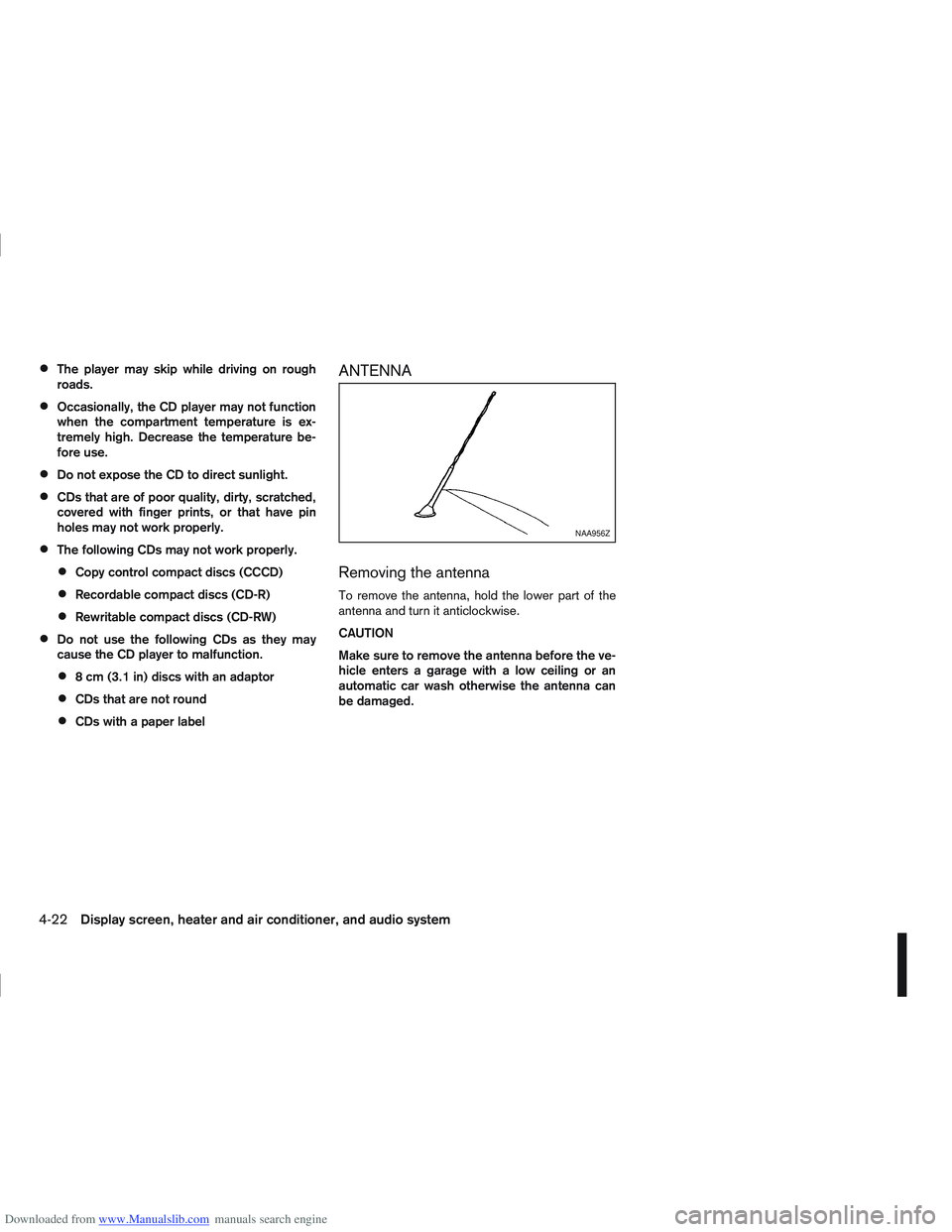
Removing the antenna
To remove the antenna, hold the lower part of the
antenna and turn it anticlockwise.
CAUTION
Make sure to remove the antenna before the ve-
hicle enters a garage with a low ceiling or an
automatic car wash otherwise the antenna can
be damaged.
NAA956Z
4-22Display screen, heater and air conditioner, and audio system
Page 130 of 297
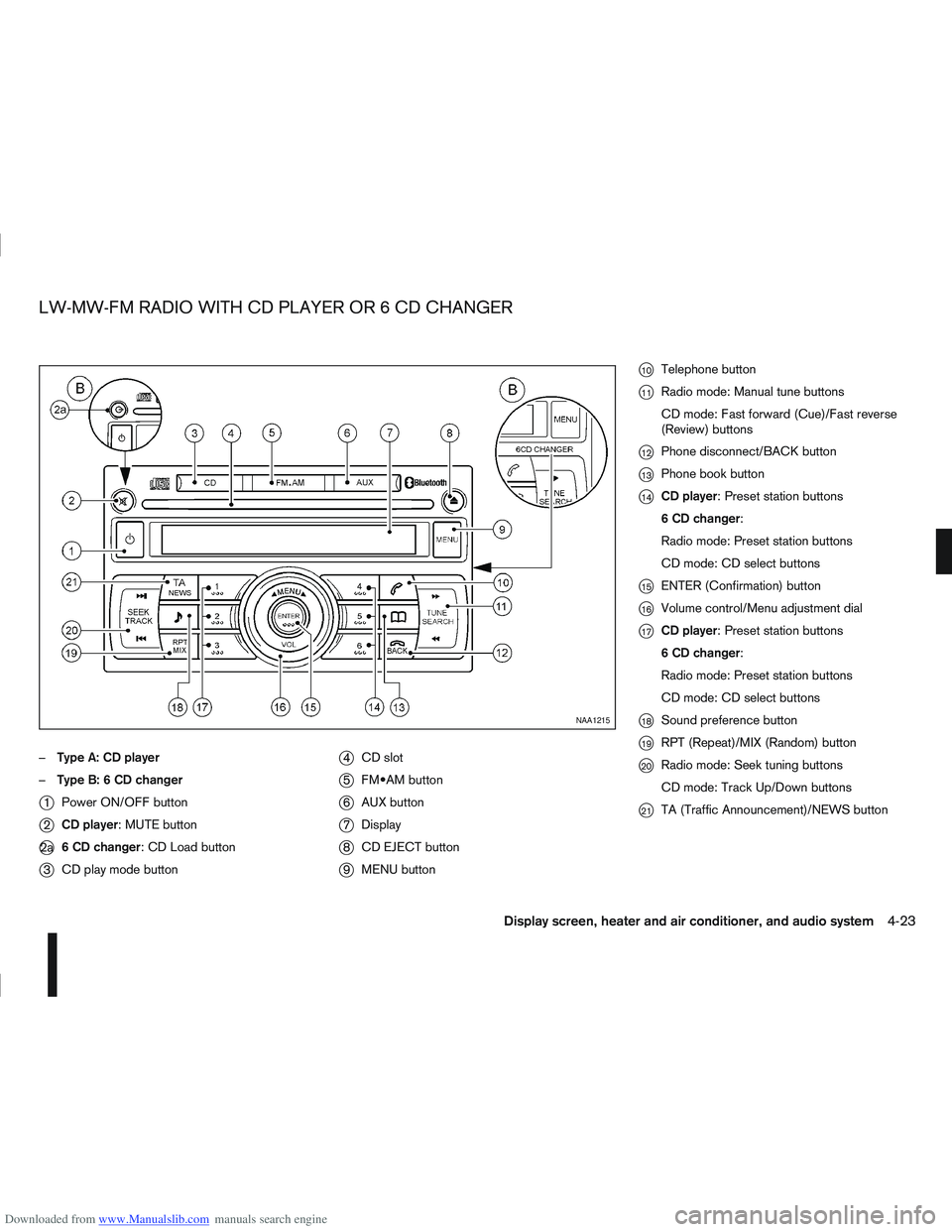
Downloaded from www.Manualslib.com manuals search engine –Type A: CD player
– Type B: 6 CD changer
j1 Power ON/OFF button
j2CD player: MUTE button
j2a 6 CD changer: CD Load button
j3CD play mode button
j4CD slot
j5 button
j6AUX button
j7Display
j8CD EJECT button
j9MENU button
j10Telephone button
j11Radio mode: Manual tune buttons
CD mode: Fast forward (Cue)/Fast reverse
(Review) buttons
j12Phone disconnect/BACK button
j13Phone book button
j14CD player: Preset station buttons
6 CD changer:
Radio mode: Preset station buttons
CD mode: CD select buttons
j15ENTER (Confirmation) button
j16Volume control/Menu adjustment dial
j17CD player: Preset station buttons
6 CD changer:
Radio mode: Preset station buttons
CD mode: CD select buttons
j18Sound preference button
j19RPT (Repeat)/MIX (Random) button
j20Radio mode: Seek tuning buttons
CD mode: Track Up/Down buttons
j21TA (Traffic Announcement)/NEWS button
NAA1215
LW-MW-FM RADIO WITH CD PLAYER OR 6 CD CHANGER
Display screen, heater and air conditioner, and audio system4-23
Page 131 of 297
Downloaded from www.Manualslib.com manuals search engine ANTI-THEFT SYSTEM
The audio unit is uniquely matched to the vehicle’s
NISSAN Anti Theft System (NATS) and therefore
cannot be transferred to any other vehicle. This unit
can only be activated when the ignition switch for
NATS is in the Acc or ON position.
AUDIO MAIN OPERATION
The audio unit operates when the ignition switch is
in Acc or ON position.
mPower ON/OFF button
Press thebutton to switch on the audio unit. If
the audio unit was switched off using the ignition
switch, it can also be switched on with the ignition
switch. The mode (radio or CD) that was playing
immediately before the unit was switched off will
resume playing and the volume will be set to the pre-
vious volume level.
The audio unit can be switched off either by press-
ing the
button or by turning the ignition switch to
the “OFF” or LOCK position.
mVolume level control
Turn the MENU/VOL dial in the clockwise or anti-
clockwise direction to adjust the volume level.
The audio unit is equipped with a speed control vol-
ume function, this means that the audio unit auto-
matically adjusts the volume level in relation to ve-
hicle speed. For details, see “MENU button” later in
this section.
Mute button (where fitted)
Press thebutton to mute the sound and
[MUTE] appears in the display. To cancel the mode,
use any one of the following options:
– Press the
button again.
– Turn the MENU/VOL dial.
– Press the
mSound button
Press thebutton to enter the sound menu. Each
time thebutton is pressed, the mode will change
as follows:
[BASS] →[TREBLE] →[BALANCE] →[FADE] →
[EQ] →[BASS]
When the desired mode appears in the display, turn
the MENU/VOL dial clockwise or anticlockwise to
adjust the settings. When the configuration is com-
plete, press the
is exited or wait at least 5 seconds without pressing
any buttons.
BASS control
Use this control to enhance or attenuate bass re-
sponse sound.
Turn the MENU/VOL dial clockwise or anticlockwise
to adjust the bass settings.
TREBLE control
Use this control to enhance or attenuate the treble.
Turn the MENU/VOL dial clockwise or anticlockwise
to adjust the treble settings.
BALANCE control
Use this control to adjust the balance of the volume
between the left and right speakers.
Turn the MENU/VOL dial anticlockwise or clock-
wise to adjust the left/right balance.
FADE (Fader) control
Use this control to adjust the balance of the volume
between the front and rear (where fitted) speakers.
Turn the MENU/VOL dial anticlockwise or clock-
wise to adjust the front/rear balance.
EQ (Equalizer)
Use this control to change the preset sound mode.
Turn the MENU/VOL dial in the clockwise or anti-
clockwise direction and the mode will change as fol-
lows:
[OFF] ⇔[ENHANCE] ⇔[ACOUSTIC] ⇔[LIVE]
⇔ [OFF]
RADIO OPERATION
When the(Power) button is pressed, the audio
unit will switch on with the last received radio sta-
tion, if the audio unit was previously switched off in
radio mode.
4-24Display screen, heater and air conditioner, and audio system
Page 137 of 297
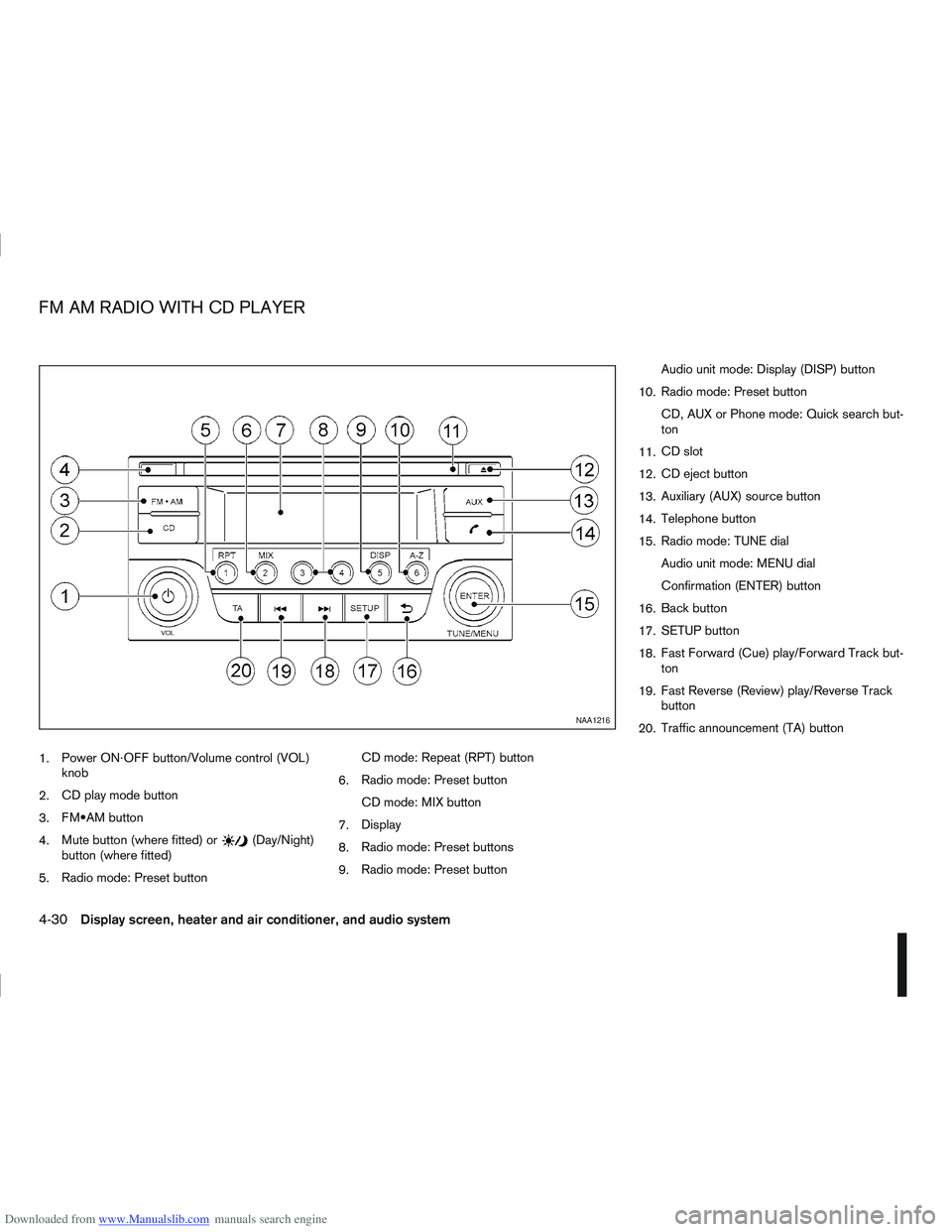
Downloaded from www.Manualslib.com manuals search engine 1.Power ON·OFF button/Volume control (VOL)
knob
2. CD play mode button
3. button
4. Mute button (where fitted) or
(Day/Night)
button (where fitted)
5. Radio mode: Preset button CD mode: Repeat (RPT) button
6. Radio mode: Preset button
CD mode: MIX button
7. Display
8. Radio mode: Preset buttons
9. Radio mode: Preset button Audio unit mode: Display (DISP) button
10. Radio mode: Preset button
CD, AUX or Phone mode: Quick search but-
ton
11. CD slot
12. CD eject button
13. Auxiliary (AUX) source button
14. Telephone button
15. Radio mode: TUNE dial
Audio unit mode: MENU dial
Confirmation (ENTER) button
16. Back button
17. SETUP button
18. Fast Forward (Cue) play/Forward Track but-
ton
19. Fast Reverse (Review) play/Reverse Track
button
20. Traffic announcement (TA) button
NAA1216
FM AM RADIO WITH CD PLAYER
4-30Display screen, heater and air conditioner, and audio system
Page 139 of 297
Downloaded from www.Manualslib.com manuals search engine mPower ON/OFF button
Press thebutton to switch on the audio unit. If
the audio unit was switched off using the ignition
switch, it can also be switched on with the ignition
switch. The source that was playing immediately
before the unit was switched off will resume playing
and the volume will be set to the previous volume
level.
The audio unit can be switched off by pressing
,
or by turning the ignition switch to the “OFF” or
LOCK position.
mVolume (VOL) level control
Turn the
adjust the volume level.
The audio unit is equipped with a speed control vol-
ume function, this means that the audio system au-
tomatically adjusts the volume level in relation to
vehicle speed. For details, see “SPD VOL (Speed
volume) control” later in this section.
Mute button (where fitted)
Press thebutton to mute the sound and [MUTE]
appears in the display. To cancel the mode, use any
of the following options:
– Press
again.
– Turn the
– Press the
Day/Night button (where fitted)
The illumination brightness level is linked to the
headlight switch. When the headlights are switched
“ON” the brightness is dimmed automatically. Press
the button to toggle illumination brightness levels
between daytime setting and nighttime setting inde-
pendent of headlamp status.
RADIO OPERATION
When the(power ON/OFF) button is pressed,
the audio unit will switch on with the last received
radio station, if the audio unit was previously
switched off in radio mode.
Radio band select
buttons
Press the button to change the reception
wave band as follows:
FM1 →FM2 →FMT →AM →FM1
When button is pressed, the radio will
come on at the last received radio station. If the CD
or AUX source mode is already playing, pressing
the button will switch off the playing
source mode and the last received radio station will
be selected.
FM Auto store
When the button is pressed for more
than 1.5 seconds the six stations with the strongest
signals are stored in the preset (1 to 6) buttons of
the FMT band. During the search, a notification mes-
sage [AUTOSTORE] appears in the display and the sound is muted until the operation is complete. Once
completed, the radio selects preset button
j1.
Manual tuning
When adjusting the broadcasting station frequency
manually, turn the
sired station is tuned in.
The frequency increases or decreases in steps of
100 kHz on the FM band, and 9 kHz on the AM
band.
WARNING
The radio should not be tuned while driving in
order for full attention to be given to the driving
operation.
SEEK tuning buttons
Pressing the <>or <>button starts the tun-
ing mode. The radio tuner seeks from low to high or
high to low frequencies and stops at the next broad-
casting station. During seek mode, the audio output
is muted. If no broadcasting station can be found
within the complete band cycle, it will return to the
initial frequency.
Preset station buttonsj1j2j3j4j5j6
Pressing a preset button for less than 2 seconds will
select the stored radio station.
Pressing a preset button for more than 2 seconds
will cause the station currently being received to be
stored against that preset button.
4-32Display screen, heater and air conditioner, and audio system