Locking NISSAN QASHQAI 2013 User Guide
[x] Cancel search | Manufacturer: NISSAN, Model Year: 2013, Model line: QASHQAI, Model: NISSAN QASHQAI 2013Pages: 297, PDF Size: 4.09 MB
Page 96 of 297
Downloaded from www.Manualslib.com manuals search engine SUPER LOCK SYSTEM (RHD models)
WARNING
Super Lock system equipped models:
Failure to follow the precautions below may lead
to hazardous situations. Make sure the Super
Lock system activation is always conducted
safely.
When the vehicle is occupied, never lock the
doors with the integrated keyfob. Doing so
will trap the occupants, since the Super Lock
system prevents the doors from being opened
from the inside of the vehicle.
Only operate the integrated keyfob “LOCK”
button when there is a clear view of the ve-
hicle. This is to prevent anybody from being
trapped inside the vehicle through the Super
Lock system activation.
Pressing the “LOCK” button
on the integrated
keyfob or locking the doors using one of the outside
door lock switches (Intelligent Key models) will acti-
vate the Super Lock system.
When the Super Lock system is active, none of the
doors can be opened from inside the vehicle. This
provides additional security in case of theft or break-
in.
The Super Lock system will be released when all
the doors are unlocked using the integrated keyfob
or an outside door lock switch (Intelligent Key mod-
els).
Emergency situations
If the Super Lock system is activated while you are
inside the vehicle, for example by a traffic accident
or other unexpected circumstances, follow the in-
structions below.
To release the Super Lock system:
– Insert the key into the ignition switch and turn it to the ON position.
All doors can now be unlocked and opened from
inside the vehicle.
– Remove the key from the ignition switch and un- lock the doors using the integrated keyfob “UN-
LOCK” button
.
All doors can now be opened from inside the
vehicle.
To unlock and open the driver’s door from
inside the vehicle while the Super Lock system
is active:
1. Open or break the driver’s door window.
2. Insert the key into the outside door key cylinder and turn it towards the rear of the vehicle.
3. The driver’s door will unlock and can now be opened from inside the vehicle.
Locking without activating the Super
Lock system
WARNING
Do not leave the key inside the vehicle when leav-
ing the vehicle.
Locking the doors using the door key cylinder or
power door lock switch will not activate the Super
Lock system. See “Power door lock switch” later in
this section for further information.
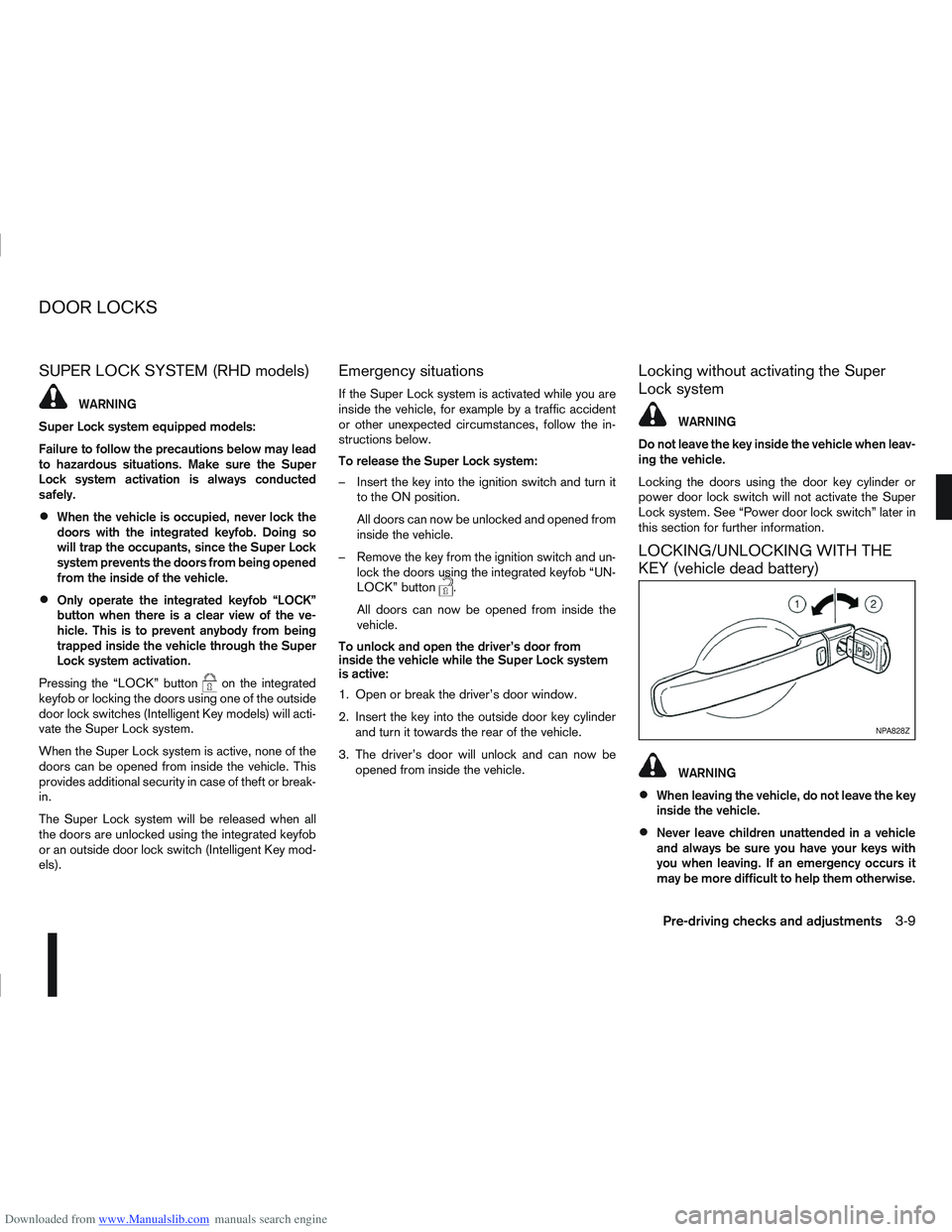
LOCKING/UNLOCKING WITH THE
KEY (vehicle dead battery)
WARNING
When leaving the vehicle, do not leave the key
inside the vehicle.
Never leave children unattended in a vehicle
and always be sure you have your keys with
you when leaving. If an emergency occurs it
may be more difficult to help them otherwise.
NPA828Z
DOOR LOCKS
Pre-driving checks and adjustments3-9
Page 97 of 297
Downloaded from www.Manualslib.com manuals search engine The driver’s door can be locked/unlocked from out-
side using the key/emergency key if the vehicle’s
battery is dead.
To lock the door, insert the key into the driver’s door
key cylinder and turn it towards the front of the ve-
hicle
j1.
To unlock the door, turn the key towards the rear of
the vehicle
j2.
See “Ignition knob (where fitted)” in the “5. Starting
and driving” section for instructions on accessing
the Intelligent Key system Emergency key.
CAUTION
The alarm system will be triggered when the door
is opened using the key (NISSAN alarm equipped
models). To stop the alarm, turn the ignition key
to the ON position or press the unlock
button
on the integrated keyfob.
Initialising the system after vehicle
battery loading or replacement
After recharging or replacing the battery, you should
release (initialise) the system by:
Inserting the key into the ignition switch and then
turning it to the ON position.
Unlocking the vehicle using the integrated key-
fob.
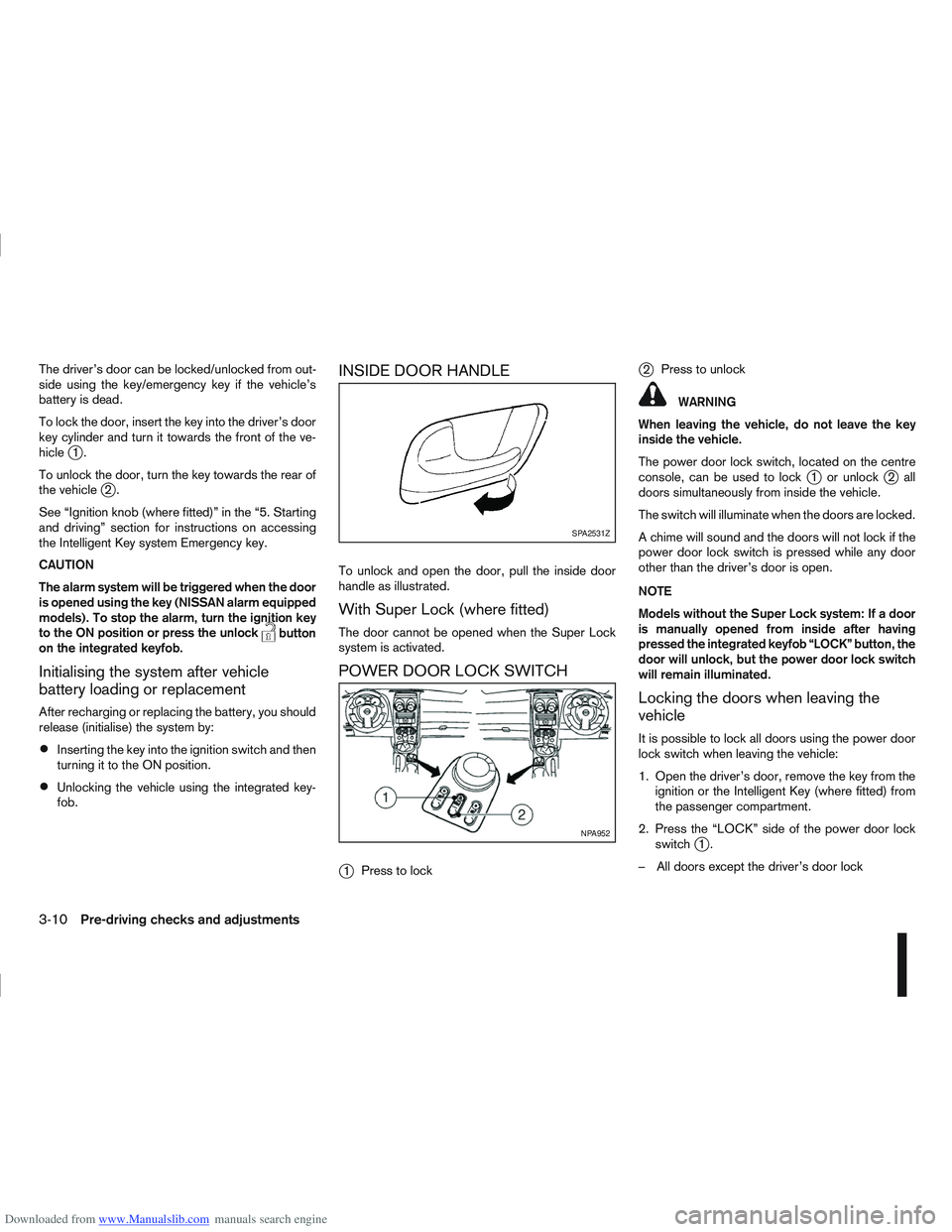
INSIDE DOOR HANDLE
To unlock and open the door, pull the inside door
handle as illustrated.
With Super Lock (where fitted)
The door cannot be opened when the Super Lock
system is activated.
POWER DOOR LOCK SWITCH
j
1 Press to lock
j2Press to unlock
WARNING
When leaving the vehicle, do not leave the key
inside the vehicle.
The power door lock switch, located on the centre
console, can be used to lock
j1 or unlockj2all
doors simultaneously from inside the vehicle.
The switch will illuminate when the doors are locked.
A chime will sound and the doors will not lock if the
power door lock switch is pressed while any door
other than the driver’s door is open.
NOTE
Models without the Super Lock system: If a door
is manually opened from inside after having
pressed the integrated keyfob “LOCK” button, the
door will unlock, but the power door lock switch
will remain illuminated.
Locking the doors when leaving the
vehicle
It is possible to lock all doors using the power door
lock switch when leaving the vehicle:
1. Open the driver’s door, remove the key from the ignition or the Intelligent Key (where fitted) from
the passenger compartment.
2. Press the “LOCK” side of the power door lock switch
j1.
– All doors except the driver’s door lock
SPA2531Z
NPA952
3-10Pre-driving checks and adjustments
Page 98 of 297
Downloaded from www.Manualslib.com manuals search engine 3. Close the driver’s door.
– The driver’s door locks
– The power door lock switch illuminates
–Super Lock system models: The Super Lock
system is not activated
– Intelligent Key models: If the Intelligent Key has
been left inside the vehicle, all doors will unlock
and an alarm will sound
Super Lock equipped models (RHD
models)
If the doors are locked using the integrated keyfob
“LOCK” button or an outside door lock switch (In-
telligent Key models), the Super Lock system will be
activated. The power door lock switch will illuminate
to indicate that all doors are locked, but it will not be
possible to use the power door lock switch to un-
lock the doors.
Locking the doors with the power door lock switch
will not activate the Super Lock system.
Drive away door locking
When active, the drive away door locking function
will automatically lock all doors when the vehicle
speed exceeds 12 km/h (7 MPH).
All doors will be automatically unlocked when a front
door is opened except in anti-hijack mode (only the
driver’s door or front passenger door will unlock); or
when opening a rear passenger door from the in-
side.
When “UNLOCK”, on the power door lock switch, is pressed the drive away door locking system will
not lock the doors again until a door is opened and
closed.
To activate or deactivate drive-away door
locking:
1. Unlock the doors.
2. Turn the ignition switch ON.
3.
Activation
Press and hold the “LOCK” side of the power
door lock switch
j1 for 5 seconds.
Deactivation
Press and hold the “UNLOCK” side of the power
door lock switch
j1 for 5 seconds.
4. A buzzer will sound if activation or deactivation was successful.
Once activated, drive-away door locking will func-
tion on every subsequent trip.
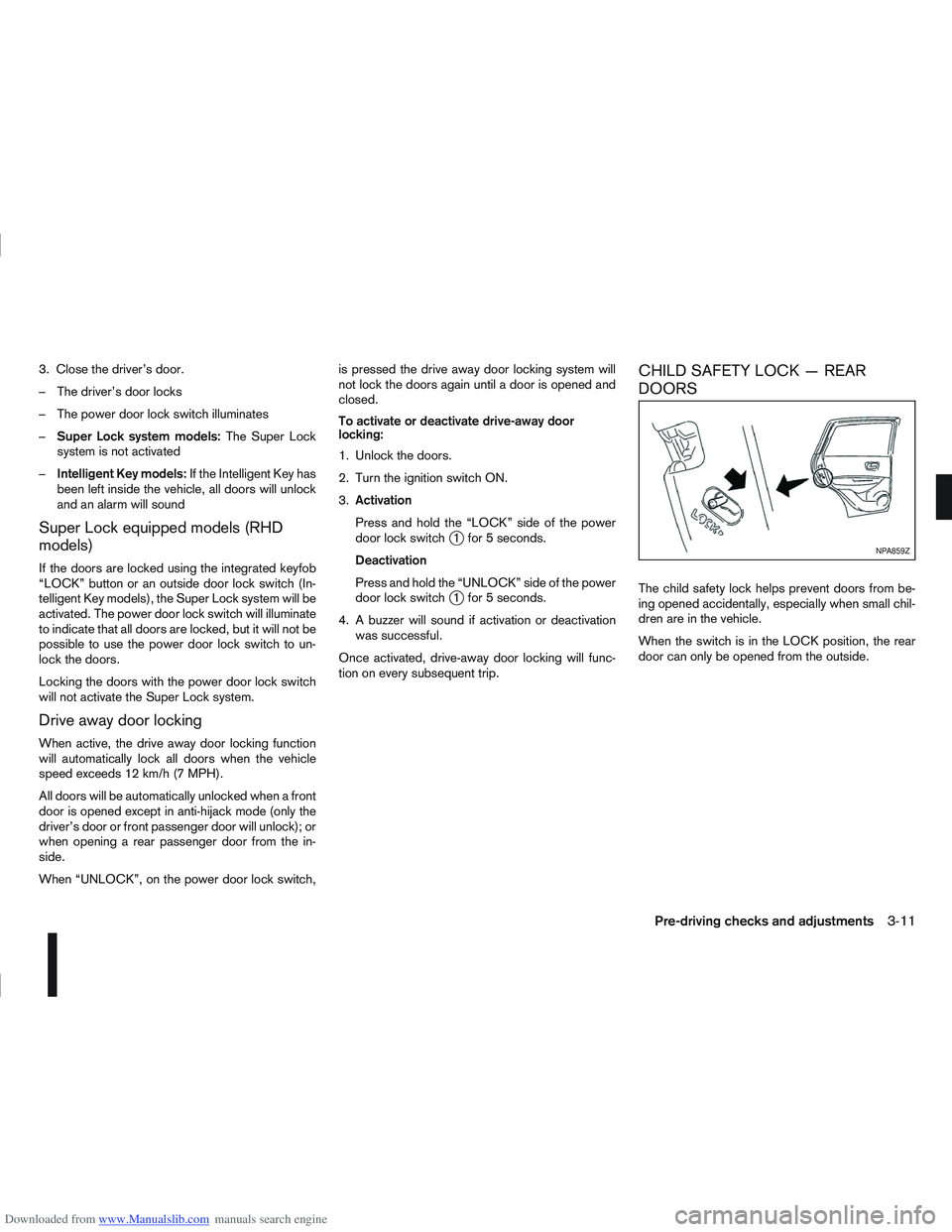
CHILD SAFETY LOCK — REAR
DOORS
The child safety lock helps prevent doors from be-
ing opened accidentally, especially when small chil-
dren are in the vehicle.
When the switch is in the LOCK position, the rear
door can only be opened from the outside.
NPA859Z
Pre-driving checks and adjustments3-11
Page 138 of 297
Downloaded from www.Manualslib.com manuals search engine ANTI-THEFT SYSTEM
Use of a 4-digit radio PIN (Personal Identification
Number) code, known only to the vehicle owner,
effectively reduces the possibility of the audio unit
being stolen. Without the PIN code the audio unit
cannot be activated.
If force is used to try and remove the audio unit, the
Anti-theft system activates and the audio unit is
locked. The only way to unlock the audio unit is to
enter the radio code number shown on an identifica-
tion card supplied with the vehicle documentation.
NOTE
The 4 digit radio code is shown on a card that
you received with your vehicle documenta-
tion.
Record the 4 digit radio code on the “Security
information” page at the end of this manual.
Remove the security page and keep it in a
safe, not in the vehicle.
Contact a NISSAN dealer if you do lose the 4
digit radio code of the audio unit.
Unlocking the unit
If the battery supply to the vehicle is interrupted, the
audio unit will lock.
When the power is restored and the unit switched
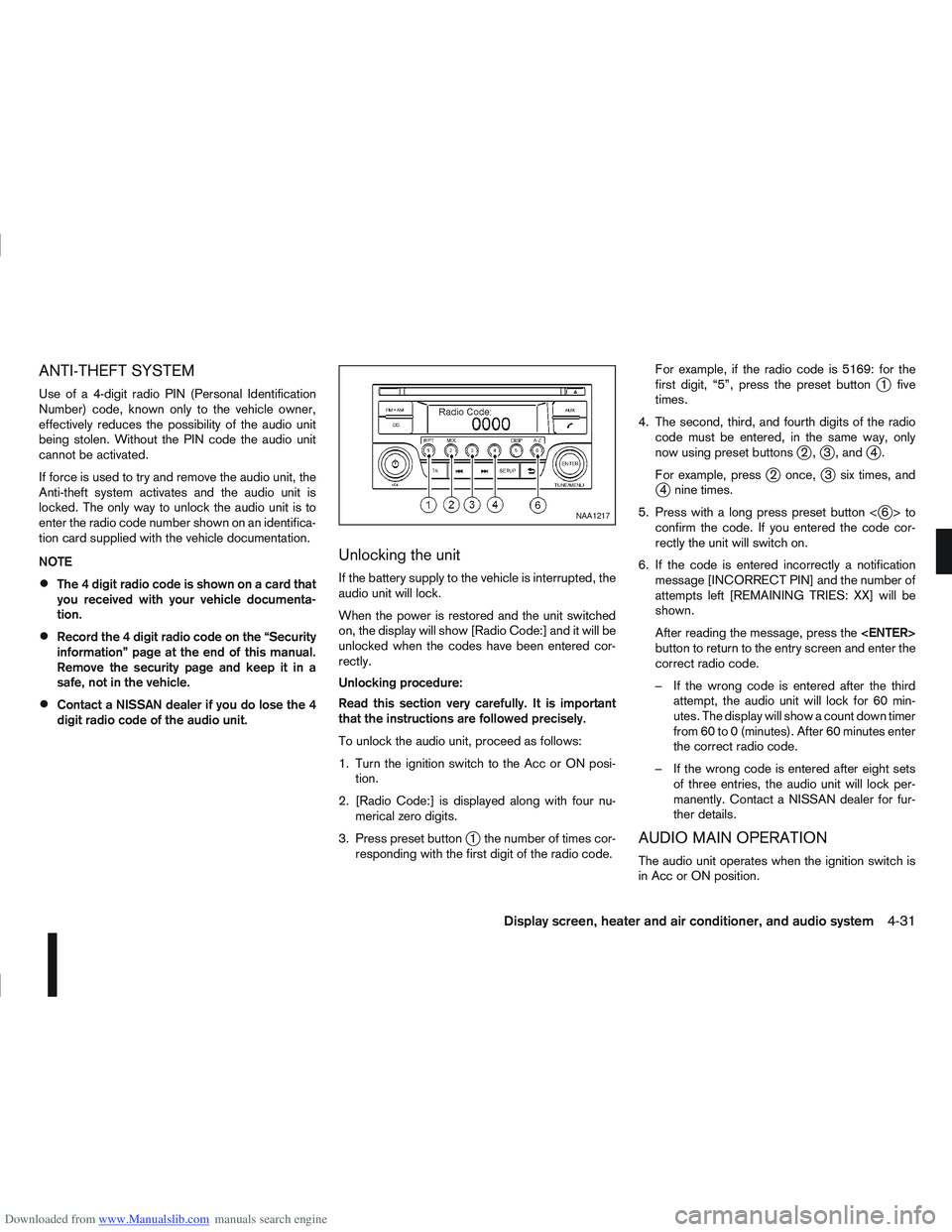
on, the display will show [Radio Code:] and it will be
unlocked when the codes have been entered cor-
rectly.
Unlocking procedure:
Read this section very carefully. It is important
that the instructions are followed precisely.
To unlock the audio unit, proceed as follows:
1. Turn the ignition switch to the Acc or ON posi-tion.
2. [Radio Code:] is displayed along with four nu- merical zero digits.
3. Press preset button
j1 the number of times cor-
responding with the first digit of the radio code. For example, if the radio code is 5169: for the
first digit, “5”, press the preset button
j1 five
times.
4. The second, third, and fourth digits of the radio code must be entered, in the same way, only
now using preset buttons
j2,j3 , andj4.
For example, press
j2 once,j3 six times, andj4 nine times.
5. Press with a long press preset button <
j6>to
confirm the code. If you entered the code cor-
rectly the unit will switch on.
6. If the code is entered incorrectly a notification message [INCORRECT PIN] and the number of
attempts left [REMAINING TRIES: XX] will be
shown.
After reading the message, press the
button to return to the entry screen and enter the
correct radio code.
– If the wrong code is entered after the third attempt, the audio unit will lock for 60 min-
utes. The display will show a count down timer
from 60 to 0 (minutes). After 60 minutes enter
the correct radio code.
– If the wrong code is entered after eight sets of three entries, the audio unit will lock per-
manently. Contact a NISSAN dealer for fur-
ther details.
AUDIO MAIN OPERATION
The audio unit operates when the ignition switch is
in Acc or ON position.
NAA1217
Display screen, heater and air conditioner, and audio system4-31
Page 170 of 297
Downloaded from www.Manualslib.com manuals search engine unlock the steering wheel, insert the ignition key and
turn it gently while rotating the steering wheel slightly
right and left.
The ignition key can only be removed when the
switch is in the LOCK position (Normal parking po-
sition) (0).
AUTOMATIC TRANSMISSION OR
CONTINUOUSLY VARIABLE
TRANSMISSION
On Automatic Transmission (AT) or Continuously
Variable Transmission (CVT) models, the ignition
lock is designed so that the key cannot be turned to
LOCK and removed until the selector lever is moved
to the P (Park) position.
When removing the key from the LOCK position of
the ignition switch, make sure that the selector lever
is in the P (Park) position.
The selector lever can only be moved from the P
(Park) position when the ignition switch is in the ON
position and the footbrake pedal is depressed.
To remove the key from the ignition switch:
1. Move the selector lever into the P (Park) posi-tion.
2. Turn the key to the LOCK position.
3. Remove the key from the ignition switch.
If the key is removed from the ignition switch, the
selector lever cannot be moved from the P (Park)
position. When the key cannot be turned toward the LOCK
position, proceed as follows to remove the key:
1. Move the selector lever into the P (Park) posi-
tion.
2. Turn the key slightly in the ON direction.
3. Turn the key towards the LOCK position.
4. Remove the key.
STEERING LOCK
To lock the steering wheel
1. Turn the key to the LOCK position.
2. Remove the key from the ignition switch.
3. Turn the steering wheel 1/6 of a turn clockwise from the straight up position.
To unlock the steering wheel
1. Insert the key into the ignition switch.
2. Gently turn the key while rotating the steeringwheel slightly right and left.
KEY POSITIONS
LOCK (Normal parking position) (0)
The ignition key can only be removed when in this
position.
The steering lock can only be locked in this position.
“OFF” (1)
The engine is turned off without locking the steering
wheel.
Acc (Accessories) (2)
This position activates electrical accessories, such
as the radio, when the engine is not running.
ON (Normal operating position) (3)
This position turns on the ignition system and elec-
trical accessories.
START (4)
The engine starter activates and the engine will start.
As soon as the engine has started, release the key
immediately. It will return to the ON position.
NOTE
For vehicles fitted with Stop/Start System:
When the engine is automatically stopped by the
Stop/Start System the ignition switch can still be
operated as usual.
At the end of a journey turn the ignition OFF to
avoid a flat battery. The Stop/Start System does
not automatically turn ignition off.
NISSAN ANTI-THEFT SYSTEM (NATS)
The NISSAN Anti Theft System (NATS)* will stop
the engine if someone tries to start the engine with-
out using the registered NATS key.
* Immobilizer
If you failed to start the engine using the NATS Key,
turn the ignition knob to the LOCK position, wait for
5 seconds and turn the key to the START position
again to start the engine.
Starting and driving5-7
Page 172 of 297
Downloaded from www.Manualslib.com manuals search engine AUTOMATIC TRANSMISSION OR
CONTINUOUSLY VARIABLE
TRANSMISSION
The ignition knob is designed so that it cannot be
turned to the LOCK position until the selector lever
is moved to the P (Park) position. The selector lever
can only be moved from the P (Park) position when
the ignition knob is in the ON position and the
footbrake pedal is depressed.
NOTE
The ignition knob warning appears and a buzzer
sounds twice when the ignition knob is turned to
the “OFF” position. Make sure that the selector
lever is in the P (Park) position, then turn the igni-
tion knob to the LOCK position. See “Warnings
and alerts” in the “2. Instruments and controls”
section for further details regarding the function-
ality of the ignition knob warning.
STEERING LOCK
To lock the steering wheel
In the LOCK position, turn the steering wheel 1/6 of
a turn from the straight up position.
To unlock the steering wheel
Depress the brake pedal, push the ignition knob and
turn it towards the Acc position while gently rotating
the steering wheel right or left.
IGNITION KNOB POSITION
LOCK (Normal parking position) (0)
The steering lock can only be locked in this position.
“OFF” (1)
The engine can be turned off without locking the
steering wheel.
Acc (Accessories) (2)
This position activates electrical accessories, such
as the radio, when the engine is not running.
ON (Normal operating position) (3)
This position turns on the ignition system and the
electrical accessories.
START (4)
The engine starter activates and the engine will start.
As soon as the engine has started, release the knob
immediately. It will return to the ON position.
NOTE
For vehicles fitted with Stop/Start System:
When the engine is automatically stopped by the
Stop/Start System the ignition knob can still be
operated as usual.
At the end of a journey turn the ignition OFF to
avoid a flat battery. The Stop/Start System does
not automatically turn ignition off.
Starting and driving5-9
Page 173 of 297
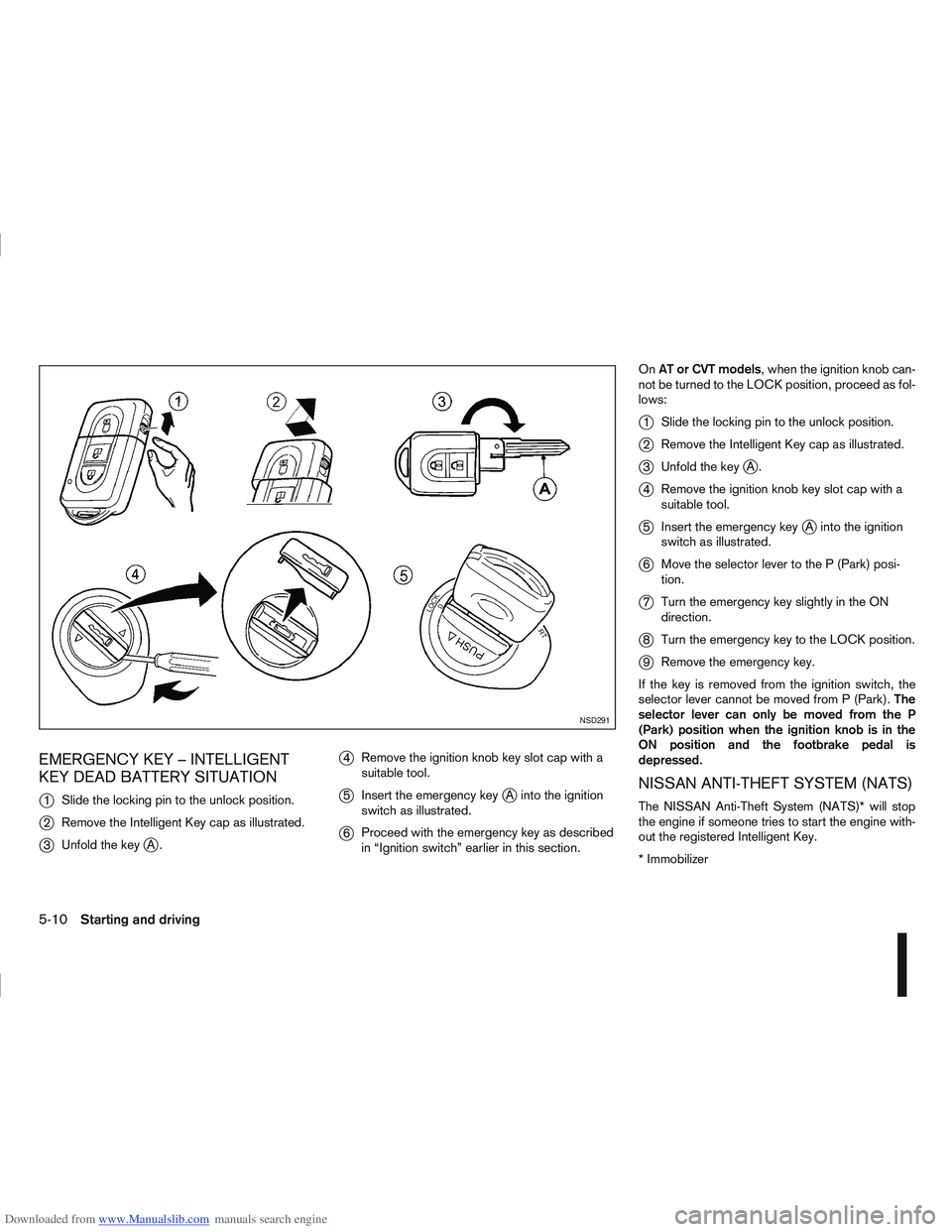
Downloaded from www.Manualslib.com manuals search engine EMERGENCY KEY – INTELLIGENT
KEY DEAD BATTERY SITUATION
j
1Slide the locking pin to the unlock position.
j2Remove the Intelligent Key cap as illustrated.
j3Unfold the keyjA.
j4Remove the ignition knob key slot cap with a
suitable tool.
j5Insert the emergency keyjA into the ignition
switch as illustrated.
j6 Proceed with the emergency key as described
in “Ignition switch” earlier in this section. On
AT or CVT models, when the ignition knob can-
not be turned to the LOCK position, proceed as fol-
lows:
j1 Slide the locking pin to the unlock position.
j2Remove the Intelligent Key cap as illustrated.
j3Unfold the keyjA.
j4Remove the ignition knob key slot cap with a
suitable tool.
j5Insert the emergency keyjA into the ignition
switch as illustrated.
j6 Move the selector lever to the P (Park) posi-
tion.
j7Turn the emergency key slightly in the ON
direction.
j8Turn the emergency key to the LOCK position.
j9Remove the emergency key.
If the key is removed from the ignition switch, the
selector lever cannot be moved from P (Park). The
selector lever can only be moved from the P
(Park) position when the ignition knob is in the
ON position and the footbrake pedal is
depressed.
NISSAN ANTI-THEFT SYSTEM (NATS)
The NISSAN Anti-Theft System (NATS)* will stop
the engine if someone tries to start the engine with-
out the registered Intelligent Key.
* Immobilizer
NSD291
5-10Starting and driving
Page 203 of 297
Downloaded from www.Manualslib.com manuals search engine and varies the brake fluid pressure to prevent each
wheel from locking and sliding. By preventing each
wheel from locking, the system helps the driver to
maintain steering control and helps to minimise
swerving and spinning on slippery surfaces.
Using the system
Depress the brake pedal and hold it down. Depress
the brake pedal with firm steady pressure, but do
not pump the brakes. The ABS will operate to pre-
vent the wheels from locking up. Steer the vehicle to
avoid obstacles.
WARNING
Do not pump the brake pedal. Doing so may in-
crease the stopping distance.
Self-test feature
The ABS includes electronic sensors, electric
pumps, hydraulic solenoids and a computer. The
computer has a built-in diagnostic feature that tests
the system each time you start the engine and move
thevehicleatalowspeedinforwardorreverse.
When the self-test occurs, you may hear a “clunk”
noise and/or feel a pulsation in the brake pedal. This
is normal and does not indicate a malfunction. If the
computer senses a malfunction, it switches the ABS
off and illuminates the ABS warning light on the
instrument panel. The brake system then operates
normally, but without anti-lock assistance.
If the ABS warning light illuminates during the self-
test or while driving, have the vehicle checked by a
NISSAN dealer or qualified workshop.
Normal operation
The ABS will not initiate at speeds below 5 to 10
km/h (3 to 6 MPH). The speeds will vary according
to road conditions.
When the ABS senses that one or more wheels are
close to locking up, the actuator rapidly applies and
releases hydraulic pressure. This action is similar to
pumping the brakes very quickly. You may feel a
pulsation in the brake pedal and hear a noise from
the actuator under the bonnet when it is operating.
This is normal and indicates that the ABS is working
properly. However, the pulsation may indicate that
road conditions are hazardous and extra care is re-
quired while driving. When accelerating, driving on slippery surfaces or
suddenly avoiding obstacles on roads, the vehicle
might swerve or slip. The Electronic Stability Pro-
gramme (ESP) system continuously monitors and
compares the driver’s intended speed and the travel
direction. The system adjusts wheel brake pressure
and engine torque to assist in improving vehicle sta-
bility.
When the ESP system is operating, the “SLIP”
indicator light () in the combination meter
blinks.
When only the traction control (TCS) system in
the ESP system is operating, the “SLIP” indica-
tor light (
) in the combination meter will also
blink.
If the “SLIP” indicator light () blinks, the
road conditions are slippery. Be sure to drive
carefully. See “Warning/indicator lights and au-
dible reminders” in the “2. Instruments and
controls” section.
Indicator light
If a malfunction occurs in the system, the “SLIP”
indicator light (
) and the ESP indicator light
() come on in the combination meter.
As long as these indicator lights are on, the trac-
tion control function is cancelled.
The ESP system uses Active Brake Limited Slip
(ABLS) system to improve vehicle traction. The Ac-
tive Brake Limited Slip (ABLS) system works when
one of the driving wheels is spinning on a slippery
ELECTRONIC STABILITY
PROGRAMME (ESP) SYSTEM
(where fitted)
5-40Starting and driving
Page 210 of 297
Downloaded from www.Manualslib.com manuals search engine 6. Turn off the engine.
7. Open the bonnet (for details, see “Bonnetrelease” in the “3. Pre-driving checks and
adjustments” section) in order to:
Warn other traffic.
Signal to professional road assistance that
you require assistance.
8. Have all passengers exit the vehicle and stand in a safe place, away from traffic and clear of the
vehicle.
CHANGING FLAT TYRE (Models with
spare wheel, where fitted)
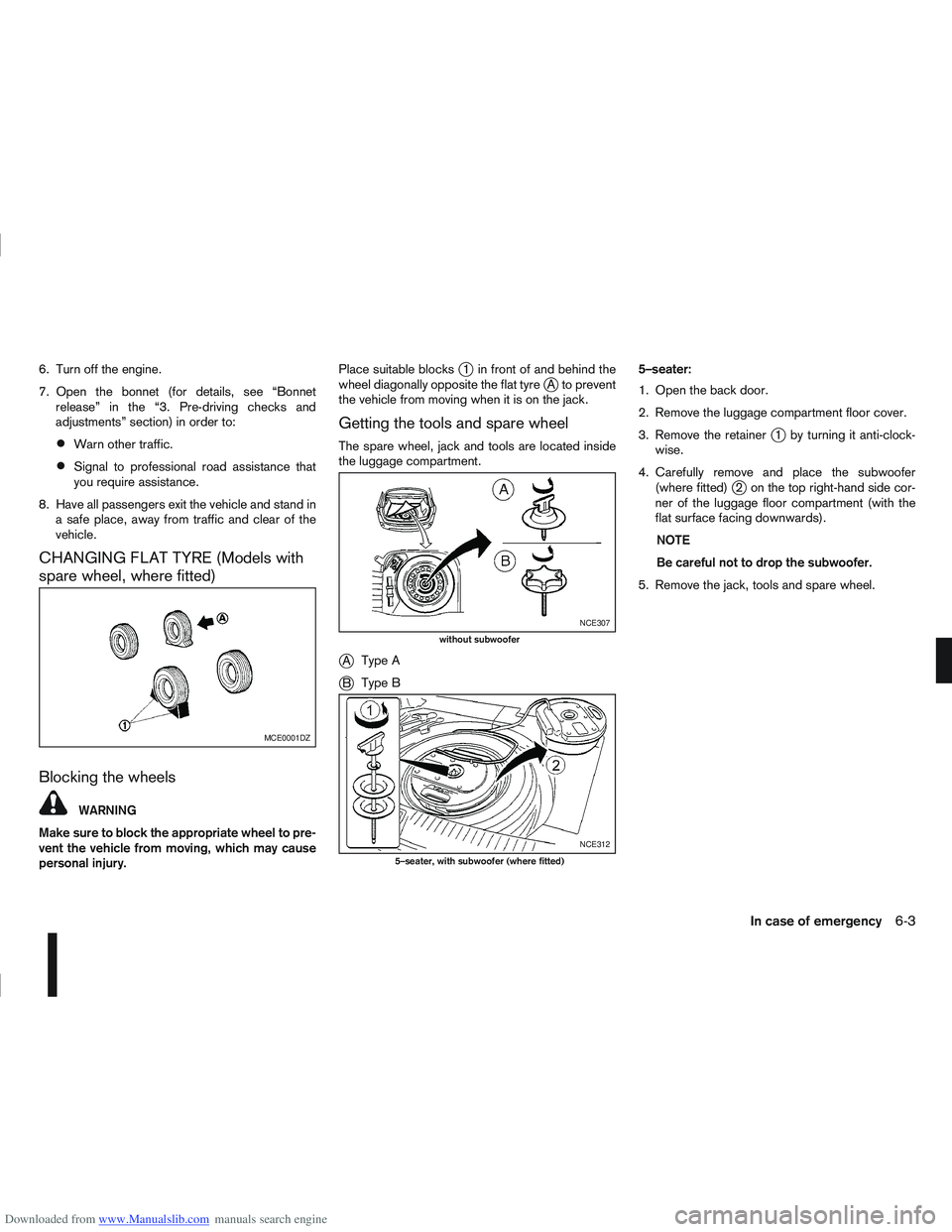
Blocking the wheels
WARNING
Make sure to block the appropriate wheel to pre-
vent the vehicle from moving, which may cause
personal injury. Place suitable blocks
j1 in front of and behind the
wheel diagonally opposite the flat tyrejA to prevent
the vehicle from moving when it is on the jack.
Getting the tools and spare wheel
The spare wheel, jack and tools are located inside
the luggage compartment.
jA Type A
jB Type B 5–seater:
1. Open the back door.
2. Remove the luggage compartment floor cover.
3. Remove the retainer
j1 by turning it anti-clock-
wise.
4. Carefully remove and place the subwoofer (where fitted)
j2 on the top right-hand side cor-
ner of the luggage floor compartment (with the
flat surface facing downwards).
NOTE
Be careful not to drop the subwoofer.
5. Remove the jack, tools and spare wheel.
MCE0001DZ
NCE307
without subwoofer
NCE312
5–seater, with subwoofer (where fitted)
In case of emergency6-3
Page 211 of 297
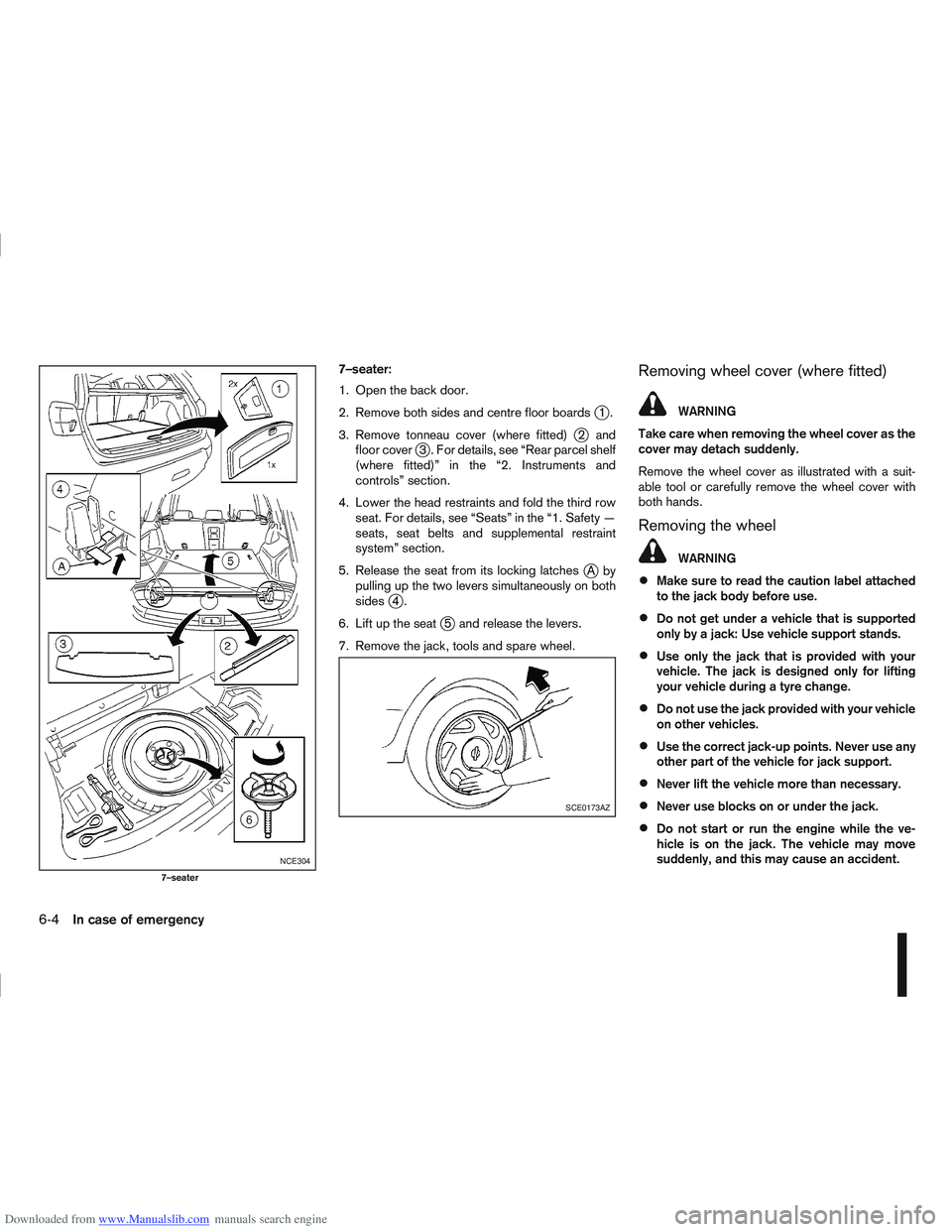
Downloaded from www.Manualslib.com manuals search engine 7–seater:
1. Open the back door.
2. Remove both sides and centre floor boards
j1.
3. Remove tonneau cover (where fitted)
j2 and
floor coverj3 . For details, see “Rear parcel shelf
(where fitted)” in the “2. Instruments and
controls” section.
4. Lower the head restraints and fold the third row seat. For details, see “Seats” in the “1. Safety —
seats, seat belts and supplemental restraint
system” section.
5. Release the seat from its locking latches
jAby
pulling up the two levers simultaneously on both
sides
j4.
6. Lift up the seat
j5 and release the levers.
7. Remove the jack, tools and spare wheel.
Removing wheel cover (where fitted)
WARNING
Take care when removing the wheel cover as the
cover may detach suddenly.
Remove the wheel cover as illustrated with a suit-
able tool or carefully remove the wheel cover with
both hands.
Removing the wheel
WARNING
Make sure to read the caution label attached
to the jack body before use.
Do not get under a vehicle that is supported
only by a jack: Use vehicle support stands.
Use only the jack that is provided with your
vehicle. The jack is designed only for lifting
your vehicle during a tyre change.
Do not use the jack provided with your vehicle
on other vehicles.
Use the correct jack-up points. Never use any
other part of the vehicle for jack support.
Never lift the vehicle more than necessary.
Never use blocks on or under the jack.
Do not start or run the engine while the ve-
hicle is on the jack. The vehicle may move
suddenly, and this may cause an accident.
NCE304
7–seater
SCE0173AZ
6-4In case of emergency