bar NISSAN QASHQAI 2013 Owners Manual
[x] Cancel search | Manufacturer: NISSAN, Model Year: 2013, Model line: QASHQAI, Model: NISSAN QASHQAI 2013Pages: 297, PDF Size: 4.09 MB
Page 21 of 297
Downloaded from www.Manualslib.com manuals search engine WARNING
Do not adjust the driver’s seat while driving.
The seat may move suddenly and could cause
loss of control of the vehicle.
After adjustment, gently rock in the seat to
make sure it is securely locked.
The seatback should not be reclined any more
than needed for comfort. Seat belts are most
effective when the passenger sits well back
and upright in the seat. If the seatback is re-
clined, the risk of sliding under the lap belt
and being injured is increased.
When returning the seatbacks to the upright
position, be certain that they are completely
secured in the latched position. If they are not
completely secured, passengers may be in-
jured in an accident or sudden stop. When
operating the seatback release always rock
the seatback afterward to check that it is
locked.
When the vehicle is being used to carry cargo,
properly secure all cargo to help prevent it
from sliding or shifting. Do not place cargo
higher than the seatbacks. In a sudden stop
or collision, unsecured cargo could cause per-
sonal injury.
Never allow anyone to ride in the luggage area
or on the rear seat when it is in the folded-
down position. Use of these areas by passen-
gers without proper restraints could result in
serious injury in an accident or sudden stop.
Closely supervise children when they are
around the vehicle to prevent them from play-
ing and being locked in the luggage compart-
ment where they could be seriously injured.
Keep the vehicle locked with the rear seat-
back securely latched when not in use, and
prevent children from having access to the
vehicle’s keys.FRONT SEATS
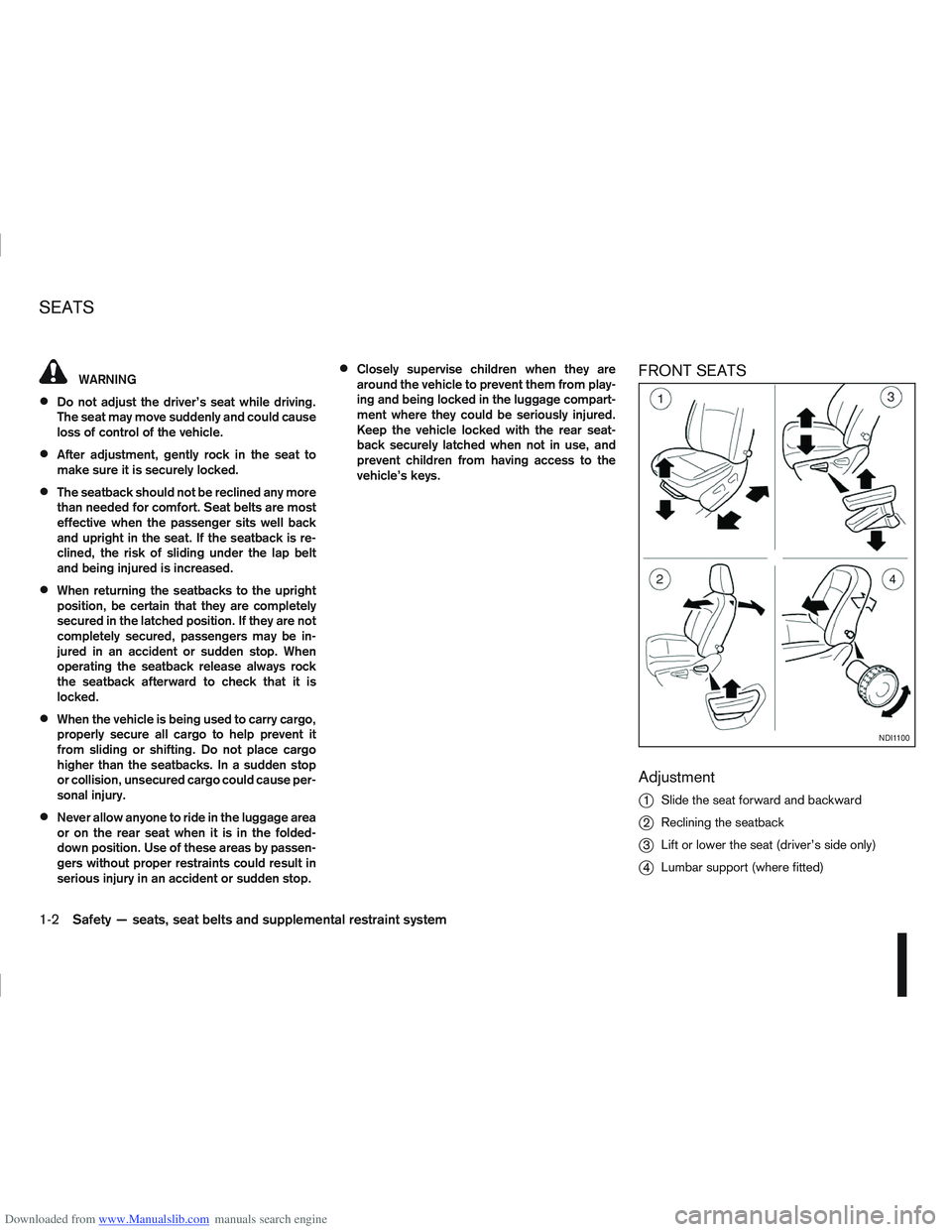
Adjustment
j
1Slide the seat forward and backward
j2Reclining the seatback
j3Lift or lower the seat (driver’s side only)
j4Lumbar support (where fitted)
NDI1100
SEATS
1-2Safety — seats, seat belts and supplemental restraint system
Page 46 of 297
Downloaded from www.Manualslib.com manuals search engine ISOFIX child seat – where fitted) to the vehicle
ISOFIX brackets located in slots on the slope of
the rear outer seat cushions (refer to the ISOFIX
label for appropriate locations).
4. After attaching the child restraint and before plac- ing the child in it, use force to check that it does
not tilt too far from side to side and tug it forward
to make sure that the child restraint is securely
held in place. Make sure that both ISOFIX an-
chorages have latched correctly.
5. Make sure that the child restraint is properly se- cured prior to each use.
NOTE
For forward facing ISOFIX child restraint posi-
tion on the rear seat, slide the front seat as far
forwards as possible.
For rearward facing ISOFIX child restraint po-
sition on the rear seat, slide the front seat
backwards until it touches the edge of the
child restraint.
TOP TETHER STRAP FOR CHILD
RESTRAINT
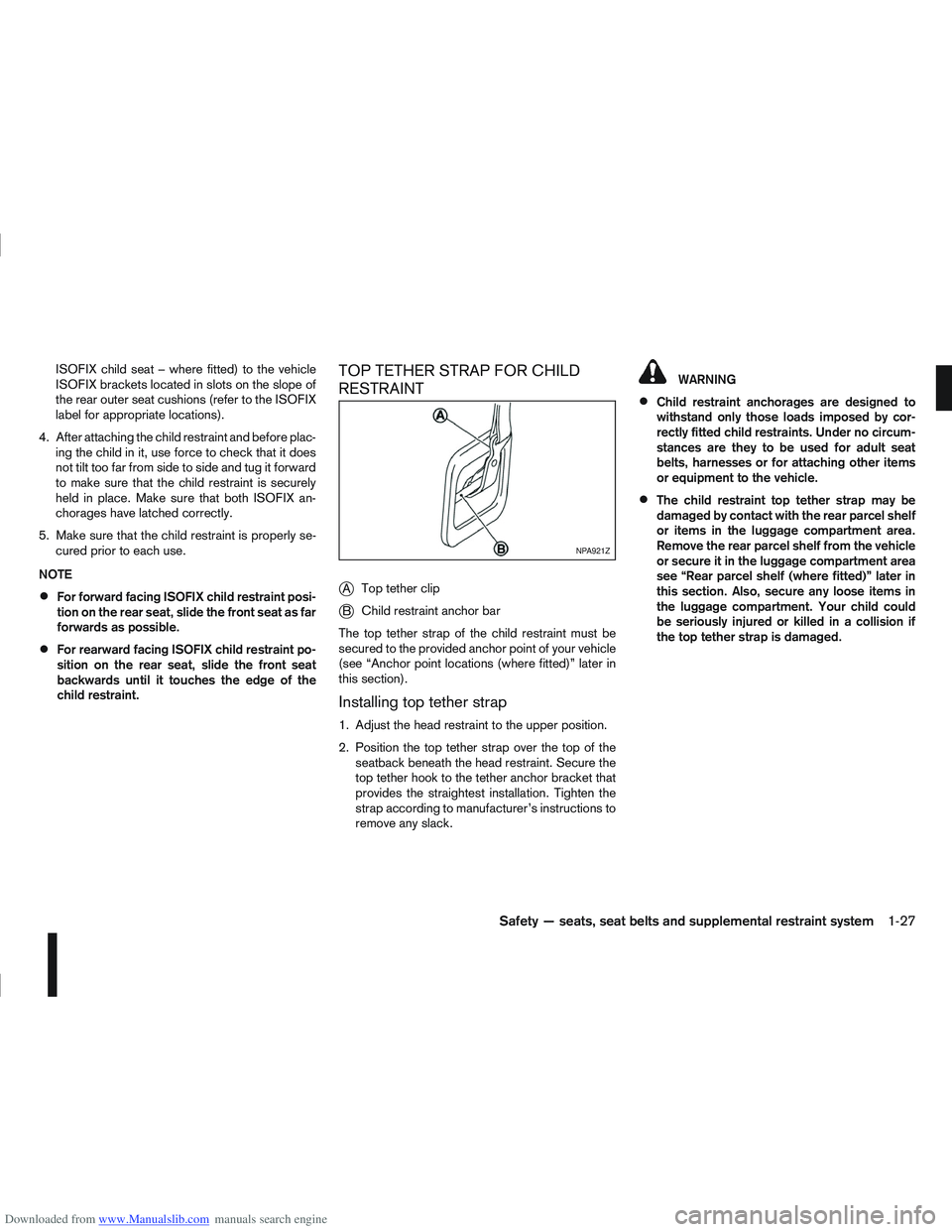
j
A Top tether clip
jB Child restraint anchor bar
The top tether strap of the child restraint must be
secured to the provided anchor point of your vehicle
(see “Anchor point locations (where fitted)” later in
this section).
Installing top tether strap
1. Adjust the head restraint to the upper position.
2. Position the top tether strap over the top of the seatback beneath the head restraint. Secure the
top tether hook to the tether anchor bracket that
provides the straightest installation. Tighten the
strap according to manufacturer’s instructions to
remove any slack.
WARNING
Child restraint anchorages are designed to
withstand only those loads imposed by cor-
rectly fitted child restraints. Under no circum-
stances are they to be used for adult seat
belts, harnesses or for attaching other items
or equipment to the vehicle.
The child restraint top tether strap may be
damaged by contact with the rear parcel shelf
or items in the luggage compartment area.
Remove the rear parcel shelf from the vehicle
or secure it in the luggage compartment area
see “Rear parcel shelf (where fitted)” later in
this section. Also, secure any loose items in
the luggage compartment. Your child could
be seriously injured or killed in a collision if
the top tether strap is damaged.
NPA921Z
Safety — seats, seat belts and supplemental restraint system1-27
Page 65 of 297
Downloaded from www.Manualslib.com manuals search engine ODOMETER/TWIN TRIP ODOMETER
The odometer and twin trip odometer are displayed
when the ignition switch is in the ON position.
Odometer
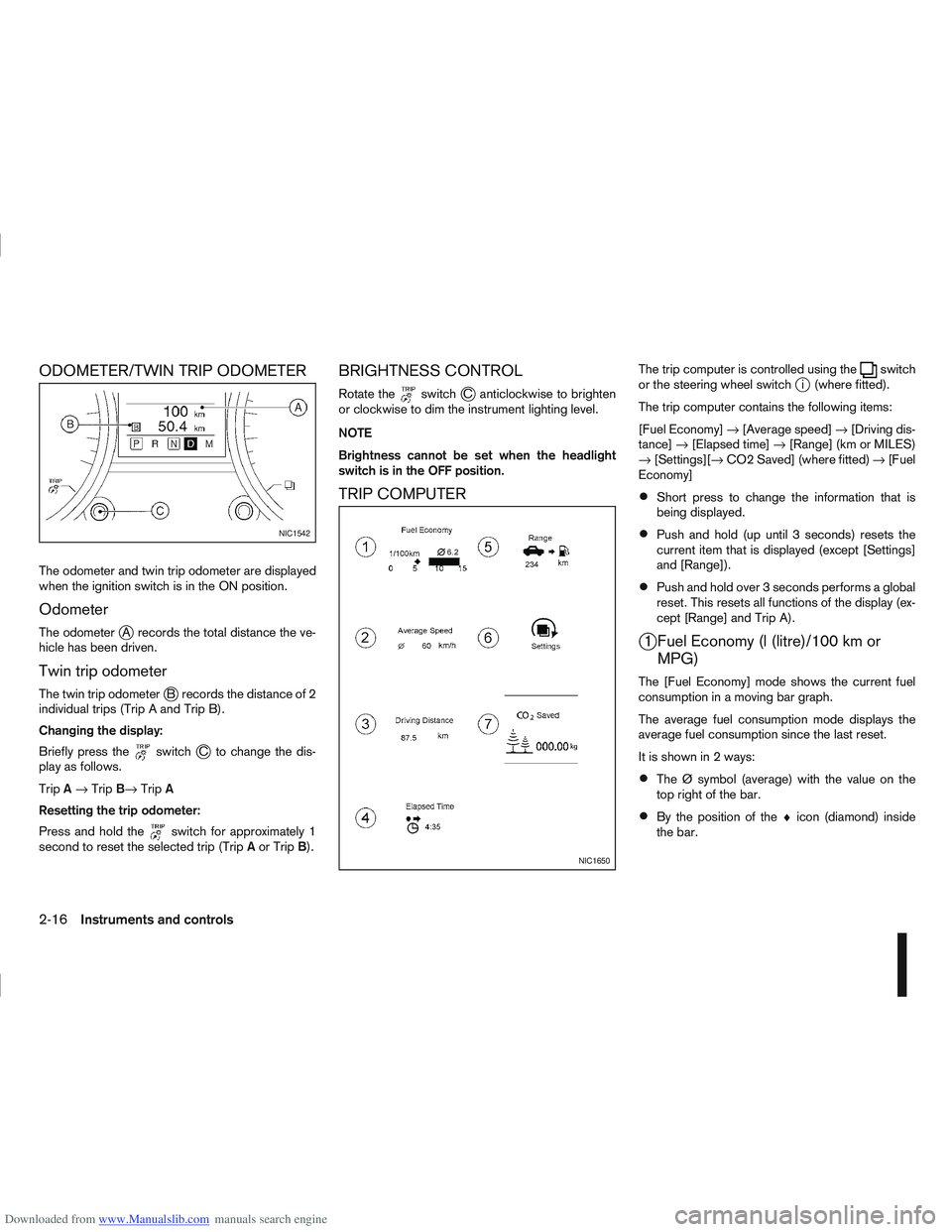
The odometerjA records the total distance the ve-
hicle has been driven.
Twin trip odometer
The twin trip odometerjB records the distance of 2
individual trips (Trip A and Trip B).
Changing the display:
Briefly press the
switchjC to change the dis-
play as follows.
Trip A→ Trip B→ TripA
Resetting the trip odometer:
Press and hold the
switch for approximately 1
second to reset the selected trip (Trip Aor Trip B).
BRIGHTNESS CONTROL
Rotate theswitchjC anticlockwise to brighten
or clockwise to dim the instrument lighting level.
NOTE
Brightness cannot be set when the headlight
switch is in the OFF position.
TRIP COMPUTER
The trip computer is controlled using theswitch
or the steering wheel switchji (where fitted).
The trip computer contains the following items:
[Fuel Economy] →[Average speed] →[Driving dis-
tance] →[Elapsed time] →[Range] (km or MILES)
→ [Settings][→ CO2 Saved] (where fitted) →[Fuel
Economy]
Short press to change the information that is
being displayed.
Push and hold (up until 3 seconds) resets the
current item that is displayed (except [Settings]
and [Range]).
Push and hold over 3 seconds performs a global
reset. This resets all functions of the display (ex-
cept [Range] and Trip A).
j1 Fuel Economy (l (litre)/100 km or MPG)
The [Fuel Economy] mode shows the current fuel
consumption in a moving bar graph.
The average fuel consumption mode displays the
average fuel consumption since the last reset.
It is shown in 2 ways:
The Ø symbol (average) with the value on the
top right of the bar.
By the position of the ♦icon (diamond) inside
the bar.
NIC1542
NIC1650
2-16Instruments and controls
Page 81 of 297
Downloaded from www.Manualslib.com manuals search engine Sunglasses holder
WARNING
The sunglasses holder should not be used
while driving so that full attention may be given
to vehicle operation.
Do not leave sunglasses in the sunglasses
holder while parking in direct sunlight. The
heat may damage the sunglasses.
The glove box contains a sunglasses storage area,
which is accessible when the glove box is open.
CONSOLE BOX
WARNING
The centre console box should not be used while
driving so that full attention may be given to ve-
hicle operation.
Pull the lid up to open the console box.
CUP HOLDERS
WARNING
Cup holders should not be used while driving so
that full attention may be given to vehicle opera-
tion.
To access the rear cup holders (where fitted), lower
the centre armrest. CAUTION
Avoid abrupt starting and braking when the
cup holder is being used to prevent spillage.
If the liquid is hot, it can scald you or your pas-
senger.
Use only soft cups in the cup holder. Hard
objects can injure you in an accident.
BOTTLE HOLDER
CAUTION
Do not use the bottle holder for any other
objects that could be thrown about in the ve-
hicle and possibly injure people during sud-
den braking or an accident.
Do not use the bottle holder for open liquid
containers.
MAP POCKET (where fitted)
Map pockets are located in the doors.
SEAT POCKET (where fitted)
A seat pocket (where fitted) is located on the back
or side of the driver and/or passenger seat.
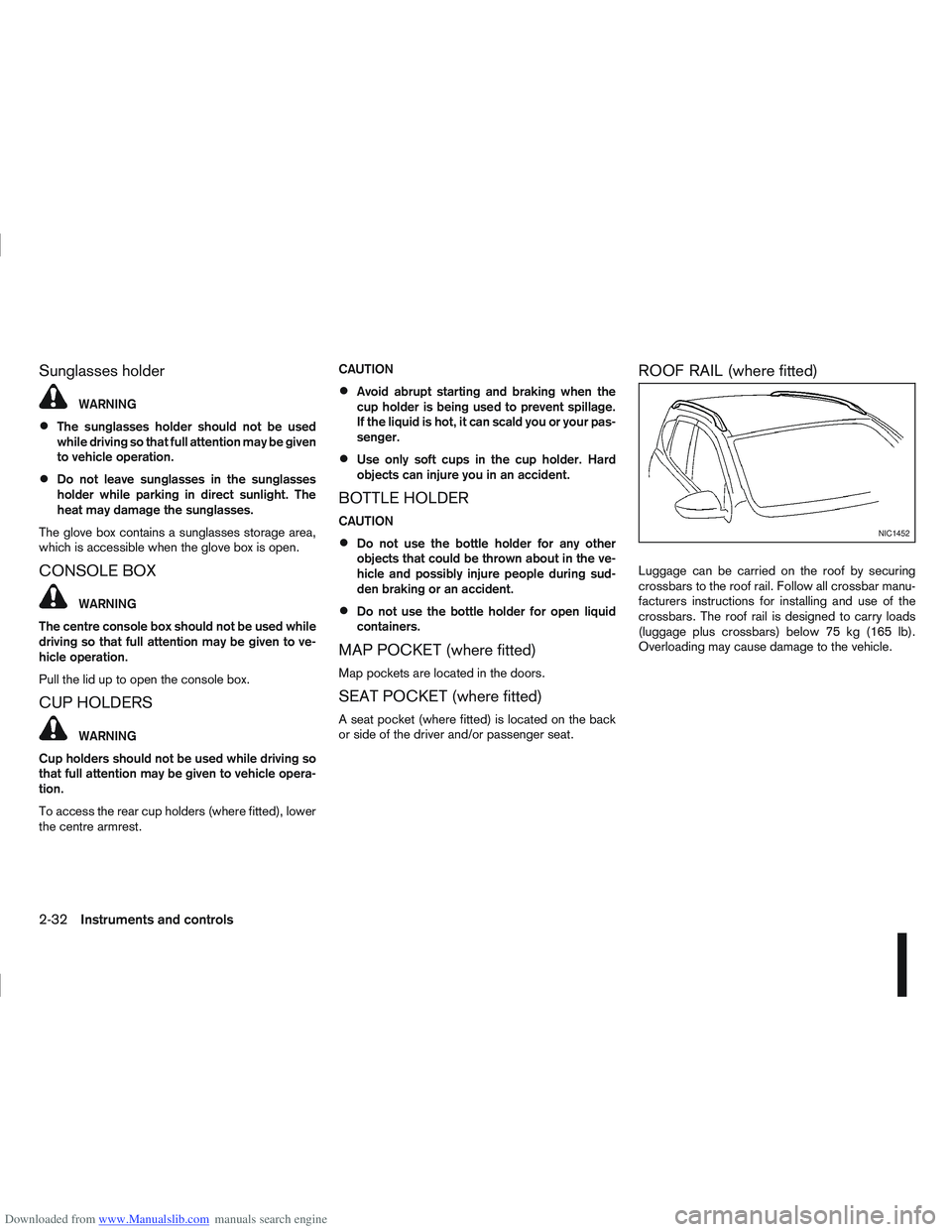
ROOF RAIL (where fitted)
Luggage can be carried on the roof by securing
crossbars to the roof rail. Follow all crossbar manu-
facturers instructions for installing and use of the
crossbars. The roof rail is designed to carry loads
(luggage plus crossbars) below 75 kg (165 lb).
Overloading may cause damage to the vehicle.
NIC1452
2-32Instruments and controls
Page 126 of 297
Downloaded from www.Manualslib.com manuals search engine NOTE
The air conditioner cooling function operates
only when the engine is running, and the am-
bient temperature is above -2°C (28°F).
The air conditioner can be used to dehumidify
when heating, or to reduce air temperature
and dehumidify when cooling. This is possible
in both auto or manual control mode as long
as the fan speed is minimum (first bar).
When the AUTO mode is selected, the tem-
perature of the passenger compartment will
be maintained automatically. Air flow distribu-
tion and fan speed will also be controlled au-
tomatically.
Controls
NOTE
Before any selection or change is made, press
the AUTO button to activate the heater and air
conditioner system.
Cooling and/or dehumidified heating (AUTO
mode):
This mode may be used all year round. The system
works automatically to control the inside tempera-
ture, air flow distribution and fan speed after the
preferred temperature is set manually.
1. Press the AUTO button (the indicator light willilluminate).
2. Operate the driver’s side temperature control dial to set the desired temperature. Adjust the temperature to about 22°C (72°F) for
normal operation.
3. Driver’s side and passenger side temperatures can be set independently using the individual
temperature control dial. When the passenger
side temperature control dial is turned, the DUAL
indicator light will come on. To turn off the pas-
senger side temperature control, press the DUAL
button.
NOTE
A visible mist may be seen coming from the
vents in hot, humid conditions as the air is
cooled rapidly, this is not a malfunction.
It is not possible to use DUAL mode when
windscreen defogger is selected.
Heating (AUTO mode):
Use this mode for heating purposes only.
1. Press the A/C button to turn off the air condi- tioner cooling function (A/C indicator light goes
off).
2. Select the desired temperature with the tempera- ture control dial.
Do not set the temperature at a lower level than
the one of the outside air temperature. Other-
wise the system may not work properly.
This mode is not recommended if the windscreen
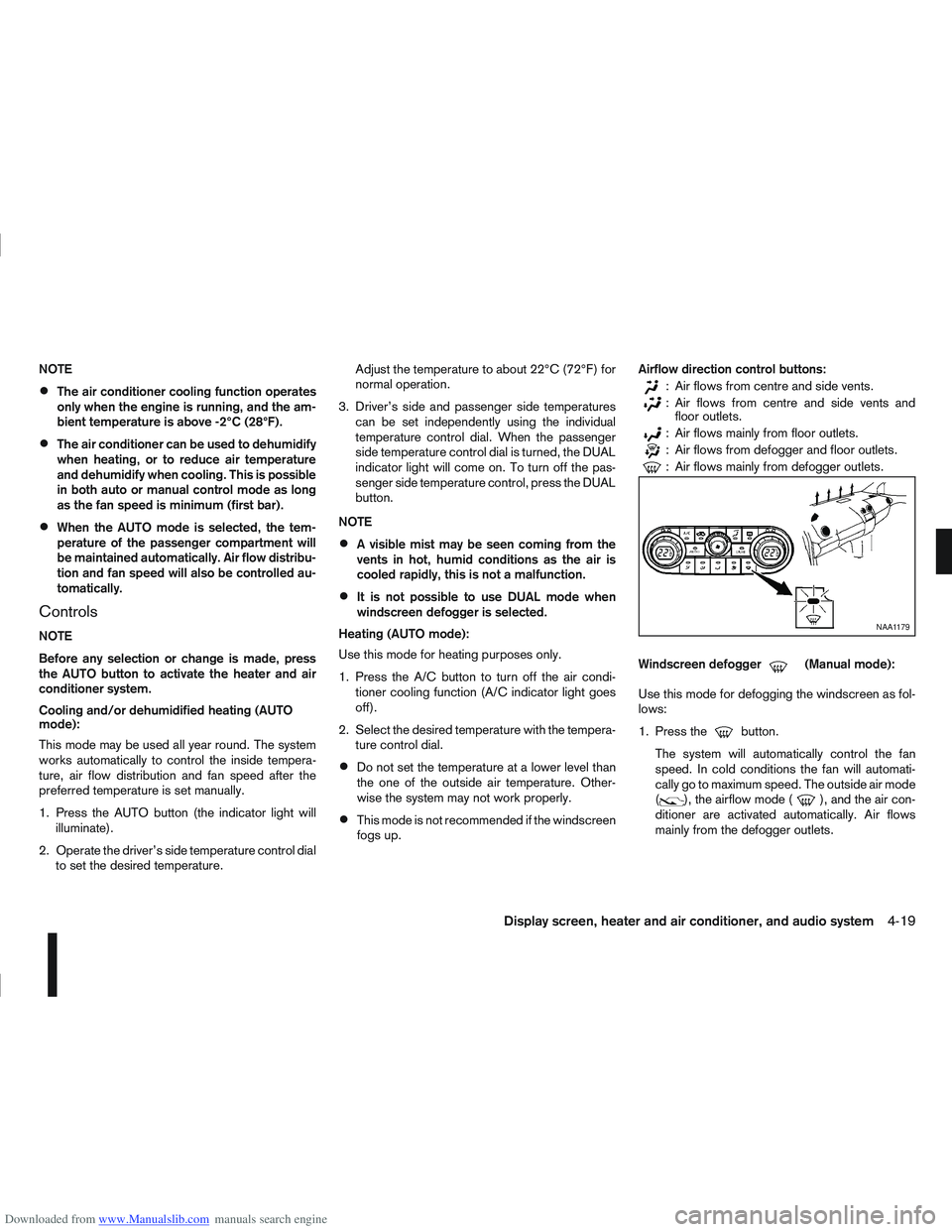
fogs up. Airflow direction control buttons:
: Air flows from centre and side vents.
: Air flows from centre and side vents and
floor outlets.
: Air flows mainly from floor outlets.
: Air flows from defogger and floor outlets.
: Air flows mainly from defogger outlets.
Windscreen defogger
m(Manual mode):
Use this mode for defogging the windscreen as fol-
lows:
1. Press the
button.
The system will automatically control the fan
speed. In cold conditions the fan will automati-
cally go to maximum speed. The outside air mode
(
), the airflow mode (), and the air con-
ditioner are activated automatically. Air flows
mainly from the defogger outlets.
NAA1179
Display screen, heater and air conditioner, and audio system4-19
Page 191 of 297
Downloaded from www.Manualslib.com manuals search engine Unsecured cargo can be thrown around when
driving over rough terrain. Properly secure it so
that it will not be thrown forwards and cause
injury to you or your passengers.
To avoid raising the centre of gravity excessively,
do not exceed the rated capacity of the roof rack/
gear bin (where fitted) and evenly distribute the
load. Secure heavy loads in the luggage area as
far forwards and as low as possible. Do not equip
the vehicle with tyres larger than specified. This
could cause your vehicle to rollover.
Accelerating quickly, sharp steering manoeuvres
or sudden braking may cause loss of control.
Do not drive beyond the performance of the
tyres, even with 4WD. Sudden acceleration,
steering or braking may result in loss of control
and could cause the vehicle to become stuck.
If at all possible, avoid sharp turning manoeuvres,
particularly at high speeds. Your 4WD vehicle
has a higher centre of gravity than a 2WD ve-
hicle and can tip over more easily. The vehicle is
not designed for cornering at the same speeds
as conventional 2WD models any more than low
sports cars are designed to perform satisfacto-
rily under off-road conditions. Failure to operate
this vehicle correctly could result in loss of con-
trol and/or a rollover accident.
Do not grip the inside or spokes of the steering
wheel when driving off-road. The steering wheel
could jerk and injure your hands. Instead, drive
with your fingers and thumbs on the outside of
the rim.
Before operating the vehicle, ensure that the
driver and all passengers have their seat belts
fastened.
Avoid raising the centre of gravity by loading
things on the roof or equipping the vehicle with
tyres larger than specified in this manual.
Always drive with the floor mats in place as the
floor may become very hot. Particular care
should be taken if you are barefoot.
Lower your speed when encountering strong
crosswinds. With its higher centre of gravity your
NISSAN is more affected by gusty side winds.
Slower speeds ensure better vehicle control.
Be sure to check the brakes immediately after
driving in mud or water as specified in “Wet
brakes” later in this section.
Whenever you drive off-road through sand, mud
or water as deep as the wheel hub, more fre-
quent maintenance may be required. For details,
refer to the separately provided Warranty Infor-
mation and Maintenance Booklet.
Rinse the underside of the vehicle with fresh
water after driving through mud or sand. Re-
move any brush or sticks that are trapped.
Install the same size of winter tyres on all four (4)
wheels (such as studless tyres) or install snow
chains to the front wheels when driving on slip-
pery roads (e.g. after a snowfall) and drive care-
fully using 4WD.
Avoid parking your vehicle on steep hills. If you
get out of the vehicle and it rolls forwards, back-
wards or sideways, you could be injured.
5-28Starting and driving
Page 204 of 297
Downloaded from www.Manualslib.com manuals search engine surface. The Active Brake Limited Slip (ABLS) sys-
tem, brakes the spinning wheel to distribute the driv-
ing power to the other driving wheel.
If the vehicle is operated with the ESP system turned
off, all ESP and TCS functions will be turned off.
The Active Brake Limited Slip (ABLS) system and
ABS will still operate with the ESP system off. If the
Active Brake Limited Slip (ABLS) system or the ABS
is activated, the “SLIP” indicator light (
) will
blink and you may hear a clunk noise and/or feel a
pulsation in the brake pedal. This is normal and does
not indicate a malfunction.
While the ESP system is operating, you may feel a
pulsation in the brake pedal and hear a noise or
vibration from under the bonnet. This is normal and
indicates that the ESP system is working properly.
The ESP computer has a built in diagnostic feature
that tests the system each time the engine is started
and the vehicle moves forwards or reverses at a
slow speed. When the self-test occurs, you may
hear a clunk noise and/or feel a pulsation in the
brake pedal. This is normal and is not an indication
of a malfunction.
WARNING
The ESP system is designed to help improve
driving stability but does not prevent accidents
caused by abrupt steering operation at high
speeds, or careless or dangerous driving
techniques. Reduce vehicle speed and be es-
pecially careful when driving and cornering on
slippery surfaces. Always drive carefully.
If engine related parts, such as a muffler, are
not standard equipment or are extremely de-
teriorated, the ESP OFF indicator light (
)
and/or the “SLIP” indicator light () may
illuminate.
If brake related parts, such as brake pads,
rotors and callipers, are not standard equip-
ment or are extremely deteriorated, the ESP
system may not operate properly and the ESP
OFF indicator light (
) and/or the “SLIP”
indicator light () may illuminate.
Do not modify the vehicle’s suspension. If
suspension parts, such as shock absorbers,
struts, springs, stabiliser bars and bushings,
are not NISSAN-approved or are extremely
deteriorated, the ESP system may not oper-
ate properly. This could adversely affect ve-
hicle handling performance and the ESP OFF
indicator light (
) and/or the “SLIP” indi-
cator light () may illuminate.
When driving on extremely inclined surfaces,
such as higher banked corners, the ESP sys-
tem may not operate properly and the ESP
OFF indicator light (
) and/or the “SLIP”
indicator light () may illuminate. Do not
drive on these types of roads. If ESP OFF indi-
cator light
does illuminate after driving
on extreme surfaces, restart the engine to re-
set the ESP system.
If wheels or tyres other than the
recommended ones are used, the ESP sys-
tem may not operate properly and the ESP OFF indicator light (
) and/or the “SLIP”
indicator light () may illuminate.
The ESP system is not a substitute for winter
tyres or snow chains on a snow covered road.
NOTE
The ESP system should be switched on under
normal circumstances although it may be ad-
vantageous to switch off the ESP system to
allow wheelspin under the following condi-
tions:
– When driving in deep snow or mud.
– When trying to rock a vehicle free that is stuck in snow.
– When driving with snow chains.
If the ESP system has been switched off, drive
carefully with reduced speed. When road con-
ditions allow, ESP should be switched back
on.
Starting and driving5-41
Page 289 of 297
Downloaded from www.Manualslib.com manuals search engine – Jump-starting ........................................................ 6-10, 8-19
– Precautions when starting and driving .............................. 5-3
– Push-starting ................................................................. 6-12
– Starting the engine ........................................................ 5-11
Steering
– Power steering system .................................................. 5-38
– Steering lock ............................................................ 5-7, 5-9
– Steering wheel adjustment ............................................. 3-16
– Steering wheel switches for hands-free telephonecontrol ........................................................................\
... 4-55
– Steering-wheel switch for audio control ......................... 4-43
– Steering-wheel switch for hands-free telephone control . 4-50
– Telephone button ........................................ 4-44, 4-52, 4-55
Stop/Start System ............................................................... 5-21
Storage ........................................................................\
....... 2-31
– Bottle holder .................................................................. 2-32
– Console box .................................................................. 2-32
– Cup holder .................................................................... 2-32
– Glove box ...................................................................... 2-31
– Map pockets ................................................................. 2-32
– Roof rail ........................................................................\
2-32
– Seat pockets ................................................................. 2-32
– Storage trays ................................................................. 2-31
– Sunglasses holder ......................................................... 2-32
Sun visors ........................................................................\
... 3-17
Sunshade
– Sunshade (Reinitialisation procedure) ............................ 2-37
– Sunshade operation ...................................................... 2-36
Super Lock system ............................................................... 3-9
– Emergency situations ....................................................... 3-9
– Power door lock switch ................................................. 3-11
Supplemental Restraint System (air bag system)
– Air bag system .............................................................. 1-13
– Air bag warning labels ................................................... 1-16
– Air bag warning light ...................................................... 1-16
– Front passenger air bag deactivate switch ..................... 1-17
– Front passenger air bag indicator light ........................... 1-17 Switch
– Defogger switch ............................................................ 2-23
– Fog light switch ............................................................. 2-26
– Headlight and turn signal switch .................................... 2-24
– Headlight cleaner switch ................................................ 2-28
– Power door lock switch ................................................. 3-10
– Wiper and washer switch .............................................. 2-21
T
Tachometer ........................................................................\
... 2-2
Temporary-use spare tyre ...................................................... 6-2
Three-point type seat belts .................................................... 1-9
Three-way catalyst (Petrol engine models) ............................. 5-4
Tilting steering wheel ........................................................... 3-16
Tonneau cover .................................................................... 2-33
Towing
– Recommended towing for four-wheel drive (4WD)models ........................................................................\
.. 6-14
– Recommended towing for two-wheel drive (2WD) models ........................................................................\
.. 6-14
– Tow bar Installation ....................................................... 5-36
– Tow truck towing ........................................................... 6-13
– Towing eye .................................................................... 6-15
– Towing precautions ....................................................... 6-13
– Trailer towing ................................................................ 5-35
Trailer
– Trailer brakes ................................................................ 5-36
– Trailer detection ............................................................. 5-36
– Trailer direction indicator light .......................................... 2-9
– Trailer towing ................................................................ 5-35
Transmission
– Automatic transmission (ignition knob) ...................... 5-7, 5-9
– Automatic transmission fluid (ATF) ................................. 8-14
– Continuously variable transmission (ignition knob) ..... 5-7, 5-9
– Continuously variable transmission fluid ......................... 8-14
10-8Index