tyre NISSAN QASHQAI 2013 Owners Manual
[x] Cancel search | Manufacturer: NISSAN, Model Year: 2013, Model line: QASHQAI, Model: NISSAN QASHQAI 2013Pages: 297, PDF Size: 4.09 MB
Page 2 of 297
Downloaded from www.Manualslib.com manuals search engine The NISSAN GREEN PROGRAM symbol indicates environmentally friendly
information and best practices.
This symbol means“Do not do this”or“Do not let this happen” .
Arrows in an illustration that are similar to these point to the front of the vehicle.
Arrows in an illustration that are similar to these indicate movement or action.
Arrows in an illustration that are similar to these call attention to an item in the
illustration.
ON-PAVEMENT AND OFF-ROAD DRIVING (4WD models)
This vehicle will handle and manoeuvre differently from an ordinary passenger
vehicle, because it has a higher centre of gravity for off-road use. As with other
vehicles with features of this type, failure to operate this vehicle correctly may
result in loss of control or an accident.
Be sure to read “On-pavement and off-road driving precautions” and “Four-
wheel drive (4WD)” in the “5. Starting and driving” section of this manual.
BATTERY DISPOSAL
CAUTION
An improperly disposed battery can harm the environment. Always confirm
local regulations for battery disposal.
Examples of the batteries that the vehicle contains:
Vehicle battery
Remote controller battery (for Intelligent Key and/or Remote keyless entry
system)
Tyre Pressure Monitoring System (TPMS) sensor battery
Remote controller battery (for Mobile Entertainment system)
If in doubt, contact your local authority, or a NISSAN dealer, or a qualified work-
shop for advice on disposal.
Page 8 of 297
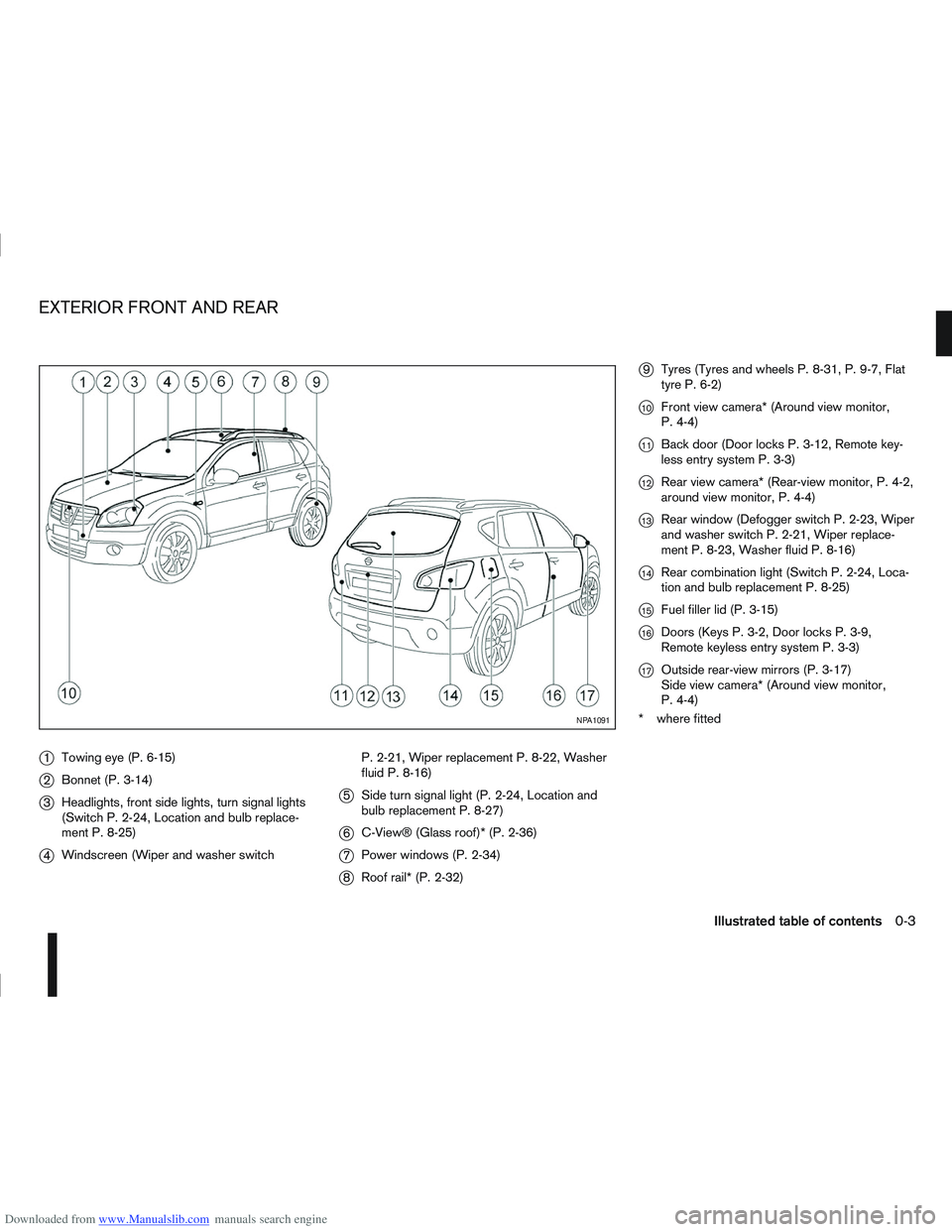
Downloaded from www.Manualslib.com manuals search engine j1Towing eye (P. 6-15)
j2Bonnet (P. 3-14)
j3Headlights, front side lights, turn signal lights
(Switch P. 2-24, Location and bulb replace-
ment P. 8-25)
j4Windscreen (Wiper and washer switch P. 2-21, Wiper replacement P. 8-22, Washer
fluid P. 8-16)
j5
Side turn signal light (P. 2-24, Location and
bulb replacement P. 8-27)
j6C-View® (Glass roof)* (P. 2-36)
j7Power windows (P. 2-34)
j8Roof rail* (P. 2-32)
j9Tyres (Tyres and wheels P. 8-31, P. 9-7, Flat
tyre P. 6-2)
j10Front view camera* (Around view monitor,
P. 4-4)
j11Back door (Door locks P. 3-12, Remote key-
less entry system P. 3-3)
j12Rear view camera* (Rear-view monitor, P. 4-2,
around view monitor, P. 4-4)
j13Rear window (Defogger switch P. 2-23, Wiper
and washer switch P. 2-21, Wiper replace-
ment P. 8-23, Washer fluid P. 8-16)
j14Rear combination light (Switch P. 2-24, Loca-
tion and bulb replacement P. 8-25)
j15Fuel filler lid (P. 3-15)
j16Doors (Keys P. 3-2, Door locks P. 3-9,
Remote keyless entry system P. 3-3)
j17Outside rear-view mirrors (P. 3-17)
Side view camera* (Around view monitor,
P. 4-4)
* where fitted
NPA1091
EXTERIOR FRONT AND REAR
Illustrated table of contents0-3
Page 64 of 297
![NISSAN QASHQAI 2013 Owners Manual Downloaded from www.Manualslib.com manuals search engine However reset is possible (only after the oil was
changed) using the [Service] menu item in the
[Settings] menu. See “[Maintenance]” later](/img/5/56763/w960_56763-63.png "NISSAN QASHQAI 2013 Owners Manual Downloaded from www.Manualslib.com manuals search engine However reset is possible (only after the oil was
changed) using the [Service] menu item in the
[Settings] menu. See “[Maintenance]” later")
Downloaded from www.Manualslib.com manuals search engine However reset is possible (only after the oil was
changed) using the [Service] menu item in the
[Settings] menu. See “[Maintenance]” later in this
section
Have the vehicle inspected by a NISSAN dealer
or qualified workshop if these conditions occur.
j20Distance to maintenance alert
(where fitted)
This alert reminds when maintenance is due in the
shown distance. The alert is shown for 10 seconds
at ignition ON, when the distance to the next main-
tenance interval is below 5000 km (3100 Miles).
The message is shown until the steering wheel
switch
ji (where fitted) is pressed.
NOTE
Visit a NISSAN dealer or qualified workshop
before the maintenance due alertj19reaches
0 km (miles) to perform maintenance (oil
change).
The maintenance interval will reduce faster
with certain types of driving, especially at low
speeds in urban conditions.
j21Tyre change alert
You can set a distance for changing tyres. See
“[Maintenance]” later in this section
j22Maintenance alert
You can set a distance for a non specific mainte-
nance item. See “[Maintenance]” later in this sec-
tion
j23Low temperature warning
If, during driving, the temperature falls below 4ºC
this alert will appear to indicate low outside air tem-
perature. You can switch the low temperature warn-
ing [On] or [Off]. See “[Units]” later in this section
CAUTION
Even if the alert is not on, there is no guarantee
that the road is free of hazards caused by in-
clement weather.
NOTE
The outside air temperature sensor is located at
the front of the vehicle. At low speeds the sensor
can be affected by engine heat, heat reflected
from the road surface and exhaust from other
vehicles, these influences can cause the display
to be inaccurate. To compensate, the outside air
temperature display is designed to react slowly
to increasing temperatures, but quickly to falling
temperatures.
j24Low fuel warning
This warning appears when the fuel level in the tank
is getting low. Refuel as soon as it is convenient,
preferably before the fuel gauge reaches the empty
position. For more information, see “Fuel gauge”
earlier in this section.
j25Driver alert
This warning appears when the previously set time
for a break is reached. You can set the time for up
to 6 hours in the setting menu. (See “Settings menu”
later in this section.)
Stop/Start System (where fitted)
For more information, see “Stop/Start System
(where fitted)” in the “5. Starting and driving” sec-
tion
j26Engine stop:
If the engine stops when the Stop/Start System is
activated, the message is shown.
j27Auto start deactivation:
If the engine stops when the Stop/Start System is
activated, and will not start automatically, the mes-
sage is shown.
j28System fault:
If the Stop/Start System is activated, but does not
operate correctly, the message is shown. Visit a
NISSAN dealer or qualified workshop.
Activating or deactivating using the Stop/Start
System OFF switch:
Using the Stop/Start System OFF switch activates
or deactivates the Stop/Start System. This is shown
in the vehicle information display:
j29 :The Stop/Start System OFF switch is
pushed to the “ON” position.
j30 :The Stop/Start System OFF switch is pushed to
the “OFF” position.
Instruments and controls2-15
Page 69 of 297
![NISSAN QASHQAI 2013 Owners Manual Downloaded from www.Manualslib.com manuals search engine [Stop/Start] (where fitted)
The CO2 savings and the engine stop time using
the Stop/Start System are kept in a submenu.
[Trip Saving]
View the](/img/5/56763/w960_56763-68.png "NISSAN QASHQAI 2013 Owners Manual Downloaded from www.Manualslib.com manuals search engine [Stop/Start] (where fitted)
The CO2 savings and the engine stop time using
the Stop/Start System are kept in a submenu.
[Trip Saving]
View the")
Downloaded from www.Manualslib.com manuals search engine [Stop/Start] (where fitted)
The CO2 savings and the engine stop time using
the Stop/Start System are kept in a submenu.
[Trip Saving]
View the estimated CO2 exhaust emissions pre-
vented since last reset.
It is possible to reset using the [Reset CO2]
submenu then push the
switch to set to zero.
NOTE
The [Trip Saving] value is the same informa-
tion that is displayed when the engine is auto-
matically stopped by the Stop/Start System.
[Total Saving]
View:
– The estimated CO2 exhaust emissions pre- vented.
– The time that the engine has been stopped by the Stop/Start System.
NOTE
The [Total Saving] values cannot be reset
and show accumulated Stop/Start System
information since the vehicle was built.
For more information, see “Stop/Start System
(where fitted)” in the “5. Starting and driving” sec-
tion.
[Maintenance]
The maintenance intervals of the following remind-
ers can be set or reset:
[Service] for engine oil change service reminder
Select this submenu to view, or reset the dis-
tance driven information or to set an interval
(petrol models).
– View the distance driven information:
Select [Service].
– Set procedure (petrol models only
jA):
1) Select [Service].
2) Select the distance driven/interval informa- tion.
3) Turn the
switch and set the interval (mile-
age) accordingly. For interval (mileage) de-
tails, see the separately provided Warranty
Information and Maintenance booklet.
4) Short press the
switch to confirm the set
interval (mileage).
– Reset procedure after changing engine oil.
CAUTION
Do not perform the reset operation unless
the engine oil has been changed.
For Petrol models
jA:
1) Select [Service].
2) Select [Reset]. 3) Select [Confirm] to confirm the reset of the
distance driven information to zero.
For Diesel models
jB:
1) Select [Service].
2) Press the
switch for more than 2 sec-
onds, then release.
3) Select [Reset].
4) Select [Confirm] to confirm the reset proce- dure.
Alternatively while the oil service message is
displayed (where fitted):
After changing the engine oil: Turn the igni-
tion switch to ON and, while the oil service
message is displayed within 3 seconds, push
both the
andswitches at the same
time for more than 5 seconds.
The display goes blank for 1 second; the de-
fault interval is then displayed; and finally the
display returns to normal.
[Tyre]
Select this submenu to set or reset the distance
for replacing tyres.
[Other]
Select this submenu and set or reset the dis-
tance for replacing or checking other items.
To return to the previous page of the setting mode,
select [Back].
2-20Instruments and controls
Page 114 of 297
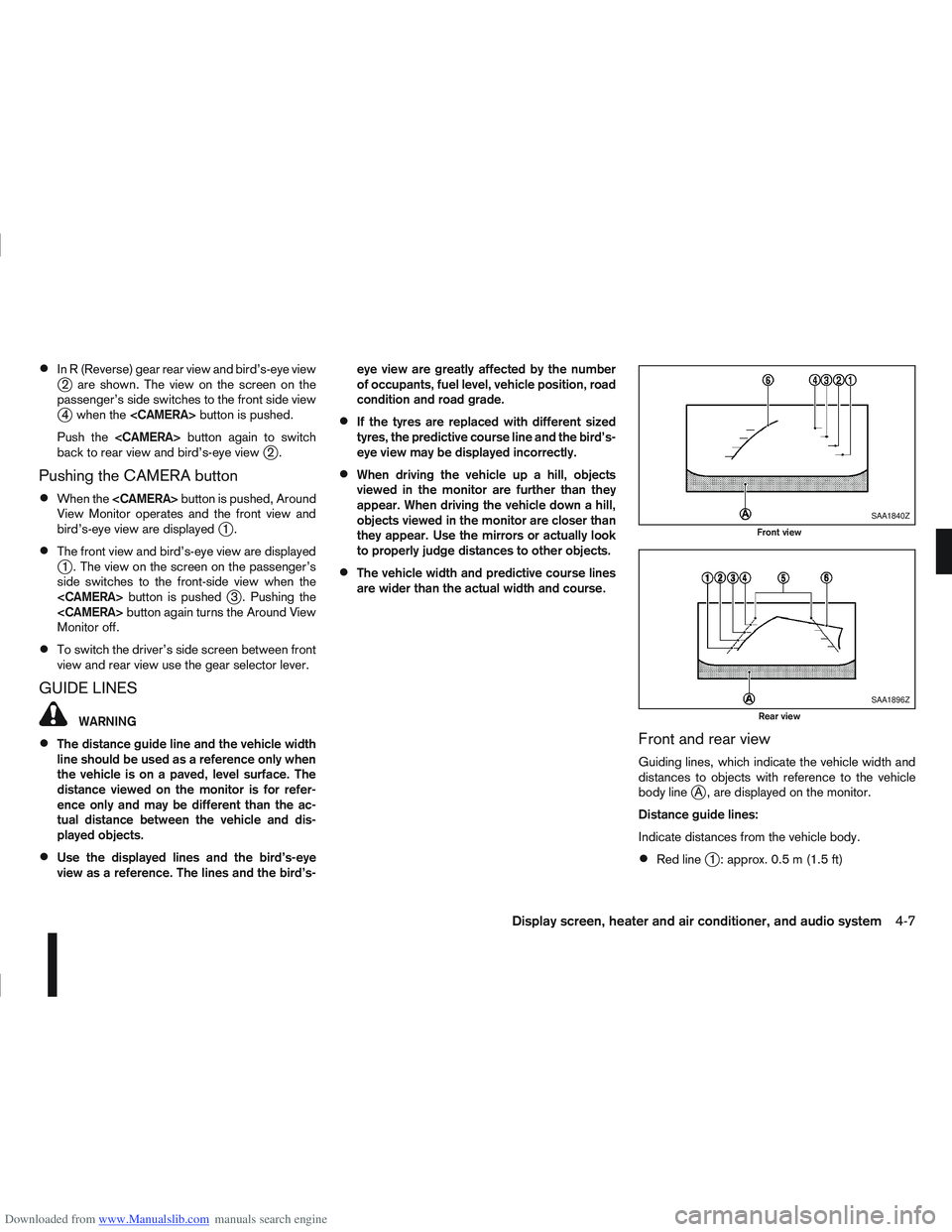
Downloaded from www.Manualslib.com manuals search engine In R (Reverse) gear rear view and bird’s-eye viewj2 are shown. The view on the screen on the
passenger’s side switches to the front side view
j4 when the
Push the
back to rear view and bird’s-eye view
j2.
Pushing the CAMERA button
When the
View Monitor operates and the front view and
bird’s-eye view are displayed
j1.
The front view and bird’s-eye view are displayedj1 . The view on the screen on the passenger’s
side switches to the front-side view when the
j3 . Pushing the
Monitor off.
To switch the driver’s side screen between front
view and rear view use the gear selector lever.
GUIDE LINES
WARNING
The distance guide line and the vehicle width
line should be used as a reference only when
the vehicle is on a paved, level surface. The
distance viewed on the monitor is for refer-
ence only and may be different than the ac-
tual distance between the vehicle and dis-
played objects.
Use the displayed lines and the bird’s-eye
view as a reference. The lines and the bird’s- eye view are greatly affected by the number
of occupants, fuel level, vehicle position, road
condition and road grade.
If the tyres are replaced with different sized
tyres, the predictive course line and the bird’s-
eye view may be displayed incorrectly.
When driving the vehicle up a hill, objects
viewed in the monitor are further than they
appear. When driving the vehicle down a hill,
objects viewed in the monitor are closer than
they appear. Use the mirrors or actually look
to properly judge distances to other objects.
The vehicle width and predictive course lines
are wider than the actual width and course.
Front and rear view
Guiding lines, which indicate the vehicle width and
distances to objects with reference to the vehicle
body line
jA , are displayed on the monitor.
Distance guide lines:
Indicate distances from the vehicle body.
Red linej1 : approx. 0.5 m (1.5 ft)
SAA1840Z
Front view
SAA1896Z
Rear view
Display screen, heater and air conditioner, and audio system4-7
Page 164 of 297
Downloaded from www.Manualslib.com manuals search engine Operating precautions ........................................ 5-35
Tyre pressure ..................................................... 5-36
Safety chains ...................................................... 5-36
Trailer brakes...................................................... 5-36
Trailer detection (where fitted) ............................ 5-36
Installation of coupling device ............................. 5-36
Vehicle security........................................................ 5-38
Power steering system............................................. 5-38
Brake system ........................................................... 5-39 Brake precautions .............................................. 5-39
Anti-lock Braking System (ABS).......................... 5-39 Electronic Stability Programme (ESP) system
(where fitted) ........................................................... 5-40
Electronic Stability Programme (ESP) OFF
switch................................................................. 5-42
Cold weather driving................................................ 5-42 Battery ............................................................... 5-43
Engine coolant .................................................... 5-43
Tyre equipment ................................................... 5-43
Special winter equipment.................................... 5-43
Corrosion protection ........................................... 5-43
Page 165 of 297
Downloaded from www.Manualslib.com manuals search engine During the first 1,600 km (1,000 miles), follow these
recommendations for the future reliability and
economy of your new vehicle. Failure to follow the
recommendations may result in shortened engine
life and reduced engine performance.
Avoid driving for long periods at a constant
speed, either fast or slow.
Do not accelerate at full throttle in any gear.
Avoid quick starts.
Avoid hard braking as much as possible.
Do not tow a trailer during the first 800 km (500
miles).
NOTE
Models with K9K diesel engine will achieve top
performance only after approximately 5,000 km
(3,000 miles).
WARNING
The driving characteristics of your vehicle can be
changed remarkably by any additional load and
its distribution as well as by adding optional
equipment (trailer couplings, roof racks, etc.).
Your driving style and speed have to be adjusted
accordingly. Especially when carrying heavy
loads, your speed must be reduced adequately.
Make sure the area around the vehicle is free of
obstacles.
Check fluid levels such as engine oil, coolant,
brake and clutch fluid, and window washer fluid
as frequently as possible, at least whenever you
refuel.
Visually inspect tyres for their appearance and
condition. Also check the tyre pressure for
proper inflation.
Maintenance items in the “8. Maintenance and
do-it-yourself” section should be checked peri-
odically.
Check that all windows and light lenses are
clean.
Check that all doors are closed.
Position the seat and adjust the head restraints.
Adjust the inside and outside mirrors.
Fasten your seat belt and ask all passengers to
do likewise.
Check the operation of the warning/indicator
lights when the ignition switch is turned to the
ON position.
Do not place hard or heavy objects on the dash-
board or rear parcel shelf in order to prevent
injury in the event of a sudden stop.
RUNNING-IN SCHEDULE BEFORE STARTING THE ENGINE
5-2Starting and driving
Page 169 of 297
Downloaded from www.Manualslib.com manuals search engine Driving your vehicle to fit the circumstances is es-
sential for your safety and comfort. As a driver, you
should be the one who knows best how to drive in
the given circumstances.
ENGINE COLD START PERIOD
Due to the higher engine speeds when the engine is
cold, extra caution must be exercised when select-
ing a gear during the engine warm-up period after
starting the engine.
LOADING LUGGAGE
Loads, their distribution and the attachment of equip-
ment (coupling devices, roof luggage carriers, etc.)
will change the driving characteristics of the vehicle
considerably. Driving style and speed must be ad-
justed accordingly.
DRIVING ON WET ROADS
Avoid starting off, accelerating and stopping sud-
denly.
Avoid sharp turns or lane changes.
Extra distance should be kept from the vehicle in
front.
When water covers the road surface in puddles,
small streams, etc, REDUCE SPEED to prevent
aquaplaning which will cause skidding and loss
of control. Worn tyres increase this risk.
DRIVING UNDER WINTER
CONDITIONS
Drive safely.
Avoid starting off, accelerating or stopping sud-
denly.
Avoid sharp turns or lane changes.
Avoid sudden steering actions.
Extra distance should be kept from the vehicle in
front.
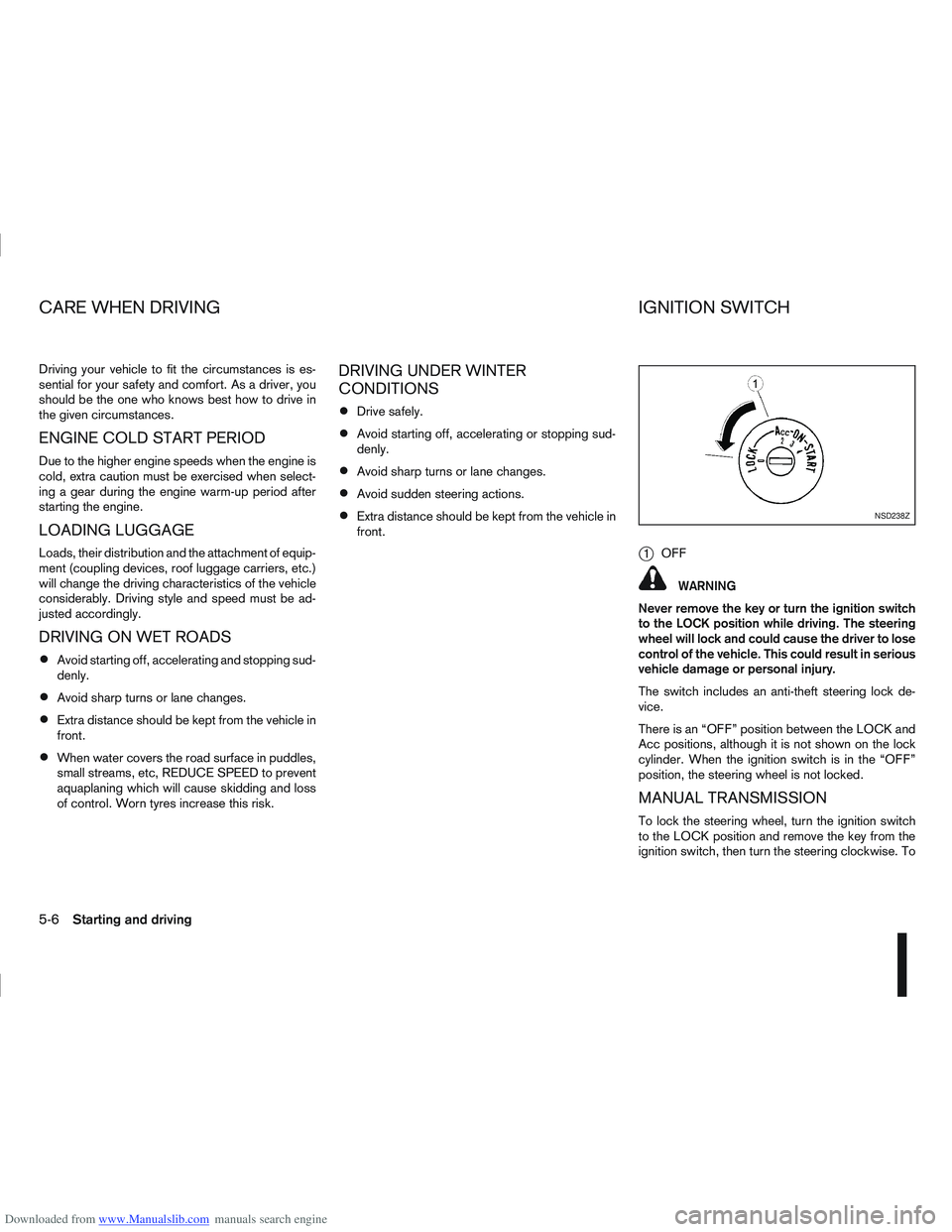
j1OFF
WARNING
Never remove the key or turn the ignition switch
to the LOCK position while driving. The steering
wheel will lock and could cause the driver to lose
control of the vehicle. This could result in serious
vehicle damage or personal injury.
The switch includes an anti-theft steering lock de-
vice.
There is an “OFF” position between the LOCK and
Acc positions, although it is not shown on the lock
cylinder. When the ignition switch is in the “OFF”
position, the steering wheel is not locked.
MANUAL TRANSMISSION
To lock the steering wheel, turn the ignition switch
to the LOCK position and remove the key from the
ignition switch, then turn the steering clockwise. To
NSD238Z
CARE WHEN DRIVING IGNITION SWITCH
5-6Starting and driving
Page 188 of 297
Downloaded from www.Manualslib.com manuals search engine 4WD MODE OPERATIONSCAUTION
Depending on the driving conditions, the 4WD
mode may automatically change from 2WD to
4WD even when the 2WD mode is selected.
Do not start the engine while in the 2WD, AUTO,
or LOCK mode:
When on free-roller or jacking the front tyres
with the rear tyres on the ground.
When towing with the rear tyres raised from
the ground.
4WD SHIFT TIPS
If the 4WD mode control is operated while cor-
nering, accelerating or decelerating, or if the ig-
nition is turned OFF while in the AUTO or LOCK
position you may feel a jolt - this is normal.
The oil temperature of power train parts will in-
crease if the vehicle is continuously operated
under conditions where the difference in rotation
between the front and rear wheels is large (wheel
slip), such as when driving the vehicle on rough
roads through sand or mud, or when freeing a
stuck vehicle. In these cases, the 4WD warning
light blinks rapidly, and the 4WD mode changes
to the 2WD condition to protect the power train
parts. If you stop the vehicle, with the engine
idling, and wait until the warning light stops blink-
ing the 4WD mode returns to the AUTO mode.
Braking distance in 4WD mode is the same as in
2WD mode.
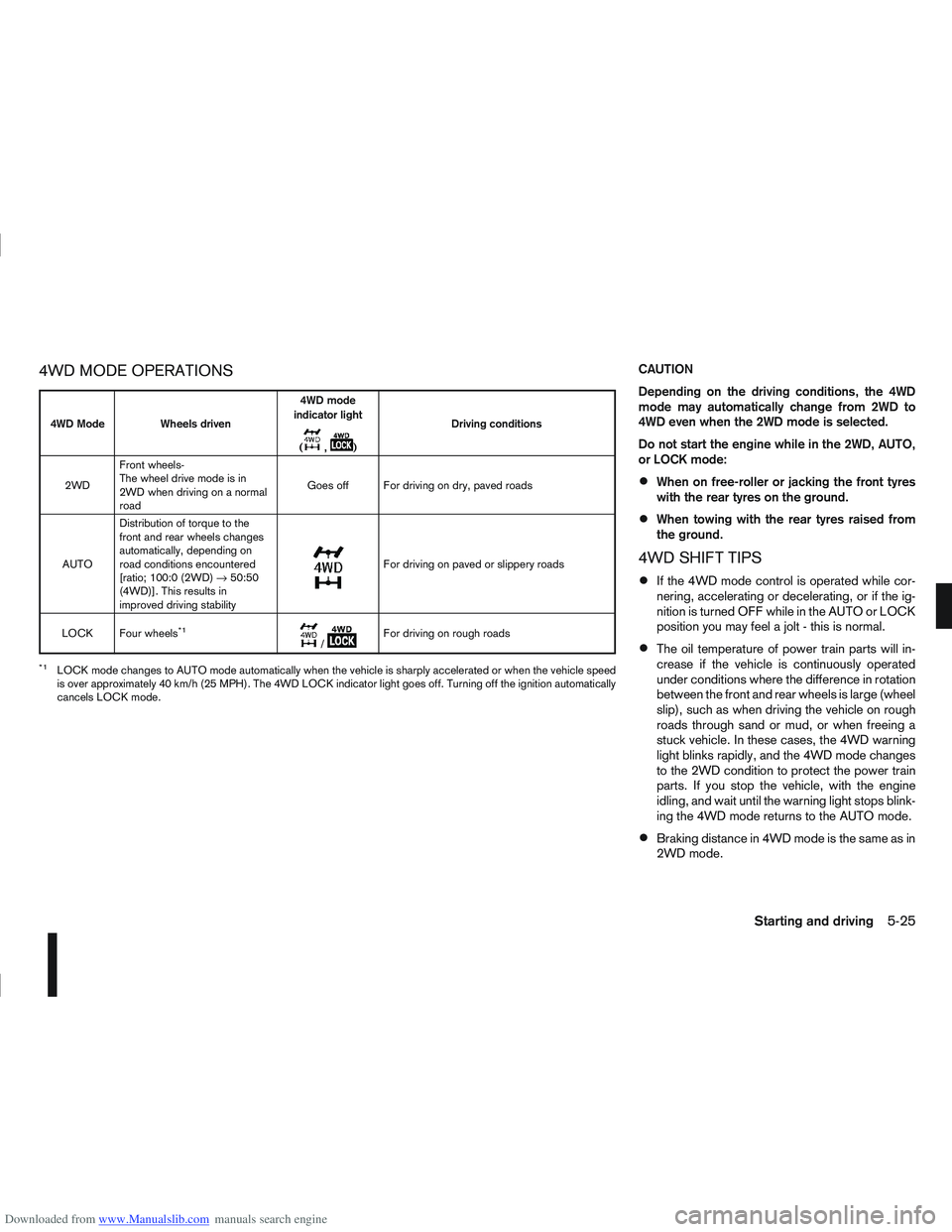
4WD Mode Wheels driven4WD mode
indicator light
(
m,m) Driving conditions
2WD Front wheels-
The wheel drive mode is in
2WD when driving on a normal
road Goes off For driving on dry, paved roads
AUTO Distribution of torque to the
front and rear wheels changes
automatically, depending on
road conditions encountered
[ratio; 100:0 (2WD)
→50:50
(4WD)]. This results in
improved driving stability
m
For driving on paved or slippery roads
LOCK Four wheels
*1m/mFor driving on rough roads
*1LOCK mode changes to AUTO mode automatically when the vehicle is sharply accelerated or when the vehicle speed
is over approximately 40 km/h (25 MPH). The 4WD LOCK indicator light goes off. Turning off the ignition automatically
cancels LOCK mode.
Starting and driving5-25
Page 189 of 297
Downloaded from www.Manualslib.com manuals search engine Even if the mode automatically changes to AUTO
mode, when driving in the LOCK mode, the indi-
cator light stays in the LOCK mode.
CAUTION
Only use the 4WD mode control when driving
in a straight direction (to select 2WD, AUTO or
LOCK).
Do not use the 4WD mode control when turn-
ing or reversing.
Do not use the 4WD mode control with the
front wheels spinning (to select 2WD, AUTO,
or LOCK).
Be especially careful when starting or driving
on slippery surfaces with the 4WD mode set
to AUTO.
Do not drive on dry, hard surfaced roads in
the LOCK position.
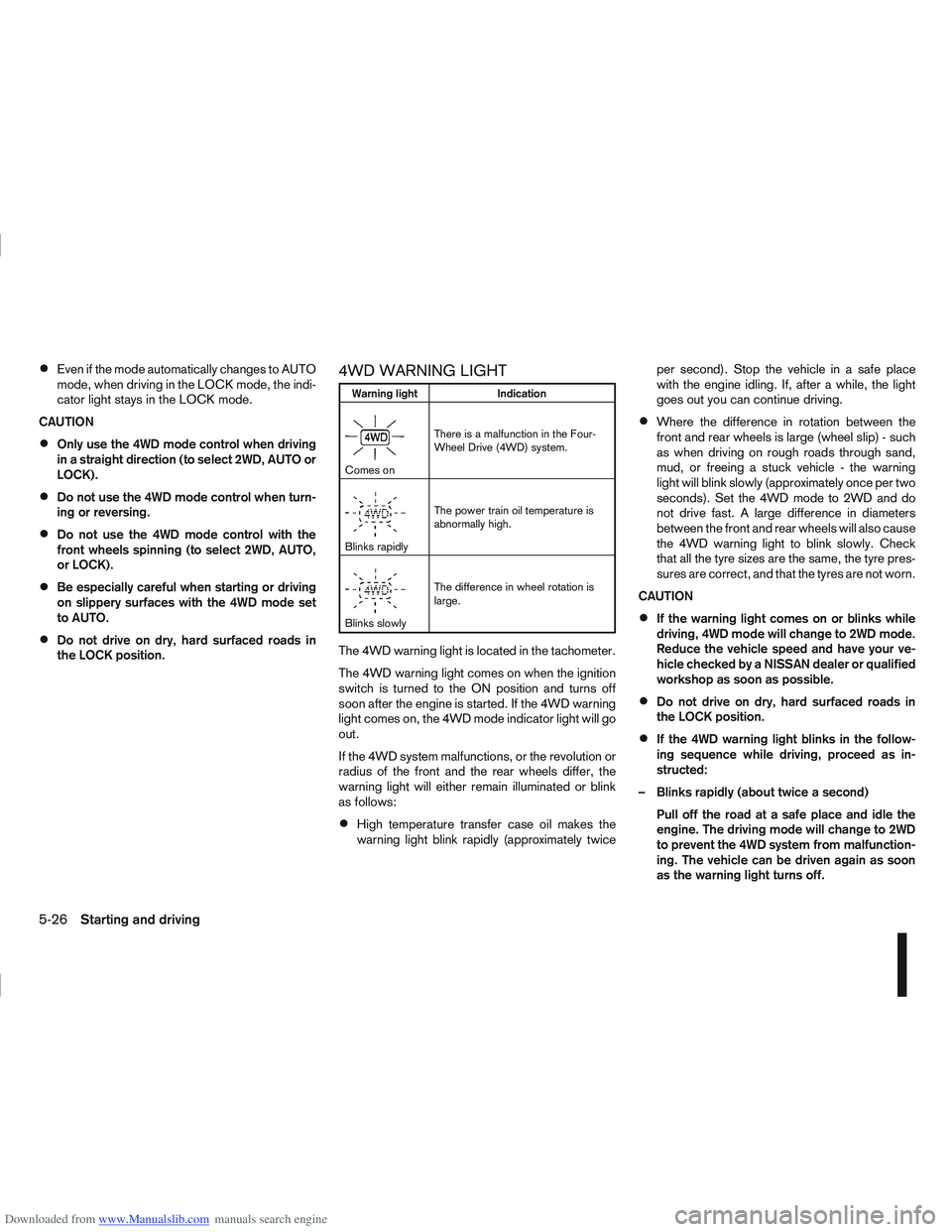
4WD WARNING LIGHT
Warning light Indication
mComes onThere is a malfunction in the Four-
Wheel Drive (4WD) system.
mBlinks rapidlyThe power train oil temperature is
abnormally high.
mBlinks slowlyThe difference in wheel rotation is
large.
The 4WD warning light is located in the tachometer.
The 4WD warning light comes on when the ignition
switch is turned to the ON position and turns off
soon after the engine is started. If the 4WD warning
light comes on, the 4WD mode indicator light will go
out.
If the 4WD system malfunctions, or the revolution or
radius of the front and the rear wheels differ, the
warning light will either remain illuminated or blink
as follows:
High temperature transfer case oil makes the
warning light blink rapidly (approximately twice per second). Stop the vehicle in a safe place
with the engine idling. If, after a while, the light
goes out you can continue driving.
Where the difference in rotation between the
front and rear wheels is large (wheel slip) - such
as when driving on rough roads through sand,
mud, or freeing a stuck vehicle - the warning
light will blink slowly (approximately once per two
seconds). Set the 4WD mode to 2WD and do
not drive fast. A large difference in diameters
between the front and rear wheels will also cause
the 4WD warning light to blink slowly. Check
that all the tyre sizes are the same, the tyre pres-
sures are correct, and that the tyres are not worn.
CAUTION
If the warning light comes on or blinks while
driving, 4WD mode will change to 2WD mode.
Reduce the vehicle speed and have your ve-
hicle checked by a NISSAN dealer or qualified
workshop as soon as possible.
Do not drive on dry, hard surfaced roads in
the LOCK position.
If the 4WD warning light blinks in the follow-
ing sequence while driving, proceed as in-
structed:
– Blinks rapidly (about twice a second) Pull off the road at a safe place and idle the
engine. The driving mode will change to 2WD
to prevent the 4WD system from malfunction-
ing. The vehicle can be driven again as soon
as the warning light turns off.
5-26Starting and driving