engine NISSAN QASHQAI 2014 Owner´s Manual
[x] Cancel search | Manufacturer: NISSAN, Model Year: 2014, Model line: QASHQAI, Model: NISSAN QASHQAI 2014Pages: 338, PDF Size: 4.87 MB
Page 87 of 338
For more details, see “Blind Spot Warning (BSW)
system (where fitted)” in the “5. Starting and driving”
section, “Lane Departure Warning (LDW) system
(where fitted)” in the “5. Starting and driving” sec-
tion, and/or “Forward emergency braking system
(where fitted)” in the “5. Starting and driving” sec-
tion.
8. [Tyre pressures] (where fitted)
The tyre pressure mode shows the pressure of all
four tyres. The displayed values are only available
while the vehicle is being driven.
When the [Low Tyre Pressure] warning appears,
the display can be switched to the tyre pressure
mode by pushing the ENTER switch to reveal addi-
tional details on the displayed warning.
9. [Chassis control]
When either the Active Trace Control (where fitted),
Active Engine Brake (where fitted), Hill start Assist
(where fitted) or the Active Ride Control system is
operated, it shows the operating condition. See
“Chassis control” in the “5. Starting and driving”
section and “Hill Start Assist (HSA) system” in the
“5. Starting and driving” section for more details.
10. [Stop/Start] system (where fitted)
The Stop/Start system mode shows the CO2 sav-
ings and the engine stop time. (See “Stop/Start Sys-
tem (where fitted)” in the “5. Starting and driving”
section.)[Trip CO2 saving] and engine stop time:
The trip CO2 saving and engine stop time mode
shows the CO2 saving and engine stop time since
the last reset.
The CO2 saving and engine stop time can be reset
by pushing the ENTER switch for longer than 1 sec-
ond.
[Total CO2 saving] and engine stop time:
The total CO2 saving and engine stop time mode
shows:
•The estimated CO2 exhaust emissions
prevented.
•The engine stop time that the engine has been
stopped by the Stop/Start System.
NOTE
The Total CO2 saving and engine stop time val-
ues cannot be reset and show accumulated
Stop/Start System information since the vehicle
was built.
11. Warning check
The current warnings are displayed. If no warning is
present, “No Warnings” is displayed.
[CLOCK] AND [OUTSIDE AIR
TEMPERATURE]
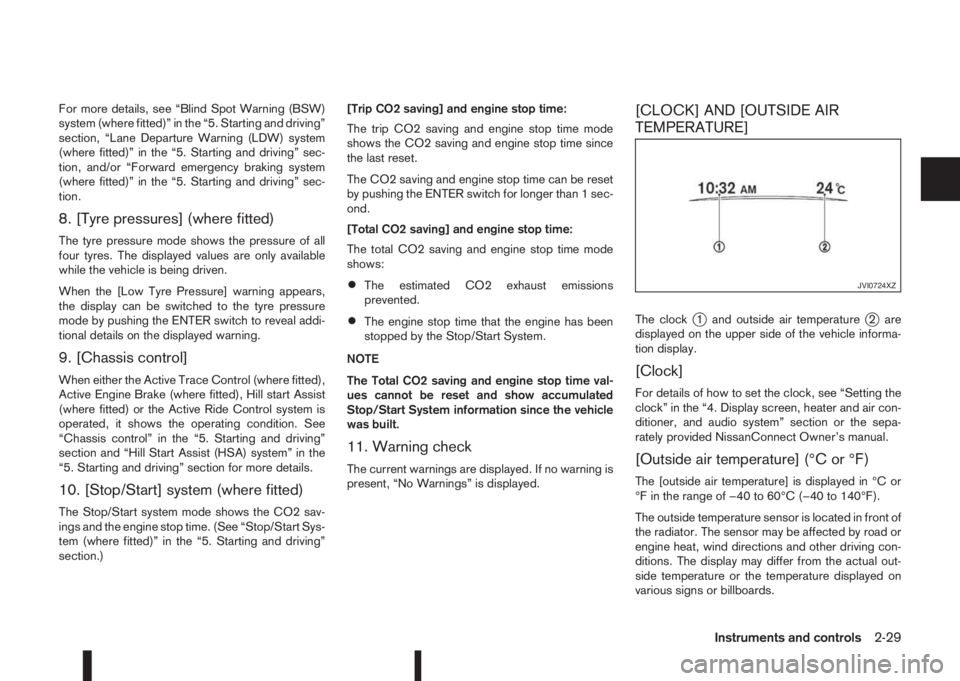
The clockj1 and outside air temperaturej2 are
displayed on the upper side of the vehicle informa-
tion display.
[Clock]
For details of how to set the clock, see “Setting the
clock” in the “4. Display screen, heater and air con-
ditioner, and audio system” section or the sepa-
rately provided NissanConnect Owner’s manual.
[Outside air temperature] (°C or °F)
The [outside air temperature] is displayed in °C or
°F in the range of −40 to 60°C (−40 to 140°F).
The outside temperature sensor is located in front of
the radiator. The sensor may be affected by road or
engine heat, wind directions and other driving con-
ditions. The display may differ from the actual out-
side temperature or the temperature displayed on
various signs or billboards.
JVI0724XZ
Instruments and controls2-29
Page 89 of 338
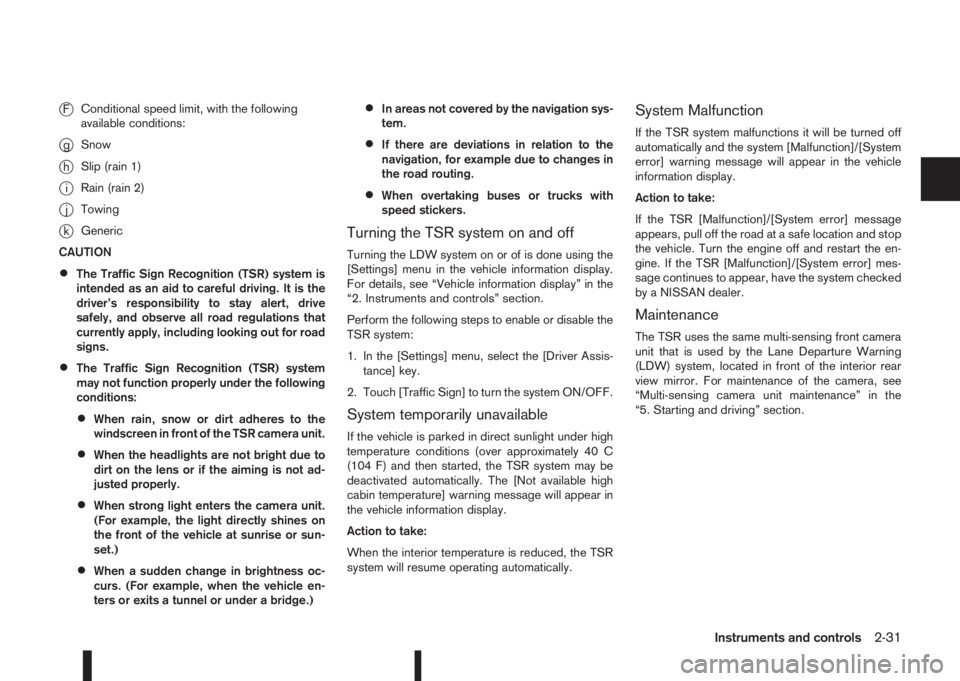
jFConditional speed limit, with the following
available conditions:
jgSnow
jhSlip (rain 1)
jiRain (rain 2)
jjTowing
jkGeneric
CAUTION
•The Traffic Sign Recognition (TSR) system is
intended as an aid to careful driving. It is the
driver’s responsibility to stay alert, drive
safely, and observe all road regulations that
currently apply, including looking out for road
signs.
•The Traffic Sign Recognition (TSR) system
may not function properly under the following
conditions:
•When rain, snow or dirt adheres to the
windscreen in front of the TSR camera unit.
•When the headlights are not bright due to
dirt on the lens or if the aiming is not ad-
justed properly.
•When strong light enters the camera unit.
(For example, the light directly shines on
the front of the vehicle at sunrise or sun-
set.)
•When a sudden change in brightness oc-
curs. (For example, when the vehicle en-
ters or exits a tunnel or under a bridge.)
•In areas not covered by the navigation sys-
tem.
•If there are deviations in relation to the
navigation, for example due to changes in
the road routing.
•When overtaking buses or trucks with
speed stickers.
Turning the TSR system on and off
Turning the LDW system on or of is done using the
[Settings] menu in the vehicle information display.
For details, see “Vehicle information display” in the
“2. Instruments and controls” section.
Perform the following steps to enable or disable the
TSR system:
1. In the [Settings] menu, select the [Driver Assis-
tance] key.
2. Touch [Traffic Sign] to turn the system ON/OFF.
System temporarily unavailable
If the vehicle is parked in direct sunlight under high
temperature conditions (over approximately 40 C
(104 F) and then started, the TSR system may be
deactivated automatically. The [Not available high
cabin temperature] warning message will appear in
the vehicle information display.
Action to take:
When the interior temperature is reduced, the TSR
system will resume operating automatically.
System Malfunction
If the TSR system malfunctions it will be turned off
automatically and the system [Malfunction]/[System
error] warning message will appear in the vehicle
information display.
Action to take:
If the TSR [Malfunction]/[System error] message
appears, pull off the road at a safe location and stop
the vehicle. Turn the engine off and restart the en-
gine. If the TSR [Malfunction]/[System error] mes-
sage continues to appear, have the system checked
by a NISSAN dealer.
Maintenance
The TSR uses the same multi-sensing front camera
unit that is used by the Lane Departure Warning
(LDW) system, located in front of the interior rear
view mirror. For maintenance of the camera, see
“Multi-sensing camera unit maintenance” in the
“5. Starting and driving” section.
Instruments and controls2-31
Page 92 of 338
NOTE
In the AUTO position (where fitted), the rear wiper
will not begin to sweep when the shift lever is
placed in the R position. It waits until the front
wipers have made the first sweep.THERMACLEAR HEATED
WINDSCREEN (where fitted)
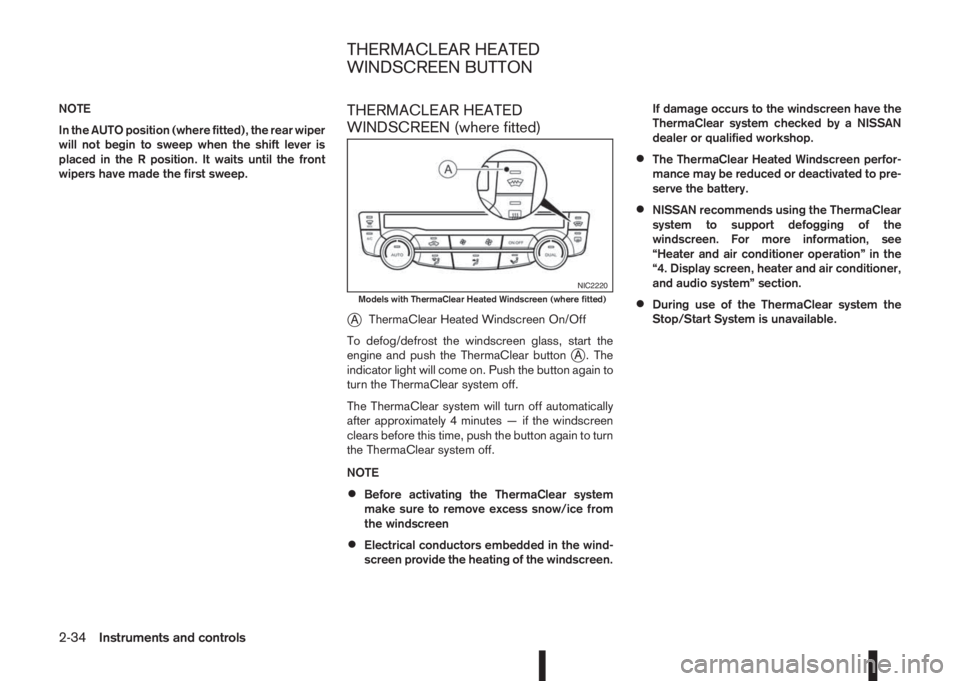
j
AThermaClear Heated Windscreen On/Off
To defog/defrost the windscreen glass, start the
engine and push the ThermaClear button
jA . The
indicator light will come on. Push the button again to
turn the ThermaClear system off.
The ThermaClear system will turn off automatically
after approximately 4 minutes — if the windscreen
clears before this time, push the button again to turn
the ThermaClear system off.
NOTE
•Before activating the ThermaClear system
make sure to remove excess snow/ice from
the windscreen
•Electrical conductors embedded in the wind-
screen provide the heating of the windscreen.If damage occurs to the windscreen have the
ThermaClear system checked by a NISSAN
dealer or qualified workshop.
•The ThermaClear Heated Windscreen perfor-
mance may be reduced or deactivated to pre-
serve the battery.
•NISSAN recommends using the ThermaClear
system to support defogging of the
windscreen. For more information, see
“Heater and air conditioner operation” in the
“4. Display screen, heater and air conditioner,
and audio system” section.
•During use of the ThermaClear system the
Stop/Start System is unavailable.
NIC2220Models with ThermaClear Heated Windscreen (where fitted)
THERMACLEAR HEATED
WINDSCREEN BUTTON
2-34Instruments and controls
Page 93 of 338
REAR WINDOW DEFOGGER
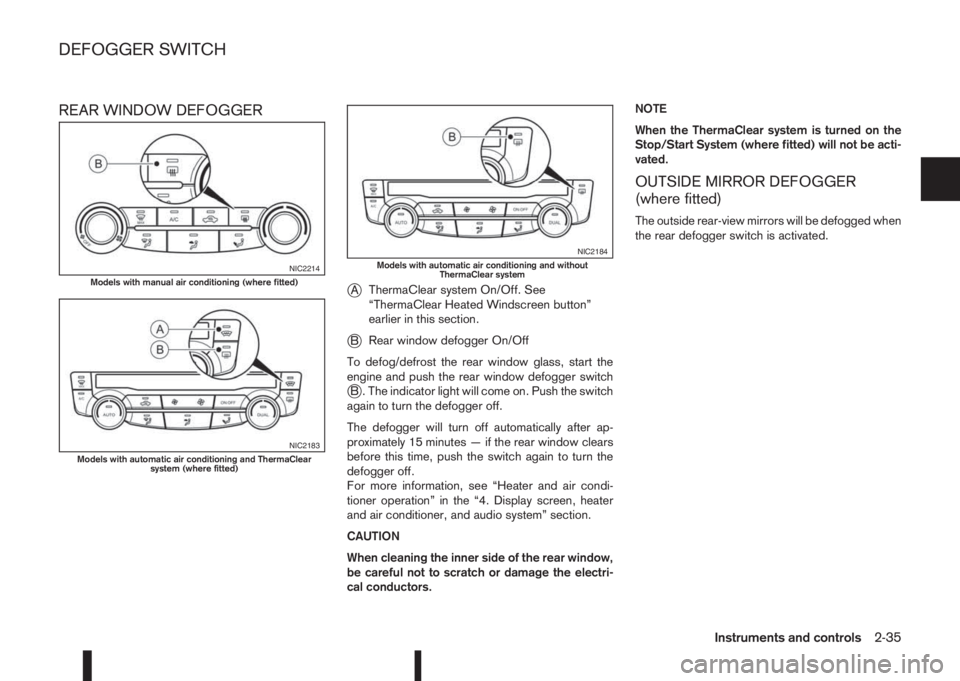
j
AThermaClear system On/Off. See
“ThermaClear Heated Windscreen button”
earlier in this section.
jBRear window defogger On/Off
To defog/defrost the rear window glass, start the
engine and push the rear window defogger switch
jB . The indicator light will come on. Push the switch
again to turn the defogger off.
The defogger will turn off automatically after ap-
proximately 15 minutes — if the rear window clears
before this time, push the switch again to turn the
defogger off.
For more information, see “Heater and air condi-
tioner operation” in the “4. Display screen, heater
and air conditioner, and audio system” section.
CAUTION
When cleaning the inner side of the rear window,
be careful not to scratch or damage the electri-
cal conductors.NOTE
When the ThermaClear system is turned on the
Stop/Start System (where fitted) will not be acti-
vated.
OUTSIDE MIRROR DEFOGGER
(where fitted)
The outside rear-view mirrors will be defogged when
the rear defogger switch is activated.
NIC2214Models with manual air conditioning (where fitted)
NIC2183Models with automatic air conditioning and ThermaClear
system (where fitted)
NIC2184Models with automatic air conditioning and without
ThermaClear system
DEFOGGER SWITCH
Instruments and controls2-35
Page 94 of 338
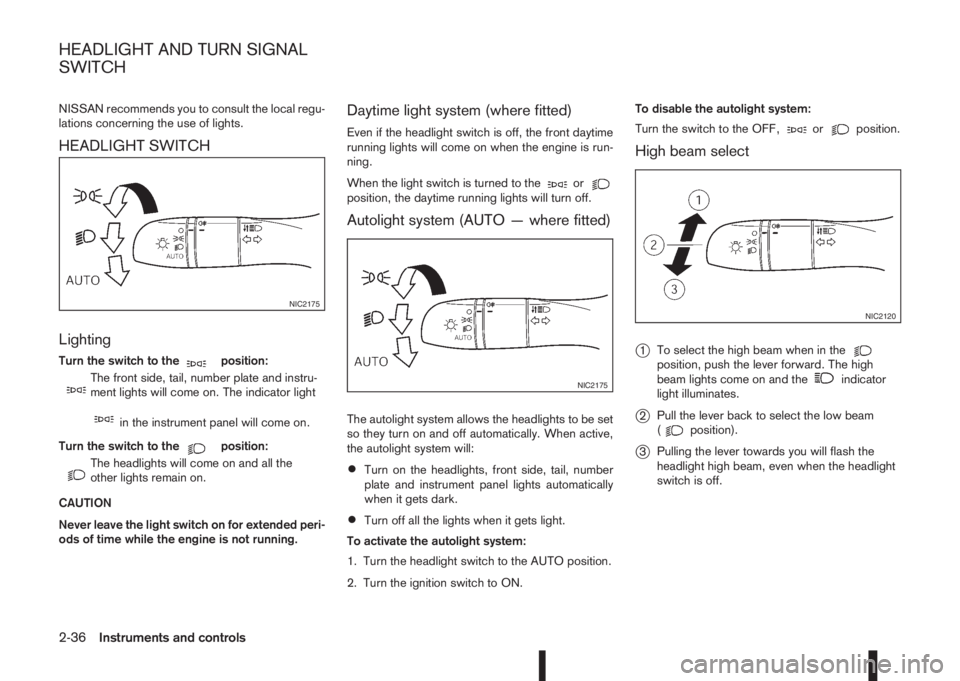
NISSAN recommends you to consult the local regu-
lations concerning the use of lights.
HEADLIGHT SWITCH
Lighting
Turn the switch to themposition:
m
The front side, tail, number plate and instru-
ment lights will come on. The indicator light
min the instrument panel will come on.
Turn the switch to the
mposition:
m
The headlights will come on and all the
other lights remain on.
CAUTION
Never leave the light switch on for extended peri-
ods of time while the engine is not running.
Daytime light system (where fitted)
Even if the headlight switch is off, the front daytime
running lights will come on when the engine is run-
ning.
When the light switch is turned to the
orposition, the daytime running lights will turn off.
Autolight system (AUTO — where fitted)
The autolight system allows the headlights to be set
so they turn on and off automatically. When active,
the autolight system will:
•Turn on the headlights, front side, tail, number
plate and instrument panel lights automatically
when it gets dark.
•Turn off all the lights when it gets light.
To activate the autolight system:
1. Turn the headlight switch to the AUTO position.
2. Turn the ignition switch to ON.To disable the autolight system:
Turn the switch to the OFF,
orposition.
High beam select
j
1To select the high beam when in theposition, push the lever forward. The high
beam lights come on and theindicator
light illuminates.
j2Pull the lever back to select the low beam
(position).
j3Pulling the lever towards you will flash the
headlight high beam, even when the headlight
switch is off.
NIC2175
NIC2175
NIC2120
HEADLIGHT AND TURN SIGNAL
SWITCH
2-36Instruments and controls
Page 95 of 338
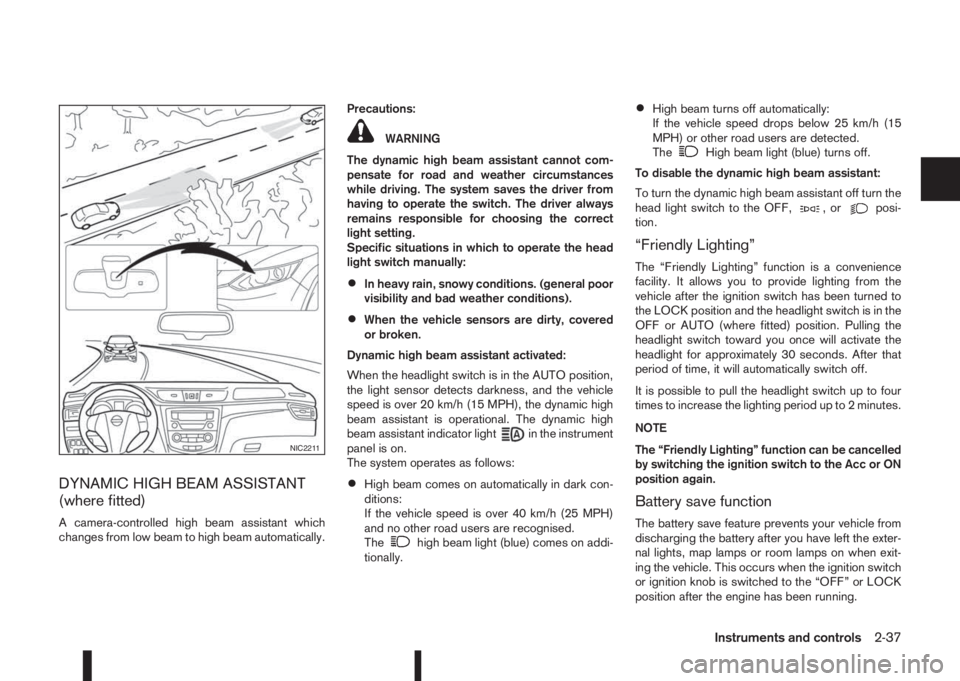
DYNAMIC HIGH BEAM ASSISTANT
(where fitted)
A camera-controlled high beam assistant which
changes from low beam to high beam automatically.Precautions:
WARNING
The dynamic high beam assistant cannot com-
pensate for road and weather circumstances
while driving. The system saves the driver from
having to operate the switch. The driver always
remains responsible for choosing the correct
light setting.
Specific situations in which to operate the head
light switch manually:
•In heavy rain, snowy conditions. (general poor
visibility and bad weather conditions).
•When the vehicle sensors are dirty, covered
or broken.
Dynamic high beam assistant activated:
When the headlight switch is in the AUTO position,
the light sensor detects darkness, and the vehicle
speed is over 20 km/h (15 MPH), the dynamic high
beam assistant is operational. The dynamic high
beam assistant indicator light
in the instrument
panel is on.
The system operates as follows:
•High beam comes on automatically in dark con-
ditions:
If the vehicle speed is over 40 km/h (25 MPH)
and no other road users are recognised.
The
high beam light (blue) comes on addi-
tionally.
•High beam turns off automatically:
If the vehicle speed drops below 25 km/h (15
MPH) or other road users are detected.
The
High beam light (blue) turns off.
To disable the dynamic high beam assistant:
To turn the dynamic high beam assistant off turn the
head light switch to the OFF,
,orposi-
tion.
“Friendly Lighting”
The “Friendly Lighting” function is a convenience
facility. It allows you to provide lighting from the
vehicle after the ignition switch has been turned to
the LOCK position and the headlight switch is in the
OFF or AUTO (where fitted) position. Pulling the
headlight switch toward you once will activate the
headlight for approximately 30 seconds. After that
period of time, it will automatically switch off.
It is possible to pull the headlight switch up to four
times to increase the lighting period up to 2 minutes.
NOTE
The “Friendly Lighting” function can be cancelled
by switching the ignition switch to the Acc or ON
position again.
Battery save function
The battery save feature prevents your vehicle from
discharging the battery after you have left the exter-
nal lights, map lamps or room lamps on when exit-
ing the vehicle. This occurs when the ignition switch
or ignition knob is switched to the “OFF” or LOCK
position after the engine has been running.
NIC2211
Instruments and controls2-37
Page 96 of 338
NOTE
The next time the engine is started the external
lights, map lamps or room lamp will come on
again
Battery save function for external lights:
If the ignition switch is turned to the “OFF” position
after driving but the external lights are accidentally
left on, the external lights will automatically be
switched off as soon as the driver’s door is opened.
It is possible to leave the external lights on perma-
nently by switching them back on using the head-
light switch while the ignition switch is still in the
LOCK or “OFF” position. In this case, the light re-
minder chime will sound when the driver’s door is
opened.
Battery save function for interior light:
The interior light will automatically be switched off
after a period of time if it has been accidentally left
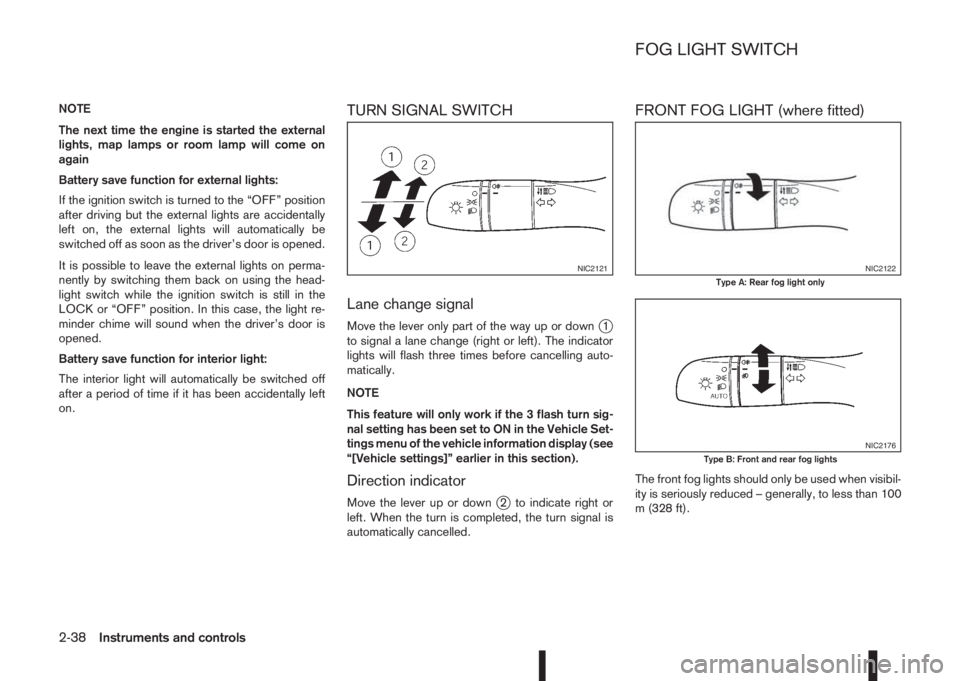
on.TURN SIGNAL SWITCH
Lane change signal
Move the lever only part of the way up or downj1
to signal a lane change (right or left). The indicator
lights will flash three times before cancelling auto-
matically.
NOTE
This feature will only work if the 3 flash turn sig-
nal setting has been set to ON in the Vehicle Set-
tings menu of the vehicle information display (see
“[Vehicle settings]” earlier in this section).
Direction indicator
Move the lever up or downj2 to indicate right or
left. When the turn is completed, the turn signal is
automatically cancelled.
FRONT FOG LIGHT (where fitted)
The front fog lights should only be used when visibil-
ity is seriously reduced – generally, to less than 100
m (328 ft).
NIC2121NIC2122Type A: Rear fog light only
NIC2176Type B: Front and rear fog lights
FOG LIGHT SWITCH
2-38Instruments and controls
Page 99 of 338
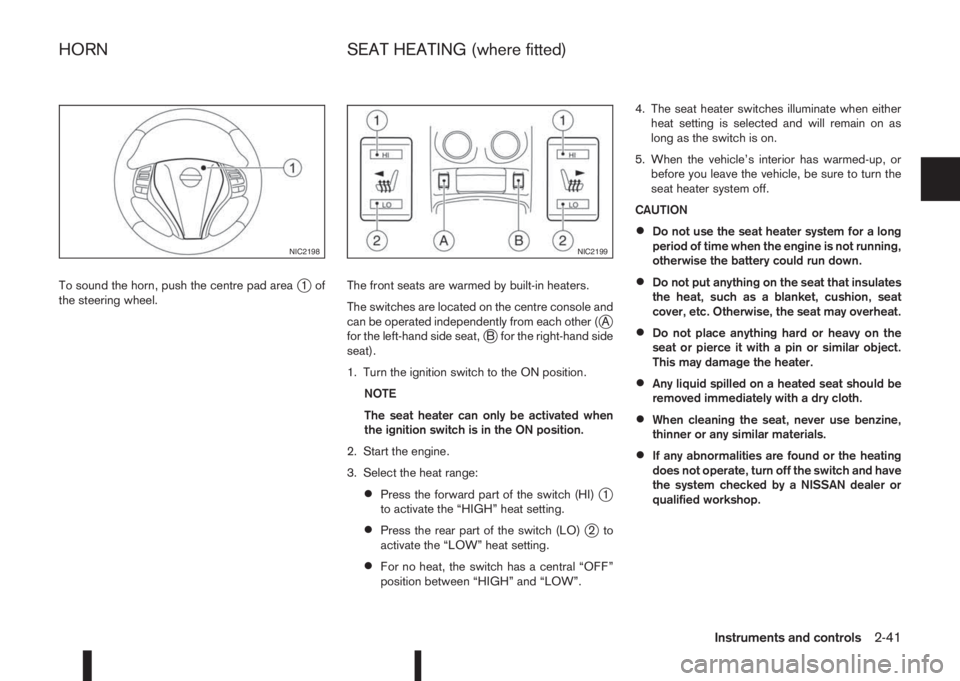
To sound the horn, push the centre pad areaj1of
the steering wheel.The front seats are warmed by built-in heaters.
The switches are located on the centre console and
can be operated independently from each other (
jA
for the left-hand side seat,jB for the right-hand side
seat).
1. Turn the ignition switch to the ON position.
NOTE
The seat heater can only be activated when
the ignition switch is in the ON position.
2. Start the engine.
3. Select the heat range:
•Press the forward part of the switch (HI)j1
to activate the “HIGH” heat setting.
•Press the rear part of the switch (LO)j2to
activate the “LOW” heat setting.
•For no heat, the switch has a central “OFF”
position between “HIGH” and “LOW”.4. The seat heater switches illuminate when either
heat setting is selected and will remain on as
long as the switch is on.
5. When the vehicle’s interior has warmed-up, or
before you leave the vehicle, be sure to turn the
seat heater system off.
CAUTION
•Do not use the seat heater system for a long
period of time when the engine is not running,
otherwise the battery could run down.
•Do not put anything on the seat that insulates
the heat, such as a blanket, cushion, seat
cover, etc. Otherwise, the seat may overheat.
•Do not place anything hard or heavy on the
seat or pierce it with a pin or similar object.
This may damage the heater.
•Any liquid spilled on a heated seat should be
removed immediately with a dry cloth.
•When cleaning the seat, never use benzine,
thinner or any similar materials.
•If any abnormalities are found or the heating
does not operate, turn off the switch and have
the system checked by a NISSAN dealer or
qualified workshop.
NIC2198NIC2199
HORN SEAT HEATING (where fitted)
Instruments and controls2-41
Page 100 of 338
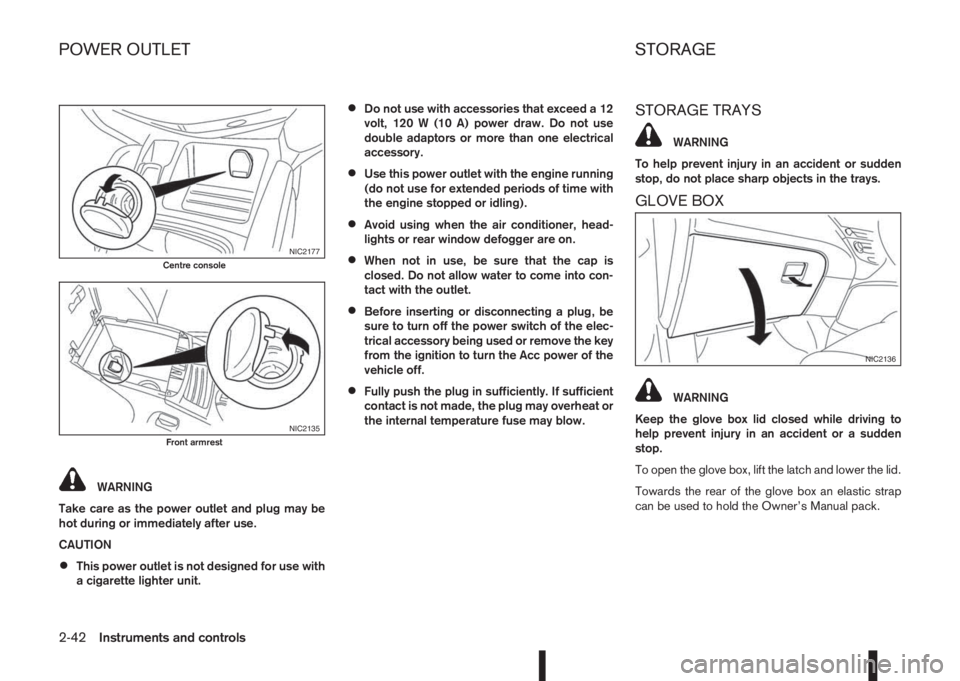
WARNING
Take care as the power outlet and plug may be
hot during or immediately after use.
CAUTION
•This power outlet is not designed for use with
a cigarette lighter unit.
•Do not use with accessories that exceed a 12
volt, 120 W (10 A) power draw. Do not use
double adaptors or more than one electrical
accessory.
•Use this power outlet with the engine running
(do not use for extended periods of time with
the engine stopped or idling).
•Avoid using when the air conditioner, head-
lights or rear window defogger are on.
•When not in use, be sure that the cap is
closed. Do not allow water to come into con-
tact with the outlet.
•Before inserting or disconnecting a plug, be
sure to turn off the power switch of the elec-
trical accessory being used or remove the key
from the ignition to turn the Acc power of the
vehicle off.
•Fully push the plug in sufficiently. If sufficient
contact is not made, the plug may overheat or
the internal temperature fuse may blow.
STORAGE TRAYS
WARNING
To help prevent injury in an accident or sudden
stop, do not place sharp objects in the trays.
GLOVE BOX
WARNING
Keep the glove box lid closed while driving to
help prevent injury in an accident or a sudden
stop.
To open the glove box, lift the latch and lower the lid.
Towards the rear of the glove box an elastic strap
can be used to hold the Owner’s Manual pack.
NIC2177Centre console
NIC2135Front armrest
NIC2136
POWER OUTLET STORAGE
2-42Instruments and controls
Page 108 of 338
SUNSHADE OPERATION
The sunshade operates only when the ignition switch
is in the ON position.
WARNING
Never allow hands or fingers, or any part of your
body within operating range of the sunshade. You
could be injured.
Opening and closing
Manual control:
To close the sunshade, press and hold the “CLOSE”
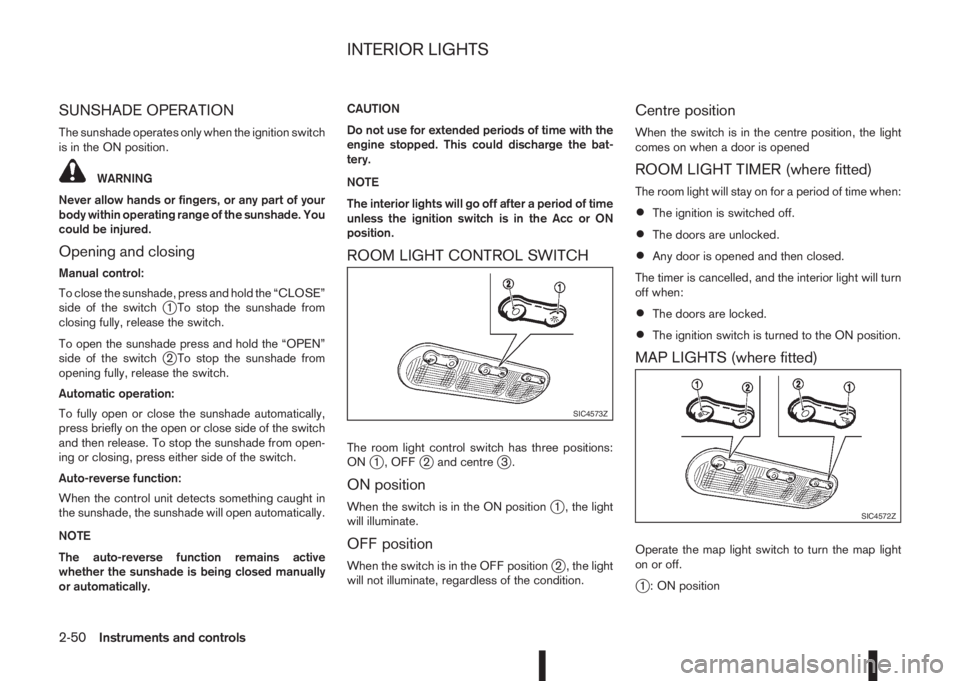
side of the switch
j1 To stop the sunshade from
closing fully, release the switch.
To open the sunshade press and hold the “OPEN”
side of the switch
j2 To stop the sunshade from
opening fully, release the switch.
Automatic operation:
To fully open or close the sunshade automatically,
press briefly on the open or close side of the switch
and then release. To stop the sunshade from open-
ing or closing, press either side of the switch.
Auto-reverse function:
When the control unit detects something caught in
the sunshade, the sunshade will open automatically.
NOTE
The auto-reverse function remains active
whether the sunshade is being closed manually
or automatically.CAUTION
Do not use for extended periods of time with the
engine stopped. This could discharge the bat-
tery.
NOTE
The interior lights will go off after a period of time
unless the ignition switch is in the Acc or ON
position.
ROOM LIGHT CONTROL SWITCH
The room light control switch has three positions:
ONj1 , OFFj2 and centrej3.
ON position
When the switch is in the ON positionj1 , the light
will illuminate.
OFF position
When the switch is in the OFF positionj2 , the light
will not illuminate, regardless of the condition.
Centre position
When the switch is in the centre position, the light
comes on when a door is opened
ROOM LIGHT TIMER (where fitted)
The room light will stay on for a period of time when:
•The ignition is switched off.
•The doors are unlocked.
•Any door is opened and then closed.
The timer is cancelled, and the interior light will turn
off when:
•The doors are locked.
•The ignition switch is turned to the ON position.
MAP LIGHTS (where fitted)
Operate the map light switch to turn the map light
on or off.
j1 : ON position
SIC4573Z
SIC4572Z
INTERIOR LIGHTS
2-50Instruments and controls