warning NISSAN QASHQAI 2014 Owner´s Manual
[x] Cancel search | Manufacturer: NISSAN, Model Year: 2014, Model line: QASHQAI, Model: NISSAN QASHQAI 2014Pages: 338, PDF Size: 4.87 MB
Page 83 of 338
![NISSAN QASHQAI 2014 Owner´s Manual 25. [Reminder turn off headlights]
warning
This warning appears when the driver side door is
opened while the headlight switch is left ON and the
ignition switch is placed in the ACC, “OFF” or
LOC](/img/5/40326/w960_40326-82.png "NISSAN QASHQAI 2014 Owner´s Manual 25. [Reminder turn off headlights]
warning
This warning appears when the driver side door is
opened while the headlight switch is left ON and the
ignition switch is placed in the ACC, “OFF” or
LOC")
25. [Reminder turn off headlights]
warning
This warning appears when the driver side door is
opened while the headlight switch is left ON and the
ignition switch is placed in the ACC, “OFF” or
LOCK position. Place the headlight switch in “OFF”
or “AUTO” position. For additional information, see
“Headlight and turn signal switch” later in this sec-
tion.
26. [Time for a driver break?] indicator
This indicator appears when the set “TIMER” indi-
cator activates. You can set the time for up to 6
hours.
27. [Low outside temperature] warning
This warning appears if the outside temperature is
below 3°C (37°F). The warning can be set not to be
displayed. (See “[Clock] and [outside air
temperature]” later in this section or the separate
NissanConnect Owner’s manual.)
28. [Chassis control system fault]
warning
This warning appears if the chassis control module
detects an error in the Chassis Control System
(where fitted). Have the system checked by a
NISSAN dealer or qualified workshop. (See “Chas-
sis control” in the “5. Starting and driving” section.)
29. Cruise control indicator
This indicator shows the cruise control system sta-
tus. The status is shown by the colour.
See “Cruise control (where fitted)” in the “5. Start-
ing and driving” section for details.
30. Speed limiter indicator
This indicator shows the status of the speed limiter
system . If the system is in turned on and in use, the
speed that the speed limiter is set to is also dis-
played.
See “Speed limiter (where fitted)” in the “5. Starting
and driving” section for details.
31. Shift lever position indicator
This indicator shows the shift lever position.
See “Shift lever indicator (where fitted)” in the
“5. Starting and driving” section for further details.
32. [Tyre Pressure System Fault]
warning
This warning illuminates when there is a problem
with the Tyre Pressure Monitoring System (TPMS).
If this warning comes on, have the system checked
by a NISSAN dealer or qualified workshop. See
“Tyre Pressure Monitoring System (TPMS)” in the
“5. Starting and driving” section for further details.
33. [Resetting Tyre Pressure System]
indicator
This warning illuminates when the TPMS tempera-
ture calibration is in progress. See “TPMS tempera-
ture calibration” in the “5. Starting and driving” sec-
tion for further details.
34. [Parking Sensor System Fault]
warning (where fitted)
This warning illuminates when there is a problem
with the parking sensor system. If this warning
comes on, have the system checked by a NISSAN
dealer or qualified workshop.
35. [Vehicle Overheating Stop Vehicle]
warning
This warning illuminates is the engine coolant tem-
perature is too high, indicating that the engine is
overheating. See “Engine overheat” in the “6. In
case of emergency” section for further details.
36. [CVT System Fault] warning
(where fitted)
This warning illuminates when there is a problem
with the XTRONIC transmission (CVT) system. If
this warning comes on, have the system checked by
a NISSAN dealer or qualified workshop.
Instruments and controls2-25
Page 84 of 338
![NISSAN QASHQAI 2014 Owner´s Manual 37. [Adaptive Front-Lighting System
Fault] warning (where fitted)
This warning illuminates when there is a problem
with the dynamic high beam assistant system. See
“Dynamic high beam assistant (wher](/img/5/40326/w960_40326-83.png "NISSAN QASHQAI 2014 Owner´s Manual 37. [Adaptive Front-Lighting System
Fault] warning (where fitted)
This warning illuminates when there is a problem
with the dynamic high beam assistant system. See
“Dynamic high beam assistant (wher")
37. [Adaptive Front-Lighting System
Fault] warning (where fitted)
This warning illuminates when there is a problem
with the dynamic high beam assistant system. See
“Dynamic high beam assistant (where fitted)” later
in this section. If this warning comes on, have the
system checked by a NISSAN dealer or qualified
workshop.
38. [Headlight System Fault] warning
(where fitted)
This warning illuminates when the LED headlights
need to be replaced. If this warning comes on, have
the system checked by a NISSAN dealer or quali-
fied workshop. See “LED headlight (where fitted)”
later in this section
39–45. [Stop/Start] System
These indicators show the Stop/Start System sta-
tus. See “Stop/Start System (where fitted)” in the
“5. Starting and driving” section.
46. [Push Ignition to OFF] warning
This warning will illuminate if the ignition switch is
placed in the ACC position when the shift lever is
moved to the P (Park) position. To turn off the Push
warning, place the ignition switch in the ON position
and then in the LOCK position.
47. [Please Select Driving Aids in
Settings Menu] warning
This warning is displayed if the Driving Aids items
are not available because they are turned off in the
Settings menu.
48–51. [System Fault] warning
This warning appears when the Blind Spot Warn-
ing, (where fitted), Lane Departure Warning (where
fitted), Traffic Sign Recognition (where fitted), or
Forward Emergency Braking systems (where fitted)
are not functioning properly.
52. [Not Available Front Radar
Obstruction] warning (where fitted)
If the sensor area of the front bumper is covered
with dirt or obstructed, making it impossible to de-
tect a vehicle ahead, the forward emergency brak-
ing system is automatically turned off. The forward
emergency braking system warning light (orange)
and the forward collision warning light (orange) will
illuminate and the [Not Available Front Radar Ob-
struction] warning message will appear in the ve-
hicle information display. If the [Not Available Front
Radar Obstruction] warning message appears, park
the vehicle in a safe location and turn the engine off.
Check to see if the sensor area of the front bumper
is blocked. If the sensor area of the front bumper is
blocked, remove the blocking material. Restart the
engine. If the warning light continues to illuminate,
have the forward emergency braking system
checked by a NISSAN dealer or qualified workshop.
53–54. [Not Available High Cabin
Temperature] warning (where fitted)
This warning appears if the interior temperature of
the vehicle has reached such a high temperature
that the sensor for the Traffic Sign Recognition and
Lane Departure warning systems can no longer
function reliably. Once the interior temperature has
reached normal levels, the warning should disap-
pear. If the warning continues to display, have the
system checked by a NISSAN dealer or qualified
workshop
55. [Not Available Clean Rear Camera]
warning (where fitted)
This message is displayed if the rear camera used
by the Blind Spot Warning system is dirty or cov-
ered with snow or rain. If the message appears,
park the vehicle in a safe place, turn off the engine,
and clean the camera unit with a soft cloth. Then
restart the engine.
56. [Steering lock Registration
Complete] indicator
This appears when a new intelligent key is regis-
tered to the vehicle.
57. [Please select 1 item or more]
indicator
This message appears when you are in the main
menu of the vehicle information display to remind
you to select at least one item.
2-26Instruments and controls
Page 86 of 338
![NISSAN QASHQAI 2014 Owner´s Manual 1. [Fuel economy] (l (litre)/100 km,
km/l(litre) or MPG)
Current fuel consumption:
The current fuel consumption mode shows the cur-
rent fuel consumption.
Average fuel consumption:
The average fuel co](/img/5/40326/w960_40326-85.png "NISSAN QASHQAI 2014 Owner´s Manual 1. [Fuel economy] (l (litre)/100 km,
km/l(litre) or MPG)
Current fuel consumption:
The current fuel consumption mode shows the cur-
rent fuel consumption.
Average fuel consumption:
The average fuel co")
1. [Fuel economy] (l (litre)/100 km,
km/l(litre) or MPG)
Current fuel consumption:
The current fuel consumption mode shows the cur-
rent fuel consumption.
Average fuel consumption:
The average fuel consumption mode shows the av-
erage fuel consumption since the last reset. Push
the ENTER switch for longer than 1 second to enter
the Reset menu.
The display is updated every 30 seconds. For about
the first 500 m (1/3 mile) after a reset, the display
shows “——”.
Push ENTER briefly to show the second Fuel
Economy page.
2. [Speed] and [Average speed] (km/h
or MPH)
The (digital) speed shows the current speed at
which the vehicle is travelling.
The average speed mode shows the average ve-
hicle speed since the last reset. Push the ENTER
switch for longer than 1 second to enter the Reset
menu.
The display is updated every 30 seconds. The first
30 seconds after a reset, the display shows “——”.
3. [Range] (dte — km or mile)
The distance to empty (dte) mode provides you with
an estimation of the distance that can be driven
before refuelling. The dte is constantly being calcu-
lated, based on the amount of fuel in the fuel tank
and the actual fuel consumption.
The display is updated every 30 seconds.
The dte mode includes a low range warning feature.
If the fuel level is low, the warning is displayed on
the screen.
When the fuel level drops even lower, the dte dis-
play will change to “——”.
•If the amount of fuel added is small, the display
just before the ignition switch is placed in the
“OFF” position may continue to be displayed.
•When driving uphill or rounding curves, the fuel
in the tank shifts, which may momentarily change
the display.
4. Elapsed [time] and [trip distance] (km
or mile)
Elapsed [time]:
The elapsed time mode shows the time since the
last reset. Push the ENTER switch for longer than 1
second to enter the Reset menu. (The trip odometer
is also reset at the same time.)[Trip distance]:
The trip odometer mode shows the total distance
the vehicle has been driven since the last reset.
Push the ENTER switch for longer than 1 second to
enter the Reset menu. (The elapsed time is also
reset at the same time.)
5. Navigation (where fitted)
When the route guidance is set in the navigation
system, this item shows the navigation route infor-
mation.
For more details, see the separately provided Nis-
sanConnect Owner’s manual.
6. Audio
The audio mode shows the status of audio informa-
tion.
For more details, see “FM AM radio with CD player
(where fitted)” in the “4. Display screen, heater and
air conditioner, and audio system” section or the
separately provided NissanConnect Owner’s
manual.
7. [Driving aids] (where fitted)
The driving aids mode shows the operating condi-
tion for the following systems.
•Lane Departure Warning (LDW)
•Blind Spot Warning (BSW)
•Forward Emergency Braking
Push ENTER to access the driving aids setting
menu.
2-28Instruments and controls
Page 87 of 338
For more details, see “Blind Spot Warning (BSW)
system (where fitted)” in the “5. Starting and driving”
section, “Lane Departure Warning (LDW) system
(where fitted)” in the “5. Starting and driving” sec-
tion, and/or “Forward emergency braking system
(where fitted)” in the “5. Starting and driving” sec-
tion.
8. [Tyre pressures] (where fitted)
The tyre pressure mode shows the pressure of all
four tyres. The displayed values are only available
while the vehicle is being driven.
When the [Low Tyre Pressure] warning appears,
the display can be switched to the tyre pressure
mode by pushing the ENTER switch to reveal addi-
tional details on the displayed warning.
9. [Chassis control]
When either the Active Trace Control (where fitted),
Active Engine Brake (where fitted), Hill start Assist
(where fitted) or the Active Ride Control system is
operated, it shows the operating condition. See
“Chassis control” in the “5. Starting and driving”
section and “Hill Start Assist (HSA) system” in the
“5. Starting and driving” section for more details.
10. [Stop/Start] system (where fitted)
The Stop/Start system mode shows the CO2 sav-
ings and the engine stop time. (See “Stop/Start Sys-
tem (where fitted)” in the “5. Starting and driving”
section.)[Trip CO2 saving] and engine stop time:
The trip CO2 saving and engine stop time mode
shows the CO2 saving and engine stop time since
the last reset.
The CO2 saving and engine stop time can be reset
by pushing the ENTER switch for longer than 1 sec-
ond.
[Total CO2 saving] and engine stop time:
The total CO2 saving and engine stop time mode
shows:
•The estimated CO2 exhaust emissions
prevented.
•The engine stop time that the engine has been
stopped by the Stop/Start System.
NOTE
The Total CO2 saving and engine stop time val-
ues cannot be reset and show accumulated
Stop/Start System information since the vehicle
was built.
11. Warning check
The current warnings are displayed. If no warning is
present, “No Warnings” is displayed.
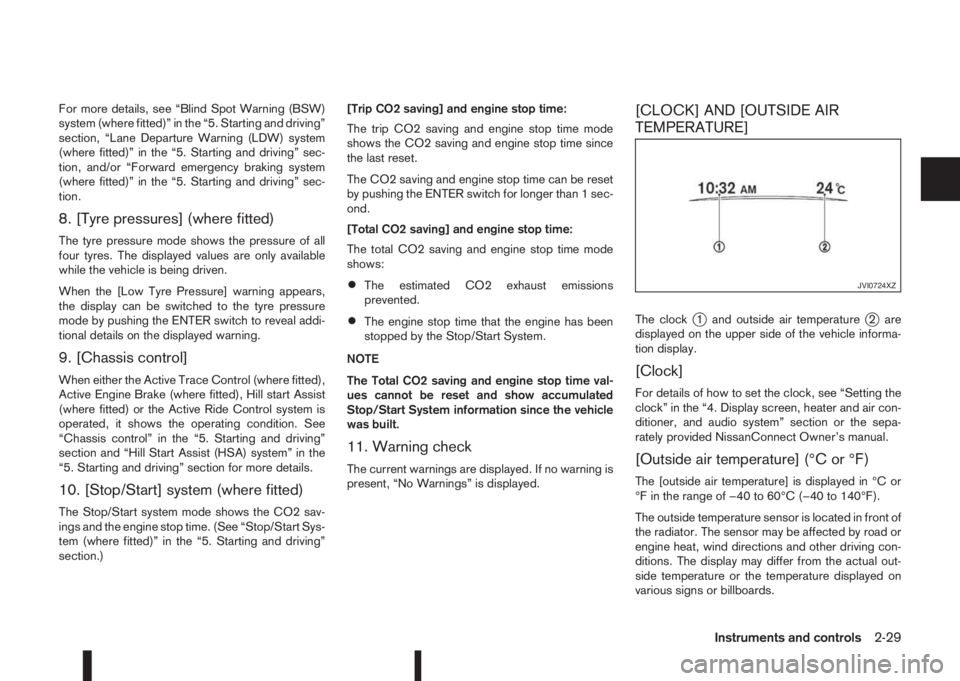
[CLOCK] AND [OUTSIDE AIR
TEMPERATURE]
The clockj1 and outside air temperaturej2 are
displayed on the upper side of the vehicle informa-
tion display.
[Clock]
For details of how to set the clock, see “Setting the
clock” in the “4. Display screen, heater and air con-
ditioner, and audio system” section or the sepa-
rately provided NissanConnect Owner’s manual.
[Outside air temperature] (°C or °F)
The [outside air temperature] is displayed in °C or
°F in the range of −40 to 60°C (−40 to 140°F).
The outside temperature sensor is located in front of
the radiator. The sensor may be affected by road or
engine heat, wind directions and other driving con-
ditions. The display may differ from the actual out-
side temperature or the temperature displayed on
various signs or billboards.
JVI0724XZ
Instruments and controls2-29
Page 88 of 338
TRAFFIC SIGN RECOGNITION
(where fitted)
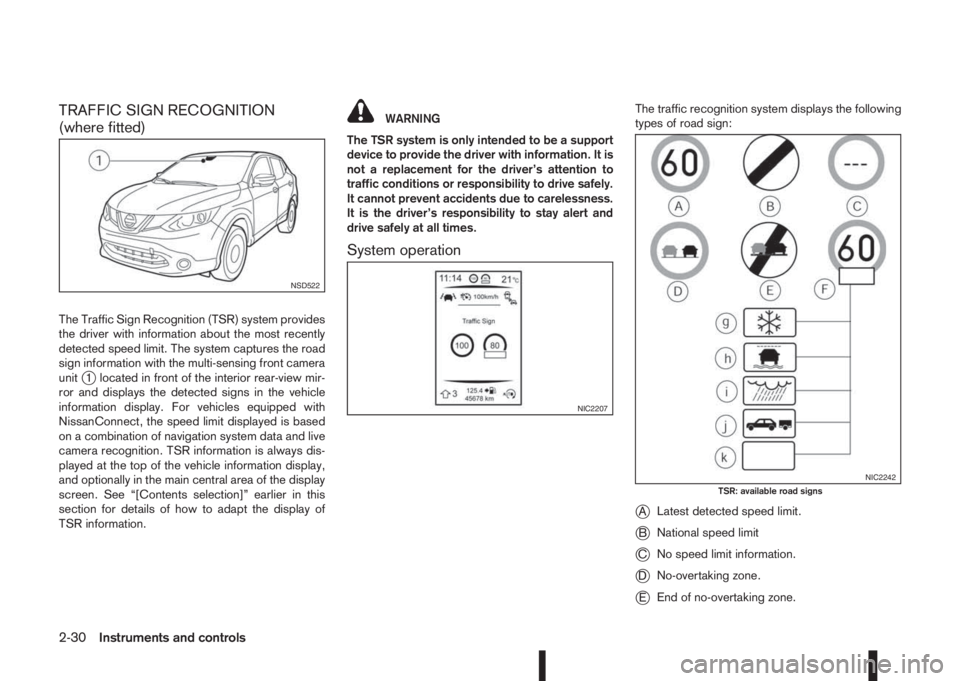
The Traffic Sign Recognition (TSR) system provides
the driver with information about the most recently
detected speed limit. The system captures the road
sign information with the multi-sensing front camera
unit
j1 located in front of the interior rear-view mir-
ror and displays the detected signs in the vehicle
information display. For vehicles equipped with
NissanConnect, the speed limit displayed is based
on a combination of navigation system data and live
camera recognition. TSR information is always dis-
played at the top of the vehicle information display,
and optionally in the main central area of the display
screen. See “[Contents selection]” earlier in this
section for details of how to adapt the display of
TSR information.
WARNING
The TSR system is only intended to be a support
device to provide the driver with information. It is
not a replacement for the driver’s attention to
traffic conditions or responsibility to drive safely.
It cannot prevent accidents due to carelessness.
It is the driver’s responsibility to stay alert and
drive safely at all times.
System operation
The traffic recognition system displays the following
types of road sign:
jALatest detected speed limit.
jBNational speed limit
jCNo speed limit information.
jDNo-overtaking zone.
jEEnd of no-overtaking zone.
NSD522
NIC2207
NIC2242TSR: available road signs
2-30Instruments and controls
Page 89 of 338
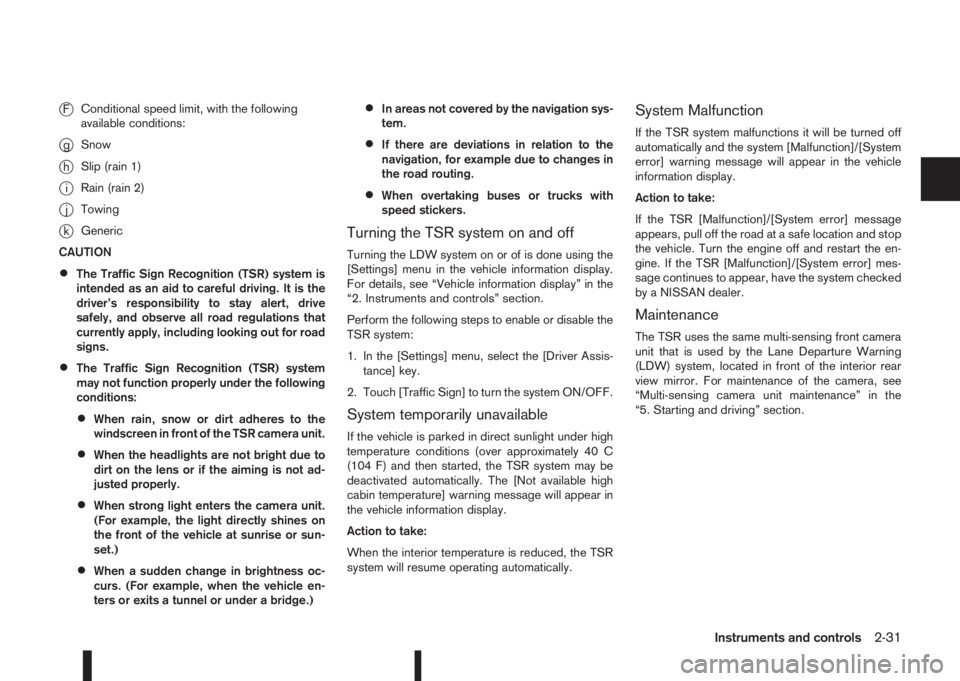
jFConditional speed limit, with the following
available conditions:
jgSnow
jhSlip (rain 1)
jiRain (rain 2)
jjTowing
jkGeneric
CAUTION
•The Traffic Sign Recognition (TSR) system is
intended as an aid to careful driving. It is the
driver’s responsibility to stay alert, drive
safely, and observe all road regulations that
currently apply, including looking out for road
signs.
•The Traffic Sign Recognition (TSR) system
may not function properly under the following
conditions:
•When rain, snow or dirt adheres to the
windscreen in front of the TSR camera unit.
•When the headlights are not bright due to
dirt on the lens or if the aiming is not ad-
justed properly.
•When strong light enters the camera unit.
(For example, the light directly shines on
the front of the vehicle at sunrise or sun-
set.)
•When a sudden change in brightness oc-
curs. (For example, when the vehicle en-
ters or exits a tunnel or under a bridge.)
•In areas not covered by the navigation sys-
tem.
•If there are deviations in relation to the
navigation, for example due to changes in
the road routing.
•When overtaking buses or trucks with
speed stickers.
Turning the TSR system on and off
Turning the LDW system on or of is done using the
[Settings] menu in the vehicle information display.
For details, see “Vehicle information display” in the
“2. Instruments and controls” section.
Perform the following steps to enable or disable the
TSR system:
1. In the [Settings] menu, select the [Driver Assis-
tance] key.
2. Touch [Traffic Sign] to turn the system ON/OFF.
System temporarily unavailable
If the vehicle is parked in direct sunlight under high
temperature conditions (over approximately 40 C
(104 F) and then started, the TSR system may be
deactivated automatically. The [Not available high
cabin temperature] warning message will appear in
the vehicle information display.
Action to take:
When the interior temperature is reduced, the TSR
system will resume operating automatically.
System Malfunction
If the TSR system malfunctions it will be turned off
automatically and the system [Malfunction]/[System
error] warning message will appear in the vehicle
information display.
Action to take:
If the TSR [Malfunction]/[System error] message
appears, pull off the road at a safe location and stop
the vehicle. Turn the engine off and restart the en-
gine. If the TSR [Malfunction]/[System error] mes-
sage continues to appear, have the system checked
by a NISSAN dealer.
Maintenance
The TSR uses the same multi-sensing front camera
unit that is used by the Lane Departure Warning
(LDW) system, located in front of the interior rear
view mirror. For maintenance of the camera, see
“Multi-sensing camera unit maintenance” in the
“5. Starting and driving” section.
Instruments and controls2-31
Page 90 of 338
WARNING
In freezing temperatures the washer fluid may
freeze on the windscreen and obscure your vi-
sion. Warm the windscreen with the defogger be-
fore you wash it.
CAUTION
•Do not open/release the bonnet when the
front wiper arms are raised from their original
position.
•Do not operate the washer continuously for
more than 15 seconds.
•Do not operate the washer if the reservoir
tank is empty or frozen.
WINDSCREEN
The windscreen wiper and washer can be operated
when the ignition switch is in the ON position.
Wiper operation
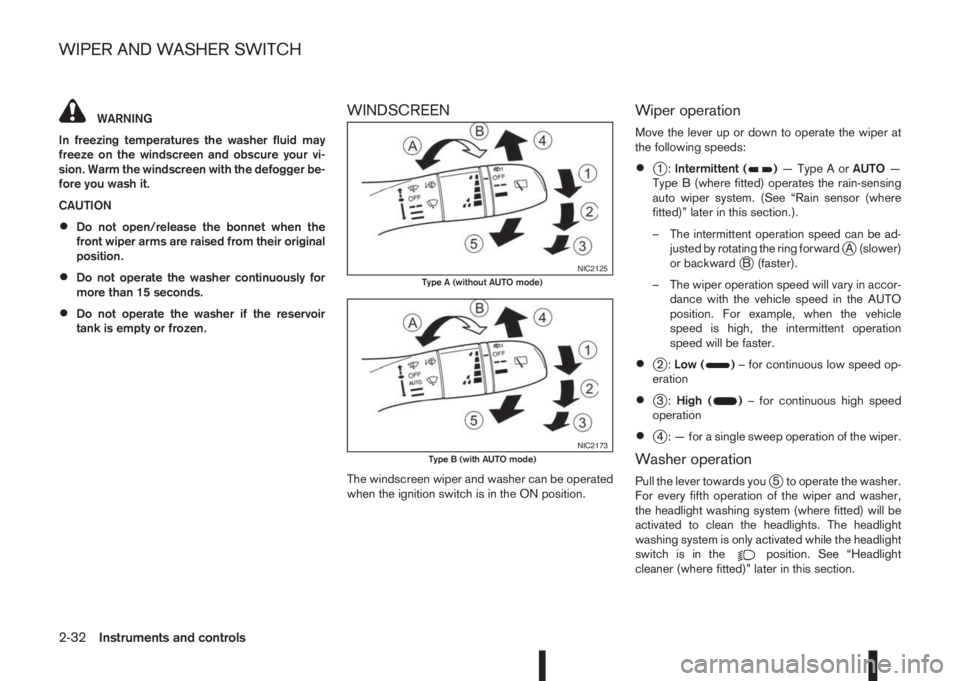
Move the lever up or down to operate the wiper at
the following speeds:
•j1:Intermittent ()—TypeAorAUTO—
Type B (where fitted) operates the rain-sensing
auto wiper system. (See “Rain sensor (where
fitted)” later in this section.).
– The intermittent operation speed can be ad-
justed by rotating the ring forward
jA (slower)
or backwardjB (faster).
– The wiper operation speed will vary in accor-
dance with the vehicle speed in the AUTO
position. For example, when the vehicle
speed is high, the intermittent operation
speed will be faster.
•j2:Low ()– for continuous low speed op-
eration
•j3:High ()– for continuous high speed
operation
•j4 : — for a single sweep operation of the wiper.
Washer operation
Pull the lever towards youj5 to operate the washer.
For every fifth operation of the wiper and washer,
the headlight washing system (where fitted) will be
activated to clean the headlights. The headlight
washing system is only activated while the headlight
switch is in the
position. See “Headlight
cleaner (where fitted)” later in this section.
NIC2125Type A (without AUTO mode)
NIC2173Type B (with AUTO mode)
WIPER AND WASHER SWITCH
2-32Instruments and controls
Page 91 of 338
Wiper drip wipe system (where fitted):
The wiper will also operate once about 3 seconds
after using the washer. This operation is to wipe
washer fluid that has dripped on the windscreen.
Rain sensor (where fitted)
The sensor of the rain-sensing auto wiper system
located on the upper part of the windscreen, in front
of the rear view mirror, can automatically turn on the
wipers and adjust the wiper speed depending on
the rainfall intensity and the vehicle speed when the
lever in the AUTO position
j1.
The sensitivity can be adjusted by rotating the ring
of the wiper switch forward
jA — less sensitive, or
backwardjB — more sensitive.
NOTE
•Be sure to turn off the rain-sensing auto wiper
system when the car is in the car wash.
•Leaving the lever in AUTO position will not
harm the rain sensor system, although occa-
sional unexpected activation of the wipers
may occur.
•If the switch is left in the AUTO position, the
wipers may operate unexpectedly when dirt,
fingerprints, oil film or insects are covering
the windscreen of the rain sensor location.
The wipers may also operate when exhaust
gas or moisture affects the rain sensor.
•Do not touch or cover the windscreen where
the rain sensor is located. The wipers may
operate unexpectedly when the wiper switchis in the AUTO position and the ignition switch
is in the ON position. This can cause an injury
or a wiper damage.
REAR WINDOW
WARNING
In freezing temperatures the washer solution
may freeze on the rear window and obscure your
vision. Warm the rear window with the rear win-
dow defogger before using the rear wipers.
CAUTION
•Do not operate the washer continuously for
more than 15 seconds.
•Do not operate the washer if the reservoir
tank is empty or frozen.
The rear window wiper and washer operates when
the ignition switch is in the ON position.
Wiper operation
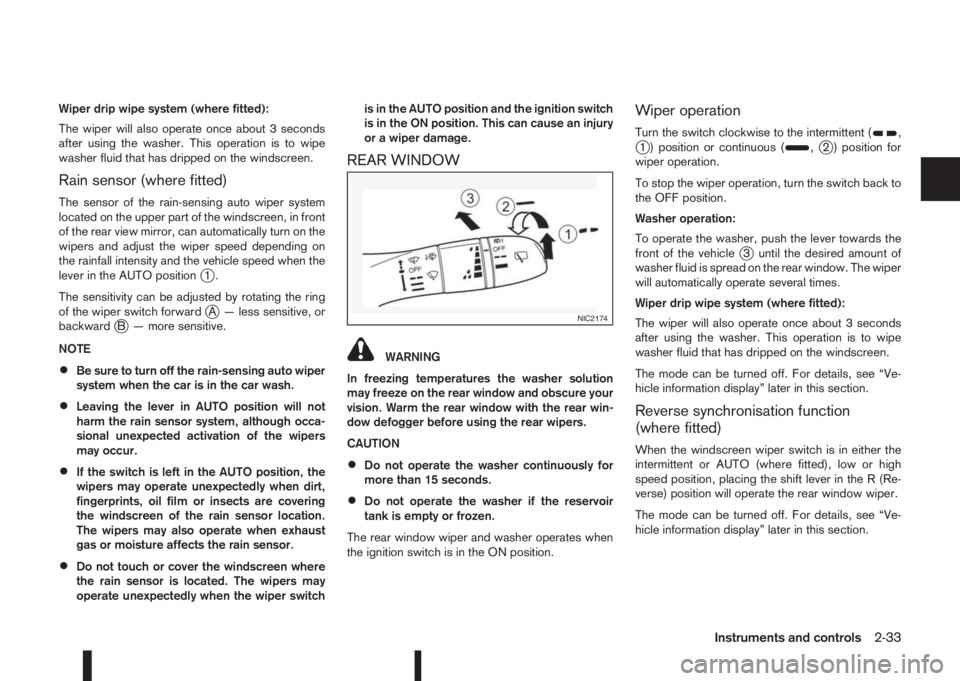
Turn the switch clockwise to the intermittent (,j1 ) position or continuous (,j2 ) position for
wiper operation.
To stop the wiper operation, turn the switch back to
the OFF position.
Washer operation:
To operate the washer, push the lever towards the
front of the vehicle
j3 until the desired amount of
washer fluid is spread on the rear window. The wiper
will automatically operate several times.
Wiper drip wipe system (where fitted):
The wiper will also operate once about 3 seconds
after using the washer. This operation is to wipe
washer fluid that has dripped on the windscreen.
The mode can be turned off. For details, see “Ve-
hicle information display” later in this section.
Reverse synchronisation function
(where fitted)
When the windscreen wiper switch is in either the
intermittent or AUTO (where fitted), low or high
speed position, placing the shift lever in the R (Re-
verse) position will operate the rear window wiper.
The mode can be turned off. For details, see “Ve-
hicle information display” later in this section.
NIC2174
Instruments and controls2-33
Page 95 of 338
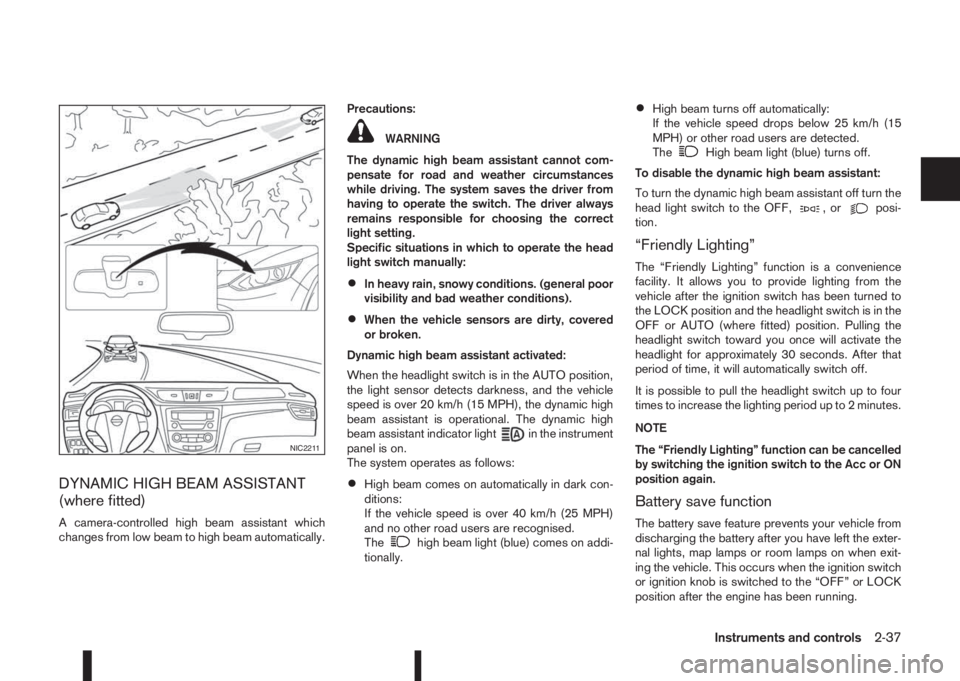
DYNAMIC HIGH BEAM ASSISTANT
(where fitted)
A camera-controlled high beam assistant which
changes from low beam to high beam automatically.Precautions:
WARNING
The dynamic high beam assistant cannot com-
pensate for road and weather circumstances
while driving. The system saves the driver from
having to operate the switch. The driver always
remains responsible for choosing the correct
light setting.
Specific situations in which to operate the head
light switch manually:
•In heavy rain, snowy conditions. (general poor
visibility and bad weather conditions).
•When the vehicle sensors are dirty, covered
or broken.
Dynamic high beam assistant activated:
When the headlight switch is in the AUTO position,
the light sensor detects darkness, and the vehicle
speed is over 20 km/h (15 MPH), the dynamic high
beam assistant is operational. The dynamic high
beam assistant indicator light
in the instrument
panel is on.
The system operates as follows:
•High beam comes on automatically in dark con-
ditions:
If the vehicle speed is over 40 km/h (25 MPH)
and no other road users are recognised.
The
high beam light (blue) comes on addi-
tionally.
•High beam turns off automatically:
If the vehicle speed drops below 25 km/h (15
MPH) or other road users are detected.
The
High beam light (blue) turns off.
To disable the dynamic high beam assistant:
To turn the dynamic high beam assistant off turn the
head light switch to the OFF,
,orposi-
tion.
“Friendly Lighting”
The “Friendly Lighting” function is a convenience
facility. It allows you to provide lighting from the
vehicle after the ignition switch has been turned to
the LOCK position and the headlight switch is in the
OFF or AUTO (where fitted) position. Pulling the
headlight switch toward you once will activate the
headlight for approximately 30 seconds. After that
period of time, it will automatically switch off.
It is possible to pull the headlight switch up to four
times to increase the lighting period up to 2 minutes.
NOTE
The “Friendly Lighting” function can be cancelled
by switching the ignition switch to the Acc or ON
position again.
Battery save function
The battery save feature prevents your vehicle from
discharging the battery after you have left the exter-
nal lights, map lamps or room lamps on when exit-
ing the vehicle. This occurs when the ignition switch
or ignition knob is switched to the “OFF” or LOCK
position after the engine has been running.
NIC2211
Instruments and controls2-37
Page 97 of 338
To turn the front fog lights on, turn the headlight
switch to theoror AUTO (where fitted)
position and turn the fog light switch to theposi-
tion. The front fog lights and indicator light will come
on. The fog light switch will return to the “OFF”
position (—). For additional information, see “Warn-
ing/indicator lights and audible reminders” earlier in
this section.
To turn the front fog lights off, turn the fog light
switch to the
position again. The front fog lights
and indicator light will turn off. The fog light switch
will return to the “OFF” position.
NOTE
If the headlight switch is turned to the “OFF” po-
sition(—),thefrontfoglightwillswitchoffauto-
matically.
REAR FOG LIGHT (where fitted)
The rear fog light should only be used when visibility
is seriously reduced – generally, to less than 100 m
(328 ft).
To turn the rear fog light on, turn the headlight switch
to the
oror AUTO (where fitted) position
and turn the fog light switch to theposition. The
rear fog light and indicator light will come on. The
fog light switch will return to the “OFF” position (—
). For additional information, see “Warning/indicator
lights and audible reminders” earlier in this section.If the front fog lights (where fitted) are already turned
on with the headlight switch in the
position,
you can turn on the rear fog light without first turn-
ing the headlight switch to the
or AUTO (where
fitted) position.
To turn the rear fog light off, turn the fog light switch
to the
position again.
NOTE
If the headlight switch is turned to the “OFF” po-
sition(—),therearfoglightwillswitchoffauto-
matically.
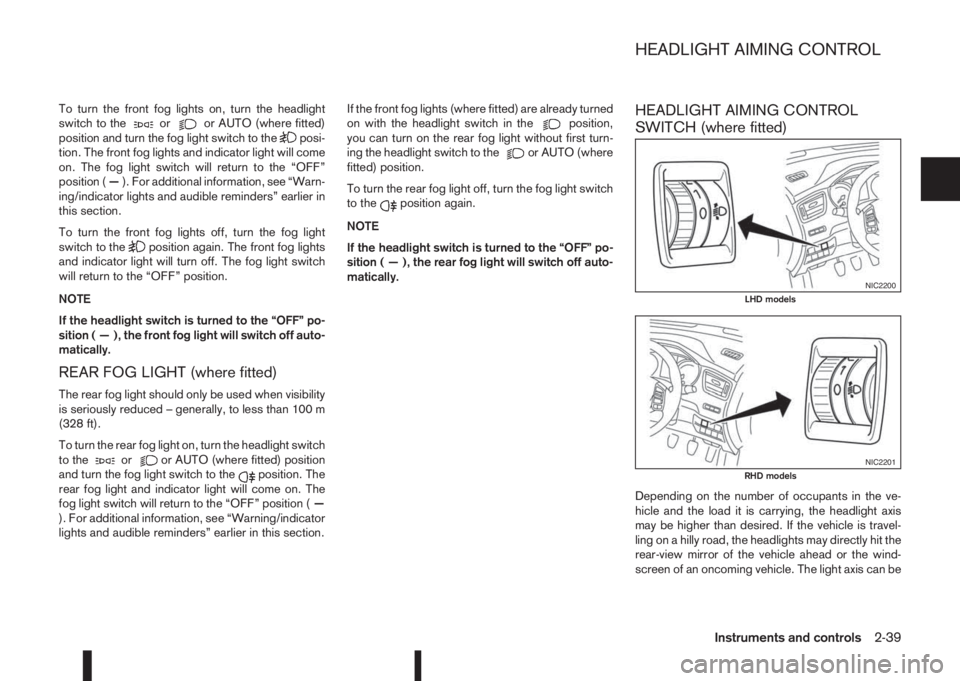
HEADLIGHT AIMING CONTROL
SWITCH (where fitted)
Depending on the number of occupants in the ve-
hicle and the load it is carrying, the headlight axis
may be higher than desired. If the vehicle is travel-
ling on a hilly road, the headlights may directly hit the
rear-view mirror of the vehicle ahead or the wind-
screen of an oncoming vehicle. The light axis can be
NIC2200LHD models
NIC2201RHD models
HEADLIGHT AIMING CONTROL
Instruments and controls2-39