brake NISSAN QASHQAI 2014 Owner´s Manual
[x] Cancel search | Manufacturer: NISSAN, Model Year: 2014, Model line: QASHQAI, Model: NISSAN QASHQAI 2014Pages: 338, PDF Size: 4.87 MB
Page 10 of 338
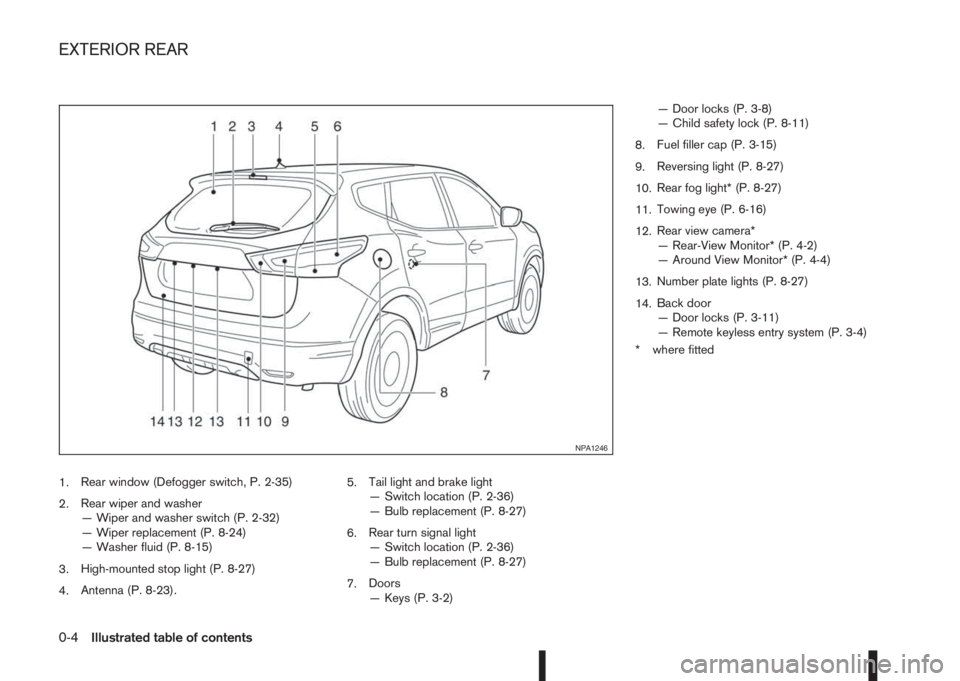
1.Rear window (Defogger switch, P. 2-35)
2.Rear wiper and washer
— Wiper and washer switch (P. 2-32)
— Wiper replacement (P. 8-24)
— Washer fluid (P. 8-15)
3.High-mounted stop light (P. 8-27)
4.Antenna (P. 8-23).5.Tail light and brake light
— Switch location (P. 2-36)
— Bulb replacement (P. 8-27)
6.Rear turn signal light
— Switch location (P. 2-36)
— Bulb replacement (P. 8-27)
7.Doors
— Keys (P. 3-2)— Door locks (P. 3-8)
— Child safety lock (P. 8-11)
8.Fuel filler cap (P. 3-15)
9.Reversing light (P. 8-27)
10.Rear fog light* (P. 8-27)
11.Towing eye (P. 6-16)
12.Rear view camera*
— Rear-View Monitor* (P. 4-2)
— Around View Monitor* (P. 4-4)
13.Number plate lights (P. 8-27)
14.Back door
— Door locks (P. 3-11)
— Remote keyless entry system (P. 3-4)
* where fitted
NPA1246
EXTERIOR REAR
0-4Illustrated table of contents
Page 12 of 338
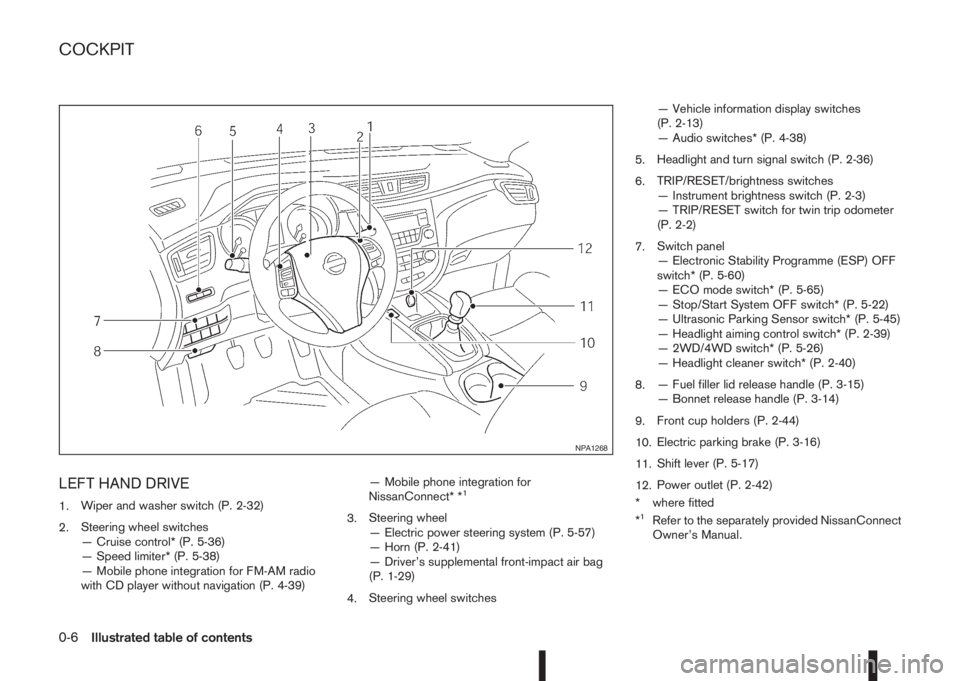
LEFT HAND DRIVE
1.Wiper and washer switch (P. 2-32)
2.Steering wheel switches
— Cruise control* (P. 5-36)
— Speed limiter* (P. 5-38)
— Mobile phone integration for FM-AM radio
with CD player without navigation (P. 4-39)— Mobile phone integration for
NissanConnect* *1
3.Steering wheel
— Electric power steering system (P. 5-57)
— Horn (P. 2-41)
— Driver’s supplemental front-impact air bag
(P. 1-29)
4.Steering wheel switches— Vehicle information display switches
(P. 2-13)
— Audio switches* (P. 4-38)
5.Headlight and turn signal switch (P. 2-36)
6.TRIP/RESET/brightness switches
— Instrument brightness switch (P. 2-3)
— TRIP/RESET switch for twin trip odometer
(P. 2-2)
7.Switch panel
— Electronic Stability Programme (ESP) OFF
switch* (P. 5-60)
— ECO mode switch* (P. 5-65)
— Stop/Start System OFF switch* (P. 5-22)
— Ultrasonic Parking Sensor switch* (P. 5-45)
— Headlight aiming control switch* (P. 2-39)
— 2WD/4WD switch* (P. 5-26)
— Headlight cleaner switch* (P. 2-40)
8.— Fuel filler lid release handle (P. 3-15)
— Bonnet release handle (P. 3-14)
9.Front cup holders (P. 2-44)
10.Electric parking brake (P. 3-16)
11.Shift lever (P. 5-17)
12.Power outlet (P. 2-42)
* where fitted
*1Refer to the separately provided NissanConnect
Owner’s Manual.
NPA1268
COCKPIT
0-6Illustrated table of contents
Page 13 of 338
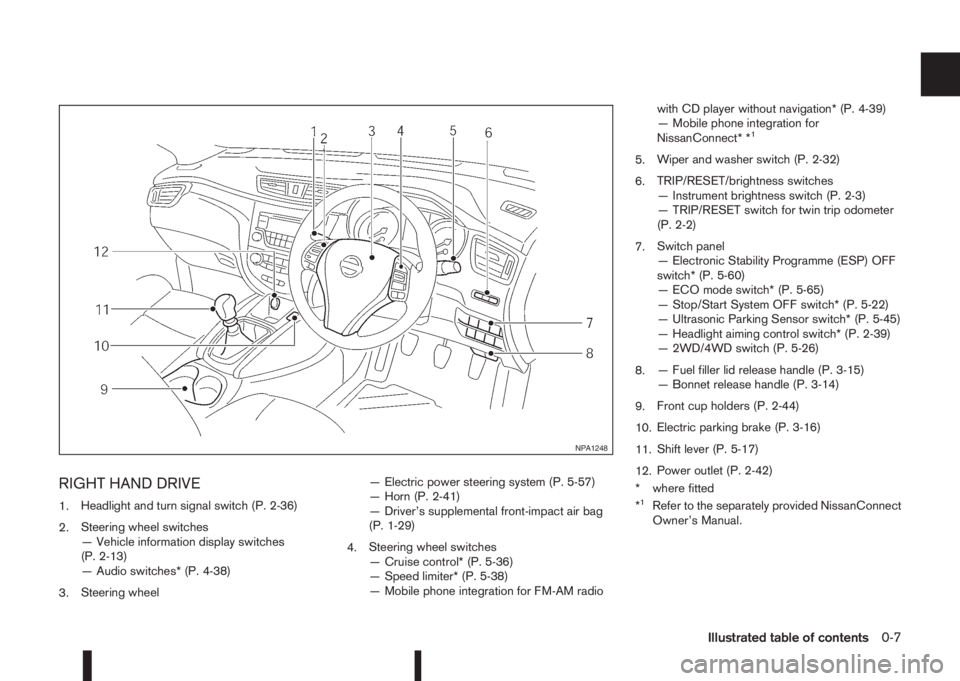
RIGHT HAND DRIVE
1.Headlight and turn signal switch (P. 2-36)
2.Steering wheel switches
— Vehicle information display switches
(P. 2-13)
— Audio switches* (P. 4-38)
3.Steering wheel— Electric power steering system (P. 5-57)
— Horn (P. 2-41)
— Driver’s supplemental front-impact air bag
(P. 1-29)
4.Steering wheel switches
— Cruise control* (P. 5-36)
— Speed limiter* (P. 5-38)
— Mobile phone integration for FM-AM radiowith CD player without navigation* (P. 4-39)
— Mobile phone integration for
NissanConnect* *
1
5.Wiper and washer switch (P. 2-32)
6.TRIP/RESET/brightness switches
— Instrument brightness switch (P. 2-3)
— TRIP/RESET switch for twin trip odometer
(P. 2-2)
7.Switch panel
— Electronic Stability Programme (ESP) OFF
switch* (P. 5-60)
— ECO mode switch* (P. 5-65)
— Stop/Start System OFF switch* (P. 5-22)
— Ultrasonic Parking Sensor switch* (P. 5-45)
— Headlight aiming control switch* (P. 2-39)
— 2WD/4WD switch (P. 5-26)
8.— Fuel filler lid release handle (P. 3-15)
— Bonnet release handle (P. 3-14)
9.Front cup holders (P. 2-44)
10.Electric parking brake (P. 3-16)
11.Shift lever (P. 5-17)
12.Power outlet (P. 2-42)
* where fitted
*
1Refer to the separately provided NissanConnect
Owner’s Manual.
NPA1248
Illustrated table of contents0-7
Page 17 of 338
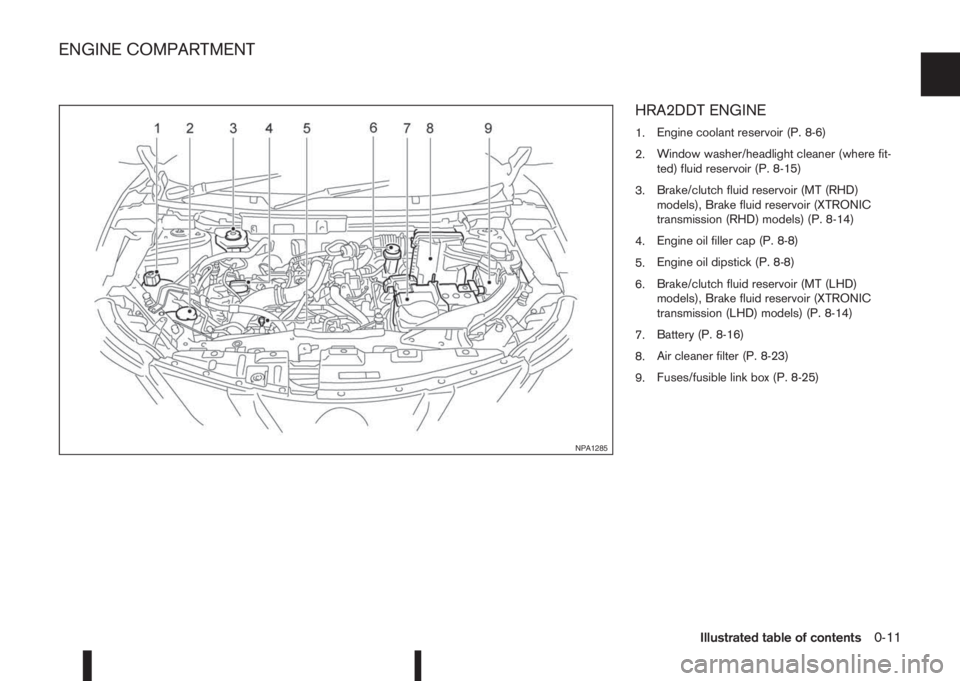
HRA2DDT ENGINE
1.Engine coolant reservoir (P. 8-6)
2.Window washer/headlight cleaner (where fit-
ted) fluid reservoir (P. 8-15)
3.Brake/clutch fluid reservoir (MT (RHD)
models), Brake fluid reservoir (XTRONIC
transmission (RHD) models) (P. 8-14)
4.Engine oil filler cap (P. 8-8)
5.Engine oil dipstick (P. 8-8)
6.Brake/clutch fluid reservoir (MT (LHD)
models), Brake fluid reservoir (XTRONIC
transmission (LHD) models) (P. 8-14)
7.Battery (P. 8-16)
8.Air cleaner filter (P. 8-23)
9.Fuses/fusible link box (P. 8-25)
NPA1285
ENGINE COMPARTMENT
Illustrated table of contents0-11
Page 18 of 338
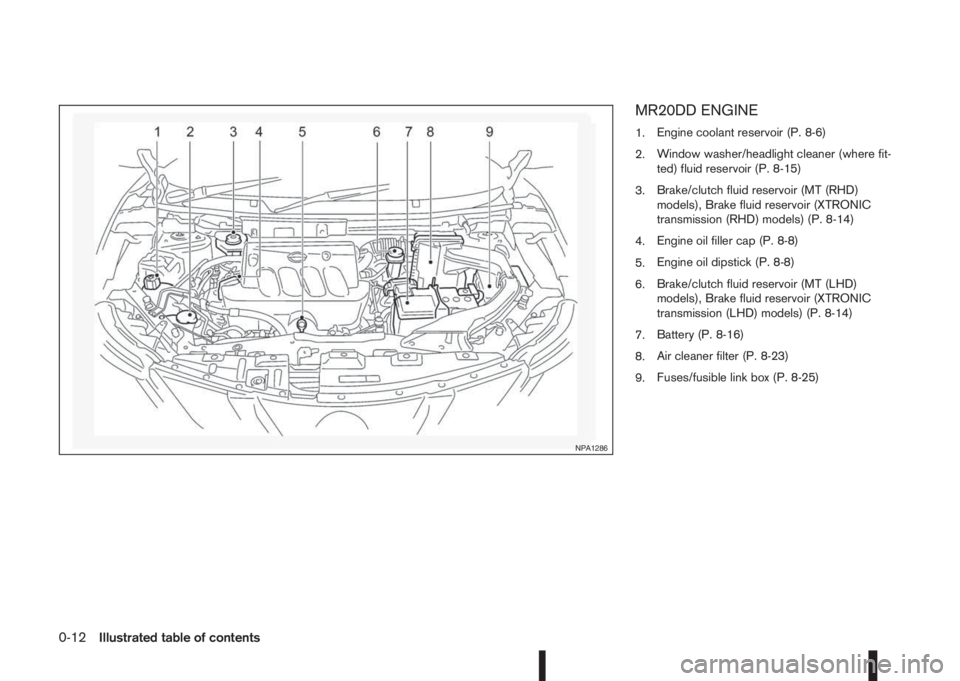
MR20DD ENGINE
1.Engine coolant reservoir (P. 8-6)
2.Window washer/headlight cleaner (where fit-
ted) fluid reservoir (P. 8-15)
3.Brake/clutch fluid reservoir (MT (RHD)
models), Brake fluid reservoir (XTRONIC
transmission (RHD) models) (P. 8-14)
4.Engine oil filler cap (P. 8-8)
5.Engine oil dipstick (P. 8-8)
6.Brake/clutch fluid reservoir (MT (LHD)
models), Brake fluid reservoir (XTRONIC
transmission (LHD) models) (P. 8-14)
7.Battery (P. 8-16)
8.Air cleaner filter (P. 8-23)
9.Fuses/fusible link box (P. 8-25)
NPA1286
0-12Illustrated table of contents
Page 19 of 338
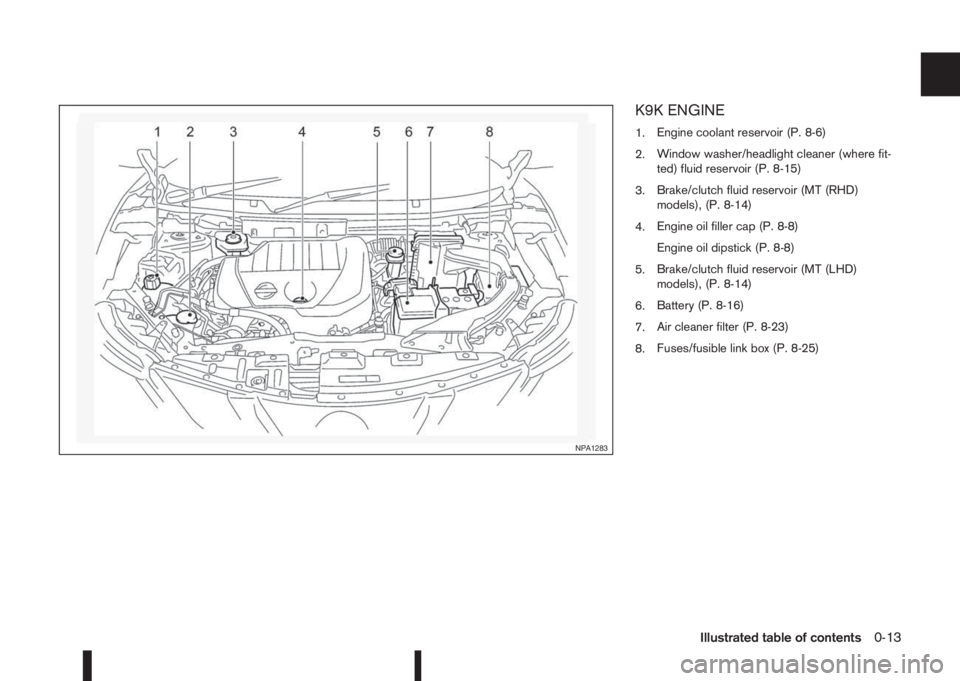
K9K ENGINE
1.Engine coolant reservoir (P. 8-6)
2.Window washer/headlight cleaner (where fit-
ted) fluid reservoir (P. 8-15)
3.Brake/clutch fluid reservoir (MT (RHD)
models), (P. 8-14)
4.Engine oil filler cap (P. 8-8)
Engine oil dipstick (P. 8-8)
5.Brake/clutch fluid reservoir (MT (LHD)
models), (P. 8-14)
6.Battery (P. 8-16)
7.Air cleaner filter (P. 8-23)
8.Fuses/fusible link box (P. 8-25)
NPA1283
Illustrated table of contents0-13
Page 20 of 338
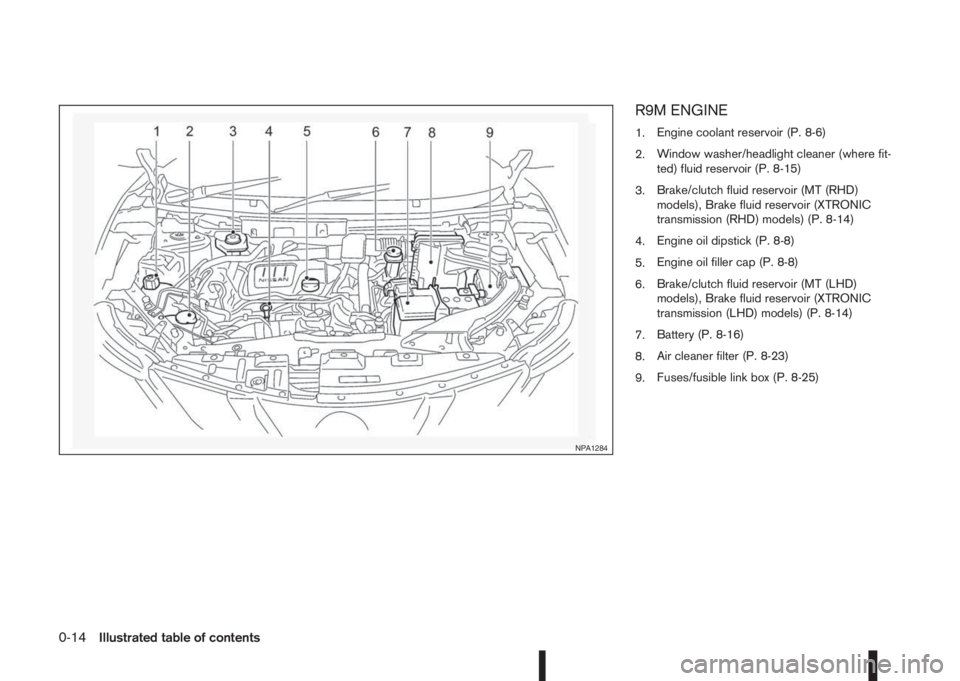
R9M ENGINE
1.Engine coolant reservoir (P. 8-6)
2.Window washer/headlight cleaner (where fit-
ted) fluid reservoir (P. 8-15)
3.Brake/clutch fluid reservoir (MT (RHD)
models), Brake fluid reservoir (XTRONIC
transmission (RHD) models) (P. 8-14)
4.Engine oil dipstick (P. 8-8)
5.Engine oil filler cap (P. 8-8)
6.Brake/clutch fluid reservoir (MT (LHD)
models), Brake fluid reservoir (XTRONIC
transmission (LHD) models) (P. 8-14)
7.Battery (P. 8-16)
8.Air cleaner filter (P. 8-23)
9.Fuses/fusible link box (P. 8-25)
NPA1284
0-14Illustrated table of contents
Page 23 of 338
FRONT SEATS
Manual seat adjustment
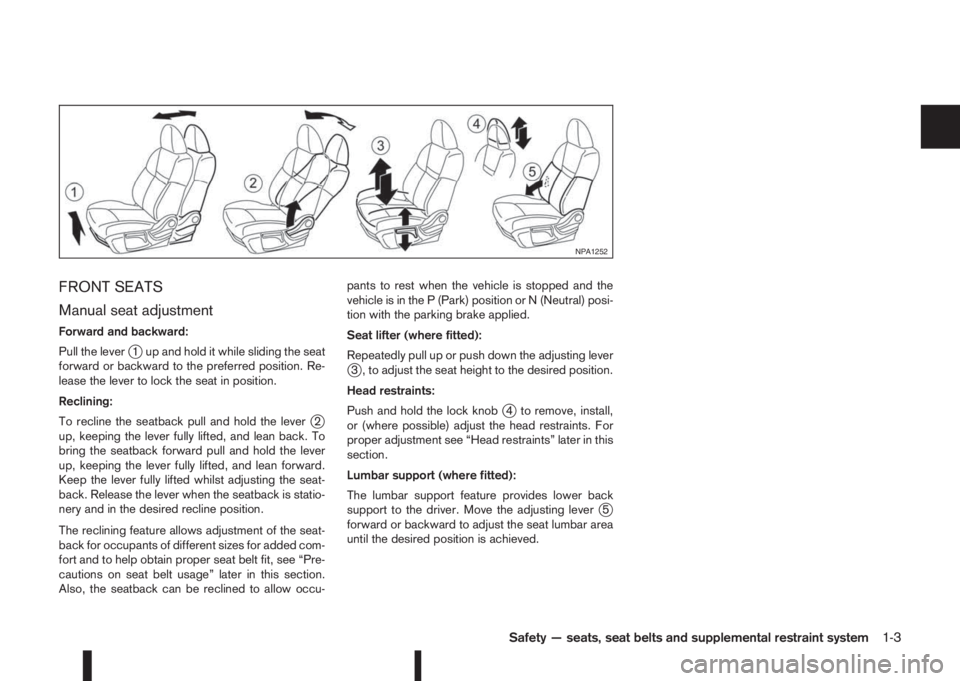
Forward and backward:
Pull the lever
j1 up and hold it while sliding the seat
forward or backward to the preferred position. Re-
lease the lever to lock the seat in position.
Reclining:
To recline the seatback pull and hold the lever
j2
up, keeping the lever fully lifted, and lean back. To
bring the seatback forward pull and hold the lever
up, keeping the lever fully lifted, and lean forward.
Keep the lever fully lifted whilst adjusting the seat-
back. Release the lever when the seatback is statio-
nery and in the desired recline position.
The reclining feature allows adjustment of the seat-
back for occupants of different sizes for added com-
fort and to help obtain proper seat belt fit, see “Pre-
cautions on seat belt usage” later in this section.
Also, the seatback can be reclined to allow occu-pants to rest when the vehicle is stopped and the
vehicle is in the P (Park) position or N (Neutral) posi-
tion with the parking brake applied.
Seat lifter (where fitted):
Repeatedly pull up or push down the adjusting lever
j3 , to adjust the seat height to the desired position.
Head restraints:
Push and hold the lock knob
j4 to remove, install,
or (where possible) adjust the head restraints. For
proper adjustment see “Head restraints” later in this
section.
Lumbar support (where fitted):
The lumbar support feature provides lower back
support to the driver. Move the adjusting lever
j5
forward or backward to adjust the seat lumbar area
until the desired position is achieved.
NPA1252
Safety — seats, seat belts and supplemental restraint system1-3
Page 62 of 338
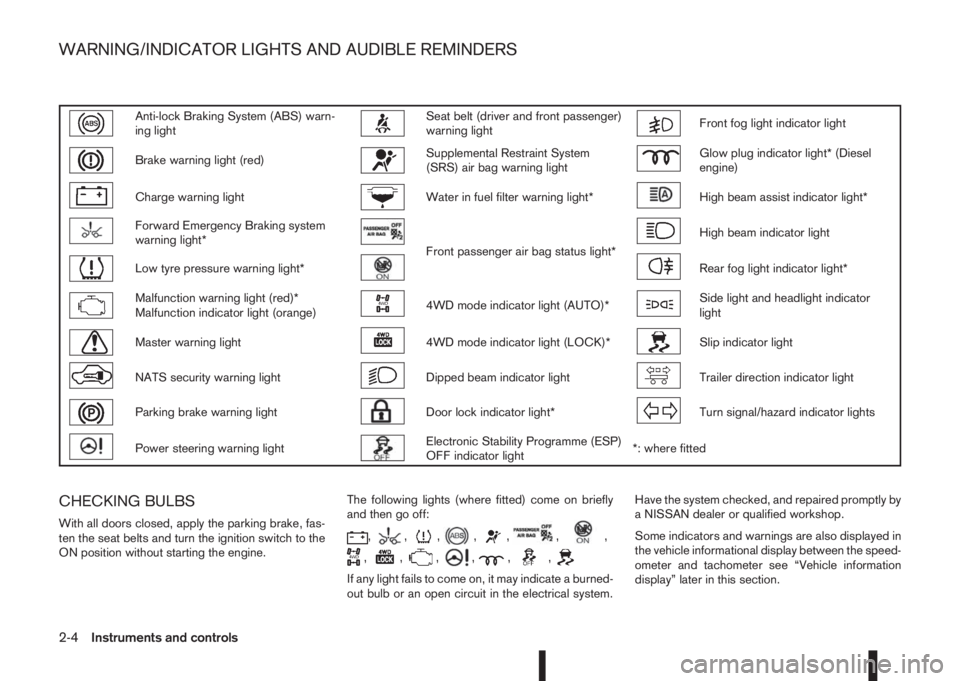
Anti-lock Braking System (ABS) warn-
ing lightSeat belt (driver and front passenger)
warning lightFront fog light indicator light
Brake warning light (red)Supplemental Restraint System
(SRS) air bag warning lightGlow plug indicator light* (Diesel
engine)
Charge warning lightWater in fuel filter warning light*High beam assist indicator light*
Forward Emergency Braking system
warning light*
Front passenger air bag status light*
High beam indicator light
Low tyre pressure warning light*Rear fog light indicator light*
Malfunction warning light (red)*
Malfunction indicator light (orange)4WD mode indicator light (AUTO)*Side light and headlight indicator
light
Master warning light4WD mode indicator light (LOCK)*Slip indicator light
NATS security warning lightDipped beam indicator lightTrailer direction indicator light
Parking brake warning lightDoor lock indicator light*Turn signal/hazard indicator lights
Power steering warning lightElectronic Stability Programme (ESP)
OFF indicator light*: where fitted
CHECKING BULBS
With all doors closed, apply the parking brake, fas-
ten the seat belts and turn the ignition switch to the
ON position without starting the engine.The following lights (where fitted) come on briefly
and then go off:,,,,,,,
,,,,,,
If any light fails to come on, it may indicate a burned-
out bulb or an open circuit in the electrical system.Have the system checked, and repaired promptly by
a NISSAN dealer or qualified workshop.
Some indicators and warnings are also displayed in
the vehicle informational display between the speed-
ometer and tachometer see “Vehicle information
display” later in this section.
WARNING/INDICATOR LIGHTS AND AUDIBLE REMINDERS
2-4Instruments and controls
Page 63 of 338
WARNING LIGHTS
Also see “Vehicle information display” later in this
section.
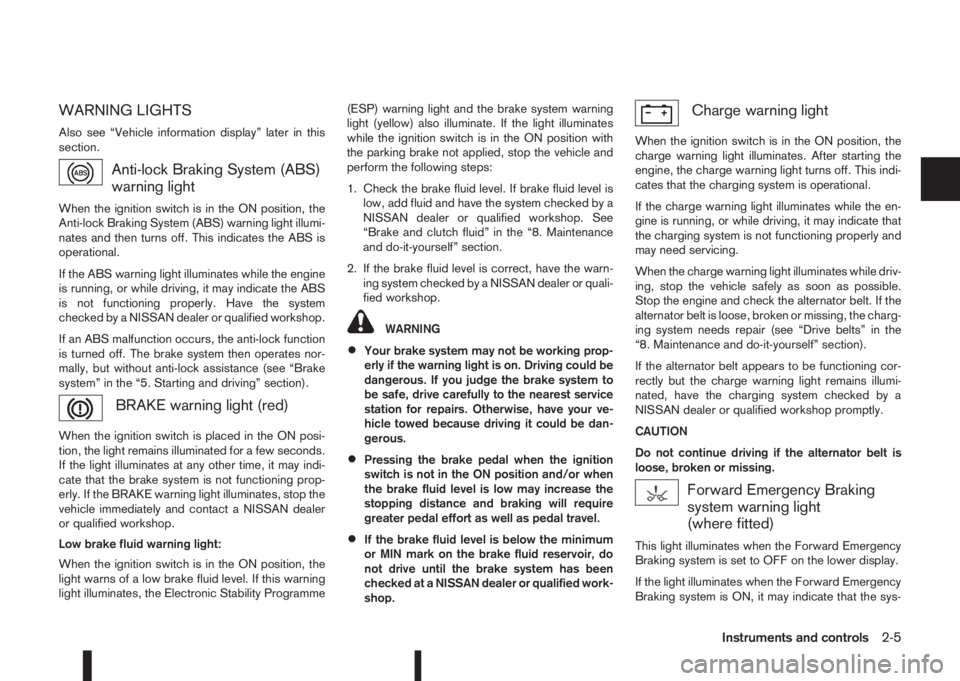
Anti-lock Braking System (ABS)
warning light
When the ignition switch is in the ON position, the
Anti-lock Braking System (ABS) warning light illumi-
nates and then turns off. This indicates the ABS is
operational.
If the ABS warning light illuminates while the engine
is running, or while driving, it may indicate the ABS
is not functioning properly. Have the system
checked by a NISSAN dealer or qualified workshop.
If an ABS malfunction occurs, the anti-lock function
is turned off. The brake system then operates nor-
mally, but without anti-lock assistance (see “Brake
system” in the “5. Starting and driving” section).
BRAKE warning light (red)
When the ignition switch is placed in the ON posi-
tion, the light remains illuminated for a few seconds.
If the light illuminates at any other time, it may indi-
cate that the brake system is not functioning prop-
erly. If the BRAKE warning light illuminates, stop the
vehicle immediately and contact a NISSAN dealer
or qualified workshop.
Low brake fluid warning light:
When the ignition switch is in the ON position, the
light warns of a low brake fluid level. If this warning
light illuminates, the Electronic Stability Programme(ESP) warning light and the brake system warning
light (yellow) also illuminate. If the light illuminates
while the ignition switch is in the ON position with
the parking brake not applied, stop the vehicle and
perform the following steps:
1. Check the brake fluid level. If brake fluid level is
low, add fluid and have the system checked by a
NISSAN dealer or qualified workshop. See
“Brake and clutch fluid” in the “8. Maintenance
and do-it-yourself” section.
2. If the brake fluid level is correct, have the warn-
ing system checked by a NISSAN dealer or quali-
fied workshop.
WARNING
•Your brake system may not be working prop-
erly if the warning light is on. Driving could be
dangerous. If you judge the brake system to
be safe, drive carefully to the nearest service
station for repairs. Otherwise, have your ve-
hicle towed because driving it could be dan-
gerous.
•Pressing the brake pedal when the ignition
switch is not in the ON position and/or when
the brake fluid level is low may increase the
stopping distance and braking will require
greater pedal effort as well as pedal travel.
•If the brake fluid level is below the minimum
or MIN mark on the brake fluid reservoir, do
not drive until the brake system has been
checked at a NISSAN dealer or qualified work-
shop.
Charge warning light
When the ignition switch is in the ON position, the
charge warning light illuminates. After starting the
engine, the charge warning light turns off. This indi-
cates that the charging system is operational.
If the charge warning light illuminates while the en-
gine is running, or while driving, it may indicate that
the charging system is not functioning properly and
may need servicing.
When the charge warning light illuminates while driv-
ing, stop the vehicle safely as soon as possible.
Stop the engine and check the alternator belt. If the
alternator belt is loose, broken or missing, the charg-
ing system needs repair (see “Drive belts” in the
“8. Maintenance and do-it-yourself” section).
If the alternator belt appears to be functioning cor-
rectly but the charge warning light remains illumi-
nated, have the charging system checked by a
NISSAN dealer or qualified workshop promptly.
CAUTION
Do not continue driving if the alternator belt is
loose, broken or missing.
Forward Emergency Braking
system warning light
(where fitted)
This light illuminates when the Forward Emergency
Braking system is set to OFF on the lower display.
If the light illuminates when the Forward Emergency
Braking system is ON, it may indicate that the sys-
Instruments and controls2-5