2-2 NISSAN QASHQAI 2015 Owner´s Manual
[x] Cancel search | Manufacturer: NISSAN, Model Year: 2015, Model line: QASHQAI, Model: NISSAN QASHQAI 2015Pages: 338, PDF Size: 4.88 MB
Page 12 of 338
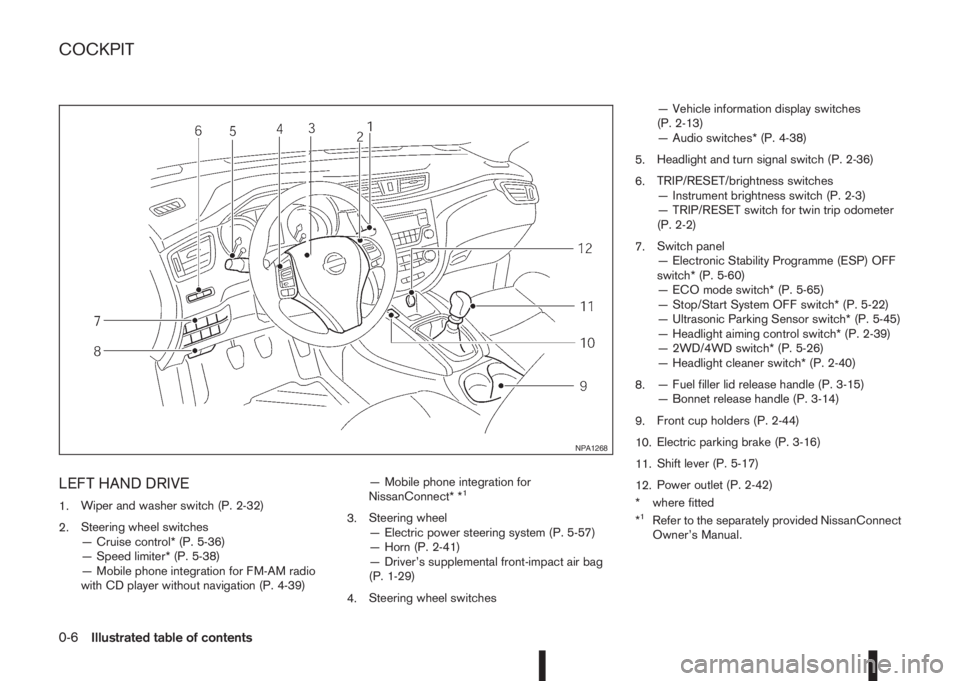
LEFT HAND DRIVE
1.Wiper and washer switch (P. 2-32)
2.Steering wheel switches
— Cruise control* (P. 5-36)
— Speed limiter* (P. 5-38)
— Mobile phone integration for FM-AM radio
with CD player without navigation (P. 4-39)— Mobile phone integration for
NissanConnect* *1
3.Steering wheel
— Electric power steering system (P. 5-57)
— Horn (P. 2-41)
— Driver’s supplemental front-impact air bag
(P. 1-29)
4.Steering wheel switches— Vehicle information display switches
(P. 2-13)
— Audio switches* (P. 4-38)
5.Headlight and turn signal switch (P. 2-36)
6.TRIP/RESET/brightness switches
— Instrument brightness switch (P. 2-3)
— TRIP/RESET switch for twin trip odometer
(P. 2-2)
7.Switch panel
— Electronic Stability Programme (ESP) OFF
switch* (P. 5-60)
— ECO mode switch* (P. 5-65)
— Stop/Start System OFF switch* (P. 5-22)
— Ultrasonic Parking Sensor switch* (P. 5-45)
— Headlight aiming control switch* (P. 2-39)
— 2WD/4WD switch* (P. 5-26)
— Headlight cleaner switch* (P. 2-40)
8.— Fuel filler lid release handle (P. 3-15)
— Bonnet release handle (P. 3-14)
9.Front cup holders (P. 2-44)
10.Electric parking brake (P. 3-16)
11.Shift lever (P. 5-17)
12.Power outlet (P. 2-42)
* where fitted
*1Refer to the separately provided NissanConnect
Owner’s Manual.
NPA1268
COCKPIT
0-6Illustrated table of contents
Page 13 of 338
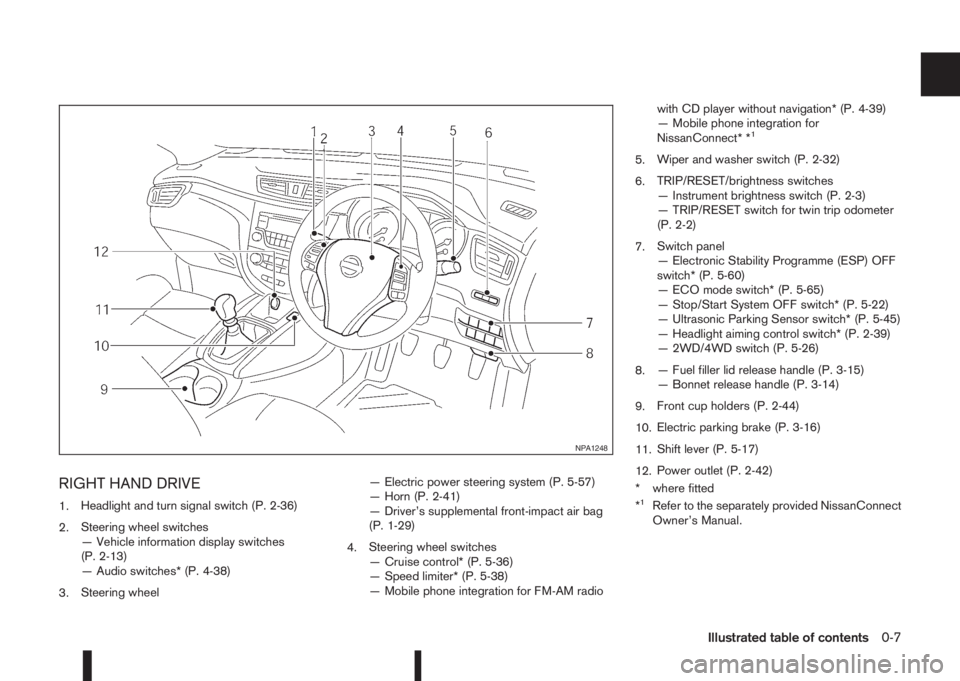
RIGHT HAND DRIVE
1.Headlight and turn signal switch (P. 2-36)
2.Steering wheel switches
— Vehicle information display switches
(P. 2-13)
— Audio switches* (P. 4-38)
3.Steering wheel— Electric power steering system (P. 5-57)
— Horn (P. 2-41)
— Driver’s supplemental front-impact air bag
(P. 1-29)
4.Steering wheel switches
— Cruise control* (P. 5-36)
— Speed limiter* (P. 5-38)
— Mobile phone integration for FM-AM radiowith CD player without navigation* (P. 4-39)
— Mobile phone integration for
NissanConnect* *
1
5.Wiper and washer switch (P. 2-32)
6.TRIP/RESET/brightness switches
— Instrument brightness switch (P. 2-3)
— TRIP/RESET switch for twin trip odometer
(P. 2-2)
7.Switch panel
— Electronic Stability Programme (ESP) OFF
switch* (P. 5-60)
— ECO mode switch* (P. 5-65)
— Stop/Start System OFF switch* (P. 5-22)
— Ultrasonic Parking Sensor switch* (P. 5-45)
— Headlight aiming control switch* (P. 2-39)
— 2WD/4WD switch (P. 5-26)
8.— Fuel filler lid release handle (P. 3-15)
— Bonnet release handle (P. 3-14)
9.Front cup holders (P. 2-44)
10.Electric parking brake (P. 3-16)
11.Shift lever (P. 5-17)
12.Power outlet (P. 2-42)
* where fitted
*
1Refer to the separately provided NissanConnect
Owner’s Manual.
NPA1248
Illustrated table of contents0-7
Page 14 of 338
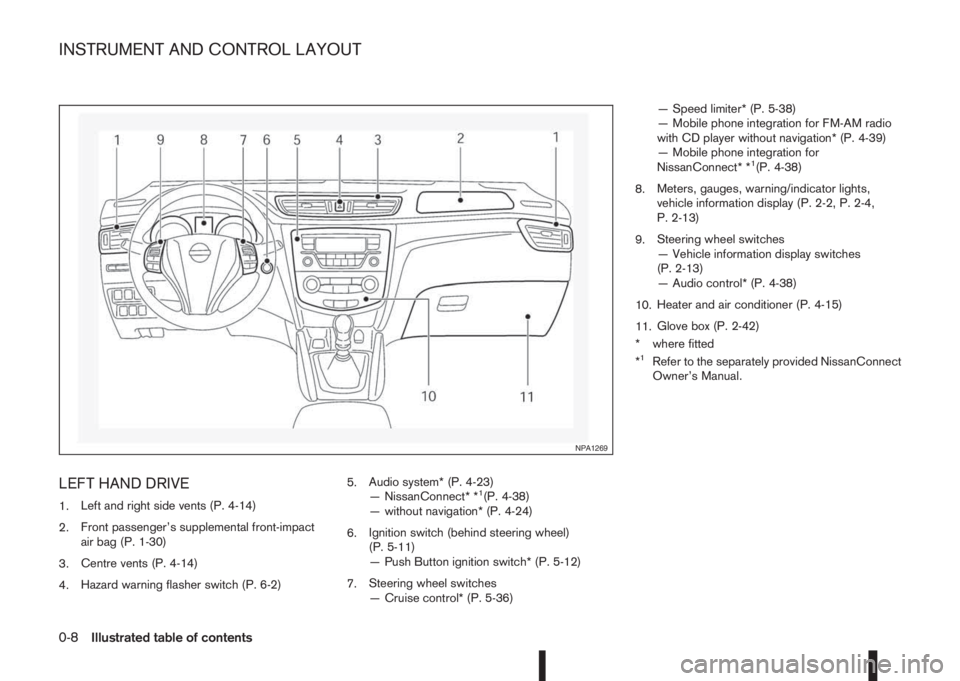
LEFT HAND DRIVE
1.Left and right side vents (P. 4-14)
2.Front passenger’s supplemental front-impact
air bag (P. 1-30)
3.Centre vents (P. 4-14)
4.Hazard warning flasher switch (P. 6-2)5.Audio system* (P. 4-23)
— NissanConnect* *1(P. 4-38)
— without navigation* (P. 4-24)
6.Ignition switch (behind steering wheel)
(P. 5-11)
— Push Button ignition switch* (P. 5-12)
7.Steering wheel switches
— Cruise control* (P. 5-36)— Speed limiter* (P. 5-38)
— Mobile phone integration for FM-AM radio
with CD player without navigation* (P. 4-39)
— Mobile phone integration for
NissanConnect* *
1(P. 4-38)
8.Meters, gauges, warning/indicator lights,
vehicle information display (P. 2-2, P. 2-4,
P. 2-13)
9.Steering wheel switches
— Vehicle information display switches
(P. 2-13)
— Audio control* (P. 4-38)
10.Heater and air conditioner (P. 4-15)
11.Glove box (P. 2-42)
* where fitted
*
1Refer to the separately provided NissanConnect
Owner’s Manual.
NPA1269
INSTRUMENT AND CONTROL LAYOUT
0-8Illustrated table of contents
Page 15 of 338
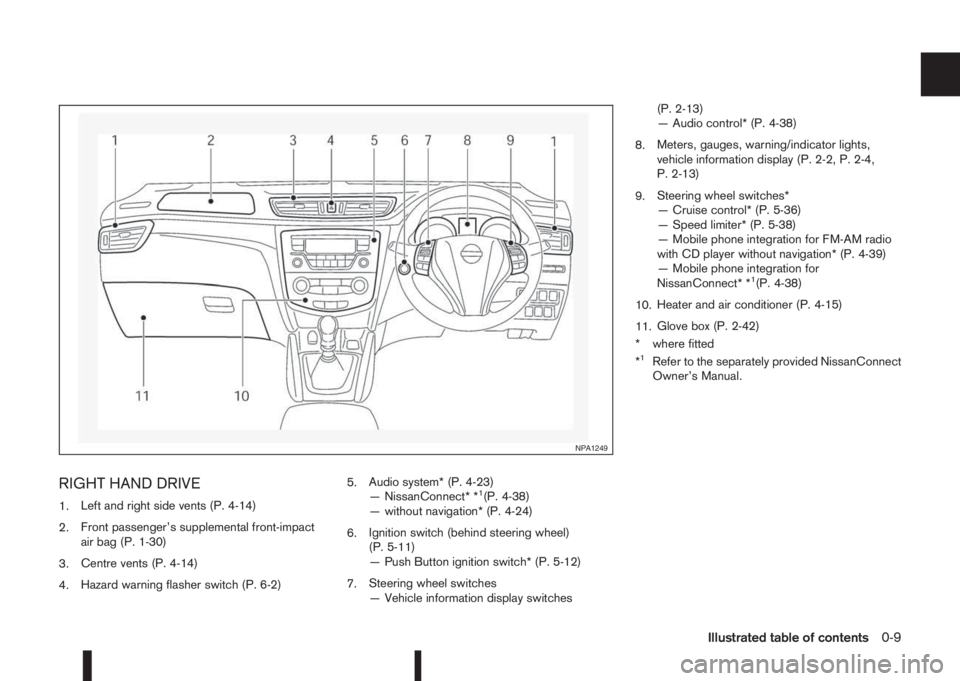
RIGHT HAND DRIVE
1.Left and right side vents (P. 4-14)
2.Front passenger’s supplemental front-impact
air bag (P. 1-30)
3.Centre vents (P. 4-14)
4.Hazard warning flasher switch (P. 6-2)5.Audio system* (P. 4-23)
— NissanConnect* *1(P. 4-38)
— without navigation* (P. 4-24)
6.Ignition switch (behind steering wheel)
(P. 5-11)
— Push Button ignition switch* (P. 5-12)
7.Steering wheel switches
— Vehicle information display switches(P. 2-13)
— Audio control* (P. 4-38)
8.Meters, gauges, warning/indicator lights,
vehicle information display (P. 2-2, P. 2-4,
P. 2-13)
9.Steering wheel switches*
— Cruise control* (P. 5-36)
— Speed limiter* (P. 5-38)
— Mobile phone integration for FM-AM radio
with CD player without navigation* (P. 4-39)
— Mobile phone integration for
NissanConnect* *
1(P. 4-38)
10.Heater and air conditioner (P. 4-15)
11.Glove box (P. 2-42)
* where fitted
*
1Refer to the separately provided NissanConnect
Owner’s Manual.
NPA1249
Illustrated table of contents0-9
Page 16 of 338
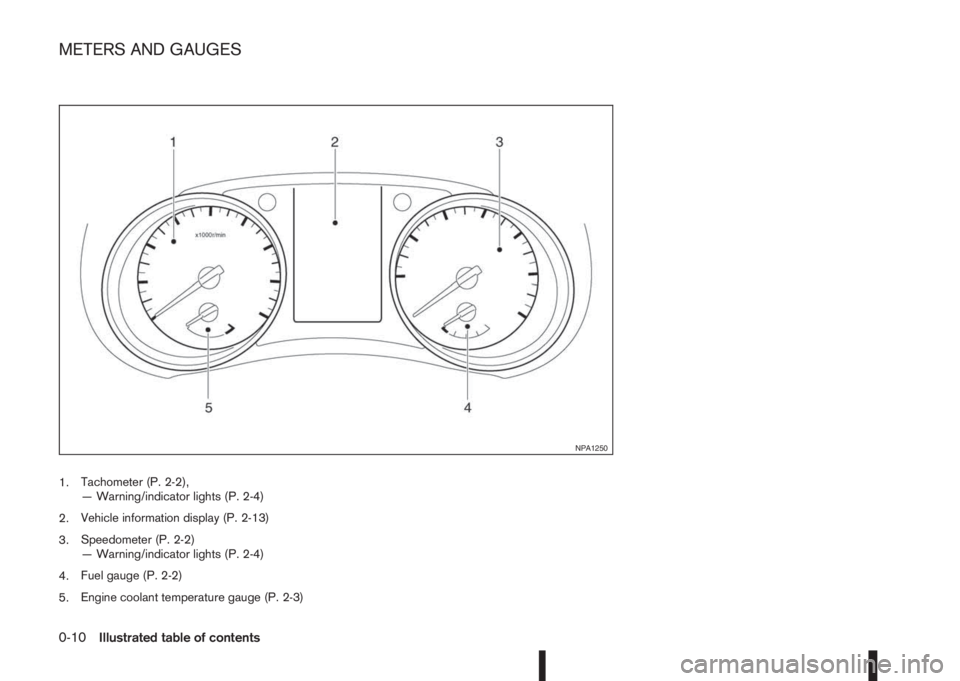
1.Tachometer (P. 2-2),
— Warning/indicator lights (P. 2-4)
2.Vehicle information display (P. 2-13)
3.Speedometer (P. 2-2)
— Warning/indicator lights (P. 2-4)
4.Fuel gauge (P. 2-2)
5.Engine coolant temperature gauge (P. 2-3)
NPA1250
METERS AND GAUGES
0-10Illustrated table of contents
Page 58 of 338
2Instruments and controlsInstruments and controls
Meters and gauges .................................................. 2-2
Speedometer...................................................... 2-2
Fuel gauge ......................................................... 2-2
Tachometer ........................................................ 2-2
Engine coolant temperature gauge ...................... 2-3
Instrument panel brightness control..................... 2-3
Warning/indicator lights and audible reminders ........ 2-4
Checking bulbs .................................................. 2-4
Warning lights .................................................... 2-5
Indicator lights .................................................... 2-10
Audible reminders............................................... 2-12
Vehicle information display ....................................... 2-13
How to use the Vehicle Information Display ......... 2-14
Startup display.................................................... 2-14
Settings .............................................................. 2-14
Vehicle information display warnings and
indicators............................................................ 2-21
Trip computer ..................................................... 2-27
[Clock] and [outside air temperature] .................. 2-29
Traffic sign recognition (where fitted) .................. 2-30
Wiper and washer switch ........................................ 2-32
Windscreen ........................................................ 2-32
Rear window ...................................................... 2-33
ThermaClear Heated Windscreen button ................. 2-34
ThermaClear Heated Windscreen (where
fitted).................................................................. 2-34
Defogger switch ...................................................... 2-35
Rear window defogger ....................................... 2-35
Outside mirror defogger (where fitted) ................ 2-35
Headlight and turn signal switch............................... 2-36Headlight switch ................................................. 2-36
Turn signal switch ............................................... 2-38
Fog light switch ....................................................... 2-38
Front fog light (where fitted)................................ 2-38
Rear fog light (where fitted)................................. 2-39
Headlight aiming control .......................................... 2-39
Headlight aiming control switch (where fitted) ..... 2-39
Automatic aiming control (LED headlights) .......... 2-40
Headlight cleaner (where fitted) ............................... 2-40
Headlight cleaner switch (where fitted) ............... 2-40
Horn ........................................................................ 2-41
Seat heating (where fitted) ....................................... 2-41
Power outlet ............................................................ 2-42
Storage ................................................................... 2-42
Storage trays ...................................................... 2-42
Glove box ........................................................... 2-42
Console box ....................................................... 2-43
Cup holders ....................................................... 2-44
Bottle holder ....................................................... 2-44
Coat hooks ......................................................... 2-44
Map pocket (where fitted) ................................... 2-44
Seat pocket (where fitted)................................... 2-44
Roof rail (where fitted) ........................................ 2-45
Parcel shelf ........................................................ 2-45
Luggage compartment/boot floor (where
fitted).................................................................. 2-47
Luggage hooks ................................................... 2-47
Windows ................................................................. 2-48
Power windows .................................................. 2-48
Fixed glass roof (where fitted) .................................. 2-49
Page 60 of 338
NOTE
For an overview see “Meters and gauges” in the
“0. Illustrated table of contents” section and see
“Instrument and control layout” in the “0. Illus-
trated table of contents” section.
SPEEDOMETER
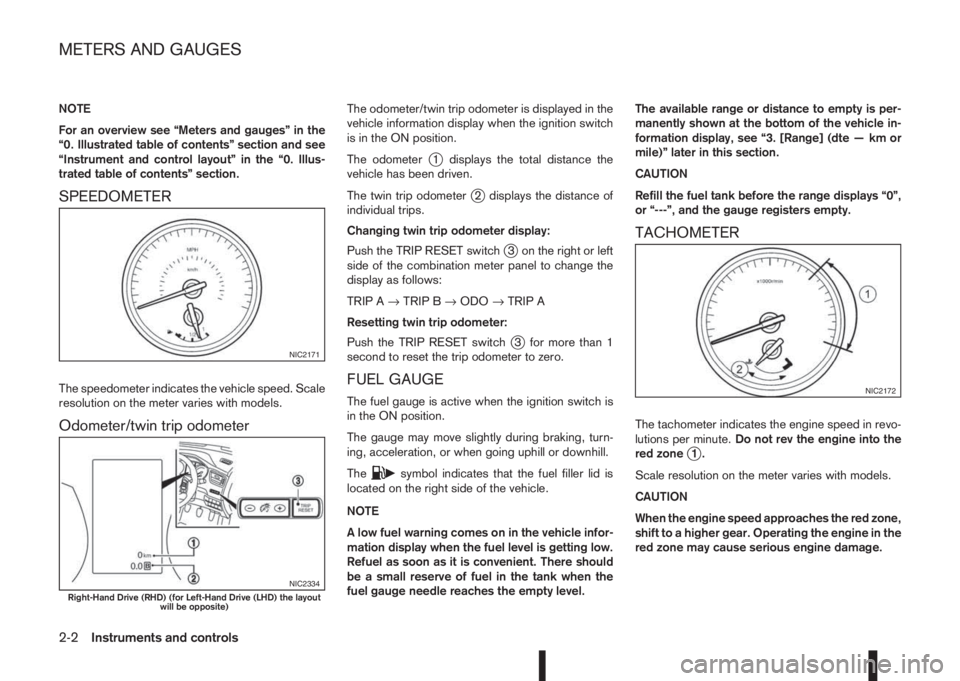
The speedometer indicates the vehicle speed. Scale
resolution on the meter varies with models.
Odometer/twin trip odometer
The odometer/twin trip odometer is displayed in the
vehicle information display when the ignition switch
is in the ON position.
The odometer
j1 displays the total distance the
vehicle has been driven.
The twin trip odometer
j2 displays the distance of
individual trips.
Changing twin trip odometer display:
Push the TRIP RESET switch
j3 on the right or left
side of the combination meter panel to change the
display as follows:
TRIP A→TRIP B→ODO→TRIP A
Resetting twin trip odometer:
Push the TRIP RESET switch
j3 for more than 1
second to reset the trip odometer to zero.
FUEL GAUGE
The fuel gauge is active when the ignition switch is
in the ON position.
The gauge may move slightly during braking, turn-
ing, acceleration, or when going uphill or downhill.
The
csymbol indicates that the fuel filler lid is
located on the right side of the vehicle.
NOTE
A low fuel warning comes on in the vehicle infor-
mation display when the fuel level is getting low.
Refuel as soon as it is convenient. There should
be a small reserve of fuel in the tank when the
fuel gauge needle reaches the empty level.The available range or distance to empty is per-
manently shown at the bottom of the vehicle in-
formation display, see “3. [Range] (dte — km or
mile)” later in this section.
CAUTION
Refill the fuel tank before the range displays “0”,
or “---”, and the gauge registers empty.
TACHOMETER
The tachometer indicates the engine speed in revo-
lutions per minute.Do not rev the engine into the
red zone
j1.
Scale resolution on the meter varies with models.
CAUTION
When the engine speed approaches the red zone,
shift to a higher gear. Operating the engine in the
red zone may cause serious engine damage.
NIC2171
NIC2334Right-Hand Drive (RHD) (for Left-Hand Drive (LHD) the layout
will be opposite)
NIC2172
METERS AND GAUGES
2-2Instruments and controls
Page 78 of 338
![NISSAN QASHQAI 2015 Owner´s Manual [Calibrate]:
The tyre pressure is affected by the temperature of
the tyre; the tyre temperature increases when the
vehicle is driven. The TPMS system uses tempera-
ture sensors in the tyres to compens](/img/5/40325/w960_40325-77.png "NISSAN QASHQAI 2015 Owner´s Manual [Calibrate]:
The tyre pressure is affected by the temperature of
the tyre; the tyre temperature increases when the
vehicle is driven. The TPMS system uses tempera-
ture sensors in the tyres to compens")
[Calibrate]:
The tyre pressure is affected by the temperature of
the tyre; the tyre temperature increases when the
vehicle is driven. The TPMS system uses tempera-
ture sensors in the tyres to compensate for changes
in temperature in order to prevent false TPMS warn-
ings.
The [CALIBRATE] function resets the previously
stored temperature value. It is recommended that
this function is performed after the tyre pressures
are adjusted.
See “Tyre Pressure Monitoring System (TPMS)” in
the “5. Starting and driving” section
Use the
orand the ENTER buttons to start or
cancel the calibration process. While the calibration
process is active, the message: [Resetting tyre pres-
sure system] will be displayed.
[Units]
•[Distance/Fuel]
•[Tyre pressures]
•[Temperature]
[Distance/Fuel]:
The unit for the distance and fuel consumption that
displays in the vehicle information display can be
changed to:
•miles, MPG
•km, km/l
•km, l/100kmUse the
orand the ENTER buttons to select
and change the unit.
[Tyre pressures]:
The unit for tyre pressure that displays in the vehicle
information display can be changed to:
•Kgf/cm2
•kPa
•bar
•psi
Use the
orand the ENTER buttons to select
and change the unit.
[Temperature]:
The temperature that displays in the vehicle informa-
tion display can be changed from:
•°C (Celsius)
•°F (Fahrenheit)
Use the ENTER button to toggle choices.
[Language]
The [language] of the vehicle information display
can be changed to:
•[English]
•[French]
•[German]
•[Italian]
•[Portuguese]
•[Dutch]
•[Spanish]
•[Turkish]
•[Russian]
Use the
orand the ENTER buttons to select
and change the language of the vehicle information
display.
[Factory reset]
The settings in the vehicle information display can
be reset back to the factory default. To reset the
vehicle information display:
1. Use the
orbuttons to select [Settings], and
press the ENTER button
2. Select [Factory Reset] using the
orbuttons
and press the ENTER button
3. Select [YES] to return all settings back to default
by pressing the ENTER button
2-20Instruments and controls
Page 79 of 338
VEHICLE INFORMATION DISPLAY WARNINGS AND INDICATORS
NIC2331
Instruments and controls2-21
Page 80 of 338
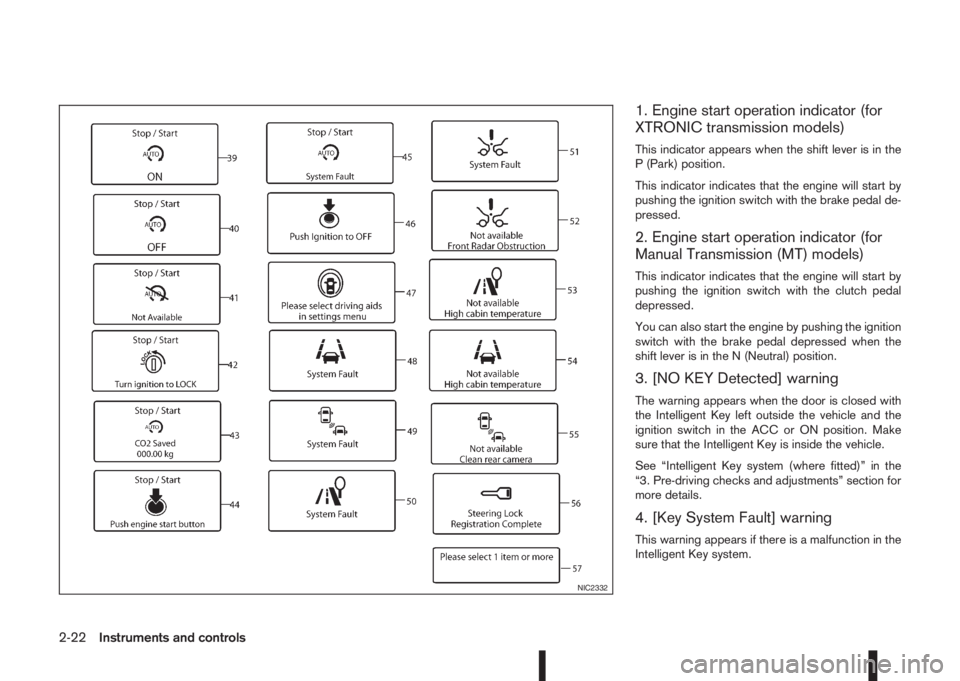
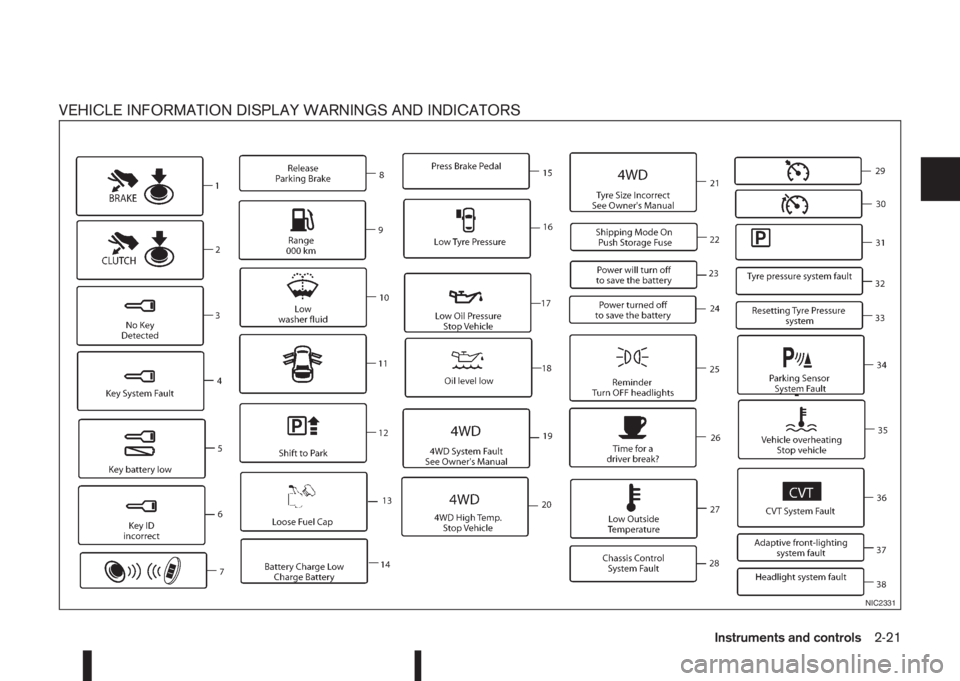
1. Engine start operation indicator (for
XTRONIC transmission models)
This indicator appears when the shift lever is in the
P (Park) position.
This indicator indicates that the engine will start by
pushing the ignition switch with the brake pedal de-
pressed.
2. Engine start operation indicator (for
Manual Transmission (MT) models)
This indicator indicates that the engine will start by
pushing the ignition switch with the clutch pedal
depressed.
You can also start the engine by pushing the ignition
switch with the brake pedal depressed when the
shift lever is in the N (Neutral) position.
3. [NO KEY Detected] warning
The warning appears when the door is closed with
the Intelligent Key left outside the vehicle and the
ignition switch in the ACC or ON position. Make
sure that the Intelligent Key is inside the vehicle.
See “Intelligent Key system (where fitted)” in the
“3. Pre-driving checks and adjustments” section for
more details.
4. [Key System Fault] warning
This warning appears if there is a malfunction in the
Intelligent Key system.
NIC2332
2-22Instruments and controls