Do it yourself NISSAN QASHQAI 2016 Owner´s Manual
[x] Cancel search | Manufacturer: NISSAN, Model Year: 2016, Model line: QASHQAI, Model: NISSAN QASHQAI 2016Pages: 338, PDF Size: 4.87 MB
Page 82 of 338
![NISSAN QASHQAI 2016 Owner´s Manual 16. [Low Tyre Pressure] warning
This warning ([Low Tyre Pressure] and a vehicle
icon - where fitted) appears when the low tyre pres-
sure warning light in the meter illuminates and low
tyre pressure i](/img/5/40324/w960_40324-81.png "NISSAN QASHQAI 2016 Owner´s Manual 16. [Low Tyre Pressure] warning
This warning ([Low Tyre Pressure] and a vehicle
icon - where fitted) appears when the low tyre pres-
sure warning light in the meter illuminates and low
tyre pressure i")
16. [Low Tyre Pressure] warning
This warning ([Low Tyre Pressure] and a vehicle
icon - where fitted) appears when the low tyre pres-
sure warning light in the meter illuminates and low
tyre pressure is detected. The warning appears each
time the ignition switch is placed in the ON position
as long as the low tyre pressure warning light re-
mains illuminated. If this warning appears, stop the
vehicle and adjust the pressure to the recommended
COLD tyre pressure shown on the tyre placard.
(See “Low tyre pressure warning light (where fitted)”
earlier in this section and “Tyre Pressure Monitoring
System (TPMS)” in the “5. Starting and driving” sec-
tion.)
17. [Low oil pressure stop vehicle]
warning
This warning appears in message area of the ve-
hicle information display if low oil pressure is de-
tected. This gauge is not designed to indicate low
oil level. The low oil pressure warning is not de-
signed to indicate a low oil level. Use the dipstick to
check the oil level. See “Engine oil” in the “8. Main-
tenance and do-it-yourself” section.)
CAUTION
The oil level should be checked regularly using
the engine oil dipstick. Operating with an insuffi-
cient amount of oil can damage the engine and
such damage is not covered by the warranty.
18. [Oil Level Low] warning
This warning appears in message area of the ve-
hicle information display if the oil level is not suffi-
cient for driving. Park the vehicle at a safe location
as soon as possible and use the dipstick to check
the oil level. See “Engine oil” in the “8. Maintenance
and do-it-yourself” section If the oil level is not suf-
ficient for driving, top up the engine oil with the rec-
ommended engine oil. “Engine oil” in the “8. Main-
tenance and do-it-yourself” section.)
CAUTION
The oil level should be checked regularly using
the engine oil dipstick. Operating with an insuffi-
cient amount of oil can damage the engine and
such damage is not covered by the warranty.
19. [4WD System Fault] warning
This warning appears when the four wheel drive
(4WD) system is not functioning properly while the
engine is running.
20. [4WD high temp. stop vehicle]
warning
This warning may appear while trying to free a stuck
vehicle due to increased oil temperature. The driv-
ing mode may change to Two-Wheel Drive (2WD).
If this warning is displayed, stop the vehicle with the
engine idling, as soon as it is safe to do so. Then if
the warning turns off, you can continue driving.
21. [4WD tyre size incorrect] warning
This warning may appear if there is a large differ-
ence between the diameters of the front and rear
wheels and tyres. Pull off the road in a safe area,
with the engine idling. Check that all the tyre sizes
are the same, that tyre pressures are correct and
that the tyres are not excessively worn.
22. [Shipping mode on push storage
fuse] warning
This warning may appear if the extended storage
fuse switch is not pushed in (switched on). When
this warning appears, push in (switch on) the ex-
tended storage fuse switch to turn off the warning.
For more information, see “Fuses” in the “8. Main-
tenance and do-it-yourself” section.
23. [Power will turn off to save the
battery] warning
This warning appears after a period of time if the
shift lever has not moved from the P (Park) position
while the ignition is in the ON position for a certain
period of time.
24. [Power turned off to save the
battery] warning
This warning appears after the ignition switch is au-
tomatically turned OFF to save the battery.
2-24Instruments and controls
Page 98 of 338
lowered using the switch located on the driver’s
side of the instrument panel, next to the steering
wheel.
The higher the number designated on the switch,
the lower the axis.
When travelling with no heavy load on a flat road,
select position 0.
AUTOMATIC AIMING CONTROL (LED
headlights)
Vehicles with LED headlights are equipped with an
automatic levelling system. The headlight axis is con-
trolled automatically.
NISSAN recommends consulting local regulations
on the use of lights.To clean the headlights, pull the windscreen washer
switch towards you while the headlight switch is in
the
position and the ignition switch is in the ON
position.
NOTE
The headlight cleaner will automatically operate
every fifth operation of the wiper and washer
switch.
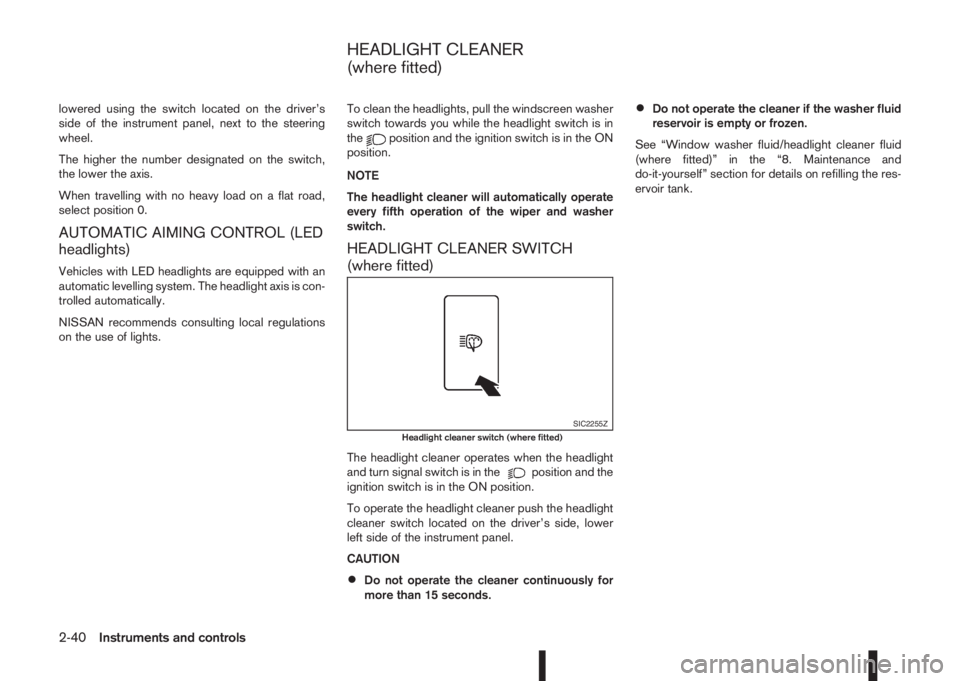
HEADLIGHT CLEANER SWITCH
(where fitted)
The headlight cleaner operates when the headlight
and turn signal switch is in theposition and the
ignition switch is in the ON position.
To operate the headlight cleaner push the headlight
cleaner switch located on the driver’s side, lower
left side of the instrument panel.
CAUTION
•Do not operate the cleaner continuously for
more than 15 seconds.
•Do not operate the cleaner if the washer fluid
reservoir is empty or frozen.
See “Window washer fluid/headlight cleaner fluid
(where fitted)” in the “8. Maintenance and
do-it-yourself” section for details on refilling the res-
ervoir tank.
SIC2255ZHeadlight cleaner switch (where fitted)
HEADLIGHT CLEANER
(where fitted)
2-40Instruments and controls
Page 115 of 338
For information regarding the replacement of a bat-
tery, see “Integrated keyfob/Intelligent Key battery
replacement” in the “8. Maintenance and
do-it-yourself” section.
SWITCHING FROM CONVENIENCE
MODE TO ANTI-HIJACK MODE
(where fitted)
Selective unlock or “Anti-hijack” mode (where fit-
ted) allows the remote unlocking of only the driver’s
door to prevent an attacker from entering the vehicle
via an unlocked passenger door.
As default, the unlock mode will be set to “Conve-
nience” mode (all doors will unlock). Follow the in-
structions in “Vehicle information display” later in
this section.
USING THE REMOTE KEYLESS
ENTRY SYSTEM
WARNING
Super Lock system equipped models:
Failure to follow the precautions below may lead
to hazardous situations. Make sure the Super
Lock system activation is always conducted
safely.
•When the vehicle is occupied, never lock the
doors with the integrated keyfob. Doing so
will trap the occupants, since the Super Lock
system prevents the doors from being opened
from the inside of the vehicle.
•Only operate the integrated keyfob “LOCK”
button when there is a clear view of the ve-hicle. This is to prevent anybody from being
trapped inside the vehicle through the Super
Lock system activation.
For further details on the Super Lock system see
“Door locks” later in this section.
LOCKING THE DOORS
CAUTION
Before operating the keyfob remote control:
•Remove the ignition key or Intelligent Key
from the vehicle and close all windows.
•Check that the driver’s door is securely
closed.
Push the “LOCK” button
on the integrated key-
fob.
– All the doors lock.
– The direction indicators flash once.
If the “LOCK” button
is pushed with all the doors
locked, the direction indicators will flash once to
remind you that the doors are already locked.
UNLOCKING THE DOORS
When you first receive the vehicle, the door unlock
mode is set to unlock all the doors with one push of
the “UNLOCK”
button.
Convenience mode
Unlock all doors, pressing thebutton once.
Setting the convenience mode is done using the
[Settings] menu in the vehicle information display(Select the [Unlocking] menu key).
Also see “Vehicle information display” in the “2. In-
struments and controls” section.
ANTI-HIJACK MODE (where fitted)
Unlock the driver’s door only, pressing thebutton once.
Press thebutton twice to open all doors.
Setting the Anti-hijack mode is done using the [Set-
tings] menu in the vehicle information display (Se-
lect the [Unlocking] menu key). Set [Selective Un-
lock] to off.
For more information see “Vehicle information
display” in the “2. Instruments and controls” sec-
tion.
Auto-relock (where fitted):
An auto-relock function will a short period after a full
or partial unlock, if no further user action is taken.
The auto-relock will be cancelled if any door is
opened or the key is inserted into the ignition.
KEYFOB OPERATION FAILURE
The keyfob may not work properly if:
•The keyfob battery is low.
See “Integrated keyfob/Intelligent Key battery
replacement” in the “8. Maintenance and
do-it-yourself” section for keyfob battery replace-
ment instructions and the required battery type.
Pre-driving checks and adjustments3-5
Page 178 of 338
During the first 1,600 km (1,000 miles), follow these
recommendations for the future reliability and
economy of your new vehicle. Failure to follow the
recommendations may result in shortened engine
life and reduced engine performance.
•Avoid driving for long periods at a constant
speed, either fast or slow.
•Do not accelerate at full throttle in any gear.
•Avoid quick starts.
•Avoid hard braking as much as possible.
•Do not tow a trailer during the first 800 km (500
miles).
NOTE
Models with K9K diesel engine will achieve top
performance only after approximately 5,000 km
(3,000 miles).
WARNING
The driving characteristics of your vehicle can be
changed remarkably by any additional load and
its distribution as well as by adding optional
equipment (trailer couplings, roof racks, etc.).
Your driving style and speed have to be adjusted
accordingly. Especially when carrying heavy
loads, your speed must be reduced adequately.
•Make sure the area around the vehicle is free of
obstacles.
•Check fluid levels such as engine oil, coolant,
brake and clutch fluid, and window washer fluid
as frequently as possible, at least whenever you
refuel.
•Visually inspect tyres for their appearance and
condition. Also check the tyre pressure for
proper inflation.
•Maintenance items in the “8. Maintenance and
do-it-yourself” section should be checked peri-
odically.
•Check that all windows and light lenses are
clean.
•Check that all doors are closed.
•Position the seat and adjust the head restraints.
•Adjust the inside and outside mirrors.
•Fasten your seat belt and ask all passengers to
do likewise.
•Check the operation of the warning/indicator
lights when the ignition switch is turned to the
ON position.
•Do not place hard or heavy objects on the dash-
board or rear parcel shelf in order to prevent
injury in the event of a sudden stop.
RUNNING-IN SCHEDULE BEFORE STARTING THE ENGINE
5-2Starting and driving
Page 183 of 338
METER INFORMATION ACTIVATION
At ignition ON. Once the vehicle starts moving the
tyre pressure is monitored.
TPMS SENSOR ID AND POSITION
RECOGNITION
It is recommended that a NISSAN dealer performs
the registration of a new TPMS sensor or sensor
location.
It is also possible to register the sensor yourself fol-
lowing the procedure below:
Procedure:
1. Change tyre position or have new TPMS sensor
fitted.
2. Park with Ignition ON or Engine ON for more
than 20 minutes. You must perform this step be-
fore driving.
3. Drive the vehicle for several minutes between 25
km/h (16 MPH) and 100 km/h (64 MPH). The
TPMS sensor ID and position will automatically
be detected.
NOTE
The TPMS might not synchronise if one or more
of the following conditions apply:
•Bad road conditions
•The TPMS unit does not receive correct data
from tyre pressure sensors
•Driving below 25 km/h (16 MPH)
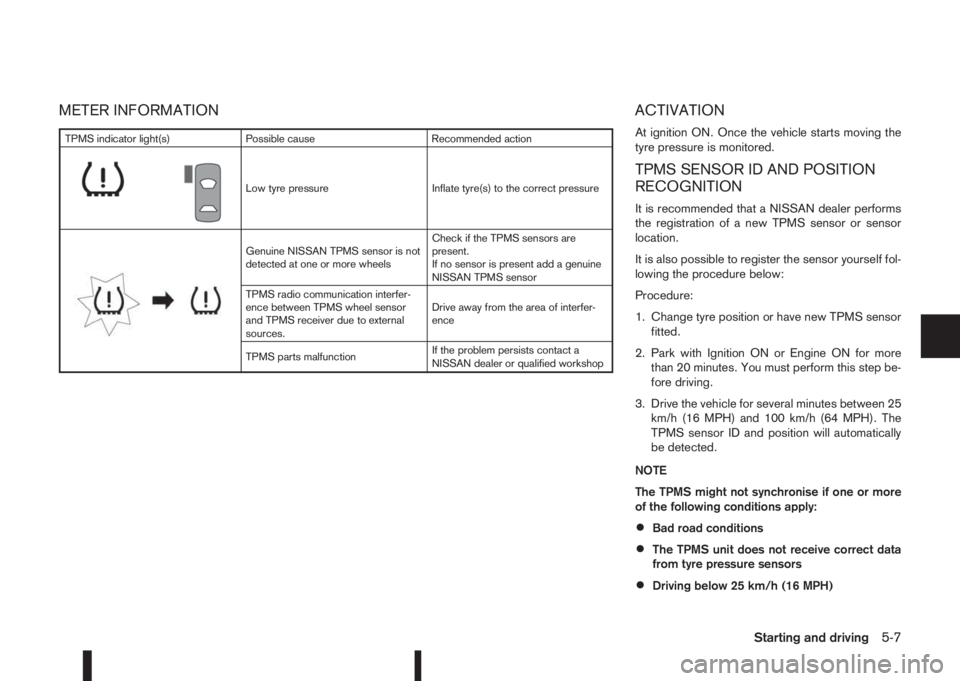
TPMS indicator light(s) Possible cause Recommended action
m
Low tyre pressure Inflate tyre(s) to the correct pressure
m
Genuine NISSAN TPMS sensor is not
detected at one or more wheelsCheck if the TPMS sensors are
present.
If no sensor is present add a genuine
NISSAN TPMS sensor
TPMS radio communication interfer-
ence between TPMS wheel sensor
and TPMS receiver due to external
sources.Drive away from the area of interfer-
ence
TPMS parts malfunctionIf the problem persists contact a
NISSAN dealer or qualified workshop
Starting and driving5-7
Page 191 of 338
After step 4 is performed, when the ignition switch
is pushed without depressing the brake pedal, the
ignition switch position will change to “ACC”.
NOTE
•When the ignition switch is pushed to the
“ACC” or “ON” position or the engine is started
by the above procedures, the Intelligent Key
system warning light may blink in yellow (on
the meter) even if the Intelligent Key is inside
the vehicle. This is not a malfunction. To stop
the warning light from blinking, touch the ig-
nition switch with the Intelligent Key again.
•If the Intelligent Key system warning light in
the meter is blinking in green, replace the bat-
tery as soon as possible. (See “Integrated
keyfob/Intelligent Key battery replacement” in
the “8. Maintenance and do-it-yourself” sec-
tion.)
MODELS WITH INTELLIGENT KEY
SYSTEM
1. Apply the parking brake. For additional informa-
tion, see “Parking brake switch” in the “3. Pre-
driving checks and adjustments” section.
2.Manual transmission models:
Move the shift lever to the N (Neutral) position,
and depress the clutch pedal to the floor while
starting the engine.
XTRONIC transmission (CVT) models:
Move the shift lever to the P (Park) or N (Neutral)
position. (P position is preferred).
The starter is designed to operate only when
the shift lever is in the proper position.
The Intelligent Key (where fitted) must be car-
ried while inside the vehicle when operating
the ignition switch.
3. To start the engine:
•MT models – keep the clutch pedal
depressed and/or depress the brake pedal
then push the ignition switch to the “ON” po-
sition.
•XTRONIC transmission models – depress the
brake pedal then push the ignition switch to
the “ON” position.
NOTE
•To start the engine immediately, push and
release the ignition switch while depress-ing the brake pedal or clutch pedal with
the ignition switch in any position.
•For diesel engine models: In cold condi-
tions there may be a delay for a few sec-
onds before the engine cranks. This is due
to the glow plugs heating to ensure ad-
equate engine starting conditions. The
glow indicator light (
) will illuminate
during this delay, then the engine will start.
4. Immediately release the ignition switch when the
engine starts. If the engine starts, but fails to run,
repeat the above procedures.
NOTE
Petrol engine models:
•If the engine is very hard to start in ex-
tremely cold weather or when restarting,
depress the accelerator pedal a little (ap-
proximately 1/3 of the way to the floor)
and hold it and then crank the engine. Re-
lease the ignition switch and the accelera-
tor pedal when the engine starts.
•If the engine is very hard to start because
it is flooded, depress the accelerator pedal
all the way to the floor and hold it. Crank
the engine for 5-6 seconds. After cranking
the engine, release the accelerator pedal.
Crank the engine with your foot off the ac-
celerator pedal by turning the ignition
switch to START. Release the switch when
the engine starts. If the engine starts, but
fails to run, repeat the above procedure.
STARTING ENGINE
Starting and driving5-15
Page 197 of 338
•If the engine is revving up to a hazardous
speed in manual shift mode, the transmission
may shift up automatically. When the vehicle
speed decreases, the transmission automati-
cally shifts down and shifts to 1st gear before
the vehicle comes to a stop.
Accelerator downshift – In the D (Drive)
and Ds (Drive Sport) position
For rapid passing or driving uphill, fully depress the
accelerator pedal to the floor. This shifts the trans-
mission down into a lower gear, depending on the
vehicle speed.
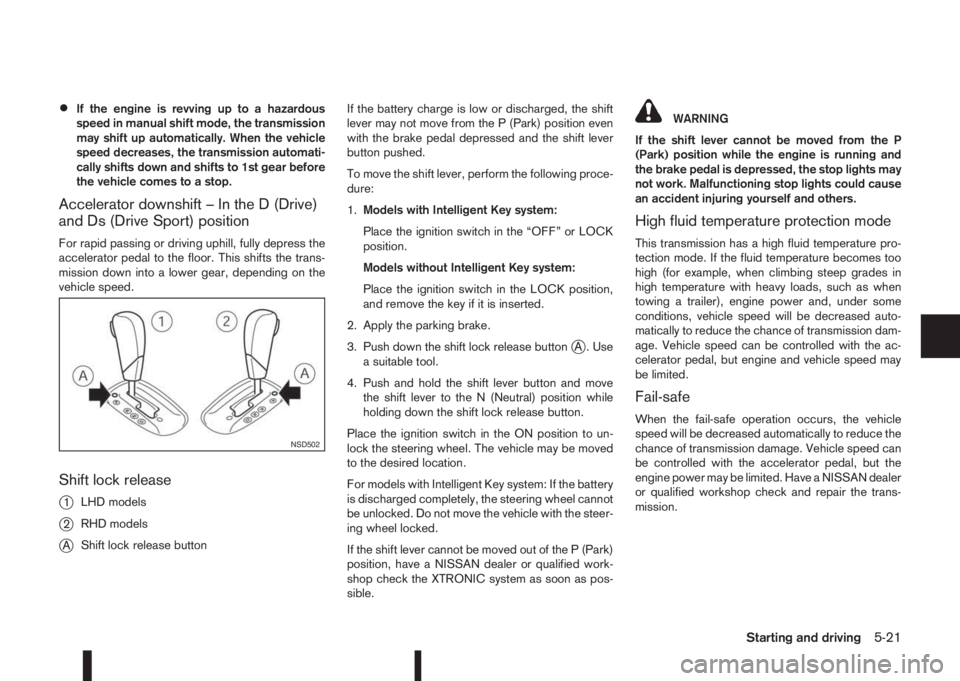
Shift lock release
j
1LHD models
j2RHD models
jAShift lock release buttonIf the battery charge is low or discharged, the shift
lever may not move from the P (Park) position even
with the brake pedal depressed and the shift lever
button pushed.
To move the shift lever, perform the following proce-
dure:
1.Models with Intelligent Key system:
Place the ignition switch in the “OFF” or LOCK
position.
Models without Intelligent Key system:
Place the ignition switch in the LOCK position,
and remove the key if it is inserted.
2. Apply the parking brake.
3. Push down the shift lock release button
jA . Use
a suitable tool.
4. Push and hold the shift lever button and move
the shift lever to the N (Neutral) position while
holding down the shift lock release button.
Place the ignition switch in the ON position to un-
lock the steering wheel. The vehicle may be moved
to the desired location.
For models with Intelligent Key system: If the battery
is discharged completely, the steering wheel cannot
be unlocked. Do not move the vehicle with the steer-
ing wheel locked.
If the shift lever cannot be moved out of the P (Park)
position, have a NISSAN dealer or qualified work-
shop check the XTRONIC system as soon as pos-
sible.
WARNING
If the shift lever cannot be moved from the P
(Park) position while the engine is running and
the brake pedal is depressed, the stop lights may
not work. Malfunctioning stop lights could cause
an accident injuring yourself and others.
High fluid temperature protection mode
This transmission has a high fluid temperature pro-
tection mode. If the fluid temperature becomes too
high (for example, when climbing steep grades in
high temperature with heavy loads, such as when
towing a trailer), engine power and, under some
conditions, vehicle speed will be decreased auto-
matically to reduce the chance of transmission dam-
age. Vehicle speed can be controlled with the ac-
celerator pedal, but engine and vehicle speed may
be limited.
Fail-safe
When the fail-safe operation occurs, the vehicle
speed will be decreased automatically to reduce the
chance of transmission damage. Vehicle speed can
be controlled with the accelerator pedal, but the
engine power may be limited. Have a NISSAN dealer
or qualified workshop check and repair the trans-
mission.
NSD502
Starting and driving5-21
Page 235 of 338
Driving downhill
The engine braking action is effective for controlling
the vehicle while descending hills.
The shift lever (MT models) should be placed in a
gear position low enough to obtain sufficient engine
braking.
For XTRONIC transmission models, a low gear po-
sition in the manual shift mode, low enough to obtain
sufficient engine braking, should be selected.WARNING
•The Anti-lock Braking System (ABS) is a so-
phisticated device, but it cannot prevent acci-
dents resulting from careless or dangerous
driving techniques. It can help maintain ve-
hicle control during braking on slippery sur-
faces. Remember that stopping distances on
slippery surfaces will be longer than on nor-
mal surfaces even with ABS. Stopping dis-
tances may also be longer on rough, gravel or
snow covered roads, or if you are using snow
chains. Always maintain a safe distance from
the vehicle in front of you. Ultimately, the
driver is responsible for safety.
•Tyre type and condition may also affect brak-
ing effectiveness.
– When replacing tyres, install the specified
size of tyres on all four wheels.
– When installing a spare tyre, make sure
that it is the proper size and type as speci-
fied on the tyre placard. (See “Vehicle
identification” in the “9. Technical
information” section.)
– For detailed information, see “Wheels and
tyres” in the “8. Maintenance and
do-it-yourself” section.
The Anti-lock Braking System (ABS) controls the
brakes so the wheels do not lock during hard brak-
ing or when braking on slippery surfaces. The sys-
tem detects the rotation speed at each wheel and
varies the brake fluid pressure to prevent each wheelfrom locking and sliding. By preventing each wheel
from locking, the system helps the driver maintain
steering control and helps to minimise swerving and
spinning on slippery surfaces.
USING SYSTEM
Depress the brake pedal and hold it down. Depress
the brake pedal with firm steady pressure, but do
not pump the brakes. The ABS will operate to pre-
vent the wheels from locking up. Steer the vehicle to
avoid obstacles.
WARNING
Do not pump the brake pedal. Doing so may re-
sult in increased stopping distances.
SELF-TEST FEATURE
The ABS includes electronic sensors, electric
pumps, hydraulic solenoids and a computer. The
computer has a built-in diagnostic feature that tests
the system each time you start the engine and move
the vehicle at a low speed in forward or reverse.
When the self-test occurs, you may hear a “clunk”
noise and/or feel a pulsation in the brake pedal. This
is normal and does not indicate a malfunction. If the
computer senses a malfunction, it switches the ABS
off and illuminates the ABS warning light on the
instrument panel. The brake system then operates
normally, but without anti-lock assistance.
If the ABS warning light illuminates during the self-
test or while driving, have the vehicle checked by a
NISSAN dealer or qualified workshop.
ANTI-LOCK BRAKING SYSTEM
(ABS)
Starting and driving5-59
Page 242 of 338
•Turn off the ECO mode system when accelera-
tion is required, such as when:
– driving with a heavy load of passengers or
cargo in the vehicle
– driving on a steep uphill slopeWARNING
•Whatever the conditions, drive with caution.
Accelerate and decelerate with great care. If
accelerating or decelerating too fast, the drive
wheels will lose even more traction.
•Allow more stopping distance in cold weather
driving. Braking should be started sooner than
on dry surfaces.
•Keep at a greater distance from the vehicle in
front of you on slippery roads.
•Wet ice (0°C, 32°F and freezing rain), very cold
snow and ice can be slick and very difficult to
drive on. The vehicle will have a lot less trac-
tion or grip under these conditions. Try to
avoid driving on wet ice until the road is salted
or sanded.
•Watch for slippery spots (black ice). These
may appear on an otherwise clear road in
shaded areas. If a patch of ice is seen ahead,
brake before driving on it. Try not to brake
while actually on the ice and avoid any sud-
den steering manoeuvres.
•Do not use cruise control (where fitted) on
slippery roads.
•Snow can trap dangerous exhaust gas under
your vehicle. Keep snow clear of the exhaust
pipe and from around your vehicle.
BATTERY
If the battery is not fully charged during extremely
cold weather conditions, the battery fluid may freeze
and damage the battery. To maintain maximum effi-
ciency, the battery should be checked regularly. For
details, see “Battery” in the “8. Maintenance and
do-it-yourself” section.
ENGINE COOLANT
If the vehicle is to be left outside without anti-freeze,
drain the cooling system. Refill before operating the
vehicle. For details, see “Engine cooling system” in
the “8. Maintenance and do-it-yourself” section.
TYRE EQUIPMENT
1) The SUMMER tyres are of a tread design to pro-
vide superior performance on dry surfaces. How-
ever, the performance of these tyres will be sub-
stantially reduced in snowy and icy conditions. If
you operate your vehicle on snowy or icy roads,
NISSAN recommends the use of MUD & SNOW
or ALL SEASON tyres on all four wheels. Please
consult a NISSAN dealer or qualified workshop
for tyre type, size, speed rating and availability
information.
2) For additional traction on icy roads, studded
tyres may be used. However, some countries,
provinces and states prohibit their use. Check
applicable laws before installing studded tyres.
COLD WEATHER DRIVING
5-66Starting and driving
Page 268 of 338
8Maintenance and do-it-yourselfMaintenance and do-it-yourself
Maintenance requirements ....................................... 8-2
Scheduled maintenance...................................... 8-2
General maintenance .......................................... 8-2
Where to go for service ...................................... 8-2
General maintenance ............................................... 8-2
Explanation of general maintenance items ........... 8-2
Maintenance precautions ......................................... 8-4
Engine compartment ................................................ 8-5
Engine cooling system ............................................. 8-6
Checking engine coolant level............................. 8-6
Changing engine coolant .................................... 8-6
Engine oil................................................................. 8-8
Checking engine oil level .................................... 8-8
Changing engine oil ............................................ 8-9
Changing engine oil filter .................................... 8-10
Protect the environment ...................................... 8-12
Fuel filter (Diesel engine models) ............................. 8-13
Draining water .................................................... 8-13
Bleeding the fuel system ..................................... 8-13
XTRONIC Continuously variable transmission
(CVT) fluid ............................................................... 8-13
Brakes ..................................................................... 8-13
Checking parking brake ...................................... 8-13
Checking brake pedal......................................... 8-13
Brake booster ..................................................... 8-14
Brake and clutch fluid .............................................. 8-14
Window washer fluid/headlight cleaner fluid
(where fitted) ........................................................... 8-15
Battery..................................................................... 8-16
Vehicle battery .................................................... 8-16Jump-starting ...................................................... 8-18
Integrated keyfob/Intelligent Key battery
replacement........................................................ 8-18
Drive belts ............................................................... 8-20
Spark plugs (Petrol engine models).......................... 8-21
Air duct removal....................................................... 8-21
Air cleaner filter........................................................ 8-23
Viscous paper type ............................................. 8-23
Dry paper type (where fitted) .............................. 8-23
Wiper blades ........................................................... 8-24
Cleaning ............................................................. 8-24
Front window wiper replacement ........................ 8-24
Back door window wiper replacement ................ 8-24
Windscreen washer nozzle ................................. 8-25
Fuses ...................................................................... 8-25
Passenger compartment ..................................... 8-25
Engine compartment ........................................... 8-26
Lights ...................................................................... 8-27
Headlights .......................................................... 8-28
Exterior lights ...................................................... 8-29
Interior lights....................................................... 8-29
Light locations .................................................... 8-30
Wheels and tyres ..................................................... 8-33
Tyre inflation pressure......................................... 8-33
Types of tyres ..................................................... 8-33
Snow chains....................................................... 8-34
Tyre rotation ....................................................... 8-34
Tyre wear and damage ....................................... 8-35
Tyre age ............................................................. 8-35
Changing tyres and wheels................................. 8-35