brake NISSAN QASHQAI 2016 Owner´s Manual
[x] Cancel search | Manufacturer: NISSAN, Model Year: 2016, Model line: QASHQAI, Model: NISSAN QASHQAI 2016Pages: 338, PDF Size: 4.87 MB
Page 65 of 338
on the driver side centre pillar, to turn the low
tyre pressure warning light off. If the light still
illuminates while driving after adjusting the
tyre pressure, a tyre may be flat. If you have a
flat tyre, repair it with the emergency tyre
puncture repair kit (where fitted) or replace it
with a spare tyre (where fitted) as soon as
possible.
•After adjusting the tyre pressure, be sure to
reset the TPMS. Unless the resetting is per-
formed, the TPMS will not warn of the low tyre
pressure correctly.
•When a spare tyre is mounted or a wheel is
replaced, the TPMS will not function and the
low tyre pressure warning light will flash for
approximately 1 minute. The light will remain
on after 1 minute. Contact a NISSAN dealer or
qualified workshop as soon as possible for
tyre replacement and/or system resetting.
•Replacing tyres with those not originally speci-
fied by NISSAN could affect the proper opera-
tion of the TPMS.
CAUTION
•The TPMS is not a substitute for the regular
tyre pressure check. Be sure to check the tyre
pressure regularly.
•If the vehicle is being driven at speeds of less
than 25 km/h (16 MPH), the TPMS may not
operate correctly.
•Be sure to install the specified size of tyres to
all four wheels correctly.
Malfunction warning light (red)
(where fitted)
When the ignition switch is turned to the ON posi-
tion, the malfunction warning light illuminates. This
means the system is operational.
See “Malfunction Indicator light (orange)” later in
this section for details of the orange Malfunction
Indicator light.
If the red malfunction warning light comes on steady
while the engine is running, it may indicate an en-
gine control system malfunction.
Have your vehicle inspected by a NISSAN dealer or
qualified workshop. You do not need to have your
vehicle towed to the dealer.
CAUTION
Continued vehicle operation without having the
engine control system checked and repaired as
necessary could lead to poor driveability,
reduced fuel economy and possible damage to
the engine control system, which may affect your
warranty coverage.
Incorrect setting of the engine control system may
lead to non-compliance of local and national emis-
sion laws and regulations.
Master warning light
When the ignition switch is in the ON position, the
master warning light illuminates if any of the follow-
ing are displayed in the vehicle information display
(see “Vehicle information display” later in this sec-
tion):
•No key warning
•Key ID incorrect warning
•Low windscreen washer fluid warning
•Parking brake release warning
•Door/boot open warning
•Low tyre pressure warning
•Four-Wheel Drive (4WD) warning (where fitted)
•Intelligent Key system warning
If the driver assist system warnings (where fitted)
appear in the vehicle information display, the master
warning light also illuminates. See “Blind Spot Warn-
ing (BSW) system (where fitted)” in the “5. Starting
and driving” section, “Lane Departure Warning
(LDW) system (where fitted)” in the “5. Starting and
driving” section, and/or “Forward emergency brak-
ing system (where fitted)” in the “5. Starting and
driving” section.
Instruments and controls2-7
Page 66 of 338
NATS security warning light
This light blinks when the ignition switch is in the
LOCK, “OFF” or Acc position. This function indi-
cates that your vehicle is equipped with the NISSAN
Anti-Theft System (NATS)*.
If NATS is malfunctioning, this light will remain on
while the ignition switch is in the ON position.
For additional information, see “Security system”
later in this section.
* Immobilizer
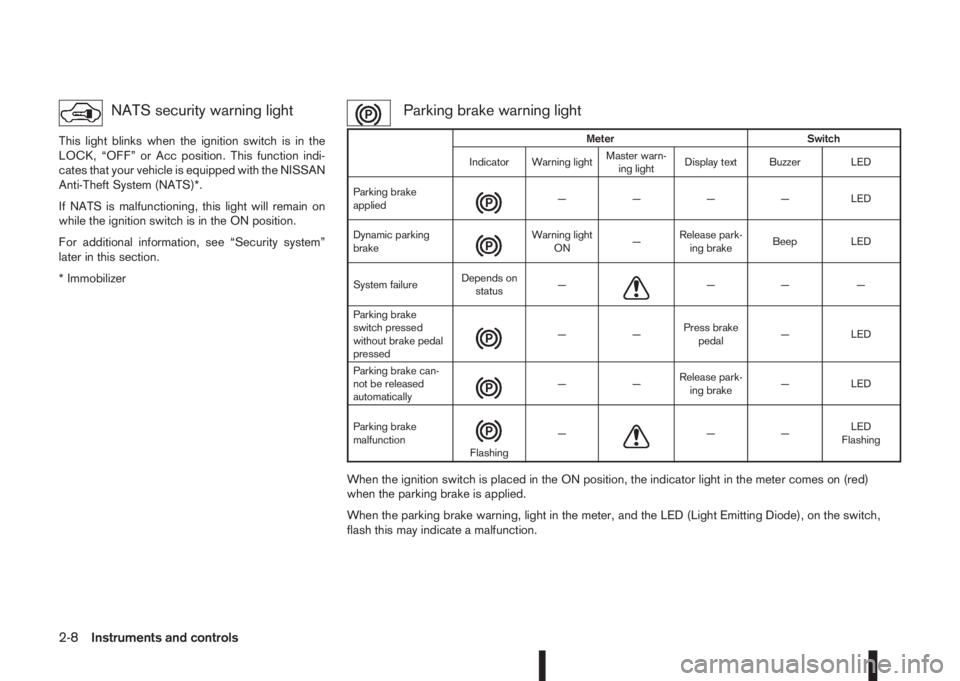
Parking brake warning light
When the ignition switch is placed in the ON position, the indicator light in the meter comes on (red)
when the parking brake is applied.
When the parking brake warning, light in the meter, and the LED (Light Emitting Diode), on the switch,
flash this may indicate a malfunction.
Meter Switch
Indicator Warning lightMaster warn-
ing lightDisplay text Buzzer LED
Parking brake
applied
m— — — — LED
Dynamic parking
brake
m
Warning light
ON—Release park-
ing brakeBeep LED
System failureDepends on
status—
m—— —
Parking brake
switch pressed
without brake pedal
pressed
m——Press brake
pedal— LED
Parking brake can-
not be released
automatically
m——Release park-
ing brake— LED
Parking brake
malfunction
mFlashing—m——LED
Flashing
2-8Instruments and controls
Page 67 of 338
Low brake fluid warning light:
When the ignition switch is in the ON position, the
light warns of a low brake fluid level. If this warning
light illuminates, the Electronic Stability Programme
(ESP) warning light and the brake system warning
light (yellow) also illuminate. If the light illuminates
while the ignition switch is in the ON position with
the parking brake not applied, stop the vehicle and
perform the following steps:
1. Check the brake fluid level. If brake fluid level is
low, add fluid and have the system checked by a
NISSAN dealer or qualified workshop. See
“Brake and clutch fluid” in the “8. Maintenance
and do-it-yourself” section.
2. If the brake fluid level is correct, have the warn-
ing system checked by a NISSAN dealer or quali-
fied workshop.
WARNING
•Your brake system may not be working prop-
erly if the warning light is on. Driving could be
dangerous. If you judge the brake system to
be safe, drive carefully to the nearest service
station for repairs. Otherwise, have your ve-
hicle towed because driving it could be dan-
gerous.
•Pressing the brake pedal when the ignition
switch is not in the ON position and/or when
the brake fluid level is low may increase the
stopping distance and braking will require
greater pedal effort as well as pedal travel.
•If the brake fluid level is below the minimum
or MIN mark on the brake fluid reservoir, do
not drive until the brake system has been
checked at a NISSAN dealer or qualified work-
shop.
For further parking brake operation information see
“Parking brake switch” in the “8. Pre-driving checks
and adjustments” section.
Power steering warning light
WARNING
•If the engine is not running or is turned off
while driving, the power assist for the steer-
ing will not work. Steering will be harder to
operate.
•When the power steering warning light illumi-
nates with the engine running, there will be
no power assist for the steering. You will still
have control of the vehicle but the steering
will be harder to operate. Have the power
steering system checked by a NISSAN dealer
or qualified workshop.
When the ignition switch is placed in the ON posi-
tion, the power steering warning light illuminates.
After starting the engine, the power steering warn-
ing light turns off. This indicates that the electric
power steering system is operational.
If the power steering warning light illuminates while
the engine is running, it may indicate the power
steering system is not functioning properly and mayneed servicing. Have the electric power steering
system checked by a NISSAN dealer or qualified
workshop. See “Electric power steering system” in
the “5. Starting and driving” section.
Seat belt (driver and front
passenger) warning light
The seat belt warning light reminds you to fasten
your seat belts. The light illuminates whenever the
ignition switch is placed in the ON or START posi-
tion and remains illuminated until the driver’s and/or
front passenger’s seat belt is fastened. At the same
time, the chime sounds for about 6 seconds unless
the driver’s and/or front passenger’s seat belt is
securely fastened see “Seat belt reminder chime”
later in this section. The seat belt warning light may
also illuminate if the front passenger’s seat belt is
not fastened when the front passenger’s seat is oc-
cupied. For 7 seconds after the ignition switch is
placed in the ON position, the system does not acti-
vate the warning light for the front passenger. See
“Seat belts” in the “1. Safety — Seats, Seat belts
and Supplemental Restraint System” section for
precautions on seat belt usage.
Supplemental Restraint System
(SRS) air bag warning light
WARNING
If the supplemental air bag warning light is on, it
could mean that the front air bag, side air bag
(where fitted), curtain air bag (where fitted) and/
or pre-tensioner systems will not operate in an
Instruments and controls2-9
Page 70 of 338
•Avoid steep uphill grades.
•If possible, reduce the load being carried or
towed.
The Malfunction Indicator light may stop blinking
and come on steady.
Have the vehicle inspected by a NISSAN dealer or
qualified workshop. You do not need to have your
vehicle towed to the dealer.
CAUTION
Continued vehicle operation without having the
engine control system checked and repaired as
necessary could lead to poor driveability,
reduced fuel economy and possible damage to
the engine control system, which may affect your
warranty coverage.
Rear fog light indicator light
(where fitted)
The light comes on when the rear fog light is
switched on (see “Rear fog light (where fitted)” later
in this section).
Side light and headlight indicator
light
This light comes on when the side light or headlight
position is selected, see “Headlight and turn signal
switch” later in this section for further details.
SLIP indicator light
(where fitted)
The SLIP indicator blinks when the Electronic Sta-
bility Programme (ESP) system is operating, thus
alerting the driver to the fact that the road surface is
slippery and the vehicle is nearing its traction limits.
You may feel or hear the system working, this is nor-
mal.
The light will continue to blink for a few seconds
after the ESP system stops limiting wheel spin.
For additional information see “Electronic Stability
Programme (ESP) OFF indicator light (where
fitted)” earlier in this section and “Electronic Stabil-
ity Programme (ESP) system (where fitted)” in the
“5. Starting and driving” section.
Trailer direction indicator light
The light will light up whenever an additional electri-
cal load is detected by the direction indicator sys-
tem.
For additional information, see “Trailer towing” in
the “5. Starting and driving” section.
Turn signal/hazard indicator
lights
The direction indicator lights will flash when the turn
signal switch or hazard warning flasher switch is
turned on. See “Headlight and turn signal switch”
later in this section and see “Hazard warning flasher
switch” in the “6. In case of emergency” section for
further details.
AUDIBLE REMINDERS
Door open reminder chime
The chime will sound if any door other than the driv-
er’s door is left open and the power door lock switch
is held down.
Intelligent Key models:The external buzzer will
sound if the vehicle is being locked remotely or us-
ing an outside door lock switch and any door is
open.
Parking brake reminder buzzer
A buzzer will sound when driving away if the parking
brake has not been released. Stop the vehicle and
release the parking brake.
Light reminder chime
A chime will sound for 10 seconds if the driver’s
door is opened while the external lights are turned
on and the ignition switch is in the “OFF” or LOCK
position.
See “Headlight and turn signal switch” later in this
section for further details on the headlight operation.
Fog light reminder chime
A chime will sound if the ignition switch is in the
“OFF” or LOCK position and the headlight switch is
in the AUTO position (where fitted) and the fog lights
are left on.
See “Fog light switch” later in this section for further
details.
2-12Instruments and controls
Page 72 of 338
HOW TO USE THE VEHICLE
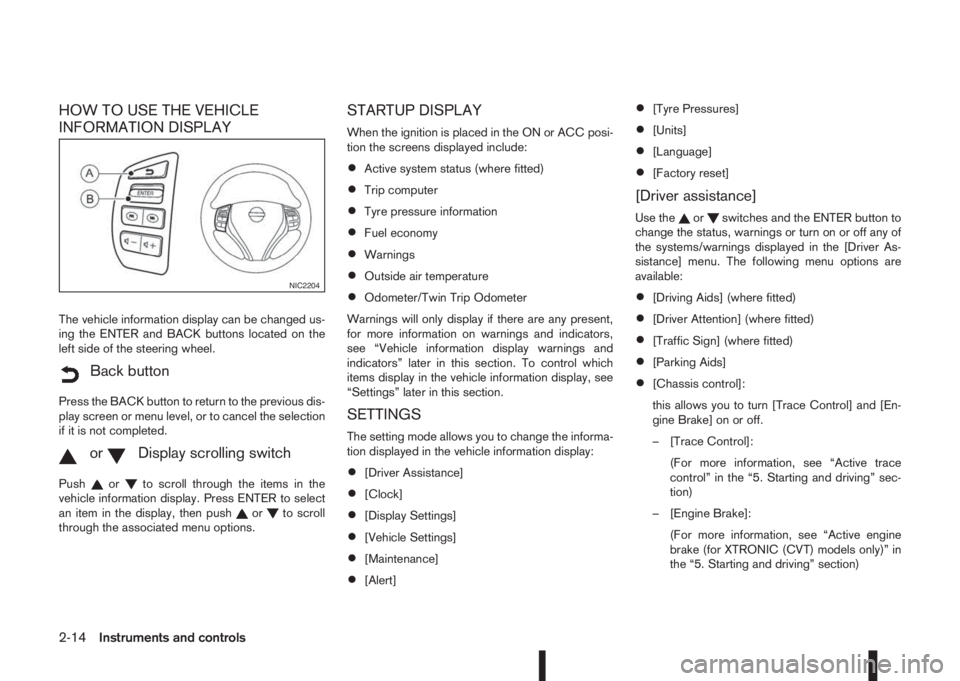
INFORMATION DISPLAY
The vehicle information display can be changed us-
ing the ENTER and BACK buttons located on the
left side of the steering wheel.
mBack button
Press the BACK button to return to the previous dis-
play screen or menu level, or to cancel the selection
if it is not completed.
mormDisplay scrolling switch
Pushorto scroll through the items in the
vehicle information display. Press ENTER to select
an item in the display, then push
orto scroll
through the associated menu options.
STARTUP DISPLAY
When the ignition is placed in the ON or ACC posi-
tion the screens displayed include:
•Active system status (where fitted)
•Trip computer
•Tyre pressure information
•Fuel economy
•Warnings
•Outside air temperature
•Odometer/Twin Trip Odometer
Warnings will only display if there are any present,
for more information on warnings and indicators,
see “Vehicle information display warnings and
indicators” later in this section. To control which
items display in the vehicle information display, see
“Settings” later in this section.
SETTINGS
The setting mode allows you to change the informa-
tion displayed in the vehicle information display:
•[Driver Assistance]
•[Clock]
•[Display Settings]
•[Vehicle Settings]
•[Maintenance]
•[Alert]
•[Tyre Pressures]
•[Units]
•[Language]
•[Factory reset]
[Driver assistance]
Use theorswitches and the ENTER button to
change the status, warnings or turn on or off any of
the systems/warnings displayed in the [Driver As-
sistance] menu. The following menu options are
available:
•[Driving Aids] (where fitted)
•[Driver Attention] (where fitted)
•[Traffic Sign] (where fitted)
•[Parking Aids]
•[Chassis control]:
this allows you to turn [Trace Control] and [En-
gine Brake] on or off.
– [Trace Control]:
(For more information, see “Active trace
control” in the “5. Starting and driving” sec-
tion)
– [Engine Brake]:
(For more information, see “Active engine
brake (for XTRONIC (CVT) models only)” in
the “5. Starting and driving” section)
NIC2204
2-14Instruments and controls
Page 73 of 338
![NISSAN QASHQAI 2016 Owner´s Manual •[Steering effort]: this can be set to [Normal] or
[Sport].
The [Driving Aids] option has a sub-menu, from
which you can choose whether or not to have fur-
ther items displayed. These items are:
•](/img/5/40324/w960_40324-72.png "NISSAN QASHQAI 2016 Owner´s Manual •[Steering effort]: this can be set to [Normal] or
[Sport].
The [Driving Aids] option has a sub-menu, from
which you can choose whether or not to have fur-
ther items displayed. These items are:
•")
•[Steering effort]: this can be set to [Normal] or
[Sport].
The [Driving Aids] option has a sub-menu, from
which you can choose whether or not to have fur-
ther items displayed. These items are:
•[Lane] (Lane Departure Warning system)
•[Blind Spot] Blind Spot Warning system)
•[Emergency Brake] (Forward Emergency Brake
system)
The [Driver Attention] option can be used to activate
or deactivate the Driver Attention Support feature
(where fitted). This system is able to detect whether
the driver is displaying a lack of attention, or is dis-
tracted. It does this by monitoring driving style, and
steering behaviour, and it notes deviations from the
normal pattern. If the system detects that driver at-
tention is decreasing, the system uses an audible
and visual warning to suggest that the driver takes a
break.
[Clock]
For details of how to set the clock, see “Setting the
clock” in the “4. Display screen, heater and air con-
ditioner, and audio system” section or the separate
NissanConnect Owner’s manual.
[Display settings]
Use theorswitches to scroll and the ENTER
button to change the status, warnings or turn on or
off any of the systems/warnings displayed in the
[Display Settings] menu. The following menu op-
tions are available:
•[Contents selection]
•[Body Colour]
•[ECO Mode Settings] (where fitted)
•[Stop/Start]
•[ECO Drive Report]
•[Welcome Effect]
[Contents selection]:
The items that display when the ignition switch is
placed in the ON position can be enabled/disabled.
To change the items that are displayed, use the
orbuttons to scroll and the ENTER button to
select a menu item: The following items (where fit-
ted) are available in the [Meter Settings] menu:
•[Home]
•[Average speed]
•[Trip]
•[Fuel economy]
•[Navigation] (where fitted)
•[Traffic Sign] (where fitted)
•[Audio]
•[Driving aids] (where fitted)
•[Tyre pressures]
•[Driver Attention] (where fitted)
•[Chassis control]
The [Driving Aids] option has a sub-menu, from
which you can choose whether or not to have fur-
ther items displayed. These items are:
•[Lane] (Lane Departure Warning system)
•[Blind Spot] Blind Spot Warning system)
•[Emergency Brake] (Forward Emergency Brak-
ing system)
[Body Colour]:
The colour of the vehicle that displays in the vehicle
information display when the ignition switch is
placed in the ON position can be changed.
[ECO mode settings] (where fitted):
You can choose which of the ECO mode features
you wish to see displayed. These include the ECO
indicator ([ECO glow]), and from the Display sub-
menu, the [Pedal Guide] and Instant fuel economy
([Fuel econ.]) display.
[Stop/Start]:
The [Stop/Start] system mode shows the CO2 sav-
ings and the engine stop time. (See “Stop/Start Sys-
tem (where fitted)” in the “5. Starting and driving”
section.)
Instruments and controls2-15
Page 80 of 338
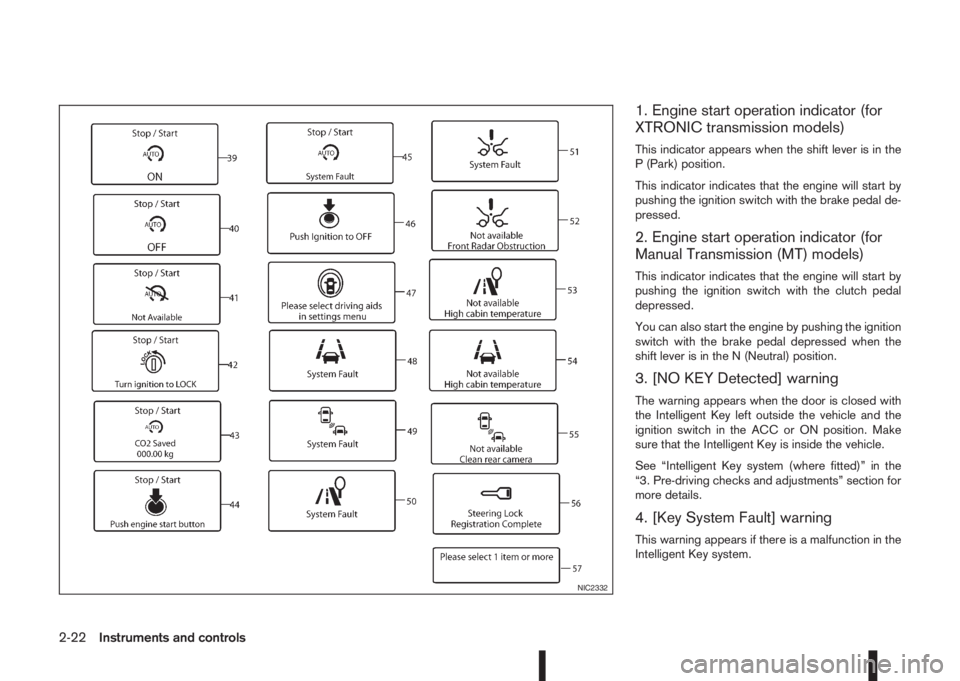
1. Engine start operation indicator (for
XTRONIC transmission models)
This indicator appears when the shift lever is in the
P (Park) position.
This indicator indicates that the engine will start by
pushing the ignition switch with the brake pedal de-
pressed.
2. Engine start operation indicator (for
Manual Transmission (MT) models)
This indicator indicates that the engine will start by
pushing the ignition switch with the clutch pedal
depressed.
You can also start the engine by pushing the ignition
switch with the brake pedal depressed when the
shift lever is in the N (Neutral) position.
3. [NO KEY Detected] warning
The warning appears when the door is closed with
the Intelligent Key left outside the vehicle and the
ignition switch in the ACC or ON position. Make
sure that the Intelligent Key is inside the vehicle.
See “Intelligent Key system (where fitted)” in the
“3. Pre-driving checks and adjustments” section for
more details.
4. [Key System Fault] warning
This warning appears if there is a malfunction in the
Intelligent Key system.
NIC2332
2-22Instruments and controls
Page 81 of 338
If this warning appears while the engine is stopped,
the engine cannot be started. If this warning ap-
pears while the engine is running, the vehicle can be
driven. However, contact a NISSAN dealer or quali-
fied workshop for repair as soon as possible.
5. [Key battery low] indicator
This indicator appears when the Intelligent Key bat-
tery is running out of power.
If this indicator appears, replace the battery with a
new one. (See “Integrated keyfob/Intelligent Key
battery replacement” in the “8. Maintenance and
do-it-yourself” section.)
6. [Key ID Incorrect] warning
This warning appears when the ignition switch is
pushed from the LOCK position and the Intelligent
Key cannot be recognised by the system. You can-
not start the engine with an unregistered key. Use
the registered Intelligent Key. See “Intelligent Key
system (where fitted)” in the “3. Pre-driving checks
and adjustments” section.
7. Engine start operation for Intelligent
Key system indicator
This indicator appears when the Intelligent Key bat-
tery is running out of power and the Intelligent Key
system and vehicle are not communicating normally.
If this indicator appears, touch the ignition switch
with the Intelligent Key while depressing the brake
pedal. (See “Push-button ignition switch (where
fitted)” in the “5. Starting and driving” section.)
8. [Release parking brake] warning
This warning appears when the vehicle speed is
above 7 km/h (4 MPH) and the parking brake is
applied. Stop the vehicle and release the parking
brake. This warning may a occur if the driver has
attempted to release the parking brake automati-
cally, but did not succeed.
9. Low fuel ([Range]) warning
This warning appears when the fuel level in the tank
is getting low. Refuel as soon as it is convenient,
preferably before the fuel gauge reaches the empty
(0) position.
There is a small reserve of fuel remaining in the
tank when the fuel gauge reaches the empty (0)
position.
10. [Low washer fluid] warning
This warning appears when the washer tank fluid is
at a low level. Add washer fluid as necessary. (See
“Window washer fluid/headlight cleaner fluid (where
fitted)” in the “8. Maintenance and do-it-yourself”
section.)
11. Door/boot open warning
This warning appears if any of the doors and/or the
boot lid are open or not closed securely. The vehicle
icon indicates which door or whether the boot lid is
open on the display.
12. [SHIFT to Park] warning (XTRONIC
transmission models)
This warning appears when the ignition switch is
pushed to stop the engine with the shift lever in any
position except the P (Park) position.
If this warning appears, move the shift lever to the P
(Park) position or place the ignition switch in the ON
position.
An inside warning chime will also sound. (See
“Push-button ignition switch (where fitted)” in the
“5. Starting and driving” section.)
13. [Loose Fuel Cap] warning
This warning appears when the fuel-filler cap is not
tightened correctly after the vehicle has been refu-
elled. See “Fuel filler lid” in the “3. Pre-driving
checks and adjustments” section section of this
manual.
14. [Battery Voltage Low Charge
Battery] warning
This warning appears when the battery voltage is
low and the battery needs to be charged.
15. [Press Brake Pedal] warning
This warning appears to remind you that you must
press the brake pedal before you can release the
parking brake. This warning may also be displayed
if the parking brake is activated, but the vehicle is
still rolling back.
Instruments and controls2-23
Page 87 of 338
For more details, see “Blind Spot Warning (BSW)
system (where fitted)” in the “5. Starting and driving”
section, “Lane Departure Warning (LDW) system
(where fitted)” in the “5. Starting and driving” sec-
tion, and/or “Forward emergency braking system
(where fitted)” in the “5. Starting and driving” sec-
tion.
8. [Tyre pressures] (where fitted)
The tyre pressure mode shows the pressure of all
four tyres. The displayed values are only available
while the vehicle is being driven.
When the [Low Tyre Pressure] warning appears,
the display can be switched to the tyre pressure
mode by pushing the ENTER switch to reveal addi-
tional details on the displayed warning.
9. [Chassis control]
When either the Active Trace Control (where fitted),
Active Engine Brake (where fitted), Hill start Assist
(where fitted) or the Active Ride Control system is
operated, it shows the operating condition. See
“Chassis control” in the “5. Starting and driving”
section and “Hill Start Assist (HSA) system” in the
“5. Starting and driving” section for more details.
10. [Stop/Start] system (where fitted)
The Stop/Start system mode shows the CO2 sav-
ings and the engine stop time. (See “Stop/Start Sys-
tem (where fitted)” in the “5. Starting and driving”
section.)[Trip CO2 saving] and engine stop time:
The trip CO2 saving and engine stop time mode
shows the CO2 saving and engine stop time since
the last reset.
The CO2 saving and engine stop time can be reset
by pushing the ENTER switch for longer than 1 sec-
ond.
[Total CO2 saving] and engine stop time:
The total CO2 saving and engine stop time mode
shows:
•The estimated CO2 exhaust emissions
prevented.
•The engine stop time that the engine has been
stopped by the Stop/Start System.
NOTE
The Total CO2 saving and engine stop time val-
ues cannot be reset and show accumulated
Stop/Start System information since the vehicle
was built.
11. Warning check
The current warnings are displayed. If no warning is
present, “No Warnings” is displayed.
[CLOCK] AND [OUTSIDE AIR
TEMPERATURE]
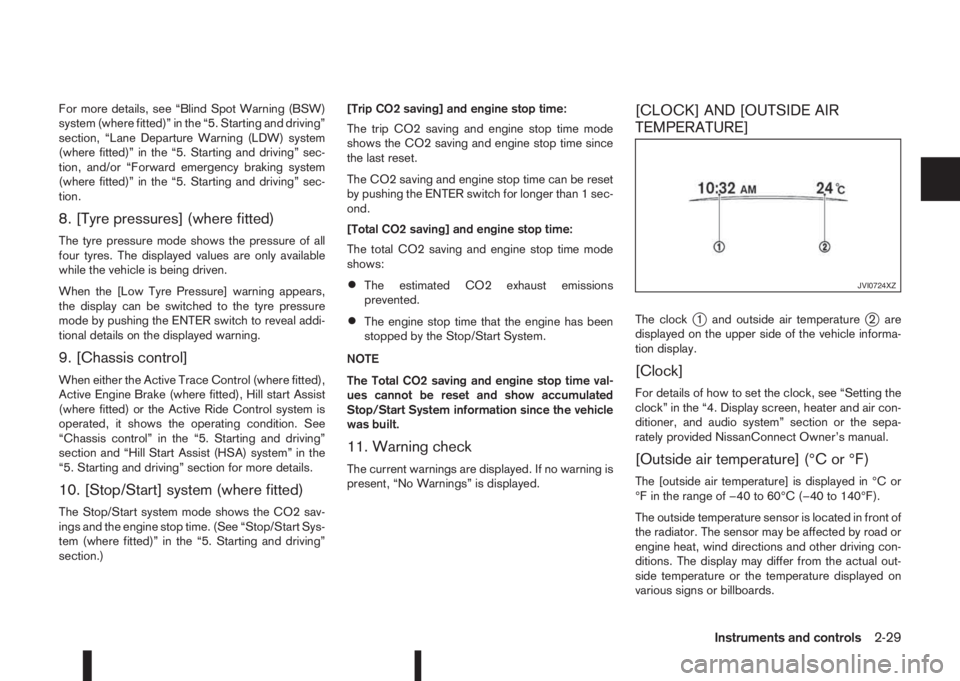
The clockj1 and outside air temperaturej2 are
displayed on the upper side of the vehicle informa-
tion display.
[Clock]
For details of how to set the clock, see “Setting the
clock” in the “4. Display screen, heater and air con-
ditioner, and audio system” section or the sepa-
rately provided NissanConnect Owner’s manual.
[Outside air temperature] (°C or °F)
The [outside air temperature] is displayed in °C or
°F in the range of −40 to 60°C (−40 to 140°F).
The outside temperature sensor is located in front of
the radiator. The sensor may be affected by road or
engine heat, wind directions and other driving con-
ditions. The display may differ from the actual out-
side temperature or the temperature displayed on
various signs or billboards.
JVI0724XZ
Instruments and controls2-29
Page 103 of 338
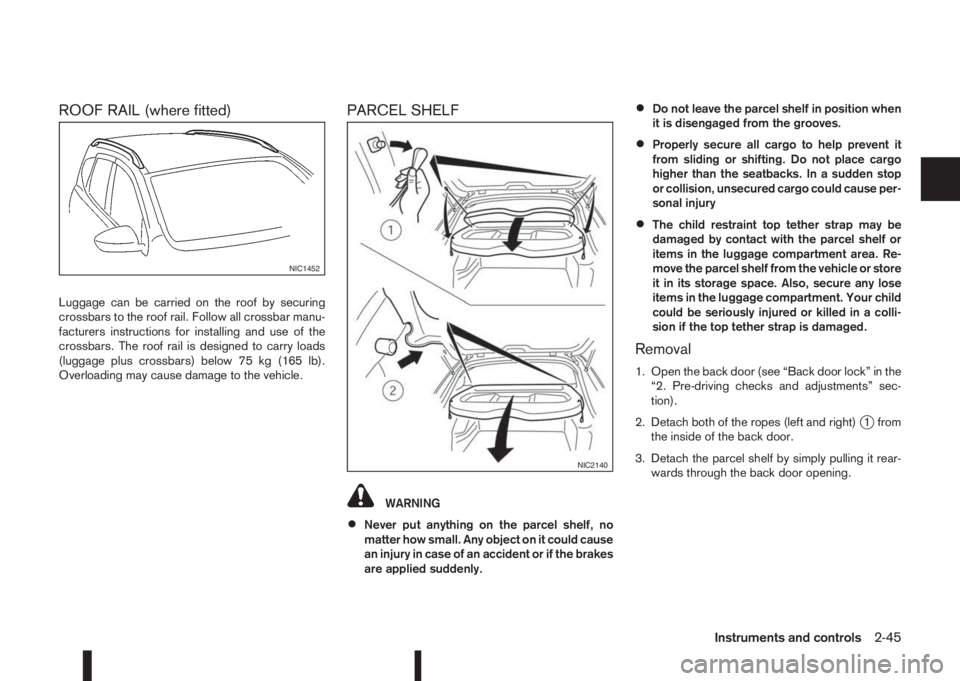
ROOF RAIL (where fitted)
Luggage can be carried on the roof by securing
crossbars to the roof rail. Follow all crossbar manu-
facturers instructions for installing and use of the
crossbars. The roof rail is designed to carry loads
(luggage plus crossbars) below 75 kg (165 lb).
Overloading may cause damage to the vehicle.
PARCEL SHELF
WARNING
•Never put anything on the parcel shelf, no
matter how small. Any object on it could cause
an injury in case of an accident or if the brakes
are applied suddenly.
•Do not leave the parcel shelf in position when
it is disengaged from the grooves.
•Properly secure all cargo to help prevent it
from sliding or shifting. Do not place cargo
higher than the seatbacks. In a sudden stop
or collision, unsecured cargo could cause per-
sonal injury
•The child restraint top tether strap may be
damaged by contact with the parcel shelf or
items in the luggage compartment area. Re-
move the parcel shelf from the vehicle or store
it in its storage space. Also, secure any lose
items in the luggage compartment. Your child
could be seriously injured or killed in a colli-
sion if the top tether strap is damaged.
Removal
1. Open the back door (see “Back door lock” in the
“2. Pre-driving checks and adjustments” sec-
tion).
2. Detach both of the ropes (left and right)
j1 from
the inside of the back door.
3. Detach the parcel shelf by simply pulling it rear-
wards through the back door opening.
NIC1452
NIC2140
Instruments and controls2-45